Qyrus Named a Leader in The Forrester Wave™: Autonomous Testing Platforms, Q4 2025 – Read More

Enterprise retailers are running $6.3 trillion worth of digital commerce on software quality models that were designed for a world of annual releases and monolithic applications. That world is gone. The gap between how retailers test their platforms and how customers experience them is no longer a technical problem — it is a revenue problem. 

This whitepaper maps the exact cost of that gap, and the three-layered path to closing it — from AI-powered full-spectrum testing across Web, Mobile, API, Data, and SAP, through to fully autonomous quality with the SEER framework. With Forrester TEI data, retail-specific scenarios, and a 12-month implementation roadmap included.

What’s Inside the Whitepaper? 

This is not a product brochure. It is a board-ready business case, built from Forrester TEI data, retail-specific failure scenarios, and a concrete implementation roadmap — designed to be shared with your CIO, CFO, and the engineering leaders who will execute the strategy. 

  • How distributed commerce architecture creates invisible, revenue-destroying failure points — and why traditional QA misses every one of them. 
  • The three structural gaps in legacy QA: maintenance debt, siloed channel testing, and synthetic load tests that don’t reflect peak-season reality. 
  • Full-spectrum AI testing across Web, Mobile, API, Data, and SAP — progressing to omnichannel orchestration and SEER autonomous testing. 
  • 3× faster test cycles, 80% maintenance reduction, and 200%+ ROI — what the numbers say and how to use them with your CFO. 
  • Why headless commerce creates seam failures that traditional UI testing never catches — and how contract testing closes the gap. 
  • A phased implementation plan with clear KPI targets at each stage — built to deliver measurable ROI before the transformation is complete. 

What the world’s most resilient retailers do differently.  

These are the six quality engineering principles that separate retailers who dominate peak season from those who post apology banners on their homepage. 

  • Test generation happens in the same sprint as feature development — not the next one. AI tools like NOVA generate test scripts from requirements, so QA is never the bottleneck before release. 
  • Validate complete customer transactions — mobile cart to web checkout, loyalty points earned in-app to POS redemption in-store. Siloed channel testing misses every cross-system failure that customers actually experience. 
  • Your payment gateway, logistics API, and tax engine all update on their own schedules. Contract testing catches schema drift before it becomes a checkout outage — without triggering real financial transactions. 
  • Stale inventory counts, mismatched pricing records, and broken personalization pipelines are not back-office problems. They are customer-facing failures. Validate data pipelines with the same rigor as your UI. 
  • Continuously run synthetic tests of your core purchase journey 24/7 — not just in the run-up to peak. Golden Path monitoring catches regression the moment it is introduced, not after it reaches customers during Black Friday. 
  • Self-healing test automation is the end-state — not a nice-to-have. Autonomous frameworks like SEER eliminate the maintenance tax entirely, freeing QA teams to focus on coverage expansion rather than script repair. 

Every millisecond of latency, every broken API, and every disjointed cross-channel moment is a direct withdrawal from your brand’s equity. The retailers who will lead the next decade are those who treat quality engineering as a capital investment in growth — not a checkbox before release. 

Events Blog Banners

The Qyrus team is excited to announce that we’ll be attending Finzspire 2026 as an exhibitor. 

As financial institutions continue accelerating digital transformation initiatives, the demand for faster releases, seamless customer experiences, and resilient quality engineering practices continues to grow. Modern BFSI ecosystems now rely on highly connected applications, APIs, third-party integrations, and real-time transactions that leave very little room for error. 

Why These Discussions Are Becoming More Important 

Today’s financial platforms operate across complex digital environments where a single customer interaction can involve multiple systems working simultaneously behind the scenes. 

From mobile banking applications to payment gateways and customer portals, testing can no longer happen in isolated silos. Teams need visibility across complete end-to-end workflows to better understand how applications behave in real-world conditions. 

That is why conversations around automation, orchestration, AI-driven testing, and release confidence are becoming increasingly important across the BFSI industry. 

What Qyrus Will Be Showcasing 

At Finzspire 2026, the Qyrus team will be connecting with banking, fintech, insurance, and QA leaders to discuss how organizations are approaching modern testing challenges in increasingly connected environments. 

Attendees visiting the Qyrus booth will have the opportunity to explore how enterprises are modernizing testing across web, mobile, and API ecosystems while improving visibility throughout the release lifecycle. 

The discussions will focus on helping teams: 

  • Validate complete end-to-end customer journeys 
  • Improve release confidence across complex systems 
  • Reduce fragmented testing processes 
  • Support faster delivery cycles with greater quality visibility 

Meet the Qyrus Team at Finzspire 2026 

We are looking forward to meeting industry professionals, exchanging ideas, and having meaningful discussions around the future of software quality in financial services. 

If you’ll be attending Finzspire 2026, be sure to stop by the Qyrus booth and connect with the team. 

Agentic Orchestration Platform-Featured Image

Modern software development moves faster than most QA teams can validate. Generative AI now contributes directly to code creation, and CI/CD pipelines push changes into production at high frequency. Testing has not kept up. Teams still depend on script-heavy automation, fragmented tools, and manual validation cycles. As release velocity increases, validation becomes the primary enterprise bottleneck. 

This widening velocity gap between development and validation is forcing enterprises to rethink how quality is engineered. Early enterprise AI adoption focused on chat-based assistance. These systems generated answers and suggested code in isolation. They did not execute end-to-end workflows. They required constant human direction and offered limited impact on actual delivery speed. 

An agentic orchestration platform changes that model. It introduces a coordinated execution layer that connects development activity to continuous validation. Instead of isolated tools, it enables AI agent coordination across the testing lifecycle. Autonomous agents generate tests, execute them, and maintain coverage without manual intervention. This forward-looking framing of a self-orchestrating QA system ensures quality keeps pace with the speed of innovation. 

What Is an Agentic Orchestration Platform? 

Legacy test automation often behaves like a house of cards. A minor UI change can break entire regression suites, forcing teams into constant maintenance. This platform replaces that fragile model with a resilient, AI-driven coordination layer designed for continuous adaptation. 

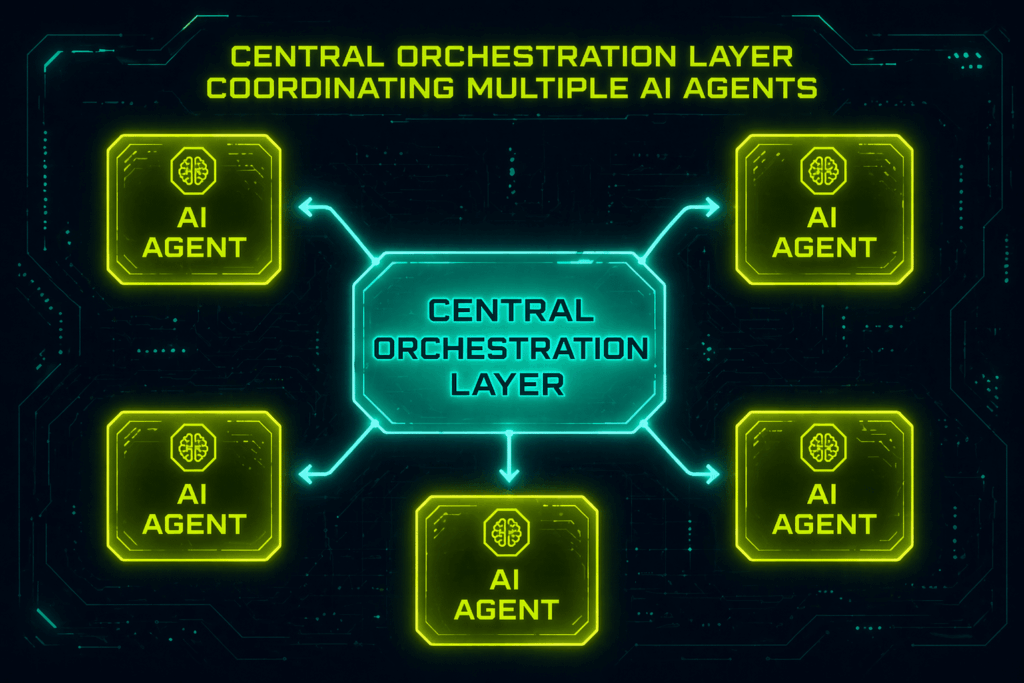
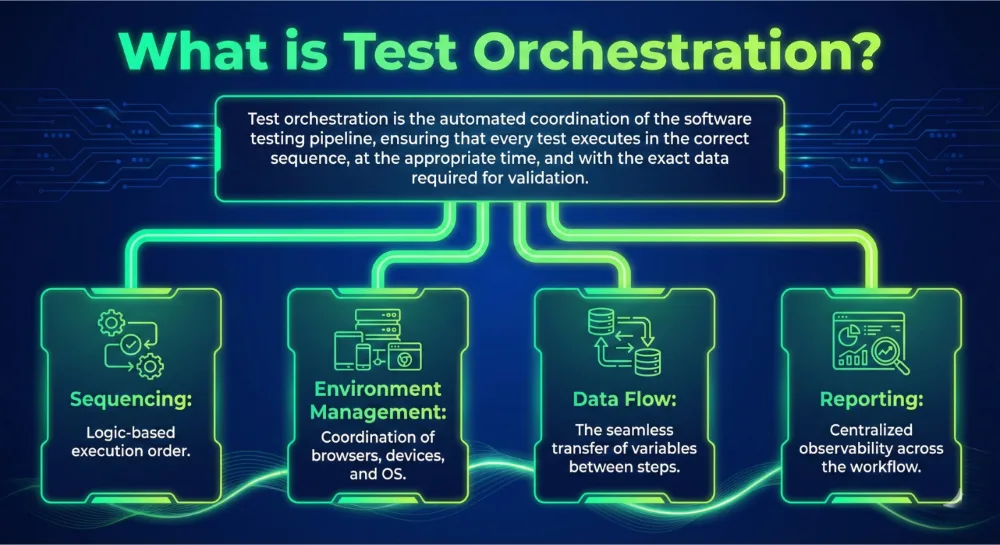
An agentic orchestration platform is a centralized execution layer that coordinates autonomous AI agents, enterprise systems, and workflows. It dynamically orchestrates test generation, execution, validation, and reporting based on real-time system changes. This marks a clear shift from rules-based automation to adaptive, agentic workflows. Traditional testing depends on anticipating every failure path. In contrast, an orchestration platform enables objective-based testing. Teams define what needs to be validated, and the system determines how to test it. 

Specialized agents operate with defined roles within this multi-agent system. Some focus on UI validation, while others handle API virtualization or exploratory testing. These agents execute in parallel and collaborate to handle complex workflows that span multiple systems. The orchestration layer synchronizes their activities and integrates them with CI/CD pipelines and broader enterprise systems. This shifts human intervention from operational tasks like writing scripts to strategic governance and policy definition. 

Why Traditional QA and Automation Are Breaking at Scale 

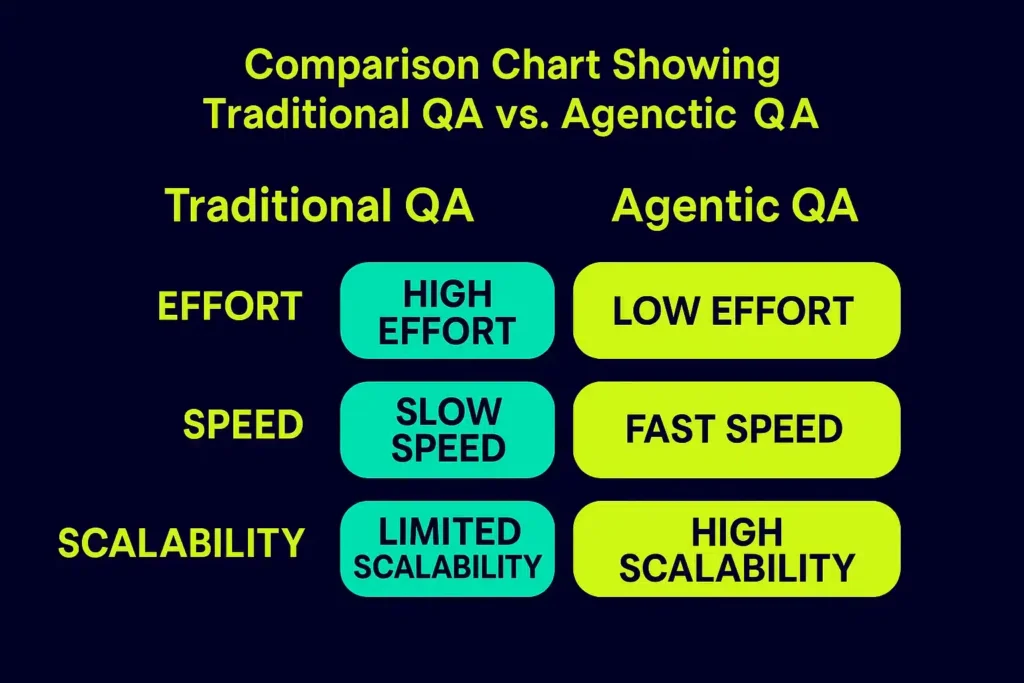
Traditional automation has hit a ceiling. Most enterprises rely on rigid, predefined scripts that crumble the moment a developer changes a UI element. This fragility forces teams into a cycle of constant maintenance. Testers often spend more time fixing old tests than validating new features. 

The resulting accumulation of test debt creates a massive bottleneck that cancels out the gains made by high-velocity development teams. Regression suites become harder to maintain at scale, and result analysis often requires manual triaging across disconnected tools. Organizations face significant ROI & Maturity Challenges as they try to scale these legacy systems. Fragmented toolchains lack the unified AI Agent Coordination necessary for modern, cross-system workflows. 

The impact is undeniable: slower release cycles and inconsistent user experiences. Teams need Self-Healing Workflows that adapt to environmental changes in real time. Moving to this model can significantly improve testing efficiency and reduce maintenance effort, especially in fast-changing UI environments. 

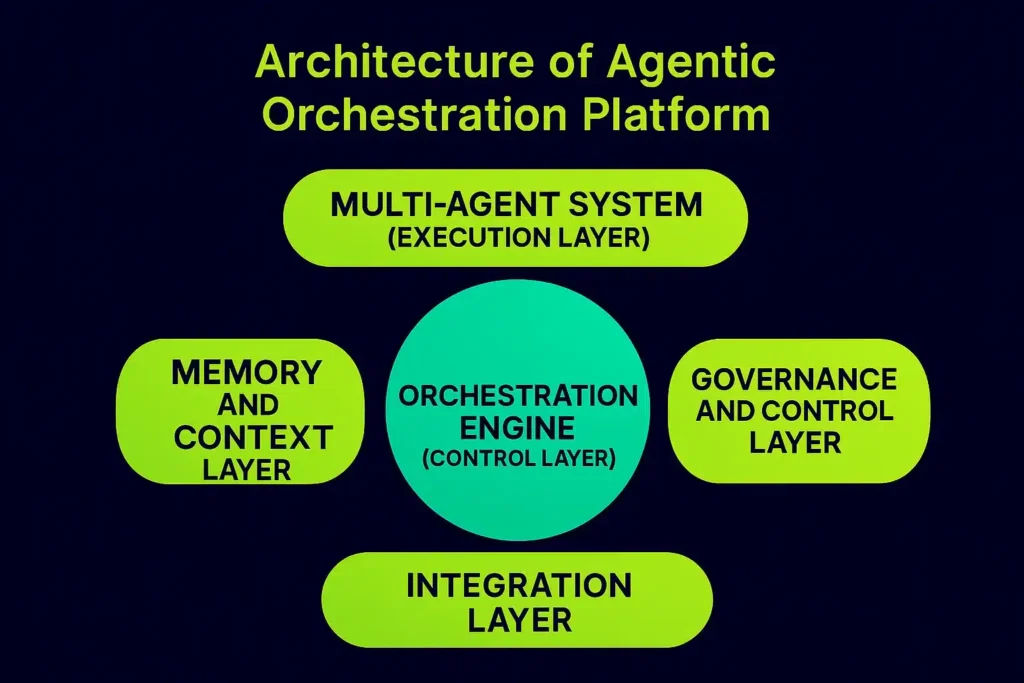
Core Architecture of an Agentic Orchestration Platform 

Modern enterprise software needs a structured environment where intelligence can scale. This architectural necessity drives the AI orchestration market toward a projected USD 30.23 billion valuation by 2030 (MarketsandMarkets, 2025). 

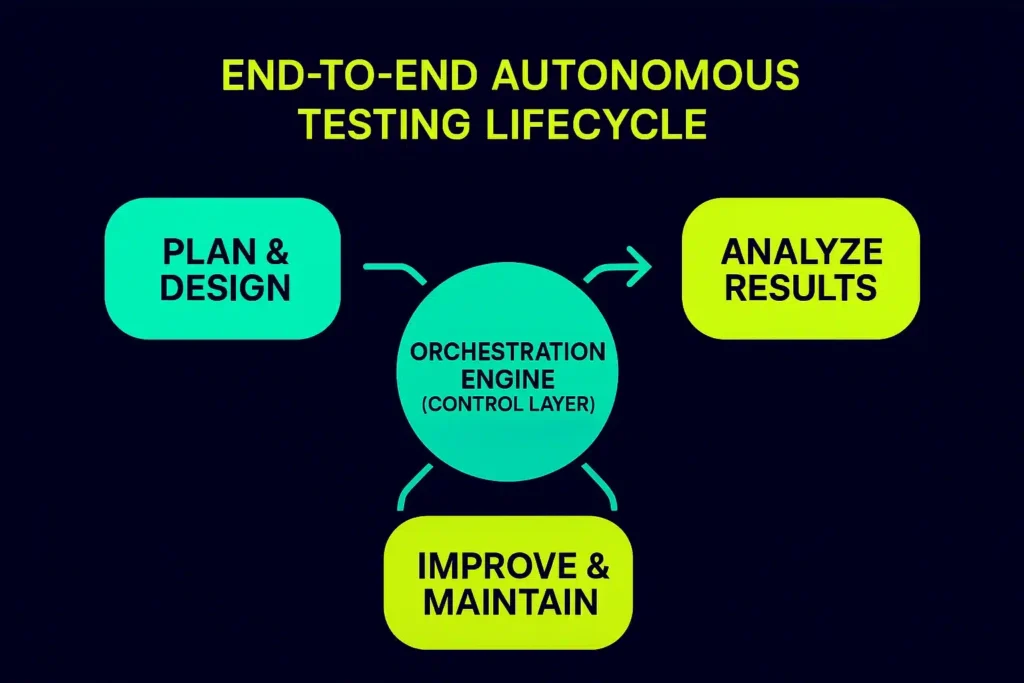
Orchestration Engine (Control Layer) 

The Orchestration Engine acts as the central coordinator of all workflows. It processes high-level business objectives and deconstructs them into discrete, executable tasks. Rather than following a linear path, it supports sequential workflows, parallel execution, and event-driven triggers. The engine continuously monitors the execution state, allowing it to adjust workflows dynamically if it encounters environmental shifts.  

Multi-Agent System (Execution Layer) 

This layer consists of autonomous AI agents with specialized roles. You might deploy UI testing agents to simulate real user interactions or API agents to verify backend microservices. These units collaborate to solve complex, cross-system problems. This enables massive parallel testing across diverse environments. 

Memory and Context Layer 

Retention separates sophisticated agents from simple automation bots. This layer manages both short-term session data and long-term context retention. By maintaining a history of previous runs and system states, the platform facilitates continuous learning and adaptation. This is particularly critical for long-running workflows where the system must remember the outcomes of early stages to make informed decisions during later validation steps.  

Integration Layer 

True orchestration requires a connected stack. The integration layer hooks directly into your CI/CD pipelines, including GitHub, Jenkins, and Azure DevOps. It synchronizes data across microservices and legacy enterprise systems, ensuring seamless communication.  

Governance and Control Layer 

The governance layer defines the rules, policies, and guardrails that keep autonomous agents within enterprise boundaries. It enables human-in-the-loop approvals for high-stakes actions, ensuring traceability and auditability in a production-grade environment.

From Automation to Autonomy: How Agentic Workflows Operate 

An agentic orchestration platform operates on a continuous loop that starts the moment an event occurs. The workflow begins with the “Sense” phase, where sentinels identify the location of a change. The platform then enters “Cognitive Crunch Time” to perform a deep impact analysis. 

Instead of running a full regression suite, the platform determines the “blast radius” of the update. It then dynamically generates only the scenarios required to validate that specific change. If an agent encounters a minor UI shift that does not break functionality, it implements Self-Healing Workflows to update the logic on the fly. 

This adaptability can help organizations reduce test maintenance substantially. A continuous feedback loop feeds every result into the system memory. This enables adaptive optimization over time, as the platform learns which testing strategies yield the highest quality with the least effort. 

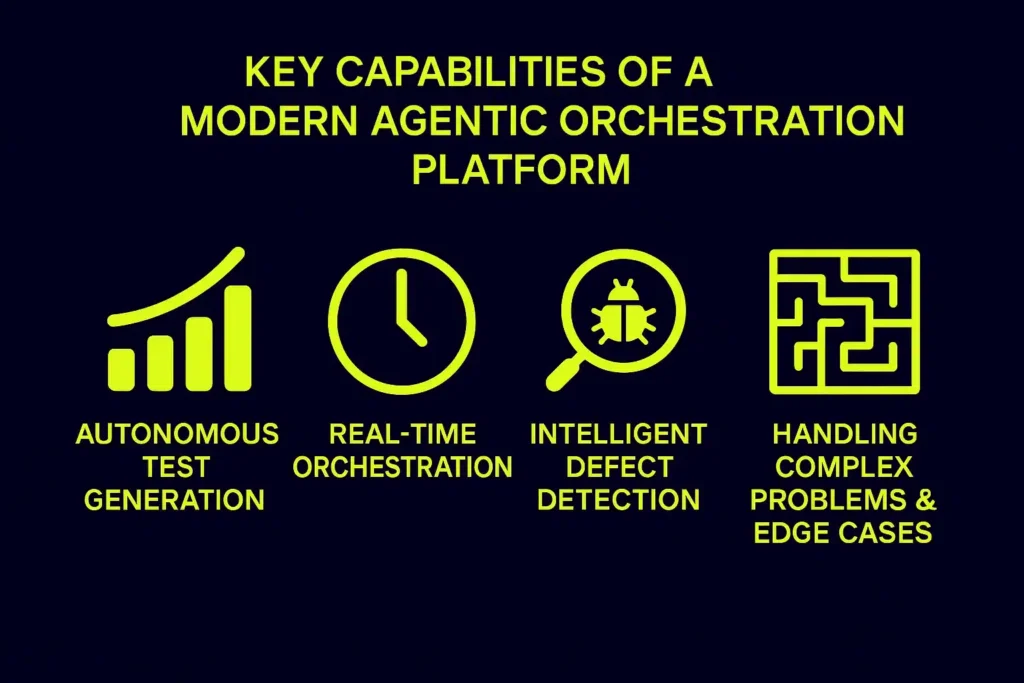
Key Capabilities of a Modern Agentic Orchestration Platform 

An agentic orchestration platform turns static quality checks into goal-oriented intelligence. This shift ensures that engineering teams do not sacrifice reliability for speed. 

  • Autonomous Test Generation: The platform analyzes application blueprints to create comprehensive test suites automatically, often reducing test creation effort significantly for repeatable flows. 
  • Real-Time Orchestration: The system manages multi-agent coordination across systems and workflows as changes happen, rather than waiting for scheduled runs. 
  • Intelligent Defect Detection: Agents perform automated root cause analysis to pinpoint the likely source of a break, improving triage speed and consistency. 
  • Handling Complex Problems & Edge Cases: Autonomous explorers uncover hidden bugs and untested pathways that traditional scripted tests miss. 

Business Impact: Eliminating Test Debt and Accelerating Releases 

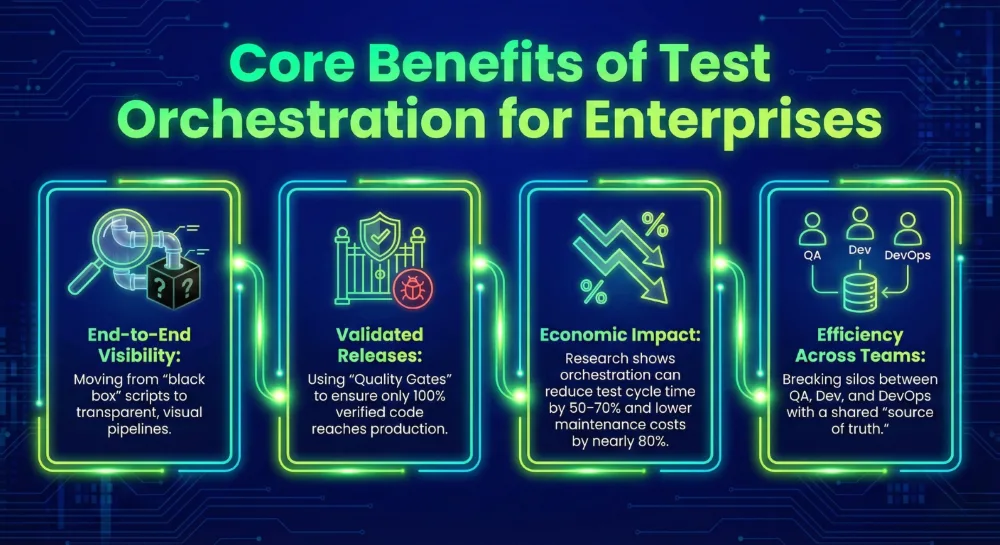
The core value of an agentic orchestration platform lies in crushing the weight of test debt. Organizations often report major reductions in test creation effort because the system generates scenarios from requirements. Self-Healing Workflows allow the platform to adapt to UI changes automatically, resulting in lower maintenance costs and better operational efficiency. 

Speed increases through massive parallel testing on cloud infrastructure. This cuts execution time from hours to minutes and significantly reduces release cycles. High-velocity development no longer waits for a manual QA bottleneck. Users experience more stable releases and fewer post-launch incidents. This agility is vital as the AI orchestration sector surges toward its USD 30.23 billion target. 

Transforming QA Roles in an Agentic Testing Model 

Adopting an agentic orchestration platform redefines daily contributions. The organization shifts toward a model of “testing without manual testing effort,” where humans focus on innovation rather than repetitive tasks. 

  • Testers: Move from manual execution to strategy, acting as quality architects who define objectives. 
  • Developers: Receive faster feedback loops, allowing them to fix defects while code context is fresh. 
  • QA Leaders: Gain unprecedented visibility and control through centralized dashboards and predictive risk analytics. 

Challenges in Adopting Agentic Orchestration Platforms 

Integration with legacy enterprise systems remains a common hurdle. Connecting to decades-old software requires careful planning and robust middleware. Data shows that legacy integration is a barrier for 60% of AI leaders. 

Data governance and security also demand attention. Only 21% of companies currently possess mature AI governance models for autonomous agents (Deloitte, State of AI in the Enterprise, 2026). Managing AI unpredictability is a specific risk factor, as non-deterministic results can impact the reliability of automated checks. Furthermore, infrastructure costs can be significant. Many organizations find that over 40% of their agentic AI projects risk cancellation due to escalating costs, unclear business value, or inadequate risk controls (Gartner, 2025). 

The Future of Agentic Orchestration Platforms in QA 

The future belongs to more autonomous ecosystems. We are witnessing a convergence where AI platforms and DevOps pipelines merge into a single intelligent fabric. Recent surveys suggest rapid momentum: 62% of respondents report their organizations are at least experimenting with AI agents (McKinsey, 2025), and 74% of companies plan to deploy agentic AI within two years. 

The platform will become the operating layer of enterprise QA, using AI-driven decision systems to manage quality. Teams will move from manual oversight to strategic governance. As these workflows become standard, the broader agentic AI market is projected to surge toward USD 199.05 billion by 2034 (Precedence Research, 2025). 

The Competitive Landscape: True Orchestration vs. Feature-Led AI 

Most enterprise testing platforms now claim AI capabilities. The real distinction lies in execution depth and how a platform handles the entire execution lifecycle. 

Qyrus outranks competitors by delivering a true agentic orchestration platform and framework named SEER (Sense-Evaluate-Execute-Report), built around autonomous execution. Its architecture focuses on multi-agent coordination across the entire testing lifecycle, from sensing changes to reporting risk insights. While others offer AI as a feature, Qyrus provides a strategic solution to eliminate test debt. 

  • UiPath and Tricentis: Offer robust enterprise automation with integrated testing. However, many workflows still rely on predefined logic rather than fully autonomous execution. 
  • ACCELQ and Functionize: Emphasize AI-assisted testing and generative capabilities. These improve efficiency but often focus on specific layers like UI or API, rather than orchestrating multi-agent systems across the full lifecycle. 

The ability to coordinate multiple agents, adapt in real time, and execute without manual intervention determines whether AI becomes an incremental improvement or a foundational capability. 

Frequently Asked Questions 

  1. What is an agentic orchestration platform?  
    An agentic orchestration platform coordinates autonomous AI agents, systems, and workflows to execute complex tasks like testing without manual intervention. It acts as a policy-driven coordination layer that connects human goals to system-level actions.  
  2. How is agentic orchestration different from traditional automation?  
    Traditional automation follows predefined scripts that often break during UI or API changes. Agentic orchestration uses adaptive AI agents to dynamically generate and execute workflows, moving beyond rules-based limitations.  
  3. What are multi-agent systems in testing?  
    They are collections of specialized AI agents that collaborate to perform different testing tasks such as generation, execution, and validation. Each agent focuses on a specific domain like UI, API, or security.  
  4. How does agentic orchestration reduce test debt?  
    By enabling Self-Healing Workflows and adaptive test generation, it minimizes script maintenance and eliminates brittle test cases. This closes the gap between software creation and reliable validation.  
  5. Can agentic orchestration integrate with CI/CD pipelines?  
    Yes, it integrates seamlessly with modern systems like GitHub, Jenkins, and Azure DevOps to enable continuous, automated testing workflows triggered by code commits.  
  6. Which industries benefit most from these platforms?
    Enterprises across finance, healthcare, telecom, and SaaS benefit most due to their complex workflows and large-scale systems requiring rigorous audit trails.  

Conclusion: Moving Toward an Autonomous Quality Future 

Agentic orchestration platforms represent a fundamental shift toward true autonomy. They transform quality assurance into a continuous, AI-driven execution layer. This architecture enables intelligent testing across complex systems by replacing manual bottlenecks with governed actions. 

The Forrester Wave report recognized Qyrus as a ‘Leader in the autonomous testing market, highlighting its ability to operationalize these advanced agentic workflows at scale. For organizations looking to accelerate releases and eliminate test debt, Qyrus provides the strategic muscle needed for the modern SDLC. 

Ready to see it in action? Request a demo to see how Qyrus can help you achieve autonomous, end-to-end testing at enterprise scale. 

Featured Image-How AI Agents Are Redefining Software Testing

Software delivery is breaking. It isn’t a loud failure or a single high-profile incident; rather, it’s a quiet divergence between development speed and testing capacity.  It happened gradually, then all at once: AI coding tools got good enough that developers started shipping code at a pace testing teams were never built to match. 

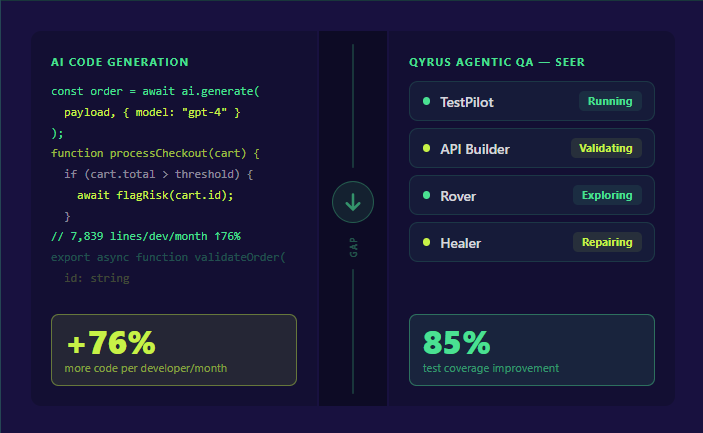
By 2025, 90% of engineering teams were using AI coding assistants to accelerate delivery. Industry experts confirmed at Transform 2025 that over 40% of all code written that year was AI-generated. Individual developer output surged — one analysis found the average developer now submits 7,839 lines of code per month1, up from 4,450 just two years prior. 

The downstream consequence? A study of 273 QA decision-makers2, published in January 2026, found that 60% of organizations had already experienced quality failures because development moved faster than testing could validate. Critically, 92% of those teams still tested manually, despite 87% having some automation in place. Existing automation was no longer keeping up. 

Forrester captured the structural problem precisely: the industry has plateaued at roughly 25% automated test coverage.  Traditional automation has been plateaued. The same AI revolution that widened the velocity gap is now the only force capable of closing it. That force is agentic QA. 

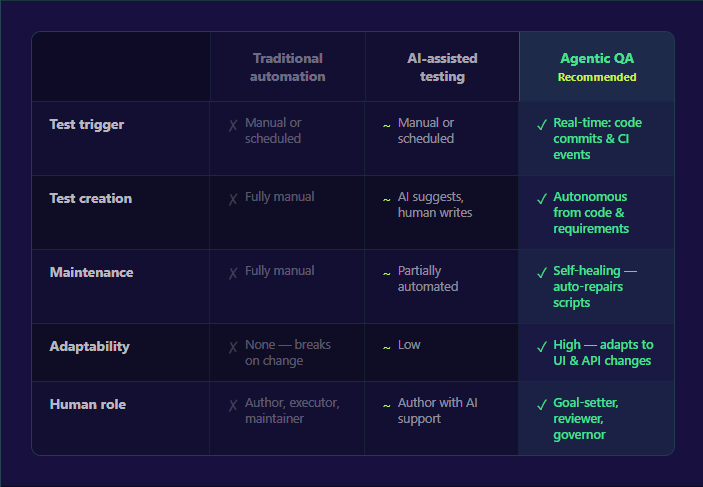
Comparison of traditional automation, AI-assisted testing, and agentic QA

One question comes up immediately: does this replace QA engineers? The data says no. The Stack Overflow 2025 Developer Survey found 70% of developers do not see AI as a threat to their jobs. What changes is the nature of the work. Agents handle the repetitive 80% of work, including regression suites, smoke tests, selector maintenance, and visual comparison. Human testers focus on the strategic 20%: defining quality objectives, exploratory testing, edge case discovery, and ensuring AI-generated results align with business intent. Agentic QA does not eliminate the QA function. It elevates it. 

 How AI Agents for QA Testing Actually Work 

Understanding agentic QA in principle is one thing. Understanding what AI agents for software testing actually do inside a real development pipeline is where the concept becomes actionable. 

A mature agentic QA system operates across five interconnected capabilities. These are not features bolted onto an existing automation tool. They are the architectural building blocks that make autonomous, self-improving testing possible.

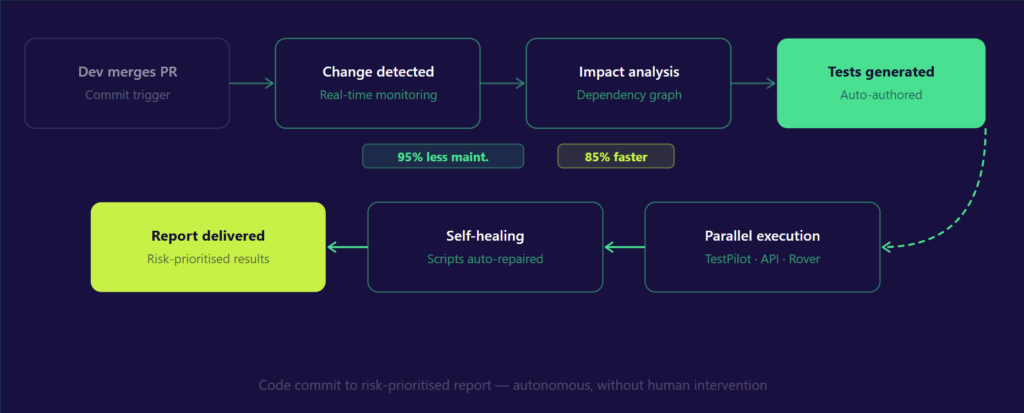
Agentic QA Cycle Flow Diagram

1. Autonomous Test Generation 

When a developer merges a pull request, an agentic system does not wait for a human to decide which tests to write or run. The system analyzes code changes, identifies coverage gaps, and automatically generates test cases for functional scenarios and regression paths that manual processes often overlook.  Teams adopting this capability report up to an 80% reduction in test creation effort, freeing engineers to focus on higher-value validation work. 

2. Self-Healing Tests 

Brittle scripts are the single largest hidden cost in traditional automation. Forrester research notes that over 60% of QA leaders identify automation maintenance as a key bottleneck in DevOps success. When a UI element shifts — a button ID changes, a form field moves, an API endpoint is renamed — traditional scripts fail silently or noisily, and a human has to diagnose and repair them. Self-healing agents detect the change, identify the correct new locator using DOM structure, visual matching, or semantic analysis, and update the test automatically. One global retailer deploying this approach achieved a 95% reduction in script maintenance while doubling the speed of regression cycles. 

3. Risk-Based Test Selection 

Running every test on every commit is unsustainable at scale. Google learned this building one of the largest CI/CD infrastructures in the world, executing over 150 million test cases daily required ML-driven test selection to identify the smallest effective test set, reducing computational waste by over 30% while maintaining a 99.9% confidence level. Agentic QA brings this capability to any team. Agents analyze what changed in a commit, assess which components are affected using dependency graphs, and run only the tests with genuine relevance to that change. There are reports that AI-powered impact analysis reduces testing timelines by up to 85% while maintaining complete risk coverage. 

4. Real-Time Adaptive Testing 

Traditional automation runs on schedules. Agentic QA reacts to events — a code commit, a Jira ticket update, a Figma design change, a failed deployment. This shift from batch-mode to real-time adaptive testing is what allows quality assurance to finally match the pace of modern development cycles. Feedback that once took hours arrives in minutes, enabling development teams to catch and fix defects before they compound. 

5. Multi-Agent Orchestration 

No single agent handles everything. A mature agentic QA system deploys specialized agents in parallel: one focused on UI interactions, another validating API responses, a third exploring untested pathways autonomously, and a fourth consolidating results into prioritized reports. This coordinated squad model, with a central orchestration layer routing work between agents. is what enables comprehensive test coverage across web, mobile, API, and backend layers simultaneously, rather than sequentially. 

🔄 In Practice: A developer merges a feature update to a checkout flow. The agentic system detects the commit in real time, evaluates which user journeys and API endpoints are affected, generates new test cases for the updated flow, dispatches UI and API agents to execute them in parallel across multiple browsers and devices, self-heals any scripts broken by the UI change, and delivers a risk-prioritized report, all before the developer’s next meeting. That is not a future state. It is what production deployments of agentic QA systems are delivering today. 

The Business Case — What the Numbers Say 

Agentic QA is not a research project. Organizations deploying it are generating measurable, reportable returns — and the numbers are significant enough to reframe how executives think about the cost of quality engineering. 

Start with the cost of inaction. Poor software quality costs the US economy an estimated $2.41 trillion annually, according to research from CISQ and Carnegie Mellon’s Software Engineering Institute. That figure encompasses failed projects, legacy system failures, cybersecurity incidents, and operational disruptions. Meanwhile, software testing already consumes 15–25% of a typical project budget — among the first line items cut when AI is assumed to close the gap automatically. It does not close the gap automatically. Agentic QA does. 

On the delivery side, the returns compound across multiple dimensions simultaneously: 

ROI metrics from agentic QA adoption
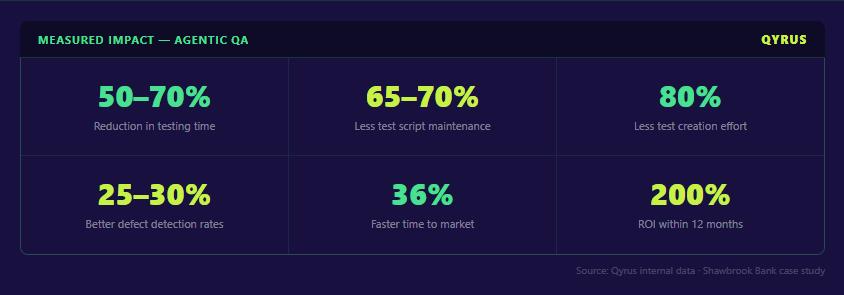
  • Speed: Teams adopting agentic orchestration achieve a 50–70% reduction in overall testing time. Regression cycles that once occupied entire sprint days compress into hours. One ERP enterprise reduced regression testing from over 25 hours to under 8 hours per cycle after deploying agentic QA — with more issues caught pre-production and more predictable releases as a direct result. 
  • Maintenance: The largest hidden cost in traditional automation is not test creation — it is upkeep. Agentic QA’s self-healing capability delivers a 65–70% decrease in the engineering effort required to maintain test scripts. For a mid-size QA team spending 50% of sprint capacity on broken test maintenance, that recovery represents significant bandwidth redirected toward coverage expansion and exploratory testing. 
  • Creation velocity: With agents generating test cases from requirements, user stories, and code changes autonomously, teams see an 80% reduction in test creation effort. Tests that previously took days to author and validate are produced and ready for review in minutes. 
  • Quality outcomes: Faster testing and less maintenance would mean nothing if defect detection suffered. It does not. Organizations adopting agentic QA report a 25–30% improvement in defect detection rates, with AI-generated test cases achieving up to 85% improvement in test coverage — catching more critical bugs before they reach customers. 
  • Business impact: These improvements compound into outcomes that matter at the board level: an 80% reduction in defect leakage, a 36% faster time to market, and a ~40% improvement in project turnaround time. A Shawbrook Bank deployment of Qyrus demonstrated 200% ROI within 12 months — a figure that shifts the conversation from “what does this cost?” to “what does waiting cost?” 

Broader market data reinforces the direction. Companies using AI agents across business functions report 55% higher operational efficiency and average cost reductions of 35%. In QA specifically, organizations implementing AI-powered testing solutions report a 40% reduction in overall testing costs while achieving productivity gains of up to 30%. 

How Qyrus Approaches Agentic QA — The SEER Framework 

Most platforms describe agentic QA as a capability. Qyrus built a purpose-designed architecture around it. 

In Q4 2025, Forrester named Qyrus a Leader in its inaugural Autonomous Testing Platforms Wave — the report that replaced the former Continuous Automation Testing Platforms category and evaluated 15 vendors on their ability to deliver genuinely autonomous, AI-driven quality assurance. Qyrus received the highest possible score of 5.0 in critical criteria including Roadmap, Testing AI Across Different Dimensions, and Testing Agentic Tool Calling. The report specifically cited the SEER framework and “excellent agentic tool calling” as the basis for an above-par score in autonomous testing. For enterprises asking whether agentic QA is production-ready, that evaluation offers a clear answer. 

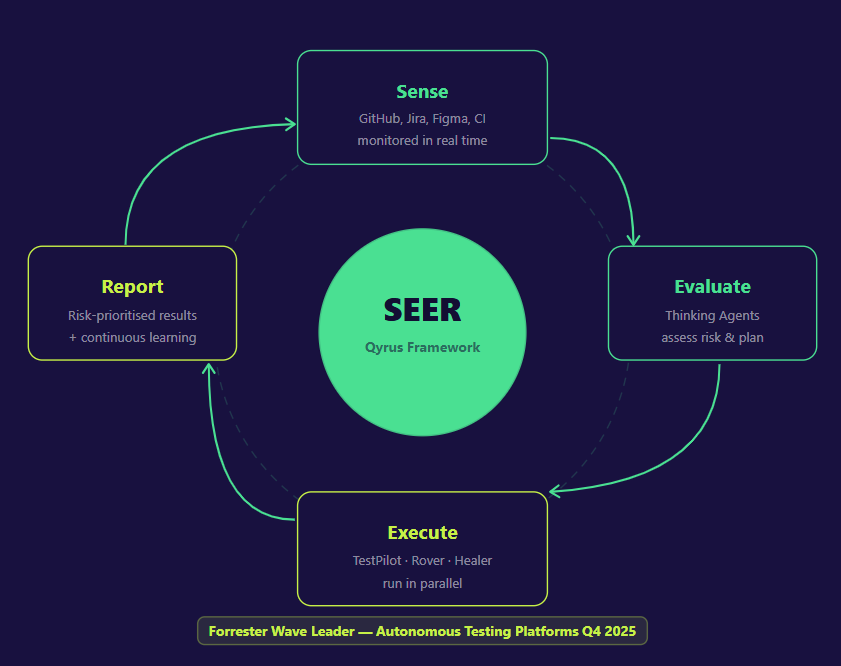
The SEER framework — Sense, Evaluate, Execute, Report — is the operational engine behind Qyrus’s agentic QA approach. It is a continuous, closed-loop cycle designed to align the pace of quality assurance with the pace of modern software development.

The Qyrus SEER agentic QA framework

Sense 

The cycle begins with awareness. Qyrus Watch Towers monitor code repositories like GitHub for commits and pull request merges, project management tools like Jira and Azure DevOps for story and requirement changes, design platforms like Figma for UI and UX updates, and CI pipeline events in real time. Testing does not start on a schedule. It starts the moment a change is detected. 

Evaluate 

Once a change is detected, a Reasoning Layer assesses its potential impact and deploys specialized Thinking Agents to formulate a response. The Impact Analyzer traces the ripple effect of a code change across modules, components, and APIs using dependency graphs. TestGenerator+ uses natural language processing to dynamically generate new test cases based on what changed and what coverage already exists — constantly expanding the test surface without human authoring. UXtract interprets design changes from Figma and maps them to the relevant test steps and user flows. The output of this stage is a precise, risk-prioritized testing plan, not a blanket instruction to run everything. 

Execute 

The plan is handed to an autonomous execution squad. TestPilot handles UI and functional testing across web and mobile platforms, simulating real user interactions across a browser and device farm. The API Builder agent validates backend services and complex integration points, with the ability to virtualize APIs on demand. Rover explores the application autonomously, surfacing untested pathways and hidden defects that scripted tests would never reach. Healer — built on US Patent 11,205,041 B2 — monitors execution in real time and automatically repairs any test script broken by a legitimate UI or structural change. These agents operate in parallel, not in sequence, compressing execution time without sacrificing coverage. 

For enterprise teams running SAP testing, this same squad extends into ERP-aware validation — analyzing transport requests, mapping business process impact, and executing regression tests autonomously across S/4HANA landscapes. 

Report 

Raw results become actionable intelligence. AnalytiQ aggregates logs and metrics from the entire execution squad. Eval, a sophisticated AI analyst, evaluates test outputs for deep contextual analysis that goes far beyond a binary pass/fail. The final output — a risk-prioritized defect list, a coverage summary, and an instant notification to the right stakeholders via Slack, email, or Jira — arrives in minutes, not hours. Every outcome is fed back into the Context DB, making the Thinking Agents smarter and more predictive with every cycle. 

This is what distinguishes Qyrus from platforms that bolt agentic labels onto existing automation tools. SEER is not a feature. It is a continuously learning system — and the results it delivers compound over time. 

Getting Started with Agentic QA — A Practical Roadmap 

Most organizations stall between interest and implementation. The World Quality Report 2025, drawing on responses from over 2,000 executives across 22 countries, found that 89% of organizations are piloting or deploying AI-augmented QA workflows — but only 15% have achieved enterprise-wide implementation. That 74-point gap is not a technology problem. It is an execution problem. 

Gartner adds a sharper warning: over 40% of agentic AI projects will be cancelled by end of 2027 due to escalating costs, unclear business value, and inadequate risk controls. The organizations that avoid this fate share one trait — they defined measurable goals and governance structures before they expanded scope. The ones that fail treat agentic QA as a plug-in rather than a system change. 

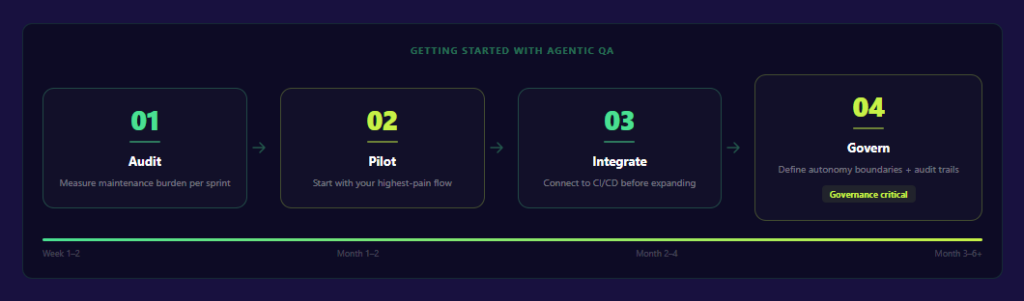
Four steps separate the teams getting results from the ones stuck in perpetual pilots.

Four-step roadmap to implementing agentic QA

Step 1: Quantify Maintenance Latency Prior to Implementation 

Before evaluating platforms or running proofs of concept, measure where your team’s time actually goes. How many hours per sprint does your QA function spend fixing broken tests that failed because of a UI change — not because of an actual product defect? Industry benchmarks suggest this figure consumes 20–30% of a QA team’s working week in traditional automation environments. That number is your baseline. It is also your first ROI target. If you cannot measure it before deployment, you cannot prove improvement after. 

Step 2: Start With Your Highest-Pain Flow, Not Your Entire Pipeline 

The instinct to modernize everything at once is where projects collapse under their own weight. Pick one regression suite or smoke test suite — ideally one that breaks frequently, consumes disproportionate maintenance time, or sits on a critical user journey. Run your agentic QA pilot there. Let it prove value in a constrained, measurable environment before expanding. Teams that start small and iterate build the internal confidence — and the data — needed to justify broader rollout. Those that start broad rarely finish. 

Step 3: Integrate Into Your Existing CI/CD Before Adding New Capabilities 

Agentic QA delivers its full value when it operates as a continuous, event-driven layer inside your development pipeline — not as a separate testing tool you run on demand. Before unlocking advanced capabilities like exploratory agents or multi-surface orchestration, ensure your agentic platform is connected to your existing infrastructure: GitHub or Bitbucket for version control triggers, Jenkins, Azure DevOps, or TeamCity for CI pipeline integration, and Jira or Azure DevOps for defect tracking and traceability. Integration before innovation is the sequencing that separates production deployments from permanent pilots. 

Step 4: Govern From Day One 

Autonomy without governance is where agentic AI projects generate the most risk — and the most expensive failures. Before agents operate independently in your pipeline, define three things explicitly: what the agent is authorized to act on without human review, what requires human approval before proceeding, and how every agent action is logged for audit. UC Berkeley’s CLTC published the first Agentic AI Risk Management Profile in February 2026, recommending proportional oversight calibrated to the autonomy level of each deployed agent. That framework is a practical starting point. The teams succeeding with agentic QA in 2026 are not those that maximized autonomy fastest — they are those that built trust incrementally, expanded scope based on demonstrated accuracy, and kept human judgment at the decision points that carry the most business risk. 

Agentic QA is not a one-time implementation. It is a system that gets smarter with every cycle — but only if the governance structures exist to let it operate reliably at scale. 

The Shift Has Already Happened 

AI agents bridging the gap between development velocity and QA validation speed

Agentic QA is not approaching. It is here. And the organizations treating it as a future consideration are already falling behind the ones running it in production. 

Forrester’s Q4 2025 Autonomous Testing Platforms Wave was not a prediction. It was a verdict: autonomous, AI-driven quality assurance has crossed from experimental to essential infrastructure. The teams winning today are not those with the largest QA headcounts or the most elaborate script libraries. They are the ones that stopped asking “how do we test faster?” and started asking “how do we set better quality goals and let intelligent agents pursue them?” 

That is the real shift agentic QA delivers. From writing scripts to defining outcomes. From managing test maintenance to governing autonomous systems. From QA as a bottleneck to QA as a continuous, self-improving competitive advantage embedded directly in the development cycle. 

The velocity gap is real. The tools to close it exist. The only remaining question is whether your organization moves now, while the gap between early adopters and the rest of the market is still recoverable, or later, when it is not. 

Book a demo with Qyrus → 

Poor software quality imposes a staggering $2.41 trillion tax on the U.S. economy every year. For most organizations, this isn’t just an abstract figure—it manifests as a direct drain on innovation, with developers spending up to 50% of their time fixing bugs instead of creating new value.

Stop letting fragmented tools and siloed processes slow your release cycles. Download our comprehensive whitepaper to discover how Qyrus Test Orchestration enables teams to validate complex, end-to-end user journeys while achieving more than 200% Return on Investment. 

What’s Inside the Whitepaper? 

This guide explores the rise of Orchestrated Testing Platforms and provides a technical roadmap for engineering leaders to eliminate the “hidden debt” in their engineering budgets. 

Key Business Insights: 

  • Sub-6-Month Payback: Learn how the platform pays for itself in less than half a year through massive productivity gains. 
  • $557,000 in Cost Avoidance: Discover how proactive testing reduces the frequency of costly production downtime. 
  • 90% Automation Levels: See how teams successfully transitioned manual regression suites into repeatable, automated processes. 

 Master the Qyrus Orchestration Toolkit 

Learn how to leverage the six core technical features that bridge the gap between fragmented automation efforts and true end-to-end quality: 

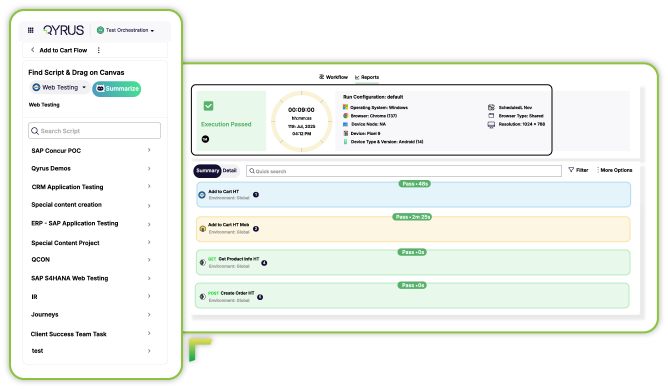
  • Multi-Protocol Workflow Creation: Seamlessly combine Web, Mobile, API, and Desktop scripts in a single, unified execution flow. 
  • Visual Node-Based Design: Empower your entire team with a codeless, drag-and-drop interface for defining complex logic. 
  • Data Propagation: Create realistic test scenarios by using output data from one test as the direct input for another. 
  • Workflow Organization: Eliminate “asset chaos” with a centralized, hierarchical folder structure for all testing assets. 
  • Flexible Scheduling: Set up one-time or recurring execution patterns (daily, weekly, or monthly) to ensure continuous validation. 
  • Centralized Reporting: Gain a single-pane-of-glass view of execution data, historical trends, and pass/fail rates. 

Ready to Break the Bottleneck? 

Fill out the form to receive your copy of the whitepaper and start your journey toward high-velocity quality. 

As featured in the Forrester Total Economic Impact™ Study 

“The beauty of Qyrus is that you can build a scenario and string add-in components of all three [mobile, web, and API] to create an end-to-end scenario.”

— CTO of a Digital Bank.

Featured Image-Generative AI for Testing

Software quality engineering is entering a decisive new phase. For over a decade, AI in testing has been largely predictive, focused on classifying defects, detecting anomalies, and optimizing execution. While effective, these models operate within predefined boundaries. 

This paradigm shifts fundamentally with generative AI. 

This approach for testing refers to the use of large language models (LLMs) and generative systems to create test artifacts directly from natural language inputs such as user stories, acceptance criteria, design files, and even production telemetry. Instead of analyzing outputs, these systems generate test cases, scripts, and data from intent. 

This shift is not incremental. It redefines how testing is designed, executed, and maintained. 

By 2026, generative AI is transitioning from experimentation to operational necessity. Increasing application complexity, distributed architectures, and compressed release cycles are pushing QA teams toward systems that can scale test creation and adaptation autonomously. Organizations that adopt generative testing early are already seeing measurable gains in speed, coverage, and resilience. 

The Current Market Landscape: Beyond the Hype 

The rapid evolution of generative AI in testing is reflected in its market trajectory. The segment is expected to grow from approximately $48.9 million in 2024 to $351.4 million by 2034, according to Future Market Insights research on generative AI in software testing, signaling strong enterprise demand and sustained investment. 

Additional industry signals reinforce this shift: 

  • 80% of QA teams plan to increase investment in AI-driven testing, as highlighted in the World Quality Report. 

Despite this growth, the market remains fragmented. 

A critical distinction exists between: 

General AI-Augmented Testing Tools 

These tools incorporate AI for: 

  • Visual regression detection 
  • Flaky test identification 
  • Execution optimization 

While valuable, they remain reactive and limited to specific phases of the testing lifecycle. 

Generative AI-Native Testing Platforms 

These platforms embed LLMs across the testing lifecycle to: 

  • Generate test scenarios from requirements 
  • Create executable scripts dynamically 
  • Produce synthetic datasets at scale 
  • Continuously evolve tests based on production signals 

This category represents a structural shift toward agent-driven testing ecosystems, where intelligent systems orchestrate test design, execution, and maintenance end-to-end. 

Enterprises are increasingly prioritizing these platforms to reduce test debt, accelerate delivery pipelines, and achieve continuous quality at scale. 

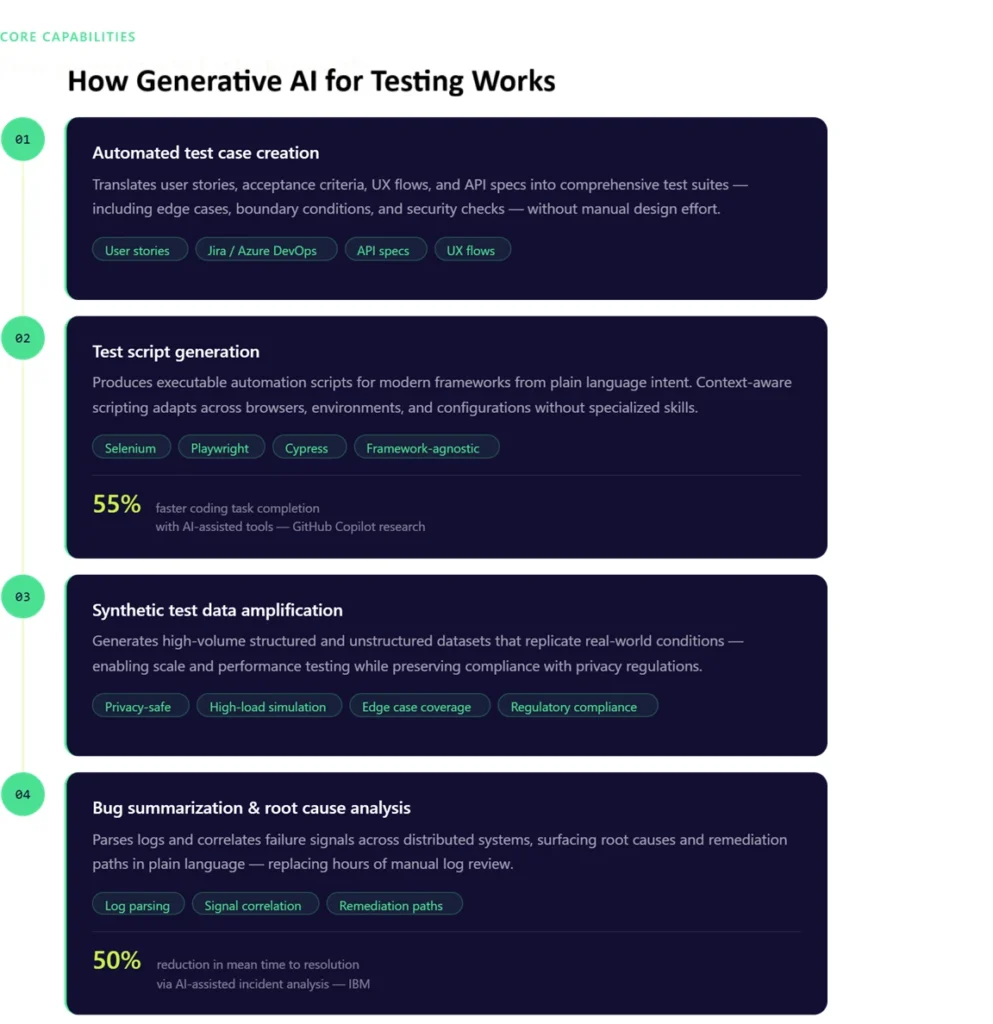
Core Pillars: How Generative AI for Testing Works 

At its core, generative AI transforms testing through four foundational capabilities. 

 1. Automated Test Case Creation

Generative AI systems translate business intent into structured, executable test scenarios. 

By analyzing inputs such as: 

  • User stories from Jira 
  • Acceptance criteria 
  • API specifications 
  • UX flows from design tools  


LLMs generate comprehensive test suites that include: 

  • Functional scenarios 
  • Negative test paths 
  • Boundary conditions 
  • Security and validation checks 

Example: 
A requirement such as password reset functionality is expanded into dozens of scenarios, including token expiry validation, rate limiting, invalid credential handling, and concurrency edge cases. 

This approach eliminates manual test design bottlenecks and significantly improves coverage, particularly for edge cases that are often missed in traditional workflows. 


  1. Test Script Generation

Beyond scenario creation, generative AI produces executable automation scripts aligned with modern frameworks such as Qyrus, Selenium, Playwright, and Cypress. 

Instead of manually writing scripts, teams can: 

  • Describe test intent in natural language 
  • Generate framework-specific code instantly 
  • Adapt scripts across browsers, environments, and configurations 

Advanced implementations go further by generating context-aware scripts, where the model understands application structure, locators, and workflows. Developers using AI-assisted tools can complete coding tasks up to 55% faster, according to GitHub Copilot research. 

This reduces dependency on specialized automation skills and accelerates time-to-automation, especially in large-scale enterprise environments. 


  1. Data Amplification with Synthetic Test Data

Data limitations have historically constrained test coverage, particularly in regulated industries. 

Generative AI addresses this through data amplification, creating high-volume synthetic datasets that replicate real-world conditions without exposing sensitive information. 

Capabilities include: 

  • Generating structured and unstructured datasets 
  • Simulating rare and extreme edge cases 
  • Supporting high-load and performance testing scenarios 
  • Preserving statistical integrity of production data 

By 2030, synthetic data is expected to dominate AI training datasets, according to Gartner’s research on synthetic data. 

As a result, teams can test at scale while maintaining compliance with privacy and regulatory requirements. 


  1. Bug Summarization and Root Cause Analysis

Modern systems generate vast volumes of logs, traces, and telemetry data. Identifying the root cause of failures in this data is time intensive. 

Generative AI simplifies this process by: 

  • Parsing logs and execution data 
  • Correlating failure signals across systems 
  • Explaining issues in plain, contextual language 

AI-assisted incident analysis can reduce resolution time by up to 50%, based on IBM research on AI in DevOps. 

For example, instead of reviewing thousands of log lines, teams receive concise summaries such as: 

  • Root cause identification 
  • Impacted components 
  • Suggested remediation paths 

The impact is a significant reduction in mean time to resolution and improves collaboration between QA, development, and DevOps teams. 

How Generative AI for testing works

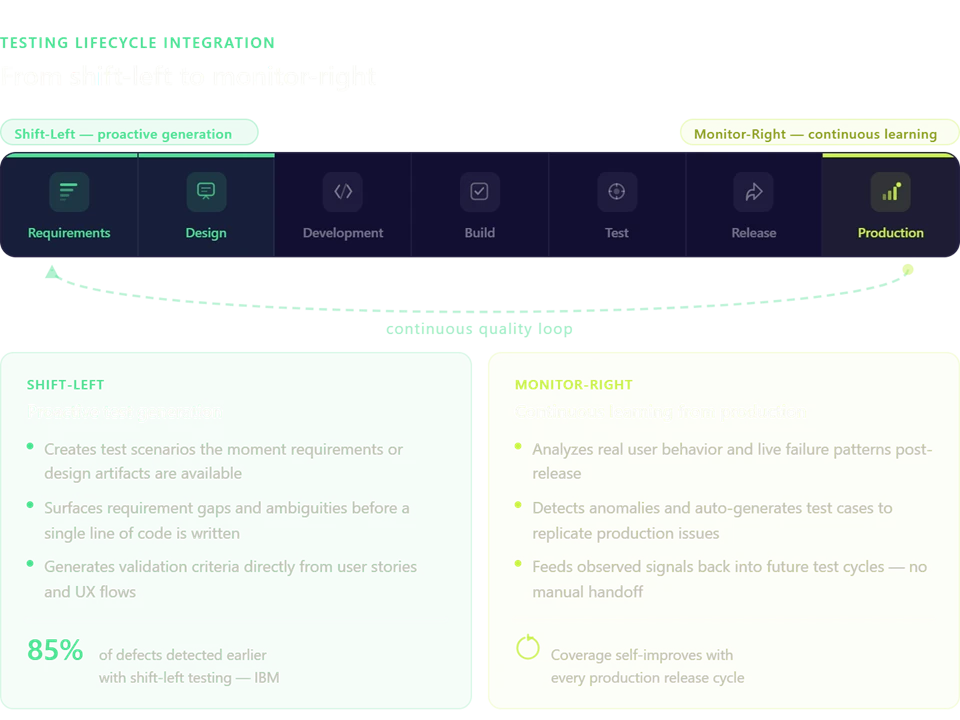
Integrating Generative AI: From “Shift-Left” to “Monitor-Right” 

Generative AI extends testing beyond traditional boundaries, creating a continuous quality loop. 

 Shift-Left: Proactive Test Generation 

Testing begins at the earliest stages of development. 

As soon as requirements or design artifacts are available, generative systems: 

  • Create initial test scenarios 
  • Identify gaps in requirements 
  • Generate validation criteria before code is written 

Organizations adopting shift-left testing can detect up to 85% of defects earlier, according to IBM Shift-Left Testing insights. 

This reduces downstream defects and ensures that quality is embedded from the outset. 

 Monitor-Right: Continuous Learning from Production 

Generative AI also operates in production environments by: 

  • Analyzing real user behavior 
  • Detecting anomalies and failure patterns 
  • Generating new test cases based on observed issues 

For example, if a specific user flow fails under high concurrency in production, the system can automatically generate test scenarios to replicate and prevent the issue in future releases. 

 The Result: Continuous Testing Intelligence 

By connecting shift-left and monitor-right: 

  • Test cycles become shorter and more efficient 
  • Coverage evolves dynamically based on real-world usage 
  • Manual effort is reduced in high-risk and high-impact areas 

This creates a self-improving testing ecosystem aligned with modern DevOps practices. 

from shift left to monitor right

Solving the “Maintenance Hell” with Self Healing 

Test maintenance remains one of the most significant sources of inefficiency in QA. 

Traditional automation relies on brittle scripts with hard-coded selectors. Even minor UI changes can break test suites, creating a cycle of constant maintenance—commonly referred to as test debt. 

Up to 30–40% of automation effort is spent on maintenance, according to Capgemini Quality Engineering research. 

Generative AI addresses this through self-healing mechanisms. 

Key capabilities include: 

  • Detecting UI and DOM changes automatically 
  • Updating locators and workflows dynamically 
  • Reconstructing test steps based on intent rather than static selectors 

For example, instead of failing due to a changed XPath, the system identifies the semantic role of an element (such as a login button) and adapts accordingly. 

This shift from selector-based automation to intent-based testing dramatically reduces flakiness and eliminates repetitive maintenance tasks. 

The Human-in-the-Loop: Ethics and Reliability 

While generative AI enhances testing capabilities, human oversight remains critical for ensuring reliability and trust. 

 Adversarial Testing and Validation 

Generative systems can be used to uncover vulnerabilities and unexpected behaviors. However, human reviewers are essential to: 

  • Validate ambiguous outputs 
  • Ensure alignment with business logic 
  • Confirm correctness in complex scenarios 

Bias, Hallucinations, and Semantic Validation 

LLMs can generate incorrect or misleading outputs if not properly constrained. 

To mitigate this, organizations implement: 

  • Semantic validation layers to verify correctness 
  • Guardrails aligned with application logic 
  • Evaluation frameworks to continuously assess model performance 

This ensures that generated tests remain grounded in actual system behavior rather than inferred assumptions. 

Continuous Reporting and Feedback Loops 

Effective reporting is essential for improving generative systems. 

By analyzing: 

  • Test outcomes 
  • Failure patterns 
  • Model inaccuracies 

Teams can refine models, improve accuracy, and reduce false positives over time. 

The most effective implementations treat generative AI as a collaborative system, where human expertise guides and enhances machine-generated outputs. 

Comparative Analysis: Manual vs. Traditional Automation vs. GenAI 

Criteria 

Manual Testing 

Traditional Automation 

Generative AI Testing 

Test Creation Speed 

Slow 

Moderate 

Near-instant 

Test Coverage 

Limited 

Moderate 

Extensive (including edge cases) 

Maintenance Effort 

Low 

High (script-heavy) 

Minimal (self-healing) 

Scalability 

Low 

Moderate 

High 

Adaptability 

Low 

Moderate 

Dynamic and context-aware 

Test Debt Impact 

Minimal 

High 

Continuously reduced 

Time to Feedback 

Slow 

Moderate 

Real-time or near real-time 

Generative AI not only accelerates testing but fundamentally improves coverage quality and system adaptability.

Top Generative AI Testing Tools to Watch 

The 2026 landscape is defined by platforms that integrate generative AI across the testing lifecycle. 

Qyrus 

Qyrus integrates Generative AI, Large Language Models (LLMs), and Vision Language Models (VLMs) into its Qyrus AI Verse suite to drive a “shift-left” approach, allowing teams to test earlier and more efficiently in the software development lifecycle. The platform deploys these AI capabilities across several specialized tools to automate and enhance quality assurance: 

Test Scenario and Script Generation 

  • Test Generator uses AI to automatically draft 60 to 80 functional test scenarios per use case by analyzing text inputs like user descriptions, JIRA tickets, Azure DevOps items, or Rally Work Items. 
  • TestGenerator+ leverages AI to analyze a team’s existing test scripts and automatically generate new scripts, saving time when expanding regression suites or validating new features. 
  • Underlying these capabilities are AI engines like Nova (which generates tests from text-based business requirements) and Vision Nova (which generates functional and visual accessibility tests by analyzing application screenshots or image URLs). 

Bridging Design and Testing 

  • UXtract uses AI to analyze Figma designs and interactive prototypes, generating test scenarios, API structures, and test data before development even begins. It also performs automated visual accessibility checks to ensure designs comply with WCAG 2.1 standards. 

API and Test Data Automation 

  • API Builder uses AI to rapidly generate fully functional APIs, Swagger JSON definitions, and mock URLs based on simple text descriptions (e.g., “Build APIs for a pet shop”). 
  • Echo (powered by Data Amplifier) automates data preparation by taking sample inputs and generating vast amounts of structured, formatted test data for parameterized testing and database stress testing. 

Intelligent Test Execution and Exploration 

  • Qyrus TestPilot features specialized AI agents, such as WebCoPilot for generating and executing web application tests, and API Bot for analyzing APIs and building intelligent execution workflows from Swagger documents. 
  • Rover 2.0 uses a large-language-model “brain” to conduct autonomous exploratory testing on web and mobile applications. Much like a human tester, the AI evaluates the current screen context and determines the next most logical action to uncover edge cases, usability gaps, and defects. 

Mabl 

An AI-native testing platform that focuses on intelligent automation and auto-healing capabilities, enabling teams to maintain stable test suites with minimal effort. 

testRigor 

A natural language-driven testing platform that allows teams to create and execute tests using plain English, significantly reducing the barrier to automation. 

Emerging Agentic Orchestration Platforms 

A new category of platforms is emerging that combines: 

  • Test generation 
  • Execution orchestration 
  • Data amplification 
  • Continuous optimization 

These platforms leverage multiple specialized AI agents to navigate applications, generate tests, and adapt to changes autonomously, effectively eliminating manual maintenance cycles. 

This shift toward end-to-end orchestration marks the next phase of evolution in software testing. 

Preparing Your Team for the Future 

Generative AI for testing is redefining how software quality is engineered. It enables faster releases, broader coverage, and a significant reduction in manual effort while addressing long-standing challenges such as test maintenance and data limitations. 

The role of the tester is evolving into that of a quality architect—designing intelligent systems, validating outcomes, and guiding continuous improvement. 

Qyrus accelerates this transformation through its AI Verse, including TestGenerator+ for automated test creation, Echo for scalable synthetic data generation, and LLM Evaluator for semantic validation of AI outputs.  

See how Qyrus enables autonomous, AI-driven test orchestration at scale. Request a demo to evaluate real-world impact across your QA pipeline. 

FAQs 

  1. How does generative AI for testing differ from traditional AI in QA?

Traditional AI in testing is predictive and analytical, focusing on detecting patterns and anomalies. Generative AI is creation-focused, producing test cases, scripts, and data directly from natural language inputs. 


  1. Can generative AI truly create test cases without human input?

Generative AI can autonomously generate test cases, but a human-in-the-loop approach is essential to validate outputs and ensure alignment with business logic. 


  1. How do I prevent AI hallucinations from creating false test results?

Implement semantic validation layers, define strict guardrails, and continuously evaluate outputs against expected results to ensure accuracy. 


  1. Is it safe to use generative AI with sensitive company data?

Yes. Synthetic data generation enables realistic testing without exposing sensitive information, ensuring compliance with privacy regulations. 


  1. What is the biggest hurdle to adopting generative AI in testing today?

The primary challenge is integrating generative AI into legacy workflows and overcoming test debt. Modern orchestration platforms help address this by enabling autonomous test adaptation and maintenance. 

QonfX-BLR-2026

Save the Date: QonfX Bangalore 2026 

Date: April 10th, 2026

Location: Bengaluru, India 

If you’re in a leadership role in engineering or QA right now, you’ve probably noticed how quickly the conversation is shifting. It’s no longer just about shipping faster. It’s about how to do that while navigating AI, increasing system complexity, and a growing expectation that quality keeps up with everything else. 

That’s part of why we’re excited to share that Qyrus is a platinum sponsor at QonfX Bangalore, one of the more focused software testing conferences in India bringing together leaders across engineering and quality. 

Hosted by The Test TribeQonfX Bangalore is a little different from most events in the testing space. It’s not built for scale or packed agendas. It’s designed to bring together a smaller group of engineering, QA, and business leaders for more meaningful conversations around AI in software testing and how teams are adapting in real time. 

That shift in format changes the tone of the event. Instead of surface-level discussions, you get into the details. What’s actually working. What’s not. And what teams are trying next as they rethink how quality fits into modern development. 

If QonfX Bangalore isn’t already on your radar, here’s why it’s worth paying attention to. 

The event brings together leaders who are actively shaping how engineering organizations operate. Conversations tend to center around topics like AI-powered test automation, responsible AI, automation at scale, and the role leadership plays as these changes start to impact real systems and teams. 

It’s not just about tools or trends. It’s about how decisions are made, how teams adapt, and how organizations move forward when the pace of change doesn’t really slow down. 

Why This Format Matters 

Most conferences give you a broad view of the industry. That has its place. But smaller, more curated events like QonfX tend to create a different kind of value. 

When you bring together people who are responsible for strategy and execution, the conversations naturally go deeper. You hear how teams are approaching AI in software testing in real environments, how they’re thinking about governance and risk, and how they’re balancing speed with long-term stability. 

There’s also something to be said about being in a room where everyone is dealing with similar challenges. It makes the conversations more direct and, honestly, more useful. 

What We’ll Be Sharing 

One area we’re especially looking forward to discussing is context engineering in AI—something that’s starting to come up more often as teams work with generative AI in testing. 

A lot of teams are finding that without the right context, AI tends to produce surface-level outputs that don’t fully reflect real business logic. We’ll be sharing how using existing test assets, system knowledge, and organizational context can help shape AI into something far more useful—something that actually understands how your applications behave, not just how they look on the surface. 

It’s a shift from simply using AI to generating outputs, to designing it to produce meaningful results within AI-powered test automation workflows. 

Let’s Connect in Bangalore 

The Qyrus team will be in Bangalore for QonfX, spending time with leaders across engineering and quality who are navigating these shifts firsthand. 

If you’re attending this software testing conference in India, we’d love to connect. Whether you’re exploring how AI in software testing fits into your strategy, thinking through how to scale automation, or just looking to exchange ideas with others in similar roles, this is the kind of setting where those conversations tend to happen naturally. 

We’re looking forward to being part of it and seeing where the discussions go. 

How to Scale Quality Within Your Agentic IDE

Software development just hit a massive turning point. We no longer spend our days sweating over low-level memory management or fighting complex syntax. Instead, we use natural language to prompt AI, review the resulting code, and move to the next task if the “vibe” feels right. This shift created a new category of tools: the Agentic IDE.

These environments do more than just autocomplete your sentences; they act as autonomous collaborators. The results are undeniable. Recent industry data shows that developers using AI-powered tools complete tasks nearly 55% faster than those working without them[cite: 115]. Inside the enterprise, the numbers are even more aggressive. Teams currently report delivering features 3.4 times faster than their previous benchmarks.

Today, 85% of developers use some form of AI for their professional roles. However, this lightning-fast output creates a glaring paradox. While we generate 41% of production code through AI, we often leave the most critical part behind: the verification.

The Invisible Wall: Testing Debt

Testing debt compounds by the hour in an AI-driven workflow. While developers churn out features, the most glaring statistic remains at zero. Standard coding agents currently produce zero auto-generated tests alongside their output. This creates a massive disconnect in the software delivery cycle.

During a typical hour of AI-assisted coding, developers generate roughly 8 to 12 API endpoints. Manually creating a single test for one of these endpoints requires approximately 45 minutes. Consequently, one developer accumulates 6 hours of testing debt every single day. Organizations often experience a quality backlash once this hidden cost surfaces.

In regulated sectors like fintech or healthcare, this gap creates a compliance liability. Code volume now outpaces the human capacity for manual review. When testing remains stuck at human speed while coding moves at machine speed, the business faces substantial risk.

“Testing debt does not accumulate slowly with AI coding. It’s compounding by the hour. Code volume now outpaces human capacity to review, and testing debt compounds silently sprint after sprint.” — Ravi Sundaram

Scaling Quality with Parallel Testing Agents

We solve this tension by introducing a parallel testing pipeline. This approach eliminates the traditional sequential handoff where developers wait for a separate QA cycle. Modern agentic quality involves a testing agent that operates in real-time alongside your coding assistant. This integration ensures that every new line of code receives immediate verification.

Industry leaders now prioritize tools that offer native IDE integration to minimize context switching. The qAPI agent specifically supports popular environments like VS Code, Cursor, JetBrains, and IntelliJ. By sitting directly inside the developer’s workspace, the agent maintains a constant watch over the source code. It automatically detects new routes and API endpoints the moment you save them.

A Gartner report predicts that agentic AI will transform software engineering by enabling specialized agents to handle complex workflows like testing and security audits. By using a specialized testing agent, teams ensure that velocity doesn’t compromise enterprise standards.

“This is a parallel pipeline. It is not some kind of sequential handoff. Build with AI and scale with Qyrus.” — Ravi Sundaram

The “Agentic” Workflow in Action

Modern testing agents transform the developer experience by removing the friction from verification. When you update a file in your IDE, the agent immediately analyzes the source code to identify new routes and API endpoints. You see options to generate tests, mock data, or run a security audit directly next to your code. This allows you to validate business logic without ever switching applications. Research shows that even brief mental blocks created by shifting between tasks can cost as much as 40% of someone’s productive time.

The agent doesn’t just guess; it understands the specific intent of your code. It synthesizes realistic data payloads or pulls from existing datasets to ensure your logic handles various edge cases. Testing at this layer remains vital because most business logic now resides in the API layer. Catching errors here provides immediate feedback before you deploy to a front-end or staging environment.

“The testing model in this agent is smart enough to understand exactly which parts of your code need testing. At the API layer, where the majority of business logic resides, the more you test, the better the outcome. Even while the agent automates the heavy lifting, you retain full control over every aspect of the API calling logic. This approach allows you to build with AI speed and then run with enterprise scale.” — Ameet Deshpande

Developers retain complete ownership of the entire process. While the AI suggests the test logic, you can open and edit any parameter, including data, query, or path variables. If you need a more tailored approach, you can interact with a two-way chat window to refine the output.

Proven Results: From 23% to 95% Coverage

Data from real-world implementations proves that agentic testing is not just a theoretical improvement. In a study of 31 development teams over a 90-day period, those using parallel testing agents saw testing debt related to AI-generated code drop by 89%. These teams didn’t just maintain their existing pace; they accelerated it. Test coverage per sprint increased 3.4 times compared to traditional manual methods.

The shift also impacts the bottom line of software delivery. Release frequency rose by 55% while the teams maintained their rigorous quality gates. Most importantly, catching bugs earlier in the IDE led to a 76% drop in post-deployment defects. General industry findings from the World Quality Report mirror this trend, showing that organizations prioritizing AI-driven automation see significantly higher reliability in their release cycles.

Before adopting this agentic approach, teams often struggled to reach 23% test coverage within a six-week window. With the QAPI agent, that number skyrocketed to 95%. These outcomes show that you can maintain enterprise discipline even while moving at machine speed. Qyrus converts AI speed into enterprise-grade confidence.

“These are not projections; these are outcomes that teams reported after 90 days of testing, and the ROI is fast, it’s real, and it’s measurable. If Vibe Coding created the velocity opportunity and velocity problem, then Vibe Testing is the answer.” — Ravi Sundaram

Build with AI, Scale with Confidence

An Agentic IDE offers an unprecedented opportunity to accelerate software delivery. However, your tool is only as effective as the quality it guarantees. If you build at machine speed without an equivalent verification layer, you simply create a faster path to technical failure. Enterprise-grade software requires more than just a quick prompt; it requires repeatable, scalable, and audit-ready artifacts that satisfy the most rigorous standards.

While publications like The Wall Street Journal confirm that engineers now ship production code at record speeds[cite: 16], the lack of oversight remains a critical concern for business leaders. We believe that while AI builds the software, a specialized testing agent builds the confidence you need to ship it. By integrating agentic quality directly into your development flow, you ensure that every feature is fundamentally sound. You no longer have to choose between moving quickly and staying compliant.

“AI is obviously building software, but we believe that Qyrus can build confidence for you as you’re doing that simultaneously. Build it once with AI and then scale it to multiple environments.” — Ravi Sundaram

The jump from 23% to 95% test coverage represents a total shift in how teams manage the software lifecycle. We invite you to experience this transformation yourself. Download the qAPI extension for your preferred IDE and join the engineers who prioritize both speed and stability. Watch the full webinar recording to see how the agentic lifecycle redefines enterprise standards.

Featured_Image-LLM_evaluation[1]

Enterprises rush to deploy Large Language Models (LLMs) to gain a competitive edge. However, speed without control invites disaster. One incorrect answer in a customer support portal or a security flaw in AI-generated code can lead to legal action or a data breach.  

We know that quality assurance defines the success of any software deployment. AI requires even stricter standards. You must treat AI output validation as the steering wheel of your innovation, not the brake pedal. 

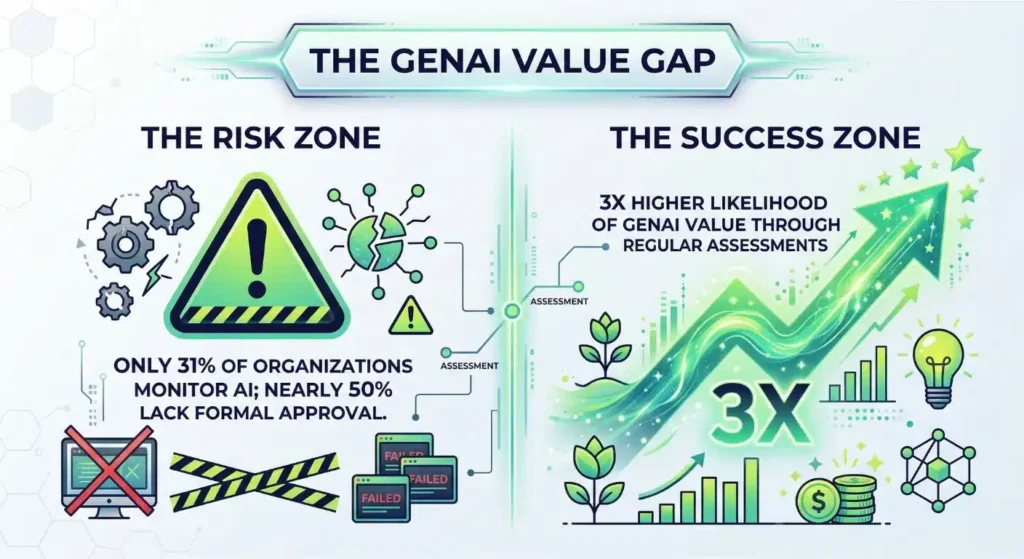
Current data highlights a massive gap in enterprise readiness. While healthcare data breaches affected over half the U.S. population in 2024, only 31% of organizations actively monitor their AI systems. This lack of oversight exists. It persists despite evidence that regular assessments triple the likelihood of achieving high value from GenAI.  

Organizations must implement robust LLM evaluation to bridge this safety gap. You protect your brand only when you prioritize generative AI testing throughout the model’s lifecycle. 

Why Is Simple Keyword Matching Failing Your AI Strategy? 

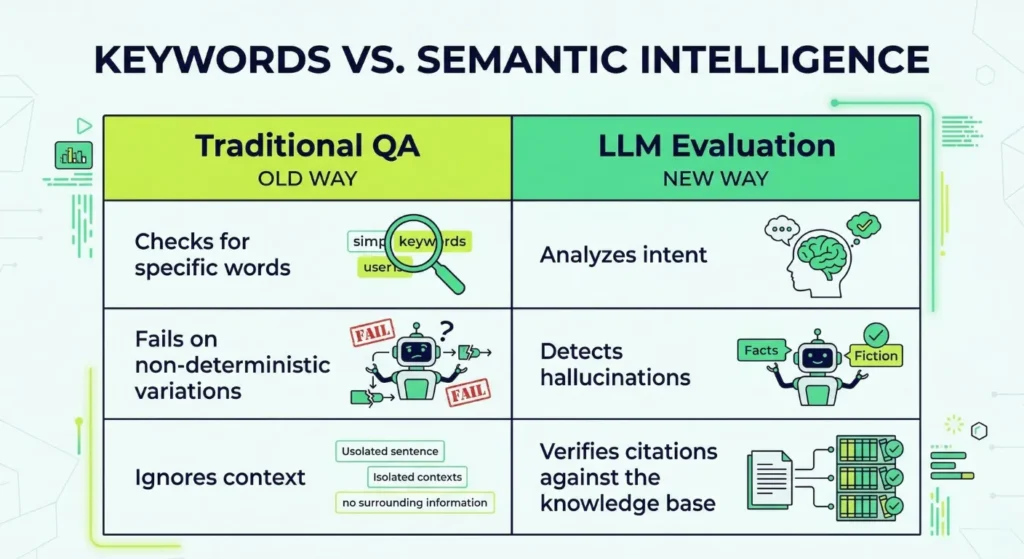
Traditional software testing relies on predictable, binary outcomes. If you input X, the system must return Y. LLMs behave non-deterministically. They produce thousands of variations for the same prompt. This unpredictability creates a massive challenge for AI output validation. If your quality assurance team relies solely on keyword matching, they will miss subtle but dangerous errors. 

Effective LLM evaluation rests on three key pillars:  

  • First, you need deep semantic analysis. You must verify that the AI captures the user’s intent rather than just repeating terms.  
  • Second, rigorous hallucination detection in LLM is non-negotiable. You must confirm that every claim the model makes exists within your trusted knowledge base. Industry analysts expect the market for these observability platforms to reach to about USD 8.07 billion by the early 2030s as companies prioritize safety.  
  • Finally, every response needs citation integrity. If an AI provides financial advice or technical specs, it must link back to a verified source. High-performing teams that automate these checks often see a 25% improvement in complex query accuracy. 

Is Your Generative AI Testing Covering the Whole Architecture? 

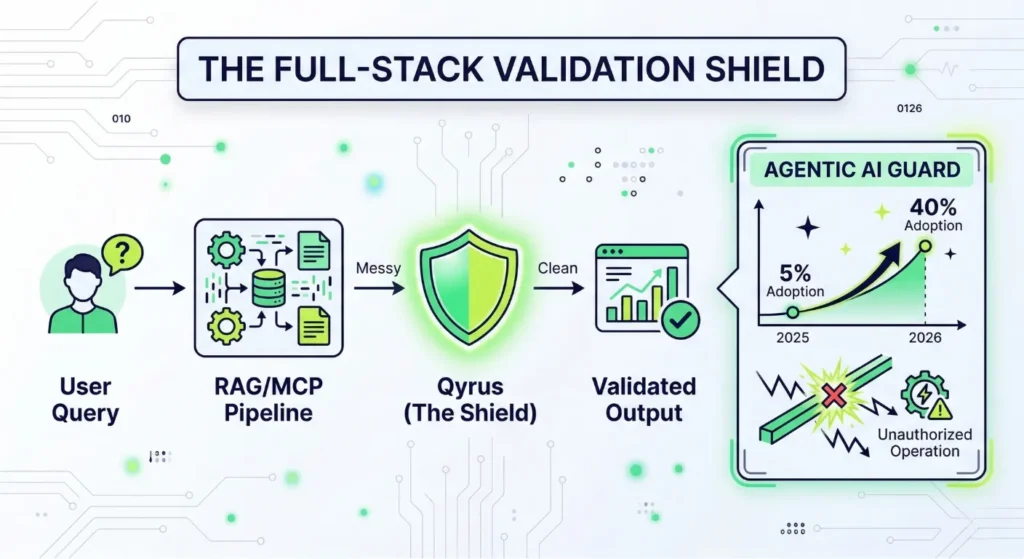
Many teams make the mistake of only checking the model’s final response. This narrow focus misses the technical cracks in your underlying architecture. Enterprise-grade generative AI testing must validate the entire stack. This includes your Retrieval-Augmented Generation (RAG) and Model Context Protocol (MCP) pipelines.  

Qyrus runs deep system-level checks to expose failures that surface-level reviews ignore. You must ensure your retrieval layer gathers the correct context before the model even starts writing. 

Agentic AI introduces even more complexity as autonomous systems take actions on your behalf. Industry forecasts suggest that enterprise applications using task-specific agents will surge from less than 5% in 2025 to 40% by the end of 2026. Without a robust LLM testing strategy that handles autonomous behavior, these agents might perform unauthorized operations.  

Qyrus provides an Agentic AI Guard to keep these systems within defined bounds. It verifies tool selection and blocks risky actions in real-time. Our AI Quality Suite achieves over 98% faithfulness in validated outputs. This level of precision ensures your agents remain reliable as they scale across your organization. Consistent LLM Evaluation ensures your AI stays on-task and secure.

How Do You Audit an AI That Never Gives the Same Answer Twice? 

Traditional testing fails when your software generates unique text for every single user. You cannot write a manual test case for every possible sentence an LLM might produce. Instead, you must build a system that understands intent and accuracy.  

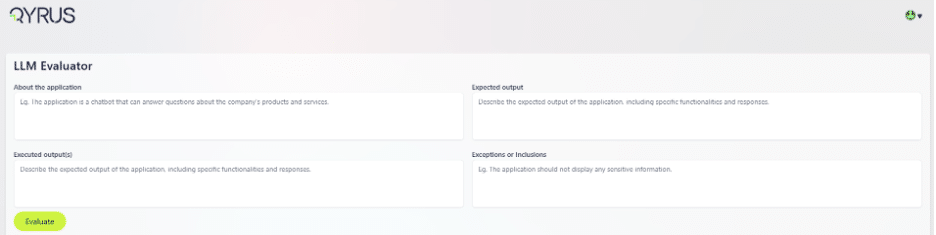
Qyrus LLM Evaluator simplifies this complexity by providing a structured framework for generative AI testing. You begin by defining the “About the Application” section to provide the evaluator with context. Then, you establish the “Expected Output”—your gold standard for what the AI should ideally say. 

The real power lies in defining “Exceptions or Inclusions.” For example, you might command the bot to never disclose account balances over one million dollars or to always include a specific legal disclaimer.  

You then input the “Executed Outputs” from your model. The system instantly analyzes the response, providing a relevance score from one to five and a detailed reasoning for that score.  

Can Your Team Scale LLM Evaluation Without Losing Precision? 

Automation is the only way to keep pace with rapid model updates. Manual reviews simply take too long and introduce human bias. A robust LLM testing strategy uses a “judge” model to verify the primary model’s work. It checks for specific positives and negatives in every response. Did the bot mention the account balance? Did it follow the formatting rules? The evaluator answers these questions in seconds. 

By automating your AI output validation, you achieve a level of consistency that human auditors cannot match. This automated layer provides a safety net that catches errors before they reach your customers. It handles the heavy lifting of hallucination detection in LLM by cross-referencing every generated claim against your source documents.  

When you integrate this into your CI/CD pipeline, LLM Evaluation becomes a continuous process rather than a final hurdle. You gain the confidence to deploy updates daily, knowing your guardrails remain intact and your brand remains protected. 

How Does Industry Context Change Your Validation Strategy? 

Enterprise risk shifts significantly depending on your field. A typo in a blog post might be embarrassing, but a mistake in a medical summary or a legal contract can destroy a company. You must tailor your AI output validation to the specific regulatory and operational pressures of your vertical. 

Will Your Internal Assistant Accidentally Violate Labor Laws? 

Internal HR bots often handle sensitive employee data and policy inquiries. If your AI provides incorrect guidance on overtime pay or hiring practices, you face immediate legal exposure. Quality engineering teams must implement LLM testing to verify that every response stays within corporate and legal guardrails.  

We focus on automated auditing that cross-references AI suggestions against current labor regulations. This prevents the model from exposing personally identifiable information (PII) or suggesting discriminatory practices. Rigorous LLM Evaluation ensures your internal tools protect your employees and your legal standing. 

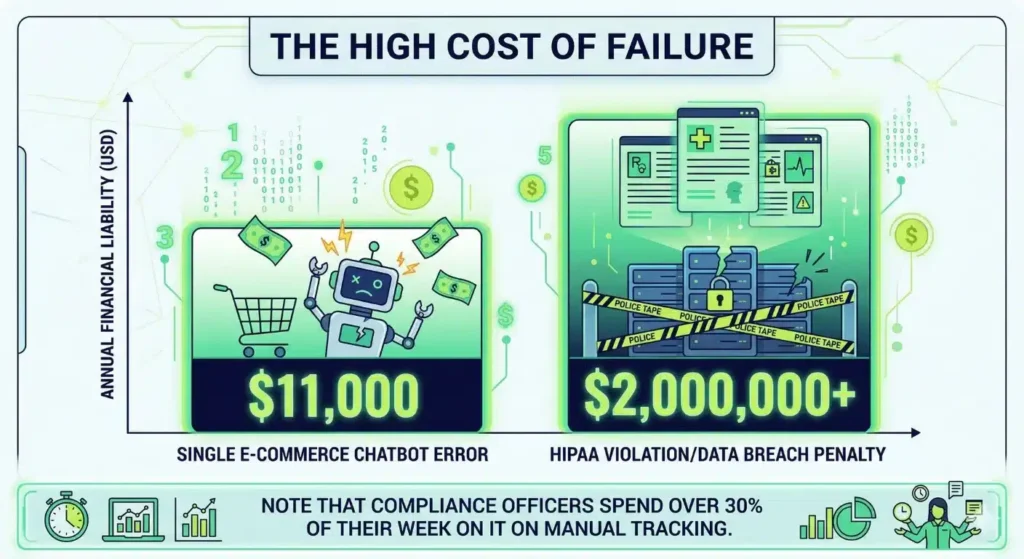
Could a Helpful Chatbot Cost You $11,000 in a Single Transaction? 

Ecommerce brands often prioritize a “polished” tone, but tone without accuracy creates merchant liability. One chatbot famously offered an 80% discount without any human approval. The resulting order totaled nearly $11,000. This is a real risk. Generative AI testing identifies these outliers by running thousands of simulated interactions before you go live.  

You must ensure your bot hits 95% accuracy against your live product manuals and pricing sheets. We use automated judges to flag any unauthorized promises, ensuring your AI remains a sales asset rather than a financial drain. 

Is Your Clinical AI a Multi-Million Dollar Liability Waiting to Happen? 

Healthcare and finance demand the highest levels of precision. In 2024, data breaches affected over half the U.S. population. Regulators now levy penalties exceeding $2 million annually for HIPAA failures. Meanwhile, financial compliance officers spend over 30% of their week manually tracking enforcement actions. You can automate much of this oversight.  

We implement deep hallucination detection in LLM to ensure clinical summaries or financial advice match verified source documents perfectly. Our platform achieves about 95% faithfulness in these high-stakes environments. This level of control allows you to innovate without fearing a regulatory crackdown. 

Why Automated LLM Testing Is the Key to Your Enterprise Growth 

Software quality defines the modern business. Generative AI testing simply extends those rigorous standards to the next generation of applications. Organizations that conduct regular assessments significantly increase the likelihood of extracting high value from their AI investments. You cannot afford to deploy models that act as black boxes. Qyrus and our LLM Evaluator transform these systems into transparent, reliable assets. 

We believe that quality functions as the steering wheel for your innovation. Our AI Quality Suite automates the most difficult parts of LLM Evaluation and AI output validation. We achieve about 95% faithfulness in validated outputs, allowing your team to move at high velocity without fear. Robust hallucination detection in LLM turns your AI from a liability into a competitive edge. It is time to move past experimental pilots and into governed, measurable operations.  

Secure your enterprise AI today. Reach out to the Qyrus team to schedule a demo and see how our platform safeguards your future. 

Frequently Asked Questions 

How to detect hallucinations in LLMs before they reach your customers? 

You must implement an automated judge that cross-references AI claims against your internal documents. Qyrus uses semantic comparison to identify assertions without evidence. This automated hallucination detection in LLM saves hundreds of manual auditing hours. It ensures every response stays grounded in your data. Relying on human reviewers for thousands of logs is impossible. 

Which LLM response validation methods offer the highest accuracy? 

Semantic scoring outperforms simple keyword matching. You should use LLM response validation methods that assign a score (1-5) based on relevance and faithfulness to the source. Our LLM Evaluation framework provides clear reasoning for every grade. This helps your team identify why a model failed and how to refine the prompt. 

Why is automated testing for generative AI essential for scaling? 

Manual testing cannot keep up with models that update frequently. Automation lets you run thousands of test cases in a single afternoon. Teams that use automated testing for generative AI reduce production time by 50% and see a 30% improvement in data extraction accuracy. 

What are the best tools for LLM evaluation on the market today? 

You need a platform that validates the entire architecture, not just the output. Qyrus Pulse and the LLM Evaluator provide full-stack visibility. We offer the precision required for enterprise-grade LLM testing. Our suite handles everything from simple chatbots to complex autonomous agents. 

How should your team approach validating LLM outputs for enterprise AI? 

Start by defining your “Expected Output” and “Exceptions or Inclusions.” This establishes the rules for the AI. You then compare the “Executed Output” against these rules. Since only 31% of organizations monitor their AI, validating LLM outputs for enterprise AI gives you a major security advantage. It prevents brand liabilities before they happen. 

What is the most effective way of testing RAG pipelines? 

You must run system-level checks on the retrieval layer and the prompt assembly. Testing RAG pipelines involves verifying that the vector search gathered the correct context. Qyrus Pulse exposes failures that surface-level reviews miss. We ensure your RAG system achieves over 98% faithfulness to the original source. 

How to test AI chatbots for legal and financial risks? 

Run adversarial simulations to see if the bot violates your internal policies. How to test AI chatbots requires setting clear “Negatives”—things the AI should never do. For example, you might block the bot from revealing account balances over a certain limit. This type of AI output validation stops costly errors in their tracks. 

Are there specific AI compliance testing tools for regulated sectors? 

Yes, you need tools that specifically address HIPAA and financial regulations. Regulated sectors face penalties exceeding $2 million annually for privacy failures. Qyrus offers specialized AI compliance testing tools that automate the auditing of clinical and legal outputs. We keep your AI within the strict bounds of the law. 

Test Orchestration

Software delivery has hit a structural wall. While AI coding assistants now contribute significantly to software development, most quality assurance teams still struggle with a fragmented process. We see a growing distance between the speed of development and the rigor of validation. This gap creates a dangerous environment where teams launch features quickly, but quality remains a secondary concern because the testing phase cannot keep up. 

Traditional testing often relies on isolated scripts. These scripts perform well for specific checks, but they fail to address the complexity of modern microservices or multi-platform user journeys. Currently, 36.5% of organizations still lack any form of test orchestration. They rely on “duct-taped” manual hand-offs that slow down the entire pipeline. In fact, 35% of companies still report that manual testing represents their most significant time-consuming activity. 

To keep up with modern engineering, you must transform your approach. Automated test orchestration provides the connective tissue required to synchronize your tools and environments. It changes the focus from “did this script pass?” to “is this business process ready for production?” By implementing workflow-based test automation, you eliminate the idle time between tests and ensure every check happens at the right moment with the exact data required for success. 

What is Test Orchestration? Definition & Core Concepts 

Think of test orchestration as the automated coordination of your entire software testing pipeline. It ensures every test executes in the correct sequence, at the appropriate time, and with the exact data required for validation.  

What is Test Orchestration

While traditional automation focuses on individual scripts, orchestration acts as the “connective tissue” that manages how those scripts interact across different platforms. Standalone automation validates individual functions, but orchestration manages the broader business outcome across your entire stack. (To explore the nuanced technical and operational contrasts between these two methodologies, read our detailed comparison: Test Orchestration vs Test Automation: What’s the Difference?) 

This structural shift requires a focus on four essential components. First, sequencing dictates the logical order of execution. For example, a system must validate a user’s credentials before attempting a complex transaction. Second, environment management handles the allocation of real browsers and mobile devices. Third, data flow allows the system to pass variables, such as session tokens, between disparate tests. Finally, centralized reporting aggregates every pass and failure into a single view for the engineering team. 

Transitioning to this model addresses the gaps found in basic frameworks. Research shows that 36.5% of firms still lack any form of orchestration, leaving them vulnerable to environment drift and manual bottlenecks. By implementing workflow-based test automation, you create a synchronized process where tools and data work in harmony. This move transforms testing from a series of disconnected events into a resilient, enterprise-grade pipeline. 

Breaking the Script: Why Automation Fails Without Test Orchestration 

Standard test automation handles the execution of individual scripts. It checks if a button works or if an API returns a 200 OK status. However, automation on its own lacks the structural logic to manage dependencies between different systems. This lack of coordination explains why 73% of test automation projects fail. Without a broader strategy, scripts become brittle and maintenance costs skyrocket. 

Test orchestration takes a different path. While automation focuses on the task, orchestration focuses on the workflow. It manages the entire lifecycle of a test suite across multiple environments. When you use automated test orchestration, you define the logic that guides a release. If an API login fails, the orchestrator stops the subsequent UI tests immediately. This prevents false positives and saves significant infrastructure costs. 

Differences Between Test Automation and Test Orchestration 

FeatureStandalone Test Automation Test Orchestration
Primary Focus Execution of individual scripts and tasks. Coordination of testing workflows and pipelines.
Data Management Often hardcoded or siloed per test. Dynamic data passing and state persistence.
Trigger Mechanism Manual or scheduled execution. Event-driven (commits, merges, deployments).
Environment Handling Static, often pre-configured environments. Dynamic environment provisioning and coordination.
Reporting Fragmented pass/fail logs per tool. Centralized observability and aggregated insights.
Quality Gating Manual intervention often required to halt pipelines. Automated conditional progression based on results.

Enterprise teams require more than just a collection of scripts. They need test orchestration tools that provide visibility into the entire delivery pipeline. Integration with CI/CD is the primary driver here, as 84% of developers now work in DevOps environments where speed is non-negotiable. Workflow-based test automation bridges this gap. It ensures your tests run as a synchronized unit rather than a series of ad-hoc events. Qyrus facilitates this through its visual Flow Master Hub, allowing teams to coordinate these complex sequences without writing additional code. 

Core Benefits of Test Orchestration for Enterprises 

Enterprise leaders often view testing as a necessary drag on momentum. However, shifting your strategy transforms this bottleneck into a strategic asset. By moving beyond isolated scripts, you gain total visibility into the delivery pipeline. This transparency allows development teams to identify risks early. It ensures that only high-quality code reaches your customers. 

Benefits of TO

Shattering the Black Box with Total Visibility 

Isolated scripts often create a “black box” where results are difficult to interpret. You might see a failure, but finding the root cause requires manual digging through logs. Automated test orchestration replaces this confusion with a transparent, visual pipeline. You see every step of the user journey as it happens. This clarity allows your team to pinpoint exactly where a process breaks, whether it occurs in an API call or a mobile UI element. 

Hardening Production with Intelligent Quality Gates 

Moving fast requires guardrails. Validated releases depend on “Quality Gates” that automatically block unstable code from moving forward. Using test orchestration tools, you set specific criteria for success at every stage of the pipeline. If a critical smoke test fails, the orchestrator halts the deployment immediately. This ensures only 100% verified features reach your users, maintaining your brand’s reputation for reliability. 

The Economic Impact of Automated Test Orchestration 

The financial argument for this shift remains undeniable. Research indicates that organizations adopting these strategies experience shorter test cycles compared to those using fragmented automation. Furthermore, these teams achieve better success rate in production releases. By streamlining the validation process, you reduce maintenance overhead by nearly 80%. This efficiency frees up your budget for innovation rather than constant troubleshooting. 

Unifying Engineering through Workflow-Based Test Automation 

Traditional testing often happens in a silo, separated from development and operations. Workflow-based test automation breaks down these barriers. It provides a shared “source of truth” that every department can access and understand. When developers, QA engineers, and DevOps professionals look at the same orchestration dashboard, they collaborate more effectively. This alignment accelerates the entire lifecycle. It ensures everyone works toward the same objective: delivering value to the customer. 

What Test Orchestration Looks Like in Action 

Test orchestration moves beyond the theory of “running tests” and enters the practice of managing business risks at scale. In a modern software environment, a single release often involves an API update, a change to the web checkout UI, and a new promotion in the mobile app. Standalone scripts struggle to bridge these gaps. However, with automated test orchestration, you build a unified flow that treats these separate components as one cohesive journey. 

High-Level Workflow Examples 

The Smoke Test: Rapid Validation  

Teams use smoke tests to perform quick, automated checks of critical functionality. The goal remains simple: verify the application works at a basic level before committing further resources. A well-orchestrated smoke suite should validate critical paths in less than 15 minutes after a deployment. This rapid feedback loop allows you to detect obvious issues immediately, preventing the team from wasting time on a fundamentally broken build. 

The Regression Suite: Enterprise-Scale Chaining  

As applications grow, so does the risk of “breaking” existing features. A comprehensive regression suite often requires chaining 10 or more workflows to achieve full system validation. Using test orchestration tools, you can organize these workflows into a logical hierarchy. If the “User Authentication” workflow fails, the system automatically halts the “Payment Processing” and “Order History” flows. This prevents the “crushing weight of maintenance” often seen in legacy systems, where most test automation projects fail due to a lack of coordination. 

The API-to-Web Journey: Cross-Platform Fluidity  

Real users do not live in silos; neither should your tests. An API-to-Web journey mirrors a real-world scenario by creating a user via an API call and immediately verifying that account on the Web UI. This requires seamless data propagation, where the session token or user ID from the first node becomes the input for the next. This workflow-based test automation ensures that your back-end and front-end systems communicate perfectly. 

Real-World Architectures: The CI/CD Connection 

Effective test orchestration relies on deep integration with your existing DevOps stack. Since more than 80% developers now work in DevOps environments, your orchestration engine must respond instantly to CI/CD triggers. 

Whether you use Jenkins, Azure DevOps, or GitLab, the architecture remains consistent. When a developer pushes code to a repository, the CI/CD tool sends a trigger to the orchestration platform. The engine then selects the appropriate environment—be it Staging, UAT, or Production—and begins the execution.  

By embedding these checks directly into the pipeline, you create “Quality Gates” that block unstable code. This automated choreography ensures that your release cycle stays fast without sacrificing the reliability your customers expect. 

Anatomy of an Orchestrated Test Workflow 

Orchestration begins with sequencing. You organize tests into logical units such as authentication, onboarding, or checkout. Traditional methods run scripts one after another in a linear queue. However, modern test orchestration tools enable parallel execution logic, which can reduce execution time by up to 90%. Chaining tests ensures that a subsequent stage only begins after a prior stage succeeds. For example, if the authentication stage fails, the orchestrator halts checkout testing to save compute resources. 

Data Management and State Persistence 

Data management serves as the fuel for these workflows. Successful test orchestration requires sharing session data, tokens, and identifiers across different platforms. You must pass a customer ID from an account creation step to the purchase validation step without manual entry. Furthermore, environment persistence maintains the application state throughout the entire process. This ensures that database snapshots or session cookies remain valid as the test progresses from an API call to a mobile interface. 

Resilience Through Failure Handling 

Reliable workflows include robust failure handling to prevent brittle pipelines. If a test fails, you need a strategy beyond simple termination. Automated test orchestration allows you to define specific retry, abort, or skip logic. For instance, if a non-critical UI element fails, the system might skip that step to continue the broader validation. In contrast, a failure in the login stage should abort the entire flow to prevent false positives. Advanced platforms even use self-healing mechanisms to address UI changes, which can slash maintenance efforts by 81%. 

Centralized Analytics and Observability 

The final piece involves results and analytics. Centralized reporting dashboards aggregate logs, videos, and performance metrics from every tool in the testing suite. You track specific KPIs such as pass/fail trends and execution duration to measure the health of your workflow-based test automation. These insights transform raw outcomes into a clear picture of overall software quality. Qyrus provides this transparency through its Mind Maps, which offer a visual, hierarchical view of the entire test repository and its execution status. 

How Test Orchestration Integrates with CI/CD & DevOps 

Modern software delivery requires a seamless connection between code changes and validation. When you integrate test orchestration into your DevOps pipeline, you move beyond simple automation. Your CI/CD tools, such as Jenkins or Azure DevOps, no longer just trigger scripts; they manage a sophisticated choreography of validation steps.  

Automated test orchestration introduces intelligent quality gates. These gates evaluate the health of a build in real-time. If a critical workflow fails, the orchestrator blocks the deployment immediately. This proactive approach prevents the accumulation of technical debt and protects the user experience.  

Effective test orchestration tools also provide immediate observability. Instead of searching through logs, your team receives results directly in Slack or Jira. This rapid feedback loop allows development teams to fix bugs as soon as they appear. Workflow-based test automation ensures that every code commit undergoes a rigorous, multi-environment check before it ever touches a customer. 

Selecting the Best Test Orchestration Tools & Platforms 

Choosing from the available test orchestration tools requires an understanding of how different architectures impact your long-term maintenance. The market generally splits into three categories. First, built-in orchestration engines exist within larger testing platforms. These offer native integration but may limit your flexibility. Second, plugin tools attach to your existing CI/CD pipeline. While these provide modularity, they often lead to “tool sprawl,” where engineers spend more time managing integrations than writing tests. Finally, full platform orchestration stacks provide a unified environment for cross-platform validation. 

Transitioning to a unified platform often reveals the inherent limitations of older, siloed testing models that lack cross-protocol support. (If your team currently relies on older frameworks, you should examine Why Traditional Component Testing Breaks at Scale to understand why a shift to orchestration is mandatory for enterprise growth.) 

The debate between code-based orchestration and visual workflow builders also shapes your team’s productivity. Code-based frameworks provide deep customization for highly technical teams. However, they often recreate the “crushing weight of maintenance” that causes test automation projects to fail. In contrast, visual builders democratize the process. They allow manual testers and product owners to contribute to the quality strategy without learning complex syntax. This shift is vital because 35% of companies still struggle with manual testing as their primary bottleneck. 

Orchestrating at Scale with Qyrus 

Qyrus offers a next-generation approach to automated test orchestration through its dedicated TO module. This platform eliminates the obstacles that hinder team progress by providing a high-performance environment for complex test scenarios. 

  • Flow Master Hub: This is your command center. Use the advanced drag-and-drop interface to create and edit test flows visually. It handles intricate user journeys across Web, Mobile, API, and Desktop platforms in a single execution. 
  • The Vault: Scale requires organization. The Vault provides a hierarchical structure to categorize projects by environments like QA, UAT, and Production. Advanced nesting and filtering tools ensure your team never wastes time hunting for the correct files. 
  • SmartFlow Mapping: Rigid paths lead to fragile tests. This feature adapts to live conditions during execution. If a login fails or a transaction lacks a balance, the mapper reroutes the test automatically to handle the edge case. 
TEST ORCHESTRATION

See How Qyrus Orchestrates Complex Test Workflows 

Best Practices for Successful Test Orchestration 

Moving from fragmented automation to a cohesive delivery pipeline requires more than just new software. It demands a shift in how your team perceives the lifecycle of a test. Success depends on treating your quality infrastructure with the same rigor as your production code. By following proven engineering standards, you ensure your test orchestration remains maintainable even as your application grows in complexity. 


TO Best Practices

Architecting the Journey Before Writing a Single Script 

Many teams rush into automation without mapping their business logic first. This lack of planning is a primary reason why most test automation projects fail to deliver long-term value. You must define your data contracts and system dependencies before building workflows. Identify which services require session persistence and where data must flow between platforms. Establishing these blueprints early prevents the creation of brittle, “duct-taped” sequences that break during minor updates. 

Prioritizing the Critical Path for Immediate Returns 

Avoid the temptation to orchestrate every minor feature at once. Start with high-impact workflows that protect your core revenue streams. Focus on building a robust smoke suite that validates critical paths in less than 15 minutes. Once you stabilize these essential checks, expand into complex regression suites. This incremental approach allows your team to demonstrate immediate ROI while gradually reducing the manual testing bottleneck. 

Maintaining Integrity Through Centralized Governance 

Reliable workflow-based test automation requires strict separation of environments. Never hardcode credentials or URLs within your scripts. Instead, use test orchestration tools to manage environment-specific variables for Dev, Staging, and Production. Centralizing your data management through a “Data Hub” ensures that every team member uses the same verified datasets. This practice eliminates the “it works on my machine” syndrome and ensures your results remain consistent across different infrastructure tiers. 

Closing the Loop with Performance-Driven Refinement 

Orchestration is not a “set and forget” activity. You must continuously monitor KPIs and failure trends to identify bottlenecks. If a specific node consistently delays your pipeline, use performance optimization patterns like parallel execution to reclaim time. Research shows that refining these sequences can improve execution speed by 40-50%. By analyzing historical reports and adjusting your retry logic, you transform automated test orchestration from a simple execution engine into a high-performance asset. 

The Road Ahead: Building a Sustainable Culture of Quality 

The shift to test orchestration marks a fundamental change in how enterprises deliver software. While standalone scripts once served a specific purpose, they cannot keep up with the speed of modern code generation. Adopting automated test orchestration is no longer a luxury. It is a prerequisite for survival in a market where many organizations still struggle with fragmented pipelines. By treating your quality layer as a first-class engineering citizen, you achieve the near perfect success rate required for enterprise scale. 

Transitioning your team requires a clear roadmap. First, map your core business processes and identify the data dependencies between systems. Second, define your “Quality Gates” to ensure only verified code moves forward. Finally, integrate your workflow-based test automation with your existing CI/CD tools. This incremental approach prevents the “crushing weight of maintenance”. 

Qyrus simplifies this journey by offering a unified environment for cross-platform validation. Our platform allows you to move away from rigid, siloed testing and toward a coordinated, visual strategy. Whether you are validating complex banking transfers or e-commerce user journeys, our test orchestration tools provide the precision and control you need to lead your industry. We help you move beyond ad-hoc scripts to build a resilient infrastructure that grows with your organization. 

Don’t let legacy testing methods hold back your engineering velocity. Contact us today for a personalized ROI report or schedule a demo to see how Qyrus can transform your testing into a direct driver of business growth.