
 Jerin Mathew


The wait is officially over. On June 10, 2025, Google released the stable version of Android 16, marking the earliest major Android launch in over a decade. On the same day, Qyrus became the first device farm to support Android 16 for testing, giving teams Day-One access to real devices running the production release. This release wasn’t just early; it was a strategic reset. While many initial reviews have labelled the update “boring” or “lackluster” due to the absence of immediate, dramatic visual changes, that surface-level take misses the entire story.
Beneath the surface, Android 16 “Baklava” is a foundational leap forward. Google has deliberately decoupled the stable platform from splashy feature drops, instead focusing on a massive overhaul designed to create a more agile and secure Android ecosystem. The accelerated release, enabled by a new “Trunk Stable” development model, gives developers and manufacturers a crucial head start. With powerful new APIs for AI and cross-device computing, a hardened security posture, and significant developer mandates, this update is less of a simple refresh and more of a quiet revolution. For app developers, this seemingly simple update introduces a complex new testing landscape.
This is where Qyrus steps in. As a premier automation tool for mobile application testing, we are proud to announce immediate, Day One support for the production release of Android 16. For a broader look at how mobile teams can approach testing across devices, platforms, and user interactions, see our Pro’s Guide to Mobile App Testing: From Gesture to Go. We ensure your team can validate your applications on this transformed platform from the moment it’s available, turning potential compatibility risks into a competitive advantage.
A Tale of Two Releases: The New Era of Android 16 Pixel Customization and Security
Understanding Android 16 requires grasping its unique, two-part release strategy. Google has made a calculated decision to release a stable platform with foundational changes first, while holding back the most significant user-facing features for a future Quarterly Platform Release (QPR). While this might create a confusing initial experience for users, it’s a strategic masterstroke for developers and OEMs, providing a stable API target months earlier than usual to accelerate the entire ecosystem’s update cycle.
This means developers need to prepare for two waves of change: the critical security and developer mandates available today, and the revolutionary UI and productivity features coming soon.
Available Now: Foundational Security and Mandates to Test For
While it may not look different on the surface, the initial release of Android 16 is packed with critical changes that demand immediate testing.
- The Advanced Protection Suite: Security is the undeniable centerpiece of this release. Google has consolidated its most powerful security settings into a single, user-friendly toggle called “Advanced Protection.” When enabled, it creates a fortress around the device by activating Theft Detection Lock, blocking insecure 2G and Wi-Fi connections, and enhancing Google Play Protect scanning. It also introduces “Intrusion Logging,” an industry-first feature that backs up device activity logs to aid in forensic analysis after a potential compromise.
- Smarter User Protection: To combat modern social engineering, Android 16 introduces “Identity Check,” which requires biometric authentication to change sensitive settings like passwords when the device is away from a trusted location, mitigating the risk of “shoulder surfing” attacks.
- Critical Developer Mandates: Google is enforcing a “tough love” strategy to modernize the app ecosystem. For apps targeting API level 36, edge-to-edge display is now mandatory, as the ability to opt-out has been removed. Furthermore, on large screens (tablets, foldables, etc.), apps that previously restricted screen orientation will now be forced to be resizable and work in both portrait and landscape modes by default, making adaptive layouts a non-negotiable requirement.
Android 16’s UI and Productivity Features
Android 16 also introduced significant UI and productivity changes, making it important for development teams to validate these experiences across supported devices and form factors.
Material 3 Expressive: This is the future of Android 16 Pixel customization. It represents the next evolution of Google’s design language, moving beyond personalization to create a more dynamic, animated, and emotionally resonant interface. It’s built on principles of fluid, physics-based motion that makes UI elements “jiggle and morph,” expressive typography for “editorial-like moments,” and a richer use of color and shape.
- Native Desktop Mode: Google is finally delivering a native, PC-like experience for Android. Developed in close collaboration with Samsung and built “on the foundation of Samsung DeX,” this feature will provide a true windowed environment with a taskbar and resizable apps when a phone is connected to an external monitor.
- Live Updates: This new, standardized framework for progress-centric notifications is Android’s answer to Apple’s Live Activities. It will allow apps to show real-time information for ongoing events like food deliveries or ride-shares directly on the lock screen and always on display.
Testing these upcoming dynamic UIs, new form factors like desktop mode, and crucial security workflows is precisely where an advanced mobile application automation testing approach becomes indispensable. For a deeper look at the role of automation in native mobile applications, see The Non-Negotiable Role of Automation Testing for Native Mobile App Success.
Tame the Complexity: Why Qyrus is the Essential Automation Tool for Mobile Application Testing on Android 16
The bifurcated release strategy for Android 16 and the significant volume of user-reported bugs on the “stable” version reveal a new reality for development teams. The accelerated release cycle came at the cost of a shorter public beta, effectively shifting the final, most challenging phase of bug discovery onto the public. Simply put, waiting for physical devices or relying on emulators is no longer a viable strategy for quality assurance.
This is why immediate access to a real device cloud is critical, and where Qyrus provides an unparalleled advantage. For a deeper look at how a mobile device farm helps teams address device fragmentation and real-device testing challenges, see Why You Still Need a Mobile Device Farm.
Day One Readiness on Real Devices: Qyrus eliminates the waiting game. Following our Android 16 beta release, our users were testing on a fleet of real Pixel devices running the final Android 16 build on its June 10th release date. This is the only way to reliably test for and safeguard against the kind of critical issues real users are reporting, from significant battery drain and system freezes to unstable Wi-Fi connections and widespread app crashes.
- Master the New Mandates with Ease: Android 16’s new requirements for adaptive layouts can be a major development hurdle. Qyrus simplifies this process entirely. Our platform allows you to instantly test your app’s response to the now-mandatory resizability on large screens, ensuring it looks and functions perfectly on tablets, foldables, and in the upcoming native Desktop Mode. Testing complex security workflows like the new “Advanced Protection” suite and biometric-gated “Identity Check” becomes streamlined and repeatable.
- Validate Android 16’s New UI and User Experiences: Android 16’s evolving UI and productivity capabilities create new experiences that teams need to validate across supported devices and configurations. With Qyrus, you can begin validating your app against the foundational APIs for features like Material 3 Expressive. This allows you to get ahead of the curve and ensure your app is ready to embrace the new era of Android 16 Pixel customization, with its fluid, physics-based motion and expressive designs, as soon as it rolls out.
- Configure devices as your customers do: One of the biggest differentiators of Qyrus is that we offer private, dedicated devices for clients. This means they can configure devices as their customers do – configure an authenticator application for OTPs, set up an email account, or configure any other related 3rd party apps.
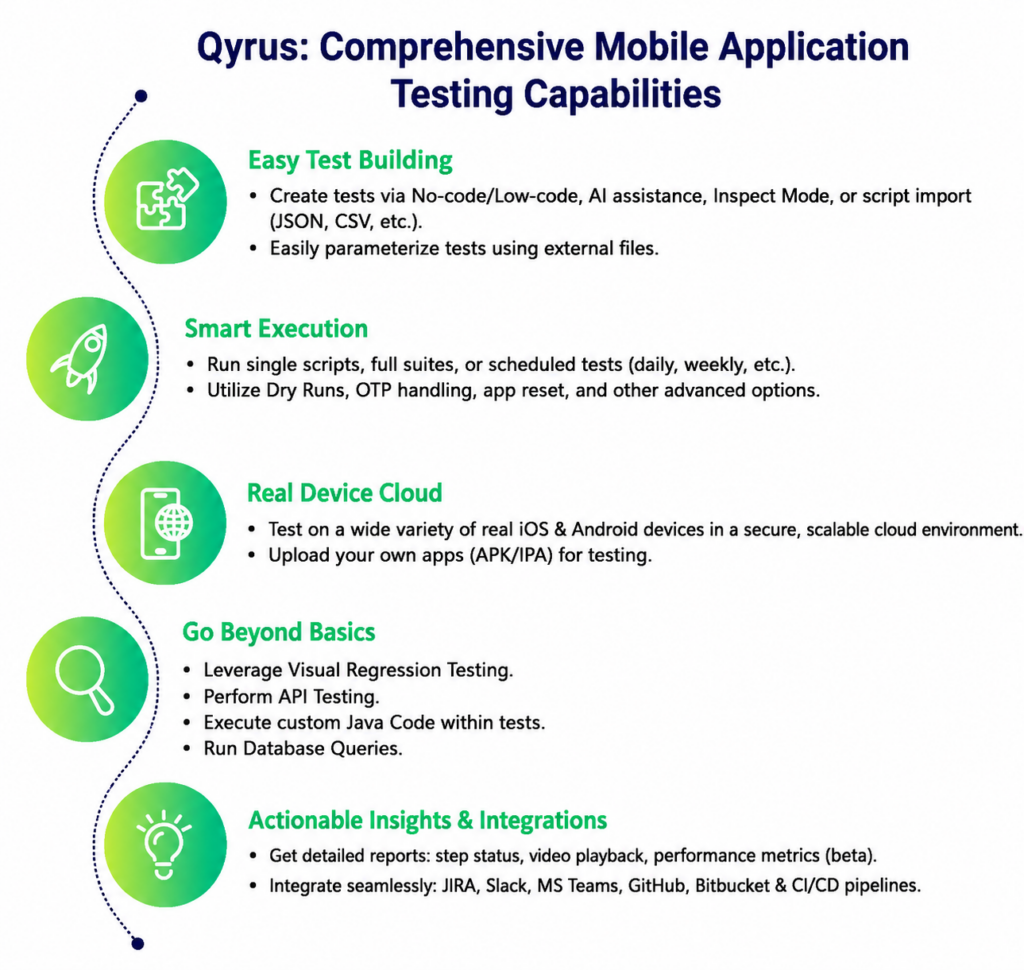
As the most adaptable automation tool for mobile application testing, Qyrus empowers your entire team—from manual testers to automation engineers—to tackle the full spectrum of challenges presented by Android 16. Learn more about mobile app testing automation strategies for building scalable, automation-ready mobile applications.
Get Started in Minutes: Test on Android 16 Today
Ready to ensure your app is prepared for the most significant Android shift in years? Our platform makes it incredibly simple. You can begin validating your application on real devices running the official production release of Android 16 in just three easy steps:
- Log In to Qyrus: Access your account and navigate to our real device cloud.
- Upload Your Application: Simply upload your .apk or .aab file.
- Select & Test: Choose a real Google Pixel device running the official Android 16 build and instantly begin your manual or automated testing sessions.
It’s that straightforward. You can use your existing test suites to immediately check for regressions or build new ones to validate the new features and security workflows.
Don’t Wait for Bugs to Find You: Secure Your App’s Future
Android 16 “Baklava” is not just another update; it’s a transitional release that represents the launchpad for a faster, more secure, and more cohesive Android ecosystem. The strategic shift in development, the staggered feature releases, and the widespread user-reported stability issues have created a new reality where proactive, early testing is non-negotiable. Ensuring your app is ready is not just about compatibility—it’s about protecting your brand’s reputation and delivering the flawless experience your users demand.
With the right automation tool for mobile application testing, you can navigate this new landscape with confidence. Qyrus provides the immediate access, powerful features, and comprehensive support you need to get ahead of the curve and stay there.
Don’t let your application’s performance on Android 16 be an afterthought.
Take action now:
Explore Qyrus: If you haven’t already, discover the comprehensive suite of testing capabilities Qyrus offers.
Contact Us for a Demo: Let us walk you through how Qyrus can specifically help you prepare for Android 16.
Start Your Testing for Free: Leverage Qyrus to get a crucial head start on your Android 16 validation.
QYRUS gets even more powerful with AI!
Achieve agile quality across your testing needs.

 October 1, 2026
  7 min
7 min