SAP Data Migration Testing: How to Prove Your Data Is Safe to Go Live With
 Vivek Tumulu

SAP Data Migration is a step to repositioning your business as the market dynamics shift. Lets say you’re in the last week before an SAP go-live your migration and your team posts a screenshot: every object, green. Millions of records, loaded.
But when the finance team runs the open receivables report on Monday morning, and the total is off by an amount nobody can explain. Procurement finds purchase orders pointing at vendors that don’t exist. A warehouse lead opens a material and the plant data is blank.
Either way, migration is a hassle it takes time, effort and money. So, once you’ve done it, you need to know it been done the right way.
That gap, between records that moved and data you can trust, is where SAP programs lose their schedules.
And this is common, according to Horváth, only 8% of companies that completed an SAP S/4HANA transition finished on schedule, projects ran about 30% longer than planned, and 65% reported severe or very severe quality deficiencies after migration.
Data is a big part of why: 57% of SAP customers and experts say data migration regularly delays SAP projects. And Gartner estimates that poor data quality costs organizations at least $12.9 million a year on average.
Why does this keep happening? Because most teams run toward the wrong finish line. Moving data is an engineering task with a clear end: the job runs, the job completes. Trusting data is a business decision with no built-in alarm.
Nothing flashes red when a tax code maps wrongly, a customer loses its sales area, or two ledgers drift apart by a few decimals. The problem stays silent until someone tries to invoice, procure, or close the books.
In this guide we’ll show you how, phase by phase teams should tackle it. We’ll profile your source data, test mappings, reconcile after every load, check relationships, and put business users in the validation seat. Then we’ll use mock migrations to build go-live confidence, so you can answer the real question with proof.
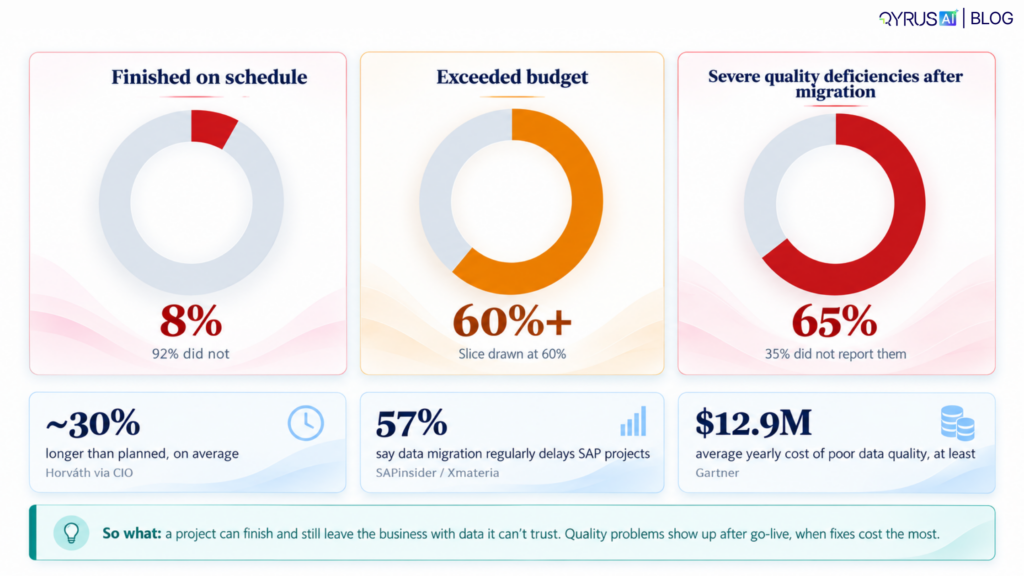
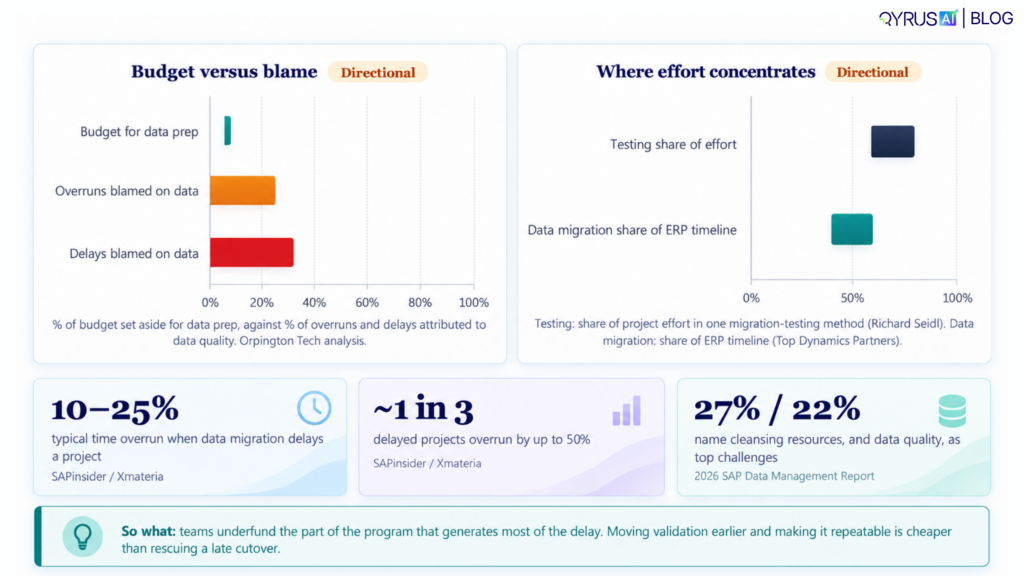
Look at the pattern. The projects that struggle aren’t careless. They put the effort in the wrong place. Data preparation gets a small slice of the budget, yet data quality is blamed for a large share of the overruns and delays.
How do I prove that the data in SAP is complete, accurate, and safe to run the business on?
The short answer: data migration testing doesn’t end when records load. It ends when you can show, with evidence, that every business-critical data object is complete, accurate, consistent, traceable, and working in SAP.
What is SAP data migration testing?
SAP data migration testing is the work of proving that data moved from your legacy systems into SAP is complete, correct, consistent, and usable for real business processes.
Think about the difference between a delivery notification and an inspection. “Delivered” tells you the truck arrived. It says nothing about whether the glass survived. A “loaded successfully” status is a delivery notification. Testing is the inspection.
These are two different ways to see this:
- Migration moves and transforms the data.
- Migration testing proves the result can be trusted.
Testing isn’t at the end instead it runs alongside every stage: profiling, cleansing, mapping, extraction, transformation, load, reconciliation, user acceptance, cutover, and the hypercare weeks after go-live. A load can show as complete while financial totals, parent-child links, or business rules are wrong. Nothing in the load log will tell you.
Why data integrity breaks
Moving house is a good way to think about it. Most of what goes wrong in a move isn’t the truck. It’s the labels, the fragile boxes, and the things you should have thrown out before you started.
SAP migrations break the same way:
- Legacy systems speak different dialects. Different data models, inconsistent field usage, free-text fields, local conventions, and fragmented master data all have to be translated into SAP’s structure, as real S/4HANA programs report.
- The source data was never clean. Duplicates along with incomplete records, old business partners, and invalid values are among the most common migration mistakes.
- Translation errors creep in. Wrong legacy-code conversions, units, date formats, currency decimals, tax identifiers, and text encoding all need explicit testing.
- Relationships snap. Orphaned transactions, missing organizational assignments, and invalid customer, material, or plant references are repeatedly named as high-impact defects.
- Nobody owns the cleanup. In the 2026 SAP Data Management Report, 27% of respondents named the availability of business resources for cleansing and validation, and 22% named data quality, among the top challenges at the data migration stage.
- Testing runs out of runway. Too few mock cycles, unrealistic data volumes, and manual checks that can’t keep up.
There’s also a budget story here. One industry analysis attributes roughly 32% of migration delays and 27% of budget overruns to data-quality issues, while teams typically set aside only 7–9% of the project budget for data preparation. What you and your teams should do here is view those as directional figures, not hard deadlines. Because the mismatch will be familiar to anyone who has run one of these programs.
The business impact is a serious issue teams are piled up failed invoices, wrong inventory, broken procurement, compliance exposure, unreliable reports, and a delayed financial close. So you must ask these questions before you take a step ahead.
Eight questions every go-live decision depends on
A checklist tells you what to do. A framework tells you what you’re trying to prove. Here are the eight questions that practitioner guidance keeps returning to, in the order a sceptical CFO would ask them:
Dimension | The question it answers | Example checks |
Completeness | Did every required record and field arrive? | Compare source extraction count with SAP loaded count; check mandatory fields |
Accuracy | Is each value correct? | Field-level comparison of customer, material, tax, bank, and payment data |
Consistency | Do related records agree with each other? | Check customer master, sales orders, invoices, and open items across objects |
Validity | Are values allowed by SAP’s rules? | Check dates, currencies, units, statuses, tax codes, and reference data |
Uniqueness | Are there duplicates? | Check business partners, materials, and vendors for duplicate keys |
Referential integrity | Does every child record have a valid parent? | Validate sales orders to customers, line items to headers, materials to plants |
Business correctness | Does the data support real operations? | Run critical transactions and compare open AR/AP, inventory, and order values |
Traceability | Can every discrepancy be explained? | Preserve source-to-target key mapping, logs, rejection files, and reconciliation evidence |
If you can answer all eight with confidence and the much needed evidence, then you have a agenda. If you can only answer the first one (“yes, the counts match”), you have a hope.
How to validate SAP data integrity during SAP S/4HANA Migration
Phase 1: Profile your Data Properly
Before you pack, you must declutter. Work towards segregating your source data before you design a single mapping, so you find the problems while it’s still cheap and easy to fix.
You should look for mandatory-field gaps, duplicate keys, inconsistent formats, old records, missing organizational data, orphaned references, and odd value patterns. Gartner calls out data silos with overlaps, gaps, and inconsistencies as a major source of poor-quality data, and that’s exactly what profiling surfaces.
Here’s the move that turns profiling from a checklist into a decision tool: build a data-readiness scorecard. For each object (customer, vendor, material, asset, open sales orders, open purchase orders, GL balances, AR/AP, inventory, tax data), score it on gaps, duplicates, invalid formats, and orphaned references, and name a business owner. Now “are we ready?” has an answer by object, and an owner who has to give it.
Finding these issues in profiling is cheaper than finding them in system or user acceptance testing, as teams who have lived it will tell you.
Phase 2: Test the translation (mapping and transformation)
Mapping is where your legacy system’s language becomes SAP’s. A comprehensive migration test should validate transformation logic, schema mapping, business rules, duplicates, referential integrity, and source-to-target reconciliation.
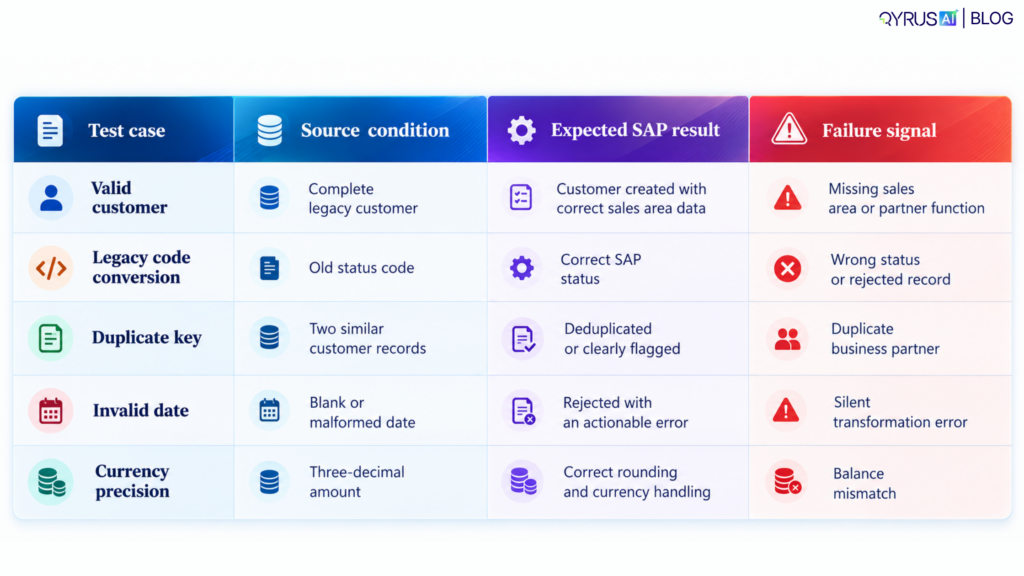
Don’t only test the happy path. Test positive, negative, boundary, null, duplicate, and invalid-code cases. A few concrete examples:
Test case | Source condition | Expected SAP result | Failure signal |
Valid customer | Complete legacy customer | Customer created with correct sales area data | Missing sales area or partner function |
Legacy code conversion | Old status code | Correct SAP status | Wrong status or rejected record |
Duplicate key | Two similar customer records | Deduplicated or clearly flagged | Duplicate business partner |
Invalid date | Blank or malformed date | Rejected with an actionable error | Silent transformation error |
Currency precision | Three-decimal amount | Correct rounding and currency handling | Balance mismatch |
The last column matters most. “Silent” failures, where the load succeeds and the value is wrong, are the ones that reach production.
Phase 3: Validate before you load
Why wait for SAP to tell you a tax code is bad? Validate files before they go in: required fields present, permitted values only, correct formats, valid master-data references, no duplicate keys, no orphaned relationships, and correct file structure and record counts.
The recommended rhythm is to test representative samples before the full load, then run the same validation suite on every later tranche and keep the reconciliation evidence. During loading, watch for rejected, skipped, and partially processed records. They’re the quiet ones.
Catching a bad tax code before load costs minutes. Chasing a financial mismatch after cutover costs days.
Phase 4: Reconcile after every load (the heart of the whole thing)
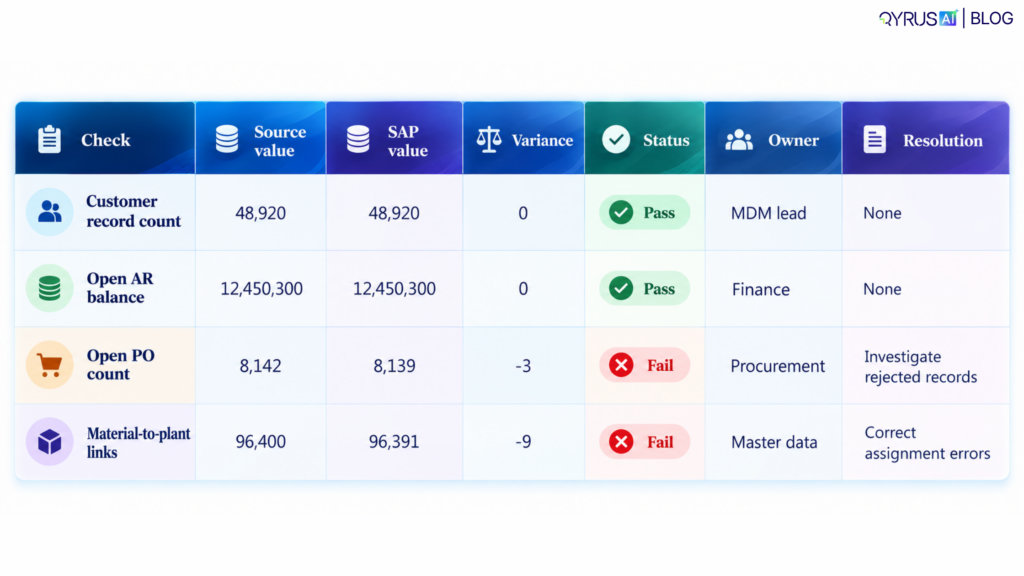
Reconciliation is where you stop asking “did it load?” and start asking “does it add up?” Do it in layers:
- Extracted versus transformed records
- Transformed versus accepted records
- Accepted versus SAP-created records
- SAP-created records versus the business records you expected
Then remove what your business cares about, not only the grand total: company code, plant, sales organization, customer group, material type along with document type, and fiscal period. A total can match while one plant is badly wrong, because errors cancel out.
To prove your data is actually trustworthy, rely on two simple but powerful tests:
Check the Row Counts
This is the easiest way to catch missing data. If you moved 1,000 records, make sure 1,000 records arrived.
Check the Totals
Row counts tell you if data is missing, but totals tell you if the numbers are actually correct. This catches hidden math errors that a simple row count will miss.
What totals should you check?
Look at your open customer and vendor balances, your overall financial trial balance, inventory amounts, open sales and purchase orders, and the value of your company assets.
How strict should you be?
For your core financial records (like the general ledger), you need a 100% perfect match. There is no room for error when it comes to the money.
For other data, like customer or material records, a tiny difference (1% to 2%) might be acceptable if your business rules explain it. Use this as a starting point to set your own “go or no-go” rules for the project.
Don’t just do this once.
Run these checks every single time you move data. Doing this repeatedly helps you spot repeating mistakes and fix them early. Even SAP’s official advice is to compare the record counts from your migration logs against the final system, and do quick spot-checks in the actual screens where your team works.
That table is more than a report. It’s the paper trail your auditors, your finance lead, and your steering committee will want when someone asks, “How do we know?”
Phase 5: Test the relationships
Referential integrity is where many migrations quietly fail, because an orphaned record often doesn’t stop a load. It just waits until someone tries to invoice, procure, or close the period.
The rule is simple: every child record must resolve to an existing parent. In practice, that means checking that:
- Every sales order has a valid customer
- Every invoice line has a valid header
- Every material has valid plant and valuation data
- Every cost center maps to a valid controlling area
- Every business partner has the right customer, vendor, or dual-role assignment
- Ship-to, bill-to, and payer relationships are set up correctly
These are the relationship checks that testing teams flag as the ones most often missed. Always explain them by their business consequence: not “foreign key violation,” but “this customer can’t be invoiced.”
Phase 6: Prove the data works in real processes
Here’s the plot twist for the technical team: reconciliation can pass and the business can still be stuck. Data that matches may not support the process.
That’s why business owners should confirm data integrity against records they know well, after the technical reconciliation. Run the critical flows end to end: order to cash, procure to pay, record to report, plan to produce, and hire to retire if HR data is moving.
After each load, run quick smoke tests:
- Can a user display a migrated customer?
- Can finance see the correct open item?
- Can procurement process an open PO?
- Can the warehouse see the right stock?
- Can the business run a key report and match source totals?
Who owns this? Technical teams can prove the load worked. Only business users can confirm the data supports their decisions and processes. Write that split into the plan on day one.
Phase 7: Rehearse with mock migrations
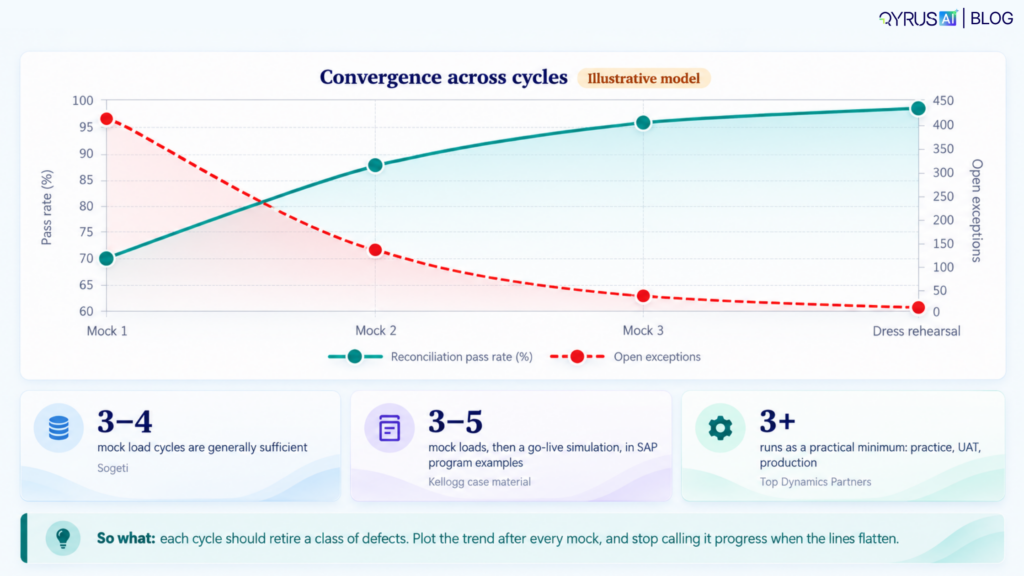
Nobody moves a hospital on the first try. You practice. In SAP, that practice is the mock migration, and the guidance is consistent: 3–4 mock load cycles are generally sufficient, with data accuracy and loaded volumes rising each time. SAP programs often plan 3–5 mock loads followed by a go-live simulation, and another practitioner benchmark treats at least three migration runs (practice, UAT, and production) as the minimum.
Automation doesn’t replace judgment. It buys you time for it. When counts and balances check themselves, your experts can spend the cutover window on the questions only they can answer.
The trick is to give every cycle a job and an exit criterion, so “we ran another mock” becomes “we proved something”:
Cycle | What it proves | Data scope | Exit criteria |
Mock 1 | Extraction, mapping, and load mechanics work | Subset or uncleaned representative data | Load completes; major mapping defects found |
Mock 2 | Cleansing, transformation, and reconciliation work | Larger cleansed, transformed dataset | Counts, balances, and key fields reconcile |
Mock 3 | Full-volume performance and dependencies hold | Full or near-full production-like data | Load time, error rate, and exception handling meet targets |
Dress rehearsal | The cutover runbook and rollback work | Full data under timed cutover conditions | Runbook executed; sign-offs complete; rollback tested |
Use fresh, production-like data each time, because test precision improves when the test system resembles production. And measure progress: error rate, load time, repeat failures, exception aging, reconciliation pass rate, and sign-off status. Falling error rates and faster loads from cycle to cycle are how you know you’re converging on a safe cutover.
Every team has the same instinct when a date slips: cut testing to save time. The numbers point the other way. Late data problems are what stretch the timeline, and each one costs more to fix than it would have a cycle earlier
Validation isn’t overhead. It’s insurance.
It’s tempting to see all this testing as the thing that slows a project down. The numbers suggest the opposite.
When data migration delays SAP projects, overruns commonly land at 10–25% of planned time, and nearly a third reach up to 50%. More than 60% of S/4HANA projects exceeded their budgets. Meanwhile, practitioner benchmarks suggest data migration can take 40–60% of an ERP project timeline, and in one rigorous methodology, testing accounted for 60–80% of total project effort.
Read those as directional figures from specific methods, not industry averages. The point stands either way: validation is already where much of the effort goes, so the real question is whether that effort is repeatable and automated or manual and repeated.
Seen that way, validation is insurance against delay, rework, restatement, and a rocky post-go-live stabilization.
What to automate first
Don’t try to automate everything. Start with the checks that repeat every cycle and run on high volumes:
- Source-to-target record counts
- Financial balance reconciliation
- Key-field comparisons
- Duplicate detection
- Orphaned-reference detection
- Rejected-record tracking
- Anomaly detection for blank clusters, invalid dates, and outliers
These map to the repeatable checks that automated validation tools cover: record counts, completeness, transformation logic, schema mapping, referential integrity, business rules, duplicates, and reconciliation.
What’s the payoff? One validation-automation study reported a 70–80% reduction in manual effort, cutting roughly 800 manual testing hours to 88, an 84% reduction. It was a small-scale experiment, so your results will vary with data complexity and test coverage. But the direction is hard to argue with when you’ll run the same suite three or four times.
Keep people responsible for the judgment calls: interpreting business rules, deciding what to do with exceptions, reviewing critical samples, giving functional acceptance, and making the final go/no-go decision. Automation tells you what differs. People decide what it means.
What Should an SAP data migration testing checklist include?
Before migration
- Data sources inventoried and owners assigned
- Legacy data profiled and issues categorized
- Cleansing rules approved
- Mapping documents under version control
- Reconciliation rules defined
- Test environment loaded with production-like data
During migration
- Extraction counts validated
- Transformation rules tested
- Rejected and skipped records tracked
- Load performance measured
- Duplicate prevention verified
- Error files reviewed and reprocessed
After migration
- Record counts reconciled
- Financial and operational control totals reconciled
- Key fields spot-checked
- Referential integrity validated
- Critical transactions executed
- Business users signed off
- Exceptions documented with owners and deadlines
Before go-live
- Critical defects resolved or formally accepted
- Reconciliation evidence archived
- Cutover runbook rehearsed
- Rollback and correction procedures tested
- Hypercare and data-issue triage ready
Nine mistakes that show up again and again
- Treating a successful load as validation. It’s a delivery notification, not an inspection.
- Reconciling only record counts. Totals and relationships matter just as much.
- Testing with tidy sample data instead of production-like data.
- Running too few mock migrations.
- Leaving data-quality ownership undefined.
- Ignoring rejected or partially processed records.
- Checking technical fields but not business outcomes.
- Starting validation after the load instead of during profiling and transformation.
- Losing source-to-target traceability, which you’ll need for audits and defect analysis.
Most of these trace back to the same root: validation treated as a final step rather than a thread through the whole program.
Where QyrusAI fits
Everything above comes down to one thing: running the same rigorous checks, again and again, across mock cycles, without burning out your team.
QyrusAI brings SAP testing and data testing into one platform. Its AI-driven SAP testing helps teams focus on the processes that are critical, changed, or complex. Its platform-agnostic data validation lets you build counts, completeness, and reconciliation checks once and rerun them every cycle. And with no-code authoring, business users can take part in validation, not just the technical team.
The bottom line
A successful load tells you the data arrived. It doesn’t tell you the data is right.
The teams that go live with confidence aren’t the ones with the fewest problems. They’re the ones who found their problems early, in rehearsal, with evidence, while fixing them was still cheap. They profiled before they mapped, reconciled after every load, tested relationships as well as records, handed business users a seat in validation, and treated every mock migration as a chance to prove something.
The real go-live question was never “did the data load?” It’s “can we safely run the business on this?” With the right evidence, you can answer it.
Ready to make that answer easier? Sit with us to see how QyrusAI can help you validate SAP data integrity across every mock cycle and go live with proof, not hope.
FAQs
How do you validate data integrity after an SAP migration?
What’s the difference between data validation and reconciliation?
How many mock migrations should we run?
Should validation be manual or automated?
What data should be reconciled in an S/4HANA migration?
Stay Ahead, Stay in the Loop with QyrusAI!
One Platform for Modernization, Quality Assurance and Intelligent IT Operations.

 October 28, 2026
  17 min