
V6.13.0 (November 2025 Release)
Welcome to our November update! As we approach the end of the year, our mission to simplify and supercharge your testing lifecycle continues with renewed vigor. In November, we’ve focused on removing the friction between your tools and your goals, delivering enhancements that offer greater visibility, deeper ecosystem integration, and a more personalized AI experience.
In November, we are bridging critical gaps in your workflow. We’ve made reporting clearer with context-rich screenshots, streamlined test creation with instant cURL imports, and empowered enterprise teams by unlocking full Test Suite executions directly within Xray. Plus, our AI algorithms are now smarter than ever, capable of leveraging memory to adapt to your specific context. These updates are all about giving you the clarity and control you need to test with confidence.
Let’s dive into the powerful new features available on the Qyrus platform in November!
Improvement
Context is King: Step Descriptions Now Label Your Screenshots!
The Challenge:
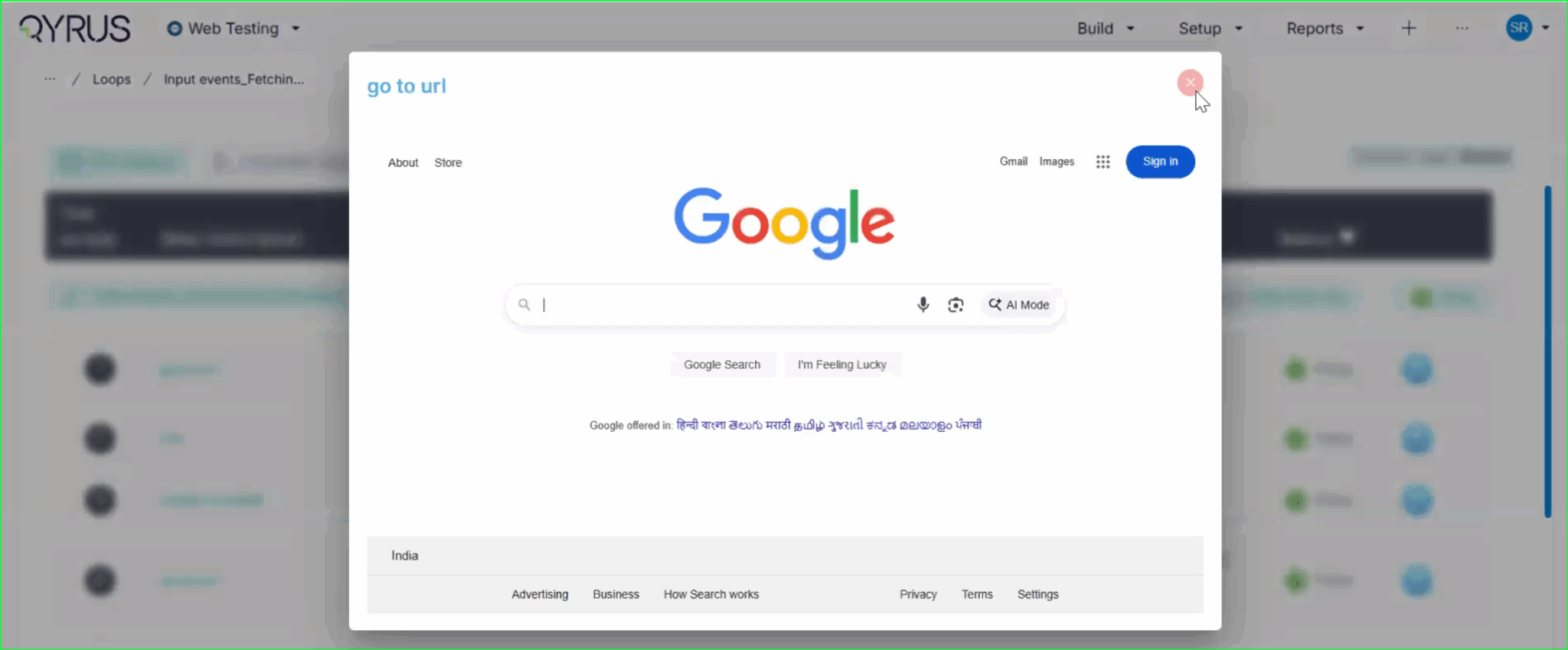
Previously, screenshots in execution reports were labeled with a generic “Screen Shot” tag. This forced users to constantly cross-reference the image with the test log to understand exactly what action was being captured in that specific frame, making the review process slower and less intuitive.
The Fix:
We have updated the reporting engine to replace the generic “Screen Shot” label. Now, the specific step description (e.g., “go to url”) is automatically displayed directly on the top left of every screenshot in the report.
How will it help?
This enhancement provides immediate context for every visual in your report. You can now browse through screenshots and instantly understand the specific test action being depicted without needing to look elsewhere. This significantly improves report readability, reduces cognitive load, and speeds up the debugging and review process.
Improvement
No More Toggling: View Recorded Locators Instantly on the Step Page!
The Challenge:
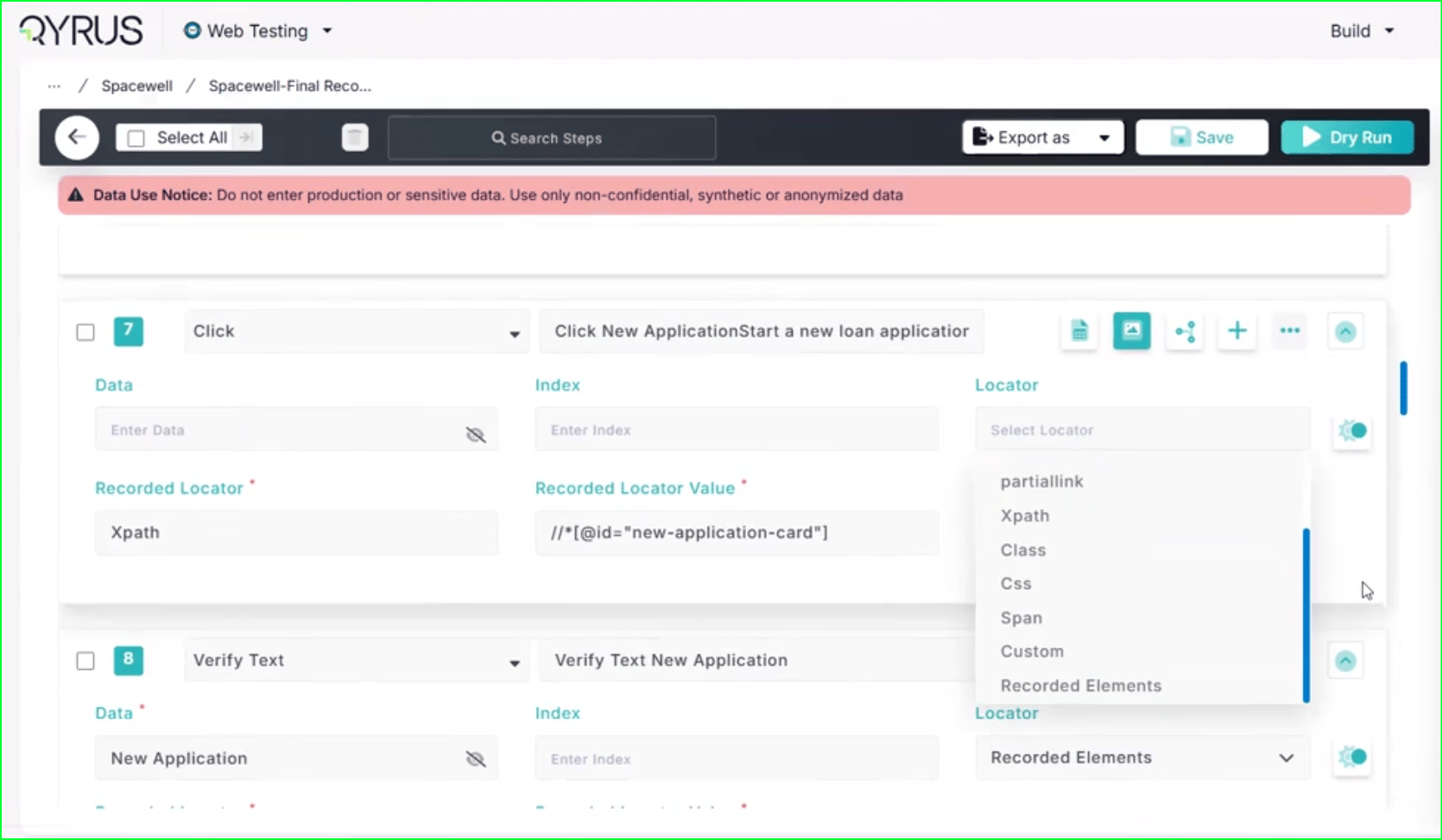
Previously, after using the Qyrus Recorder to capture a test flow, the specific locator values (like XPaths or CSS selectors) were not immediately visible on the main test step page. To view or verify these locators, functional testers found it cumbersome to have to re-enter “record mode” via the Encapsulate Chrome extension, disrupting their workflow just to check technical details.
The Fix:
We have updated the Qyrus Recorder with improved locator detection and data handling. Now, after recording a session, all captured locator values are immediately populated and visible directly on the step page within the Qyrus platform.
How will it help?
This update significantly streamlines the script review and validation process. You no longer need to switch back and forth between the platform and the recorder extension just to see how an element is being identified. This gives functional testers and automation engineers instant visibility into their test logic, making it faster and easier to verify scripts and ensure the correct elements are being targeted.
Scale Your Xray Testing: Suite Execution Now Supported!
The Challenge:
Previously, our integration with Xray was limited to triggering single test scripts. This created a workflow bottleneck for teams who needed to execute larger batches of tests or full regression sets, as there was no capability to launch a complete Test Suite directly from the Xray interface.
The Fix:
We have upgraded our Xray integration to fully support Test Suite execution. Users can now trigger the execution of entire suites from within Xray with the same ease and simplicity as running a single script.
How will it help?
This update allows you to significantly scale your testing efforts directly from your test management tool. You are no longer restricted to triggering scripts one by one; instead, you can launch comprehensive test suites in a single action. This streamlines your execution workflow, ensuring that your Xray-driven testing is as efficient and powerful as your needs demand.
New Feature
Copy, Paste, Done: Import APIs Instantly with cURL!
The Challenge:
Creating API tests manually can be a tedious process of copy-pasting individual components—headers, bodies, URLs, and methods—from your documentation or browser developer tools into the test platform. This manual reconstruction is not only slow but also increases the risk of transcription errors, leading to frustrated testers and broken initial tests.
The Fix:
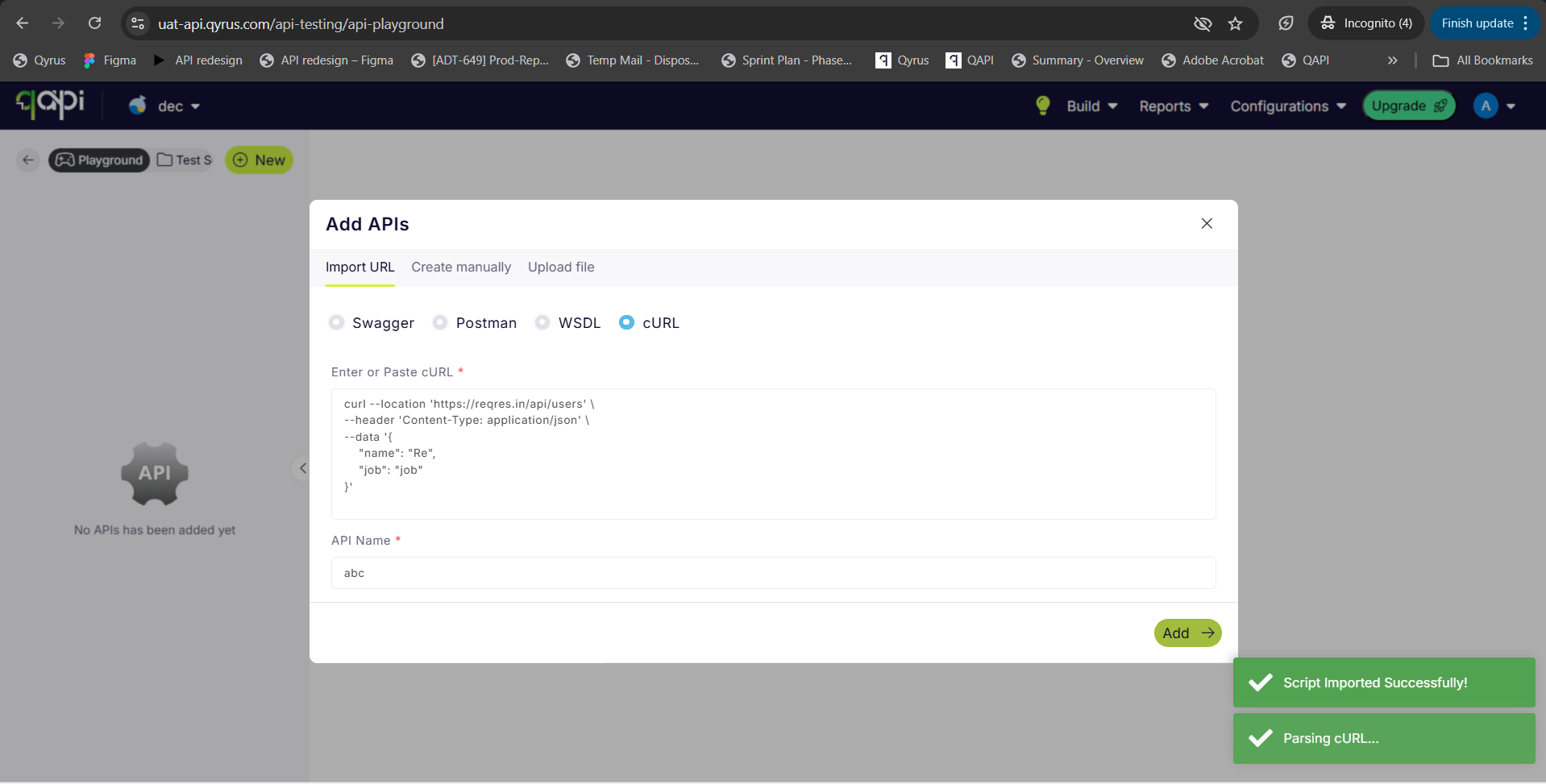
We have introduced a new “Import via cURL” option in the API creation workflow. You can now simply paste a raw cURL command directly into Qyrus. The system will automatically parse the command and instantly create a fully configured API test with all the correct parameters, headers, and body content mapped for you.
How will it help?
This feature is a massive time-saver that bridges the gap between development and testing. Developers and testers often have cURL commands readily available (from API docs or network logs). By allowing direct import, we eliminate the manual data entry, ensuring your API tests are set up instantly and accurately, exactly as they were defined in your cURL command.
New Feature
AI That Remembers: Enhanced Algorithms Now Access User Memory!
The Challenge:
Previously, while our AI algorithms were powerful, they often operated in isolation for each interaction. Without access to a persistent memory of past preferences, specific project contexts, or user-defined constraints, the AI could sometimes provide generic suggestions or require users to repeatedly provide the same background information, slowing down the workflow.
The Fix:
We have rolled out significant enhancements to all our AI algorithms. For users who have opted into the memory feature, these algorithms can now securely access and utilize stored context and preferences.
How will it help?
This upgrade makes your AI interactions significantly smarter and more personalized.
- Reduced Repetition: The AI remembers your specific constraints and preferences, so you don’t have to repeat them.
- Better Suggestions: Whether generating test data or building scenarios, the AI now understands your unique context, leading to more relevant and accurate results.
- Seamless Workflow: Experience a more continuous and intelligent partnership with the platform, as the AI learns and adapts to your specific way of working over time.
Ready to Accelerate Your Testing with November Upgrades?
We are dedicated to evolving Qyrus into a platform that not only anticipates your needs but also provides practical, powerful solutions that help you release top-quality software with greater speed and confidence.
Curious to see how these October enhancements can benefit your team? There’s no better way to understand the impact of Qyrus than to see it for yourself.