Qyrus Named a Leader in The Forrester Wave™: Autonomous Testing Platforms, Q4 2025 – Read More

Enterprise retailers are running $6.3 trillion worth of digital commerce on software quality models that were designed for a world of annual releases and monolithic applications. That world is gone. The gap between how retailers test their platforms and how customers experience them is no longer a technical problem — it is a revenue problem. 

This whitepaper maps the exact cost of that gap, and the three-layered path to closing it — from AI-powered full-spectrum testing across Web, Mobile, API, Data, and SAP, through to fully autonomous quality with the SEER framework. With Forrester TEI data, retail-specific scenarios, and a 12-month implementation roadmap included.

What’s Inside the Whitepaper? 

This is not a product brochure. It is a board-ready business case, built from Forrester TEI data, retail-specific failure scenarios, and a concrete implementation roadmap — designed to be shared with your CIO, CFO, and the engineering leaders who will execute the strategy. 

  • How distributed commerce architecture creates invisible, revenue-destroying failure points — and why traditional QA misses every one of them. 
  • The three structural gaps in legacy QA: maintenance debt, siloed channel testing, and synthetic load tests that don’t reflect peak-season reality. 
  • Full-spectrum AI testing across Web, Mobile, API, Data, and SAP — progressing to omnichannel orchestration and SEER autonomous testing. 
  • 3× faster test cycles, 80% maintenance reduction, and 200%+ ROI — what the numbers say and how to use them with your CFO. 
  • Why headless commerce creates seam failures that traditional UI testing never catches — and how contract testing closes the gap. 
  • A phased implementation plan with clear KPI targets at each stage — built to deliver measurable ROI before the transformation is complete. 

What the world’s most resilient retailers do differently.  

These are the six quality engineering principles that separate retailers who dominate peak season from those who post apology banners on their homepage. 

  • Test generation happens in the same sprint as feature development — not the next one. AI tools like NOVA generate test scripts from requirements, so QA is never the bottleneck before release. 
  • Validate complete customer transactions — mobile cart to web checkout, loyalty points earned in-app to POS redemption in-store. Siloed channel testing misses every cross-system failure that customers actually experience. 
  • Your payment gateway, logistics API, and tax engine all update on their own schedules. Contract testing catches schema drift before it becomes a checkout outage — without triggering real financial transactions. 
  • Stale inventory counts, mismatched pricing records, and broken personalization pipelines are not back-office problems. They are customer-facing failures. Validate data pipelines with the same rigor as your UI. 
  • Continuously run synthetic tests of your core purchase journey 24/7 — not just in the run-up to peak. Golden Path monitoring catches regression the moment it is introduced, not after it reaches customers during Black Friday. 
  • Self-healing test automation is the end-state — not a nice-to-have. Autonomous frameworks like SEER eliminate the maintenance tax entirely, freeing QA teams to focus on coverage expansion rather than script repair. 

Every millisecond of latency, every broken API, and every disjointed cross-channel moment is a direct withdrawal from your brand’s equity. The retailers who will lead the next decade are those who treat quality engineering as a capital investment in growth — not a checkbox before release. 

Featured image-10 Bottlenecks blocking test automation

Most test automation programs start strong. A few hundred tests, fast feedbackand streamlined CI pipelines. Eventually, the landscape shifts. The suite grows, the team grows, the product grows, and suddenly every merge takes 90 minutes to validate, engineers spend more time fixing broken tests than writing new ones, and QA has quietly become the bottleneck it was always meant to eliminate. 

This is not a tooling problem. It is an architecture, process, and prioritization problem. And it is extremely common. 

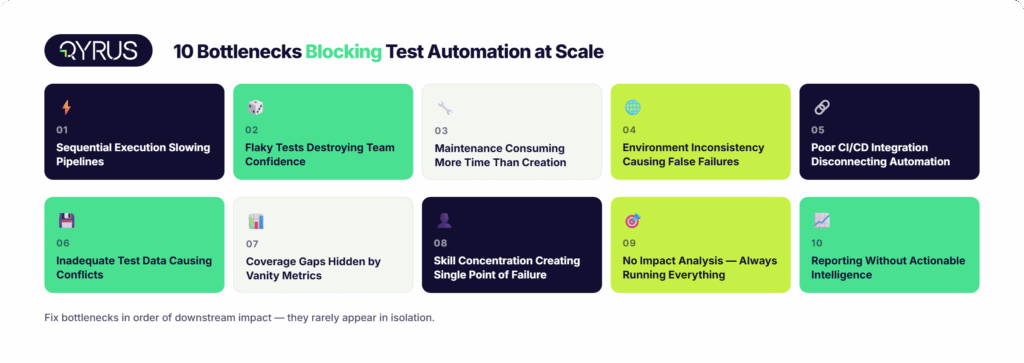
This post maps out the 10 most common bottlenecks that block teams from scaling test automation platforms effectively — with the symptoms to recognize them early, the root causes beneath the surface, and practical fixes QA leaders, test automation leads, and DevOps engineers can apply now. 

Bottleneck 1: Sequential Test Execution Stifling Pipeline Velocity 

Symptom 

Your full regression suite takes 60, 90, or 120+ minutes to complete. Developers stop waiting for results and merge anyway. 

Root Cause 

Tests run one after another in a single thread. This worked fine at 50 tests. It does not work at 500 or 5,000. Sequential execution is not a deliberate choice at this point. Instead, it represents architectural debt from the suite’s early stages. 

When CI feedback takes longer than a coffee break, engineers decouple from test results mentally. They start merging on gut feel, which defeats the entire purpose of automation. 

Fix 

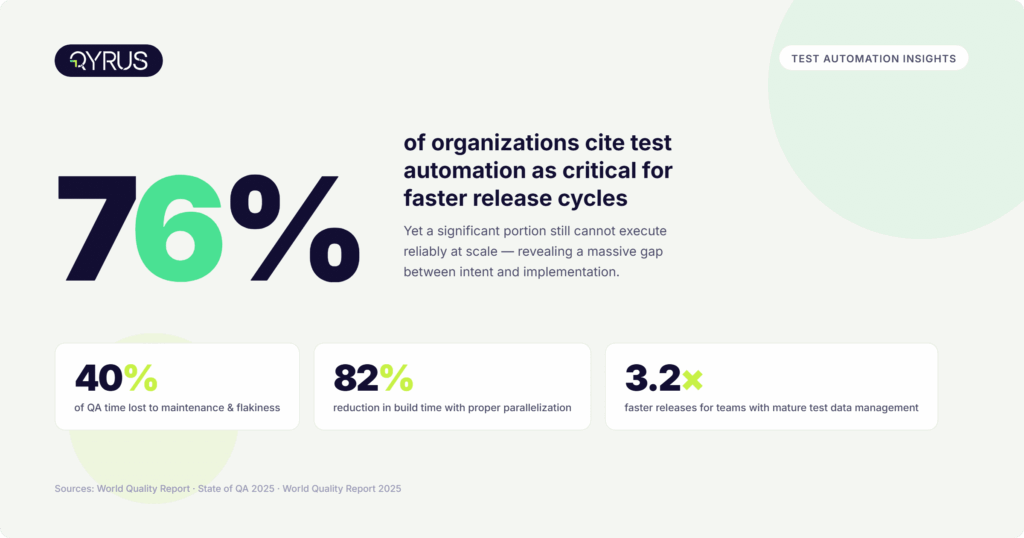
Implement parallel test execution. Distribute tests across multiple agents, containers, or cloud nodes so that independent tests run simultaneously. A test suite that runs sequentially in 45 minutes can complete in under 8 minutes with proper parallelization. This represents an 82% reduction in build time. 

Start by identifying tests that share no state or data dependencies and split those into parallel streams. Add test sharding and dynamic load balancing as the suite matures. For teams running cross-browser or cross-device validation, a cloud-based browser and device farm eliminates queue bottlenecks without maintaining physical hardware. 

 Bottleneck 2: Flaky Tests Destroying Team Confidence 

Symptom 

Tests pass locally but fail in CI. The same test fails on Monday and passes on Tuesday with no code changes. Developers add retry flags and move on. 

Root Cause 

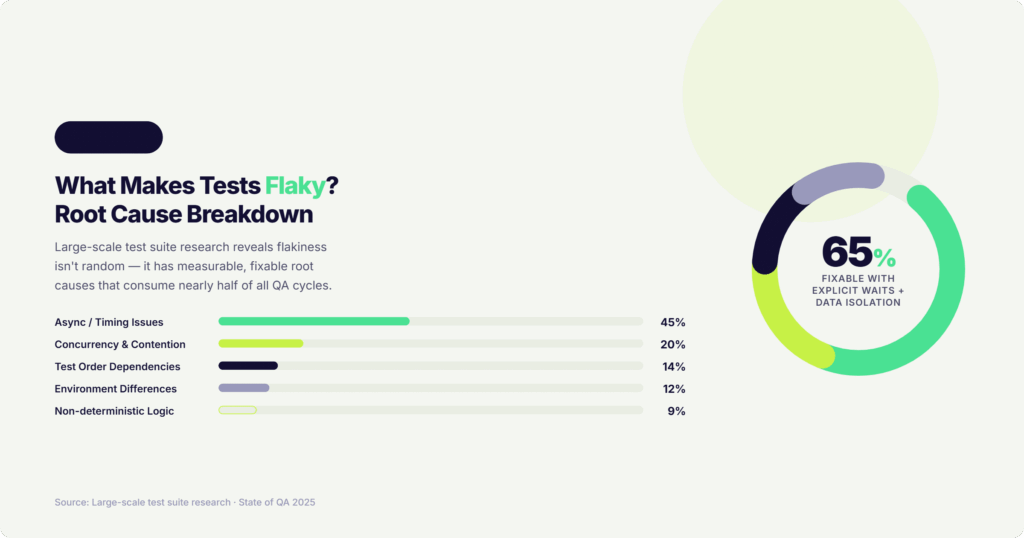
Research on large-scale test suites consistently shows that async wait and timing issues account for roughly 45% of flaky tests. Concurrency and resource contention cause 20% more. The remainder splits between test order dependencies, environment differences, and non-deterministic logic. 

Retrying a failing test is the instinctive response — but retries inflate CI duration and, more damagingly, train teams to normalize failure. Eventually developers stop acting on red builds because they cannot distinguish noise from signals. The safety net becomes wallpaper. 

Fix 

Treat flakiness as a first-class engineering concern, not a QA nuisance. Instrument your CI pipeline to detect and quarantine flaky tests automatically. Replace hard-coded sleeps with explicit waits. Isolate test data so runs do not interfere with each other. 

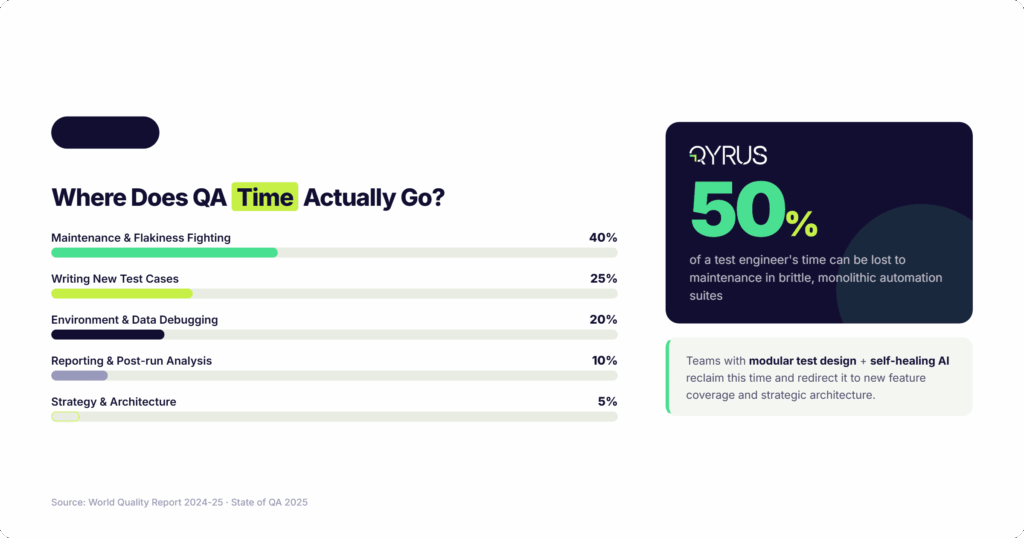
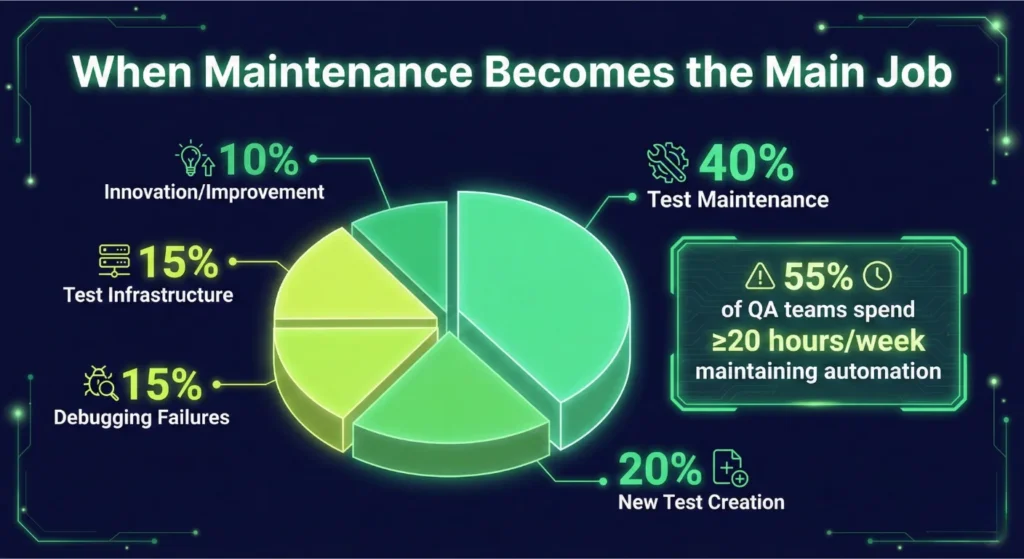
Stat: Test maintenance, including fighting flakiness, consumes roughly 40% of QA team time. (State of QA 2025) 

Self-healing test capabilities, where AI automatically identifies updated locators when UI elements shift, directly address the most common root cause of brittleness in web and mobile automation. 

Bottleneck 3: Test Suite Maintenance Consuming More Time Than Test Creation 

Symptom 

The sprint backlog is dominated by ‘fix broken test’ tickets. New feature coverage is falling behind because automation engineers are busy repairing old scripts. 

Root Cause 

Automation suites function as dynamic ecosystems. Applications change constantly — new UI components, refactored flows, updated APIs. Every change is a potential break. Without modular architecture, a single UI update can cascade into dozens of failing tests that each need individual repair. Up to 50% of a test engineer’s time can be consumed by maintenance in organizations running brittle, monolithic, script-based automation. 

Fix 

Modular test design is the highest-impact structural change a team can make. Encapsulate reusable flows — authentication, checkout, navigation — into shared components. When a flow changes, update the component once and all tests using it inherit the fix automatically. 

Pair this with a regular test audit cadence. Retire tests that cover functionality no longer in production. Flag tests with a consistent failure rate above a set threshold for triage. A lean, reliable suite beats a sprawling, brittle one at any scale. 

Bottleneck 4: Test Environment Inconsistency Causing False Failures 

Symptom 

Tests pass in staging, fail in QA, and behave unpredictably in CI. Environment differences account for a large share of investigation time that yields no actual bug. 

Root Cause 

Configuration drift. Development, staging, QA, and production environments diverge over time — different versions of dependencies, different database states, and different environment variables. Tests written against one configuration quietly break in another.  The failure does not stem from the test logic but from an undefined environment state. 

Fix 

Adopt Infrastructure-as-Code (IaC) to define environments programmatically and keep them consistent across every pipeline stage. Use containerization (Docker) to replicate production configuration during testing. Define environment-specific variables in your test platform rather than hardcoding them into scripts, so the same test can execute across multiple environments without modification. 

Bottleneck 5: Poor CI/CD Integration Leaving Automation Disconnected from Delivery 

Symptom 

Tests are triggered manually or on a schedule, rather than on every code push. Feedback arrives hours after a change, not minutes. Developers have already moved on by the time results land. 

Root Cause 

Test automation and CI/CD pipelines exist in separate silos. The tools are not wired together — either integration was never built, or it was built poorly, with no intelligent gate logic, no notification routing, and no pass/fail criteria tied to deployment decisions. 

Fix 

Native CI/CD integration is non-negotiable for scaling test automation platforms. Connect your test suite directly to your pipeline so every code commit triggers the appropriate test subset automatically — unit tests on every push, integration tests on every PR, full regression on merge to main. Build quality gates that block promotion based on test outcomes. 

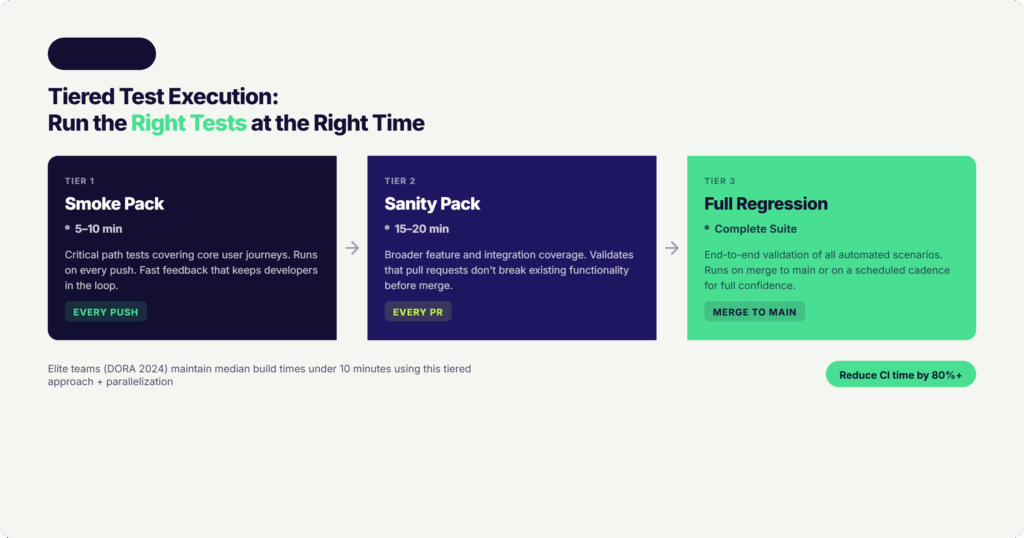
Stat: The DORA State of DevOps Report 2024 identifies test parallelization and CI/CD integration as the top techniques separating elite engineering teams from the rest, with elite teams maintaining median build times under 10 minutes. 

Bottleneck 6: Inadequate Test Data Management Causing Hard Dependencies and Conflicts 

Symptom 

Tests fail because required test data does not exist, is stale, or was consumed by a previous run. Setting up data for a new scenario takes days. Parallel runs corrupt each other’s data. 

Root Cause 

Test data is treated as an afterthought rather than a managed resource. Teams either copy production data (fragile and non-compliant) or rely on manually created datasets that go stale as the application changes. At scale, a shared data pool becomes a contention point — parallel test runs race to read and modify the same records, producing unpredictable results. 

Stats: 45% of respondents have 3–10 copies of each production dataset in non-production environments. (2025 State of Data Compliance and Security Report) | Teams with mature TDM practices release 3.2x faster than those without. (World Quality Report 2025) 

Fix 

Invest in parameterized, data-driven test design where each test scenario pulls from its own isolated dataset rather than a shared pool. Use synthetic data generation to create realistic, compliant datasets on demand — no production data copies required. Build data provisioning into the CI pipeline so the right data is ready before tests execute. 

Bottleneck 7: Coverage Gaps Hidden by Vanity Metrics 

Symptom 

Automation coverage is reported at 80%+, but production defects keep slipping through. Post-mortems reveal the tested paths were not the ones that failed. 

Root Cause 

Coverage metrics measure which lines of code or test cases have been automated — not which business-critical flows have been validated end-to-end. Teams optimize for the metric rather than the outcome. Common side effects: over-automation of low-risk UI interactions, under-automation of API layers and backend integrations, and zero coverage of edge cases that only emerge under real load. 

Fix 

Reframe coverage as business process coverage, not code coverage. Map your most critical user journeys — registration, checkout, onboarding, payment processing — and confirm each one has complete automated validation from the API layer through the UI. Run exploratory test tools alongside scripted automation to surface untested pathways that scripted tests cannot reach by design. 

Risk-based test selection — prioritizing automation for flows that carry the highest business risk, change most frequently, or have the highest defect history — delivers far more value than maximizing a coverage percentage. 

Bottleneck 8: Skill Concentration Creating a Testing Bottleneck of One 

Symptom 

Only one or two engineers on the team can write or maintain automation scripts. Every new test request joins a queue behind them. Manual testing fills the gap. 

Root Cause 

Traditional automation frameworks require programming expertise — knowledge of Selenium, specific language bindings, locator strategies, and framework architecture. This creates a single-guild dependency where non-technical team members cannot contribute to automation regardless of their functional knowledge. 

Stat: Over 88% of companies report struggling to find, hire, and retain quality automation engineers. (Techstrong Research) 

Fix 

Low-code and no-code test automation directly addresses this bottleneck by making test creation accessible without coding expertise. When a business analyst can build a test from a user story description and a manual tester can record and validate a scenario without writing a single line of code, the creation bottleneck breaks. 

AI-powered test generation goes further — taking a Jira ticket or a natural language use case description and producing 60–80 functional test scenarios automatically. This does not replace automation engineers; it reallocates their focus from test authoring to architecture, tooling, and strategy. 

Bottleneck 9: No Impact Analysis Leading to Always-Run-Everything Cycles 

Symptom 

Every commit triggers the full test suite, regardless of what changed. A CSS fix to the footer runs the payment integration tests. Execution time grows proportionally with suite size. 

Root Cause 

There is no intelligence connecting code changes to test selection. The default is to run everything, always — which is safe in theory but inefficient at scale. As suites grow to thousands of tests, ‘run everything’ becomes a delivery tax paid on every merge. 

Fix 

Implement test impact analysis to identify which tests cover the code changed in a specific commit, and run only those instead of the full suite. Organize your suite into fast-feedback layers: 

  • Smoke pack (5–10 minutes) — runs on every push 
  • Sanity pack (15–20 minutes) — runs on every PR 
  • Full regression pack — runs on merge to main or on schedule 

This tiered approach dramatically reduces CI time while maintaining appropriate coverage at each stage. AI-driven impact analysis — examining dependency graphs, historical failure data, and code change patterns — takes this further, delivering higher confidence with a smaller execution footprint. 

Bottleneck 10: Reporting That Produces Data Without Actionable Intelligence 

Symptom 

Test results are available, but no one acts on them quickly. Root cause investigation requires diving through log files, comparing screenshots manually, and tracing failures across multiple tools. Post-run analysis takes longer than the run itself. 

Root Cause 

Reporting is treated as a log dump rather than a communication tool. Results are stored in one system, screenshots in another, CI logs in a third. There is no unified view that tells a developer or QA lead — at a glance — what failed, why it failed, and what the business impact is. 

Fix 

Consolidate reporting into a single, unified view that shows step-level execution details, failure screenshots, console logs, performance metrics, and issue-tracking integration in one place. Step-level granularity — showing exactly which action failed and what the actual versus expected result was — dramatically reduces investigation time compared to high-level pass/fail summaries. 

Build notification routing into your test infrastructure. When a specific workflow fails, the right person should know within minutes, through Slack, email, Teams, or a Jira ticket, with enough context to act without hunting through dashboards. 

Pulling It Together: A Self-Assessment Checklist for QA Leaders 

The ten bottlenecks above rarely appear in isolation. Flaky tests compound slow execution. Poor test data management drives environment inconsistency. Skill concentration blocks the coverage expansion that impact analysis requires. Pick the bottleneck causing the most downstream damage and work forward from there. 

  • Regression runs taking more than 30 minutes? → Start with parallel execution (Bottleneck 1) 
  • Team spending more time on maintenance than creation? → Prioritize modular design and self-healing (Bottlenecks 2, 3) 
  • Environment failures masking real results? → Tackle IaC and configuration management (Bottleneck 4) 
  • CI results arriving too late to influence developer behavior? → Fix CI/CD integration first (Bottleneck 5) 
  • Tests failing because data is missing or conflicting? → Build a test data strategy (Bottleneck 6) 
  • Only one person able to create automation? → Invest in low-code tooling and AI test generation (Bottleneck 8) 

How Modern Platforms Accelerate This Work 

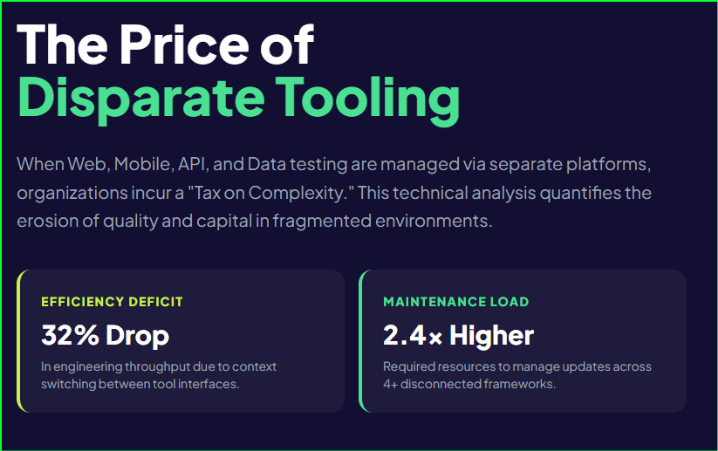
Fixing these bottlenecks is significantly harder with fragmented toolchains — one tool for web automation, another for API testing, a third for CI integration, a fourth for reporting. Every seam between tools is a maintenance burden and an integration risk. 

Modern unified testing platforms are designed to address this architectural fragmentation. Qyrus, for example, brings web, mobile, API, and SAP testing onto a single platform with: 

  • Built-in parallel execution across a cloud browser and device farm 
  • Native CI/CD integrations (Jenkins, Azure DevOps, Bitrise, TeamCity, Concourse) 
  • Self-healing AI (Healer) that automatically repairs broken locators after UI changes 
  • AI-powered test generation (NOVA and TestGenerator+) that creates scenarios from Jira tickets or plain-English descriptions 
  • Parameterization and data-driven testing for isolated, reusable test data 
  • Granular step-level reporting with screenshots, console logs, and performance metrics — all without writing code 

The practical effect: teams can address multiple bottlenecks simultaneously rather than purchasing and integrating point solutions for each one. 

Final Thought 

Scaling test automation platforms is not about running more tests. It is about running the right tests, reliably, fast enough to influence decisions, with low enough maintenance overhead that the suite stays trustworthy as the product grows. 

Each of the ten bottlenecks above represents a point where automation effort exceeds automation value. Removing them — one by one, in order of impact — is how QA teams transform from a delivery gate into a delivery accelerator. 

The teams that get this right don’t just ship faster. They ship with confidence. 

Want to see how Qyrus helps QA and DevOps teams tackle these scalability challenges end-to-end? Book a demo today. 

Featured Image-Top No-Code Test Automation Tools

The Codeless Promise — and Why 2026 Is Different 

QA and test automation leaders are facing a familiar pressure: ship faster, cover more, and do it with the same headcount. Codeless testing was supposed to solve the first two. For many teams, it delivered, up to a point. Then came the maintenance. 

Record-and-playback tools created fragile tests. Every UI change triggered a cascade of broken locators. Engineers who should have been building coverage were instead fixing scripts. The promise of no-code test automation stalled somewhere around 25% automation coverage for most organizations. 

2026 is different. The platforms in this comparison have moved well past record-and-playback, transitioning into what Forrester now defines as “Autonomous Testing Platforms” (ATP) which replaces the traditional ‘Continuous Automation’ category to reflect the shift toward self-healing, agentic orchestration. Agentic AI now handles test creation, failure diagnosis, and self-repair. More importantly, the best platforms have unified web, mobile, and API testing into a single orchestrated workflow — meaning a single test can follow a user journey from a mobile app through an API call to a web confirmation, with session state persisting throughout. 

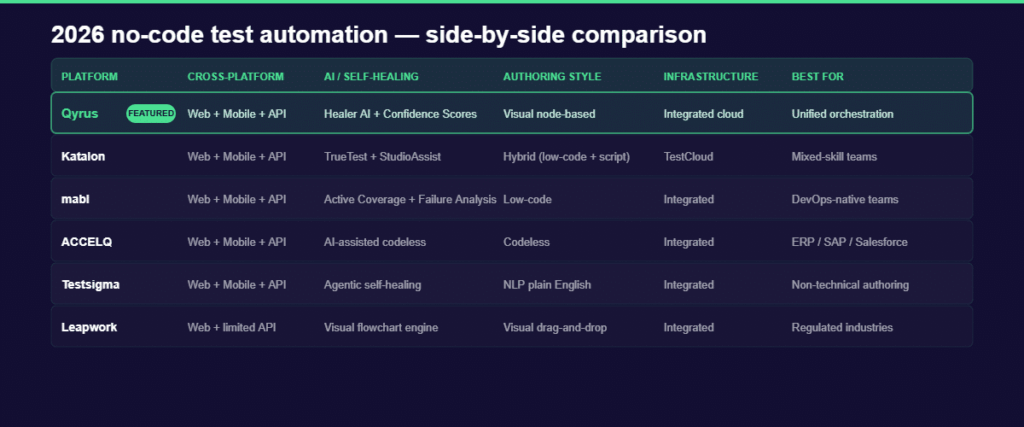
This guide compares six no-code test automation tools including Qyrus, Katalon, mabl, ACCELQ, Testsigma, and Leapwork, across five consistent criteria. The goal is to give QA and test automation leaders a clear, honest basis for a platform decision.  

What to Look for in a No-Code Test Automation Tool in 2026 

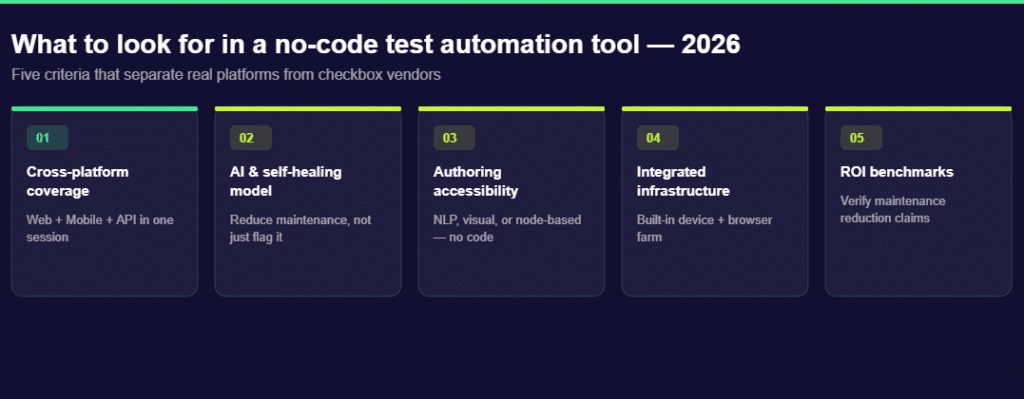
Before comparing platforms, it helps to agree on what matters. The five criteria below reflect what QA leaders consistently cite as the real differentiators, not feature checkboxes, but capabilities that change how a team operates.  

Criterion 

Why It Matters in 2026 

What to Look For 

Cross-platform coverage 

Modern user journeys span web, mobile, and API. Fragmented tools mean fragmented data. 

Single platform that maintains session state across all three channels 

AI and self-healing 

UI changes are constant. Tools that require manual locator fixes add maintenance overhead. 

Automated fix suggestions with human oversight controls 

Authoring for non-technical users 

QA bottlenecks form when only engineers can write tests. Broader authorship = faster coverage. 

NLP, visual node-based, or drag-and-drop interfaces 

Integrated infrastructure 

Third-party device/browser farms add cost, latency, and integration complexity. 

Built-in real device farm and browser grid 

ROI benchmarks 

Licensing costs are only part of TCO. Maintenance hours and ramp-up time are the hidden costs. 

Published customer benchmarks for maintenance reduction and authoring speed 

Keep these five criteria in mind as you move through the comparison. They surface the tradeoffs that vendor marketing typically obscures. 

 The 2026 No-Code Test Automation Tools — Side-by-Side Comparison 

Before the deep dives, here is where each platform stands across the five criteria. Use this as a reference card throughout the article. 

Platform 

Cross-Platform 

AI / Self-Healing 

Authoring Style 

Infrastructure 

Best For 

Qyrus 

Web + Mobile + API 

Healer AI + Confidence Scores 

Visual node-based (no-code) 

Integrated cloud farm 

Unified orchestration 

Katalon 

Web + Mobile + API 

TrueTest + StudioAssist 

Hybrid (low-code + Groovy) 

TestCloud (integrated) 

Teams needing script fallback 

mabl 

Web + Mobile + API 

Active Coverage + Failure Analysis 

Low-code 

Integrated 

DevOps-native engineering teams 

ACCELQ 

Web + Mobile + API 

AI-assisted codeless 

Codeless 

Integrated 

ERP / SAP / Salesforce automation 

Testsigma 

Web + Mobile + API 

 Atto 2.0 (context-aware agentic healer) 

NLP plain English 

Integrated 

Accessibility-first authoring 

Leapwork 

Web + limited API 

Visual flowchart engine 

Visual drag-and-drop 

Integrated 

Regulated industry compliance 

Now let’s unpack what makes each platform worth a closer look — and where they fall short. 

 Qyrus — Best for Unified Cross-Platform Orchestration 

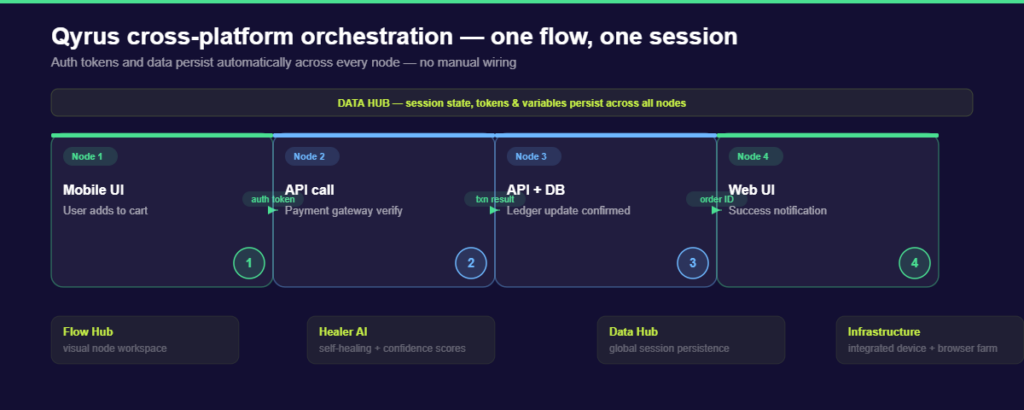
Most codeless testing platforms support web, mobile, and API testing. Fewer of them let those three channels share a single session. That distinction is the core of what Qyrus does differently. 

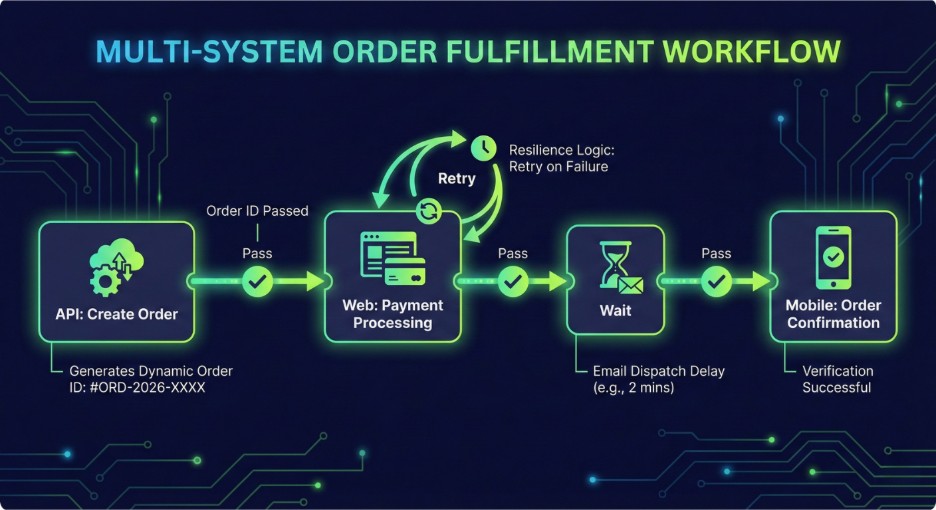
When a test touches multiple systems, a mobile app that triggers an API call that confirms via a web dashboard, most tools require separate projects, manual data exports, and careful re-import of tokens or IDs between stages. Qyrus handles this as a single orchestrated flow. The authentication token from step one is automatically available in step two. The transaction results from step three informs the validation in step four. No manual wiring is required. 
qyrus-flow-hub-diagram

This is the “wiring tax” that Qyrus is designed to eliminate. Here is how the platform’s SEER (Sense, Evaluate, Execute, Report) architecture delivers it: 

AIVerse Agents: Qyrus coordinates a population of specialized Single-Use Agents (SUAs)—such as Uxtract and API Builder —coordinated by the SEER orchestration layer. 

Nova + Healer AI: Nova is Qyrus’ AI layer for test generation. It suggests assertions from UI interactions and can generate test suites from API discovery using a Chrome extension that captures API calls as a user works through the UI. Healer AI handles maintenance: when a locator breaks due to a UI change, it proposes a fix and assigns a Confidence Score. High-confidence fixes can be auto-applied; lower-confidence fixes queue for human approval. 

Beyond testing standard apps, Qyrus is uniquely positioned for the “Agentic Era” by testing the AI itself. It is the only platform in this set that earned a perfect 5.0 from Forrester for testing RAG pipelines and agentic tool calling, capabilities essential for enterprises building and validating their own AI-infused applications. 

Integrated infrastructure: Qyrus includes a real device farm and browser cloud within the platform; no separate Sauce Labs or BrowserStack subscription required. For teams testing at scale, this removes one integration dependency from the stack. 

On ROI, Qyrus reports a 150% efficiency boost for a banking client as validated in a Forrester TEI study showing a 213% ROI with payback in under six months. Those numbers are worth pressure-testing in a proof of concept, but they reflect the platform’s core pitch: replacing multiple fragmented tools with one orchestrated environment lowers total cost of ownership even when the per-seat licensing looks comparable. 

Qyrus is the right choice for QA teams that need to test complex, multi-system user journeys and want to do it without specialized automation engineers gluing tools together. If your testing environment is primarily single-channel — web only, or mobile only — the orchestration depth may be more than you need. 

Want to see Qyrus handle your specific cross-platform testing environment? Request a demo. 

Katalon — Best for Teams That Still Need a Script Fallback 

Katalon has come a long way from its origins as a Selenium wrapper. By 2026, it has matured into the Katalon True Platform, a full quality management system with a credible AI generation story and one of the most capable mobile testing suites in this comparison. 

The standout addition in recent versions is TrueTest: a capability that ingests real user session recordings from production and auto-generates corresponding test cases. Instead of QA engineers manually mapping test scenarios, TrueTest continuously expands coverage based on how actual users interact with the application. It shifts the coverage conversation from “how many tests have we written” to “how much of real user behavior is covered.” 

For mobile testing specifically, Katalon’s live testing features are genuinely advanced. Biometric authentication simulation, GPS and IP geolocation, camera image injection, and network throttling across 2G, 3G, and LTE — these are capabilities that matter when you are testing applications with location-aware features or connectivity-dependent behaviors. 

The honest limitation is Groovy. For complex test logic including conditional flows, custom data manipulation, edge-case assertions, Katalon still routes teams through its Groovy/Java scripting editor. For organizations with technical QA engineers, this is a feature: a scripting fallback when the visual interface hits its limits. For organizations trying to enable business analysts or product managers to write tests independently, it is a bottleneck. The platform is genuinely hybrid, which means it serves mixed-skill teams well and fully non-technical teams less so. 

Katalon is the right choice for QA teams with a mix of technical and non-technical testers, particularly those who have existing Selenium or Appium experience they want to preserve alongside newer AI-assisted authoring. 

mabl — Best for DevOps-Native Engineering Teams 

mabl has built its identity around one principle: serving as an “independent quality reviewer” for AI-coding-agent output. In 2026, that positioning has deepened into a full agentic platform with the strongest developer experience in this comparison. 

The most concrete expression of this is mabl’s MCP Server integration, which lets developers interact with the platform directly from their IDE or terminal. Combined with its native Jira integration via Atlassian Rovo, where mabl can generate test cases from Jira tickets automatically, the result is a testing platform that lives inside the development workflow rather than alongside it. 

Two capabilities stand out for QA leaders evaluating mabl. Active Coverage means tests evolve automatically as the application UI changes: mabl detects the change, updates the affected tests, and keeps the suite current without manual intervention. Failure Analysis classifies failures before a human investigates, distinguishing genuine regressions from application changes and environmental noise. In high-velocity CI pipelines where flaky tests erode trust in automation, this classification step saves significant engineering time. 

For mobile testing, mabl’s Visual Assist finds elements based on visual appearance rather than underlying code. When a mobile layout shifts — a button moves, a form reorganizes — Visual Assist adapts because it reasons about what the element looks like and what it does, not what its ID is. 

The limitation to flag honestly: mabl is optimized for developer-QA collaboration in agile teams. Business analysts or non-technical stakeholders who want to author tests independently will find mabl’s interface less accessible than Qyrus’s node-based approach or Testsigma’s NLP authoring. If “democratizing test creation to non-engineers” is a strategic goal, mabl is not the primary tool to get there. 

mabl is the right choice for engineering organizations where QA and development share tooling, the CI/CD pipeline runs fast, and the priority is autonomous test maintenance over test authoring accessibility. 

ACCELQ, Testsigma, and Leapwork — At a Glance 

Three more platforms round out the 2026 no-code test automation landscape, each with a clearly defined niche. For most web, mobile, and API testing environments, the comparison above is the core decision. But for specific use cases, one of these three may be the right fit. 

ACCELQ — Best for ERP and Complex Business Process Automation 

ACCELQ is built for organizations where the application under test is a complex enterprise system: SAP, Salesforce, Oracle, or a custom ERP. Its codeless engine models business processes at a higher level of abstraction than most tools — you define what the process does, not the individual UI interactions required to execute it. 

Its codeless engine models business processes at a higher level of abstraction than most tools — you define what the process does, not the individual UI interactions required to execute it. While ACCELQ remains a dominant choice for Salesforce, Workday, and Oracle, Qyrus has significantly deepened its enterprise utility through specialized SAP capabilities, including Qyrus DataChain and Robotic Smoke Testing. 

The productivity numbers ACCELQ publishes are among the strongest in this comparison: 7.5x faster automation development and 72% reduction in maintenance overhead. For teams automating repetitive, process-heavy workflows across enterprise applications, those gains are credible. ACCELQ was also recognized as a leader in the G2 Winter 2026 reports, which reflects strong user satisfaction within its target segment. 

Where ACCELQ is less suited: greenfield digital products, consumer-facing web and mobile applications built on modern JavaScript frameworks, or organizations where the primary need is cross-platform orchestration rather than process modeling. 

 Testsigma — Best for NLP-First, Accessibility-Driven Authoring 

Testsigma’s core differentiator is plain-English test authoring. Testers write test steps in natural language — “click the login button,” “verify the order total equals $49.99” — and Testsigma’s NLP engine maps those instructions to executable automation. No code, no visual drag-and-drop, no node configuration. 

This makes Testsigma the most accessible platform in this comparison for non-technical contributors: business analysts, product managers, and domain experts who understand what the application should do but have no interest in how to automate it. The platform’s agentic healer claims a 90% reduction in test maintenance, and its cross-platform coverage — web, mobile, and API — is comprehensive. 

The platform’s Atto 2.0 (context-aware agentic healer) claims a 90% reduction in maintenance through its specialized Five-Agent model—Generator, Runner, Analyzer, Healer, and Optimizer. 

The gap relative to Qyrus is orchestration depth. Testsigma handles each test type well in isolation via its Five-Agent model (Generator, Runner, Analyzer, Healer, and Optimizer). For complex multi-system journeys where session state needs to persist across web, mobile, and API within a single flow, Qyrus’ node-based chaining provides more structural control. 

Leapwork — Best for Regulated Industries Requiring Audit Trails 

Leapwork’s visual flowchart approach to test automation has found a strong market in regulated industries including financial services, pharma, and healthcare, where auditability, process documentation, and deterministic test paths are requirements, not preferences. Each test in Leapwork is a visible flowchart that non-technical stakeholders can read and validate, which satisfies audit requirements in ways that code-heavy automation cannot. 

Its 2026 Continuous Validation Platform extends this positioning into AI-assisted test creation while maintaining the visual transparency that its regulated-industry customer base requires. 

The honest limitation: API testing coverage in Leapwork is thinner than the other platforms in this comparison. For organizations whose primary testing need is end-to-end API chain validation or API-first application architecture, Leapwork is not the strongest choice. For regulated organizations testing complex, multi-step business processes through a UI, it is hard to beat. 

The Self-Healing Question — What ‘AI-Powered’ Actually Means in 2026 

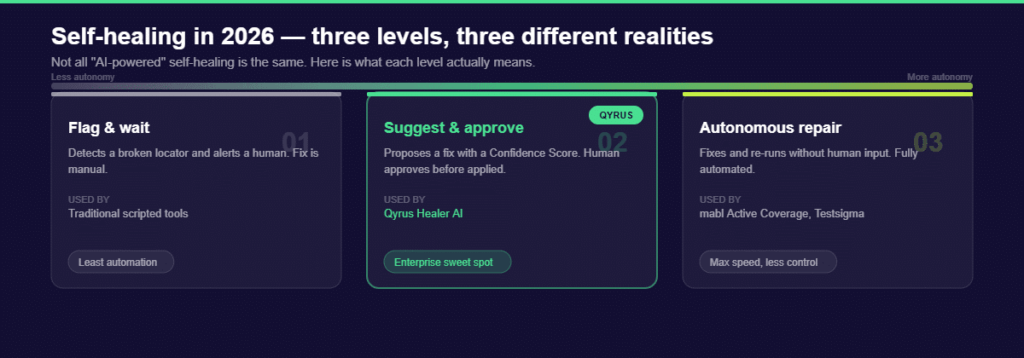
Every platform in this comparison claims AI-powered self-healing. The claim is accurate for all of them, and almost useless as a differentiator because of it. What matters to a QA leader is not whether a platform uses AI for maintenance, but what level of autonomy that AI operates at and what controls exist when it makes decisions. 

There are three meaningfully different levels of self-healing in 2026, and choosing between them depends on your organization’s tolerance for autonomous action versus human oversight: 


Level 

How It Works 

Who Uses It 

Level 1: Flag & Wait 

Detects broken locator, alerts a human. Manual fix required. 

Traditional scripted tools 

Level 2: Suggest & Approve 

Proposes a fix with a Confidence Score. Human approves before it’s applied. 

Qyrus Healer AI 

Level 3: Autonomous Repair 

Fixes and re-runs without human input. Fully automated. 

mabl Active Coverage, Testsigma Agentic Healer 


For most enterprise QA environments, Level 2 is the practical sweet spot. Level 3 autonomous repair sounds appealing, and in high-velocity pipelines where tests run hundreds of times a day, it genuinely reduces noise. But autonomous repair without oversight can mask a real product defect: if a button changes its label because a developer made an error, and the AI silently updates the test to match, the regression goes unreported. 

Qyrus’ Confidence Score model handles this tension directly. High-confidence fixes — where the AI is statistically certain the change is cosmetic, not a regression — apply automatically. Low-confidence fixes queue for human review. The result is AI-speed maintenance for routine changes, with human judgment preserved for ambiguous ones. 

When evaluating any platform’s self-healing claims, ask the vendor three questions: At what confidence threshold does the AI act autonomously? How does the platform distinguish a cosmetic UI change from a functional regression? And where is the audit log of every automated fix? 

Frequently Asked Questions 

What is a no-code test automation tool? 

A no-code test automation tool lets QA teams create, run, and maintain automated tests without writing code. Depending on the platform, test authoring happens through visual drag-and-drop interfaces (Qyrus, Leapwork), plain-English NLP inputs (Testsigma), or low-code visual workflows (mabl, Katalon). The goal is to make test automation accessible to testers who aren’t software engineers, while still producing reliable, maintainable coverage. 

Which no-code test automation tool is best for API testing? 

It depends on how API testing fits into your broader strategy. If your primary need is API testing within end-to-end cross-platform flows — where an API call sits in the middle of a user journey that starts on mobile and ends on web — Qyrus offers the most integrated approach through its Flow Hub and Data Hub. If your API testing is primarily within an ERP ecosystem like SAP or Salesforce, ACCELQ is the stronger fit. For API testing as a standalone discipline within a DevOps pipeline, mabl’s CI/CD-native architecture is worth evaluating. 

Can no-code tools replace manual testing entirely? 

Not yet — and any vendor who says otherwise is oversimplifying. No-code automation tools dramatically reduce the manual effort required for regression testing, functional test suites, and repetitive scenario validation. They expand coverage without expanding headcount. What they don’t replace is exploratory testing: the human judgment required to identify unexpected edge cases, assess the quality of a user experience, or catch bugs that only manifest under unusual conditions. Think of no-code automation as raising the floor on coverage, not eliminating the need for skilled testers. 

What is the difference between low-code and no-code testing platforms? 

No-code platforms — Qyrus, Testsigma, Leapwork — require zero scripting. Test authoring happens entirely through visual or natural-language interfaces, with no programming knowledge assumed. Low-code platforms — Katalon, mabl — offer a predominantly codeless experience but permit scripting for complex scenarios. For Katalon, that means Groovy and Java. For mabl, it means JavaScript for advanced configurations. The distinction matters when you are deciding who in your organization can contribute to test authorship: no-code platforms enable non-engineers; low-code platforms are primarily designed for QA engineers who want to move faster. 

How do I evaluate the ROI of switching to a no-code test automation platform? 

Start with three numbers from your current state: the percentage of your test suite that is currently automated, the average hours per sprint your team spends on test maintenance, and the number of people who can actively contribute to writing tests today. Then use those as your baseline when running a proof of concept with any platform. The platforms in this comparison all publish customer benchmarks — ACCELQ’s 7.5x faster authoring, Testsigma’s 90% maintenance reduction, mabl’s 9x faster release cycles — but benchmarks from other organizations are directional at best. Your architecture, team size, and application complexity will determine your actual return. A 30-day PoC on a representative part of your test suite is the most reliable evaluation method. 

Making the Decision: Which Platform Fits Your Team in 2026? 

No single platform wins across every dimension — and that is actually useful information. The 2026 no-code test automation market has matured to the point where the best tools have distinct, defensible positions. The right choice depends on your team structure, your application architecture, and where your biggest testing friction currently lives. 

If unified cross-platform orchestration is your priority — if your user journeys span web, mobile, and API and you are tired of manually wiring data between tools — Qyrus is built for exactly that problem. If your team is split between technical engineers and non-technical testers and you need the option to drop into scripting for edge cases, Katalon’s hybrid approach gives you that safety net. If your CI/CD pipeline runs fast and QA and development share tooling, mabl’s developer-native experience is the smoothest fit. If your environment is ERP-heavy, ACCELQ’s process modeling capabilities are unmatched. If plain-English authoring is the fastest path to getting non-engineers writing tests, Testsigma is the most accessible starting point. And if you operate in a regulated industry where auditability is non-negotiable, Leapwork’s visual flowcharts satisfy requirements the other platforms don’t address as cleanly. 

The evaluation framework in this guide — cross-platform coverage, AI self-healing model, authoring accessibility, infrastructure integration, and ROI benchmarks — applies regardless of which platform you are assessing. Use it as your proof-of-concept scorecard, not just a reading lens. 

If Qyrus is on your shortlist, the fastest way to assess it is against your own testing environment.

Request a demo to see how its cross-platform test orchestration handle the specific journeys your team needs to cover. 

SAP Performance Testing-featured image

SAP ECC support ends in 2027. That deadline has turned what was once a long-term roadmap item into an active, urgent project for enterprises across every sector. Tens of thousands of organizations are mid-migration right now — rebuilding their most critical business processes on SAP S/4HANA under real time pressure. 

But here’s what most migration plans underestimate: S/4HANA is not just an upgrade. It’s an architectural shift. The in-memory HANA database, the redesigned data model, the Fiori user interface layer — all of it changes how your system performs under load. And if performance testing isn’t built into the migration program from the start, the risks don’t disappear. They get deferred to go-live, where fixing them is far more expensive and far more disruptive. 

The stakes are real. One hour of SAP system failure can cost an organization several thousands of dollars. Every second of response delay reduces user productivity by 7%, according to research. These aren’t edge-case numbers — they’re what happens when a platform managing mission-critical business operations hits a wall it was never tested against. 

SAP performance testing is the discipline that prevents that outcome. It validates how your SAP system — whether on-premise, cloud-based, or hybrid — behaves under real-world load before those conditions reach production. Done right, it surfaces bottlenecks during design, not during month-end close or a post-migration go-live. 

This guide covers everything QA leads and IT decision-makers need to know: the types of SAP performance tests that matter, why SAP HANA testing requires a different approach, how to evaluate the right tools, and the best practices that separate teams who catch issues early from those who discover them in production.  

What Is SAP Performance Testing? 

SAP performance testing is the process of evaluating how your SAP system behaves under defined load conditions — measuring response times, transaction throughput, system stability, and resource utilization before those conditions appear in production. 

That definition sounds straightforward. The execution is anything but. 

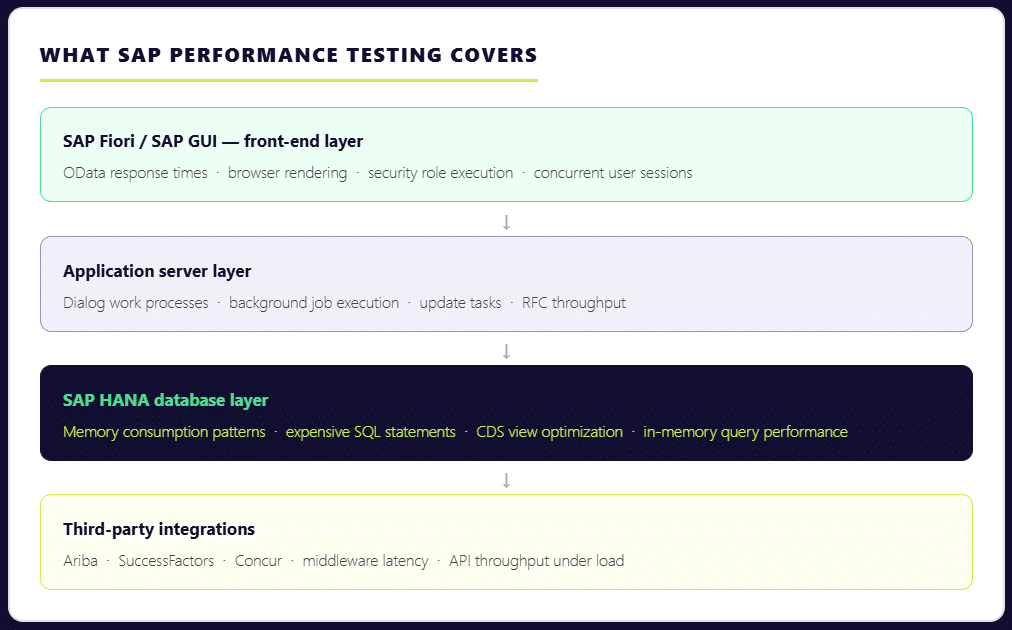
Testing SAP performance is not simply a matter of simulating users clicking through transactions. A realistic SAP performance test runs dialog work processes, background jobs, update tasks, HANA memory growth, and integration traffic simultaneously — because that’s what production looks like. Isolate any one of those layers and your results stop reflecting reality. 

The complexity compounds when you consider the scale of a typical SAP environment. Over 440,000 organizations globally run SAP to manage core business operations, spanning finance, supply chain, procurement, HR, and more. Each implementation is deeply customized. Each module carries its own transaction patterns, data dependencies, and user load profiles. A sales order creation in VA01 behaves nothing like an MRP run. A financial posting during daily operations performs very differently from mass postings during period close. Your sap performance testing strategy has to account for all of it. 

This is why SAP performance testing matters at every stage of the system lifecycle — not just at go-live. It’s essential when a system is first being launched to validate it can carry the expected load. It’s equally critical after the system is live, when module changes, platform updates, or infrastructure shifts can quietly degrade performance that was previously stable. And during SAP S/4HANA migrations, performance validation is non-negotiable: the architectural changes are significant enough that past performance data from ECC gives you very little reliable guidance about how the new system will behave under the same business process volumes. 

Types of SAP Performance Testing 

Not every SAP performance test serves the same purpose. Grouping them all under a generic “load test” is one of the most common mistakes QA teams make — and one of the most costly. Each test type is designed to surface a different category of risk. Skip the wrong one, and that risk stays hidden until production exposes it. 

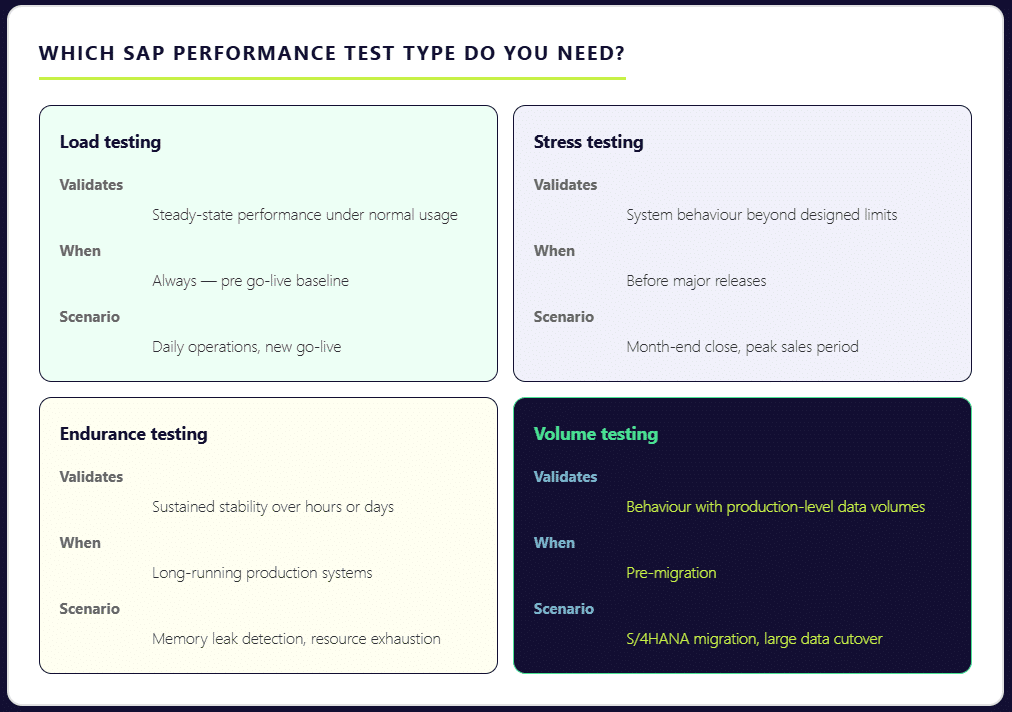
Load Testing 

Load testing validates how your SAP system performs under steady, expected usage. It answers the most fundamental question: can your landscape support normal day-to-day business operations — order entry, financial postings, procurement workflows — without degradation? This is the baseline that every SAP performance program should establish first. Teams often underestimate its importance for finance and logistics modules, where transaction volumes are high and response time expectations are tight. According to ImpactQA, every second of delay in SAP’s response time reduces user productivity by 7% — a number that compounds quickly across hundreds of concurrent users. 

Stress Testing 

Stress testing pushes the system beyond its designed limits — deliberately. The goal is to find the breaking point before the business does. This is how you determine whether your current infrastructure sizing decisions are actually sufficient, or whether they hold up only under controlled conditions. If your users hit system walls during month-end close or a peak sales period, it almost certainly means stress testing was skipped or scoped too conservatively. 

Endurance Testing 

Also called soak testing, endurance testing runs your SAP system under sustained load over an extended period — anywhere from eight hours to two weeks. Its primary purpose is to surface memory leaks and resource exhaustion patterns that only appear after prolonged operation. A system can pass a short load test and still fail during a sustained production run. Endurance testing catches that gap. 

Volume Testing 

Volume testing validates system behavior when tables carry realistic data volumes. This is a frequently underestimated risk area. A sap system can handle 300 concurrent users smoothly when database tables contain limited historical data. Once production carries years of transactional records, index scans and database joins behave fundamentally differently — and what passed in testing starts failing in real world operations. The test environment must reflect actual production data volumes to produce meaningful results. 

Understanding which combination of these tests applies to your specific scenario — go-live, S/4HANA migration, regular platform update, or peak period preparation — is the first step toward a testing process that actually protects your business operations. 

SAP HANA Performance Testing — What’s Different 

Most performance testing guidance was written for SAP ECC. If you’re running S/4HANA — or migrating to it — that guidance only gets you part of the way there. 

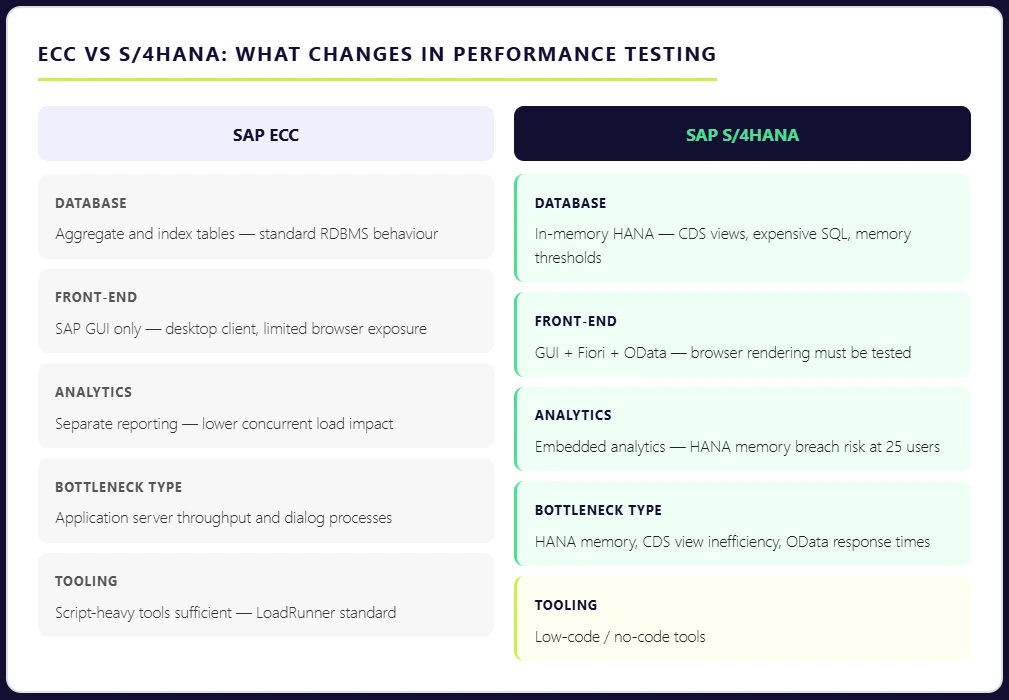
S/4HANA’s architectural shift is significant. The HANA in-memory database processes massive volumes of data in real time. Aggregate and index tables that ECC relied on have been removed. The Fiori user interface layer introduces browser-based front-ends, OData calls, and CDS views into transactions that previously ran purely through SAP GUI. Each of these changes alters how your system performs under load — and how you need to test it. 

ECC vs S4HANA what changes in performance testing

The most common mistake teams make is running standard HTTP-based load tests and assuming the results reflect true SAP HANA performance. They don’t. In HANA-based systems, memory consumption patterns and expensive SQL statements are often the real bottleneck — not application server throughput. Transaction ST03N may show high database time, while the HANA expensive statements trace reveals inefficient CDS views or poorly optimized custom queries running underneath. If your testing doesn’t go that deep, those bottlenecks stay invisible until production surfaces them. 

The risks are more tangible than they might appear. HANA memory thresholds can be breached during peak analytical queries with as few as 25 concurrent users — particularly when embedded analytics and transactional loads are running simultaneously. This is a scenario that most standard load tests never simulate, because they don’t account for the reporting layer sitting on top of the transactional layer in S/4HANA environments. 

SAP HANA performance testing also demands a different validation standard. It’s not enough to confirm that data is correct. It has to be correct and delivered fast enough to support real-time business operations. A financial posting that produces accurate results in eight seconds still fails the user if the business process expectation is under three. 

There are additional layers specific to S/4HANA that require dedicated test coverage: Fiori apps must be tested through the browser with real security roles, not just at the RFC layer; cloud integrations with platforms like Ariba, SuccessFactors, and Concur introduce new latency variables; and for organizations on SAP RISE Private Edition, performance management remains the customer’s responsibility — the cloud deployment model doesn’t eliminate the need for validation. 

For a deeper look at how to structure your approach, our guide to optimizing SAP HANA testing covers the key considerations specific to HANA environments. 

SAP Performance Testing Tools — LoadRunner, NeoLoad & Beyond 

There is no single best tool for SAP performance testing. There is only the tool that matches your architecture, your team’s capability, and your delivery model. The mistake many teams make is starting with a brand name rather than starting with technical requirements. Before comparing tools, the more important questions are: What SAP protocols do you need to test — GUI, Fiori, API, or all three? Does your team have scripting expertise, or do you need low-code options? And critically — is it a periodic, project-driven activity? 

With those realities in mind, here is how the leading SAP performance testing tools stack up. 

SAP Performance Testing Using LoadRunner 

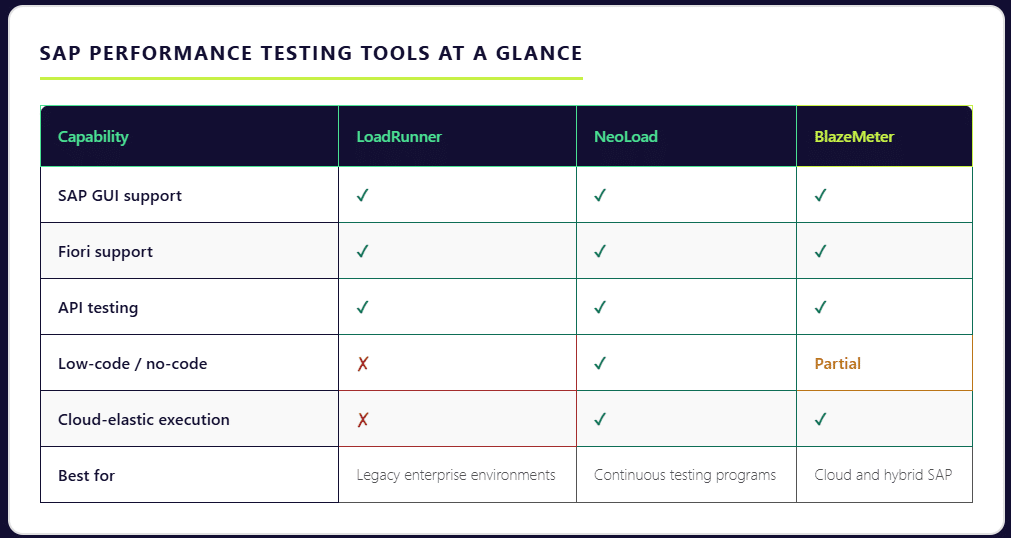
LoadRunner — now under OpenText after the Micro Focus acquisition — remains the most widely used enterprise tool for SAP performance testing. Its depth of protocol support is unmatched: it covers SAP GUI, SAP Web, and SAP Fiori natively, allowing teams to simulate end-to-end sap applications across the full user interface stack. For organizations running complex, legacy-heavy SAP environments with diverse protocol requirements, LoadRunner is often the only tool that handles the full breadth of what needs to be tested. 

The trade-offs are real, however. LoadRunner scripts are written in C-based VuGen, which carries a steep learning curve and demands specialized performance engineers to build and maintain. Licensing costs can reach mid-six figures for average deployments. 

Tricentis NeoLoad 

NeoLoad is the tool most frequently selected when SAP performance testing needs to align with a continuous testing strategy. It provides strong SAP protocol support — including SAP GUI and Fiori — with a low-code and no-code test design interface that makes performance testing accessible beyond specialist engineers. In a controlled comparison, teams using NeoLoad reported a 70% improvement in test design efficiency compared to LoadRunner for the same test suite. Its native integration with Jenkins, Azure DevOps, and Bamboo makes it a strong fit for organizations embedding performance validation into their release pipelines. 

BlazeMeter (Perforce) 

BlazeMeter takes a cloud-elastic approach to SAP performance testing. It natively supports SAP GUI, Fiori, and API testing in a single platform, with execution infrastructure that scales up and down on demand — eliminating the need to provision and maintain dedicated load generation hardware. For teams that need to test SAP BTP cloud applications or hybrid environments, BlazeMeter’s cloud-native architecture maps well to the deployment model they’re already operating in. 

The Broader Shift Toward Low-Code and Scriptless Testing 

The tool landscape is shifting in a clear direction. By 2024, 33% of SAP testing workflows had adopted scriptless automation frameworks, and modern testing platforms now support automated script generation for more than 68% of standard SAP business processes. Between 2023 and 2025, new testing tools reduced manual testing effort by nearly 34%. The direction of travel is toward platforms that make performance testing faster to set up, easier to maintain, and accessible to QA teams without deep scripting expertise — while still producing the protocol-level fidelity that sap environments demand. 

Whichever tool you select, the principle is the same: tool choice should follow architecture and team reality, not the other way around. 

SAP Performance Testing Best Practices 

Having the right tools is only part of the equation. How you structure and execute your SAP performance testing program determines whether it actually protects your business — or just produces reports that look thorough without catching the issues that matter. These are the practices that separate testing programs that work from those that only appear to. 

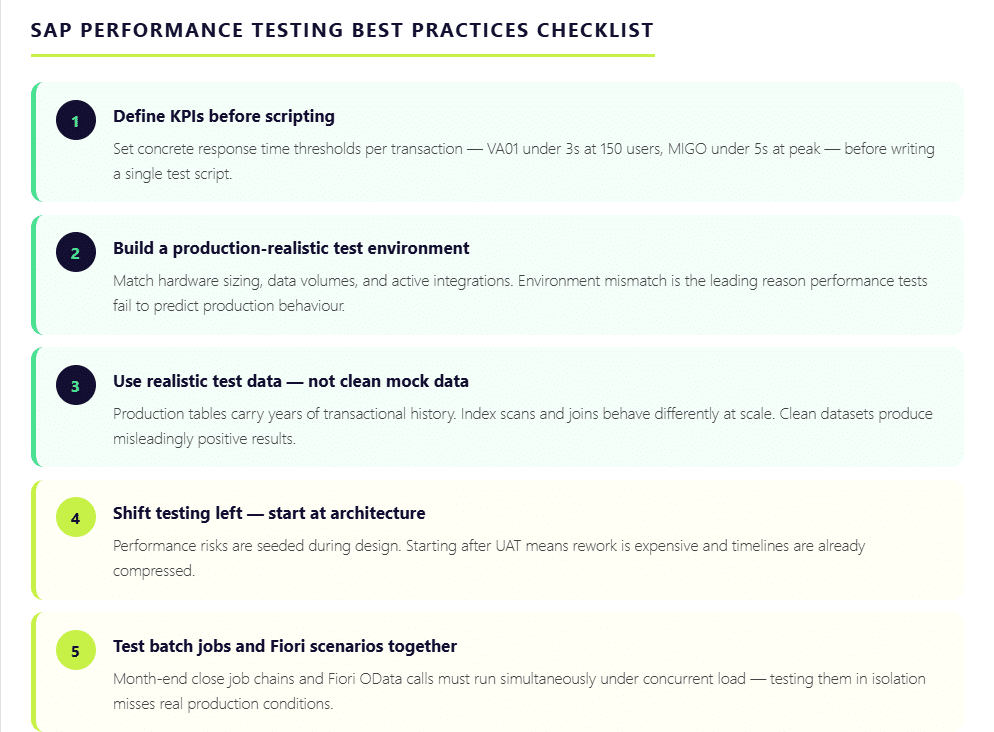
  1. Define Performance KPIs Before Writing a Single Script

The most common reason SAP performance testing fails to deliver value is the absence of clear success criteria. Without defined thresholds, results become subjective — and subjective results don’t drive decisions. Before any test execution begins, document what acceptable performance looks like in concrete terms. VA01 order creation should complete within three seconds under 150 concurrent users. MIGO posting should not exceed five seconds during peak warehouse activity. Batch job runtimes during month-end close should stay within a defined threshold. When KPIs are clear upfront, every test run produces a measurable verdict rather than a collection of data points open to interpretation. 
  1. Build a Production-Realistic Test Environment

Environment mismatch is the single biggest reason performance tests fail to predict production behaviour. A test environment with lower hardware capacity, reduced data volumes, or missing integrations will produce results that look acceptable — right up until go-live. The test environment must reflect the actual production landscape as closely as possible: similar sizing, realistic data volumes, and active third-party integrations. Where full replication is impractical, service virtualization can simulate external dependencies without requiring the entire connected ecosystem to be live during testing. 
  1. Use Realistic Test Data — Not Clean Mock Data

Test data quality has more impact on result accuracy than tool choice. A sap system can process transactions smoothly against a clean, limited dataset and then struggle badly once production tables carry years of transactional history. Index scans and database joins behave differently at scale. Master data dependencies — material masters, business partners, purchase orders — introduce complexity that synthetic data rarely replicates accurately. The test data strategy needs to account for this, using masked production data or carefully constructed data sets that reflect real world transaction volumes and relationships. 

  1. Shift Testing Left — Start After Architecture, Not After UAT

One hour of SAP system failure can cost an organization up to $400,000. Yet most performance issues are seeded during the design phase — through architecture choices, report structures, and how much logic is pushed into ABAP — long before UAT begins. By the time performance testing happens post-UAT, rework is expensive and timelines are compressed. Starting performance validation immediately after architecture is finalized allows teams to catch structural problems when fixing them is still relatively straightforward. 

  1. Test Batch Jobs and Fiori Scenarios Together

Two areas that are routinely under-tested in isolation: month-end close batch job chains and Fiori front-end scenarios. Period-close processing triggers simultaneous background job execution — when these overlap, job collisions create bottlenecks that have nothing to do with individual transaction performance. Similarly, a transaction like ME21N may perform acceptably in the SAP GUI backend but slow significantly when tested through Fiori on a browser with real security roles and full dropdown rendering. Both layers must be tested together, under realistic concurrent load, to produce results that reflect actual business process behavior. 

How Qyrus Helps with SAP Performance Testing 

The tool landscape for SAP performance testing has historically forced a difficult trade-off: depth of SAP protocol coverage on one side and ease of use on the other. Traditional tools like LoadRunner deliver the protocol depth but demand specialist scripting engineers and significant infrastructure investment. Newer cloud-based tools prioritize speed and pipeline integration but often fall short on SAP-specific coverage. Most QA teams end up compromising on one or the other. 

Qyrus is built to close that gap. 

As a no-code test automation platform, Qyrus enables QA teams to build, execute, and manage SAP performance tests without the scripting overhead that makes traditional tools slow to set up and expensive to maintain. Teams that previously needed specialist LoadRunner engineers to develop and maintain test scripts can instead work directly within a visual interface, reducing the time from test design to execution significantly.  

Where Qyrus stands apart from point solutions is in its coverage across the full SAP testing spectrum. Web, mobile, and API testing are handled within a single platform — meaning the same tool that validates your SAP Fiori front-end can test the API integrations connecting SAP to third-party systems like Ariba or SuccessFactors. For organizations running hybrid SAP environments or managing cloud-based SAP deployments, unified coverage eliminates the tool sprawl that typically inflates both cost and coordination overhead. 

Critically, SAP performance validation can run continuously alongside every release cycle, catching regression before it reaches production rather than discovering it during a go-live or peak business period. This is precisely the shift that sap performance testing best practices now demand — and it’s the gap that most traditional SAP testing tools were not designed to fill. 

For SAP teams preparing for S/4HANA migration, managing regular platform updates, or building toward a continuous testing model, Qyrus offers a starting point worth exploring. 

Build a SAP Performance Testing Program That Holds Up When It Matters 

SAP is not a system you can afford to guess about. It manages financial closes, supply chains, procurement cycles, and workforce operations — often simultaneously, often across multiple geographies. When it performs well, it’s invisible. When it doesn’t, the impact moves fast and reaches far. 

The organizations that avoid costly performance failures share a common approach: they treat SAP performance testing as an ongoing discipline, not a pre-go-live checklist item. They define clear KPIs before scripting begins. They test against realistic data volumes in production-like environments. They cover load, stress, endurance, and volume scenarios — not just the ones that are easiest to run. They validate SAP HANA performance at the database layer, not just the application layer. And they embed performance validation into their release pipelines so that every change is tested, not just the major ones. 

With SAP ECC support ending in 2027 and tens of thousands of S/4HANA migrations underway right now, the window for getting this right is narrower than it has ever been. Performance issues discovered during migration are manageable. The same issues discovered after go-live are not. 

The right testing program starts with the right platform. If your team is evaluating how to build a faster, more continuous approach to SAP performance testing — one that doesn’t require specialist scripting engineers or separate tools for every test type — request a Qyrus demo and see how no-code SAP test automation works in practice. 

Frequently Asked Questions: SAP Performance Testing 

  1. What is SAP performance testing and why is it important?

SAP performance testing is the process of evaluating how an SAP system behaves under real-world load conditions — measuring transaction response times, system stability, throughput, and resource utilization before those conditions appear in production. It matters because SAP manages mission-critical business operations across finance, supply chain, procurement, and HR. Performance failures in these environments are expensive: one hour of SAP system downtime can cost an organization up to $400,000, and every second of response delay reduces user productivity by 7%. Performance testing identifies bottlenecks before they become business disruptions. 

  1. What are the main types of SAP performance testing?

There are four primary types of SAP performance testing, each designed to surface a different category of risk. Load testing validates system behavior under normal, expected user volumes. Stress testing pushes the system beyond its designed limits to find the breaking point before production does. Endurance testing — also called soak testing — runs sustained load over hours or days to surface memory leaks and resource exhaustion patterns. Volume testing validates how the system performs when database tables carry realistic production-level data volumes, which often behave very differently from the clean, limited datasets used in standard test environments. 

  1. How is SAP HANA performance testing different from traditional SAP testing?

SAP HANA introduces architectural changes that standard load testing approaches were not designed to handle. The in-memory database processes data in real time, aggregate and index tables have been removed, and the Fiori user interface layer adds browser-based front-ends and OData calls to transactions that previously ran through SAP GUI alone. In HANA-based systems, the real bottlenecks are often memory consumption patterns and expensive SQL statements — inefficient CDS views or poorly optimized custom queries — that standard HTTP-based testing never reaches. SAP HANA performance testing requires validating at the database layer, not just the application layer, and must account for embedded analytics running simultaneously with transactional loads. 

  1. What tools are used for SAP performance testing?

The most widely used tools for SAP performance testing are LoadRunner (OpenText), Tricentis NeoLoad, and BlazeMeter (Perforce). There are modern no-code/low-code tools like Qyrus that are beneficial for users with a shift-left approach. The right tool depends on your SAP architecture, team capability, and whether performance testing needs to be run as a periodic activity. 

  1. What are the best practices for SAP performance testing?

Effective SAP performance testing starts with defining clear KPIs before any scripting begins — specific response time thresholds for critical transactions like VA01 or MIGO under defined concurrent user loads. Tests should run in a production-realistic environment using realistic data volumes, not clean mock datasets that produce misleadingly positive results. Performance testing should start after architecture is finalized, not after UAT, since performance risks are seeded at the design stage. Batch job chains and Fiori front-end scenarios must be tested together under concurrent load, not in isolation. Regular business changes and platform updates can introduce performance regression incrementally, and only continuous testing catches it before it reaches production. 

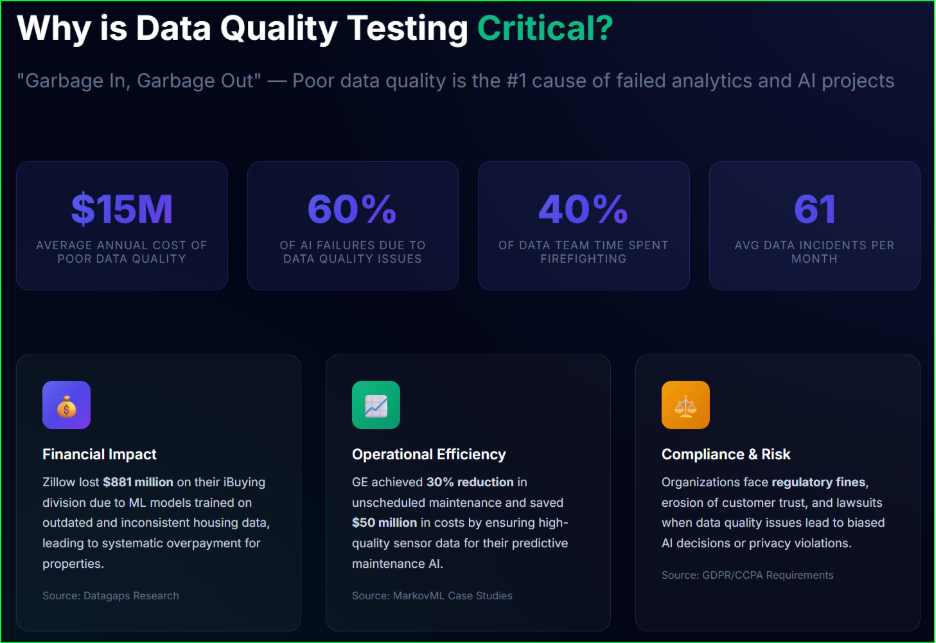
Poor software quality imposes a staggering $2.41 trillion tax on the U.S. economy every year. For most organizations, this isn’t just an abstract figure—it manifests as a direct drain on innovation, with developers spending up to 50% of their time fixing bugs instead of creating new value.

Stop letting fragmented tools and siloed processes slow your release cycles. Download our comprehensive whitepaper to discover how Qyrus Test Orchestration enables teams to validate complex, end-to-end user journeys while achieving more than 200% Return on Investment. 

What’s Inside the Whitepaper? 

This guide explores the rise of Orchestrated Testing Platforms and provides a technical roadmap for engineering leaders to eliminate the “hidden debt” in their engineering budgets. 

Key Business Insights: 

  • Sub-6-Month Payback: Learn how the platform pays for itself in less than half a year through massive productivity gains. 
  • $557,000 in Cost Avoidance: Discover how proactive testing reduces the frequency of costly production downtime. 
  • 90% Automation Levels: See how teams successfully transitioned manual regression suites into repeatable, automated processes. 

 Master the Qyrus Orchestration Toolkit 

Learn how to leverage the six core technical features that bridge the gap between fragmented automation efforts and true end-to-end quality: 

  • Multi-Protocol Workflow Creation: Seamlessly combine Web, Mobile, API, and Desktop scripts in a single, unified execution flow. 
  • Visual Node-Based Design: Empower your entire team with a codeless, drag-and-drop interface for defining complex logic. 
  • Data Propagation: Create realistic test scenarios by using output data from one test as the direct input for another. 
  • Workflow Organization: Eliminate “asset chaos” with a centralized, hierarchical folder structure for all testing assets. 
  • Flexible Scheduling: Set up one-time or recurring execution patterns (daily, weekly, or monthly) to ensure continuous validation. 
  • Centralized Reporting: Gain a single-pane-of-glass view of execution data, historical trends, and pass/fail rates. 

Ready to Break the Bottleneck? 

Fill out the form to receive your copy of the whitepaper and start your journey toward high-velocity quality. 

As featured in the Forrester Total Economic Impact™ Study 

“The beauty of Qyrus is that you can build a scenario and string add-in components of all three [mobile, web, and API] to create an end-to-end scenario.”

— CTO of a Digital Bank.

Software quality defines market leadership. QA teams today face a clear choice: continue managing fragmented scripts or switch to an integrated system that handles the entire testing lifecycle. Qyrus Test Orchestration provides this bridge. It allows teams to coordinate complex test scenarios across diverse environments using a visual, no-code interface. By centralizing execution and using AI to handle dynamic conditions, organizations move products from development to release faster than ever. 

Current data highlights a significant opportunity for growth. While 83% of developers now work within DevOps environments, 36.5% of firms still lack any form of test orchestration. This gap creates bottlenecks in high-velocity pipelines. Qyrus solves this with a workflow-driven automation platform that ensures every test runs in the right sequence, on the right device, at exactly the right time. 

The Strategic Need for Enterprise Test Orchestration Software 

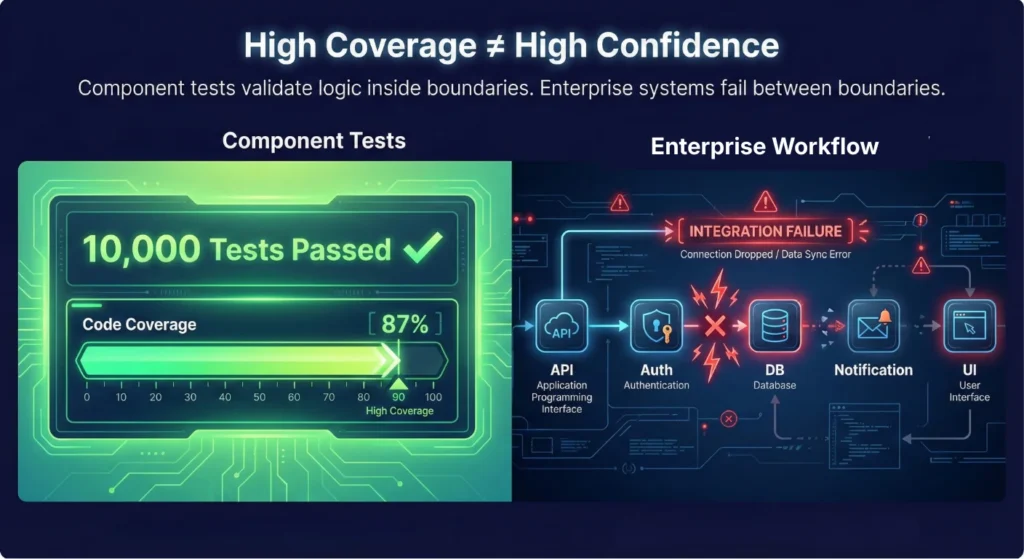
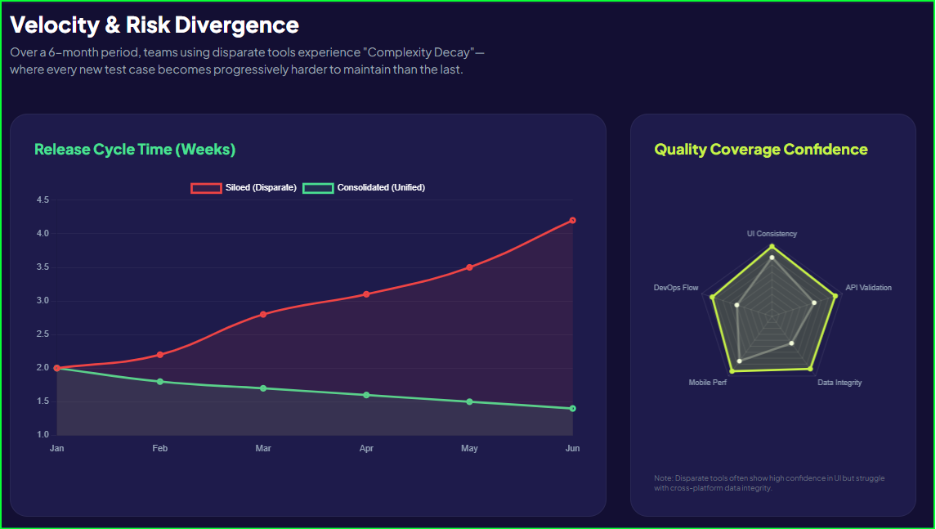
Many organizations struggle with “automation silos.” Teams write scripts for specific features, but these scripts rarely talk to each other. This fragmentation causes major delays. According to a survey, 82% of testers still perform manual or component-level testing daily. Even more concerning, only 45% of teams have automated their standard regression suites. Isolated tests fail to capture how different components interact in the real world. 

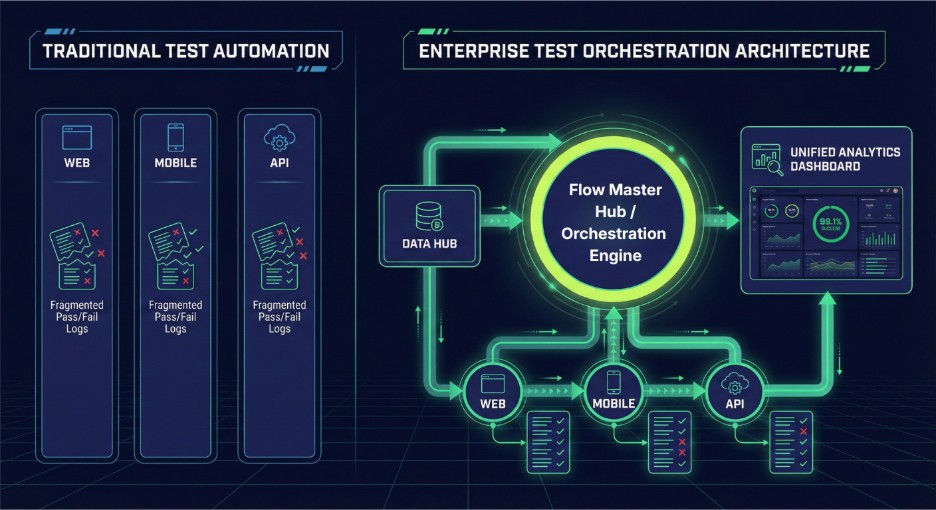
Enterprise test orchestration software moves beyond simple execution. It acts as the brain of your testing strategy. Standard automation tools run scripts; orchestration platforms manage the relationship between those scripts. They handle data dependencies, environment setup, and error recovery automatically.  

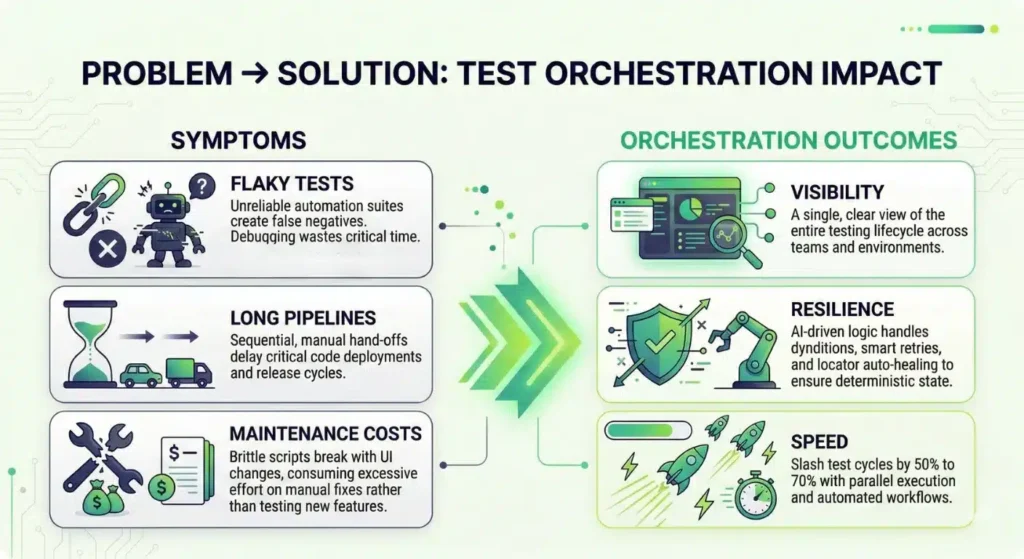
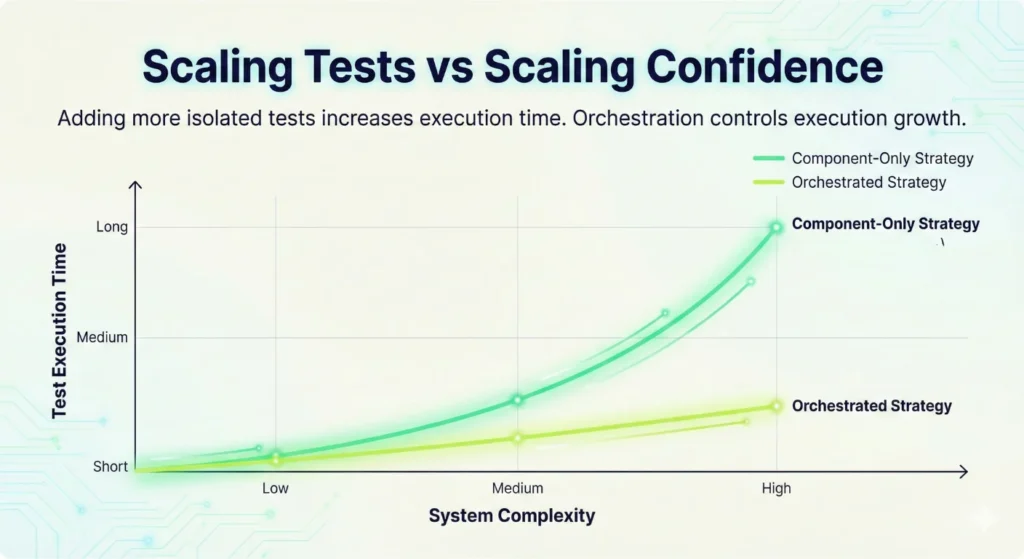
This shift reduces the “flakiness” that plagues most pipelines. When tests fail for non-functional reasons, it wastes developer time and slows down the release cycle. By coordinating the entire flow, orchestration cuts cycle times by 50% to 70% for many teams. 

Leaders prioritize orchestration because it lowers the defect escape rate. It creates a safety net that spans the entire software development lifecycle. You no longer hope that your components work together. You prove it. Consistent orchestration ensures that every code change undergoes rigorous validation across every layer of the system. 

Qyrus: The Modern Workflow-Driven Automation Platform 

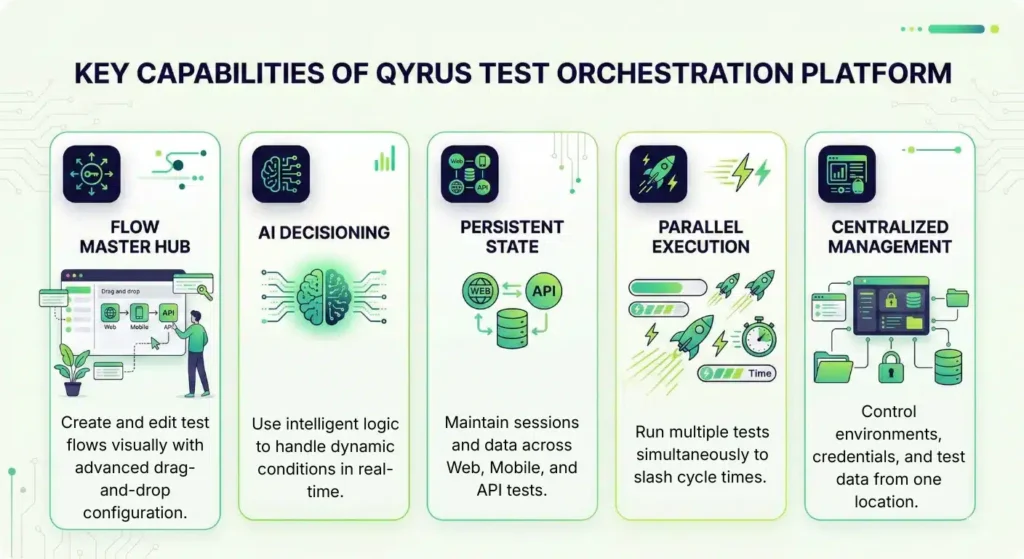
Qyrus transforms testing from a collection of isolated tasks into a cohesive, managed system. It operates as a workflow-driven automation platform that integrates four core pillars: the visual Flow Hub, a centralized Data Hub, a powerful Orchestration Engine, and extensive third-party integrations. This structure allows teams to reduce manual testing efforts by 80% while maintaining total control over the release pipeline. Unlike standard tools that require heavy scripting to manage dependencies, Qyrus uses an AI decision layer to handle complex logic and environment promotion automatically. 

Flow Hub: Visual Logic Creation 

The Flow Hub serves as the primary workspace for your testing strategy. You drag and drop “Nodes”—individual units representing Web, Mobile, API, or Desktop scripts—and connect them to form a sequence. This visual approach allows QA experts to build sophisticated scenarios without writing a single line of code. Each node contains its own execution settings, allowing you to customize timeouts and skip conditions for every specific step. 

Data Hub & State Persistence 

Managing data dependencies often creates the biggest hurdle in automation. Qyrus simplifies this through a centralized Data Hub that supports Global, Workflow, and Step scopes. This ensures that an ID generated in an API test can move seamlessly into a Mobile or Web script. Furthermore, unique session persistence capabilities allow a single browser or device session to remain active across multiple scripts. This prevents the need for constant re-logins and ensures your tests mirror real user behavior. 

Resilience Patterns 

Flaky environments often derail even the best automation projects. Qyrus counters this with built-in resilience patterns, including “Retry with Backoff” and “Stop” actions. If an API call fails due to network lag, the platform automatically retries the operation using a linear or exponential delay. These patterns act as circuit breakers, preventing a single transient error from failing an entire multi-hour suite and saving your team hours of manual debugging. 

Integrations 

A platform must fit into your existing ecosystem to provide value. Qyrus connects directly with CI/CD tools and communication platforms like Slack and Microsoft Teams to keep stakeholders informed in real-time. It also supports major cloud providers and various test runners. This connectivity ensures that your orchestrated workflows remain a natural part of your DevOps stack. 

Core Features & How They Map to Enterprise Needs 

Enterprise testing requires more than just high-speed script execution. Large-scale organizations manage sprawling portfolios of legacy systems and modern microservices that must function in unison. Enterprise test orchestration software bridges this gap by addressing the specific structural failures that cause 73% of automation projects to fail. 

Visual Test Flows for Complex Coverage 

Most QA teams struggle to automate complex journeys because the underlying code becomes too brittle to maintain. Qyrus solves this through the Flow Hub. You drag and drop test nodes to map out the entire user journey visually. This approach enables teams to achieve higher coverage across multi-platform systems without the technical debt of thousands of lines of custom code. 

Conditional Logic for Environment-Aware Testing 

Tests often fail because they lack the intelligence to adapt to different environments. Logic control within the platform allows you to define “If-Then” scenarios. For example, a workflow can skip an email verification step in the Development environment but require it in Staging. This environment-aware testing ensures that the same workflow remains valid across the entire release pipeline. 

Session Persistence for True E2E Tests 

Standard automation tools usually restart the browser or clear the device cache between test scripts. This resets the user state and makes deep end-to-end testing nearly impossible. Qyrus maintains session persistence across Web, Mobile, and API tests. A single login at the start of a workflow carries through every subsequent node, mirroring exactly how a real customer interacts with your brand across different platforms. 

Data Hub for Deterministic State 

Inconsistent test data causes frequent false negatives. The Data Hub acts as a centralized repository that passes information, such as unique Order IDs or customer tokens, between steps. This ensures a deterministic state throughout the run. When every test uses fresh, accurate data from the previous step, you eliminate the “data pollution” that often breaks shared testing environments. 

Parallel Nodes for Faster Pipelines 

Cycle time remains the primary metric for DevOps success. Orchestration allows you to run independent test nodes in parallel rather than waiting for one to finish before starting the next. This capability significantly slashes execution time, helping teams meet the demand for daily or even hourly releases. 

AI Decisioning for Resilient Testing 

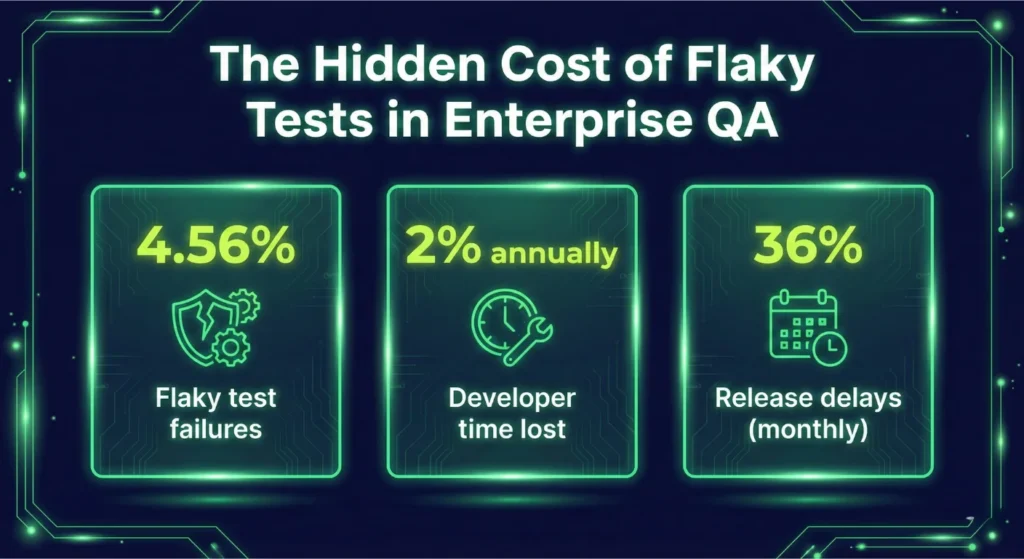
Flaky tests are a significant drain on resources, often consuming up to 16% of a developer’s time. Qyrus integrates an AI test orchestration platform layer to identify whether a failure is a genuine bug or a transient environment glitch. Smart retries and circuit-breaker patterns allow the system to recover from minor network lags automatically. This ensures your team only investigates real issues, which improves overall execution accuracy and builds trust in the automation suite. 

The AI Advantage: Why an AI Test Orchestration Platform Matters 

Traditional automation often collapses under the weight of flaky tests. When a locator changes or a network blips, scripts break and require manual fixes. An AI test orchestration platform solves this by introducing “self-healing” capabilities. If the system detects a modified UI element, it automatically updates the locator during execution to prevent a failure. This shift toward intelligence is why 76% of developers now use or plan to use AI tools in their development process. 

Smart classification provides the second major advantage. Instead of a generic “failed” report, the platform uses machine learning to categorize the root cause. It distinguishes between a transient environment glitch and a genuine code regression. This clarity allows teams to reduce triage time by up to 35%. You no longer waste hours investigating “ghost” failures that fix themselves on a rerun. 

Intelligence also optimizes how you run your tests. The platform analyzes historical data to prioritize high-risk areas. If a specific microservice fails frequently, the AI places those tests at the front of the queue. While the system handles these complex decisions, human oversight remains vital. The platform provides “Confidence Scores” for every automated decision, allowing QA leads to verify and approve major structural changes. This collaboration ensures that speed never comes at the cost of accuracy. 

The market reflects this move toward smarter systems. MarketsandMarkets expects the AI in software testing market to grow at a CAGR of 22.3% through 2032. By letting AI handle the routine repairs, your engineers can focus on designing better user experiences. 

Visual suggestion 

  • Flow with AI decision node: show a node that uses AI confidence to choose retry vs fallback. 
  • Placement: next to the AI section 

Typical Enterprise Use Cases & Playbooks 

Enterprise teams don’t just test features; they test business outcomes. A single user action often triggers a complex chain reaction across dozens of services, internal APIs, and legacy databases. Manually triggering these tests or relying on loosely coupled scripts leads to “blind spots” where integration failures hide. Orchestration provides a structured playbook for these high-stakes scenarios. 

Release Smoke + Regression Across 40 Microservices 

Large-scale applications now rely on hundreds of independent services. When a developer updates one microservice, you must validate how it interacts with the rest of the dependency graph. A workflow-driven automation platform allows you to chain contract tests, API mocks, and UI smoke tests into a single, synchronized flow.  

This coordinated approach helps companies achieve shorter test cycles by eliminating manual hand-offs between infrastructure and QA teams. 

The Resilient Payment Journey 

A standard checkout involves a UI interaction, an API call to a payment gateway, a ledger update, and a final customer notification. If the ledger update fails, the system shouldn’t just stop. Qyrus uses “circuit breaker” and “rollback compensation” patterns to manage these failures.  

If a critical step fails, the orchestrator can automatically trigger a compensating transaction or send an immediate high-priority alert to the DevOps team. This ensures that a failure in one layer doesn’t leave the system in an inconsistent state or corrupt customer data. 

Cross-Platform Continuity with Session Persistence 

Modern customers often start a journey on a mobile app and finish it on a desktop browser. Traditionally, testing this required two separate scripts with no shared data or session history. Enterprise test orchestration software changes this through session persistence.  

The orchestrator keeps the user logged in as the test moves from a mobile device to a web browser or a desktop application. This validates the true end-to-end experience and catches state-sync issues that isolated tests miss. By testing the way customers actually behave, you catch defects that usually escape to production. 

Security, Compliance & Enterprise Governance 

Enterprises in highly regulated sectors like finance and healthcare cannot compromise on data integrity. While cloud adoption grows, 90% of organizations will maintain hybrid cloud deployments through 2027 to meet strict residency and security requirements. Enterprise test orchestration software must provide the same level of control as the production environments it validates. A single data breach now costs companies an average of $4.4 million, and regulatory fines under frameworks like GDPR can reach 4% of global annual turnover. 

Governance and Data Control 

A workflow-driven automation platform acts as a secure vault for your testing assets. Qyrus handles sensitive information through dedicated credential management, ensuring that API keys and passwords never appear in plain text within test scripts. Role-Based Access Control (RBAC) limits visibility, so only authorized personnel can view or edit critical workflows in production-level environments. This prevents unauthorized changes and protects sensitive system configurations. 

Auditability and Segregation 

Regulated industries require a clear paper trail for every code change. The platform maintains detailed audit trails and activity logs that track who executed a test, what parameters they used, and when the run occurred. This transparency simplifies compliance audits and internal reviews.  

Furthermore, environment segregation prevents accidental cross-contamination between development, staging, and production tiers. By using data masking, teams can run realistic tests without exposing actual Personally Identifiable Information (PII) to the QA environment. This approach maintains the high standards of an AI test orchestration platform while protecting the organization from legal and financial risk. 

Migration Path: From Component Tests to Orchestrated Workflows 

Transitioning from fragmented component testing to a structured workflow-driven automation platform requires a tactical, phased approach. Organizations cannot simply lift and shift every script overnight without creating technical debt. A successful migration moves through four distinct stages to ensure stability and immediate value. 

Stage 1: Inventory and Audit 

Begin by auditing your existing library of unit and functional scripts. Identify which tests provide the most value and which have become redundant or “flaky.” Statistics show that flaky tests consume up to 16% of a developer’s time, so this is the perfect moment to prune low-quality assets. Categorize your scripts by their role in the user journey to prepare them for the Flow Hub. 

Stage 2: Quick Wins with Smoke Workflows 

Do not attempt to orchestrate your entire regression suite on day one. Instead, focus on “quick wins” by building automated smoke tests for your most critical paths. Qyrus provides templates for login and session validation that allow teams to get up and running in just 1-2 hours. These high-visibility workflows demonstrate immediate ROI and build team confidence in the new system. 

Stage 3: Expanding Orchestrated Flows 

Once your smoke tests are stable, begin connecting more complex nodes. This stage involves using the Data Hub to pass information between Web, Mobile, and API scripts. Use session persistence to maintain a single user state across these platforms. Most enterprises find that coordinating these multi-component systems results in 50% to 70% shorter test cycles compared to their old manual hand-off processes. 

Stage 4: Optimize with an AI Test Orchestration Platform 

The final stage involves layering intelligence over your workflows. Enable smart retries and “retry with backoff” patterns to handle transient environment issues automatically. As the system gathers data, use the AI test orchestration platform capabilities to identify failure patterns and suggest locator fixes. This maturity level allows your team to stop “firefighting” and start focusing on strategic quality engineering. 

Migration Best Practices and Pitfalls 

Avoid the common pitfall of 1-to-1 script migration. Simply running an old script inside a new container does not capture the benefits of orchestration. Instead, re-think how those scripts should interact. Qyrus minimizes the technical burden by offering a managed migration process that typically requires only a 2-day downtime window to move all existing web scripts from old component services to the core orchestration engine. 

Quality Engineering: From Managing Scripts to Governing Systems 

Quality engineering moves from managing scripts to governing systems. Modern delivery pipelines demand more than isolated checks. They require a coordinated, intelligent strategy. Adopting enterprise test orchestration software allows your team to connect Web, Mobile, and API tests into one seamless journey. This shift removes the bottlenecks that prevent high-velocity releases. 

The financial and operational benefits remain high across all industries. Teams using a workflow-driven automation platform report shorter test cycles, lower maintenance costs, and reduced manual testing efforts. These improvements ensure your engineers spend their time building features rather than repairing brittle scripts. Early adoption provides a clear market advantage. Orchestration gives you the stability needed to release with absolute confidence. 

Take control of your testing lifecycle today with a demo of Qyrus Test Orchestration. 

Most engineering teams start with component testing because it feels safe. 

You test one module. One function. One service. You mock dependencies. You isolate behavior. The feedback loop is fast. Failures are easy to debug. Teams build confidence quickly. And at small scale, that confidence is justified. 

But I’ve seen this pattern shift dramatically once organizations move into enterprise territory — multiple microservices, shared environments, distributed teams, continuous deployment pipelines, and regulatory pressure. What once felt like disciplined engineering begins to expose cracks. The more components you add, the more those isolated tests start missing the bigger picture. 

That’s where the real component testing limitations begin to surface. 

Component tests validate logic. They do not validate behavior across systems. They do not validate workflow continuity. They do not validate production-like interactions between services, data stores, APIs, authentication layers, and user interfaces. 

At enterprise scale, software rarely fails inside a single component. It fails between components. And that’s exactly where traditional strategies struggle. 

Organizations continue to invest heavily in component-level validation. In fact, 82% of teams still rely heavily on manual or component-level testing, while only 45% have automated regression suites at scale, according to industry reports. 

This imbalance creates structural risk. 

Component testing builds a strong base in the testing pyramid. But when enterprises depend on it as the primary strategy, they encounter enterprise test automation challenges that no amount of isolated scripts can solve. 

Scalable test automation requires more than isolated verification. It requires coordination, orchestration, data continuity, and real system validation. And that is where traditional approaches start to break. 

What Component Testing Actually Covers — And What It Ignores 

High coverage, low confidence

Component testing remains a foundational discipline in software engineering. It protects individual modules. It verifies business rules. It prevents regressions at the function or service level. 

But enterprise systems do not fail inside neat boundaries. They fail where systems connect. 

What Component Tests Do Well 

Component tests validate logic in isolation. Teams mock dependencies. They simulate external services. They inject test data directly into functions. They run thousands of tests in seconds. 

This approach gives developers confidence during rapid development cycles. It supports continuous integration. It reduces debugging time when something breaks. 

And for small systems, this works exceptionally well. 

Component testing strengthens the base of the testing pyramid. It provides early feedback. It improves code reliability. It reduces simple defects. 

But it assumes isolation reflects reality. 

Enterprise software rarely operates in isolation. 

What Component Tests Cannot See 

Once systems grow into distributed architectures, the blind spots become obvious. 

Component tests do not validate: 

  • Service-to-service communication failures 
  • Schema mismatches between APIs 
  • Authentication token expiry issues 
  • Database constraint conflicts across workflows 
  • Race conditions in asynchronous flows 
  • Real user journeys across multiple systems 

In microservices environments, failures typically occur between components, not within them. 

Industry benchmarks reinforce this risk. High-performing organizations maintain defect leakage under 2%, and most enterprises aim to keep it below 5%, according to the Capgemini World Quality Report. When teams rely heavily on isolated testing, integration defects frequently escape detection until staging or production. 

That gap represents one of the most critical component testing limitations. 

The Coverage Illusion in Enterprise Systems 

Strong component coverage creates an illusion of safety. 

A codebase may show thousands of passing tests. Dashboards may display green builds. Yet real workflows remain untested. 

Only 19.3% of organizations report automating more than half of their codebase. Even within that minority, automation often concentrates at the unit or component level rather than at workflow or integration layers. 

This imbalance creates enterprise test automation challenges that surface late in the release cycle. 

Component testing verifies correctness inside boundaries. Scalable test automation must verify correctness across boundaries. That shift requires coordination, state management, environment awareness, and execution control — capabilities that isolated tests do not provide. 

Many teams assume strong component coverage equals strong system quality. Yet overall automation coverage remains limited across the industry. Only 19.3% of organizations report automating more than half of their codebase, according to a report. That gap often reflects the difficulty of moving beyond isolated tests into integrated validation. 

The result? A testing strategy that looks robust on paper but leaves workflow-level risks exposed. This is where scalable test automation begins to demand more than component verification. It demands system-level validation that mirrors production behavior. 

And once enterprises attempt that transition, the next challenge emerges: instability. 

The Flaky Test Problem: When Isolation Starts Working Against You 

Hidden Cost of Flaky Tests

As test suites grow, instability creeps in. 

At first, it appears harmless. A test fails once. You rerun it. It passes. The team shrugs and moves on. 

But at enterprise scale, flakiness compounds. What begins as a minor annoyance becomes a systemic drain on productivity and trust. 

Flaky Tests Are Not a Minor Irritation 

A flaky test fails without a real defect in the code. It might fail due to timing issues, environmental variability, network latency, or improper mocking. 

In isolation-heavy strategies, these issues multiply. Research from Google Engineering found that 4.56% of all test failures were caused by flaky tests, consuming approximately 2% of total developer time. 

Two percent may sound small. For a 100-engineer organization, that equals two full-time engineers spending their year diagnosing unreliable tests instead of building features. 

This represents one of the most underestimated enterprise test automation challenges. 

CI Pipelines Become Noise Machines 

As component tests scale into thousands, CI systems begin to amplify instability. 

Developers lose confidence in red builds. They rerun pipelines instead of investigating failures. Real defects hide behind intermittent noise. According to the GitLab Global DevSecOps Report, 36% of developers experience release delays at least monthly due to CI test failures. 

When instability affects releases, leadership notices. Frequent false alarms create operational drag. Teams slow down deployments. They hesitate to merge. They delay releases “just to be safe.” 

Ironically, a system designed to improve confidence begins to erode it. 

Isolation Does Not Prevent Instability — It Can Cause It 

Many teams assume that component tests are inherently stable because they run in controlled environments. 

In practice, excessive mocking and artificial setups introduce their own fragility. Mocks drift from real contracts. Dependencies change without synchronized updates. Data fixtures grow complex. Timing assumptions become brittle. 

Mozilla reported that fixing flaky tests improved developer confidence by 29% and significantly reduced escaped defects. 

The lesson is clear. Flakiness is not just a technical nuisance. It directly affects morale, productivity, and quality outcomes. 

And when component-heavy strategies dominate without orchestration and integration controls, flakiness scales with them. This is where scalable test automation demands coordination — retry logic, dependency awareness, environment control, and execution governance. 

Without those controls, enterprises end up managing instability instead of preventing it. 

The Hidden Cost: Maintenance Becomes the Real Project 

Maintenance becomes main job

Component testing does not fail overnight. It fails gradually — through maintenance. 

At small scale, updating a few mocks or fixing broken assertions feels manageable. At enterprise scale, maintenance transforms into a parallel engineering effort. 

And in many organizations, it quietly becomes the dominant one. 

Test Maintenance Starts Consuming Engineering Capacity 

Enterprise teams often underestimate how much effort they spend maintaining automated tests. 

According to the PractiTest State of Testing Report, 55% of QA teams spend at least 20 hours per week maintaining automated tests. 

That is half a workweek. Not writing new tests. Not improving coverage. Not optimizing pipelines. Maintaining what already exists. 

In more complex enterprise environments, the numbers grow even more alarming. A Fortune 500 case study documented engineers spending 67–89 hours per week maintaining automation suites. 

That is not sustainable engineering. That is operational drag. This maintenance burden represents one of the most overlooked component testing limitations. 

Flakiness Multiplies Maintenance Effort 

Flaky tests amplify the problem. 

Google’s research shows flaky tests consume approximately 2% of total developer time annually, which equates to the output of a full-time engineer per 50 developers. In enterprise environments with hundreds of engineers, this compounds quickly. 

Every unstable test demands: 

  • Investigation 
  • Log analysis 
  • Reproduction attempts 
  • Temporary disabling 
  • Rewriting fixtures 
  • Updating mocks 

Multiply that across thousands of component tests and dozens of services, and scalable test automation begins to feel less scalable. Instead of accelerating delivery, automation becomes a maintenance ecosystem that teams constantly repair. 

Mocking at Scale Creates Structural Fragility 

Component testing relies heavily on mocks and stubs. At a small scale, that improves speed and focus. At enterprise scale, mocks drift from real behavior. Contracts change. APIs evolve. Data schemas update. Dependencies move independently across teams. 

Component tests continue to pass because they validate mocked behavior — not real system interaction. This creates a dangerous disconnect. 

Teams assume coverage is strong. Dashboards show green builds. Meanwhile, production failures reveal integration gaps that mocks never captured. 

Enterprise test automation challenges rarely originate from single modules. They originate from integration complexity. And maintaining isolated tests without systemic coordination only delays the inevitable. 

Maintenance is not just a technical inconvenience. It affects velocity. It affects cost. It affects release predictability. 

When automation maintenance consumes engineering bandwidth, organizations face a critical decision: Continue scaling component tests — or redesign the strategy for coordination and resilience. 

When Speed Turns into a Bottleneck: The Scalability Trap 

Scaling Tests

Component tests run fast. That is one of their strongest advantages. 

A single unit test completes in milliseconds. Thousands of them finish in seconds. Developers rely on that speed to keep feedback loops tight. 

But the scale changes the equation. Speed per test does not equal speed per pipeline. 

More Tests Do Not Automatically Mean Faster Delivery 

As systems expand, teams add more component tests to protect new services, new endpoints, and new edge cases. Test count grows linearly. Infrastructure demand grows with it. CI pipelines lengthen. Parallelization becomes mandatory. 

CircleCI notes that 10,000 unit tests can execute in approximately 30 seconds, but achieving equivalent workflow coverage through higher-level tests can take hours. 

The lesson is not that unit tests are bad. The lesson is that volume alone does not guarantee system confidence. 

When enterprises attempt to compensate for integration gaps by writing more component tests, they create execution pressure without solving coverage gaps. 

That is not scalable test automation. That is test inflation. 

Integration Complexity Extends Execution Time 

Enterprise systems rarely consist of simple synchronous flows. 

They include: 

  • Distributed services 
  • Event-driven messaging 
  • Database replication 
  • API gateways 
  • External integrations 
  • Identity providers 

Testing real system behavior requires environment coordination. Integration-level tests frequently move execution time from milliseconds into seconds or minutes due to environmental dependencies and real system interaction. 

When teams attempt to simulate these interactions inside component tests through heavy mocking, they trade execution time for artificial confidence. When they test them at integration level without orchestration, pipelines stall. 

Either way, enterprises face enterprise test automation challenges that isolated strategies cannot absorb efficiently. 

Pipeline Instability Slows the Organization 

As execution time increases, teams introduce workarounds: 

  • Split test suites 
  • Run nightly builds instead of per-commit 
  • Reduce test coverage in feature branches 
  • Disable unstable tests 

Each workaround introduces risk. 

Eventually, pipeline duration becomes a business metric. Leadership questions why releases take longer. Developers feel friction in every merge. 

Component testing alone does not create this bottleneck. But scaling it without orchestration does. 

Scalable test automation requires intelligent sequencing, parallelization strategies, environment provisioning, and workflow coordination. Without those controls, test execution grows faster than delivery capacity. 

And when testing becomes the slowest step in the pipeline, teams either slow down — or bypass quality gates. Neither option supports enterprise reliability. 

The Strategic Shift: From Isolated Tests to Orchestrated Workflows 

Enterprise teams do not struggle because they lack tests. They struggle because their tests do not operate as a system. 

Component testing protects logic. It does not coordinate environments. It does not manage state across workflows. It does not intelligently route failures. It does not sequence dependent validations across services. And it does not provide visibility into end-to-end execution health. 

That gap is exactly where modern enterprises experience friction. Scalable test automation requires more than scripts. It requires workflow intelligence. 

It requires: 

  • Coordinated execution across services 
  • Real-time decision logic 
  • Environment-aware workflows 
  • Data propagation across stages 
  • Built-in retry and failure strategies 
  • Cross-platform validation across web, mobile, API, and desktop 

This is not an incremental improvement to component testing. It is a structural upgrade. And this is where Test Orchestration becomes critical. 

Why Qyrus Test Orchestration Changes the Equation 

Qyrus Test Orchestration was designed for enterprise systems that outgrew isolated automation. Instead of running disconnected test scripts, Qyrus enables workflow-based execution that mirrors how real systems behave. 

With Qyrus, teams can: 

  • Build visual test flows that coordinate complex scenarios 
  • Execute conditional branching based on real-time outcomes 
  • Maintain state and session continuity across steps 
  • Parallelize independent nodes to reduce execution time 
  • Apply retry logic and fallback strategies intelligently 
  • Manage environments centrally across Dev, QA, Staging, and Production 

This approach directly addresses the core component testing limitations discussed throughout this article. 

It transforms automation from a collection of scripts into an execution framework. That is the difference between having tests — and having confidence.  

For enterprises facing enterprise test automation challenges, orchestration provides clarity where isolation creates blind spots. It aligns automation with system architecture. And when automation aligns with architecture, it becomes sustainable. 

Stop Scaling Tests. Start Scaling Confidence. 

Component testing remains essential. But enterprise systems demand more. 

  • They demand validation across boundaries. 
  • They demand coordinated workflows. 
  • They demand resilience under real-world conditions. 

Organizations that continue scaling isolated tests will continue fighting maintenance, flakiness, and execution bottlenecks. 

Organizations that adopt orchestrated, scalable test automation build release confidence at speed. The choice is strategic. 

If your team is experiencing growing pipeline instability, rising maintenance costs, or integration defects slipping into staging, it is time to rethink the structure of your automation. 

Not by adding more component tests. But by orchestrating them. 

Ready to Move Beyond Isolated Testing? 

See how Qyrus Test Orchestration helps enterprise teams coordinate complex workflows, reduce instability, and scale automation intelligently. Try Qyrus Test Orchestration and experience workflow-driven automation built for enterprise scale. 

Automated testing stands as a cornerstone of modern software delivery, yet many organizations find themselves hitting a “scaling wall” where more scripts no longer equal better quality. While many developers now participate in DevOps-related activities, traditional test automation often becomes a bottleneck in high-velocity environments. It focuses on isolated tasks—a single login check or an API call—but fails to account for the complex choreography required by today’s distributed systems. 

Enterprises are shifting from monoliths to microservices at a staggering rate, with the average number of applications in an enterprise growing to 957 in a single year. In this environment, running tests in a “fire and forget” fashion leads to fragmented results and massive maintenance overhead. Research shows that 73% of test automation projects fail because they lack a cohesive strategy to manage coordination, visibility, and architectural value. 

Test orchestration represents the strategic evolution of quality assurance. It provides the “connective tissue” that manages how, when, and where tests execute across disparate systems. While automation handles the individual tasks, orchestration ensures those tasks run in a controlled, synchronous process that validates entire business workflows. Without this coordination, teams remain trapped in a cycle of manual syncing and environment drift. 

The Atomic Unit: What is Test Automation? 

Test automation focuses on the execution of individual scripts to verify specific outcomes without human intervention. QA engineers typically use this to handle repetitive, well-defined tasks like regression checks or unit tests. By scripting these steps—such as clicking a button or sending an API call—teams improve consistency and allow for more frequent runs. 

Traditional automation relies on specific frameworks and tools: 

  • Test Scripts: Engineers write code using frameworks like Selenium for web UI, Appium for mobile apps, or JUnit and PyTest for unit-level validation. 
  • Isolated Execution: Each test generally runs independently or as a simple linear suite triggered by a code commit or a manual prompt. 
  • Individual Reporting: Tools provide pass/fail logs for the specific job at hand, rather than a holistic view of the entire system’s health. 

While automation speeds up testing and reduces manual effort, it operates in a vacuum. In complex enterprise automation architecture, these isolated scripts often lead to “maintenance death spirals” where teams spend more time fixing brittle locators than building new features. Global studies indicate that the average level of test automation remains around 44%, meaning more than half of all testing effort is still manual due to these scaling challenges. 

The Command Center: What is Test Orchestration? 

If automation provides the tools to run a test, orchestration provides the process to run hundreds of tests together in a controlled, intelligent sequence. Test orchestration is the automated coordination of your entire testing pipeline, ensuring the right tests run in the right order, in the correct environments, with shared data and unified reporting. It acts as a system-level coordination layer that manages end-to-end workflow orchestration testing across distributed microservices and multi-tier applications. 

Key capabilities that define a true orchestration layer include: 

  • Intelligent Sequencing and Dependency Management: Orchestration defines complex dependency graphs, allowing teams to model pipelines as specific workflows—such as running service-level tests in parallel only after shared component checks pass. 
  • Contextual Data Propagation: Unlike siloed scripts, orchestration enables “context data sharing,” where transaction IDs or session tokens generated in one stage automatically flow into the next. 
  • Environment Coordination: Orchestration engines automatically provision and tear down ephemeral test environments, enforcing consistency to prevent the “environment drift” that plagues manual setups. 
  • Logical Control and SmartFlow Mapping: Modern orchestration uses action nodes like conditional branching (If/Else), retries for transient failures, and “Stop” actions to halt pipelines on critical errors. 

Organizations that move beyond simple triggers to full orchestration see immediate results. Research indicates that 36.5% of organizations still lack any orchestration, leaving them with brittle pipelines and long queues. However, those who implement dedicated orchestration platforms can achieve up to a 90% reduction in execution time by moving from sequential to adaptive parallel execution. 

Test Orchestration vs Test Automation: A Strategic Comparison 

Understanding the technical boundaries between these two paradigms is essential for building a resilient enterprise automation architecture. While automation answers “how do we execute without manual intervention,” orchestration answers “how do tests run together in a synchronous process”. 

The following table breaks down the core functional differences: 

Core Functional differences :

FeatureTest Automation Test Orchestration
Scope Atomic (Single scripts or suites) Holistic (End-to-end workflows)
Data Management Often hardcoded or siloed per test Dynamic "Data Hub" & variable propagation
Environment Handling Static, pre-configured environments Dynamic provisioning and coordination
Integration Limited to basic CI triggers Deep CI/CD + cross-platform toolchain
Logic Minimal/Linear Conditional branching (If/Else, Switch)
Decision Making Manual quality gating often required Automated conditional progression

Standalone automation typically generates fragmented pass/fail logs for individual tools. This forces engineers to waste hours daily “hunting for logs” across disparate dashboards to understand why a build failed. Orchestration eliminates this friction by providing centralized observability and aggregated insights. By managing these multi-step flows across components, orchestration ensures that automation provides actual business value rather than just a collection of fragile scripts. 

Workflow Orchestration Testing: Beyond Linear Execution 

Modern quality assurance requires more than just checking if a single feature works; it necessitates validating how data moves through a complex, multi-system environment. This is where workflow orchestration testing transforms testing from a series of checks into a high-fidelity simulation of user journeys. By focusing on the workflow rather than the isolated test case, teams can validate cross-cutting business logic that spans mobile apps, web interfaces, and backend APIs. 

Core concepts that drive this architectural shift include: 

  • Logical Control Nodes: Orchestration uses specialized actions like Wait for timing synchronization and Retry to handle transient network issues or “flaky” environment states. 
  • Adaptive Branching: If a critical smoke test fails, the orchestrator can execute “if/else” logic to bypass heavy regression suites, saving significant compute resources and providing faster feedback. 
  • Parallel and Dependent Stages: Pipelines are modeled as sophisticated graphs where independent services undergo validation simultaneously, while dependent steps wait for clear “pass” signals from upstream components. 

This level of coordination is no longer optional for the modern enterprise. Research indicates that up to 30% of failing tests in CI/CD pipelines are actually flaky, often due to environment drift or timing errors that linear automation cannot handle. By implementing orchestration, teams catch failures earlier in the cycle, with studies reporting up to 29.4% higher defect detection in modern API testing environments compared to traditional execution. 

Designing a Modern Enterprise Automation Architecture 

A high-performing QA stack requires more than a collection of standalone tools; it demands a structured enterprise automation architecture that connects code commits to production deployments. Think of this architecture as a city’s power grid. While automation scripts are the individual appliances, orchestration is the grid itself, managing the distribution of resources and ensuring every component receives what it needs to function. 

A resilient architecture, like the one provided by Qyrus, typically follows a hierarchical, three-tier structure: 

  • The Organization/Project Layer: This acts as the administrative foundation where you manage permissions, global variables, and cross-team standards. 
  • The Workflow Orchestration Layer: Here, teams design the “SmartFlow Mapping” that dictates how tests behave under real-world conditions. 
  • The Execution and Data Layer: This contains the individual test nodes (Web, Mobile, API, Desktop) and the Data Hub—a centralized repository for persistent data that remains available throughout the execution lifecycle. 

Despite the clear benefits, many organizations still struggle to build this connective tissue. By integrating an orchestrator engine directly into the CI/CD pipeline, enterprises transform testing into a proactive “fail-gate” rather than a reactive bottleneck. This architectural shift allows for centralized observability, where every stakeholder sees a unified view of quality rather than hunting through disparate logs. 

Navigating the Decision Between Test Orchestration vs Test Automation 

Avoid viewing these two concepts as competing alternatives. Instead, treat them as complementary tiers within a modern enterprise automation architecture. Choosing the correct layer for each testing task determines whether your pipeline accelerates delivery or grinds to a halt. 

Standard test automation remains the gold standard for verifying isolated functions. Use standalone scripts when you need to validate specific components, such as a single login field or a simple API endpoint response. These scripts are lightweight and provide the rapid feedback developers need during the initial coding phase. 

You must pivot to workflow orchestration testing once the scope expands to include multiple systems or complex business logic. Orchestration becomes essential when tests involve dependencies—for instance, when a “Step B” cannot begin until a “Step A” successfully populates a database record. 

Scenario Best Fit Primary Reason
Single component regression Test Automation High speed and low complexity for atomic checks.
Multi-system user journeys Test Orchestration Manages data flow across Web, Mobile, and API.
Multi-environment smoke tests Test Orchestration Automatically adjusts URLs and credentials per tier.
CI/CD "Fail-Gate" reporting Test Orchestration Provides the logical controls needed for hands-off releases.

The choice also impacts your human capital. QA teams that manually manage large automation suites often spend their days troubleshooting environment drift and syncing data across platforms. Research suggests that moving to an orchestrated model can reduce manual QA effort by up to 80%. However, many firms continue to lack this coordination layer, which directly contributes to the 73% failure rate observed in traditional automation-heavy projects. 

Real-World Examples: Solving High-Stakes Testing Scenarios 

Modern enterprises don’t just ship code; they ship experiences. When a user purchases a product on a mobile app, monitors the shipment on a desktop browser, and receives a real-time email notification, a simple automated script cannot validate the entire journey. This is where workflow orchestration testing replaces fragmented checks with a unified verification process. 

Scenario 1: The Multi-System Data Chain 

Consider an e-commerce platform where a code update changes the inventory service. In a robust enterprise automation architecture, an orchestrator identifies the change and triggers a choreographed sequence: 

  • Step 1: API tests create a new order and reserve inventory, capturing a dynamic order_id . 
  • Step 2: The system propagates this ID to a web test that validates the payment gateway and confirms the transaction. 
  • Step 3: Finally, a mobile script verifies that the “ready to ship” status appears correctly in the user’s account. This chain ensures data flows correctly between microservices, catching cross-system bugs that isolated scripts would miss. 

Scenario 2: Adaptive Resilience in Financial Workflows 

Financial transfers require absolute reliability. If a payment processor returns a temporary “Service Unavailable” error, standard automation simply fails and marks the build as “red.” An orchestrated workflow handles this with intelligence: 

  • Conditional Branching: The system detects the error and triggers a “Retry” action with exponential backoff. 
  • Fallback Logic: If the retry succeeds, the flow continues. If it fails after three attempts, the orchestrator executes a separate branch to alert the fraud monitoring team and clean up the test data. 

The impact of this coordination is measurable. Organizations that move from ad-hoc scripts to orchestrated pipelines report a massive reduction in overall test execution time. Beyond speed, the precision of these workflows drives higher quality.  

The Force Multiplier: Maximizing Your Existing Automation Investment 

Test orchestration does not replace your current scripts; it makes them work harder. Many organizations mistakenly view the debate of test orchestration vs test automation as a choice between two separate paths. In reality, orchestration preserves and elevates the technical work your team has already completed. By wrapping existing scripts into reusable nodes, you transform isolated code into modular assets that any team member can trigger within a larger sequence. 

Implementing this layer within your enterprise automation architecture can have a massive impact on the bottom line.  

Transitioning to workflow orchestration testing unlocks the following key benefits: 

  •  Reuse of automation assets in larger pipelines: You can chain together disparate scripts for Web, Mobile, and API platforms into a single, synchronous process. This approach turns standalone code into reusable building blocks that support complex end-to-end journeys. 
  • Better visibility into failures: Orchestration tools aggregate results and metrics from every stage into unified dashboards. This ends the inefficiency of engineers hunting for logs across different tools to understand why a test failed. 
  • Reduced redundancy: Automated environment provisioning and centralized data management eliminate manual hand-offs and the risk of environment drift. This coordination allows teams to reduce manual testing effort by 80%. 
  • Faster feedback loops: Intelligent parallel execution can reduce overall test runtimes by 70%. This acceleration moves testing from a nightly bottleneck to a real-time fail-gate that informs every code commit. 

This shift ensures your automation provides actual business value rather than just a collection of fragile, disconnected scripts. 

Building a Resilient Future for Quality Engineering 

The distinction between test orchestration vs test automation represents the difference between running a tool and managing a strategy. Automation provides the technical means to execute a script, yet orchestration provides the intelligence to govern how those scripts behave within a modern enterprise automation architecture. 

Lack of test orchestration forces quality teams to spend more time syncing data than discovering defects. However, enterprises that bridge this gap achieve shorter test cycles and release with up to 99% success. High-performing QA teams no longer view testing as an ad hoc event but as a continuous, synchronous process. 

To succeed with workflow orchestration testing, follow these essential best practices: 

  • Start with a manageable scope: Design your initial workflows with 2–5 nodes to ensure stability before scaling to more complex chains. 
  • Utilize structural templates: Use proven structural patterns for your workflows to maintain consistency across different teams and projects. 
  • Prioritize critical user journeys: Focus your orchestration efforts on real-world business processes—such as checkout or onboarding—to see immediate gains in release velocity. 
  • Automate environment coordination: Eliminate environment drift by using the orchestrator to manage target systems and configurations dynamically. 

By moving from isolated execution to automated choreography, you transform your QA department into a driver of business value. You stop reacting to brittle failures and start predicting quality outcomes. Quality demands precision. 

See How Qyrus Orchestrates Complex Test Workflows 

Frequently Asked Questions 

Is orchestration better than automation?  

Think of these as complementary layers rather than competing alternatives. Test automation handles the execution of individual scripts to verify specific functions. Test orchestration provides the “connective tissue” that turns isolated scripts into a controlled, synchronous process. It treats testing as an integrated pipeline step, ensuring that your automation serves a wider business goal. 

When do you need test orchestration in QA?  

Transition to workflow orchestration testing when your application complexity exceeds the limits of standalone scripts. You require it when a single user journey spans multiple protocols, such as an e-commerce order that begins on a mobile app and concludes with a web-based confirmation. It becomes essential when your tests have strict dependencies or require data propagation between steps. 

How orchestration improves CI/CD testing?  

Orchestration functions as the intelligent engine within a modern enterprise automation architecture. It eliminates the delays caused by manual triggers. By utilizing parallel execution, an orchestrator can slash test suite runtimes by up to 70%, delivering feedback to developers in minutes rather than hours. Furthermore, it provides unified reporting and centralized observability, aggregating metrics from every stage of the pipeline into a single source of truth. 

Devops Conclave

Save the Date:
📅 March 13th, 2026 
📍 Taj MG Road, Bengaluru 

If you’ve been keeping an eye on how fast DevOps is evolving across the enterprise, you already know one thing for sure: innovation doesn’t slow down for anyone. That’s exactly why we’re excited to share some big news. Qyrus is proud to be a Platinum Sponsor at the 11th Edition of the DevOps Conclave & Awards 2026, happening this March in Bengaluru. 

Over the years, DevOps Conclave has earned its place as a must-attend event for leaders, practitioners, and builders who care deeply about the future of software delivery. It’s not just another conference. It’s a space where real conversations happen, ideas are challenged, and the next phase of DevOps takes shape. 

If this event isn’t already on your calendar, here’s why it should be. DevOps Conclave brings together forward-thinking teams and technology leaders to talk openly about what’s working, what’s broken, and what needs to change. This year’s agenda dives into AI-powered DevOps, platform engineering, cloud-native innovation, GitOps, and the evolving practices that are redefining how software is built and delivered at scale. It’s practical, relevant, and grounded in real-world experience. 

The Big Stage: Ameet Deshpande on the Future of Engineering 

If you’ve spent any time in the product engineering world, you’ve probably heard the word “efficiency” thrown around more times than you can count. Too often, it becomes a catch-all phrase that hides manual effort, fragmented tooling, and growing complexity. We think it’s time to have a more honest conversation. 

That’s where this year gets even more exciting for us. Ameet Deshpande, SVP of Product Engineering at Qyrus, will be delivering a keynote at the Conclave. Ameet has spent years working closely with engineering teams to modernize how they design, test, and ship software. His perspective goes beyond theory. It’s rooted in what teams actually face every day. 

Ameet doesn’t just talk about trends. He challenges assumptions, asks uncomfortable questions, and offers practical ways to move forward. Expect clarity, thoughtful insights, and a dose of healthy disruption that will leave you rethinking how engineering organizations operate. 

Why We’re All In 

DevOps Conclave has always stood out for one reason. It’s a place where leaders share not just their wins, but the hard-earned lessons that come from scaling complex systems. This year’s focus on Platform Engineering and Developer Experience feels especially relevant to us at Qyrus. 

We believe the best tools are the ones that get out of the way, reduce friction, and let teams focus on building great software. As Platinum Sponsor, we’re looking forward to connecting with architects, VPs of Engineering, DevOps leaders, and hands-on practitioners who are shaping the next generation of digital-first operations. 

Whether you’re leading DevOps strategy, working on the front lines of delivery, managing product releases, or exploring how AI is changing automation, there’s real value here. Beyond the sessions, the conversations, debates, case studies, and awards make DevOps Conclave & Awards 2026 a true hub for what’s next. 

So, if you’re planning your DevOps roadmap for the year ahead, join us in Bengaluru. Stop by the Qyrus booth, attend Ameet’s keynote, and let’s talk about the future of quality, automation, and delivery. This isn’t about buzzwords. It’s about meaningful transformation, and we’re proud to be part of it. 

Data Quality Testing

Zillow’s iBuying division collapsed after losing a staggering $881 million on housing models trained on inconsistent data.

This catastrophe proves that even the most advanced machine learning fails when built on a foundation of flawed information. Stanford AI Professor Andrew Ng captures the urgency: “If 80 percent of our work is data preparation, then ensuring data quality is the most critical task”.

Organizations now face an average annual loss of $15 million due to poor information quality. Most enterprises struggle with these costs because they lack sophisticated data quality testing tools to catch errors early.

Relying on manual checks in high-speed pipelines creates massive blind spots that invite financial disasters. Professional data quality validation in ETL processes must move beyond a reactive “firefighting” mindset. Precision requires a proactive strategy that protects your capital and restores trust in your digital insights.

Data Quality Testing

The 1,000x Multiplier: Why Your Budget Cannot Survive Fragmented Quality

Ignoring quality creates a financial sinkhole that scales with terrifying speed. The industry follows a brutal economic principle known as the Rule of 100. A single defect that costs $100 to fix during the requirements phase balloons into a monster as it moves through your pipeline. That same bug costs $1,000 during coding and $10,000 during system integration. If it escapes to User Acceptance Testing, the bill hits $50,000. Once that flaw goes live in production, you face a recovery cost of $100,000 or more.

Enterprises currently hemorrhage capital through maintenance overhead. Industry surveys report that keeping existing tests functional consumes up to 50% of the total test automation budget and 60-70% of resources. This means you spend most of your resources just maintaining the status quo instead of building new value. Fragmented ETL testing automation tools aggravate this problem by forcing engineers to update multiple disconnected scripts every time a schema changes.

The financial contrast is stark. Managing disparate tools for a 50-person QA team costs an average of $4.3 million annually, according to our estimates. Switching to a unified platform reduces this cost to $2.1 million—a 51% reduction in total expenditure.

Breakdown of Annual Costs (50-Person Team)

Cost Category Disparate Tools Unified Platform Annual Savings
Personnel & Maintenance $3,500,000 $1,750,000 $1,750,000 (50%)
Infrastructure $500,000 $250,000 $250,000 (50%)
Tool Licenses $200,000 $75,000 $125,000 (62.5%)
Training & Certification $100,000 $50,000 $50,000 (50%)
Total Annual Cost $4,300,000 $2,125,000 $2,175,000 (51%)

Implementing a robust ETL data testing framework allows you to stop paying the “Fragmentation Tax” and start investing in innovation. Without automated data quality checks, your organization remains vulnerable to the exponential costs of escaped defects.

Velocity & Risk Divergence

Tool Sprawl is the Silent Productivity Killer in Your Pipeline

Fragmented workflows force your engineers to act as human integration buses. When you use separate platforms for web, mobile, and APIs, your team toggles between applications  1,200+ times daily. This constant context switching creates a massive cognitive tax, slashing productivity by 20% to 80%. For a ten-person team, this translates to 10 to 20 hours of lost work every single day.

QA tools

Disconnected ETL testing automation tools also create dangerous blind spots. About 40% of production incidents stem from untested interactions between different layers of the software stack. Siloed suites often miss these UI-to-API mismatches because they only validate one piece of the puzzle at a time. Furthermore, data corruption in multi-step flows accounts for 25% of production bugs. Without an integrated ETL data testing framework, your team cannot verify a complete journey from the front end to the database.

Fragility in your CI/CD pipeline often leads to the “Pink Build” phenomenon. This happens when builds fail due to flaky tooling rather than actual code defects, causing engineers to ignore red flags. Maintaining these custom integrations costs an additional 10% to 20% of your initial license fees every year. To regain velocity, you must move toward automated data quality checks that run within a single, unified interface. Consolidation allows you to replace multiple expensive data quality testing tools with a platform that delivers data quality validation in ETL across the entire enterprise.

Total Cost of Ownership

Sifting Through the Contenders in the Quality Arena

Choosing the right partner for your data strategy requires a clear view of the current market. Every organization has unique needs, but the goal remains the same: eliminating defects before they poison your decision-making. While specialized tools offer depth in specific areas, Qyrus takes a different path by providing a unified TestOS that handles web, mobile, API, and data testing within a single ecosystem.

Tricentis 

Tricentis currently dominates the enterprise space with an estimated annual recurring revenue of $400-$425 million. It maintains a massive footprint, serving over 60% of the Fortune 500. Organizations deep in the SAP ecosystem often choose Tricentis for its specialized integration and model-based automation. However, its premium pricing and high complexity can feel like overkill for teams seeking agility.

Read the full breakdown: Qyrus vs. Tricentis: Enterprise Scale vs. Unified Agility

QuerySurge 

If your primary concern is the sheer variety of data sources, QuerySurge stands out with over 200 connectors. It functions primarily as a specialist for data warehouse and ETL validation. While it offers the strongest DevOps for Data capabilities with 60+ API calls, it lacks the ability to test the UI and mobile layers that actually generate that data.

Read the full breakdown: Qyrus vs. QuerySurge: Specialist Connectivity vs. Full-Stack Coverage

iCEDQ 

iCEDQ focuses on high-volume monitoring and rules-based automated data quality checks. Its in-memory engine can process billions of records, making it a favorite for teams with massive production monitoring requirements. Despite its power, a steeper learning curve and a lack of modern generative AI features may slow down teams trying to shift quality left.

Read the full breakdown: Qyrus vs. iCEDQ: Shifting Quality Left in the DataOps Pipeline

Datagaps 

Datagaps offers a visual builder for ETL testing automation tools and maintains a strong partnership with the Informatica ecosystem. It excels at baselining for incremental ETL and supporting cloud data platforms. However, it currently possesses fewer enterprise integrations and a less mature AI feature set than more unified data quality testing tools.

Read the full breakdown: Qyrus vs. Datagaps: Modernizing Quality for Cloud-Native Data

Informatica Data Validation 

Informatica remains a global leader in data management, with a total revenue of approximately $1.6 billion. Its data validation module provides a natural extension for organizations already using their broader suite for data quality validation in ETL.

While these specialists solve pieces of the puzzle, Qyrus delivers a comprehensive ETL data testing framework that bridges the gap between your applications and your data.

The End of Guesswork: Scaling Data Trust with Unified Intelligence

Qyrus redefines the potential of modern data quality testing tools by replacing fragmented workflows with a single, unified TestOS. This platform allows your team to validate information across the entire software stack—Web, Mobile, API, and Data—without writing a single line of code. Instead of wrestling with brittle scripts that break during every update, engineers use a visual designer to build a resilient ETL data testing framework.

The platform operates through a powerful “Compare and Evaluate” engine that reconciles millions of records between heterogeneous sources in under a minute. For deeper analysis, Qyrus performs automated data quality checks on row counts, schema types, and custom business logic using sophisticated Lambda functions. This level of granularity ensures that your data quality validation in ETL remains airtight, even as your data volume explodes.

Qyrus also future-proofs your organization for the next generation of automation: Agentic AI. While disparate tools create data silos that blind AI agents, Qyrus provides the unified context these agents need to perform autonomous root-cause analysis and self-healing. By leveraging Nova AI to identify validation patterns automatically, your team can build test cases 70% faster than traditional ETL testing automation tools allow. The results are definitive: case studies show 60% faster testing cycles and 100% accuracy with zero oversight errors.

The 45-Day Detox: Purging Pipeline Pollution and Reclaiming Truth

Transforming a quality strategy requires a structured path rather than a blind leap. Most enterprises hesitate to move away from legacy ETL testing automation tools because the migration feels overwhelming. However, a phased transition minimizes risk while delivering immediate visibility into your pipeline health. Organizations adopting unified platforms see a significant financial turnaround, with total benefits often reaching more than 200% over a three-year period.

The first 30 days focus on discovery within a zero-configuration sandbox. You connect directly to your existing sources and process a staggering 10 million rows per minute to expose critical flaws. This phase replaces manual data quality validation in ETL with high-speed automated data quality checks that provide instant feedback on your data health. Your team focuses on validation results instead of wrestling with infrastructure or complex configurations.

Following discovery, a two-week Proof of Concept (POC) deepens your insights. During this sprint, you build an ETL data testing framework tailored to your unique business logic and complex transformations. You generate detailed differential reports to pinpoint every discrepancy for rapid remediation.

Finally, you scale these data quality testing tools across the entire enterprise. Seamless integration into your CI/CD pipelines ensures that every code commit or deployment triggers a rigorous validation. This automated approach reduces manual testing labor by 60%, allowing your engineers to focus on innovation rather than maintenance.

The Strategic Fork: Choosing Between Technical Debt and Data Integrity

The decision to modernize your quality stack is no longer just a technical choice; it defines your organization’s ability to compete in a data-first economy.

Continuing with a patchwork of disconnected ETL testing automation tools ensures that technical debt will eventually outpace your innovation. Leaders who embrace a unified approach fundamentally restructure their economic outlook.

This transition effectively cuts your annual testing costs by 51% by eliminating redundant licenses and infrastructure overhead. More importantly, it liberates your engineering talent from the drudgery of tool maintenance and the “Fragmentation Tax” that slows down every release.

By implementing an integrated ETL data testing framework, you ensure that data quality validation in ETL becomes a silent, automated safeguard rather than a constant bottleneck. Proactive automated data quality checks provide the unshakeable foundation of truth required for trustworthy AI and precision analytics.

The era of guessing is over.

You can now replace uncertainty with a definitive “TestOS” that protects your bottom line and empowers your team to move with absolute confidence.

Your journey toward data integrity starts with a single strategic pivot. Contact us today!