V6.15.0 (February 2026 Release)
 Varun RS

Welcome to our February update!
This month, we are shifting gears to focus on velocity, volume, and smarter orchestration. As your testing needs grow more complex, your tools need to be faster and more flexible to keep up. We’ve listened closely to your feedback and delivered a set of powerful enhancements designed to remove bottlenecks, streamline management, and give you total command over your execution strategy.
In this release, we’ve supercharged Test Orchestration by tripling your configuration limits and unlocking the ability to execute multiple workflows simultaneously. We’ve also brought massive performance improvements to the workflow canvas, ensuring even the most complex tests load instantly.
On the execution front, you now have the power to bulk stop and delete web tests, while our new smart variable fallback ensures your environments are easier to manage than ever. Whether you are scaling up load tests or fine-tuning API timing with new Wait nodes, February is all about helping you test smarter and faster.
Let’s dive into the powerful new capabilities arriving on the Qyrus platform this month!
Web Testing
Take Command: Bulk Stop & Delete for Web Tests!
The Challenge:
Previously, managing test execution queues could be a tedious, manual process. If you accidentally triggered a massive suite with the wrong configuration, or if a set of tests stalled while allocating browsers, you were often forced to stop them one by one. This inability to mass-cancel or clean up runs meant valuable concurrency slots were tied up unnecessarily, and report dashboards became cluttered with irrelevant data.
The Fix:
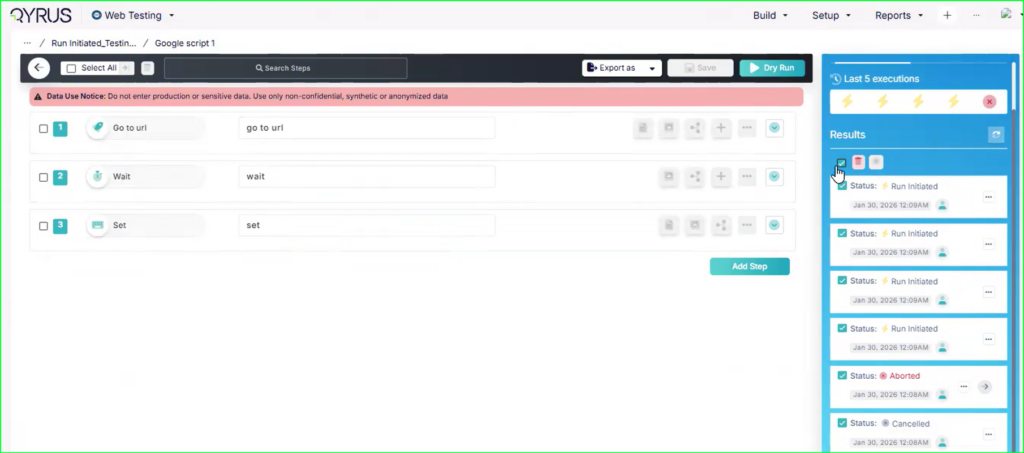
We have implemented a robust Bulk Stop and Delete functionality for Web Tests. You now have granular control over your execution queue:
- Selective Control: Select specific multiple tests or choose “Select All” to perform actions in bulk.
- Immediate Action: Instantly Stop running tests (updating them to “CANCELLED” or “ABORTED”) or Delete old runs to clean up your view.
- Broad Coverage: This works across various early-stage statuses like “Run Initiated,” “Allocating Browsers,” and “Running,” ensuring you can pull the plug before resources are wasted. (Note: Runs already generating reports will complete to ensure data integrity).
How will it help?
This feature gives you immediate command over your testing resources.
- Save Concurrency: Instantly free up browser slots by cancelling accidental or stuck runs in bulk, allowing legitimate tests to run sooner.
- Faster Cleanup: Keep your reporting dashboard organized by quickly deleting batches of irrelevant or failed execution entries.
- Safety First: Includes confirmation prompts to prevent accidental mass deletions, giving you confidence while managing high volumes of tests.
Smart Variable Resolution: Global Fallback Now Active!
The Challenge:
Managing test data across multiple environments (SIT, UAT, Pre-Prod) often resulted in unnecessary redundancy. If you had a variable that was constant across all environments—like a shared API key or a common database URL—you were previously forced to define that same variable repeatedly inside every single environment profile. This not only cluttered your workspace but also made maintenance a nightmare; updating a shared value meant editing five different files instead of just one.
The Fix:
We have introduced a smart fallback mechanism for environment variables. The system now employs a hierarchical lookup logic during execution. When a test step requests a variable, the system first checks your currently selected environment (e.g., SIT). If the key is missing there, it automatically “falls back” and retrieves the value from your Global environment.
How will it help?
This update brings the “Don’t Repeat Yourself” (DRY) principle to your test configuration.
- Reduce Redundancy: Define shared values (like standard timeouts or common endpoints) once in the Global profile, and they automatically work everywhere.
- Simplify Maintenance: Update a shared credential in one place, and the change propagates instantly to all environments that don’t override it.
- Cleaner Configuration: Keep your environment-specific profiles focused only on what actually changes between environments (like URLs or user accounts), keeping your setup lean and readable.
Test Orchestration
Expand Your Reach: Run 10 Configurations in a Single Workflow!
The Challenge:
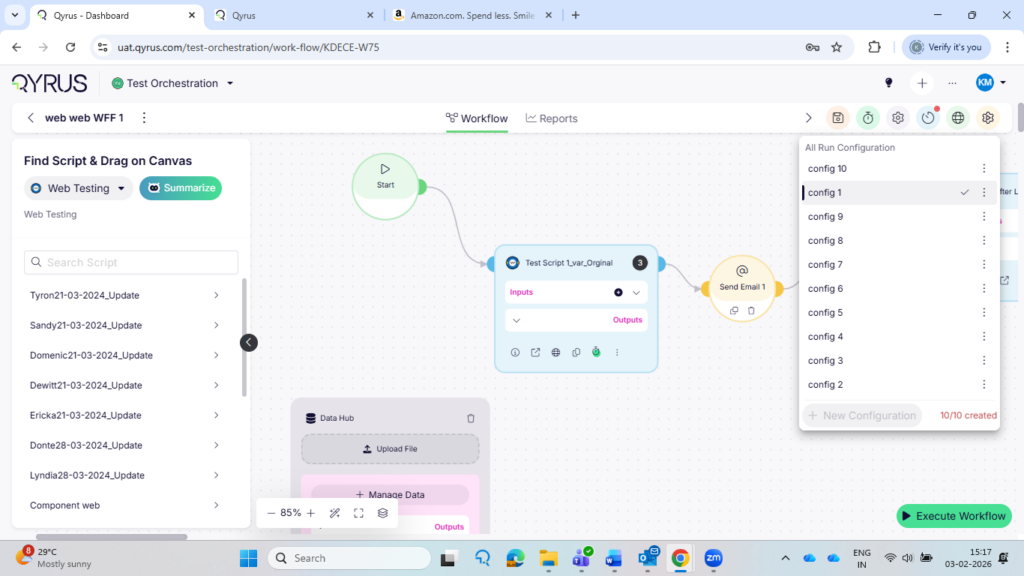
Previously, test workflows were limited to a maximum of 3 configurations. For global teams needing to validate scripts across multiple markets or environments simultaneously, this limit was a major bottleneck. Users were forced to fragment their testing into multiple separate schedules or workflows just to cover all their required bases, creating unnecessary management overhead and “configuration dependencies.”
The Fix:
We have more than tripled the capacity for workflow customizations. You can now add up to 10 unique Run Configurations (Global Environment Configurations) within a single workflow.
How will it help?
This update streamlines your global testing strategy.
- One Schedule, All Markets: You can now validate a script across up to 10 different markets or environments in a single scheduled run.
- Reduced Clutter: Eliminate the need to create duplicate workflows just to bypass the previous limit.
- Simplified Management: Manage your entire multi-region or multi-config test strategy from a centralized, single pane of glass.
Orchestrate at Scale: Execute Multiple Workflows Simultaneously!
The Challenge:
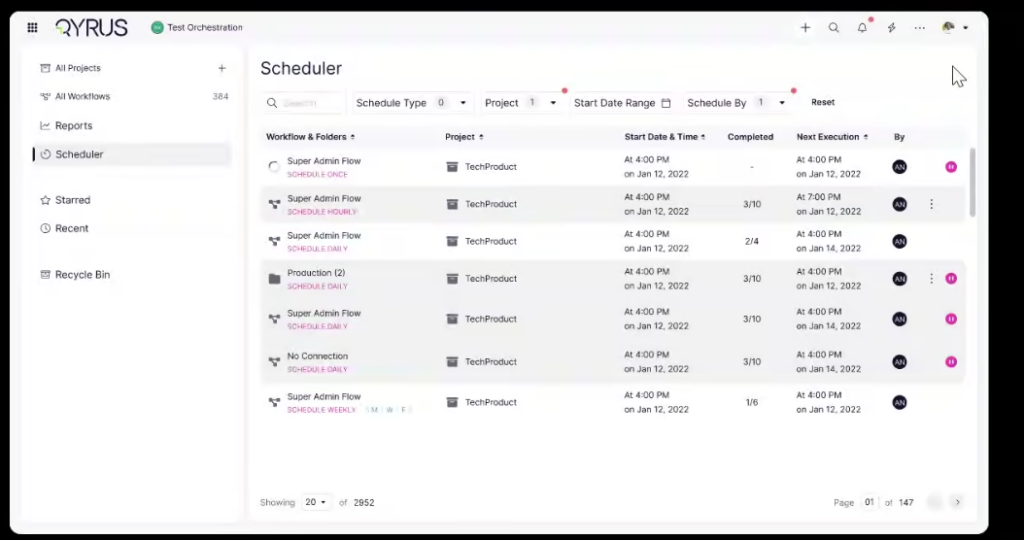
Previously, Test Orchestration was limited to a “one-at-a-time” execution model. If you had 20 different workflows that needed to run daily or weekly, you had to manually trigger or schedule each one individually. There was no mechanism to group them together and say “Run all of these now,” which made managing large-scale, recurring test cycles incredibly tedious and time-consuming.
The Fix:
We have unlocked the ability to execute and schedule multiple workflows simultaneously. You can now select multiple workflows—whether they reside within a single folder or are scattered across different folders—and trigger them all in one go with their respective global environment configurations.
How will it help?
This update transforms Test Orchestration into a true bulk-management tool.
- Massive Efficiency: Trigger your entire daily or weekly regression suite with a single click, rather than dozens.
- Parallel Execution: Leverage your grid’s full potential by spinning up multiple workflows at once.
- Simplified Scheduling: Set up complex, multi-workflow schedules easily, ensuring all your critical tests run exactly when they need to without manual intervention.
Turbocharged Canvas: Load Complex Workflows Instantly!
The Challenge:
As workflows grew in complexity with hundreds of steps and linkages, the Test Orchestration canvas struggled to keep up. Users with large projects (like those at Finzly) experienced frustrating load times—sometimes exceeding 15 minutes—or faced “Page Unresponsive” errors and browser timeouts. The sheer volume of data being rendered at once made the interface laggy and difficult to navigate.
The Fix:
We have engineered a massive performance overhaul for the workflow builder.
- Web Workers: We now offload heavy processing tasks to background threads, keeping the UI responsive.
- Smart Rendering: We implemented incremental loading and pagination for IO variables, meaning the system only renders what you currently see or need, rather than trying to load the entire universe at once.
- Optimized Scroll: Navigation is now buttery smooth, even in massive workflows, thanks to optimized scroll performance and differential loading.
How will it help?
This update transforms the user experience from “waiting” to “working.”
- Zero Wait Time: Open even your most complex workflows in seconds, not minutes.
- Stability: Eliminate browser crashes and “Unresponsive” errors, no matter how large your test logic grows.
- Fluid Experience: Zoom, scroll, and build without lag, allowing you to focus on orchestration rather than fighting the interface.
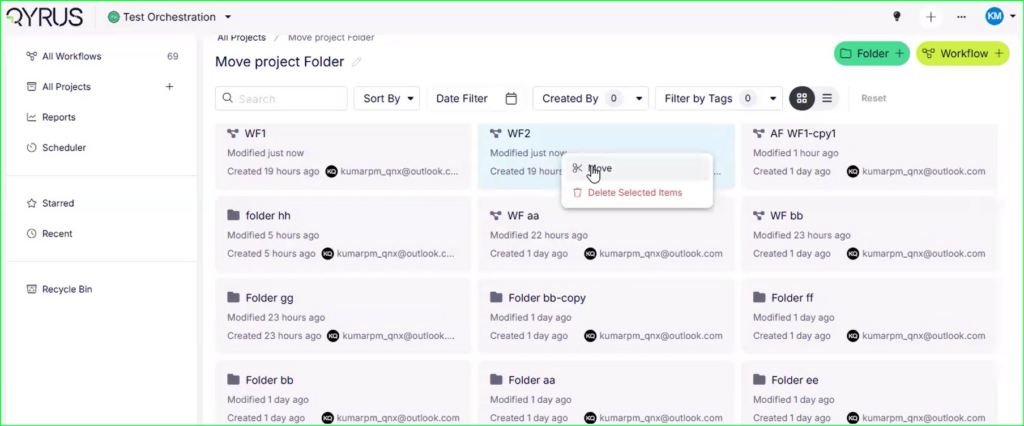
Organize with Ease: Move Multiple Workflows & Folders!
The Challenge:
As projects grew, test hierarchies often became cluttered or outdated. Previously, reorganizing these assets was a rigid and painful process. Users could not easily shift multiple workflows or folders to new locations in bulk. If you wanted to restructure your project or move a set of regression tests to a different folder, you were often stuck moving items one by one or, worse, having to recreate them in the new location.
The Fix:
We have introduced Multi-Select and Move functionality for Test Orchestration. You can now hold Ctrl (or Cmd) and click to select multiple workflows or folders at once. With a simple right-click action, you can move these selected items in bulk to any other folder or project within your workspace.
How will it help?
This update gives you the freedom to restructure your work as your project evolves.
- Declutter Your Workspace: Easily clean up messy projects by grouping related workflows into specific folders.
- Bulk Management: Save time by moving dozens of items at once instead of painstakingly reorganizing them individually.
- Project Refactoring: Seamlessly migrate workflows between projects or folders as your team’s testing strategy changes.
qAPI
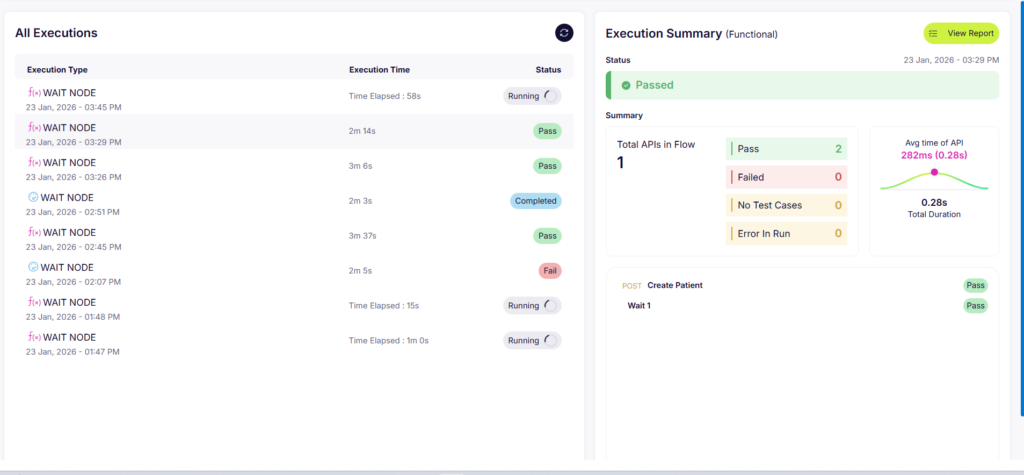
Master the Clock: Wait Nodes Now Available in API Workflows!
The Challenge:
In real-world scenarios, systems don’t always respond instantly. A database might take a few seconds to update after a POST request, or a third-party service might need a moment to process a webhook. Previously, API workflows in QAPI executed steps as fast as possible. This speed often caused “flaky” tests—where a step would fail simply because the backend wasn’t quite ready yet—or resulted in unrealistic performance tests that hammered the server with unnatural intensity.
The Fix:
We have introduced a dedicated Wait Node to the API workflow builder. This feature is available for both Functional and Performance testing types. You can now drag and drop a wait step anywhere in your flow to pause execution for a specific duration.
How will it help?
This update gives you precise control over the timing of your tests.
- Eliminate Flakiness: Give your backend the time it needs to process asynchronous tasks (like database writes or queue processing) before the next validation step runs.
- Realistic Performance Testing: Simulate “think time”—the natural pauses a real user takes between actions—to create more accurate and realistic load scenarios.
- Better Orchestration: easily handle race conditions and timing-dependent logic without writing custom scripts.
Ready to Leverage February’s Innovations?
We are committed to providing a unified platform that not only adapts to your evolving needs but also streamlines your critical processes, empowering you to release high-quality software with greater speed and confidence.
Eager to explore how these advancements can transform your testing efforts? The best way to appreciate the Qyrus difference is to experience these new capabilities directly.
Ready to dive deeper or get started?

 July 23, 2026
  18 min