 Varun RS
First things first- Your AI coding tools are not the problem.
GitHub Copilot, Amazon CodeWhisperer, and a growing stack of AI development assistants are now generating between 20 and 40 percent of all new code at major technology companies. Your developers are shipping faster than ever before. Feature cycles that once took months now take weeks. Hotfixes that once required sprints go out overnight.
But still your problems keep to rise. Why?
Because your QA team is not able to keep the pace and this gap is widening.
The global automation testing market has already crossed $40.44 billion in 2026 and is projected to hit $78.94 billion by 2031 — companies are clearly pouring money into this problem. But buying tools is not the same as fixing it. Many QA teams have spent heavily and still end up manually stitching together broken pipelines, with three or four tools running web automation, API testing, mobile, and SAP testing in separate silos.
Nearly two-thirds of organizations remain stuck in experimentation or pilot phases, unable to scale AI for real impact
The cost of that fragmentation is not just operational. Every release that goes through patchy test coverage carries defect risk. Every hour your QA engineers spend fixing broken scripts in one tool and rebuilding coverage in another is an hour not spent catching regressions earlier or expanding test breadth.
What this guide gives you is a clear way to make that decision — not a list of tools, but a way to figure out which SaaS test automation platform actually fits your team’s needs, budget, and where you need to be 18 months from now. You will find:
- A seven-criterion evaluation framework weighted by business impact
- A head-to-head comparison of Testsigma, Tricentis, mabl, Katalon, and ACCELQ mapped to real coverage gaps
- A coverage KPI model that connects platform features to quality outcomes you can measure
- A phased rollout plan from week one through month twelve
- Answers to the questions QA directors most often ask when picking a platform
Where Most Platform Decisions Go Wrong
Platform selection failure is not a failure of intent. Most QA directors evaluating automation tools do their homework. They read reviews, sit through vendor demos, and run proof-of-concept tests. The mistakes happen for three specific reasons.
1. Evaluating on Demo Performance, Not Real-World Outcomes
Vendor demos are set up for clean conditions. Every platform looks capable when the test application is simple, the data is tidy, and the integrations are already wired up. The gap between demo and production only shows up after contracts are signed and the first messy E2E flow falls apart.
The smarter approach is to judge platforms on numbers that matter: defect detection rates, test creation speed, regression cycle time, and how much work it takes to keep tests from breaking — all tested against your actual apps and your actual data, not the vendor’s sample project.
2. Ignoring Total Cost of Ownership
License cost is the first number that shows up in a budget conversation. It is rarely the biggest one. For Tricentis Tosca, a mid-size setup with 3–5 users and multiple modules typically runs €40,000–€100,000+ per year in licensing alone — before anyone touches implementation. One Forrester study found a modeled customer spent roughly $150,000 on Tricentis implementation alone. That number rarely shows up in the first proposal.
Across all platforms, the hidden costs follow the same pattern: implementation services, team training, framework setup, and the ongoing hours required to keep test coverage current as the product changes. A platform with cheap per-seat pricing but high upkeep will often cost you more over three years than one that costs more upfront but runs leaner day to day.
3. Underweighting Coverage Breadth
Most platform evaluations zero in on the testing type the team uses most — usually web UI automation. That is fine for the first year. The problem builds up later, when the team needs to extend coverage to SAP, data pipelines, desktop apps, or complex E2E flows, and finds out the platform they locked into does not handle any of that.
The result is the same fragmentation they were trying to get away from — now made worse by migration work, duplicate training costs, and split test repositories.
The 7 Evaluation Criteria’s That Actually Matter
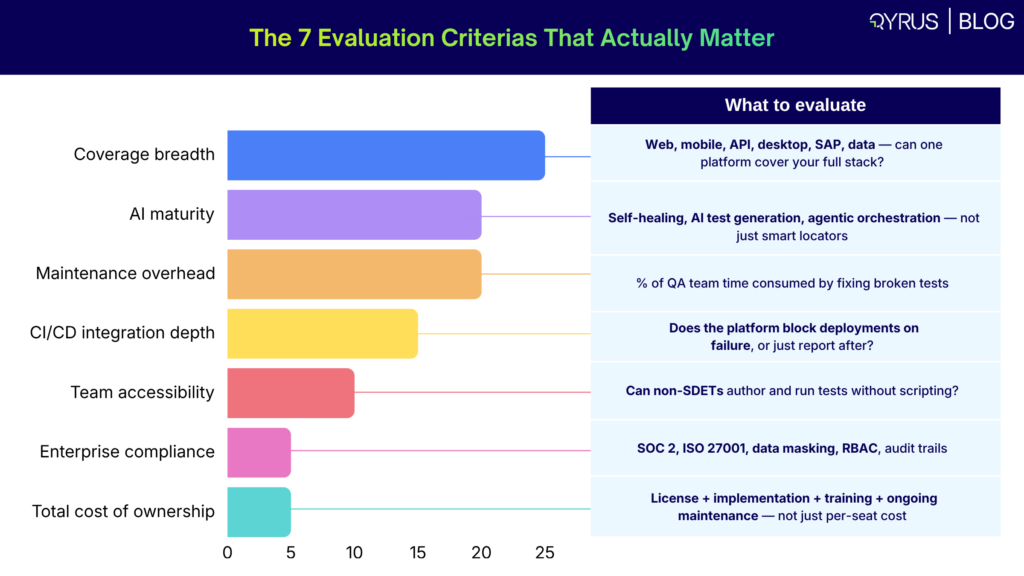
Enterprise QA leaders assess platforms based on how well they fit existing quality goals, scale with complex systems, and handle compliance across global operations. The table below lists the seven criteria’s that leaders should anchor every platform evaluation, with suggested weightings based on common enterprise priorities. We suggest you to adjust the weights based on your specific context.
| Criteria | Weight | What to evaluate |
| Coverage breadth | High (25%) | Web, mobile, API, desktop, SAP, data — can one platform cover your full stack? |
| AI maturity | High (20%) | Self-healing, AI test generation, agentic orchestration — not just smart locators |
| Maintenance overhead | High (20%) | % of QA team time consumed by fixing broken tests |
| CI/CD integration depth | Medium (15%) | Does the platform block deployments on failure, or just report after? |
| Team accessibility | Medium (10%) | Can non-SDETs author and run tests without scripting? |
| Enterprise compliance | Medium (5%) | SOC 2, ISO 27001, data masking, RBAC, audit trails |
| Total cost of ownership | High (5%) | License + implementation + training + ongoing maintenance — not just per-seat cost |
1st Criteria: Coverage Breadth
The single most important question to ask any vendor is: can one platform cover web, mobile, API, desktop, SAP, and data testing? Most platforms say yes to three or four of those. Very few say yes to all six with real depth rather than thin, checkbox support. Before signing anything, ask vendors to show demo of each testing type running on an app that looks like your own tech stack — not a environment purely made for demo.
2nd Criteria: AI Maturity
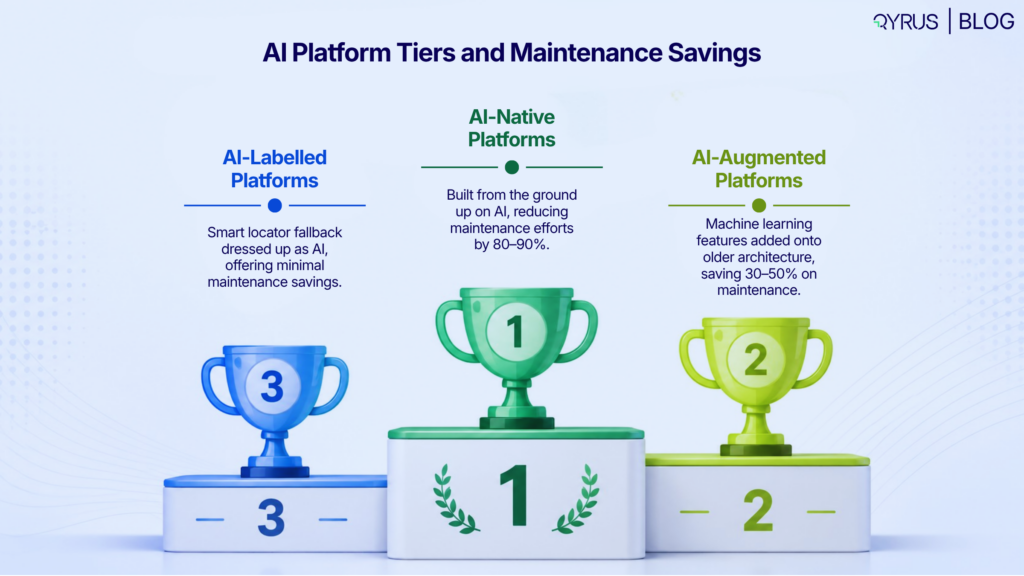
Not all AI features in testing platforms are the same, we can all agree on that. The market splits into three tiers: AI-native platforms (built from the ground up on AI), AI-augmented platforms (ML features bolted onto older architecture), and AI-labelled platforms (smart locator fallback dressed up as AI). This distinction matters because AI-native platforms tend to cut maintenance by 80–90%. AI-augmented tools land at 30–50%. That gap translates directly into QA team hours and how much coverage they can actually maintain.
3rd Criteria: Maintenance Overhead
This is the biggest cost driver in any established automation program. Traditional automation frameworks take up 80% of QA budgets just on maintenance. When evaluating any platform, you should ask vendors for documented proof of maintenance reduction — not projected estimates, but real numbers from actual customers. Self-healing accuracy should be something you can verify, not just a claim in a slide deck.
4th Criteria: CI/CD Integration Depth
There is a real difference between a platform that integrates with CI/CD and one that does it well. A basic integration means test results get exported to your pipeline after the fact. A deep integration means the pipeline will be stopped when tests fail, giving your team feedback before code gets merged. For teams running continuous delivery, only that second kind gives you a real quality gate.
5th Criteria: Team Accessibility
If only senior SDETs can write tests, your coverage ceiling is capped by headcount. But in comparison, platforms that support codeless and low-code test authoring let business analysts, manual testers, and junior QA engineers contribute. This difference matters most during regression testing for SAP and ERP flows, where deep knowledge of business processes counts for more than scripting ability.
6th Criteria: Enterprise Compliance and Security
For regulated industries it’s observed that financial services, healthcare, utilities — compliance is not optional. It rules out non-compliant platforms before evaluation even begins. Key requirements include SOC 2 Type II certification, ISO 27001, role-based access control, data masking for sensitive test data, and full audit trails. It is your duty to verify these yourself; do not trust blindly.
7th Criteria: Total Cost of Ownership
Start by creating a three-year cost model before signing. Because a platform with lower upfront costs but heavy ongoing maintenance will often cost more over a full contract term.
Ensure to include: per-seat or per-execution license fees, implementation services, integration development, team onboarding and training, ongoing maintenance hours (calculated at your team’s fully-loaded cost), and the cost of switching platforms if you outgrow the tool. This is the only strategic way you ensure the chances of outcome are on your side.
Platform Comparison
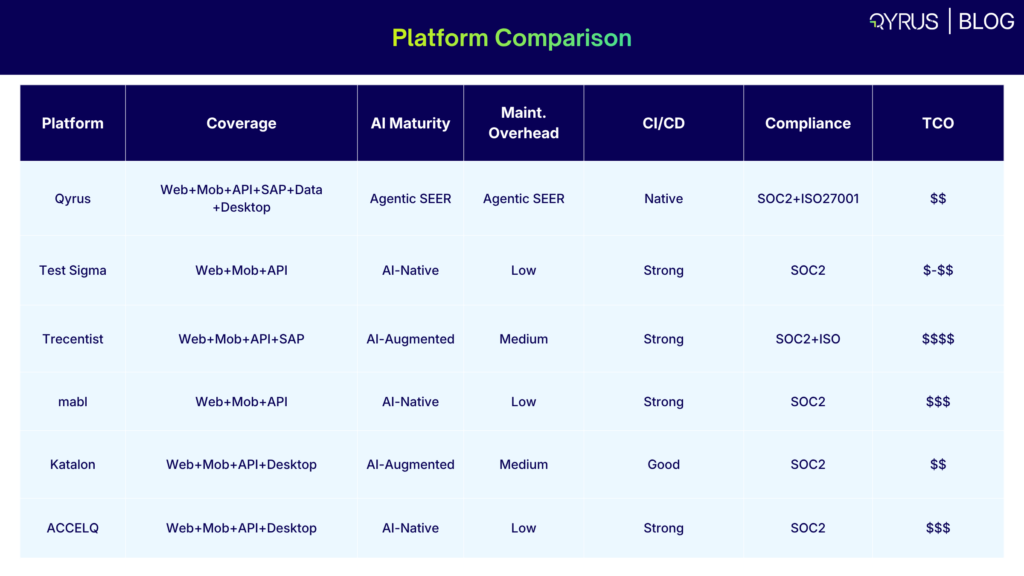
Each of the five platforms below is a solid choice for specific use cases. Each also has documented coverage gaps and cost patterns that become significant at enterprise scale. The profiles below draw on public customer reviews, G2 data, analyst reports, and publicly available pricing information — not vendor-supplied content.
| Platform | Coverage | AI Maturity | Maint. Overhead | CI/CD | Compliance | TCO |
| Qyrus | Web+Mob+API+SAP+
Data+Desktop |
Agentic SEER | Very Low | Native | SOC2+ISO27001 | $$ |
| Test sigma | Web+Mob+API | AI-Native | Low | Strong | SOC2 | $-$$ |
| Trecentist | Web+Mob+API+SAP | AI-Augmented | Medium | Strong | SOC2+ISO | $$$$ |
| mabl | Web+Mob+API | AI-Native | Low | Strong | SOC2 | $$$ |
| Katalon | Web+Mob+API+Desktop | AI-Augmented | Medium | Good | SOC2 | $$ |
| ACCELQ | Web+Mob+API+Desktop | AI-Native | Low | Strong | SOC2 | $$$ |
Please note: TCO tiers above are relative ($ = lower, $$$$ = highest total cost of ownership at enterprise scale). Coverage notation reflects native, production-tested support — not surface-level integrations.
TestSigma
Testsigma is a cloud-native, AI-driven platform with strong credentials in web, mobile, and API test automation. Its Sprint Planner Agent reads Jira boards and automatically generates test coverage for new stories — a feature that can meaningfully speed up coverage for agile teams running short sprints.
The self-healing capability they offer can cut maintenance overhead by up to 90%.
Coverage gap: Testsigma does not offer native SAP or Fiori testing, data pipeline validation, or agentic orchestration for complex E2E business process flows. For enterprises whose testing scope goes beyond standard web and mobile applications, these gaps become hard structural limits rather than minor inconveniences.
Best fit: Cloud-first teams focused on web, mobile, and API coverage with no SAP or legacy enterprise application requirements.
Tricentis
Tricentis is the established enterprise standard for organizations with complex SAP landscapes. Its model-based approach and Vision AI technology are well-regarded for SAP regression testing and large-scale enterprise application coverage. It is also the most expensive platform in this comparison by a wide margin.
According to public sources, mid-size Tricentis deployments with 3–5 users and multiple modules typically costs €40,000–€100,000+ per year. Named licenses run approximately $3,500–$5,000 per user per year; concurrent licenses run $6,000–$10,000. Implementation services frequently add $150,000+ for large deployments. Every capability — Vision AI, mobile testing, test data management, SAP modules — requires a separate license purchase.
Coverage gap: Real users on G2 consistently flag Tricentis Tosca as not ideal for Salesforce testing. It’s because the learning curve is steep and moreover the script creation process takes significant time. For organizations without dedicated Tricentis-certified engineers, adoption timelines increase out marginally.
Best fit: Large enterprises with SAP as their primary testing challenge, dedicated automation engineering teams, and budget set aside for sustained platform investment.
mabl
mabl is one of the most used platforms for web application testing. It has intelligent test generation, clean CI/CD integration, and easy-to-use interface enabling a fast path to coverage for web-focused teams. Trusted by enterprise names including Workday, Vivid Seats, and JetBlue, it has earned strong customer rating scores for web UI automation.
Coverage gap: mabl does not cover desktop applications as stated by a G2 user. It does not support SAP or data pipeline testing. At scale, teams with test suites larger than several hundred cases report performance slowdowns and unexplained test delays. An important aspect to check before making mabl your enterprise-wide standard.
Best fit: For web-focused teams running moderate test suite volumes, without SAP, desktop, or data testing requirements.
Katalon
Katalon has a larger surface coverage among the five platforms compared here — because it supports web, mobile, API, and desktop testing from a single interface. It has three authoring modes (record-playback, keyword-driven, and full scripting) make it accessible to mixed-skill teams without forcing everyone into the same workflow. They have a free tier, making it easy to evaluate without a big upfront commitment.
Coverage gap: Katalon’s agentic AI features are less effective as compared to Testsigma or mabl. Advanced scenarios typically require scripting, which brings back the dependency on SDETs for complex flows. SAP testing and data pipeline validation are not supported. For enterprises looking to fully automate complex business process testing without scripting, Katalon starts to show its limits.
Best fit: We see it as a ideal fit for cross functioning teams needing broad surface coverage across web, mobile, API, and desktop, with budget constraints and some scripting capability in-house.
ACCELQ
ACCELQ is built for enterprises with complex business logic validation requirements. Its Generative AI engine builds a live model of the application and uses business rules to suggest relevant test scenarios — a strong capability for organizations with intricate workflow dependencies. Its Salesforce testing depth is among the best in the market.
Coverage gap: Vendor lock-in is a common concern raised by users who need flexibility in their automation framework. SAP Fiori testing depth is limited compared to dedicated SAP testing tools. Data pipeline testing and agentic orchestration across multi-system enterprise flows are not core strengths.
Best fit: Enterprises with Salesforce as the primary application under test, complex business logic validation requirements, and no significant SAP or data testing needs.
Mapping Coverage KPIs to Platform Capabilities
The evaluation framework becomes useful when you tie it to quality outcomes you can actually measure. The five KPIs below are the ones QA directors most often bring to engineering leadership when making the case for automation investment. Each one points directly to a specific platform capability you need to look for.
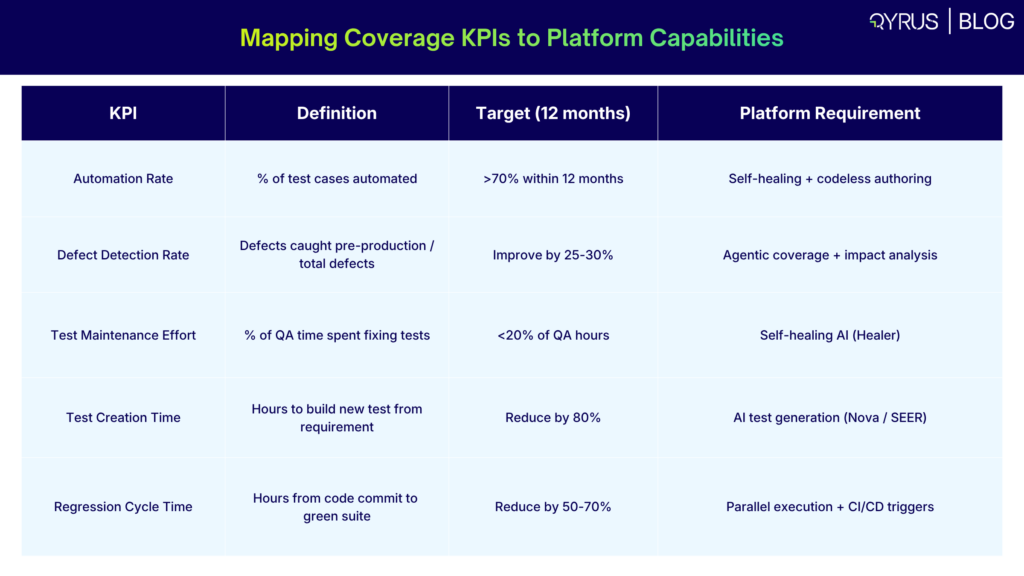
| KPI | Definition | Target (12 months) | Platform Requirement |
| Automation Rate | % of test cases automated | >70% within 12 months | Self-healing + codeless authoring |
| Defect Detection Rate | Defects caught pre-production / total defects | Improve by 25-30% | Agentic coverage + impact analysis |
| Test Maintenance Effort | % of QA time spent fixing tests | <20% of QA hours | Self-healing AI (Healer) |
| Test Creation Time | Hours to build new test from requirement | Reduce by 80% | AI test generation (Nova / SEER) |
| Regression Cycle Time | Hours from code commit to green suite | Reduce by 50-70% | Parallel execution + CI/CD triggers |
Two examples show how this mapping helps narrow down vendor choices:
Example 1 — Maintenance overhead is your primary cost driver: Your team currently spends 60% of QA engineering hours maintaining existing test scripts. The KPI target is to bring that below 20% within 12 months. This makes self-healing AI the must-have capability in your evaluation. Platforms without documented, verifiable self-healing accuracy should fall lower on your list, regardless of their other strengths.
Example 2 — SAP regression is your highest business risk: Your organization runs quarterly SAP updates that have historically required 3–4 weeks of manual regression testing. The KPI target is to cut that regression cycle to under one week with 85% automation coverage of critical business processes. This quickly cuts down your vendor shortlist to platforms with native SAP Fiori testing, automated impact analysis of transport changes, and intelligent test prioritization — features that only some of the platforms reviewed here actually deliver at the depth you need in production.
How Qyrus Solves the Coverage Gap
The gap that shows up in every comparison above — SAP, data testing, desktop, and agentic orchestration all covered natively in a single platform — is the problem Qyrus was designed to fix.
Qyrus is an AI-powered, low-code/no-code end-to-end testing platform that covers web, mobile, API, desktop, data, and SAP testing from a single unified environment. The architecture is built around three core differentiators.
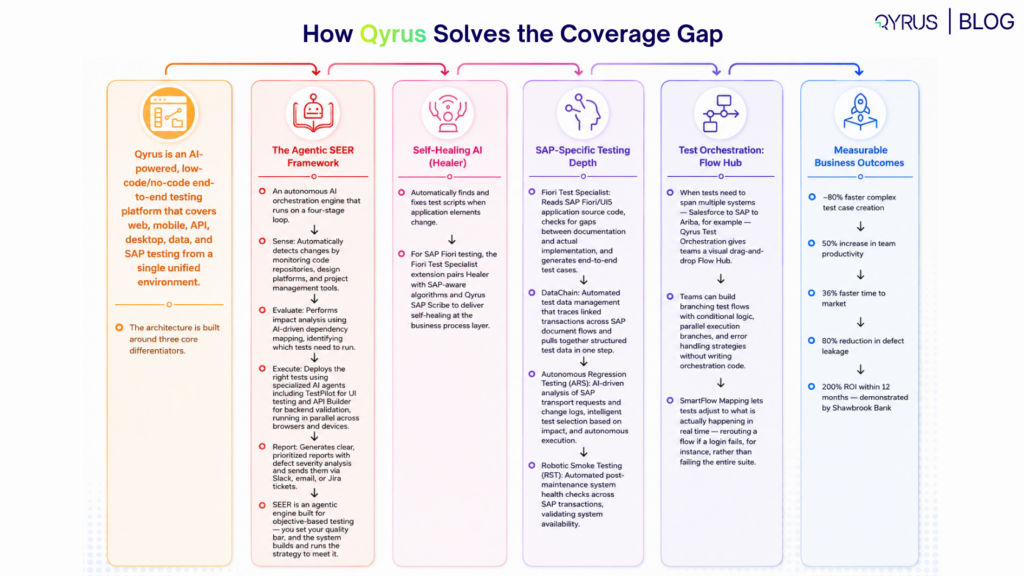
The Agentic SEER Framework
The heart of the Qyrus platform is the SEER framework — an autonomous AI orchestration engine that runs on a four-stage loop:
- Sense: Automatically detects changes by monitoring code repositories (GitHub commits, pull request merges), design platforms (Figma updates), and project management tools (Jira story changes)
- Evaluate: Performs impact analysis using AI-driven dependency mapping, identifying which tests need to run in response to a specific change — not the entire regression suite
- Execute: Deploys the right tests using specialized AI agents including TestPilot for UI testing and API Builder for backend validation, running in parallel across browsers and devices
- Report: Generates clear, prioritized reports with defect severity analysis and sends them via Slack, email, or Jira tickets — getting results back in minutes, not hours
This is not AI patched onto an old system. SEER is an agentic engine built for objective-based testing — you set your quality bar, and the system builds and runs the strategy to meet it.
Self-Healing AI (Healer)
Qyrus Healer (US Patent 11,205,041 B2) automatically finds and fixes test scripts when application elements change. When a test fails because of a real UI update, Healer looks at the change, suggests corrected locators, and repairs the script — cutting out the manual debugging that eats up maintenance budgets. For SAP Fiori testing, the Fiori Test Specialist extension pairs Healer with SAP-aware algorithms and Qyrus SAP Scribe (custom ERP-aware AI models fine-tuned to a customer’s SAP landscape) to deliver self-healing at the business process layer, not just the UI locator level.
SAP-Specific Testing Depth
Qyrus provides purpose-built SAP testing capabilities that go beyond what general-purpose platforms offer:
- Fiori Test Specialist: Reads SAP Fiori/UI5 application source code, checks for gaps between documentation and actual implementation, and generates end-to-end test cases that are ready to run straight away
- DataChain: Automated test data management that traces linked transactions across SAP document flows (from sales order through to accounting entries) and pulls together structured test data in one step — achieving up to 92% faster test data creation
- Autonomous Regression Testing (ARS): AI-driven analysis of SAP transport requests and change logs, intelligent test selection based on impact, and autonomous execution — delivering 2x test breadth with 50% fewer resources
- Robotic Smoke Testing (RST): Automated post-maintenance system health checks across SAP transactions, validating system availability without the weekend coordination overhead
Test Orchestration: Flow Hub
When tests need to span multiple systems — Salesforce to SAP to Ariba, for example — Qyrus Test Orchestration gives teams a visual drag-and-drop Flow Hub. Teams can build branching test flows with conditional logic, parallel execution branches, and error handling strategies (retry with backoff, circuit breakers, saga compensation) without writing orchestration code. SmartFlow Mapping lets tests adjust to what is actually happening in real time — rerouting a flow if a login fails, for instance, rather than failing the entire suite.
Measurable Business Outcomes
- ~80% faster complex test case creation
- 50% increase in team productivity
- 36% faster time to market
- 80% reduction in defect leakage
- 200% ROI within 12 months — demonstrated by Shawbrook Bank
- 65–70% decrease in test script maintenance effort (Healer AI)
- 50–70% reduction in overall testing time through parallel agentic execution
The Phased Implementation Plan: 0–12 Months
Rolling out automation across an enterprise usually takes 12–18 months. AI-native platforms can cut that down by 50–70% compared to traditional frameworks that need a lot of custom development. The most common failure is trying to automate everything in the first sprint and ending up with nothing useful. The phased approach below is set up to show real KPI improvements at each stage, building confidence at each step.
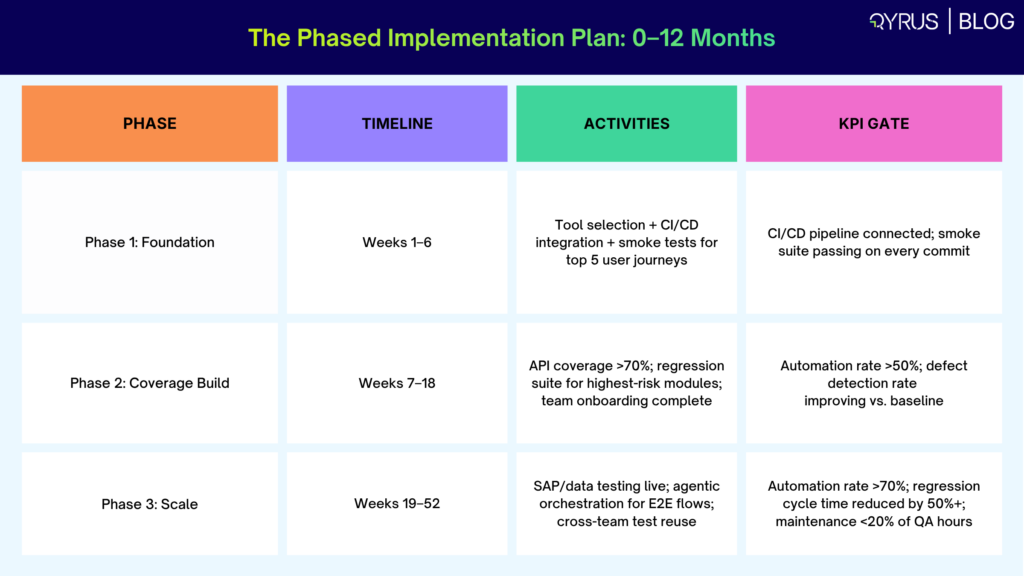
| Phase | Timeline | Activities | KPI Gate |
| Phase 1: Foundation | Weeks 1–6 | Tool selection + CI/CD integration + smoke tests for top 5 user journeys | CI/CD pipeline connected; smoke suite passing on every commit |
| Phase 2: Coverage Build | Weeks 7–18 | API coverage >70%; regression suite for highest-risk modules; team onboarding complete | Automation rate >50%; defect detection rate improving vs. baseline |
| Phase 3: Scale | Weeks 19–52 | SAP/data testing live; agentic orchestration for E2E flows; cross-team test reuse | Automation rate >70%; regression cycle time reduced by 50%+; maintenance <20% of QA hours |
Phase 1 (Weeks 1–6): Foundation
The goal of Phase 1 is a working CI/CD integration and a passing smoke test suite for your five most business-critical user journeys. This phase is about checking that the platform actually works in your setup — your authentication flows, your test data, your pipeline configuration — before you put time into broader coverage.
Activities: Select your platform and sign contracts. Set up CI/CD integration (Jenkins, Azure DevOps, GitHub Actions, or equivalent). Identify your top 5 user journeys by business risk. Build and run smoke tests for those journeys. Verify that failing tests block pipeline deployment.
Common mistake to avoid: Trying to migrate existing test scripts from a legacy platform in Phase 1. Migration brings old problems into the new setup. Start fresh with high-value journeys; migrate in Phase 2 and 3.
Phase 2 (Weeks 7–18): Coverage Build
Phase 2 builds out automation depth across the API layer and your highest-risk regression modules. API tests give you the best return in this phase — they run faster, break less often, and are easier to keep up than UI tests. They also catch integration failures before they show up in the UI.
Activities: Build API test coverage for all public-facing APIs. Find the 10–15 test scenarios with the highest historical defect count and automate those first. Finish team onboarding so all QA engineers can write tests without needing SDET help. Set up test data management workflows.
KPI gate: Automation rate should reach 50% of total test scenarios. Defect detection rate should show a clear improvement versus the pre-automation baseline. Bring these numbers to engineering leadership at the Phase 2 review.
Phase 3 (Weeks 19–52): Scale
Phase 3 extends coverage to the full testing surface — SAP regression, data pipeline validation, desktop application testing, and complex E2E orchestration flows. This phase also sets up the reuse structure that keeps the automation program running on its own: shared function libraries, parameterized test data sets, and cross-team test reuse policies.
Activities: Activate SAP testing modules (Fiori Test Specialist, ARS, DataChain). Build data testing workflows for ETL/ELT pipelines and critical data integrity checks. Set up agentic orchestration for complex multi-system E2E flows. Create shared test function libraries across teams.
KPI gate: Automation rate above 70%. Regression cycle time down by 50% or more versus baseline. Test maintenance overhead below 20% of QA engineering hours. Present a full ROI breakdown to leadership using the KPI model from Section 5.
What to Avoid at Every Phase
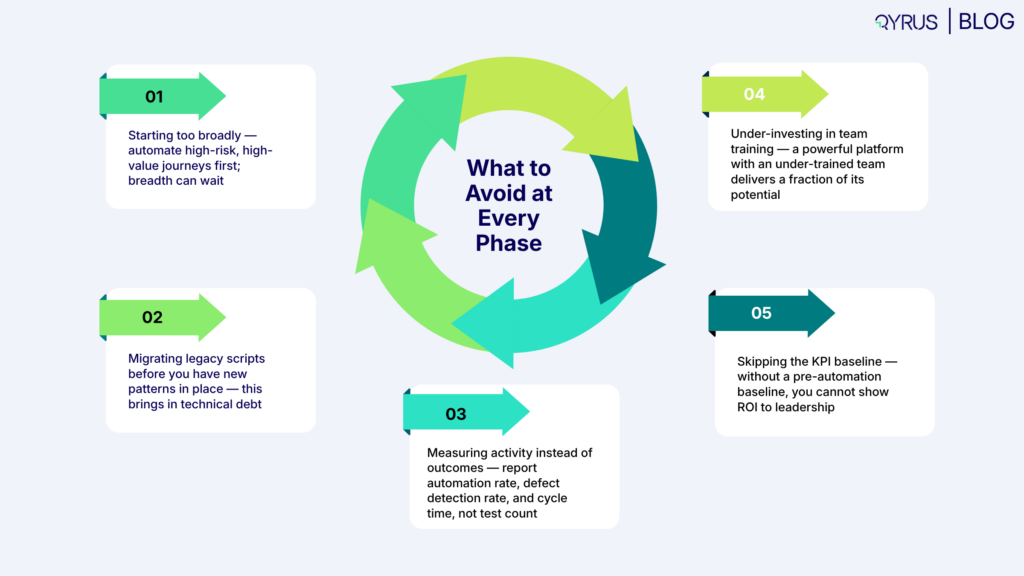
- Starting too broadly — automate high-risk, high-value journeys first; breadth can wait
- Migrating legacy scripts before you have new patterns in place — this brings in technical debt
- Measuring activity instead of outcomes — report automation rate, defect detection rate, and cycle time, not test count
- Under-investing in team training — a powerful platform with an under-trained team delivers a fraction of its potential
- Skipping the KPI baseline — without a pre-automation baseline, you cannot show ROI to leadership
The Bottom Line: Choose a Platform That Covers Your Next 18 Months, Not Just Today
The gap between how fast dev teams ship and how fast QA can keep up is real and it is getting wider. The question for QA directors in 2026 is not whether to invest in test automation — that decision was settled years ago. The question is whether the platform you pick can cover everything you need today and everything you will need eighteen months from now.
Testsigma, mabl, Katalon, and ACCELQ all work well for specific situations. Tricentis is the go-to for SAP-heavy enterprises with the budget to match. The coverage gap that each of them leaves — SAP, data testing, desktop, agentic orchestration, or scalable E2E flows — is what ends up forcing a second platform purchase, a migration project, or a structural defect risk.
The seven evaluation criteria in this guide, the KPI model, and the phased rollout plan are here to help you sidestep that problem: make one decision, cover everything, and show measurable ROI at every stage gate.
If your testing scope includes SAP, data pipelines, desktop applications, or complex multi-system E2E flows — and you want a single platform that handles all of them with AI-native automation and no-code authoring — Qyrus is built for exactly that scope.
Ready to close your coverage gap? Book a demo with the Qyrus team and see the SEER framework, Healer AI, and SAP testing capabilities running on applications that look like yours.
Frequently Asked Questions
What is a SaaS test automation platform?
A SaaS test automation platform is a cloud-based software tool that lets QA teams build, run, and manage automated software tests without setting up or maintaining on-premise infrastructure. Modern platforms combine codeless or low-code test authoring, AI-powered self-healing, parallel execution across browsers and devices, and CI/CD pipeline integration — so that teams of varying technical skill levels can build and keep up comprehensive test coverage at speed.
What are the most important evaluation criteria for enterprise QA teams?
For enterprise teams, coverage breadth and total cost of ownership are the two criteria that most teams undervalue. Coverage breadth — whether the platform can genuinely support web, mobile, API, desktop, SAP, and data testing natively — decides whether you end up needing a second or third platform in 18 months. Total cost of ownership, including implementation, training, and maintenance overhead, tells you whether the platform actually pays off over a three-year contract. The seven-criterion framework in this guide gives you a weighted model for structuring your evaluation.
How does Qyrus compare to Tricentis for SAP testing?
Both platforms offer native SAP testing capabilities. The main differences come down to cost, setup complexity, and what each covers outside of SAP. Tricentis is modular and priced that way — each capability (Vision AI, mobile, SAP modules, test data management) needs a separate license, with mid-size deployments typically running €40,000–€100,000+ per year before implementation services. Qyrus provides SAP testing depth — including Fiori Test Specialist, DataChain, ARS, and Robotic Smoke Testing — inside a unified platform that also covers web, mobile, API, desktop, and data testing. For organizations where SAP is one important testing area among several, Qyrus offers broader coverage at a lower total cost.
What KPIs should I track to measure test automation ROI?
The five KPIs that best show automation ROI to engineering and business leadership are: automation rate (percentage of test scenarios automated, target 70%+ within 12 months), defect detection rate (percentage of defects caught pre-production, target 25–30% improvement), test maintenance effort (percentage of QA hours spent fixing broken tests, target under 20%), test creation time (hours from requirement to executable test, target 80% reduction), and regression cycle time (hours from code commit to green test suite, target 50–70% reduction). Setting a baseline before you deploy the platform is essential — without it, you have no way to prove the ROI later.
How long does it take to implement a SaaS test automation platform enterprise-wide?
Enterprise-wide automation rollouts typically take 12–18 months, covering platform selection, CI/CD integration, team onboarding, coverage build, and scaled deployment. AI-native platforms can cut that timeline by 50–70% compared to traditional frameworks that need significant custom development work. Pilot rollouts — covering a defined application scope and team — usually wrap up in 3–6 months and give you the proof you need to roll it out across the organization. The phased plan in this guide covers the first 52 weeks in detail.
What should I look for in AI-powered testing tools?
Three things separate platforms that are actually AI-powered from those that just use the label. First, self-healing test maintenance — where the platform automatically spots and fixes broken test locators when applications change, with accuracy rates you can verify, not just take on trust. Second, AI-driven test generation — where the platform creates test scenarios from requirements, Jira tickets, or application analysis rather than making engineers write every test by hand. Third, agentic orchestration — where the platform picks and runs the right tests in response to a code change, rather than firing the entire regression suite regardless of what changed. Platforms that deliver all three at production quality work very differently — in terms of cost and output — from those that only cover one.
What is the biggest mistake QA teams make when selecting a test automation platform?
Judging a platform by its demo rather than what it can do in the real world. Vendor demos are built for clean conditions and rarely show the coverage gaps that become real problems once you are locked in. The most reliable way to evaluate is a hands-on proof-of-concept using your actual applications, your actual test data, and your actual CI/CD pipeline — scored against the seven criteria in this guide rather than a gut feeling from a vendor-run demo. Asking vendors to show each testing type (web, mobile, API, SAP, data) on a sample of your own application stack is the fastest way to find the gaps that will actually matter for your team.
 September 30, 2026
  9 min
9 min