
Self-Healing Test Automation: The Complete Guide
 Varun RS
It’s Monday morning. Your CI pipeline ran overnight and you open your test dashboard to find 180 tests failing. The app isn’t broken. No bug was introduced. Over the weekend, a developer refactored the frontend component library, wiping out every CSS class name your test suite depended on. Not a single real defect. Just 180 broken locators standing between your team and the Friday release.
This is the maintenance trap that quietly drains QA programs every single week. The more you invest in test automation, the larger the surface area that shatters the moment your application evolves. And in teams shipping multiple times a day, that means an endless cycle of triage, diagnosis, and manual repair work that pulls engineers away from the things that actually matter: building new coverage, exploring edge cases, and shipping features.
Built to break this cycle, self-healing test automation leverages artificial intelligence and machine learning to detect failures caused by UI or element modifications. The system dynamically identifies the intended element using alternative architectural attributes, updates the script in real time, and resumes execution without human intervention.
This guide covers everything you need to know: what self-healing is, how it works under the hood, where it makes the biggest difference, what to watch out for, and how to implement it well. Whether you’re a QA engineer drowning in broken locators, an engineering manager trying to protect release velocity, or a CTO evaluating your automation strategy, this is your practical reference.
What Is Self-Healing Test Automation?
Self-healing test automation is an AI-powered capability that allows an automated test to detect when it cannot find a UI element, search for that element using alternative identifiers, repair the broken locator, and continue executing without any manual intervention.
Think of it like GPS navigation. When you miss a turn, your GPS does not shut off and report failure. It recalculates the route, finds a new path, and gets you to the destination anyway. Self-healing test automation works on exactly the same principle: when the expected path breaks, the system finds another way and keeps going.
The root problem it solves is locator brittleness. Traditional automated tests rely on locators such as IDs, XPath expressions, CSS selectors, element names, and text content to find and interact with UI elements. These locators are recorded at test creation time and hardcoded into the script. The moment a developer renames a button ID from ‘login-btn’ to ‘auth-submit’, or moves a div inside a new container, every test that referenced that element fails with a NoSuchElementException.
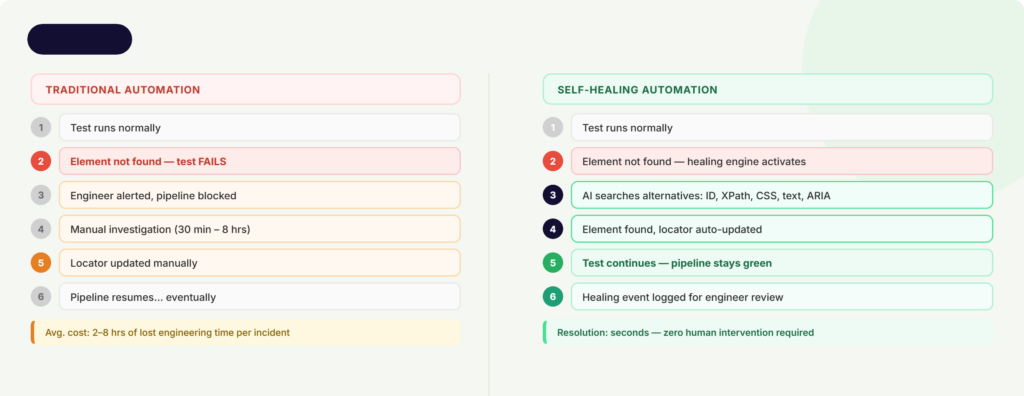
With traditional testing, the mentioned failure looks like this: test fails, engineer gets paged, engineer investigates, engineer updates the locator, pipeline resumes. That cycle can span from 30 minutes to several days, based on the number of affected scripts and the complexity of the change.
Conversely, a self-healing framework completely alters this. When a missing element is detected, the healing engine instantly evaluates secondary attributes, resolves the locator drift, resumes the test execution, and logs the event for asynchronous engineering review. The pipeline remains uninterrupted, eliminating false-positive pages. This is not about making tests that never fail. It is about making sure tests fail only when there is a real problem with the software, not because a button label changed.
Why Test Maintenance Is Quietly Killing Your QA Program
The numbers are hard to argue with. Research from Capgemini’s World Quality Report 2024-25, cited by QASource, found that script maintenance consumes up to 50% of test engineering time due to constant application changes. An analysis of 40 startups published on Medium in 2026 found teams spending 60 to 70% of QA time on upkeep, leaving only 30 to 40% for actually building new coverage.
This maintenance burden compounds destructively over time. Early in a product lifecycle, frontend elements remain relatively stable. However, as the application scales, three primary forces accelerate degradation: expanding feature sets increase test volume, widening the surface area vulnerable to code changes; modernizations like React framework upgrades trigger cascading locator failures; and growing test suites multiply the number of scripts referencing a single volatile element.
There is also a talent cost that rarely gets quantified. A 2026 analysis found that triaging flaky tests requires both application architecture knowledge and test framework expertise simultaneously. That work concentrates on your most senior engineers. A senior QA engineer earning $140,000 annually who spends 30% of their time on test maintenance is absorbing roughly $42,000 of pure overhead per year. Not fixing bugs. Not building coverage. Updating locators.
Then there is the false positive problem. When tests fail not because the software is broken, but because a class name shifted, it erodes trust in the entire test suite. Engineers start ignoring failures. Red pipelines stop being alarming. The automation you invested in stops being a safety net and becomes background noise.
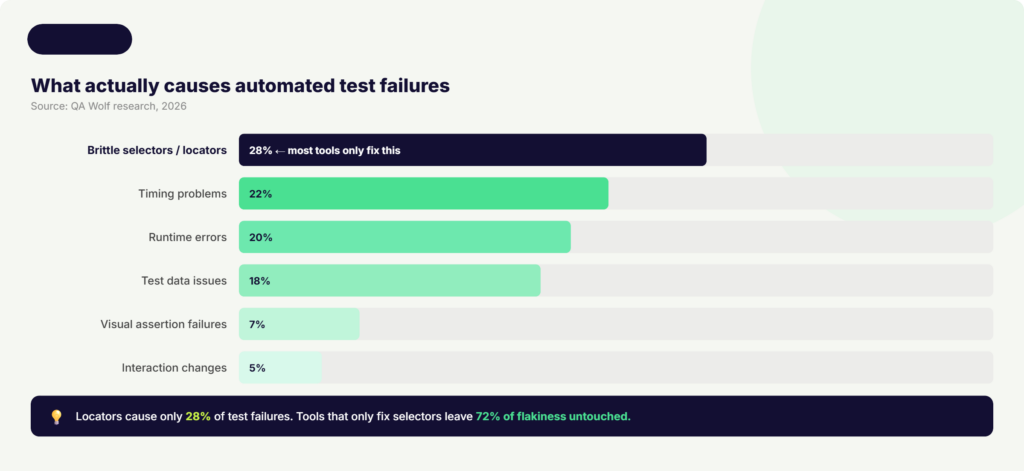
One more widely misunderstood reality: most tools marketed as ‘self-healing’ only address locator breakage. But according to QA Wolf research published in 2026, brittle selectors cause only about 28% of test failures in real-world suites. The remaining 72% come from timing problems, invalid test data, runtime errors, visual assertion failures, and interaction changes. Fixing only the locators while ignoring the rest means 72% of flakiness remains untouched.
For an automation strategy to deliver a true return on investment, teams must look past basic locator-fixing utilities and adopt comprehensive platforms that handle data states, environment availability, and timing synchronization dynamically.
How Self-Healing Test Automation Works
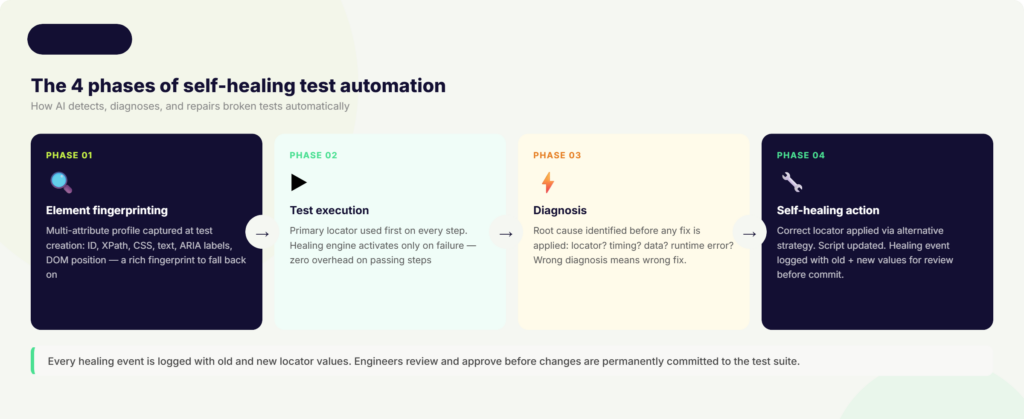
Understanding self-healing at a mechanical level helps you choose the right tool and implement it correctly. The process follows four distinct phases.
Phase 1: Element Fingerprinting
When a test is first created, the self-healing system captures a rich fingerprint of every UI element it interacts with. Rather than recording a single locator, it records multiple attributes simultaneously: the element ID, name, CSS selector, XPath, text content, ARIA labels, and the element’s relative position within the DOM tree. Some advanced systems also capture visual attributes through screenshots.
This multi-attribute profile gives the healing engine a redundant set of identifiers to fall back on when the primary one breaks. It is the difference between knowing one route to a destination versus knowing five.
By shifting from a single locator strategy to an object-model representation, the framework constructs a dynamic map of the application’s user interface rather than a fragile list of hardcoded coordinates.
Phase 2: Test Execution
During a test run, the framework attempts to locate elements using their primary identifiers exactly as scripted. The vast majority of steps will execute normally. When the primary locator succeeds, no healing occurs and no performance overhead is added.
The system only activates when an element cannot be found via its primary identifier. At that point, rather than immediately reporting a failure, the healing engine is triggered.
Phase 3: Diagnosis
This is where more sophisticated self-healing tools differentiate themselves. A basic tool assumes every failure is a locator problem and tries alternative selectors. A diagnosis-first tool asks: what type of failure is this?
Diagnosis-first systems capture runtime artifacts including DOM snapshots, network activity logs, console errors, and application state. They categorize the root cause before applying any fix. If the element is missing because an API response was slow and the page has not finished rendering, patching the locator achieves nothing and may cause a false pass. The right fix is adding a resilient wait or retry. If the element’s ID changed, updating the locator is correct. If it is a visual assertion failure, a screenshot comparison is needed.
The AI and machine learning techniques involved include: computer vision using convolutional neural networks (CNNs) for visual element identification; natural language processing (NLP) to understand semantic meaning (so ‘Sign In’ and ‘Log In’ are recognized as functionally equivalent); supervised learning from historical test execution data to predict stable locator strategies; and fuzzy matching to score candidate elements by similarity of text, attributes, and DOM structure.
Phase 4: Self-Healing Action
Once the correct element is located through an alternative strategy, the system updates the test script with the new locator value and resumes execution. The original run completes and future runs use the healed locator.
Critically, every healing event is logged. Best-in-class tools display the old locator value alongside the new one and prompt an engineer to review and approve the change before it is permanently committed. This human-in-the-loop validation ensures that legitimate functional regressions are never masked by over-eager healing. The script adapts to real UI changes. It does not silently pass when something actually broke.
Key Benefits of Self-Healing Test Automation
“Teams using AI-based testing tools reduced maintenance effort by up to 70% and improved CI/CD pipeline stability by nearly 50%.” – Capgemini World Quality Report 2024-25
The most immediate and quantifiable benefit is the reduction in time spent on test maintenance. Capgemini’s World Quality Report 2024-25 found that teams using AI-based testing tools reduced maintenance effort by up to 70% and improved CI/CD pipeline stability by nearly 50%.
The second major benefit is the elimination of false positives. When tests no longer fail due to minor UI changes, the signal-to-noise ratio in your test suite improves dramatically. Engineers stop ignoring red builds. When a test does fail, the team can trust it represents a real issue. This rebuilds confidence in the automation program and makes QA a reliable partner in the release process rather than a bottleneck.
Self-healing directly accelerates CI/CD pipelines. With healing running automatically on every build, the pipeline stays green through routine UI changes without any human intervention required. Developers get fast, reliable feedback after every commit. The feedback loop that makes continuous delivery work remains intact even as the application changes constantly underneath it.
Better test coverage is another downstream benefit that often goes unrecognized. When QA engineers are no longer spending half their time fixing broken locators, they have capacity to build new tests. Coverage expands. More business flows get validated. The automation program actually grows instead of just trying to maintain what already exists.
For mobile testing specifically, self-healing addresses a particularly acute pain point. Mobile applications update frequently, often with UI structures that change significantly between versions and behave differently across iOS and Android. Teams that implement self-healing in mobile CI/CD pipelines report 20 to 30% faster release cycles according to Quinnox’s 2025 analysis. Healing corrects locator differences across device types without any per-device manual tuning.
Finally, the return on investment is measurable and arrives quickly. CloudQA’s 2026 testing trends report found that enterprise organizations adopting self-healing scripts demonstrated a 95% reduction in manual maintenance overhead. The upfront investment in tooling is typically recovered within a single release quarter when measured against the engineering hours no longer lost to locator repair.
Where Self-Healing Test Automation Makes the Biggest Difference
Web Applications with Frequent Releases
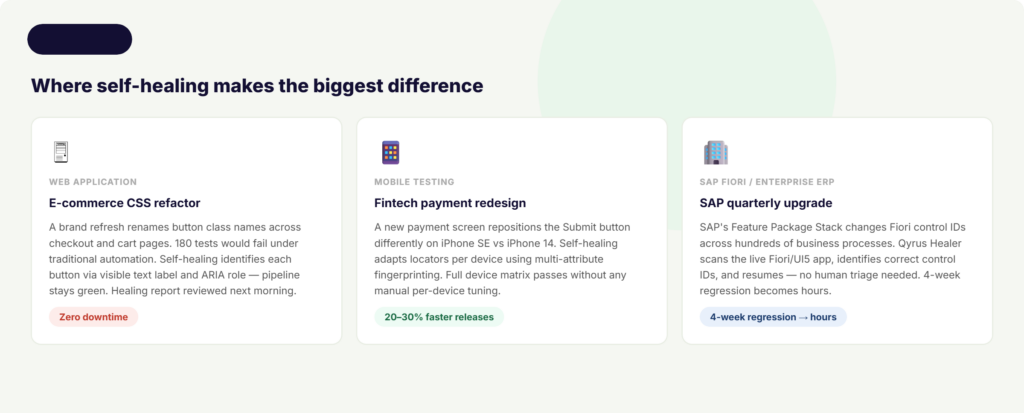
Consider an e-commerce team that ships a CSS refactor as part of a brand refresh. The development team renames dozens of button class names and updates div structures across checkout, cart, and account pages. Under traditional automation, this triggers mass test failures. Not because checkout is broken. Because the test scripts are looking for class names that no longer exist.
With self-healing in place, the testing platform detects the broken selectors, identifies each button via its visible text label, ARIA role, and relative DOM position, updates the locators, and completes the run. The pipeline stays green. A healing report is generated summarizing every locator that was updated, which the QA lead reviews the next morning. The release ships on schedule.
Mobile Testing Across Devices and OS Versions
A fintech mobile app ships a redesigned payment screen to comply with updated accessibility guidelines. The Submit button has been repositioned, its ID has changed, and the surrounding layout is different on smaller devices than on larger ones. Tests that were working perfectly on iPhone 14 now fail on iPhone SE.
Self-healing handles the positional differences automatically. By capturing multiple locator strategies at test design time, including text content, ARIA labels, and proximity to other stable elements, the healing engine identifies the correct button regardless of where it landed on each device. The test suite runs cleanly across the full device matrix without any per-device locator maintenance.
SAP Fiori and Enterprise ERP Testing
This is where self-healing delivers some of its most significant enterprise value, and where most competitors leave organizations on their own.
SAP operates on a structured release cycle that includes major upgrades, Feature Package Stacks (FPS) delivered three times per release, and regular Support Package Stacks (SPS). Each release changes Fiori control IDs, app structures, and field names in ways that systematically break traditional test automation. According to ContextQA’s 2026 SAP testing guide, manual regression for a SAP environment with 200 or more active business processes takes 4 to 8 weeks. With automated testing, that same coverage takes 4 to 8 hours.
Without self-healing, those 4 to 8 hours of automated testing become days of manual locator repair after every SAP quarterly update. With self-healing integrated into the SAP testing workflow, the automation adapts to each new release automatically, keeping the regression suite operational across upgrades.
This drastically compresses the traditional testing timeline, allowing enterprise IT leaders to align their core ERP updates with rapid agile sprint cadences without risking business process downtime.
When to Be Cautious
Self-healing is not appropriate everywhere, and a credible guide should say so directly. For security-sensitive flows such as banking transactions or authorization changes, the consequences of a false pass are serious enough that human review should precede any test continuation. For exact layout or copy validation tests, where the precise position of an element or its exact text content is what you are testing, visual regression testing is the more appropriate tool. Self-healing adapts to change; visual regression detects it.
How Qyrus Healer Takes Self-Healing Further
Most self-healing tools pick a lane: web or mobile, UI or API, one platform or one framework. Qyrus Healer was built differently.
A patent-backed approach. Qyrus Healer holds U.S. Patent 11,205,041 B2 for self-healing test automation. This is one of the few solutions in the market where the core healing algorithm is protected by a registered patent, reflecting the proprietary nature of the approach rather than a repackaging of generic AI libraries.
No advance training required. Many AI-based testing tools need a period of historical execution data before their healing becomes reliable. Qyrus Healer’s patented algorithm works out of the box on any application, without requiring prior training runs. From the first execution, it intelligently identifies element changes across the application lifecycle and updates locators using a custom distance metric.
99.9% accuracy. Healer achieves an accuracy rate of over 99.9% on locator identification and repair, minimizing false positives and ensuring that healed scripts genuinely reflect the current state of the application rather than introducing new errors.
Web and mobile in one. Most self-healing solutions are siloed to either web or mobile testing. Qyrus Healer works across both platforms within a single unified environment. Web application tests and mobile application tests running on real devices through Qyrus Device Farm both benefit from the same healing capabilities.
SAP Fiori integration. Qyrus Healer powers a unique SAP Fiori testing workflow through the Fiori Test Specialist module. When the AI-assisted test generator produces test steps with incorrect or missing Control IDs, the Healer pauses execution at the failing step, automatically scans the live Fiori/UI5 application to identify the correct technical field names and control IDs, corrects the values, and resumes execution. The healed values are shown alongside the original for review before being committed.
Baseline script approach. Healer AI activates for Execute Test runs where a previous passed scenario report exists. It references that successful baseline and suggests updated locators, primarily ID, Class, and XPath values, to accommodate discrepancies found in the current run. This baseline-anchored approach means healing is always grounded in a known-good state of the application.
For teams using Qyrus across web, mobile, API, and SAP testing, Healer provides a consistent self-healing layer across the entire testing program rather than requiring a different healing strategy per platform. You can learn more about Qyrus’s approach to web testing, mobile testing, and SAP testing, or book a demo to see Healer in action.
Self-Healing Test Automation in CI/CD Pipelines
CI/CD is where self-healing delivers its sharpest return on investment. Multiple deployments per day mean multiple opportunities for locator breakage. Without healing, every UI change is a potential pipeline blocker. With healing integrated at the pipeline level, those changes are absorbed automatically, and the deployment cadence is never interrupted.
Integration works by hooking the self-healing engine directly into your pipeline trigger. When a developer merges a pull request or a build completes in Jenkins, Azure DevOps, or a similar tool, the test suite fires. If any locators have changed, the healing engine repairs them during that run. No human needs to intervene. No deployment waits for a QA engineer to investigate a false positive.
Teams that implement CI-integrated healing typically find that 5 to 10% of locators fail after each UI update under normal conditions. With healing running at the pipeline level, the majority of those failures are resolved instantly. Quinnox’s analysis found that teams adopting this approach achieve 20 to 30% faster release cycles and experience far fewer pipeline halts due to broken tests.
The recommended practice is not to auto-commit every healed locator without review. Instead, the AI proposes the fix and the pipeline continues. At the end of the sprint, a QA engineer reviews the healing log, which shows every step that was updated with the old and new values side by side. They approve changes that reflect genuine UI evolution, and flag any that look suspicious. This human-in-the-loop rhythm maintains trust in the test suite without sacrificing deployment speed.
Qyrus integrates natively with the full range of CI/CD and version control tools that enterprise teams rely on, including Jenkins, Azure DevOps, Bitrise, TeamCity, Concourse, GitHub, and Bitbucket. Self-healing is available as a toggle in the run configuration, so it can be enabled or disabled per execution type without requiring any pipeline reconfiguration.
Best Practices for Implementing Self-Healing Test Automation
Self-healing is powerful, but it works best when you design your test suite to support it rather than expecting it to compensate for poor locator hygiene.
- Start with stable locator design. The best locators to use as primary identifiers are role-based selectors, visible text content, ARIA labels, and dedicated test attributes like data-testid. These change less frequently than generated IDs or dynamic class names. Self-healing compensates for locator drift, but fewer healing events mean faster runs and less noise in the healing log.
- Do not over-trust automatic fixes. If the healing engine is configured to be too permissive, it can mask real functional regressions. A button that has genuinely been removed from the application should fail the test, not be healed into clicking something else. Review healing logs regularly and configure confidence thresholds appropriately for your risk tolerance.
- Maintain a complete audit trail. Every healed step should be logged with the old locator value, the new locator value, the alternative matching strategy used, and the timestamp. This trail is essential both for debugging unexpected behavior and for demonstrating test reliability to auditors in regulated industries.
- Combine with visual regression testing for layout-sensitive flows. Self-healing adapts to locator changes. It does not validate that the visual layout of a page is correct. For flows where the exact positioning of elements matters, use visual regression testing alongside self-healing. The two capabilities are complementary, not interchangeable.
- Schedule periodic manual reviews. Monthly or quarterly reviews of healed steps confirm that the healing engine’s updates genuinely reflect intended UI changes rather than masking defects. This is especially important as the application scales and the volume of healing events grows.
- For SAP and ERP environments, run healing against a validated baseline first. Use a known-good, full-regression baseline execution as the reference point. Healing suggestions are always evaluated against that baseline, so the system knows what ‘correct’ looks like before proposing any changes. This prevents healing from propagating errors forward if a previous run already contained a defect.
The Future of Self-Healing Test Automation
The self-healing tools available today are reactive: they detect a failure, diagnose it, and apply a fix. The next generation will be predictive.
Predictive healing analyzes upcoming code commits before tests run. It identifies which locators in the existing test suite are likely to be affected by a proposed change, and pre-updates them so that the test run after the commit completes cleanly from the start. Instead of healing after a failure, the system prevents the failure from occurring in the first place.
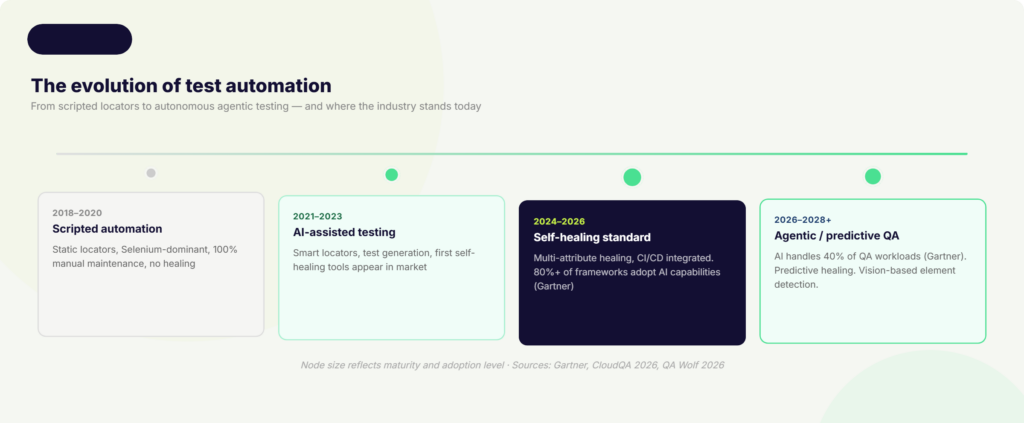
Agentic AI is the broader force reshaping how this works. Gartner forecasts that AI agents will independently handle up to 40% of QA workloads by 2028, including regression testing, smoke testing, maintenance, and bug triage. Standard self-healing addresses individual broken locators. Agentic AI reasons across entire test suites, makes decisions about test strategy, and executes multi-step recovery workflows without any human direction.
Vision-based testing is another emerging direction that could reduce DOM dependency entirely. Rather than relying on HTML attributes and DOM structure, vision-based tools identify UI elements the way a human tester would: by looking at the screen. A button is a button because it looks like a button and sits in the context of a form, regardless of what its underlying ID happens to be on any given day.
The 2026 software testing trends report from CloudQA puts this trajectory in concrete terms: self-healing scripts have demonstrated a 95% reduction in manual maintenance in early enterprise adopters, and organizations embedding generative AI into testing workflows are reporting a 40% increase in test coverage and a 10x improvement in overall productivity.
For business and engineering leaders, the strategic implication is straightforward. The teams that invest in self-healing and agentic testing infrastructure now are not just reducing a maintenance overhead. They are building the quality assurance foundation that makes it possible to release confidently at the speed their customers expect.
FAQs on Self-Healing Test Automation
1: What is self-healing test automation?
Self-healing test automation is an AI-powered capability that allows automated test scripts to detect when a UI element or locator has changed, find the correct element through alternative identifiers, update the script automatically, and continue running without any manual intervention. Instead of failing with a NoSuchElementException and waiting for an engineer to fix it, the test adapts on the spot.
2: How is self-healing different from traditional automated testing?
Traditional automated tests rely on a single hardcoded locator (an ID, XPath, or CSS selector) to find each UI element. When that locator breaks due to a UI change, the test fails and a human has to investigate and repair it. Self-healing tests capture multiple attributes for each element at test creation time, so when the primary locator fails, the system tries alternatives automatically. The key difference: traditional tests are brittle by design. Self-healing tests are built to absorb change.
3: Does self-healing work for both web and mobile testing?
Yes, though not every tool supports both. Most self-healing solutions focus exclusively on web automation. Qyrus Healer is specifically built to work across both web and mobile platforms within a single environment, including on real devices through Qyrus Device Farm, which means teams running both web and mobile test suites get consistent healing behavior without switching tools or strategies.
4: Can self-healing test automation handle SAP Fiori testing?
Most self-healing tools do not address SAP Fiori at all, which is a significant gap. SAP upgrades regularly change Fiori control IDs and app structures, making traditional test scripts fragile after every release. Qyrus Healer powers a dedicated SAP Fiori workflow through the Fiori Test Specialist module. When a test step fails due to an incorrect control ID, Healer pauses, scans the live Fiori/UI5 application, identifies the correct field names, corrects the values, and resumes execution.
5: Will self-healing hide real bugs by making failing tests pass?
This is the most important concern to address honestly: yes, it can, if implemented poorly. If a healing engine is too permissive, it may fix a locator when the real issue is that a feature has been removed or a flow has genuinely broken. The safeguard is human-in-the-loop review. Best-in-class self-healing tools log every healing event with the old and new locator values, and prompt an engineer to approve changes before they are permanently committed. Self-healing should never run silently with no audit trail. When implemented correctly, it reduces noise from false positives without masking real defects.
Stop Fixing Tests. Start Shipping Software.
Go back to Monday morning. Your pipeline ran overnight. You open the dashboard. 180 tests ran. 180 passed. The frontend team’s CSS refactor landed cleanly. The component library update was absorbed automatically. The healing log shows 23 locators that were updated overnight, each one reviewed and approved, each one correct. And your team ships on Friday.
That is what self-healing test automation actually delivers. Not a magic system that never breaks. A practical infrastructure that stops tests from failing for the wrong reasons, keeps your CI/CD pipeline moving, and gives your QA team back the time they need to do the work that actually requires human judgment.
The data is clear. Maintenance consumes up to 50% of QA engineering time under traditional automation. Teams that adopt AI-based self-healing reduce that burden by 70%. The releases come faster. The test suite grows instead of stagnating. The Monday morning dashboard becomes something you look forward to rather than dread.
The technology is here, it works, and the organizations investing in it now are building a sustainable competitive advantage in release quality and speed.
If you want to see how Qyrus Healer handles self-healing across web, mobile, and SAP Fiori testing in a single platform, book a demo with the Qyrus team.
Stay Ahead, Stay in the Loop with QyrusAI!
One Platform for Modernization, Quality Assurance and Intelligent IT Operations.

 October 16, 2026
  6 min
6 min