V6.19.0 (June 2026 Release)
Welcome to the June release!
In June, our engineering teams focused on injecting deep operational intelligence, enterprise flexibility, and rock-solid platform infrastructure into your daily testing workflows.
Across every service layer, we are delivering enhancements that eliminate friction, maximize execution visibility, and give you far greater control over how you manage and scale your automation suites.
In Web Testing, Test Generator v2 has taken a massive leap forward by expanding its AI-driven capabilities to handle advanced coding and API interactions natively. Desktop Testing receives an influx of precision features specifically designed to streamline complex SAP environments and dynamic grid data extraction.
Our backend and API testing capabilities have also matured significantly. We’ve introduced highly requested organization tools like drag-and-drop rearrangement and bulk migration workflows, paired with a unified deep-linking model to make cross-team collaboration absolutely frictionless.
Finally, we’ve fortified our foundational layer with hardened, cloud-resilient session management in the Device Farm and powerful scheduling and execution combos within Test Orchestration.
Let’s dive into the full breakdown of everything new across the platform this June!
Web Testing
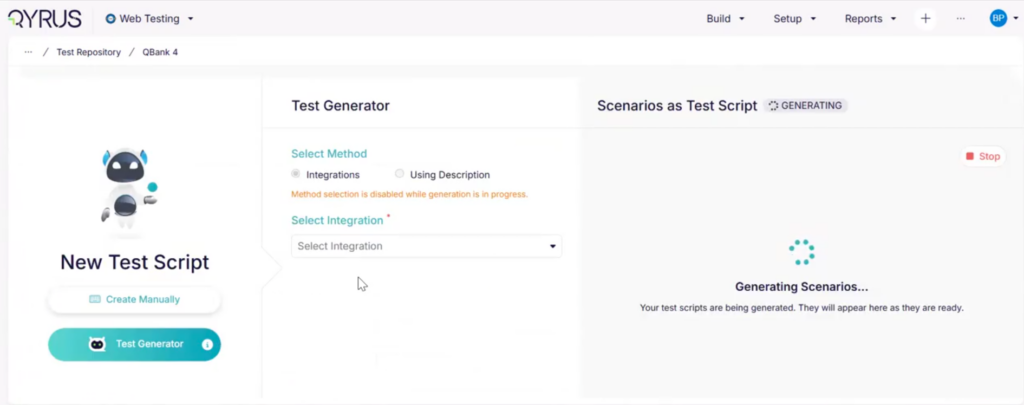
Complete AI Test Generation: Support for Code, APIs, and Variables!
The Challenge:
When using AI to automatically generate complex web testing scenarios, the system needs to be able to handle more than just basic UI clicks and text inputs. Previously, users utilizing Test Generator v2 were required to add certain missing data fields when the AI attempted to generate advanced actions. Specifically, generated steps for API calls, complex variable data handlers, and embedded JavaScript or JavaCode executions were returning empty or lacking the necessary dummy data, forcing testers to fill in the blanks.
The Fix:
We have expanded the capabilities of Test Generator v2 to fully support and populate data for advanced web actions. The AI engine has been updated to accurately generate and fill in the required fields for API Actions, Create Variable Data Handlers, Execute JavaCode, and Execute JavaScript steps directly within the generated test scenarios.
How will it help?
This upgrade ensures your AI-generated tests are comprehensive and ready to execute with minimal manual intervention.
- Advanced Scenario Automation: Confidently use the AI to generate complex, end-to-end tests that seamlessly blend UI interactions with backend API validations and custom code executions.
- Reduced Manual Coding: The AI now intelligently supplies the necessary code structures and dummy data for JavaScript and JavaCode steps, saving your engineers significant manual scripting time.
- Robust Variable Handling: Automatically generate and populate variable data handlers, ensuring your dynamic test logic works flawlessly right out of the box.
Desktop Testing
Dynamic Data Extraction: Table & Grid Support for Variables!
The Challenge:
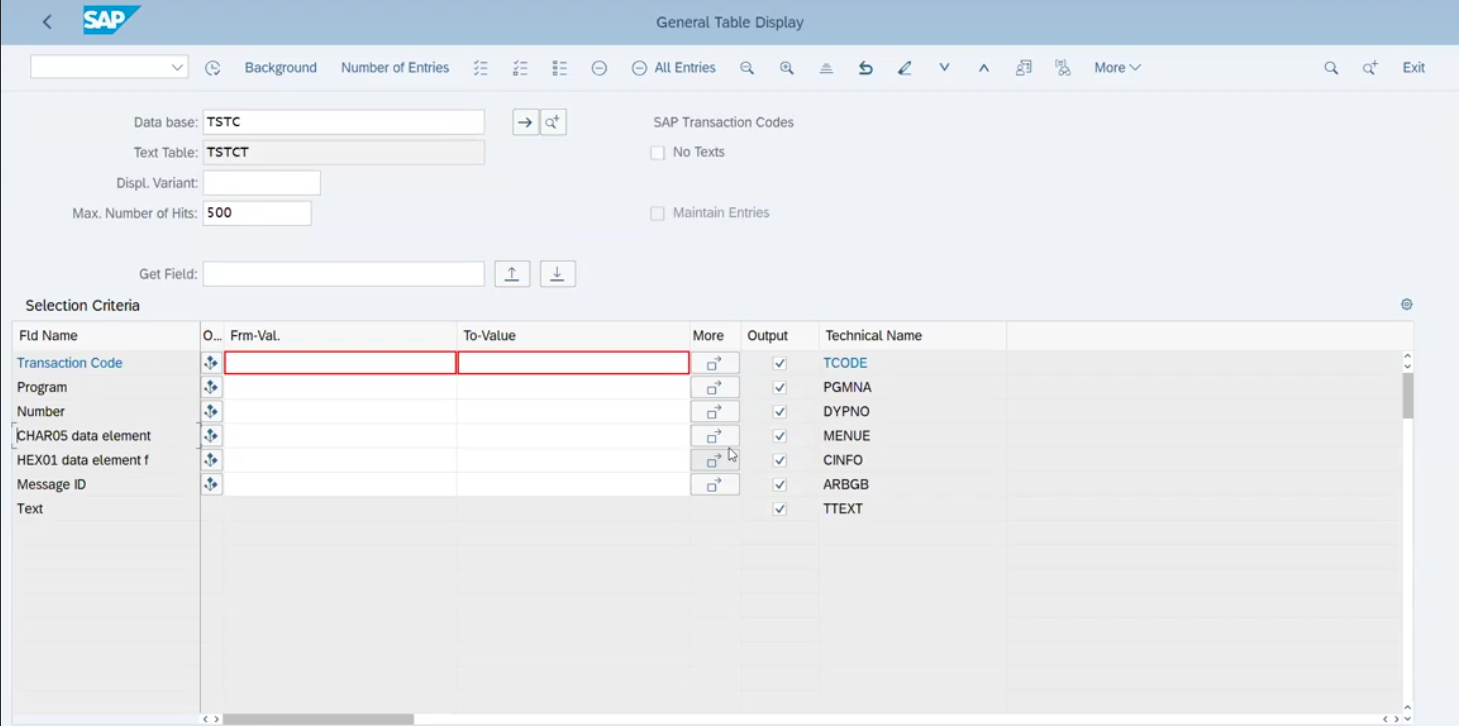
Desktop applications often display critical information—like financial records, inventory lists, or user data—within complex tables and data grids. Previously, extracting a dynamic value from a specific cell within these desktop grids and storing it as a variable was difficult. Testers often had to rely on complex workarounds or custom scripting just to grab a simple value, which slowed down the creation of data-driven test scenarios.
The Fix:
We have significantly enhanced the Create Variable action within the Desktop Testing service to natively support table and grid cell inputs. You can now seamlessly target a specific cell within your desktop application’s data grid and directly extract its contents into a variable for use later in your automation script.
How will it help?
This enhancement makes interacting with complex desktop data structures simple and straightforward.
- Data-Driven Flexibility: Easily capture dynamic data generated during a test (like a newly created order ID or a status code) directly from a table cell to pass into subsequent steps.
- Simplified Scripting: Eliminate the need for fragile workarounds or custom code just to read a value from a desktop grid, keeping your automation scripts clean and easy to maintain.
- Robust End-to-End Validation: Build stronger assertions by dynamically extracting table data and verifying it against expected outcomes later in your workflow.
Predictable Connections: Smart SAP Login Logic!
The Challenge:
When automating SAP workflows, the rules dictating whether a test script would attach to an existing SAP session or launch a brand-new window were previously implicit and relied heavily on backend exceptions. If a test provided partial login information (like just a client ID), the system’s behavior was unpredictable. This ambiguity often led to duplicate SAP instances cluttering the desktop, consuming system resources, and causing connection confusion during complex test runs.
The Fix:
We have completely overhauled the core logic for the “Login to SAP” action, establishing clear, explicit rules for the attach-or-create decision. Now, if a running SAP session perfectly matches the requested username and client, the system seamlessly attaches to it. If the credentials differ, it opens a new connection. Crucially, we removed the reliance on exception-driven fallbacks and updated the action results to explicitly surface exactly which path was taken during the test.
How will it help?
This structural upgrade brings absolute control and reliability to your SAP desktop automations.
- Eliminate Duplicate Windows: The strict matching rules guarantee that new application windows are only spawned when absolutely necessary, keeping your testing environment clean.
- Predictable Execution: Whether you provide full credentials or partial client information, the login action behaves exactly as documented without unpredictable fallback loops.
- Clear Traceability: You can now instantly see within your test execution reports whether a script attached to an existing session or created a new one, drastically simplifying script debugging.
Front and Center: Active SAP Session Monitoring!
The Challenge:
When automating complex SAP workflows, visibility is key to ensuring your tests are running as intended. Previously, when utilizing the new “Connect to Existing SAP Window” action, the test execution would successfully proceed, but the SAP GUI often remained hidden in the background. This obscured the live testing steps, making it incredibly difficult for automation engineers to visually monitor the execution in real time or immediately spot UI-level issues as they occurred.
The Fix:
We have updated the SAP automation engine to guarantee immediate visibility. Now, whenever a script utilizes the “Connect to Existing SAP Window” command, the platform automatically forces the active SAP application directly to the foreground of your desktop environment.
How will it help?
This quality-of-life improvement ensures complete transparency and immediate feedback during your desktop executions.
- Real-Time Monitoring: Watch your test steps execute live on the screen, giving you immediate visual confirmation of the application’s behavior and performance.
- Faster Debugging: Instantly spot unexpected pop-ups, UI anomalies, or navigation errors the exact moment they happen instead of digging through logs after the test completes.
- Streamlined Usability: No more manually hunting for minimized windows or alt-tabbing to find the right screen; the platform actively surfaces the relevant SAP instance right when you need to see it.
API Testing
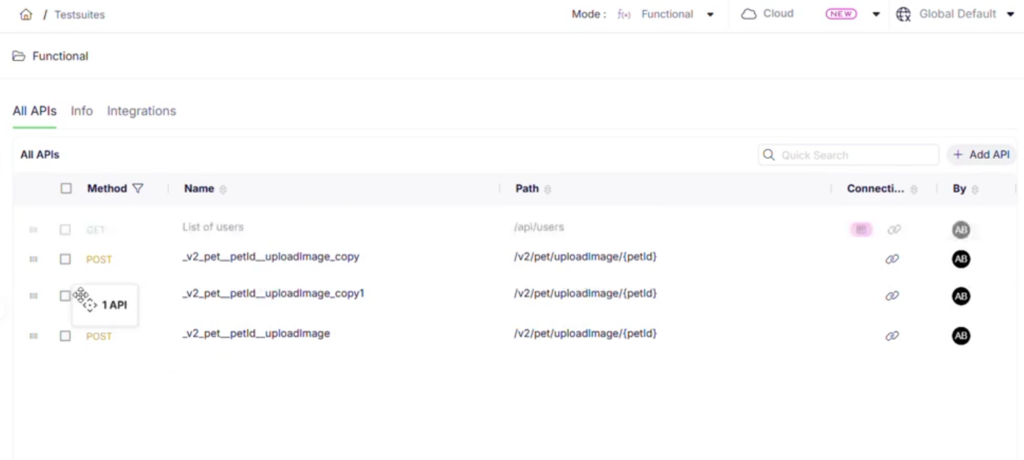
Effortless Organization: Drag-and-Drop API Rearrangement!
The Challenge:
When managing a growing library of API test scripts, keeping your workspace logically organized is crucial for team efficiency. Previously, the list of scripts on the “All APIs” page was rigid. If you needed to reorder your scripts to reflect a specific execution sequence, group related endpoints together, or simply clean up your view, there was no intuitive way to move them around. This lack of flexibility made managing extensive API suites feel clunky and time-consuming.
The Fix:
We have introduced fluid drag-and-drop functionality directly to the right-hand side (RHS) “All APIs” page. You can now seamlessly rearrange your entire list of API scripts simply by clicking, dragging, and dropping them into your exact preferred order.
How will it help?
This UI enhancement puts you in complete control of how your API workspace is structured.
- Intuitive Organization: Visually structure your API scripts exactly how you think about them, effortlessly grouping related tests without relying on rigid naming conventions.
- Faster Test Management: Quickly reorder scripts to match natural execution flows or priority levels in seconds, eliminating frustrating administrative overhead.
- Streamlined Workspace: Maintain a clean, personalized, and highly navigable project view, making it easier for both you and your team to locate specific endpoints instantly.
Seamless Sharing: Deep Linking for API Testing!
The Challenge:
Sharing specific API test artifacts—like a complex script, a failed execution report, or a massive test suite—with team members used to be a hassle. Testers often had to tell colleagues exactly where to click through the platform hierarchy to find the right asset. Additionally, strict team-based silos in QAPI made it difficult to securely share direct links with designated collaborators without hitting frustrating access roadblocks and permission errors.
The Fix:
We have introduced comprehensive Deep Linking across the entire API Testing ecosystem, aligning it perfectly with the behavior you already know from Test Orchestration. Every major entity—including Projects, Scripts, Suites, Workflows, and Reports—now automatically generates a unique, shareable deep link ID. Crucially, we also implemented a smart collaborator-based access model for QAPI, meaning authorized collaborators can now instantly access shared deep links even across different individual team setups.
How will it help?
This underlying infrastructure update drastically reduces the friction of team collaboration and debugging.
- Instant Collaboration: Drop direct links to specific API scripts, suites, or reports directly into your Slack channels or Jira tickets, getting your team looking at the exact same screen instantly.
- Frictionless Access: The intelligent collaborator-based model ensures that deep links are both secure and accessible, smoothly granting visibility to explicitly authorized users without manual permission wrestling.
- Unified Experience: Deep linking now behaves consistently across both API Testing and Test Orchestration, providing a seamless, predictable sharing experience across the entire Qyrus platform.
Effortless Reorganization: Bulk Copy & Move for APIs!
The Challenge:
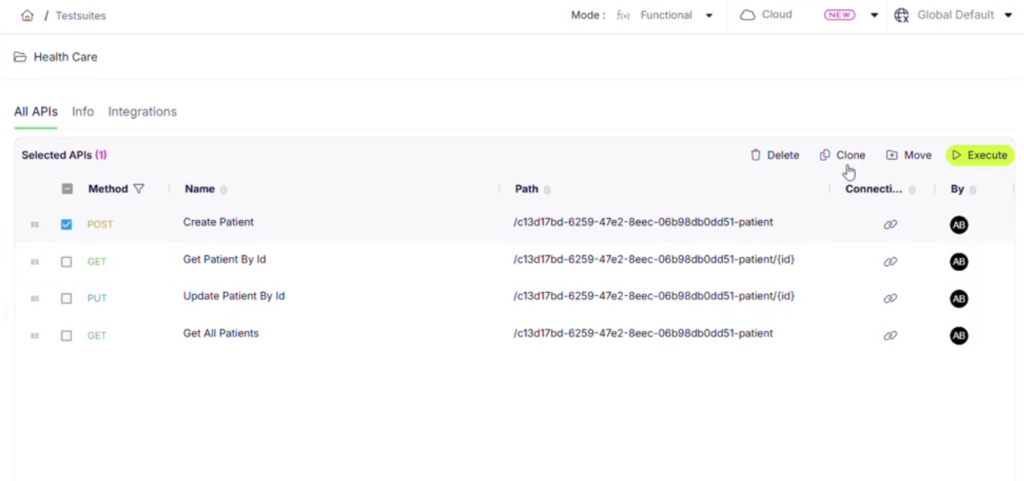
As your API test coverage expands, test suites inevitably need restructuring. Whether you’re refactoring older tests, creating specialized regression suites, or just cleaning up your workspace, moving or cloning APIs one by one is an incredibly tedious process. Previously, there was no streamlined way to select multiple API scripts and securely transfer or copy them into a different suite, forcing testers into a frustrating loop of repetitive manual actions.
The Fix:
We have completely redesigned the workflow for migrating scripts between test suites. You can now bulk-select, copy, and move multiple APIs simultaneously. This update includes intuitive new checkbox triggers, dedicated options within the three-dot menu, and fluid drag-and-drop capabilities within the left-hand panel, giving you total flexibility over how you reorganize your workspace.
How will it help?
This redesign drastically cuts down administrative overhead when managing your API library.
- Massive Time Savings: Quickly bulk-select dozens of API scripts and move or clone them to a new suite in just a few clicks, eliminating repetitive manual work.
- Flexible Organization: Whether you prefer drag-and-drop simplicity or structured menu commands, the new interface adapts to your preferred organizational workflow.
- Streamlined Refactoring: Easily break down massive test suites into smaller, targeted collections or combine scripts into comprehensive master suites without breaking a sweat.
Direct Workflow Automation: Listing Page Scheduling!
The Challenge:
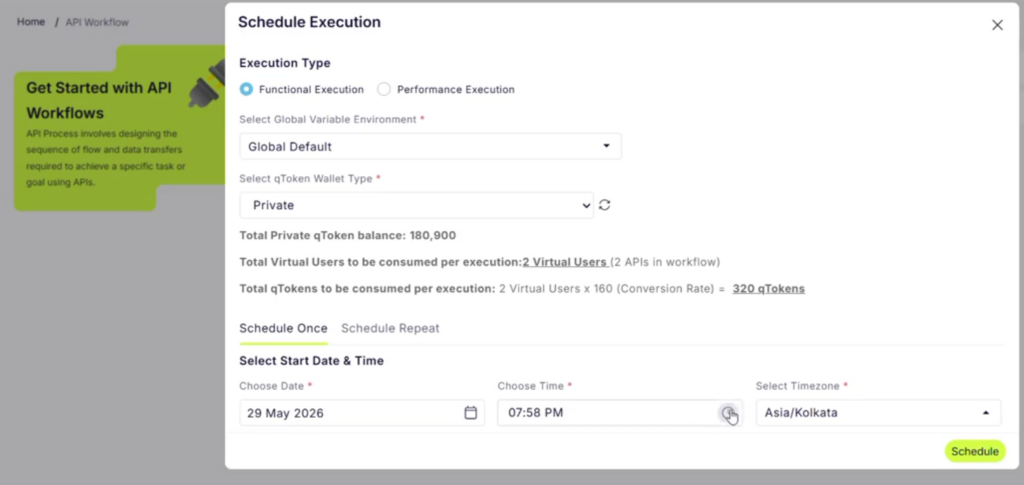
To keep up with continuous integration demands, automation engineers need to schedule their API testing workflows quickly and efficiently. Previously, the workflow listing page served strictly as a static directory. If you wanted to schedule a specific workflow to run automatically, you had to leave the high-level overview, navigate deep into the individual workflow’s configuration settings, and apply your scheduling rules there. This extra navigation loop slowed down management tasks and added unnecessary clicks to a routine process.
The Fix:
We have integrated scheduling capabilities directly onto the API workflow listing page. You can now configure, activate, and manage execution schedules for any workflow immediately from the main listing view, supported by an updated, streamlined UI design.
How will it help?
This workflow upgrade streamlines your continuous automation planning.
- Rapid Automation Planning: Schedule your API testing workflows on the fly right from the directory page, bypassing unnecessary clicks and navigation loops.
- Centralized Management: View your list of workflows and adjust their execution rules from a single, unified control pane, making it easier to orchestrate your overall automation strategy.
- Frictionless CI Coordination: Quickly coordinate and adjust automated test runs to match changing deployment schedules or sprint deadlines with absolute ease.
Device Farm
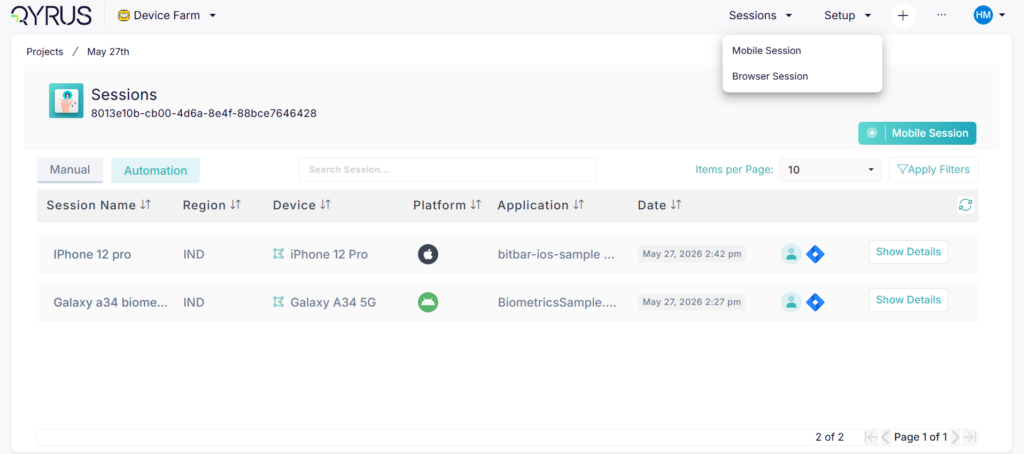
Controlled Rollouts: Feature Flags for AI Device Farm Sessions!
The Challenge:
Integrating cutting-edge AI capabilities into real mobile device testing requires careful, managed deployment. Previously, new AI-powered session types in the Device Farm were universally visible in the UI. This made it difficult to perform targeted beta testing, manage resource-intensive features, or selectively roll out experimental capabilities to specific teams without cluttering the interface for the rest of the user base.
The Fix:
We have introduced a robust feature flag system (enableDeviceFarmAISession) specifically for AI-powered Device Farm sessions. This backend control allows us to granularly toggle access to these advanced testing environments. To support this controlled rollout, we have also streamlined the user interface by dynamically removing the “AI Session” option from the general Sessions dropdown menu, ensuring it is only visible when explicitly enabled for a specific workspace.
How will it help?
This infrastructure update provides absolute control over how AI features are introduced into your testing environment.
- Targeted Beta Testing: Safely introduce and test experimental AI capabilities with specific engineering teams without disrupting the standard Device Farm experience for everyone else.
- Clutter-Free Interface: Keep the testing UI clean, intuitive, and focused by hiding advanced, specialized AI session options from users who do not actively need them.
- Scalable Rollouts: Grant administrators precise, behind-the-scenes control over how and when cutting-edge AI testing tools are deployed across the platform.
Rock-Solid Device Provisioning: Hardened Provider Lifecycle Handling!
The Challenge:
Interacting with remote cloud infrastructure requires highly resilient backend communication. Previously, the Device Farm Microservice (DFM) relied on default handling for provider Device Farm sessions. This meant that transient network blips during device readiness checks could cause an entire test session to fail prematurely, while concurrent or duplicate session creation requests could lead to race conditions. Additionally, non-idempotent session termination routines and unmapped SDK exceptions occasionally resulted in generic, unhelpful server errors, making it difficult to pinpoint whether a failure was due to an invalid configuration or a temporary cloud glitch.
The Fix:
We have hardened the provider session lifecycle management inside the Device Farm Microservice to drastically increase backend stability. The engine now features distributed create-time locking to eliminate concurrent session creation conflicts, explicit exception mapping (translating specific faults directly to clear HTTP error codes), and dedicated retry and timeout rules for the SDK client. Furthermore, we built transient fault resilience directly into the device polling loop and ensured the session termination endpoint is fully idempotent—meaning it will gracefully clean up resources without throwing errors if a session is already stopped.
How will it help?
These deep infrastructure improvements ensure an incredibly stable and predictable remote device testing experience.
- Immunity to Transient Blips: Short-lived network fluctuations or minor AWS hiccups will no longer kill your test runs; the platform now intelligently retries and continues polling behind the scenes.
- No More Race Conditions: Distributed create-time locking ensures that duplicate or retried device requests are safely queued and managed, preventing conflicting or broken device states.
- Graceful Cleanups & Faster Debugging: Clearer error mapping replaces generic server errors with actionable feedback, while idempotent session handling ensures cleaner resource teardowns and fewer noisy, false-alarm logs.
Test Orchestration
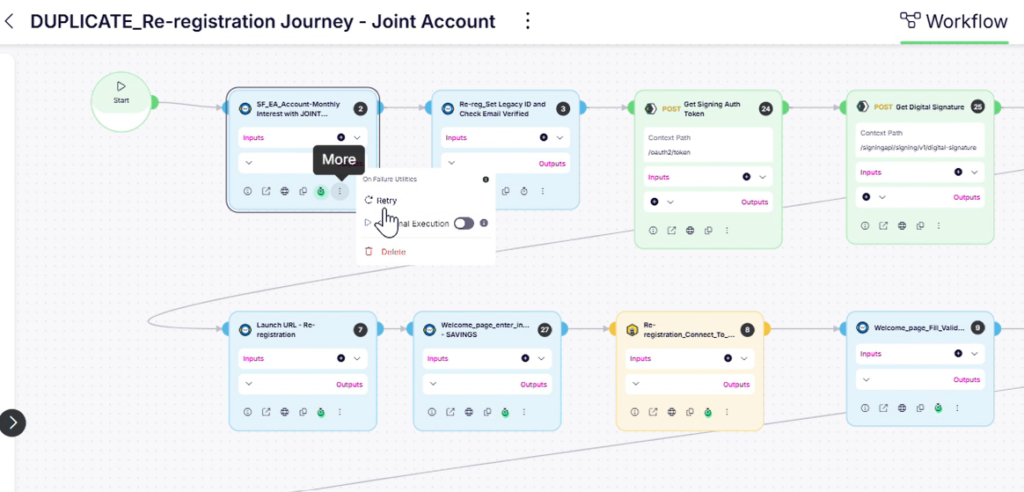
Resilient Workflows: Combined Optional Execution & Session Persistence!
The Challenge:
In complex test orchestrations, maintaining a continuous state across multiple test steps (Session Persistence) while allowing non-critical steps to fail without stopping the whole run (Optional Execution) is a powerful combination. Previously, these two features were mutually exclusive in Test Orchestration. Turning on “Optional Execution” would automatically force “Session Persistence” off. This meant a failure in an optional setup or cleanup step would either completely kill the persistent session or force teams to split their unified workflows into disconnected parts.
The Fix:
We have fully integrated Optional Execution to work seamlessly alongside Session Persistence. The orchestration engine has been updated to handle failures within a persistent session gracefully. Now, if an orchestrated node designated as “Optional” encounters a failure, the platform intelligently preserves the active session state and securely hands it off to the next node in the pipeline instead of tearing down the environment.
How will it help?
This update unlocks advanced, highly resilient test scheduling configurations for complex end-to-end scenarios.
- Flawless Multi-Step Resiliency: Build extensive end-to-end testing chains that reuse the same active state, confident that minor, non-critical failures won’t tank your entire execution pipeline.
- Smart Failure Recovery: If an optional validation or data-gathering script fails mid-session, the platform automatically bypasses the fault, keeps the application state alive, and carries on to subsequent verification steps.
- Uncompromised Workflow Logic: Eliminate the need for messy workarounds or custom scripting just to keep a testing window open when a secondary step runs into an unexpected hitch.
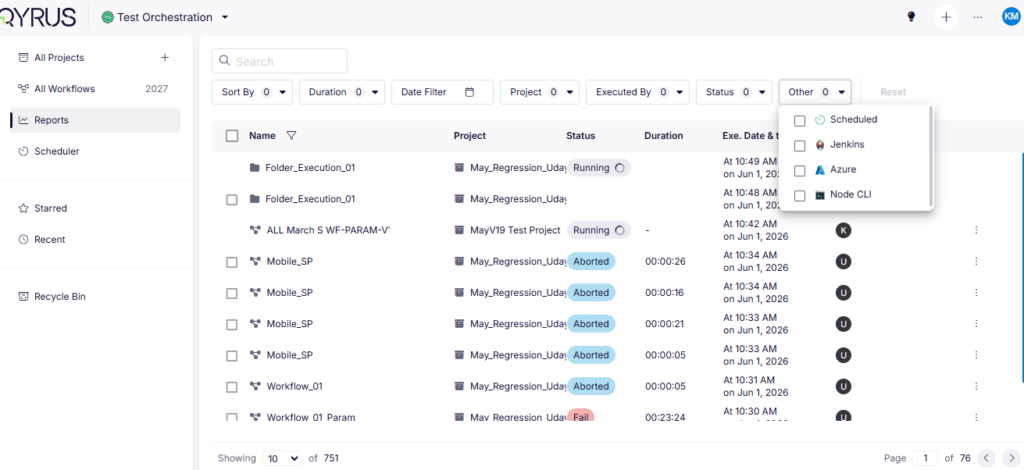
Precision Analysis: Enhanced Report Page Filters!
The Challenge:
As enterprise teams scale their automation efforts, the volume of test reports generated daily can become overwhelming. Navigating through thousands of execution records to find a specific run can feel like hunting for a needle in a haystack. Previously, limited filtering options on the Test Orchestration Reports page made it difficult to quickly isolate runs based on how they were triggered or configured, creating administrative bottlenecks during post-execution analysis.
The Fix:
We have significantly upgraded the Reports Page with a suite of new, advanced filtering options. You can now slice and dice your test data using specialized Schedule Type and Other filters. This allows you to dynamically narrow down your execution history by specific parameters, including Once, Hourly, Daily, Weekly, Scheduled, and Session Persisted execution profiles.
How will it help?
These new filters give you total control over your reporting data, dramatically speeding up triage and auditing tasks.
- Instant Execution Triage: Quickly separate routine, automated nightly regression runs from manual, ad-hoc test executions with a single click.
- Isolate Persistent Sessions: Effortlessly track down and review reports tied specifically to your Session Persisted workflows to evaluate state retention across multi-step runs.
- Streamlined Audit Trails: Seamlessly monitor recurring test patterns (such as hourly health checks or daily smoke tests) to identify historical flake rates or performance trends across specific schedules.
Ready to Leverage June’s Innovations?
We are committed to providing a unified platform that not only adapts to your evolving needs but also streamlines your critical processes, empowering you to release high-quality software with greater speed and confidence.
Eager to explore how these advancements can transform your testing efforts? The best way to appreciate the Qyrus difference is to experience these new capabilities directly.
Ready to dive deeper or get started?