SAP UAT Test Cases: Templates, Examples & Design Best Practices
 Varun RS

A UAT test case may successfully complete all steps yet still allow a negative business result to occur. The uncomfortable reality SAP teams face is that a test yielding “success” only verifies that a transaction was executed, not that it was done accurately. When crafting UAT test cases for SAP S/4HANA, Fiori, or a highly tailored SAP environment, the disparity between “it worked” and “it’s accurate” is where costly mistakes lurk.
Industry surveys indicate that 88% of companies believe User Acceptance Testing is essential for achieving their quality goals. However, typical UAT methods frequently do not meet expectations when implemented in intricate ERP environments. Common industry standards often consider a 90% pass rate as the unofficial threshold for UAT approval, yet when faced with tight project deadlines, teams may hastily approve this sign-off rather than exploring the reasons behind the failures of the remaining 10%.
This guide focuses on the execution layer of SAP UAT: the components of a well-constructed UAT test case, the organization of a reusable SAP UAT test case template, and the distinguishing factors between a test case that identifies genuine defects and one that merely fulfils requirements. If you seek information on UAT process, planning, and stakeholder strategy, our companion guide on SAP user acceptance testing addresses those topics thoroughly; this article continues from where that guide concludes, focusing on the individual test case level.
What Is a UAT Test Case? (And How It Differs from a Test Scenario)
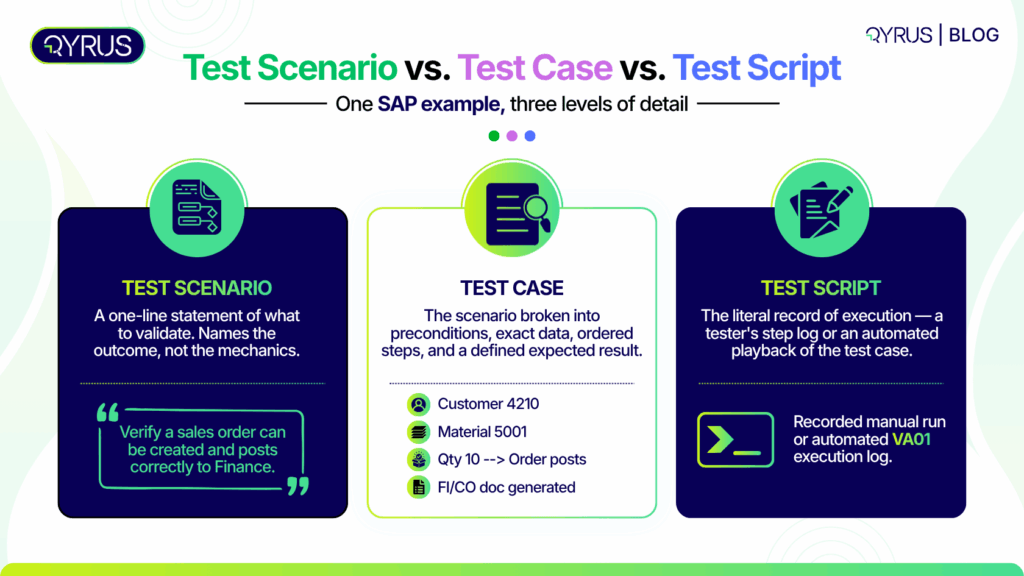
Prior to creating test cases for UAT, it’s beneficial to distinguish three terms that are often used interchangeably but shouldn’t be: test scenario, test case, and test script. Each one addresses a distinct question, with acceptance testing test cases positioned at the most detailed level of the three.
- Test Scenario: A one-line statement of what needs validating. For example, “Verify that a sales order can be created and correctly posts to Finance.” It names the outcome, not the mechanics.
- Test Case: Breaks that scenario into something executable: specific preconditions, exact input data, ordered steps, and a defined expected result. “Log in as a sales rep, create a sales order for Customer 4210 with Material 5001, quantity 10, and verify the order posts with status Open and the correct net value in FI/CO” is a test case.
- Test Script: The literal record of execution, whether that’s a manual tester’s step-by-step log or an automated script that plays the test case back against the system.
This test scenario vs. test case distinction matters in SAP UAT specifically because one scenario (“Sales order creation works correctly”) can require several test cases to actually prove it: a standard order, an order that hits a customer’s credit limit, an order with an invalid material number. According to GeeksforGeeks, test cases originate from test scenarios, which in turn come from requirements. By omitting the scenario step, your test cases end up addressing the same successful path in five different manners while overlooking the conditions that truly lead to defects.
This difference is more significant in SAP than in an ordinary standalone application since SAP modules are closely interconnected. A sales order initiated in SD is not confined to SD; it interacts with FI/CO for revenue acknowledgment, MM for inventory reservation, and possibly with credit management for risk assessments. A test scenario in SAP may genuinely necessitate test cases that assess functionality across three or four modules simultaneously, which is precisely why a vaguely outlined scenario becomes an insufficiently tested, high-risk gap instead of a controllable checklist task.
Anatomy of a UAT Test Case: The Essential Fields
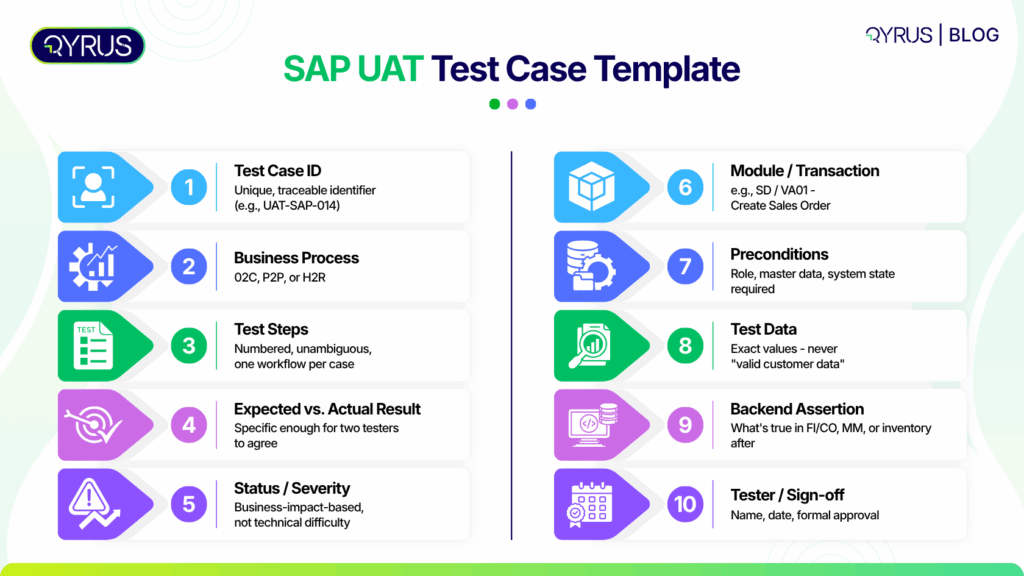
The majority of UAT test case formats align with the same fundamental structure. A properly structured template consists of Test Case ID, title, purpose, prerequisites, actions, expected and actual outcomes, status, remarks, severity, tester details, and a sign-off area. Every field has a purpose:
- Test Case ID: A unique, traceable identifier (e.g., UAT-SAP-014) that links the case back to a requirement and forward to a defect log.
- Objective / Scenario Reference: The business requirement or scenario this case proves.
- Preconditions: The system state, user role, and master data required before the test can run.
- Test Steps: Numbered, unambiguous actions. One test case, one workflow; don’t bundle order creation and invoice posting into the same case.
- Test Data: The exact values used, not “valid customer data.” Vague test data is the single most common reason UAT results can’t be reproduced when a defect needs retesting.
- Expected Result vs. Actual Result: The expected result should be specific enough that two different testers would agree on pass/fail without discussion.
- Status, Severity, Comments: Pass/fail along with sufficient information for a developer to take action without needing to re-execute the case themselves. Severity must indicate business impact rather than technical complexity: a superficial UI problem on an infrequently accessed page is Low no matter how challenging it was to replicate, whereas a flaw that secretly distorts a financial entry is Critical even if the resolution is merely a single line of code.
- Sign-off: The field that turns a spreadsheet into an audit-ready UAT record.
For SAP specifically, three fields are worth adding to the standard template:
- The transaction code or Fiori app under test.
- The business process it belongs to (Order-to-Cash, Procure-to-Pay, Hire-to-Retire).
- A downstream/backend assertion—what should be true in FI/CO, MM, or inventory after the transaction, not just what the screen shows.
By overlooking that final field, issues that succeed in UAT can still become production incidents. It is also a significant factor in defect leakage, a metric that teams are increasingly monitoring to assess the proportion of bugs that escape an earlier testing stage and only appear in UAT or production.
SAP UAT Test Case Template (Downloadable Structure)
Here is the structure of the field presented in template format. Employ it as the header line for a UAT test case log in a spreadsheet, or as the recurring section for a Word-based sign-off document. Practitioners typically use spreadsheets for test cases involving daily data changes that require bulk filtering, whereas Word or PDF is more suitable for test plans and sign-off documents that are reviewed and finalized only once.
Field | Description / SAP Example |
Test Case ID | UAT-SAP-014 |
Module / Transaction | SD / VA01 – Create Sales Order |
Business Process | Order-to-Cash (O2C) |
Objective | Verify a standard sales order creates correctly and posts to Finance |
Preconditions | User has SD Sales Rep role; Customer 4210 and Material 5001 exist |
Test Steps | 1. Log in as Sales Rep 2. Execute VA01 3. Enter customer, material, quantity 4. Save |
Test Data | Customer 4210, Material 5001, Qty 10, Plant 1000 |
Expected Result | Order created with status Open; net value matches pricing condition; FI/CO document generated |
Actual Result | [Filled during execution] |
Status | Pass / Fail |
Severity | Critical / High / Medium / Low |
Comments | [Tester notes, defect ID if failed] |
Tester / Sign-off | [Name, date, approval] |
Note on SAP Implementation Methodology: If your team is following SAP’s S/4HANA Cloud public edition methodology, testers typically create and manage these structured test cases inside the Test Preparation app based on your finalized solution scope, and then assign them to test plans within the Test Plans app. SAP’s Best Practices content generally provides two test scripts per core business process as a starting baseline.
UAT Test Case Examples: Positive, Negative, and Boundary Design
A template only gets you a consistent shape. What actually catches defects is positive and negative test cases deliberately designed to probe different conditions, not five variations of the same successful path.
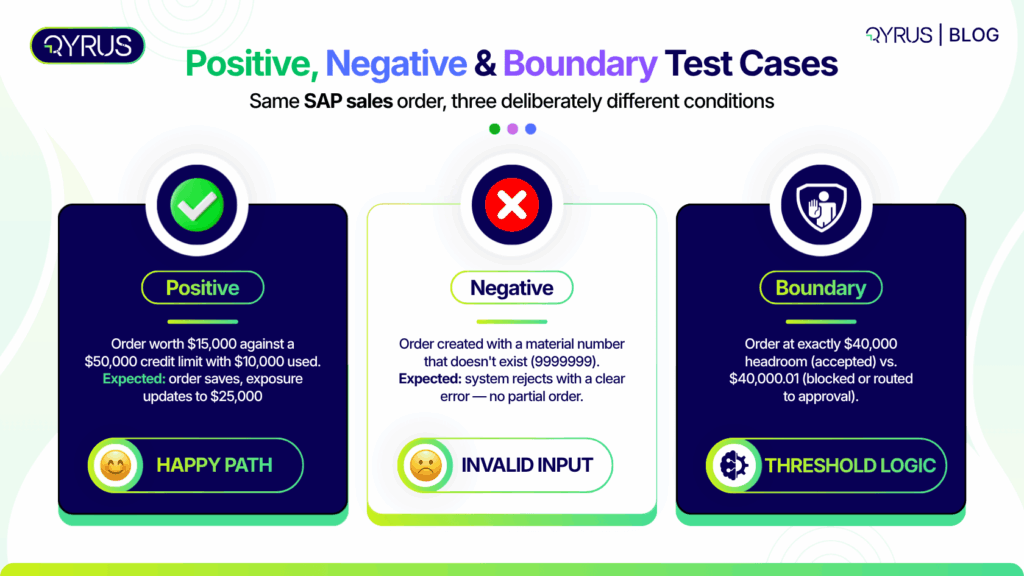
Here are three worked UAT test case examples built around one SAP transaction—creating a sales order against a customer credit limit—so you can see how the same scenario produces genuinely different test cases:
- Positive Test Case (Happy Path)
- Scenario: Customer 4210 has a credit limit of $50,000 and an open balance of $10,000. Create an order worth $15,000.
- Expected Result: Order saves with status Open, and the credit exposure updates to $25,000, well within the limit. This confirms the standard flow works end to end, including the downstream FI/CO update.
- Negative Test Case (Invalid Input)
- Scenario: Attempt to create an order using a material number that doesn’t exist in the system (e.g., 9999999).
- Expected Result: The system rejects the entry with a clear error message and does not create a partial or orphaned order. A system that silently accepts invalid input, or creates a broken record, fails this case even if no error appears on screen, which is exactly the kind of pass that hides a defect.
- Why this matters: You can learn more about positive vs. negative testing to see why negative testing is the only reliable way to verify system resilience and error handling.
- Boundary Test Case (Limit Values)
- Scenario: Same customer, same $50,000 limit, $10,000 open balance, meaning $40,000 of headroom remains. Test at the boundary: an order worth exactly $40,000 (expected: accepted, balance now at limit) and a second case at $40,000.01 (expected: blocked or routed to credit management approval, per configured tolerance).
- Expected Result: Boundary value testing like this is where credit-limit logic, tax rounding, and threshold-based approval workflows most often break. Generic, tool-vendor UAT examples built around login forms and password fields simply don’t transfer to real SAP configuration.
Notice what all three share: one variable changes per case, the expected result is specific and checkable, and at least one case (the negative one) is designed to fail gracefully rather than to succeed. A UAT test suite built only from positive cases will pass, and still leave your users encountering the negative and boundary conditions for the first time in production.
As a rule of thumb, one meaningful SAP business scenario rarely resolves into just one test case. A single sales order scenario, worked properly, tends to produce a positive case, at least one negative case per validation rule (invalid material, invalid customer, missing pricing condition), and one boundary case per numeric threshold that governs the process (credit limit, quantity available, discount tier). That’s often five or more test cases from a scenario that looked like a single line item on a test plan.
Common SAP UAT Test Case Mistakes (and the “Green Light Lie”)
Even well-templated UAT test cases fail in predictable ways in SAP environments:
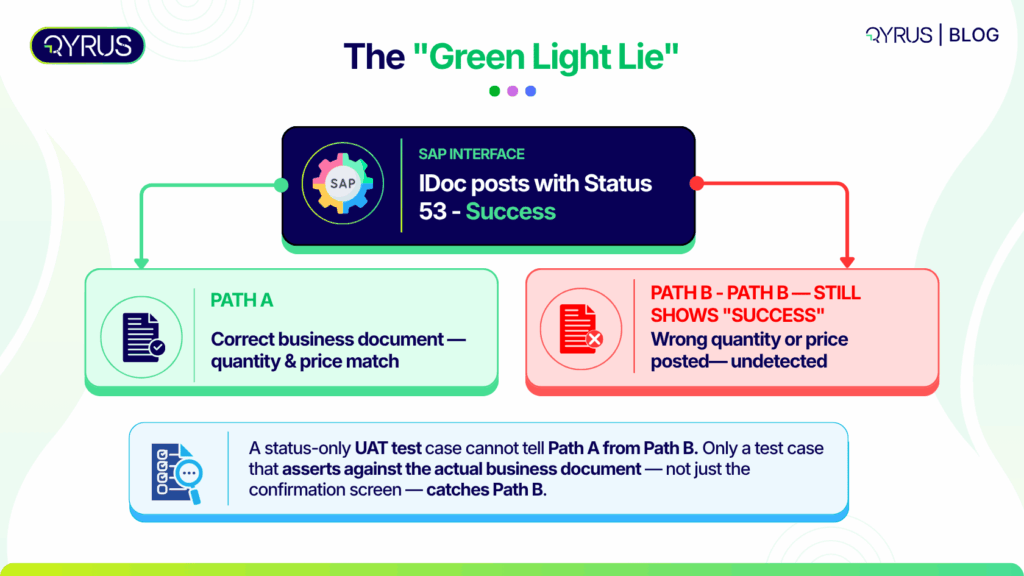
- Testing the status code, not the business outcome: This is the most consequential mistake in SAP UAT, and it has a name worth knowing: the “Green Light Lie.” An interface like an IDoc can report a fully successful processing status while the business document it created is wrong, such as a purchase order with the wrong quantity or price. A UAT test case that only asserts “status = success” will pass in exactly the scenario it should have caught. Every test case involving an interface or backend post needs an assertion against the actual business data, not just the confirmation screen. Our deeper look at this problem, Beyond the Green Light: Ensuring True Data Integrity in Your SAP EDI Processes, walks through how it shows up in IDoc/EDI testing specifically.
- Bundling multiple workflows into one test case: Combining order creation, delivery, and billing into a single “end-to-end” test case makes it impossible to tell which step actually failed without re-running the whole thing.
- Vague or non-reusable test data: SAP’s interconnected modules mean a test case built on invented data often breaks referential integrity somewhere downstream. Test cases should reference specific, known-good master data, or reference a repeatable process for sourcing it.
- Skipping negative and boundary cases under deadline pressure: UAT schedules are frequently tight, and negative cases are the first thing cut. That trade-off shows up later as production defects rather than UAT findings. To prevent this, practitioners increasingly recommend building in at least a 20% schedule buffer specifically so negative and edge-case testing doesn’t get dropped, and organizing testing into prioritized waves.
- No traceability back to the requirement: A test case that isn’t linked to the business requirement or acceptance criterion it validates becomes very hard to audit later. When a stakeholder asks “where did we verify this?” during a compliance review, “somewhere in the spreadsheet” isn’t an answer that holds up. Every test case should carry a reference back to the requirement, story, or acceptance criterion it proves.
How Qyrus Helps Teams Design and Execute SAP UAT Test Cases
The design principles above hold regardless of tooling, but SAP’s complexity is exactly where manual UAT test case authoring starts to break down. Qyrus SAP Testing addresses the two failure modes covered above directly. Its API-first architecture (ARS) validates SAP’s native backend services—OData, BAPIs, IDocs, and direct database queries—so test cases can assert against actual business data (FI/CO, MM, inventory) instead of relying on fragile UI status checks, closing the exact gap behind the Green Light Lie. For deeper coverage of how this plays out across functional test design, see our SAP Functional Testing guide.
For teams building test cases against Fiori and UI5 applications, Fiori Test Specialist reverse-engineers the application’s source code and documentation to generate business-aware, ready-to-run test cases. This reduces the manual effort of translating a business process into a structured test case, and uses Healer to keep dynamic control IDs from breaking those cases every time the UI changes.
Sourcing valid, referentially consistent test data—the mistake covered above—is handled by DataChain, which maps and extracts every linked transaction in a business process chain automatically. Our guide to SAP test data management covers this in more detail.
The impact shows up in execution time as much as accuracy: a US automaker with $30B+ in revenue used Qyrus’s agentic testing and SAP Scribe AI to cut effort for a Capital Purchase Order scenario by 88%, reducing execution time for that process from 34 minutes to 4. That is the kind of result that comes from test cases built on real backend assertions rather than screen-level status checks.
Frequently Asked Questions
What’s the difference between a UAT test case and a test scenario?
A test scenario is a one-line statement of what to validate (“Verify a sales order posts correctly”). A UAT test case breaks that into specific preconditions, exact test data, ordered steps, and a defined expected result: the executable version of the scenario.
How many UAT test cases should I write for one business process?
Enough to cover the positive path plus the negative and boundary conditions that actually carry risk. For a process like sales order creation with a credit check, that’s typically at least three to five cases, not one “happy path” case repeated with different data.
What’s the difference between UAT and acceptance testing?
Acceptance testing is the broader umbrella covering any validation that a system meets defined acceptance criteria. UAT is the specific, final round of acceptance testing performed by real business users before go-live.
How do I write negative test cases for UAT?
Identify an input or condition the system should reject—an invalid ID, an out-of-range value, a missing required field—and write the test case around the expectation that the system fails gracefully with a clear error, rather than silently accepting bad data.
Should UAT test cases be documented in Excel or Word?
Spreadsheets work best when test case data changes frequently and needs to be filtered or tracked in bulk. Word or PDF suits the final, reviewed sign-off document. Many teams use both for different stages of the same UAT cycle.
Who should write UAT test cases: QA or business users?
QA typically drafts the structured test case from business requirements, but business users should review and, where possible, co-author the test data and expected results. They are the ones who can confirm a result actually reflects how the process works in practice.
How is UAT different for SAP compared to a standard web application?
SAP UAT test cases have to account for cross-module ripple effects (a Sales Order touching FI/CO and MM), backend/interface validation beyond UI status codes, and referential integrity in test data. This is complexity that a typical single-application UAT process doesn’t have to handle.
Conclusion
A template gives your SAP UAT test cases consistency. Design discipline—deliberate positive, negative, and boundary cases, backend assertions instead of status-code checks, and test data that holds up across modules—is what makes them actually catch defects before they reach production.
Qyrus SAP Testing and Fiori Test Specialist build that discipline into the test case creation process itself, generating business-aware test cases and validating them against real backend data rather than screen output alone.
Request a demo to see how Qyrus can help your team design SAP UAT test cases that hold up past go-live.
What specific SAP modules or Fiori applications is your team currently prioritizing for your upcoming UAT cycles?

 September 16, 2026
  7 min
7 min