Qyrus Named a Leader in The Forrester WaveTM: Autonomous Testing Platforms, Q4 2025 – Read More

Flaky API tests are one of the biggest killers of trust in automation. They pass on one run, fail on the next, and trigger the same internal debate every time: “Is something actually broken, or is our test suite behaving odd again?” 

We’ve seen it a thousand times. Whenever a CI/CD pipeline turns red, it’s because a critical API test has failed. The developers stop their work, and everyone tries to figure out what’s broken. Then, someone re-runs the process, and… it passes.

Why? Because once you and your team lose confidence, they stop taking failures seriously—and your CI pipeline becomes and dead end instead of a gate.

What exactly is a flaky API test?

A flaky API test is one that behaves inconsistently under the same conditions—same code, same environment, same inputs. The key factor to notice here is non-determinism. You can re-run it five times and get a mix of passes and failures.  This isn’t bad test writing; it’s usually a signal that something deeper is unstable—timing, dependency calls, shared state, or the environment itself.

Understanding this helps teams shift from blaming QA to fixing systemic issues in API stability. 

Why are flaky API tests such a big deal in CI/CD?

CI/CD pipelines rely on fast, trustworthy feedback loops. Flaky API tests break that trust. They slow delivery, cause you to re-run them, hides real issues, and pushes developers toward shortcuts like adding retries just to get a green build. Eventually, people stop paying attention to failures altogether—creating a dangerous “green means nothing” tendency.

“Flakiness is one of the top silent blockers of fast-paced engineering teams.” 

How to identify if a failed test is flaky or a real defect?

Test diagnosis as a process, not a guess. Teams typically check:

• Does the test pass on immediate re-run?

• Are related API tests also failing?

• Did the environment show latency spikes?

• Has this test shown inconsistent behavior before?

Step 1: Capture the Failure Context Immediately

• Record:

     • Endpoint, payload, headers

     • Environment (dev/stage, build number, commit SHA)

     • Timestamps, logs, and any upstream/downstream calls

• In qAPI, ensure each run stores full request/response, environment, and log metadata for every test so you always have a forensic snapshot of failures.

Step 2: Re-run the Same Test in Isolation

• Re-run the exact same test:

• Same environment and with the same payload and preconditions

• Do this in a way that the execution path matches the original:

• If it fails consistently then there’s strong signal of a real defect.

      • If it passes on immediate re-run then we can suspect flakiness.

Step 3: Check the Test’s History and Stability

• Look at the past runs for this specific test:

    • Has it been green for weeks and suddenly started failing?

    • Has it flipped pass/fail multiple times across recent builds?

In qAPI, use trend/historic test reports and there are two ways to direct this towards:

   • If the failure starts exactly at a specific commit/build, lean toward real defect.

   • If the same test has intermittent failures across unchanged code, mark it as a flakiness candidate.

Step 4: Correlate With Related Tests and Endpoints

• Check whether:

      • Other tests hitting the same endpoint or business flow also failed.

      • Only this single test failed while others touching the same API stayed green.

• In qAPI, you can filter by:

      • Endpoint (e.g., /orders/create)

      • Tag/feature (e.g., “checkout”, “auth”)

Step 5: Inspect Environment and Dependencies

• Validate:

       • Was there an outage or spike in latency on the backend or a thirdparty service?

       • Were deployments happening during the run?

        • Any DB, cache, or network issues?

• In qAPI, correlate test failure timestamps with:

        • API performance metrics

        • Error rate charts

Step 6: Analyze Test Design for Flakiness Triggers

Review the failing test itself to see if it:

• Does it:

       • Depends on shared or preexisting data?

       • Uses fixed waits (sleep) instead of polling/conditions?

       • Assumes ordering of records or timing of async operations?

Step 7: Try Reproducing Locally or in a Controlled Environment

• Run the same test:

     • Locally (via CLI/qAPI agent) and in CI

    • Against the same environment or new.

• Compare the results to see:

     • If it fails everywhere with the same behavior then it’s a real defect.

     • If it fails only in specific pipeline/agent or at random then it’s flakiness or environment issue.

Step 8: Decide and Tag: Flaky vs Real Defect

Make an clear call and record it:

• As real defect when:

    • Failure is reproducible on repeated runs.

    • It correlates with a recent code/config change.

    • Related tests for the same flow are also failing.

• Classify as flaky when:

    • Re-runs intermittently pass.

    • History shows pass/fail flips with no relevant change.

    • Root cause factors are timing/data/env rather than logic.

In qAPI you can

• Tag the test (e.g., flaky, env-dependent, investigate).

    • Move confirmed flaky tests into a “quarantine” suite so they don’t block merges but still run for data.

    • Create a new testing environment directly from qAPI to track fixing the flakiness.

Step 9: Feed the Learning Back Into Test & API Design

Once you’ve identified a test as flaky:

• Fix root causes, not just symptoms by:

    • Improving test data isolation.

    • Replacing hard coding time delays with condition-based waits.

    • Strengthen environment stability or add mocks where needed.

• For real defects:

    • Link qAPI’s failed run, logs, and payloads to a ticket so devs have complete context.

What are the most common causes of flaky API tests?

The majority of API flakiness falls into predictable categories:

• Timing issues: relying on fixed waits instead of real conditions.

• Shared or dirty data: test accounts reused across suites.

• Unstable staging environments: multiple teams deploying simultaneously.

• Third-party API calls: rate limits, sandbox inconsistencies.

• Race conditions: async operations not completing in time.

Once you classify failures into these buckets, you can start projecting patterns—and based on that teams can solve the root cause.

Can we detect flaky API tests proactively instead of waiting for failures?

Yes—teams worldwide are doing it. Here’s a short summary of their detection techinques:

• Running critical tests multiple times and measuring variance.

• Tracking historical pass/fail trends per API.

• Flagging tests with inconsistent outcomes.

• Creating a “Top Flaky API Tests” report weekly.

Flakiness becomes manageable when it is visible, measured, and reviewed—just like any other quality metric.

How do we design API tests that are less flaky from day one?

Stable API automation comes from building tests that are:

• Deterministic: same input, same output.

• Data-independent: each test owns and cleans up its state.

• Condition-based: waiting for the system to reflect the correct state.

• Reproducible: no hidden randomness or external surprises.

• API-layer focused: validating contracts and flows, not UI noise.

A good rule that we follow: A test should run in any environment, on any machine, and give the same result every time.

How much flakiness is actually caused by environment issues?

Far more than most teams admit. Shared staging environments are notorious for:

• Partial deployments

• Old configuration

• DB resets

• Parallel loads from other teams

• Third-party dependency failures

You can curate the perfect automation strategy and still get flaky results in a noisy environment. This is why modern engineering cultures prefer dedicated environments that are lean, isolated, and consistent.

When the environment stabilizes, the flakiness rate drops dramatically.

How do you fix flaky tests without slowing delivery?

Research and industry experience show that flaky tests aren’t just inconvenient — they can disrupt your CI/CD pipelines and waste engineering time. In fact, industry data indicates that flaky tests account for a significant portion of CI failures and engineer effort: one study found that flaky and unstable tests contributed to as much as ~13–16% of all test failures in mature organizations’ pipelines.

Quarantine flaky tests — but still run them. Instead of letting flaky tests block merges, isolate them in a separate suite. Run them regularly so you still collect data and trends, but don’t let a flaky failure stop your pipeline.

Prioritize by impact and frequency. Not all flaky tests are equal. Fix the tests that fail most often and those covering critical business flows first. A small number of high-impact flakes often cause most CI noise.

Fix in batches. Group fixes by root cause — timing/synchronization, async behavior, data isolation, environment instability — and tackle them together. This reduces context switching and produces measurable improvements faster.

Flakiness Isn’t a QA Problem—It’s an Engineering Culture Problem

API flakiness exposes weaknesses in environments, data management, architecture, and team processes.

Fixing it requires collaboration across QA, DevOps, and backend teams—not just “better test scripts.”

By adopting a systematic approach to diagnosing, prioritizing, and fixing instability, you can transform your automation suite from a source of frustration into a trusted, high-signal safety net. And by choosing a modern API testing platform that provides the toolkit for flakiness detection, environment management, and AI-assisted diagnosis so that you have lesser problems down the line.

At Qyrus, we’re relentlessly focused on evolving our platform to empower your teams, streamline your workflows, and make achieving quality more intuitive than ever before. May was a busy month behind the scenes, packed with exciting new features and significant enhancements designed to give you even more power and flexibility in your testing journey. Here’ re the latest advancements we’ve rolled out across the Qyrus platform!

Excited to see these May power-ups in action? There’s no better way to understand the impact Qyrus can have on your testing journey than by experiencing it firsthand.


Ready to Experience the May Power-Ups?


This month’s Qyrus updates are all about putting more power, intelligence, and efficiency directly into your hands. From harnessing AI to generate complex web code to gaining sharper insights from mobile visual tests, scheduling your desktop workflows, and boosting the output of our AI test generators – every enhancement is designed with your success in mind. We’re dedicated to providing a platform that adapts to your needs, streamlines your processes, and helps you deliver quality software faster than ever before.

Excited to see these May power-ups in action? There’s no better way to understand the impact Qyrus can have on your testing journey than by experiencing it firsthand.


Ready to learn more or get started?


According to Gartner, 74% of organizations now use microservice architecture, with an additional 23% planning adoption—showing strong, real-time growth well beyond the projected predictions made in 2019.

Now that microservices and cloud-native apps usage is at an all-time high, every enterprise application relies on an average of 40-60 APIs.

Most of the time, organizations that are doing well in their API management programs are simply too busy to share their experiences with others. On the other hand, other organizations are still connecting the dots and are too careful to make the move.

You are constantly building APIs and writing tests, so it’s only safe and logical that you test them every time.

ChatGPT has been the go-to source for many, but it’s only as useful if you know what you’re testing for, what parameters you want to set.  But what you don’t realize is that the text queries (prompts) a user enters into AI models and the responses the models generate are always not what you can expect.

For example, say a user asks ChatGPT, “Attached is my JSON file. I want you to create test cases around it.”

Now, you would obtain the test cases and run a subsequent query to test them, but how trustworthy is ChatGPT’s answer? Or how detailed are the test cases? Are they genuinely solving the problem or making things worse?

Also, one thing to note here is that each time there’s a change in the API, you end up repeating all the same processes and tracking how the responses change over time.

What’s the key difference between testing it directly on qAPI? Instead of re-running every test and worrying about test cases and different APIs, you can test your APIs for free, completely end-to-end.

Let’s look at it closely.

The Limitations of ChatGPT for API Test Automation

Generative AI is impressive, but here’s what it can’t do (yet) when it comes to end-to-end API testing:

1️⃣ No Real-Time Environment Integration

ChatGPT can generate test scripts, but it can’t execute them in your staging or QA environments.   So you’re doing the log work of copying the contents from one place to another.  There’s no runtime context, meaning it doesn’t know your authentication tokens, environment variables, or dynamic data setups.

You’re getting a test code that:

•  Has never been executed

•  Hasn’t verified a single API response

•  Can’t prove it actually works.

2️⃣ Inconsistent and Generic Script Generation

Prompts produce different outputs each time. You will have to work more on curating your prompts.  ChatGPT’s generated test scripts may vary in syntax, framework, or structure — a major red flag for teams maintaining hundreds of APIs. For obvious reasons, because:

Test Suite A might be of Postman syntax

Test Suite B uses Python requests

Test Suite C uses REST Assured.

Your team will now have maintains three different testing approaches for the same API.

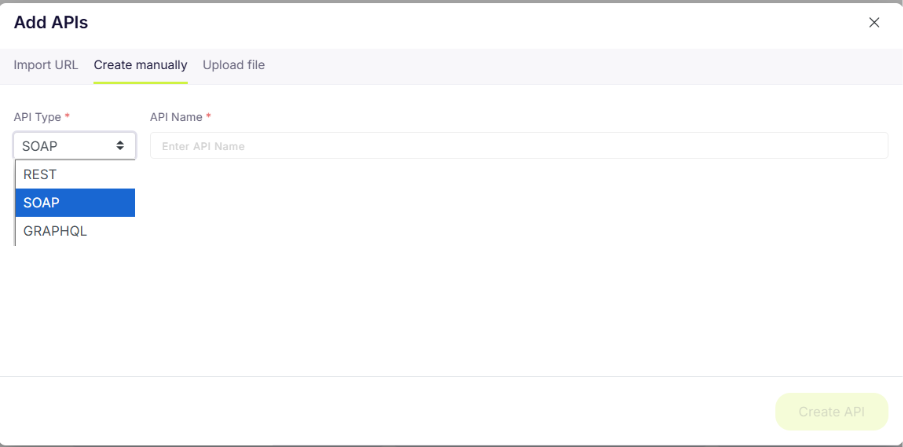
But with qAPI, you can skip all these worries because it supports all API types and formats.  You can either directly upload the URL or file or create the API manually and test it.

You can either directly upload the URL or file or create the API manually and test it.

3️⃣ Data Privacy and Security Risks

Feeding real API payloads or credentials into ChatGPT raises serious privacy concerns. Sensitive tokens or data may be stored or logged externally — an unacceptable risk in regulated industries.

For industries under GDPR, HIPAA, PCI-DSS, or SOC 2 compliance, this is grounds for termination, not really a productivity hack.

qAPI maintains compliance and keeps your data secure in safe environments. You can run the application locally or in the cloud.

4️⃣ Limited Test Validation and Reporting

ChatGPT can tell you what to test, but not how well it ran. It doesn’t provide execution logs, schema validation, or analytics dashboards for pass/fail metrics.

What ChatGPT will miss:

•  Boundary conditions (negative numbers, zero values, maximum limits)

•  Schema validation (is the response structure correct?)

•  Data type validation (is that integer an integer?)

•  Sequence dependencies (does this API require calling three others first?)

•  Negative scenarios (401s, 403s, 500s, rate limit errors)

•  Performance baselines (Is 5 seconds acceptable for this endpoint?)

You will again keep writing new prompts to test these out.

5️⃣ No Collaboration or Workflow Scalability

Testing is a team sport — testers, developers, and QA lead and even product managers need shared access, version control, and regression tracking. ChatGPT offers none of that.

qAPI on the other hand lets you create dedicated workspaces so you and your team are always in the loop. And the entire team has the access to the latest dataset.

What Makes qAPI better for API Testing

qAPI bridges the gap between AI-generated suggestions and enterprise-grade automation. Here’s how it stands apart:

1️⃣Native API Test Builder + Dedicated Environments

qAPI connects directly with your API environments — staging, sandbox, or production — letting you run and validate tests in real time with live response data.

2️⃣Codeless or Code-Assisted Workflows

Whether you’re a tester or developer, qAPI’s interface adapts to your comfort level. Write tests visually or extend them with code — both are equally supported.

3️⃣Auto-Generation, Discovery, and Coverage Metrics

With AI-powered test discovery, qAPI scans your API collection, identifies untested endpoints, and auto-generates cases to boost coverage.

4️⃣ Advanced Assertions and Schema Validation

Validate every API response with built-in assertion libraries, JSON schema checks, and negative testing capabilities — no manual setup required.

5️⃣Built for Teams

Collaborate across shared workspaces, review execution history, assign roles, and view unified reports — everything built for QA at scale.

6️⃣CI/CD and Regression Integration

Plug qAPI into your existing DevOps setup. Run tests automatically during every deployment to catch regressions before they hit production.

7️⃣AI Tailored for API Testing

Unlike ChatGPT’s general text-generation approach, qAPI uses domain-specific AI trained to optimize dependency mapping, sequence automation, and dynamic data generation — all within testing workflows.

Practical Comparison: ChatGPT vs. qAPI

Feature/Capability ChatGPT-Generated Script qAPI Platform Why it Matters for Scaling
 Setup Time  ~2 minutes (for one script) ~5 minutes (for a full workflow) qAPI can build more complex, ready-to-use tests in the same amount of time. 
Maintainability  High Effort: Code changes needed for each API update.  Low Effort: Visual updates, make changes in an instant.  Users can reduce test maintenance overhead by up to 60% with qAPI 
 Environment Handling  Manual: Hardcoded URLs and variables.  Automated: Switch environments with a dropdown.  You can eliminate manual errors and enables seamless testing across the lifecycle. 
 Test Coverage   Minimal: Typically only the “happy path.”  Comprehensive: AI generates positive, negative, and data-driven tests.  Catches more bugs in the early stages, testing edge cases and invalid inputs. 
 Reusability   Low: Scripts are single-purpose and isolated. High: Workflows and test steps are modular and reusable components.  Speeds up the creation of new test suites by leveraging existing assets. 
Reporting & CI/CD  None: Requires custom frameworks (e.g., PyTest, Allure). Built-in: Rich dashboards, historical data, and good CI/CD integration.  Provides immediate, actionable feedback to the entire team. 

ChatGPT has made our lives easier; there’s no doubt; it is excellent on various levels, generating code snippets and ideas. But with qAPI, a production-ready testing platform—it makes it easy to create maintainable, scalable, and end-to-end testing suites that drives value and saves time.

Here’s what qAPI offers:

1️⃣Endpoint Discovery: You import your OpenAPI/Swagger spec or Postman collection. qAPI automatically discovers the endpoints and its dependencies.

2️⃣AI Automap: You select the endpoints for a user journey (e.g., Login, GetUser, CreatePayment).

qAPI’s AI Automap analyzes the relationships and automatically chains them, passing the authToken from Login and the userId from GetUser to the final step.

1️⃣End-To-End Testing: You link the entire API collection or internal data source to run hundreds of variations (different amounts, payment methods, user roles) in a single execution.

2️⃣Environment Management: You run the exact same test against Dev, Staging, or UAT by simply selecting the environment from a dropdown menu. All environment-specific variables are managed separately so you and your teams can collaborate with ease.

3️⃣The ROI and Business Impact

•  Switching to qAPI isn’t just a technical upgrade — it’s an operational advantage and a smart move:

•  60% faster test generation with AI-assisted automation

•  50% fewer bugs in production from improved test coverage

•  30–40% reduction in release time with integrated CI/CD

•  Higher team velocity and cross-functional visibility through collaborative reporting

Key Takeaway: The ROI of a platform like qAPI isn’t just about saving QA hours. It’s about moving towards faster innovation, protecting customer trust, and ensuring that your application works when it matters most.

Measures to Improve API Testing Results with qAPI

If you’ve been experimenting with ChatGPT-generated test scripts, then you’ll love what qAPI has to offer because it’s simple and intuitive. All you need to do is:

1️⃣Import your API specs/Swagger/Postman collections into qAPI

2️⃣Execute all the imported APIs; qAPI will generate the test cases around it.

3️⃣Map your endpoints to live environments or use AI Automap to skip the manual effort workflows in minutes

4️⃣ Add assertions and schedule tests(Functional, Performance and Process tests) in CI/CD

5️⃣Review detailed reports and fine-tune your coverage.

Traditional manual testing or using these LLMs will only take you a step ahead, but if you want to play the long game, it’s always better to start investing in tools that make your life easier.

Conclusion

To see a change in performance, start looking beyond getting things done early and focus on doing things right. Pushing your APIs through qAPI not only provides you with an initial picture of the capabilities of your application and how it may perform in the real world.

Since the development behaviour is shifting, testing APIs faster and efficiently is as crucial.

As development behavior shifts toward faster iterations and AI-assisted builds, testing APIs efficiently has become just as crucial as writing them.  To truly elevate your API testing strategy, you’ll need a detailed strategy, because platforms like ChatGPT, Gemini, and Perplexity show variations in responses and favored sources.

That means your testing strategy can’t afford to be one-dimensional.

You need depth. You need coverage.

You need a platform built to adapt to API complexity, scale with your workflows, and automate intelligently. For teams that want reliability, traceability, and real execution power, qAPI delivers what generative AI can’t: hands-free test generation, environment-level validation, and true automation at scale.

Ready to move beyond prototypes? Try qAPI for your next API release—and see the difference purpose-built automation makes.

Is Your QA Transformation on Track?

Discover the essential 10-point checklist every QA leader needs to evaluate their readiness for digital transformation.

From test coverage and DevOps integration to AI-driven insights and business alignment, this quick checklist helps you assess where your QA stands and how to elevate it.

Whether you’re just starting your transformation journey or fine-tuning with the right partner, this checklist is your first step toward faster, smarter, and more collaborative quality engineering.

Are you ready for QA Transformation
 
automobile case study

Ever feel like you’re stuck in testing traffic? That’s where a major US auto manufacturer was—$30B+ in revenue, but their IT testing was a mess! Think late-stage defects, costly disruptions, and way too much manual testing. Their complex systems (SAP, vendor portals, you name it) and “test everything” approach were a roadblock to efficiency.  

Enter Qyrus! This unified testing platform was like a green light to move their testing into hyperspeed! The automaker reimagined SAP testing with Qyrus‘ Agentic Testing capabilities.

Key-Benefits-At-a-Glance

The result? Less risk, faster releases, and a well-oiled testing machine. Qyrus didn’t just tweak their testing; it transformed it! Let’s dive deeper. 

Company Background: The Client

The client is a prominent United States-based automobile manufacturer, demonstrating a substantial scale of operations with annual revenues exceeding $30 billion. As a major entity in the automotive industry, the client’s operations encompass a range of intricate processes, including design, manufacturing, supply chain management, sales, and after-sales service, contributing to the complexity of their technological environment.    

The need for a robust testing solution was driven by frequent system upgrades, a high volume of ongoing projects, and complex business processes. The confluence of frequent upgrades and multiple parallel projects amplifies the complexity of the IT environment, demanding rigorous testing to ensure seamless integration and functionality.    

Moreover, the client’s business processes are characterized by complexity, often spanning multiple systems and devices, including SAP, vendor portals, and handheld devices. This multi-system environment introduces additional layers of intricacy to their operations, requiring sophisticated testing strategies and tools to ensure consistent data flow and functional integrity across heterogeneous systems.    

Within this operational framework, certain business processes are particularly critical. A key example is the Capital Goods Purchase process, a strategically important process involving an annual investment exceeding $150 million. This process involves multiple departments and a complex, 15-level approval workflow, with each approval requiring distinct user credentials based on the purchase order department and amount. The execution of this process necessitates numerous validations across SAP S/4HANA and Ariba.    

Roadblocks to Efficient and Effective Testing 

The client faced significant challenges in its SAP testing processes. These challenges hindered efficient change implementation, system stability, and impacted operational costs and project timelines. Key roadblocks included:    

These challenges collectively hindered the client’s ability to maintain system quality and deliver changes efficiently.  

 The Solution: A Unified Testing Platform 

To effectively address the identified testing challenges, the client strategically implemented Qyrus as a unified testing platform across their software development lifecycle. Following a successful Pilot that demonstrated Qyrus’ capabilities, the platform was deployed to provide comprehensive Web, Mobile, SAP, and API testing services. 

This comprehensive implementation of Qyrus aimed to streamline testing operations, improve efficiency, and ultimately enhance software quality across the client organization. 

Implementation and Adoption 

The successful implementation and adoption of Qyrus involved several key factors: 

This approach focused on demonstrating value, enabling users, and standardizing processes to ensure effective Qyrus adoption and implementation. 

The Qyrus Effect: A Transformation in Outcomes 

VI. Benefits 

The deployment of Qyrus yielded significant benefits for the automobile manufacturer: 

Details of Capital Purchase Order Process Transformation 

These benefits demonstrate Qyrus’ impact on enhancing testing efficiency, reducing disruptions, and improving overall software quality. 

Conclusion: Driving Strategic Value Through Testing Transformation 

The implementation of Qyrus delivered a transformative impact on the automobile manufacturer’s testing capabilities. This transition involved a shift from a potentially reactive and inefficient testing model to a proactive, automated, and standardized approach. 

Qyrus’ Agentic AI-powered automation and comprehensive testing modules enabled the client to overcome the complexities of their SAP environment and achieve strategic advantages, including: 

This transformation, driven by Qyrus, established a more robust and reliable technology foundation, better positioning the automobile manufacturer for continued growth and innovation. 

Facing challenges with SAP testing, production disruptions, or slow-release cycles? This leading automobile manufacturer overcame these hurdles with Qyrus. See how our unified, AI-powered platform can provide the solution you need. Get a free trial today or book a demo with us.  

End-to-End API testing is a phrase or a dream that developers and testers type into search engines like Google or ChatGPT to find a tool or a service that can deliver that.

Most teams today juggle multiple tools—Postman for functional checks, Swagger or OpenAPI for contracts, custom scripts for performance, and other utilities for virtual user simulation.

The problem? Switching between tools is slowing you down, increasing maintenance overhead, and leaving gaps in coverage. Hard to get around it?

Now, imagine having everything in one platform: writing tests, running functional and performance checks, simulating complex user workflows, handling asynchronous calls, and managing dependencies—all without stitching together a dozen tools.

Whether you’re debugging a critical payment flow, scaling a SaaS backend, or validating a complex microservices chain, the goal is simple: make your APIs unbreakable, reliable, and production-ready—every single time.

In this guide, we’ll break down the core concepts, best practices, and essential features you need to build a robust end-to-end API testing strategy that actually works in 2025 and 2026.

1️⃣ What is End-to-End API Testing?

End-to-end API testing is the process of validating the complete flow of an API-driven application, from start to finish, without touching the UI. In simple terms, it connects multiple API calls—think sending a request, processing data through services, and verifying the final response—it ensures that the API responds at each stage.

This is precisely what qAPI offers; it’s the only end-to-end API testing tool that’s capable enough to handle all your API testing needs in one place.

E2E Testing addresses broader issues, such as data consistency across chains, real-world failures (e.g., timeouts in asynchronous calls), and system-wide reliability. It catches issues that lower-level tests miss, such as a login API followed by a purchase portal, failing due to session mismatches.

2️⃣ What is Covered in End-to-End API Testing

In 2025, trends such as AI-powered automation, shift-left testing, and low-code platforms are making End-to-End (E2E) API testing non-negotiable. With APIs handling real-time data in edge computing and serverless architectures, a single glitch can cascade into outages.

To use an API effectively, you need targeted checks that test the specific aspects of the API you are using. Here are the different types of API tests, along with what you should know about them.

Functional Testing

You must start with functional tests to validate that each API endpoint behaves as intended. It checks status codes, response formats, error handling, and business logic.

• Example: A /login endpoint should return 200 OK with a token when valid credentials are provided, and 401 Unauthorized when they are not.

Contract Testing 

In contrast, you ensure that APIs adhere to their agreed-upon specification, typically defined in an OpenAPI or Swagger document. This prevents breaking changes between providers and consumers.

• Example: If the contract specifies that the currency must be in ISO format, responses returning USD instead of $ should fail the test.

Workflow (Process) Testing

Validates that a complete business process works as expected when APIs interact with each other and external systems. Unlike simple end-to-end tests, workflow testing often spans multiple domains, services, and even user roles.

Performance Testing 

Finally, the most important of all, the Performance test measures how well APIs perform under different loads and conditions. It checks response times, throughput, scalability, and system stability.

Example: The /checkout endpoint should handle thousands of concurrent requests without exceeding agreed latency thresholds.

All of these major requests can be found in one single cloud tool, so that you don’t have to juggle your API collections from one place to another.

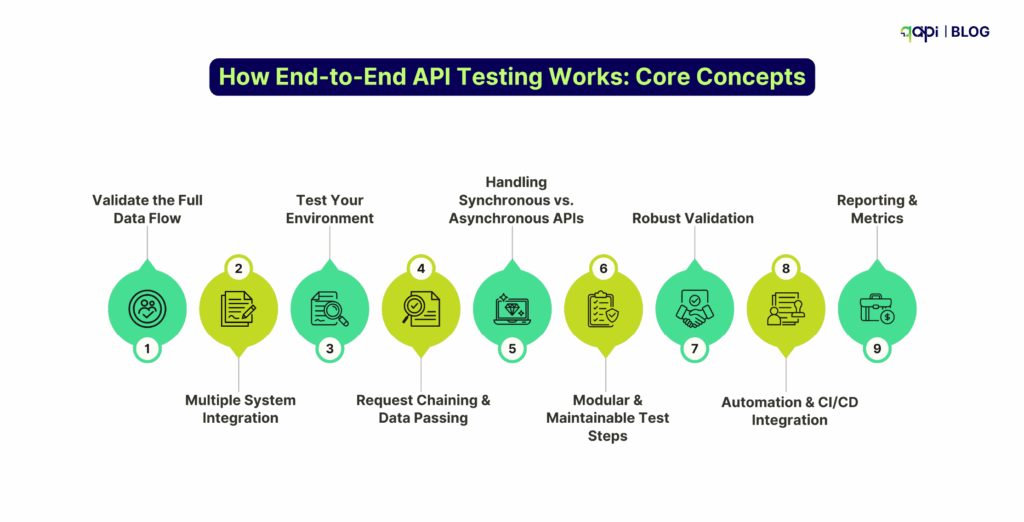
3️⃣ How End-to-End API Testing Works: Core Concepts

Think of end-to-end API testing as recreating a real user journey—step by step, but at the API layer.

1️⃣Validate the Full Data Flow

Example flow:

•  A mobile user logs in → API call to the authentication service

•  Their profile data loads → API call to the user service

•  They place an order → API calls to the payment gateway and inventory service

•  The system responds with an order confirmation

An end-to-end test simulates this chain, making sure each call works individually and that the entire process delivers the right outcome.

2️⃣ Multiple System Integration

E2E tests confirm that all components work together:

• Internal microservices

• Third-party APIs (payments, SMS, email)

• Databases and caching layers

• Message queues and event-driven systems

This builds resilience against failures in external systems and uncovers integration issues early.

3️⃣ Test Your Environment 

Tests are only as good as the environment, so start by creating: 

• Dedicated environments that mirror production

• Sanitized real-world data

• Matching API versions and configurations

Highly unstable environments will reduce environment-specific failures and improve confidence in results.

4️⃣ Request Chaining & Data Passing

E2E workflows rely on passing data between steps, so take care of:

Request chaining: Use tokens, IDs, or session values returned by one API in subsequent calls.

• Variables and environments: Store reusable data like user IDs, order numbers, or auth tokens for dynamic, realistic tests.

• Reddit insight: Developers often mention that chaining and dynamic data are the trickiest parts of end-to-end (E2E) testing, but they are essential for reliability.

5️⃣Handling Synchronous vs. Asynchronous APIs

Decide, test how you want your APIs to interact in the entire ecosystem

• Synchronous APIs: Immediate responses—simply chain the next request.

• Asynchronous APIs: Background jobs, webhooks, or queues—use polling (asking “is it done yet?”) or callbacks (system signals completion) to verify outcomes.

6️⃣Modular & Maintainable Test Steps

•  Break tests into reusable, composable steps

•  Keep one assertion per concern

•  Use parameterized inputs to cover different data scenarios without bloating the suite

This ensures maintainability, reduces flakiness, and allows teams to expand coverage efficiently.

7️⃣Robust Validation

End-to-end testing goes beyond just checking HTTP responses; it should check:

•  Status codes (200, 400, 401, 500, etc.)

•  Response body structure and fields

•  Database state changes

•  External system interactions (emails, logs, notifications)

Also, include edge cases and failure scenarios, such as invalid inputs, network errors, and service outages.

8️⃣Automation & CI/CD Integration

Your plan should be to automate tests for speed and consistency:

•  Run tests on every pull request

•  Fail fast if workflows break

•  Ensure integration of pipelines via GitHub Actions, Jenkins, or GitLab CI

Automation enables the early detection of regressions and facilitates faster delivery cycles.

9️⃣Reporting & Metrics

An effective end-to-end api testing tool should be able to track, summarize, and report the following:

• Test pass/fail rates

• Execution times

• Root cause analysis

• Performance trends

Relying on dashboards and reporting tools (such as Allure, Sentry, and Jira) is no longer necessary, as qAPI provides visibility for both developers and QA teams.

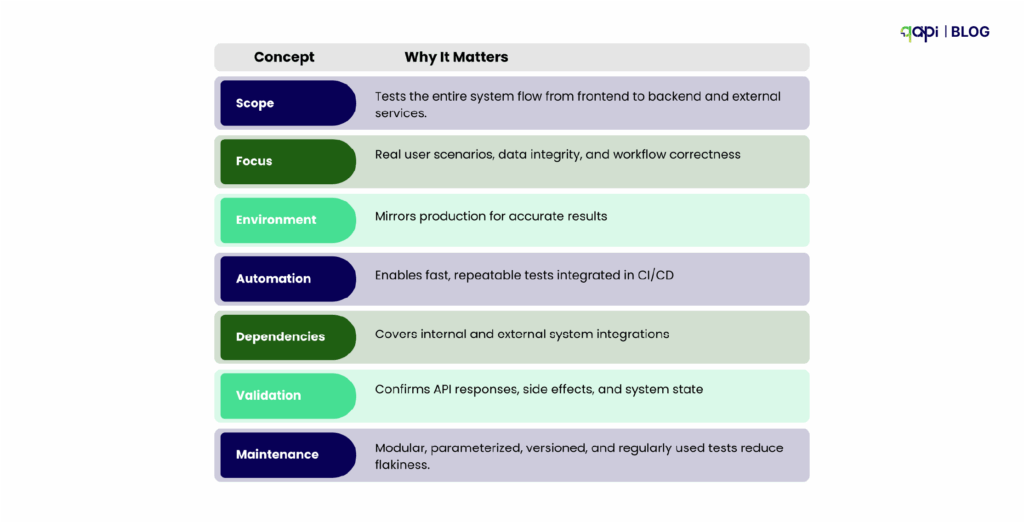
Key Takeaways

Reddit-inspired insight: Developers frequently note that E2E testing becomes maintainable and actionable only when workflows are modular, parameterized, and versioned, with proper environment setup and realistic test data. Without these, E2E tests often break or provide false confidence.

4️⃣ Preparing for E2E API Testing

Many testers on Reddit stress that setup makes or breaks your test strategy. Without the right environment and data, tests either break constantly or give false confidence.

To start, you’ll need staging environments mirroring production, realistic test data (synthetic or anonymized), and setup scripts for dependencies. qAPI is your best bet for all your needs  Before you start punching requests and validating workflows, you need the right strategy. A strong setup will save you from wasting your time. Here are the essentials:

1️⃣Test Environment Setup

• Staging environment → A safe space for production where breaking things won’t affect users.

• Test database → Filled with clean, predictable data you can reset between runs.

• Third-party service mocks → Stand-ins for external systems (like payment gateways) so tests don’t trigger real charges.

2️⃣Test Data Strategy

• Static data → Fixed users, accounts, or products that stay the same across runs for predictability.

• Dynamic data → Freshly generated values (like unique emails or order IDs) to avoid collisions.

• Data cleanup → Reset or clean out records after each run so tests remain reliable.

q tip: Use a dedicated “test tenant” or “test organization” to keep test data completely separate from production data.

3️⃣Dependency Management

APIs rarely work alone. External services—such as payment gateways, third-party APIs, or other systems beyond your control—pose challenges for stable testing. That’s where parametrization comes in.

Instead of hardcoding values or relying on unpredictable responses, qAPI lets you define parameters that make tests flexible, reproducible, and scalable.

Why parametrization matters:

•  Create parameterized mock APIs directly from your OpenAPI spec. Pass parameters to generate realistic responses instead of hitting live services—because it’s safer, faster, and cheaper during early testing.

•  Define expected outputs through parameters (e.g., always return a valid payment ID) to keep workflows stable and reproducible.

•  Find a tool where you can simulate high-volume requests with parameterized mocks, avoiding quotas or per-call charges on external APIs.

With qAPI, you don’t need separate tools for mocks, virtual users, environments, or test data management; you get it all!

To avoid confusion, here’s a simplified strategy for E2E API testing, which begins with planning and prioritization.

•  Identify critical workflows: For example, login → order placement → payment → notification.

•  Define success criteria: Status codes, JSON fields, latency limits, and business rules.

•  Adopt risk-based testing: Cover the most critical and high-risk endpoints first.

•  Document workflows: Keep expected behavior, edge cases, and error handling clear for developers and testers.

5️⃣Best Practices and Pro Tips for Effective E2E API Testing

Sustainable E2E testing is more than writing scripts—it’s about modular design, version control, stabilization, and continuous pruning.

Here’s how to develop one step-by-step:

•  Define Clear Requirements: Start with well-defined specs using OpenAPI or Swagger. This sets the foundation for contract testing, ensuring producers and consumers agree on requests/responses.

•  Adopt a Layered Approach: Combine unit tests for single endpoints, integration for service interactions, and end-to-end for full flows. Prioritize based on risk—focus on high-traffic or critical paths first.

•  Incorporate Automation Early: Use AI-powered tools like qAPI to auto-generate tests from specs, covering happy paths, negatives, and edges. Automate in CI/CD to run on every PR for fast feedback.

•  Include Non-Functional Testing: Don’t skip load, stress, and security—set SLOs for response times and use fuzzing for robustness.

•  Measure and Iterate: Track metrics like coverage percentage, flake rate, and escaped defects. Review quarterly to refine.

This methodology will reduce rework by 60-80%, making your strategy agile and effective.

Documentation Requirements

•  Use Standardized Specs: Adopt OpenAPI/Swagger for detailed endpoints, parameters, responses, and examples. This enables the generation of auto-tests and contract validation.

•  Include Test Cases: Document happy/negative paths, edge cases, auth flows, and error models. Tools like Postman can embed these in collections for living docs.

•  Version Control: Keep docs in the same repo as code—review in PRs to catch drift. Use semantic versioning for APIs to manage changes without breaking tests.

•  Security and Compliance Notes: Detail auth (OAuth/JWT), data masking, and standards like OWASP to guide security testing.

•  Accessibility for Teams: Make docs collaborative—qAPI’s shared workspaces let developers and testers update in real-time.

In the fresh rollout, qAPI will release the AI summarizer tool, which will help explain the workflows you create. All you have to do is copy the explanation and send it internally, so all your teams are on track and know how the APIs are designed and how data flows across the pipeline.

Test Coverage Optimization

Optimizing coverage means testing smarter, not more—aim for 80-90% coverage in critical areas without overstuffing your test suites. In 2025-26, AI and data-driven methods help maximize this.

Strategies to optimize:

•  Risk-Based Prioritization: Focus on business-critical endpoints (e.g., payments) and high-risk scenarios like invalid inputs or rate limits.

•  Data-Driven Testing: Parameterize tests with datasets for varied coverage—synthetic data generators in qAPI can handle edges like special characters or nulls without manual effort.

•  Performance and Security Inclusion: Cover load thresholds and OWASP checks to ensure non-functional optimization.

This approach enhances reliability while maintaining fast test times, resulting in 60% better bug detection, as observed in real-world cases.

Collaboration Between Testers and Developers

Great API testing thrives on teamwork—breaking silos leads to better quality and faster cycles. In 2025, DevOps and shift-left foster this.

Ways to enhance collab:

•  Shared Tools and Workflows: Use qAPI (up to 5 users free) for joint test creation and reviews. Devs write unit tests; testers handle E2E—review together in PRs.

•  Contract-First Development: Devs define specs early; testers generate tests from them. This aligns expectations and reduces handoffs.

•  Blame-Free Culture: Focus on issues, not people—use retros to improve processes.

Elevate Your API Strategy

The future of software quality is API-first, and organizations that adopt end-to-end testing early gain a decisive advantage.

By now, you know it, and your teams know it.

Let’s start by testing comprehensive workflows, simulating real-world user behavior, and handling dependencies seamlessly. You ensure your APIs are dependable, scalable, and production-ready.

•  Refine test coverage across critical workflows and edge cases

•  Automate meaningful validations rather than superficial checks

•  Monitor real-world performance and adjust tests proactively

Start now: audit your workflows, implement end-to-end testing with qAPI, the only unified platform, and track holistic metrics that capture true API reliability.

Teams that invest in comprehensive E2E testing today will build systems that scale safely, perform consistently, and delight users tomorrow.

Android-16 beta-and-Mobile-Testing

The Android ecosystem is buzzing once again! The first glimpses of Android 16 Beta, codenamed “Baklava”, are out, bringing with them a wave of anticipation for developers, businesses, and tech enthusiasts alike. Each new Android version promises fresh capabilities, refined user experiences, and new opportunities for innovation. But this year, there’s a twist that adds a new layer of urgency.  


Sources indicate that the production version of Android 16 is expected to roll out in early June. This is a significant shift, much earlier than the traditional September-October release window we’ve seen in previous cycles. This accelerated timeline means the race to ensure your applications are fully compatible and optimized for the new OS is on, and it’s faster than ever! 

In this dynamic environment, early preparation is paramount. That’s why we’re thrilled to announce a crucial update from our side: Qyrus teams have successfully validated core functionality with the Android 16 Beta 4 on our platform! We understand the critical importance of day-one readiness, and our proactive efforts ensure that you can start your testing journey on this new OS version without delay, using robust mobile app testing tools. 

This blog post will dive into what Android 16 Beta has in store and, more importantly, how Qyrus is geared up to support your essential testing efforts, helping you navigate this accelerated release schedule with confidence. Let’s explore! 

What’s Brewing? A Look Inside the Exciting Features of Android 16 Beta 

The Android 16 Beta is more than just an incremental update; it’s a glimpse into the future of mobile experiences, packed with enhancements designed to refine user interaction, boost privacy, and unlock new capabilities for app developers. As we gear up for its accelerated release, understanding these key features is the first step in preparing your applications.  

Key Enhancements Unveiled in Android 16 Beta 

Beyond these user-facing features, developers should also be aware of important compatibility changes. These include new behaviors around ordered broadcasts, intent security, the potential for a 16KB memory page size on new devices, and stricter enforcement of UI navigation like edge-to-edge gestures. 

Early performance observations on the android beta 16 have been a mixed bag, which is typical for beta software. Some users reported significant GPU benchmark gains on Tensor-powered Pixels after Beta 3, a sentiment echoed in community forums. However, initial betas also saw some regressions, including unexpected reboots with Beta 2 and notable battery drain or haptic feedback issues in earlier Beta 3 stages. Thankfully, these were largely addressed in subsequent incremental updates like Android 16 Beta 3.1 and Beta 3.2. The journey through beta is all about refinement! 

Android 16 Key features

The Clock is Ticking: Why Testing Your App on Android 16 Beta is More Crucial Than Ever! 

Usually, the Android release cycle offers a more leisurely runway to the final launch. Developers typically have until late Q3, often September or October, to fine-tune their apps. But with Android 16 Beta, the game has changed. That’s a significantly shorter timeframe, meaning the window for preparation is tighter, and the call to action for developers is immediate. 

So, why is diving into Android 16 Beta testing right now not just a good idea, but an absolute business imperative? 

The message is clear: the early bird gets the worm, especially when the worm is a stable, high-performing app on the latest Android OS. The condensed timeline for Android 16 Beta means proactive testing is the only way to fly. 

Validated Mobile App Testing Tools for Your Android 16 Beta Needs 

With the accelerated timeline for Android 16 Beta making early testing more critical than ever, the natural question arises: “Is my testing platform ready?” We’re excited to provide a clear and confident answer. 

Our teams at Qyrus have diligently tested and validated our platform’s core compatibility and functionality with Android 16 Beta. This proactive validation means that as you gear up to explore the nuances of the new OS, Qyrus stands ready to support your efforts with powerful mobile app testing tools from day one of your beta journey. 

Now, it’s important to address the nature of beta software. Android 16 is currently a Beta OS version. As with any pre-release software, there’s always a possibility of encountering unexpected OS-level behaviors or isolated issues that are part of the OS refinement process. However, Qyrus has proactively validated its essential testing functionalities against Android 16 Beta. We are prepared and ready to provide our clients with access to Android 16 beta environments on our platform as required, empowering you to begin your critical testing phases immediately and with confidence. 

This early readiness is possible due to Qyrus’s robust architecture and commitment to supporting the latest mobile innovations.  
 
Our platform’s core strengths: 

These elements ensure that you have a reliable and efficient environment to start validating your apps against Android 16 Beta straight away. We’re committed to helping you stay ahead of the curve. 

Qyrus Mobile Application Testing Capabilities

Powering Your Validation: Practical Use Cases for Testing Android 16 Beta with Qyrus Mobile App Testing Tools 

Understanding the new features of Android 16 Beta is one thing; rigorously testing your app against them is another. This is where Qyrus steps in, providing the versatile mobile app testing tools you need to ensure your application is not just compatible, but also leverages the best of what Android 16 has to offer. Here are some practical use cases demonstrating how Qyrus supports your validation efforts on this new beta OS: 

By systematically using Qyrus’s diverse testing capabilities, you can thoroughly vet your application against the new and changed behaviors in Android 16 Beta, ensuring a smooth transition for your users. 

Jump In: Getting Started with Your Android 16 Beta Testing on Qyrus 

Ready to ensure your app is primed for the accelerated Android 16 Beta release? Qyrus makes it straightforward to begin your testing journey on this new operating system. As our teams have validated Qyrus’s core functionalities with Android 16 Beta, you can start your critical testing phases with the support of our robust mobile app testing tools. 

Here’s how you can typically get started: 

  1. Access the Qyrus Platform: Log in to your Qyrus account. If you’re new, now is the perfect time to explore what Qyrus offers! 
  1. Navigate to the Device Cloud: Head over to the real device cloud section within the Qyrus platform. 
  1. Select Android 16 Beta: When choosing your desired device and OS combination for testing, you should find Android 16 Beta available as an option on compatible devices. Remember, as this is a beta OS, availability might be on specific devices initially and expanded over time. 
  1. Upload Your App & Start Testing: Upload your .apk file and begin executing your existing test scripts or creating new ones to validate compatibility and new feature integrations on Android 16 Beta. 

Given that Android 16 Beta is still pre-release software, we’re providing access to it on our platform as required by our clients. This approach allows you to conduct essential early-stage testing while understanding the inherent nature of a beta operating system. For the most up-to-date information on specific device availability or any best practices for testing on a beta OS within Qyrus, we recommend checking our official documentation or reaching out to our support team. 

Don’t wait for the official Android 16 launch to find out if your app is ready. The accelerated timeline demands proactive measures. 

Take action now: 

Qyrus Enables 90% Test Coverage and Faster Releases for a Global F&B Leader


In today’s fast-paced market, the food and beverage industry demands rapid and reliable application deployment. A global leader in food and beverage production and distribution faced the challenge of modernizing its testing processes to meet these demands. Qyrus’ codeless testing platform for web and native mobile apps provided the perfect solution, enabling the company to overcome outdated manual testing and achieve remarkable enhancements in application quality, speed to market, and consumer satisfaction. 

Achievements & Benefits at a Glance

Legacy Testing Limits Growth: The Need for Transformation 

In the dynamic food and beverage industry, agility and speed are paramount. This global leader, a prominent American foodservice wholesaler, distributor, and bottler, and one of the 10 largest privately held companies in the United States with annual sales exceeding $40 billion USD, recognized the critical need for rapid and high-quality application deployment and monitoring. However, their existing testing processes were hindering their ability to keep pace with the demands of the market.  

Problem Statement:

Qyrus: Modernizing Testing for Speed and Quality 

Qyrus provided a comprehensive and transformative solution that addressed the F&B leader’s critical testing challenges. By implementing Qyrus’s codeless test automation platform, the company was able to modernize its testing processes, achieving significant improvements in efficiency, coverage, and overall application quality.    

Solution Details: 

Tangible Results: Significant Improvements Across the Board 

By partnering with Qyrus, the global food and beverage leader achieved significant, measurable improvements in their testing processes and application quality. These results demonstrate the transformative impact of Qyrus’s codeless test automation platform. 

Test Statistics

Business Benefits 

Client Testimonial

“Qyrus has been a game-changer for our testing processes. As a large organization, we struggled with the limitations of manual testing, which slowed down our releases and increased the risk of defects. Qyrus’ codeless automation platform has enabled us to significantly improve our test coverage, reduce execution time, and ultimately deliver higher-quality applications to our customers much faster. The platform’s ease of use and scalability have been invaluable, and we’ve seen a tremendous return on our investment.”

Qyrus: The AI-Powered Codeless Test Automation Platform 

Qyrus is a comprehensive and intelligent test automation platform that empowers organizations to achieve faster, more efficient, and higher-quality software testing. Designed with users in mind and enhanced with AI, Qyrus simplifies testing across web, mobile, and APIs. 

 
Platform Highlights: 

Transform Your Testing with Qyrus 

Ready to experience the benefits of Qyrus for yourself? Take the next step towards modernizing your testing processes and achieving significant improvements in application quality, speed, and efficiency. 

There’s a moment every QA engineer faces — when the current testing setup finally cracks.

Maybe it’s yet another broken regression suite.  Maybe it’s a release delayed because of flaky API validations.  Or maybe it’s just that one thought: “There has to be a better way to do this.”

That moment is when you stop treating API testing as just another task — and start seeing it as a system.

And like any well-oiled system, it needs the right tools, backed by the right strategy. Not just something that “runs tests,” but something that learns with your team, scales with your architecture, and adapts to change without slowing you down.

You don’t need a tool full of bells and whistles.  You need one that’s practical. One that saves time instead of creating more work. One that doesn’t just fit into your CI/CD pipeline — it accelerates it.

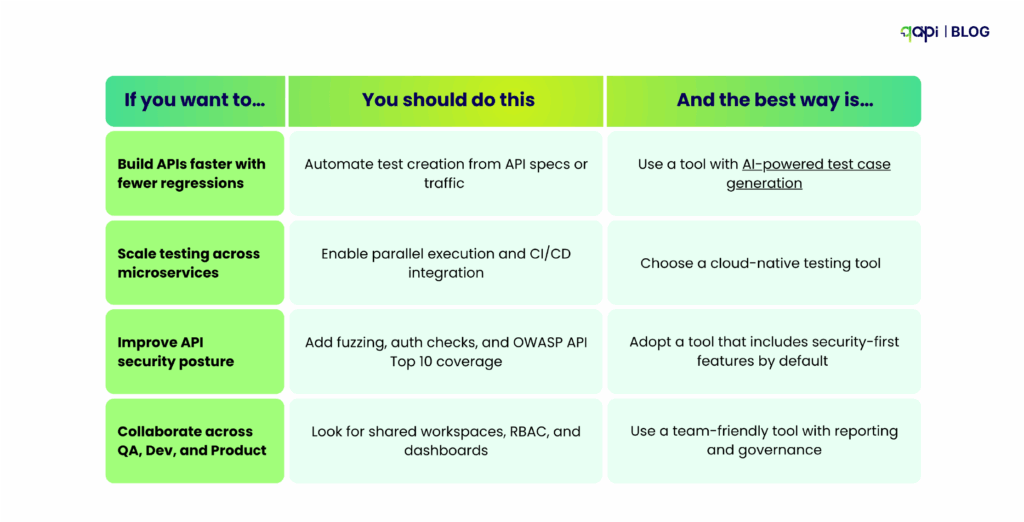
In this guide, we’ll break down the 10 essential features that separate good API testing tools from great ones — without overwhelming you with jargon or vendor fluff.

By the end, you’ll have a clear, actionable checklist to evaluate any tool and confidently choose the one that’s the right fit for your tech stack, your workflows, and your future goals.

Let’s get into it.

1️⃣ First things first. 

What is API testing?

Once you build your APIs, testing your APIs is the process to evaluate them based on their functionality. It involves running tests to send requests, validating responses, and verifying workflows across various systems. The goal is to ensure APIs can handle data correctly, follow business logic, and move smoothly between software components.

A good API testing tool should cover functional, security, performance, and contract testing, integrate with CI/CD, support mocking, data-driven tests, and provide insightful reporting capabilities.

But not all tools are built the same. Each tool in the market has some upside and downside.

Start by getting clear on what you need: 

•  Are you looking for a new tool? What does your current tool stack miss out on?

•  Do you want to abandon your current tool stack or just need an add-on?

•  Want to stay in the loop on the latest trends and efficient practices?

This will set the tone and make things easier: where to spend your time.

For example:

Before you ask,

What is the difference between API testing and UI testing

The difference between API and UI testing lies in their scope and approach. UI testing is focused on the entire user experience directly from the graphical interface, while API testing, on the other hand, puts focus on business logic and the data layer.

API Testing Advantages:

• Speed: API tests execute faster as they bypass the UI layer

• Early detection: Issues can be identified before UI development is complete

• Stability: Less likely to get affected due to environmental changes and UI modifications

• Data focus: Direct validation of business logic and data processing

UI Testing Strengths:

• User experience validation: Ensures end-to-end user workflows function properly

• Visual verification: Helps confirm proper rendering and interface behavior

• Integration testing: You can validate the complete application stack, including the frontend

2️⃣ Start With the People You Know

You don’t have to start from scratch; sometimes, the best thing is to just adapt what works for others, so learn and improvise.

Think about the problems you’ve had, someone else would have had it too at some point of time.

Don’t overthink, just start watching product tour videos, use all the tools with free trials. All it takes is just one click.

3️⃣ Here’s What an API Testing Tool Should Provide

Manual testing will only take you so far, but if you’re serious about setting the foundation for the future, using an API testing tool will be a good investment.

Because as your app grows, tools become hard to match efficiency and accuracy. In such cases, an API testing tool can automate repetitive tasks, integrate with your pipeline, and provide insights that manual methods can’t match—ultimately saving time and reducing errors.

Faster cycles, stronger reliability, and less downtime. It’s no longer a dream; it’s the bare minimum.

In 2025 itself, AI-powered features in qAPI like auto-generated tests have made our customers to move 3–5x faster without sacrificing quality.

Top 10 qualities needed in a API testing tool

1️⃣Flexible and Capable to test all API types: REST, SOAP, GraphQL

• Protocol Support: REST, SOAP, GraphQL, gRPC

• CRUD Testing: Create, Read, Update, Delete operations

• Negative Testing: User can verify error handling with invalid inputs

• Schema Validation: Ensure responses match OpenAPI or WSDL specs

• Assertions: Rich libraries for response content, status codes, and timing

2️⃣Security Testing: Protect What Matters To You

Modern tools must cover both authentication flows and threat detection.

•  Auth Support: OAuth 2.0, JWT, API keys, rotating secrets

•  OWASP Checks: Coverage of the OWASP API Security Top 10

Parameterization: Run security checks with varied datasets (tokens, credentials, wrong values) to validate performance under different inputs.

3️⃣Performance Testing: Prove Reliability at Scale

Users don’t just want working APIs—they want fast and reliable ones.

•  Load Testing: Validate performance under expected traffic

•  Stress Testing: Find breaking points

•  Soak Testing: Detect memory leaks during long sessions

•  Distributed Load: Generate traffic across regions to mimic real-world scenarios

•  SLA/SLO Monitoring: Ensure performance targets are consistently met across all conditions

qAPI intelligent simulation helps teams to select virtual users as much as they need to identify problems before they hit you and your production!

4️⃣ Contract Testing: Keep Services in Sync

In microservices, a breaking change in one service stop a across dozen others a domino effect.

• OpenAPI/Swagger Support: Auto-generate tests from contracts

• Pact & Consumer-Driven Contracts: Validate expectations across teams

• CI/CD Integration: Run contract checks on every pull request

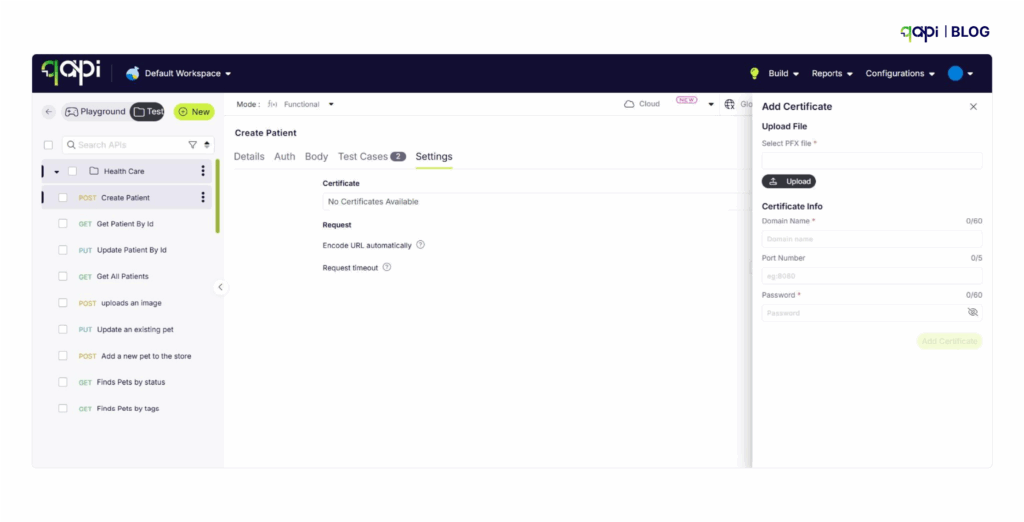
Authentication & Trust: Certificates (like TLS/SSL certs) prove that the API you’re talking to is really who it claims to be.

With qAPI you can add certificates in just a click, so you’re APIs are as secure as they can be.

This ensures both sides of the connection (client + server) have proved their identity before exchanging data.

5️⃣Mocking & Virtualization: Test Without Waiting

No need to pause development while dependencies are still being built.

•  Mock Servers: Lightweight simulations of API endpoints

•  Service Virtualization: More complex, realistic simulations

•  Parallel Tests: Run tests side by side so you save time and efforts

•  Fault Injection: Simulate users or failure to harden systems

6️⃣Data-Driven Testing: Scale Scenarios with Ease

The tool you use should be able to easily handle different file types and data.

•  Datasets: Import from CSV, JSON, or databases

•  Parameterization: Run tests with multiple values automatically

•  Synthetic Data: So that you can simulate realistic, privacy-safe datasets

•  Data Lifecycle Management: Handle setup, cleanup, and isolation

7️⃣CI/CD Integration: Fit Into DevOps Pipelines

A modern tool shouldn’t “just work” with your delivery workflows, but it should be capable enough to integrate and work fine alongside your development cyclem

•  CLI Support: So you can run tests from any pipeline

•  Basic Integrations: GitHub Actions, GitLab, Jenkins, Azure DevOps

8️⃣Reporting & Analytics: Turn Results into Insights

Testing data results should fuel smarter decisions, not just pass/fail marks and shouldn’t confuse you further.

•  Dashboards: Visualize trends and API health in a glance

•  Flaky Test Detection: Spot and fix unreliable tests

•  Trend Analysis: Track regressions over time

•  Performance Analytics: Historical metrics for capacity planning

9️⃣Collaboration & Governance: Align Teams

Scaling teams need alignment and accountability. We’ve been seeing teams just playing catch-up, whether it’s Teams, Slack, or GitHub.

If you, your team, and your API collection are in one place, it pushes out more work and less confusion.

•  Versioning: So everyone is aware of test history and rollback options

•  Review Workflows: No need to share and wait for peer reviews before merging

•  RBAC: Role-based access for compliance and security

•  Audit Logs: Track changes and maintain governance

qAPIs shared workspaces are ideal for small, collaborative QA teams. And it can accommodate larger groups too, if you prefer.

🔟AI Assistance: The 2025 Differentiator

AI is no longer futuristic—it’s now already in your systems, so it’s only poetic and just that your API testing tool also has it.

•  Auto Test Generation: Build tests based on your API specs or traffic

•  Anomaly Detection: Flag unusual behavior before failures spread

•  Workflow Explanation: Translate logs, API workflows into readable story so everyone can understand what’s happening and how the data is supposed to flow.

•  Workflow Generation: With one click AI can stitch your APIs together in the right flow so you can directly focus on the performance of the entire setup. (qAPI offers that)

4️⃣How to Choose the Right API Testing Tool

Selecting the right API testing tool isn’t just about features—it’s about finding the right fit for your team, your tech stack, and your long-term goals. Here’s a practical checklist to making the choice easier.

1️⃣Ease of Use vs. Depth: UI, CLI, Extensibility

Choose a tool that balances usability with flexibility:

•  Intuitive UI: Ideal for beginners or non-coders. Low-code platforms let teams get started quickly.

•  CLI & Scripting: Advanced users need deep scripting capabilities for complex workflows.

•  The qAPI advantage: Supports all API types, including REST, SOAP, and GraphQL. You can test Postman and Swagger collections directly—no coding required.

Tip: Look for a tool that grows with your team—from simple tests to advanced automation.

2️⃣The Tool Should Fit Into Your Tech Stack

Your API testing tool should seamlessly integrate with your existing stack:

•  API protocols: REST, SOAP, GraphQL, gRPC

•  Programming languages: Java, Python, JavaScript, etc.

•  CI/CD tools: Jenkins, GitHub Actions, GitLab CI

Tip: For GraphQL-heavy stacks, Postman or Katalon can work well. But qAPI is a step ahead by eliminating compatibility worries by supporting every API type and version out of the box.

3️⃣Pricing, Licensing, and Support

Total cost of ownership goes beyond the initial license:

•  Licensing models: Compare subscription vs. perpetual licenses, and user-based vs. execution-based pricing.

•  Hidden costs: Training, infrastructure, integration, and ongoing maintenance.

•  Support quality: Evaluate vendor support, documentation, update frequency, and community resources.

Example: Postman offers a free tier with 1M calls/month, but enterprise features and support come at a cost. qAPI offers a free tier with 5-user collaboration and a pay-as-you-go model, making it easy to scale so you can focus on testing and not on the bank.

4️⃣Proof of Value: Trial Criteria and Selection Checklist

Before committing, run realistic tests and define success metrics:

Trial Scenarios:

•  Simulate your actual workflows

•  Test complex API interactions

•  Measure performance and reliability

Success Metrics:

•  Test creation speed

•  Execution time

•  Defect detection rate

•  Team adoption

Selection Checklist:

•  Supported protocols and integrations

•  Team size and skill level

•  Performance and scalability needs

•  Security and compliance requirements

•  Budget and total cost of ownership

•  Vendor stability and roadmap alignment

Pro tip: A trial can reveal whether a tool truly fits your team’s workflow and future growth—don’t skip this step.

qAPI stands out by combining simplicity, extensibility, and enterprise-ready features in a single platform, letting teams focus on testing—not troubleshooting tools.

5️⃣Build an Ecosystem You’re Proud To Be a Part Of

API testing has an approach problem. It has always been an assumption that API testing has to be done by a skilled workforce; it needs to be done only manually, and automation alone is not enough.

But, automation in API testing isn’t about running the same tests. The best way towards it is leveraging AI-automation to run tests faster, effectively to avoid re-runs, build scalable APIs and run tests end-to-end all at one place.

You don’t need to run behind different tools; you just need a one-stop solution for all your API testing needs, where real testing happens.

That will help you understand your APIs better and build scalable applications the kind that puts you on track for long-term success.

You can use qAPI at every step to streamline your API building process

Sign up for a free trial today.

Deliver Flawless Digital Experiences—Every Time Your Customers Tap, Click, or Order

In today’s food & beverage landscape, your digital front-of-house must be as seamless as your back-of-house operations. From mobile ordering and curbside pickup to third-party delivery and loyalty integrations — every click, swipe, and API call needs to perform like clockwork.

That’s why we created this quick-hit infographic: “12 Smart Tips to Optimize Mobile & API Testing”,built specifically for F&B tech leaders navigating the complexity of omnichannel operations.

Discover how Qyrus helps you:

 ✓Orchestrate no-code API test flows across ordering, loyalty, and delivery apps
✓Validate integrations across POS, payment gateways, and kitchen display systems
✓Stress-test mobile and API flows before lunch rush or limited-time promos hit
✓ Shift testing left to accelerate rollouts of new menus or service features
✓Catch digital issues early before they impact guest experience or revenue

From quick-service to enterprise restaurant groups, Qyrus ensures your digital ecosystem is test-ready across brands, markets, and platforms.

Explore the full infographic because your tech stack should move as fast as your operations.

12-Smart-Tips-to-Optimize-Mobile-&-API-Testing

Embedded this Infographic.

<a href="https://www.qyrus.com/post/tips-to-optimize-mobile-api-testing/"><img style="width:100%;" src="/webcasata/surbhi/qyrus/wp-content/uploads/2025/05/12-Smart-Tips-to-Optimize-Mobile-API-Testing.jpg"></a><br>12 Smart Tips to Optimize Mobile & API Testing<a href="https://www.qyrus.com/post/tips-to-optimize-mobile-api-testing/">12 Smart Tips to Optimize Mobile & API Testing</a>