Qyrus Named a Leader in The Forrester WaveTM: Autonomous Testing Platforms, Q4 2025 – Read More

Featured Image

A five-second freeze is all it takes. Eighteen percent of users will uninstall an app on the spot after one bad freeze, and nearly a third abandon it within a month of installing it at all. For a QA team, that’s not an abstract quality metric, it’s the difference between a release that grows the business and one that quietly bleeds users before anyone notices. 

That’s why “what’s the best mobile test automation platform” is such a loaded question. The honest answer isn’t a single product name, it’s a framework for matching platform capabilities to the failure mode your team actually needs to prevent. This guide breaks down exactly that: a direct answer for common scenarios, the six criteria that separate serious platforms from the rest, and where each category of tool fits. 

What Is the Best Mobile Test Automation Platform? 

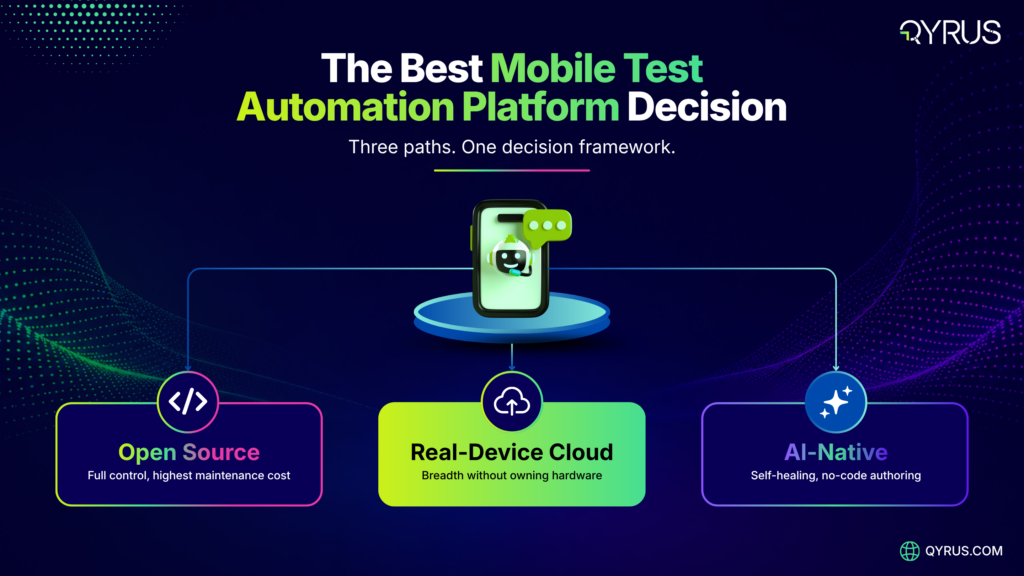
The best mobile test automation platform depends on three variables: your authoring model, how you execute against real devices, and how much of your maintenance burden AI can absorb. 

  • For open-source flexibility and full control: Appium remains the standard — it’s free, framework-agnostic, and covers native, hybrid, and mobile web apps across Android and iOS from a single codebase. 
  • For real-device execution and AI-driven maintenance in one platform: Qyrus combines a real Android/iOS Device Farm with AI-powered Mobile Testing, including Healer AI script correction and visual UI validation — Qyrus was named a Leader in The Forrester Wave™: Autonomous Testing Platforms, Q4 2025, scoring the maximum available rating in several evaluation criteria among 15 vendors assessed. 
  • For teams that need broad device-cloud breadth above all else: BrowserStack, Sauce Labs, and Perfecto offer some of the largest real-device libraries on the market. 
  • For teams already fully invested in AI-native, no-code authoring: newer AI-first platforms let non-developers describe tests in plain language, trading some low-level control for speed. 

None of these platforms is universally “the best”. The right one depends on which of the six criteria below matters most for your app and your team. 

Platform 

Best For 

Device Access 

AI Self-Healing 

Appium 

Open-source flexibility 

Emulator + real (via 3rd-party grid) 

No (native) 

BrowserStack / Sauce Labs / Perfecto 

Device-cloud breadth 

Real device cloud 

Varies by plan 

Qyrus 

Real-device + AI maintenance in one platform 

Real device cloud (Device Farm) 

Yes — Healer AI 

AI-native platforms 

No-code authoring speed 

Varies 

Yes 

Comparison Table

Why the Right Platform Choice Is a Revenue Decision 

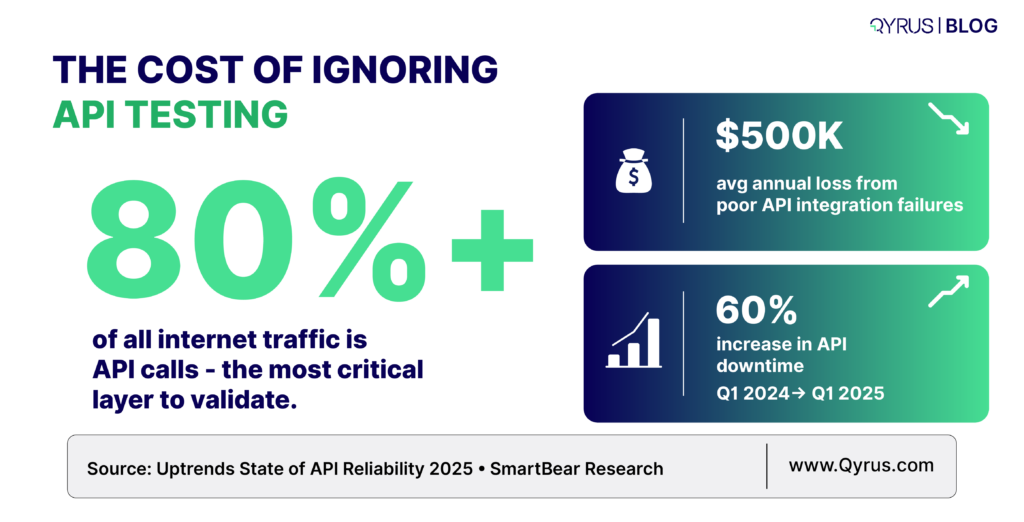
Mobile quality problems aren’t cosmetic, they directly affect revenue. Seventy-one percent of app uninstalls are tied to crashes and bugs that thorough testing could have caught, and 94% of uninstalls happen within the first 30 days of install. Users are especially unforgiving of performance issues: an app that simply freezes for five seconds will lose 18% of the people who just installed it. 

Layer device fragmentation on top of that and the scale of the problem becomes clear. There are more than 24,000 distinct, active Android device models in circulation today, and six major Android versions — 11 through 16 — all still carry meaningful active-install share simultaneously. A platform that can’t run comprehensive test coverage efficiently across that spread isn’t just slower, it’s leaving coverage gaps exactly where users are most likely to hit a crash your team never saw. 

Stat Infographic

6 Criteria That Actually Separate Mobile Test Automation Platforms 

On paper, feature lists make every platform look similar. These six criteria are where they actually diverge.

6- Criteria Criteria
  1. Real device execution vs. emulators and simulators.Emulators are fine for early-stage checks, but theycan’t reliably replicate real network conditions, battery behavior, or biometric prompts. A platform’s real-device access, not its device count alone, is what determines whether your test results reflect what users actually experience. 
  2. AI-driven self-healing.Locator-based scripts break the moment a button shifts or a label changes text. Teams running unassisted Appium suites at scaleroutinely lose 60-70% of QA time to fixing broken selectors. An AI-driven testing process that heals broken locators automatically has become the difference between a test suite that stays useful and one your team quietly stops trusting. 
  3. Cross-platform testing coverage.A platform that requires separate test suites for Android and iOS doubles your maintenance load. Look for genuine single-codebase coverage that supports both Android and iOS from the same test cases, among the key features that matter most as your app portfolio grows.
  4. Device and OS fragmentation handling.Given 24,000+ Android models alone, no team can test everything. The best platforms support risk-based device pools rather than forcing an all-or-nothing device matrix.
  5. CI/CD-native integration.A mobile test automation platform thatdoesn’t trigger automatically on a pull request or build is a manual step waiting to be skipped. Native hooks into tools like Jenkins, Azure DevOps, and GitHub Actions are non-negotiable in 2026. 
  6. Parallel and scalable execution.Sequential test runsdon’t survive a fast release cadence. The platform needs to run suites across many devices simultaneously without the queue becoming the bottleneck, and reporting needs to keep pace — screenshots, video recordings, and device vitals (CPU, memory, network usage) captured per run, not just a single pass/fail flag at the end. 

Weigh these six against each other rather than treating them as a checklist to satisfy in full. A five-person startup team testing a single native Android app has a very different priority order than an enterprise team shipping cross-platform releases weekly across a dozen markets, and the platform that wins on paper for one context can be badly over- or under-built for the other. 

The Three Categories of Mobile Test Automation Platforms in 2026 

Rather than ranking twenty individual tools, it’s more useful to understand the three categories they fall into, because the category, not the brand name, determines the tradeoffs you’re accepting. 

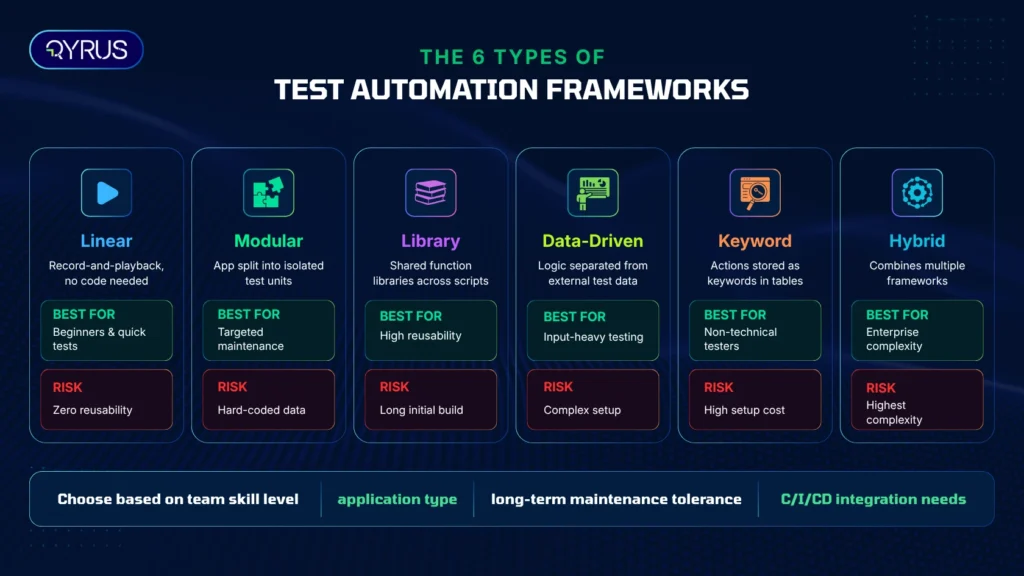
Open-source frameworks — Appium, Espresso, XCUITest. Free, flexible, and backed by large communities, but the maintenance cost falls entirely on your team. Best for teams with strong in-house automation engineering. 

Real-device cloud platforms — BrowserStack, Sauce Labs, Perfecto, Qyrus Device Farm, and similar. These solve the device-fragmentation problem by giving you on-demand access to real hardware instead of maintaining an in-house device lab. Best for teams that need breadth and reliability without owning physical infrastructure. 

AI-native and self-healing platforms — a growing category where AI handles locator maintenance, and in some cases test authoring, automatically. Best for teams trying to escape the 60-70% maintenance tax that traditional scripted automation carries. 

Many mature platforms — Qyrus among them — now blend the second and third categories: real-device execution paired with AI-driven maintenance, rather than forcing a choice between the two. That combination matters because device access alone doesn’t solve test fragility, and AI-driven maintenance alone doesn’t solve device fragmentation — a team needs both working together to keep pace with a modern release cadence. 

The category distinction also changes how you should evaluate pricing and onboarding. Open-source frameworks carry no license cost but the highest engineering-hours cost. Device cloud platforms typically price by device-minutes or seats, which scales predictably with team size. AI-native platforms often price by test volume or usage credits, which rewards teams that consolidate suites rather than maintaining redundant coverage. Understanding which category you’re evaluating — before comparing brand names — makes the pricing conversation much clearer. For a broader comparison across web, mobile, and API no-code platforms specifically, see our related guide: Top No-Code Test Automation Tools for Web, Mobile, and API Testing 2026. 

How Qyrus Approaches Mobile Test Automation 

Qyrus’s mobile offering is built around two components working together: Mobile Testing for AI-driven test authoring and execution, and Device Farm for real-device access at scale. 

On the authoring side, Qyrus Mobile Testing simplifies test creation and test management with a live device connection for building and previewing tests against a real-time video stream, a mobile recorder that captures user actions as test steps, and Healer AI — which automatically finds new locators for failed steps when the UI changes, so tests don’t break every time a button moves. Visual testing catches UI regressions that functional assertions alone would miss, and Rover AI adds autonomous exploratory testing to surface issues scripted regression tests weren’t written to catch, all aimed at faster test execution without sacrificing coverage. For deeper context on how this fits into a broader agentic testing approach, see Beyond Linear Scripting: Why 2026 is the Year of Modular, Agentic Mobile Testing. 

On the infrastructure side, Qyrus Device Farm provides access to real Android and iOS devices — smartphones and tablets — backed by a 99.9% real device availability commitment, with support for Android 9+ and iOS 14+, plus day-one support for new OS releases. Teams can run manual sessions with full device control, simulate interrupts like incoming calls to test how an app recovers, configure network shaping to test under real-world conditions like a slow 3G connection, and use biometric bypass to streamline testing of authentication flows. The platform runs in an ISO 27001/SOC 2-compliant cloud environment, and Qyrus is the only vendor offering fully dedicated, private devices that teams can configure exactly as their end users would. More on why real-device coverage matters at scale: Struggling with Fragmentation Frustration in AI Era? Why You Still Need a Mobile Device Farm. 

 A London-based neobank illustrates the impact of this combination. With a small four-person manual testing team and a limited budget, the bank needed to scale mobile test coverage fast without adding headcount. Using Qyrus Mobile Testing and Device Farm on Android and iOS, the team reached 90% test coverage in 10 weeks, cut test build time by 50% through script cloning, and shipped with zero bugs leaked to production. Read the full case study. 

Frequently Asked Questions 

What is a mobile test automation platform? 

A mobile test automation platform is software that runs pre-written or AI-generated test scripts against a mobile app automatically, without a human manually tapping through each screen. It validates functionality, UI, and performance across devices and OS versions as part of a release pipeline. 

Is Appium still relevant in 2026? 

Yes. Appium remains the most widely used open-source mobile automation framework, supporting native, hybrid, and mobile web apps across Android and iOS from a single codebase. Its main tradeoff is maintenance: locator-based scripts require ongoing upkeep as the app’s UI changes, which is why many teams pair it with AI-assisted self-healing tools. 

What’s the difference between a device farm and an emulator? 

An emulator simulates a device in software, which is useful for quick early checks but can’t fully replicate real-world conditions like network variability, battery behavior, or biometric hardware. A device farm gives you on-demand access to actual physical devices, so test results reflect what real users experience. 

How much does AI self-healing actually reduce maintenance time? 

Teams running unassisted, locator-based automation at scale commonly lose 60-70% of QA time to fixing broken selectors after UI changes. AI-driven self-healing tools reduce that overhead significantly by automatically identifying updated locators when elements shift, though the exact reduction varies by platform and app complexity. 

Can one platform test both Android and iOS? 

Most modern mobile test automation platforms, including Appium and Qyrus Mobile Testing, support both Android and iOS from a single test suite, which avoids maintaining separate scripts per platform. 

What should a small QA team prioritize first? 

Real device access and AI-driven maintenance typically deliver the fastest return for small teams, since they directly reduce the two biggest cost centers in mobile QA: infrastructure overhead and script upkeep. Cross-platform, CI/CD-native platforms let a small team cover more ground without proportionally more headcount. 

Conclusion 

There’s no single “best” mobile test automation platform, there’s a best fit for your team’s authoring preferences, device coverage needs, and tolerance for maintenance overhead. What doesn’t change is the cost of getting it wrong: with 71% of uninstalls tied to preventable crashes and over 24,000 Android device models to account for, the platform decision is a revenue decision as much as a technical one. 

Qyrus approaches this with real-device execution through its Device Farm and AI-driven maintenance through Mobile Testing’s Healer AI and Rover AI, an approach that helped a London-based neobank reach 90% coverage in 10 weeks with zero production bugs leaked. Request a demo to see how Qyrus’s Mobile Testing and Device Farm can cut your team’s maintenance overhead and device-fragmentation risk.

Qyrus Blog Featured Image thumbnail 2026

Most test automation evaluations start with a feature checklist and end with a tool that looks great in the demo and buckles under real release pressure six months later. That gap isn’t a procurement failure. It’s a framework failure — enterprises are comparing the wrong things, at the wrong level, for the wrong reasons. 

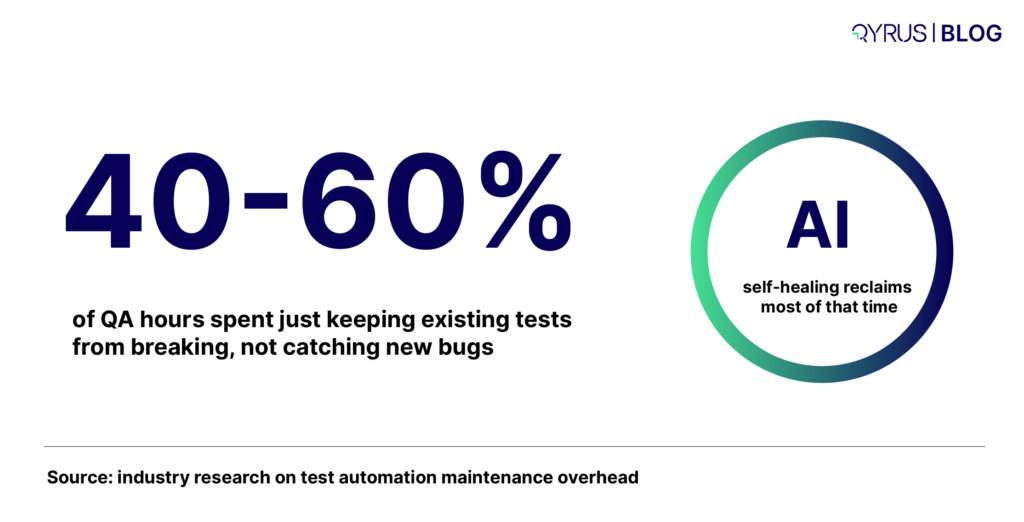
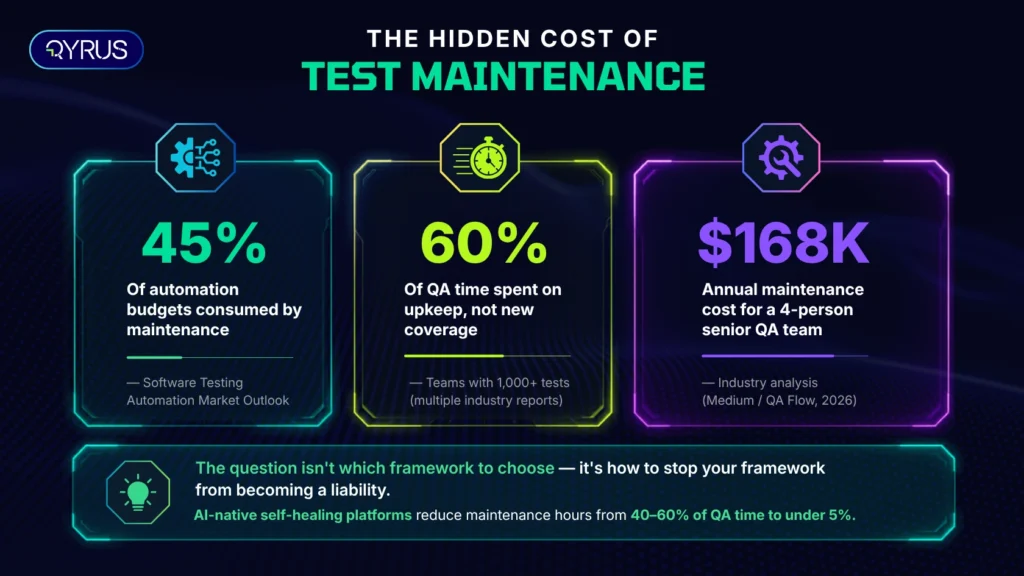
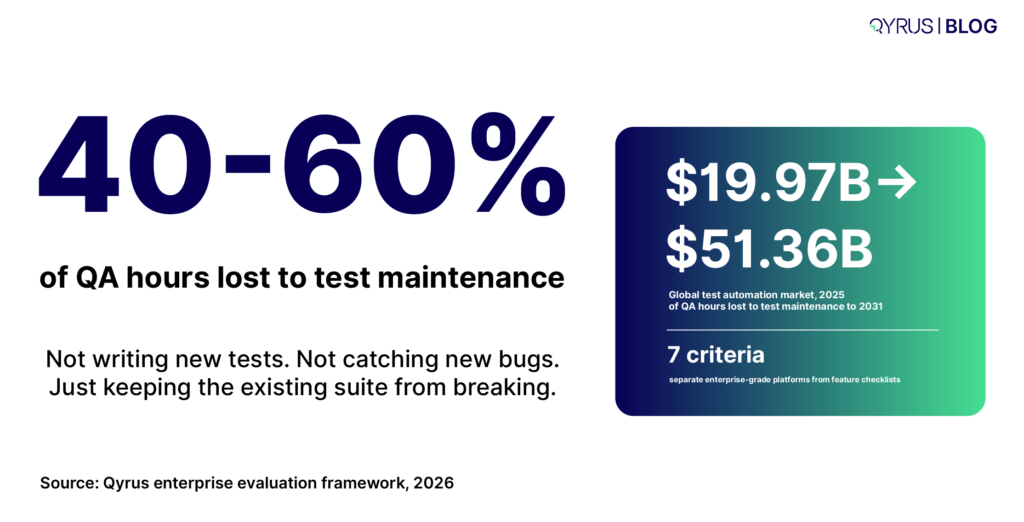
Here’s the number that should redirect the conversation: QA teams that depend on manual or brittle automated processes spend 40% to 60% of their working hours on test maintenance, not on writing new tests or catching new bugs. That’s the maintenance trap, and it’s the single biggest hidden cost in any test automation decision — one that rarely shows up on the RFP scorecard. 

QA hours lost

The market is responding accordingly. The global test automation market is projected to grow from roughly $19.97 billion in 2025 to $51.36 billion by 2031. That growth isn’t speculative; it’s enterprises collectively admitting that scripted, manually-maintained automation can’t keep pace with modern release velocity. 

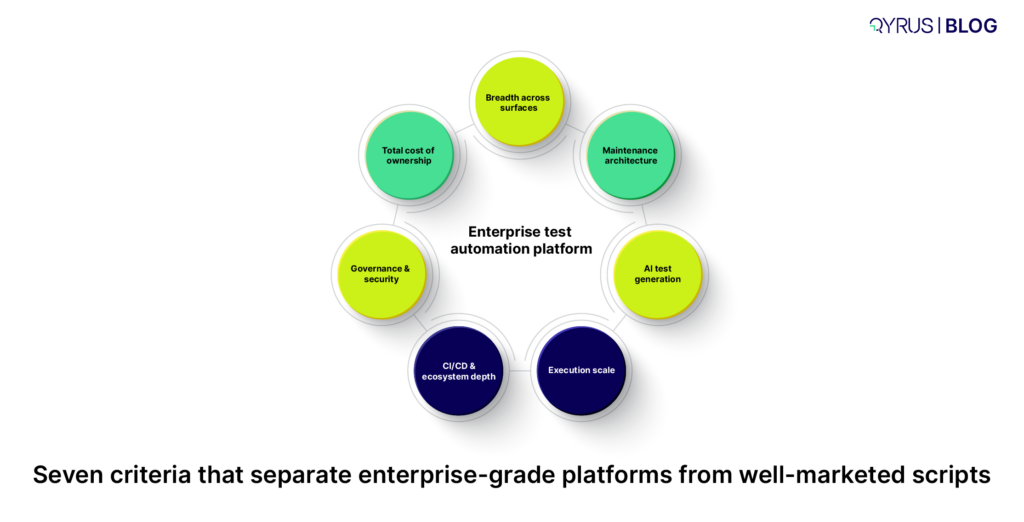
This guide isn’t a tool ranking. It’s a framework — seven criteria that separate platforms genuinely built for enterprise scale from tools that simply added an AI feature to an old architecture. If you’re specifically evaluating cloud/SaaS-only platforms, our guide to choosing SaaS test automation platforms goes deeper on that narrower decision. This piece is for the broader enterprise buy: web, mobile, API, desktop, and the legacy systems that don’t fit neatly into a SaaS-only evaluation. 

Two tool categories

Why Most Evaluations Compare the Wrong Things 

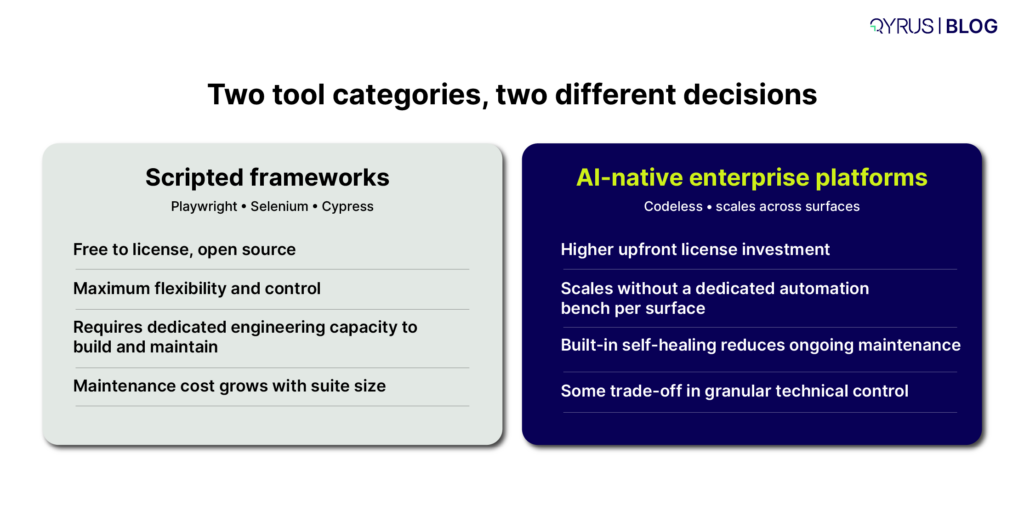
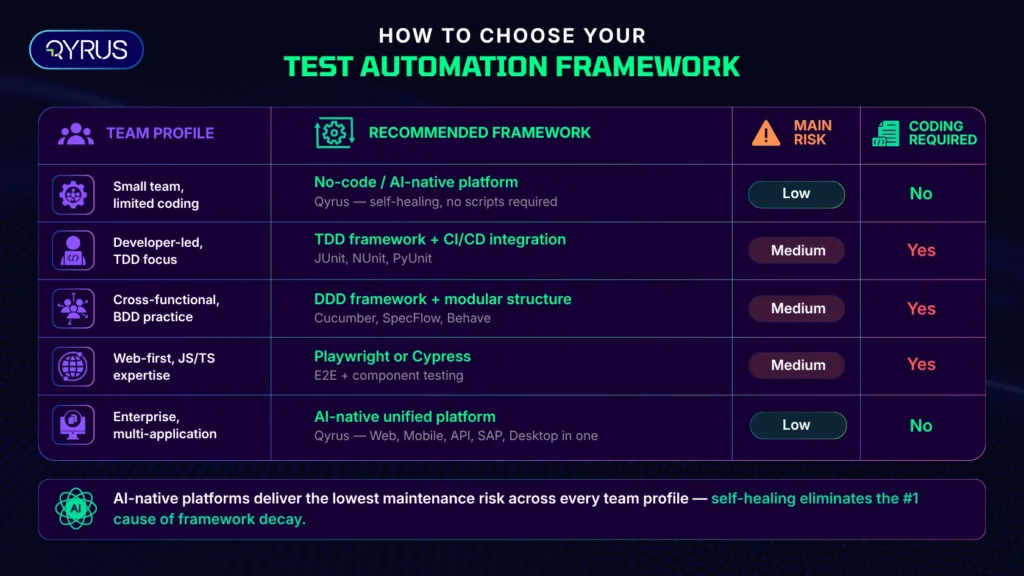
The most common mistake enterprise buyers make is putting fundamentally different categories of tool side-by-side on the same scorecard. A scripted open-source framework and an AI-native enterprise platform both get called “test automation tools,” but they solve different problems for different teams. Comparing them on a feature-by-feature basis treats a skill-level and architecture decision as if it were a simple feature decision. 

Before you build an evaluation matrix, get clear on which category you’re actually shopping in: 

  • Developer-led scripted frameworks (Playwright, Selenium, Cypress, Appium) — free, flexible, and require engineering capacity for ongoing maintenance as the suite grows. 
  • AI-native, codeless enterprise platforms — built for QA teams who need to scale automation across surfaces without a dedicated automation-engineering bench for each one. 
  • Point solutions (visual testing only, performance testing only, mobile-device-farm only) — excellent at one job, but they add integration overhead if your enterprise needs unified reporting across surfaces. 

Once you know which category fits your team’s skills and scale needs, the seven criteria below tell you how to evaluate within it. 

1. Breadth Across Surfaces Without Framework-Switching 

Enterprises rarely test just one thing. A single customer journey might touch a web front end, a mobile app, three backend APIs, and a legacy desktop or SAP screen. If your test automation platform only covers one of those surfaces, you’re stitching together multiple tools, multiple reporting formats, and multiple places where a defect can hide between the seams. 

What to evaluate: 

  • Does the platform natively support Web, Mobile (native and hybrid), API, and Desktop testing — or does “support” mean a separate product with a separate login and separate reporting? 
  • Can a single test flow chain steps across surfaces (e.g., start a transaction on web, verify it on mobile, confirm the backend state via API) without manually re-platforming the test logic? 
  • If your enterprise runs SAP, Salesforce, or another packaged ERP/CRM, does the platform have purpose-built support for that system’s dynamic, frequently-changing UI — or is it relying on generic web locators that break on every patch? 

A unified platform doesn’t just save licensing costs. It removes the reporting fragmentation that makes “are we covered end-to-end?” an unanswerable question during a release retro. 

2. Maintenance Architecture, Not a Self-Healing Checkbox 

Almost every vendor now claims “self-healing.” Almost none of them explain how it actually works, and the difference matters enormously for total cost of ownership. The architectural distinction industry analysts are increasingly drawing is between platforms that are AI-native from the ground up and platforms that added an AI layer on top of a traditional scripted framework — the latter produces marginal maintenance reduction, not structural reduction. 

Questions that separate real self-healing from marketing self-healing: 

  • What does it heal against? Effective self-healing references a previous passing execution — a baseline — and suggests corrected locators (ID, class, XPath) when the application changes. If a vendor can’t explain their reference mechanism, ask them to. 
  • Does it require a clean baseline first? Most legitimate self-healing tools need at least one successful, non-dry-run execution to heal against later. If a platform claims to heal scripts with no prior passing run, be skeptical of how that’s actually working. 
  • What’s the maintenance number it actually moves? Don’t accept “reduces maintenance” as an answer. Ask for a percentage, and ask whether that number comes from a third-party study (like a Forrester Total Economic Impact report) or an internal benchmark. 

This is the single highest-leverage criterion on this list. A platform that gets self-healing right structurally changes the economics of test maintenance — described elsewhere as the QA “janitorial work” that consumes senior engineers’ time without adding new coverage. A platform that gets it wrong just defers the maintenance bill. 

For a deeper technical breakdown of how self-healing mechanisms actually work — and which architectural patterns hold up at scale — see our complete guide to self-healing test automation. 

3. Genuine AI Test Generation, Not AI-Flavored Scripting 

“AI-powered” has become a checkbox term. The real question is whether the platform’s AI understands intent — what the test is supposed to verify — or whether it’s simply converting recorded clicks into code with a generative wrapper around the UI. 

Evaluate AI test generation on: 

  • Input flexibility. Can it generate test scenarios from a plain-language description, a Jira ticket, or a requirements document — or only from a recorded session? 
  • Context awareness. Does it understand existing test coverage well enough to suggest new scenarios that fill genuine gaps, rather than generating redundant tests that inflate your suite without adding confidence? 
  • Criticality scoring. Enterprise-grade generation tools don’t just produce volume; they categorize generated scenarios by risk or criticality, so your team can prioritize execution under time pressure. 
  • Explainability. Can a reviewer see why the AI generated a given test step, or is it a black box you either trust completely or discard? 

This is also where the broader industry conversation is moving from automation toward orchestration — AI agents that don’t just execute predefined scripts, but determine what to test, generate the relevant cases, and reason about results. If you’re evaluating platforms on a multi-year horizon, ask vendors directly where they sit on that spectrum today, and where their roadmap is headed. 

4. Execution Scale and Real-World Infrastructure 

A test that passes in a sandboxed local environment and a test that passes across the actual matrix of browsers, devices, and network conditions your customers use are not the same test. Enterprise-grade execution infrastructure is what closes that gap. 

What to look for: 

  • Parallel execution at meaningful scale. Can the platform run hundreds of tests simultaneously across a browser and device farm, or does scale require provisioning your own infrastructure? 
  • Real devices, not just emulators. Emulators miss hardware-specific behavior — battery drain, memory pressure, real network handoffs. A platform with access to real Android and iOS devices, including day-one support for new OS releases, catches issues emulator-only testing misses entirely. 
  • Network condition simulation. Can you test how the application behaves on throttled 3G or high-latency connections, not just on your office Wi-Fi? 
  • Compliance posture of the infrastructure itself. ISO 27001 and SOC 2 Type 2 compliance on the browser/device farm isn’t a nice-to-have for regulated industries — it’s frequently a procurement gate. 

5. CI/CD and Ecosystem Depth — Not Just a Logo Wall 

Every vendor’s integrations page has a wall of logos. The real evaluation question is whether those integrations are bi-directional and operationally deep, or whether they’re a one-way trigger that doesn’t feed results back into the tools your team actually lives in. 

Dig into: 

  • Test management traceability. Can the platform link automated scripts to Jira, Xray, or TestRail issues and update them automatically with execution results — or does someone have to manually copy-paste outcomes? 
  • CI/CD trigger depth. Does a code push or pull-request merge automatically trigger the right subset of tests, or does someone have to manually kick off a run? 
  • Granular feedback, not just pass/fail. The platforms that meaningfully speed up release cycles deliver step-level data, screenshots, and logs back into the pipeline — not just a green or red status check. 
  • Notification routing. Can failures route to the right channel (Slack, Teams, email) with enough context that someone can act without opening five tabs to reconstruct what happened? 

Survey data from 2026 consistently shows that depth of DevOps pipeline integration is one of the clearest separators between high- and low-performing automation programs — teams with tight integration report faster cycles and lower defect leakage than teams running automation as a side process. 

6. Governance, Security, and Enterprise Readiness 

Features that look optional in a pilot become non-negotiable the moment a platform touches production data, regulated workflows, or a security review. This is the criterion most often skipped in early-stage evaluations and most often the reason a deal stalls in procurement six weeks later. 

Confirm before you’re deep into a contract: 

  • Compliance certifications — ISO 27001, SOC 2 Type 2, and any industry-specific requirements (PCI-DSS for payments, HIPAA-adjacent controls for healthcare-adjacent data). 
  • Access control granularity — role-based permissions (Admin, Editor, Viewer, Contributor) at the project level, not just account-wide admin/non-admin toggles. 
  • Secrets handling — are credentials and API keys encrypted and excluded from logs and reports by default, or does someone have to remember to mask them manually? 
  • Audit trail — can you reconstruct who changed what test, when, and why, months after the fact. 

None of this shows up in a demo. All of it shows up in a security questionnaire, and a platform that can’t answer cleanly will cost you months of procurement delay regardless of how good its automation capabilities are. 

7. Total Cost of Ownership, Not License Price 

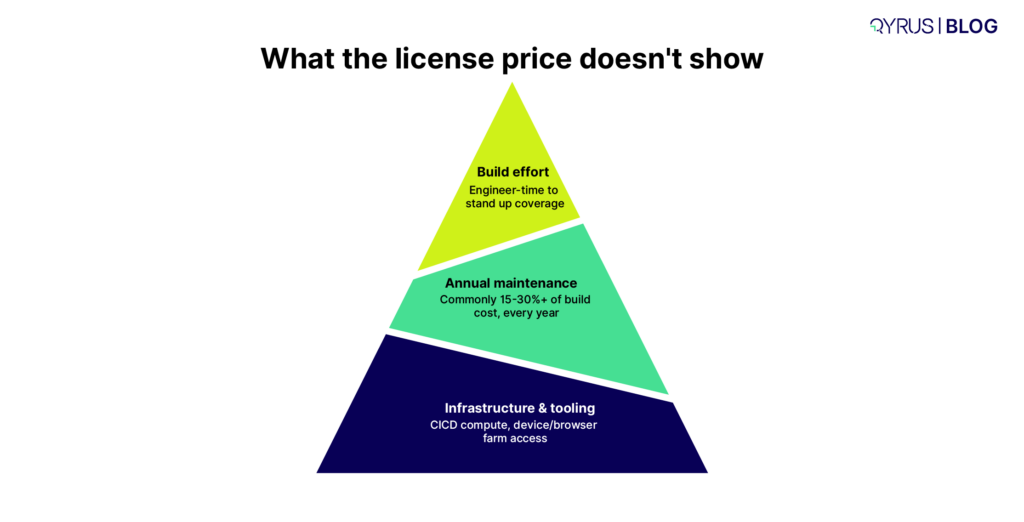
The license quote is the most visible number in any evaluation and frequently the least important one. The real cost structure includes build effort, ongoing maintenance, infrastructure, and the engineering time spent operating the framework — and that maintenance line item compounds in ways that are easy to underestimate at signing. 

license price

A useful mental model: model three numbers, not one. 

  1. Build cost — engineer-time to stand up initial coverage, whether that’s scripting against an open-source framework or configuring a codeless platform. 
  2. Annual maintenance cost — typically modeled as a percentage of build cost (commonly cited in the 15–30% range for healthier programs, and meaningfully higher for brittle, script-heavy suites). 
  3. Infrastructure and tooling cost — license fees, CI/CD compute, device/browser farm access, whether self-hosted or vendor-provided. 

The platforms worth paying a license premium for are the ones that demonstrably bend that maintenance curve downward — because year two and year three are where build-vs-buy math actually gets decided, not year one. For the full model on running these numbers yourself, our guide to software testing cost estimation and strategic reduction walks through the calculation in detail. And if your current bottleneck is specifically about scaling an existing program rather than starting fresh, these 10 bottlenecks that block scaling test automation are worth checking against your own roadmap before you sign anything new. 

The Enterprise Evaluation Checklist 

Seven criteria

Use this as a working scorecard during vendor conversations: 

  • Covers Web, Mobile, API, and Desktop from one platform with unified reporting 
  • Self-healing references a verified baseline and the vendor can explain the mechanism 
  • AI test generation accepts plain-language input and scores scenarios by criticality 
  • Real device farm with day-one support for new OS releases, not emulator-only 
  • Network condition simulation for realistic mobile/web performance testing 
  • Bi-directional integration with your test management tool (Jira/Xray/TestRail) 
  • CI/CD triggers run automatically on commit or PR merge, not manually 
  • ISO 27001 / SOC 2 Type 2 certified infrastructure 
  • Role-based access control at the project level 
  • Vendor can show a third-party-verified ROI/TCO study, not just an internal claim 

If a vendor can’t give you a confident, specific answer on more than two or three of these, that’s a data point — not a dealbreaker on its own, but a reason to ask harder follow-up questions before you sign. 

Where Do We Fit 

Qyrus is built around the seven criteria above rather than around any single one of them. The platform unifies Web, Mobile, API, Desktop, Data, and SAP testing in one environment, so enterprises validating end-to-end business processes aren’t reconciling reports across five tools.  

Its Healer AI references a successful baseline script to suggest corrected locators when an application changes, and its TestGenerator and TestGenerator+ services generate and expand test coverage from Jira tickets or plain-language descriptions, with scenarios categorized by criticality. Execution runs across a browser and device farm with real Android and iOS hardware, day-one support for new OS releases, and ISO 27001/SOC 2 Type 2 compliance built into the infrastructure layer. 

On the cost side, a Forrester Total Economic Impact study found a 213% ROI with a payback period of under 6 months for organizations using Qyrus, alongside a 70% reduction in test-building time. None of that replaces doing your own evaluation against the framework above — but it’s the kind of third-party-verified number this guide suggests you ask every vendor for. 

Conclusion 

The platforms that hold up under real enterprise pressure aren’t the ones with the longest feature list. They’re the ones whose architecture was built to bend the maintenance curve down, scale execution across the surfaces your business actually runs on, and survive a security review without scrambling. Run any platform you’re evaluating through the seven criteria here, and you’ll know within a few conversations whether you’re looking at an enterprise-grade platform or a well-marketed script. 

FAQ 

What’s the difference between a test automation framework and a test automation platform? 

A framework (like Selenium, Playwright, or Appium) is a library that developers use to write and run test scripts — it’s free, flexible, and requires engineering effort to build and maintain. A platform is a more complete product that typically adds codeless test creation, AI-driven maintenance, execution infrastructure, and reporting on top of (or instead of) a scripting layer, aimed at QA teams who need to scale automation without a large dedicated engineering bench. 

How much does an enterprise test automation platform cost? 

Enterprise platform pricing is typically customized and quote-based rather than published, but the total cost of ownership includes more than the license fee: build effort, annual maintenance (commonly modeled as 15–30% of build cost for well-maintained programs), and infrastructure such as device farms and CI/CD compute. Comparing license price alone without modeling maintenance cost is the most common evaluation mistake. 

Is open-source or a commercial platform better for enterprises? 

It depends on team composition and scale, not on which option is objectively “better.” Open-source frameworks cost nothing in licensing but require dedicated automation engineers to build and maintain coverage as the application changes. Commercial AI-native platforms cost more upfront but are designed to reduce the ongoing maintenance burden, which often becomes the larger cost driver once a test suite reaches enterprise scale. 

What is self-healing test automation and does it actually work? 

Self-healing automation automatically detects when a UI element’s locator has changed and suggests or applies an updated locator, rather than requiring a human to manually fix the broken script. It works reliably when it references a previous successful execution as a baseline; vendors that can’t explain their reference mechanism should be evaluated cautiously. 

Should enterprises evaluate SaaS-specific test automation platforms differently from general enterprise platforms? 

Yes — SaaS-only platforms typically optimize for cloud-native applications and may not natively support legacy desktop, on-premise ERP, or mainframe systems that many enterprises still run. If your testing scope includes legacy or packaged-application surfaces alongside cloud applications, evaluate against the full criteria here rather than a SaaS-specific checklist alone. 

Featured Image-AI Test Automation

Most QA teams already know the uncomfortable truth about test automation: building the suite was never the hard part. Keeping it alive is. When people do research on taking care of test automation they always find that QA teams who use scripted frameworks spend 40 to 60 percent of their working hours just keeping existing tests from breaking, not writing new ones, not catching new bugs, simply patching selectors that broke because a button got renamed.  This is the problem that AI test automation was made to fix. It is an idea to understand how AI test automation works, rather than just believing what people say. 

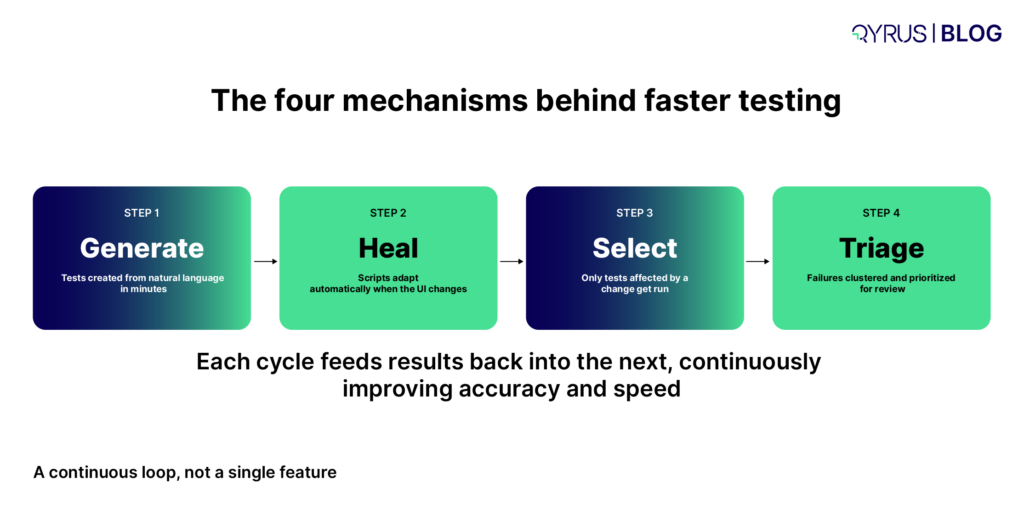
This isn’t a single feature. AI test automation reduces testing time through four distinct mechanisms working together: faster test creation, self-healing scripts that survive UI changes, smarter test selection that skips irrelevant runs, and automated triage that tells you which failures actually matter. Each one of these things helps with a part of the testing problem. If people understand all four they can pick a tool that really helps them than picking one that just gives them another thing to check. 

self-healing reclaims

What Is AI Test Automation? 

AI test automation applies machine learning and natural language processing to the parts of testing that have historically required the most manual, repetitive human effort. This includes writing test scripts keeping them up to date when the application changes, deciding which tests to run and figuring out what a failure means. It works with the underlying system that runs your tests across browsers, devices and APIs. It does not replace it. 

Traditional automation frameworks like Selenium, Cypress, and Playwright are still doing the work of executing scripted steps. What has changed is everything around that execution. Traditional scripts use fixed selectors, like a CSS class or a hardcoded XPath, that stop working when a developer renames a button, but AI-driven frameworks can recognize the element in different ways and keep working even when the underlying code changes. Traditional test creation meant a QA engineer had to write every assertion by hand, but AI can create a working test from a description or a Jira ticket in just a few minutes. 

The market reflects how mainstream this shift has become. The automation testing market reached an estimated $40.44 billion in 2026 and is projected to climb past $78 billion by 2031 This is because big companies are using AI tooling that creates self-healing scripts quickly. AI test automation is not an idea anymore. It is now a part of testing.  


Traditional Test Automation 

AI Test Automation 

Test creation 

Manual scripting, line by line 

Natural language or requirement-based generation 

Maintenance 

Manual fix every time the UI changes 

Self-healing locators adapt automatically 

Test selection 

Run the full regression suite every time 

Risk-based selection runs only affected tests 

Failure analysis 

Manual log review to find root cause 

Automated clustering and root-cause suggestions 


The Four Mechanisms That Actually Cut Testing Time 

The four mechanisms

If you only take one thing from this article, take this: when someone says “AI makes testing faster,” ask them which of these four mechanisms they mean. The answer changes what you should evaluate in a tool. 

Automated Test Case Generation 

The most visible time saving happens before a single test ever runs. AI tools can create test cases directly from structured inputs like Jira tickets, user stories, or plain-English descriptions, often within minutes, cutting test creation time that used to take hours or days down to a fraction of that. Some platforms report generating tests 10 times faster through natural language test creation, even for complex scenarios involving dynamic content or multi-step workflows. 

This matters because test creation has historically been the gatekeeping skill in QA. If only your most technical engineers can write a Selenium script, your test coverage is capped by how many of those engineers you have. Generation that works from natural language descriptions opens test creation to product managers, business analysts, and less code-fluent testers, which doesn’t just save time, it removes a structural bottleneck on coverage itself. 

Self-Healing Scripts 

This is the mechanism that saves the time and we have the numbers to prove it. It helps with the maintenance tax that we talked about earlier which’s around 40 to 60 percent. The way it works is that self-healing automation looks for lots of ways to find the thing on a website, like an ID or a class or where it is on the page or what it says. So when someone makes a change to one of those things the test does not stop working. It just finds the thing another way. Keeps going. This is because self-healing automation is really good at finding things in ways like if it cannot find something by its ID it will try to find it by its class or by where it is, on the page. Self-healing automation is very helpful because it saves time and makes sure that the test keeps running without any problems. 

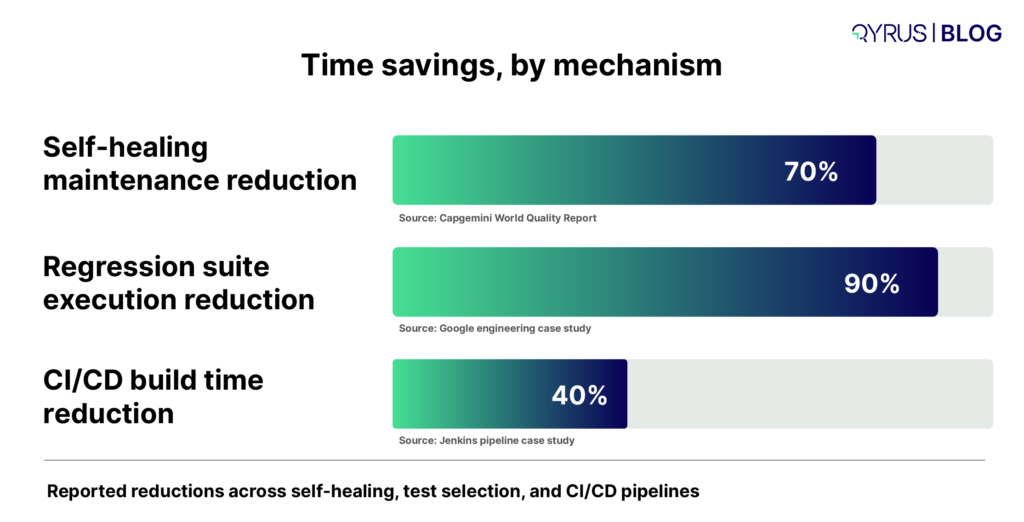
The reported impact is substantial. Capgemini’s World Quality Report found self-healing reduces maintenance effort by up to 70 percent. One case study involving a major bank’s QA team went even further, reporting a 95 percent reduction in script maintenance and twice as fast regression cycles after adopting AI-driven locator matching. The mechanism is simple, but the compounding effect on a team’s calendar is not: hours that used to go to script repair go back into actual test design and exploratory testing. 

Risk-Based Test Selection 

Running an entire regression suite on every code change is the brute-force default, and it’s increasingly unnecessary. AI-driven impact analysis looks at what actually changed in a commit, cross-references that against historical defect data and dependency graphs, and runs only the tests that change could plausibly affect. 

The scale of the time savings here can be dramatic. Google has reported using this approach to cut test suite execution by roughly 90 percent while maintaining the same defect detection rate, by training a model to learn which tests were likely to fail based on the code changes in a given commit. At a more typical enterprise scale, organizations report reducing regression suite size by 30 to 40 percent while maintaining full coverage, and Fujitsu specifically reported a 35 percent reduction in QA labor hours after switching from manual test scoping to automated change impact analysis. None of these examples require Google-scale infrastructure. They require a model trained on the test history a team already has. 

Automated Failure Triage 

The last mile of the testing cycle is often the most manually intensive. Someone has to check if its a real bug, a test that sometimes fails or just an environment issue. AI-driven failure analysis clusters similar failures, flags likely root causes, and surfaces the handful of failures that actually need a human look, instead of leaving an engineer to wade through logs one at a time. 

The compounding effect of this on CI/CD pipelines is significant on its own. AI-powered test prioritization can get developers critical feedback on a code change within minutes of committing, rather than waiting hours for a full pipeline run. One documented case using AI-driven test prioritization in a Jenkins pipeline reported a 40 percent reduction in overall build times, by dynamically reordering and executing only the most impactful test cases based on historical results and code dependencies. Faster feedback doesn’t just feel better, it changes how often a team is willing to commit and test, which compounds release velocity over time. 

Time savings, by mechanism

Test Coverage and Quality Gains Beyond Speed 

Speed is the headline benefit, but it’s worth being clear that AI test automation’s value isn’t only about doing the same testing faster. It’s also about testing more thoroughly than manual processes ever could, without a proportional increase in headcount. 

AI-assisted generation tends to surface edge cases and boundary conditions that human testers, working under deadline pressure, are statistically more likely to skip. A test suite built primarily by hand tends to cluster around the “happy path,” the scenarios the team already expects to test, while AI-suggested scenarios can probe invalid inputs, unusual sequences, and combinations a human wouldn’t think to script. The net effect for most teams isn’t just a shorter testing cycle, it’s a wider net catching more of the defects that would otherwise reach production. That combination, faster and broader, is what separates a meaningful AI test automation strategy from a tool that just runs old scripts marginally quicker. 

The Limits of AI Test Automation (What It Can’t Do Yet) 

It would be dishonest to present AI test automation as a fully autonomous replacement for QA judgment, and most credible voices in the space don’t claim otherwise. AI test automation tools are genuinely good at the repetitive, pattern-recognition-heavy parts of testing. They are not yet good at understanding business logic, which is the part that determines whether a test is actually testing the right thing. 

AI-generated tests can overlook scenarios that matter specifically because of how your business operates, not how your UI is built; an AI model doesn’t inherently know that a particular discount code combination should never be allowed, even if nothing in the interface prevents it. Decision-making inside AI testing tools can also be opaque, meaning a tool might skip or deprioritize a test without an obvious, auditable reason, which is exactly the kind of gap a tester needs to catch. And large language models used for test generation can produce confidently wrong outputs, hallucinated assertions, plausible-looking but incorrect expected results, if a human isn’t reviewing them. 

None of this is an argument against adopting AI test automation. It’s an argument for treating it the way the field’s own research suggests: a force multiplier for QA judgment, not a substitute for it. Teams that get the most value tend to start with a clear pain point, a maintenance backlog, a slow regression cycle, a coverage gap, and apply AI deliberately to that problem, with human review built into the loop, rather than handing over an entire testing strategy and hoping the AI fills the gaps on its own. 

How Qyrus Helps Teams Cut Testing Time Across the Board 

Most AI testing tools solve one piece of this puzzle. Qyrus is built to address all four mechanisms in a single platform, and across more testing surfaces than most point solutions ever touch. 

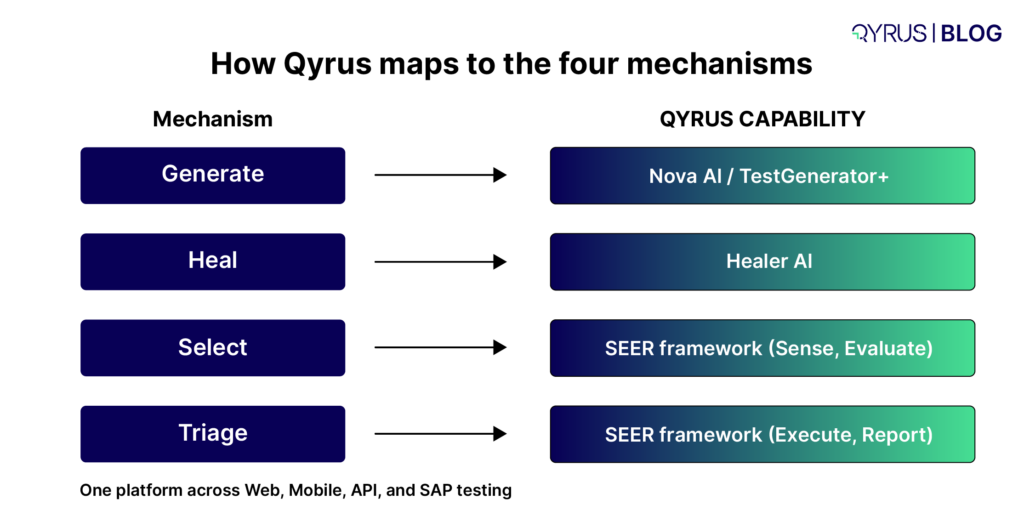
On generation, Qyrus’s Nova AI builds functional test scenarios directly from a free-text description or a Jira ticket, while TestGenerator+ analyzes your existing scripts and proposes additional scenarios to close coverage gaps automatically, categorized by criticality so your team knows what to prioritize first. For a deeper look at how generation works under the hood, see our guide to generative AI for testing. 

Qyrus maps to the four

On maintenance, Healer AI references a successful baseline script and automatically suggests updated locators when an element’s ID, class, or XPath changes, the same self-healing mechanism behind the maintenance-reduction data above, applied across Qyrus’s Web, Mobile, and SAP testing services rather than confined to a single surface. We cover this mechanism in detail in our complete guide to self-healing test automation, including how it differs across implementation approaches. 

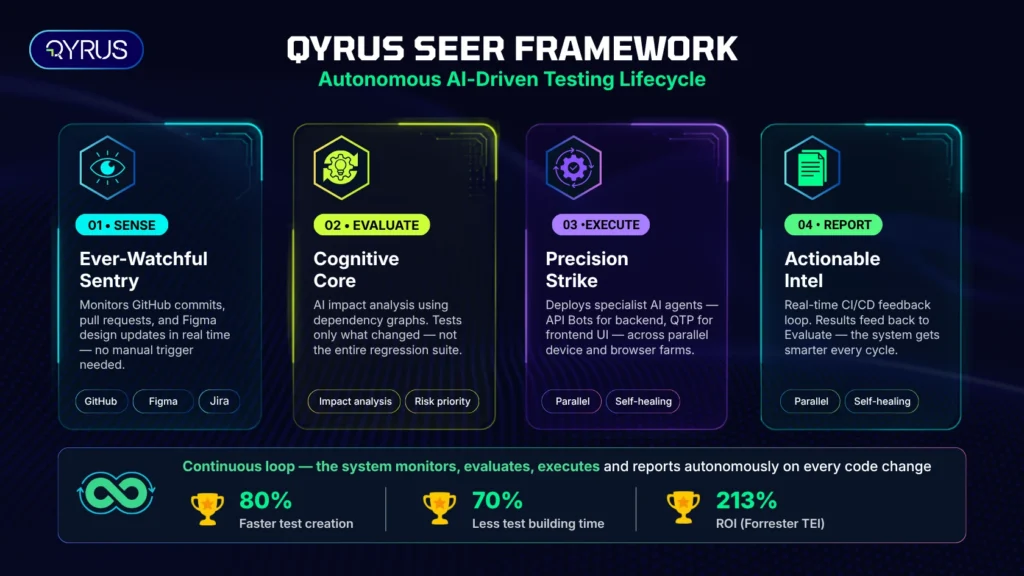
On test selection and orchestration, Qyrus’s SEER framework (Sense, Evaluate, Execute, Report) runs as a continuous loop: it senses changes via webhooks and API polling from sources like GitHub and Jira, evaluates impact through specialized Thinking Agents that trace dependency graphs and map design changes to test scenarios, executes only the tests that matter through a coordinated squad of agents like TestPilot and API Builder, and reports results back into a Context DB that makes the next cycle smarter. This kind of orchestration is also what separates a true AI test automation strategy from simply bolting AI onto an existing manual process, a distinction we explore further in our overview of scaling bottlenecks in test automation. 

And because Qyrus unifies Web, Mobile, API, and SAP testing on one platform instead of stitching together separate point tools for each surface, the time savings compound across an entire business process rather than staying siloed to a single UI layer, which is precisely the kind of end-to-end coverage most single-purpose no-code test automation tools can’t offer on their own. For a broader architectural view of how AI is reshaping the discipline as a whole, see AI in testing: architecting the future of software QA. 

The result, as with the Coca-Cola Bottler implementation that cut SAP test execution time by 88 percent (from 10,020 minutes down to 1,186 minutes across 500-plus automated scripts), isn’t just isolated time savings on individual test runs. It’s a measurably faster path from code commit to confident release. 

Frequently Asked Questions 

How does AI-powered test automation reduce testing time? 

AI test automation reduces testing time through four mechanisms: generating test cases from natural language or requirements in minutes instead of hours, self-healing scripts that adapt to UI changes without manual fixes, risk-based test selection that runs only the tests affected by a given change, and automated failure triage that clusters and prioritizes results so engineers aren’t manually combing through logs. Documented results range from a 70 percent reduction in maintenance effort to a 90 percent reduction in regression suite execution time, depending on which mechanism is applied. 

Will AI test automation replace QA engineers? 

No. AI handles the repetitive, pattern-based work, generating routine test cases, fixing broken locators, and surfacing likely root causes, but it doesn’t understand business logic or judge which edge cases matter most to your users. QA engineers remain essential for defining what to test, validating AI-generated results, and applying judgment AI doesn’t have. 

Is AI test automation ready for production use today? 

For specific, well-scoped use cases like self-healing UI tests, AI-generated regression suites, and risk-based test prioritization, yes, these are already running in production CI/CD pipelines at scale. Fully autonomous testing with zero human oversight is less mature and still requires careful validation before relying on it for critical releases. 

How is AI test automation different from traditional test automation? 

Traditional automation (Selenium, Cypress, Playwright) executes pre-written scripts using fixed selectors that break when the UI changes. AI test automation adds a layer on top: it generates tests from plain language, heals broken locators automatically, decides which tests to run based on what actually changed, and helps triage failures, all without requiring a human to manually rewrite scripts every release. 

Do AI test automation tools work with frameworks like Selenium or Playwright? 

Many AI testing platforms integrate with or build on top of existing open-source frameworks rather than replacing them outright, though the depth of that integration varies significantly by vendor. Some generate native framework code you own and can export; others run on a proprietary execution engine. It’s worth confirming this directly with any vendor before committing, since migration cost differs significantly between the two approaches. 

How do I get started with AI test automation? 

Start by identifying your actual bottleneck, whether that’s maintenance overhead, slow regression cycles, or limited coverage, rather than adopting AI broadly across your entire testing strategy at once. Pilot one mechanism (self-healing tends to show the fastest measurable return) against a real test suite, validate the results with your team, and expand from there. 

Conclusion 

AI test automation isn’t a single trick that makes testing faster. It’s four compounding mechanisms, faster test creation, self-healing maintenance, smarter test selection, and automated triage, each removing a distinct source of wasted time from the testing cycle. Together, they’re why organizations report cutting maintenance overhead by up to 70 percent and regression cycles by as much as 90 percent, without sacrificing coverage. 

Qyrus brings all four mechanisms together across Web, Mobile, API, and SAP testing on a single platform, so the time savings compound across your entire testing process instead of staying locked inside one tool for one surface. If you’re ready to see what that looks like against your own test suite, request a demo and find out how much time you could get back.

The Rules Changed. Did Your QA? See Why UK Fintechs Are Making QA Central to Operational Resilience. 

In 2025, the FCA fined Monzo £21.1 million. Months earlier, it fined Nationwide £44.1 million. Neither penalty was for a defective feature — both were for governance and control infrastructure, including the systems meant to test and monitor operations, that failed to scale at the same pace as customer growth. 

That’s the paradox at the heart of UK fintech today. The market that pioneered Open Banking and built some of the world’s most admired digital-native banks is also the most heavily scrutinised retail financial market on earth. The FCA’s Consumer Duty, the PRA’s operational resilience rules, and the financial liability shift for Authorised Push Payment fraud all place a continuously rising bar on every firm that touches UK retail money — and none of it leaves room for testing practices built for a slower era. 

What this whitepaper holds 

Why QA is now a boardroom risk, not a release gate 

Testing has stopped being a final functional check before launch. It’s now the primary operational control UK regulators expect firms to evidence continuously. This whitepaper explains why QA has become central to operational resilience — and what happens when it isn’t. 

Five systemic pitfalls breaking UK fintech testing 

Explore the recurring failure patterns across UK banking, payments, and insurance technology, including: 

  • Consumer Duty’s outcomes-based testing problem 
  • Open Banking’s third-party integration blind spot 
  • the synthetic-data dilemma undermining AML and fraud models 
  • hyper-scale transaction volatility that static load testing can’t simulate 
  • the APP fraud liability shift demanding continuous, behavioural testing 

Why manual and scripted QA can’t close the gap 

See why testing built around manual effort or static automation scripts structurally cannot keep pace with the combination of UK regulatory intensity and fintech release velocity — and what’s replacing it. 

How a modular, agentic testing approach answers each gap 

Learn how Web, Mobile, API, and Data testing — unified by Test Orchestration and elevated by Qyrus SEER, an autonomous agentic testing framework — give UK fintechs continuous, evidence-backed test coverage across every regulated customer journey. 

What measurable impact looks like in practice 

The whitepaper includes five UK banking case studies and an independent Forrester study, with outcome metrics such as: 

  • 213% ROI with payback in under 6 months (Forrester TEI™) 
  • 90%+ test coverage achieved across multiple UK banking engagements 
  • Test execution cut from 2 days to 9 minutes in one regulated UK bank 
  • 150% increase in testing efficiency through real-device, real-browser automation 

By the end of this whitepaper, you’ll have a clearer understanding of: 

  • where UK fintech QA risk is really coming from 
  • why Consumer Duty and operational resilience rules have changed what “good testing” means 
  • what a modular, AI-powered, agentic testing strategy looks like in practice 
  • how five UK banks and fintechs turned testing from a bottleneck into a competitive advantage 
  • how to move from periodic QA to continuous, autonomous quality assurance 

Because UK regulatory scrutiny isn’t going to ease up — but your testing can get a lot smarter. 

This whitepaper gives you a practical look at how to build testing for the realities of Consumer Duty, operational resilience, Open Banking, and APP fraud liability — without slowing down the releases your business depends on. 

Discover how agentic, AI-powered SAP testing helps enterprises reduce upgrade risk, accelerate validation, and eliminate testing debt — from Transport Request to go-live. 

In 2026 SAP landscapes are moving faster than traditional QA can handle. With S/4HANA Cloud releases, bi-weekly hotfixes, Fiori automation challenges, integration complexity, and rising compliance demands, testing has become one of the biggest risk factors in enterprise transformation. 

What this whitepaper holds 

Why SAP QA is now a business continuity issue 

SAP updates no longer affect just IT. When testing fails, businesses face downtime, broken workflows, delayed operations, and costly hyper-care cycles. This whitepaper explains why quality assurance has become central to enterprise resilience. 

The six biggest reasons SAP updates fail 

Explore the major fracture points in modern SAP testing, including: 

  • mandatory cloud release pressure 
  • custom code and configuration conflicts 
  • brittle Fiori automation 
  • test data and compliance bottlenecks 
  • integration blind spots 
  • the business–IT skills divide 

Why traditional testing approaches are no longer enough 

See why manual testing, legacy automation, and late-stage regression models are too slow, too fragile, and too expensive for modern SAP environments. 

How Qyrus enables shift-left SAP quality engineering 

Learn how Qyrus starts earlier than conventional testing tools — validating changes at the Transport Request level before they move downstream into broader landscapes. 

Discover how Agentic Regression Suite (ARS) and DataChain reduce test maintenance, accelerate automation, and solve one of the biggest SAP QA bottlenecks: test data preparation. 

What measurable impact looks like in practice 

The whitepaper also includes a real-world case study and outcome metrics such as: 

  • 88% reduction in test effort 
  • 50% faster test execution 
  • 60x reduction in test data effort 
  • 35% lower testing costs 


By the end of this whitepaper, you’ll have a clearer understanding of: 

  • where SAP testing risk is really coming from 
  • why existing QA models struggle under modern release cycles 
  • what an AI-first, agentic testing strategy looks like 
  • how to reduce effort without sacrificing coverage 
  • how to move from reactive QA to continuous quality engineering

Because SAP release cycles won’t slow down — but your testing can get smarter. 

Our whitepaper will give you a practical look at how to improve SAP QA with a platform designed for the realities of S/4HANA Cloud, Fiori, integration-heavy landscapes, and compliance-driven test environments. 

Android 17 Beta Testing_ Is Your App Ready

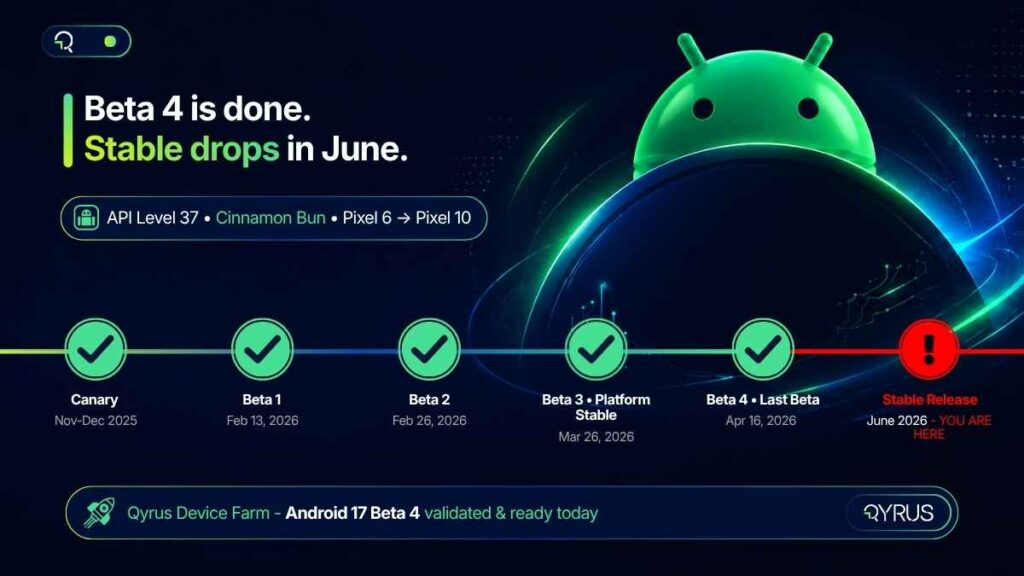
Android 17, codenamed Cinnamon Bun, is weeks away from going stable. Google released Beta 4 on April 16, 2026 — the last scheduled beta before the full public launch expected in June. That is not a soft deadline. The API is locked. Behavior changes are final. There are no more grace periods left in this cycle. 

For QA teams and mobile developers, this moment is the last clear window to validate against what will ship to over three billion active Android devices. And unlike previous cycles, Android 17 is not a cosmetic update. It carries four breaking changes that will silently break mainstream app categories — banking, streaming, fintech, and e-commerce — if they haven’t been tested. 

The good news: Qyrus has already validated Android 17 Beta 4 on its Device Farm. Android 17 devices are available to your team today. The testing environment is ready — the only question is whether your app is. 


Android 17 Release Timeline at a Glance 

Milestone 

Date 

Status 

Action for QA Teams 

Canary / DP Builds 

Nov–Dec 2025 

✅ Complete 

Early API exploration 

Beta 1 

Feb 13, 2026 

✅ Complete 

Start compatibility scans 

Beta 2 

Feb 26, 2026 

✅ Complete 

Handoff API testing 

Beta 3 (Platform Stable) 

Mar 26, 2026 

✅ Complete 

Lock test baselines 

Beta 4 (Last Beta) 

Apr 16, 2026 

✅ Complete 

Final regression runs 

Stable Release 

June 2026 

⏳ Imminent 

YOUR APP MUST BE READY 

android17_timeline

What’s New in Android 17 (Cinnamon Bun): A QA Engineer’s Briefing 

Android 17 (API level 37) is Google’s most significant platform restructuring in several years. Before diving into what breaks, here is what is new — and why each feature creates immediate testing obligations. 

App Bubbles — Any App Can Now Float 

Google has extended the Bubbles system beyond messaging apps to every application on the platform. Users can now long-press any app icon and open it as a floating window that overlays whatever is currently on screen. On tablets and foldables, a Bubble Bar anchors to the taskbar and holds recently bubbled apps. 

For QA teams, this introduces a new class of test scenarios: z-order conflicts (does your app behave correctly when partially obscured by another app’s bubble?), multi-window state preservation when a bubbled session is interrupted, and layout integrity when your app itself is opened as a bubble on a foldable device. 

Handoff API / ‘Continue On’ — Cross-Device State Transfer 

Announced at Google I/O 2026 as ‘Continue On,’ the Handoff API allows users to transfer the active state of an app from one Android device to another. Start composing an email on a Pixel 9 phone, and a suggestion appears on a nearby Pixel Tablet to pick up exactly where you left off. The system synchronizes state via CompanionDeviceManager and supports both native app-to-app transitions and app-to-web fallback. 

The testing implications are significant. Apps that participate in Handoff need to correctly serialize state, handle graceful fallback when the native app isn’t installed on the receiving device, and maintain session continuity over WiFi under variable network conditions. 

Native App Lock — System-Level Biometric Protection 

For the first time, Android ships a built-in App Lock that requires no third-party vault app. Users long-press any app icon, select ‘App lock,’ and choose their authentication method — PIN, pattern, password, or biometric. Notifications from locked apps are masked: instead of showing content, users see ‘New message’ or ‘New notification.’ 

This is a critical feature for fintech, healthcare, and banking apps. Testing must cover the full authentication flow, correct masking of notification content for locked apps, and behavior after failed authentication attempts. 

android17_breaking_changes

Desktop Interactive PiP — External Monitor Support 

Building on Android 16’s desktop mode foundations, Android 17 Beta 3 introduced Interactive Picture-in-Picture (iPiP) for external display sessions. When a Pixel device is connected to a monitor, apps run as fully interactive floating windows — not static mirrors. Widgets scale correctly, and the Bubble Bar is available for multitasking. 

Apps that interact with external displays now need to be tested in this mode, validating input handling, widget rendering, and interactive state when the app runs as a floating iPiP window. 

Frosted Glass / Material 3 Expressive UI 

Android 17 applies a system-wide translucent Gaussian blur effect — a frosted glass aesthetic — to the volume panel, power menu, notification shade, and Quick Settings. This is the most visually disruptive change for screenshot-based test assertions. Any test suite relying on exact pixel matching against Android 16 baselines will fail immediately. Visual regression baselines need to be reset entirely before your first Android 17 test run. 

Digital Wellbeing: Pause Point 

Android 17 introduces Pause Point — a 10-second interstitial screen that appears before opening an app the user has marked as distracting. For QA teams, this is relevant for any automation flow that launches an app after a user has configured digital wellbeing restrictions. Test scripts that assume immediate app launch will break if the device under test has Pause Point enabled. 

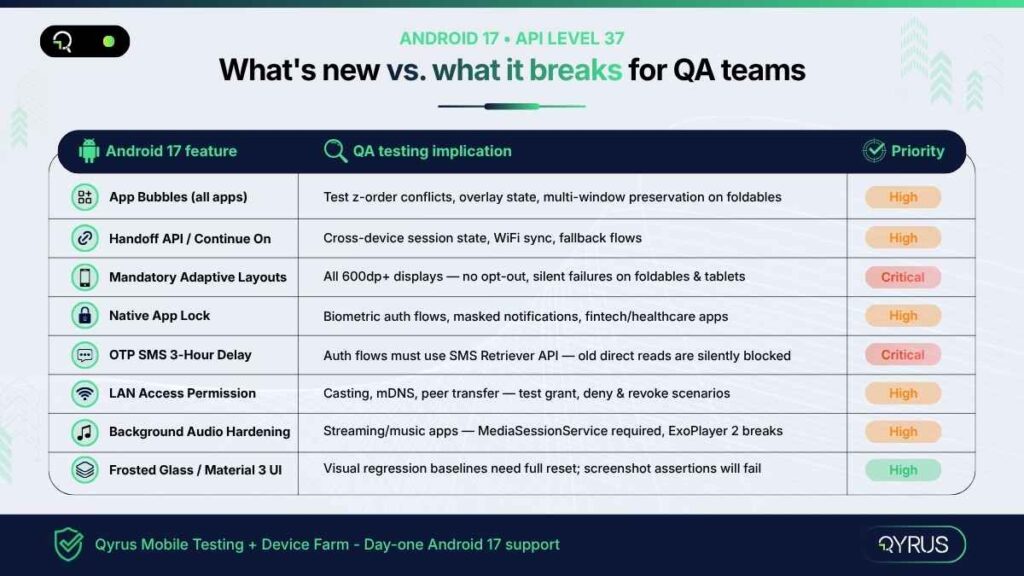
 Android 17 Features vs. QA Testing Implications 

Android 17 Feature 

QA Testing Implication 

Complexity 

App Bubbles (All Apps) 

Test z-order conflicts, overlay state, multi-window preservation 

High 

Handoff API / Continue On 

Cross-device session state, fallback flows, WiFi sync 

High 

Mandatory Adaptive Layouts 

All tablet/foldable UI — no opt-out, silent breakage risk 

Critical 

Native App Lock 

Biometric auth flows, masked notifications, fintech/healthcare apps 

High 

OTP SMS 3-Hour Delay 

Auth test flows must use new SMS Retriever API path 

Critical 

LAN Access Permission 

Casting, mDNS, peer transfer — all need explicit grant now 

High 

Background Audio Restrictions 

Streaming/music apps — MediaSessionService foreground service required 

High 

Frosted Glass / Material 3 UI 

Visual regression baselines will need full reset 

Medium 


The Silent App-Killers: Android 17 Breaking Changes You Cannot Ignore 

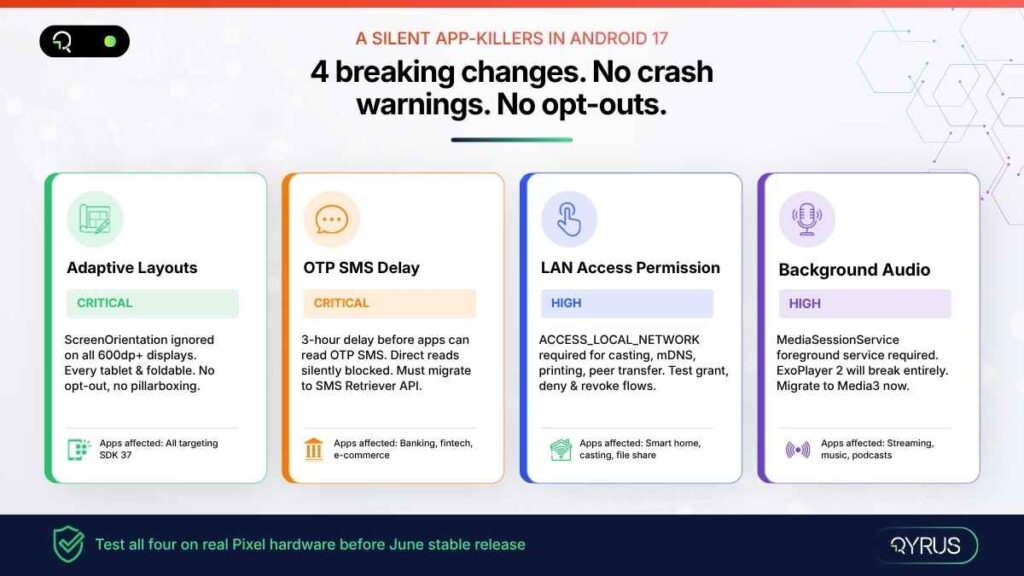
New features generate headlines. Breaking changes generate production incidents. Android 17 ships four behavior changes that will affect mainstream app categories at scale — and none of them announces itself with a crash. They surface as subtle regressions, failed test flows, and user-facing errors after the stable release ships. 

⚠  If your app does any of these four things and you have not tested on Android 17 Beta 4, you have a production incident waiting in June. 

1. Mandatory Adaptive Layouts — No Opt-Out, No Warning 

Starting with API level 37, Android completely ignores the screenOrientation, resizeableActivity, minAspectRatio, and maxAspectRatio manifest attributes on any display wider than 600dp. That means every tablet and every foldable device on the market. 

Your app will fill the entire screen window regardless of what your manifest says. There is no pillarboxing, no opt-out. The failure mode is not always a crash — it is often far subtler. A camera preview stretched sideways. Navigation buttons pushed off-screen on a Pixel Fold. User state lost silently when the device is rotated. These are the kinds of bugs that reach production and damage reviews before anyone realizes what happened. 

Every app targeting SDK 37 must be tested across at least three screen form factors: a standard phone, a foldable, and a tablet. This is not optional from a Play Store compliance perspective. 

2. OTP SMS 3-Hour Delay — Banking and Fintech Alert 

Android 17 introduces a mandatory three-hour delay before most apps can programmatically read SMS messages containing a one-time password. The SMS_RECEIVED_ACTION broadcast is withheld, and SMS provider database queries are filtered for apps targeting API level 37. 

Exemptions are narrow: the default SMS app, assistant apps, and apps that have correctly implemented the SMS Retriever or SMS User Consent APIs. Apps that read OTP codes directly from SMS — a common pattern in banking, e-commerce checkout flows, and two-factor authentication — will silently fail after the update. 

The QA implication is direct: your OTP authentication test flows must be updated to simulate the new API path, not the legacy direct SMS read. Any test that validates a login or checkout OTP flow using the old pattern will produce a false pass on Android 16 and a production failure on Android 17. 

3. Local Network Access Requires Explicit Runtime Permission 

Apps can no longer discover or communicate with devices on the local network without an explicit user grant. Android 17 introduces the ACCESS_LOCAL_NETWORK permission (part of the NEARBY_DEVICES group), which triggers a system permission prompt identical to the photo and contacts pickers. 

The scope of impact is broad: screen mirroring and casting, wireless printing, Chromecast integration, smart home device discovery via mDNS, and peer-to-peer file transfer all require this explicit grant. Apps that use any of these features need to test three scenarios: the user grants the permission, the user denies it, and the user revokes it mid-session. Graceful degradation — not crashes — must be the result in all three cases. 

4. Background Audio Hardening — Streaming Apps Must Adapt 

Android 17 strictly enforces new restrictions on background audio interactions for apps targeting API level 37. Audio playback, audio focus requests, and volume adjustments made while the app is not visible to the user now require a foreground service using MediaSessionService. 

Apps that still use the deprecated ExoPlayer 2 library (com.google.android.exoplayer2) will break entirely — not degrade gracefully. Google’s Media3 library (stable since March 2026) is the required migration path. If your streaming, podcast, or music app has not migrated from ExoPlayer 2 to androidx.media3, Android 17’s stable release is the forcing function. 

Test scenarios must cover background audio initiation, audio focus handling when another app takes focus, and correct foreground service lifecycle management.

Android17_feature_qa

Why Real Device Testing Matters More Than Ever with Android 17 

Emulators have their place in development. They do not have a place as your primary Android 17 test environment. 

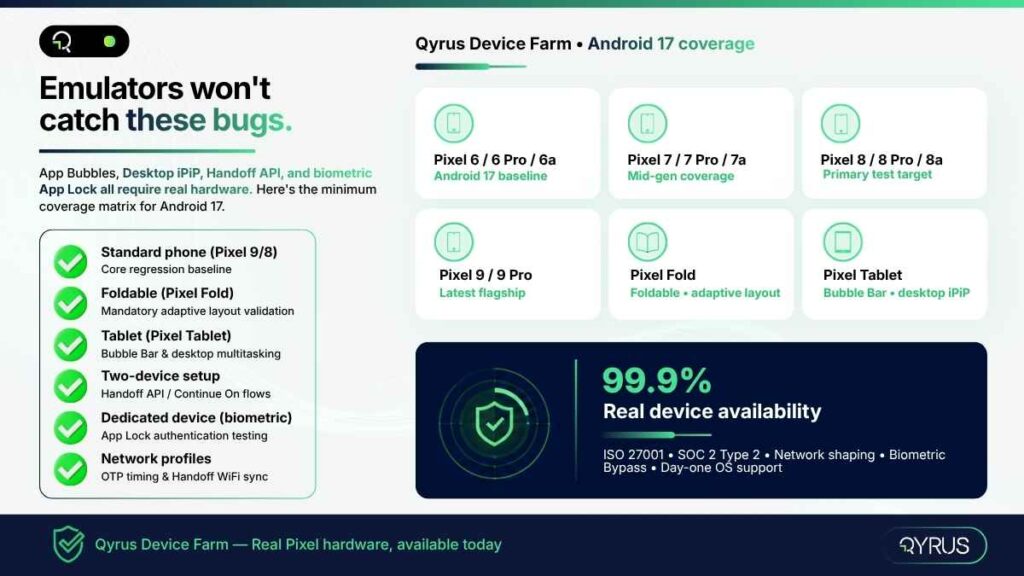
Android 17’s most significant changes — App Bubbles, Desktop iPiP, Handoff API, and adaptive layout enforcement — all involve hardware-specific behavior that emulators cannot replicate faithfully. The Bubble Bar behaves differently on a Pixel Fold than it does on a Pixel Tablet. Desktop Interactive PiP requires a physical external monitor connection. The Handoff API depends on real WiFi communication between two physical devices. Biometric bypass for App Lock testing is simply not possible on an emulator. 

There is also the fragmentation dimension. Android 17 supports Pixel 6 through Pixel 10 — five hardware generations with meaningfully different screen sizes, aspect ratios, foldable form factors, and chipsets. The adaptive layout changes that look fine on a Pixel 9 can silently break the camera interface on a Pixel Fold. Testing a single device is not a regression suite. 

Network conditions matter too. The Handoff API synchronizes state over WiFi via CompanionDeviceManager. The three-hour OTP delay creates new timing dependencies in authentication flows. Testing these scenarios on a real device with configurable network profiles — simulating 4G, LTE, congested WiFi — is the only way to catch timing-sensitive failures before they affect users.

Real Device Testing Checklist for Android 17: 

✓ Standard phone (Pixel 9 or Pixel 8) — core regression baseline 

✓ Foldable device (Pixel Fold) — mandatory adaptive layout validation 

✓ Tablet (Pixel Tablet) — Bubble Bar and desktop multitasking 

✓ External display session — Desktop Interactive PiP 

✓ Two-device setup — Handoff API / Continue On flows 

✓ Network profiles — OTP timing, Handoff sync under variable connectivity 

Qyrus Has Already Validated Android 17 Beta 4 — Here’s What That Means for You 

The Qyrus team validated core platform compatibility with Android 17 Beta 4 on the Device Farm. Android 17 devices are available to clients today — no waiting for the stable release to begin testing. 

But device availability is just the starting point. Each of Android 17’s breaking changes maps directly to a specific Qyrus capability that makes testing it faster, more thorough, and more maintainable. 

Android 17 Challenges Mapped to Qyrus Capabilities 

Android 17 Testing Challenge 

Qyrus Capability 

Adaptive layout regression on foldables & tablets 

Visual Testing on real Pixel Fold / Pixel Tablet devices in the Device Farm 

OTP SMS delay — new auth flow testing 

Verify OTP action type + real Pixel devices with proper SMS Retriever flow 

App Lock biometric testing 

Biometric Bypass (Beta) + Instrumentation on dedicated devices 

Handoff API / cross-device state testing 

Multi-device sessions with network shaping via Device Farm 

Background audio restrictions 

Automated scripts with Healer AI for locator maintenance after media API changes 

Frosted Glass UI visual regression 

Visual Testing baseline comparison — auto-flag rendering differences 

Full regression across Pixel 6–10 

Parallel execution across device pool — all generations available Day One 


Device Farm: Day-One Access, Real Hardware, Secure Cloud 

  • 99.9% real device availability — no emulators, no queuing surprises 
  • Pixel 6 through Pixel 10 across all generations, including Pixel Fold and Pixel Tablet 
  • Network shaping: configure bandwidth, latency, and packet loss to simulate real-world Handoff API and OTP timing conditions 
  • Dedicated private devices available for clients requiring biometric configuration (App Lock testing) 
  • ISO 27001 and SOC 2 Type 2 compliant cloud — enterprise security, no compromise 
  • Day-one OS support: Qyrus delivered Android 16 on its release date; Android 17 follows the same commitment 
android17_device_checklist

How to Start Android 17 Beta Testing on Qyrus in 4 Steps 

Your team does not need to wait for the stable release. Android 17 Beta 4 devices are available on the Qyrus Device Farm now. Here is how to get your first test run done today. 

  1. Log in to Qyrus — or request Android 17 Beta 4 device access if you are a new client. Android 17 is available on compatible Pixel devices in the Device Farm. 
  1. Upload your APK and configure your project — create a new project or import your existing test suite. Qyrus supports JSON and XLSX import for existing scripts. 
  1. Select your Android 17 device pool — choose Pixel 6 through Pixel 10 for a full generational sweep, or target Pixel Fold and Pixel Tablet specifically for adaptive layout and Bubble Bar validation. 
  1. Run your regression suite — prioritize the four breaking-change areas first — adaptive layouts on foldables, OTP authentication flows, LAN-dependent features, and background audio playback. Enable Healer AI on your first run to auto-correct any locators broken by the Material 3 Expressive UI changes. 

Use network profiles to simulate variable connectivity for Handoff API testing. Schedule parallel runs across your device pool to compress what would be a multi-day regression into a single execution window. 

 Frequently Asked Questions: Android 17 Beta Testing 

What is Android 17’s codename and API level? 

Android 17 is codenamed ‘Cinnamon Bun’ and uses API level 37. It is the seventeenth major release of the Android platform, following Android 16 (Baklava, API level 36) which shipped in June 2025. 

When does Android 17 stable release? 

The stable release is expected in June 2026, aligned with Google’s new Q2 major SDK release cadence. Pixel 6 through Pixel 10 devices will receive it first. Samsung, OnePlus, Motorola, and other OEMs typically follow three to six months after Google’s stable launch. 

Which Pixel devices support Android 17 Beta? 

Android 17 Beta is supported on Pixel 6, Pixel 6 Pro, Pixel 6a, and all newer Pixel models through the Pixel 10 lineup. Pixel 5 and older are not eligible. Select Motorola devices in certain regions have also launched a manufacturer beta program. 

What apps are most at risk of breaking on Android 17? 

Four app categories face the highest risk: (1) Banking and fintech apps that read OTP codes directly from SMS without using the SMS Retriever API; (2) Apps that restrict screen orientation on tablets and foldables — this opt-out no longer exists at API level 37; (3) Streaming and music apps that rely on ExoPlayer 2 for background audio; (4) Any app that uses LAN discovery for casting, printing, or peer-to-peer transfers without requesting the new ACCESS_LOCAL_NETWORK permission. 

How is Android 17 different from Android 16 for QA teams? 

Android 16 focused primarily on UI adaptability — making apps resizable by default on large screens. Android 17 goes further: it removes the opt-out entirely, adds cross-device state transfer via the Handoff API, introduces system-level App Lock with biometric masking, and enforces three new privacy defaults (OTP delay, LAN permission, contacts picker) that directly affect how authentication and networking flows must be tested. The breaking changes in Android 17 are more widespread and less visible than Android 16’s. 

Can I test Android 17 without a physical Pixel device? 

You can use the Android Emulator for initial API compatibility checks. However, the most impactful Android 17 changes — App Bubbles on foldables, Desktop Interactive PiP, Handoff API cross-device flows, and App Lock biometric testing — cannot be reliably validated on an emulator. Real device testing on a cloud-based device farm is the only way to catch hardware-specific regressions and multi-device interaction scenarios before they reach your users. 

What happened to Android 17 Developer Previews? 

Google replaced the traditional Developer Preview program with continuous Android Canary builds starting with the Android 17 cycle. Canary builds are updated throughout the year as features pass internal testing, rather than being bundled into quarterly preview releases. This change is designed to give developers earlier and more continuous access to new platform capabilities. 

 The Clock Is Running 

Beta 4 is done. The API is locked. June is not a future event — it is the current month. 

The four breaking changes in Android 17 — mandatory adaptive layouts, OTP SMS delay, LAN access permissions, and background audio restrictions — are not edge cases that affect niche apps. They affect banking flows, streaming sessions, casting features, and every app that targets tablets and foldables. That is most production apps in most enterprise portfolios. 

The window to catch these regressions in a controlled testing environment, fix them before users see them, and push a compliant update to the Play Store is open right now. In a few weeks, it closes. 

Qyrus Device Farm has Android 17 Beta 4 validated and ready. Real Pixel devices across all supported generations — from Pixel 6 through Pixel 10, including Pixel Fold and Pixel Tablet — are available today. Your team does not need to wait for stable to start. 

Start your Android 17 testing on Qyrus today. 

Book a demo

Explore Mobile Testing 

Explore Device Farm

A data breach at a financial institution costs an average of $6.08 million, a figure 22% higher than in any other industry. Over 50% of members will switch financial institutions after a single poor digital experience, while over 80% of regression testing remains completely manual.  

This whitepaper is for QA directors, IT leaders, and application teams who have felt that gap. It shows, through published case study outcomes and an independent Forrester ROI study, how a unified, AI-powered platform closes them.  

Core Insights & Feature Deep-Dive 

What’s Inside the Whitepaper? 

This whitepaper maps the specific fracture points in credit union and regulated financial QA environments and names the limitations of the incumbent testing platform tools.  

Key Business Insights: 

  • 213% ROI Achieved: See the breakdown of an independent study showing a $1M net present value for top banking institutions.  
  • Sub-6-Month Payback Period: Learn how the platform pays for itself quickly through massive operational and quality efficiency gains today.  
  • $6.08M Data Breach Cost: Discover how automated testing reduces the frequency of costly defects.  
  • 80%+ Manual Testing Reduced: See how teams successfully transitioned slow manual regression suites into automation.  

Master the Qyrus Orchestration Toolkit 

Learn how to leverage specialized single-use agents that bridge the gap between legacy point solutions and true continuous automated validation:  

  • TestPilot Execution Agent: Instantly creates and executes tests from any live digital banking platform application screen autonomously.  
  • TestGenerator Tool: Converts user requirements and PDF specifications into automated, deep financial testing scenarios easily.  
  • Healer Script Automation: Automatically self-heals broken test scripts when monthly upgrades modify underlying digital banking UI components completely.  
  • Echo Synthetic Data: Generates realistic financial test data on demand that is parameterized and privacy-safe.  
  • API Builder Engine: Virtualizes APIs before live environments are available to enable early core integration pipeline testing.  
  • Rover Explorer Tool: Autonomously explores complex banking applications to identify unexpected anomalies or paths.

Ready to Eliminate Quality Failures? 

Fill out the form to download your copy of the guide and protect your critical banking member trust. 

As featured in The Forrester Total Economic Impact Study. 

“The real power of Qyrus is that we have this extremely broad testing capability in one tool, run in the cloud, and reusable across our teams.”  

— Executive Lead at Shawbrook Bank. 

June Release Notes

Welcome to the June release!  

In June, our engineering teams focused on injecting deep operational intelligence, enterprise flexibility, and rock-solid platform infrastructure into your daily testing workflows. 

Across every service layer, we are delivering enhancements that eliminate friction, maximize execution visibility, and give you far greater control over how you manage and scale your automation suites.  

In Web Testing, Test Generator v2 has taken a massive leap forward by expanding its AI-driven capabilities to handle advanced coding and API interactions natively. Desktop Testing receives an influx of precision features specifically designed to streamline complex SAP environments and dynamic grid data extraction. 

Our backend and API testing capabilities have also matured significantly. We’ve introduced highly requested organization tools like drag-and-drop rearrangement and bulk migration workflows, paired with a unified deep-linking model to make cross-team collaboration absolutely frictionless.  

Finally, we’ve fortified our foundational layer with hardened, cloud-resilient session management in the Device Farm and powerful scheduling and execution combos within Test Orchestration. 

Let’s dive into the full breakdown of everything new across the platform this June! 

Web Testing

Complete AI Test Generation: Support for Code, APIs, and Variables! 

Complete AI Test Generation

The Challenge:  

When using AI to automatically generate complex web testing scenarios, the system needs to be able to handle more than just basic UI clicks and text inputs. Previously, users utilizing Test Generator v2 were required to add certain missing data fields when the AI attempted to generate advanced actions. Specifically, generated steps for API calls, complex variable data handlers, and embedded JavaScript or JavaCode executions were returning empty or lacking the necessary dummy data, forcing testers to fill in the blanks. 

The Fix:  

We have expanded the capabilities of Test Generator v2 to fully support and populate data for advanced web actions. The AI engine has been updated to accurately generate and fill in the required fields for API Actions, Create Variable Data Handlers, Execute JavaCode, and Execute JavaScript steps directly within the generated test scenarios. 

How will it help?  

This upgrade ensures your AI-generated tests are comprehensive and ready to execute with minimal manual intervention. 

  • Advanced Scenario Automation: Confidently use the AI to generate complex, end-to-end tests that seamlessly blend UI interactions with backend API validations and custom code executions. 
  • Reduced Manual Coding: The AI now intelligently supplies the necessary code structures and dummy data for JavaScript and JavaCode steps, saving your engineers significant manual scripting time. 
  • Robust Variable Handling: Automatically generate and populate variable data handlers, ensuring your dynamic test logic works flawlessly right out of the box. 

Dynamic Data Extraction: Table & Grid Support for Variables! 

Dynamic Data Extraction

The Challenge:  

Desktop applications often display critical information—like financial records, inventory lists, or user data—within complex tables and data grids. Previously, extracting a dynamic value from a specific cell within these desktop grids and storing it as a variable was difficult. Testers often had to rely on complex workarounds or custom scripting just to grab a simple value, which slowed down the creation of data-driven test scenarios. 

The Fix:  

We have significantly enhanced the Create Variable action within the Desktop Testing service to natively support table and grid cell inputs. You can now seamlessly target a specific cell within your desktop application’s data grid and directly extract its contents into a variable for use later in your automation script. 

How will it help?  

This enhancement makes interacting with complex desktop data structures simple and straightforward. 

  • Data-Driven Flexibility: Easily capture dynamic data generated during a test (like a newly created order ID or a status code) directly from a table cell to pass into subsequent steps. 
  • Simplified Scripting: Eliminate the need for fragile workarounds or custom code just to read a value from a desktop grid, keeping your automation scripts clean and easy to maintain. 
  • Robust End-to-End Validation: Build stronger assertions by dynamically extracting table data and verifying it against expected outcomes later in your workflow. 

Predictable Connections: Smart SAP Login Logic! 


The Challenge:  

When automating SAP workflows, the rules dictating whether a test script would attach to an existing SAP session or launch a brand-new window were previously implicit and relied heavily on backend exceptions. If a test provided partial login information (like just a client ID), the system’s behavior was unpredictable. This ambiguity often led to duplicate SAP instances cluttering the desktop, consuming system resources, and causing connection confusion during complex test runs. 

The Fix:  

We have completely overhauled the core logic for the “Login to SAP” action, establishing clear, explicit rules for the attach-or-create decision. Now, if a running SAP session perfectly matches the requested username and client, the system seamlessly attaches to it. If the credentials differ, it opens a new connection. Crucially, we removed the reliance on exception-driven fallbacks and updated the action results to explicitly surface exactly which path was taken during the test. 

How will it help?  

This structural upgrade brings absolute control and reliability to your SAP desktop automations. 

  • Eliminate Duplicate Windows: The strict matching rules guarantee that new application windows are only spawned when absolutely necessary, keeping your testing environment clean. 
  • Predictable Execution: Whether you provide full credentials or partial client information, the login action behaves exactly as documented without unpredictable fallback loops. 
  • Clear Traceability: You can now instantly see within your test execution reports whether a script attached to an existing session or created a new one, drastically simplifying script debugging. 

Front and Center: Active SAP Session Monitoring! 

The Challenge:  

When automating complex SAP workflows, visibility is key to ensuring your tests are running as intended. Previously, when utilizing the new “Connect to Existing SAP Window” action, the test execution would successfully proceed, but the SAP GUI often remained hidden in the background. This obscured the live testing steps, making it incredibly difficult for automation engineers to visually monitor the execution in real time or immediately spot UI-level issues as they occurred. 

The Fix:  

We have updated the SAP automation engine to guarantee immediate visibility. Now, whenever a script utilizes the “Connect to Existing SAP Window” command, the platform automatically forces the active SAP application directly to the foreground of your desktop environment. 

How will it help?  

This quality-of-life improvement ensures complete transparency and immediate feedback during your desktop executions. 

  • Real-Time Monitoring: Watch your test steps execute live on the screen, giving you immediate visual confirmation of the application’s behavior and performance. 
  • Faster Debugging: Instantly spot unexpected pop-ups, UI anomalies, or navigation errors the exact moment they happen instead of digging through logs after the test completes. 
  • Streamlined Usability: No more manually hunting for minimized windows or alt-tabbing to find the right screen; the platform actively surfaces the relevant SAP instance right when you need to see it. 

Effortless Organization: Drag-and-Drop API Rearrangement!

Drag-and-Drop API Rearrangement

The Challenge: 

When managing a growing library of API test scripts, keeping your workspace logically organized is crucial for team efficiency. Previously, the list of scripts on the “All APIs” page was rigid. If you needed to reorder your scripts to reflect a specific execution sequence, group related endpoints together, or simply clean up your view, there was no intuitive way to move them around. This lack of flexibility made managing extensive API suites feel clunky and time-consuming. 

The Fix: 

We have introduced fluid drag-and-drop functionality directly to the right-hand side (RHS) “All APIs” page. You can now seamlessly rearrange your entire list of API scripts simply by clicking, dragging, and dropping them into your exact preferred order. 

How will it help? 

This UI enhancement puts you in complete control of how your API workspace is structured. 

  • Intuitive Organization: Visually structure your API scripts exactly how you think about them, effortlessly grouping related tests without relying on rigid naming conventions. 
  • Faster Test Management: Quickly reorder scripts to match natural execution flows or priority levels in seconds, eliminating frustrating administrative overhead. 
  • Streamlined Workspace: Maintain a clean, personalized, and highly navigable project view, making it easier for both you and your team to locate specific endpoints instantly. 

Seamless Sharing: Deep Linking for API Testing!

The Challenge:  

Sharing specific API test artifacts—like a complex script, a failed execution report, or a massive test suite—with team members used to be a hassle. Testers often had to tell colleagues exactly where to click through the platform hierarchy to find the right asset. Additionally, strict team-based silos in QAPI made it difficult to securely share direct links with designated collaborators without hitting frustrating access roadblocks and permission errors. 

The Fix:  

We have introduced comprehensive Deep Linking across the entire API Testing ecosystem, aligning it perfectly with the behavior you already know from Test Orchestration. Every major entity—including Projects, Scripts, Suites, Workflows, and Reports—now automatically generates a unique, shareable deep link ID. Crucially, we also implemented a smart collaborator-based access model for QAPI, meaning authorized collaborators can now instantly access shared deep links even across different individual team setups. 

How will it help?  

This underlying infrastructure update drastically reduces the friction of team collaboration and debugging. 

  • Instant Collaboration: Drop direct links to specific API scripts, suites, or reports directly into your Slack channels or Jira tickets, getting your team looking at the exact same screen instantly. 
  • Frictionless Access: The intelligent collaborator-based model ensures that deep links are both secure and accessible, smoothly granting visibility to explicitly authorized users without manual permission wrestling. 
  • Unified Experience: Deep linking now behaves consistently across both API Testing and Test Orchestration, providing a seamless, predictable sharing experience across the entire Qyrus platform. 

Effortless Reorganization: Bulk Copy & Move for APIs!

Bulk Copy- Move for APIs

The Challenge:  

As your API test coverage expands, test suites inevitably need restructuring. Whether you’re refactoring older tests, creating specialized regression suites, or just cleaning up your workspace, moving or cloning APIs one by one is an incredibly tedious process. Previously, there was no streamlined way to select multiple API scripts and securely transfer or copy them into a different suite, forcing testers into a frustrating loop of repetitive manual actions. 

The Fix:  

We have completely redesigned the workflow for migrating scripts between test suites. You can now bulk-select, copy, and move multiple APIs simultaneously. This update includes intuitive new checkbox triggers, dedicated options within the three-dot menu, and fluid drag-and-drop capabilities within the left-hand panel, giving you total flexibility over how you reorganize your workspace. 

How will it help?  

This redesign drastically cuts down administrative overhead when managing your API library. 

  • Massive Time Savings: Quickly bulk-select dozens of API scripts and move or clone them to a new suite in just a few clicks, eliminating repetitive manual work. 
  • Flexible Organization: Whether you prefer drag-and-drop simplicity or structured menu commands, the new interface adapts to your preferred organizational workflow. 
  • Streamlined Refactoring: Easily break down massive test suites into smaller, targeted collections or combine scripts into comprehensive master suites without breaking a sweat. 

Direct Workflow Automation: Listing Page Scheduling!

Listing Page Scheduling

The Challenge:  

To keep up with continuous integration demands, automation engineers need to schedule their API testing workflows quickly and efficiently. Previously, the workflow listing page served strictly as a static directory. If you wanted to schedule a specific workflow to run automatically, you had to leave the high-level overview, navigate deep into the individual workflow’s configuration settings, and apply your scheduling rules there. This extra navigation loop slowed down management tasks and added unnecessary clicks to a routine process. 

The Fix:  

We have integrated scheduling capabilities directly onto the API workflow listing page. You can now configure, activate, and manage execution schedules for any workflow immediately from the main listing view, supported by an updated, streamlined UI design. 

How will it help?  

This workflow upgrade streamlines your continuous automation planning. 

  • Rapid Automation Planning: Schedule your API testing workflows on the fly right from the directory page, bypassing unnecessary clicks and navigation loops. 
  • Centralized Management: View your list of workflows and adjust their execution rules from a single, unified control pane, making it easier to orchestrate your overall automation strategy. 
  • Frictionless CI Coordination: Quickly coordinate and adjust automated test runs to match changing deployment schedules or sprint deadlines with absolute ease. 

Controlled Rollouts: Feature Flags for AI Device Farm Sessions!

Feature Flags for AI Device Farm Sessions

The Challenge:  

Integrating cutting-edge AI capabilities into real mobile device testing requires careful, managed deployment. Previously, new AI-powered session types in the Device Farm were universally visible in the UI. This made it difficult to perform targeted beta testing, manage resource-intensive features, or selectively roll out experimental capabilities to specific teams without cluttering the interface for the rest of the user base. 

The Fix:  

We have introduced a robust feature flag system (enableDeviceFarmAISession) specifically for AI-powered Device Farm sessions. This backend control allows us to granularly toggle access to these advanced testing environments. To support this controlled rollout, we have also streamlined the user interface by dynamically removing the “AI Session” option from the general Sessions dropdown menu, ensuring it is only visible when explicitly enabled for a specific workspace. 

How will it help?  

This infrastructure update provides absolute control over how AI features are introduced into your testing environment. 

  • Targeted Beta Testing: Safely introduce and test experimental AI capabilities with specific engineering teams without disrupting the standard Device Farm experience for everyone else. 
  • Clutter-Free Interface: Keep the testing UI clean, intuitive, and focused by hiding advanced, specialized AI session options from users who do not actively need them. 
  • Scalable Rollouts: Grant administrators precise, behind-the-scenes control over how and when cutting-edge AI testing tools are deployed across the platform. 

Rock-Solid Device Provisioning: Hardened Provider Lifecycle Handling!

The Challenge:  

Interacting with remote cloud infrastructure requires highly resilient backend communication. Previously, the Device Farm Microservice (DFM) relied on default handling for provider Device Farm sessions. This meant that transient network blips during device readiness checks could cause an entire test session to fail prematurely, while concurrent or duplicate session creation requests could lead to race conditions. Additionally, non-idempotent session termination routines and unmapped SDK exceptions occasionally resulted in generic, unhelpful server errors, making it difficult to pinpoint whether a failure was due to an invalid configuration or a temporary cloud glitch. 

The Fix:  

We have hardened the provider session lifecycle management inside the Device Farm Microservice to drastically increase backend stability. The engine now features distributed create-time locking to eliminate concurrent session creation conflicts, explicit exception mapping (translating specific faults directly to clear HTTP error codes), and dedicated retry and timeout rules for the SDK client. Furthermore, we built transient fault resilience directly into the device polling loop and ensured the session termination endpoint is fully idempotent—meaning it will gracefully clean up resources without throwing errors if a session is already stopped. 

How will it help?  

These deep infrastructure improvements ensure an incredibly stable and predictable remote device testing experience. 

  • Immunity to Transient Blips: Short-lived network fluctuations or minor AWS hiccups will no longer kill your test runs; the platform now intelligently retries and continues polling behind the scenes. 
  • No More Race Conditions: Distributed create-time locking ensures that duplicate or retried device requests are safely queued and managed, preventing conflicting or broken device states. 
  • Graceful Cleanups & Faster Debugging: Clearer error mapping replaces generic server errors with actionable feedback, while idempotent session handling ensures cleaner resource teardowns and fewer noisy, false-alarm logs. 

Resilient Workflows: Combined Optional Execution & Session Persistence!

Combined Optional Execution and Session Persistence

The Challenge:  

In complex test orchestrations, maintaining a continuous state across multiple test steps (Session Persistence) while allowing non-critical steps to fail without stopping the whole run (Optional Execution) is a powerful combination. Previously, these two features were mutually exclusive in Test Orchestration. Turning on “Optional Execution” would automatically force “Session Persistence” off. This meant a failure in an optional setup or cleanup step would either completely kill the persistent session or force teams to split their unified workflows into disconnected parts. 

The Fix:  

We have fully integrated Optional Execution to work seamlessly alongside Session Persistence. The orchestration engine has been updated to handle failures within a persistent session gracefully. Now, if an orchestrated node designated as “Optional” encounters a failure, the platform intelligently preserves the active session state and securely hands it off to the next node in the pipeline instead of tearing down the environment. 

How will it help?  

This update unlocks advanced, highly resilient test scheduling configurations for complex end-to-end scenarios. 

  • Flawless Multi-Step Resiliency: Build extensive end-to-end testing chains that reuse the same active state, confident that minor, non-critical failures won’t tank your entire execution pipeline. 
  • Smart Failure Recovery: If an optional validation or data-gathering script fails mid-session, the platform automatically bypasses the fault, keeps the application state alive, and carries on to subsequent verification steps. 
  • Uncompromised Workflow Logic: Eliminate the need for messy workarounds or custom scripting just to keep a testing window open when a secondary step runs into an unexpected hitch. 

Precision Analysis: Enhanced Report Page Filters!

Enhanced Report Page Filters

The Challenge:  

As enterprise teams scale their automation efforts, the volume of test reports generated daily can become overwhelming. Navigating through thousands of execution records to find a specific run can feel like hunting for a needle in a haystack. Previously, limited filtering options on the Test Orchestration Reports page made it difficult to quickly isolate runs based on how they were triggered or configured, creating administrative bottlenecks during post-execution analysis. 

The Fix:  

We have significantly upgraded the Reports Page with a suite of new, advanced filtering options. You can now slice and dice your test data using specialized Schedule Type and Other filters. This allows you to dynamically narrow down your execution history by specific parameters, including Once, Hourly, Daily, Weekly, Scheduled, and Session Persisted execution profiles. 

How will it help?  

These new filters give you total control over your reporting data, dramatically speeding up triage and auditing tasks. 

  • Instant Execution Triage: Quickly separate routine, automated nightly regression runs from manual, ad-hoc test executions with a single click. 
  • Isolate Persistent Sessions: Effortlessly track down and review reports tied specifically to your Session Persisted workflows to evaluate state retention across multi-step runs. 
  • Streamlined Audit Trails: Seamlessly monitor recurring test patterns (such as hourly health checks or daily smoke tests) to identify historical flake rates or performance trends across specific schedules. 

Ready to Leverage June’s Innovations? 

We are committed to providing a unified platform that not only adapts to your evolving needs but also streamlines your critical processes, empowering you to release high-quality software with greater speed and confidence. 

Eager to explore how these advancements can transform your testing efforts? The best way to appreciate the Qyrus difference is to experience these new capabilities directly. 

Ready to dive deeper or get started? 

Book a Personalized Demo

The truth about test automation is pretty simple: most teams use up time looking after their tests than they do making them. The World Quality Report says that looking after tests uses up to 50 percent of the test automation budget. For teams that have to deal with more than 1,000 tests it gets even worse. Up to 60 percent of all the time spent on quality assurance goes into this. This is not a problem with how people work. The real problem is the framework they are using. 

When you pick a test automation framework, you are not just choosing a tool. You are making a decision that affects how your tests will work overtime. If you make a choice, your team can work faster and feel more confident. If you make a bad choice, you will spend all your time fixing scripts that break every time something small changes like a button being moved.  

The following sections will help you look at the types of test automation frameworks. We will see what makes BDD and TDD approaches different from each other. Test automation frameworks are a part of this. We will also look at the role of component testing, in test automation strategies. We will talk about the problems that come with taking care of code-centric test automation frameworks. Test automation frameworks are still a part of this. Then we will see how AI-native testing platforms are handling those problems in a way.What Is a Test Automation Framework? 

A test automation framework is like a plan that shows how to create, run and keep tests for a software project. It gives rules, reusable parts, ways to handle test data steps to run tests and systems to report results. This helps keep automation consistent as test coverage expands. This difference is important. Selenium and Playwright are tools. A framework built on Playwright with test data, simple test scripts and integration with integration/continuous deployment (CI/CD) is a framework. The framework is like a structure. The tool is just one part of it. A well-designed test automation framework typically includes: 

  • Test environment setup for version management, environment configurations, and prerequisites 
  • Test data management for sourcing, storing, and passing data between test cases 
  • Test execution mechanisms that control how tests are triggered and run 
  • Logging and reporting for capturing results, screenshots, logs, and failure details 
  • CI/CD integration for incorporating automated tests into delivery pipelines 
  • Reusable components such as shared libraries, functions, and utilities that reduce duplication 

Together, these elements provide the structure needed to manage automation at scale. They help teams standardize how tests are developed, executed, and maintained across projects and environments. As more tests are added the framework helps keep things consistent and easy to maintain.  

The 6 Types of Test Automation Frameworks Explained 

Not all automation testing frameworks are built the same. Each type makes a different trade-off between ease of setup, scalability, reusability, and required programming knowledge. Here are the six you need to know. 

qyrus-framework-types

1. Linear (Record-and-Playback) Framework 

The simplest entry point into test automation. A tester records each user action, navigation, inputs, clicks, and the tool plays them back as a test script. No coding is required. Scripts are generated automatically and run sequentially. 

Best for: beginners, quick validations, and short-term projects with minimal change cycles. 

Key limitation: test data is hard-coded directly into each script. If your application changes, even a single UI element, every affected script needs manual updates. This framework does not scale. 

2. Modular Testing Framework 

Modular testing breaks the application under test into isolated units, login, checkout, search, and creates an individual test script for each. Larger test scenarios are assembled by combining these modules in sequence. 

The abstraction layer is this framework’s core strength: changes to one module do not cascade into the rest. This makes targeted maintenance far more efficient than the linear approach. 

Key limitation: test data is still hard coded at the module level, so running the same scenario with multiple data sets means duplicating scripts. Programming knowledge is also required to build and manage the module structure. 

3. Library Architecture Framework 

A natural evolution of the modular approach. Instead of organizing by application section, this framework identifies common functions, login, form submission, API calls, and groups them into a shared function library that any test script can call. 

The result is a higher degree of reusability. A single function handles repeated action across the entire test suite. Update the function once, and every script that calls it benefits automatically. 

Key limitation: test data remains hard-coded. Building and maintaining the shared library requires solid programming expertise, and initial development time is longer than simpler approaches. 

4. Data-Driven Framework 

Here is where things get meaningfully more powerful. A data-driven framework separates test data from script logic entirely. Test scripts are written once; data is stored externally in files such as Excel spreadsheets, CSV files, SQL tables, or JSON. The framework reads each row of data and executes the same script with a different dataset on each pass. 

One script. Dozens of test scenarios. This approach is ideal for input-heavy applications, registration flows, payment processing, search, where you need to validate the same logic with many different values. 

Key limitation: setting up a data-driven framework requires an experienced engineer who can manage external data sources and write the connection logic between the data file and the test scripts. Initial setup investment is high. 

5. Keyword-Driven Framework 

A framework driven by keywords extends the separation principle. Keywords — simple action labels like ‘ClickButton’, ‘EnterText’, or ‘VerifyPageTitle’ — are kept in an external table together with the objects they operate on. During the test execution, the engine interprets each keyword, associates it with the relevant code, and carries out the action. 

The primary benefit is easy access. Non-technical stakeholders can access and even participate in test design without needing to code. One keyword may be utilized in various test scripts, and tests can be developed separately from the application being tested. 

Main drawback: the upfront setup expense is substantial and requires a considerable amount of time. Keyword tables and object repositories need to be diligently managed. As the test suite expands, managing keywords becomes a separate administrative burden. 
 

6. Hybrid Testing Framework 

As automation programs grow, teams often combine multiple framework approaches instead of relying on just one. For example, a team may use a data-driven model for handling large test datasets while using keywords to simplify test creation and maintenance. This combination is commonly referred to as a hybrid framework. Most enterprise test automation environments converge on hybrid frameworks because real-world applications are complex enough to need flexibility. A hybrid framework can support multiple testing types, accommodate mixed team skill sets, and adapt as the application evolves. 

Key limitation: Building and maintaining a hybrid framework demands experienced engineers, strong documentation, and disciplined governance. Without it, hybrid frameworks become the most expensive kind to maintain. 

Framework Comparison at a Glance 

Framework Type 

Best For 

Key Limitation 

Linear / Record-and-Playback 

Beginners, short-term projects 

Not reusable; breaks on any change 

Modular 

Structured apps, targeted maintenance 

Hard-coded data; needs coding skills 

Library Architecture 

High reusability needs 

Long initial build; coding expertise required 

Data-Driven 

Input-heavy, multi-scenario testing 

Complex setup; data management overhead 

Keyword-Driven 

Non-technical stakeholders in QA 

High initial cost; maintenance at scale 

Hybrid 

Enterprise, complex applications 

Highest complexity; demands strong governance 


BDD vs. TDD: Two Philosophies That Shape Your Framework Choice 

Test-Driven Development (TDD) and Behavior-Driven Development (BDD) are two development methodologies that have an impact on how teams create their automation frameworks. They are often talked about together. They really deal with different problems. 

qyrus-bdd-vs-tdd

What Is Test-Driven Development (TDD)? 

 
TDD is an approach for developers which is simple and repeatable. 

Here is how it works: 

  • Create a test that fails at first. 
  • Write enough code so the test passes. 
  • Then improve the code. 

This is called the Red-Green-Refactor cycle. Developers must follow this way of working, which is a method and also a discipline. 

The objective is code accuracy. TDD makes developers think about how the code will work, what could go wrong and what will happen if something fails. They do this before they start writing the code. This means that each part of the code has a test that was written before the code itself.  

TDD is most effective at the unit level: testing individual functions, methods, or classes in isolation. Popular TDD frameworks include JUnit (Java), NUnit (.NET), and PyUnit (Python).  

What TDD does not address well is bridging the gap between the side of things and what the business actually needs. When we write a test in Java, it checks if a function gives us the answer. It does not tell us if we built the feature that the business really wanted. TDD is about making sure the code works. It does not say if we are building the right thing. The business wants certain features, and TDD does not always address this. 

What Is a Behavior Driven Development (BDD) Framework? 

BDD evolved from TDD specifically to bridge that gap. Where TDD is written in programming languages and read by developers, BDD is written in plain, structured language that business stakeholders, product managers, and QA engineers can all read and contribute to. 

 The language used for BDD is called Gherkin. It is a way of describing how the code should work using a Given/When/Then format. This format describes what the user will see when they use the code. 

				
					Feature: User Login 

  Scenario: Successful login with valid credentials 

    Given the user is on the login page 

    When they enter a valid username and password 

    Then they should be redirected to the dashboard


Non-technical stakeholders can easily check this scenario without needing to know any code. The BDD test turns into a plan that the whole team agrees before they start building anything. When the test works, the feature is complete. If the test fails, everyone can see where the problem is. The team can then fix the issue and make sure the feature works as expected. 

The adoption figures reflect how much teams value this collaboration. According to the 2025 State of Continuous Testing Report by Perforce, BDD adoption has reached 66% among development teams, and 90% of teams that adopted BDD report better communication across functions.  Popular BDD frameworks include Cucumber (multi-language), SpecFlow (.NET), and Behave (Python). 

TDD vs. BDD: Side-by-Side Comparison 

Dimension 

TDD 

BDD 

Focus 

Code correctness 

Business behaviour 

Written in 

Programming language 

Plain language (Gherkin) 

Who writes tests 

Developers 

Developers, QA, and business stakeholders 

Test level 

Unit / component 

Integration / acceptance 

Collaboration scope 

Technical team 

Cross-functional team 

Best suited for 

Internal code quality 

User-facing features and workflows 

Popular tools 

JUnit, NUnit, PyUnit 

Cucumber, SpecFlow, Behave 


The most effective teams do not choose one over the other. They apply TDD to low-level components, where code correctness is the primary concern, and BDD to user-facing features, where alignment with business requirements matters most. The two methodologies complement each other rather than compete. 

Playwright Component Testing vs. Cypress Component Testing: What’s the Difference? 

 When people become more skilled at testing, they usually start using component testing. This is like a step between unit tests and full end-to-end (E2E) runs.  Of pretending the whole application is there or just looking at one function component testing puts a real component in a real browser and lets testers use it like a real user would. They can click on things, type, and hover over things. They can also control what the component looks like and how it works. This way you get to see what the component really looks like in a browser without having to set up the application, which can be slow and unreliable. 

 There are two frameworks that people use for this in 2026: Playwright and Cypress. Both mount components in a real browser. They differ sharply in architecture, speed, and developer experience. 

Playwright Component Testing 

 Playwright is backed by Microsoft. It uses a way of working that talks directly to browsers using the Chrome DevTools Protocol (CDP). This design makes it 20 times faster than browser-in-process frameworks and delivers significantly lower test flakiness rates. 

Playwright component testing is parallel by default, free to run at scale, and supports TypeScript, JavaScript, Python, Java, and C#/.NET. As of early 2026, Playwright averages 20–30 million weekly NPM downloads, and the State of JavaScript 2025 survey recorded a satisfaction score of 91%, the highest ever measured for a testing framework at this scale. 

Reach for Playwright when:  you need to do things and at the same time. It is also good if your team is used to working with async/await patterns. If you need to work with languages or if you are starting a new project Playwright is a good choice. 

Caveat: Playwright’s component testing feature is still marked experimental. The API surface may change between releases. 

Cypress Component Testing 

Cypress works inside the browser with the application you are testing.This architecture makes it exceptionally fast for debugging: the time-travel GUI lets engineers step backward through test execution frame by frame, which is genuinely the best visual debugging experience available in any testing framework today. 

 Cypress testing for parts of the application is solid and reliable. It is part of the same tool you use for end-to-end testing with Cypress. This means you only have to think about one way of doing things, and you only have to set it up. The people who make extras, for Cypress have made a lot of tools that work well with it like tools to check how things look and tools to make sure everything is accessible. 

Reach for Cypress when: you already run Cypress for E2E testing, your team prizes interactive visual debugging, or your application has a complex custom bundler configuration that Cypress can reuse. 

Playwright vs. Cypress: Head-to-Head 

Dimension 

Playwright 

Cypress 

Architecture 

Out-of-process (CDP) 

In-browser (same run loop) 

Speed 

Faster (parallel by default, free) 

Moderate (Cloud plan for parallelism) 

Language support 

JS, TS, Python, Java, C# 

JavaScript / TypeScript only 

Debugging experience 

Trace viewer (excellent for CI) 

Time-travel GUI (best for local dev) 

Component testing status 

Experimental 

Stable / GA 

CI cost 

Lower (free parallelism) 

Higher (Cypress Cloud subscription) 

Best for 

Greenfield, multi-language, scale 

Existing Cypress suites, frontend DX 


The honest 2026 verdict: for new projects, Playwright is the stronger default choice. Cypress remains compelling for teams as it already invested in its ecosystem and for anyone who finds its debugging experience genuinely more productive. Both are excellent tools, but both are still code-first frameworks, which brings us to the problem that neither fully solves. 

The Real Problem with Traditional Test Automation Frameworks: Maintenance 

Selecting a framework type is the easy part. Keeping it alive is where most teams fail. 

Consider the numbers: maintenance consumes 45% of automation budgets on average. Teams maintaining more than 1,000 tests report spending 60% of their time on upkeep rather than new test development. Across a four-person senior QA team, where each engineer earns roughly $140,000 per year, that translates to approximately $168,000 annually spent on maintaining tests, not improving coverage. 

qyrus-maintenance-stat-card

The root causes are consistent regardless of which framework type a team chooses: 

  • Brittle locators: element IDs, XPaths, and CSS selectors break every time the UI is updated. Even minor redesigns require manual script triage across hundreds of tests. 
  • Hard-coded test data: without clean data separation, any change to the underlying data model requires touching individual scripts rather than a central source. 
  • No self-healing: traditional frameworks are passive. When something breaks, a human must diagnose, locate, and fix it. The framework itself offers no intelligence about what changed or why. 

Here is the pattern across engineering teams that analysis has consistently surfaced: 60–70% of QA time goes to test upkeep. Only 30–40% goes to add coverage or review results. That ratio is backwards, and code-first frameworks, no matter how well architected, cannot correct it on their own. 

The question that matters most is not which framework type to choose. It is: how do you stop your test automation framework from becoming a liability the moment your application starts moving quickly? 

45% 

of automation budgets consumed by test maintenance 

— Software Testing Automation Market Outlook, IntelMarketResearch 

How Qyrus Takes the Framework Burden Off Your Team 

Qyrus is not another code-first framework with a cleaner UI. It is an AI-native, no-code testing platform built to solve the maintenance problem at its root, not patch it after the fact. Where traditional frameworks require skilled engineers to build, maintain, and repair the infrastructure around testing, Qyrus makes that infrastructure autonomous. 

The SEER Framework: Autonomous Test Orchestration 

At the core of Qyrus sits the industry-first SEER (Sense, Evaluate, Execute, Report) framework, an agentic AI engine that manages the entire testing lifecycle without manual hand-offs. 

  • Sense: monitors code repositories (GitHub) for commits, merges, and pull requests; detects UI/UX changes in Figma as they happen 
  • Evaluate: performs automated impact analysis using static analysis and dependency graphs, identifying exactly which APIs and UI test scenarios are affected by a change, not the entire regression suite 
  • Execute: autonomously deploys the right specialist agents, API Bots for backend validation, Qyrus Test Pilot (QTP) for frontend testing, without human selection 
  • Report: delivers real-time insights into test outcomes and coverage, feeding results back into the CI/CD pipeline as a continuous learning loop 

The SEER framework means your test automation framework no longer waits to be told a change occurred. It observes, responds, and executes, continuously. 

qyrus-seer-framework

Healer AI: Self-Healing That Actually Works 

The single biggest cause of framework maintenance overhead is broken locators. Qyrus solves this with Healer AI, a patented self-healing engine (U.S. Patent 11,205,041 B2) that references a successful baseline script and automatically suggests updated locators (ID, Class, XPath) when UI elements change. 

When Healer detects a failed step due to a UI change, it scans the application, identifies the corrected element, and applies the fix, without a human ever opening the script. For web testing teams, this directly attacks the locator fragility that accounts for the majority of maintenance work. 

No-Code Test Building at Scale 

Qyrus offers 115 distinct action types across web, mobile, and API testing, all accessible through a low-code/no-code interface that requires no programming knowledge to operate. Tests can be created manually, imported from Jira tickets, or generated from natural language descriptions via Nova AI. 

TestGenerator+ goes further: it analyses your existing scripts and automatically generates additional test scenarios to fill coverage gaps, categorizing each new scenario by criticality (Low, Medium, High, Critical) before any human reviews the output. 

Parallel Execution Across a Real Device and Browser Farm 

For mobile testing and web testing alike, Qyrus provides access to a cloud-based browser farm (Chrome, Edge, Firefox, Safari, including previous and custom versions) and a real-device farm covering Android and iOS. Tests run in parallel across all of them simultaneously, with zero infrastructure overhead. 

This eliminates the device lab maintenance that typically consumes a separate slice of QA budget and removes the bottleneck of sequential test runs that inflate feedback cycle times. 

A Unified Platform Across Every Testing Type 

Traditional frameworks are fragmented by testing type: one tool for web, another for mobile, another for API testing, another for SAP. Each one has its own maintenance burden, its own script library, and its own skill requirement. Qyrus consolidates Web, Mobile, API, Desktop, SAP, and Data testing into a single platform, one interface, one team, and one source of truth. 

The Numbers 

Metric 

Qyrus Impact 

Test case creation speed 

~80% faster for complex scenarios 

Team productivity 

50% increase 

Test building time 

70% reduction via AI-driven, codeless features 

ROI 

213% within 12 months (Forrester TEI study) 

Production incidents 

50% reduction through proactive AI detection 


How to Choose the Right Test Automation Framework for Your Team 

qyrus-framework-decision-matrix

There is no universally correct framework. The right choice depends on five factors that are specific to your team, your application, and your risk tolerance. 

  1. Team skill level: Code-first frameworks (Playwright, Cypress, Selenium) require engineers who can build, govern, and maintain them long-term. If your team includes non-technical QA contributors or you are resource-constrained, a no-code or low-code platform substantially lowers the barrier to entry and the ongoing cost of ownership. 
  1. Application type: Web-only applications have the widest framework choice. Mobile applications narrow the field to frameworks with Appium support or native real-device testing. Cross-platform environments, web, mobile, API, and backend together, need either a unified platform or a deliberately integrated multi-framework strategy. 
  1. Testing methodology preference: If your team practices BDD, your framework needs native Gherkin/Cucumber support and reporting that non-technical stakeholders can read. If you are TDD-heavy, unit-level framework depth matters more than business-language output. 
  1. CI/CD integration needs: Your automation framework should integrate natively with the tools already in your pipeline, Jenkins, Azure DevOps, GitHub Actions, Bitrise, TeamCity. Frameworks that require custom plugins or workarounds to connect create integration debt that compounds over time. 
  1. Maintenance tolerance: This is the factor most teams underweight. Ask honestly: how much of your annual QA budget can sustainably go to maintaining tests rather than building new ones? If the honest answer is ‘not 45%’, then a framework with self-healing AI or no-code test repair is not a luxury; it is a financial necessity. 

Quick Decision Guide 

Team Profile 

Recommended Approach 

Small team, limited coding resources 

No-code / AI-native platform (e.g. Qyrus) 

Developer-led, unit-testing focus 

TDD framework (JUnit, PyUnit) + CI/CD integration 

Cross-functional team, BDD practice 

BDD framework (Cucumber, SpecFlow) + modular structure 

Web-first, advanced JS/TS expertise 

Playwright or Cypress (E2E + component testing) 

Enterprise, multi-application landscape 

Hybrid framework or unified AI-native platform 


Frequently Asked Questions About Test Automation Frameworks 

What is a test automation framework? 

A test automation framework is a structured set of guidelines, tools, and reusable components that govern how automated tests are built, executed, and maintained, providing consistency, scalability, and reduced long-term maintenance cost across a team’s testing process. 

What are the main types of automated testing frameworks? 

The six primary types are: Linear (Record-and-Playback), Modular, Library Architecture, Data-Driven, Keyword-Driven, and Hybrid. Each makes different trade-offs between ease of setup, scalability, and required programming knowledge. 

What is the difference between BDD and TDD? 

TDD (Test-Driven Development) is a developer-centric methodology where tests are written before code, using programming language-specific frameworks like JUnit or NUnit. BDD (Behavior-Driven Development) evolved from TDD and uses plain-language Gherkin syntax (Given/When/Then) so that business stakeholders, QA engineers, and developers can all read and contribute to test scenarios. TDD focuses on code correctness; BDD focuses on business behavior. 

What is a BDD example using Gherkin syntax? 

A simple BDD example for a login feature: Given the user is on the login page / When they enter valid credentials / Then they should be redirected to the dashboard. This scenario is readable by anyone on the team, no coding knowledge required. 

What is Playwright component testing? 

Playwright component testing mounts individual UI components in a real browser, rather than a simulated DOM, and lets testers interact with them using real events. It offers fast, parallel-by-default execution and supports multiple programming languages. As of 2026, it is marked experimental but is widely used in production by engineering teams that prioritize speed and parallelism. 

Do I need coding knowledge to use a test automation framework? 

For traditional code-first frameworks like Selenium, Playwright, or Cypress, yes, you need solid programming knowledge. For no-code and AI-native platforms like Qyrus, you do not. Qyrus offers 115 action types accessible through a visual interface, along with AI-powered test generation from plain-language descriptions and Jira tickets. 

Stop Maintaining Frameworks. Start Shipping Quality. 

The type of test automation framework your team chooses matters. But in 2026, what matters more is whether that framework can keep up with your application, without consuming half your QA budget in maintenance the moment it does. 

Code-first frameworks, whether linear, modular, data-driven, or even Playwright and Cypress, are powerful tools in skilled hands. But they are fundamentally passive systems. They break when your application changes. They wait for humans to fix them. They accumulate debt quietly until the team starts dreading the test suite rather than trusting it. 

The teams that will lead on software quality in the years ahead are those whose testing infrastructure adapts, self-heals, and integrates continuously, not those who schedule sprint time to patch broken locators. 

Qyrus is built for that standard. If you are ready to move beyond the maintenance trap and build a test automation strategy that scales with your product, book a demo with the Qyrus team today and see the SEER framework in action. 

Qyrus Blog Featured Image thumbnail 2026-2

83% of public APIs are built using REST architecture  

REST API testing is the process of validating the requests, responses, authentication mechanisms, error handling, and performance characteristics for a RESTful web service — without touching the user interface.  

It is one of the most powerful techniques a development team can implement to catch defects early, add contracts between services, and ensures product works before every release. 

This guide explains everything you need to know about REST API testing. It covers: 

  • What REST API testing actually checks 
  • The important HTTP methods and status codes you should test 
  • The main types of testing (functional, performance, security, and contract) 
  • How to automate your tests effectively 
  • The right tools to use — and what separates professional testing from basic, random testing 

If you’re trying to build your very first API test or improving an existing test suite, you’ll find practical techniques that you can start using right away. 

THE COST OF IGNORING

What Does REST API Testing Mean? 

REST (Representational State Transfer) APIs interact with each other over HTTP. They accept structured requests and return structured responses — usually with JSON. Because they sit between the frontend and the backend, it’s the most important integration point in a application. Every mobile app, every web dashboard, and every microservice dependency runs through them. 

REST API testing verifies that this contract behaves exactly as documented. It checks that the API returns the right data, puts the authentication correctly, handles invalid input properly, performs within acceptable latency limits, and exposes no security vulnerabilities. 

The business case is direct. According to Forrester’s research on autonomous testing platforms, while there are more than 50% companies targeting coverage but only 23–25% of them have actually automated test coverage. The gap is not due to tooling issues it’s in testing strategy. 

Teams that run happy-path functional tests while ignoring contract validation, negative-path coverage, and performance baselines. Qyrus helps reduce that gap. 

 Key Stat 

 A single integration failure can cost companies up to $500,000 per year — yet most teams still under-invest in API test coverage beyond basic functional checks. 

Understanding HTTP Methods: The Foundation of Test Cases 

Every REST API test case begins with an HTTP method. Understanding what each method is supposed to do — and what invariants it must uphold — explains what you need to verify. 

HTTP Method 

Operation 

Idempotent? 

Safe? 

Key Test Focus 

GET 

Retrieve a resource 

Yes 

Yes 

Response body shape, status 200/404, query param handling 

POST 

Create a resource 

No 

No 

Request validation, 201 on success, duplicate handling 

PUT 

Replace a resource 

Yes 

No 

Full body replacement, 200/204, missing field behavior 

PATCH 

Partially update a resource 

No 

No 

Partial update accuracy, unchanged field preservation 

DELETE 

Remove a resource 

Yes 

No 

204/200 on success, 404 on missing, idempotency 

rest api testing

Idempotency is a critical testing invariant: If you call GET, PUT, or DELETE multiple times with the same inputs must produce the same result. Your test suite should verify this — particularly for DELETE, as here a second call against an already-deleted resource should return 404, not 500. 

HTTP Status Codes: What Your Tests Must Verify 

Status codes are the only way to understand what happened with the API. Just checking for a 200 OK response is not enough. A good test must also verify if the response body contains the correct data, the expected side effects actually happened and if the error cases are properly handled. 

Relying only on a 200 status means you’re missing the full picture. That’s why you need to know about codes. 

2xx — Success Codes 

  • 200 OK: Standard success for GET, PUT, PATCH. It means the response body matches the expected schema. 
  • 201 Created: Must accompany POST requests that create resources. Verify the Location header points to the new resource. 
  • 204 No Content: Common for DELETE and some PUT operations. The body must be empty — assert that explicitly. 

 4xx — Client Error Codes 

  • 400 Bad Request 
    We get it when the request is badly formed — for example, invalid JSON, missing fields, or wrong data types. Always test these “negative” cases. 
  • 401 Unauthorized 
    Triggered when no login token is sent or the token is invalid. Test this on every protected endpoint. 
  • 403 Forbidden 
    It happens in cases where the user has a valid token but doesn’t have permission for that action. We need to check that role-based access control and see if it works correctly. 
  • 404 Not Found 
    Returned when the requested resource doesn’t exist. Test with both correct-looking and incorrect IDs. 
  • 409 Conflict 
    Happens during duplicate actions or when a business rule is broken (e.g., creating the same record twice). Make sure the error message is clear and helpful. 
  • 422 Unprocessable Entity 
    Gets triggered when the request looks correct but fails specific validation rules. We need to check that each field shows a proper error message. 
  • 429 Too Many Requests 
    We get it when someone exceeds the rate limit. You must verify that the Retry-After header is included so the user knows when to try again. 

 5xx — Server Error Codes 

5xx errors should never be a designed response to valid or invalid client input. If your tests produce 500 responses against documented inputs, that is a defect. Test suites should treat any unexpected 5xx as an automatic failure, regardless of the specific code. 

The Six Dimensions of REST API Testing 

A comprehensive REST API test strategy covers six distinct test types. Most teams focus on functional testing and leave the rest partially or completely uncovered — which is where production incidents originate. And that’s exactly where we should start. 

1. Functional Testing 

In functional testing we verify that the API does what its documentation says. This means testing every endpoint with valid inputs (happy paths) and asserting on the response status, body structure, data types, and field values. It also means testing with boundary values, edge cases, and combinations of optional parameters. 

Key assertions that we must include: 

  • Status code matches the documented response for this scenario 
  • Response body matches the documented schema (field names, types, required vs. optional) 
  • Returned data matches the data that was submitted or the known state of the system 
  • Headers include correct Content-Type and any documented custom headers 
  • Response time is within an acceptable threshold (even in functional tests, set a loose SLA assertion) 

 Functional testing answers the question — “Does the API do what it’s supposed to do?”

2. Negative Testing and Input Validation 

Negative testing verifies that the API fails safely and informatively when given invalid inputs. This is where most functional test suites stop short — and where the most damaging production bugs hide. 

For each endpoint, design tests that send: 

  • Missing required fields 
  • Wrong data types to check strings where integers are expected, and vice versa. 
  • Boundary violations — values one step beyond the documented minimum and maximum 
  • Special characters, Unicode edge cases, and SQL-like injection strings in string fields 
  • Extremely large payloads to probe size limits 
  • Malformed JSON or XML 

In all of of the cases above your API should return a 4xx status code with a structured error message that shows which field failed and why. A 500 response to any of these inputs is a defect. 

Best Practice Here is to  

Use equivalent partitioning to merge inputs into valid and invalid classes, then select representative test cases from each class. Combined with boundary value analysis, this approach will help generate the highest defect-detection output based on per test case written. 

3. Contract Testing 

Contract testing is process that ensures the API’s actual responses matches with the specification it publishes. In most cases typically an OpenAPI (previously known as Swagger) document. This is different from functional testing, which checks behavior. Contract testing checks the shape. 

A developer who changes a field’s type from integer to string, renames a field, or removes a response property may not realize how many consumers that silently breaks. Contract tests catch these breaking changes before they reach production. 

In a microservices architecture, consumer-driven contract testing goes further: each consumer service publishes the specific fields and behaviors it depends on, and those contracts become automated tests run against the provider. Tools like Pact implement this pattern. The OpenAPI specification is your contract artifact — treat it as a first-class test input, not just documentation. 

4. Performance Testing 

Performance testing checks if the API can match its latency and throughput requirements under real and peak loading conditions. A functional test that passes at one user can recreate catastrophic performance regressions that only appear at scale. 

Key metrics that we need to check for: 

  • p50, p95, p99 response latency — not just averages, which mask tail latency 
  • Throughput in requests per second (RPS) at target load 
  • Error rate under load — any increase above the baseline is a regression 
  • Database query time and CPU time breakdown to identify specific bottlenecks 

You should run your performance tests with realistic data volumes. Because an endpoint that returns a response in just 50 milliseconds with 100+ records can suddenly take 8 seconds or more when working with 90,000+ records.  

These kinds of performance issues often only appear when you use production-scale data. That’s why it’s important to create and define performance baselines early so you can enforce them in your CI/CD pipeline. 

5. Security Testing 

REST API Security Testing is done to make sure your authentication and authorization are put across correctly and sensitive data is protected and the API is not vulnerable to usually known attack patterns. The OWASP API Security Top 10 is the good resource to check on what to test. 

What needs to be covered: 

  • Authentication Bypass 
    Test every protected endpoint by trying: no token, an expired token, a malformed token, and a token from a different environment. 
  • Broken Object-Level Authorization (BOLA) 
    Check that a user cannot view or change another user’s data by simply changing IDs in the URL or request body. 
  • Excessive Data Exposure 
    Make sure the API doesn’t return more information than it should — especially sensitive data like personal information (PII), internal IDs, or secrets. 
  • Mass Assignment 
    Try sending extra fields that are not documented in the API (via POST or PUT) and verify the API safely ignores or rejects them. 
  • Rate Limiting 
    Confirm the API limits how many requests you can make and returns a 429 Too Many Requests response with a Retry-After header. 
  • Injection Attacks 
    Send dangerous inputs like SQL code, command injection strings, or SSRF payloads into text fields to ensure the API blocks them. 

6. Integration and End-to-End Testing 

Integration testing is the process to validate a sequence of API calls and to check if it produces the correct system state. This goes beyond testing individual endpoints in isolation — it tests workflows.  

For example: create a user, authenticate as that user, create a resource under that user’s account, verify the resource appears in a list endpoint, then delete it and verify it no longer appears. 

End-to-end tests check the entire flow by connecting multiple services together.They make sure data moves correctly from one service to another. In a microservices setup, this means the output from one API becomes the input for the next API — and the final result matches the expected business outcome. This is why API process testing or API chaining tools are so important. 

Automating REST API Testing: Strategy and CI/CD Integration 

Manual API testing with tools like Postman or cURL is good for exploration and debugging — but it does not scale to production-grade quality assurance. But once your API has more than a handful of endpoints, manual verification becomes inconsistent, time-consuming, and impossible to repeat reliably across every code change. 

So with automated API testing we can solve this by turning your test scenarios into repeatable, machine-executable checks that run without human intervention — on every commit, every pull request easily. 

There are three levels to this: 

Level 1: Local Developer Tests 

Developers run a fast subset of API tests before committing code. This suite should complete in under two minutes and cover the most critical endpoints and happy paths. The goal is immediate feedback during development, not comprehensive coverage. 

Level 2: CI Pipeline Gate 

Every pull request triggers the full test suite. This suite includes all functional tests, negative tests, contract tests, and a lightweight performance assertion (e.g., p95 < 500ms). The pipeline blocks merges on any failure. This is where the bulk of your defect detection happens. 

Level 3: Scheduled and Production Monitoring 

A smaller set of smoke tests runs continuously against staging and production environments to catch regressions that only appear in live infrastructure — configuration drift, third-party dependency failures, or data-volume-related degradations. 

Architecture Note 

Independent nodes in your test workflow should run in parallel. Sequential execution is the default in most frameworks but is rarely necessary — most API tests have no dependency on each other’s execution order. Parallelization can reduce a 30-minute suite to under 10 minutes with no additional infrastructure cost. 

Rest API automation: 3 Level CI/CD

Parameterization and Data-Driven Testing 

A single test script contains logic: it sends a request, receives a response, and checks whether the result matches expectations. What changes between scenarios is the input — the payload, the query parameters, the authentication credentials, the edge case values.  

Data-driven testing separates that variable input from the fixed logic, so one script can help to validate multiple other scenarios without repeating a line of assertion code. 

This is useful when: 

  • We are testing the same endpoint with valid inputs from different user roles 
  • You merge boundary and equivalence class testing with a controlled input matrix 
  • Regression testing against a library of historical production requests that previously caused failures 

Service Virtualization for Dependency Management 

REST APIs frequently depend on other services — third-party APIs, payment gateways, authentication providers, or downstream microservices. When those dependencies are unavailable, unreliable, or expensive to call in test environments, service virtualization (also called API mocking) allows you to simulate their responses with controlled, deterministic behavior. 

Service virtualisation solves this by replacing real dependencies with simulated stand-ins that return controlled, predictable responses. Instead of calling the actual payment gateway, your test calls a mock that always responds with a specific status code, payload, or latency. 

REST API Testing Checklist 

Use our Qyrus designed checklist when designing test coverage for a new or existing API: 

Functional Coverage 

  • All documented endpoints covered with at least one happy-path test 
  • GET, POST, PUT, PATCH, DELETE each tested per endpoint where applicable 
  • Query parameters tested individually and in combination 
  • Pagination tested: first page, last page, beyond last page, invalid page values 
  • Filtering and sorting parameters tested with valid and invalid values 

 Negative and Validation Coverage 

  • All required fields tested for absence 
  • All fields tested for wrong data types 
  • Boundary values tested for numeric and string-length constraints 
  • Special characters and encoding edge cases tested in string fields 
  • Duplicate creation attempts tested for POST endpoints 

 Security Coverage 

  • All protected endpoints tested with missing, expired, and invalid tokens 
  • Object-level authorization tested: can user A access user B’s resources? 
  • Response bodies audited for excessive data exposure 
  • Rate limiting verified on public-facing endpoints 

 Performance Coverage 

  • Baseline latency established for all critical endpoints 
  • Load test run at 2x expected peak traffic 
  • p99 latency asserted in CI pipeline 
  • Large dataset response times tested 

 Contract Coverage 

  • All responses validated against OpenAPI schema 
  • Breaking change detection integrated into CI 
  • Consumer contracts validated against provider for each microservice boundary 
REST API TESTING COVERAGE CHECKLIST

Common REST API Testing Mistakes to Avoid 

Even experienced teams fall into these patterns. Each one creates a blind spot that eventually produces a production incident. 

  • Testing only the happy path 
    This is the biggest mistake. If your tests never try invalid tokens or bad inputs, you don’t actually know if your authentication works. 
  • Asserting only on status codes 
    Just checking for a 200 OK response is not enough. A 200 with wrong data, missing fields, or old information is still a bug. Always check the full response body too. 
  • Ignoring idempotency 
    Not checking that GET, PUT, and DELETE give the same result when you call them multiple times with the same data. 
  • Hardcoding test data 
    Tests that rely on specific data already existing in the system are very fragile. Instead, create and clean up your test data automatically in every test. 
  • Skipping performance baselines 
    Adding a simple check like “response time under 500ms” only takes a few minutes. Without it, you won’t notice when a slow database query gets released to users. 
  • Treating all 5xx errors as acceptable 
    Any 5xx server error on a valid request (or even invalid ones that are documented) should fail your test. It means something is wrong on the server. 
  • Not testing authentication expiry 
    Tokens expire. You must test that your API correctly returns 401 Unauthorized for expired tokens and that the token refresh process works properly. 

How Qyrus Accelerates REST API Testing 

Building and maintaining a comprehensive REST API test strategy at the scale described in this guide is non-trivial. The discipline requires careful test design, robust parameterization, reliable service virtualization, and tight CI/CD integration — all of which accumulate maintenance overhead over time. 

Qyrus is a unified, AI-powered testing platform that addresses the full lifecycle of REST API testing without requiring deep scripting expertise. Its codeless environment supports functional, performance, and security test runs against REST, SOAP, and GraphQL APIs. Nova AI analyzes API responses and automatically generates assertions for headers, JSON body, JSON Path expressions, and schema validation — dramatically accelerating the test creation phase. 

For teams dealing with external dependencies, the Qyrus API Builder can generate mock APIs from a natural language description, providing immediate service virtualization without manual configuration. API Process Testing supports end-to-end workflow validation by chaining multiple REST calls, extracting response data using JSON path expressions, and passing it into subsequent requests — precisely the kind of integration testing that catches real-world defects. 

The platform integrates natively with CI/CD pipelines including Jenkins and Azure DevOps, and connects directly to test management tools like Jira, Xray, and TestRail. Performance runs capture p50, p95, p99 latency, throughput, and active thread counts with built-in graphical reporting. 

If your team is looking to build a REST API testing program that goes beyond happy-path functional checks — one that covers contract validation, security, performance baselines, and automated regression — explore what Qyrus API Testing can do for your team. 

 Summary: Key REST API Testing Concepts 

Concept 

Why It Matters 

HTTP Method Idempotency 

GET, PUT, DELETE must return the same result on repeated calls — a critical invariant to verify. 

Status Code Assertions 

Always assert the exact expected status code per scenario — not just 2xx vs non-2xx. 

Negative Testing 

Invalid inputs must return structured 4xx errors, never 5xx. 

Contract Testing 

OpenAPI schema validation catches silent breaking changes before they reach consumers. 

Performance Baselines 

Establish p95/p99 thresholds early and enforce them in CI. 

Security Test Cases 

Auth bypass, BOLA, and excessive data exposure must be tested on every protected endpoint. 

Service Virtualization 

Mock unavailable dependencies to test error-path behavior deterministically. 

Data-Driven Automation 

Parameterized tests multiply coverage with minimal maintenance overhead. 


Frequently Asked Questions:  

Q: What is the difference between REST API testing and UI testing? 

UI testing validates the application through its graphical interface by checking clicks, forms, and visual elements. REST API testing validates the backend service directly by sending HTTP requests and checking responses, without any browser or UI. API tests are usually 3–10x faster, can run early in development, and help find bugs more precisely. The two approaches complement each other: API tests catch backend logic issues while UI tests verify the end-user experience. Most teams achieve the best results with a 70/30 split — more API tests than UI tests. 

 Q: How do I test REST API authentication and authorization correctly?  

Authentication testing ensures the API accepts valid credentials and rejects invalid ones. For every protected endpoint, you should test at least four cases: a valid token (expects success), no token (expects 401), an expired token (expects 401), and a malformed token (expects 401). Authorization testing checks that a valid token only allows actions permitted by the user’s role. The most important test is Broken Object-Level Authorization (BOLA) — verifying that User A cannot access or modify User B’s data by changing IDs in the request. It should return 403 Forbidden, not 200. 

Q: What is contract testing and when should I add it to my test suite? 

Contract testing verifies that the API’s actual responses match the schema defined in your OpenAPI specification. It checks field names, data types, and required fields. You should add contract testing once you have a published OpenAPI spec and at least one consumer (frontend, mobile app, or another service) depending on the API. In microservices, it is especially valuable early on to catch breaking changes that functional tests might miss. 

Q: What HTTP status codes should my negative test cases target? 

Your negative tests should cover these status codes: 400 Bad Request (malformed payload, missing fields, type mismatch), 401 Unauthorized (missing or invalid token), 403 Forbidden (authenticated but not permitted), 404 Not Found (resource doesn’t exist), 409 Conflict (duplicate or business rule violation), 422 Unprocessable Entity (valid syntax but fails validation), and 429 Too Many Requests (rate limiting). Any 5xx response to a documented request is considered a server-side defect and should fail the test. 

Q: How should I approach REST API performance testing? 

Start by establishing a latency baseline for your critical endpoints under low load. Record p50, p95, and p99 response times. Then run load tests at expected peak traffic and at twice that volume. Focus on key metrics: throughput (requests per second), error rate under load, and tail latency (p95/p99). Add simple performance assertions (e.g., p95 < 500ms) into your CI pipeline. Always test with realistic data volumes, as performance can degrade significantly with larger datasets.