Qyrus Named a Leader in The Forrester Wave™: Autonomous Testing Platforms, Q4 2025 – Read More

Qyrus Blog Featured Image thumbnail 2026-2

83% of public APIs are built using REST architecture  

REST API testing is the process of validating the requests, responses, authentication mechanisms, error handling, and performance characteristics for a RESTful web service — without touching the user interface.  

It is one of the most powerful techniques a development team can implement to catch defects early, add contracts between services, and ensures product works before every release. 

This guide explains everything you need to know about REST API testing. It covers: 

  • What REST API testing actually checks 
  • The important HTTP methods and status codes you should test 
  • The main types of testing (functional, performance, security, and contract) 
  • How to automate your tests effectively 
  • The right tools to use — and what separates professional testing from basic, random testing 

If you’re trying to build your very first API test or improving an existing test suite, you’ll find practical techniques that you can start using right away. 
What Does REST API Testing Mean? 

REST (Representational State Transfer) APIs interact with each other over HTTP. They accept structured requests and return structured responses — usually with JSON. Because they sit between the frontend and the backend, it’s the most important integration point in a application. Every mobile app, every web dashboard, and every microservice dependency runs through them. 

REST API testing verifies that this contract behaves exactly as documented. It checks that the API returns the right data, puts the authentication correctly, handles invalid input properly, performs within acceptable latency limits, and exposes no security vulnerabilities. 

The business case is direct. According to Forrester’s research on autonomous testing platforms, while there are more than 50% companies targeting coverage but only 23–25% of them have actually automated test coverage. The gap is not due to tooling issues it’s in testing strategy. 

Teams that run happy-path functional tests while ignoring contract validation, negative-path coverage, and performance baselines. Qyrus helps reduce that gap. 

 Key Stat 

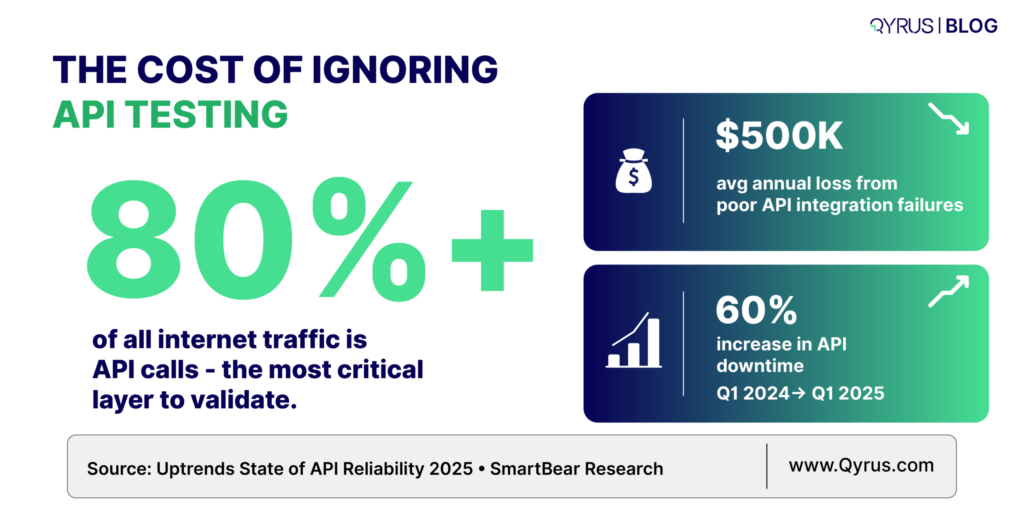
 A single integration failure can cost companies up to $500,000 per year — yet most teams still under-invest in API test coverage beyond basic functional checks. 

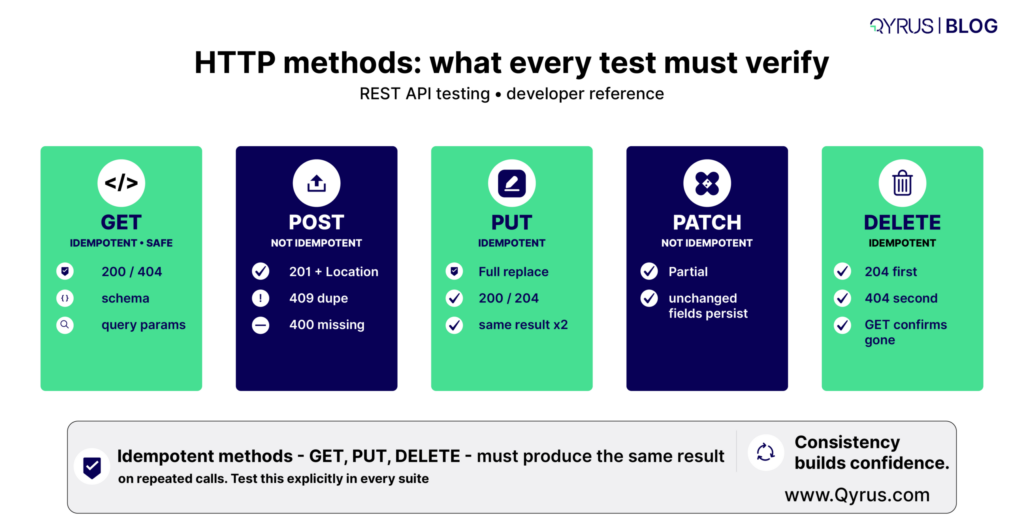
Understanding HTTP Methods: The Foundation of Test Cases 

Every REST API test case begins with an HTTP method. Understanding what each method is supposed to do — and what invariants it must uphold — explains what you need to verify. 

HTTP Method 

Operation 

Idempotent? 

Safe? 

Key Test Focus 

GET 

Retrieve a resource 

Yes 

Yes 

Response body shape, status 200/404, query param handling 

POST 

Create a resource 

No 

No 

Request validation, 201 on success, duplicate handling 

PUT 

Replace a resource 

Yes 

No 

Full body replacement, 200/204, missing field behavior 

PATCH 

Partially update a resource 

No 

No 

Partial update accuracy, unchanged field preservation 

DELETE 

Remove a resource 

Yes 

No 

204/200 on success, 404 on missing, idempotency 

Idempotency is a critical testing invariant: If you call GET, PUT, or DELETE multiple times with the same inputs must produce the same result. Your test suite should verify this — particularly for DELETE, as here a second call against an already-deleted resource should return 404, not 500. 

HTTP Status Codes: What Your Tests Must Verify 

Status codes are the only way to understand what happened with the API. Just checking for a 200 OK response is not enough. A good test must also verify if the response body contains the correct data, the expected side effects actually happened and if the error cases are properly handled. 

Relying only on a 200 status means you’re missing the full picture. That’s why you need to know about codes. 

2xx — Success Codes 

  • 200 OK: Standard success for GET, PUT, PATCH. It means the response body matches the expected schema. 
  • 201 Created: Must accompany POST requests that create resources. Verify the Location header points to the new resource. 
  • 204 No Content: Common for DELETE and some PUT operations. The body must be empty — assert that explicitly. 

 4xx — Client Error Codes 

  • 400 Bad Request 
    We get it when the request is badly formed — for example, invalid JSON, missing fields, or wrong data types. Always test these “negative” cases. 
  • 401 Unauthorized 
    Triggered when no login token is sent or the token is invalid. Test this on every protected endpoint. 
  • 403 Forbidden 
    It happens in cases where the user has a valid token but doesn’t have permission for that action. We need to check that role-based access control and see if it works correctly. 
  • 404 Not Found 
    Returned when the requested resource doesn’t exist. Test with both correct-looking and incorrect IDs. 
  • 409 Conflict 
    Happens during duplicate actions or when a business rule is broken (e.g., creating the same record twice). Make sure the error message is clear and helpful. 
  • 422 Unprocessable Entity 
    Gets triggered when the request looks correct but fails specific validation rules. We need to check that each field shows a proper error message. 
  • 429 Too Many Requests 
    We get it when someone exceeds the rate limit. You must verify that the Retry-After header is included so the user knows when to try again. 

 5xx — Server Error Codes 

5xx errors should never be a designed response to valid or invalid client input. If your tests produce 500 responses against documented inputs, that is a defect. Test suites should treat any unexpected 5xx as an automatic failure, regardless of the specific code. 

The Six Dimensions of REST API Testing 

A comprehensive REST API test strategy covers six distinct test types. Most teams focus on functional testing and leave the rest partially or completely uncovered — which is where production incidents originate. And that’s exactly where we should start. 

1. Functional Testing 

In functional testing we verify that the API does what its documentation says. This means testing every endpoint with valid inputs (happy paths) and asserting on the response status, body structure, data types, and field values. It also means testing with boundary values, edge cases, and combinations of optional parameters. 

Key assertions that we must include: 

  • Status code matches the documented response for this scenario 
  • Response body matches the documented schema (field names, types, required vs. optional) 
  • Returned data matches the data that was submitted or the known state of the system 
  • Headers include correct Content-Type and any documented custom headers 
  • Response time is within an acceptable threshold (even in functional tests, set a loose SLA assertion) 

 Functional testing answers the question — “Does the API do what it’s supposed to do?”

2. Negative Testing and Input Validation 

Negative testing verifies that the API fails safely and informatively when given invalid inputs. This is where most functional test suites stop short — and where the most damaging production bugs hide. 

For each endpoint, design tests that send: 

  • Missing required fields 
  • Wrong data types to check strings where integers are expected, and vice versa. 
  • Boundary violations — values one step beyond the documented minimum and maximum 
  • Special characters, Unicode edge cases, and SQL-like injection strings in string fields 
  • Extremely large payloads to probe size limits 
  • Malformed JSON or XML 

In all of of the cases above your API should return a 4xx status code with a structured error message that shows which field failed and why. A 500 response to any of these inputs is a defect. 

Best Practice Here is to  

Use equivalent partitioning to merge inputs into valid and invalid classes, then select representative test cases from each class. Combined with boundary value analysis, this approach will help generate the highest defect-detection output based on per test case written. 

3. Contract Testing 

Contract testing is process that ensures the API’s actual responses matches with the specification it publishes. In most cases typically an OpenAPI (previously known as Swagger) document. This is different from functional testing, which checks behavior. Contract testing checks the shape. 

A developer who changes a field’s type from integer to string, renames a field, or removes a response property may not realize how many consumers that silently breaks. Contract tests catch these breaking changes before they reach production. 

In a microservices architecture, consumer-driven contract testing goes further: each consumer service publishes the specific fields and behaviors it depends on, and those contracts become automated tests run against the provider. Tools like Pact implement this pattern. The OpenAPI specification is your contract artifact — treat it as a first-class test input, not just documentation. 

4. Performance Testing 

Performance testing checks if the API can match its latency and throughput requirements under real and peak loading conditions. A functional test that passes at one user can recreate catastrophic performance regressions that only appear at scale. 

Key metrics that we need to check for: 

  • p50, p95, p99 response latency — not just averages, which mask tail latency 
  • Throughput in requests per second (RPS) at target load 
  • Error rate under load — any increase above the baseline is a regression 
  • Database query time and CPU time breakdown to identify specific bottlenecks 

You should run your performance tests with realistic data volumes. Because an endpoint that returns a response in just 50 milliseconds with 100+ records can suddenly take 8 seconds or more when working with 90,000+ records.  

These kinds of performance issues often only appear when you use production-scale data. That’s why it’s important to create and define performance baselines early so you can enforce them in your CI/CD pipeline. 

5. Security Testing 

REST API Security Testing is done to make sure your authentication and authorization are put across correctly and sensitive data is protected and the API is not vulnerable to usually known attack patterns. The OWASP API Security Top 10 is the good resource to check on what to test. 

What needs to be covered: 

  • Authentication Bypass 
    Test every protected endpoint by trying: no token, an expired token, a malformed token, and a token from a different environment. 
  • Broken Object-Level Authorization (BOLA) 
    Check that a user cannot view or change another user’s data by simply changing IDs in the URL or request body. 
  • Excessive Data Exposure 
    Make sure the API doesn’t return more information than it should — especially sensitive data like personal information (PII), internal IDs, or secrets. 
  • Mass Assignment 
    Try sending extra fields that are not documented in the API (via POST or PUT) and verify the API safely ignores or rejects them. 
  • Rate Limiting 
    Confirm the API limits how many requests you can make and returns a 429 Too Many Requests response with a Retry-After header. 
  • Injection Attacks 
    Send dangerous inputs like SQL code, command injection strings, or SSRF payloads into text fields to ensure the API blocks them. 

6. Integration and End-to-End Testing 

Integration testing is the process to validate a sequence of API calls and to check if it produces the correct system state. This goes beyond testing individual endpoints in isolation — it tests workflows.  

For example: create a user, authenticate as that user, create a resource under that user’s account, verify the resource appears in a list endpoint, then delete it and verify it no longer appears. 

End-to-end tests check the entire flow by connecting multiple services together.They make sure data moves correctly from one service to another. In a microservices setup, this means the output from one API becomes the input for the next API — and the final result matches the expected business outcome. This is why API process testing or API chaining tools are so important. 

Automating REST API Testing: Strategy and CI/CD Integration 

Manual API testing with tools like Postman or cURL is good for exploration and debugging — but it does not scale to production-grade quality assurance. But once your API has more than a handful of endpoints, manual verification becomes inconsistent, time-consuming, and impossible to repeat reliably across every code change. 

So with automated API testing we can solve this by turning your test scenarios into repeatable, machine-executable checks that run without human intervention — on every commit, every pull request easily. 

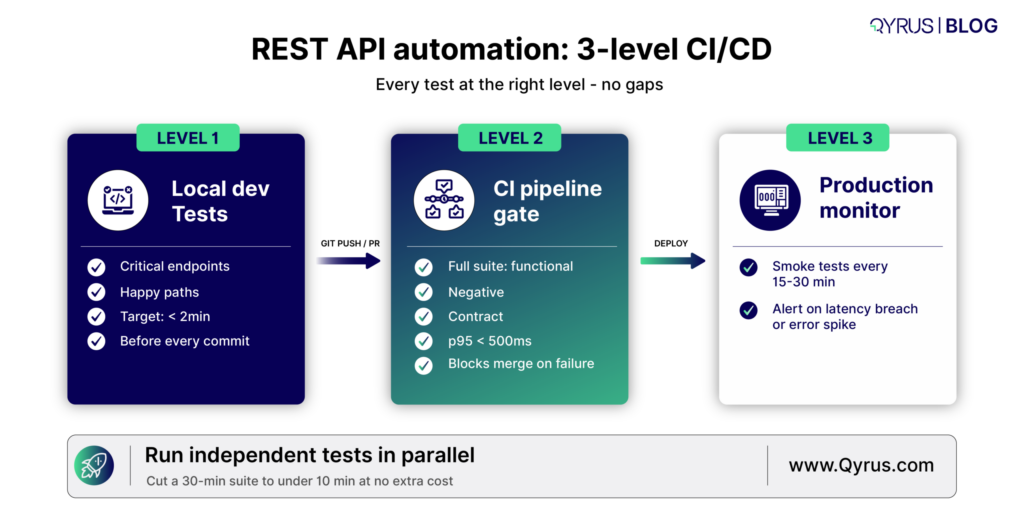
There are three levels to this: 

Level 1: Local Developer Tests 

Developers run a fast subset of API tests before committing code. This suite should complete in under two minutes and cover the most critical endpoints and happy paths. The goal is immediate feedback during development, not comprehensive coverage. 

Level 2: CI Pipeline Gate 

Every pull request triggers the full test suite. This suite includes all functional tests, negative tests, contract tests, and a lightweight performance assertion (e.g., p95 < 500ms). The pipeline blocks merges on any failure. This is where the bulk of your defect detection happens. 

Level 3: Scheduled and Production Monitoring 

A smaller set of smoke tests runs continuously against staging and production environments to catch regressions that only appear in live infrastructure — configuration drift, third-party dependency failures, or data-volume-related degradations. 

Architecture Note 

Independent nodes in your test workflow should run in parallel. Sequential execution is the default in most frameworks but is rarely necessary — most API tests have no dependency on each other’s execution order. Parallelization can reduce a 30-minute suite to under 10 minutes with no additional infrastructure cost. 
Parameterization and Data-Driven Testing 

A single test script contains logic: it sends a request, receives a response, and checks whether the result matches expectations. What changes between scenarios is the input — the payload, the query parameters, the authentication credentials, the edge case values.  

Data-driven testing separates that variable input from the fixed logic, so one script can help to validate multiple other scenarios without repeating a line of assertion code. 

This is useful when: 

  • We are testing the same endpoint with valid inputs from different user roles 
  • You merge boundary and equivalence class testing with a controlled input matrix 
  • Regression testing against a library of historical production requests that previously caused failures 

Service Virtualization for Dependency Management 

REST APIs frequently depend on other services — third-party APIs, payment gateways, authentication providers, or downstream microservices. When those dependencies are unavailable, unreliable, or expensive to call in test environments, service virtualization (also called API mocking) allows you to simulate their responses with controlled, deterministic behavior. 

Service virtualisation solves this by replacing real dependencies with simulated stand-ins that return controlled, predictable responses. Instead of calling the actual payment gateway, your test calls a mock that always responds with a specific status code, payload, or latency. 

REST API Testing Checklist 

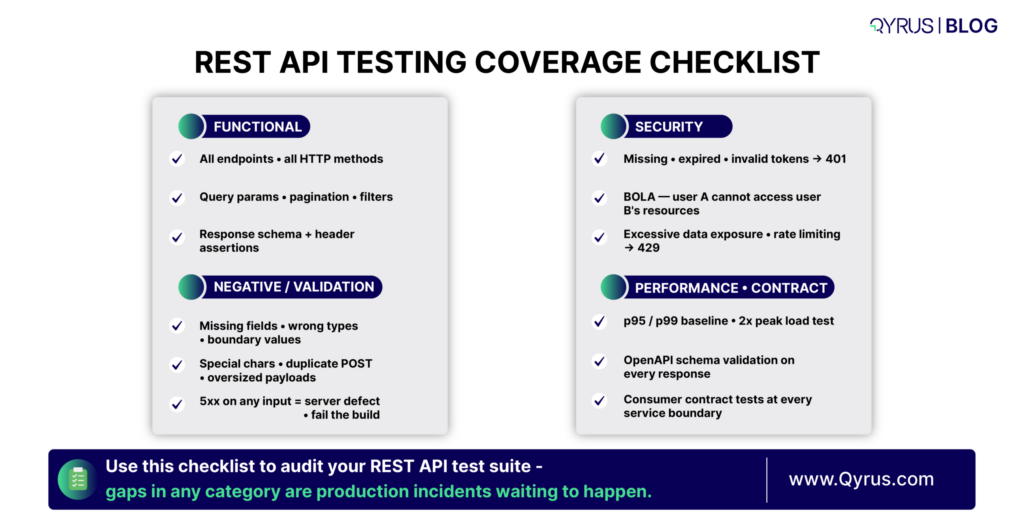
Use our Qyrus designed checklist when designing test coverage for a new or existing API: 

Functional Coverage 

  • All documented endpoints covered with at least one happy-path test 
  • GET, POST, PUT, PATCH, DELETE each tested per endpoint where applicable 
  • Query parameters tested individually and in combination 
  • Pagination tested: first page, last page, beyond last page, invalid page values 
  • Filtering and sorting parameters tested with valid and invalid values 

 Negative and Validation Coverage 

  • All required fields tested for absence 
  • All fields tested for wrong data types 
  • Boundary values tested for numeric and string-length constraints 
  • Special characters and encoding edge cases tested in string fields 
  • Duplicate creation attempts tested for POST endpoints 

 Security Coverage 

  • All protected endpoints tested with missing, expired, and invalid tokens 
  • Object-level authorization tested: can user A access user B’s resources? 
  • Response bodies audited for excessive data exposure 
  • Rate limiting verified on public-facing endpoints 

 Performance Coverage 

  • Baseline latency established for all critical endpoints 
  • Load test run at 2x expected peak traffic 
  • p99 latency asserted in CI pipeline 
  • Large dataset response times tested 

 Contract Coverage 

  • All responses validated against OpenAPI schema 
  • Breaking change detection integrated into CI 
  • Consumer contracts validated against provider for each microservice boundary 
Common REST API Testing Mistakes to Avoid 

Even experienced teams fall into these patterns. Each one creates a blind spot that eventually produces a production incident. 

  • Testing only the happy path 
    This is the biggest mistake. If your tests never try invalid tokens or bad inputs, you don’t actually know if your authentication works. 
  • Asserting only on status codes 
    Just checking for a 200 OK response is not enough. A 200 with wrong data, missing fields, or old information is still a bug. Always check the full response body too. 
  • Ignoring idempotency 
    Not checking that GET, PUT, and DELETE give the same result when you call them multiple times with the same data. 
  • Hardcoding test data 
    Tests that rely on specific data already existing in the system are very fragile. Instead, create and clean up your test data automatically in every test. 
  • Skipping performance baselines 
    Adding a simple check like “response time under 500ms” only takes a few minutes. Without it, you won’t notice when a slow database query gets released to users. 
  • Treating all 5xx errors as acceptable 
    Any 5xx server error on a valid request (or even invalid ones that are documented) should fail your test. It means something is wrong on the server. 
  • Not testing authentication expiry 
    Tokens expire. You must test that your API correctly returns 401 Unauthorized for expired tokens and that the token refresh process works properly. 

How Qyrus Accelerates REST API Testing 

Building and maintaining a comprehensive REST API test strategy at the scale described in this guide is non-trivial. The discipline requires careful test design, robust parameterization, reliable service virtualization, and tight CI/CD integration — all of which accumulate maintenance overhead over time. 

Qyrus is a unified, AI-powered testing platform that addresses the full lifecycle of REST API testing without requiring deep scripting expertise. Its codeless environment supports functional, performance, and security test runs against REST, SOAP, and GraphQL APIs. Nova AI analyzes API responses and automatically generates assertions for headers, JSON body, JSON Path expressions, and schema validation — dramatically accelerating the test creation phase. 

For teams dealing with external dependencies, the Qyrus API Builder can generate mock APIs from a natural language description, providing immediate service virtualization without manual configuration. API Process Testing supports end-to-end workflow validation by chaining multiple REST calls, extracting response data using JSON path expressions, and passing it into subsequent requests — precisely the kind of integration testing that catches real-world defects. 

The platform integrates natively with CI/CD pipelines including Jenkins and Azure DevOps, and connects directly to test management tools like Jira, Xray, and TestRail. Performance runs capture p50, p95, p99 latency, throughput, and active thread counts with built-in graphical reporting. 

If your team is looking to build a REST API testing program that goes beyond happy-path functional checks — one that covers contract validation, security, performance baselines, and automated regression — explore what Qyrus API Testing can do for your team. 

 Summary: Key REST API Testing Concepts 

Concept 

Why It Matters 

HTTP Method Idempotency 

GET, PUT, DELETE must return the same result on repeated calls — a critical invariant to verify. 

Status Code Assertions 

Always assert the exact expected status code per scenario — not just 2xx vs non-2xx. 

Negative Testing 

Invalid inputs must return structured 4xx errors, never 5xx. 

Contract Testing 

OpenAPI schema validation catches silent breaking changes before they reach consumers. 

Performance Baselines 

Establish p95/p99 thresholds early and enforce them in CI. 

Security Test Cases 

Auth bypass, BOLA, and excessive data exposure must be tested on every protected endpoint. 

Service Virtualization 

Mock unavailable dependencies to test error-path behavior deterministically. 

Data-Driven Automation 

Parameterized tests multiply coverage with minimal maintenance overhead. 


Frequently Asked Questions:  

Q: What is the difference between REST API testing and UI testing? 

UI testing validates the application through its graphical interface by checking clicks, forms, and visual elements. REST API testing validates the backend service directly by sending HTTP requests and checking responses, without any browser or UI. API tests are usually 3–10x faster, can run early in development, and help find bugs more precisely. The two approaches complement each other: API tests catch backend logic issues while UI tests verify the end-user experience. Most teams achieve the best results with a 70/30 split — more API tests than UI tests. 

 Q: How do I test REST API authentication and authorization correctly?  

Authentication testing ensures the API accepts valid credentials and rejects invalid ones. For every protected endpoint, you should test at least four cases: a valid token (expects success), no token (expects 401), an expired token (expects 401), and a malformed token (expects 401). Authorization testing checks that a valid token only allows actions permitted by the user’s role. The most important test is Broken Object-Level Authorization (BOLA) — verifying that User A cannot access or modify User B’s data by changing IDs in the request. It should return 403 Forbidden, not 200. 

Q: What is contract testing and when should I add it to my test suite? 

Contract testing verifies that the API’s actual responses match the schema defined in your OpenAPI specification. It checks field names, data types, and required fields. You should add contract testing once you have a published OpenAPI spec and at least one consumer (frontend, mobile app, or another service) depending on the API. In microservices, it is especially valuable early on to catch breaking changes that functional tests might miss. 

Q: What HTTP status codes should my negative test cases target? 

Your negative tests should cover these status codes: 400 Bad Request (malformed payload, missing fields, type mismatch), 401 Unauthorized (missing or invalid token), 403 Forbidden (authenticated but not permitted), 404 Not Found (resource doesn’t exist), 409 Conflict (duplicate or business rule violation), 422 Unprocessable Entity (valid syntax but fails validation), and 429 Too Many Requests (rate limiting). Any 5xx response to a documented request is considered a server-side defect and should fail the test. 

Q: How should I approach REST API performance testing? 

Start by establishing a latency baseline for your critical endpoints under low load. Record p50, p95, and p99 response times. Then run load tests at expected peak traffic and at twice that volume. Focus on key metrics: throughput (requests per second), error rate under load, and tail latency (p95/p99). Add simple performance assertions (e.g., p95 < 500ms) into your CI pipeline. Always test with realistic data volumes, as performance can degrade significantly with larger datasets.
Qyrus Blog Featured Image thumbnail 2026-3

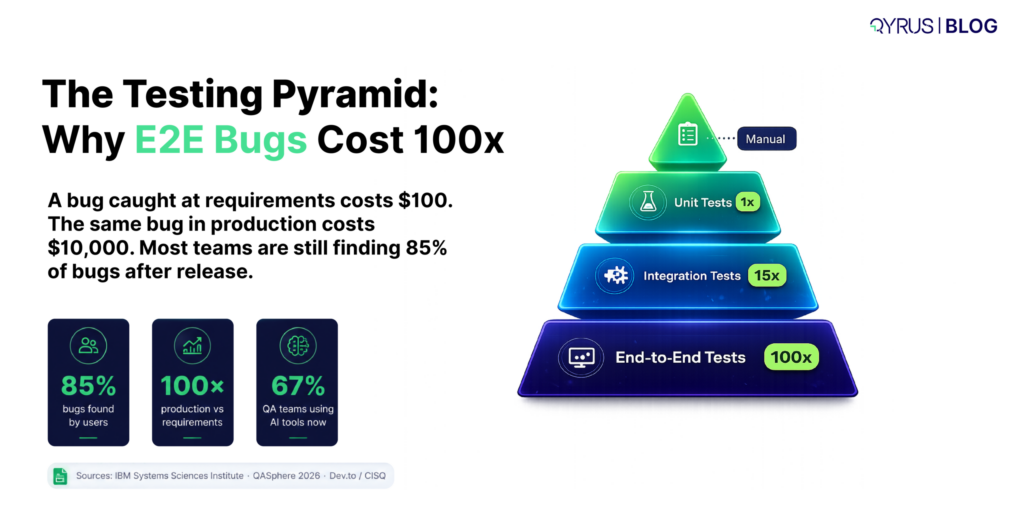
Here is a number that should make every engineering leader uncomfortable: a bug caught during requirements costs $100 to fix. The same bug, discovered in production, costs $10,000. That is a 100x multiplier, and according to IBM’s Systems Sciences Institute, it has held true across decades of software development. 

Yet despite this well-documented reality, 85% of website bugs are still found by users, not QA teams. 

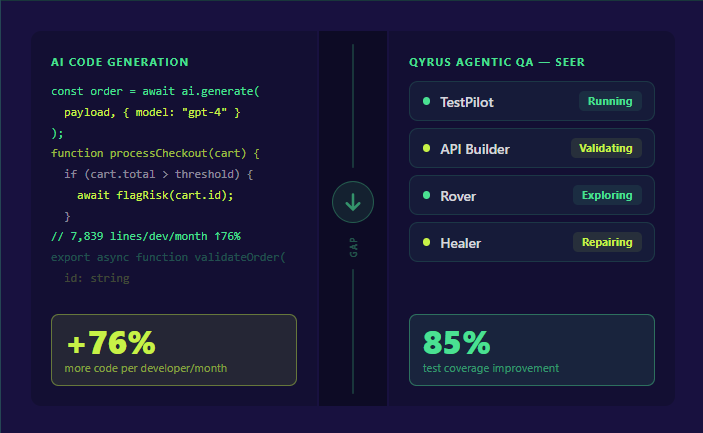
The reason is not a lack of effort. It is a structural mismatch between how fast software is being written and how well teams can test it. AI coding tools like GitHub Copilot and Amazon CodeWhisperer are writing between 20–40% of all new code at major tech companies. Developers ship faster than ever. But testing, anchored to brittle scripts, fragmented toolchains, and manual maintenance cycles, has become the new bottleneck standing between code and confident release. 

This is the velocity gap. And it is widening. 

In 2026, the question is no longer whether to automate end-to-end testing. It is which approach actually works at scale: the open-source code-first frameworks that dominate developer surveys, or the emerging generation of AI-powered platforms that promise to do far more than run scripts. 

This guide cuts through the noise. We compare the leading end-to-end testing tools including Playwright, Cypress, Selenium, and AI-powered alternatives, on the dimensions that matter to real teams: maintenance burden, CI/CD integration, cross-platform coverage, and long-term ROI. Whether you are a QA engineer evaluating your next framework, a developer tired of fixing flaky tests, or an engineering manager building a business case for tooling investment, you will find a clear, honest picture of where the market stands and where it is going. 

What Is End-to-End Testing (And Why Traditional Approaches Are Failing) 

End-to-end (E2E) testing validates a complete user journey, from the first click through backend processing, database updates, and confirmation screens, as a single, continuous flow. Unlike unit tests, which verify individual functions, or integration tests, which check how modules interact, E2E tests simulate real user behavior across interconnected systems. They answer the question every business actually cares about: does this work, end to end, the way a real user would experience it? 

The testing pyramid places E2E tests at the top for a reason. They offer the most comprehensive validation but also carry the highest cost: slower to run, harder to build, and notoriously difficult to maintain as applications change. 

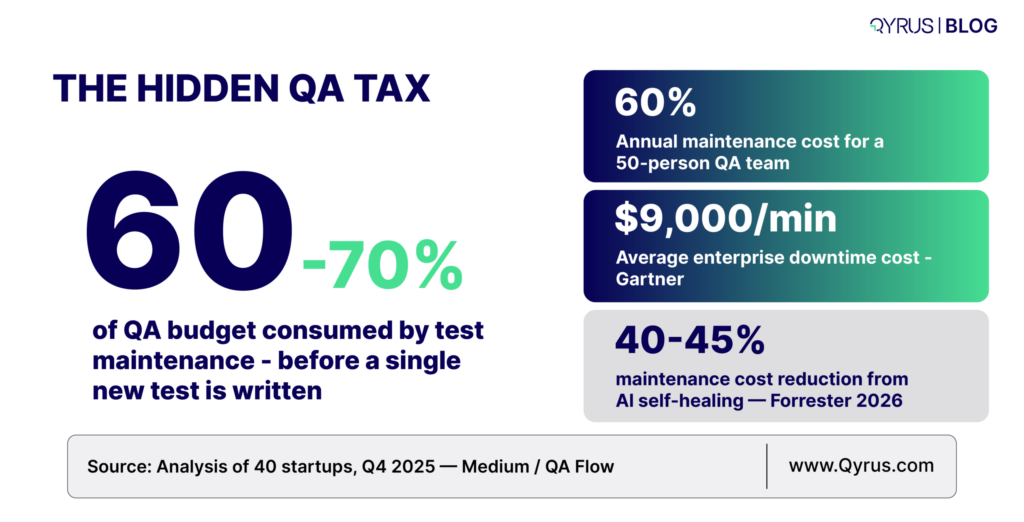
That maintenance challenge is where most teams quietly lose the plot. According to analysis of 40 startups conducted in Q4 2025, teams spend 60–70% of QA time on test upkeep, with only 30–40% going to new coverage or actual results review. The consequence: enormous engineering investment producing diminishing returns. 


Maintenance burden: 60–70% of QA time is spent on test upkeep, not new coveragehttps://medium.com/qa-flow/the-hidden-test-automation-maintenance-cost-consuming-50-of-qa-time-a8a462cd9084 

Production cost multiplier: A bug caught in requirements costs $100. The same bug in production costs $10,000 which is a 100x difference. https://betterqa.co/bug-fixing-costs-throughout-sdlc/User-detected bugs: 85% of website bugs are found by users, not QA teams.

https://dev.to/esha_suchana_3514f571649c/the-hidden-24-trillion-crisis-why-software-quality-cant-wait-57eiDowntime cost: Average enterprise downtime costs $9,000 per minutehttps://testomat.io/blog/software-bug-cost/


The “shift-left” movement exists precisely because of these economics: catch defects early, when they cost almost nothing to fix, rather than in production, where they cost everything. But shifting left requires test automation that actually runs reliably in CI/CD pipelines, integrates with GitHub Actions and Azure DevOps, and does not collapse every time a developer renames a button. 

Traditional E2E testing tools were not built for this reality. They were built for a world where applications changed slowly, QA engineers had months to build scripts, and the average test suite had hundreds, not thousands, of tests to maintain. That world is gone. 

Playwright, Cypress, and Selenium: Strengths, Limitations, and When to Use Each 

Three frameworks dominate the end-to-end testing conversation in 2026. Each earns its place for specific use cases. Each also carries real limitations that enterprise teams routinely discover too late. 

Playwright 

Built by Microsoft and now holding 45.1% adoption among QA professionals, with a 91% satisfaction rating in the State of JS 2025 survey, the widest gap over Cypress ever recorded, Playwright has become the go-to framework for new projects in 2026. 

Its advantages are substantial. Playwright supports Chromium, Firefox, and WebKit natively, meaning true cross-browser coverage including Safari on a single codebase. It is 3.2x faster than Selenium in parallel execution, offers built-in parallelization at zero additional cost, and its auto-wait functionality eliminates most timing-related flaky tests. Multi-language support, including JavaScript, TypeScript, Python, Java, and C#, makes it accessible to polyglot teams. 

Playwright’s limitations matter for enterprise buyers. It requires coding expertise — business analysts and manual testers cannot create or maintain tests without developer support. It covers web only; mobile native apps, desktop applications, and SAP/ERP systems are entirely out of scope. There is no self-healing: every UI change that breaks a locator requires manual triage and repair. And while the framework is free, its value depends entirely on the engineering time needed to build and maintain scripts. 

Best for: JavaScript/TypeScript teams building modern web apps who need cross-browser coverage and strong CI/CD integration. 


Cypress 

Cypress pioneered the developer-friendly testing movement and still holds a loyal following, currently at 14.4% adoption, among frontend JavaScript teams. Its in-browser execution model delivers the most intuitive debugging experience in the category: time-travel debugging that lets you step backward through DOM snapshots is something neither Playwright nor Selenium offers natively. 

The trade-offs are significant. Cypress supports Chromium-based browsers only, no Firefox WebKit, no Safari. It does not support mobile app testing, desktop apps, or any ERP platform. Its architecture limits tests to single-domain scenarios, which creates real friction in enterprise applications that span multiple subdomains or authentication systems. Its cloud parallelization requires a paid subscription: teams running 1,000 tests daily can expect to spend $400–800 per month on Cypress Cloud, compared to near-zero incremental cost on Playwright. 

Best for: Frontend-focused JavaScript teams who value interactive debugging and work exclusively within a single-domain web app. 


Selenium 

Selenium has been the backbone of enterprise browser automation for nearly two decades. Over 31,000 companies report active Selenium usage. It supports every major programming language, every major browser, and virtually every CI/CD tool in the market, and it is entirely free. 

But Selenium’s market share has declined to 22.1% in 2026 for a reason. Its WebDriver architecture introduces HTTP overhead that makes it measurably slower than Playwright. More critically, Selenium has no self-healing whatsoever: every UI change requires manual locator updates across every affected test. For large enterprises with thousands of tests, this maintenance burden consumes entire QA teams. Reporting, test management, and parallel execution all require additional third-party tools assembled from scratch. 

Best for: Large enterprises with established Java, Python, or C# test suites, polyglot teams, and the engineering capacity to manage a high-maintenance framework. 


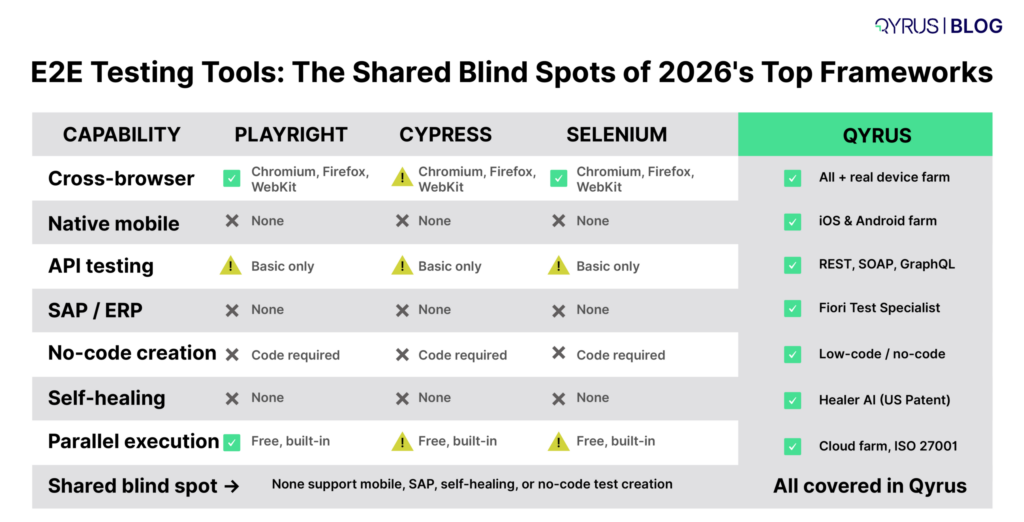
The three frameworks compared across the dimensions enterprise teams care about most: 


Dimension 

Playwright 

Cypress 

Selenium 

Browser Support 

✅ Chromium, Firefox, WebKit 

⚠️ Chromium only 

✅ All major browsers 

Mobile Testing 

❌ Web emulation only 

❌ Not supported 

❌ Not supported 

API Testing 

⚠️ Basic support 

⚠️ Basic support 

⚠️ Basic support 

SAP / ERP Testing 

❌ None 

❌ None 

❌ None 

Coding Required 

⚠️ Yes (JS/TS/Py/Java/C#) 

⚠️ Yes (JavaScript) 

⚠️ Yes (multi-language) 

Parallel Execution 

✅ Built-in, free 

⚠️ Paid cloud tier 

⚠️ Requires Selenium Grid 

Self-Healing 

❌ None 

❌ None 

❌ None 

CI/CD Integration 

✅ Native (GitHub Actions, Azure DevOps) 

✅ Good (cloud dashboard) 

✅ Via plugins 


The shared blind spot across all three frameworks is not a flaw you can engineer around, it is an architectural reality. None offers unified coverage across Web, Mobile, API, Desktop, and SAP. None provides self-healing automation. None can generate tests from a Jira ticket or a natural language description. For teams whose testing scope ends at the browser, these frameworks deliver real value. For enterprises validating end-to-end business processes that span ERP systems, mobile apps, APIs, and web frontends, they are the wrong foundation. 

Why Most Teams Are Paying More Than They Think for E2E Testing 

Open-source frameworks appear free. They are not. The license costs nothing; the engineering time to build, run, and maintain them costs everything. 

The average enterprise QA team running a mature Selenium or Playwright suite does not use one tool, it uses five. Selenium or Playwright handles web UI. Postman or a REST Assured library handles API testing. Applitools or Percy handles visual regression. TestRail or Jira manages test cases and results. Each tool has its own license, its own learning curve, its own reporting format, and its own maintenance overhead. Results from these tools exist in different systems, require manual correlation, and cannot produce a unified picture of end-to-end coverage. 

The maintenance bill compounds as test suites grow. Research across enterprise QA teams puts the figure starkly: a 50-person QA organization with a 70% maintenance burden has 35 engineers spending their entire working time keeping existing tests functional, at an average cost of $100,000 per engineer, that is $3.5 million annually spent on maintenance rather than new coverage. 


Annual maintenance cost: 50-person QA team burns approximately $3.5M per year on test maintenance alonehttps://www.virtuosoqa.com/post/intelligent-test-maintenance 

Self-healing ROI: Forrester data puts the maintenance cost reduction from self-healing tests at 40–45%https://brijeshdeb.medium.com/top-trends-in-testing-in-2026-and-what-does-it-mean-for-testers-and-business-leaders-a1a44bd64761 

Market growth: The automation testing market reached $40.44B in 2026 and is heading to $78.94B by 2031 at 14.32% CAGRhttps://www.mordorintelligence.com/industry-reports/automation-testing-market 

AI adoption: 67% of QA teams now use at least one AI-powered testing tool — up from 21% in 2024https://qasphere.com/blog/ai-in-software-testing/ 


Flaky tests compound the damage further. When test results are unreliable, engineering teams stop trusting CI/CD pipelines. They reintroduce manual validation steps. They delay releases “just to be safe.” The automation that was supposed to accelerate delivery becomes another bottleneck, and the test suite becomes a liability rather than an asset. 

The answer is not a better open-source framework. Playwright is already excellent at what it does. Selenium is already mature. The answer is a fundamentally different architecture, one built for the realities of 2026: heterogeneous application stacks, AI-accelerated development cycles, non-technical team members who understand business processes but cannot write JavaScript, and enterprise deployments that span SAP, Salesforce, mobile apps, and custom web applications in a single end-to-end flow. 


The New Generation of E2E Testing Tools: AI-Powered, Agentic, and Unified 

“AI-powered” has become one of the most overused labels in the testing industry. Almost every tool now claims it. Most mean something narrow: autocomplete for test scripts, or a visual recorder with an AI icon. The distinction that matters is not whether a tool uses AI, it is what the AI actually does and at what stage of the testing lifecycle it operates. 

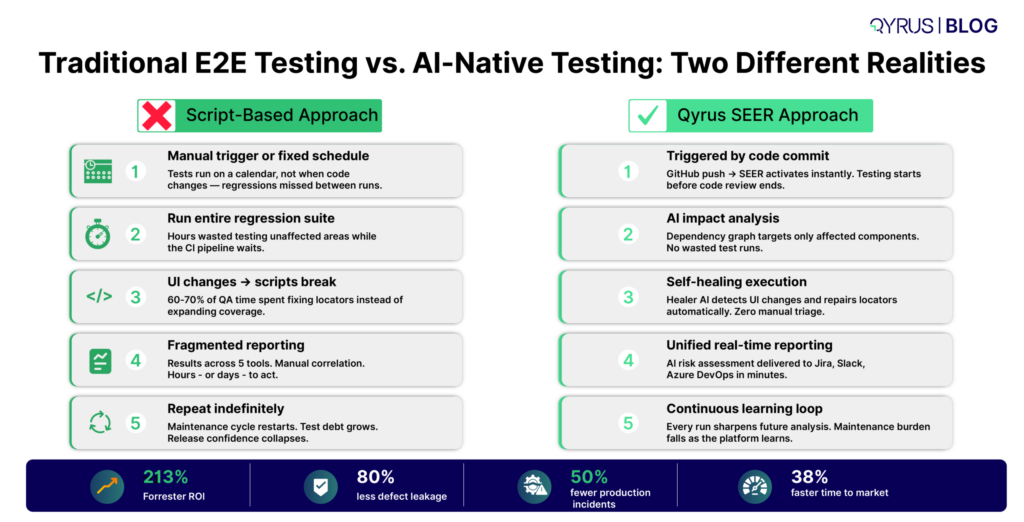
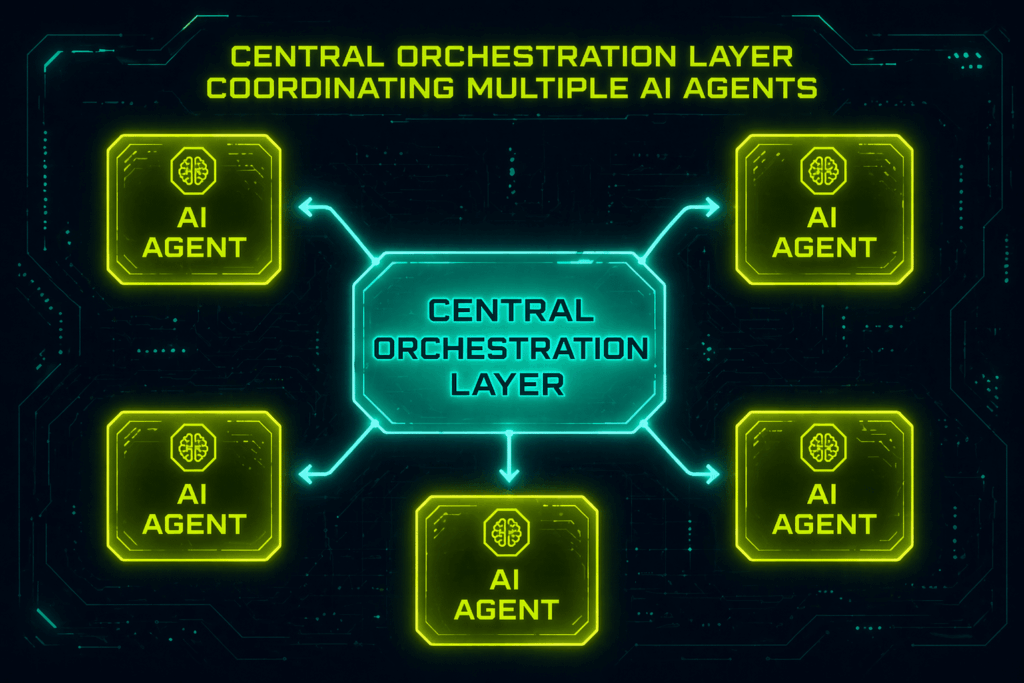
Genuinely agentic AI testing platforms do something categorically different. They do not wait to be told what to test. They sense changes in the development environment, a new commit to GitHub, a design update in Figma, a modified Jira story, and respond autonomously: analyzing impact, selecting relevant tests, executing them in parallel, self-healing broken locators, and delivering results back into the CI/CD pipeline before a human has reviewed a single line of changed code. 

The market signal is unambiguous. Gartner forecasts that 40% of enterprise applications will include task-specific AI agents by the end of 2026, up from less than 5% in 2025. The World Quality Report 2025–26 found 89% of organizations piloting or deploying generative AI in quality engineering, but only 15% have achieved enterprise-scale deployment. That gap between pilot and production is where the competitive advantage lives. 

Three capabilities separate genuine AI-native platforms from AI-washed frameworks: 

  • Self-healing locators: When UI elements change, the platform automatically identifies and updates the affected locators, no manual triage, no broken pipelines. Forrester data puts the maintenance cost reduction from self-healing at 40–45%. 
  • Autonomous test generation: Tests created from Jira tickets, natural language descriptions, Figma designs, or existing scripts, not from hand-written code. This democratizes testing: business analysts who understand workflows can create coverage without engineering degrees. 
  • Unified coverage: A single platform validating Web, Mobile, API, Desktop, SAP, and Data in one continuous flow, eliminating the fragmented toolchain that fragments results, multiplies maintenance, and obscures the true picture of end-to-end quality. 


The codeless testing segment reflects this shift directly: 39% of companies are now actively evaluating codeless automation tools, according to recent market analysis. The driver is not cost savings alone, it is the recognition that the skills needed to understand business processes and the skills needed to write automation scripts rarely overlap. 

For enterprise teams managing SAP S/4HANA landscapes, Salesforce environments, or cross-platform mobile and web applications, the calculus is clear: a unified AI platform that maintains its own tests costs less over three years than an assembly of open-source frameworks that demand constant human maintenance. The question is which platform delivers that promise at enterprise scale. 

How Qyrus Delivers True End-to-End Testing — Across Every Layer of Your Stack 

Most end-to-end testing platforms validate one layer of the stack. Qyrus validates all of them. 

Qyrus is a unified, AI-powered testing platform that covers Web, Mobile, API, Desktop, SAP, and Data testing in a single interface with no fragmented toolchain, no manual correlation across systems, and no separate license for each testing discipline. It is recognized by Forrester, Gartner, and ISG as a leader in intelligent automation and autonomous testing. 

The SEER Framework: Autonomous Quality at Every Stage 

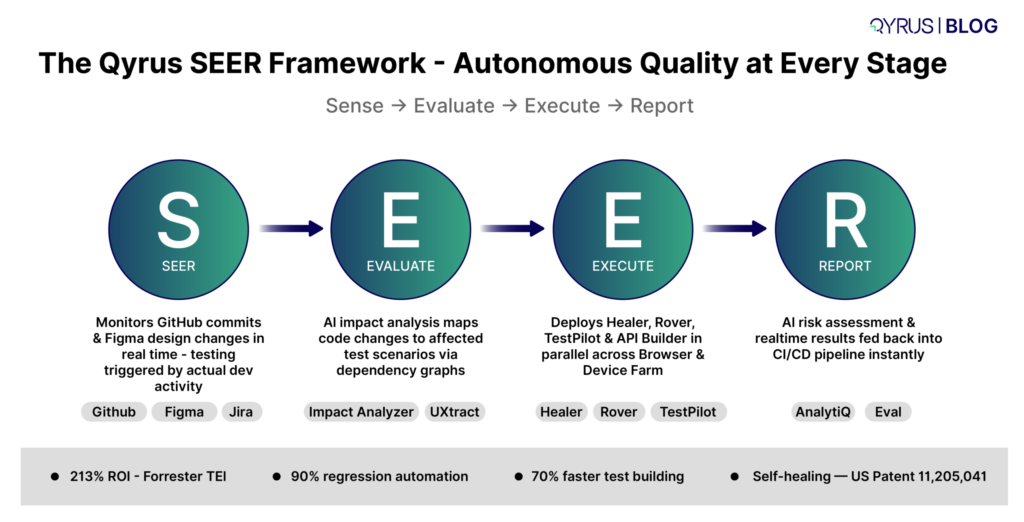
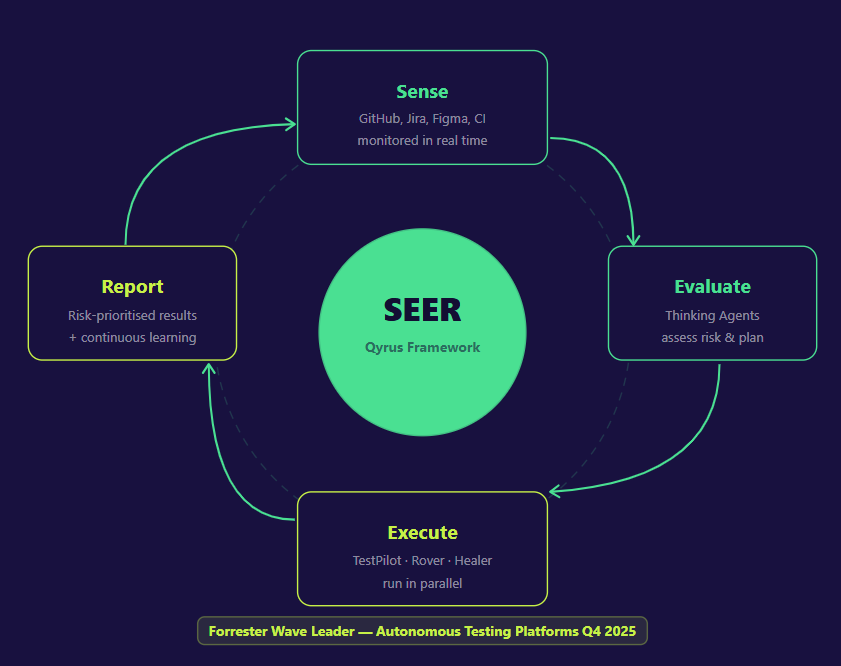
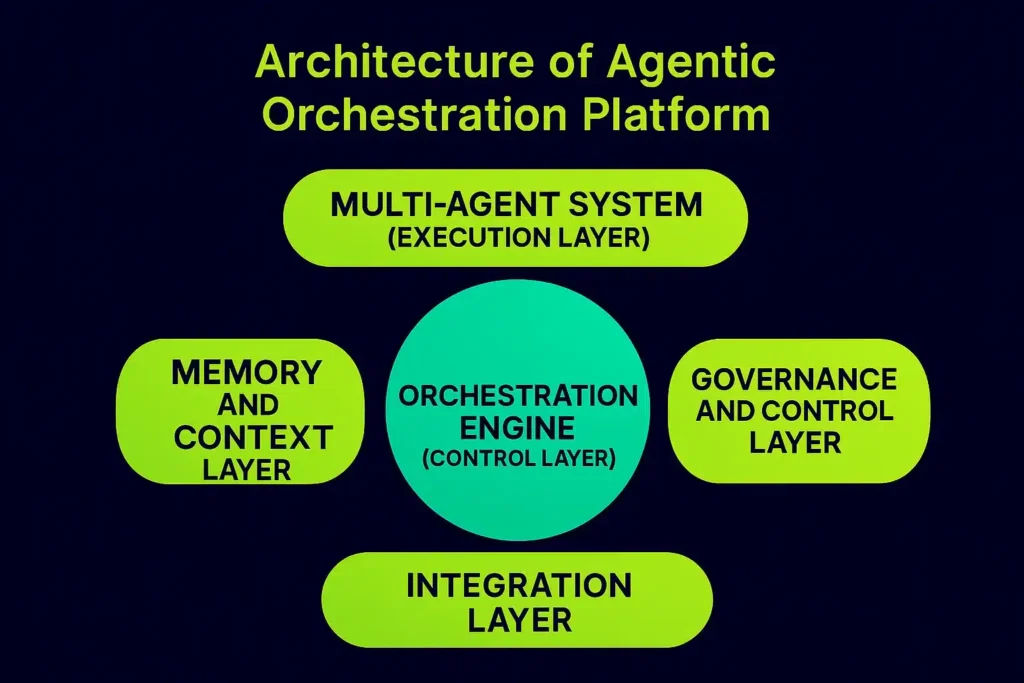
At the core of Qyrus is the industry-first SEER (Sense, Evaluate, Execute, Report) framework, an autonomous AI orchestration engine that manages the entire testing lifecycle as a continuous feedback loop, not a scheduled event. 

  • Sense: Qyrus continuously monitors GitHub repositories for commits, merges, and pull requests, and observes design changes in Figma in real time. Testing is triggered by actual development activity not a calendar. 
  • Evaluate: Specialized AI agents perform automated impact analysis using static analysis and dependency graphs, mapping code or design changes to the specific API and UI test scenarios most likely to be affected. Only relevant tests run, not the entire regression suite. 
  • Execute: The platform automatically deploys the right agent for the right job: API Bots for backend validation, the Qyrus Test Pilot (QTP) for frontend UI testing, Rover for autonomous exploratory coverage, and Healer for self-healing maintenance. Tests run in parallel across a scalable, ISO 27001 and SOC 2 Type 2 compliant browser and device farm. 
  • Report: Results are delivered in real time back into the DevOps pipeline, detailed coverage metrics, step-level screenshots, video recordings, and AI-driven risk assessments, so teams know not just what failed, but what to fix first. 

Single-Use AI Agents: A Specialist for Every Testing Challenge 

Where most platforms bolt AI onto existing workflows, Qyrus deploys purpose-built Single-Use Agents (SUAs), each an expert in a specific domain: 

  • Healer (US Patent 11,205,041 B2): When UI elements change, Healer automatically analyses the update and repairs affected test scripts. Self-healing, not just self-flagging. This directly attacks the 60–70% maintenance burden that drains enterprise QA budgets. 
  • NOVA: Reads Jira tickets, Azure DevOps stories, or plain-text descriptions and automatically generates comprehensive functional test scenarios. Business teams participate in QA from day one. 
  • TestGenerator+: Analyses existing test scripts and generates new scenarios to fill coverage gaps, categorized by criticality ensuring regression suites stay comprehensive as applications evolve. 
  • Rover: An autonomous exploratory testing engine that navigates applications without human direction, identifying anomalies, crashes, and bugs in areas scripted tests would never reach. 
  • API Builder: Generates fully virtualised, mock APIs from natural language descriptions, enabling backend validation independent of third-party system availability. 


SAP Testing: The Enterprise Differentiator No Competitor Touches 

For organizations running SAP S/4HANA, Fiori, SuccessFactors, or Ariba, Qyrus offers capabilities that Playwright, Cypress, and Selenium cannot begin to match. 

The Fiori Test Specialist reverse-engineers SAP application source code alongside functional specifications and existing manual test cases, generating end-to-end test scripts that understand SAP business processes, not just UI interactions. The proprietary Qyrus SAP Scribe, custom ERP-aware AI models fine-tuned to each customer’s SAP landscape, eliminates the brittle XPath locators that plague traditional SAP automation, replacing them with dynamic object recognition that adapts to metadata changes. 

The platform also supports cross-application orchestration: a single E2E test flow can span Salesforce, SAP, and Ariba across UI, API, and backend layers simultaneously. Prebuilt business process packs cover O2C, P2P, H2R, and PM flows out of the box. 


Test Orchestration: Visual E2E Flow Building for Complex Business Processes 

For teams building complex, multi-platform end-to-end business process tests, the Flow Hub provides a drag-and-drop visual canvas for orchestrating Web, Mobile, and API test scripts into a single continuous workflow. SmartFlow Conditional Mapping adapts to live conditions during execution, rerouting tests dynamically if a user fails a login or a transaction lacks balance, without manual script intervention. 


Seamless CI/CD and Ecosystem Integration 

Qyrus integrates natively with Jenkins, Azure DevOps, Bitrise, TeamCity, and Concourse for CI/CD pipeline execution, and with GitHub and Bitbucket for version control. Test management integrations cover Jira, XRay, and TestRail. Communication integrations include Slack and Microsoft Teams. Tests can be triggered automatically on every commit, scheduled for recurring execution, or run in parallel across the Browser and Device Farm, over 99.9% real device availability, with ISO 27001 and SOC 2 Type 2 compliance. 


The Numbers: What Qyrus Delivers 

  1. ROI: 213% return on investment with a payback period of less than 6 months (Forrester Total Economic Impact study).https://www.qyrus.com/post/forrester-report-tei-2024/ 
  2. Regression automation: 90% automation of manual regression test cases  
  3. Production incidents: 50% reduction in production incidents and downtime through proactive AI defect detection  
  4. Test building time: 70% reduction in test building time through AI-driven and codeless features  
  5. Test case creation: ~80% faster complex test case creation  
  6. Defect leakage: 80% reduction in defect leakage  
  7. Time to market: 36% faster time to market  

These are not framework benchmarks. They are business outcomes with measurable differences in production incident rates, release velocity, and total cost of ownership that translate directly to competitive advantage. A Forrester TEI study commissioned on Qyrus found a 213% ROI with payback in under six months, validated by Shawbrook Bank’s 200% ROI within 12 months of deployment. 

How to Choose the Right End-to-End Testing Tool in 2026 

The right E2E testing tool depends on your team’s scope, skills, and scale, not on which framework tops a developer survey. Five questions will clarify the decision faster than any feature comparison: 

  • Do we need web-only coverage, or do our E2E tests need to span Mobile, API, Desktop, or SAP/ERP systems? If the answer is web-only with a coding-fluent team, Playwright is likely your strongest starting point. If your E2E flows cross system boundaries, open-source frameworks will force you to build a fragmented toolchain that multiplies maintenance overhead. 
  • Can our non-technical team members, business analysts, manual testers, domain experts, create and maintain tests? If your QA capacity is gated by automation engineering bandwidth, a codeless or low-code AI platform expands that capacity without proportional headcount growth. 
  • How much of our current QA budget is being consumed by test maintenance? If the answer is more than 40%, the actual cost of your “free” framework already exceeds most enterprise platform licensing fees. Calculate your three-year total cost of ownership before comparing tools on license price alone. 
  • Does our CI/CD pipeline need native integration with GitHub Actions, Azure DevOps, or Jenkins, and do we need parallel execution without paying per-run fees? All major platforms offer CI/CD integration, but the depth, cost, and configuration complexity vary significantly. 
  • Are we prepared to manage, integrate, and train on multiple tools, or do we need a unified platform that covers the full testing lifecycle? Fragmented toolchains work for mature engineering teams with specialized skill sets. Unified platforms are better suited to mixed teams that need one system to own from test creation to defect reporting. 
 

A simple guide to match team profile to tool choice: 


If your team looks like this… 

Consider this approach 

JavaScript/TypeScript developers, web-only apps, cross-browser needs 

Playwright (free, fast, excellent DX) 

Frontend JS team, Chromium only, heavy debugging needs 

Cypress (best interactive debugging experience) 

Polyglot enterprise team, legacy Java/C# test suites 

Selenium (mature ecosystem, broad language support) 

Enterprise team, Web + Mobile + API + SAP, mixed skills, high maintenance burden, need unified ROI 

Qyrus, AI-powered unified platform with SEER framework, self-healing, and 213% Forrester-validated ROI 


It is also worth acknowledging what this guide is not arguing. Playwright and Cypress are genuinely strong tools for the use cases they were designed for. The engineering teams at companies like Shopify, Vercel, and Stripe who built their E2E suites on Playwright made sound decisions. The argument here is not that open-source frameworks are bad, it is that they are increasingly insufficient as the sole testing infrastructure for enterprises whose applications span systems, teams, and technology stacks that no single framework was ever designed to cover. 

Frequently Asked Questions 

1: What is the difference between end-to-end testing and integration testing?  

Integration testing checks whether two or more modules work correctly when combined, it validates specific connection points between components. End-to-end testing goes further, validating an entire user journey from the first interaction through every system it touches, including the UI, APIs, databases, and backend services, exactly as a real user would experience it. Think of integration testing as checking that two puzzle pieces fit; E2E testing confirms the finished puzzle makes the right picture. 


2: Is Playwright better than Selenium for end-to-end testing in 2026? 

For most new projects, yes. Playwright holds 45.1% adoption among QA professionals in 2026, is 3.2x faster than Selenium in parallel execution, and offers built-in cross-browser support across Chromium, Firefox, and WebKit at zero additional cost. Selenium remains the stronger choice for large enterprises with established Java, Python, or C# test suites and polyglot engineering teams. The honest answer depends on your existing stack, but Playwright wins on speed, modern API design, and CI/CD integration for greenfield projects. 


3: What does “self-healing” mean in end-to-end testing tools? 

 Self-healing refers to a platform’s ability to automatically detect and repair broken test locators when the application’s UI changes, without human intervention. In traditional frameworks like Selenium, Cypress, and Playwright, a renamed button ID or rearranged form element breaks the test and requires a developer to manually update the script. Self-healing tools, powered by AI, identify the changed element, find the correct new locator, and update the test automatically. Forrester data shows self-healing reduces test maintenance costs by 40–45%, directly attacking the biggest hidden cost in enterprise QA. 


4: Can end-to-end testing tools integrate with CI/CD pipelines like GitHub Actions and Azure DevOps? 

 Yes, and seamless CI/CD integration is now a baseline requirement, not a differentiator. Playwright, Cypress, and Selenium all integrate with GitHub Actions, Azure DevOps, Jenkins, and other major CI/CD platforms, triggering test runs automatically on code commits. AI-powered platforms like Qyrus go a step further: they integrate directly into the pipeline and use the commit as a trigger for autonomous impact analysis, parallel test execution, and real-time reporting back to the team, eliminating manual hand-offs entirely. 


5: Which end-to-end testing tool works best for SAP and enterprise ERP applications? 

 None of the major open-source frameworks including Playwright, Cypress, or Selenium, natively support SAP Fiori, S/4HANA, or other ERP platforms. They rely on generic browser automation that breaks frequently against SAP’s dynamically generated control IDs and metadata-driven UI. Purpose-built platforms like Qyrus, with the Fiori Test Specialist and SAP Scribe (custom ERP-aware AI models fine-tuned to each customer’s SAP landscape), are designed specifically for this challenge, eliminating brittle XPath locators, supporting cross-application orchestration across SAP, Salesforce, and Ariba, and generating end-to-end test scripts that understand SAP business processes, not just UI clicks. 


The Future of End-to-End Testing Is Autonomous; Are You Ready? 

The best end-to-end testing tools in 2026 are not just frameworks that run scripts faster. They are intelligent platforms that watch for change, assess impact, execute the right tests autonomously, self-heal when something breaks, and report back to every stakeholder who needs to know, all without a human deciding what to test or manually fixing what breaks. 

The economics of traditional E2E testing have always been difficult. The maintenance burden, 60–70% of QA budget consumed before a single new test is written, has quietly made many automation initiatives liabilities rather than assets. AI-native platforms flip that equation: the cost of testing falls as the platform gets smarter, rather than rising as the test suite grows. 
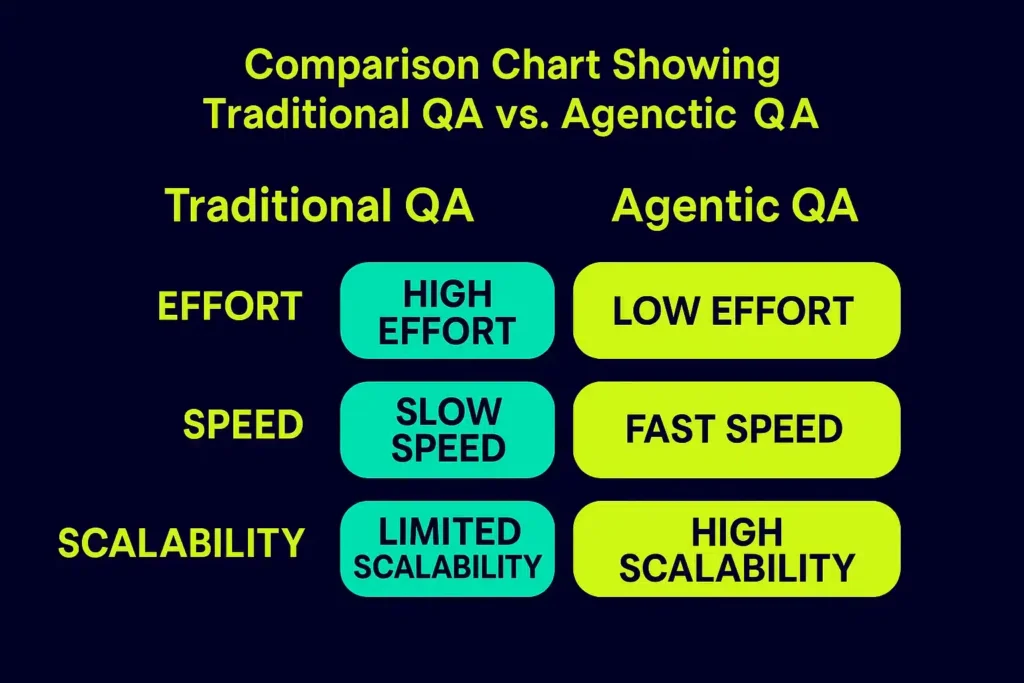
For teams still evaluating Playwright against Cypress, the comparison is worth making carefully, and both are strong for their intended context. But for enterprises whose definition of end-to-end includes SAP transactions, mobile native apps, REST APIs, and web frontends in a single validated flow, the comparison is not really between frameworks at all. It is between a fragmented assembly of tools that each cover one layer, and a unified platform that covers everything. 

Qyrus delivers 213% ROI (Forrester TEI), 80% reduction in defect leakage, 36% faster time to market, and 90% automation of manual regression cases, not as theoretical benchmarks, but as outcomes validated by enterprise customers across BFSI, manufacturing, retail, and SAP-heavy industries. 

The velocity gap between development speed and QA capacity is not closing on its own. The teams that close it first will ship faster, with fewer production incidents, and at lower total cost than their competitors. That is not a prediction, it is already happening. 


See how Qyrus transforms end-to-end testing for enterprise teams. Request a personalised demo → 

Featured Image-Self-healing Test Automation

It’s Monday morning. Your CI pipeline ran overnight and you open your test dashboard to find 180 tests failing. The app isn’t broken. No bug was introduced. Over the weekend, a developer refactored the frontend component library, wiping out every CSS class name your test suite depended on. Not a single real defect. Just 180 broken locators standing between your team and the Friday release. 

This is the maintenance trap that quietly drains QA programs every single week. The more you invest in test automation, the larger the surface area that shatters the moment your application evolves. And in teams shipping multiple times a day, that means an endless cycle of triage, diagnosis, and manual repair work that pulls engineers away from the things that actually matter: building new coverage, exploring edge cases, and shipping features. 

Built to break this cycle, self-healing test automation leverages artificial intelligence and machine learning to detect failures caused by UI or element modifications. The system dynamically identifies the intended element using alternative architectural attributes, updates the script in real time, and resumes execution without human intervention. 

This guide covers everything you need to know: what self-healing is, how it works under the hood, where it makes the biggest difference, what to watch out for, and how to implement it well. Whether you’re a QA engineer drowning in broken locators, an engineering manager trying to protect release velocity, or a CTO evaluating your automation strategy, this is your practical reference. 

What Is Self-Healing Test Automation? 

Self-healing test automation is an AI-powered capability that allows an automated test to detect when it cannot find a UI element, search for that element using alternative identifiers, repair the broken locator, and continue executing without any manual intervention. 

Think of it like GPS navigation. When you miss a turn, your GPS does not shut off and report failure. It recalculates the route, finds a new path, and gets you to the destination anyway. Self-healing test automation works on exactly the same principle: when the expected path breaks, the system finds another way and keeps going. 

The root problem it solves is locator brittleness. Traditional automated tests rely on locators such as IDs, XPath expressions, CSS selectors, element names, and text content to find and interact with UI elements. These locators are recorded at test creation time and hardcoded into the script. The moment a developer renames a button ID from ‘login-btn’ to ‘auth-submit’, or moves a div inside a new container, every test that referenced that element fails with a NoSuchElementException. 
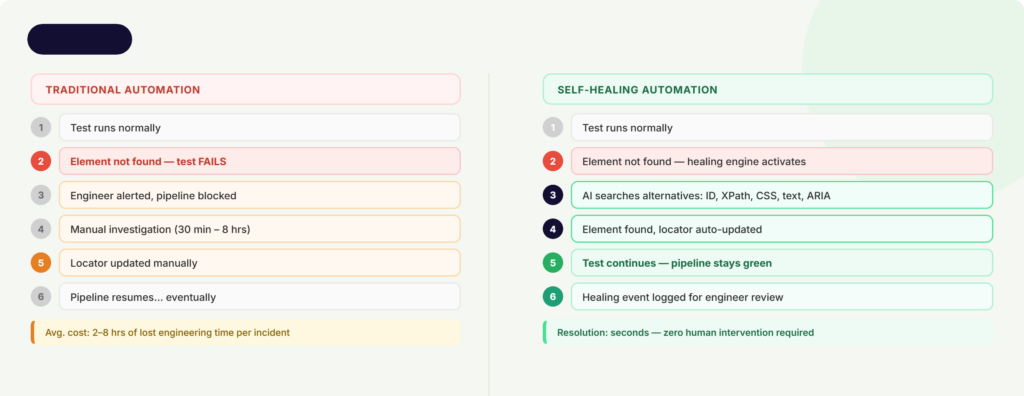
With traditional testing, the mentioned failure looks like this: test fails, engineer gets paged, engineer investigates, engineer updates the locator, pipeline resumes. That cycle can span from 30 minutes to several days, based on the number of affected scripts and the complexity of the change. 
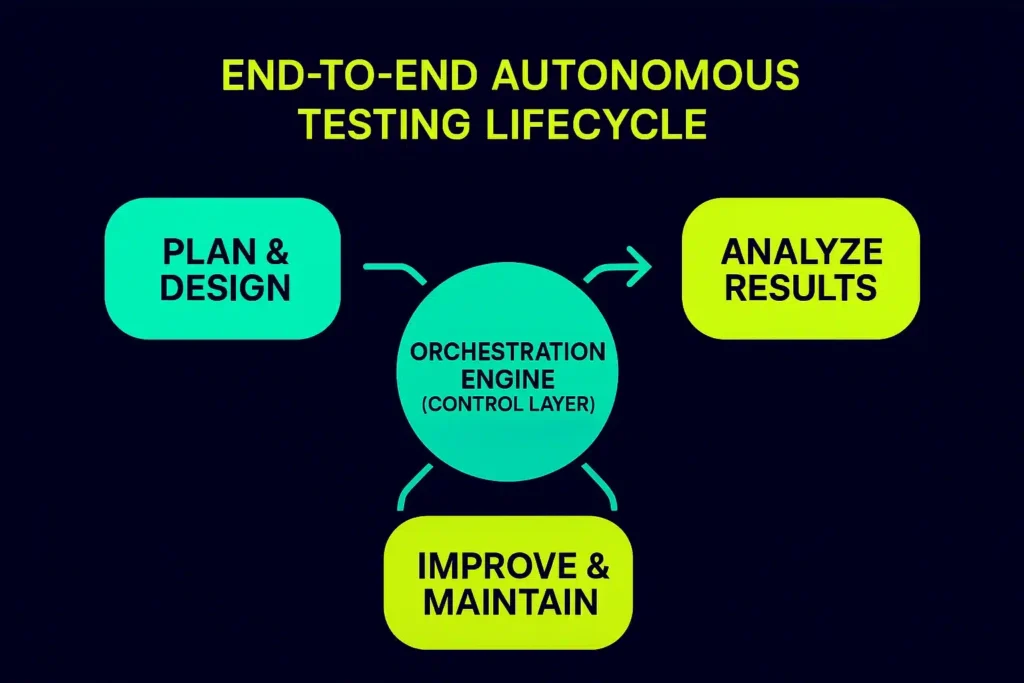
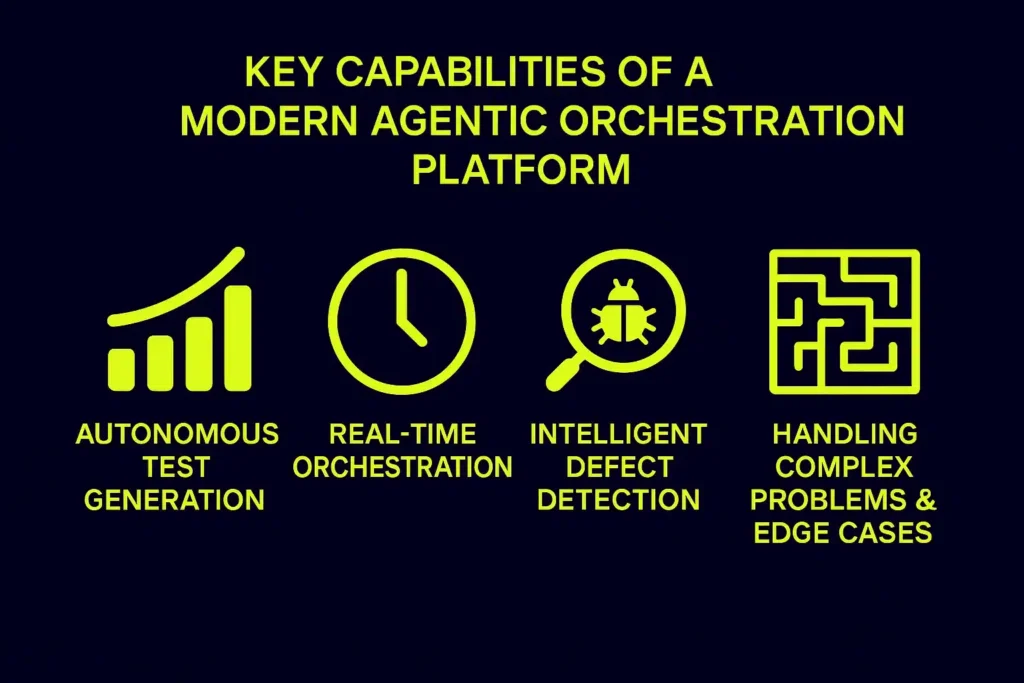
Conversely, a self-healing framework completely alters this. When a missing element is detected, the healing engine instantly evaluates secondary attributes, resolves the locator drift, resumes the test execution, and logs the event for asynchronous engineering review. The pipeline remains uninterrupted, eliminating false-positive pages. This is not about making tests that never fail. It is about making sure tests fail only when there is a real problem with the software, not because a button label changed.

Why Test Maintenance Is Quietly Killing Your QA Program 

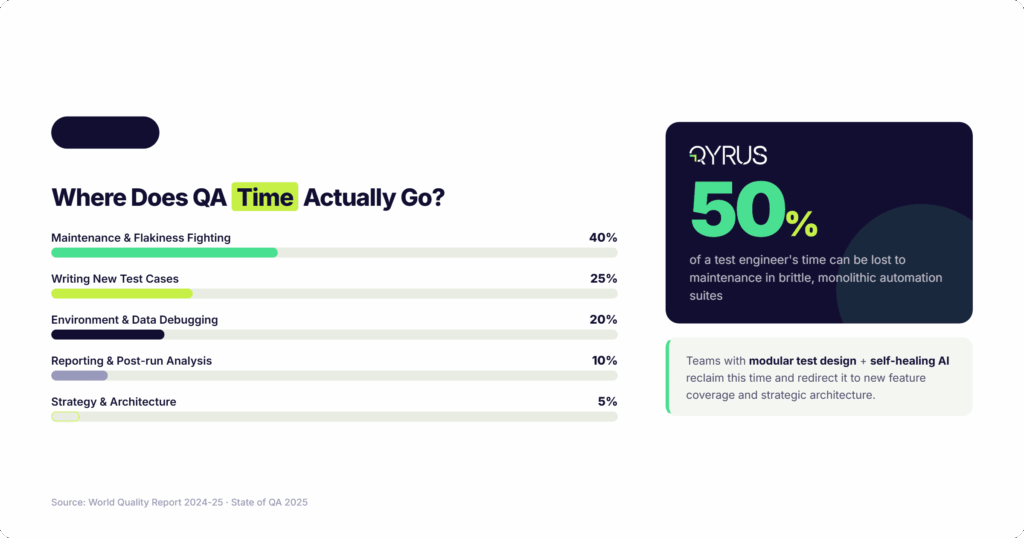
The numbers are hard to argue with. Research from Capgemini’s World Quality Report 2024-25, cited by QASource, found that script maintenance consumes up to 50% of test engineering time due to constant application changes. An analysis of 40 startups published on Medium in 2026 found teams spending 60 to 70% of QA time on upkeep, leaving only 30 to 40% for actually building new coverage. 

 This maintenance burden compounds destructively over time. Early in a product lifecycle, frontend elements remain relatively stable. However, as the application scales, three primary forces accelerate degradation: expanding feature sets increase test volume, widening the surface area vulnerable to code changes; modernizations like React framework upgrades trigger cascading locator failures; and growing test suites multiply the number of scripts referencing a single volatile element. 

There is also a talent cost that rarely gets quantified. A 2026 analysis found that triaging flaky tests requires both application architecture knowledge and test framework expertise simultaneously. That work concentrates on your most senior engineers. A senior QA engineer earning $140,000 annually who spends 30% of their time on test maintenance is absorbing roughly $42,000 of pure overhead per year. Not fixing bugs. Not building coverage. Updating locators. 

Then there is the false positive problem. When tests fail not because the software is broken, but because a class name shifted, it erodes trust in the entire test suite. Engineers start ignoring failures. Red pipelines stop being alarming. The automation you invested in stops being a safety net and becomes background noise. 

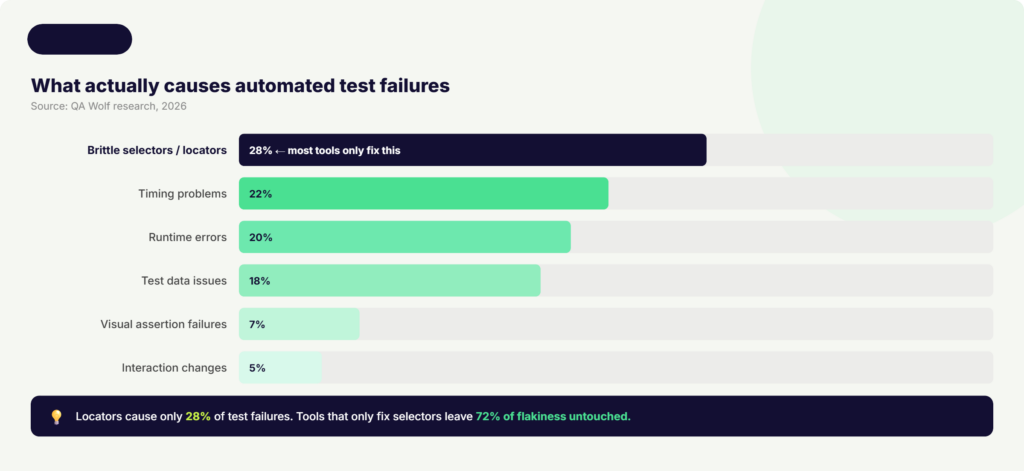
One more widely misunderstood reality: most tools marketed as ‘self-healing’ only address locator breakage. But according to QA Wolf research published in 2026, brittle selectors cause only about 28% of test failures in real-world suites. The remaining 72% come from timing problems, invalid test data, runtime errors, visual assertion failures, and interaction changes. Fixing only the locators while ignoring the rest means 72% of flakiness remains untouched. 

For an automation strategy to deliver a true return on investment, teams must look past basic locator-fixing utilities and adopt comprehensive platforms that handle data states, environment availability, and timing synchronization dynamically. 

How Self-Healing Test Automation Works 

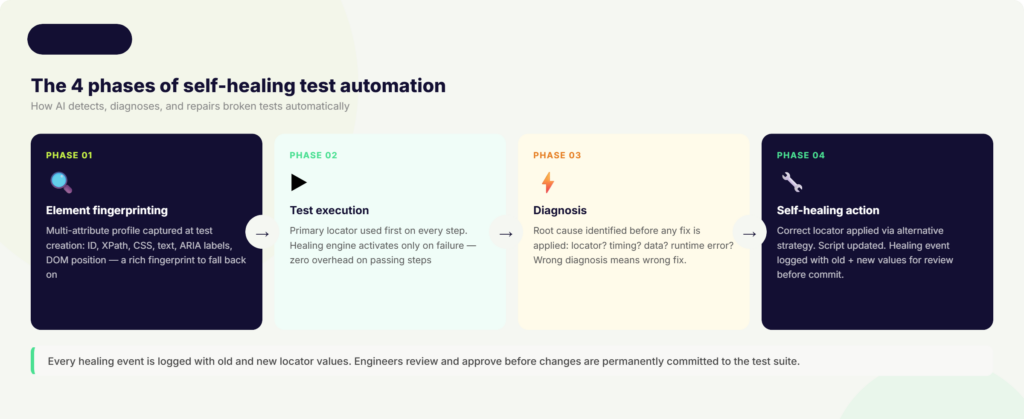
Understanding self-healing at a mechanical level helps you choose the right tool and implement it correctly. The process follows four distinct phases. 

Phase 1: Element Fingerprinting 

When a test is first created, the self-healing system captures a rich fingerprint of every UI element it interacts with. Rather than recording a single locator, it records multiple attributes simultaneously: the element ID, name, CSS selector, XPath, text content, ARIA labels, and the element’s relative position within the DOM tree. Some advanced systems also capture visual attributes through screenshots. 

This multi-attribute profile gives the healing engine a redundant set of identifiers to fall back on when the primary one breaks. It is the difference between knowing one route to a destination versus knowing five. 

By shifting from a single locator strategy to an object-model representation, the framework constructs a dynamic map of the application’s user interface rather than a fragile list of hardcoded coordinates. 

Phase 2: Test Execution 

During a test run, the framework attempts to locate elements using their primary identifiers exactly as scripted. The vast majority of steps will execute normally. When the primary locator succeeds, no healing occurs and no performance overhead is added. 

The system only activates when an element cannot be found via its primary identifier. At that point, rather than immediately reporting a failure, the healing engine is triggered. 

Phase 3: Diagnosis 

This is where more sophisticated self-healing tools differentiate themselves. A basic tool assumes every failure is a locator problem and tries alternative selectors. A diagnosis-first tool asks: what type of failure is this? 

Diagnosis-first systems capture runtime artifacts including DOM snapshots, network activity logs, console errors, and application state. They categorize the root cause before applying any fix. If the element is missing because an API response was slow and the page has not finished rendering, patching the locator achieves nothing and may cause a false pass. The right fix is adding a resilient wait or retry. If the element’s ID changed, updating the locator is correct. If it is a visual assertion failure, a screenshot comparison is needed. 

The AI and machine learning techniques involved include: computer vision using convolutional neural networks (CNNs) for visual element identification; natural language processing (NLP) to understand semantic meaning (so ‘Sign In’ and ‘Log In’ are recognized as functionally equivalent); supervised learning from historical test execution data to predict stable locator strategies; and fuzzy matching to score candidate elements by similarity of text, attributes, and DOM structure. 

Phase 4: Self-Healing Action 

Once the correct element is located through an alternative strategy, the system updates the test script with the new locator value and resumes execution. The original run completes and future runs use the healed locator. 

Critically, every healing event is logged. Best-in-class tools display the old locator value alongside the new one and prompt an engineer to review and approve the change before it is permanently committed. This human-in-the-loop validation ensures that legitimate functional regressions are never masked by over-eager healing. The script adapts to real UI changes. It does not silently pass when something actually broke. 

Key Benefits of Self-Healing Test Automation 

“Teams using AI-based testing tools reduced maintenance effort by up to 70% and improved CI/CD pipeline stability by nearly 50%.” – Capgemini World Quality Report 2024-25 

The most immediate and quantifiable benefit is the reduction in time spent on test maintenance. Capgemini’s World Quality Report 2024-25 found that teams using AI-based testing tools reduced maintenance effort by up to 70% and improved CI/CD pipeline stability by nearly 50%.  

The second major benefit is the elimination of false positives. When tests no longer fail due to minor UI changes, the signal-to-noise ratio in your test suite improves dramatically. Engineers stop ignoring red builds. When a test does fail, the team can trust it represents a real issue. This rebuilds confidence in the automation program and makes QA a reliable partner in the release process rather than a bottleneck. 

Self-healing directly accelerates CI/CD pipelines. With healing running automatically on every build, the pipeline stays green through routine UI changes without any human intervention required. Developers get fast, reliable feedback after every commit. The feedback loop that makes continuous delivery work remains intact even as the application changes constantly underneath it. 

Better test coverage is another downstream benefit that often goes unrecognized. When QA engineers are no longer spending half their time fixing broken locators, they have capacity to build new tests. Coverage expands. More business flows get validated. The automation program actually grows instead of just trying to maintain what already exists. 

For mobile testing specifically, self-healing addresses a particularly acute pain point. Mobile applications update frequently, often with UI structures that change significantly between versions and behave differently across iOS and Android. Teams that implement self-healing in mobile CI/CD pipelines report 20 to 30% faster release cycles according to Quinnox’s 2025 analysis. Healing corrects locator differences across device types without any per-device manual tuning. 

Finally, the return on investment is measurable and arrives quickly. CloudQA’s 2026 testing trends report found that enterprise organizations adopting self-healing scripts demonstrated a 95% reduction in manual maintenance overhead. The upfront investment in tooling is typically recovered within a single release quarter when measured against the engineering hours no longer lost to locator repair. 

Where Self-Healing Test Automation Makes the Biggest Difference 

Web Applications with Frequent Releases 

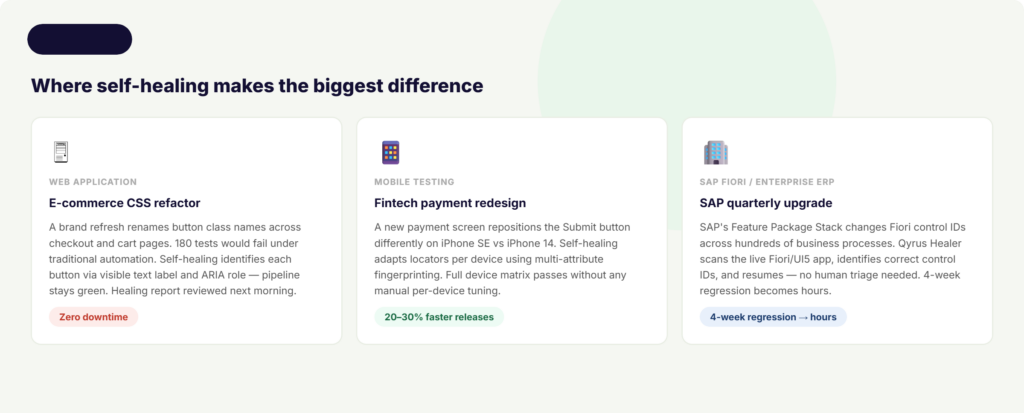
Consider an e-commerce team that ships a CSS refactor as part of a brand refresh. The development team renames dozens of button class names and updates div structures across checkout, cart, and account pages. Under traditional automation, this triggers mass test failures. Not because checkout is broken. Because the test scripts are looking for class names that no longer exist. 

With self-healing in place, the testing platform detects the broken selectors, identifies each button via its visible text label, ARIA role, and relative DOM position, updates the locators, and completes the run. The pipeline stays green. A healing report is generated summarizing every locator that was updated, which the QA lead reviews the next morning. The release ships on schedule. 

Mobile Testing Across Devices and OS Versions 

A fintech mobile app ships a redesigned payment screen to comply with updated accessibility guidelines. The Submit button has been repositioned, its ID has changed, and the surrounding layout is different on smaller devices than on larger ones. Tests that were working perfectly on iPhone 14 now fail on iPhone SE. 

Self-healing handles the positional differences automatically. By capturing multiple locator strategies at test design time, including text content, ARIA labels, and proximity to other stable elements, the healing engine identifies the correct button regardless of where it landed on each device. The test suite runs cleanly across the full device matrix without any per-device locator maintenance. 

SAP Fiori and Enterprise ERP Testing 

This is where self-healing delivers some of its most significant enterprise value, and where most competitors leave organizations on their own. 

SAP operates on a structured release cycle that includes major upgrades, Feature Package Stacks (FPS) delivered three times per release, and regular Support Package Stacks (SPS). Each release changes Fiori control IDs, app structures, and field names in ways that systematically break traditional test automation. According to ContextQA’s 2026 SAP testing guide, manual regression for a SAP environment with 200 or more active business processes takes 4 to 8 weeks. With automated testing, that same coverage takes 4 to 8 hours. 

Without self-healing, those 4 to 8 hours of automated testing become days of manual locator repair after every SAP quarterly update. With self-healing integrated into the SAP testing workflow, the automation adapts to each new release automatically, keeping the regression suite operational across upgrades. 

This drastically compresses the traditional testing timeline, allowing enterprise IT leaders to align their core ERP updates with rapid agile sprint cadences without risking business process downtime. 

When to Be Cautious 

Self-healing is not appropriate everywhere, and a credible guide should say so directly. For security-sensitive flows such as banking transactions or authorization changes, the consequences of a false pass are serious enough that human review should precede any test continuation. For exact layout or copy validation tests, where the precise position of an element or its exact text content is what you are testing, visual regression testing is the more appropriate tool. Self-healing adapts to change; visual regression detects it. 

How Qyrus Healer Takes Self-Healing Further 

Most self-healing tools pick a lane: web or mobile, UI or API, one platform or one framework. Qyrus Healer was built differently. 

A patent-backed approach. Qyrus Healer holds U.S. Patent 11,205,041 B2 for self-healing test automation. This is one of the few solutions in the market where the core healing algorithm is protected by a registered patent, reflecting the proprietary nature of the approach rather than a repackaging of generic AI libraries. 

No advance training required. Many AI-based testing tools need a period of historical execution data before their healing becomes reliable. Qyrus Healer’s patented algorithm works out of the box on any application, without requiring prior training runs. From the first execution, it intelligently identifies element changes across the application lifecycle and updates locators using a custom distance metric. 

99.9% accuracy. Healer achieves an accuracy rate of over 99.9% on locator identification and repair, minimizing false positives and ensuring that healed scripts genuinely reflect the current state of the application rather than introducing new errors. 

Web and mobile in one. Most self-healing solutions are siloed to either web or mobile testing. Qyrus Healer works across both platforms within a single unified environment. Web application tests and mobile application tests running on real devices through Qyrus Device Farm both benefit from the same healing capabilities. 

SAP Fiori integration. Qyrus Healer powers a unique SAP Fiori testing workflow through the Fiori Test Specialist module. When the AI-assisted test generator produces test steps with incorrect or missing Control IDs, the Healer pauses execution at the failing step, automatically scans the live Fiori/UI5 application to identify the correct technical field names and control IDs, corrects the values, and resumes execution. The healed values are shown alongside the original for review before being committed.  

Baseline script approach. Healer AI activates for Execute Test runs where a previous passed scenario report exists. It references that successful baseline and suggests updated locators, primarily ID, Class, and XPath values, to accommodate discrepancies found in the current run. This baseline-anchored approach means healing is always grounded in a known-good state of the application. 

For teams using Qyrus across web, mobile, API, and SAP testing, Healer provides a consistent self-healing layer across the entire testing program rather than requiring a different healing strategy per platform. You can learn more about Qyrus’s approach to web testing, mobile testing, and SAP testing, or book a demo to see Healer in action. 

Self-Healing Test Automation in CI/CD Pipelines 

CI/CD is where self-healing delivers its sharpest return on investment. Multiple deployments per day mean multiple opportunities for locator breakage. Without healing, every UI change is a potential pipeline blocker. With healing integrated at the pipeline level, those changes are absorbed automatically, and the deployment cadence is never interrupted. 

Integration works by hooking the self-healing engine directly into your pipeline trigger. When a developer merges a pull request or a build completes in Jenkins, Azure DevOps, or a similar tool, the test suite fires. If any locators have changed, the healing engine repairs them during that run. No human needs to intervene. No deployment waits for a QA engineer to investigate a false positive. 

Teams that implement CI-integrated healing typically find that 5 to 10% of locators fail after each UI update under normal conditions. With healing running at the pipeline level, the majority of those failures are resolved instantly. Quinnox’s analysis found that teams adopting this approach achieve 20 to 30% faster release cycles and experience far fewer pipeline halts due to broken tests. 

The recommended practice is not to auto-commit every healed locator without review. Instead, the AI proposes the fix and the pipeline continues. At the end of the sprint, a QA engineer reviews the healing log, which shows every step that was updated with the old and new values side by side. They approve changes that reflect genuine UI evolution, and flag any that look suspicious. This human-in-the-loop rhythm maintains trust in the test suite without sacrificing deployment speed. 

Qyrus integrates natively with the full range of CI/CD and version control tools that enterprise teams rely on, including Jenkins, Azure DevOps, Bitrise, TeamCity, Concourse, GitHub, and Bitbucket. Self-healing is available as a toggle in the run configuration, so it can be enabled or disabled per execution type without requiring any pipeline reconfiguration. 

Best Practices for Implementing Self-Healing Test Automation 

Self-healing is powerful, but it works best when you design your test suite to support it rather than expecting it to compensate for poor locator hygiene. 

  • Start with stable locator design. The best locators to use as primary identifiers are role-based selectors, visible text content, ARIA labels, and dedicated test attributes like data-testid. These change less frequently than generated IDs or dynamic class names. Self-healing compensates for locator drift, but fewer healing events mean faster runs and less noise in the healing log. 
  • Do not over-trust automatic fixes. If the healing engine is configured to be too permissive, it can mask real functional regressions. A button that has genuinely been removed from the application should fail the test, not be healed into clicking something else. Review healing logs regularly and configure confidence thresholds appropriately for your risk tolerance. 
  • Maintain a complete audit trail. Every healed step should be logged with the old locator value, the new locator value, the alternative matching strategy used, and the timestamp. This trail is essential both for debugging unexpected behavior and for demonstrating test reliability to auditors in regulated industries. 
  • Combine with visual regression testing for layout-sensitive flows. Self-healing adapts to locator changes. It does not validate that the visual layout of a page is correct. For flows where the exact positioning of elements matters, use visual regression testing alongside self-healing. The two capabilities are complementary, not interchangeable. 
  • Schedule periodic manual reviews. Monthly or quarterly reviews of healed steps confirm that the healing engine’s updates genuinely reflect intended UI changes rather than masking defects. This is especially important as the application scales and the volume of healing events grows. 
  • For SAP and ERP environments, run healing against a validated baseline first. Use a known-good, full-regression baseline execution as the reference point. Healing suggestions are always evaluated against that baseline, so the system knows what ‘correct’ looks like before proposing any changes. This prevents healing from propagating errors forward if a previous run already contained a defect. 

 The Future of Self-Healing Test Automation 

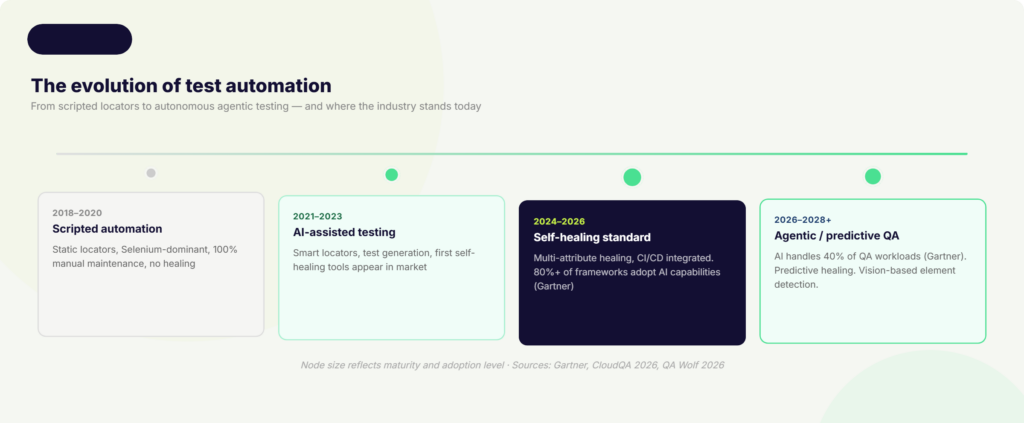
The self-healing tools available today are reactive: they detect a failure, diagnose it, and apply a fix. The next generation will be predictive. 

Predictive healing analyzes upcoming code commits before tests run. It identifies which locators in the existing test suite are likely to be affected by a proposed change, and pre-updates them so that the test run after the commit completes cleanly from the start. Instead of healing after a failure, the system prevents the failure from occurring in the first place. 

Agentic AI is the broader force reshaping how this works. Gartner forecasts that AI agents will independently handle up to 40% of QA workloads by 2028, including regression testing, smoke testing, maintenance, and bug triage. Standard self-healing addresses individual broken locators. Agentic AI reasons across entire test suites, makes decisions about test strategy, and executes multi-step recovery workflows without any human direction. 

Vision-based testing is another emerging direction that could reduce DOM dependency entirely. Rather than relying on HTML attributes and DOM structure, vision-based tools identify UI elements the way a human tester would: by looking at the screen. A button is a button because it looks like a button and sits in the context of a form, regardless of what its underlying ID happens to be on any given day. 

The 2026 software testing trends report from CloudQA puts this trajectory in concrete terms: self-healing scripts have demonstrated a 95% reduction in manual maintenance in early enterprise adopters, and organizations embedding generative AI into testing workflows are reporting a 40% increase in test coverage and a 10x improvement in overall productivity. 

For business and engineering leaders, the strategic implication is straightforward. The teams that invest in self-healing and agentic testing infrastructure now are not just reducing a maintenance overhead. They are building the quality assurance foundation that makes it possible to release confidently at the speed their customers expect. 

FAQs on Self-Healing Test Automation 

 1: What is self-healing test automation?  

 Self-healing test automation is an AI-powered capability that allows automated test scripts to detect when a UI element or locator has changed, find the correct element through alternative identifiers, update the script automatically, and continue running without any manual intervention. Instead of failing with a NoSuchElementException and waiting for an engineer to fix it, the test adapts on the spot. 

2: How is self-healing different from traditional automated testing?  

Traditional automated tests rely on a single hardcoded locator (an ID, XPath, or CSS selector) to find each UI element. When that locator breaks due to a UI change, the test fails and a human has to investigate and repair it. Self-healing tests capture multiple attributes for each element at test creation time, so when the primary locator fails, the system tries alternatives automatically. The key difference: traditional tests are brittle by design. Self-healing tests are built to absorb change. 

3: Does self-healing work for both web and mobile testing?  

Yes, though not every tool supports both. Most self-healing solutions focus exclusively on web automation. Qyrus Healer is specifically built to work across both web and mobile platforms within a single environment, including on real devices through Qyrus Device Farm, which means teams running both web and mobile test suites get consistent healing behavior without switching tools or strategies. 

4: Can self-healing test automation handle SAP Fiori testing?  

Most self-healing tools do not address SAP Fiori at all, which is a significant gap. SAP upgrades regularly change Fiori control IDs and app structures, making traditional test scripts fragile after every release. Qyrus Healer powers a dedicated SAP Fiori workflow through the Fiori Test Specialist module. When a test step fails due to an incorrect control ID, Healer pauses, scans the live Fiori/UI5 application, identifies the correct field names, corrects the values, and resumes execution. 

5: Will self-healing hide real bugs by making failing tests pass?  

This is the most important concern to address honestly: yes, it can, if implemented poorly. If a healing engine is too permissive, it may fix a locator when the real issue is that a feature has been removed or a flow has genuinely broken. The safeguard is human-in-the-loop review. Best-in-class self-healing tools log every healing event with the old and new locator values, and prompt an engineer to approve changes before they are permanently committed. Self-healing should never run silently with no audit trail. When implemented correctly, it reduces noise from false positives without masking real defects. 

Stop Fixing Tests. Start Shipping Software. 

Go back to Monday morning. Your pipeline ran overnight. You open the dashboard. 180 tests ran. 180 passed. The frontend team’s CSS refactor landed cleanly. The component library update was absorbed automatically. The healing log shows 23 locators that were updated overnight, each one reviewed and approved, each one correct. And your team ships on Friday. 

That is what self-healing test automation actually delivers. Not a magic system that never breaks. A practical infrastructure that stops tests from failing for the wrong reasons, keeps your CI/CD pipeline moving, and gives your QA team back the time they need to do the work that actually requires human judgment. 

The data is clear. Maintenance consumes up to 50% of QA engineering time under traditional automation. Teams that adopt AI-based self-healing reduce that burden by 70%. The releases come faster. The test suite grows instead of stagnating. The Monday morning dashboard becomes something you look forward to rather than dread. 

The technology is here, it works, and the organizations investing in it now are building a sustainable competitive advantage in release quality and speed. 

If you want to see how Qyrus Healer handles self-healing across web, mobile, and SAP Fiori testing in a single platform, book a demo with the Qyrus team. 

Enterprise retailers are running $6.3 trillion worth of digital commerce on software quality models that were designed for a world of annual releases and monolithic applications. That world is gone. The gap between how retailers test their platforms and how customers experience them is no longer a technical problem — it is a revenue problem. 

This whitepaper maps the exact cost of that gap, and the three-layered path to closing it — from AI-powered full-spectrum testing across Web, Mobile, API, Data, and SAP, through to fully autonomous quality with the SEER framework. With Forrester TEI data, retail-specific scenarios, and a 12-month implementation roadmap included.

What’s Inside the Whitepaper? 

This is not a product brochure. It is a board-ready business case, built from Forrester TEI data, retail-specific failure scenarios, and a concrete implementation roadmap — designed to be shared with your CIO, CFO, and the engineering leaders who will execute the strategy. 

  • How distributed commerce architecture creates invisible, revenue-destroying failure points — and why traditional QA misses every one of them. 
  • The three structural gaps in legacy QA: maintenance debt, siloed channel testing, and synthetic load tests that don’t reflect peak-season reality. 
  • Full-spectrum AI testing across Web, Mobile, API, Data, and SAP — progressing to omnichannel orchestration and SEER autonomous testing. 
  • 3× faster test cycles, 80% maintenance reduction, and 200%+ ROI — what the numbers say and how to use them with your CFO. 
  • Why headless commerce creates seam failures that traditional UI testing never catches — and how contract testing closes the gap. 
  • A phased implementation plan with clear KPI targets at each stage — built to deliver measurable ROI before the transformation is complete. 

What the world’s most resilient retailers do differently.  

These are the six quality engineering principles that separate retailers who dominate peak season from those who post apology banners on their homepage. 

  • Test generation happens in the same sprint as feature development — not the next one. AI tools like NOVA generate test scripts from requirements, so QA is never the bottleneck before release. 
  • Validate complete customer transactions — mobile cart to web checkout, loyalty points earned in-app to POS redemption in-store. Siloed channel testing misses every cross-system failure that customers actually experience. 
  • Your payment gateway, logistics API, and tax engine all update on their own schedules. Contract testing catches schema drift before it becomes a checkout outage — without triggering real financial transactions. 
  • Stale inventory counts, mismatched pricing records, and broken personalization pipelines are not back-office problems. They are customer-facing failures. Validate data pipelines with the same rigor as your UI. 
  • Continuously run synthetic tests of your core purchase journey 24/7 — not just in the run-up to peak. Golden Path monitoring catches regression the moment it is introduced, not after it reaches customers during Black Friday. 
  • Self-healing test automation is the end-state — not a nice-to-have. Autonomous frameworks like SEER eliminate the maintenance tax entirely, freeing QA teams to focus on coverage expansion rather than script repair. 

Every millisecond of latency, every broken API, and every disjointed cross-channel moment is a direct withdrawal from your brand’s equity. The retailers who will lead the next decade are those who treat quality engineering as a capital investment in growth — not a checkbox before release. 

Featured image-10 Bottlenecks blocking test automation

Most test automation programs start strong. A few hundred tests, fast feedbackand streamlined CI pipelines. Eventually, the landscape shifts. The suite grows, the team grows, the product grows, and suddenly every merge takes 90 minutes to validate, engineers spend more time fixing broken tests than writing new ones, and QA has quietly become the bottleneck it was always meant to eliminate. 

This is not a tooling problem. It is an architecture, process, and prioritization problem. And it is extremely common. 

This post maps out the 10 most common bottlenecks that block teams from scaling test automation platforms effectively — with the symptoms to recognize them early, the root causes beneath the surface, and practical fixes QA leaders, test automation leads, and DevOps engineers can apply now. 

Bottleneck 1: Sequential Test Execution Stifling Pipeline Velocity 

Symptom 

Your full regression suite takes 60, 90, or 120+ minutes to complete. Developers stop waiting for results and merge anyway. 

Root Cause 

Tests run one after another in a single thread. This worked fine at 50 tests. It does not work at 500 or 5,000. Sequential execution is not a deliberate choice at this point. Instead, it represents architectural debt from the suite’s early stages. 

When CI feedback takes longer than a coffee break, engineers decouple from test results mentally. They start merging on gut feel, which defeats the entire purpose of automation. 

Fix 

Implement parallel test execution. Distribute tests across multiple agents, containers, or cloud nodes so that independent tests run simultaneously. A test suite that runs sequentially in 45 minutes can complete in under 8 minutes with proper parallelization. This represents an 82% reduction in build time. 

Start by identifying tests that share no state or data dependencies and split those into parallel streams. Add test sharding and dynamic load balancing as the suite matures. For teams running cross-browser or cross-device validation, a cloud-based browser and device farm eliminates queue bottlenecks without maintaining physical hardware. 

 Bottleneck 2: Flaky Tests Destroying Team Confidence 

Symptom 

Tests pass locally but fail in CI. The same test fails on Monday and passes on Tuesday with no code changes. Developers add retry flags and move on. 

Root Cause 

Research on large-scale test suites consistently shows that async wait and timing issues account for roughly 45% of flaky tests. Concurrency and resource contention cause 20% more. The remainder splits between test order dependencies, environment differences, and non-deterministic logic. 

Retrying a failing test is the instinctive response — but retries inflate CI duration and, more damagingly, train teams to normalize failure. Eventually developers stop acting on red builds because they cannot distinguish noise from signals. The safety net becomes wallpaper. 

Fix 

Treat flakiness as a first-class engineering concern, not a QA nuisance. Instrument your CI pipeline to detect and quarantine flaky tests automatically. Replace hard-coded sleeps with explicit waits. Isolate test data so runs do not interfere with each other. 

Stat: Test maintenance, including fighting flakiness, consumes roughly 40% of QA team time. (State of QA 2025) 

Self-healing test capabilities, where AI automatically identifies updated locators when UI elements shift, directly address the most common root cause of brittleness in web and mobile automation. 

Bottleneck 3: Test Suite Maintenance Consuming More Time Than Test Creation 

Symptom 

The sprint backlog is dominated by ‘fix broken test’ tickets. New feature coverage is falling behind because automation engineers are busy repairing old scripts. 

Root Cause 

Automation suites function as dynamic ecosystems. Applications change constantly — new UI components, refactored flows, updated APIs. Every change is a potential break. Without modular architecture, a single UI update can cascade into dozens of failing tests that each need individual repair. Up to 50% of a test engineer’s time can be consumed by maintenance in organizations running brittle, monolithic, script-based automation. 

Fix 

Modular test design is the highest-impact structural change a team can make. Encapsulate reusable flows — authentication, checkout, navigation — into shared components. When a flow changes, update the component once and all tests using it inherit the fix automatically. 

Pair this with a regular test audit cadence. Retire tests that cover functionality no longer in production. Flag tests with a consistent failure rate above a set threshold for triage. A lean, reliable suite beats a sprawling, brittle one at any scale. 

Bottleneck 4: Test Environment Inconsistency Causing False Failures 

Symptom 

Tests pass in staging, fail in QA, and behave unpredictably in CI. Environment differences account for a large share of investigation time that yields no actual bug. 

Root Cause 

Configuration drift. Development, staging, QA, and production environments diverge over time — different versions of dependencies, different database states, and different environment variables. Tests written against one configuration quietly break in another.  The failure does not stem from the test logic but from an undefined environment state. 

Fix 

Adopt Infrastructure-as-Code (IaC) to define environments programmatically and keep them consistent across every pipeline stage. Use containerization (Docker) to replicate production configuration during testing. Define environment-specific variables in your test platform rather than hardcoding them into scripts, so the same test can execute across multiple environments without modification. 

Bottleneck 5: Poor CI/CD Integration Leaving Automation Disconnected from Delivery 

Symptom 

Tests are triggered manually or on a schedule, rather than on every code push. Feedback arrives hours after a change, not minutes. Developers have already moved on by the time results land. 

Root Cause 

Test automation and CI/CD pipelines exist in separate silos. The tools are not wired together — either integration was never built, or it was built poorly, with no intelligent gate logic, no notification routing, and no pass/fail criteria tied to deployment decisions. 

Fix 

Native CI/CD integration is non-negotiable for scaling test automation platforms. Connect your test suite directly to your pipeline so every code commit triggers the appropriate test subset automatically — unit tests on every push, integration tests on every PR, full regression on merge to main. Build quality gates that block promotion based on test outcomes. 

Stat: The DORA State of DevOps Report 2024 identifies test parallelization and CI/CD integration as the top techniques separating elite engineering teams from the rest, with elite teams maintaining median build times under 10 minutes. 

Bottleneck 6: Inadequate Test Data Management Causing Hard Dependencies and Conflicts 

Symptom 

Tests fail because required test data does not exist, is stale, or was consumed by a previous run. Setting up data for a new scenario takes days. Parallel runs corrupt each other’s data. 

Root Cause 

Test data is treated as an afterthought rather than a managed resource. Teams either copy production data (fragile and non-compliant) or rely on manually created datasets that go stale as the application changes. At scale, a shared data pool becomes a contention point — parallel test runs race to read and modify the same records, producing unpredictable results. 

Stats: 45% of respondents have 3–10 copies of each production dataset in non-production environments. (2025 State of Data Compliance and Security Report) | Teams with mature TDM practices release 3.2x faster than those without. (World Quality Report 2025) 

Fix 

Invest in parameterized, data-driven test design where each test scenario pulls from its own isolated dataset rather than a shared pool. Use synthetic data generation to create realistic, compliant datasets on demand — no production data copies required. Build data provisioning into the CI pipeline so the right data is ready before tests execute. 

Bottleneck 7: Coverage Gaps Hidden by Vanity Metrics 

Symptom 

Automation coverage is reported at 80%+, but production defects keep slipping through. Post-mortems reveal the tested paths were not the ones that failed. 

Root Cause 

Coverage metrics measure which lines of code or test cases have been automated — not which business-critical flows have been validated end-to-end. Teams optimize for the metric rather than the outcome. Common side effects: over-automation of low-risk UI interactions, under-automation of API layers and backend integrations, and zero coverage of edge cases that only emerge under real load. 

Fix 

Reframe coverage as business process coverage, not code coverage. Map your most critical user journeys — registration, checkout, onboarding, payment processing — and confirm each one has complete automated validation from the API layer through the UI. Run exploratory test tools alongside scripted automation to surface untested pathways that scripted tests cannot reach by design. 

Risk-based test selection — prioritizing automation for flows that carry the highest business risk, change most frequently, or have the highest defect history — delivers far more value than maximizing a coverage percentage. 

Bottleneck 8: Skill Concentration Creating a Testing Bottleneck of One 

Symptom 

Only one or two engineers on the team can write or maintain automation scripts. Every new test request joins a queue behind them. Manual testing fills the gap. 

Root Cause 

Traditional automation frameworks require programming expertise — knowledge of Selenium, specific language bindings, locator strategies, and framework architecture. This creates a single-guild dependency where non-technical team members cannot contribute to automation regardless of their functional knowledge. 

Stat: Over 88% of companies report struggling to find, hire, and retain quality automation engineers. (Techstrong Research) 

Fix 

Low-code and no-code test automation directly addresses this bottleneck by making test creation accessible without coding expertise. When a business analyst can build a test from a user story description and a manual tester can record and validate a scenario without writing a single line of code, the creation bottleneck breaks. 

AI-powered test generation goes further — taking a Jira ticket or a natural language use case description and producing 60–80 functional test scenarios automatically. This does not replace automation engineers; it reallocates their focus from test authoring to architecture, tooling, and strategy. 

Bottleneck 9: No Impact Analysis Leading to Always-Run-Everything Cycles 

Symptom 

Every commit triggers the full test suite, regardless of what changed. A CSS fix to the footer runs the payment integration tests. Execution time grows proportionally with suite size. 

Root Cause 

There is no intelligence connecting code changes to test selection. The default is to run everything, always — which is safe in theory but inefficient at scale. As suites grow to thousands of tests, ‘run everything’ becomes a delivery tax paid on every merge. 

Fix 

Implement test impact analysis to identify which tests cover the code changed in a specific commit, and run only those instead of the full suite. Organize your suite into fast-feedback layers: 

  • Smoke pack (5–10 minutes) — runs on every push 
  • Sanity pack (15–20 minutes) — runs on every PR 
  • Full regression pack — runs on merge to main or on schedule 

This tiered approach dramatically reduces CI time while maintaining appropriate coverage at each stage. AI-driven impact analysis — examining dependency graphs, historical failure data, and code change patterns — takes this further, delivering higher confidence with a smaller execution footprint. 

Bottleneck 10: Reporting That Produces Data Without Actionable Intelligence 

Symptom 

Test results are available, but no one acts on them quickly. Root cause investigation requires diving through log files, comparing screenshots manually, and tracing failures across multiple tools. Post-run analysis takes longer than the run itself. 

Root Cause 

Reporting is treated as a log dump rather than a communication tool. Results are stored in one system, screenshots in another, CI logs in a third. There is no unified view that tells a developer or QA lead — at a glance — what failed, why it failed, and what the business impact is. 

Fix 

Consolidate reporting into a single, unified view that shows step-level execution details, failure screenshots, console logs, performance metrics, and issue-tracking integration in one place. Step-level granularity — showing exactly which action failed and what the actual versus expected result was — dramatically reduces investigation time compared to high-level pass/fail summaries. 

Build notification routing into your test infrastructure. When a specific workflow fails, the right person should know within minutes, through Slack, email, Teams, or a Jira ticket, with enough context to act without hunting through dashboards. 

Pulling It Together: A Self-Assessment Checklist for QA Leaders 

The ten bottlenecks above rarely appear in isolation. Flaky tests compound slow execution. Poor test data management drives environment inconsistency. Skill concentration blocks the coverage expansion that impact analysis requires. Pick the bottleneck causing the most downstream damage and work forward from there. 

  • Regression runs taking more than 30 minutes? → Start with parallel execution (Bottleneck 1) 
  • Team spending more time on maintenance than creation? → Prioritize modular design and self-healing (Bottlenecks 2, 3) 
  • Environment failures masking real results? → Tackle IaC and configuration management (Bottleneck 4) 
  • CI results arriving too late to influence developer behavior? → Fix CI/CD integration first (Bottleneck 5) 
  • Tests failing because data is missing or conflicting? → Build a test data strategy (Bottleneck 6) 
  • Only one person able to create automation? → Invest in low-code tooling and AI test generation (Bottleneck 8) 

How Modern Platforms Accelerate This Work 

Fixing these bottlenecks is significantly harder with fragmented toolchains — one tool for web automation, another for API testing, a third for CI integration, a fourth for reporting. Every seam between tools is a maintenance burden and an integration risk. 

Modern unified testing platforms are designed to address this architectural fragmentation. Qyrus, for example, brings web, mobile, API, and SAP testing onto a single platform with: 

  • Built-in parallel execution across a cloud browser and device farm 
  • Native CI/CD integrations (Jenkins, Azure DevOps, Bitrise, TeamCity, Concourse) 
  • Self-healing AI (Healer) that automatically repairs broken locators after UI changes 
  • AI-powered test generation (NOVA and TestGenerator+) that creates scenarios from Jira tickets or plain-English descriptions 
  • Parameterization and data-driven testing for isolated, reusable test data 
  • Granular step-level reporting with screenshots, console logs, and performance metrics — all without writing code 

The practical effect: teams can address multiple bottlenecks simultaneously rather than purchasing and integrating point solutions for each one. 

Final Thought 

Scaling test automation platforms is not about running more tests. It is about running the right tests, reliably, fast enough to influence decisions, with low enough maintenance overhead that the suite stays trustworthy as the product grows. 

Each of the ten bottlenecks above represents a point where automation effort exceeds automation value. Removing them — one by one, in order of impact — is how QA teams transform from a delivery gate into a delivery accelerator. 

The teams that get this right don’t just ship faster. They ship with confidence. 

Want to see how Qyrus helps QA and DevOps teams tackle these scalability challenges end-to-end? Book a demo today. 

Events Blog Banners

The Qyrus team is excited to announce that we’ll be attending Finzspire 2026 as an exhibitor. 

As financial institutions continue accelerating digital transformation initiatives, the demand for faster releases, seamless customer experiences, and resilient quality engineering practices continues to grow. Modern BFSI ecosystems now rely on highly connected applications, APIs, third-party integrations, and real-time transactions that leave very little room for error. 

Why These Discussions Are Becoming More Important 

Today’s financial platforms operate across complex digital environments where a single customer interaction can involve multiple systems working simultaneously behind the scenes. 

From mobile banking applications to payment gateways and customer portals, testing can no longer happen in isolated silos. Teams need visibility across complete end-to-end workflows to better understand how applications behave in real-world conditions. 

That is why conversations around automation, orchestration, AI-driven testing, and release confidence are becoming increasingly important across the BFSI industry. 

What Qyrus Will Be Showcasing 

At Finzspire 2026, the Qyrus team will be connecting with banking, fintech, insurance, and QA leaders to discuss how organizations are approaching modern testing challenges in increasingly connected environments. 

Attendees visiting the Qyrus booth will have the opportunity to explore how enterprises are modernizing testing across web, mobile, and API ecosystems while improving visibility throughout the release lifecycle. 

The discussions will focus on helping teams: 

  • Validate complete end-to-end customer journeys 
  • Improve release confidence across complex systems 
  • Reduce fragmented testing processes 
  • Support faster delivery cycles with greater quality visibility 

Meet the Qyrus Team at Finzspire 2026 

We are looking forward to meeting industry professionals, exchanging ideas, and having meaningful discussions around the future of software quality in financial services. 

If you’ll be attending Finzspire 2026, be sure to stop by the Qyrus booth and connect with the team. 

SAP Functional Testing

A Strategic Framework for CIOs, CTOs, and IT Leaders Navigating SAP Quality Assurance 

Imagine a global manufacturer closing its books for the quarter. On a Tuesday morning, a routine SAP transport—a minor configuration patch applied the previous Friday—silently severs the integration between Sales and Distribution and Financial Accounting. Purchase orders continue to flow. Inventory updates in real-time.  

Yet, invoices stop posting to the general ledger. The oversight remains undetected until Wednesday afternoon, when the finance team discovers a 36-hour gap in receivables. By the time leadership identifies and remediates the break, the company absorbs three days of operational disruption, a delayed financial close, and an emergency session with external auditors. The catalyst? A single change that skipped regression testing before promotion to production. 

This scenario repeats in SAP environments every quarter across every major industry. The financial stakes are absolutely important.  

We designed this guide for executives accountable for the integrity of that nervous system. It outlines: 

  • The Business Risk Profile: Identifying the true cost of inadequate sap functional testing. 
  • Life Cycle Strategy: Defining your testing requirements at every phase of the SAP journey. 
  • The Maturity Model: An honest assessment of the path from manual testing to AI-driven orchestration. 
  • The Executive Diagnostic: A five-question audit to determine if your current approach is a hidden liability. 
  • Systemic Remediation: How Qyrus helps enterprise SAP programs close these gaps. 

Why SAP Testing Failures Are a Board-Level Risk, Not Just an IT Problem 

The ITIC 2024 Hourly Cost of Downtime Survey reveals that 97% of large enterprises report a single hour of downtime costs over $100,000. In sectors like finance, manufacturing, and retail, average hourly outage costs frequently exceed $5 million. SAP serves as the nervous system for these organizations; when it fails, the entire business halts. 

Many leadership teams still misclassify SAP testing as a localized IT task—a technical checkbox to clear before a release. This perspective is a dangerous strategic miscalculation. In reality, SAP quality assurance represents a fundamental pillar of business continuity, financial reporting integrity, and regulatory compliance. 

Over 440,000 organizations worldwide utilize SAP to orchestrate their most critical operations, including payroll, procurement, order management, and global supply chain logistics. These are not peripheral functions; they are the heart of the enterprise. When a core SAP module fails, the resulting operational paralysis extends far beyond the IT department, hitting the balance sheet and achieving board-level visibility within hours. 

The following table illustrates the immediate impact an untested SAP change can have across typical enterprise functions:

Business Function 

Operational Impact of Failure 

Primary Stakeholders 

Financial Close 

General Ledger postings halt; reconciliation logic fails. 

CFO, External Auditors 

Supply Chain 

Procurement orders stall; inventory signals become corrupt. 

COO, Logistics Partners 

Order-to-Cash 

Sales orders process, but invoices fail to post to the ledger. 

VP of Sales, Customers 

Payroll 

Pay runs miscalculate or fail to execute entirely. 

CHRO, Employees 

Regulatory Reporting 

Incorrect tax postings or compliance omissions trigger penalties. 

General Counsel, Regulators 

The Capital Efficiency Problem 

Beyond the immediate operational risk, a significant capital allocation dimension exists that CFOs rarely surface in testing discussions. Research from SAP Insider confirms that manual testing still consumes up to 30% of total SAP implementation budgets. On a $20 million transformation program, the organization effectively spends $6 million on a methodology that is both slower and less effective than modern automated alternatives. We do not view this as a QA budget line; we view it as a massive drain on capital efficiency. Redirecting that capital toward faster release cycles or innovation provides a genuine competitive advantage. 

The Remediation Multiplier 

Post-release risk compounds this financial picture further. According to IBM’s Systems Sciences Institute, fixing a defect in production costs 4 to 5 times more than identifying it during earlier testing phases. However, in the SAP ecosystem, the multiplier is even more punishing. Because SAP modules are so tightly linked, a single defect often cascades across multiple business units. The true remediation cost—accounting for developer hours, business downtime, and extensive data cleanup—frequently grows by an order of magnitude. 

“What gets skipped in testing shows up as a live system issue. And live system issues cost far more to fix.” — SAP S/4HANA Migration Risk Guide 

By shifting testing “left” and automating the validation process, we help enterprises transform QA from a cost center into a risk-mitigation engine that protects the organization’s most vital assets. 

Defining the Domain: What SAP Functional Testing Actually Validates 

Sap functional testing is the process of confirming that configured business processes align with specific business requirements. It is a distinct discipline from end-to-end, performance, or security testing, though a mature quality program must include all four. While other methods test for scale or vulnerability, functional testing confirms that the logic inside your SAP modules matches how your business actually operates. 

The distinction is critical. In most struggling SAP programs, the failure isn’t that teams test too little; they test the wrong things, in the wrong order, using fragmented data. 

The Four Essential Testing Layers 

To maintain system integrity, every enterprise SAP program requires a structured approach across these four layers: 

Layer 

Strategic Validation 

Primary Ownership 

Primary Failure Mode 

Functional Unit Testing (FUT) 

Validates individual configurations, ABAP logic, and custom fields. 

Functional Consultants 

Sacrificed under timeline pressure. 

System Integration Testing (SIT) 

Validates cross-module and third-party data exchanges. 

QA Leads + Functional Teams 

Fragmented module dependency mapping. 

Regression Testing 

Protects the stability of existing processes after every patch or transport. 

QA / Automation Teams 

Manual execution vs. release velocity. 

User Acceptance Testing (UAT) 

Validates real-world process fit and day-to-day usability. 

Business Users 

Rushed and bolted on at the project’s end. 


The “Integration Wall”: Why SAP Defies Modular Testing 

Most enterprise software allows for siloed, module-by-module testing. SAP does not. Its architecture creates what practitioners call the “Integration Wall”, the point where isolated testing produces false confidence because it ignores how modules interact. 

Consider a practical example: A development team applies a pricing configuration change within the Sales and Distribution (SD) module. In isolation, the change validates perfectly. A sales order generates, the pricing logic applies, and the tester signs off. 

The risk lies in the downstream chain that remains untested: that SD pricing change alters the value of a document auto-generated in Financial Accounting (FI). This, in turn, corrupts the tax calculation logic posting to your general ledger accounts, which eventually breaks the month-end balance sheet reconciliation. These defects rarely surface until the finance team attempts to close the books. 

This is not an edge case. In a 2025 iLab Quality case study, a manufacturing enterprise discovered, just two weeks before a major go-live, that a critical procurement workflow silently depended on a deprecated transaction code. Because the team had tested isolated modules rather than end-to-end processes, the issue remained invisible. The resulting remediation delayed go-live by six weeks while the team mapped the entire dependency chain. 

S/4HANA and Fiori: The Legacy Script Liability 

If your organization is among the 60% actively planning or undergoing an SAP S/4HANA migration, your existing ECC test scripts represent a systemic risk. They will not just fail occasionally; they will fail systematically. 

The move to S/4HANA introduces three shifts that render legacy test cases obsolete: 

  1. The Fiori UI Layer: Standard SAP GUI scripts cannot interact with web-based Fiori apps. Test automation built over the last decade for the legacy GUI requires complete re-engineering. 
  2. Simplified Data Models: The S/4HANA Universal Journal consolidates tables that previously lived separately across FI and CO. Validation logic that targets specific ECC table structures will return errors or corrupt results in S/4HANA. 
  3. Real-Time Processing: S/4HANA replaces ECC’s batch-oriented processes with real-time processing. This shift invalidates performance assumptions, transaction sequences, and timing dependencies. 

The data confirms the difficulty of this transition. A 2025 Horváth study of 200 SAP user companies found that over 60% experienced schedule and quality deviations during migration, with projects running 30% longer than planned. Only 8% finished on schedule. In the S/4HANA era, undertested migrations have become the norm, not the exception. 

 Is Your SAP Testing Strategy a Hidden Liability? A 5-Question Executive Checklist 

Before evaluating platforms or vendors, you must conduct an objective audit of your current SAP testing maturity. These questions bypass technical jargon to focus on governance and risk. If your leadership team cannot answer these with absolute certainty, your organization is likely carrying unmanaged operational risk. 

Question 1: Impact Visibility 

Do you know exactly which business processes are at risk when an SAP patch or transport is applied? 

Most organizations lack this visibility. They recognize that a change occurred and perhaps identify the specific module it touched, but they cannot trace the downstream impact. Without automated change impact analysis, your team relies on “assumption-based testing.” These assumptions are precisely how six-week go-live delays happen. 

Question 2: The Automation Bottleneck 

Does your regression suite run autonomously, or do you still rely on manual intervention for every transport? 

Partial automation is a bottleneck in disguise. SAP environments receive a constant stream of security patches, enhancement packages, and configuration updates. Each one introduces regression risk. Manual testing creates a compounding cost burden that eventually breaks the project budget. If your testing does not scale horizontally with your release frequency, the math will eventually fail. 

Question 3: The Execution Window 

Can your QA team complete a full regression cycle within your current release window? 

This is the question internal teams often avoid. If your team must “selectively” skip tests to meet a deadline, you are making implicit risk decisions under pressure. Strategic quality assurance requires that every critical path receives validation every time. If your window is shrinking while your manual effort remains static, you are essentially gambling on system stability. 

Question 4: Process-Level Coverage 

Do you have documented cross-module test coverage for your top 10 critical business processes? 

Standard documentation usually lives at the module level (e.g., SD or FI). However, your business operates through end-to-end chains: Order-to-Cash, Procure-to-Pay, and Record-to-Report. If your testing validates modules but ignores the connective tissue between them, you have a massive coverage gap at the process level—where the most expensive failures occur. 

Question 5: Audit and Compliance Readiness 

Can you produce audit-ready test evidence within 24 hours of a major release? 

Regulatory frameworks like SOX, GDPR, and GxP require definitive proof that you validated critical processes before go-live. If your evidence is scattered across spreadsheets and email threads, you lack a proper system of record. This creates a compliance vulnerability that auditors will eventually expose, leading to significant fines or remediation costs. 


Scoring Your Risk Posture 

Score 

Strategic Implication 

4–5 “Yes” 

Mature: Your program is resilient. Focus on AI-driven acceleration and continuous optimization. 

2–3 “Yes” 

At Risk: Significant gaps exist that threaten release stability. A platform evaluation is a priority, not a future project. 

0–1 “Yes” 

Critical Liability: Your SAP program carries material business risk. This is a business continuity conversation that requires immediate executive intervention. 

The Evolution of SAP Test Automation: From Scripts to Agentic AI 

Understanding your organization’s position on the testing maturity curve is the prerequisite for any defensible investment decision. Not every enterprise must reach Stage 4 immediately. However, every leader managing a mission-critical SAP environment must identify their current stage—and calculate the literal cost of remaining there. 

Stage 1: Manual Testing 

This is the legacy starting point where many organizations remain stuck. Functional consultants and business users execute test cases manually, following scripts documented in Excel or Word. They capture results in spreadsheets and exchange sign-offs via email. 

The primary deficit here is not just a lack of speed; it is a lack of repeatability. A manual tester executing 200 cases over three days rarely identifies defects consistently across cycles. Fatigue, interpretation drift, and deadline pressure make manual testing inherently variable and prone to oversight. 

The financial case against this approach is overwhelming. SAP Insider research indicates that manual testing consumes up to 30% of total implementation budgets. On a $15 million S/4HANA program, that represents $4.5 million poured into a methodology that your competitors have already replaced with automation. In this stage, you aren’t just testing software; you are hemorrhaging capital. 

Stage 2: Script-Based Test Automation 

The first wave of automation introduced record-and-playback tools and scripted frameworks. These systems improved repeatability and reduced manual effort significantly. However, they introduced a new problem: brittleness. Scripts written for the SAP GUI often break when screen layouts shift, a frequent occurrence during enhancement package updates or Fiori migrations. 

Maintenance costs represent the “hidden trap” of Stage 2. Many organizations that invested heavily in scripted automation during the ECC era now find their test libraries are liabilities rather than assets. Re-engineering thousands of brittle scripts for S/4HANA Fiori often costs as much as building a new suite from scratch. This realization creates difficult conversations with boards that previously approved major automation investments. 

Stage 3: Model-Based Test Automation (MBTA) 

Model-based testing represents a shift toward resilience by decoupling test logic from the application’s UI layer. Instead of scripts that reference specific, volatile screen elements, MBTA utilizes a business process model. This model describes what a process does—not how the UI renders it. 

This approach offers three strategic advantages: 

  1. Resilience: Test cases survive application changes without manual re-engineering. 
  1. Accessibility: Business users can own and validate test cases without programming expertise. 
  1. Hybrid Coverage: For large enterprises running SAP GUI and Fiori in parallel, a single process model generates tests for both paradigms simultaneously. This is the only sustainable way to manage quality during a long-term migration. 

Stage 4: Agentic AI and Intelligent Orchestration 

The current frontier moves beyond simple automation into genuine intelligence. Agentic AI tools act as “doers.” They receive plain-language instructions—such as “Create a sales order in SD, verify stock reservation in MM, and confirm the FI document posts correctly”—and execute the full cross-module scenario autonomously. 

Early adopters report massive acceleration. A Forrester Total Economic Impact study found that advanced automation can accelerate application delivery by up to four times, with organizations reporting a 334% return on investment. More recent implementations of AI-driven sap test automation report test creation timelines dropping from hours to mere minutes. 

The most transformative dimension of Stage 4 is Automated Change Impact Analysis. Instead of a “test everything and hope” approach, intelligence identifies exactly which business processes a transport will affect before it reaches the QA environment. Teams focus their energy on the 20% of processes that carry 80% of the business risk. This strategy enables faster releases with higher confidence, improving both velocity and coverage in tandem. 

The market reflects this shift: between 2023 and 2025, intelligent testing tools reduced manual effort by nearly 34% on average. Automation now influences approximately 49% of SAP testing engagements, representing a total paradigm shift in how we secure the enterprise nervous system. 

Bridging the Gap: How Qyrus Secures the Modern SAP Landscape 

Legacy testing platforms often feel like an anchor in an S/4HANA world. They were built for an era of stable ECC instances, infrequent updates, and massive, dedicated QA teams. Today’s reality is the opposite: volatile cloud updates, hybrid GUI/Fiori environments, and release cycles that have compressed from quarters to weeks.  

Qyrus bridges the gap between legacy QA constraints and modern release velocity. We provide an intelligent quality engineering platform that addresses the three points where traditional approaches consistently fail: test creation speed, cross-module visibility, and automation sustainability. 

Proof Point 1: Accelerating Test Creation Across GUI and Fiori 

Manual script authorship is a technical debt factory. In traditional models, functional consultants spend weeks translating process documentation into executable scripts. For an enterprise with hundreds of critical workflows, this process takes months and is often obsolete before it finishes. 

Qyrus uses AI to compress this timeline. Business analysts can describe a process in plain language, and the platform generates executable test scenarios that run across both SAP GUI and Fiori apps. You no longer need separate test libraries for different interfaces—a massive advantage during S/4HANA migrations where both environments must coexist. 

Proof Point 2: Ensuring Genuine Cross-Module Coverage 

The most expensive testing gap isn’t an untested module; it’s an untested module interaction. A failure in an order-to-cash process that spans SD, MM, and FI usually stems from data that doesn’t flow correctly between the modules. 

Qyrus validates these end-to-end chains, not just isolated steps. We trace data from the initial sales order through inventory reservation, goods issue, and final GL reconciliation. This prevents configuration changes in one area from triggering unexpected downstream failures that only surface in post-go-live “war room” sessions. 

Proof Point 3: Resilience by Design 

Most SAP automation efforts fail because they are brittle. Scripts break whenever an enhancement package updates a screen layout or a Fiori interface shifts. Maintenance costs eventually outpace the value of the automation, forcing teams back to manual testing. 

Qyrus utilizes a model-based approach that decouples test logic from the UI. When SAP updates an interface, the underlying business process model remains valid. Because updates are localized rather than wholesale re-engineering projects, your automation becomes a long-term asset that survives every update cycle. 

6 Strategic Best Practices for High-Performing SAP Programs 

These are not generic QA suggestions. They address the specific failure patterns we see in SAP programs that overrun budgets and miss go-live dates. 

  1. Map Cross-Module Dependencies First

Inadequate scoping causes more defects than inadequate testing. If you write test cases before mapping how SD affects FI or how MM triggers CO postings, you are testing in the dark. Build the dependency map first. This upfront investment saves multiples of that time in production remediation and emergency patching. 

  1. Automate Regression in Parallel,Notas “Phase 2” 

Many leaders treat automation as a secondary activity to be handled after go-live. By then, the team has already built a manual “technical debt” library. Start automation in parallel with test case development. Integrating even partial automation into your implementation creates a sustainable foundation for long-term maintenance. 

  1. Apply the 80/20 Rule to Risk

Not all SAP processes carry equal business risk. A configuration change in a minor HR report is not the same as a change to a high-volume pricing engine. High-performing programs explicitly rank processes by business criticality. Ensure your most critical 20% of workflows receive the deepest testing rigor and the most frequent automated execution. 

  1. Treat Test Data as a Strategic Asset

Misaligned test data causes nearly 30% of migration delays. Tests often fail not because the system is broken, but because the data doesn’t satisfy validation rules. This erodes team confidence and stalls sign-off cycles. Invest in data refresh utilities, masking for sensitive fields, and environment parity from day one. 

  1. Transition to Event-Driven Testing

In many organizations, testing is a periodic activity scheduled before a major release. In a mature program, testing is continuous. Every SAP transport represents a regression risk. Automated checks should fire every time a transport moves from development to QA. This is the only way to catch integration defects before they accumulate into a systemic failure. 

  1. Move Business Users from Gatekeepers to Partners

Late User Acceptance Testing (UAT) is the primary cause of go-live delays. When business users are treated as the final checkpoint, they often find critical defects when the window for remediation has already closed. Integrate UAT as soon as stable builds are available. Shifting UAT “left” ensures that the solution meets operational needs throughout the development cycle, not just at the end. 

SAP Functional Testing — Frequently Asked Questions 

What is SAP functional testing? 

SAP functional testing is the validation that configured business processes in SAP operate according to defined business requirements. It confirms that the logic inside modules like Finance, Materials Management, and Sales and Distribution produces the correct outputs for real business scenarios — not just that individual screens display correctly, but that end-to-end process chains work as your business actually operates. 

How is SAP functional testing  different from SAP performance testing? 

Functional testing validates correctness: does the process produce the right result? Performance testing validates scale: does the process remain fast and stable when 5,000 users are executing it simultaneously? Both are necessary. A process that is functionally correct but collapses under production load is still a production risk. 

How long does a typical SAP functional testing cycle take? 

It depends heavily on the scope of change and the maturity of the test automation program. For a major release in a manual-testing environment, regression cycles often run two to four weeks. For organizations with mature automation coverage, the same cycle can run in hours to days. This compression is one of the primary ROI drivers of investing in SAP test automation. 

What is the difference between SIT and UAT in SAP? 

System Integration Testing (SIT) validates that SAP modules and connected external systems exchange data correctly — it is primarily an IT-led activity focused on technical integration. User Acceptance Testing (UAT) validates that the system meets operational needs from a business user perspective — it is primarily a business-led activity focused on process usability and correctness. Both are required. SIT without UAT misses business process gaps. UAT without SIT misses integration defects. 

How do you protect sensitive data during SAP testing? 

Best practice is to replicate production data volumes in test environments while applying data masking to sensitive fields — employee personal information, customer financial data, and payroll details. This ensures test data reflects real-world complexity and volume without creating compliance exposure. Automated data refresh utilities are essential for maintaining environment parity across long test programs. 

Is SAP test automation worth the investment for mid-size organizations? 

The economics are compelling even at mid-scale. IDC research cited in enterprise testing studies shows enterprises implementing test automation achieving 548% ROI over five years, with average payback periods of seven months. For organizations facing S/4HANA migration timelines, the question is less “is it worth it?” and more “can we afford not to?” Manual testing cannot keep pace with modern SAP release velocity. The choice is not automation versus no automation — it is automation versus repeated production incidents. 

Ready to Close the Gaps in Your SAP Testing Program? 

Treating SAP quality as a secondary IT concern is no longer a viable strategy. As S/4HANA migration deadlines loom and release cadences accelerate, the margin for error has effectively vanished. In this environment, a single production failure carries a price tag—operational, financial, and reputational—that most enterprises simply cannot afford. 

The organizations successfully navigating this shift do not rely on the sheer size of their QA departments. Instead, they prioritize intelligence: risk-based, autonomous testing programs designed specifically for the complexities of modern SAP development. 

Qyrus provides that level of strategic resilience. By addressing the core friction points of enterprise quality—collapsing test creation timelines across GUI and Fiori while deploying automation that actually survives the next update—Qyrus helps teams move beyond the limitations of manual testing. This approach identifies the deep-seated logic defects that legacy scripts and manual checks consistently miss. 

Request a Demo or start with a self-assessment: ask your team the five questions in this guide and see how many you can answer with confidence. The gaps in those answers are the gaps in your SAP risk posture. 

SAP Performance Testing-featured image

SAP ECC support ends in 2027. That deadline has turned what was once a long-term roadmap item into an active, urgent project for enterprises across every sector. Tens of thousands of organizations are mid-migration right now — rebuilding their most critical business processes on SAP S/4HANA under real time pressure. 

But here’s what most migration plans underestimate: S/4HANA is not just an upgrade. It’s an architectural shift. The in-memory HANA database, the redesigned data model, the Fiori user interface layer — all of it changes how your system performs under load. And if performance testing isn’t built into the migration program from the start, the risks don’t disappear. They get deferred to go-live, where fixing them is far more expensive and far more disruptive. 

The stakes are real. One hour of SAP system failure can cost an organization several thousands of dollars. Every second of response delay reduces user productivity by 7%, according to research. These aren’t edge-case numbers — they’re what happens when a platform managing mission-critical business operations hits a wall it was never tested against. 

SAP performance testing is the discipline that prevents that outcome. It validates how your SAP system — whether on-premise, cloud-based, or hybrid — behaves under real-world load before those conditions reach production. Done right, it surfaces bottlenecks during design, not during month-end close or a post-migration go-live. 

This guide covers everything QA leads and IT decision-makers need to know: the types of SAP performance tests that matter, why SAP HANA testing requires a different approach, how to evaluate the right tools, and the best practices that separate teams who catch issues early from those who discover them in production.  

What Is SAP Performance Testing? 

SAP performance testing is the process of evaluating how your SAP system behaves under defined load conditions — measuring response times, transaction throughput, system stability, and resource utilization before those conditions appear in production. 

That definition sounds straightforward. The execution is anything but. 

Testing SAP performance is not simply a matter of simulating users clicking through transactions. A realistic SAP performance test runs dialog work processes, background jobs, update tasks, HANA memory growth, and integration traffic simultaneously — because that’s what production looks like. Isolate any one of those layers and your results stop reflecting reality. 

The complexity compounds when you consider the scale of a typical SAP environment. Over 440,000 organizations globally run SAP to manage core business operations, spanning finance, supply chain, procurement, HR, and more. Each implementation is deeply customized. Each module carries its own transaction patterns, data dependencies, and user load profiles. A sales order creation in VA01 behaves nothing like an MRP run. A financial posting during daily operations performs very differently from mass postings during period close. Your sap performance testing strategy has to account for all of it. 

This is why SAP performance testing matters at every stage of the system lifecycle — not just at go-live. It’s essential when a system is first being launched to validate it can carry the expected load. It’s equally critical after the system is live, when module changes, platform updates, or infrastructure shifts can quietly degrade performance that was previously stable. And during SAP S/4HANA migrations, performance validation is non-negotiable: the architectural changes are significant enough that past performance data from ECC gives you very little reliable guidance about how the new system will behave under the same business process volumes. 

Types of SAP Performance Testing 

Not every SAP performance test serves the same purpose. Grouping them all under a generic “load test” is one of the most common mistakes QA teams make — and one of the most costly. Each test type is designed to surface a different category of risk. Skip the wrong one, and that risk stays hidden until production exposes it. 

Load Testing 

Load testing validates how your SAP system performs under steady, expected usage. It answers the most fundamental question: can your landscape support normal day-to-day business operations — order entry, financial postings, procurement workflows — without degradation? This is the baseline that every SAP performance program should establish first. Teams often underestimate its importance for finance and logistics modules, where transaction volumes are high and response time expectations are tight. According to ImpactQA, every second of delay in SAP’s response time reduces user productivity by 7% — a number that compounds quickly across hundreds of concurrent users. 

Stress Testing 

Stress testing pushes the system beyond its designed limits — deliberately. The goal is to find the breaking point before the business does. This is how you determine whether your current infrastructure sizing decisions are actually sufficient, or whether they hold up only under controlled conditions. If your users hit system walls during month-end close or a peak sales period, it almost certainly means stress testing was skipped or scoped too conservatively. 

Endurance Testing 

Also called soak testing, endurance testing runs your SAP system under sustained load over an extended period — anywhere from eight hours to two weeks. Its primary purpose is to surface memory leaks and resource exhaustion patterns that only appear after prolonged operation. A system can pass a short load test and still fail during a sustained production run. Endurance testing catches that gap. 

Volume Testing 

Volume testing validates system behavior when tables carry realistic data volumes. This is a frequently underestimated risk area. A sap system can handle 300 concurrent users smoothly when database tables contain limited historical data. Once production carries years of transactional records, index scans and database joins behave fundamentally differently — and what passed in testing starts failing in real world operations. The test environment must reflect actual production data volumes to produce meaningful results. 

Understanding which combination of these tests applies to your specific scenario — go-live, S/4HANA migration, regular platform update, or peak period preparation — is the first step toward a testing process that actually protects your business operations. 

SAP HANA Performance Testing — What’s Different 

Most performance testing guidance was written for SAP ECC. If you’re running S/4HANA — or migrating to it — that guidance only gets you part of the way there. 

S/4HANA’s architectural shift is significant. The HANA in-memory database processes massive volumes of data in real time. Aggregate and index tables that ECC relied on have been removed. The Fiori user interface layer introduces browser-based front-ends, OData calls, and CDS views into transactions that previously ran purely through SAP GUI. Each of these changes alters how your system performs under load — and how you need to test it. 

ECC vs S4HANA what changes in performance testing

The most common mistake teams make is running standard HTTP-based load tests and assuming the results reflect true SAP HANA performance. They don’t. In HANA-based systems, memory consumption patterns and expensive SQL statements are often the real bottleneck — not application server throughput. Transaction ST03N may show high database time, while the HANA expensive statements trace reveals inefficient CDS views or poorly optimized custom queries running underneath. If your testing doesn’t go that deep, those bottlenecks stay invisible until production surfaces them. 

The risks are more tangible than they might appear. HANA memory thresholds can be breached during peak analytical queries with as few as 25 concurrent users — particularly when embedded analytics and transactional loads are running simultaneously. This is a scenario that most standard load tests never simulate, because they don’t account for the reporting layer sitting on top of the transactional layer in S/4HANA environments. 

SAP HANA performance testing also demands a different validation standard. It’s not enough to confirm that data is correct. It has to be correct and delivered fast enough to support real-time business operations. A financial posting that produces accurate results in eight seconds still fails the user if the business process expectation is under three. 

There are additional layers specific to S/4HANA that require dedicated test coverage: Fiori apps must be tested through the browser with real security roles, not just at the RFC layer; cloud integrations with platforms like Ariba, SuccessFactors, and Concur introduce new latency variables; and for organizations on SAP RISE Private Edition, performance management remains the customer’s responsibility — the cloud deployment model doesn’t eliminate the need for validation. 

For a deeper look at how to structure your approach, our guide to optimizing SAP HANA testing covers the key considerations specific to HANA environments. 

SAP Performance Testing Tools — LoadRunner, NeoLoad & Beyond 

There is no single best tool for SAP performance testing. There is only the tool that matches your architecture, your team’s capability, and your delivery model. The mistake many teams make is starting with a brand name rather than starting with technical requirements. Before comparing tools, the more important questions are: What SAP protocols do you need to test — GUI, Fiori, API, or all three? Does your team have scripting expertise, or do you need low-code options? And critically — is it a periodic, project-driven activity? 

With those realities in mind, here is how the leading SAP performance testing tools stack up. 

SAP Performance Testing Using LoadRunner 

LoadRunner — now under OpenText after the Micro Focus acquisition — remains the most widely used enterprise tool for SAP performance testing. Its depth of protocol support is unmatched: it covers SAP GUI, SAP Web, and SAP Fiori natively, allowing teams to simulate end-to-end sap applications across the full user interface stack. For organizations running complex, legacy-heavy SAP environments with diverse protocol requirements, LoadRunner is often the only tool that handles the full breadth of what needs to be tested. 

The trade-offs are real, however. LoadRunner scripts are written in C-based VuGen, which carries a steep learning curve and demands specialized performance engineers to build and maintain. Licensing costs can reach mid-six figures for average deployments. 

Tricentis NeoLoad 

NeoLoad is the tool most frequently selected when SAP performance testing needs to align with a continuous testing strategy. It provides strong SAP protocol support — including SAP GUI and Fiori — with a low-code and no-code test design interface that makes performance testing accessible beyond specialist engineers. In a controlled comparison, teams using NeoLoad reported a 70% improvement in test design efficiency compared to LoadRunner for the same test suite. Its native integration with Jenkins, Azure DevOps, and Bamboo makes it a strong fit for organizations embedding performance validation into their release pipelines. 

BlazeMeter (Perforce) 

BlazeMeter takes a cloud-elastic approach to SAP performance testing. It natively supports SAP GUI, Fiori, and API testing in a single platform, with execution infrastructure that scales up and down on demand — eliminating the need to provision and maintain dedicated load generation hardware. For teams that need to test SAP BTP cloud applications or hybrid environments, BlazeMeter’s cloud-native architecture maps well to the deployment model they’re already operating in. 

The Broader Shift Toward Low-Code and Scriptless Testing 

The tool landscape is shifting in a clear direction. By 2024, 33% of SAP testing workflows had adopted scriptless automation frameworks, and modern testing platforms now support automated script generation for more than 68% of standard SAP business processes. Between 2023 and 2025, new testing tools reduced manual testing effort by nearly 34%. The direction of travel is toward platforms that make performance testing faster to set up, easier to maintain, and accessible to QA teams without deep scripting expertise — while still producing the protocol-level fidelity that sap environments demand. 

Whichever tool you select, the principle is the same: tool choice should follow architecture and team reality, not the other way around. 

SAP Performance Testing Best Practices 

Having the right tools is only part of the equation. How you structure and execute your SAP performance testing program determines whether it actually protects your business — or just produces reports that look thorough without catching the issues that matter. These are the practices that separate testing programs that work from those that only appear to. 

  1. Define Performance KPIs Before Writing a Single Script

The most common reason SAP performance testing fails to deliver value is the absence of clear success criteria. Without defined thresholds, results become subjective — and subjective results don’t drive decisions. Before any test execution begins, document what acceptable performance looks like in concrete terms. VA01 order creation should complete within three seconds under 150 concurrent users. MIGO posting should not exceed five seconds during peak warehouse activity. Batch job runtimes during month-end close should stay within a defined threshold. When KPIs are clear upfront, every test run produces a measurable verdict rather than a collection of data points open to interpretation. 

  1. Build a Production-Realistic Test Environment

Environment mismatch is the single biggest reason performance tests fail to predict production behaviour. A test environment with lower hardware capacity, reduced data volumes, or missing integrations will produce results that look acceptable — right up until go-live. The test environment must reflect the actual production landscape as closely as possible: similar sizing, realistic data volumes, and active third-party integrations. Where full replication is impractical, service virtualization can simulate external dependencies without requiring the entire connected ecosystem to be live during testing. 

  1. Use Realistic Test Data — Not Clean Mock Data

Test data quality has more impact on result accuracy than tool choice. A sap system can process transactions smoothly against a clean, limited dataset and then struggle badly once production tables carry years of transactional history. Index scans and database joins behave differently at scale. Master data dependencies — material masters, business partners, purchase orders — introduce complexity that synthetic data rarely replicates accurately. The test data strategy needs to account for this, using masked production data or carefully constructed data sets that reflect real world transaction volumes and relationships. 

  1. Shift Testing Left — Start After Architecture, Not After UAT

One hour of SAP system failure can cost an organization up to $400,000. Yet most performance issues are seeded during the design phase — through architecture choices, report structures, and how much logic is pushed into ABAP — long before UAT begins. By the time performance testing happens post-UAT, rework is expensive and timelines are compressed. Starting performance validation immediately after architecture is finalized allows teams to catch structural problems when fixing them is still relatively straightforward. 

  1. Test Batch Jobs and Fiori Scenarios Together

Two areas that are routinely under-tested in isolation: month-end close batch job chains and Fiori front-end scenarios. Period-close processing triggers simultaneous background job execution — when these overlap, job collisions create bottlenecks that have nothing to do with individual transaction performance. Similarly, a transaction like ME21N may perform acceptably in the SAP GUI backend but slow significantly when tested through Fiori on a browser with real security roles and full dropdown rendering. Both layers must be tested together, under realistic concurrent load, to produce results that reflect actual business process behavior. 

How Qyrus Helps with SAP Performance Testing 

The tool landscape for SAP performance testing has historically forced a difficult trade-off: depth of SAP protocol coverage on one side and ease of use on the other. Traditional tools like LoadRunner deliver the protocol depth but demand specialist scripting engineers and significant infrastructure investment. Newer cloud-based tools prioritize speed and pipeline integration but often fall short on SAP-specific coverage. Most QA teams end up compromising on one or the other. 

Qyrus is built to close that gap. 

As a no-code test automation platform, Qyrus enables QA teams to build, execute, and manage SAP performance tests without the scripting overhead that makes traditional tools slow to set up and expensive to maintain. Teams that previously needed specialist LoadRunner engineers to develop and maintain test scripts can instead work directly within a visual interface, reducing the time from test design to execution significantly.  

Where Qyrus stands apart from point solutions is in its coverage across the full SAP testing spectrum. Web, mobile, and API testing are handled within a single platform — meaning the same tool that validates your SAP Fiori front-end can test the API integrations connecting SAP to third-party systems like Ariba or SuccessFactors. For organizations running hybrid SAP environments or managing cloud-based SAP deployments, unified coverage eliminates the tool sprawl that typically inflates both cost and coordination overhead. 

Critically, SAP performance validation can run continuously alongside every release cycle, catching regression before it reaches production rather than discovering it during a go-live or peak business period. This is precisely the shift that sap performance testing best practices now demand — and it’s the gap that most traditional SAP testing tools were not designed to fill. 

For SAP teams preparing for S/4HANA migration, managing regular platform updates, or building toward a continuous testing model, Qyrus offers a starting point worth exploring. 

Build a SAP Performance Testing Program That Holds Up When It Matters 

SAP is not a system you can afford to guess about. It manages financial closes, supply chains, procurement cycles, and workforce operations — often simultaneously, often across multiple geographies. When it performs well, it’s invisible. When it doesn’t, the impact moves fast and reaches far. 

The organizations that avoid costly performance failures share a common approach: they treat SAP performance testing as an ongoing discipline, not a pre-go-live checklist item. They define clear KPIs before scripting begins. They test against realistic data volumes in production-like environments. They cover load, stress, endurance, and volume scenarios — not just the ones that are easiest to run. They validate SAP HANA performance at the database layer, not just the application layer. And they embed performance validation into their release pipelines so that every change is tested, not just the major ones. 

With SAP ECC support ending in 2027 and tens of thousands of S/4HANA migrations underway right now, the window for getting this right is narrower than it has ever been. Performance issues discovered during migration are manageable. The same issues discovered after go-live are not. 

The right testing program starts with the right platform. If your team is evaluating how to build a faster, more continuous approach to SAP performance testing — one that doesn’t require specialist scripting engineers or separate tools for every test type — request a Qyrus demo and see how no-code SAP test automation works in practice. 

Frequently Asked Questions: SAP Performance Testing 

  1. What is SAP performance testing and why is it important?

SAP performance testing is the process of evaluating how an SAP system behaves under real-world load conditions — measuring transaction response times, system stability, throughput, and resource utilization before those conditions appear in production. It matters because SAP manages mission-critical business operations across finance, supply chain, procurement, and HR. Performance failures in these environments are expensive: one hour of SAP system downtime can cost an organization up to $400,000, and every second of response delay reduces user productivity by 7%. Performance testing identifies bottlenecks before they become business disruptions. 

  1. What are the main types of SAP performance testing?

There are four primary types of SAP performance testing, each designed to surface a different category of risk. Load testing validates system behavior under normal, expected user volumes. Stress testing pushes the system beyond its designed limits to find the breaking point before production does. Endurance testing — also called soak testing — runs sustained load over hours or days to surface memory leaks and resource exhaustion patterns. Volume testing validates how the system performs when database tables carry realistic production-level data volumes, which often behave very differently from the clean, limited datasets used in standard test environments. 

  1. How is SAP HANA performance testing different from traditional SAP testing?

SAP HANA introduces architectural changes that standard load testing approaches were not designed to handle. The in-memory database processes data in real time, aggregate and index tables have been removed, and the Fiori user interface layer adds browser-based front-ends and OData calls to transactions that previously ran through SAP GUI alone. In HANA-based systems, the real bottlenecks are often memory consumption patterns and expensive SQL statements — inefficient CDS views or poorly optimized custom queries — that standard HTTP-based testing never reaches. SAP HANA performance testing requires validating at the database layer, not just the application layer, and must account for embedded analytics running simultaneously with transactional loads. 

  1. What tools are used for SAP performance testing?

The most widely used tools for SAP performance testing are LoadRunner (OpenText), Tricentis NeoLoad, and BlazeMeter (Perforce). There are modern no-code/low-code tools like Qyrus that are beneficial for users with a shift-left approach. The right tool depends on your SAP architecture, team capability, and whether performance testing needs to be run as a periodic activity. 

  1. What are the best practices for SAP performance testing?

Effective SAP performance testing starts with defining clear KPIs before any scripting begins — specific response time thresholds for critical transactions like VA01 or MIGO under defined concurrent user loads. Tests should run in a production-realistic environment using realistic data volumes, not clean mock datasets that produce misleadingly positive results. Performance testing should start after architecture is finalized, not after UAT, since performance risks are seeded at the design stage. Batch job chains and Fiori front-end scenarios must be tested together under concurrent load, not in isolation. Regular business changes and platform updates can introduce performance regression incrementally, and only continuous testing catches it before it reaches production. 

Agentic Orchestration Platform-Featured Image

Modern software development moves faster than most QA teams can validate. Generative AI now contributes directly to code creation, and CI/CD pipelines push changes into production at high frequency. Testing has not kept up. Teams still depend on script-heavy automation, fragmented tools, and manual validation cycles. As release velocity increases, validation becomes the primary enterprise bottleneck. 

This widening velocity gap between development and validation is forcing enterprises to rethink how quality is engineered. Early enterprise AI adoption focused on chat-based assistance. These systems generated answers and suggested code in isolation. They did not execute end-to-end workflows. They required constant human direction and offered limited impact on actual delivery speed. 

An agentic orchestration platform changes that model. It introduces a coordinated execution layer that connects development activity to continuous validation. Instead of isolated tools, it enables AI agent coordination across the testing lifecycle. Autonomous agents generate tests, execute them, and maintain coverage without manual intervention. This forward-looking framing of a self-orchestrating QA system ensures quality keeps pace with the speed of innovation. 

What Is an Agentic Orchestration Platform? 

Legacy test automation often behaves like a house of cards. A minor UI change can break entire regression suites, forcing teams into constant maintenance. This platform replaces that fragile model with a resilient, AI-driven coordination layer designed for continuous adaptation. 

An agentic orchestration platform is a centralized execution layer that coordinates autonomous AI agents, enterprise systems, and workflows. It dynamically orchestrates test generation, execution, validation, and reporting based on real-time system changes. This marks a clear shift from rules-based automation to adaptive, agentic workflows. Traditional testing depends on anticipating every failure path. In contrast, an orchestration platform enables objective-based testing. Teams define what needs to be validated, and the system determines how to test it. 

Specialized agents operate with defined roles within this multi-agent system. Some focus on UI validation, while others handle API virtualization or exploratory testing. These agents execute in parallel and collaborate to handle complex workflows that span multiple systems. The orchestration layer synchronizes their activities and integrates them with CI/CD pipelines and broader enterprise systems. This shifts human intervention from operational tasks like writing scripts to strategic governance and policy definition. 

Why Traditional QA and Automation Are Breaking at Scale 

Traditional automation has hit a ceiling. Most enterprises rely on rigid, predefined scripts that crumble the moment a developer changes a UI element. This fragility forces teams into a cycle of constant maintenance. Testers often spend more time fixing old tests than validating new features. 

The resulting accumulation of test debt creates a massive bottleneck that cancels out the gains made by high-velocity development teams. Regression suites become harder to maintain at scale, and result analysis often requires manual triaging across disconnected tools. Organizations face significant ROI & Maturity Challenges as they try to scale these legacy systems. Fragmented toolchains lack the unified AI Agent Coordination necessary for modern, cross-system workflows. 

The impact is undeniable: slower release cycles and inconsistent user experiences. Teams need Self-Healing Workflows that adapt to environmental changes in real time. Moving to this model can significantly improve testing efficiency and reduce maintenance effort, especially in fast-changing UI environments. 

Core Architecture of an Agentic Orchestration Platform 

Modern enterprise software needs a structured environment where intelligence can scale. This architectural necessity drives the AI orchestration market toward a projected USD 30.23 billion valuation by 2030 (MarketsandMarkets, 2025). 

Orchestration Engine (Control Layer) 

The Orchestration Engine acts as the central coordinator of all workflows. It processes high-level business objectives and deconstructs them into discrete, executable tasks. Rather than following a linear path, it supports sequential workflows, parallel execution, and event-driven triggers. The engine continuously monitors the execution state, allowing it to adjust workflows dynamically if it encounters environmental shifts.  

Multi-Agent System (Execution Layer) 

This layer consists of autonomous AI agents with specialized roles. You might deploy UI testing agents to simulate real user interactions or API agents to verify backend microservices. These units collaborate to solve complex, cross-system problems. This enables massive parallel testing across diverse environments. 

Memory and Context Layer 

Retention separates sophisticated agents from simple automation bots. This layer manages both short-term session data and long-term context retention. By maintaining a history of previous runs and system states, the platform facilitates continuous learning and adaptation. This is particularly critical for long-running workflows where the system must remember the outcomes of early stages to make informed decisions during later validation steps.  

Integration Layer 

True orchestration requires a connected stack. The integration layer hooks directly into your CI/CD pipelines, including GitHub, Jenkins, and Azure DevOps. It synchronizes data across microservices and legacy enterprise systems, ensuring seamless communication.  

Governance and Control Layer 

The governance layer defines the rules, policies, and guardrails that keep autonomous agents within enterprise boundaries. It enables human-in-the-loop approvals for high-stakes actions, ensuring traceability and auditability in a production-grade environment.

From Automation to Autonomy: How Agentic Workflows Operate 

An agentic orchestration platform operates on a continuous loop that starts the moment an event occurs. The workflow begins with the “Sense” phase, where sentinels identify the location of a change. The platform then enters “Cognitive Crunch Time” to perform a deep impact analysis. 

Instead of running a full regression suite, the platform determines the “blast radius” of the update. It then dynamically generates only the scenarios required to validate that specific change. If an agent encounters a minor UI shift that does not break functionality, it implements Self-Healing Workflows to update the logic on the fly. 

This adaptability can help organizations reduce test maintenance substantially. A continuous feedback loop feeds every result into the system memory. This enables adaptive optimization over time, as the platform learns which testing strategies yield the highest quality with the least effort. 

Key Capabilities of a Modern Agentic Orchestration Platform 

An agentic orchestration platform turns static quality checks into goal-oriented intelligence. This shift ensures that engineering teams do not sacrifice reliability for speed. 

  • Autonomous Test Generation: The platform analyzes application blueprints to create comprehensive test suites automatically, often reducing test creation effort significantly for repeatable flows. 
  • Real-Time Orchestration: The system manages multi-agent coordination across systems and workflows as changes happen, rather than waiting for scheduled runs. 
  • Intelligent Defect Detection: Agents perform automated root cause analysis to pinpoint the likely source of a break, improving triage speed and consistency. 
  • Handling Complex Problems & Edge Cases: Autonomous explorers uncover hidden bugs and untested pathways that traditional scripted tests miss. 

Business Impact: Eliminating Test Debt and Accelerating Releases 

The core value of an agentic orchestration platform lies in crushing the weight of test debt. Organizations often report major reductions in test creation effort because the system generates scenarios from requirements. Self-Healing Workflows allow the platform to adapt to UI changes automatically, resulting in lower maintenance costs and better operational efficiency. 

Speed increases through massive parallel testing on cloud infrastructure. This cuts execution time from hours to minutes and significantly reduces release cycles. High-velocity development no longer waits for a manual QA bottleneck. Users experience more stable releases and fewer post-launch incidents. This agility is vital as the AI orchestration sector surges toward its USD 30.23 billion target. 

Transforming QA Roles in an Agentic Testing Model 

Adopting an agentic orchestration platform redefines daily contributions. The organization shifts toward a model of “testing without manual testing effort,” where humans focus on innovation rather than repetitive tasks. 

  • Testers: Move from manual execution to strategy, acting as quality architects who define objectives. 
  • Developers: Receive faster feedback loops, allowing them to fix defects while code context is fresh. 
  • QA Leaders: Gain unprecedented visibility and control through centralized dashboards and predictive risk analytics. 

Challenges in Adopting Agentic Orchestration Platforms 

Integration with legacy enterprise systems remains a common hurdle. Connecting to decades-old software requires careful planning and robust middleware. Data shows that legacy integration is a barrier for 60% of AI leaders. 

Data governance and security also demand attention. Only 21% of companies currently possess mature AI governance models for autonomous agents (Deloitte, State of AI in the Enterprise, 2026). Managing AI unpredictability is a specific risk factor, as non-deterministic results can impact the reliability of automated checks. Furthermore, infrastructure costs can be significant. Many organizations find that over 40% of their agentic AI projects risk cancellation due to escalating costs, unclear business value, or inadequate risk controls (Gartner, 2025). 

The Future of Agentic Orchestration Platforms in QA 

The future belongs to more autonomous ecosystems. We are witnessing a convergence where AI platforms and DevOps pipelines merge into a single intelligent fabric. Recent surveys suggest rapid momentum: 62% of respondents report their organizations are at least experimenting with AI agents (McKinsey, 2025), and 74% of companies plan to deploy agentic AI within two years. 

The platform will become the operating layer of enterprise QA, using AI-driven decision systems to manage quality. Teams will move from manual oversight to strategic governance. As these workflows become standard, the broader agentic AI market is projected to surge toward USD 199.05 billion by 2034 (Precedence Research, 2025). 

The Competitive Landscape: True Orchestration vs. Feature-Led AI 

Most enterprise testing platforms now claim AI capabilities. The real distinction lies in execution depth and how a platform handles the entire execution lifecycle. 

Qyrus outranks competitors by delivering a true agentic orchestration platform and framework named SEER (Sense-Evaluate-Execute-Report), built around autonomous execution. Its architecture focuses on multi-agent coordination across the entire testing lifecycle, from sensing changes to reporting risk insights. While others offer AI as a feature, Qyrus provides a strategic solution to eliminate test debt. 

  • UiPath and Tricentis: Offer robust enterprise automation with integrated testing. However, many workflows still rely on predefined logic rather than fully autonomous execution. 
  • ACCELQ and Functionize: Emphasize AI-assisted testing and generative capabilities. These improve efficiency but often focus on specific layers like UI or API, rather than orchestrating multi-agent systems across the full lifecycle. 

The ability to coordinate multiple agents, adapt in real time, and execute without manual intervention determines whether AI becomes an incremental improvement or a foundational capability. 

Frequently Asked Questions 

  1. What is an agentic orchestration platform?  
    An agentic orchestration platform coordinates autonomous AI agents, systems, and workflows to execute complex tasks like testing without manual intervention. It acts as a policy-driven coordination layer that connects human goals to system-level actions.  
  2. How is agentic orchestration different from traditional automation?  
    Traditional automation follows predefined scripts that often break during UI or API changes. Agentic orchestration uses adaptive AI agents to dynamically generate and execute workflows, moving beyond rules-based limitations.  
  3. What are multi-agent systems in testing?  
    They are collections of specialized AI agents that collaborate to perform different testing tasks such as generation, execution, and validation. Each agent focuses on a specific domain like UI, API, or security.  
  4. How does agentic orchestration reduce test debt?  
    By enabling Self-Healing Workflows and adaptive test generation, it minimizes script maintenance and eliminates brittle test cases. This closes the gap between software creation and reliable validation.  
  5. Can agentic orchestration integrate with CI/CD pipelines?  
    Yes, it integrates seamlessly with modern systems like GitHub, Jenkins, and Azure DevOps to enable continuous, automated testing workflows triggered by code commits.  
  6. Which industries benefit most from these platforms?
    Enterprises across finance, healthcare, telecom, and SaaS benefit most due to their complex workflows and large-scale systems requiring rigorous audit trails.  

Conclusion: Moving Toward an Autonomous Quality Future 

Agentic orchestration platforms represent a fundamental shift toward true autonomy. They transform quality assurance into a continuous, AI-driven execution layer. This architecture enables intelligent testing across complex systems by replacing manual bottlenecks with governed actions. 

The Forrester Wave report recognized Qyrus as a ‘Leader in the autonomous testing market, highlighting its ability to operationalize these advanced agentic workflows at scale. For organizations looking to accelerate releases and eliminate test debt, Qyrus provides the strategic muscle needed for the modern SDLC. 

Ready to see it in action? Request a demo to see how Qyrus can help you achieve autonomous, end-to-end testing at enterprise scale. 

Featured Image-How AI Agents Are Redefining Software Testing

Software delivery is breaking. It isn’t a loud failure or a single high-profile incident; rather, it’s a quiet divergence between development speed and testing capacity.  It happened gradually, then all at once: AI coding tools got good enough that developers started shipping code at a pace testing teams were never built to match. 

By 2025, 90% of engineering teams were using AI coding assistants to accelerate delivery. Industry experts confirmed at Transform 2025 that over 40% of all code written that year was AI-generated. Individual developer output surged — one analysis found the average developer now submits 7,839 lines of code per month1, up from 4,450 just two years prior. 

The downstream consequence? A study of 273 QA decision-makers2, published in January 2026, found that 60% of organizations had already experienced quality failures because development moved faster than testing could validate. Critically, 92% of those teams still tested manually, despite 87% having some automation in place. Existing automation was no longer keeping up. 

Forrester captured the structural problem precisely: the industry has plateaued at roughly 25% automated test coverage.  Traditional automation has been plateaued. The same AI revolution that widened the velocity gap is now the only force capable of closing it. That force is agentic QA. 

Comparison of traditional automation, AI-assisted testing, and agentic QA

One question comes up immediately: does this replace QA engineers? The data says no. The Stack Overflow 2025 Developer Survey found 70% of developers do not see AI as a threat to their jobs. What changes is the nature of the work. Agents handle the repetitive 80% of work, including regression suites, smoke tests, selector maintenance, and visual comparison. Human testers focus on the strategic 20%: defining quality objectives, exploratory testing, edge case discovery, and ensuring AI-generated results align with business intent. Agentic QA does not eliminate the QA function. It elevates it. 

 How AI Agents for QA Testing Actually Work 

Understanding agentic QA in principle is one thing. Understanding what AI agents for software testing actually do inside a real development pipeline is where the concept becomes actionable. 

A mature agentic QA system operates across five interconnected capabilities. These are not features bolted onto an existing automation tool. They are the architectural building blocks that make autonomous, self-improving testing possible.

Agentic QA Cycle Flow Diagram

1. Autonomous Test Generation 

When a developer merges a pull request, an agentic system does not wait for a human to decide which tests to write or run. The system analyzes code changes, identifies coverage gaps, and automatically generates test cases for functional scenarios and regression paths that manual processes often overlook.  Teams adopting this capability report up to an 80% reduction in test creation effort, freeing engineers to focus on higher-value validation work. 

2. Self-Healing Tests 

Brittle scripts are the single largest hidden cost in traditional automation. Forrester research notes that over 60% of QA leaders identify automation maintenance as a key bottleneck in DevOps success. When a UI element shifts — a button ID changes, a form field moves, an API endpoint is renamed — traditional scripts fail silently or noisily, and a human has to diagnose and repair them. Self-healing agents detect the change, identify the correct new locator using DOM structure, visual matching, or semantic analysis, and update the test automatically. One global retailer deploying this approach achieved a 95% reduction in script maintenance while doubling the speed of regression cycles. 

3. Risk-Based Test Selection 

Running every test on every commit is unsustainable at scale. Google learned this building one of the largest CI/CD infrastructures in the world, executing over 150 million test cases daily required ML-driven test selection to identify the smallest effective test set, reducing computational waste by over 30% while maintaining a 99.9% confidence level. Agentic QA brings this capability to any team. Agents analyze what changed in a commit, assess which components are affected using dependency graphs, and run only the tests with genuine relevance to that change. There are reports that AI-powered impact analysis reduces testing timelines by up to 85% while maintaining complete risk coverage. 

4. Real-Time Adaptive Testing 

Traditional automation runs on schedules. Agentic QA reacts to events — a code commit, a Jira ticket update, a Figma design change, a failed deployment. This shift from batch-mode to real-time adaptive testing is what allows quality assurance to finally match the pace of modern development cycles. Feedback that once took hours arrives in minutes, enabling development teams to catch and fix defects before they compound. 

5. Multi-Agent Orchestration 

No single agent handles everything. A mature agentic QA system deploys specialized agents in parallel: one focused on UI interactions, another validating API responses, a third exploring untested pathways autonomously, and a fourth consolidating results into prioritized reports. This coordinated squad model, with a central orchestration layer routing work between agents. is what enables comprehensive test coverage across web, mobile, API, and backend layers simultaneously, rather than sequentially. 

🔄 In Practice: A developer merges a feature update to a checkout flow. The agentic system detects the commit in real time, evaluates which user journeys and API endpoints are affected, generates new test cases for the updated flow, dispatches UI and API agents to execute them in parallel across multiple browsers and devices, self-heals any scripts broken by the UI change, and delivers a risk-prioritized report, all before the developer’s next meeting. That is not a future state. It is what production deployments of agentic QA systems are delivering today. 

The Business Case — What the Numbers Say 

Agentic QA is not a research project. Organizations deploying it are generating measurable, reportable returns — and the numbers are significant enough to reframe how executives think about the cost of quality engineering. 

Start with the cost of inaction. Poor software quality costs the US economy an estimated $2.41 trillion annually, according to research from CISQ and Carnegie Mellon’s Software Engineering Institute. That figure encompasses failed projects, legacy system failures, cybersecurity incidents, and operational disruptions. Meanwhile, software testing already consumes 15–25% of a typical project budget — among the first line items cut when AI is assumed to close the gap automatically. It does not close the gap automatically. Agentic QA does. 

On the delivery side, the returns compound across multiple dimensions simultaneously: 

ROI metrics from agentic QA adoption
  • Speed: Teams adopting agentic orchestration achieve a 50–70% reduction in overall testing time. Regression cycles that once occupied entire sprint days compress into hours. One ERP enterprise reduced regression testing from over 25 hours to under 8 hours per cycle after deploying agentic QA — with more issues caught pre-production and more predictable releases as a direct result. 
  • Maintenance: The largest hidden cost in traditional automation is not test creation — it is upkeep. Agentic QA’s self-healing capability delivers a 65–70% decrease in the engineering effort required to maintain test scripts. For a mid-size QA team spending 50% of sprint capacity on broken test maintenance, that recovery represents significant bandwidth redirected toward coverage expansion and exploratory testing. 
  • Creation velocity: With agents generating test cases from requirements, user stories, and code changes autonomously, teams see an 80% reduction in test creation effort. Tests that previously took days to author and validate are produced and ready for review in minutes. 
  • Quality outcomes: Faster testing and less maintenance would mean nothing if defect detection suffered. It does not. Organizations adopting agentic QA report a 25–30% improvement in defect detection rates, with AI-generated test cases achieving up to 85% improvement in test coverage — catching more critical bugs before they reach customers. 
  • Business impact: These improvements compound into outcomes that matter at the board level: an 80% reduction in defect leakage, a 36% faster time to market, and a ~40% improvement in project turnaround time. A Shawbrook Bank deployment of Qyrus demonstrated 200% ROI within 12 months — a figure that shifts the conversation from “what does this cost?” to “what does waiting cost?” 

Broader market data reinforces the direction. Companies using AI agents across business functions report 55% higher operational efficiency and average cost reductions of 35%. In QA specifically, organizations implementing AI-powered testing solutions report a 40% reduction in overall testing costs while achieving productivity gains of up to 30%. 

How Qyrus Approaches Agentic QA — The SEER Framework 

Most platforms describe agentic QA as a capability. Qyrus built a purpose-designed architecture around it. 

In Q4 2025, Forrester named Qyrus a Leader in its inaugural Autonomous Testing Platforms Wave — the report that replaced the former Continuous Automation Testing Platforms category and evaluated 15 vendors on their ability to deliver genuinely autonomous, AI-driven quality assurance. Qyrus received the highest possible score of 5.0 in critical criteria including Roadmap, Testing AI Across Different Dimensions, and Testing Agentic Tool Calling. The report specifically cited the SEER framework and “excellent agentic tool calling” as the basis for an above-par score in autonomous testing. For enterprises asking whether agentic QA is production-ready, that evaluation offers a clear answer. 

The SEER framework — Sense, Evaluate, Execute, Report — is the operational engine behind Qyrus’s agentic QA approach. It is a continuous, closed-loop cycle designed to align the pace of quality assurance with the pace of modern software development.

The Qyrus SEER agentic QA framework

Sense 

The cycle begins with awareness. Qyrus Watch Towers monitor code repositories like GitHub for commits and pull request merges, project management tools like Jira and Azure DevOps for story and requirement changes, design platforms like Figma for UI and UX updates, and CI pipeline events in real time. Testing does not start on a schedule. It starts the moment a change is detected. 

Evaluate 

Once a change is detected, a Reasoning Layer assesses its potential impact and deploys specialized Thinking Agents to formulate a response. The Impact Analyzer traces the ripple effect of a code change across modules, components, and APIs using dependency graphs. TestGenerator+ uses natural language processing to dynamically generate new test cases based on what changed and what coverage already exists — constantly expanding the test surface without human authoring. UXtract interprets design changes from Figma and maps them to the relevant test steps and user flows. The output of this stage is a precise, risk-prioritized testing plan, not a blanket instruction to run everything. 

Execute 

The plan is handed to an autonomous execution squad. TestPilot handles UI and functional testing across web and mobile platforms, simulating real user interactions across a browser and device farm. The API Builder agent validates backend services and complex integration points, with the ability to virtualize APIs on demand. Rover explores the application autonomously, surfacing untested pathways and hidden defects that scripted tests would never reach. Healer — built on US Patent 11,205,041 B2 — monitors execution in real time and automatically repairs any test script broken by a legitimate UI or structural change. These agents operate in parallel, not in sequence, compressing execution time without sacrificing coverage. 

For enterprise teams running SAP testing, this same squad extends into ERP-aware validation — analyzing transport requests, mapping business process impact, and executing regression tests autonomously across S/4HANA landscapes. 

Report 

Raw results become actionable intelligence. AnalytiQ aggregates logs and metrics from the entire execution squad. Eval, a sophisticated AI analyst, evaluates test outputs for deep contextual analysis that goes far beyond a binary pass/fail. The final output — a risk-prioritized defect list, a coverage summary, and an instant notification to the right stakeholders via Slack, email, or Jira — arrives in minutes, not hours. Every outcome is fed back into the Context DB, making the Thinking Agents smarter and more predictive with every cycle. 

This is what distinguishes Qyrus from platforms that bolt agentic labels onto existing automation tools. SEER is not a feature. It is a continuously learning system — and the results it delivers compound over time. 

Getting Started with Agentic QA — A Practical Roadmap 

Most organizations stall between interest and implementation. The World Quality Report 2025, drawing on responses from over 2,000 executives across 22 countries, found that 89% of organizations are piloting or deploying AI-augmented QA workflows — but only 15% have achieved enterprise-wide implementation. That 74-point gap is not a technology problem. It is an execution problem. 

Gartner adds a sharper warning: over 40% of agentic AI projects will be cancelled by end of 2027 due to escalating costs, unclear business value, and inadequate risk controls. The organizations that avoid this fate share one trait — they defined measurable goals and governance structures before they expanded scope. The ones that fail treat agentic QA as a plug-in rather than a system change. 

Four steps separate the teams getting results from the ones stuck in perpetual pilots.

Four-step roadmap to implementing agentic QA

Step 1: Quantify Maintenance Latency Prior to Implementation 

Before evaluating platforms or running proofs of concept, measure where your team’s time actually goes. How many hours per sprint does your QA function spend fixing broken tests that failed because of a UI change — not because of an actual product defect? Industry benchmarks suggest this figure consumes 20–30% of a QA team’s working week in traditional automation environments. That number is your baseline. It is also your first ROI target. If you cannot measure it before deployment, you cannot prove improvement after. 

Step 2: Start With Your Highest-Pain Flow, Not Your Entire Pipeline 

The instinct to modernize everything at once is where projects collapse under their own weight. Pick one regression suite or smoke test suite — ideally one that breaks frequently, consumes disproportionate maintenance time, or sits on a critical user journey. Run your agentic QA pilot there. Let it prove value in a constrained, measurable environment before expanding. Teams that start small and iterate build the internal confidence — and the data — needed to justify broader rollout. Those that start broad rarely finish. 

Step 3: Integrate Into Your Existing CI/CD Before Adding New Capabilities 

Agentic QA delivers its full value when it operates as a continuous, event-driven layer inside your development pipeline — not as a separate testing tool you run on demand. Before unlocking advanced capabilities like exploratory agents or multi-surface orchestration, ensure your agentic platform is connected to your existing infrastructure: GitHub or Bitbucket for version control triggers, Jenkins, Azure DevOps, or TeamCity for CI pipeline integration, and Jira or Azure DevOps for defect tracking and traceability. Integration before innovation is the sequencing that separates production deployments from permanent pilots. 

Step 4: Govern From Day One 

Autonomy without governance is where agentic AI projects generate the most risk — and the most expensive failures. Before agents operate independently in your pipeline, define three things explicitly: what the agent is authorized to act on without human review, what requires human approval before proceeding, and how every agent action is logged for audit. UC Berkeley’s CLTC published the first Agentic AI Risk Management Profile in February 2026, recommending proportional oversight calibrated to the autonomy level of each deployed agent. That framework is a practical starting point. The teams succeeding with agentic QA in 2026 are not those that maximized autonomy fastest — they are those that built trust incrementally, expanded scope based on demonstrated accuracy, and kept human judgment at the decision points that carry the most business risk. 

Agentic QA is not a one-time implementation. It is a system that gets smarter with every cycle — but only if the governance structures exist to let it operate reliably at scale. 

The Shift Has Already Happened 

AI agents bridging the gap between development velocity and QA validation speed

Agentic QA is not approaching. It is here. And the organizations treating it as a future consideration are already falling behind the ones running it in production. 

Forrester’s Q4 2025 Autonomous Testing Platforms Wave was not a prediction. It was a verdict: autonomous, AI-driven quality assurance has crossed from experimental to essential infrastructure. The teams winning today are not those with the largest QA headcounts or the most elaborate script libraries. They are the ones that stopped asking “how do we test faster?” and started asking “how do we set better quality goals and let intelligent agents pursue them?” 

That is the real shift agentic QA delivers. From writing scripts to defining outcomes. From managing test maintenance to governing autonomous systems. From QA as a bottleneck to QA as a continuous, self-improving competitive advantage embedded directly in the development cycle. 

The velocity gap is real. The tools to close it exist. The only remaining question is whether your organization moves now, while the gap between early adopters and the rest of the market is still recoverable, or later, when it is not. 

Book a demo with Qyrus →