What Should Enterprises Look for in a Test Automation Platform?
 Varun RS
Most test automation evaluations start with a feature checklist and end with a tool that looks great in the demo and buckles under real release pressure six months later. That gap isn’t a procurement failure. It’s a framework failure — enterprises are comparing the wrong things, at the wrong level, for the wrong reasons.
Here’s the number that should redirect the conversation: QA teams that depend on manual or brittle automated processes spend 40% to 60% of their working hours on test maintenance, not on writing new tests or catching new bugs. That’s the maintenance trap, and it’s the single biggest hidden cost in any test automation decision — one that rarely shows up on the RFP scorecard.
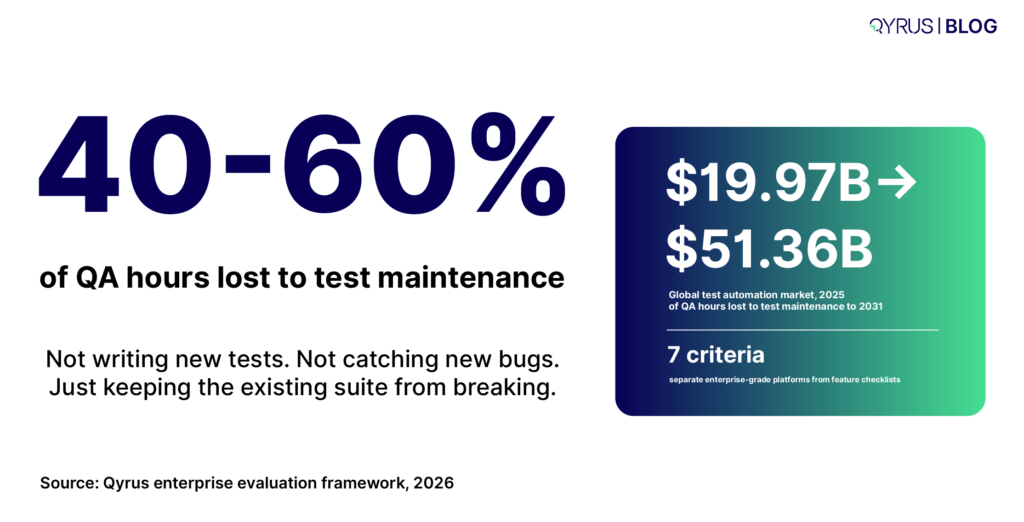
The market is responding accordingly. The global test automation market is projected to grow from roughly $19.97 billion in 2025 to $51.36 billion by 2031. That growth isn’t speculative; it’s enterprises collectively admitting that scripted, manually-maintained automation can’t keep pace with modern release velocity.
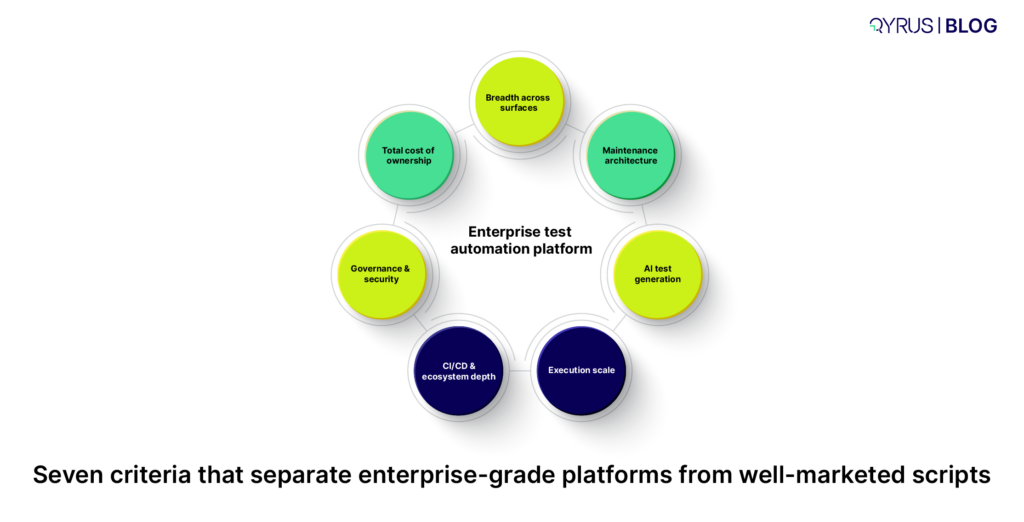
This guide isn’t a tool ranking. It’s a framework — seven criteria that separate platforms genuinely built for enterprise scale from tools that simply added an AI feature to an old architecture. If you’re specifically evaluating cloud/SaaS-only platforms, our guide to choosing SaaS test automation platforms goes deeper on that narrower decision. This piece is for the broader enterprise buy: web, mobile, API, desktop, and the legacy systems that don’t fit neatly into a SaaS-only evaluation.
Why Most Evaluations Compare the Wrong Things
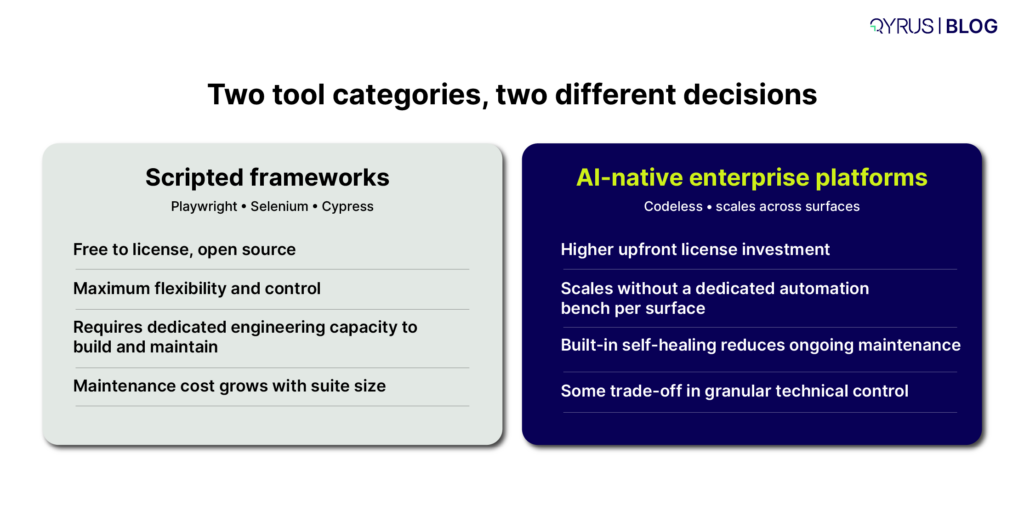
The most common mistake enterprise buyers make is putting fundamentally different categories of tool side-by-side on the same scorecard. A scripted open-source framework and an AI-native enterprise platform both get called “test automation tools,” but they solve different problems for different teams. Comparing them on a feature-by-feature basis treats a skill-level and architecture decision as if it were a simple feature decision.
Before you build an evaluation matrix, get clear on which category you’re actually shopping in:
- Developer-led scripted frameworks (Playwright, Selenium, Cypress, Appium) — free, flexible, and require engineering capacity for ongoing maintenance as the suite grows.
- AI-native, codeless enterprise platforms — built for QA teams who need to scale automation across surfaces without a dedicated automation-engineering bench for each one.
- Point solutions (visual testing only, performance testing only, mobile-device-farm only) — excellent at one job, but they add integration overhead if your enterprise needs unified reporting across surfaces.
Once you know which category fits your team’s skills and scale needs, the seven criteria below tell you how to evaluate within it.
1. Breadth Across Surfaces Without Framework-Switching
Enterprises rarely test just one thing. A single customer journey might touch a web front end, a mobile app, three backend APIs, and a legacy desktop or SAP screen. If your test automation platform only covers one of those surfaces, you’re stitching together multiple tools, multiple reporting formats, and multiple places where a defect can hide between the seams.
What to evaluate:
- Does the platform natively support Web, Mobile (native and hybrid), API, and Desktop testing — or does “support” mean a separate product with a separate login and separate reporting?
- Can a single test flow chain steps across surfaces (e.g., start a transaction on web, verify it on mobile, confirm the backend state via API) without manually re-platforming the test logic?
- If your enterprise runs SAP, Salesforce, or another packaged ERP/CRM, does the platform have purpose-built support for that system’s dynamic, frequently-changing UI — or is it relying on generic web locators that break on every patch?
A unified platform doesn’t just save licensing costs. It removes the reporting fragmentation that makes “are we covered end-to-end?” an unanswerable question during a release retro.
2. Maintenance Architecture, Not a Self-Healing Checkbox
Almost every vendor now claims “self-healing.” Almost none of them explain how it actually works, and the difference matters enormously for total cost of ownership. The architectural distinction industry analysts are increasingly drawing is between platforms that are AI-native from the ground up and platforms that added an AI layer on top of a traditional scripted framework — the latter produces marginal maintenance reduction, not structural reduction.
Questions that separate real self-healing from marketing self-healing:
- What does it heal against? Effective self-healing references a previous passing execution — a baseline — and suggests corrected locators (ID, class, XPath) when the application changes. If a vendor can’t explain their reference mechanism, ask them to.
- Does it require a clean baseline first? Most legitimate self-healing tools need at least one successful, non-dry-run execution to heal against later. If a platform claims to heal scripts with no prior passing run, be skeptical of how that’s actually working.
- What’s the maintenance number it actually moves? Don’t accept “reduces maintenance” as an answer. Ask for a percentage, and ask whether that number comes from a third-party study (like a Forrester Total Economic Impact report) or an internal benchmark.
This is the single highest-leverage criterion on this list. A platform that gets self-healing right structurally changes the economics of test maintenance — described elsewhere as the QA “janitorial work” that consumes senior engineers’ time without adding new coverage. A platform that gets it wrong just defers the maintenance bill.
For a deeper technical breakdown of how self-healing mechanisms actually work — and which architectural patterns hold up at scale — see our complete guide to self-healing test automation.
3. Genuine AI Test Generation, Not AI-Flavored Scripting
“AI-powered” has become a checkbox term. The real question is whether the platform’s AI understands intent — what the test is supposed to verify — or whether it’s simply converting recorded clicks into code with a generative wrapper around the UI.
Evaluate AI test generation on:
- Input flexibility. Can it generate test scenarios from a plain-language description, a Jira ticket, or a requirements document — or only from a recorded session?
- Context awareness. Does it understand existing test coverage well enough to suggest new scenarios that fill genuine gaps, rather than generating redundant tests that inflate your suite without adding confidence?
- Criticality scoring. Enterprise-grade generation tools don’t just produce volume; they categorize generated scenarios by risk or criticality, so your team can prioritize execution under time pressure.
- Explainability. Can a reviewer see why the AI generated a given test step, or is it a black box you either trust completely or discard?
This is also where the broader industry conversation is moving from automation toward orchestration — AI agents that don’t just execute predefined scripts, but determine what to test, generate the relevant cases, and reason about results. If you’re evaluating platforms on a multi-year horizon, ask vendors directly where they sit on that spectrum today, and where their roadmap is headed.
4. Execution Scale and Real-World Infrastructure
A test that passes in a sandboxed local environment and a test that passes across the actual matrix of browsers, devices, and network conditions your customers use are not the same test. Enterprise-grade execution infrastructure is what closes that gap.
What to look for:
- Parallel execution at meaningful scale. Can the platform run hundreds of tests simultaneously across a browser and device farm, or does scale require provisioning your own infrastructure?
- Real devices, not just emulators. Emulators miss hardware-specific behavior — battery drain, memory pressure, real network handoffs. A platform with access to real Android and iOS devices, including day-one support for new OS releases, catches issues emulator-only testing misses entirely.
- Network condition simulation. Can you test how the application behaves on throttled 3G or high-latency connections, not just on your office Wi-Fi?
- Compliance posture of the infrastructure itself. ISO 27001 and SOC 2 Type 2 compliance on the browser/device farm isn’t a nice-to-have for regulated industries — it’s frequently a procurement gate.
5. CI/CD and Ecosystem Depth — Not Just a Logo Wall
Every vendor’s integrations page has a wall of logos. The real evaluation question is whether those integrations are bi-directional and operationally deep, or whether they’re a one-way trigger that doesn’t feed results back into the tools your team actually lives in.
Dig into:
- Test management traceability. Can the platform link automated scripts to Jira, Xray, or TestRail issues and update them automatically with execution results — or does someone have to manually copy-paste outcomes?
- CI/CD trigger depth. Does a code push or pull-request merge automatically trigger the right subset of tests, or does someone have to manually kick off a run?
- Granular feedback, not just pass/fail. The platforms that meaningfully speed up release cycles deliver step-level data, screenshots, and logs back into the pipeline — not just a green or red status check.
- Notification routing. Can failures route to the right channel (Slack, Teams, email) with enough context that someone can act without opening five tabs to reconstruct what happened?
Survey data from 2026 consistently shows that depth of DevOps pipeline integration is one of the clearest separators between high- and low-performing automation programs — teams with tight integration report faster cycles and lower defect leakage than teams running automation as a side process.
6. Governance, Security, and Enterprise Readiness
Features that look optional in a pilot become non-negotiable the moment a platform touches production data, regulated workflows, or a security review. This is the criterion most often skipped in early-stage evaluations and most often the reason a deal stalls in procurement six weeks later.
Confirm before you’re deep into a contract:
- Compliance certifications — ISO 27001, SOC 2 Type 2, and any industry-specific requirements (PCI-DSS for payments, HIPAA-adjacent controls for healthcare-adjacent data).
- Access control granularity — role-based permissions (Admin, Editor, Viewer, Contributor) at the project level, not just account-wide admin/non-admin toggles.
- Secrets handling — are credentials and API keys encrypted and excluded from logs and reports by default, or does someone have to remember to mask them manually?
- Audit trail — can you reconstruct who changed what test, when, and why, months after the fact.
None of this shows up in a demo. All of it shows up in a security questionnaire, and a platform that can’t answer cleanly will cost you months of procurement delay regardless of how good its automation capabilities are.
7. Total Cost of Ownership, Not License Price
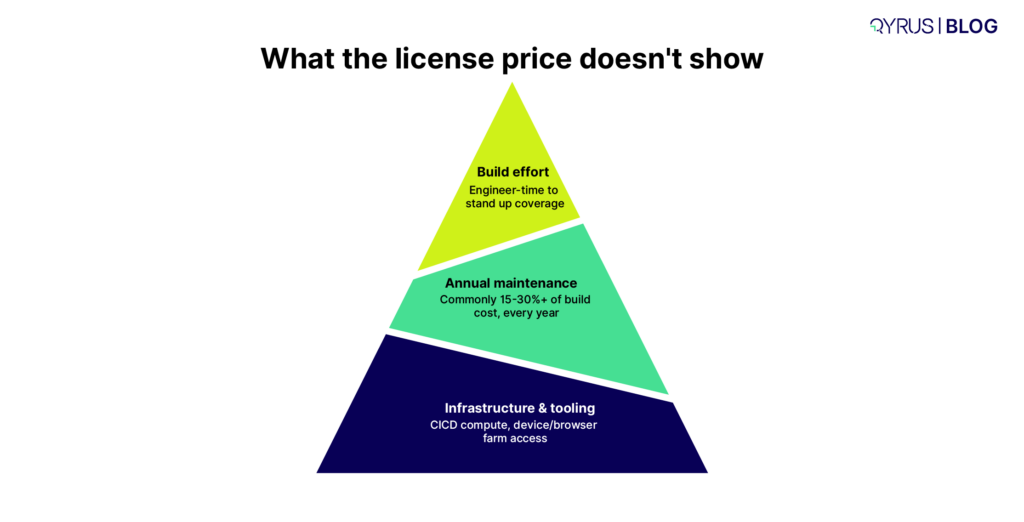
The license quote is the most visible number in any evaluation and frequently the least important one. The real cost structure includes build effort, ongoing maintenance, infrastructure, and the engineering time spent operating the framework — and that maintenance line item compounds in ways that are easy to underestimate at signing.
A useful mental model: model three numbers, not one.
- Build cost — engineer-time to stand up initial coverage, whether that’s scripting against an open-source framework or configuring a codeless platform.
- Annual maintenance cost — typically modeled as a percentage of build cost (commonly cited in the 15–30% range for healthier programs, and meaningfully higher for brittle, script-heavy suites).
- Infrastructure and tooling cost — license fees, CI/CD compute, device/browser farm access, whether self-hosted or vendor-provided.
The platforms worth paying a license premium for are the ones that demonstrably bend that maintenance curve downward — because year two and year three are where build-vs-buy math actually gets decided, not year one. For the full model on running these numbers yourself, our guide to software testing cost estimation and strategic reduction walks through the calculation in detail. And if your current bottleneck is specifically about scaling an existing program rather than starting fresh, these 10 bottlenecks that block scaling test automation are worth checking against your own roadmap before you sign anything new.
The Enterprise Evaluation Checklist
Use this as a working scorecard during vendor conversations:
- Covers Web, Mobile, API, and Desktop from one platform with unified reporting
- Self-healing references a verified baseline and the vendor can explain the mechanism
- AI test generation accepts plain-language input and scores scenarios by criticality
- Real device farm with day-one support for new OS releases, not emulator-only
- Network condition simulation for realistic mobile/web performance testing
- Bi-directional integration with your test management tool (Jira/Xray/TestRail)
- CI/CD triggers run automatically on commit or PR merge, not manually
- ISO 27001 / SOC 2 Type 2 certified infrastructure
- Role-based access control at the project level
- Vendor can show a third-party-verified ROI/TCO study, not just an internal claim
If a vendor can’t give you a confident, specific answer on more than two or three of these, that’s a data point — not a dealbreaker on its own, but a reason to ask harder follow-up questions before you sign.
Where Do We Fit
Qyrus is built around the seven criteria above rather than around any single one of them. The platform unifies Web, Mobile, API, Desktop, Data, and SAP testing in one environment, so enterprises validating end-to-end business processes aren’t reconciling reports across five tools.
Its Healer AI references a successful baseline script to suggest corrected locators when an application changes, and its TestGenerator and TestGenerator+ services generate and expand test coverage from Jira tickets or plain-language descriptions, with scenarios categorized by criticality. Execution runs across a browser and device farm with real Android and iOS hardware, day-one support for new OS releases, and ISO 27001/SOC 2 Type 2 compliance built into the infrastructure layer.
On the cost side, a Forrester Total Economic Impact study found a 213% ROI with a payback period of under 6 months for organizations using Qyrus, alongside a 70% reduction in test-building time. None of that replaces doing your own evaluation against the framework above — but it’s the kind of third-party-verified number this guide suggests you ask every vendor for.
Conclusion
The platforms that hold up under real enterprise pressure aren’t the ones with the longest feature list. They’re the ones whose architecture was built to bend the maintenance curve down, scale execution across the surfaces your business actually runs on, and survive a security review without scrambling. Run any platform you’re evaluating through the seven criteria here, and you’ll know within a few conversations whether you’re looking at an enterprise-grade platform or a well-marketed script.
FAQ
What’s the difference between a test automation framework and a test automation platform?
A framework (like Selenium, Playwright, or Appium) is a library that developers use to write and run test scripts — it’s free, flexible, and requires engineering effort to build and maintain. A platform is a more complete product that typically adds codeless test creation, AI-driven maintenance, execution infrastructure, and reporting on top of (or instead of) a scripting layer, aimed at QA teams who need to scale automation without a large dedicated engineering bench.
How much does an enterprise test automation platform cost?
Enterprise platform pricing is typically customized and quote-based rather than published, but the total cost of ownership includes more than the license fee: build effort, annual maintenance (commonly modeled as 15–30% of build cost for well-maintained programs), and infrastructure such as device farms and CI/CD compute. Comparing license price alone without modeling maintenance cost is the most common evaluation mistake.
Is open-source or a commercial platform better for enterprises?
It depends on team composition and scale, not on which option is objectively “better.” Open-source frameworks cost nothing in licensing but require dedicated automation engineers to build and maintain coverage as the application changes. Commercial AI-native platforms cost more upfront but are designed to reduce the ongoing maintenance burden, which often becomes the larger cost driver once a test suite reaches enterprise scale.
What is self-healing test automation and does it actually work?
Self-healing automation automatically detects when a UI element’s locator has changed and suggests or applies an updated locator, rather than requiring a human to manually fix the broken script. It works reliably when it references a previous successful execution as a baseline; vendors that can’t explain their reference mechanism should be evaluated cautiously.
Should enterprises evaluate SaaS-specific test automation platforms differently from general enterprise platforms?
Yes — SaaS-only platforms typically optimize for cloud-native applications and may not natively support legacy desktop, on-premise ERP, or mainframe systems that many enterprises still run. If your testing scope includes legacy or packaged-application surfaces alongside cloud applications, evaluate against the full criteria here rather than a SaaS-specific checklist alone.
 September 30, 2026
  9 min
9 min