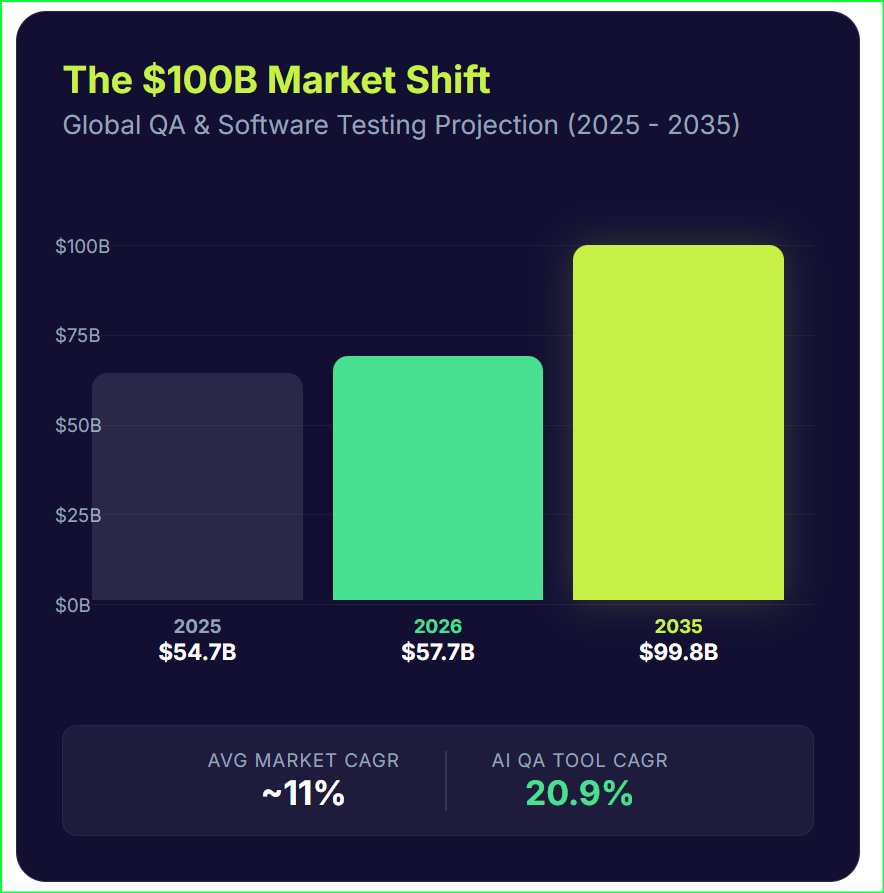
The gatekeeper model of Quality Assurance just broke. For years, we treated QA as a final checkbox beforea release. We wrote static scripts and waited for results. But the math has changed. By 2026, the global testing market will hit approximately $57.7 billion. Looking further out, experts project a climb toward $100 billion by 2035.
We are witnessing a massive capital reallocation. Organizations are freezing manual headcount and moving those funds into intelligent test automation. It is a pivot from labor-intensive validation to AI-augmented intelligence. You see it in the numbers: while the general market grows at roughly 11%, AI trends in software testing show an explosive 20% annual growth rate.
This is more than a budget update. It is a fundamental dismantling of the traditional software development lifecycle. Quality is no longer a distinct phase. It is an intelligence function that permeates every microsecond of the digital value chain.
Autonomous Intent: Leaving the Brittle Script Behind
The era of writing static, fragile test cases is nearing its end. Traditional automation relies on Selenium-based scripts that break the moment a developer changes a button ID or moves a div. This “flakiness” is an expensive trap, often consuming up to 40% of a QA team’s capacity just for maintenance. We are moving toward a future where software testing predictions 2026 suggest the complete obsolescence of these brittle scripts.
Instead of following a rigid Step A to Step B path, we are deploying autonomous agents. These agents do not just execute code; they understand intent. You give an agent a goal—such as “Complete a guest checkout for a red sweater”—and it navigates the UI dynamically. It handles unexpected pop-ups and A/B test variations without crashing. This shift is so significant that analysts expect 80% of test automation frameworks to incorporate AI-based self-healing capabilities by late 2025.
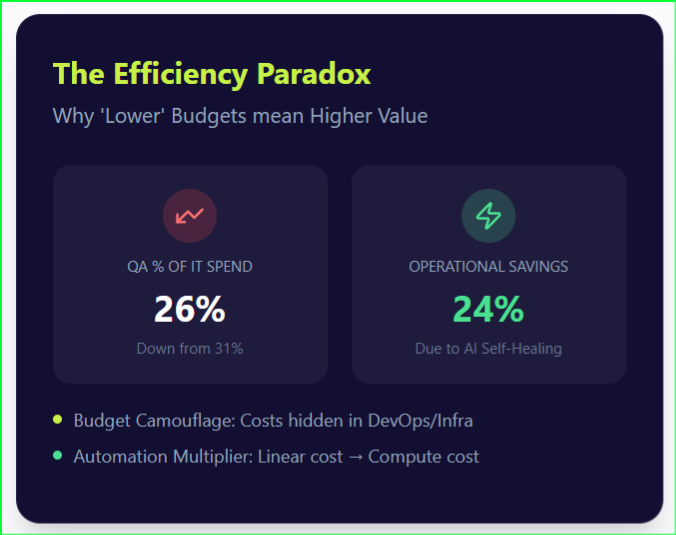
Self-healing tools use computer vision and dynamic locators to identify elements by context. If an element ID changes, the AI finds the button that “looks like” the intended target and updates the test definition on the fly. The economic impact is clear: organizations using these mature AI-driven test automation trends report 24% lower operational costs. By removing the drudgery of maintenance, your engineers finally focus on expanding coverage rather than fixing what they already built.
Intelligent Partners: The Rise of AI Copilots and the Strategic Tester
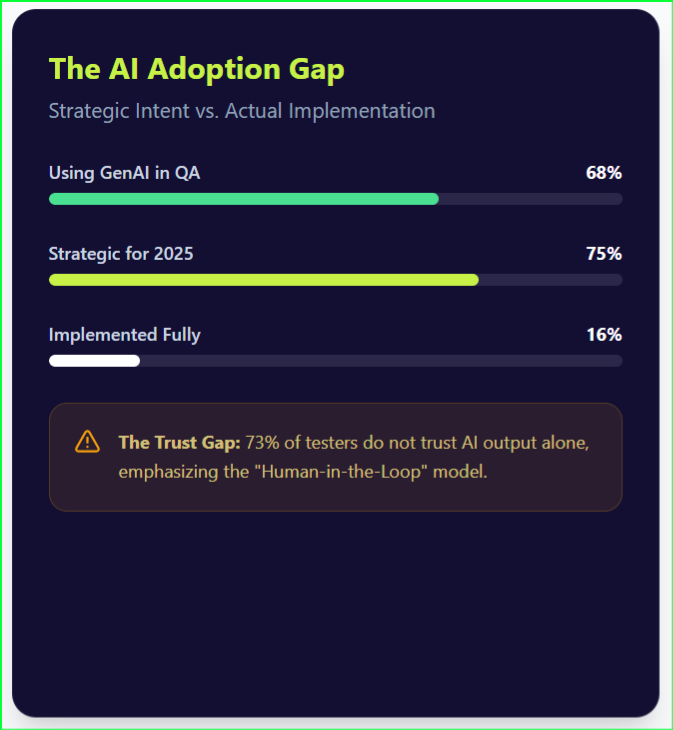
The narrative that AI will replace the human tester is incomplete. In reality, AI trends in software testing indicate a transition toward a “Human-in-the-Loop” model where AI serves as a force multiplier. Roughly 68% of organizations now utilize Generative AI to advance their quality engineering agendas. However, a significant “trust gap” remains. While 82% of professionals view AI as essential, nearly 73% of testers do not yet trust AI output without human verification.
AI copilots now handle the high-volume, repetitive tasks that previously bogged down release cycles. These tools generate comprehensive test cases from user stories in minutes, addressing the “blank page problem” for many large organizations. They also write boilerplate code for modern frameworks like Playwright and Cypress. This assistance allows future of QA automation to focus on high-level strategy rather than syntax.
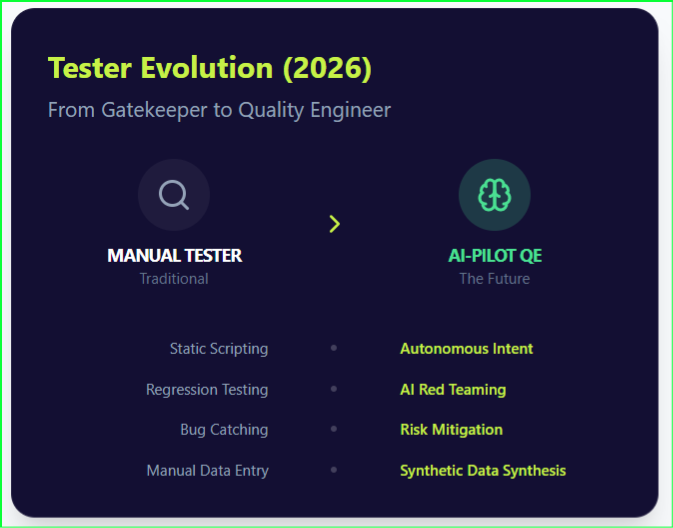
The role of the manual tester is not dying; it is gentrifying into an elite skill set. We are seeing a sharp decline of manual regression testing, as 46% of teams have already replaced half or more of their manual efforts with intelligent test automation. The modern Quality Engineer acts as a strategic auditor and “AI Red Teamer,” using human cunning to trick AI systems into failure—a task no script can perform. This evolution demands deeper domain knowledge and AI literacy, as testers must now verify the probabilistic logic of LLMs.
The Efficiency Paradox: Shifting Quality Everywhere
One of the most counter-intuitive software testing predictions 2026 is the visible contraction of dedicated QA budgets. Historically, as software complexity grew, organizations funneled up to 35% of their IT spend into testing. Recent data reveals a reversal, with QA budgets dropping to approximately 26% of IT spend. This decline does not signal a deprioritization of quality; rather, it represents a “deflationary dividend” powered by intelligent test automation.
We are seeing the rise of a hybrid “Shift-Left and Shift-Right” model that embeds quality into every phase of the lifecycle. The economic logic for shifting left is irrefutable: fixing a defect during the design phase costs pennies, while fixing it post-release can cost 15 times more. By 2025, nearly all DevOps-centric organizations will have adopted shift-left practices, making developers responsible for writing unit and security tests directly within their IDEs.
Simultaneously, the industry is embracing shift-right strategies to validate software in the chaos of live production. Teams now use observability and chaos engineering to monitor real-user behavior and system resilience in real time. This constant testing loop causes a phenomenon known as “budget camouflage”.
When a developer configures a security scan in a CI/CD pipeline, the cost is often filed under “Engineering” or “Infrastructure” rather than a dedicated QA line item. The result is a leaner, more distributed future of QA automation that delivers higher reliability at a lower visible cost.
Guardians of the Model: QA’s Critical Role in AI Governance and Risk
As enterprises rush to deploy Large Language Models (LLMs) and Generative AI, a new challenge emerges: the “trust gap”. While the potential of AI is immense, nearly 73% of testers do not trust AI output alone. This skepticism stems from the probabilistic nature of LLMs, which are prone to hallucinations—generating test cases for non-existent features or writing functionally flawed code. Consequently, AI-driven test automation trends are shifting the QA focus from simple bug-hunting to robust AI governance.
Testing GenAI-based applications requires a fundamental change in methodology. Traditional deterministic testing, where a specific input always yields the same output, does not apply to LLMs. Instead, QA teams must now perform “AI Red Teaming”—deliberately trying to trick the model into producing biased, insecure, or incorrect results. This role is vital for compliance with emerging regulations like the EU AI Act, which is expected to create new, stringent testing requirements for companies deploying AI in Europe by 2026.
Modern quality engineering must also address the “Data Synthesis” challenge. Organizations are increasingly using GenAI to create synthetic test data that mimics production environments while remaining strictly compliant with privacy laws like GDPR and CCPA. This practice ensures that future of QA automation remains secure and ethical. By 2026, the primary metric for QA success will move beyond defect counts to “Risk Mitigation Efficiency,” measuring how effectively the team identifies and neutralizes the subtle logic gaps inherent in AI-driven systems.
Specialized Frontiers: Navigating 5G, IoT, and the Autonomous Horizon
The final piece of the 2026 puzzle lies in the physical world. As software expands into specialized hardware, the global 5G testing market is surging toward $8.39 billion by 2034. We are moving beyond web browsers into massive IoT ecosystems where connectivity and latency are the primary failure points. Network slicing—where operators create virtual networks optimized for specific tasks—introduces a level of complexity that traditional tools simply cannot handle.
In these high-stakes environments, such as medical IoT or autonomous vehicles, the margin for error is non-existent. While a consumer web app might tolerate three defects per thousand lines of code, critical IoT targets less than 0.1 defects per KLOC. This demand for absolute reliability is driving a massive spike in security testing, which has become the top spending priority in the IoT lifecycle. We are also seeing the explosive growth of blockchain testing, with a CAGR exceeding 50% as enterprises adopt immutable ledgers for supply chains.
Qyrus: Orchestrating the Autonomous Quality Frontier
Qyrus does not just follow AI trends in software testing; it builds the infrastructure to make them operational. As the industry moves toward agentic autonomy, Qyrus acts as the bridge. Through NOVA, our autonomous test generation engine, and Sense-Evaluate-Execute-Report (SEER), our agentic orchestration layer, we enable teams to transition from manual script-writing to goal-oriented intelligent test automation. These tools do more than suggest code; they navigate complex application logic to achieve business outcomes, fulfilling the software testing predictions 2026 that favor intent over static steps.
To solve the maintenance crisis—where “flakiness” consumes 40% of team capacity—Qyrus provides Healer AI. This self-healing technology automatically repairs brittle scripts by identifying UI changes through context and computer vision. By automating the drudgery of maintenance, Healer AI frees your engineers for high-value exploratory work.
Furthermore, Qyrus modernizes the entire stack by providing Data Testing capabilities and a unified cloud-native environment. Whether it is Web, Mobile, API, or Desktop, our platform allows developers and business users to collaborate seamlessly, making the future of QA automation a “shift-left” reality.
For specialized frontiers like BFSI and IoT, Qyrus offers enterprise-grade solutions like our Real Device Farm and dedicated SAP Testing modules. These tools are designed for high-stakes environments where reliability targets are often stricter than 0.1 defects per KLOC.
Finally, as organizations face the “trust gap” in GenAI adoption, Qyrus introduces Determinism on Demand. This ensures that while you leverage the power of probabilistic AI, your testing remains grounded in verifiable logic. Qyrus provides the governance and risk mitigation needed to turn AI-driven test automation trends into a secure, competitive advantage.
Finalizing Your Strategy: The Road to 2030
The transition from “Quality Assurance” to “Quality Engineering” is not just a change in title—it is a change in survival strategy. As we head toward 2030, the organizations that thrive will be those that treat quality as a strategic intelligence function rather than a release-day hurdle. By leveraging intelligent test automation and autonomous agents, you can bridge the “trust gap” and deliver digital experiences that are not just functional, but fundamentally trustworthy.
Looking toward, the vision is one of complete autonomy. We expect intelligent test automation to manage the entire testing lifecycle—from discovery to self-healing—without explicit human intervention. The U.S. Bureau of Labor Statistics projects a 15% growth for testers through 2034, but the roles will look very different. The successful Quality Engineer of the future will be a pilot of AI agents, focusing on strategic business value and delightful user experiences rather than manual validation.
Stop Testing the Past. Start Engineering the Future.
The leap to autonomous quality doesn’t have to be a leap into the unknown. Whether you are battling brittle scripts, scaling for 5G, or navigating the risks of GenAI, Qyrus provides the AI-native infrastructure to help you lead the shift.
The Final Checkpoint – Why SAP UAT Matters (and Why It’s Tough)
In the complex world of SAP implementations and upgrades, countless hours go into configuration, development, and functional testing. But before the champagne corks pop for a successful go-live, there’s one crucial gatekeeper: User Acceptance Testing (UAT). Think of SAP User Acceptance Testing as the final, critical checkpoint within SAP Testing, the moment where the real end-users – the people who rely on SAP for their daily tasks – give their seal of approval. It’s the ultimate confirmation that the system not only works technically but works for the business.
However, let’s be honest. For many organizations, SAP UAT often feels less like a confident stride to the finish line and more like a stumbling block. It can be time-consuming, pull key business users away from their primary responsibilities, and sometimes feel like a rubber-stamping exercise rather than genuine validation, especially given the sheer scale and customization inherent in many SAP landscapes. What if there was a smarter way? A way to make UAT more focused, efficient, and truly value-driven, moving beyond the limitations of traditional approaches?
Demystifying UAT in the SAP Ecosystem
So, what is UAT exactly in the SAP context? At its core, the definition of UAT testing is simple: it’s testing that is conducted by the intended end-users of the SAP system within a realistic, controlled environment before the system or its changes are deployed to production. It’s not about finding every minor bug (that’s what earlier testing phases are for); it’s about validating that the system enables users to execute their business processes correctly and efficiently, meeting the agreed-upon business requirements. There are certain acceptance criteria attributes for UAT, such as completeness, accuracy, user-friendliness, performance, reliability, security, scalability, and compatibility.
The ultimate goal isn’t just a sign-off; it’s achieving business acceptance. It’s building confidence among users and stakeholders that the SAP solution will deliver its intended value and won’t disrupt critical operations upon launch. In SAP, this often involves testing complete end-to-end business processes – think Order-to-Cash, Procure-to-Pay, or Record-to-Report – which might span multiple SAP modules (like SD, MM, FI) and even integrate with other internal and external systems, truly reflecting how the business operates day-to-day.
The Common Roadblocks: Challenges Specific to SAP UAT
While the goal of SAP User Acceptance Testing is clear, completing it without any chaos is often easier said than done. SAP environments present unique hurdles that can derail even well-intentioned UAT efforts:
Sheer Complexity & Scale: SAP systems are rarely simple. They often involve intricate configurations, numerous modules, and deep integrations across the business. Testing every possible scenario becomes impractical, demanding a smart approach to prioritize efforts effectively.
Keeping Pace with Constant Change: Whether it’s implementing S/4HANA, applying support packs, rolling out new features, or simply configuring existing processes, SAP environments are dynamic. Understanding the true impact of these changes on end-to-end business processes is crucial for targeted UAT, but often difficult to determine accurately.
The Test Data Conundrum: Realistic testing requires realistic data. However, generating or sourcing comprehensive, compliant, and accurate test data that reflects complex, multi-step transactions within SAP is a significant challenge. Using production data carries security risks, while manually creating data is time-consuming and often insufficient.
The Business User Bottleneck: Your finance experts, logistics coordinators, or HR managers are essential for UAT, but they also have demanding day jobs. Pulling them away for extensive testing cycles disrupts operations and often leads to rushed or superficial validation. UAT needs to be respectful of their time.
Taming Customizations (Z-Objects): Most SAP landscapes include custom developments (often called Z-Objects) tailored to specific business needs. These unique components are critical but fall outside standard test scripts, requiring dedicated attention during UAT as they are often impacted by upgrades or other changes.
Bridging the Communication Gap: Effective UAT requires seamless collaboration between the IT/QA teams deploying the changes and the business users validating them. Misunderstandings about requirements, test steps, or defect reporting can lead to frustration and delays.
Laying the Foundation: Best Practices for Successful SAP UAT
Navigating these challenges requires a strategic approach. Implementing best practices can significantly improve the effectiveness and efficiency of your SAP UAT cycles:
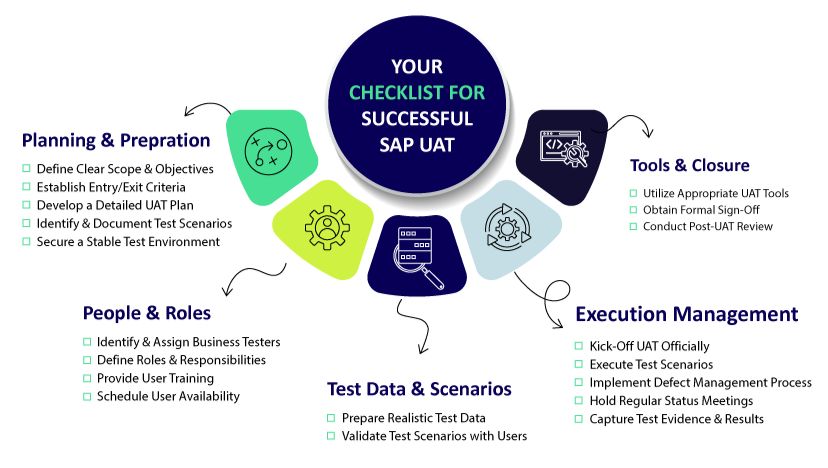
Start with a Clear Plan & Strategy: Define the UAT scope, objectives, specific business processes to be tested, timelines, and clear roles and responsibilities for testers and approvers before testing begins. Establish clear entry and exit criteria.
Involve Business Users Early and Often: Don’t wait until the final UAT phase. Engage business users during requirement gathering and design phases to ensure alignment and leverage their expertise in defining realistic test scenarios.
Focus on End-to-End Business Processes: Prioritize testing complete, real-world workflows that mimic daily operations (e.g., creating a sales order through to billing and payment) rather than just testing isolated transactions.
Prioritize Realistic Test Data: Make test data management a priority. Invest time and potentially tools to ensure testers have access to relevant, comprehensive, and compliant data sets that cover the required business scenarios.
Establish Effective Defect Management Strategies: Implement a clear, user-friendly process for business users to report defects found during UAT. Ensure prompt triage, clear communication on status, and efficient resolution by the technical teams.
Leverage the Right Tools: Manual UAT processes can be cumbersome. Utilizing appropriate tools for test management, execution tracking, data provisioning, and capturing results can drastically streamline the process, provide valuable insights, and make participation easier for business users. This is where modern platforms begin to show their true value.
Introducing Qyrus: A Smarter, AI-Powered Approach to SAP UAT
We’ve explored the critical nature of SAP User Acceptance Testing, the significant hurdles organizations face, and the best practices required for success. It’s clear that traditional methods and existing tools often struggle to keep pace, leading to prolonged test cycles and delays in adopting crucial business-IT changes. Today’s complex, hybrid IT landscapes, especially those involving SAP, demand a fresh perspective and new-age testing tools.
This is where Qyrus enters the picture. Qyrus isn’t just another testing tool; it’s designed specifically to tackle the challenges of modern Enterprise Application Testing, offering a fundamentally smarter way to approach validation, particularly for complex systems like SAP. Qyrus is envisioned as a comprehensive, codeless, and highly intelligent test automation SaaS platform built for the demands of digital transformation.
At its core, Qyrus leverages an AI-powered engine, moving beyond the limitations of older tools or time-consuming custom frameworks. It’s built to handle the diverse technologies found in modern SAP environments – encompassing not just traditional ERP interfaces but also Web (like Fiori apps), Mobile, APIs, and other integrated components. This unified approach directly addresses the difficulty of testing across today’s interconnected, multi-platform business processes.
For stakeholders seeking an intelligent, AI-enhanced alternative to tools like SAP Solution Manager, Qyrus provides capabilities designed to streamline UAT, improve accuracy, and ultimately ensure that SAP solutions deliver exceptional user experiences and tangible business value. It’s about shifting UAT from a potential bottleneck to a strategic enabler for confident go-lives.
How Qyrus Streamlines and Enhances SAP UAT
Let’s explore how Qyrus’s specific features directly address the common hurdles in SAP User Acceptance Testing, making the process more efficient and effective for everyone involved, especially business users.
(A) Intelligent Insights: Focusing Your UAT Efforts
Challenges Addressed: Keeping pace with change, SAP complexity, managing customizations.
Qyrus Capability: Qyrus tackles this head-on with its Test Strategy module (including Business Analysis, Customization Insights, Workbench Insights) and Impact Analyzer. Instead of guesswork, Qyrus analyzes actual SAP system usage, pinpoints implemented customizations and assesses the delta from release changes or transports. It intelligently identifies exactly which business processes and transactions are impacted by changes.
Benefit for UAT: This eliminates the “test everything” burden. Business users receive guided, impact-based recommendations on precisely what needs validation. This targeted approach, noted for its depth in identifying affected transactions, ensures UAT efforts are focused on the highest-risk areas, saving significant time and aligning testing with real-world usage and changes.
(B) Simplified Test Case Management & Design
Challenges Addressed: Business user time constraints, complexity in test design.
Qyrus’ Capability: While Qyrus offers powerful automation, its AI capabilities like SAP Scribe (a conversational AI trained on SAP knowledge) and the AI Test Generator act as intelligent assistants for UAT preparation. They can analyze functional specifications or even custom code (ABAP, UI5) to brainstorm and suggest relevant test scenarios.
Benefit for UAT: These features provide a robust starting point or baseline for UAT test cases. Business users aren’t expected to become automation experts; instead, they can review, refine, and adapt these AI-generated suggestions to fit their specific end-to-end UAT scenarios, ensuring comprehensive coverage without starting from scratch. This AI assistance accelerates the design phase, respecting the valuable time of business participants.
(C) Seamless & Realistic Test Data Management
Challenges Addressed: The critical need for realistic and comprehensive test data, especially for complex chains in systems like S/4HANA.
Qyrus Capability: Qyrus’s DataChain module revolutionizes test data provisioning for SAP. Business users can simply input a starting point, like a document or transaction number. DataChain automatically identifies all linked transactions in the business process chain and extracts the relevant data fields – even from S/4HANA’s in-memory database using a live data extraction approach. The Test Data Analyzer further assists with managing, masking, and ensuring data consistency.
Benefit for UAT: This provides business users with the rich, realistic, end-to-end data needed for their scenarios quickly and without manual drudgery or risky reliance on production data copies. It ensures UAT scenarios accurately reflect real operational data flows.
Challenges Addressed: Business user availability, testing complete cross-module/cross-platform workflows.
Qyrus Capability: Qyrus supports UAT execution efficiency in several ways. Robotic Smoke Testing (RST) can automate foundational checks, ensuring system stability before UAT begins, freeing users from repetitive tasks. Crucially, Qyrus excels at testing end-to-end business processes that span multiple SAP modules (SAP GUI, Fiori) and integrated non-SAP systems (Web, Mobile, APIs, Desktop applications). Capabilities like Document Exchange Testing (IDoc) allow specific validation of critical data interchanges. Furthermore, the platform significantly improves execution speed and automatically stores test evidence.
Benefit for UAT: Business users can focus their valuable time on validating complex business logic and exception handling, confident that core functionalities are stable, and that testing covers the entire operational flow. The increased speed and automated evidence capture streamline the validation process itself.
Empowering Business Users: Making SAP UAT Accessible and Effective
Ultimately, the success of SAP Testing and SAP User Acceptance Testing hinges on the engagement and effectiveness of business users. Qyrus is designed with this principle in mind, aiming to empower not just testers and developers, but specifically the business teams performing this critical validation.
Recognizing that business users are not typically testing specialists and face time constraints, Qyrus focuses on making UAT participation more intuitive and efficient. It addresses concerns about non-testers owning complex automation by providing support and context rather than demanding automation expertise.
Here’s how Qyrus empowers your business users:
Clarity Through Insights: Instead of vague test lists, users get clear insights from the impact analysis, understanding why specific areas need testing. This context makes their validation efforts more meaningful.
Focused Task Lists: Guided test selection pinpoints the most critical scenarios impacted by change, allowing users to concentrate their limited time where it matters most.
Simplified Preparation: AI-assisted test case suggestions provide a starting point, while streamlined data generation via DataChain removes the significant burden of manual data preparation.
Ease of Use: The platform is designed for usability, allowing users to execute tests (whether manual validation aided by Qyrus insights, or reviewing automated results) and log feedback efficiently. (If Qyrus includes specific features for managing manual test scripts and evidence capture, they further simplify this process.)
Reduced Burden: By automating foundational checks (RST) and providing realistic data, Qyrus allows business users to focus on validating business logic and user experience, not troubleshooting basic setup issues.
The goal isn’t to turn business users into automation engineers, but to provide them with intelligent tools and clear information, enabling them to perform their essential UAT role with greater confidence and less friction.
Achieve Confident SAP Go-Lives with Qyrus
SAP User Acceptance Testing doesn’t have to be the resource-draining bottleneck it often becomes. By moving beyond traditional methods and embracing an intelligent, AI-powered platform like Qyrus, organizations can transform their UAT process.
Qyrus helps you overcome the inherent challenges of SAP complexity, constant change, and data provisioning. It enables you to implement best practices by providing:
Intelligent impact analysis to focus efforts precisely.
AI assistance to streamline test design.
Automated, realistic test data generation.
Efficient end-to-end validation across SAP and integrated systems.
An empowered experience for your critical business users.
The result? Significantly reduced testing effort (often turning days into hours), dramatically improved execution speed, reduced risk of production defects, and increased confidence in your SAP deployments. By ensuring your SAP solutions truly meet business needs through effective UAT, you accelerate adoption, maximize the value of your SAP investments, and achieve smoother, more successful go-lives.
Ready to revolutionize your SAP User Acceptance Testing?
Contact us today to request a personalized demo and discover how Qyrus can help you achieve confident SAP success.
The Velocity Gap in BFSI Software Quality
Why Traditional QA Fails Modern Finance
The BFSI sector faces immense pressure to deliver rapid digital transformation, but outdated, manual QA has become a bottleneck. AI accelerates innovation but introduces unpredictable behaviors that legacy approaches can’t handle. Fragmented toolchains and slow, error-prone testing expose banks to security risks, costly inefficiencies, and customer churn.
Download this whitepaper to learn how to:
Address non-determinism in AI-powered financial systems
Move from reactive bug-finding to proactive trust engineering
Integrate holistic, automated testing across web, mobile, and APIs
Quantify the bottom-line impact of engineered software quality
What You’ll Discover Inside
Core principles of Trust Engineering for BFSI institutions
Qyrus platform’s role in enabling unified, intelligent, and automated QA.
Case study: 200% ROI for a leading UK bank using agentic QA.
Strategies to protect customer data, enhance user experience, and reduce manual testing effort.
Qyrus, a provider of AI-powered software testing solutions to enterprises, today announced that it has been named a Leader in The Forrester Wave™: Autonomous Testing Platforms, Q4 2025. The report evaluated the 15 most significant providers in the market based on 25 criteria.
As organizations increasingly integrate artificial intelligence into their software development lifecycles, the demand for autonomous testing solutions that can validate both the applications and the AI models within them has surged. In this evaluation, Qyrus received the highest score possible (5.0) in the Roadmap, Testing AI Across Different Dimensions, Testing RAG Pipelines, Level of Autonomous Testing, Pricing Flexibility and transparency, and Testing Agentic Tool Calling criteria.
“We believe being named a Leader in a Forrester report is tremendous evidence of our vision to transform quality engineering through Agentic AI,” said Ravi Sundaram, President at Qyrus. “As enterprises move from simple automation to true autonomy, we are dedicated to providing a platform that not only accelerates release velocity but also ensures trust in the generative AI systems building our future.”
The report notes that Qyrus “excels in AI testing dimensions, using heuristics and LLM to judge faithfulness, relevance, and coverage.” With the rise of agentic workflows, Qyrus has focused heavily on agentic test orchestration. The report states, “Its Sense to Evaluate to Execute to Report (SEER) orchestration framework and excellent agentic tool calling result in an above-par score for autonomous testing”.
Qyrus’ platform enables enterprises to scale their testing efforts across web, mobile, and API layers while addressing the specific complexities of modern AI applications. In the report’s “Forrester’s Take” section, the report concludes that “Qyrus suits enterprises seeking advanced AI-driven testing, multiagent orchestration, and robust validation of genAI outputs at speed and scale”.
Qyrus believes its recognition as a Leader underscores its commitment to innovation and its ability to support customers as they navigate the complexities of testing in an AI-first world.
This News Release is originally published on EIN Presswire
Disclaimer
Forrester does not endorse any company, product, brand, or service included in its research publications and does not advise any person to select the products or services of any company or brand based on the ratings included in such publications. Information is based on the best available resources. Opinions reflect judgment at the time and are subject to change. For more information, read about Forrester’s objectivity here.
SAP releases updates at breakneck speed. Development teams are sprinting forward, leveraging AI-assisted coding to deploy features faster than ever. Yet, in conference rooms across the globe, SAP Quality Assurance (QA) leaders face a grim reality: their testing cycles are choking innovation. We see this friction constantly in the field—agility on the front-end, paralysis in the backend.
The gap between development speed and testing capability is not just a process issue; it is a financial liability. Modern enterprise resource planning (ERP) systems, particularly those driven by SAP Fiori and UI5, have introduced significant complexities into the Quality Assurance lifecycle. Fiori’s dynamic nature—characterized by frequent updates and the generation of dynamic control identifiers—systematically breaks traditional testing models.
When business processes evolve, the Fiori applications update to meet new requirements, but the corresponding test cases often lag behind. This misalignment creates a dangerous blind spot. We often see organizations attempting to validate modern, cloud-native SAP environments using methods designed for on-premise legacy systems. This disconnect impacts more than just functional correctness; it hampers the ability to execute critical SAP Fiori performance testing at scale. If your team cannot validate functional changes quickly, they certainly cannot spare the time to load test SAP Fiori applications under peak user conditions, leaving the system vulnerable to crashes during critical business periods.
To understand why SAP Fiori test automation strategies fail so frequently, we must examine the three distinct evolutionary phases of SAP testing. Most enterprises remain dangerously tethered to the first two, unable to break free from the gravity of legacy processes.
Wave 1: The Spreadsheet Quagmire and the High Cost of Human Error
For years, “testing” meant a room full of functional consultants and business users staring at spreadsheets. They manually executed detailed, step-by-step scripts and took screenshots to prove validation.
This approach wasn’t just slow; it was economically punishing. Manual testing suffers from a linear cost curve—every new feature adds linear effort. Industry analysis suggests that the annual cost for manual regression testing alone can exceed $201,600 per environment. When you scale that across a five-year horizon, organizations often burn over $1 million just to stay in the same place. Beyond the cost, the reliance on human observation inevitably leads to “inconsistency and human error,” where critical business scenarios slip through the cracks due to sheer fatigue.
Wave 2: The False Hope of Script-Based Automation
As the cost of manual testing became untenable, organizations scrambled toward the second wave: Traditional Automation. Teams adopted tools like Selenium or record-and-playback frameworks, hoping to swap human effort for digital execution.
It worked, until it didn’t.
While these tools solved the execution problem, they created a massive maintenance liability. Traditional web automation frameworks rely on static locators (like XPaths or CSS selectors). They assume the application structure is rigid. SAP Fiori, however, is dynamic by design. A simple update to the UI5 libraries can regenerate control IDs across the entire application.
Instead of testing new features, QA engineers spend 30% to 50% of their time just setting up environments and fixing broken locators. This isn’t automation; it is just automated maintenance.
Wave 3: The Era of ERP-Aware Intelligence
We have hit a ceiling with script-based approaches. The complexity of modern SAP Fiori test automation demands a third wave: Agentic AI.
This new paradigm moves beyond checking if a button exists on a page. It focuses on “ERP-Aware Intelligence”—tools that understand the business intent behind the process, the data structures of the ERP, and the context of the user journey. We are moving away from fragile scripts toward intelligent agents that can adapt to changes, understand business logic, and ensure process integrity without constant human intervention.
To achieve the economic viability modern enterprises need, automation must do more than click buttons. It must reduce maintenance effort by 60% to 80%. Without this shift, teams will remain trapped in a cycle of repairing yesterday’s tests instead of assuring tomorrow’s releases.
The Technical Trap: Why Standard Automation Crumbles Under Fiori
You cannot solve a dynamic problem with a static tool. This fundamental mismatch explains why so many SAP Fiori test automation initiatives stall within the first year. The architecture of SAP Fiori/UI5 is built for flexibility and responsiveness, but those very traits act as kryptonite for traditional, script-based testing frameworks.
The “Dynamic ID” Nightmare
If you have ever watched a Selenium script fail instantly after a fresh deployment, you have likely met the Dynamic ID problem.
Standard web automation tools function like a treasure map: “Go to X coordinate and dig.” They rely on static locators—specific identifiers in the code (like button_123)—to find and interact with elements.
SAP Fiori does not play by these rules. To optimize performance and rendering, the UI5 framework dynamically generates control IDs at runtime. A button labeled __xmlview1–orderTable in your test environment today might become __xmlview2–orderTable in production tomorrow.
Because the testing tool cannot find the exact ID it recorded, the test fails. The application works perfectly, but the report says otherwise. These “false negatives” force your QA engineers to stop testing and start debugging, eroding trust in the entire automation suite.
The Maintenance Death Spiral
This instability triggers a phenomenon known as the Maintenance Death Spiral. When locators break frequently, your team stops building new tests for new features. Instead, they spend their days patching old scripts just to keep the lights on.
If you spend 70% of your time fixing yesterday’s work, you cannot support today’s velocity. This high rework cost destroys the ROI of automation. You aren’t accelerating release cycles; you are merely shifting the bottleneck from manual execution to technical debt management.
The “Documentation Drift”
While your engineers fight technical fires, a silent strategic failure occurs: Documentation Drift.
In a fast-moving SAP environment, business processes evolve rapidly. Developers update the code to meet new requirements, but the functional specifications—and the test cases based on them—often remain static.
This creates a dangerous gap. Your tests might pass because they validate an outdated version of the process, while the actual implementation has drifted away from the business intent. Without a mechanism to triangulate code, documentation, and tests, you risk deploying features that are technically functional but practically incorrect.
The Tooling Illusion: Why Current Solutions Fall Short
When organizations realize manual testing is unsustainable, they often turn to established automation paradigms, but each category trades one problem for another. Model-based solutions, while offering stability, suffer from a severe “creation bottleneck,” forcing functional teams to manually scan screens and build complex underlying models before a single test can run. On the other end of the spectrum, code-centric and low-code frameworks offer flexibility but remain fundamentally “blind” to the ERP architecture. Because these tools rely on standard web locators rather than understanding the business object, they shatter the moment SAP Fiori test automation environments generate dynamic IDs, forcing teams to simply trade manual execution for manual maintenance.
Native legacy tools built specifically for the ecosystem might feel like a safer bet, but they lack the modern, agentic capabilities required for today’s cloud cadence. These older platforms miss critical self-healing features and struggle to keep pace with evolving UI5 elements, making them ill-suited for agile SAP Fiori performance testing. Ultimately, no existing category—whether model-based, script-based, or native—fully bridges the gap between the technical implementation and the business intent. They leave organizations trapped in a cycle where they must choose between the high upfront cost of creation or the “death spiral” of ongoing maintenance, with no mechanism to align the testing reality with drifting documentation.
Code-to-Test: The Agentic Shift in SAP Fiori Test Automation
We built the Qyrus Fiori Test Specialist to answer a singular question: Why are humans still explaining SAP architecture to testing tools? The “Third Wave” of QA requires a platform that understands your ERP environment as intimately as your functional consultants do. We achieved this by inverting the standard workflow. We moved from “Record and Play” to “Upload and Generate.”
SAP Scribe: Reverse Engineering, Not Recording
The most expensive part of automation is the beginning. Qyrus eliminates the manual “creation tax” through a process we call Reverse Engineering. Instead of asking a business analyst to click through screens while a recorder runs, you simply upload the Fiori project folder containing your View and Controller files.
Proprietary algorit hms, which we call Qyrus SAP Scribe, ingest this source code alongside your functional requirements. The AI analyzes the application’s input fields, data flow, and mapping structures to automatically generate ready-to-run, end-to-end test cases. This agentic approach creates a massive leap in SAP Fiori test automation efficiency. It drastically reduces dependency on your business teams and eliminates the need to manually convert fragile recordings into executable scripts. You get immediate validation that your tests match the intended functionality without writing a single line of code.
The Golden Triangle: Triangulated Gap Analysis
Standard tools tell you if a test passed or failed. Qyrus tells you if your business process is intact.
We introduced a “Triangulated” Gap Analysis that compares three distinct sources of truth:
The Code: The functionality actually implemented in the Fiori app.
The Specs: The requirements defined in your functional documentation.
The Tests: The coverage provided by your existing validation steps.
Dashboards visualize exactly where the reality of the code has drifted from the intent of the documentation. The system then provides specific recommendations: either update your documentation to match the new process or modify the Fiori application to align with the original requirements. This ensures your QA process drives business alignment, not just bug detection.
The Qyrus Healer: Agentic Self-Repair
Even with perfect generation, the “Dynamic ID” problem remains a threat during execution. This is where the Qyrus Healer takes over.
When a test fails because a control ID has shifted—a common occurrence in UI5 updates—the Healer does not just report an error. It pauses execution and scans the live application to identify the new, correct technical field name. It allows the user to “Update with Healed Code” instantly, repairing the script in real-time. This capability is the key to breaking the maintenance death spiral, ensuring that your automation assets remain resilient against the volatility of SaaS updates.
Beyond the Tool: The Unified Qyrus Platform
Optimizing a single interface is not enough. SAP Fiori exists within a complex ecosystem of APIs, mobile applications, and backend databases. A testing strategy that isolates Fiori from the rest of the enterprise architecture leaves you vulnerable to integration failures. Qyrus addresses this by unifying SAP Fiori performance testing, functional automation, and API validation into a single, cohesive workflow.
Unified Testing and Data Management
Qyrus extends coverage beyond the UI5 layer. The platform allows you to load test SAP Fiori workflows under peak traffic conditions while simultaneously validating the integrity of the backend APIs driving those screens. This holistic view ensures that your system does not just look right but performs right under pressure.
However, even the best scripts fail without valid data. Identifying or creating coherent data sets that maintain referential integrity across tables is often the “real bottleneck” in SAP testing. The Qyrus Fiori Test Specialist integrates directly with Qyrus DataChain to solve this challenge. DataChain automates the mining and provisioning of test data, ensuring your agentic tests have the fuel they need to run without manual intervention.
Agentic Orchestration: The SEER Framework
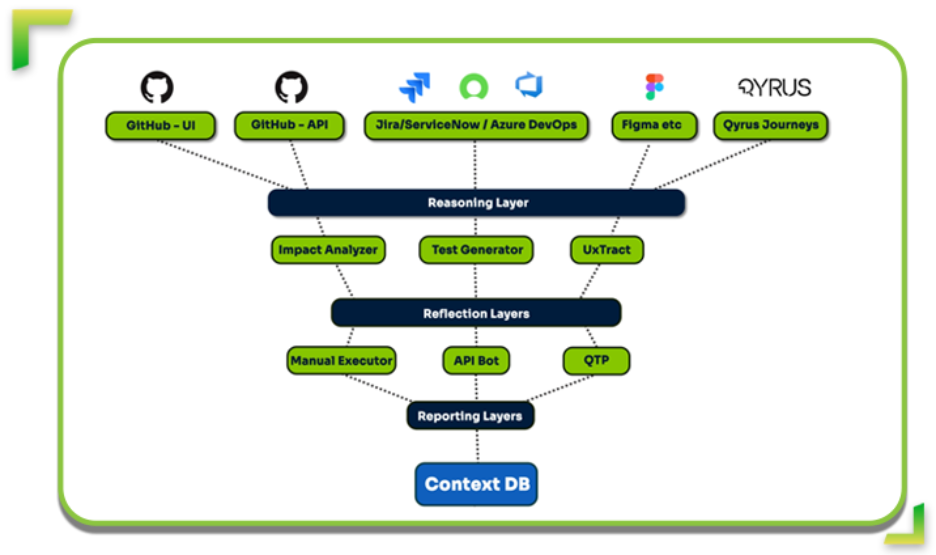
We are moving toward autonomous QA. The Qyrus platform operates on the SEER framework—Sense, Evaluate, Execute, Report.
Sense: The system reads and interprets the application code and documentation.
Evaluate: It identifies gaps between the technical implementation and business requirements.
Execute: It generates and runs tests using self-healing locators.
Report: It provides actionable intelligence on process conformance.
This framework shifts the role of the QA engineer from a script writer to a process architect.
Conclusion: From “Checking” to “Assuring”
The path to effective SAP Fiori test automation does not lie in faster scripting. It lies in smarter engineering.
For too long, teams have been stuck in the “checking” phase—validating if a button works or a field accepts text. The Qyrus Fiori Test Specialist allows you to move to true assurance. By utilizing Reverse Engineering to eliminate the creation bottleneck and the Qyrus Healer to survive the dynamic ID crisis, you can achieve the 60-80% reduction in maintenance effort that modern delivery cycles demand.
Ready to Transform Your SAP QA Strategy?
Stop letting maintenance costs eat your budget. It is time to shift your focus from reactive validation to proactive process conformance.
If you are ready to see how SAP Fiori test automation can actually work for your enterprise—delivering stable locators, autonomous repair, and deep ERP awareness—the Qyrus Fiori Test Specialist is the solution you have been waiting for. Don’t let brittle scripts or manual regressions slow down your S/4HANA migration. Eliminate the creation bottleneck and achieve the 60-80% reduction in maintenance effort that your team deserves.
Let’s confront the reality of mobile testing right now. It is messy. It is expensive. And for most teams, it is a constant battle against entropy.
We aren’t just writing tests anymore; we are fighting to keep them alive. The sheer scale of hardware diversity creates a logistical nightmare. Consider the Android ecosystem alone: it now powers over 4.2 billion active smartphones produced by more than 1,300 different manufacturers. When you combine this hardware chaos with OS fragmentation—where Android 15 holds only 28.5% market share while older versions cling to relevance—you get a testing matrix that breaks traditional scripts.
But the problem isn’t just the devices. It’s the infrastructure.
If you use real-device clouds, you know the frustration of “hung sessions” and dropped connections. You lose focus. You lose context. You lose time. These infrastructure interruptions force testers to restart sessions, re-establish state, and waste hours distinguishing between a buggy app and a buggy cloud connection.
This chaos creates a massive, invisible tax on your engineering resources. Instead of building new features or exploring edge cases, your best engineers are stuck in the “maintenance trap.” Industry data reveals that QA teams often spend 65-70% of their time maintaining existing tests rather than creating new ones.
That is not a sustainable strategy. It is a slow leak draining your return on investment (ROI). To fix this, we didn’t just need a software update; we needed a complete architectural rebuild.
The Zero-Migration Paradox: Innovation Without the Demolition
When a software vendor announces a “complete platform rebuild,” seasoned QA leaders usually panic.
We know what that phrase typically hides. It implies “breaking changes.” It signals weeks or months of refactoring legacy scripts to fit new frameworks. It means explaining to stakeholders why regression testing is stalled while your team migrates to the “new and improved” version.
We chose a harder path for the upcoming rebuild of the Qyrus Mobility platform.
We refused to treat your existing investment as collateral damage. Our engineering team made one non-negotiable promise during this rebuild: 100% backwards compatibility from Day 1.
This is the “Zero Migration” paradox. We completely re-imagined the building, managing, and running of mobile tests to be faster and smarter, yet we ensured that zero migration effort is required from your team. You do not need to rewrite a single line of code.
Those complex, business-critical test scripts you spent years refining? They will work perfectly the moment you log in. We prioritized this stability to ensure you get the power of a modern engine without the downtime of a mechanic’s overhaul. Your ROI remains protected, and your team keeps moving forward, not backward.
Stop Fixing the Same Script Twice: The Modular Revolution
We need to talk about the “Copy-Paste Trap.”
In the early days of a project, linear scripting feels efficient. You record a login flow, then record a checkout flow, and you are done. But as your suite grows to hundreds of tests, that linear approach becomes a liability. If your app’s login button ID changes from #submit-btn to #btn-login, you don’t just have one problem; you have 50 problems scattered across 50 different scripts.
This is the definition of Test Debt. It is the reason why teams drown in maintenance instead of shipping quality code.
With the new Qyrus Mobility update, we are handing you the scissors to cut that debt loose. We are introducing Step Blocks.
Think of Step Blocks as the LEGO® bricks of your testing strategy. You build a functional sequence—like a “Login” flow or an “Add to Cart” routine—once. You save it. Then, you reuse that single block across every test in your suite.
The magic happens when the application changes. When that login button ID inevitably updates, you don’t hunt through hundreds of files. You open your Login Step Block, update the locator once, and it automatically propagates to every test script that uses it.
This shift from linear to modular design is not just a convenience; it is a mathematical necessity for scaling. Industry research confirms that adopting modular, component-based frameworks can reduce maintenance costs by 40-80%.
By eliminating the redundancy in your scripts, you free your team from the drudgery of repetitive fixes. You stop maintaining the past and start testing the future.
Reclaiming Focus: Banish the “Hung Session”
We need to address the most frustrating moment in a tester’s day.
You are forty minutes into a complex exploratory session. You have almost reproduced that elusive edge-case bug. You are deep in the flow state. Then, the screen freezes. The connection drops. Or perhaps you hit a hard limit; standard cloud infrastructure often enforces strict 60-minute session timeouts.
The session dies, and with it, your context. You have to reconnect, re-install the build, navigate back to the screen, and hope you remember exactly what you were doing. Industry reports confirm that cloud devices frequently go offline unexpectedly, forcing testers to restart entirely.
We designed the new Qyrus Mobility experience to eliminate these interruptions.
We introduced Uninterrupted Editing because we know testing is iterative. You can now edit steps, fix logic, or tweak parameters without closing the device window. You stay connected. The app stays open. You fix the test and keep moving.
We also solved the context-switching problem with Rapid Script Switching. If you need to verify a different workflow, you don’t need to disconnect and start a new session. You simply load the new script file into the active window. The device stays with you.
We even removed the friction at the very start of the process. With our “Zero to Test” workflow, you can upload an app and start building a test immediately—no predefined project setup required. We removed the administrative hurdles so you can focus on the quality of your application, not the stability of your tools.
Future-Proofing with Data & AI: From Static Inputs to Agentic Action
Mobile applications do not live in a static vacuum. They exist in a chaotic, dynamic world where users switch time zones, calculate different currencies, and demand personalized experiences. Yet, too many testing tools still rely on static data—hardcoded values that work on Tuesday but break on Wednesday.
We have rebuilt our data engine to handle this reality.
The new Qyrus Mobility platform introduces advanced Data Actions that allow you to calculate and format variables directly within your test flow. You can now pull dynamic values using the “From Data Source” option, letting you plug in complex datasets seamlessly. This is critical because modern apps handle 180+ different currencies and complex date formats that static scripts simply cannot validate. We are giving you the tools to test the app as it actually behaves in the wild, not just how it looks in a spreadsheet.
But we are not stopping at data. We are preparing for the next fundamental shift in software quality.
You have heard the hype about Generative AI. It writes code. It generates scripts. But it is reactive; it waits for you to tell it what to do. The future belongs to Agentic AI.
In Wave 3 of our roadmap, we will introduce AI Agents designed for autonomous execution. Unlike Generative AI, which focuses on content creation, Agentic AI focuses on outcomes. These agents will not just follow a script; they will autonomously explore your application, identifying edge cases and validating workflows that a human tester might miss. We are building the foundation today for a platform that doesn’t just assist you—it actively works alongside you.
Practical Testing: Generative AI Vs. Agentic AI
Dimension
Generative AI
Agentic AI
Core Function
Generates test code and suggestions
Autonomously executes and optimizes testing
Decision-Making
Reactive; requires prompts
Proactive; makes independent decisions
Error Handling
Cannot fix errors autonomously; requires human correction
Automatically detects, diagnoses, and fixes errors
Maintenance
Generates new tests; humans maintain existing tests
Actively uses tools, APIs, and systems to accomplish tasks
Feedback Loops
None; static output until new prompt
Continuous; learns and adapts from every execution
Outcome Focus
Process-oriented (did I generate good code?)
Results-oriented (did I achieve quality objectives?)
Conclusion: The New Standard for 2026
This update is not a facelift. It is a new foundation.
We rebuilt the Qyrus Mobility platform to solve the problems that actually keep you awake at night: the maintenance burden, the flaky sessions, and the fear of breaking what already works. We did it while keeping our promise of 100% backwards compatibility.
You get the speed of a modern engine. You get the intelligence of modular design. And you keep every test you have ever written.
Get Ready. The future of mobile testing arrives in 2026. Stay tuned for the official release date—we can’t wait to see what you build.
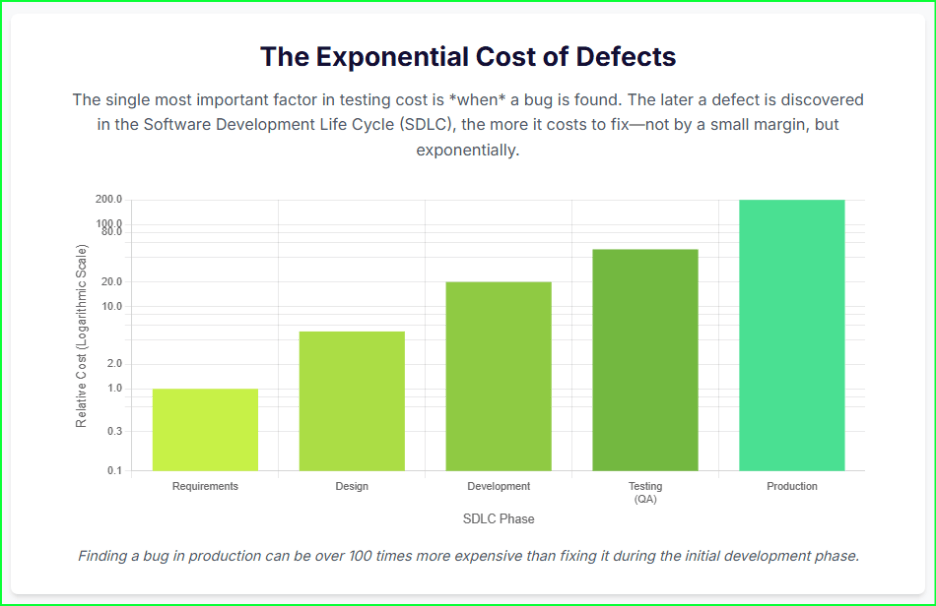
Consider the staggering price of poor software. In 2022, the cost of poor software quality in the US alone hit an astonishing $2.41 trillion. This isn’t just a number; it’s a massive tax on businesses that fail to invest in quality. The math is simple: a bug found in production is up to 100 times more expensive to fix than one caught during the initial design phase.
Many organizations, however, still treat their software testing cost as a line item to slash. This short-sighted approach creates a cycle of underinvestment. It leads directly to catastrophic external failures, emergency patches, and customer churn. You are not saving money; you are just delaying a much larger payment.
This guide changes that perspective. We will reframe software testing as a strategic, high-return investment. We will deconstruct the true costs of quality assurance, provide a clear framework for accurate software testing cost estimation, and share proven strategies for how to reduce the cost of software testing—not by cutting corners, but by optimizing value.
The Strategic Framework: Cost of Quality (CoQ) vs. Cost of Poor Quality (CoPQ)
To effectively manage your software testing cost, you must stop thinking about it as a simple expense. Instead, you need a structured financial framework. The Cost of Quality (CoQ) provides this structure. It classifies every quality-related expenditure into two strategic categories: proactive investments and reactive failures. This model reframes the entire conversation from “how much does testing cost?” to “what is the value of our investment in quality?”.
This framework is built on a central economic principle: every dollar you invest in “Good Quality” directly and significantly reduces the exponentially more damaging “Poor Quality” costs.
The Cost of Good Quality (Proactive Investment)
These are the proactive investments you make to build quality into your product from the start.
Prevention Costs: This is the money you spend to prevent defects from ever happening. It includes activities like developer training on secure coding, robust test planning, and conducting thorough requirements analysis before a single line of code is written.
Appraisal (Detection) Costs: This is the cost of finding defects before they reach your customer. This category includes all traditional QA activities: running manual and automated tests, QA team salaries, automation tools licensing, and setting up test environments.
The Cost of Poor Quality (Reactive Liability)
These are the reactive expenses you incur when quality fails.
Internal Failure Costs: These are the costs to fix bugs before the product ships. This includes all the developer time spent on debugging and rework, as well as the time your QA team spends re-running tests after a fix.
External Failure Costs: This is the most expensive and dangerous category. These costs explode after a defective product is released to users. It includes everything from increased customer support calls and emergency hotfixes to regulatory penalties, lost revenue, and severe, lasting reputational damage.
Key Takeaway: A smart testing process involves a deliberate investment in Prevention and Appraisal costs. This proactive spending is the single most effective way to drastically reduce the massive, uncontrolled costs of Internal and External failures.
What Factors Really Determine Your Software Testing Cost?
Your final software testing cost is not a fixed number. It’s a variable figure that depends on several key drivers. Understanding these factors is the first step toward building an accurate software testing cost estimation model and identifying opportunities for optimization.
Project Complexity
This is the most significant cost driver. A simple, single-platform application requires far less testing effort than a complex, cross-platform enterprise system. More features, complex business logic, and numerous third-party integrations all directly increase the testing scope and, therefore, the cost.
Testing Types
Not all testing is created equal. Different test types require different skills, tools, and environments, leading to varied costs.
Functional & Regression Testing: These form the baseline of QA efforts. Manual functional testing can range from $15-$30 per hour.
Automation Testing: While it carries a higher initial investment for setup, automation testing, often billed at $20-$35 per hour, provides long-term ROI by reducing manual effort in regression cycles.
Performance Testing: This specialized testing requires advanced tools and environments to simulate user load, with rates often falling between $20-$35 per hour.
Security & Compliance Testing: This is a high-skill domain. Security testing rates can be $25-$45 per hour, and specialized penetration tests can range from $5,000 to over $100,000, depending on the application’s scope.
Team Model & Location
Where your team is located and how it’s structured dramatically impacts the budget. Labor rates vary significantly by region. For example, a QA tester in North America might cost $50-$150 per hour, while a tester with similar skills in Asia could be $15-$40 per hour. Outsourcing to regions with lower labor costs can lead to savings of 60-70%. The choice between in-house, outsourced, or a hybrid model is one of the most critical financial decisions you will make.
Automation Tools & Infrastructure
Your technology stack has a clear price tag. Commercial automation tools come with licensing fees, which must be factored into your budget. Your testing infrastructure also plays a major role. A traditional on-premise test lab requires significant capital expenditure (CapEx), with initial setup costs potentially ranging from $10,000 to $50,000. In contrast, a cloud-based testing platform shifts this to an operational expense (OpEx), offering a pay-as-you-go model that eliminates large upfront investments and reduces long-term maintenance.
The Hidden Costs You’re Forgetting
The most dangerous costs are the ones you don’t track.
Test Maintenance: This is the #1 hidden cost in test automation. As your application changes, test scripts break. Teams can spend up to 50% of their automation budget just fixing and maintaining brittle scripts instead of finding new bugs.
Technical Debt: Poorly written, complex code is a drag on quality. This “technical debt” makes the application exponentially harder and more expensive to test with every new feature.
Test Data Management: Creating, managing, and securing compliant test data (especially for regulations like GDPR) is a significant and often completely overlooked expense.
Opportunity Cost: This is the business value lost when a lengthy, inefficient testing process delays your product release, allowing competitors to capture market share.
How to Accurately Estimate Your Software Testing Cost
Forget guesswork. A reliable software testing cost estimate isn’t pulled from thin air; it’s built on a structured approach. An accurate forecast prevents budget overruns, justifies resource allocation, and sets up a clear baseline for your project’s financial health. Here is a three-step framework for a more accurate software testing cost estimation.
Step 1: Deconstruct the Work (Work Breakdown Structure – WBS)
You can’t estimate what you haven’t defined. Start by using a Work Breakdown Structure (WBS) to divide the entire testing project into smaller, manageable components. Instead of one giant task called “testing,” you’ll have a detailed list:
Test Planning & Strategy
Test Environment Setup & Configuration
Test Case Design (per module or feature)
Test Data Creation
Test Execution (for functional, regression, performance, etc.)
Defect Management & Reporting
This detailed list of tasks becomes the foundation for all your effort calculations.
Step 2: Apply an Estimation Model
Once you have your task list, you can apply proven models to estimate the effort (in hours) for each item.
Function-Point Analysis: This method gauges project size by breaking tasks into “functional points” and categorizing them as simple, medium, or complex. You assign points to each feature (e.g., a simple login is 1 point, a complex payment gateway is 4 points) and then multiply the total points by a standard effort-per-point based on your team’s past performance.
Three-Point (PERT) Estimation: This technique brilliantly accounts for uncertainty. For each task, you get three estimates: (O)ptimistic, (M)ost Likely, and (P)essimistic. You then use a weighted average to find the expected effort: (O + 4M + P) / 6. This method avoids the trap of purely optimistic planning.
Analogous Estimation: Use your own history as a guide. This model involves using historical data and metrics from similar past projects as a baseline to estimate the effort for your current one.
Step 3: Calculate the Final Cost
With your total effort estimated, the final calculation is straightforward.
(Total Estimated Effort in Hours) x (Blended Hourly Rate of QA Team) + (Tool & Infrastructure Costs) = Total Software Testing Cost
Always include a 15-20% contingency buffer on top of this total. This buffer accounts for the unknown—the unexpected issues, scope creep, and hidden complexities that inevitably arise.
Simple Example:
Total Effort (from Step 2): 400 hours
Blended QA Rate: $80/hr (avg. of onshore/offshore team)
5 Proven Strategies for How to Reduce the Cost of Software Testing
The goal is not just to cut your software testing cost, but to optimize your spending. You want to achieve maximum quality and speed for every dollar you invest. Here is how to reduce the cost of software testing by focusing on efficiency and value, not just arbitrary cuts.
Strategy 1: “Shift Left” – Test Early in the Development Cycle
This is the most critical and impactful strategy. The “Shift-Left” philosophy involves moving quality-related activities as early in the development lifecycle as possible. The economic driver is simple: the cost to fix a bug explodes over time.
A defect found and fixed by a developer during the design phase is trivial. The exact same bug found after release can cost 4 to 100 times more to remediate, factoring in customer support, emergency patches, and rework. By integrating QA professionals into requirements and design discussions, you prevent entire classes of defects from ever being written.
Strategy 2: Implement Strategic Automated Testing
Automation is a powerful cost-saver, but only when applied strategically. The goal is to automate tasks that provide a high return on investment. This includes:
Repetitive, time-consuming tasks like regression testing.
Data-driven tests that run the same script with thousands of different data inputs.
Avoid automating unstable features or tests that will only be run once. Strategic automation frees your skilled manual testers to focus on high-value, human-centric tasks like exploratory testing and usability testing. Organizations that invest in test automation can see a positive ROI within the first year.
Strategy 3: Adopt Risk-Based Testing (RBT)
You cannot and should not test everything with equal effort. Risk-Based Testing (RBT) provides a systematic method to focus your finite testing efforts on the areas of the application that pose the greatest business risk.
This process involves identifying high-risk modules—based on code complexity, frequency of use, and the business impact of a failure—and prioritizing them. This follows the Pareto Principle (80/20 rule): you can often find 80% of the critical defects by focusing on the 20% most important features. Studies have shown that a well-implemented RBT strategy can yield a 35% higher ROI on your testing investment.
Strategy 4: Optimize Your Sourcing Strategy
A hybrid model is often the most cost-effective approach. This strategy involves:
Keeping your core strategy, complex risk-based testing, and business logic validation in-house.
Outsourcing or offloading high-volume, repetitive regression suites or specialized testing (like security) to a cost-effective partner.
This gives you the control of an in-house team combined with the cost-efficiency and specialized talent pool of an outsourcing partner. This can be especially effective for accessing specialized skills, like penetration testing, which can be slow and expensive to build internally.
Traditional automation tools have a critical flaw: they create the massive “Test Maintenance” hidden cost we identified earlier. As your application evolves, brittle scripts break, forcing your engineers to spend up to 50% of their time just fixing old tests.
Modern, AI-driven platforms are designed to solve this exact problem. AI can automatically detect UI changes, “self-heal” broken tests, and intelligently generate new test cases, drastically reducing maintenance overhead. AI-driven approaches have been shown to reduce overall QA costs by as much as 50%.
Cost Effectiveness with Qyrus Autonomous Platform
The biggest flaw in most automated testing strategies is the hidden software testing cost of maintenance. As your app evolves, your tests break, and your engineers spend more time fixing tests than finding bugs.
The Solution: The Qyrus Autonomous Testing Platform
Eliminate Tool Sprawl: Qyrus is a unified platform that handles Web, Mobile, API, Desktop, and SAP testing. This consolidation dramatically reduces licensing costs and the friction of a fragmented toolchain.
Crush Maintenance Costs with AI: The Qyrus SEER framework uses intelligent AI agents to tackle the biggest cost drivers:
Healer: Automatically detects UI changes and “self-heals” broken tests, virtually eliminating the manual maintenance overhead that plagues other tools.
TestGenerator & Rover: Autonomously generate and execute tests from requirements or by exploring your application, slashing the manual effort needed for test planning and creation.
Enable True Continuous Testing: Qyrus integrates directly into your CI/CD pipeline, allowing you to “shift left” and find bugs early in the development cycle when they are cheapest to fix.
The Bottom Line: Qyrus makes your testing process more cost efficient not just by automating, but by autonomously maintaining your automation. This delivers a faster ROI and frees your engineers to focus on quality, not script repair.
Beyond Cost: Measuring the Business ROI of Your Testing Investment
A mature testing strategy doesn’t just save money; it actively drives business value. To prove this, you must connect your testing efforts to the key performance indicators (KPIs) that your entire business runs on. The focus must shift from activity metrics (e.g., “test cases executed”) to outcome-based metrics that measure operational stability and delivery velocity.
Reducing the Change Failure Rate (CFR)
This is a critical DORA metric that measures how often a deployment to production fails or results in a degraded service. A high CFR is a direct indicator of quality problems escaping your test process, and it creates immense rework costs. A robust, automated regression testing suite, tracked in your CI/CD dashboard, is the number one tool for keeping this rate low and ensuring production stability.
Improving Mean Time to Recovery (MTTR)
When a failure does happen (and it will), this DORA metric measures the average time it takes to restore service. A long MTTR translates directly to customer impact, lost revenue, and reputational damage. A high-speed, reliable continuous testing pipeline is essential here. It allows your team to validate a fix and safely deploy it in minutes or hours, not days.
Increasing Release Velocity
For decades, testing was seen as the primary bottleneck to release new features. By automating your regression suite and reducing the testing cycle, you directly increase your release velocity. This allows you to capture market opportunities before your competitors. High-performing DevOps organizations that practice continuous testing deploy multiple times per day, not monthly, and have significantly lower change failure rates.
Conclusion: Stop Managing Cost, Start Optimizing Value
The software testing cost is not an unavoidable expense but a strategic, high-return investment in product quality and business resilience. The real price tag to fear is the $2.41 trillion cost of poor software—that is the steep price businesses pay for not investing.
You can achieve true cost effectiveness and competitive advantages. The path requires reframing your entire strategy around the Cost of Quality (CoQ) framework. It demands that you shift left to find bugs earlier, prioritize your efforts with risk-based testing, and—most importantly—leverage modern, autonomous platforms. These tools are the only way to eliminate the single biggest cost driver in traditional automation: the crippling, 50% budget-drain of test maintenance.
Stop letting brittle scripts and fragmented tools inflate your testing budget.
See how Qyrus’ AI-powered, unified platform can cut your maintenance overhead, boost your release velocity, and deliver a measurable ROI. Schedule a Demo Today!
Welcome to our November update! As we approach the end of the year, our mission to simplify and supercharge your testing lifecycle continues with renewed vigor. In November, we’ve focused on removing the friction between your tools and your goals, delivering enhancements that offer greater visibility, deeper ecosystem integration, and a more personalized AI experience.
In November, we are bridging critical gaps in your workflow. We’ve made reporting clearer with context-rich screenshots, streamlined test creation with instant cURL imports, and empowered enterprise teams by unlocking full Test Suite executions directly within Xray. Plus, our AI algorithms are now smarter than ever, capable of leveraging memory to adapt to your specific context. These updates are all about giving you the clarity and control you need to test with confidence.
Let’s dive into the powerful new features available on the Qyrus platform in November!
Web Testing
Context is King: Step Descriptions Now Label Your Screenshots!
The Challenge:
Previously, screenshots in execution reports were labeled with a generic “Screen Shot” tag. This forced users to constantly cross-reference the image with the test log to understand exactly what action was being captured in that specific frame, making the review process slower and less intuitive.
The Fix:
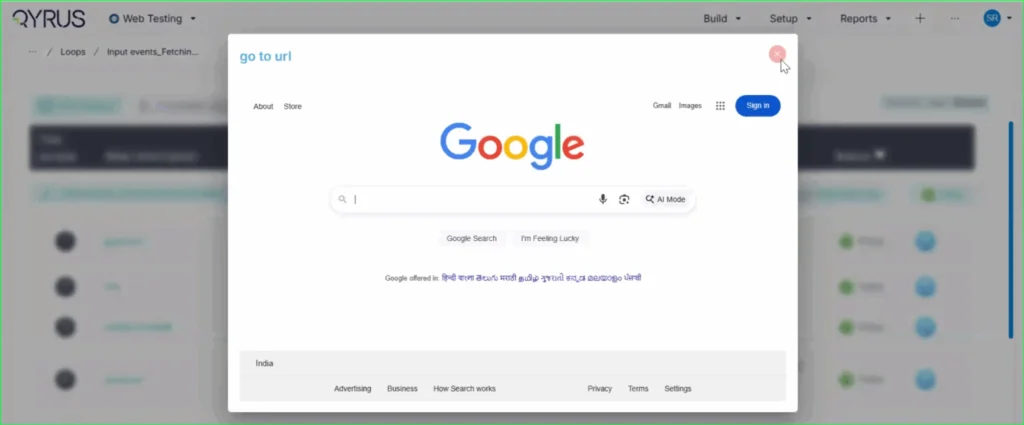
We have updated the reporting engine to replace the generic “Screen Shot” label. Now, the specific step description (e.g., “go to url”) is automatically displayed directly on the top left of every screenshot in the report.
How will it help?
This enhancement provides immediate context for every visual in your report. You can now browse through screenshots and instantly understand the specific test action being depicted without needing to look elsewhere. This significantly improves report readability, reduces cognitive load, and speeds up the debugging and review process.
No More Toggling: View Recorded Locators Instantly on the Step Page!
The Challenge:
Previously, after using the Qyrus Recorder to capture a test flow, the specific locator values (like XPaths or CSS selectors) were not immediately visible on the main test step page. To view or verify these locators, functional testers found it cumbersome to have to re-enter “record mode” via the Encapsulate Chrome extension, disrupting their workflow just to check technical details.
The Fix:
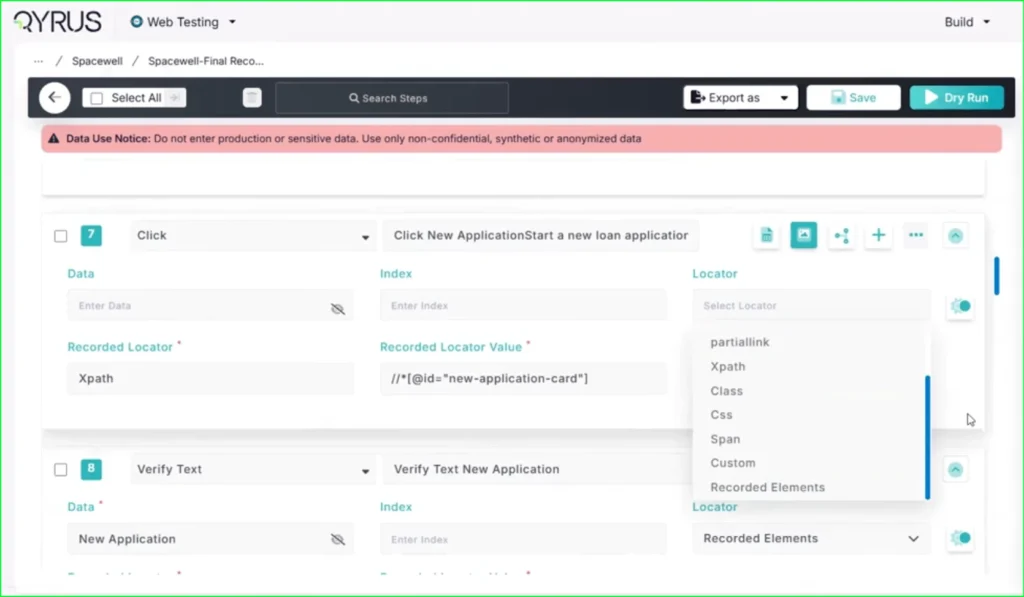
We have updated the Qyrus Recorder with improved locator detection and data handling. Now, after recording a session, all captured locator values are immediately populated and visible directly on the step page within the Qyrus platform.
How will it help?
This update significantly streamlines the script review and validation process. You no longer need to switch back and forth between the platform and the recorder extension just to see how an element is being identified. This gives functional testers and automation engineers instant visibility into their test logic, making it faster and easier to verify scripts and ensure the correct elements are being targeted.
Scale Your Xray Testing: Suite Execution Now Supported!
The Challenge:
Previously, our integration with Xray was limited to triggering single test scripts. This created a workflow bottleneck for teams who needed to execute larger batches of tests or full regression sets, as there was no capability to launch a complete Test Suite directly from the Xray interface.
The Fix:
We have upgraded our Xray integration to fully support Test Suite execution. Users can now trigger the execution of entire suites from within Xray with the same ease and simplicity as running a single script.
How will it help?
This update allows you to significantly scale your testing efforts directly from your test management tool. You are no longer restricted to triggering scripts one by one; instead, you can launch comprehensive test suites in a single action. This streamlines your execution workflow, ensuring that your Xray-driven testing is as efficient and powerful as your needs demand.
qAPI Product Release Update
Copy, Paste, Done: Import APIs Instantly with cURL!
The Challenge:
Creating API tests manually can be a tedious process of copy-pasting individual components—headers, bodies, URLs, and methods—from your documentation or browser developer tools into the test platform. This manual reconstruction is not only slow but also increases the risk of transcription errors, leading to frustrated testers and broken initial tests.
The Fix:
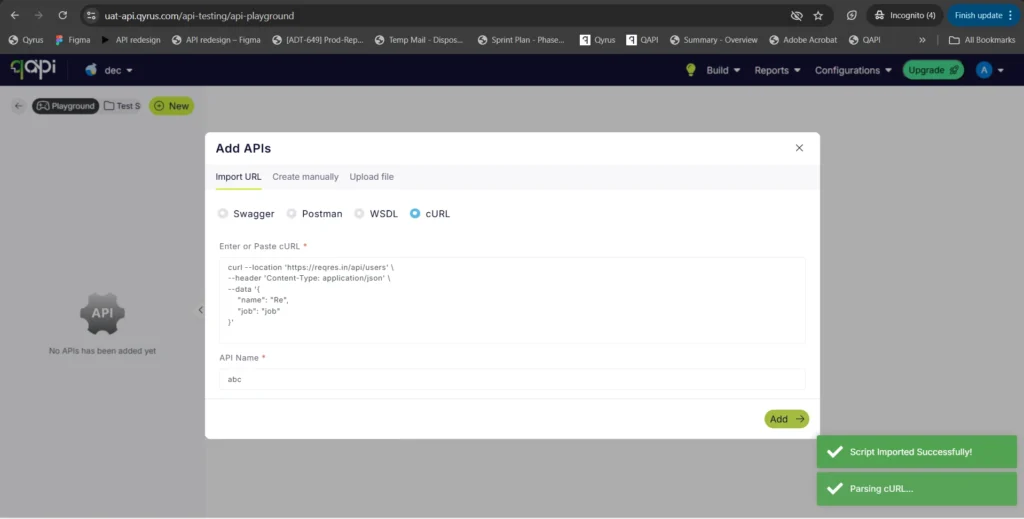
We have introduced a new “Import via cURL” option in the API creation workflow. You can now simply paste a raw cURL command directly into Qyrus. The system will automatically parse the command and instantly create a fully configured API test with all the correct parameters, headers, and body content mapped for you.
How will it help?
This feature is a massive time-saver that bridges the gap between development and testing. Developers and testers often have cURL commands readily available (from API docs or network logs). By allowing direct import, we eliminate the manual data entry, ensuring your API tests are set up instantly and accurately, exactly as they were defined in your cURL command.
AI Enhancements
AI That Remembers: Enhanced Algorithms Now Access User Memory!
The Challenge:
Previously, while our AI algorithms were powerful, they often operated in isolation for each interaction. Without access to a persistent memory of past preferences, specific project contexts, or user-defined constraints, the AI could sometimes provide generic suggestions or require users to repeatedly provide the same background information, slowing down the workflow.
The Fix:
We have rolled out significant enhancements to all our AI algorithms. For users who have opted into the memory feature, these algorithms can now securely access and utilize stored context and preferences.
How will it help?
This upgrade makes your AI interactions significantly smarter and more personalized.
Reduced Repetition: The AI remembers your specific constraints and preferences, so you don’t have to repeat them.
Better Suggestions: Whether generating test data or building scenarios, the AI now understands your unique context, leading to more relevant and accurate results.
Seamless Workflow: Experience a more continuous and intelligent partnership with the platform, as the AI learns and adapts to your specific way of working over time.
Ready to Accelerate Your Testing with November Upgrades?
We are dedicated to evolving Qyrus into a platform that not only anticipates your needs but also provides practical, powerful solutions that help you release top-quality software with greater speed and confidence.
Curious to see how these October enhancements can benefit your team? There’s no better way to understand the impact of Qyrus than to see it for yourself.
Financial application testing is the process of checking that banking, fintech, and financial services software works correctly and securely. It must also comply with requirements before it reaches customers or auditors.
The risks are very high in this area. If there is a mistake in the interest rate, a payment fails, or an API endpoint is exposed, it is not a small problem. It is an issue with rules; it hurts the company’s reputation, and it costs a lot of money, all at the same time. On average, a data breach in services costs $6.08 million per incident. This makes the sector a big target for cybercriminals. Meanwhile, financial institutions using AI-powered test automation reduce transaction processing errors by 96% and accelerate compliance validation by 73% compared to those relying on manual approaches.
Most institutions are not doing things the best way. They still do a lot of testing by hand even though applications must handle a number of transactions every day, process payments from other countries, and keep up with rules that are always changing.
This guide has everything QA leaders, test architects, and engineering heads at banks and fintechs need to know. It talks about the types of testing that are most important, the special challenges of the financial area, how to set up a plan that uses both people and automation, and how AI is changing what financial application testing can do.
What is financial application testing?
Financial application testing is an area of software quality assurance that focuses on the unique needs of banking, fintech, insurance, capital markets, and payments software. It is not about checking if buttons work.
In a financial context, testing must validate:
Transactional accuracy that calculations, interest rates, fund transfers, and ledger entries are mathematically precise
Security and fraud resilience that the application can withstand attacks and protect sensitive customer data
Regulatory compliance that the software meets the requirements of PCI DSS, SOX, GDPR, DORA, PSD2, and other applicable frameworks
Performance under load that the system holds up during peak events like salary day, tax season, or IPO allotments
Integration integrity that data flows correctly across the full chain of APIs, legacy systems, payment rails, and third-party services
The main thing that defines financial application testing is the consequences of failure. A bug in an app is just an inconvenience. But the same bug in a banking app can cause problems. It can freeze accounts, misroute funds, trigger regulatory penalties, and destroy customer trust.
8 essential types of financial application testing
A good financial application testing strategy does not rely on one method. It uses multiple testing types, each designed to catch different kinds of risks. Here are the 8 important ones:
Testing type
What it covers in financial applications
1. Functional testing
Checks every feature, including account creation, fund transfers, loan calculations, and currency conversions, works exactly as it should. In finance, it is very important that everything works precisely. A miscalculated interest rate or failed transfer is not a bug, it is a liability.
2. Security testing
Identifies vulnerabilities including SQL injection, cross-site scripting, broken authentication, and insecure API endpoints. Financial apps are the second-most targeted sector by cybercriminals, with breaches costing an average of $6.08 million per incident.
3. Performance and load testing
Simulates thousands of users at the same time to see if the application can handle peak events like tax deadlines, salary-day surges, and IPO allotments. Automated tools can check response times and bottlenecks before they cause problems.
4. Compliance testing
Checks that the application meets all the requirements of PCI DSS, SOX, GDPR, DORA, PSD2, and AML/KYC. It also generates logs and evidence trails that are ready for audits. Automated compliance testing can reduce audit findings by up to 82%.
5. Integration testing
Validates data flow and integrity across interconnected legacy systems, third-party APIs, payment gateways, credit bureaus, and fraud engines. Most problems in fintech happen between systems, not within them.
6. Regression testing
Makes sure that new code changes do not break existing functionality. Financial applications are updated often. Automated regression testing can re-run a comprehensive test suite after every update, providing quick assurance that everything still works.
7. Usability and UAT testing
Checks if the user interface is easy to use and if the system meets the expectations of the end users. Banks with user-friendly apps see 23% higher customer retention rates compared to those with technical issues.
8. API testing
Directly validates the functionality, performance, and security of the APIs powering payments, account verification, and open banking. It includes sending requests, checking responses, and testing for access controls.
No single type of testing can cover everything. The best financial QA teams run these tests in parallel, using automation to handle the volume and speed demands of security, regression, and performance testing while reserving human judgment for usability, exploratory, and UAT scenarios.
When you do financial application testing correctly, it changes the way you think about quality assurance. It is no longer a cost but a way to help your business. These are the benefits that you will see over time.
Accelerated time-to-market
Manual testing can take up a lot of time and money. In fact, it can take up 30 to 40% of a typical banking IT budget. If you automate the repetitive tasks, you can cut testing time by up to 50%. This means that financial firms can release features faster, which is a big advantage when your competitors are always shipping new things. Integrated automation enables release cycles to speed up by 60% compared to manual-only approaches.
Enhanced security and risk mitigation
Over 75% of applications have security flaws. Automated security testing tools can help find these flaws by scanning known vulnerabilities and simulating cyberattacks. They can test things like SQL injection, cross-site scripting, and broken access controls that could let someone transfer money without permission. This helps reduce the risk of an attack and keeps customer data safe.
Continuous regulatory compliance
The financial industry has a lot of rules to follow. Automated compliance testing can help simplify this by checking that you are following the rules and making detailed records. Companies that use automated compliance testing see up to a 78% improvement in compliance accuracy and can reduce audit findings by as much as 82%.
Greater accuracy and transactional integrity
Automated tests execute predefined steps with absolute precision, eliminating the human error inherent in manual validation. This is very important for software, where a small mistake can lead to big financial losses.
Broader test coverage
Automation lets you test more things than you could manually. It can do tests and repeat them many times, which would be impractical to do by hand. This means that human testers can focus on the work that requires real financial knowledge.
Regulatory compliance in financial application testing
Compliance testing is not optional, but it is a requirement in every financial jurisdiction. The table below shows the regulatory frameworks and the types of testing that meet their requirements.
Regulation
What it requires
How testing addresses it
PCI DSS 4.0
Secure handling of cardholder data; mandatory MFA for high-risk actions
Security testing, penetration testing, API validation, access control testing
SOX
Accuracy of financial reporting and IT internal controls; full audit trails
Regression testing, data integrity testing, audit log validation
GDPR / CCPA
User data privacy, consent management, encryption of PII in transit and at rest
Data masking in test environments, consent flow testing, encryption validation
DORA (EU)
Digital operational resilience; mandatory annual security testing strategy; TLPT every 1–3 years
A critical development: the EU’s Digital Operational Resilience Act (DORA), which came into force in January 2025, now mandates a formal annual security testing strategy and threat-led penetration testing every one to three years for critical systems. Compliance is no longer a good idea, it is enforceable, with regulatory reporting of findings required. Teams must incorporate this into their financial application testing plans.
Unique challenges in modern financial application testing
Financial institutions face a testing environment that is different from any other. A generic testing strategy is not enough, as failure here can have consequences.
Handling sensitive data
Financial applications handle a lot of customer data. Testers must use methods to prevent leaks during testing. Research shows that 46% of banking organizations struggle with test data management. Using non-production data is not optional; it is a compliance requirement under GDPR and CCPA.
Complex system integrations
Modern financial systems are connected to legacy platforms and new APIs. Open Banking, Banking-as-a-Platform (BaaP), and embedded finance all depend on deep, real-time integration across systems from multiple vendors. Ensuring data transfer across these systems is crucial. Most real-world fintech failures occur because of integration issues that were not tested properly.
High-stakes performance requirements
Financial applications must handle a lot of transactions and sudden traffic spikes without slowing down. Salary day for a major bank can trigger tens of millions of simultaneous requests. Automated performance and load testing can simulate these conditions in a controlled environment, identifying bottlenecks before they hit production. Teams that skip load testing discover their limitations at the worst possible moment.
Device and platform fragmentation
A modern financial customer journey involves web portals, iOS and Android apps, desktop banking software, and third-party aggregators, all of which must deliver a consistent, reliable experience. Testing across all of these manually is not feasible. A unified testing platform that can test mobile, web, and API from an interface is necessary for comprehensive coverage.
Manual vs. automated financial application testing: finding the right balance
The most effective strategy for financial application testing is not a binary choice between automation and manual. It is a deliberate hybrid, with each method assigned to the category of work it handles best.
Where automation excels
Automation handles high-volume, repeatable, and data-intensive tasks where precision and speed are paramount. In financial applications, this means:
Regression testing: Automated regression suites re-execute a comprehensive test suite after every code commit, ensuring new changes do not break existing financial workflows. This is the only way to maintain coverage at modern release velocities.
Performance and load testing: Automated tools pretend to be thousands of users to see if the system can handle people using it at the same time. This helps find any problems before they become an issue.
API testing: Fintech applications rely on APIs for every critical function including payments, account verification, fraud checks, and credit scoring. Automated API testing validates the functionality, performance, and security of these integrations directly and continuously.
Compliance and security scanning: Automated tools run scheduled security scans, validate compliance controls, and generate the audit evidence that regulators require, without human involvement.
Where manual testing remains essential
Manual testing retains a critical role for work that requires human adaptability, financial domain expertise, and genuine judgment:
Exploratory testing: Skilled testers probing the application creatively, looking for unexpected behaviors and edge cases that a script would never surface.
Usability evaluation: Assessing whether the interface is intuitive for customers, including first-time users and those with accessibility needs. Banks with high customer experience scores see 23% higher retention rates.
User acceptance testing (UAT): Confirming that the system meets end-user expectations, business requirements, and regulatory definitions of acceptable behavior before release.
The combined strategy in practice
So the best approach is to use a combination of automation and human testing. The goal is to automate 80% of regression testing and have humans focus on the areas that require creativity, judgment, and expertise. This way, testers can focus on the things that are most important and automation can handle the more repetitive tasks. Automation is not meant to replace testers, but to free them up to do the things that are most valuable.
The role of AI and machine learning in financial application testing
The big thing in financial software quality assurance is AI and machine learning. These technologies are making testing faster and more proactive. They are changing the way we do quality assurance from checking if something works to making it a smart and continuous process that is part of the development lifecycle.
Self-healing tests
Traditional automated test scripts stop working when the application’s user interface changes. This happens a lot in products that are being updated all the time. AI-powered self-healing tests can automatically detect and adapt to these changes. This means we do not have to spend a lot of time fixing the tests. Some studies have found that using AI to automate testing can reduce the time it takes to test by 40% and increase the number of defects found by 30%.
Intelligent test case generation and prioritization
AI can look at product specifications, defect data, and how users really behave to generate test cases automatically. It can also prioritize them based on financial risk. Instead of running each test every time, AI can focus on the areas where a failure would have the biggest financial impact.
Real-time fraud and anomaly detection
Machine learning models can monitor transaction logs in real time to identify anomalies and potential fraud. By using machine learning in the testing process, we can make sure that fraud detection models work correctly before they are used with transactions. One payment processor found that this approach could identify threats with 95% accuracy before they were deployed.
Autonomous testing and agentic test orchestration: SEER
AI-assisted testing is only one step on the maturity curve. The advanced financial QA teams are now using fully autonomous and agentic orchestration. This means that an intelligent system manages the testing process from start to finish.
Qyrus offers a framework called SEER (Sense, Evaluate, Execute, Report) that acts as the control center for the testing process. Rather than using one general AI, SEER uses a team of specialized Single Use Agents (SUAs), each doing a specific task with high precision:
Sensing changes: SEER monitors source code repositories like GitHub for changes and design platforms like Figma for UI/UX changes. It can automatically detect when testing is needed.
Evaluating impact: The Impact Analyzer agent performs static analysis to determine which components are affected by a change, enabling targeted testing rather than running an entire regression suite unnecessarily.
Executing coordinated action: SEER orchestrates the parallel execution of multiple agents. For example, API Builder checks backend logic and TestPilot performs functional tests on affected UI components at the same time without human coordination.
Reporting: Complete, traceable test results are generated automatically, providing the audit-ready evidence that financial regulators require.
For institutions that release new updates frequently across web, mobile, and API surfaces, agentic orchestration is not something to consider for the future. It is something they need now to stay competitive.
Qyrus’ SEER Framework
Real-Time Fraud and Anomaly Detection
AI and ML algorithms can continuously monitor transaction logs to identify anomalies and potential fraud in real-time. This proactive approach significantly enhances security and mitigates risks associated with financial fraud. A case study of a payment processor revealed that an AI model achieved a 95% accuracy rate in identifying threats prior to deployment.
Qyrus: purpose-built for financial services QA
Qyrus is an AI-powered testing platform designed specifically for financial application testing. It provides a solution for testing web, mobile, desktop, API, and SAP applications. This eliminates the need for tools that can create gaps in coverage and blind spots.
Built for financial industry requirements
The Qyrus platform meets the security and compliance requirements of the industry. It is ISO 27001 and SOC 2 compliant, which satisfies the security requirements of regulators and enterprise procurement teams. The no-code and low-code test design interface empowers both financial domain experts and technical testers to build and execute complex test cases without dependency on specialized programming skills. This is important because 76% of organizations now prioritize deep financial domain expertise in their QA teams.
Mobile testing for financial apps
The platform’s mobile testing capabilities are designed for the complexity of native and hybrid financial applications. It includes a cloud-based device farm that provides access to a wide range of real mobile devices and browsers for cross-platform testing. The Rover AI feature can autonomously explore applications to identify anomalies and unexpected behaviors faster than any manual effort. It also evaluates outputs from AI-driven fraud detection and credit scoring models, which is critical as AI is used more in financial products.
Quantifiable business outcomes
The business case for Qyrus is documented in an independent Forrester Total Economic Impact study, which found a 213% return on investment and a payback period of less than six months. A leading UK bank achieved 200% ROI within the first year, a 60% reduction in manual testing effort, and prevented over 2,500 bugs from reaching production.
Curious about how much your organization can save on QA with AI-powered automation? Contact our experts to see a personalized ROI estimate.
FAQ: financial application testing
What types of testing are most critical for financial applications?
The eight most critical types are functional testing, security testing, performance and load testing, compliance testing, integration testing, regression testing, usability and UAT testing, and API testing. Financial institutions that perform all eight in a coordinated strategy — using automation for volume and speed, and humans for judgment and exploration — achieve the deepest coverage and the lowest risk of production failures.
Can compliance testing be automated?
Yes. Automated compliance testing tools continuously validate adherence to PCI DSS, SOX, GDPR, DORA, and other frameworks, and generate audit-ready evidence trails automatically. A 2025 survey found that 78% of organizations reported significant improvements in compliance accuracy after adopting automated compliance tools. Manual compliance validation is simply not scalable given the volume and frequency of checks required under modern regulatory frameworks.
How do financial institutions handle sensitive test data?
The standard approach is a combination of data masking, anonymization, and synthetic data generation. Production data is never used in test environments without masking, as doing so would expose PII and likely constitute a GDPR or CCPA violation in itself. Synthetic data generation creates realistic but fictitious financial records — realistic enough to surface edge cases, but carrying no actual customer risk.
Can stress testing be automated?
Yes. Automated load and stress testing tools simulate thousands or millions of concurrent users against a financial application to identify performance degradation, crash points, and recovery behavior under extreme conditions. Stress testing should be a standard part of every financial application’s pre-release process, particularly before high-traffic events like salary day, tax season, or major product launches.
What is the difference between functional testing and compliance testing in fintech?
Functional testing validates that the application behaves as designed that a transfer moves the correct amount, that a loan calculation returns the right result, that an error message appears when it should. Compliance testing validates that the application meets externalregulatory requirements, that it logs the right data for SOX audit trails, that it enforces the MFA requirements of PCI DSS 4.0, that it handles user consent correctly under GDPR. Both are essential. A functionally perfect application can still fail a compliance audit.
What should I look for in a financial application testing platform?
The most important criteria are: support for all application types your organization uses (web, mobile, API, desktop); built-in compliance testing capabilities aligned to your regulatory environment; secure test data management with masking and synthetic data generation; a device farm for real-device mobile testing; integration with your CI/CD pipeline for continuous testing; and detailed audit-ready reporting. No-code or low-code interfaces are increasingly important, as they allow financial domain experts, not just test engineers, to build and execute test cases.
Investing in trust: the ultimate competitive advantage
Financial application testing is no longer a quality gate at the end of the development process. It is a continuous, intelligent function embedded throughout the entire software lifecycle, from the first code commit to every production release.
The institutions winning in digital finance are not necessarily those with the most features. They are the ones whose customers trust them absolutely, whose apps never fail at the worst moment, whose data is never exposed, and whose compliance posture never becomes a liability. That trust is not an accident. It is engineered, test by test, and release by release.
A modern financial application testing strategy — one that combines automation with human expertise, leverages AI for intelligence and speed, and uses agentic orchestration to manage complexity — is the foundational investment that makes trust at scale possible. The tools exist today. The question is whether your organization moves first or catches up later.
Ready to transform your financial application testing strategy? See how Qyrus delivers a 213% ROI and pays back in under six months. Book a personalized demo with our BFSI testing specialists.
Mobile apps are now the foundation of our digital lives, and their quality is no longer just a perk—it’s an absolute necessity. The global market for mobile application testing is experiencing explosive growth, projected to hit $42.4 billion by 2033.
This surge in investment reflects a crucial reality: users have zero tolerance for subpar app experiences. They abandon apps with performance issues or bugs, with 88% of users leaving an app that isn’t working properly. The stakes are high; 94% of users uninstall an app within 30 days of installation.
This article is your roadmap to building a resilient mobile application testing strategy. We will cover the core actions that form the foundation of any test, the art of finding elements reliably, and the critical skill of managing timing for stable, effective mobile automation testing.
The Foundation of a Flawless App: Mastering the Three Core Interactions
A mobile test is essentially a script that mimics human behavior on a device. The foundation of any robust test script is the ability to accurately and reliably automate the three high-level user actions: tapping, swiping, and text entry. A good mobile automation testing framework not only executes these actions but also captures the subtle nuances of human interaction.
Tapping and Advanced Gestures
Tapping is the most common interaction in mobile apps. While a single tap is a straightforward action to automate, modern applications often feature more complex gestures critical to their functionality. A comprehensive test must include various forms of tapping. These include:
Single Tap: The most basic interaction for selecting elements.
Double Tap: Important for actions like zooming or selecting text.
Long Press: Critical for testing context menus or hidden options.
Drag and Drop: A complex, multi-touch action that requires careful coordination of the drag path and duration. A strategic analysis of the research reveals two primary methods for automating this gesture: the simple driver.drag_and_drop(origin, destination) method, and a more granular approach using a sequence of events like press, wait, moveTo, and release.
Multi-touch: Advanced gestures such as pinch-to-zoom or rotation require sophisticated automation that can simulate multiple touch points simultaneously.
The Qyrus Platform can efficiently automate each of these variations, simulating the full spectrum of user interactions to provide comprehensive coverage.
Swiping and Text Entry
Swiping is a fundamental gesture for mobile navigation, used for scrolling or switching pages. Automation frameworks should provide robust control over directional swipes, enabling testers to define the starting coordinates, direction, and even the number of swipes to perform, as is possible with platforms like Qyrus.
Text entry is another core component of any specific mobile test. The best practice for automating this action revolves around managing test data effectively.
Hard-coded Text Entry
This is the simplest approach. You define the text directly in the script. It is useful for scenarios like a login page where the test credentials remain the same every time you run the test.
Example Script (Python with Appium):
from appium import webdriver from appium.webdriver.common.appiumby import AppiumBy # Desired Capabilities for your device desired_caps = { “platformName”: “Android”, “deviceName”: “MyDevice”, “appPackage”: “com.example.app”, “appActivity”: “.MainActivity” } # Connect to Appium server driver = webdriver.Remote(“http://localhost:4723/wd/hub”, desired_caps) # Find the username and password fields using their Accessibility IDs username_field = driver.find_element(AppiumBy.ACCESSIBILITY_ID, “usernameInput”) password_field = driver.find_element(AppiumBy.ACCESSIBILITY_ID, “passwordInput”) login_button = driver.find_element(AppiumBy.ACCESSIBILITY_ID, “loginButton”) # Hard-coded text entry username_field.send_keys(“testuser1”) password_field.send_keys(“password123”) login_button.click() # Close the session driver.quit()
Dynamic Text Entry
This approach makes tests more flexible and powerful. Instead of hard-coding values, you pull them from an external source or generate them on the fly. This is essential for testing with a variety of data, such as different user types, unusual characters, or lengthy inputs. A common method is to use a data-driven approach, reading values from a file like a CSV.
Example Script (Python with Appium and an external CSV):
Next, write the Python script to read from this file and run the test for each row of data:
import csv from appium import webdriver from appium.webdriver.common.appiumby import AppiumBy # Desired Capabilities for your device desired_caps = { “platformName”: “Android”, “deviceName”: “MyDevice”, “appPackage”: “com.example.app”, “appActivity”: “.MainActivity” } # Connect to Appium server driver = webdriver.Remote(“http://localhost:4723/wd/hub”, desired_caps) # Read data from the CSV file with open(‘test_data.csv’, ‘r’) as file: reader = csv.reader(file)
# Skip the header row next(reader) # Iterate through each row in the CSV for row in reader: username, password, expected_result = row
# Clear fields before new input username_field.clear() password_field.clear()
# Dynamic text entry from the CSV username_field.send_keys(username) password_field.send_keys(password) login_button.click()
# Add your assertion logic here based on expected_result if expected_result == “success”: # Assert that the user is on the home screen pass else: # Assert that an error message is displayed pass # Close the session driver.quit()
A Different Kind of Roadmap: Finding Elements for Reliable Tests
A crucial task in mobile automation testing is reliably locating a specific UI element in a test script. While humans can easily identify a button by its text or color, automation scripts need a precise way to interact with an element. Modern test frameworks approach this challenge with two distinct philosophies: a structural, code-based approach and a visual, human-like one.
The Power of the XML Tree: Structural Locators
Most traditional mobile testing tools rely on an application’s internal structure—the XML or UI hierarchy—to identify elements. This method is fast and provides a direct reference to the element. A good strategy for effective software mobile testing involves a clear hierarchy for choosing a locator.
ID or Accessibility ID: Use these first. They are the fastest, most stable, and least likely to change with UI updates. On Android, the ID corresponds to the resource-id, while on iOS it maps to the name attribute. The accessibilityId is a great choice for cross-platform automation as developers can set it to be consistent across both iOS and Android.
Native Locator Strategies: These include -android uiautomator, -ios predicate string, or -ios class chain. These are “native” locator strategies because they are provided by Appium as a means of creating selectors in the native automation frameworks supported by the device. These locator strategies have many fans, who love the fine-grained expression and great performance (equally or just slightly less performance than accessibility id or id).
Class Name: This locator identifies elements by their class type. While it is useful for finding groups of similar elements, it is often less unique and can lead to unreliable tests.
XPath: Use this only as a last resort. While it is the most flexible locator, it is also highly susceptible to changes in the UI hierarchy, making it brittle and slow.
CSS Selector: This is a useful tool for hybrid applications that can switch from a mobile view to a web view, allowing for a seamless transition between testing contexts.
To find the values for these locators, use an inspector tool. It allows you to click an element in a running app and see all its attributes, speeding up test creation and ensuring you pick the most reliable locator.
Visual and AI-Powered Locators: A Human-Centered Approach
While structural locators are excellent for ensuring functionality, they can’t detect visual bugs like misaligned text, incorrect colors, or overlapping elements. This is where visual testing, which “focuses on the more natural behavior of humans,” becomes essential.
Visual testing works by comparing a screenshot of the current app against a stored baseline image. This approach can identify a wide range of inconsistencies that traditional functional tests often miss. Emerging AI-powered software mobile testing tools can process these screenshots intelligently, reducing noise and false positives. These tools can also employ self-healing locators that use AI to adapt to minor UI changes, automatically fixing tests and reducing maintenance costs.
The most effective mobile testing and mobile application testing strategy uses a hybrid approach: rely on stable structural locators (ID, Accessibility ID) for core functional tests and leverage AI-powered visual testing to validate the UI’s aesthetics and layout. This ensures a comprehensive test suite that guarantees both functionality and a flawless user experience.
Wait for It: The Art of Synchronization for Stable Tests
Timing is one of the most significant challenges in mobile application testing. Unlike a person, an automated script runs at a consistent, high speed and lacks the intuition to know when to wait for an application to load content, complete an animation, or respond to a server request. When a test attempts to interact with an element that has not yet appeared, it fails, resulting in a “flaky” or unreliable test.
To solve this synchronization problem, testers use waits. There are two primary types: implicit and explicit.
Implicit Waits vs. Explicit Waits
Implicit waits set a global timeout for all element search commands in a test. It instructs the framework to wait a specific amount of time before throwing an exception if an element is not found. While simple to implement, this approach can cause issues. For example, if an element loads in one second but the implicit wait is set to ten, the script will wait the full ten seconds, unnecessarily increasing the test execution time.
Explicit waits are a more intelligent and targeted synchronization method. They instruct the framework to wait until a specific condition is met on a particular element before proceeding. These conditions are highly customizable and include waiting for an element to be visible, clickable, or for a loading spinner to disappear.
The consensus among experts is to use explicit waits exclusively. Although they require more verbose code, they provide the granular control essential for handling dynamic applications. Using explicit waits prevents random failures caused by timing issues, saving immense time on debugging and maintenance, which ultimately builds confidence in your test results.
Concluding the Test: A Holistic Strategy for Success
Creating a successful mobile test requires synthesizing all these practices into a cohesive, overarching strategy. A truly effective framework considers the entire development lifecycle, from the choice of testing environments to integration with CI/CD pipelines.
The future of mobile testing lies in the continued evolution of both mobile testing tools and the role of the tester. As AI and machine learning technologies automate a growing share of tedious work—from test case generation to visual validation—the responsibilities of a quality professional are shifting.
The modern tester is no longer a manual executor but a strategic quality analyst, architecting intelligent automation frameworks and ensuring an app’s overall integrity. The judicious use of AI-powered visual testing, for example, frees testers from maintaining brittle structural locators, allowing them to focus on exploratory testing and the nuanced validation of user experiences.
To fully embrace these best practices and build a resilient framework, consider the Qyrus Mobile Testing solution. With features like integrated gesture automation, intelligent element identification, and advanced wait management, Qyrus provides the tools you need to create, run, and scale your mobile application testing efforts.
Experience the difference.Get in touch with us to learn how Qyrus can help you deliver the high-quality mobile testing tools and user experiences that drive business success.
Jerin Mathew
Manager
Jerin Mathew M M is a seasoned professional currently serving as a Content Manager at Qyrus. He possesses over 10 years of experience in content writing and editing, primarily within the international business and technology sectors. Prior to his current role, he worked as a Content Manager at Tookitaki Technologies, leading corporate and marketing communications. His background includes significant tenures as a Senior Copy Editor at The Economic Times and a Correspondent for the International Business Times UK. Jerin is skilled in digital marketing trends, SEO management, and crafting analytical, research-backed content.