QyrusAI Named a Visionary in Gartner® Magic Quadrant™ for Agentic Software Quality Assurance Platforms – Read More

Welcome to our November update! As we approach the end of the year, our mission to simplify and supercharge your testing lifecycle continues with renewed vigor. In November, we’ve focused on removing the friction between your tools and your goals, delivering enhancements that offer greater visibility, deeper ecosystem integration, and a more personalized AI experience.

In November, we are bridging critical gaps in your workflow. We’ve made reporting clearer with context-rich screenshots, streamlined test creation with instant cURL imports, and empowered enterprise teams by unlocking full Test Suite executions directly within Xray. Plus, our AI algorithms are now smarter than ever, capable of leveraging memory to adapt to your specific context. These updates are all about giving you the clarity and control you need to test with confidence.

Let’s dive into the powerful new features available on the Qyrus platform in November!

Web Testing

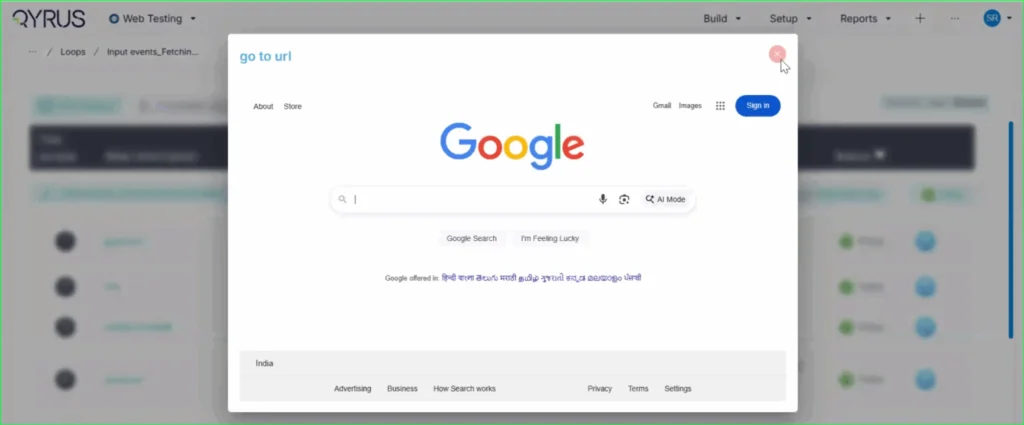
Context is King: Step Descriptions Now Label Your Screenshots!

The Challenge:

Previously, screenshots in execution reports were labeled with a generic “Screen Shot” tag. This forced users to constantly cross-reference the image with the test log to understand exactly what action was being captured in that specific frame, making the review process slower and less intuitive.

The Fix:

We have updated the reporting engine to replace the generic “Screen Shot” label. Now, the specific step description (e.g., “go to url”) is automatically displayed directly on the top left of every screenshot in the report.

How will it help?

This enhancement provides immediate context for every visual in your report. You can now browse through screenshots and instantly understand the specific test action being depicted without needing to look elsewhere. This significantly improves report readability, reduces cognitive load, and speeds up the debugging and review process.

No More Toggling: View Recorded Locators Instantly on the Step Page!

The Challenge:

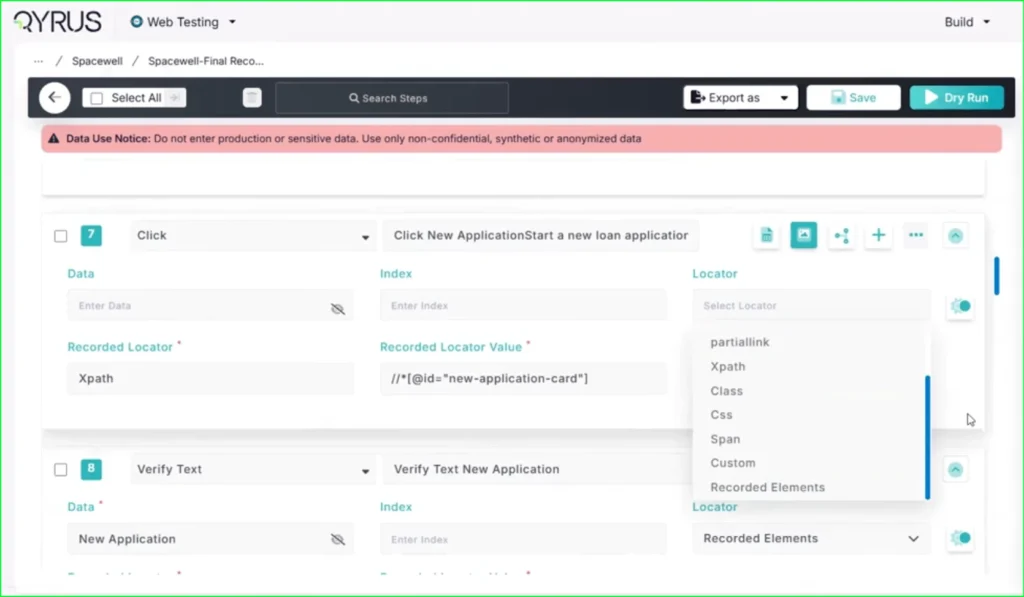
Previously, after using the Qyrus Recorder to capture a test flow, the specific locator values (like XPaths or CSS selectors) were not immediately visible on the main test step page. To view or verify these locators, functional testers found it cumbersome to have to re-enter “record mode” via the Encapsulate Chrome extension, disrupting their workflow just to check technical details.

The Fix:

We have updated the Qyrus Recorder with improved locator detection and data handling. Now, after recording a session, all captured locator values are immediately populated and visible directly on the step page within the Qyrus platform.

How will it help?

This update significantly streamlines the script review and validation process. You no longer need to switch back and forth between the platform and the recorder extension just to see how an element is being identified. This gives functional testers and automation engineers instant visibility into their test logic, making it faster and easier to verify scripts and ensure the correct elements are being targeted.

Scale Your Xray Testing: Suite Execution Now Supported!

The Challenge:

Previously, our integration with Xray was limited to triggering single test scripts. This created a workflow bottleneck for teams who needed to execute larger batches of tests or full regression sets, as there was no capability to launch a complete Test Suite directly from the Xray interface.

The Fix:

We have upgraded our Xray integration to fully support Test Suite execution. Users can now trigger the execution of entire suites from within Xray with the same ease and simplicity as running a single script.

How will it help?

This update allows you to significantly scale your testing efforts directly from your test management tool. You are no longer restricted to triggering scripts one by one; instead, you can launch comprehensive test suites in a single action. This streamlines your execution workflow, ensuring that your Xray-driven testing is as efficient and powerful as your needs demand.

Copy, Paste, Done: Import APIs Instantly with cURL!

The Challenge:

Creating API tests manually can be a tedious process of copy-pasting individual components—headers, bodies, URLs, and methods—from your documentation or browser developer tools into the test platform. This manual reconstruction is not only slow but also increases the risk of transcription errors, leading to frustrated testers and broken initial tests.

The Fix:

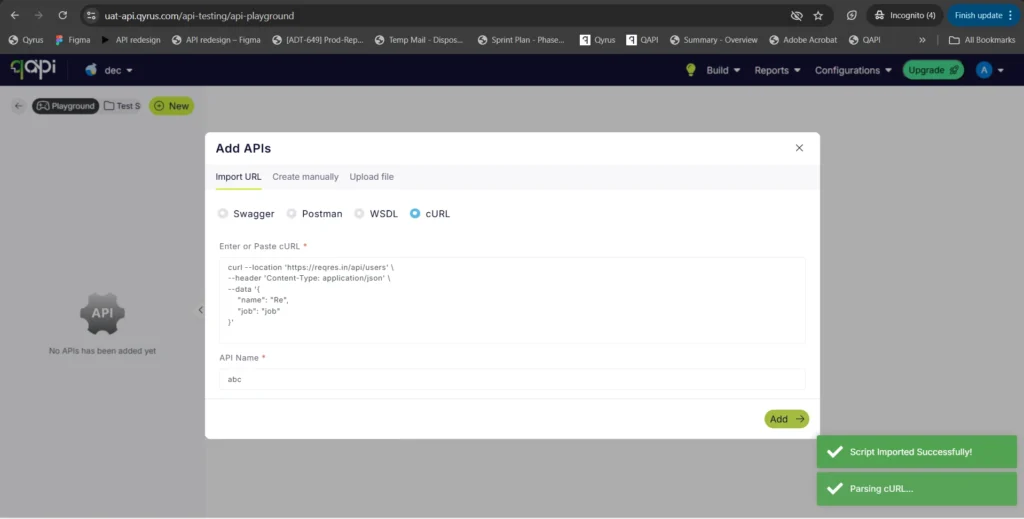
We have introduced a new “Import via cURL” option in the API creation workflow. You can now simply paste a raw cURL command directly into Qyrus. The system will automatically parse the command and instantly create a fully configured API test with all the correct parameters, headers, and body content mapped for you.

How will it help?

This feature is a massive time-saver that bridges the gap between development and testing. Developers and testers often have cURL commands readily available (from API docs or network logs). By allowing direct import, we eliminate the manual data entry, ensuring your API tests are set up instantly and accurately, exactly as they were defined in your cURL command.

AI That Remembers: Enhanced Algorithms Now Access User Memory!

The Challenge:

Previously, while our AI algorithms were powerful, they often operated in isolation for each interaction. Without access to a persistent memory of past preferences, specific project contexts, or user-defined constraints, the AI could sometimes provide generic suggestions or require users to repeatedly provide the same background information, slowing down the workflow.

The Fix:

We have rolled out significant enhancements to all our AI algorithms. For users who have opted into the memory feature, these algorithms can now securely access and utilize stored context and preferences.

How will it help?

This upgrade makes your AI interactions significantly smarter and more personalized.

  • Reduced Repetition: The AI remembers your specific constraints and preferences, so you don’t have to repeat them.
  • Better Suggestions: Whether generating test data or building scenarios, the AI now understands your unique context, leading to more relevant and accurate results.
  • Seamless Workflow: Experience a more continuous and intelligent partnership with the platform, as the AI learns and adapts to your specific way of working over time.

Ready to Accelerate Your Testing with November Upgrades?

We are dedicated to evolving Qyrus into a platform that not only anticipates your needs but also provides practical, powerful solutions that help you release top-quality software with greater speed and confidence.

Curious to see how these October enhancements can benefit your team? There’s no better way to understand the impact of Qyrus than to see it for yourself.

Ready to dive deeper or get started?

We stopped asking “can we automate this?” in 2025. Instead, we started asking a much harder question: “How much can the system handle on its own?” 

This year changed the rules for software quality. We witnessed the industry pivot from simple script execution to genuine autonomy, where AI doesn’t just follow orders—it thinks, heals, and adapts. The numbers back this shift. The global software testing market climbed to a valuation of USD 50.6 billion , and 72% of corporate entities embraced AI-based mobile testing methodologies to escape the crushing weight of manual maintenance. 

At Qyrus, we didn’t just watch these numbers climb. We spent the last twelve months building the infrastructure to support them. From launching our SEER (Sense-Evaluate-Execute-Report) orchestration framework to engaging with thousands of testers in Chicago, Houston, Santa Clara, Anaheim, London, Bengaluru, and Mumbai, our focus stayed sharp: helping teams navigate a world where real-time systems demand a smarter approach. 

This post isn’t just a highlight reel. It is a report on how we listened to the market, how we answered with agentic AI, and where the industry goes next. 

The Pulse of the Industry vs. The Qyrus Answer 

We saw the gap between “what we need” and “what tools can do” narrow significantly this year. We aligned our roadmap directly with the friction points slowing down engineering teams, from broken scripts to the chaos of microservices. 

The GenAI & Autonomous Shift 

The industry moved past the novelty of generative AI. It became an operational requirement. Analysts estimate the global software testing market will reach a value of USD 50.6 billion in 2025, driven largely by intelligent systems that self-correct rather than fail. Self-healing automation became a primary focus for reducing the maintenance burden that plagues agile teams. 

We responded by handing the heavy lifting to the agents. 

  • Healer 2.0 arrived in July, fundamentally changing how our platform interacts with unstable UIs. It doesn’t just guess; it prioritizes original locators and recognizes unique attributes like data-testid to keep tests running when developers change the code. 
  • We launched AI Genius Code Generation to eliminate the blank-page paralysis of writing custom scripts. You describe the calculation or logic, and the agent writes the Java or JavaScript for you. 
  • Most importantly, we introduced the SEER framework (Sense, Evaluate, Execute, Report). This isn’t just a feature; it is an orchestration layer that allows agents to handle complex, multi-modal workflows without constant human hand-holding. 

Democratization: Testing is Everyone’s Job  

The wall between “testers” and “business owners” crumbled. With manual testing still commanding 61.47% of the market share, the need for tools that empower non-technical users to automate complex scenarios became undeniable. 

We focused on removing the syntax barrier. 

  • TestGenerator now integrates directly with Azure DevOps and Rally. It reads your user stories and bugs, then automatically builds the manual test steps and script blueprints. 
  • We embedded AI into the Qyrus Recorder, allowing users to generate test scenarios simply by typing natural language descriptions. The system translates intent into executable actions. 

The Microservices Reality Check

Monolithic applications are dying, and microservices took their place. This shift made API testing the backbone of quality assurance. As distributed systems grew, teams faced a new problem: testing performance and logic across hundreds of interconnected endpoints. 

We upgraded qAPI to handle this scale. 

  • We introduced Virtual User Balance (VUB), allowing teams to simulate up to 1,000 concurrent users for stress testing without needing expensive, external load tools. 
  • We added AI Automap, a feature where the system analyzes your API definitions, identifies dependencies, and autonomously constructs the correct workflow order. 

Feature Flashback 

We didn’t just chase the AI headlines in 2025. We spent thousands of engineering hours refining the core engines that power your daily testing. From handling complex loops in web automation to streamlining API workflows, we shipped updates designed to solve the specific, gritty problems that slow teams down. 

Here is a look at the high-impact capabilities we delivered across every module. 

Web Testing: Smarter Looping & Debugging 

Complex logic often breaks brittle automation. We fixed that by introducing Nested Loops and Loops Inside Functions, allowing you to automate intricate scenarios involving multiple related data sets without writing a single line of code. 

  • Resilient Execution: We added a Continue on Failure option for loops. Now, a single failed iteration won’t halt your entire run, giving you a complete report for every data item. 
  • Crystal Clear Reports: Debugging got faster with Step Descriptions on Screenshots. We now overlay the specific action (like “go to url”) directly on the execution image, so you know exactly what happened at a glance. 
  • Instant Visibility: You no longer need to re-enter “record mode” just to check a technical detail. We made captured locator values immediately visible on the step page the moment you stop recording. 

API Testing: Developer-Centric Workflows  

We focused on making qAPI speak the language of developers. 

  • Seamless Hand-offs: We expanded our code generation to include C# (HttpClient) and cURL snippets, allowing developers to drop your test logic directly into their environment. 
  • Instant Migration: Moving from manual checks to automation is now instant. The Import via cURL feature lets you paste a raw command to create a fully configured API test in seconds. 
  • AI Summaries: Complex workflows can be confusing. We added an AI Summary feature that generates a concise, human-readable explanation of your API workflow’s purpose and flow. 
  • Expanded Support: We added native support for x-www-form-urlencoded bodies, ensuring you can test web form submissions just as easily as JSON payloads. 

Mobile Testing: The Modular & Agentic Leap  

Mobile testing has long been plagued by device fragmentation and flaky infrastructure. We overhauled the core experience to eliminate “maintenance traps” and “hung sessions.” 

  • Uninterrupted Editing: We solved the context-switching problem. You can now edit steps, fix logic, or tweak parameters without closing the device window or losing your session state. 
  • Modular Design: Update a “Login Block” once, and it automatically propagates to every test script that uses it. This shift from linear to component-based design reduces maintenance overhead by up to 80%. 
  • Agentic Execution: We moved beyond simple generation to true autonomy. Our new AI Agents focus on outcomes—detecting errors, self-healing broken tests, and executing multi-step workflows without constant human prompts. 
  • True Offline Simulation: Beyond basic throttling, we introduced True Offline Simulation for iOS and a Zero Network profile for Android. These features simulate a complete lack of internet connectivity to prove your app handles offline states gracefully. 

Desktop Testing: Security & Automation  

For teams automating robust desktop applications, we introduced features to harden security and streamline execution. 

  • Password Masking: We implemented automatic masking for global variables marked as ‘password’, ensuring sensitive credentials never appear in plain text within execution reports. 
  • Test Scheduling: We brought the power of “set it and forget it” to desktop apps. You can now schedule complex end-to-end desktop tests to run automatically, ensuring your heavy clients are validated nightly without manual intervention. 

Test Orchestration: Control & Continuity  

Managing end-to-end tests across different platforms used to be disjointed. We unified it. 

  • Seamless Journeys: We introduced Session Persistence for web and mobile nodes. You can now run a test case that spans 24 hours without repeated login steps, enabling true “day-in-the-life” scenarios. 
  • Unified Playback: Reviewing cross-platform tests is now a single experience. We generate a Unified Workflow Playback that stitches together video from both Web and Mobile services into one consolidated recording. 
  • Total Control: Sometimes you need to pull the plug. We added a Stop Execution on Demand feature, giving you immediate control to terminate a wayward test run instantly. 

Data Testing: Modern Connectivity  

Data integrity is the silent killer of software quality. We expanded our reach to modern architectures. 

  • NoSQL Support: We released a MongoDB Connector, unlocking support for semi-structured data and providing a foundation for complex nested validations. 
  • Cloud Data: We built a direct Azure Data Lake (ADLS) Connector, allowing you to ingest and compare data residing in your Gen2 storage accounts without moving it first. 
  • Efficient Validation: We added support for SQL LIMIT & OFFSET clauses. This lets you configure “Dry Run” setups that fetch only small data slices, speeding up your validation cycles significantly. 

Analyst Recognition 

Innovation requires validation. While we see the impact of our platform in our customers’ success metrics every day, independent recognition from the industry’s top analysts confirms our trajectory. This year, two major firms highlighted Qyrus’ role in defining the future of quality. 

Leading the Wave in Autonomous Testing  

We secured a position as a Leader in The Forrester Wave™: Autonomous Testing Platforms, Q4 2025. 

This distinction matters because it evaluates execution, not just vision. We received the highest possible score (5.0) in critical criteria including Roadmap, Testing AI Across Different Dimensions, and Testing Agentic Tool Calling. The report specifically noted our orchestration capabilities, stating that our SEER framework (Sense, Evaluate, Execute, Report) and “excellent agentic tool calling result in an above-par score for autonomous testing”. 

For enterprises asking if agentic AI is ready for production, this report offers a clear answer: the technology is mature, and Qyrus is driving it. 

Defining GenAI’s Role in the SDLC  

Earlier in the year, Gartner featured Qyrus in their report, How Generative AI Impacts the Software Delivery Life Cycle (April 2025). 

As developers adopt GenAI to write code faster—reporting productivity gains of 10-15%—testing often becomes the bottleneck. Gartner identified Qyrus as an example vendor for AI-augmented testing, recognizing our ability to keep pace with these accelerated development cycles. We don’t just test the code humans write; we validate the output of the generative models themselves, ensuring that speed does not come at the cost of reliability. 

Community & Connection 

We didn’t spend 2025 behind a desk. We spent it in conference halls, hackathons, and boardrooms, listening to the engineers and leaders who are actually building the future. From Chicago to Bengaluru, the conversations shifted from “how do we automate?” to “how do we orchestrate?” 

Empowering the SAP Community  

We started our journey with the ASUG community, where the focus was squarely on modernizing the massive, complex landscapes that run global business. In Houston, Ravi Sundaram challenged the room to look at agentic SAP testing not as a future luxury, but as a current necessity for improving ROI. The conversation deepened in New England and Chicago, where we saw firsthand that teams are struggling to balance S/4HANA migration with daily execution. The consensus across these chapters was clear: SAP teams need strategies that reduce overhead while increasing confidence across integrated landscapes. 

We wrapped up our 2025 event journey at SAP TechEd Bengaluru in November with two energizing days that put AI-led SAP testing front and center. As a sponsor, we brought a strong mix of thought leadership and real-world execution. Sessions from Ameet Deshpande and Amit Diwate broke down why traditional SAP automation struggles under modern complexity and demonstrated how SEER enables teams to stop testing everything and start testing smart. The booth buzzed with discussions on navigating S/4HANA customizations, serving as a powerful reminder that the future of SAP quality is intelligent, adaptive, and already taking shape. 

Leading the Global Conversation

In August, we took the conversation global with an exclusive TestGuild webinar hosted by Joe Colantonio. Ameet Deshpande, our SVP of Product Engineering, tackled the industry-wide struggle of fragmentation—where AI accelerates development, but QA falls behind due to disjointed tools. This session marked the public unveiling of Qyrus SEER, our autonomous orchestration framework designed to balance the Dev–QA seesaw. The strong live attendance and post-event engagement reinforced that the market is ready for a shift toward unified, autonomous testing. 

The momentum continued in September at StarWest 2025 in Anaheim, where we were right in the middle of the conversations shaping the future of software testing. Our booth became a go-to spot for QA leaders looking to understand how agentic, AI-driven testing can keep up with an increasingly non-deterministic world. A standout moment was Ameet Deshpande’s keynote, where he challenged traditional QA thinking and unpacked what “quality” really means in an AI-powered era—covering agentic pipelines, semantic validation, and AI-for-AI evaluation. 

Redefining Financial Services (BFSI) 

Banking doesn’t sleep, and neither can its quality assurance. At the BFSI Innovation & Technology Summit in Mumbai, Ameet Deshpande introduced our orchestration framework, SEER, to leaders facing the pressure of instant payments and digital KYC. Later in London at the QA Financial Forum, we tackled a tougher reality: non-determinism. As financial institutions embed AI deeply into their systems, rule-based testing fails. We demonstrated how multi-modal orchestration validates these adaptive systems without slowing them down, proving that “AI for AI” is already reshaping how financial products are delivered. 

The Developer & API Ecosystem  

APIs drive the modern web, yet they often get tested last. We challenged this at API World in Santa Clara, where we argued that API quality deserves a seat at the table. Raoul Kumar took this message to London at APIdays, showing how no-code workflows allow developers to adopt rigorous testing without the friction. In Bengaluru, we saw the scale of this challenge up close. At APIdays India, we connected with architects building for one of the world’s fastest-growing digital economies, validating that the future of APIs relies on autonomous, intelligent quality. 

Inspiring the Next Generation  

Innovation starts early. We closed the year as the Technology Partner for HackCBS 8.0 in New Delhi, India’s largest student-run hackathon. Surrounded by thousands of student builders, we didn’t just hand out swag. We put qAPI in their hands, showing them how to validate prototypes instantly so they could focus on creativity. Their curiosity reinforced a core belief: when you give builders the right tools, they ship better software from day one. 

Conclusion: Ready for 2026 

2025 was the year we stopped treating “Autonomous Testing” as a theory. We proved it is operational, scalable, and essential for survival in a market where software complexity outpaces human capacity. 

We are entering 2026 with a platform that understands your code, predicts your failures, and heals itself. Whether you need to validate generative AI models, streamline a massive SAP migration, or ensure your APIs hold up under peak load, Qyrus has built the infrastructure for the AI-first world. 

The tools are ready. The agents are waiting. Let’s build the future of quality together. 

Book a Demo 


Let’s start with a hard truth. A bad website experience actively costs you money. It is not just a minor annoyance for your users; it is a direct financial liability for your business.   

Consider that an overwhelming  88% of online users say they are less likely to return to a website after a bad experience. That is nearly nine out of ten potential customers gone, perhaps for good. The damage is immediate and measurable. A single one-second delay in your page load time can trigger a 7% reduction in conversions.   

Now, think bigger. What if the bug isn’t just about speed, but security? The global average cost of just one data breach has climbed to $4.88 million.   

Suddenly, “web testing” isn’t just a technical task for the QA department. It is a core business strategy for protecting your revenue and reputation.   

But before you can choose the right tools, you must understand what you are testing. The terms used for testing web products get tossed around, but they are not interchangeable.   

  • Website Testing: This primarily focuses on an informational experience. Think of a corporate blog, a marketing page, or a news portal. The main goal is delivering content. Testing here centers on usability, ensuring content is accurate, links work, and the visual presentation is correct across browsers.   
  • Web Application Testing: This is a far more complex discipline. This is where interaction is the entire point. We are talking about e-commerce platforms, online banking portals, or sophisticated SaaS tools. This type of application testing must verify complex, end-to-end functional workflows (like a multi-step checkout), secure data handling, API integrity, and performance under load.   

The ecosystem of website testing tools is massive, and choosing the right website testing tools is critical for ensuring performance, usability, and reliability in modern digital experiences. You have open-source frameworks, AI-powered platforms, and specialized tools for every possible niche. This guide will help you navigate this world. We will break down the best tools by their specific categories so you can build a testing toolkit that actually protects your bottom line. In this guide, we break down the most in-demand website testing tools and web application testing tools for 2026 to help you make the right decision.  

Tool 

Best For 

Starting Price 

AI Features 

No-Code 

Rating 

Qyrus 

Enterprise QA 

Custom 

Yes 

Yes 

⭐⭐⭐⭐⭐ 

Selenium 

Open-source automation 

Free 

No 

No 

⭐⭐⭐⭐☆ 

Playwright 

Modern web apps 

Free 

Limited 

No 

⭐⭐⭐⭐⭐ 

Cypress 

Frontend testing 

Free/Paid 

Limited 

No 

⭐⭐⭐⭐☆ 

BrowserStack 

Cross-browser 

Paid 

No 

No 

⭐⭐⭐⭐☆ 

LambdaTest 

Cross-browser cloud 

Paid 

Yes 

Partial 

⭐⭐⭐⭐☆ 

JMeter 

Load testing 

Free 

No 

No 

⭐⭐⭐⭐☆ 

k6 

Performance 

Free/Paid 

No 

No 

⭐⭐⭐⭐☆ 

Hotjar 

UX testing 

Paid 

Yes 

Yes 

⭐⭐⭐⭐☆ 

OWASP ZAP 

Security 

Free 

No 

No 

⭐⭐⭐⭐☆ 


Website vs. Web Application Testing   

Feature   

Website Testing   

Web Application Testing   

Primary Purpose   

To deliver information and content.   

To provide interactive functionality and facilitate user tasks.   

User Interaction   

Mostly passive (reading, navigating).   

Highly active and complex (workflows, data entry).   

Key Focus   

Visual elements, content accuracy, link integrity, and ease of navigation.   

End-to-end functional workflows, data handling, API integrity, security, and performance.   

Example   

A corporate informational site, a blog.   

An e-commerce platform, an online banking portal.   


Top Website Testing Tools Compared 

With dozens of website testing tools available today, choosing the right solution can be challenging. Some tools excel at functional automation, while others focus on performance testing, security, cross-browser compatibility, or user experience. Rather than ranking tools based on popularity alone, we evaluated each platform using the criteria that matter most to modern QA teams and enterprise organizations. 

First, we looked at testing capabilities. The best website testing tools should support multiple testing types, including functional testing, UI testing, API testing, cross-browser testing, performance testing, and visual validation. Teams often need more than a single-purpose solution, especially when testing complex web applications. 

Next, we evaluated AI capabilities. In 2026, AI has become a practical part of software testing rather than a differentiator. Features such as AI-generated test cases, self-healing test automation, intelligent test maintenance, and automated defect analysis help reduce manual effort and improve testing efficiency. Platforms that integrate AI across the testing lifecycle provide a clear advantage for teams looking to scale automation. 

Pricing and total cost of ownership were also important factors. While open-source tools like Selenium, Playwright, and Apache JMeter have no licensing costs, they often require significant investment in framework development, infrastructure, maintenance, and engineering resources. Commercial platforms introduce subscription costs but frequently reduce long-term operational overhead through built-in infrastructure, support, and integrated capabilities. 

We also considered maintenance and scalability. Test suites naturally grow as applications evolve, making script maintenance one of the biggest challenges for QA teams. Tools that minimize test failures, simplify updates, and support large-scale execution across browsers, devices, and CI/CD pipelines provide greater long-term value. 

Finally, we assessed enterprise readiness. Modern organizations require more than basic automation. Enterprise-grade website testing tools should offer role-based access, collaboration features, reporting, cloud execution, integrations with DevOps pipelines, security controls, and the ability to support distributed teams across multiple projects. 

The comparison below evaluates each tool against these criteria to help you identify the solution that best aligns with your testing goals, technical requirements, and budget. 

Comparison Table Here’s a quick comparison of the most in-demand website testing tools and web application testing tools in 2026. This overview helps teams evaluate tools based on use case, strengths, and testing category.  

Tool 

Best For 

Starting Price 

AI Features 

No-Code Support 

Qyrus 

End-to-end enterprise testing 

Custom Pricing 

✅ Yes 

✅ Yes 

Selenium 

Open-source functional automation 

Free 

❌ No 

❌ No 

Playwright 

Modern web application testing 

Free 

Limited 

❌ No 

Cypress 

Frontend and UI testing 

Free / Paid 

Limited 

❌ No 

Apache JMeter 

Performance and load testing 

Free 

❌ No 

❌ No 

k6 

Developer-focused load testing 

Free / Paid 

❌ No 

❌ No 

BrowserStack 

Cross-browser and device testing 

Starts at $29/month 

❌ No 

❌ No 

LambdaTest 

Cloud-based browser testing 

Starts at $19/month 

✅ Partial 

Partial 

Hotjar 

UX and behavior analytics 

Free / Paid 

✅ Yes 

✅ Yes 

OWASP ZAP 

Security testing 

Free 

❌ No 

❌ No 


 Beyond the ‘Best Of’ List: How to Select the Right Web  Application Testing Tools   

Jumping into a list of website testing tools without a plan is a recipe for wasted time and money. The sheer number of options can be paralyzing. The “best” tool for a JavaScript-savvy startup is the wrong tool for a large enterprise managing legacy code. Choosing the right web application testing tools depends on your architecture, workflows, and automation maturity.  

Before you look at a single product, you must evaluate your own environment. Your answers to these five questions will build a framework that narrows your search from hundreds of tools to the one or two that actually fit your needs.   

What problem are you really trying to solve?   

Do not just search for “testing tools.” Get specific. Are you trying to verify that your login forms and checkout process work? That is Functional Testing. Are you worried your site will crash during a Black Friday sale? You need Performance and Load Testing. Are you trying to find security holes before hackers do? That is Security Testing. A tool that excels at one of these is often mediocre at others. Be clear about your primary goal.   

Who will actually be using the tool?   

This is the most critical question. A powerful, code-based framework like Selenium or Playwright is fantastic for a team of developers who are comfortable writing scripts in Java, Python, or JavaScript. But what if your primary testers are manual QA analysts or non-technical product managers? Forcing them to learn advanced coding will fail. In this case, you need to look at the new generation of low-code/no-code platforms. These tools are designed to democratize application testing, allowing non-technical members to contribute to automation.   

What browsers and devices actually matter?   

It is easy to say “we test everything,” but that is impractical. Does your team just need to run quick checks on local browsers like Chrome and Firefox? Or do you need to provide a flawless experience for a global audience? To do that, you must test on a massive grid of browser-based combinations and real user devices (like iPhones and Androids). This is where cloud platforms like Qyrus become essential, offering access to thousands of environments on demand.   

How does this tool fit into your workflow?   

A testing tool that lives on an island is useless. Modern development relies on speed and automation. Your tool must integrate with your existing CI/CD pipeline (like Jenkins, GitHub Actions, etc.) to enable continuous testing. It also needs to communicate with your project management and bug-tracking systems. If it cannot automatically file a detailed bug report in Jira, your team will waste hours on manual data entry.   

What is your real budget?   

This is not just about licensing fees. Open-source tools like Selenium and Apache JMeter are “free” to download, but they carry significant hidden costs in setup, configuration, and ongoing maintenance. Commercial platforms have an upfront subscription cost, but they often save you time by providing an all-in-one, supported environment. You must calculate the total cost of ownership, factoring in your team’s time.   

How to Choose the Right Website Testing Tool   

Selecting the right website testing tools depends on your team structure, technical maturity, and testing goals. Use this checklist to guide your decision.  

Criteria  

Code-Based Tools  

Commercial Platforms  

Team Skillset  

Developers (Java, Python, JS)  

Mixed teams (QA, BA, Product)  

Key Goal  

Deep control and flexibility  

Unified testing solution  

Coverage  

Local/grid setup required  

Cloud-based scalability  

Integration  

Manual configuration  

Built-in CI/CD integrations  

Cost  

Low licensing, high maintenance  

Subscription with lower overhead  


 The 2026 Toolkit: Top Website Testing Tools by Category   

The world of website testing tools is vast and are widely used across modern QA teams. To make sense of it, you must break it down by purpose. A tool for finding security holes is fundamentally different from one that checks for broken links.   

Here is a breakdown of the leading tools across the six essential categories of quality.   

  1. Functional & End-to-End Testing Tools  

What they do: These tools are the foundation of application testing. They verify the core functions of your web application—checking if buttons, forms, and critical user workflows (like a login process or an e-commerce checkout) actually work as expected.   

  • Selenium: This is the long-standing, open-source industry standard. Its greatest strengths are its unmatched flexibility—it supports numerous programming languages (like Java, Python, and C#) and virtually every browser. However, this flexibility comes at the cost of complexity. Selenium requires more setup, can be slower, and often leads to “flaky” tests that require careful management.   
  • Playwright: This is the powerful, modern challenger from Microsoft. It has gained massive popularity by directly addressing Selenium’s pain points. It offers true, reliable cross-browser support (including Chromium, Firefox, and WebKit for Safari) and is praised for its speed. Features like auto-waits and native parallel execution mean tests run faster and are far less flaky.   
  • Cypress: This is a developer-favorite, all-in-one framework built specifically for modern JavaScript applications. It is known for its fast execution and fantastic developer experience, which includes a visual test runner with “time-travel” debugging. Its main trade-off is that it only supports testing in JavaScript/TypeScript.   

2. Solving Test Maintenance with AI  

Test maintenance remains one of the biggest challenges in modern automation. UI changes, dynamic elements, and evolving workflows frequently break scripts, creating ongoing overhead for QA teams.  

Modern website testing tools are addressing this challenge by embedding AI directly into testing workflows.  

Qyrus approaches this with practical AI capabilities:  

  • Healer AI automatically detects broken locators and suggests fixes, reducing manual intervention   
  • Create with AI (NOVA) generates test cases from simple descriptions, accelerating automation   

This allows teams to:  

  • Reduce test flakiness   
  • Minimize manual maintenance effort   
  • Scale automation without increasing complexity   

Instead of treating maintenance as a recurring cost, AI-driven testing transforms it into a self-optimizing process.  

Best Tools for Building and Testing Web UI  

Teams searching for tools to build and test web UI need solutions that combine automation, visual validation, and cross-browser reliability.  

Modern applications rely heavily on user interfaces, making web UI testing tools essential for ensuring consistent design, responsiveness, and usability across devices.  

Automated UI testing helps teams validate layouts, visual elements, and interactive workflows without manual effort. This is especially important when building and testing web UI at scale.  

Tools like Cypress and Playwright are widely used for automated UI testing due to their speed and developer-friendly workflows. However, they still require coding expertise and ongoing maintenance.  

Platforms like Qyrus go further by combining automated UI testing with visual validation and AI-driven automation. This allows teams to test UI changes, detect visual regressions, and validate workflows without writing extensive scripts.  

For teams looking to scale efficiently, combining web UI testing tools with AI-driven platforms is becoming the standard approach in 2026.  

  1. Performance & Load Testing Tools  

What they do: These tools answer two critical questions: “Is my site fast?” and “Will it crash during a traffic spike?” They measure page speed, responsiveness, and stability under heavy user traffic.   

  • Apache JMeter: A powerful and highly versatile open-source tool from Apache. While it is widely used for load testing web applications, it can also test performance on many different protocols, including databases and APIs. Its GUI-based test builder makes it accessible, but it can be very resource-intensive.   
  • k6 (by Grafana): A modern, developer-centric load testing tool that has become extremely popular. Instead of a clunky UI, you write your test scripts in JavaScript, making it easy to integrate into a developer’s workflow and CI/CD pipeline. It is designed to be like “unit tests for performance”.   

GTmetrix: This is less a load-testing tool and more an easy-to-use page speed analyzer. It is an excellent free tool for getting a quick, actionable report on your site’s performance and how it stacks up against Google’s Core Web Vitals.   

2. Usability & User Experience (UX) Tools  

What they do: These tools help you understand the real user journey. They provide qualitative insights into how people actually interact with your site, capturing their clicks, scrolls, and confusion to help you improve the user experience.   

  • Hotjar: This tool is famous for its intuitive heatmaps and session recordings. Heatmaps give you a visual, aggregated report of where all your users are clicking and scrolling. Session recordings are even more powerful, letting you watch an anonymous user’s complete journey on your site, allowing you to see exactly where they get frustrated or lost.   
  • UXTweak: This is a comprehensive UX research platform that goes beyond just observation. It allows you to run a wide range of usability tests, from card sorting and tree testing (to fix your navigation) to running surveys and testing tasks with either your own users or a panel of testers.   

3. Security & Vulnerability Scanners  

What they do: These essential tools scan your web applications for security weaknesses, helping you find and fix vulnerabilities like those listed in the OWASP Top 10 (e.g., SQL injection, Cross-Site Scripting) before attackers do.   

  • OWASP ZAP (Zed Attack Proxy): This is the world’s most popular open-source security tool. Maintained by a global community of security experts, it is a powerful and free resource for running Dynamic Application Security Testing (DAST) scans to find common security flaws.   
  • Pentest-Tools.com: This is a commercial DAST tool that provides a suite of scanners for a comprehensive vulnerability assessment. It is known for its clear, actionable reports that help you find vulnerabilities related to your network, website, and infrastructure and then provide clear steps for remediation.   

4. Accessibility Testing Tools  

What they do: These tools check if your website is usable for people with disabilities, ensuring compliance with legal standards like the Web Content Accessibility Guidelines (WCAG) and the Americans with Disabilities Act (ADA).   

  • WAVE (Web Accessibility Evaluation Tool): This is a popular free tool from the organization WebAIM. It provides a visual overlay directly on your page, injecting icons and indicators that identify accessibility errors like missing alt text, low-contrast text, and incorrect heading structures.   
  • ANDI (Accessible Name & Description Inspector): This is a free accessibility testing bookmarklet provided by the U.S. government (Section508.gov). It is a simple tool that analyzes content and provides a report on accessibility issues found on the page.   

5. Cross-Browser & Visual Testing Platforms  

What they do: These are cloud-based platforms that solve one of the biggest testing web challenges: ensuring your site looks and works correctly everywhere. They provide on-demand access to thousands of different browser-based combinations (Chrome, Safari, Firefox on Windows, macOS, iOS, Android).   

  • BrowserStack: The undisputed market leader. BrowserStack offers a massive cloud infrastructure of over 30,000 real devices and browser combinations. It allows for both manual “live” testing and, more importantly, running your entire automated test suite (from Selenium, Cypress, etc.) in parallel on their grid.   
  • Sauce Labs: A top enterprise-focused competitor to BrowserStack. It provides a robust and scalable cloud for testing web, mobile, and even API functionality. It is known for its strong analytics and debugging tools, like video recordings and detailed logs for every test run.   
  • LambdaTest: A fast-growing and often more cost-effective alternative. It has gained significant traction by offering a comparable feature set, a massive grid of over 3,000 browser and OS combinations, and a reputation for having the broadest range of CI/CD integrations.   

Which Website Testing Tool Should You Choose? 

The best website testing tool depends on your application’s complexity, team structure, automation maturity, and testing objectives. While open-source frameworks provide flexibility, commercial platforms often simplify implementation by combining multiple testing capabilities into a single solution. 

The recommendations below can help narrow your decision. 

If You Need… 

Recommended Tool 

Enterprise end-to-end testing 

Qyrus 

Open-source automation 

Selenium 

Modern web application testing 

Playwright 

Frontend UI testing 

Cypress 

Cross-browser testing 

BrowserStack 

Budget-friendly browser testing 

LambdaTest 

Performance and load testing 

Apache JMeter 

Developer-first load testing 

k6 

UX and user behavior analysis 

Hotjar 

Security vulnerability scanning 

OWASP ZAP 


Rather than choosing a tool based solely on popularity, prioritize the platform that aligns with your team’s technical expertise, long-term maintenance capacity, integration requirements, and business goals. 

The Hidden Cost of Your ‘Perfect’ Testing Toolbox   

You have just reviewed a list of more than 15 top-rated tools across six different categories. This is the “best-in-class” strategy: you pick the perfect, specialized tool for every single job.   

On paper, it looks incredibly smart. In reality, for most teams, it is a maintenance nightmare.   

You have just created a problem called “tool sprawl.” Your team is now drowning in a sea of disconnected systems, dashboards, and subscription fees.   

  • Fragmented Data: Your functional test results live in Selenium. Your performance reports are in JMeter. Your security vulnerabilities sit in a ZAP log. To get a single, coherent answer to the simple question, “Is this release ready?” You need a committee, three spreadsheets, and a data analyst. This fragmented approach makes a true, modern application testing strategy nearly impossible.   
  • Sky-High Costs: Those commercial subscriptions add up. You are paying for a cross-browser cloud, a UX analytics tool, a security scanner, and maybe more. The costs are not just in dollars, but in the time spent managing all those separate accounts and invoices.   
  • The Maintenance Trap: This is the biggest hidden cost. Every tool has its own scripting language, its own update cycle, and its own way of breaking. Your Selenium scripts are brittle and fail when a developer changes a button ID. Your JMeter scripts need constant updates for new API endpoints. Your team ends up spending more time fixing their tests than they do finding bugs in your product. This test maintenance is an incredibly time-consuming black hole that drains your engineering resources.   
  • Debilitating Skill Gaps: You have also created knowledge of silos. The “Selenium expert” cannot touch the “k6 performance scripts.” Your front-end team that knows Cypress has no idea how to read the security reports. The entire process of testing web applications becomes slow, brittle, and completely dependent on a few key people. Your collection of website testing tools becomes a bottleneck, not a solution.   

The “Tool Sprawl” Problem   

Data   

Fragmented. Test results are scattered across 5+ different tools.   

Maintenance   

High. Teams spend most of their time fixing brittle scripts for each tool.   

Skills   

Siloed. Requires separate experts for Selenium, JMeter, ZAP, etc.   

Cost   

High. Multiple subscription fees plus the hidden cost of maintenance time.   


The Solution: Unify Your Entire Application Testing Strategy with Qyrus   

Instead of juggling a dozen disconnected website testing tools, what if you could use a single, unified platform? What if you could replace that fragmented, high-maintenance toolbox with one intelligent solution?   

This is where the Qyrus GenAI-powered platform changes the game. It was designed to solve the exact problems of tool sprawl by consolidating the entire testing lifecycle into one end-to-end platform.   

One Platform, Every Function   

Qyrus directly replaces the need for multiple, separate tools by integrating different testing types into a single, cohesive workflow:   

  • No-Code/Low-Code Functional Testing: Qyrus uses a simple low-code/no-code approach. This democratizes application testing, allowing your manual QAs and business analysts to build robust automated tests for complex web applications without needing to become expert coders. This is not a niche idea; research shows that no-code automation is projected to make up 45% of the entire test automation market.   
  • Built-in Cross-Browser Cloud: You can stop paying for that separate BrowserStack or Sauce Labs subscription. Qyrus includes its own robust Browser Farm, allowing you to execute your tests in parallel across a wide range of browsers (like Chrome, Edge, Firefox, and Safari) and operating systems (including Windows, Mac, and Linux).  
  • Integrated API & Visual Testing: Why use a separate tool for API testing? Qyrus supports API requests (like GET, POST, PUT, DELETE) directly within your test scripts. Furthermore, it integrates Visual Testing (VT), which captures screenshots during execution and compares them against a baseline to catch unintended UI changes. This unified approach also supports integration testing workflows, where APIs, UI layers, and backend systems must work together seamlessly as part of a single test flow.  

Best Integration Testing Tools for 2026  

Integration testing tools ensure that different components of a web application work seamlessly together. This includes APIs, databases, third-party services, and frontend-backend interactions.  

As modern applications become more distributed, integration testing has become a core part of web application testing tools. Validating individual components in isolation is no longer sufficient. Teams need to ensure that entire workflows function reliably across systems.  

Traditional tools like Postman and k6 support API-level validation and performance testing. However, they often operate in isolation from UI and functional workflows.  

Modern platforms address this gap by enabling unified testing across layers. Qyrus, for example, allows teams to test APIs, UI interactions, and backend services within a single workflow. This ensures end-to-end validation of real user journeys rather than disconnected checks.   

For organizations scaling automation, integration testing tools that connect APIs, UI, and workflows provide a significant advantage in maintaining reliability across complex systems.  

[See how Qyrus can revolutionize your web testing. Schedule a demo today!]   

The Horizon: Key Website Testing Trends for 2026   

The world of website testing tools never sits still. The strategies and tools that are cutting-edge today will be standard practice tomorrow. To build a future-proof quality strategy, you must understand the forces that are redefining application testing.   

Here are the three dominant trends that are shaping the future of quality.   

  1. AI and Machine Learning Become Standard Practice  

For years, AI in testing was a marketing buzzword. Now, it is a practical, value-driving reality. AI is moving from a “nice-to-have” feature to the core engine of modern testing platforms. In fact, 68% of organizations are already using or have roadmaps for Generative AI in their quality engineering processes.   

This is not about robot testers; it is about empowering human teams with:   

  • Self-Healing Test Scripts: AI automatically detects when a UI element has changed and updates the test script to fix it. This single feature saves countless hours of manual test maintenance.   
  • Intelligent Test Generation: AI can analyze an application and automatically generate new test cases, helping teams find gaps in their coverage.   
  • Predictive Analytics: By analyzing historical bug data and code changes, ML models can predict which parts of your application are at the highest risk for new defects. This allows teams to focus their limited testing time where it matters most.   

2. The “Shift-Everywhere” Continuous Quality Loop  

The old idea of testing as a separate “phase” at the end of development is dead. It has been replaced by a continuous, holistic “shift-everywhere” paradigm.   

  • Shift-Left: This is the practice of moving testing activities earlier and more often in the development process. Developers run automated tests with every code commit, and static analysis tools catch bugs as they are being written. The goal is to find bugs when they are simple and up to 100 times cheaper to fix than if they are found in production.   
  • Shift-Right: This practice extends quality assurance into the production environment. It involves using techniques like A/B testing and canary releases to test new features with a small subset of real users before a full rollout. This provides invaluable feedback based on real-world behavior.   

Together, these two movements create a continuous quality loop, where quality is built-in from the start and refined by real-user data.   

3. The Democratization of Testing with Codeless Automation  

Another transformative trend is the rapid rise of low-code and no-code automation platforms. These tools are “democratizing” testing web applications by enabling non-technical team members to build and maintain sophisticated automation suites.   

Using intuitive visual interfaces, drag-and-drop actions, and simple commands, manual QA analysts, business analysts, and product managers can now automate complex workflows without writing a single line of code. This is not a niche movement; Forrester projected that no-code automation would comprise 45% of the entire test automation tool market by 2025. This frees up specialized developers to focus on more complex challenges, like security and performance engineering.   

Table Content: The Future of Testing   

Trend   

What It Is   

Why It Matters   

AI & Machine Learning   

Using AI for tasks like self-healing tests, test generation, and risk prediction.   

Drastically reduces the high cost of test maintenance and focuses effort on high-risk areas.   

Shift-Everywhere   

Testing “left” (early in development) and “right” (in production with real users).   

Catches bugs when they are cheap to fix and validates features with real-world data.   

Codeless Automation   

Platforms that allow non-technical users to build automation using visual interfaces.   

“Democratizes” testing, allowing more team members to contribute and accelerating feedback loops.   


Conclusion: Stop Just Testing, Start Ensuring Quality   

The “best website testing tool” does not exist. That is because “testing” is not a single activity. A successful quality strategy requires a comprehensive approach that covers every angle: from functional workflows and API integrity to performance under load, security vulnerabilities, and cross-browser usability.   

We have seen the landscape of tools: powerful open-source frameworks like Selenium and Playwright, specialized performance tools like JMeter, and essential cloud platforms like BrowserStack.   

But we have also seen the stakes. The cost of a bug found in production can be up to 100 times higher than one caught during the design phase. A bad user experience will send 88% of your visitors away for good. This is not a technical problem; it is a business-critical investment.   

Choosing the right website testing tools is no longer optional. In 2026, the most in-demand testing tools are those that combine automation, AI, and integration into a unified strategy. Whether you build a custom toolkit or adopt a platform approach, the goal remains the same: deliver reliable, high-quality user experiences at scale.   

Frequently asked questions   

Q: What is the most popular website testing tool?   

A: It depends on the category. For open-source functional automation, Selenium is the most widely adopted and well-liked solution, with over 31,854 companies using it in 2025. For commercial cross-browser cloud platforms, BrowserStack is a market leader, offering a massive grid of real devices and browsers. For new AI-powered, unified platforms, Qyrus represents the next generation of testing, combining low-code automation with features like Healer AI and built-in cross-browser execution. Many modern teams also consider tools that support automated UI testing and integration testing workflows, as these capabilities are critical for end-to-end validation.  

Q: What is the difference between website testing and web application testing?   

A: It comes down to complexity and interaction. Website testing primarily focuses on content, usability, and visual presentation. Think of a blog or a corporate informational site; the main goal is ensuring the content is accurate and the layout is consistent. Web application testing is far more complex. It focuses on dynamic functionality, end-to-end user workflows, and data handling. Examples include an e-commerce store’s checkout process or an online banking portal, which require deep testing of APIs, databases, and security.   

Q: Are free website testing tools good enough?   

A: Free and open-source tools are incredibly powerful for specific tasks. Tools like Apache JMeter are excellent for performance testing, and Selenium is a robust framework for functional automation. However, “free” does not mean “zero cost.” These tools require significant technical expertise to set up, configure, and maintain, which can be very time-consuming. They also lack the unified reporting, AI-powered “self-healing” features, and on-demand real device clouds that commercial platforms provide to accelerate testing and reduce maintenance.   

Q: What are the top tools for building and testing Web UI?  

A: The top web UI testing tools include Cypress, Playwright, and platforms like Qyrus. These tools support automated UI testing, visual validation, and cross-browser testing, helping teams ensure consistent user experiences across devices and environments.  

Q: Which website testing tool is easiest for beginners? 

No-code and low-code platforms are generally the easiest options for beginners because they reduce the need for programming knowledge. Teams that want faster automation with minimal scripting often choose commercial platforms that provide visual test creation and built-in maintenance capabilities. 

Q: Which website testing tools use AI? 

Many modern website testing tools now incorporate AI to simplify automation. Common AI capabilities include self-healing test scripts, AI-generated test cases, intelligent locator management, visual validation, and automated defect analysis. These features help reduce maintenance while improving automation reliability. 

Q: Which website testing tool is best for enterprise organizations? 

Enterprise organizations typically require platforms that combine functional testing, API testing, cross-browser execution, reporting, collaboration, CI/CD integrations, security controls, and AI-powered automation. Unified testing platforms often provide lower operational overhead than managing multiple standalone tools. 

QYRUS gets even more powerful with AI! 

Achieve agile quality across your testing needs. 

Contact Us  

agentic orchestration

The software world is experiencing a fundamental change, moving from simple automation to true autonomy. This is the “agentic shift,” a transformation reflected in massive market momentum. The global agentic AI market, valued at $5.25 billion in 2024, is projected to explode to $199.05 billion by 2034. An agentic orchestration platform sits at the center of this shift, coordinating a dynamic ecosystem of specialized AI agents, legacy automation systems, and human experts. These components work together in a single workflow to execute complex, end-to-end business processes. 

For decades, “automation” meant rigid, predefined scripts. Traditional automation is deterministic; it follows a strict, rules-based path. This model is collapsing under its own weight. Industry research shows that software teams spend a staggering 60-80% of their test automation effort just on maintenance. If the application or workflow changes even slightly, the script breaks, trapping engineers in a cycle of constant, costly human intervention. 

Agentic Automation breaks this fragile cycle. It is goal-based and adaptive. Instead of following a static script, specialized Cognitive Reasoning agents perceive their environment, make independent decisions, and take actions to achieve a high-level goal. The focus shifts entirely from brittle “scripts” to resilient “goals”. 

It is important to understand a key distinction. “AI Orchestration” (platforms like MLflow or Kubeflow) is an MLOps or data science function. It focuses on managing ML models, training, and data pipelines. Agentic Orchestration is different. It is a business process function that explicitly focuses on the real-time coordination of autonomous, decision-making agents to complete work. 

Why Your QA Process Is Creating a Velocity Gap 

Generative AI is accelerating development at a startling rate. At major tech companies, AI already writes between 20-40% of all new code. This surge in development speed has exposed a critical vulnerability: a massive “velocity gap”. Quality assurance (QA) practices, stuck in a manual or semi-automated past, simply cannot keep pace. 

Legacy QA is Failing

This creates a dangerous bottleneck, and the legacy QA model is failing on three distinct fronts: 

This leads to a strategic imperative. You cannot pair an AI-driven development cycle with a human-driven QA process. Software testing is the primary proving ground for Agentic Automation because it directly addresses the core challenges of fragility, high maintenance, and slow delivery that plague quality assurance. 

Traditional Test Automation Vs. Agentic Test Automation 

Dimension Traditional Test Automation Agentic Test Automation 
Core Unit Script-based Goal-based 
Structure & Flexibility Linear and rigid; requires manual reprogramming for any change. Non-linear and adaptive; agents can re-plan and self-correct. 
Cognitive Capability No context awareness; cannot handle ambiguity. Perceives, decides, and acts using LLMs and reasoning engines. 
Maintenance High; brittle scripts break easily with application changes. Low; features self-healing capabilities to adapt to changes. 
Human Role Script Author/Maintainer Strategist/Overseer. 
Scalability Limited by maintenance overhead and script brittleness. Natively scalable; agents can be added to handle growing
workloads. 
AI Agent

Not All Agentic Orchestration Platforms Are Created Equal 

The market for agentic orchestration platforms is expanding quickly, but the platforms themselves serve very different purposes. They generally fall into three distinct categories, each with a different focus and target user. Understanding these differences is critical to choosing the right solution. 

Enterprise-Grade Platforms (Broad Business Process) 

These are end-to-end, high-governance solutions designed to automate general business operations. Their goal is to orchestrate a hybrid workforce of Cognitive Reasoning agents, existing RPA bots, and human employees across the entire enterprise (think HR, Finance, and IT). 

Developer-Centric Frameworks (Open-Source) 

This category includes open-source toolkits for developer teams that need maximum flexibility to build custom agentic systems from scratch. These frameworks provide building blocks for multi-agent collaboration but require significant engineering effort. 

AI-Enabled Workflow Platforms (Low-Code) 

This third category is distinct. Tools like Domo are powerful but focus more on connecting data pipelines and AI models (not necessarily autonomous agents) into workflows. They are excellent at data automation and empowering business analysts, but they are not purpose-built for coordinating autonomous, decision-making Cognitive Reasoning agents to handle dynamic, complex processes. 

A Vertical Solution for the Velocity Gap: The Qyrus SEER Framework 

The general-purpose platforms just described are horizontal. They provide a broad toolkit to automate any business process, from HR to finance. Software testing is just one of many things they can do, but you must build the specialized testing agents yourself. 

Qyrus is different. It is a vertical agentic orchestration platform. It was purpose-built with one goal: to solve the deep, complex problems of the software quality lifecycle and close the “velocity gap”. 

The Qyrus SEER (Sense, Evaluate, Execute, Report) framework is an autonomous system architected to manage the entire testing lifecycle. It operates using a hierarchical orchestration model with three core components: 

  1. AI-Powered Agents (SUAs): These are Specialized User Agents, each an expert in a specific QA task. Instead of one generalist agent, Qyrus deploys squads of specialists. 
  1. The Orchestration Layer: This is the “central nervous system”. It intelligently deploys the right agents at the right time to achieve the testing objective. 
  1. Continuous Feedback Loops: The system learns. It analyzes historical test results and defect trends to continuously improve its own strategy, making the entire process smarter with every cycle. 

The SEER Framework in Action 

The framework operates in a continuous, four-stage loop: 

Stage 1: SENSE  

In the Sense stage, Qyrus’ “Watch Tower” agents proactively monitor your entire ecosystem—GitHub, Jira, Figma—for changes in real-time. The system doesn’t wait for a manual trigger; it senses a change as it happens. 

Stage 2: EVALUATE  

The Evaluate stage works as the “cognitive core”. When a change is detected, a squad of “Thinking Agents” analyzes the potential impact to create a targeted test plan. 

Stage 3: EXECUTE  

The Execute stage performs an autonomous precision strike. The orchestration layer deploys a squad of “Execution Agents” to validate every layer of the application. 

Stage 4: REPORT  

The Report stage is the “voice” of the operation. “Analyst Agents” transform raw data into business intelligence. The system provides AI-driven risk assessment to prioritize defects and delivers concise reports instantly to Slack, email, or Jira, closing the loop in minutes. 

Horizontal vs. Vertical: Why a General Platform Isn’t a Testing Solution 

The core difference between the platforms described earlier and a purpose-built system like Qyrus comes down to a simple concept: horizontal vs. vertical. 

This difference is critical. You don’t use a general-purpose screwdriver to perform heart surgery; you use a specialized instrument. The same applies here. 

Feature Comparison: General vs. QA-Specific Orchestration 

Capability General Platforms (e.g., UiPath, IBM) Qyrus SEER Platform 
Primary Goal Business Process Automation (HR, Finance, etc.)  Autonomous Software Quality Assurance  
Specialized Agents “Prescriptive Knowledge Agents,” “Workflow Agents” for business tasks.  “Test Generator+,” “Healer,” “Rover,” “UXtract” for specific QA tasks. 
Test Generation Requires manual modeling or a developer to build a new custom agent. Autonomous. The Test Generator+ agent reads requirements (Jira) and auto-generates test cases. 
Test Maintenance High. Relies on brittle, scripted steps. Autonomous. The Healer agent provides true self-healing, automatically repairing broken scripts. 
Target User Business Analysts, IT Process Managers. QA Teams, Testers, Developers, and DevOps Engineers. 

How to Choose the Right Agentic Orchestration Platform 

Your choice depends entirely on the primary business problem you are trying to solve. Ask yourself these two questions: 

1. What is my real bottleneck? 

Is your biggest problem slow, manual business approvals in HR or finance? If yes, a horizontal, general-purpose platform might be a good fit. 

But if your biggest problem is the speed and quality of your software releases—if your bottleneck is testing, high maintenance, and a growing “velocity gap”—you need a vertical, purpose-built QA platform. 

2. Do I want a “Platform” or a “Solution”? 

Many general platforms provide tooling (like an “Agent Studio”) that lets you build an agentic solution from scratch. This requires a highly skilled team of AI and ML engineers and a significant investment in time. 

A purpose-built platform like Qyrus provides a fully autonomous solution out-of-the-box. It comes with pre-built, specialized agents for every step of the testing lifecycle, ready to work on day one. 

Conclusion: Stop Maintaining Scripts. Start Orchestrating Quality. 

The “velocity gap” is the most critical challenge facing modern development. You cannot win a race in a sports car that’s being held back by a parachute. Yet, that’s what companies are doing when they pair up an AI-accelerated development pipeline with a manual, script-based QA process. 

An agentic orchestration platform is the only viable solution to this problem, but as we’ve seen, not all platforms are built for the job. 

The Qyrus SEER framework provides a definitive architectural answer. It is a purpose-built, vertical solution that deploys a squad of specialized Cognitive Reasoning agents to create a system that is invisible (operates autonomously in the background) and invincible (delivers higher quality, greater coverage, and unwavering confidence). 

Stop trying to fix brittle scripts. It’s time to adopt a truly autonomous quality platform. 

See how the Qyrus SEER framework can close your velocity gap and transform your QA from a bottleneck into an accelerator. 

Schedule a Demo of the Qyrus SEER Framework! 

Frequently Asked Questions (FAQ) 

Q: What is the main difference between agentic orchestration and traditional test automation? 

A: Traditional automation follows a rigid script (e.g., “click button A, then type X”). If the script breaks, a human must fix it. Agentic Automation is goal-based (e.g., “log in and verify the dashboard”). An autonomous agent uses AI to decide the best steps, and if the UI changes, it can adapt or self-heal to achieve the goal without human intervention. 

Q: What is an “AI agent” and how is it different from an RPA bot? 

A: An RPA bot is a “doer.” It’s designed to execute a simple, repetitive, rules-based task. An AI agent is a “decider” or “thinker.” It uses generative AI and Cognitive Reasoning to analyze information, make decisions, and autonomously handle complex workflows and unexpected changes. 

Q: Will an agentic orchestration platform replace my QA team? 

A: No, it elevates them. It automates the most time-consuming and frustrating parts of the job, like script maintenance—which can consume 50% of an engineer’s time—and repetitive test creation. This frees skilled engineers from being “script maintainers” and allows them to become “AI Testing Strategists,” focusing on high-level goals, risk analysis, and complex exploratory problems. 

Q: Why can’t I just use a general-purpose platform like UiPath for testing? 

A: You can, but it’s not built for it. General platforms are horizontal—they give you tools to automate any business process (like HR or finance). You would have to build your own specialized testing agents from scratch. Qyrus is a vertical platform—it comes pre-built with a full squad of specialized agents like Healer, Rover, and Test Generator+ designed specifically for the complex processes of software quality. 

API Testing for Banks

Banks now deliver nearly every customer interaction through APIs. From mobile banking and digital payments to Open Banking and partner ecosystems, reliable API testing has become essential for security, compliance, and customer trust. 

Application Programming Interfaces (APIs) are no longer just integration tools; they are the core products of a modern financial institution. With API calls representing over 80% of all internet traffic, the entire digital banking customer experience—from mobile apps to partner integrations—depends on them.  

This market is exploding. The global API banking market will expand at a compound annual growth rate (CAGR) of 24.7% between 2025 and 2031. Here is the problem: the global API testing market projects a slower 19.69% CAGR.  

For banks, this growing gap increases operational risk, regulatory exposure, customer dissatisfaction, and the cost of software failures. Banks are deploying new API-based services faster than their quality assurance capabilities can mature. This gap creates massive “quality debt”, exposing institutions to security vulnerabilities, performance bottlenecks, and costly compliance failures.  

This challenge is accelerating toward 2026. A new strategic threat emerges: AI agents as major API consumers. Shockingly, only 7% of organizations design their APIs for this AI-first consumption. These agents will consume APIs with relentless, high-frequency, and complex query patterns that traditional, human-based testing models cannot anticipate. This new paradigm renders traditional load testing obsolete.  

Effective banking API automation is no longer optional; it is the only viable path forward.  

In This Guide 

In this guide, you’ll learn: 

  • Why API testing is critical for modern banking and financial services  
  • The biggest API testing challenges banks face  
  • Essential API testing strategies for security, compliance, and performance  
  • Best practices for testing REST, SOAP, asynchronous APIs, and AI-driven workloads  
  • How service virtualization improves banking API testing  
  • How Qyrus automates end-to-end API testing for banks 

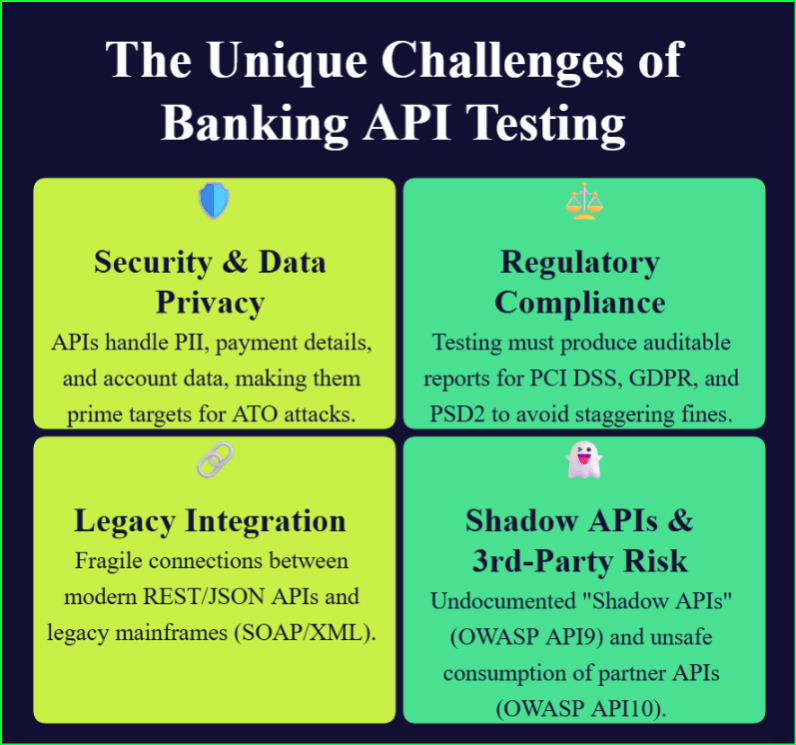
The Unique Challenges of API Testing for Banks (Why It’s Not Like Other Industries)  

Testing APIs in the banking, financial services, and insurance (BFSI) sector is a high-stakes discipline, fundamentally different from e-commerce or media. The challenges in API testing are not merely technical; they are strategic, regulatory, and existential. A single failure can erode trust, trigger massive fines, and halt business operations.  

API Testing

Challenge 1: Non-Negotiable Security & Data Privacy  

API testing for banks is, first and foremost, security testing. APIs handle the most sensitive financial data imaginable: Personally Identifiable Information (PII), payment details, and detailed account data. Banks are “prime targets” for cybercriminals, and the slightest gap in authentication can be exploited for devastating Account Takeover (ATO) attacks.  

Challenge 2: The Crushing Regulatory Compliance Burden  

Banking QA teams face a unique burden: testing is not just about finding bugs but about proving compliance. Failure to comply means staggering financial penalties and legal consequences. Automated tests must produce detailed, auditable reports to satisfy a complex web of regulations, including:  

  • PCI DSS (Payment Card Industry Data Security Standard)   
  • GDPR (General Data Protection Regulation)   
  • PSD2 (Revised Payment Services Directive) in Europe   
  • US Regulations (like FFIEC, OCC, and CFPB)   

A 2024 survey highlighted this, revealing that 82% of financial institutions worry about federal regulations, with 76% specifically concerned about PCI-DSS compliance. For a broader look at software testing challenges and quality requirements across financial services, explore our BFSI software testing whitepaper. 

Challenge 3: The Legacy-to-Modern Integration Problem  

Financial institutions live in a complex hybrid world. They must connect modern, cloud-native microservices with monolithic legacy systems, such as core banking mainframes-built decades ago. The primary testing challenge lies at this fragile integration layer, where new REST API validation processes (using JSON) must communicate flawlessly with older SOAP API automation scripts (using XML).  

Challenge 4: The “Shadow API” & Third-Party Risk  

The pressure to bridge this legacy-to-modern divide is a direct cause of a massive, hidden risk: “Shadow APIs”. Developers, facing tight deadlines, often create undocumented and untested APIs to bypass bottlenecks. These uncatalogued and unsecured endpoints create a massive, unknown attack surface. This practice is a direct violation of OWASP API9:2023 (Improper Inventory Management).  

Furthermore, banks rely on a vast web of third-party APIs for credit checks, payments, and fraud detection. This introduces another risk, defined by OWASP API10:2023 (Unsafe Consumption of APIs), where developers tend to trust data received from these “trusted” partners. An attacker who compromises a third-party API can send a malicious payload back to the bank, and if the bank’s API blindly processes it, the results can be catastrophic. This banking API testing guide outlines the strategies financial institutions should adopt to improve security, compliance, resilience, and software quality. 

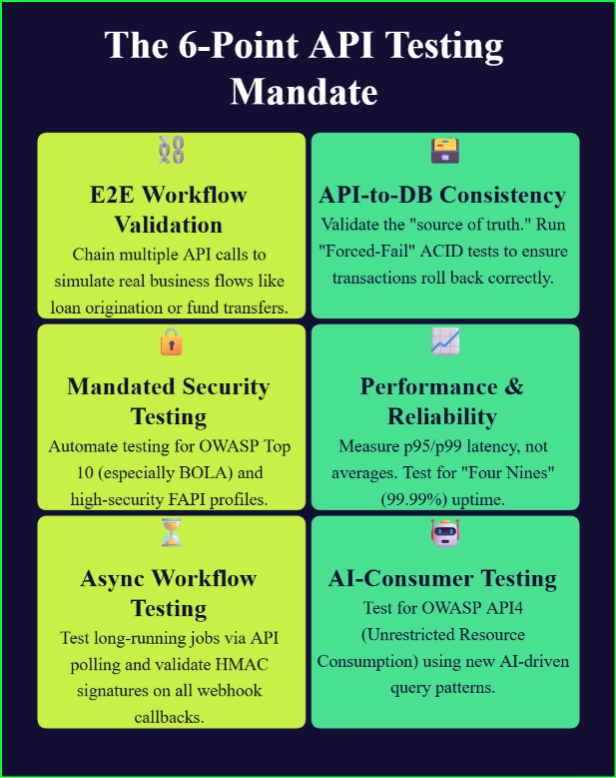
API Testing for Banks: 6 Essential Strategies for Secure Banking APIs in 2026 To close the “quality gap” and secure the institution, QA teams must move beyond basic endpoint checks. A modern, automated strategy must validate entire business processes, from data integrity at the database level to the new threat of AI-driven consumption.  

API Testing mandate


  1. End-to-End Business Workflow Validation (API Chaining) 

Successful API testing for banks goes beyond validating individual endpoints. The real risk lies in the complete, multi-step business workflow. API testing for banks must validate the entire money movement process by “chaining” multiple API calls to simulate a real business flow. This approach models complex, end-to-end scenarios like a full loan origination or a multi-leg fund transfer, passing state and data from one API response to the next request.  

  1. API-to-Database Consistency Checks (Testing ACID) 

An API can return a “200 OK” and still be catastrop hically wrong. The ultimate test of a transaction is validating the “source of truth”: the core banking database. An API to database consistency check validates that an API call actually worked by querying the database to confirm the change.  

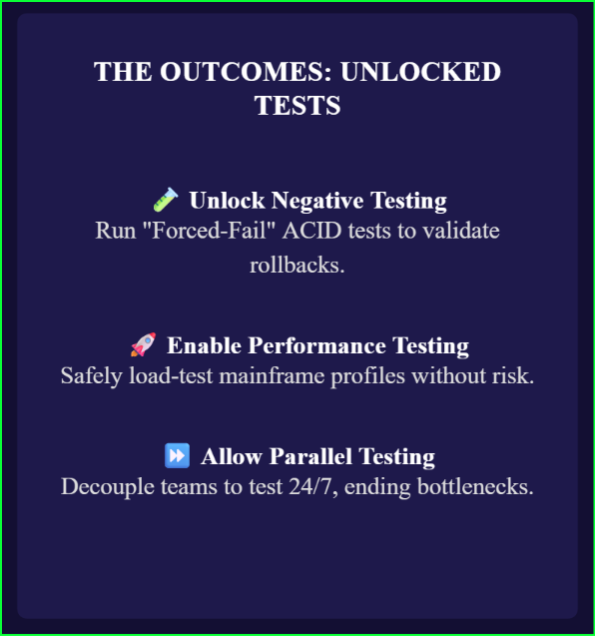
The most critical test for this is the “Forced-Fail” Atomicity Test. Financial transactions must be “all-or-nothing” (Atomic).  

  • GIVEN: Account A has $100 and Account B has $0.  
  • WHEN: An API test initiates a $50 transfer.  
  • AND: Service virtualization is used to simulate a failure in a dependent service (e.g., the “credit Account B” service fails).  
  • ASSERT: The entire transaction must be rolled back. A database query must confirm Account A’s balance is still $100. If the balance is $50, you have failed the test and “lost” money.  
  1. Mandated Security Testing (OWASP & FAPI) 

For API testing for banks, security testing must be continuous rather than an afterthought. This means baking token-based authentication testing (JWT, OAuth2) and OWASP Top 10 validation directly into the test suite.  

The “Big 4” vulnerabilities for banks are:  

  • API1: Broken Object Level Authorization (BOLA): The most common and severe risk.  
  • Test Case: Authenticate as User A (owns Account 123). Then, call GET /api/accounts/456 (owned by User B). The API must return a 403 Forbidden. If it returns 200 OK with User B’s data, you are critically vulnerable.  
  • API2: Broken Authentication: Test for weak password policies and JWT vulnerabilities.  
  • API5: Broken Function Level Authorization: Test if a standard user can call an admin-only endpoint (e.g., DELETE /api/accounts/456) .  
  • API9: Improper Inventory Management: The “Shadow API” problem we covered earlier.  

For Open Banking, standard OAuth 2.0 is not enough. Tests must validate the advanced Financial-grade API (FAPI) profile and DPoP (Demonstrating Proof of Possession) to prevent token theft.  

  1. Performance & Reliability Testing (Meeting the “Nines”) 

Averages are misleading. The only performance metric that matters is the experience of your worst-perceiving users. You must measure p95/p99 latency—what the slowest 5% of your users experience.  

Understand the “Cost of Nines”:  

  • 99.9% (“Three Nines”): Allows for ~8.7 hours of downtime per year. For a bank, this is a catastrophic business failure.  
  • 99.99% (“Four Nines”): Allows for ~52 minutes of downtime per year. This is the new minimum standard.  

Your endpoint latency monitoring must use realistic, scenario-based load testing, not generic high-volume tests. Simulate an “end-of-month processing” spike or a “market volatility event” to find the real-world bottlenecks.  

For more insights into how fintechs are connecting quality assurance with operational resilience, read UK Fintechs Are Making QA Central to Operational Resilience. 

  1. Asynchronous Workflow Testing (Polling, Webhooks & Queues) 

Many banking processes (loan approvals, transfers) are not instant. You must test these asynchronous flows.  

  • Asynchronous API Polling: For long-running jobs, the test script must call a status endpoint in a loop (e.g., GET /api/loan_status/123) until a “COMPLETED” status is received, measuring the total time elapsed.  
  • Webhooks: To validate notifications from third parties (e.g., payment gateways), the most critical test is security. A webhook URL is public, so you must validate the HMAC signature. Your test must assert that any request with a missing or invalid signature is rejected with a 401/403 error.  
  • Message Queues: Test internal data streams (like Kafka) for guaranteed delivery and data integrity at scale.  
  1. The New Frontier: Testing for AI Consumers 

This is the new strategic threat for 2026. As noted, only 7% of organizations design APIs for AI-first consumption. AI agents will consume API-driven BFSI systems with relentless, high-frequency query patterns that will break traditional models.  

This demands a new “AI-Consumer Testing” paradigm focused on OWASP API4:2023 (Unrestricted Resource Consumption).  

  • Bad Test: “Can I get a loan quote?”  
  • Good Test (AI-Consumer): “Can I request 10,000 different loan quotes in one second?”  

This test validates your rate-limiting and resource-protection controls against the specific patterns of AI agents, not just malicious bots.  

As financial institutions adopt AI across quality engineering, testing strategies must evolve alongside these new capabilities. Explore our AI-powered quality engineering for credit unions whitepaper for a deeper look at this shift. 

The “Two Fronts” of API Governance: Managing Legacy & Modern Systems  

To manage the complexity of a hybrid environment, banks must fight a war on two fronts. A mature API-driven BFSI system requires two distinct governance models—one for external partners and one for internal microservices.  

The External Front (Top-Down): OpenAPI/Swagger  

For your public-facing Open Banking APIs and third-party partner integrations, the bank must set the rules as the provider.  

The OpenAPI (Swagger) specification serves as the non-negotiable, provider-driven “contract”. This specification is the single source of truth that allows you to enforce consistent design standards and automate documentation. This “contract-first” approach is the foundation for API contract testing (OpenAPI/Swagger), where you can automatically validate that the final implementation never deviates from the agreed-upon specification.  

The Internal Front (Bottom-Up): Consumer-Driven Contract Testing (Pact)  

For your internal microservices, a top-down model is too slow and rigid. Traditional E2E tests become brittle and break with every small change.  

This is where Consumer-Driven Contract Testing (CDCT), using tools like Pact, is superior. This model flips the script: the “consumer” (e.g., the mobile app) defines the exact request and response it needs, which generates a “pact file”. The “provider” (e.g., the accounts microservice) then runs a verification test to ensure it meets that contract.  

This is a pure automation game. It catches integration-breaking bugs on the developer’s machine before deployment, enabling CI/CD pipelines to run checks in minutes and eliminating the bottleneck of slow, complex E2E test environments.  

A mature bank needs both: top-down OpenAPI governance for external control and bottom-up CDCT for internal speed and resilience.  

Solving the Un-testable: The Critical Role of Service Virtualization  

The most critical, high-risk scenarios in banking are often impossible to test. How do you safely run the “Forced-Fail” ACID test from Section 3? How do you performance-test a third-party API without paying millions in fees? And how do you run a full regression suite when the core mainframe is only available for a 2-hour nightly window?  

The answer is Service Virtualization (SV).  

SV (or “mocking”) solves the test-dependency problem. It allows you to simulate the behavior of these unavailable, costly, or unstable systems. Instead of testing against the real partner API, you test against a “virtual” version that is available 24/7, completely under your control, and can be configured to fail on demand.  

This capability unlocks the testing strategies that banks must perform:  

 Service Virtualization

  • Negative Testing: SV is the only way to reliably run the “Forced-Fail” ACID Atomicity test. You can configure the virtual service to return the 500 error needed to validate your system’s rollback logic.  
  • Performance Testing: You can finally load-test the “un-testable.” SV allows you to simulate the performance profile of the mainframe, capturing bottlenecks without any risk to the real system.  
  • Parallel Testing: It decouples your teams. The mobile app team can test against a virtual core banking API without waiting for the mainframe team, enabling true parallel development.  

The business case for SV is not theoretical; it is proven by major financial institutions.  

  • Speed: A report covering over 20 financial institutions, including Bank of America, found that projects using SV deliver software 40% faster.  
  • Efficiency: An ING case study showed that by virtualizing key dependencies, their test environment setup and execution time was reduced from 5 days to 1 day.  

Accelerate Your API Banking Automation with Qyrus  

The challenges are significant, but the “quality gap” is solvable. Closing it requires a platform that is built to handle the specific, hybrid, and high-stakes nature of API-driven BFSI systems. Manual testing and fragmented, code-heavy tools cannot keep pace. A unified, AI-powered platform is the only way to accelerate banking API automation and ensure quality.  

A Unified Platform for a Hybrid World  

The core legacy-to-modern integration problem (Challenge 3) requires a single platform that speaks both languages. Qyrus is a unified, codeless platform that natively supports REST, SOAP, and GraphQL APIs. This eliminates the need for fragmented tools and empowers all team members—not just developers—to build tests, making testing with Qyrus 40% more efficient than code-based systems.  

Solve End-to-End & Database Testing Instantly  

Qyrus directly solves the most complex banking test scenarios, Strategies 1 and 2.  

  • API Process Testing: This feature directly maps to E2E Business Workflow Validation. A visual, drag-and-drop canvas allows you to chain APIs together to test complex money movement flows, passing data from one call to the next.  
  • API-to-Database Assertion: This feature is built to solve the API-to-Database Consistency problem. You can visually map an API request or response directly to a database (like Oracle, PostgreSQL, or DB2) and assert that the transactional data is correct.  

AI-Powered Automation to Close the Quality Gap  

To overcome the “Shadow API” problem (Challenge 4) and the new AI-Consumer threat (Strategy 6), you need AI in your testing arsenal.  

  • Service Virtualization & API Builder: Qyrus provides robust Service Virtualization to run the “Forced-Fail” ACID tests and mock 3rd-party dependencies. Its GenAI-powered API Builder can even create a new virtualized API from just a text description, letting your teams test before the real service is even built.  
  • API Discovery: Qyrus’s AI-powered browser extension directly solves the “Shadow API” (OWASP API9) problem. It records network traffic as you browse your application, discovers all APIs (even undocumented ones), and automatically generates test scripts for them.  
  • Nova AI: Qyrus’s AI assistant accelerates test creation by autonomously analyzing an API response and suggesting assertions for headers, schemas, and body content, ensuring comprehensive coverage.  

Built for Performance, Compliance, and CI/CD  

Qyrus completes the strategy by integrating endpoint latency monitoring and compliance reporting directly into your workflow.  

  • Integrated Performance Testing: You can reuse your functional API tests as Performance Tests. This allows you to run realistic, scenario-based load tests and validate your p99 latency targets, capturing key metrics like hits per second and response times over time.  
  • Jira & Xray Integration: Qyrus integrates directly with Jira and Xray. When tests run, the results are automatically pushed back, creating the crucial, auditable report trail required for regulatory compliance (Challenge 2).  
  • CI/CD Integration: Native plugins for Jenkins, Azure DevOps, and other tools enable true banking API automation within your pipeline, shifting quality left.  

Frequently Asked Questions 

What is API testing for banks? 

API testing for banks validates the security, performance, reliability, and compliance of banking APIs that power digital banking, payments, Open Banking, and financial applications. 

Why is banking API testing important? 

Banking API testing helps financial institutions prevent security breaches, maintain regulatory compliance, improve customer experience, and ensure transaction reliability. 

Which APIs should banks test? 

Banks should test REST APIs, SOAP APIs, GraphQL APIs, Open Banking APIs, payment APIs, authentication APIs, asynchronous APIs, and third-party integrations. 

How can banks automate API testing? 

Banks can automate API testing using AI-powered platforms that support functional, security, performance, database validation, service virtualization, and CI/CD integration. 

Conclusion: From “Quality Gap” to “Quality Unlocked”  

The stakes in financial services have never been higher. The “quality gap”—caused by rapid API deployment, legacy system drags, and new AI-driven threats—is real.  

Manual testing and fragmented, code-heavy tools are no longer a viable option. They are a direct risk to your business.  

The future of API testing for banks requires a unified, codeless, and AI-powered platform. Adopting this level of automation is not just an IT decision; it is a strategic business imperative for security, compliance, and survival.  

This banking API testing guide provides a practical framework for banks modernizing their API quality strategy.  

Ready to close your “quality gap”? See how Qyrus’s unified platform can automate your end-to-end API testing—from REST to SOAP and from security to performance.  

Schedule your personalized demo today.  

QYRUS gets even more powerful with AI! 

Achieve agile quality across your testing needs. 

Contact Us