In today’s digital age, users expect software applications to work seamlessly across a multitude of devices and platforms. This expectation creates a significant challenge for software development teams: the increasing software testing costs and complexity of software testing infrastructure.
Historically, companies have tackled this by acquiring and maintaining a wide array of physical devices, virtual machines, and software licenses to mimic real-world user environments. Think of the stacks of devices, the rows of servers, and the sheer number of tools needed – it’s a lot! This traditional approach leads to a substantial financial burden and support from cross-functional teams to support. It includes the initial investment in hardware and software and the ongoing operational expenses like power, cooling, maintenance, and IT support.
To put this into perspective, ITConvergence reports that organizations typically spend between $10,000 and $50,000 on the initial setup of their testing infrastructure. But that’s just the beginning. According to London App Development, 25-35% of the total software development budget is spent on testing.
As technology advances and these costs continue to climb, businesses face a critical question: Are there smarter, more cost-effective ways to manage our software testing? Can strategies like infrastructure consolidation and the use of Artificial Intelligence provide a more viable and economical path to ensuring software quality and simultaneously reducing software testing costs?
Unveiling the Hidden Costs: The Pitfalls of Fragmented Test Infrastructure
Maintaining a fragmented test infrastructure can feel like navigating a minefield for software development organizations. It’s not just about the obvious expenses; it’s the hidden costs and inefficiencies that truly eat away at your resources. Let’s break down these pain points:
- The High Price of Entry: Setting up a fragmented test infrastructure demands significant upfront investment. You’re looking at acquiring a diverse range of testing environments – physical devices, virtual machines, various operating systems – the costs quickly add up. This initial outlay can strain budgets, especially for startups and smaller businesses. Cost estimation in software testing becomes crucial here, and a fragmented approach makes accurate estimation incredibly difficult.
- Operational Costs That Keep on Climbing: The spending doesn’t stop after the initial setup. Maintaining a fragmented infrastructure involves continuous expenses that can feel like a relentless drain. Think about hardware maintenance and upgrades, software licenses for a multitude of testing tools, the ever-increasing power consumption to run it all, and the large teams needed to manage and support this complex system.
- Complexity Overload: Trying to configure, maintain, and ensure consistency across numerous, separate testing environments is a huge challenge. Differences in setup, versions, and configurations can easily lead to errors and unreliable test results. Imagine the frustration of chasing bugs only to realize they were caused by an environmental inconsistency! This complexity makes reliable cost estimation in software testing a nightmare, as unexpected issues constantly arise.
- Scalability Challenges: Need to scale your testing efforts up or down? With a fragmented infrastructure, it’s a slow and painful process. Acquiring new hardware, provisioning environments, and getting them to play nicely with your existing systems takes time and effort, potentially delaying critical releases. This lack of agility directly impacts time to market and increases overall software testing costs.
- Integration Headaches: Fragmented infrastructures often involve a mix of testing tools and environments that simply don’t work well together. This leads to data silos, wasted effort, and a struggle to achieve a smooth, efficient testing workflow. End-to-end testing becomes particularly difficult, as different parts of the application struggle to communicate.
- Time-to-Market Erosion: All the challenges mentioned above – managing disparate environments, troubleshooting inconsistencies, and dealing with integration issues – contribute to a slower testing process. This ultimately delays software releases, preventing organizations from delivering new features and updates to customers quickly. In a fast-paced market, this delay translates directly into lost revenue and increased software testing costs.
The Consolidation Cure: Streamlining Your Testing Ecosystem for Cost Savings
Test infrastructure consolidation offers a powerful solution to the challenges we’ve discussed. It’s about moving towards a unified approach to software testing, leaving behind the fragmented chaos. The core idea is to reduce the number of separate tools and test environments, creating a streamlined and integrated ecosystem. This shift can unlock significant benefits and directly address the question of how to reduce the cost of software testing.
- Slash Licensing Costs: One of the most immediate and noticeable advantages of consolidation is the potential for significant reductions in software licensing expenses. By moving away from a multitude of individual tools, you can decrease the number of software licenses needed, leading to substantial savings on procurement and ongoing subscription fees. Platforms that offer a comprehensive suite of testing capabilities within a single environment are key to achieving these savings.
- Simplify Management and Maintenance: A consolidated testing ecosystem inherently simplifies management. Instead of grappling with a variety of tools, each with its own interface, update schedule, and compatibility requirements, your IT teams can focus on a single, unified platform like Qyrus. This streamlined approach reduces the administrative overhead associated with managing a diverse toolset, freeing up valuable IT resources and decreasing the workload on the teams responsible for maintaining the testing infrastructure. This directly translates to reduced operational costs.
- Enhance Integration and Efficiency: Consolidated platforms are designed with better integration in mind. When your testing tools exist within a unified ecosystem, they are more likely to offer seamless interoperability, resulting in more efficient workflows. This level of integration streamlines the testing process, enabling a better flow of information between different stages of the software development lifecycle and directly contributes to how to reduce the cost of software testing.
- Accelerated Time to Market: By addressing the challenges of fragmented infrastructure, consolidation contributes to a faster time to market. Streamlined workflows, reduced errors, and improved collaboration enable quicker testing cycles, allowing organizations to deliver new features and updates to customers more rapidly.
By embracing test infrastructure consolidation, organizations can move towards a more efficient, cost-effective, and manageable approach to software testing, ultimately leading to higher quality software and faster release cycles.
The AI Revolution: Intelligent Efficiency in Software Testing
Beyond consolidating your testing tools, Artificial Intelligence (AI) is a game-changer when it comes to reducing software testing costs. AI’s ability to analyze large datasets, identify patterns, and make smart decisions can be applied throughout the testing lifecycle, boosting efficiency and lowering operational costs. It’s about making testing smarter, not just faster.
AI is transforming tasks that traditionally demand significant manual effort:
- Intelligent Test Generation: AI algorithms can analyze software requirements, user stories, and existing systems to automatically generate test cases. This significantly reduces the time and resources testing teams spend on manual test design and creation, leading to faster test coverage and lower labor costs.
- Automated Test Maintenance: Software applications are constantly changing, which means test scripts need frequent, time-consuming manual updates. AI-powered tools can detect changes in the application (like modifications to the user interface or code) and automatically update the relevant test scripts. This greatly reduces the burden of manual test maintenance, ensuring tests remain effective and up to date.
- Smart Defect Analysis: When tests fail, it takes testers a long time to analyze the results, find the root cause of defects, and prioritize them for development teams. AI can help by identifying patterns in test failures, correlating issues, and prioritizing defects based on their severity and impact. This allows teams to focus their efforts and resources on the most critical issues, leading to faster resolution times and reduced costs associated with debugging.
- Predictive Analytics: By analyzing historical test data, such as past failure rates, defect trends, and code changes, AI can predict potential risk areas within the application. This enables testing teams to proactively focus their efforts on these high-risk areas, optimizing test coverage and potentially preventing costly defects from ever reaching production. According to London App Development, using predictive analytics in testing can reduce the time spent on defect fixing by up to 30%.
In essence, integrating AI into software testing empowers organizations to achieve greater efficiency, reduce manual effort, and ultimately lower the overall costs of ensuring software quality.
Qyrus: The Power of Consolidation for Cost-Effective Testing
Qyrus embodies the principles of test infrastructure consolidation by providing a comprehensive, codeless, and intelligent test automation platform designed for Web, Mobile, and API testing. This unified platform eliminates the need for multiple, specialized testing tools. By consolidating your testing activities within Qyrus, your organization can significantly reduce licensing costs and simplify the overall testing ecosystem.
Qyrus operates using an on-demand SaaS model with integrated browser and device farms. This is a crucial aspect of consolidation, as it removes the need for organizations to invest in and maintain their own extensive physical or virtual test infrastructure. This eliminates the overhead associated with hardware procurement, maintenance, and ongoing operational costs. Qyrus provides the necessary infrastructure on demand, enabling you to scale your testing efforts without the traditional burdens of infrastructure management.
As the Forrester Total Economic Impact study highlights, Qyrus’s strength lies in its ability to “build a scenario and string add-in components of all three [mobile, web, and API] to create an end-to-end scenario.” This further emphasizes Qyrus’s capability to unify different aspects of testing within a single platform.
Qyrus: AI-Driven Cost Reduction in Action
Qyrus harnesses the power of Artificial Intelligence (AI) to drive down the costs associated with software testing significantly. As an AI-infused platform, Qyrus incorporates intelligent capabilities across various aspects of the testing process, leading to increased efficiency and substantial cost savings.
One key area where Qyrus leverages AI is in test script maintenance.
Qyrus features Healer, an advanced AI-based tool that helps prevent test flakiness and brittleness. By recreating the base functionality of a script if it fails, Healer reduces the time spent investigating and fixing unreliable tests, ensuring that testing efforts are focused on genuine defects rather than test instability. Furthermore, Qyrus’s AI/ML-driven features assist in autocorrecting, self-navigating, and generating tests. By automating these traditionally manual tasks, Qyrus enables faster test creation and execution, saving valuable time and resources for testing teams.
The Forrester Total Economic Impact (TEI) study reveals several key benefits that directly translate to significant cost reductions:
- Significant cost avoidance from reduced downtime: This is partly due to Qyrus’s proactive AI detection, which reduces 50% of incidents that enter production.
- Time savings with regression testing automation: Qyrus enables the regression automation of around 90% of manual test cases, significantly reducing the need for manual regression testing.
- Productivity gains during UAT and reporting: Qyrus’s enhanced automation and user-friendly features reduce time spent on UAT testing by 20%, and its automated reporting capabilities save nearly two days of effort in generating regular reports.
- Time savings in resolving issues due to reduced production errors: Qyrus enables more automated and proactive identification of production errors, saving QA testers and developers time in managing fixes, and reduces incidents by about half.
By integrating AI throughout its platform, Qyrus empowers organizations to achieve substantial cost savings through reduced manual effort, improved test stability, and a decrease in production defects and downtime.
The Future of Testing: A Strategic Path to Cost Efficiency
The persistent challenge of high costs linked to traditional test infrastructure and manual processes continues to burden software development organizations. However, the rise of test infrastructure consolidation and the integration of Artificial Intelligence offer compelling ways to achieve substantial cost reduction.
Qyrus emerges as a powerful platform that effectively combines these two crucial approaches. As the demands on software testing continue to increase in complexity and the pressure to deliver high-quality software at speed intensifies, adopting a platform like Qyrus presents a compelling advantage. By embracing a unified, AI-driven approach, organizations can achieve more efficient, scalable, and significantly more cost-effective software testing practices, positioning themselves for success in the future of technology.
Want to reduce testing costs and improve quality? Try Qyrus now and experience the difference.
The misalignment between what you intend for your APIs and how they perform is sometimes bigger than you imagine. Have you ever witnessed that? Have you thought why is that way?
Well, the gap starts to widen along the testing and shipping process. APIs that look fine in development often stumble in production—causing downtime, you lose appear fine in development often stumble in production—causing downtime, losing customers, and endless pressure on sales. For QA, it feels like chasing problems that could’ve been prevented. For developers, it’s the frustration of watching good code fail because testing came in too late.
Performance testing is straightforward. It ensures that your APIs are scalable and can handle any amount of traffic and instability thrown towards them.
However, manually testing APIs or generating test cases can be a time-consuming and inefficient process. You’d end up spending more time accessing breakdowns than you would generating them.
That’s why it’s important to simulate users in your API testing process. It ensures your APIs are aligned to your product goals, you know before performance degrades and helps you plan infrastructure needs.
In this blog, we will learn how to test API performance, latency, throughput, and error rates under load. And how you can set your APIs to build scalable and efficient applications.
What is Performance Testing in APIs?
Performance testing for APIs is a process we use to understand how well your API handles load, stress, and various usage patterns. Unlike functional testing, performance testing measures how quickly and how much load your API can handle before it breaks. Such as:
• Response Time – How quickly the API responds to requests
• Throughput – How many requests per second the API can process
• Latency – Time delay between request and first byte of response
• Error Rate – Percentage of failed requests under load
• Resource Utilization – CPU, memory, and database usage during testing.
The following factors help developers and SDETs understand how to build APIs that are more likely to fail. By ensuring the API account well on these aspects, you ensure that your APIs bring the trust you need.
Types of API Performance Testing:
• Load Testing – Normal expected traffic levels
• Stress Testing – Beyond normal capacity to find breaking points
• Spike Testing – Sudden traffic increases (like flash sales)
• Volume Testing – Large amounts of data processing
• Endurance Testing – Sustained load over extended periods
What is the role of Virtual Users in Performance Testing?
Virtual users are simulated users that performance testing tools create to mimic/re-create real user behavior without needing actual people.
How Virtual Users Work:
• Each virtual user executes a script that makes API calls
• They simulate realistic user patterns (login → browse → purchase → logout)
• Multiple virtual users run simultaneously to create a load
• They can simulate different user types, locations, and behaviors
For example, instead of hiring 1,000 people to test your e-commerce API, you create 1,000 virtual users that:
• Log in with different credentials
• Browse products via API calls
• Add items to cart
• Process payments
• Each following realistic timing patterns
Virtual User Benefits:
• Cost Effective – No need to recruit real users for testing
• Scalable – Can simulate thousands or millions of users
• Consistent – Same test patterns every time
• Controllable – Adjust user behavior, timing, and load patterns
• 24/7 Testing – Run performance tests anytime
Virtual User Simulation: Challenges Where Current Tools Fall Short
Realistic User Behavior
• Static scripting limitations – Most tools use fixed scripts that don’t adapt to real user variations and decision-making patterns. All virtual users are designed to act identically but, real users change their minds, make mistakes, retry actions.
• Session complexity gaps – Real users browse, abandon carts, return later – current tools struggle with complex user journey modelling. Virtual users lose context between API calls, unlike real users who maintain browsing state
Authentication and Session Management
• Token refresh complexity – Most tools struggle with realistic JWT token expiration and refresh cycles during long test runs
• Multi-factor authentication simulation – Current tools can’t properly simulate MFA flows that real users experience
Data Management and Variability
• Synthetic data limitations – Test data doesn’t reflect real-world data distributions, edge cases, and anomalies
• Data correlation problems – Virtual users use random data instead of realistic data relationships (user preferences, purchase history)
• Geographic distribution gaps – Most tools don’t simulate realistic global user distribution and network conditions
Technical Infrastructure Limitations
• Resource consumption explosion – Simulation of virtual users consumes significant memory and processing power, causing performance lapses or crashes.
• Network conditions– Tools don’t simulate realistic mobile networks, slow connections, or intermittent connectivity
• Parallel execution problems – Current tools hit hardware limits when simulating thousands of concurrent users
• Increasing cloud costs – Scaling virtual users in cloud environments becomes prohibitively expensive for realistic load testing
These are just challenges that you often face but are avoidable. We’ll explore how smart tactics can put you steps ahead. However, let’s examine how automating API performance tests can simplify the process.
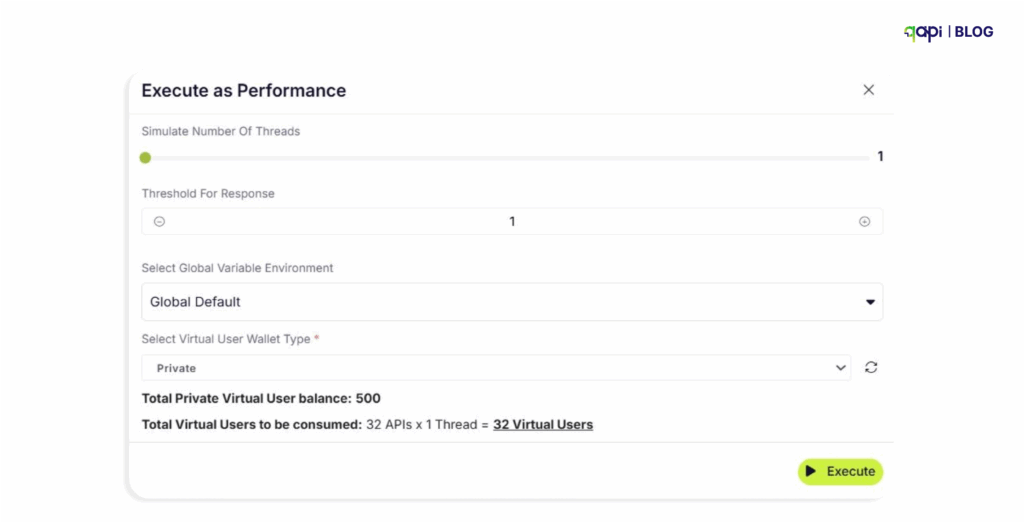
How do I set up virtual users for API performance testing?
qAPI an end-to-end API testing tool offering free Virtual users each month so you can test your APIs for free.
You can also add more virtual users if needed.
Here’s how it works-
Set Up Test Data
• Create varied and realistic test data:
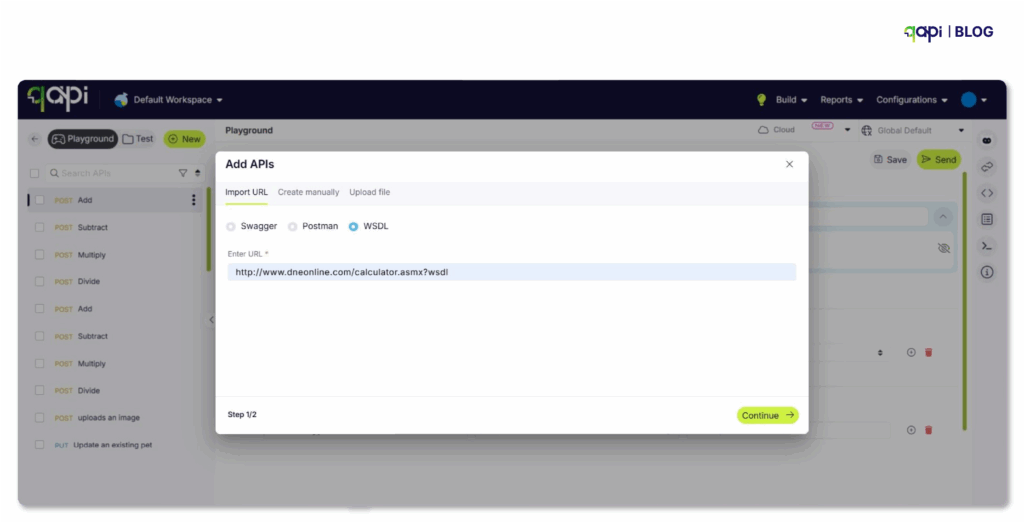
• Use data files (CSV, JSON) for parameterization. Or directly import your API collection.
Best Practices for Performance Testing APIs with Virtual Users
Before writing a single test script, establish what you’re trying to accomplish:
• Are you validating that your API can handle expected peak traffic?
• Are you looking to identify breaking points?
• Are you testing a specific endpoint or the entire API ecosystem?
- Based on that, set the following parameters like:
• API must handle 1,000 concurrent users with <2s response time
• System should maintain 99.9% uptime under load
• Error rate must remain below 0.1% during peak load
- Start Small and Scale Gradually
Build your test incrementally:
1️⃣ Baseline test: Verify functionality with a single virtual user
2️⃣ Smoke test: Run with a small number of users (10-50) to ensure basic stability
3️⃣ Load test: Apply expected normal load (what you expect during regular usage)
4️⃣ Stress test: Push beyond normal load to find breaking points
- Test in Production-Like Environments
Your test environment should mirror production as closely as possible:
• Match hardware specifications
• Replicate network configurations
• Use similar database sizes and configurations
• Ensure monitoring and logging match production
4. Run Multiple Test Cycles
Performance testing isn’t a one-time activity:
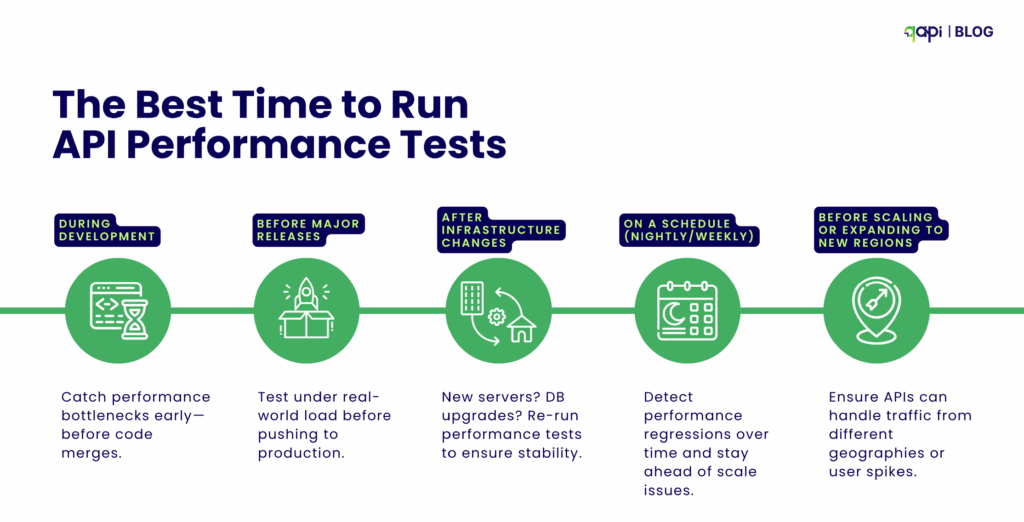
• Run tests at different times of day
• Test after every major code deployment
• Re-test after infrastructure changes
• Create a performance baseline and track against it
5. Consider Security Implications
When load testing APIs:
• Use test credentials that have appropriate permissions
• Avoid generating real user data
• Ensure you’re not exposing sensitive information in test scripts
• Consider rate limiting and how your API handles abuse scenarios
These steps help ensure your API scales reliably without overcomplicating the process.
Metrics to Monitor During API Performance Tests
Focus on key metrics that reveal how your API performs under load. Monitor these in real-time:
– Response Time: Measures how long the API takes to reply (aim for under 200-500ms for most cases).
– Throughput/Requests Per Second (RPS): Tracks how many requests the API handles per unit of time.
– Error Rate: Percentage of failed requests (e.g., 4xx/5xx errors); keep it below 1% for reliability.
– CPU and Memory Usage: Monitors server resource consumption to spot overloads.
– Latency: Time from request to first response byte; critical for user experience.
How to Analyze the Results of API Performance Tests
Follow these clear steps:
Compare against benchmarks: Check if metrics like response time meet your predefined thresholds (e.g., avg < 300ms); flag deviations.
Review trends and graphs: Use visualizations to spot patterns, such as rising errors as the load increases, or percentiles (e.g., p90 for 90% of responses).
Identify problems: Look for high CPU usage or slow queries causing delays; correlate metrics (e.g., high latency with error spikes).
Iterate and optimize: Retest after fixes, focusing on improvements like reduced response times, to validate changes.
How Performance testing ensures your APIs are scalable and dependable
By simulating VUs, you predict failures, optimize resources, and maintain 99.9% uptime—reducing outages by up to 50% in real cases. In 2025, with API security and performance trends surging (CAGR 32.8% for security testing), tools like qAPI can make this accessible, by cutting costs and boosting confidence.
Conclusion: Level Up with qAPI
Performance testing with VUs transforms APIs from fragile to fortress-like. qAPI’s codeless approach addresses traditional pain points, enabling faster and more realistic tests. Ready to optimize? Sign up for free VUs at qAPI and test today. See the difference for yourself.
Test APIs faster and simpler with qAPI.
Qyrus, a leading AI-powered test automation platform has been featured in Gartner’s latest report on the impact of Generative AI (GenAI) on the Software Delivery Life Cycle (SDLC).
GenAI is rapidly changing how software is built, tested, and delivered. The new-gen technology offers significant quality-of-life improvements for developers, with Gartner clients reporting productivity gains of around 10-15%. The real value lies in enhancing the developer experience and tackling specific SDLC bottlenecks.
Download Now
This Gartner report, “How Generative AI Impacts the Software Delivery Life Cycle” (April 4, 2025), provides crucial insights into leveraging GenAI effectively while navigating its challenges.
At Qyrus, we proactively embrace critical industry trends like GenAI to best serve our customers. Our inclusion as an example vendor in Gartner’s research on AI-augmented testing reflects our commitment to leveraging cutting-edge technology for customer success and satisfaction.
Explore this research to:
- Understand Gartner’s perspective on GenAI’s role in areas like code generation, debugging, application modernization, and AI-augmented testing.
- Discover why Qyrus is recognized in the AI-augmented testing landscape.
- Learn about the key benefits and risks software engineering teams should consider when adopting GenAI tools.
- Gain insights into effectively integrating GenAI into your software development and testing workflows.
Gartner, How Generative AI Impacts the Software Delivery Life Cycle, Matt Brasier, 4 April 2025.
At qAPI, we’re focused on one mission: simplifying API testing so that teams can move faster, debug smarter, and release more with confidence. This will in turn increase productivity when it comes to functional API testing.
We’ve seen a clear pattern emerge across hundreds of engineering teams: writing API test cases takes too long and debugging them across multi-step workflows is even harder. It’s not just a developer frustration—it’s a managerial setback that’s affecting delivery timelines and system stability.
In 2024, 74% of respondents are API-first, up from 66% in 2023, with an average application running between 26 and 50 APIs actively. This shift toward API-first development has created new testing challenges.
Failing to complete digital transformation initiatives is costing organizations a minimum of $9.5 million annually, largely due to integration failures and inadequate API testing. And these numbers are small if we focus on the largely affected aspects, if we zoom out and look at the big picture, the number will be bigger.
As part of this collective strategy, we have launched our functional API testing tool, which helps you create test cases with ease in the cloud.
We understood the setbacks teams face with the current tools on the market and created a way to leverage AI to reduce the time wasted in running behind a manual testing process.
Here, we’ll take a closer look at what qAPI’s API testing capabilities are, how they work, and how they’ll help teams save time and make the most out of their API testing needs.
Let’s clear the basics first.
What is Functional API Testing and Why is it Important?
Functional API testing is the process of verifying that an API performs as per its defined functions correctly, meeting its specified requirements.
It can be many things like sending requests to API endpoints and checking if the responses align with expected outcomes, including correct data, proper error handling, and follow specifications.
Unlike performance or security testing, functional testing focuses on the API’s core functionality—making sure that it does what it’s supposed to do under any condition.
Importance of Functional API Testing
A single API failure, if not tested and identified early can lead to infamous issues, such as:
• Data Breaches: Improper handling of authentication or authorization, which exposes sensitive data.
• Service Disruptions: Faulty APIs will cause spiralling failures across dependent systems.
• Poor User Experience: Incorrect responses or slow performance will result in the loss of more customers and visitors.
Functional API testing ensures reliability, security, and performance, which are important for maintaining user trust and application likeability.
To create a good and scalable API testing framework, you and your team needs to identify the key areas of performance that will be used as a reference point to test APIs.
The Market Gap
Let’s just pick the trending markets — a typical e-commerce checkout process now involves 25-30 API calls across authentication, fraud detection, inventory management, payment processing, tax calculation, shipping logistics, and order confirmation.
If each step is connected to the previous one, and any failure can affect the entire workflow. That’s why studies have shown that 68% of API failures occur in multi-step workflows rather than single endpoint calls.
The problem? Most API testing tools are still designed to validate individual endpoints, rather than creating complex workflows.
This is what qAPI solves.
qAPI’s Functional API Testing capability is designed to solve these exact issues. Here’s how:
• Import any API collection (Postman, Swagger, etc.) and instantly generate workflow-based test cases
• Customize flow logic, with chaining, conditions, retries, and validations
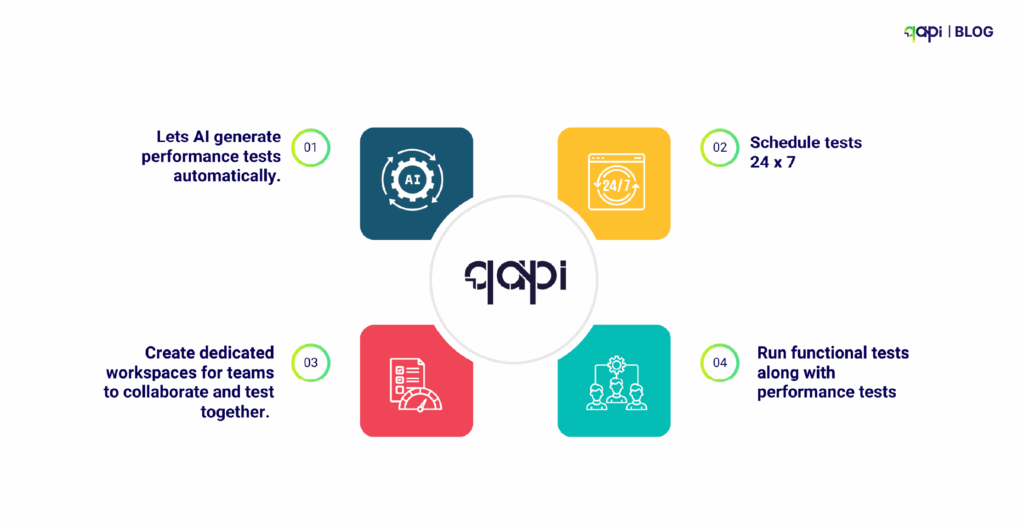
• Run functional and performance tests together—one click, two test types
• Debug faster, with AI-driven test case generation and reporting insights get recommendations and solve issues faster.
• Automate API tests 24×7
Based on current growth trends and enterprise adoption rates, we project that by 2027, organizations will manage an average of 75-100 APIs per application, driven by increased adoption of microservices and third-party integrations. This shows a 50% increase from current levels.
What challenges should I expect in functional API testing?
Because when it comes to managing environments, there’s still a problem.
APIs Change Fast. Tests Don’t Keep Up.
APIs will change—new versions will come so will new endpoints, and changed fields. But with every change, your test suite needs to be updated too, which includes: test data, environment setup, and validation rules.
Every API version you support requires additional effort to maintain: adjusting test data, assertions, and environments. A systematic review highlights ongoing struggles with “authentication-enabled API unit test generation,” showing major maintenance gaps
Example: When your /user/profile endpoint changes to return an extra nickname field, old tests expecting only name may silently break or miss validation. Over time, many tests become outdated.
And yet, most legacy testing tools—like Postman or Swagger-based setups—are still focused on one endpoint at a time. They weren’t built to test connected workflows or simulate production-like sequences.
Most tools don’t handle this well. The result? Teams start ignoring broken tests—or worse, they stop writing them altogether.
Also, There Are Multiple Slow Feedback Loops
API tests that take 20 minutes to run don’t help developers. By the time you get results, you’ve moved on to other tasks. Fast feedback is crucial for modern development workflows. Manual testing is a slow road. API tests should run automatically on every pull request or build.
Tests Are Not Integrated Into CI/CD
Only 30% of teams today automate Postman tests in their CI/CD pipelines. Many still run them post-deployment. That’s too late.
In fast-moving development cycles, feedback loops need to be short. If your tests take 20 minutes, your developers have already moved on.
This needs to change and to break this cycle, testing tools must follow these steps:
Best Practices for Functional API Testing in 2025
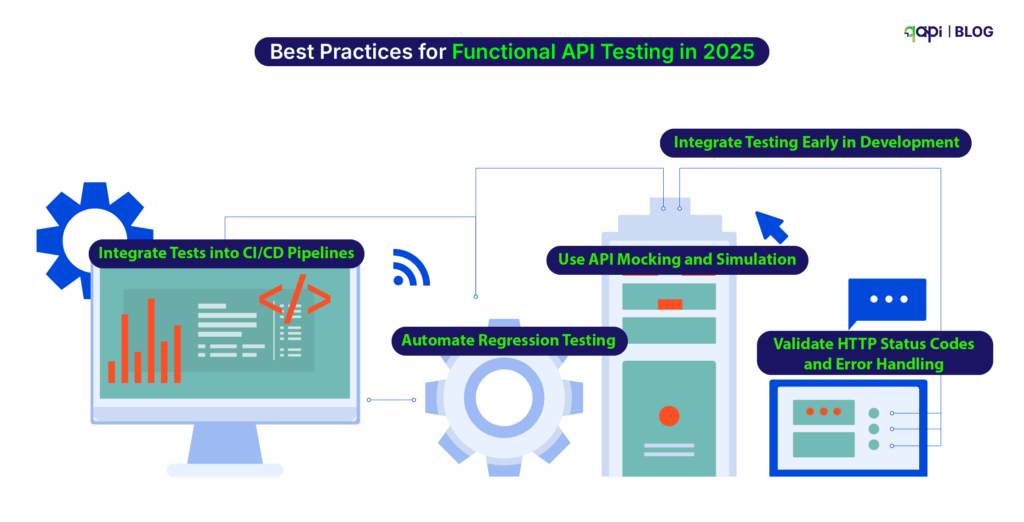
To ensure effective functional API testing in 2025, start doing these API testing best practices tailored to the latest technological advancements:
1️⃣ Integrate Testing Early in Development Begin testing during the development phase to identify and fix issues before they escalate. Early testing reduces costs and ensures quality from the start.
2️⃣ Use API Mocking and Simulation Tools like qAPI for virtual user simulation or Postman Mock Servers for testing without relying on real backend services, reducing dependencies and speeding up cycles.
3️⃣ Automate Regression Testing Automate regression tests to ensure new changes don’t break existing functionality. This is crucial for maintaining consistency in fast-paced development environments.
4️⃣ Validate HTTP Status Codes and Error Handling Verify that APIs return correct status codes (e.g., 200 OK, 401 Unauthorized) and handle errors gracefully to maintain application stability.
5️⃣ Integrate Tests into CI/CD Pipelines Automate tests within CI/CD pipelines using tools like Jenkins or GitHub Actions to ensure every code change is tested.
• Add test triggers in your CI pipeline (e.g., GitHub Actions, Jenkins, GitLab).
• Run smoke tests on every PR, deeper tests nightly or before release.
• Generate test reports and alerts automatically.
6️⃣ Leverage AI for Testing AI-driven tools can generate test cases, identify vulnerabilities, and predict failures based on historical data. By 2025, 40% of DevOps teams are expected to adopt AI-driven testing tools, enhancing efficiency and reducing errors.\
7️⃣ Choose Tools That Match Your Workflow
Not every tool suits every team. Choosing based on popularity rather than fit often leads to rework and frustration.
Choose tools that support your auth, CI/CD, and API types (REST, GraphQL, gRPC).
Evaluate whether it can scale with test volume and handle async operations.
Ensure your team can learn and maintain it quickly.
Examples:
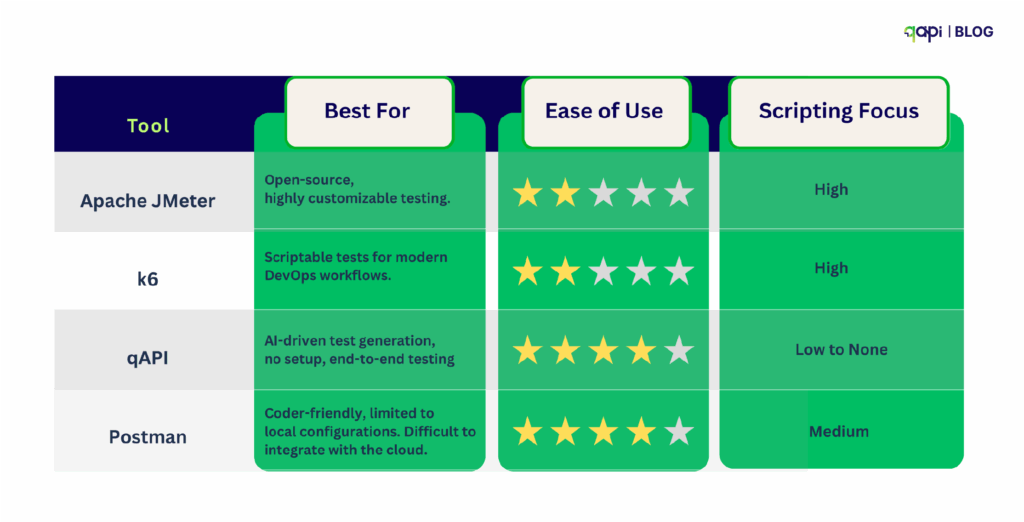
Postman: Best for simple REST tests and manual workflows.
REST Assured: Good for Java-based validation-heavy use cases.
Karate: Great for BDD-style test writing and CI automation.
qAPI: Cloud-native, AI-powered, adapts to any workflow, it’s built to automate both functional + performance testing workflows in one place.
8️⃣ Start to Validate Error Handling
• Test invalid inputs, missing fields, bad tokens, and unsupported methods.
• Validate that error messages are clear and HTTP status codes are correct.
• Simulate failures in dependent services to test recovery logic.
Gartner estimates that 31% of production API incidents are due to poor error handling—not code bugs.
Apart from API testing, Qyrus offers a single platform for automating a wide range of testing types, including:
• Cross-browser testing
• Mobile testing
• Web testing
• SAP Testing
Qyrus is not just an API testing tool—it’s a comprehensive, AI-driven testing platform designed to streamline quality assurance across the board. It offers a wide range of testing solutions application.
The API economy is no longer emerging—it’s exploding. And the numbers confirm it. If you’re still testing APIs like it’s 2018, you’re already behind.
Here’s what our most recent research reveals—and why it matters to your functional testing strategy:
API Usage Is Increasing
Treblle’s independent study of 1 billion API requests from 9,000 APIs found that APIs accounted for 83% of all internet traffic
Microservices Are Multiplying Rapidly
As per the CNCF 2024 Annual Survey, a typical enterprise runs 200–500 microservices, each exposing 2–3 APIs.
That’s anywhere between 600 to 1,500 APIs per organization—and each API must be tested for version compatibility, functionality, and chained workflows. Manual or endpoint-level testing is simply not logical in this scenario.
A recent forecast by IDC states that by 2027, 60% of enterprise development teams will rely on AI-assisted or fully autonomous testing tools.
Similarly, Gartner predicts that 85% of customer interactions will occur via APIs—not front-end channels—by the same year.
APIs now are the primary customer interface, and test coverage will need to evolve from manual scripting to AI-powered automation for teams to keep up.
Put all this together, and the message is clear:
• API volume is rising fast
• Functional complexity is increasing
• Existing tools can’t scale to handle dynamic workflows
• Test gaps are costing real money
• AI will be the only sustainable way to manage testing velocity and coverage
• Workflow-centric validation
• Integrated performance + functional test execution
And that’s exactly what qAPI is delivering.
What’s your biggest API testing challenge?
Share your experiences with us, and let’s build a community of practitioners who can learn from each other’s successes and struggles.
For more insights on API testing best practices, subscribe to our newsletter and get access to our comprehensive API testing checklist to ensure you’re covering all the essential aspects of functional API validation.
Step 4: Run the Tests & Monitor
Once you’ve decided your performance benchmarks and designed your load scenarios, it’s time to run the actual tests.
Hitting “Start” —it’s where the real learning begins.
Why Real-Time Monitoring Matters
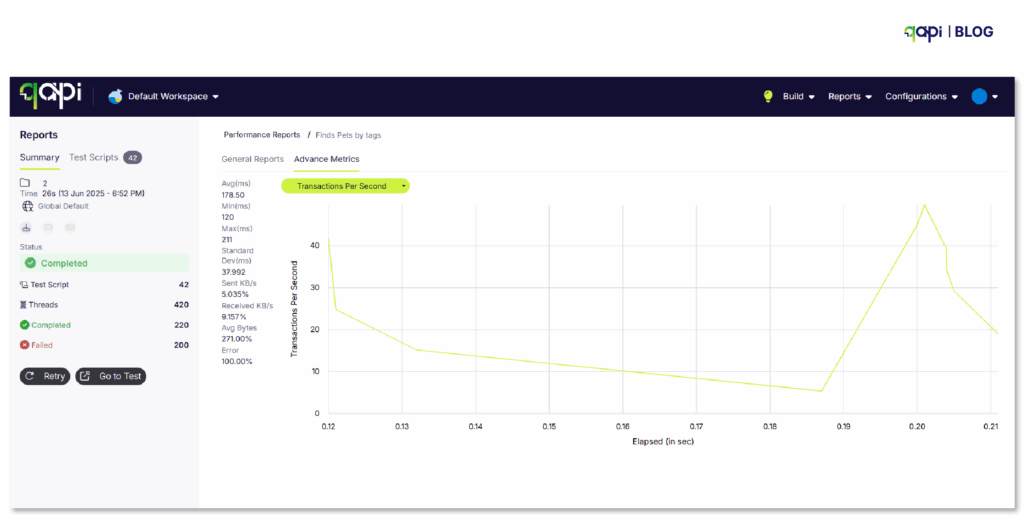
As your API tests run, what you need isn’t just a pass/fail status—you need live insight into what’s happening.
That means you and your team must keep an eye on:
• Response times: How quickly is the API responding?
• Throughput: How many requests per second is it handling?
• Errors: Are any endpoints failing or slowing down?
Seeing this in real-time is crucial. It allows your team to:
• Spot problems while they happen, not hours later
• Quickly trace slowdowns to specific endpoints or systems
• Avoid production surprises by catching unstable behavior early
Monitoring Is More Than Just Watching
Real-time monitoring isn’t just about watching numbers climb or fall. It creates a feedback loop that improves everything:
• Did a spike in traffic slow down a key endpoint? Log it(qAPI logs it for you)
• Did memory usage shoot up after a test run? Time to optimize.
This data feeds your next round of testing, shapes future improvements, and builds a habit of continuous performance tuning.
Running performance tests without real-time monitoring is like flying without a clear view. That’s what qAPI provides you with:
• Faster issue detection
• Smarter optimization
• Stronger, more reliable APIs
So don’t just run tests—observe, learn, and evolve. That’s how performance stays sharp, even as your APIs scale.
API Testing Best Practices
Take note of the following best practices in API testing that will help you save time and also build your tests faster like never before-
Test in Production-Like Environments:
Your performance testing environment should mirror production as closely as possible.
Focus on Percentiles, Not Averages:
Average response time can be misleading. A 100ms average might hide the fact that 5% of your users wait 5 seconds.
Automate Performance Tests:
Integrate automation into CI/CD pipelines to enable early detection. Automated tests provide rapid feedback, allowing issues to be addressed before they escalate.
Define Clear Objectives & Benchmarks:
Set clear performance goals and acceptance criteria upfront. Without these your testing efforts will be unfocused, and results difficult to interpret.
Analyze Results Thoroughly:
Do not just run tests; dig deep into the data to identify root causes of performance issues.
Problems to Avoid when building an API performance testing framework:
Not Testing All Possible Scenarios: Assuming a few tests cover everything can leave significant gaps in coverage, leading to undiscovered bugs and issues.
Failing to Update Tests After API Changes: APIs are dynamic; neglecting to update tests after modifications can result in missed bugs or the introduction of new security vulnerabilities.
Ignoring Third-Party Integrations: External services can introduce unpredictable performance issues and bottlenecks. These dependencies must be accounted for in testing.
The best API Performance Testing Tool in 2025
qAPI is new to the market, it’s completely free to use, does not require coding, and moreover, you get end-to-end test analysis to judge your APIs without having to worry about technical specifications.
Why qAPI? It simplifies testing with AI, generating load and stress tests from Postman or Swagger collections in under 5 minutes, with built-in dashboards.
Want to Automate All This?
With qAPI, you can:
Sanity testing has come a long way from manual smoke tests. (Recent research by Ehsan et) reveals that sanity tests are now critical for catching RESTful API issues early—especially authentication and endpoint failures—before expensive test suites run. The study found that teams implementing proper sanity testing reduced their time-to-detection of critical API failures by up to 60%.
But here’s where it gets interesting:
Sanity testing is no longer just limited to checking if your API responds with a 200 status code. The testing tools on the market are now using Large Language Models to synthesize sanity test inputs for deep learning library APIs, reducing manual overhead while increasing accuracy.
We’re witnessing the start of intelligent sanity testing.
Wait, before you get ahead of yourself, let’s set some context first.
What are sanity checks in API testing?
The definition of sanity checks is:
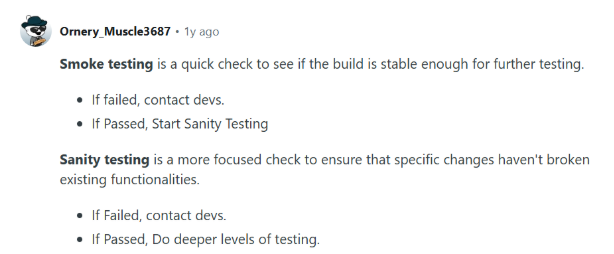
Sanity checks are used as a quick, focused, and shallow test (or a group of tests) performed after minor code changes, bug fixes, or enhancements to an API.
The purpose of these sanity tests is to verify that the specific changes made to the API are working as required. And that they haven’t affected any existing, closely related functionality.
Think of it as a “reasonable” check. It’s not about exhaustive testing, but rather a quick validation.
Main features of sanity tests in API testing:
• Narrow and Deep Focus: It concentrates on the specific API endpoints or functionalities that have been modified or are directly affected when a change is made.
• Post-Change Execution: In most cases it’s performed after a bug fix, a small new feature implementation, or a minor code refactor.
• Subset of Regression Testing: While regression testing aims to ensure all existing functionality remains intact, sanity testing focuses on the impact of recent changes on a limited set of functionalities.
• Often Unscripted/Exploratory: While automated sanity checks are valuable, they can also be performed in an ad-hoc or random manner by experienced testers, focusing on the immediate impact of changes.
Let’s put it in a scenario: Example of a sanity test
Imagine you have an API endpoint /user/{id} that retrieves user details. A bug is reported where the email address is not returned correctly for a specific user.
• Bug fix: The Developer deploys a fix.
• Sanity check: You would quickly call /users/{id} for that specific user (and maybe a few others to ensure no general breakage) to verify that the email address is now returned correctly.
The goal here is not to re-test every single field or every other user scenario, but only the affected area.
Why do we need them?
Sanity checks are crucial for several reasons:
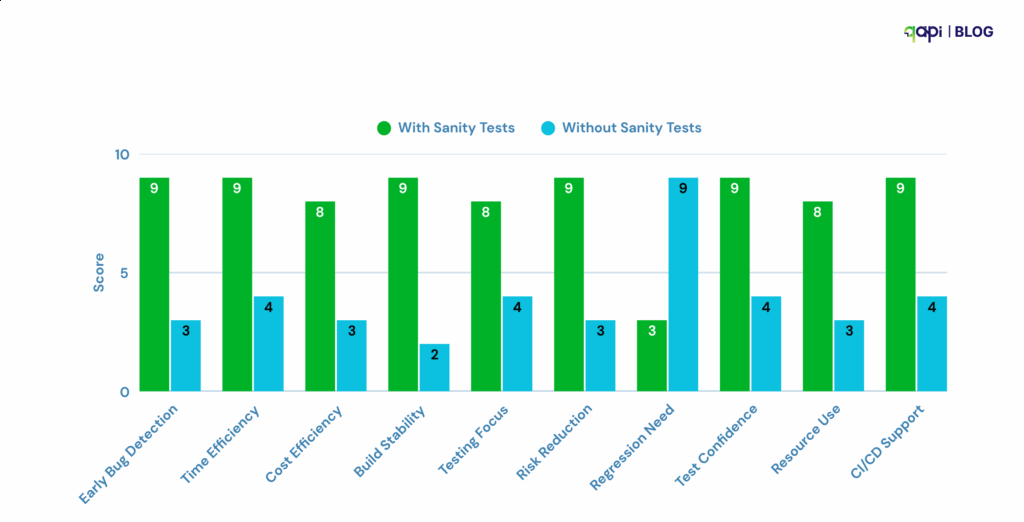
1️⃣ Early Detection of Critical Issues: They help catch glaring issues or regressions introduced by recent changes early in the development cycle. If a sanity check fails, it indicates that the build is not stable, and further testing would be a waste of time and resources
2️⃣ Time and Cost Savings: By quickly identifying faulty builds, sanity checks prevent the QA team from wasting time and effort on more extensive testing (like complete regression testing) on an unstable build.
3️⃣ Ensuring Stability for Further Testing: A successful sanity check acts as a gatekeeper, confirming that the API is in a reasonable state to undergo more comprehensive testing.
4️⃣ Focused Validation: When changes are frequent, sanity checks provide a targeted way to ensure that the modifications are working as expected without causing immediate adverse effects on related functionality
5️⃣ Risk Mitigation: They help mitigate the risk of deploying a broken API to production by catching critical defects introduced by small changes.
6️⃣ Quick Feedback Loop: Developers receive quick feedback on their fixes or changes, allowing for rapid iteration and correction.
Difference Between Sanity and Smoke Testing
While both sanity and smoke testing are preliminary checks performed on new builds, they have distinct purposes and scopes:
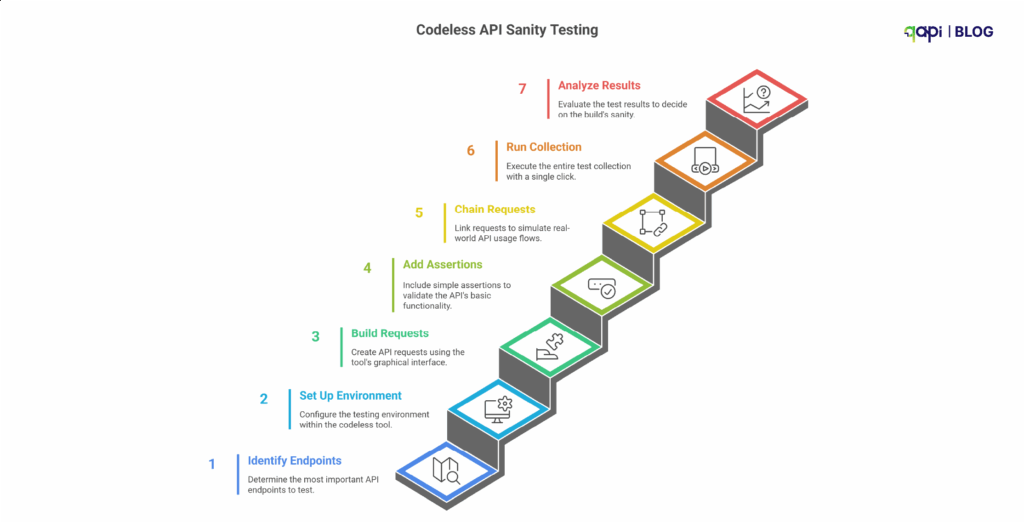
Here is a step-by-step, simple guide on using a codeless testing tool.
Step 1: Start by Identifying the “Critical Path” Endpoints
As mentioned earlier, you don’t have to test everything.
You have to identify the handful of API endpoints that are responsible for the core functionality of your application.
Ask yourself, you’re the team responsible: “If this one call fails, is the entire application basically useless?”
Examples of critical path endpoints:
Examples:
• POST /api/v1/login → Can users log in?
• GET /api/v1/users/me → Can users retrieve their profile?
• GET /api/v1/products → Can users see key data?
• POST /api/v1/cart → Can users complete a core action like adding items?
• Primary Data Retrieval: GET /api/v1/users/me or GET /api/v1/dashboard - Can a logged-in user retrieve their own essential data?
• Core List Retrieval: GET /api/v1/products or GET /api/v1/orders - Can the main list of data be displayed?
• Core Creation: POST /api/v1/cart - Can a user perform the single most important “create” action (e.g., add an item to their cart)?
Your sanity suite should have maybe 5-10 API calls, not 50!
Step 2: Set Up Your Environment in the Tool
Codeless tools excel at managing environments. Before you build the tests, create environments for your different servers (e.g., Development, Staging, Production).
• Create an Environment: Name it for e.g. “Staging Sanity Check.”
• Use Variables: Instead of hard-coding the URL, create a variable like {{baseURL}} and set its value to
e.g. https://staging-api.yourcompany.com.
This will make your tests reusable across different environments.
• Store Credentials Securely: Store API keys or other sensitive tokens as environment variables (often marked as “secret” in the tool).
Step 3: Build the API Requests Using the GUI
This is the “easy” part. You don’t have to write any code to make the HTTP request.
- Create a “Collection” or “Test Suite”: Name it, for example, “API Sanity Tests.”
- Add Requests: For each critical endpoint we identified in Step 1, create a new request in your collection.
- Configure each request using the UI:
• Select the HTTP Method (GET, POST, PUT, etc.).
• Enter the URL using your variable: {{baseURL}}/api/v1/login.
• Add Headers (e.g., Content-Type: application/json).
• For POST or PUT requests, add the request body in the “Body” tab.
You have now managed to create the “requests” part of your sanity suite
Step 4: Add Simple, High-Value Assertions
A request that runs isn’t a test. A test checks that the response is what you expect. Codeless tools have a GUI for this.
For each request, add a few basic assertions:
Add checks like:
• Status Code: Is it 200 or 201?
• Response Time: Is it under 800ms?
• Response Body: Does it include key data? (e.g., “token” after login)
• Content-Type: Is it application/json?
qAPI does it all for you with a click! Without any special request.
Keep assertions simple for sanity tests. You don’t need to validate the entire response schema, just confirm that the API is alive and returning the right kind of data.
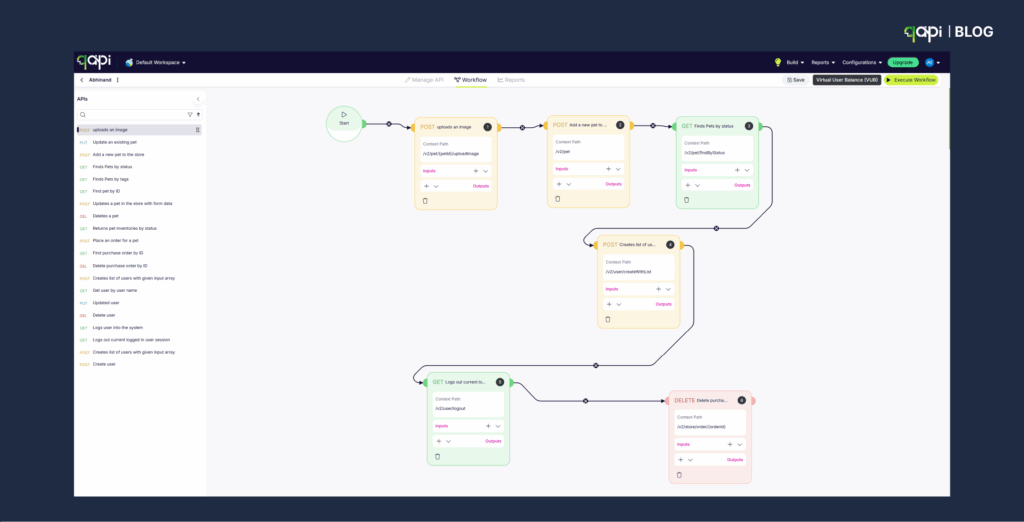
Step 5: Chain Requests to Simulate a Real Flow
APIs rarely work in isolation. Users log in, then fetch their data. If one step breaks, the whole flow breaks.
Classic Example: Login and then Fetch Data
1. Request 1: POST /login
• In the “Tests” or “Assertions” tab for this request, add a step to extract the authentication token from the response body and save it to an environment variable (e.g., {{authToken}}).
Most tools have a simple UI for this (e.g., “JSON-based extraction”).
2. Request 2: GET /users/me
• In the “Authorization” or “Headers” tab for this request, use the variable you just saved.
For example, set the Authorization header to Bearer {{authToken}}.
Now you get a confirmation that the endpoints work in isolation, but also that the authentication part works too.
Step 6: Run the Entire Collection with One Click
You’ve built your small suite of critical tests. Now, use the qAPIs “Execute” feature.
• Select your “API Sanity Tests” collection.
• Select your “Staging” environment.
• Click “Run.”
The output should be a clear, simple dashboard: All Pass or X Failed.
Step 7: Analyze the Result and Make the “Go/No-Go” Decision
This is the final output of the sanity test.
• If all tests pass (all green): The build is “good.” You can notify the QA team that they can begin full, detailed testing.
• If even one test fails (any red): The build is “bad.” Stop! Do not proceed with further testing. The build is rejected and sent back to the development team. This failure should be treated as a high-priority bug.
The Payoff: Why Sanity Check Matters
By following these steps, you create a fast, reliable “quality gate.”
• For Non-Technical Leaders: This process saves immense time and money. It prevents the entire team from wasting hours testing an application that was broken from the start. It gives you a clear “Go / No-Go” signal after every new build.
• For Technical Teams: This automates the most repetitive and crucial first step of testing. It provides immediate feedback to developers, catching critical bugs when they are cheapest and easiest to fix.
For a more technical deep dive into the power of basic sanity validations, this GitHub repository offers a good example.
While it focuses on machine learning datasets, the same philosophy applies to API testing: start with fast, lightweight checks that catch broken or invalid outputs before you run full-scale validations.
It follows all the steps we discussed above, and with a sample in hand, things will be much easier for you and your team.
Why are sanity checks important in API testing?
Sanity checks are important in API testing because they quickly validate whether critical API functionality is working after code changes or bug fixes. They act as a fast, lightweight safety layer before we get into deeper testing.
But setting them up manually across tools, environments, and auth flows is time-consuming.
Source:(code intelligence, softwaretestinghelp.com, and more)
That’s where qAPI fits in.
qAPI lets you design and automate sanity tests in minutes, without writing code. You can upload your API collection, define critical endpoints, and run a sanity check in one unified platform.
Here’s how qAPI supports fast, reliable sanity testing:
• Codeless Test Creation: Add tests for your key API calls (like /login, /orders, /products) using a simple GUI—no scripts required.
• Chained Auth Flows: Easily test auth + protected calls together using token extraction and chaining.
• Environment Support: Use variables like {{baseURL}} to switch between staging and production instantly.
• Assertions Built-In: Set up high-value checks like response code, body content, and response time with clicks, not code.
• One-Click Execution: Run your full sanity check and see exactly what passed or failed before any detailed testing begins.
Whether you’re a solo tester, a QA lead, or just getting started with API automation, qAPI helps you implement sanity testing the right way—quickly, clearly, and repeatedly.
Sanity checks are your first line of defense. qAPI makes setting them up as easy as running them.
Run critical tests faster, catch breakages early, and stay ahead of release cycles—all in one tool.
Hate writing code to test APIs? You’ll love our no-code approach
There’s always a moment that changes everything. For our client, it was the 3 AM Crisis.
Sarah’s phone buzzed at 3:14 AM—another production API failure. As the QA lead at a growing startup, she’d been here before—countless times. The payment processing API, which had worked perfectly in development, crashed under real-world load, leaving thousands of customers unable to complete transactions.
The worst part? Their manual testing process, which they usually follow, had missed critical edge cases that automated API testing should have caught weeks earlier.
This scenario plays out in development teams worldwide every single day.
By the way, Sarah and her team now use qAPI to streamline their process and avoid such midnight fallouts. Please read the blog to know more about it.
Our recent survey revealed that over 80% of developers spend more than 20% of their time dealing with API-related issues. In comparison, 73% of organizations report that API failures directly impact their bottom line.
The problem isn’t just technical—it’s systematic.
The Hidden Cost of not adapting the new API Testing metrics
Most development teams find themselves trapped in what we call the “API Testing Paradox.” The more complex your application becomes, the more APIs and more scenarios you need to test.
As the application grows, your testing approaches become increasingly time-consuming and more likely to cause errors.
Let us consider the typical API testing workflow most teams follow:
Step 1: Manual Endpoint Testing. A developer or QA engineer manually works API requests using tools like Postman or cURL. They test happy paths, document responses, and move on. This process might take 30-45 minutes per endpoint for basic testing.
Step 2: Writing Automated Tests. For each API endpoint, someone needs to write test scripts. This requires in-depth programming knowledge, a solid understanding of testing frameworks, and a significant time investment. A good test suite for a single API endpoint can take 2-4 hours to develop properly.
Step 3: Maintenance Nightmare. As APIs evolve, every test script needs updates when your API changes, which happens frequently in agile environments—your test suite becomes a maintenance burden rather than an asset.
• According to Rainforest QA, teams using open-source frameworks like Selenium, Cypress, and Playwright spend at least 20 hours per week creating and maintaining automated tests.
• 55% of teams spend at least 20 hours per week on test creation and maintenance, with maintenance alone consuming a significant portion of each sprint.
• On average, about 21% of bugs slip through to production due to limitations in manual testing.
• Cost per production API failure: The average cost of API downtime for large enterprises ranges from $5,600 to $11,600 per minute, which can add up to hundreds of thousands or even millions of dollars annually, depending on the frequency and duration of incidents.
Why it’s not working for you now
We see that the market has adopted various API testing tools, but most suffer from fundamental limitations:
Code-Heavy Approaches: Tools like REST Assured, Karate, or custom scripts require heavy programming expertise. This creates bottlenecks where only senior developers can create and maintain tests. Increasing dependency
Limited Collaboration: When testing requires coding, business analysts, product managers, and junior QA engineers are excluded from the process. This creates knowledge and communication gaps.
Slow Feedback Loops: The testing approaches we currently use often mean waiting until the end of development cycles to identify issues. By then, fixing is expensive and, of course, time-consuming.
Scalability Issues: As your API portfolio grows, code-based testing becomes increasingly complex to manage and scale across teams. (Nothing new here)
The Codeless Revolution: A New Shift
We’re creating a world where creating scalable API tests is as simple as filling out a form, where business analysts can validate API behavior without writing a single line of code.
Where test maintenance takes minutes instead of hours. This isn’t a fantasy—it’s the capability of codeless API testing.
The aim of qAPI, as a codeless API testing tool, is to provide a fundamental shift in how we approach testing.
Instead of requiring specialized programming skills, we provide intuitive interfaces that help anyone to create, execute, and maintain test suites with ease.
How can codeless API testing improve my development workflow?
The Three Pillars of Effective Codeless API Testing
Pillar 1: Visual Testing Interfaces
The best codeless API testing platform should be able to transform complex testing scenarios into a straightforward visual testing interface. So that users can drag and drop components, configure parameters through forms, and see their tests take shape in real-time without the need for coding.
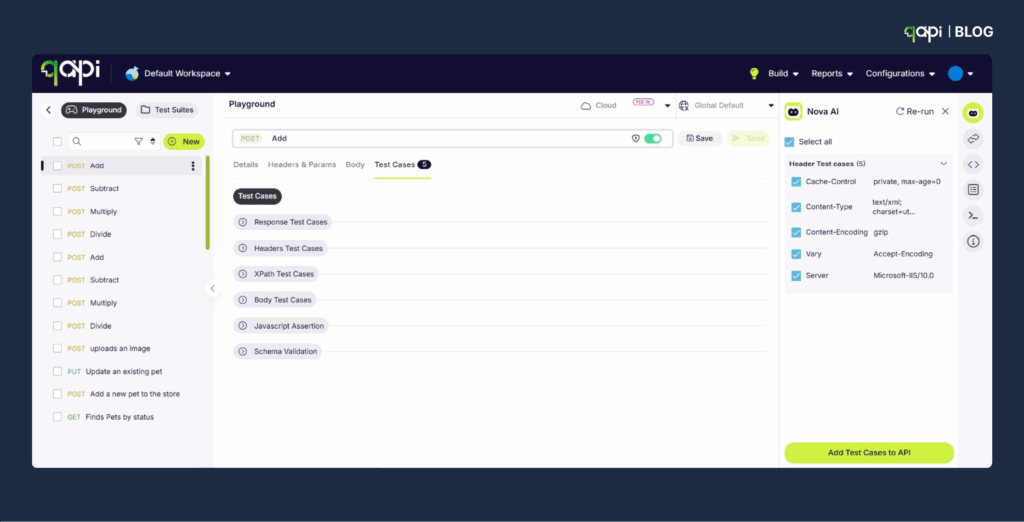
Step 2: Generate Test cases.
– AI creates test cases automatically
– Review suggested assertions and add test cases to the API.
– Customize test data if needed
– It executes tests immediately, so check for 200 OK
– And you’re done!
You can also access comprehensive, detailed reports for every test run—perfect for audits, debugging, and team collaboration.
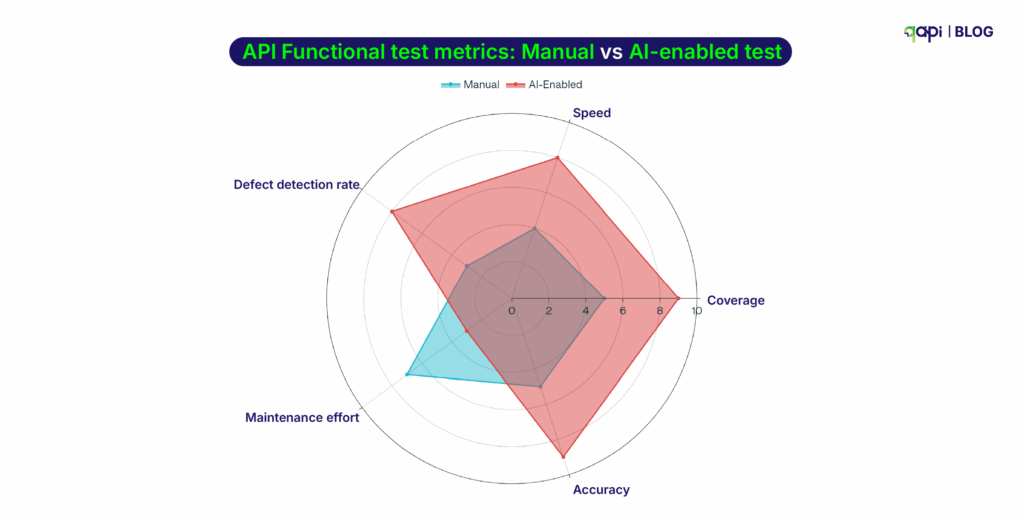
Using AI-driven testing solutions within a codeless API testing platform is one of the most effective API testing best practices today. It not only accelerates test creation but also improves accuracy, coverage, and long-term maintainability.
What are the benefits of using codeless API testing in development?
The benefits of using a no-code API testing tool are evident in the statement itself; it eliminates coding, making a codeless automation framework more accessible to teams worldwide, including beginners.
You save time
● Writing API tests takes a lot of time: 4-6 hours per endpoint
● Debugging the test cases: 2-3 hours weekly per developer(average time spent)
● Maintaining test suites when APIs change again takes up an average of 20% of the sprint’s capacity
You save costs
Developer Time (Annual Cost for 5-person team):
● Writing API tests: ~800 hours/year × $75/hour = $60,000
● Maintaining test suites: ~400 hours/year × $75/hour = $30,000
● Training new team members: ~120 hours/year × $75/hour = $9,000
● Total: $99,000+ annually
Infrastructure & Tooling:
● Multiple testing framework licenses can cost up to: $15,000+
● CI/CD infrastructure for complex test suites: $12,000+
● Developer tooling and IDE plugins: $8,000+
Now let’s compare it with the Codeless Automation Framework
Platform Cost:
● Enterprise codeless testing platform: $30,000-50,000/year
P.S.- Individual plans on qAPI start at only $288/year
Time Savings (5-person team):
● 70% reduction in test creation time: $42,000 saved
● 85% reduction in maintenance overhead: $25,500 saved
● 60% faster team onboarding: $5,400 saved
● Total Savings: $72,900/year
ROI Breakdown
Year 1 Net Savings: $22,900 – $72,900* (depending on platform choice)
Payback Period: 6-8 months*
3-Year ROI: 340-580%*
And these are just conservative estimates that we have taken into consideration; actual savings can be much higher.
What Codeless Testing Delivers:
Speed: Test creation down from hours to minutes
Maintainability: Visual updates vs. code refactoring
Team effort: Everyone can contribute, not just senior developers.
Reliability: Platform handles framework updates automatically
Shifts Focus: More time building features, less time maintaining tests
What Challenges might I Face When Implementing Codeless API Testing?
Problem 1: Trying to Replicate Existing Code-Based Tests
Teams often try to recreate their existing test suites exactly as they were written in code.
Solution: Rethink your testing approach. Codeless platforms often enable better test organization and more comprehensive coverage.
Problem 2: Neglecting Test Maintenance
Even codeless tests require maintenance as APIs evolve.
Solution: Establish regular review cycles and assign ownership for maintaining the test suite.
Problem 3: Insufficient Training and Adoption
Team members stick to familiar tools and processes.
Solution: Invest in comprehensive training and create incentives for adoption.
Problem 4: Ignoring Integration Requirements
Codeless testing becomes isolated from existing development workflows.
Solution: Ensure your chosen platform integrates with your CI/CD pipeline and existing tools.
The Future of API Testing: Trends and Innovations Where do we see the market going
In 2024, the API testing market is valued at $1.6 billion and is projected to reach $4.0 billion by 2030, with a compound annual growth rate (CAGR) of 16.4% annually. Here’s what’s driving the future of API testing.
Key Trends in API Testing for 2025
Codeless and Low-Code Tools for Accessibility
Testing tools are becoming easier to use, even for non-technical team members. Codeless platforms, such as qAPI, allow testers to import API specifications and generate tests without coding.
This trend is set to make API testing accessible to product managers and business analysts, improving team collaboration.
AI and Machine Learning in Testing
AI-powered solutions can automatically generate and optimize test cases, adapt to API changes, and expand test coverage, reducing manual effort and improving efficiency.
Tools will use machine learning to analyze past test results, spot patterns, and suggest high-risk areas to test. For example, AI can predict which API endpoints might fail under heavy traffic.
The qAPIs AI Test Case Generator already utilizes AI to generate test cases from imported API specifications, saving hours of manual work.
Shift-Left Testing for Faster Feedback
By running tests as soon as code is written, developers catch bugs before they reach production. This aligns with CI/CD pipelines, where automated tests run on every code change. Tools like qAPI, Postman, and Newman integrate easily with CI/CD systems, making this approach practical.
Stronger Focus on API Security
With APIs handling sensitive data, security is a top priority. In 2024, over 55% of organizations experienced API-related security issues, with some incidents resulting in costs exceeding $500,000.
By 2033, the API security testing market is expected to grow from $0.76 billion in 2024 to $9.76 billion, driven by rising cyber threats. Standards like OAuth 2.0 and OpenID Connect are becoming increasingly common to protect data and meet regulations such as GDPR.
Cloud-Based Testing for Scalability
Cloud-based testing is gaining popularity for its flexibility and scalability. Tools like Postman and qAPI provide cloud platforms for running tests at scale, handling large API suites without the need for local hardware.
This is important for teams and individual developers building cloud-native apps or microservices.
Support for Modern Architectures
APIs are central to microservices, event-driven systems, and real-time apps. Testing tools are adapting to support these architectures, including protocols like WebSocket and GraphQL.
How to Choose the Right Codeless API Testing Platform?
When evaluating platforms, consider these essential criteria:
Technical Capabilities
● Protocol Support: REST, GraphQL, SOAP, WebSocket compatibility
● Authentication Methods: OAuth, JWT, API keys, custom headers
● Data Formats: JSON, XML, form data handling
● Integration Options: CI/CD, bug tracking, collaboration tools
User Experience
● Learning Curve: How quickly can team members become productive?
● Interface Design: Is the platform intuitive and well-designed?
● Documentation: Are there comprehensive guides and tutorials?
● Support: What level of customer support is available?
Business Considerations
● Pricing Model: Does it scale with your team and usage?
● Security: How does the platform handle sensitive data?
● Compliance: Does it meet your industry requirements?
Conclusion: Transform Your API Testing Future
The shift to codeless API testing isn’t just about adopting new tools—it’s about transforming how your team approaches quality assurance. By removing the coding barrier, you enable broader participation, faster feedback loops, and more comprehensive testing coverage.
The organizations that embrace this transformation will find themselves with a significant competitive advantage: faster time-to-market, higher quality products, and more collaborative development processes.
“Sarah’s story, which began with a 3 AM crisis, has a different ending now. Her team adopted a codeless API testing platform six months ago. They’ve reduced their testing time by 70%, increased their API test coverage by 300%, and haven’t had a single production API failure in four months.”
More importantly, her entire team—including business analysts and product managers—now actively participates in ensuring API quality.
The future of API testing is codeless, collaborative, and accessible. The question isn’t whether you should make this transition, but how quickly you can implement it to transform your development workflow.
Ready to start your codeless API testing journey? The tools, techniques, and strategies outlined in this guide provide your roadmap to success. The only thing left is to take the first step.
CREATE YOUR FREE qAPI ACCOUNT TODAY!
In today’s fast-paced software development landscape, speed is paramount. The ability to rapidly release high-quality software can be the difference between market leadership and falling behind. Traditional software testing methods often act as a test execution bottleneck, hindering release cycles and straining resources.
Qyrus offers a solution: a comprehensive, AI-powered testing platform designed to accelerate test execution and drastically improve software quality. By harnessing the power of codeless automation, AI, and machine learning, Qyrus empowers teams to achieve faster release cycles without compromising on quality. Qyrus improves web application quality and accessibility, while also shortening the time to market.
The Need for Speed: Overcoming Testing Bottlenecks
Software testing, while crucial, often presents significant hurdles. Time constraints, limited resources, and the relentless pressure to accelerate release cycles can lead to compromises in test coverage, ultimately impacting software quality. This translates to a dismal “inquiry to close won” conversion rate of less than 1% for a lead-centric process. Flipping that around, our cross-functional business processes fail more than 99% of the time. This is tragic, expensive, and needs to change.
Many organizations find themselves trapped in a testing bottleneck due to:
- Application Development Fragmentation: A staggering number of applications, often resulting from acquisitions, leads to fragmented Agile development and testing. This makes the testing process time-consuming and resource intensive. Think of it like trying to assemble a puzzle where the pieces constantly change shape.
- Siloed Teams: Different teams working in isolation make it difficult to test end-to-end user journeys. This causes communication breakdown, duplication of efforts, and inconsistency in testing. It’s like having different departments in a company speaking different languages.
But what if you could overcome these challenges and achieve faster test execution without sacrificing quality? What if you could assemble that puzzle with ease, and have all your departments speak the same language?
Qyrus: The Brains Behind the Speed
Qyrus isn’t just about automation; it’s about intelligent automation. It leverages cutting-edge technologies and a comprehensive feature set to drastically accelerate your software testing process.
Here’s how Qyrus helps you escape the testing bottleneck:
- AI-Infused Testing: Qyrus utilizes AI and ML tools to automatically identify and fix test scripts, reducing maintenance overhead and ensuring tests remain reliable. This includes features like:
- Healer: An advanced AI tool that prevents test flakiness and brittleness by recreating the base functionality of a script if it fails.
- Rover: An autonomous exploratory testing solution using machine learning that is capable of generating tests without any human interaction. Rover can generate test steps, check for crashes, and even ensure the reliability of apps.
- Codeless Automation: Qyrus’s intuitive low-code/no-code approach empowers both technical and non-technical users to create and execute tests, eliminating the need for complex coding and reducing the learning curve.
- Web and Mobile Recorders: Streamline test building and create comprehensive, automated mobile test scripts with a low-code, no-code environment, capable of handling AI-driven mobile applications.
- Parallel Testing: Qyrus enables parallel test execution, allowing you to run multiple tests simultaneously and significantly reduce overall testing time.
- CI/CD Integration: Seamlessly integrate Qyrus with your existing continuous integration/continuous delivery (CI/CD) pipeline to automate workflows and ensure continuous testing throughout the development lifecycle.
Proof in the Pudding: Qyrus Delivers
Qyrus delivers quantifiable results, including:
- Reduce test execution time by at least 50%.
- Reduce test building time by at least 70%.
By combining these powerful features with an intelligent, AI-driven approach, Qyrus empowers organizations to achieve unprecedented speed and efficiency in their software testing efforts.
Qyrus: A Smart Investment for Your Bottom Line
A Total Economic Impact (TEI) study conducted by Forrester Consulting examined the potential return on investment (ROI) enterprises may realize by deploying Qyrus. The study provides a framework to evaluate the potential financial impact of Qyrus.
The study, based on interviews with representatives from an organization using Qyrus, projected a three-year financial analysis and found significant economic benefits:
- Return on Investment (ROI): 213%
- Net Present Value (NPV): $1 Million
The quantified benefits for the composite organization over three years include:
- Time savings with regression testing automation: Qyrus enables the regression automation of around 90% of manual test cases, leading to a time saving worth $228,000.
- Productivity gains during user acceptance testing (UAT) and reporting: Enhanced automation and user-friendly features reduce time spent on UAT testing by 20%, with automated reporting capabilities saving nearly two days of effort in generating regular reports, worth $212,000.
- Time savings in remediating issues due to reduced production errors: Qyrus enables more automated and proactive identification of production errors, reducing incidents by about half, resulting in a benefit of $482,000.
- Business growth due to accelerated feature release and market response: Automation and efficiency in the testing lifecycle enable faster release of new features, resulting in a cumulative increase in operating profits worth $29,000.
- Cost avoidance from reduced downtime: Proactive AI detection reduces 50% of incidents that enter production, achieving significant cost savings worth $557,000 by preventing defects from moving to production.
The study demonstrates that Qyrus is not just a technological advantage, but a sound economic investment, delivering substantial returns and cost savings for organizations.
Qyrus: Your Testing Future, Today
In today’s fast-paced digital landscape, businesses need a software testing solution that can keep up with the demands of modern application development. Qyrus offers a comprehensive, AI-driven platform that simplifies and accelerates the testing process, helping organizations to deliver high-quality software faster and more efficiently.
From its codeless automation and AI-infused testing capabilities to its seamless integration with existing development ecosystems, Qyrus empowers teams to achieve unprecedented levels of test coverage, reduce defects, and improve overall software quality. The Forrester TEI study demonstrates the significant economic benefits that Qyrus can deliver, including a 213% ROI and a net present value of $1 million.
Whether you’re in banking, retail, logistics, manufacturing, or any other industry, Qyrus provides a versatile and scalable solution to meet your unique testing needs. By choosing Qyrus, you’re not just investing in a software testing platform; you’re investing in the future of your business.
To discover how Qyrus can transform your software testing process, get a demo of our platform or try it for yourself.
Welcome to the second post in our series on Agentic Orchestration. In our introduction, we explained why the future of QA requires a shift from simple automation to an intelligent, agent-driven framework. Now, we’ll dive into the first step of that process: the ‘Eyes and Ears’ of the operation, the SEER Sense stage. If you missed our first post, we suggest starting there to get the full context.
How Qyrus Senses Change and Kickstarts Autonomous Testing
In the ever-evolving world of software development, change is the only constant. New features are added, bugs are fixed, and designs are tweaked, all at a breakneck pace. Traditional testing methods often struggle to keep up with this constant flux, leading to missed bugs, delayed releases, and frustrated developers. But what if your testing process could automatically adapt to change, like a chameleon blending seamlessly into its environment? This is the power of agentic orchestration, and at the heart of this revolution lies the “Sense” stage of the SEER framework (Sense, Evaluate, Execute, Report).
In this second installment of our series, we’ll explore how Qyrus Agentic acts as the eyes and ears of your development process, constantly monitoring for changes and triggering the appropriate testing actions. It’s like having a vigilant guardian constantly watching over your software, ensuring that no update goes unnoticed.
The ‘Sense’ Stage Explained
The ‘Sense’ stage is the foundation of Qyrus’ Agentic AI capabilities, designed to transition software testing from a reactive approach to a proactive one. It ensures high-quality software with minimal effort by detecting changes across various platforms and tools.
Change is in the Air: Detecting the When and Where
The primary objective of the ‘Sense’ stage is to identify precisely when and where a change occurs within the software development lifecycle. This involves continuously monitoring various sources for updates that could potentially impact the software’s quality, acting as the eyes and ears of your development process.
Imagine a radar system constantly scanning the horizon for potential threats. The ‘Sense’ stage acts in a similar fashion, vigilantly monitoring code repositories, project management tools, design platforms, and even user journey maps for any modifications. This proactive approach ensures that no change goes unnoticed, no matter how small or seemingly insignificant. By detecting changes early on, Qyrus SEER enables a shift from reactive to proactive testing, allowing teams to address potential issues before they escalate into major problems.
Watch Towers: The Guardians of Change
Watch Towers are the sentinels of the ‘Sense’ stage, constantly monitoring various sources for any changes that could impact the software’s quality. They act as the eyes and ears of Qyrus SEER, ensuring that no update goes unnoticed.
These Watch Towers are strategically positioned across the development landscape, keeping a close watch on platforms like:
- GitHub (UI & API): Watch Towers receive push events and pull request merges. This allows Qyrus SEER to detect changes in the codebase, enabling immediate testing of new code commits.
- Jira/ServiceNow/Azure DevOps: The system listens for changes to stories, tasks, or backlog items. This ensures that any modifications to project requirements are immediately identified and incorporated into the testing process.
- Figma: Watch Towers detect design updates relevant to front-end/UX components. This allows Qyrus Agentic to adapt to changes in the user interface and user experience, ensuring visual accessibility across updates.
- Qyrus Journeys: The system identifies changes in user journey definitions or test flows. By monitoring how users interact with the application, Qyrus Agentic can ensure that testing aligns with real-world usage patterns.
These components enable Qyrus Agentic to maintain a comprehensive overview of the software development lifecycle, ensuring that all relevant changes are captured and addressed.
The ‘Sense’ Stage Under the Hood: Technical Mechanisms for Change Detection
To effectively capture changes across diverse platforms, the ‘Sense’ stage employs several technical mechanisms. These mechanisms ensure that Qyrus Agentic is promptly notified of any updates that may impact software quality:
- Webhooks: These provide real-time notifications from platforms like GitHub and Jira, alerting Qyrus to new commits, pull requests, or story updates.
- API Polling: For systems that do not support webhooks, Qyrus Agentic uses API polling to periodically check for updates.
- Event-Driven Pipelines: These pipelines facilitate the collection of triggers, indicating new or modified items, ensuring a streamlined and responsive change detection process.
By combining these technical mechanisms, Qyrus SEER achieves unparalleled continuous testing capabilities. It’s like having a network of sensors constantly monitoring your development environment, instantly detecting any changes and triggering the appropriate testing actions. This proactive approach ensures that no bug goes unnoticed, no matter how small or subtle.
The ‘Sense’ Stage: Eyes and Ears
How Qyrus uses ‘Watch Towers’ to monitor the entire development ecosystem for changes.
Design Tools
Figma, Sketch
Requirement Docs
Jira, Confluence
API Specs
Swagger, Postman
The ‘Sense’ Stage
Aggregates all change data into a single trigger.
OUTPUT: Change Data Trigger → Sent to ‘Evaluate’ Stage
Benefits of the ‘Sense’ Stage: Proactive, Real-Time, and Comprehensive
The ‘Sense’ stage offers several key benefits that enhance the efficiency and effectiveness of software testing:
- Proactive Testing: By initiating testing as soon as changes are detected, the ‘Sense’ stage enables a shift from reactive to proactive testing. This approach allows for the early identification and resolution of defects, reducing the risk of costly rework later in the development cycle.
- Real-Time Adaptation: The ‘Sense’ stage ensures that Qyrus can respond to code updates, story modifications, and design changes in real-time. This adaptability is crucial for maintaining test coverage and relevance in dynamic development environments.
- Comprehensive Monitoring: By tracking changes across various platforms and tools, the ‘Sense’ stage provides a comprehensive overview of the software development lifecycle. This holistic monitoring ensures that no critical update is overlooked, contributing to more robust and reliable software.
With its proactive, real-time, and comprehensive monitoring capabilities, the ‘Sense’ stage lays the foundation for a truly autonomous and efficient testing process. It’s like having a vigilant watchdog constantly guarding your software, ensuring that no change goes unnoticed, and no bug slips through the cracks.
Conclusion: Sense the Change, Embrace the Future
The ‘Sense’ stage is a critical component of Qyrus SEER, enabling proactive, real-time, and comprehensive monitoring of changes across the software development lifecycle. By identifying when and where changes occur, Qyrus ensures that testing efforts are always aligned with the latest code, requirements, and designs, resulting in more robust and reliable software.
But the journey doesn’t end here. Once changes are sensed, they need to be evaluated for their impact on the software. In the next part of this series, we’ll dive deep into the ‘Evaluate’ stage, exploring how Qyrus SEER uses Single Use Agents (SUAs) to assess the impact of these changes, generate or adapt test cases, and optimize testing strategies. Stay tuned to discover how Qyrus transforms detected changes into actionable insights, ensuring comprehensive test coverage and efficient resource allocation.
Other Blog Posts in the Series
The Agentic Orchestration Series, Part 5: Test Insights – The Voice of the Operation
The Agentic Orchestration Series, Part 4: How Autonomous Test Execution is the Muscle of the Operation
The Agentic Orchestration Series, Part 3: Brains of the Operation
The Agentic Orchestration Series, Part 1: Beyond Automation
For years, software development teams have relied on a mix of manual and automated testing methods, hoping to catch those pesky bugs before they wreak havoc on users. But let’s face it, this approach is like trying to navigate a busy city with a tattered map and a broken compass. You might get to your destination eventually, but it’s going to be a bumpy ride. Traditional testing methods often lead to inconsistent coverage, inefficient release timelines, and sky-high maintenance costs.
Manual testing requires a small army of testers, while conventional automation tools lack the intelligence to manage comprehensive end-to-end testing across various types and stages. It’s like trying to assemble a complex puzzle with only half the pieces – frustrating and ultimately unproductive. This outdated approach is screaming for a change, begging for a solution that can navigate the complexities of modern software development with intelligence and precision.
Agentic Orchestration: The Self-Driving Revolution of Software Testing
Imagine a world where software tests itself, where intelligent agents tirelessly work behind the scenes to ensure quality at every stage of development. This is the promise of agentic orchestration, an AI-driven, fully autonomous system that manages test case creation, execution, and reporting. It’s like having a self-driving car for your software testing process – you set the destination, and the system takes care of the rest.
Agentic orchestration empowers development and testing teams to achieve exceptional results without the traditional overhead. It’s a paradigm shift from reactive to proactive testing, ensuring high-quality software with minimal effort. No more sleepless nights worrying about missed bugs or delayed releases. With agentic orchestration, you can finally shift gears and focus on what matters most – building amazing software that delights your users.
The Evolution of Testing
From rigid, linear pipelines to a dynamic, intelligent, and cyclical orchestration framework.
Qyrus SEER: Your Co-Pilot for Autonomous Testing
Qyrus SEER (Sense, Evaluate, Execute and Report) is a framework for AI-powered agent orchestration. It features AIVerse, a comprehensive suite of Single Use Agents (SUAs) – specialized GenAI-driven models designed to address specific problems or scenarios within the quality assurance process. These agents act like a team of expert testers, each with their own unique skills and knowledge, collaborating to ensure your software is rock solid.
SUAs can collaborate or operate independently, enhancing test automation with an extraordinary level of intelligence and speed. They can generate test cases, discover APIs, create realistic test data, and even self-heal when things go wrong. It’s like having a team of tireless testers working around the clock, catching bugs before they even have a chance to rear their ugly heads.
With Qyrus SEER, you can finally say goodbye to the headaches of traditional testing and embrace a new era of self-driving quality. It’s time to shift gears, accelerate your release cycles, and steer your software development towards a brighter future.
What is Agent Orchestration?
Agent orchestration represents a paradigm shift in software testing, using AI-driven agents to automate and optimize the entire testing process. Unlike traditional methods that often require extensive manual intervention or fall short in end-to-end coverage, AI agent orchestration leverages intelligent automation to create a dynamic, self-improving testing ecosystem. It enables a move from reactive to proactive testing, ensuring superior software quality with less effort.
Think of it as an orchestra, where each musician plays a specific instrument to create a harmonious symphony. In agentic orchestration, each AI agent is a specialized musician, playing its part to ensure a flawless performance. The agent orchestration framework acts as the conductor, coordinating the agents to work together seamlessly.
Qyrus Agentic, a leading AI agent orchestration platform, takes this concept to the next level with its unique approach.
Our Features
- AI-Powered Agents: At the heart of agentic ai orchestration are SUAs. These autonomous entities are designed to perform specific tasks within the testing lifecycle, such as generating test cases, discovering APIs, or creating realistic test data. Each SUA is a specialist in its domain, contributing to the overall intelligence and efficiency of the system.
- Orchestration Layer: The orchestration layer acts as the central nervous system, coordinating SUAs to work together seamlessly. It ensures that the right agent is deployed at the right time, in the right sequence, to achieve testing objectives. This layer may also apply business rules or enterprise testing policies.
- Feedback Loops: Agentic orchestration includes continuous feedback loops that allow the system to learn and adapt from past tests. By analyzing historical test results, defect trends, and risk profiles, the system can refine test cases, optimize test execution, and enhance overall test coverage. This continuous learning ensures that the testing process becomes more effective over time.
With its AI-powered agents, intelligent orchestration, and continuous feedback loops, Qyrus Agentic offers a comprehensive solution for multi-agent orchestration in software testing. It’s like having a self-learning orchestra, constantly improving its performance to deliver a flawless symphony of software quality.
The Benefits of Agentic Orchestration: Unleashing a Tidal Wave of Efficiency and Quality
Qyrus Agentic offers a multitude of benefits that address the key challenges of traditional software testing, resulting in a more efficient, reliable, and cost-effective approach to quality assurance. By automating and optimizing the testing process, agentic orchestration enables organizations to achieve faster releases, improved test coverage, and significant cost savings.
Advantages of adopting Qyrus SEER
- Increased Efficiency: Agentic orchestration accelerates test cycles and significantly reduces manual effort. AI-powered agents automate test case creation, execution, and reporting, freeing up testers to focus on more strategic activities. This leads to faster feedback loops and quicker identification of defects.
- Improved Coverage: Agentic orchestration facilitates comprehensive testing across UI, API, and data layers. By leveraging SUAs for different testing tasks, the system ensures that all aspects of the application are thoroughly tested. This results in more robust and reliable software.
- Reduced Costs: By automating key testing processes, Qyrus SEER lowers operational and hiring costs. The platform eliminates the need for multiple tools, reduces the reliance on large testing teams, and streamlines the overall testing workflow. This enables organizations to achieve significant cost savings while improving the quality of their software.
- Faster Releases: Agentic orchestration accelerates time to market by enabling faster test cycles and continuous feedback. The AI-driven system adapts to code and UI changes in real-time, ensuring that tests are always up to date. This allows development teams to release new features and updates with minimal risk.
- Self-Healing: Qyrus SEER incorporates self-healing capabilities that allow the automation to adapt to changes in the application. This reduces the need for constant test script updates and ensures that tests remain effective over time. The result is a more stable and maintainable testing environment.
In essence, agentic orchestration empowers software development teams to break free from the shackles of outdated testing methods and embrace a new era of efficiency, quality, and speed. It’s like having a team of expert testers working tirelessly behind the scenes, ensuring your software is always at its best. With Qyrus Agentic, you can finally say goodbye to the headaches of manual testing and embrace a future where quality is not just a goal, but a guarantee.
SEER: The Brain Behind the Machine
Qyrus SEER is an agentic AI orchestration framework to automate and orchestrate testing activities. SEER is designed to automate and orchestrate testing activities based on incoming triggers, such as new code commits, updates to user stories, or design changes.
The agent orchestration framework uses SUAs across structured Reasoning and Orchestration layers, each focusing on a distinct set of responsibilities. The main goal is to continuously track changes, analyze their impact, generate or adapt test cases, execute these tests, and report findings.
AlVerse: The Powerhouse of Specialized Agents
Qyrus AlVerse is a key component of Qyrus SEER, comprising a suite of SUAs designed to address specific testing challenges. These specialized GenAl-driven models can work together or independently to elevate test automation with intelligence and speed.
The AlVerse, combined with SUAs, advances software test automation towards objective-based testing, providing an automated testing continuum. Each SUA serves a distinct purpose:
- Generating tests/scenarios
- Providing advanced insights and reporting
- Data amplification
- API discovery
- Self-healing
Qyrus AlVerse has SUAs deployed at every phase of the SDLC, designed to ‘Shift Left’, find defects early, reduce costs and improve overall quality.
Every agent has tools, such as functions to parse JSON, build tests, or something else.
Qyrus SEER: A Symphony of Benefits for Every Role
Qyrus SEER is designed to provide value to everyone involved in the software development lifecycle, from testers and developers to executives. By addressing the unique challenges and priorities of each role, Qyrus SEER ensures that the entire organization benefits from a more efficient, reliable, and cost-effective approach to software testing.
- Testers: Qyrus Agentic offers a paradigm shift for testers, enabling “testing without testing”. This means that testers can focus on more strategic activities, such as exploratory testing and test planning, while the AI-powered system handles the repetitive tasks of test case creation, execution, and maintenance.
- Developers: For developers, Qyrus SEER provides the confidence to code with confidence, knowing that their changes are thoroughly tested in real-time. The platform’s self-adapting capabilities ensure that tests are always up to date, providing developers with instant, stable feedback. By automating key testing processes, Qyrus SEER reduces dependency on testing teams, allowing developers to iterate more quickly and release new features with minimal risk. The platform’s self-healing automation eliminates flaky scripts, allowing developers to focus on coding rather than fixing broken tests.
- Top Leaders: Qyrus SEER enables executives to accelerate releases with near-zero risk. The AI-powered system ensures consistent quality across the entire application, from front-end to back-end, leading to a more efficient development cycle and a strategic competitive advantage. By automating key testing processes and reducing the reliance on large testing teams, Qyrus SEER enables organizations to achieve significant cost savings. The platform’s AI-driven capabilities streamline the overall testing workflow, resulting in faster time to market and improved business outcomes.
Conclusion: The Dawn of Autonomous Testing
Agentic orchestration signals a transformative shift in software testing, moving away from traditional, often inefficient methods, towards an AI-driven, fully autonomous system. Qyrus SEER, powered by the Qyrus AIVerse, orchestrates SUAs to achieve unparalleled results in test automation. This innovative approach promises faster releases, improved test coverage, and significant cost savings, ensuring high-quality software with minimal effort.
This series will delve into how SEER enhances each stage of the testing process.
But how does it all begin? The answer lies in the first critical step: Sense.
In the next part, we’ll explore how SEER’s “Watch Towers” act as vigilant sentinels, identifying when and where changes occur across your development landscape, from GitHub and Jira to Figma and Qyrus Journeys. Discover how Qyrus SEER knows exactly when to spring into action, ensuring that no code commit, user story update, or design tweak goes unnoticed.
Other Blog Posts in the Series
The Agentic Orchestration Series, Part 5: Test Insights – The Voice of the Operation
The Agentic Orchestration Series, Part 4: How Autonomous Test Execution is the Muscle of the Operation
The Agentic Orchestration Series, Part 3: Brains of the Operation
The Agentic Orchestration Series, Part 2: Eyes and Ears