

Qyrus Named a Leader in The Forrester Wave™: Autonomous Testing Platforms, Q4 2025 – Read More

Featured thumbnail

Here is a situation every QA team knows: a test script passes in sprint one. It passes in sprint two. By sprint three, it has become the thing everyone quietly dreads — the test that someone has to fix before the release can go out, every single time. 

It’s not because of what they tested, but because of how they were written. There’s a interesting insight behind it, what happens is when a script passes in first sprint it has a chance of becoming a maintenance liability by sprint three.  It happens for various reasons if it’s properly coupled to fragile selectors, lacks clear failure context, or tries to validate too much at once. 

In this Qyrus guide, you’ll find a clear definition of what a test script actually is, a step-by-step authoring framework, examples across manual, code-based, and no-code approaches, clubbed with best practices that actually cut maintenance overhead, and the most common mistakes that silently affecting engineering teams worldwide.  

Let’s build scripts that stay reliable long after they’re written, so you and your teams finally can have a streamlined process. 

What Is a Test Script And Is It Different From a Test Case? 

We see a clear confusion between test cases and test scripts, it’s more than a vocabulary problem. It leads directly to weak automation strategies, coverage gaps, and maintenance costs that nobody budgeted for. 

A test case defines what to test: it covers the objective, the preconditions, the inputs, and the expected outcome. It lives in a test management tool and traces back to a requirement or user story.  

Whereas a test script defines how to test it: the exact sequence of steps, interactions, and assertions that operationalise the test case. It lives in version control, a CI pipeline, or an orchestration platform. 

The clearest way to see the distinction 

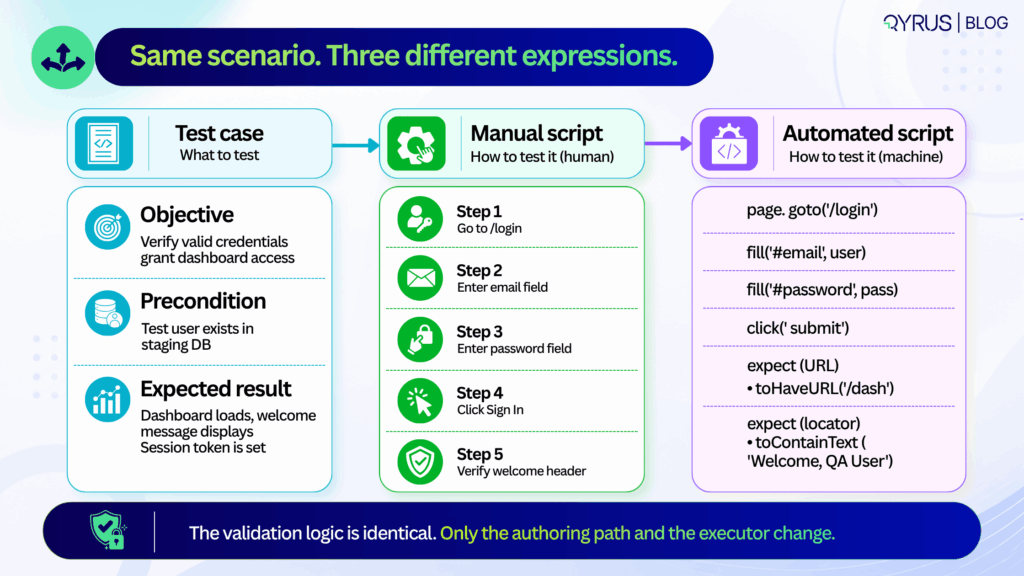
Test case: Verify that a user with valid credentials can access the dashboard. 

Manual test script:  

  1. Navigate to /login. 
  2. Enter username “testuser@qyrus.com”. 
  3. Enter password “SecurePass3qww!”. 
  4. Click “Sign In”. 
  5. Confirm dashboard loads and welcome message displays.

Automated test script: A code block or no-code workflow that launches a browser, fills the credential fields, submits the form, waits for the /dashboard route, and verifies the presence and content of the welcome header element. 

The test case states the goal. The script operationalises it and neither substitutes for the other. 

It is only when teams start to treat them as interchangeable, they will end up with test cases that read like code comments — over-specified, hard to update when requirements change or automation scripts that try to validate five different user journeys in a single run. 

Both patterns produce the same outcome: the feedback is slow, debugging takes time, and maintenance costs that compound every sprint. 

Keeping them separate has a practical upside too. Product managers and QA can refine acceptance criteria in parallel with engineers building the executable scripts. If the UI changes, you update the script. If the business rule changes, you update the test case. One doesn’t break the other. 
How to Write a Test Script, Step by Step 

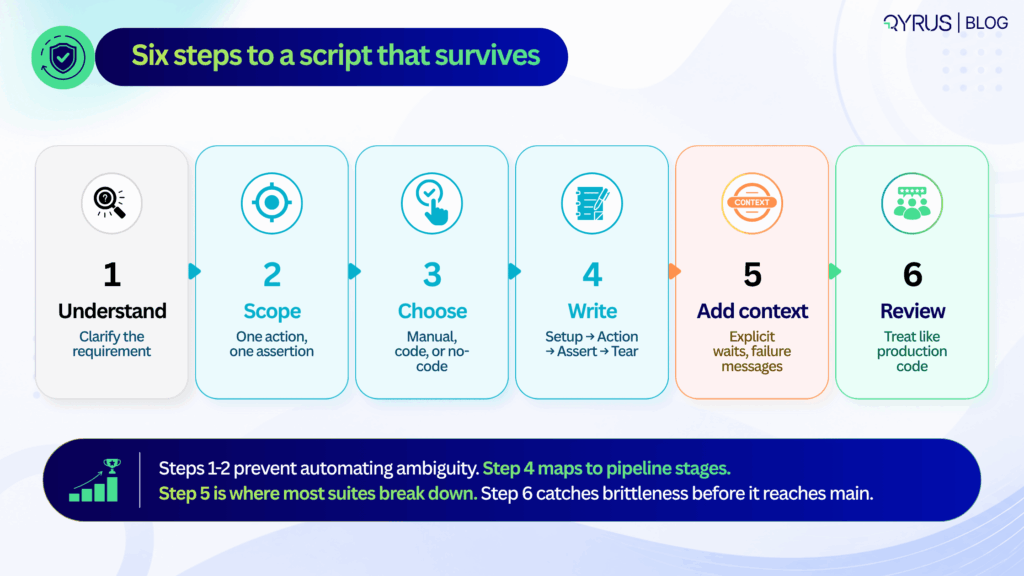
Writing a test script that survives multiple release cycles is not about clever code or exhaustive steps. It is about discipline, structure, and foresight. The following six steps apply equally whether you are writing a manual checklist, a Playwright test, or a no-code workflow. 
Step 1: Set the Context 

Before writing a single step, identify which specific acceptance criterion this script needs to verify. Is it a business rule, a UI state change, an API contract, or a data transformation? If you cannot state the purpose in one sentence, the scope is too broad and the script too will be broad. 

Step 2: Next define the scope  

When a script validates login, permissions checking, and data sync in a single run, a failure tells you nothing useful.  

You do not know whether login has failed, or the permissions were wrong, or whether the data sync had a race condition. You only know that the 20-step chain broke somewhere. Your scripts should isolate risk. They fail fast and point directly at the broken component. 

 A common argument is that atomic scripts increase the number of tests and execution time. While that concern can be valid, parallel execution can help teams manage the additional test volume. Parallel execution handles scale. The debugging time saved by atomic failures pays back the execution overhead many times over. 

Step 3: Choosing your authoring approach  

The most important question is not which framework is most powerful. It is: who will be maintaining these scripts in six months? If the answer is a dedicated SDET team, code-based frameworks offer the right level of control.  

If the answer is a mixed team of QA analysts and product managers, no-code authoring is more sustainable. If the answer is nobody — because the team is small and the feature is stable — a clear manual script may be the highest-ROI option. 

Choosing based on industry hype rather than team composition is the most common reason automation investments underdeliver. 

Step 4: Write in a consistent structure — setup, action, assertion, teardown 

Every reliable script follows the same four-phase lifecycle, regardless of format: 

  • Setup — prepare test data, authenticate the session, navigate to the starting state. Anything that must be true before the test action begins
  • Action — trigger the specific event being tested — a button click, a form submission, an API call, a file upload
  • Assertion — verify the expected state or response. One primary assertion per script. Secondary validations are a separate test
  • Teardown — clean up created records, close sessions, reset state. Teardown is the most commonly skipped phase and the most common source of cross-test contamination

This lifecycle maps cleanly to CI/CD pipeline stages and makes it possible to parallelize execution without shared state causing interference between tests. 

Step 5: Add failure context, not just failure conditions 

A script that fails silently — or dumps a raw stack trace — costs more time to diagnose than the defect it found costs to fix. Every test should include: 

  • Explicit waits — wait for DOM readiness, network idle, or specific element state — not sleep (5000) or arbitrary time delays that will be wrong in half your environments
  • Custom failure messages — “Expected /dashboard URL after valid login, got /login — check session cookie configuration” is useful. A raw assertion error is not
  • Data context in failure output — which test user, which environment, which data set was in use when the failure occurred

The engineer who receives this failure report at 11pm before a release will be grateful. So will the engineer who gets it at 9am three sprints later when the same failure reappears. 

Step 6: Review scripts like production code 

Test scripts that go unreviewed before merge accumulate the same kind of technical debt that unreviewed application code does — just more slowly and more expensively, because the symptoms (flaky CI, unexplained failures, maintenance backlogs) are harder to trace to their origin. 

The checklist for a test script review:  

  • Do assertions match the acceptance criteria in the test case?  
  • Are selectors stable, or are they tied to implementation details that change regularly?  
  • Is test data isolated, or does this script depend on state created by another test?  
  • Is teardown present and correct?  
  • Would a new team member understand what this test is verifying and why from the script alone? 

In 2026 and beyond, this workflow aligns directly with how your teams should ship. Requirements often start in AI-assisted product specs, but the verification logic still needs human clarity. 

Step 1 and 2 prevent the common trap of automating ambiguous acceptance criteria.  

Step 3 acknowledges that teams now blend SDETs, manual QA, and AI-generated snippets—tool choice should match team composition, not industry hype.  

Step 4’s setup-action-assertion-teardown pattern maps cleanly to pipeline stages, making it easier to parallelize execution and cache test environments.  

Step 5 is where most suites break down: without structured error context, flaky failures get quarantined instead of fixed, slowly eroding trust in the pipeline.  

Step 6 closes the loop. Many organizations now treat test script reviews as mandatory PR gates, catching brittle selectors and hardcoded data before they reach main.  

Following this sequence doesn’t just produce better scripts—it builds a testing culture that scales with release velocity. 

Test Script Best Practices That Actually Prevent Maintenance Pain 

Test scripts don’t decay because teams lack skill. They decay because small structural compromises compound over time. The practices below target the highest-leverage maintenance traps and are proven to extend script lifespan across release cycles. 

Keep scripts atomic 

One purpose, one primary assertion. When a script validates login, permissions, and data sync in a single run, a failure tells you nothing specific. Atomic scripts isolate risk and speed up root-cause analysis. 

Avoid hardcoded waits and brittle selectors 

Rigid XPath chains can contribute to flaky or brittle tests, particularly when they depend on implementation details that change frequently. Use explicit waits for network idle, DOM readiness, or API response states. Prefer stable attributes like data-testid or semantic roles over auto-generated class names. 

If your team is still fighting this, our deep dive on what actually causes test flakiness breaks down why brittle selectors are only part of the problem — and what the other 72% looks like. 

Standardize naming and formatting 

A script named test1_final_updated is a future debugging liability. Use consistent conventions:  MODULE_ACTION_EXPECTATION (e.g., AUTH_LOGIN_VALID_CREDENTIALS). Format code or steps uniformly so any team member can read, edit, or extend them. 

Isolate test data and state 

Shared test accounts or reused database rows cause cross-test contamination. Generate unique data per run, clean up after teardown, or use ephemeral test environments. State leakage is a silent suite killer. 

Parameterize intelligently. 

Don’t duplicate scripts for minor data variations. Use data tables, environment variables, or CSV/JSON inputs to run the same logic across multiple scenarios. Parameterization multiplies coverage without multiplying maintenance. 

Document intent, not just steps. 

A comment explaining why an assertion exists saves hours later. “Verify session token to prevent CSRF regression” is infinitely more useful than “Check token exists.” Intent documentation turns scripts into living quality documentation. 

These practices are practical as they map directly to how modern pipelines handle scale. In 2026 and years to come, they also align with how AI-assisted testing tools operate. AI can generate selectors or suggest waits, but it still depends on human-defined boundaries. Without atomic scope, AI-generated scripts inherit the same bloat.  

Without intent documentation, AI refactors can silently change verification logic. Treat these practices as guardrails, not suggestions. When baked into PR templates, linter rules, or no-code platform defaults, they become automatic rather than aspirational. 

Teams that enforce them see fewer quarantined tests, faster CI feedback, and lower handoff friction between QA and engineering. The goal isn’t perfection on day one it’s having predictability in the next months. 

Common Test Script Mistakes  

The most expensive test failures aren’t the ones that catch bugs. They’re the ones that waste time, erode trust, and quietly drain engineering capacity. Three patterns consistently drive those costs. 
Flaky vs. brittle failures 

They’re often conflated, but the root causes and fixes differ. A flaky test passes and fails intermittently under identical conditions—usually due to race conditions, network latency, or unstable test data.  

A brittle test fails predictably after a minor UI or API change—typically because of hardcoded selectors, rigid paths, or tight coupling to implementation details. Flakiness requires synchronization and data control. Brittleness requires abstraction and stable locators. Treating them as the same problem leads to the wrong fix. 

The hidden cost of poor structure 

Industry analyses from 2025 quality reports indicate that engineering teams spend 18–24% of their testing capacity maintaining or debugging unreliable scripts.  

The World Quality Report continues to highlight test maintenance as a top-three bottleneck for release velocity. When scripts lack error context, try to validate too much, or skip peer review, they accumulate silent debt.  

A single flaky script quarantined in CI might seem harmless, but ten of them degrade pipeline trust. Teams start ignoring failures, bypassing gates, or reverting to manual smoke checks—undoing the entire purpose of automation. 

The most common structural mistakes: 

  • Overly broad scripts that chain multiple user journeys, making failures impossible to triage quickly. 
  • Zero error handling or custom messaging, leaving engineers to reverse-engineer raw logs. 
  • Skipping review cycles, allowing brittle selectors and hardcoded data to merge into main. 
  • Ignoring teardown, which leaves orphaned sessions, locked records, or polluted test databases. 

The fix isn’t more automation. It’s better structure.  Scripts that fail clearly, maintain a focused scope, and clean up after themselves are easier to maintain. Poorly structured scripts become a maintenance tax on every release. 

Automated Test Scripts: When (and How) to Go Beyond Manual 

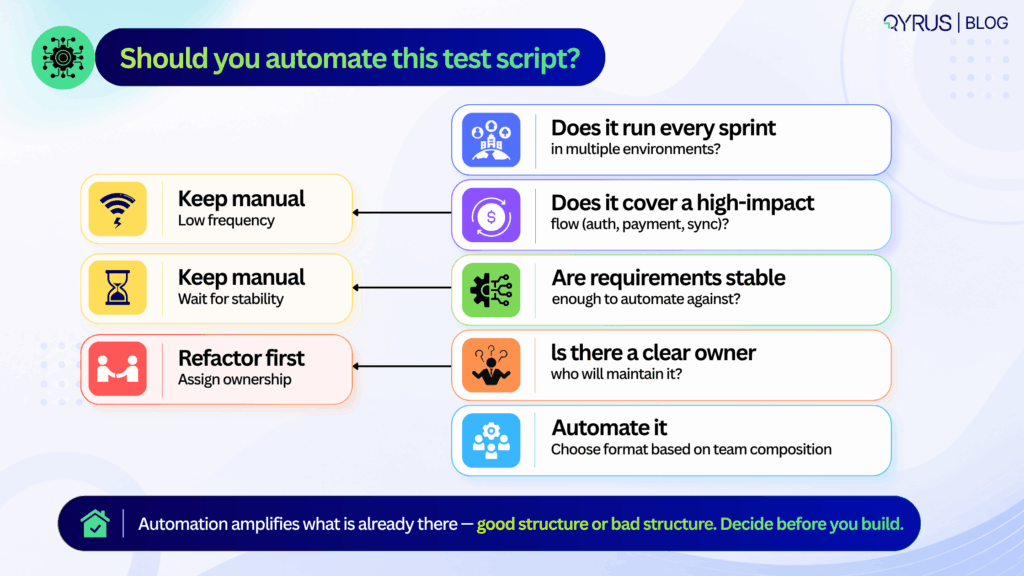
Automation isn’t a goal. It’s a leverage point. Knowing when to automate—and how to choose the right approach—prevents wasted effort and brittle suites. 

Signals it’s time to automate: 

  • The test runs repeatedly across sprints or environments. 
  • It covers a regression-prone area or a high-value business process (checkout, auth, data sync). 
  • Manual execution creates bottlenecks or delays feedback beyond acceptable SLAs. 
    If a test is exploratory, rarely executed, or highly subjective, manual execution often remains the smarter choice. 

Framework vs. no-code/low-code platforms 

Code-based frameworks offer maximum flexibility, deep CI/CD integration, and fine-grained control over execution. They require engineering bandwidth, version control discipline, and ongoing maintenance.  

No-code and low-code platforms trade some flexibility for speed, enabling QA analysts, product teams, and support engineers to author and maintain tests without writing code. The tradeoff isn’t quality—it’s ownership. Choose based on who will maintain the suite long-term, not who can write the first script fastest. 

For a direct comparison of modern end-to-end testing tools across both approaches, our guide breaks down the specific tradeoffs worth knowing before you commit to a testing stack. 

Where AI fits in 2026 

AI now helps with natural-language test authoring, locator generation, and self-healing mechanisms that adapt to minor UI shifts without manual intervention. But self-healing addresses symptoms, not structure.  It can update a broken selector or retry a flaky step, but it won’t fix an overly broad scope, a missing teardown, or an ambiguous assertion. 

AI-generated scripts still require the same best practices outlined above. A poorly structured script is equally brittle whether a human, a framework, or an LLM wrote it. The quality of the foundation matters more than the tool that built it. 

To understand how agentic testing takes this further, moving from self-healing individual scripts to AI agents that detect errors, generate test cases, and manage broader testing workflows, explore our guide before planning your next automation investment. 

How Qyrus Helps Teams Write and Maintain Test Scripts 

Qyrus is built to support the full spectrum of test script authoring and maintenance, whether your team prefers code, low-code, or codeless workflows across web, mobile, API, and desktop applications. 

The platform’s codeless script builder allows non-engineers to create structured, executable tests using plain-English steps and visual workflows, without sacrificing the setup → action → assertion → teardown lifecycle.  

For teams that prefer recording initial flows, the web and mobile recorder captures user interactions and converts them into editable, reusable scripts that can be refined with explicit waits and stable selectors. 

To address the maintenance burden highlighted earlier, Qyrus includes a self-healing engine that detects broken locators and suggests safe alternatives during execution. This reduces routine repair work and keeps pipelines moving, while still relying on well-scoped, atomic test design as the foundation. Self-healing complements good structure; it doesn’t replace it. 

Qyrus also supports parameterization and modular reusability out of the box. Teams can store test data securely, swap environments without rewriting steps, and chain reusable components across multiple scripts.  

For teams managing at scale, Qyrus’s approach to mobile testing shows how modular design — updating a “Login Block” once and having it propagate automatically to every script that uses it — can reduce maintenance overhead by up to 80% in real-world deployments. 

Whether your team manages scripts in version control, runs them through CI/CD gates, or orchestrates them alongside manual test cases, Qyrus provides a unified layer for authoring, execution, and reporting. The goal is consistent: reduce maintenance overhead, improve failure diagnostics, and keep test assets reliable as applications evolve. 

If your team is looking to standardize script authoring, reduce maintenance cycles, or bring manual and automated testing into a single workflow, you can explore how Qyrus handles these patterns in practice or request a walkthrough tailored to your current stack. 

The truth about test automation is pretty simple: most teams use up time looking after their tests than they do making them. The World Quality Report says that looking after tests uses up to 50 percent of the test automation budget. For teams that have to deal with more than 1,000 tests it gets even worse. Up to 60 percent of all the time spent on quality assurance goes into this. This is not a problem with how people work. The real problem is the framework they are using. 

When you pick a test automation framework, you are not just choosing a tool. You are making a decision that affects how your tests will work overtime. If you make a choice, your team can work faster and feel more confident. If you make a bad choice, you will spend all your time fixing scripts that break every time something small changes like a button being moved.  

The following sections will help you look at the types of test automation frameworks. We will see what makes BDD and TDD approaches different from each other. Test automation frameworks are a part of this. We will also look at the role of component testing, in test automation strategies. We will talk about the problems that come with taking care of code-centric test automation frameworks. Test automation frameworks are still a part of this. Then we will see how AI-native testing platforms are handling those problems in a way.What Is a Test Automation Framework? 

A test automation framework is like a plan that shows how to create, run and keep tests for a software project. It gives rules, reusable parts, ways to handle test data steps to run tests and systems to report results. This helps keep automation consistent as test coverage expands. This difference is important. Selenium and Playwright are tools. A framework built on Playwright with test data, simple test scripts and integration with integration/continuous deployment (CI/CD) is a framework. The framework is like a structure. The tool is just one part of it. A well-designed test automation framework typically includes: 

  • Test environment setup for version management, environment configurations, and prerequisites 
  • Test data management for sourcing, storing, and passing data between test cases 
  • Test execution mechanisms that control how tests are triggered and run 
  • Logging and reporting for capturing results, screenshots, logs, and failure details 
  • CI/CD integration for incorporating automated tests into delivery pipelines 
  • Reusable components such as shared libraries, functions, and utilities that reduce duplication 

Together, these elements provide the structure needed to manage automation at scale. They help teams standardize how tests are developed, executed, and maintained across projects and environments. As more tests are added the framework helps keep things consistent and easy to maintain.  

The 6 Types of Test Automation Frameworks Explained 

Not all automation testing frameworks are built the same. Each type makes a different trade-off between ease of setup, scalability, reusability, and required programming knowledge. Here are the six you need to know. 

1. Linear (Record-and-Playback) Framework 

The simplest entry point into test automation. A tester records each user action, navigation, inputs, clicks, and the tool plays them back as a test script. No coding is required. Scripts are generated automatically and run sequentially. 

Best for: beginners, quick validations, and short-term projects with minimal change cycles. 

Key limitation: test data is hard-coded directly into each script. If your application changes, even a single UI element, every affected script needs manual updates. This framework does not scale. 

2. Modular Testing Framework 

Modular testing breaks the application under test into isolated units, login, checkout, search, and creates an individual test script for each. Larger test scenarios are assembled by combining these modules in sequence. 

The abstraction layer is this framework’s core strength: changes to one module do not cascade into the rest. This makes targeted maintenance far more efficient than the linear approach. 

Key limitation: test data is still hard coded at the module level, so running the same scenario with multiple data sets means duplicating scripts. Programming knowledge is also required to build and manage the module structure. 

3. Library Architecture Framework 

A natural evolution of the modular approach. Instead of organizing by application section, this framework identifies common functions, login, form submission, API calls, and groups them into a shared function library that any test script can call. 

The result is a higher degree of reusability. A single function handles repeated action across the entire test suite. Update the function once, and every script that calls it benefits automatically. 

Key limitation: test data remains hard-coded. Building and maintaining the shared library requires solid programming expertise, and initial development time is longer than simpler approaches. 

4. Data-Driven Framework 

Here is where things get meaningfully more powerful. A data-driven framework separates test data from script logic entirely. Test scripts are written once; data is stored externally in files such as Excel spreadsheets, CSV files, SQL tables, or JSON. The framework reads each row of data and executes the same script with a different dataset on each pass. 

One script. Dozens of test scenarios. This approach is ideal for input-heavy applications, registration flows, payment processing, search, where you need to validate the same logic with many different values. 

Key limitation: setting up a data-driven framework requires an experienced engineer who can manage external data sources and write the connection logic between the data file and the test scripts. Initial setup investment is high. 

5. Keyword-Driven Framework 

A framework driven by keywords extends the separation principle. Keywords — simple action labels like ‘ClickButton’, ‘EnterText’, or ‘VerifyPageTitle’ — are kept in an external table together with the objects they operate on. During the test execution, the engine interprets each keyword, associates it with the relevant code, and carries out the action. 

The primary benefit is easy access. Non-technical stakeholders can access and even participate in test design without needing to code. One keyword may be utilized in various test scripts, and tests can be developed separately from the application being tested. 

Main drawback: the upfront setup expense is substantial and requires a considerable amount of time. Keyword tables and object repositories need to be diligently managed. As the test suite expands, managing keywords becomes a separate administrative burden. 
 

6. Hybrid Testing Framework 

As automation programs grow, teams often combine multiple framework approaches instead of relying on just one. For example, a team may use a data-driven model for handling large test datasets while using keywords to simplify test creation and maintenance. This combination is commonly referred to as a hybrid framework. Most enterprise test automation environments converge on hybrid frameworks because real-world applications are complex enough to need flexibility. A hybrid framework can support multiple testing types, accommodate mixed team skill sets, and adapt as the application evolves. 

Key limitation: Building and maintaining a hybrid framework demands experienced engineers, strong documentation, and disciplined governance. Without it, hybrid frameworks become the most expensive kind to maintain. 

Framework Comparison at a Glance 

Framework Type 

Best For 

Key Limitation 

Linear / Record-and-Playback 

Beginners, short-term projects 

Not reusable; breaks on any change 

Modular 

Structured apps, targeted maintenance 

Hard-coded data; needs coding skills 

Library Architecture 

High reusability needs 

Long initial build; coding expertise required 

Data-Driven 

Input-heavy, multi-scenario testing 

Complex setup; data management overhead 

Keyword-Driven 

Non-technical stakeholders in QA 

High initial cost; maintenance at scale 

Hybrid 

Enterprise, complex applications 

Highest complexity; demands strong governance 


BDD vs. TDD: Two Philosophies That Shape Your Framework Choice 

Test-Driven Development (TDD) and Behavior-Driven Development (BDD) are two development methodologies that have an impact on how teams create their automation frameworks. They are often talked about together. They really deal with different problems. 

What Is Test-Driven Development (TDD)? 

TDD is an approach for developers which is simple and repeatable. 

Here is how it works: 

  • Create a test that fails at first. 
  • Write enough code so the test passes. 
  • Then improve the code. 

This is called the Red-Green-Refactor cycle. Developers must follow this way of working, which is a method and also a discipline. 

The objective is code accuracy. TDD makes developers think about how the code will work, what could go wrong and what will happen if something fails. They do this before they start writing the code. This means that each part of the code has a test that was written before the code itself.  

TDD is most effective at the unit level: testing individual functions, methods, or classes in isolation. Popular TDD frameworks include JUnit (Java), NUnit (.NET), and PyUnit (Python).  

What TDD does not address well is bridging the gap between the side of things and what the business actually needs. When we write a test in Java, it checks if a function gives us the answer. It does not tell us if we built the feature that the business really wanted. TDD is about making sure the code works. It does not say if we are building the right thing. The business wants certain features, and TDD does not always address this. 

What Is a Behavior Driven Development (BDD) Framework? 

BDD evolved from TDD specifically to bridge that gap. Where TDD is written in programming languages and read by developers, BDD is written in plain, structured language that business stakeholders, product managers, and QA engineers can all read and contribute to. 

 The language used for BDD is called Gherkin. It is a way of describing how the code should work using a Given/When/Then format. This format describes what the user will see when they use the code. 

				
					Feature: User Login 

  Scenario: Successful login with valid credentials 

    Given the user is on the login page 

    When they enter a valid username and password 

    Then they should be redirected to the dashboard


Non-technical stakeholders can easily check this scenario without needing to know any code. The BDD test turns into a plan that the whole team agrees before they start building anything. When the test works, the feature is complete. If the test fails, everyone can see where the problem is. The team can then fix the issue and make sure the feature works as expected. 

The adoption figures reflect how much teams value this collaboration. According to the 2025 State of Continuous Testing Report by PerforceBDD adoption has reached 66% among development teams, and 90% of teams that adopted BDD report better communication across functions.  Popular BDD frameworks include Cucumber (multi-language), SpecFlow (.NET), and Behave (Python). 

TDD vs. BDD: Side-by-Side Comparison 

Dimension 

TDD 

BDD 

Focus 

Code correctness 

Business behaviour 

Written in 

Programming language 

Plain language (Gherkin) 

Who writes tests 

Developers 

Developers, QA, and business stakeholders 

Test level 

Unit / component 

Integration / acceptance 

Collaboration scope 

Technical team 

Cross-functional team 

Best suited for 

Internal code quality 

User-facing features and workflows 

Popular tools 

JUnit, NUnit, PyUnit 

Cucumber, SpecFlow, Behave 


The most effective teams do not choose one over the other. They apply TDD to low-level components, where code correctness is the primary concern, and BDD to user-facing features, where alignment with business requirements matters most. The two methodologies complement each other rather than compete. 

Playwright Component Testing vs. Cypress Component Testing: What’s the Difference? 

 When people become more skilled at testing, they usually start using component testing. This is like a step between unit tests and full end-to-end (E2E) runs.  Of pretending the whole application is there or just looking at one function component testing puts a real component in a real browser and lets testers use it like a real user would. They can click on things, type, and hover over things. They can also control what the component looks like and how it works. This way you get to see what the component really looks like in a browser without having to set up the application, which can be slow and unreliable. 

 There are two frameworks that people use for this in 2026: Playwright and Cypress. Both mount components in a real browser. They differ sharply in architecture, speed, and developer experience. 

Playwright Component Testing 

 Playwright is backed by Microsoft. It uses a way of working that talks directly to browsers using the Chrome DevTools Protocol (CDP). This design makes it 20 times faster than browser-in-process frameworks and delivers significantly lower test flakiness rates. 

Playwright component testing is parallel by default, free to run at scale, and supports TypeScript, JavaScript, Python, Java, and C#/.NET. As of early 2026, Playwright averages 20–30 million weekly NPM downloads, and the State of JavaScript 2025 survey recorded a satisfaction score of 91%, the highest ever measured for a testing framework at this scale. 

Reach for Playwright when:  you need to do things and at the same time. It is also good if your team is used to working with async/await patterns. If you need to work with languages or if you are starting a new project Playwright is a good choice. 

Caveat: Playwright’s component testing feature is still marked experimental. The API surface may change between releases. 

Cypress Component Testing 

Cypress works inside the browser with the application you are testing.This architecture makes it exceptionally fast for debugging: the time-travel GUI lets engineers step backward through test execution frame by frame, which is genuinely the best visual debugging experience available in any testing framework today. 

 Cypress testing for parts of the application is solid and reliable. It is part of the same tool you use for end-to-end testing with Cypress. This means you only have to think about one way of doing things, and you only have to set it up. The people who make extras, for Cypress have made a lot of tools that work well with it like tools to check how things look and tools to make sure everything is accessible. 

Reach for Cypress when: you already run Cypress for E2E testing, your team prizes interactive visual debugging, or your application has a complex custom bundler configuration that Cypress can reuse. 

Playwright vs. Cypress: Head-to-Head 

Dimension 

Playwright 

Cypress 

Architecture 

Out-of-process (CDP) 

In-browser (same run loop) 

Speed 

Faster (parallel by default, free) 

Moderate (Cloud plan for parallelism) 

Language support 

JS, TS, Python, Java, C# 

JavaScript / TypeScript only 

Debugging experience 

Trace viewer (excellent for CI) 

Time-travel GUI (best for local dev) 

Component testing status 

Experimental 

Stable / GA 

CI cost 

Lower (free parallelism) 

Higher (Cypress Cloud subscription) 

Best for 

Greenfield, multi-language, scale 

Existing Cypress suites, frontend DX 


The honest 2026 verdict: for new projects, Playwright is the stronger default choice. Cypress remains compelling for teams as it already invested in its ecosystem and for anyone who finds its debugging experience genuinely more productive. Both are excellent tools, but both are still code-first frameworks, which brings us to the problem that neither fully solves. 

The Real Problem with Traditional Test Automation Frameworks: Maintenance 

Selecting a framework type is the easy part. Keeping it alive is where most teams fail. 

Consider the numbers: maintenance consumes 45% of automation budgets on average. Teams maintaining more than 1,000 tests report spending 60% of their time on upkeep rather than new test development. Across a four-person senior QA team, where each engineer earns roughly $140,000 per year, that translates to approximately $168,000 annually spent on maintaining tests, not improving coverage. 

The root causes are consistent regardless of which framework type a team chooses: 

  • Brittle locators: element IDs, XPaths, and CSS selectors break every time the UI is updated. Even minor redesigns require manual script triage across hundreds of tests. 
  • Hard-coded test data: without clean data separation, any change to the underlying data model requires touching individual scripts rather than a central source. 
  • No self-healing: traditional frameworks are passive. When something breaks, a human must diagnose, locate, and fix it. The framework itself offers no intelligence about what changed or why. 

Here is the pattern across engineering teams that analysis has consistently surfaced: 60–70% of QA time goes to test upkeep. Only 30–40% goes to add coverage or review results. That ratio is backwards, and code-first frameworks, no matter how well architected, cannot correct it on their own. 

The question that matters most is not which framework type to choose. It is: how do you stop your test automation framework from becoming a liability the moment your application starts moving quickly? 

45% 

of automation budgets consumed by test maintenance 

— Software Testing Automation Market Outlook, IntelMarketResearch 

How Qyrus Takes the Framework Burden Off Your Team 

Qyrus is not another code-first framework with a cleaner UI. It is an AI-native, no-code testing platform built to solve the maintenance problem at its root, not patch it after the fact. Where traditional frameworks require skilled engineers to build, maintain, and repair the infrastructure around testing, Qyrus makes that infrastructure autonomous. 

The SEER Framework: Autonomous Test Orchestration 

At the core of Qyrus sits the industry-first SEER (Sense, Evaluate, Execute, Report) framework, an agentic AI engine that manages the entire testing lifecycle without manual hand-offs. 

  • Sense: monitors code repositories (GitHub) for commits, merges, and pull requests; detects UI/UX changes in Figma as they happen 
  • Evaluate: performs automated impact analysis using static analysis and dependency graphs, identifying exactly which APIs and UI test scenarios are affected by a change, not the entire regression suite 
  • Execute: autonomously deploys the right specialist agents, API Bots for backend validation, Qyrus Test Pilot (QTP) for frontend testing, without human selection 
  • Report: delivers real-time insights into test outcomes and coverage, feeding results back into the CI/CD pipeline as a continuous learning loop 

The SEER framework means your test automation framework no longer waits to be told a change occurred. It observes, responds, and executes, continuously. 

Healer AI: Self-Healing That Actually Works 

The single biggest cause of framework maintenance overhead is broken locators. Qyrus solves this with Healer AI, a patented self-healing engine (U.S. Patent 11,205,041 B2) that references a successful baseline script and automatically suggests updated locators (ID, Class, XPath) when UI elements change. 

When Healer detects a failed step due to a UI change, it scans the application, identifies the corrected element, and applies the fix, without a human ever opening the script. For web testing teams, this directly attacks the locator fragility that accounts for the majority of maintenance work. 

No-Code Test Building at Scale 

Qyrus offers 115 distinct action types across web, mobile, and API testing, all accessible through a low-code/no-code interface that requires no programming knowledge to operate. Tests can be created manually, imported from Jira tickets, or generated from natural language descriptions via Nova AI. 

TestGenerator+ goes further: it analyses your existing scripts and automatically generates additional test scenarios to fill coverage gaps, categorizing each new scenario by criticality (Low, Medium, High, Critical) before any human reviews the output. 

Parallel Execution Across a Real Device and Browser Farm 

For mobile testing and web testing alike, Qyrus provides access to a cloud-based browser farm (Chrome, Edge, Firefox, Safari, including previous and custom versions) and a real-device farm covering Android and iOS. Tests run in parallel across all of them simultaneously, with zero infrastructure overhead. 

This eliminates the device lab maintenance that typically consumes a separate slice of QA budget and removes the bottleneck of sequential test runs that inflate feedback cycle times. 

A Unified Platform Across Every Testing Type 

Traditional frameworks are fragmented by testing type: one tool for web, another for mobile, another for API testing, another for SAP. Each one has its own maintenance burden, its own script library, and its own skill requirement. Qyrus consolidates Web, Mobile, API, Desktop, SAP, and Data testing into a single platform, one interface, one team, and one source of truth. 

The Numbers 

Metric 

Qyrus Impact 

Test case creation speed 

~80% faster for complex scenarios 

Team productivity 

50% increase 

Test building time 

70% reduction via AI-driven, codeless features 

ROI 

213% within 12 months (Forrester TEI study) 

Production incidents 

50% reduction through proactive AI detection 


How to Choose the Right Test Automation Framework for Your Team 

There is no universally correct framework. The right choice depends on five factors that are specific to your team, your application, and your risk tolerance. 

  1. Team skill level: Code-first frameworks (Playwright, Cypress, Selenium) require engineers who can build, govern, and maintain them long-term. If your team includes non-technical QA contributors or you are resource-constrained, a no-code or low-code platform substantially lowers the barrier to entry and the ongoing cost of ownership. 
  1. Application type: Web-only applications have the widest framework choice. Mobile applications narrow the field to frameworks with Appium support or native real-device testing. Cross-platform environments, web, mobile, API, and backend together, need either a unified platform or a deliberately integrated multi-framework strategy. 
  1. Testing methodology preference: If your team practices BDD, your framework needs native Gherkin/Cucumber support and reporting that non-technical stakeholders can read. If you are TDD-heavy, unit-level framework depth matters more than business-language output. 
  1. CI/CD integration needs: Your automation framework should integrate natively with the tools already in your pipeline, Jenkins, Azure DevOps, GitHub Actions, Bitrise, TeamCity. Frameworks that require custom plugins or workarounds to connect create integration debt that compounds over time. 
  1. Maintenance tolerance: This is the factor most teams underweight. Ask honestly: how much of your annual QA budget can sustainably go to maintaining tests rather than building new ones? If the honest answer is ‘not 45%’, then a framework with self-healing AI or no-code test repair is not a luxury; it is a financial necessity. 

Quick Decision Guide 

Team Profile 

Recommended Approach 

Small team, limited coding resources 

No-code / AI-native platform (e.g. Qyrus) 

Developer-led, unit-testing focus 

TDD framework (JUnit, PyUnit) + CI/CD integration 

Cross-functional team, BDD practice 

BDD framework (Cucumber, SpecFlow) + modular structure 

Web-first, advanced JS/TS expertise 

Playwright or Cypress (E2E + component testing) 

Enterprise, multi-application landscape 

Hybrid framework or unified AI-native platform 


Frequently Asked Questions About Test Automation Frameworks 

What is a test automation framework? 

A test automation framework is a structured set of guidelines, tools, and reusable components that govern how automated tests are built, executed, and maintained, providing consistency, scalability, and reduced long-term maintenance cost across a team’s testing process. 

What are the main types of automated testing frameworks? 

The six primary types are: Linear (Record-and-Playback), Modular, Library Architecture, Data-Driven, Keyword-Driven, and Hybrid. Each makes different trade-offs between ease of setup, scalability, and required programming knowledge. 

What is the difference between BDD and TDD? 

TDD (Test-Driven Development) is a developer-centric methodology where tests are written before code, using programming language-specific frameworks like JUnit or NUnit. BDD (Behavior-Driven Development) evolved from TDD and uses plain-language Gherkin syntax (Given/When/Then) so that business stakeholders, QA engineers, and developers can all read and contribute to test scenarios. TDD focuses on code correctness; BDD focuses on business behavior. 

What is a BDD example using Gherkin syntax? 

A simple BDD example for a login feature: Given the user is on the login page / When they enter valid credentials / Then they should be redirected to the dashboard. This scenario is readable by anyone on the team, no coding knowledge required. 

What is Playwright component testing? 

Playwright component testing mounts individual UI components in a real browser, rather than a simulated DOM, and lets testers interact with them using real events. It offers fast, parallel-by-default execution and supports multiple programming languages. As of 2026, it is marked experimental but is widely used in production by engineering teams that prioritize speed and parallelism. 

Do I need coding knowledge to use a test automation framework? 

For traditional code-first frameworks like Selenium, Playwright, or Cypress, yes, you need solid programming knowledge. For no-code and AI-native platforms like Qyrus, you do not. Qyrus offers 115 action types accessible through a visual interface, along with AI-powered test generation from plain-language descriptions and Jira tickets. 

Stop Maintaining Frameworks. Start Shipping Quality. 

The type of test automation framework your team chooses matters. But in 2026, what matters more is whether that framework can keep up with your application, without consuming half your QA budget in maintenance the moment it does. 

Code-first frameworks, whether linear, modular, data-driven, or even Playwright and Cypress, are powerful tools in skilled hands. But they are fundamentally passive systems. They break when your application changes. They wait for humans to fix them. They accumulate debt quietly until the team starts dreading the test suite rather than trusting it. 

The teams that will lead on software quality in the years ahead are those whose testing infrastructure adapts, self-heals, and integrates continuously, not those who schedule sprint time to patch broken locators. 

Qyrus is built for that standard. If you are ready to move beyond the maintenance trap and build a test automation strategy that scales with your product, book a demo with the Qyrus team today and see the SEER framework in action. 

Featured Image-Self-healing Test Automation

It’s Monday morning. Your CI pipeline ran overnight and you open your test dashboard to find 180 tests failing. The app isn’t broken. No bug was introduced. Over the weekend, a developer refactored the frontend component library, wiping out every CSS class name your test suite depended on. Not a single real defect. Just 180 broken locators standing between your team and the Friday release. 

This is the maintenance trap that quietly drains QA programs every single week. The more you invest in test automation, the larger the surface area that shatters the moment your application evolves. And in teams shipping multiple times a day, that means an endless cycle of triage, diagnosis, and manual repair work that pulls engineers away from the things that actually matter: building new coverage, exploring edge cases, and shipping features. 

Built to break this cycle, self-healing test automation leverages artificial intelligence and machine learning to detect failures caused by UI or element modifications. The system dynamically identifies the intended element using alternative architectural attributes, updates the script in real time, and resumes execution without human intervention. 

This guide covers everything you need to know: what self-healing is, how it works under the hood, where it makes the biggest difference, what to watch out for, and how to implement it well. Whether you’re a QA engineer drowning in broken locators, an engineering manager trying to protect release velocity, or a CTO evaluating your automation strategy, this is your practical reference. 

What Is Self-Healing Test Automation? 

Self-healing test automation is an AI-powered capability that allows an automated test to detect when it cannot find a UI element, search for that element using alternative identifiers, repair the broken locator, and continue executing without any manual intervention. 

Think of it like GPS navigation. When you miss a turn, your GPS does not shut off and report failure. It recalculates the route, finds a new path, and gets you to the destination anyway. Self-healing test automation works on exactly the same principle: when the expected path breaks, the system finds another way and keeps going. 

The root problem it solves is locator brittleness. Traditional automated tests rely on locators such as IDs, XPath expressions, CSS selectors, element names, and text content to find and interact with UI elements. These locators are recorded at test creation time and hardcoded into the script. The moment a developer renames a button ID from ‘login-btn’ to ‘auth-submit’, or moves a div inside a new container, every test that referenced that element fails with a NoSuchElementException. 

With traditional testing, the mentioned failure looks like this: test fails, engineer gets paged, engineer investigates, engineer updates the locator, pipeline resumes. That cycle can span from 30 minutes to several days, based on the number of affected scripts and the complexity of the change. 

Conversely, a self-healing framework completely alters this. When a missing element is detected, the healing engine instantly evaluates secondary attributes, resolves the locator drift, resumes the test execution, and logs the event for asynchronous engineering review. The pipeline remains uninterrupted, eliminating false-positive pages. This is not about making tests that never fail. It is about making sure tests fail only when there is a real problem with the software, not because a button label changed.

Why Test Maintenance Is Quietly Killing Your QA Program 

The numbers are hard to argue with. Research from Capgemini’s World Quality Report 2024-25, cited by QASource, found that script maintenance consumes up to 50% of test engineering time due to constant application changes. An analysis of 40 startups published on Medium in 2026 found teams spending 60 to 70% of QA time on upkeep, leaving only 30 to 40% for actually building new coverage. 

 This maintenance burden compounds destructively over time. Early in a product lifecycle, frontend elements remain relatively stable. However, as the application scales, three primary forces accelerate degradation: expanding feature sets increase test volume, widening the surface area vulnerable to code changes; modernizations like React framework upgrades trigger cascading locator failures; and growing test suites multiply the number of scripts referencing a single volatile element. 

There is also a talent cost that rarely gets quantified. A 2026 analysis found that triaging flaky tests requires both application architecture knowledge and test framework expertise simultaneously. That work concentrates on your most senior engineers. A senior QA engineer earning $140,000 annually who spends 30% of their time on test maintenance is absorbing roughly $42,000 of pure overhead per year. Not fixing bugs. Not building coverage. Updating locators. 

Then there is the false positive problem. When tests fail not because the software is broken, but because a class name shifted, it erodes trust in the entire test suite. Engineers start ignoring failures. Red pipelines stop being alarming. The automation you invested in stops being a safety net and becomes background noise. 

One more widely misunderstood reality: most tools marketed as ‘self-healing’ only address locator breakage. But according to QA Wolf research published in 2026, brittle selectors cause only about 28% of test failures in real-world suites. The remaining 72% come from timing problems, invalid test data, runtime errors, visual assertion failures, and interaction changes. Fixing only the locators while ignoring the rest means 72% of flakiness remains untouched. 

For an automation strategy to deliver a true return on investment, teams must look past basic locator-fixing utilities and adopt comprehensive platforms that handle data states, environment availability, and timing synchronization dynamically. 

How Self-Healing Test Automation Works 

Understanding self-healing at a mechanical level helps you choose the right tool and implement it correctly. The process follows four distinct phases. 

Phase 1: Element Fingerprinting 

When a test is first created, the self-healing system captures a rich fingerprint of every UI element it interacts with. Rather than recording a single locator, it records multiple attributes simultaneously: the element ID, name, CSS selector, XPath, text content, ARIA labels, and the element’s relative position within the DOM tree. Some advanced systems also capture visual attributes through screenshots. 

This multi-attribute profile gives the healing engine a redundant set of identifiers to fall back on when the primary one breaks. It is the difference between knowing one route to a destination versus knowing five. 

By shifting from a single locator strategy to an object-model representation, the framework constructs a dynamic map of the application’s user interface rather than a fragile list of hardcoded coordinates. 

Phase 2: Test Execution 

During a test run, the framework attempts to locate elements using their primary identifiers exactly as scripted. The vast majority of steps will execute normally. When the primary locator succeeds, no healing occurs and no performance overhead is added. 

The system only activates when an element cannot be found via its primary identifier. At that point, rather than immediately reporting a failure, the healing engine is triggered. 

Phase 3: Diagnosis 

This is where more sophisticated self-healing tools differentiate themselves. A basic tool assumes every failure is a locator problem and tries alternative selectors. A diagnosis-first tool asks: what type of failure is this? 

Diagnosis-first systems capture runtime artifacts including DOM snapshots, network activity logs, console errors, and application state. They categorize the root cause before applying any fix. If the element is missing because an API response was slow and the page has not finished rendering, patching the locator achieves nothing and may cause a false pass. The right fix is adding a resilient wait or retry. If the element’s ID changed, updating the locator is correct. If it is a visual assertion failure, a screenshot comparison is needed. 

The AI and machine learning techniques involved include: computer vision using convolutional neural networks (CNNs) for visual element identification; natural language processing (NLP) to understand semantic meaning (so ‘Sign In’ and ‘Log In’ are recognized as functionally equivalent); supervised learning from historical test execution data to predict stable locator strategies; and fuzzy matching to score candidate elements by similarity of text, attributes, and DOM structure. 

Phase 4: Self-Healing Action 

Once the correct element is located through an alternative strategy, the system updates the test script with the new locator value and resumes execution. The original run completes and future runs use the healed locator. 

Critically, every healing event is logged. Best-in-class tools display the old locator value alongside the new one and prompt an engineer to review and approve the change before it is permanently committed. This human-in-the-loop validation ensures that legitimate functional regressions are never masked by over-eager healing. The script adapts to real UI changes. It does not silently pass when something actually broke. 

Key Benefits of Self-Healing Test Automation 

“Teams using AI-based testing tools reduced maintenance effort by up to 70% and improved CI/CD pipeline stability by nearly 50%.” – Capgemini World Quality Report 2024-25 

The most immediate and quantifiable benefit is the reduction in time spent on test maintenance. Capgemini’s World Quality Report 2024-25 found that teams using AI-based testing tools reduced maintenance effort by up to 70% and improved CI/CD pipeline stability by nearly 50%.  

The second major benefit is the elimination of false positives. When tests no longer fail due to minor UI changes, the signal-to-noise ratio in your test suite improves dramatically. Engineers stop ignoring red builds. When a test does fail, the team can trust it represents a real issue. This rebuilds confidence in the automation program and makes QA a reliable partner in the release process rather than a bottleneck. 

Self-healing directly accelerates CI/CD pipelines. With healing running automatically on every build, the pipeline stays green through routine UI changes without any human intervention required. Developers get fast, reliable feedback after every commit. The feedback loop that makes continuous delivery work remains intact even as the application changes constantly underneath it. 

Better test coverage is another downstream benefit that often goes unrecognized. When QA engineers are no longer spending half their time fixing broken locators, they have capacity to build new tests. Coverage expands. More business flows get validated. The automation program actually grows instead of just trying to maintain what already exists. 

For mobile testing specifically, self-healing addresses a particularly acute pain point. Mobile applications update frequently, often with UI structures that change significantly between versions and behave differently across iOS and Android. Teams that implement self-healing in mobile CI/CD pipelines report 20 to 30% faster release cycles according to Quinnox’s 2025 analysis. Healing corrects locator differences across device types without any per-device manual tuning. 

Finally, the return on investment is measurable and arrives quickly. CloudQA’s 2026 testing trends report found that enterprise organizations adopting self-healing scripts demonstrated a 95% reduction in manual maintenance overhead. The upfront investment in tooling is typically recovered within a single release quarter when measured against the engineering hours no longer lost to locator repair. 

Where Self-Healing Test Automation Makes the Biggest Difference 

Web Applications with Frequent Releases 

Consider an e-commerce team that ships a CSS refactor as part of a brand refresh. The development team renames dozens of button class names and updates div structures across checkout, cart, and account pages. Under traditional automation, this triggers mass test failures. Not because checkout is broken. Because the test scripts are looking for class names that no longer exist. 

With self-healing in place, the testing platform detects the broken selectors, identifies each button via its visible text label, ARIA role, and relative DOM position, updates the locators, and completes the run. The pipeline stays green. A healing report is generated summarizing every locator that was updated, which the QA lead reviews the next morning. The release ships on schedule. 

Mobile Testing Across Devices and OS Versions 

A fintech mobile app ships a redesigned payment screen to comply with updated accessibility guidelines. The Submit button has been repositioned, its ID has changed, and the surrounding layout is different on smaller devices than on larger ones. Tests that were working perfectly on iPhone 14 now fail on iPhone SE. 

Self-healing handles the positional differences automatically. By capturing multiple locator strategies at test design time, including text content, ARIA labels, and proximity to other stable elements, the healing engine identifies the correct button regardless of where it landed on each device. The test suite runs cleanly across the full device matrix without any per-device locator maintenance. 

SAP Fiori and Enterprise ERP Testing 

This is where self-healing delivers some of its most significant enterprise value, and where most competitors leave organizations on their own. 

SAP operates on a structured release cycle that includes major upgrades, Feature Package Stacks (FPS) delivered three times per release, and regular Support Package Stacks (SPS). Each release changes Fiori control IDs, app structures, and field names in ways that systematically break traditional test automation. According to ContextQA’s 2026 SAP testing guide, manual regression for a SAP environment with 200 or more active business processes takes 4 to 8 weeks. With automated testing, that same coverage takes 4 to 8 hours. 

Without self-healing, those 4 to 8 hours of automated testing become days of manual locator repair after every SAP quarterly update. With self-healing integrated into the SAP testing workflow, the automation adapts to each new release automatically, keeping the regression suite operational across upgrades. 

This drastically compresses the traditional testing timeline, allowing enterprise IT leaders to align their core ERP updates with rapid agile sprint cadences without risking business process downtime. 

When to Be Cautious 

Self-healing is not appropriate everywhere, and a credible guide should say so directly. For security-sensitive flows such as banking transactions or authorization changes, the consequences of a false pass are serious enough that human review should precede any test continuation. For exact layout or copy validation tests, where the precise position of an element or its exact text content is what you are testing, visual regression testing is the more appropriate tool. Self-healing adapts to change; visual regression detects it. 

How Qyrus Healer Takes Self-Healing Further 

Most self-healing tools pick a lane: web or mobile, UI or API, one platform or one framework. Qyrus Healer was built differently. 

A patent-backed approach. Qyrus Healer holds U.S. Patent 11,205,041 B2 for self-healing test automation. This is one of the few solutions in the market where the core healing algorithm is protected by a registered patent, reflecting the proprietary nature of the approach rather than a repackaging of generic AI libraries. 

No advance training required. Many AI-based testing tools need a period of historical execution data before their healing becomes reliable. Qyrus Healer’s patented algorithm works out of the box on any application, without requiring prior training runs. From the first execution, it intelligently identifies element changes across the application lifecycle and updates locators using a custom distance metric. 

99.9% accuracy. Healer achieves an accuracy rate of over 99.9% on locator identification and repair, minimizing false positives and ensuring that healed scripts genuinely reflect the current state of the application rather than introducing new errors. 

Web and mobile in one. Most self-healing solutions are siloed to either web or mobile testing. Qyrus Healer works across both platforms within a single unified environment. Web application tests and mobile application tests running on real devices through Qyrus Device Farm both benefit from the same healing capabilities. 

SAP Fiori integration. Qyrus Healer powers a unique SAP Fiori testing workflow through the Fiori Test Specialist module. When the AI-assisted test generator produces test steps with incorrect or missing Control IDs, the Healer pauses execution at the failing step, automatically scans the live Fiori/UI5 application to identify the correct technical field names and control IDs, corrects the values, and resumes execution. The healed values are shown alongside the original for review before being committed.  

Baseline script approach. Healer AI activates for Execute Test runs where a previous passed scenario report exists. It references that successful baseline and suggests updated locators, primarily ID, Class, and XPath values, to accommodate discrepancies found in the current run. This baseline-anchored approach means healing is always grounded in a known-good state of the application. 

For teams using Qyrus across web, mobile, API, and SAP testing, Healer provides a consistent self-healing layer across the entire testing program rather than requiring a different healing strategy per platform. You can learn more about Qyrus’s approach to web testing, mobile testing, and SAP testing, or book a demo to see Healer in action. 

Self-Healing Test Automation in CI/CD Pipelines 

CI/CD is where self-healing delivers its sharpest return on investment. Multiple deployments per day mean multiple opportunities for locator breakage. Without healing, every UI change is a potential pipeline blocker. With healing integrated at the pipeline level, those changes are absorbed automatically, and the deployment cadence is never interrupted. 

Integration works by hooking the self-healing engine directly into your pipeline trigger. When a developer merges a pull request or a build completes in Jenkins, Azure DevOps, or a similar tool, the test suite fires. If any locators have changed, the healing engine repairs them during that run. No human needs to intervene. No deployment waits for a QA engineer to investigate a false positive. 

Teams that implement CI-integrated healing typically find that 5 to 10% of locators fail after each UI update under normal conditions. With healing running at the pipeline level, the majority of those failures are resolved instantly. Quinnox’s analysis found that teams adopting this approach achieve 20 to 30% faster release cycles and experience far fewer pipeline halts due to broken tests. 

The recommended practice is not to auto-commit every healed locator without review. Instead, the AI proposes the fix and the pipeline continues. At the end of the sprint, a QA engineer reviews the healing log, which shows every step that was updated with the old and new values side by side. They approve changes that reflect genuine UI evolution, and flag any that look suspicious. This human-in-the-loop rhythm maintains trust in the test suite without sacrificing deployment speed. 

Qyrus integrates natively with the full range of CI/CD and version control tools that enterprise teams rely on, including Jenkins, Azure DevOps, Bitrise, TeamCity, Concourse, GitHub, and Bitbucket. Self-healing is available as a toggle in the run configuration, so it can be enabled or disabled per execution type without requiring any pipeline reconfiguration. 

Best Practices for Implementing Self-Healing Test Automation 

Self-healing is powerful, but it works best when you design your test suite to support it rather than expecting it to compensate for poor locator hygiene. 

  • Start with stable locator design. The best locators to use as primary identifiers are role-based selectors, visible text content, ARIA labels, and dedicated test attributes like data-testid. These change less frequently than generated IDs or dynamic class names. Self-healing compensates for locator drift, but fewer healing events mean faster runs and less noise in the healing log. 
  • Do not over-trust automatic fixes. If the healing engine is configured to be too permissive, it can mask real functional regressions. A button that has genuinely been removed from the application should fail the test, not be healed into clicking something else. Review healing logs regularly and configure confidence thresholds appropriately for your risk tolerance. 
  • Maintain a complete audit trail. Every healed step should be logged with the old locator value, the new locator value, the alternative matching strategy used, and the timestamp. This trail is essential both for debugging unexpected behavior and for demonstrating test reliability to auditors in regulated industries. 
  • Combine with visual regression testing for layout-sensitive flows. Self-healing adapts to locator changes. It does not validate that the visual layout of a page is correct. For flows where the exact positioning of elements matters, use visual regression testing alongside self-healing. The two capabilities are complementary, not interchangeable. 
  • Schedule periodic manual reviews. Monthly or quarterly reviews of healed steps confirm that the healing engine’s updates genuinely reflect intended UI changes rather than masking defects. This is especially important as the application scales and the volume of healing events grows. 
  • For SAP and ERP environments, run healing against a validated baseline first. Use a known-good, full-regression baseline execution as the reference point. Healing suggestions are always evaluated against that baseline, so the system knows what ‘correct’ looks like before proposing any changes. This prevents healing from propagating errors forward if a previous run already contained a defect. 

 The Future of Self-Healing Test Automation 

The self-healing tools available today are reactive: they detect a failure, diagnose it, and apply a fix. The next generation will be predictive. 

Predictive healing analyzes upcoming code commits before tests run. It identifies which locators in the existing test suite are likely to be affected by a proposed change, and pre-updates them so that the test run after the commit completes cleanly from the start. Instead of healing after a failure, the system prevents the failure from occurring in the first place. 

Agentic AI is the broader force reshaping how this works. Gartner forecasts that AI agents will independently handle up to 40% of QA workloads by 2028, including regression testing, smoke testing, maintenance, and bug triage. Standard self-healing addresses individual broken locators. Agentic AI reasons across entire test suites, makes decisions about test strategy, and executes multi-step recovery workflows without any human direction. 

Vision-based testing is another emerging direction that could reduce DOM dependency entirely. Rather than relying on HTML attributes and DOM structure, vision-based tools identify UI elements the way a human tester would: by looking at the screen. A button is a button because it looks like a button and sits in the context of a form, regardless of what its underlying ID happens to be on any given day. 

The 2026 software testing trends report from CloudQA puts this trajectory in concrete terms: self-healing scripts have demonstrated a 95% reduction in manual maintenance in early enterprise adopters, and organizations embedding generative AI into testing workflows are reporting a 40% increase in test coverage and a 10x improvement in overall productivity. 

For business and engineering leaders, the strategic implication is straightforward. The teams that invest in self-healing and agentic testing infrastructure now are not just reducing a maintenance overhead. They are building the quality assurance foundation that makes it possible to release confidently at the speed their customers expect. 

FAQs on Self-Healing Test Automation 

 1: What is self-healing test automation?  

 Self-healing test automation is an AI-powered capability that allows automated test scripts to detect when a UI element or locator has changed, find the correct element through alternative identifiers, update the script automatically, and continue running without any manual intervention. Instead of failing with a NoSuchElementException and waiting for an engineer to fix it, the test adapts on the spot. 

2: How is self-healing different from traditional automated testing?  

Traditional automated tests rely on a single hardcoded locator (an ID, XPath, or CSS selector) to find each UI element. When that locator breaks due to a UI change, the test fails and a human has to investigate and repair it. Self-healing tests capture multiple attributes for each element at test creation time, so when the primary locator fails, the system tries alternatives automatically. The key difference: traditional tests are brittle by design. Self-healing tests are built to absorb change. 

3: Does self-healing work for both web and mobile testing?  

Yes, though not every tool supports both. Most self-healing solutions focus exclusively on web automation. Qyrus Healer is specifically built to work across both web and mobile platforms within a single environment, including on real devices through Qyrus Device Farm, which means teams running both web and mobile test suites get consistent healing behavior without switching tools or strategies. 

4: Can self-healing test automation handle SAP Fiori testing?  

Most self-healing tools do not address SAP Fiori at all, which is a significant gap. SAP upgrades regularly change Fiori control IDs and app structures, making traditional test scripts fragile after every release. Qyrus Healer powers a dedicated SAP Fiori workflow through the Fiori Test Specialist module. When a test step fails due to an incorrect control ID, Healer pauses, scans the live Fiori/UI5 application, identifies the correct field names, corrects the values, and resumes execution. 

5: Will self-healing hide real bugs by making failing tests pass?  

This is the most important concern to address honestly: yes, it can, if implemented poorly. If a healing engine is too permissive, it may fix a locator when the real issue is that a feature has been removed or a flow has genuinely broken. The safeguard is human-in-the-loop review. Best-in-class self-healing tools log every healing event with the old and new locator values, and prompt an engineer to approve changes before they are permanently committed. Self-healing should never run silently with no audit trail. When implemented correctly, it reduces noise from false positives without masking real defects. 

Stop Fixing Tests. Start Shipping Software. 

Go back to Monday morning. Your pipeline ran overnight. You open the dashboard. 180 tests ran. 180 passed. The frontend team’s CSS refactor landed cleanly. The component library update was absorbed automatically. The healing log shows 23 locators that were updated overnight, each one reviewed and approved, each one correct. And your team ships on Friday. 

That is what self-healing test automation actually delivers. Not a magic system that never breaks. A practical infrastructure that stops tests from failing for the wrong reasons, keeps your CI/CD pipeline moving, and gives your QA team back the time they need to do the work that actually requires human judgment. 

The data is clear. Maintenance consumes up to 50% of QA engineering time under traditional automation. Teams that adopt AI-based self-healing reduce that burden by 70%. The releases come faster. The test suite grows instead of stagnating. The Monday morning dashboard becomes something you look forward to rather than dread. 

The technology is here, it works, and the organizations investing in it now are building a sustainable competitive advantage in release quality and speed. 

If you want to see how Qyrus Healer handles self-healing across web, mobile, and SAP Fiori testing in a single platform, book a demo with the Qyrus team.