How Does Test Automation Fit Into CI/CD Pipelines?
 Varun RS
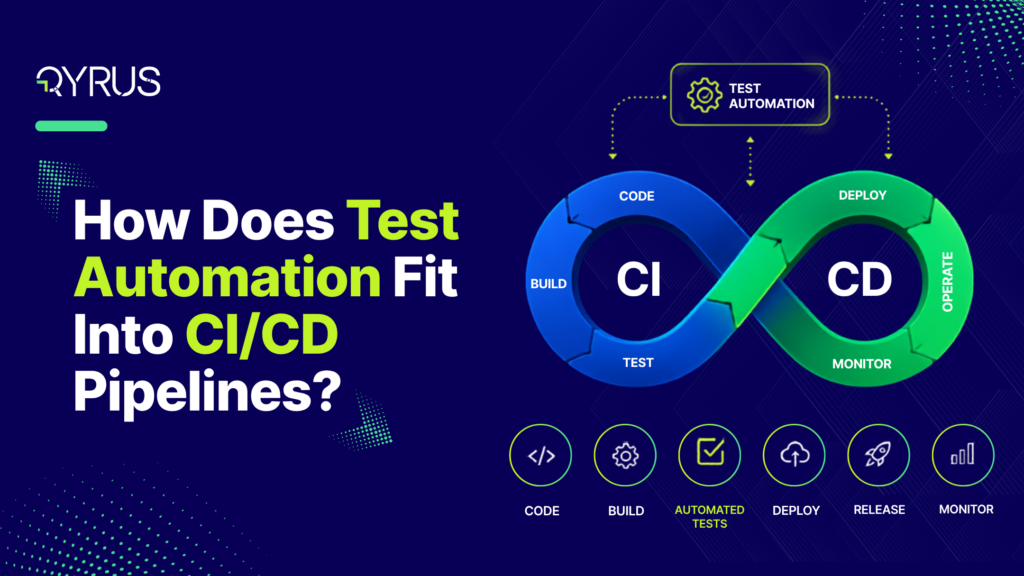
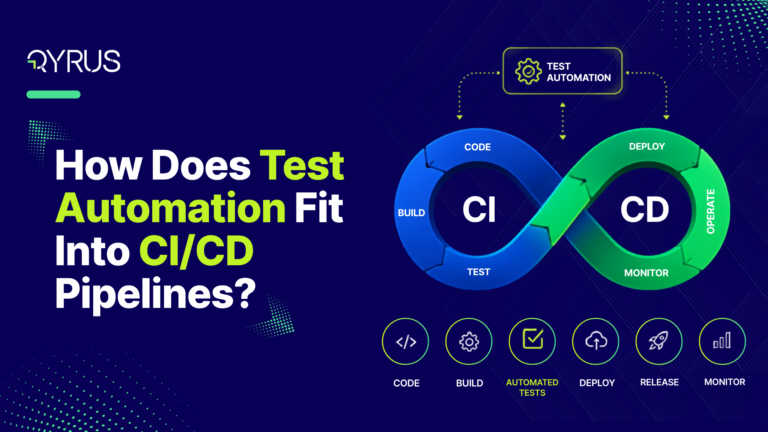
Test automation fits into a CI/CD pipeline as the validation layer that runs at every stage between a code commit and a production release. Each stage runs the fastest tests capable of catching failures at that point in the pipeline: unit tests on commit, integration and API tests on merge, end-to-end and regression tests before deployment — and quality gates decide whether code is allowed to move forward. Done well, automation is what lets a team deploy quickly without shipping broken software.
That last point is where most teams struggle. Continuous integration and continuous delivery pipelines were built for speed: build fast, test fast, and fail fast. But a test suite dropped into the pipeline in the wrong place does the opposite. A forty-five-minute end-to-end run on every pull request forces developers to wait, batch their changes, and merge larger chunks of code — which produces bigger, harder-to-debug failures. The question, then, is not whether to automate. It is where each test earns its place.
What CI/CD Pipelines Actually Do — and Why Testing Is the Load-Bearing Wall
A CI/CD pipeline automates the path from source code to running software. Continuous integration is the practice of merging code changes into a shared branch frequently, with an automated build and test run verifying each change. Continuous delivery extends that by automatically preparing every validated build for release, so deployment becomes a routine, low-risk event rather than a quarterly ordeal.
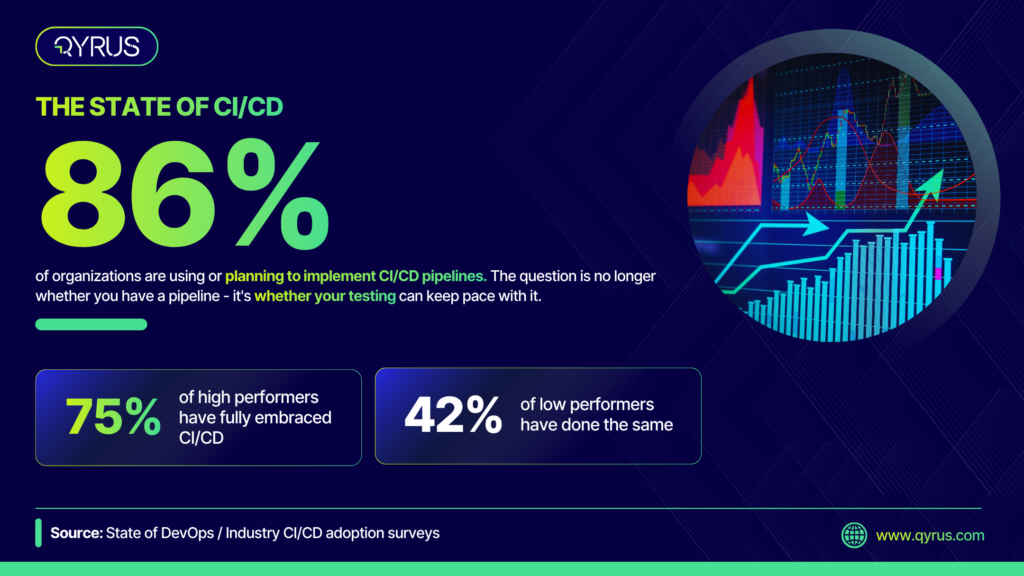
CI/CD pipelines are now the default way modern teams deliver software. Industry surveys report that 86% of organizations are either using or planning to implement CI/CD pipelines, and the gap between leaders and laggards is stark: 75% of high-performing organizations have fully embraced CI/CD, compared with only 42% of low performers. Adoption has moved past the question of whether you have a pipeline to whether your testing can keep pace with it.
This is where automated testing becomes the load-bearing wall. Without it, continuous integration simply packages code faster — it does not tell you whether that code works. The pipeline will happily build, deploy, and ship a broken change at high speed. Automation is the mechanism that turns a build system into a quality system.
The payoff shows up in the delivery data. Across more than a decade of DORA research, elite performers deploy roughly 182 times more frequently than low performers while maintaining around 8 times lower change failure rates. Speed and stability move together rather than trading off — and continuous, automated testing is the mechanism that makes that combination possible. You cannot deploy on demand and sleep at night unless a reliable test layer is validating every change on the way through.
Where Each Test Type Belongs: Mapping the Pyramid to Pipeline Stages
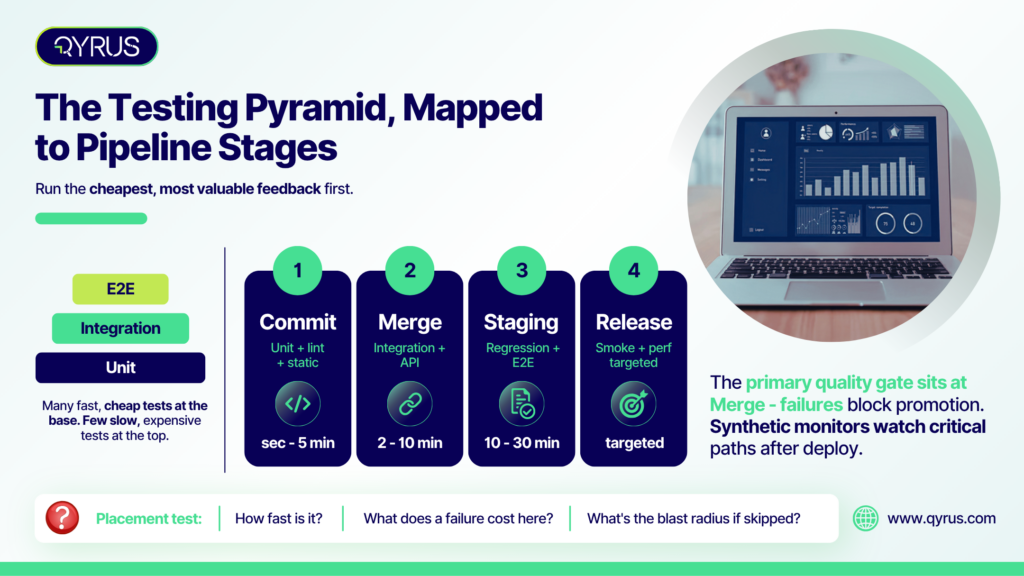
The classic testing pyramid — a broad base of fast unit tests, a middle layer of integration tests, and a thin top layer of end-to-end tests — is usually taught as a ratio. In a pipeline, it is better understood as a map of where each test type runs. The guiding principle is simple: run the cheapest, most valuable feedback first, and reserve slow, expensive checks for the stages where they add unique confidence.
Commit stage: unit tests, linting, static analysis
Every commit triggers the fastest checks: unit tests that validate individual functions in isolation, plus linting and static code analysis. This stage answers one question: “Did I break anything obvious?” It has to answer it in seconds to a few minutes. Fast feedback here keeps the code fresh in the developer’s mind and stops trivial errors from ever reaching a teammate.
Pull request / merge: integration and API tests
When a change is proposed for merge, the pipeline runs integration and API tests against a deployed test environment, verifying that components and services work together. This is typically the primary quality gate: failures here block the merge. Because API tests validate business logic directly without a browser, they run far faster than UI tests and catch a large share of defects before they ever reach the interface.
Post-merge / staging: full regression, end-to-end, cross-browser and device
After changes merge to the main branch, the pipeline runs the heavier suites — full regression, end-to-end user journeys, and cross-browser or cross-device validation — in an environment that mirrors production. This stage confirms that the combined changes from multiple merges do not produce emergent defects. It runs on a schedule or on deployment rather than on every commit, so its longer runtime never blocks a developer waiting for feedback.
Pre-production / release: smoke, performance, and visual regression
Before a build is promoted to production, a focused set of smoke tests validates the critical paths, while performance and visual regression tests confirm the release behaves and looks correct under realistic conditions. These are targeted checks, not a re-run of everything.
Post-deployment: synthetic monitoring
The pipeline’s job does not end at release. Synthetic monitors continuously exercise critical production paths after every deployment, catching issues that only surface with real infrastructure and real traffic.
A simple placement framework
When you are unsure where a test belongs, ask three questions. How fast is it? Faster tests run earlier and more often. What does a failure cost at this stage? The later a defect escapes, the more it costs to fix — so high-cost failures deserve an earlier gate. And what is the blast radius if you skip it here? Tests guarding payments, authentication, or data integrity earn a place in more stages than cosmetic checks do. Getting this placement right is the difference between a pipeline that accelerates delivery and one that grinds it to a halt.
Quality Gates: The Decision Logic Between Stages
If test placement decides which tests run where, quality gates decide what happens next. A quality gate is an automated checkpoint that evaluates whether a change meets predefined criteria — all unit tests passing, code coverage above a threshold, no critical or high-severity vulnerabilities, performance within an acceptable range — before it is allowed to advance to the next stage. If the criteria are met, the change passes. If not, the pipeline halts until the issue is resolved.
The discipline this enforces is the whole point. As one common formulation puts it, if a failing test does not stop the build from moving forward, your automation is purely decorative. Gates turn test results from information into enforcement.
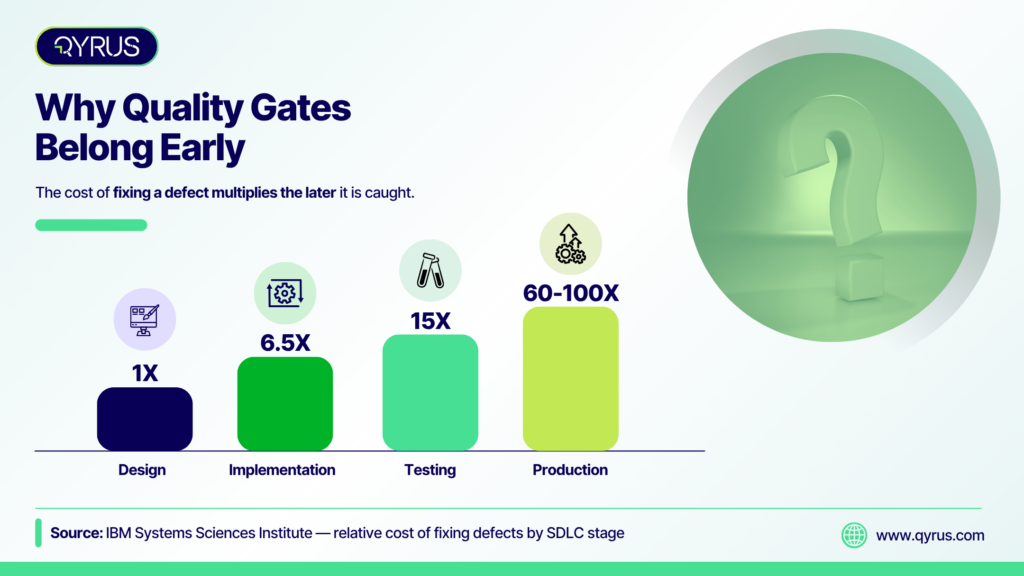
The economics justify gating early and often. The IBM Systems Sciences Institute’s long-cited research on defect cost found that fixing a bug grows dramatically more expensive the later it is caught: roughly 1x during design, 6.5x during implementation, 15x during testing, and 60 to 100x once the software is in production. A gate that blocks a defective change at the merge stage is not bureaucracy. It catches a problem while it still costs a fraction of what it would after release. This is the economic engine behind shift-left testing: placed at multiple stages, gates create layered validation, with each checkpoint catching a different class of issue at the point where it is cheapest to fix.
The Failure Mode: When Test Automation Breaks Your Pipeline Instead of Protecting It
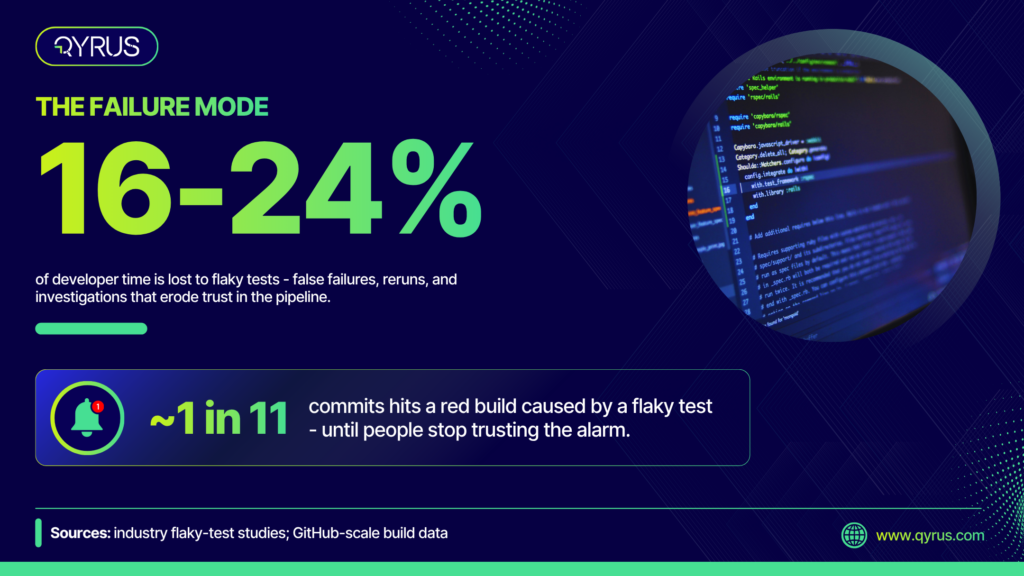
Automated testing only helps if the pipeline trusts its results. The fastest way to lose that trust is flaky tests — tests that pass or fail inconsistently without any change to the code. The cost is larger than it looks. Studies place the developer time lost to flaky tests, through false failures, reruns, and investigations, at roughly 16 to 24% on average, and GitHub-scale data has found that around one commit in eleven hit a red build caused by a flaky test.
The damage compounds. When a green checkmark stops meaning the code is good, developers start clicking rerun instead of investigating — and eventually real failures slip through because nobody believes the alarm anymore. The test suite decays from an early-warning system into background noise.
Slow suites cause a related failure. When feedback takes too long, developers batch larger changes to avoid the wait. Each failure becomes larger and harder to isolate, making the suite feel even slower. And underneath both problems sits the maintenance tax: brittle, hard-coded locators that snap the moment a designer renames a CSS class or shifts a layout, turning a routine UI change into a suite full of red that found no real bug at all. This is exactly the problem self-healing test automation is built to solve.
None of this is an argument against automation. It is an argument for automation that is fast, isolated, and resilient enough to survive the pace of real development — which is precisely where the newest generation of tooling is focused.
What Modern Pipelines Add: AI-Assisted Testing in CI/CD
The direction of pipeline testing in 2026 is intelligence about what to run and self-maintenance of what breaks. Three capabilities lead the shift. Test impact analysis uses the change itself to determine which tests are actually relevant, running a targeted subset instead of the entire suite on every pull request. Self-healing automatically repairs locators when the interface changes, so a legitimate UI update no longer turns the pipeline red. And flake detection identifies and quarantines unreliable tests before they erode trust in the signal.
There is a sharper reason this matters now. DORA’s 2025 research found that AI adoption tends to improve throughput by an estimated 2 to 18%, but often at the cost of declining stability and higher change failure rates. In other words, teams are shipping more code, faster, with AI assistance — and pushing more of it through the pipeline. That makes the automated test layer more critical, not less. When more change flows through the same gates, the gates have to be smart enough to keep up.
This is the point where a pipeline stops being a set of scripts that run tests and starts becoming an orchestrated system that decides what to test based on what changed. Teams ready to go deeper on that shift can read how agentic orchestration tames the CI/CD pipeline as the advanced companion to this guide.
How Qyrus Fits Into Your CI/CD Pipeline
Qyrus is designed to plug into the pipeline you already run rather than replace it. It offers native integrations with the major CI/CD servers — Jenkins, Azure DevOps, Bitrise, TeamCity, and Concourse — so a code push or a completed build can trigger the right tests automatically, with no manual handoff.
Because Qyrus covers web, mobile, and API testing on a single platform, it maps cleanly onto the stage model described above. API tests can run early for fast backend validation; web and mobile regression can run mid-pipeline across cloud-based browser and device farms; and orchestrated end-to-end flows can validate a complete business process before release. That cross-module reach matters in a world where a single user journey often spans an API, a website, and a mobile app.
Qyrus also addresses the failure mode from earlier in this guide directly. Healer is an AI feature that finds new locators for steps that break when the application changes, referencing a passing baseline to repair scripts instead of failing them — reducing the maintenance tax and the flakiness that erode pipeline trust. And rather than a bare pass or fail, Qyrus feeds granular, step-by-step results, screenshots, and visual reports back into the pipeline, so a red build tells you exactly what broke and where.
The results show up in practice. A Fortune 500 waste management company integrated Qyrus automated API testing with Jenkins and, over three months, built 4,500 unique test cases — achieving a 10x increase in coverage, a 50% decrease in execution time, and zero API bugs leaked into production across the following 24 months. More broadly, a Forrester Total Economic Impact study of the Qyrus platform reported a 213% return on investment with a payback period of under six months, and a 70% reduction in test building time through AI-driven, codeless features.
Frequently Asked Questions
What is the role of test automation in CI/CD?
Test automation is the validation layer of a CI/CD pipeline. It runs automated checks at each stage — from commit through deployment — to confirm that code changes work as expected before they advance. This is what allows teams to release frequently without relying on slow manual testing as a bottleneck.
Which tests should run on every commit?
Fast, isolated checks belong on every commit: unit tests, linting, and static code analysis. They provide feedback in seconds to a few minutes and catch obvious errors while the code is still fresh. Slower integration and end-to-end tests run later, at merge and deployment stages, so they do not hold up developers.
What is a quality gate in a CI/CD pipeline?
A quality gate is an automated checkpoint that decides whether a change can move to the next stage. It evaluates criteria such as passing tests, code coverage thresholds, and the absence of critical vulnerabilities. If the criteria are not met, the pipeline stops until the issues are fixed.
How do you keep automated tests from slowing down the pipeline?
Order tests by speed so the fastest run first, run only the tests relevant to a change where possible, and execute tests in parallel. Reserve slow end-to-end suites for later stages rather than every commit. Keeping the developer-facing feedback loop under about ten minutes is a common target.
What causes flaky tests in CI/CD?
Flaky tests usually stem from timing issues, unstable test environments, test pollution, or brittle locators that break when the UI changes. They pass or fail inconsistently without any code change, which erodes trust in the pipeline. Isolating tests, using resilient selectors, and self-healing automation all help reduce flakiness.
Can AI improve test automation in CI/CD pipelines?
Yes. AI is increasingly used to prioritize which tests to run based on code changes, to self-heal broken locators so UI updates do not cause false failures, and to detect and quarantine flaky tests. These capabilities become more valuable as AI-assisted development pushes more code through the pipeline.
Conclusion
Test automation does not fit into a CI/CD pipeline as a single stage or a box to check at the end. It fits as a layered validation system with the right tests running at the right stage, enforced by quality gates, kept trustworthy by resilient tooling. The teams that get this right are not the ones that automate the most tests, but the ones that place each test where it earns its confidence for the least delay.
Qyrus helps teams do exactly that, plugging into your existing CI/CD tools and covering web, mobile, and API testing across every pipeline stage. To see how it fits your workflow, request a demo.
 July 21, 2026
  12 min