Dive into the magic of effortless test integration with Qyrus’ AI-powered test converter! Picture this: Ananya spills the beans on Qyrus, where importing scripts is as breezy as a stroll in the park—no need to endure the painstaking task of rebuilding extensive test suites. Tim chips in to cheerlead this digital superhero, especially for those script-wranglers dealing with a multitude of codes. Say goodbye to script-creating marathons; Qyrus is here to save the day, potentially freeing up hours, or even days, of your precious time!
Tell us more about Qyrus’ AI-powered test converter and what it can do.
Ananya: Qyrus allows users to take scripts that they have created outside of Qyrus, convert them, and upload them directly into Qyrus. This allows users to not have to recreate the same tests again from scratch and eliminates the tedious work that comes with it.
Tim: This targets users who may have been using other methods of testing applications. Especially if a user has many and/or long scripts, one could save hours, even days, or tedious work trying to get their working tests integrated into Qyrus.
Discover the transformative impact of the test converter on the testing process. Ananya emphasizes a paradigm shift in the test-building phase. Instead of starting anew, users can convert existing Selenium scripts seamlessly into Qyrus-compatible ones, preserving their hard work while adopting an enhanced testing approach.
What is the test converter’s overall impact on the testing process?
Ananya: The converter introduces a significant shift, particularly in the test-building phase of the process. Instead of requiring users to start from scratch and recreate their scripts, they now have the valuable capability to convert their already existing scripts into Qyrus-compatible ones. This addresses a common concern we’ve encountered in the past – the dilemma of leveraging existing Selenium scripts that are already in use. It’s a practical solution that allows users to preserve their hard work while adopting a new and improved approach.
Can you elaborate on the compatibility of the test converter with different open-source tools?
Tim: Absolutely. The converter extends its reach to all open-source tools whose code is written in popular languages like JS, TS, Java, C#, and Python. This broad compatibility ensures that users working with a diverse range of open-source testing tools can seamlessly transition and utilize Qyrus, adding a layer of versatility to the testing process.
How might these test converters help testers, developers, and business technologists? What value can this feature bring?
Ananya: This tool is primarily aimed at testers, offering a significant advantage in terms of efficiency and reusability. Testers no longer find themselves repeating the laborious task of recreating scripts that were previously built on other open-source tools. With the Qyrus Test Converter, testers simply upload their existing test scripts, and the converter seamlessly handles the code translation, generating a JSON file for the user. Subsequently, the user can effortlessly upload the file into any test in Qyrus, and the steps will automatically appear, streamlining the entire process.
Tim: Business technologists stand to greatly benefit from this feature as well. While Qyrus prides itself on being a no-code and low-code platform with user-friendly features for building test scenarios, some business technologists may lack the technical expertise to handle more advanced test scripts. With the converter, a technologist can easily convert and upload tests. From there, they can verify if the tests meet all the set criteria without grappling with complex technical details. This accessibility extends to developers as well, providing a user-friendly bridge for those more technically inclined.
Does the same or similar functionality exist without Qyrus, and how do competitors address similar problems?
Ananya: While some competitors do offer resources to assist in integrating previous tests onto their platforms, not all provide the convenience of an automated test converter. Qyrus stands out by offering a dedicated test converter, streamlining the process of building the bulk of scripts. Moreover, if any adjustments are required, the Qyrus team is readily available to provide support in editing these tests, ensuring a seamless transition.
Can you elaborate on the benefits of having a test converter, especially in comparison to other testing tools?
Tim: Opting for a more conventional approach, without the aid of testing tools, leaves a tester with limited options. They might find themselves subscribing to a tool that lacks the essential feature of a test converter, leading to inefficiencies and additional challenges. Alternatively, they could persist with building automated or manual tests manually, a time-consuming endeavor that demands substantial resources. Qyrus’ test converter not only offers a more efficient and automated solution but also presents a cost-effective and time-saving alternative, contributing to the overall benefits of translation in the testing process.
Delve into the benefits of the Qyrus test converter compared to conventional testing approaches. Tim explains how the test converter provides an efficient, automated, and cost-effective solution, saving time and resources. It eliminates the limitations faced by testers subscribing to tools lacking a test converter and those manually building tests, presenting a smarter alternative for testing processes.
How do you see the test converter impacting day-to-day operations across organizations?
Ananya: The impact of the test converter on day-to-day operations is quite substantial. Not only does it eliminate the cumbersome task of rebuilding scripts from scratch, but it also opens up opportunities for users to build upon these scripts using the clone script method in Qyrus. This streamlined approach simplifies the testing process, allowing users to focus on refining their tests rather than investing time in recreating them.
Tim: The test converter significantly contributes to saving effort and optimizing testing operations within organizations. It eliminates the need for duplicating tests created on legacy platforms, enabling users to seamlessly transition and leverage the unique features of the Qyrus platform. This not only enhances efficiency but also provides the freedom to think of smarter ways to test applications, rather than being tied down to the repetitive task of script building. The ability to upload a script and then clone it as many times as needed, building different scenarios based on the previous script using Qyrus’ clone script method, further exemplifies the benefits of translation in testing processes.
What kind of updates might we expect to the test converter in the future?
Ananya: The Qyrus test converter has been tailored to cater to users from both automated and manual testing backgrounds, making significant strides in code translation. Currently, it supports the conversion of manual codebases, including GDD, Gherkins, and Glue, as well as those from Selenium. Building upon this foundation, we recently introduced the capability to convert individual tests and POM-based tests using the test converter. Looking ahead, Qyrus aims to further expand the range of supported test types, providing users with even more options for seamless code translation.
Experience a testing revolution with Qyrus’ test converter—an innovative tool designed to streamline integration, enhance efficiency, and unlock new possibilities in the dynamic field of test automation. As Qyrus evolves, so does its commitment to providing users with cutting-edge solutions, making the testing process more accessible and effective.
Welcome to a Feature Friday spotlight on Qyrus, where precision meets patience in the world of testing. Today, we unravel the intricacies of Qyrus’ wait action types, a game-changer in the realm of action-based testing. These aren’t just any waits; they are the conductors orchestrating a harmonious testing symphony. Join us as we explore how Qyrus tackles the challenge of variable wait times, making testing more adaptive and robust.
Tell us more about the different “Wait” action types on Qyrus.
Ananya: Qyrus provides users with the ability to incorporate a wait action within their test cases, particularly useful when an element or web page requires some time to appear. Users can simply specify the desired wait duration in seconds, allowing the script to adapt accordingly. However, what if the wait times for certain elements vary significantly? What if certain elements take less time to appear in certain runs, yet the overall script execution still takes a considerable amount of time? Qyrus addresses this by offering wait action types that go beyond simple time-based waits.
Tim: These wait actions are designed to specifically target elements that may have variable wait times for appearance or interaction. External factors, such as a website’s API calls or a user’s bandwidth, can influence the test time for a script. Instead of relying on a fixed time to wait for an element, Qyrus provides the flexibility to wait until that specific element is available. This approach ensures a more adaptive and accurate synchronization with the varying conditions, contributing to a more robust and reliable testing process.
Now, as we paddle down the stream of Qyrus’ intricate testing waters, it’s worth pausing to marvel at the genius behind its action types. It’s like having a toolkit where you pick the right tool for the job, making test script creation a breeze. Just select the action type that fits your testing needs, fill in the blanks, and voilà – your script is ready to roll. It’s like the ‘easy button’ for testers!
What might be the overall impact these action types can have on the testing process?
Ananya: Qyrus adopts an action-based testing design, providing users with a versatile selection of action types available in a kind of library. Users can choose an action type that aligns with their testing needs. Once that’s decided, it’s a matter of filling in the necessary information for that specific action and incorporating it into the script. It’s a streamlined process that allows users to easily construct and customize their test scripts based on the required action type and steps.
Tim: That being said, Qyrus is made to make testing more efficient, and that comes in more ways than just one. Our action-based testing methodology basically does more than half the work for you. All that’s left is giving things like element locator values and required data for input where necessary. On top of that, make use of Qyrus’ various recorders, like the web or mobile recorder, to speed processes up and keep things rolling.
How might these wait actions help testers, developers, and business technologists? What value can this feature bring?
Ananya: Testers, in the realm of action-based testing, find significant advantages with these wait actions. This feature not only saves them time but also contributes to more informed test schedules. By eliminating the guesswork surrounding the duration of a page or element change, testers can efficiently streamline their testing processes, minimizing the reliance on trial and error.
Tim: Developers, within the framework of action-based testing, value this feature for ensuring the appropriate time intervals for elements to appear during testing. Identifying and addressing time lags at an early stage markedly enhances the efficiency of the development process. Furthermore, business technologists can leverage these wait actions to verify the correct elements’ appearance on the webpage, aligning with the principles of action-based testing and providing a thorough understanding of the application’s behavior.
Does the same or similar functionality exist without Qyrus, and how do competitors address similar problems?
Ananya: When it comes to addressing this particular problem, it varies among competitors. Qyrus sets itself apart by integrating with a wide range of attributes, including XPaths, IDs, names, and more. This extensive coverage is not universal among competitors, and some may lack the flexibility to handle a diverse set of attributes. This distinction becomes crucial because, in certain cases, competitors might face issues like a “Wait for Element” step breaking due to limited attribute coverage. Qyrus, on the other hand, ensures comprehensive coverage, whether dealing with static or dynamic attributes.
Tim: Qyrus brings a unique advantage to testers by allowing them to wait for the appropriate duration, especially when dealing with elements that are more unstable or dynamic. In the past, testers might have encountered challenges with faulty locators. Qyrus’ extensive coverage becomes particularly valuable in such scenarios, offering the capability to pinpoint a working locator value. This distinction can significantly enhance the reliability and effectiveness of the testing process, addressing challenges that testers may have faced with competitors lacking similar comprehensive coverage.
How do you see these impacting day-to-day operations across organizations?
Ananya: From a testing perspective, these features are transformative. Testers can now operate with more precision, eliminating the guesswork around how long a page or element change might take. This reduction in uncertainty leads to a substantial decrease in the need for trial and error. Testers no longer have to wait for the longest possible duration; instead, they can wait until the element is ready for interaction, optimizing the testing process.
Tim: Qyrus is taking action-based testing to the next level. The impact of these features extends to the precision of test-building scenarios and coverage. Testers can now be more accurate and specific, eliminating the need to deal with arbitrary values or gauge when an element is available. The ability to wait until the correct locator value appears, coupled with the passage of the wait time, may eliminate the need to add additional steps in scripts to verify the existence of an element. This not only streamlines the testing process but also enhances efficiency and clarity in day-to-day testing operations across organizations.
Let’s face it; testing without Qyrus’ wait actions would be like trying to solve a puzzle in the dark. Testers, developers, and business technologists alike are finding a friend in Qyrus. Testers save time and effort, developers enjoy a smoother development process, and business technologists get a front-row seat to a more informed and efficient application landscape. Qyrus – making testing a collaborative success story!
What kind of new updates can we expect from Qyrus in the future on this front?
Ananya: Looking ahead, the roadmap for this feature is quite exciting. Our focus is to target as many tricky elements as possible, ensuring that Qyrus remains at the forefront of addressing dynamic testing scenarios. Building on our commitment to action-based testing, we’ve already introduced several new wait action types, each crafted to address specific scenarios our clients have encountered. Moving forward, we are continuously exploring additional enhancements and improvements to further expand the capabilities of wait actions. Additionally, we’re exploring the potential of leveraging AI/ML to detect element or page changes, a prospect that holds promise in enhancing the adaptability and intelligence of Qyrus in handling evolving testing requirements.
As we draw the curtain on our exploration of Qyrus’ wait action types, it’s not just an end but a crescendo in the symphony of precision and efficiency. Qyrus has transformed waiting into an art, and each script becomes a masterpiece of testing ingenuity. As the spotlight dims, the impact of Qyrus’ action-based testing with versatile wait actions echoes in the corridors of testing excellence, promising a future where precision meets anticipation. This isn’t just about the wait; it’s about the orchestration of seamless, adaptive, and intelligent testing. Stay tuned as Qyrus continues to compose innovations that resonate with the ever-evolving needs of dynamic testing scenarios. The stage is set, and the best is yet to come.
Strap on your digital adventure boots and get ready for a whimsical journey into the tech wonderland with our guides, Brett and Joyal! They’re here to sprinkle a dash of magic on the latest upgrades in iOS device streaming capabilities. Picture this as an enchanted carpet ride through the realms of streaming testing and live testing, promising a seamless and reliable experience for all you daring souls testing iOS apps. Buckle up! We’re about to explore the enchanted details of these updates and uncover their playful implications for online iOS device testing. Let the digital adventure begin!
Tell us more about the new updates to iOS device streaming capabilities in the mobile testing service. Give us some insights into what kind of impact this might have.
Brett: The recent updates to iOS device streaming bring about improvements in both quality and stability. These enhancements play a significant role in test building and execution, ensuring a smoother and more reliable experience for users.
Joyal: These updates have increased the reliability of streaming testing on iOS devices. One impact is the reduction in the time testers spend building scripts, thanks to the improved capabilities. Users are finding increased efficiency, especially when leveraging other tools like the mobile recorder tool for test building. The lasting impacts downstream in the testing process are evident, making the overall testing experience more streamlined and effective.
How might these new updates help testers, developers, and business technologists? What value can this feature bring?
Brett: For testers, the value lies in utilizing this feature while building iOS tests with the live test builder. The updates ensure that they encounter fewer interruptions to the streaming testing process, contributing to a more seamless and uninterrupted test-building experience. Developers, on the other hand, benefit from a live preview of the device during test execution, including the audio from the device.
Joyal: When it comes to business technologists viewing reports of running tests, these updates offer a valuable enhancement to live and streaming testing. They can now watch the live stream preview of the test without interruptions. This capability provides business technologists with real-time insights into the test execution process, contributing to a more informed and efficient decision-making process based on the live stream preview.
Is there still more work to be done, or more updates to be made for better iOS streaming capabilities?
Brett: Absolutely. As time progresses, there will always be room for continuous improvement and updates. Currently, our focus is on deploying these enhancements to all devices across all environments. The goal is to ensure a consistently improved streaming experience for users across the board.
How do you see these updates impacting day-to-day operations across organizations?
Brett: The increased stream availability resulting from these updates has made a tangible difference in day-to-day operations. Building iOS test scripts has become notably easier and more streamlined, making the world of streaming testing that much more efficient.
Joyal: The expanded device availability not only allows for quicker test building but also contributes to a more efficient process. Additionally, the reduction in latency when building tests is another notable impact on day-to-day operations. Overall, these updates play a key role in enhancing the speed and efficiency of test building across organizations.
And there you have it, folks – the grand finale of our whimsical exploration through the enchanted forest of revamped iOS device streaming, brilliantly guided by the dynamic duo, Brett and Joyal. What a journey it’s been! The impact on streaming testing and live testing is like finding the pot of gold at the end of a digital rainbow. These updates not only sprinkle efficiency dust on test buildings but also promise a more reliable online iOS device testing experience. So, wave goodbye to glitches and hello to a future where testing iOS apps is smoother than a perfectly brewed potion. Here’s to the magical strides in stability and quality – because, in the world of live and streaming testing, the future is looking brighter than ever!
10% Worldwide Code is Generated by TuringBots ~ As per 2023 Forrester Prediction* *A commissioned study conducted by Forrester Consulting on behalf of Quinnox Aug 23 (Add to the bottom of the page)
AI and Machine Learning in Fintech Testing Automation In the ever-evolving landscape of financial technology, or fintech, staying ahead of the curve is crucial for companies seeking to provide seamless and secure experiences for their users. One of the key drivers of this evolution is the integration of artificial intelligence (AI) and machine learning (ML) into testing automation processes. This paradigm shift not only enhances test coverage, accuracy, and efficiency but also propels fintech applications into a new era of reliability and innovation.
The Rise of TuringBots: Redefining Automation in Fintech TuringBots, inspired by the genius of Alan Turing, are taking center stage in the realm of automation. These intelligent bots, equipped with advanced machine learning algorithms, are designed to mimic human-like cognitive functions. When integrated into Fintech platforms, TuringBots excel in tasks that require reasoning, problem-solving, and decision-making. Their ability to adapt and learn from data makes them indispensable in streamlining complex financial processes.
In the context of AI and ML in Test Automation, TuringBots prove to be a game-changer. Traditionally, testing financial software required extensive manual efforts, consuming time and resources. However, with TuringBots, the testing process becomes agile and efficient. These bots can simulate user interactions, identify vulnerabilities, and ensure the robustness of Fintech applications. As a result, Fintech companies can accelerate their software development life cycle, bringing innovations to market faster and with increased confidence.
Fintech Trends: A Glimpse into the Future The Fintech landscape is undergoing a seismic shift, driven by technological advancements. Among the prominent trends shaping the industry, the integration of AI and ML in Test Automation stands out. Fintech companies are leveraging these technologies to enhance the reliability and security of their platforms. The ability of TuringBots to conduct comprehensive testing ensures that financial applications meet stringent regulatory standards and deliver a seamless user experience.
Another noteworthy trend is the increasing adoption of AI in Fintech for risk management. Machine learning algorithms analyze vast datasets to identify patterns and anomalies, enabling real-time risk assessment. This proactive approach to risk mitigation enhances the stability of financial systems and safeguards against potential threats.
Furthermore, AI and ML are fueling innovations in customer service within the Fintech sector. Chatbots, a specific application of AI, are becoming ubiquitous in providing instant and personalized assistance to users. These conversational interfaces enhance user engagement, simplify issue resolution, and contribute to an overall positive customer experience.
AI in Fintech: Transforming Operations and Customer Experiences
The infusion of AI in Fintech goes beyond test automation; it extends to every facet of financial operations. From customer onboarding to fraud detection, AI algorithms are optimizing processes and mitigating risks. In customer onboarding, AI-powered systems streamline the verification process, reducing the time required to establish new accounts. This not only enhances user satisfaction but also contributes to operational efficiency.
Fraud detection, a critical concern in the financial industry, benefits immensely from AI’s predictive capabilities. Machine learning models analyze transaction patterns and identify anomalies indicative of fraudulent activities. The proactive nature of AI in fraud detection minimizes losses and fortifies the security infrastructure of Fintech platforms.
Moreover, AI-driven personalization is reshaping customer experiences in Fintech. By analyzing user behavior and preferences, AI algorithms tailor recommendations and services to individual needs. This level of customization not only improves customer satisfaction but also fosters loyalty in an increasingly competitive market.
The Role of AI and ML in Test Automation: Ensuring Robust Fintech Solutions
As Fintech companies integrate AI and ML into their operations, the need for robust testing becomes paramount. Here, the synergy between AI and ML in Test Automation, powered by TuringBots, plays a pivotal role. These intelligent bots meticulously test applications, identifying vulnerabilities and ensuring that security measures are foolproof.
The iterative nature of machine learning enables TuringBots to continuously evolve their testing methodologies. They learn from each testing cycle, adapting to new features and functionalities. This dynamic approach ensures that Fintech applications remain resilient in the face of evolving cyber threats and regulatory changes.
Qyrus AIVerse: Designed with Users in Mind, Enhanced with AI
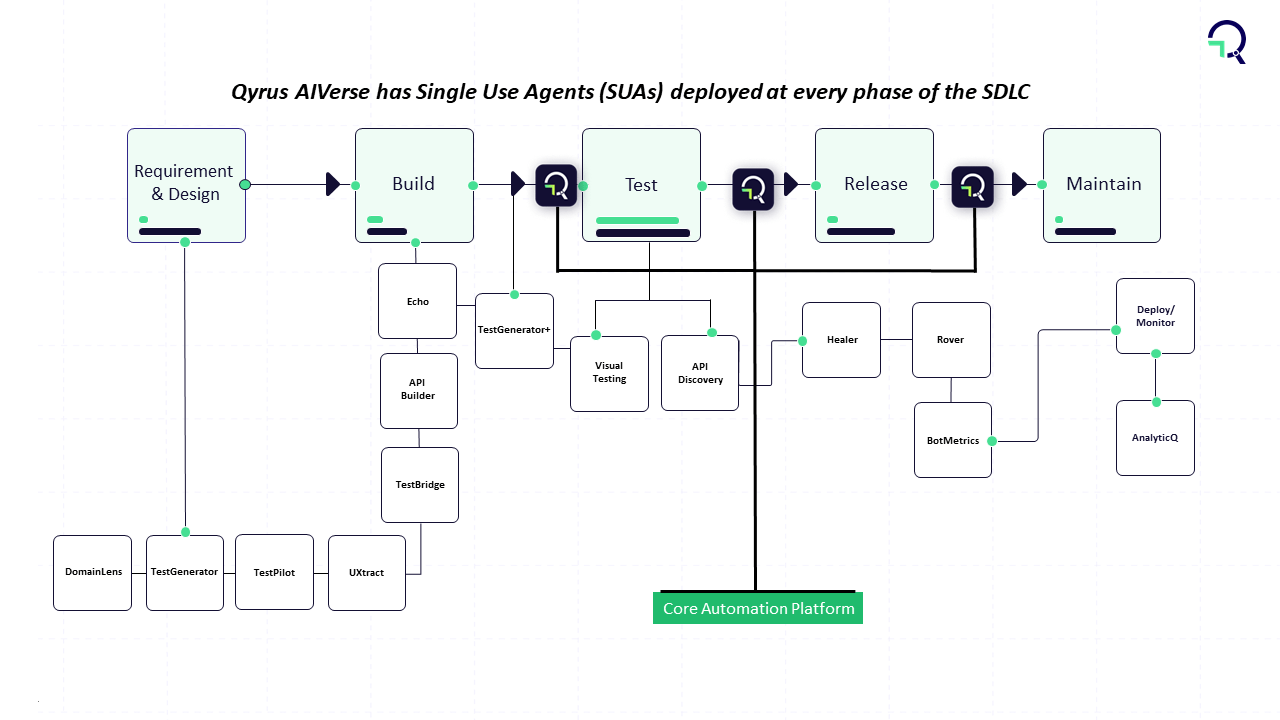
Qyrus AIVerse or TuringBots or Single Use Agents (SUAs) serve distinct purposes such as generating scenarios or tests, data amplification, domain understanding etc. By deploying an amalgamation of these SUAs, one can achieve ‘objecting-based testing’.
So, what all can a QyrusBot do?
Well, it can read Jira stories and tickets to create test automation scenarios, it can create realistic and diverse test data, analyze requirements and build APIs for testing, learn from past tests and suggest new test cases, analyze logs and other data sources to identify potential risks, and the list goes on.
Conclusion: Navigating the Future with AI/ML and TuringBots
In conclusion, the fusion of AI, ML, and TuringBots is reshaping the landscape of Fintech. The transformative power of these technologies is evident not only in test automation but also in revolutionizing how financial services are delivered and experienced. Fintech trends underscore the industry’s trajectory towards a more secure, efficient, and customer-centric future.
As we move forward, Fintech companies that harness the potential of AI in their operations will stand at the forefront of innovation. The integration of TuringBots and AI/ML in Test Automation will be the cornerstone of this evolution, ensuring that Fintech solutions are not only cutting-edge but also resilient in the face of an ever-changing financial landscape. The future of Fintech is undeniably intertwined with the capabilities of AI, ML, and TuringBots, heralding a new era of possibilities and opportunities.
Dive into the world of testing complexities with Qyrus’ focus on testing the happy path/unhappy path. Parth and Steve are here to unravel the intricacies of testing positive and negative scenarios, exploring the advantages and multifaceted benefits this approach offers. Discover how Qyrus revolutionizes testing methodologies, providing a platform that empowers testers, developers, and business technologists alike.
Tell us more about testing the happy path/unhappy path on Qyrus.
Parth: Happy path testing involves verifying that the positive test cases of your application are functioning properly. It’s about ensuring that your application performs as expected under normal, favorable conditions. On the other hand, unhappy path testing focuses on assessing how well error handling is implemented in your application during negative test cases. The overall purpose is to comprehensively test all coverage aspects of your application.
Steve: Exactly. In general, all use cases fall into either negative or positive categories. During testing, the objective is to confirm that every aspect of the application, whether positive or negative, is working as expected. It’s a comprehensive approach aimed at validating the functionality and robustness of the application across various scenarios. Top of Form
What are some advantages of testing the happy path/unhappy path?
Parth: The advantage of happy path testing lies in its ability to validate that the core functionalities of the system work correctly under normal conditions. It serves as a baseline for assessing the overall performance and usability of the system, contributing to building confidence in its ability to meet user expectations during typical use.
Steve: Conversely, the advantage of unhappy path testing is multifaceted. It goes beyond typical functionality testing and extends to security. By deliberately testing how the system handles invalid or malicious inputs, unhappy path testing exposes potential security vulnerabilities. It also plays a crucial role in identifying error-handling mechanisms, and ensuring users receive informative and appropriate error messages. Furthermore, it helps uncover and address issues related to data validation, boundary conditions, and exception handling. Essentially, it’s a comprehensive approach to fortifying the system against a range of potential issues.
How might testing happy path/unhappy path help testers, developers, and business technologists? What value can this feature bring?
Parth: Testers leverage testing happy path/unhappy path by creating Qyrus scripts that encompass both positive and negative scenarios. This ensures a thorough examination of the application’s functionality and its ability to handle errors correctly. For developers, these tests serve as a valuable feedback loop, guiding them to make necessary fixes based on identified scenarios. It’s particularly beneficial for enhancing error handling in case negative scenarios fail.
Steve: The value extends to business technologists as well. Testing happy path/unhappy path provides comprehensive test coverage, empowering business technologists to make informed decisions about their applications. This testing methodology enables them to understand how the application behaves under various conditions. Additionally, business technologists can use the insights gained to make recommendations for changes that can enhance the application’s user-friendliness, contributing to a more robust and user-centric product.
How do you see testing happy path/unhappy path on Qyrus impacting day-to-day operations across organizations?
Parth: The impact of testing happy and unhappy paths on Qyrus is substantial for day-to-day operations. The platform enables parallel testing, allowing users to simultaneously test multiple happy and unhappy scenarios. This approach ensures a comprehensive understanding of all aspects of their application, contributing to a more efficient testing process.
Steve: Testing on Qyrus provides insights into the changes needed to make the application more user-friendly and helps the team understand how the application handles errors. Qyrus facilitates efficiency by allowing users to clone and reuse scripts and suites. This means users can modify test data to test both positive and negative scenarios without starting from scratch, streamlining day-to-day testing operations across the organization.
In conclusion, the exploration of happy and unhappy path testing on Qyrus, guided by the insights of Parth and Steve, reveals a holistic approach to testing. From boosting confidence in positive scenarios to fortifying security and error handling, Qyrus emerges as a transformative force in the testing landscape. Stay tuned for more innovations that continue to elevate testing standards across organizations!
What’s brewing at Qyrus? This Feature Friday spotlights the latest changes in mobility testing, specifically in email reporting. Join Milton and Kiwaun as they walk us through the intricacies of these updates. It’s not just about reporting; it’s about making the post-testing process smoother and more user-friendly through report-testing automation. Let’s explore how Qyrus continues to shape the landscape of testing automation with these innovative features.
Tell us more about the email reporting changes that came to mobility.
Milton: Certainly. The recent changes in email reporting bring a more detailed summary of test results right to the user’s inbox. It’s about providing a quick and comprehensive overview without the need to dive into the full report right away.
Kiwaun: These changes cater to users who prefer having basic testing information and reports readily available in their email, offering a convenient way to stay informed without the necessity of downloading and going through the entire report. It’s all about efficiency and accessibility in the reporting process.
What is the overall impact on the testing process these updates might have?
Milton: The impact of these updates is primarily focused on the test reporting aspect of the testing process. It’s about refining and enhancing how users receive and interact with the results of their tests.
Kiwaun: The overarching goal of these updates is to streamline the testing process by reducing overall effort. By delivering the reporting details directly in email format, we aim to make the testing experience more efficient and user-friendly. It’s all about simplifying the post-testing procedures for our users through report testing automation.
How might this help testers, developers, and business technologists?
Kiwaun: Certainly, these updates bring value to testers, developers, and business technologists alike. They allow users to quickly assess the performance of their test suite without the need to open a full report. Report testing automation gives the user the ability to share this information in email format, making collaboration easier among colleagues.
Milton: Importantly, developers and business technologists can seamlessly receive these reports from their testing counterparts, eliminating the need for direct access to Qyrus or the requirement to navigate to a specific report. It’s a practical way to foster collaboration across all teams involved in the testing process.
Does the same or similar functionality exist without Qyrus, and how do competitors address similar problems?
Kiwaun: Competitors do offer features for sharing reports among users and team members. However, it’s worth noting that our reports stand out for their detailed information and superior reporting quality compared to competitors. We’ve prioritized delivering comprehensive and insightful reporting capabilities through our innovative report testing automation.
Milton: Without Qyrus, users and testers would find themselves manually collecting test reporting and execution information to compile into an email for sharing with colleagues. This process can be disorganized and prone to causing confusion and conflicts within teams. Qyrus, on the other hand, streamlines this entire process by means of report testing automation, providing a structured and efficient way to handle test reporting and communication among team members.
How do you see this feature and its updates impacting day-to-day operations across organizations?
Milton: The impact of report testing automation and its updates on day-to-day operations is quite straightforward. It makes operations easier for testers and colleagues alike by eliminating the need to manually navigate and view reports on the Qyrus platform. This enables a quick and direct assessment of test execution results, indicating whether a test passed or failed, along with pertinent details on any failures. It’s essentially about simplifying the workflow for a more efficient day-to-day testing process.
In summary, this Feature Friday delved into the recent enhancements in email reporting for mobility testing, shedding light on the transformative effects on the testing process. Milton and Kiwaun underscored the significance of these updates, particularly in improving efficiency and accessibility. By enabling users to receive comprehensive usability testing reports directly in their emails, Qyrus is championing a new era in report testing automation. This not only facilitates smoother collaboration but also elevates day-to-day testing operations to a more streamlined and effective level. Keep an eye out for further insights and innovations as Qyrus continues to lead the charge in testing automation.
Hello testing aficionados! This Feature Friday, we’re unraveling the mysteries of Qyrus’ action types – “Set,” “Send Text,” and “Press Keys.” What are these actions, and how can they revolutionize your keyboard input tests? Steve and Parth have the answers. Dive into the details of the “Sendkeys” command, learn how to automate key presses effortlessly, and explore the impact these action types have on the future of test automation. Stay tuned for a journey into the core features shaping the software quality assurance trends.
Tell us more about the difference between the type of actions “Set,” “Send Text,” and “Press Keys” offered by Qyrus and its use cases.
Steve: So, the distinction between these actions is quite specific. With the type of action “Set,” the process involves finding the input field using a locator and then sending data to it. “Send Text,” on the other hand, requires a prior “Tap” action on an input field before the user can send data when the field is recognized as active. Lastly, “Press Keys” is about simulating keyboard key presses, like “Enter” or “Backspace.”
Parth: Building on that, in practical terms, both the type of action “Set” and the type of action “Send Text” are commonly used when users need to input data into specific fields. “Press Keys” finds its application in scenarios where, for example, a search bar lacks a dedicated search button. Users can input the ‘ENTER’ keyword into the data field, prompting the application to submit the search request.
What is the overall impact these action types have on the testing process?
Steve: Primarily, the impact is observed in the test-building process throughout the testing lifecycle. These action types play a crucial role in shaping how tests are constructed and executed.
Parth: The significant value lies in effort reduction. Instead of testers having to devise workarounds for various scenarios using a single action type, we’ve taken the initiative to think through those scenarios for users. The introduction of different action types addresses these diverse testing needs seamlessly, all without requiring any coding. It’s about providing a more efficient and user-friendly testing experience.
How might these action types help testers and developers? What value can this feature bring?
Parth: For testers, the value lies in the versatility of the type of action “Set” and the type of action “Send Text,” allowing interaction with any input field in the application seamlessly. Additionally, “Press Keys” provides the ability to simulate various keyboard actions, enhancing the range of scenarios that can be tested—all without the need for complex coding.
Steve: From a developer’s perspective, these action types provide valuable insights into the intricacies of how input fields function within their applications. It allows developers to test a wide array of scenarios, evaluating their application’s responsiveness to different inputs. With the type of action “Press Keys,” developers can specifically explore how their application handles keyboard interactions, gaining a more comprehensive understanding of their software’s behavior.
Does the same or similar functionality exist without Qyrus? Can testers do this on their own?
Parth: Well, without Qyrus, testers would find themselves in a more manual and resource-intensive scenario. They’d need to manually input data into the application’s fields and perform keyboard actions themselves. Given the variability in how different devices handle input fields, testers might even need to invest in multiple devices to comprehensively assess how the application responds to these inputs. Qyrus essentially streamlines and automates these processes, saving testers from the complexities of managing varied devices and manual interactions.
How do you see these action types impacting day-to-day operations across organizations?
Parth: These action types, particularly “Set” and “Send Text,” simplify testing. Qyrus provides testers with multiple options for sending data to the application, making the testing process more versatile and adaptable. Additionally, the inclusion of “Press Keys” makes executing keyboard actions straightforward.
Steve: Firstly, testing becomes faster as users can employ these three methods to send data in various ways, thoroughly testing all aspects of the application. And secondly, it makes testing smarter by allowing users to observe how the application handles data sent in multiple different ways. Overall, these action types contribute to a more efficient and insightful testing routine within organizations.
So, that’s a wrap for Feature Friday! Steve and Parth have unveiled the power of Qyrus’ action types – “Set,” “Send Text,” and “Press Keys.” From deciphering the nuances of these actions to showcasing how they enhance testing processes, this session was all about making testing more versatile. Stay tuned for more updates, as Qyrus continues to evolve and bring innovative features to the testing landscape.
Let’s delve into the latest enhancements in Qyrus’ mobility command line interface (CLI)! Brett and Joyal are here to guide us through the changes, emphasizing a more informative and user-friendly experience for executing and managing tests from the command line. Notable updates include improved feedback mechanisms and the introduction of a flexible first-available device feature. Let’s jump right in!
Tell us more about these new mobility CLI changes.
Brett: So, with these changes, we’ve focused on enhancing the feedback users receive when they trigger an execution. This is all about providing a more informative and user-friendly experience. Additionally, we’ve introduced the first available device feature for executions, offering users greater flexibility.
Joyal: Another notable improvement is the shift to reading CLI arguments from a configuration file instead of passing everything with the commands. This adjustment aims to streamline the process and make it more user-friendly.
What is the overall impact these new changes might have?
Brett: The impact of these changes is significant, touching both the test execution and test building aspects. As mentioned earlier, users now have the ability to import or update scripts directly from the CLI and execute them accordingly. It’s an improvement that enhances the efficiency of the entire testing process.
Joyal: These changes contribute to a reduction in effort. The streamlined processes, especially with the ability to import and update scripts from the CLI, make tasks more efficient and less resource-intensive. It’s a positive shift towards optimizing efforts in testing workflows.
How might this feature help testers, developers, and business technologists? What value can this feature bring?
Brett: For testers, this feature opens up the ability to create and update scripts directly from the CLI. The improved feedback mechanism provides them with a clearer understanding of the execution state, and the introduction of the first available device feature adds a layer of flexibility by eliminating the need to wait for a specific device.
Joyal: From a developer’s perspective, this feature facilitates the building and updating of scripts, aligning seamlessly with the iterative nature of developing or changing apps. For business technologists, the utility might be a bit constrained unless they possess in-depth technical knowledge. Nevertheless, the collaborative aspect between developers and testers is enhanced, contributing to smoother app development and testing processes.
Does the same or similar functionality exist without Qyrus, and how do competitors address similar problems?
Joyal: Well, without Qyrus, users essentially have to take the DIY route and build the CLI app themselves to match all the functionalities Qyrus offers. However, this involves a significant investment of time and requires a certain level of technical knowledge. It’s not as straightforward as having a ready-made solution like Qyrus.
How do you see this feature impacting day-to-day operations across organizations?
Brett: Users now have enhanced knowledge about the state of an execution, enabling them to troubleshoot and fix configurations more effectively. The ability to create and modify scripts and initiate executions directly through the CLI without relying on the Qyrus UI streamlines workflows and enhances efficiency.
Joyal: In terms of day-to-day operations, these updates introduce a significant speed boost when working with Qyrus. If you find yourself triggering executions with the same configurations consistently, you can simply run the same command, eliminating the need to manually select configurations through the UI or specify command arguments each time. Additionally, the introduction of the first available device feature further expedites the process by automatically selecting the first available device for execution, whether from a list of dedicated devices or a device pool. It’s all about making the workflow faster and more efficient.
In conclusion, the latest mobility CLI changes from Qyrus, explained by Brett and Joyal, mark a significant step forward in test execution and script management. By streamlining processes, enhancing feedback, and introducing a flexible device feature, these changes contribute to a more efficient and optimized testing workflow. Keep an eye on Qyrus as it continues to redefine the CLI experience for testers and developers.
Hey testing enthusiasts! Welcome to Feature Friday, where we’re diving into the nitty-gritty of Qyrus’ latest marvel, the Bitbucket integration. Join Milton and Kiwaun as they unpack the simplicity of pulling and pushing Qyrus scripts into Bitbucket. It’s not just about version control; it’s a whole new way that testers handle scripts. Stick around to explore its impact, and the value it brings, and get a sneak peek into the future updates that promise to elevate your testing game.
Tell us more about Qyrus’ Bitbucket integration.
Milton: Certainly, Qyrus’ Bitbucket integration allows users to seamlessly pull and push Qyrus scripts to Bitbucket. It essentially functions as a form of version control.
Kiwaun: Indeed, with this version control feature, users have the capability to store various versions of a particular script in Bitbucket. They can easily push or pull the script as required. Notably, users can push a Qyrus-compatible script to Bitbucket and subsequently pull it directly from the Qyrus UI.
What is the overall impact Bitbucket integration has on the testing process?
Milton: The Bitbucket integration has a meaningful impact on the testing process, influencing both test building and management. The convenience of integrating with Qyrus has streamlined various aspects.
Kiwaun: The integration of Qyrus with Bitbucket brings about a noticeable reduction in the effort testers need to invest in script management. Beyond that, it plays a role in enhancing overall test coverage, contributing positively to the testing process.
How might Qyrus’ integration with Bitbucket help testers, developers, and business technologists? What value can this feature bring?
Kiwaun: Well, this integration is particularly geared towards testers. It allows testers to seamlessly pull a default test script into Qyrus, depending on the testing scenario. Once imported, they can conveniently edit the script within Qyrus.
Milton: If needed, testers have the flexibility to roll back changes by pulling the previous version from Bitbucket. Additionally, users can also make edits to an uploaded script directly from Bitbucket. It essentially streamlines the testing workflow for testers.
Does the same or similar functionality exist without Qyrus?
Milton: One could potentially achieve a similar functionality without Qyrus by building their own testing framework from scratch and integrating it with Bitbucket. However, it’s worth noting that such an approach demands a certain level of coding knowledge and expertise.
How do you see this integration impacting day-to-day operations?
Milton The Bitbucket integration really streamlines day-to-day operations for testers. With management being integrated into Qyrus, testers can easily push and pull scripts to and from their Bitbucket repositories. This is particularly handy as it allows users to pull default scripts from scenarios they’ve encountered before, enhancing efficiency in their daily tasks.
Kiwaun Beyond just ease of management, this integration promotes reusability, which is a significant factor in day-to-day operations. Users can maintain different versions of the same script on Bitbucket, and this flexibility allows them to pull or push these scripts whenever needed. For instance, if a user needs to test different versions of their app, they can effortlessly pull version-specific scripts from Bitbucket, adding a layer of adaptability to their daily testing routines.
Qyrus is constantly improving its features and pushing out updates. What might users expect in terms of updates to this integration in the future?
Kiwaun: Well, currently, users are limited to pushing and pulling one script at a time. Looking ahead, our next goal is to introduce the capability for bulk push and pull of files. Essentially, users can anticipate the ability to push or pull an entire test suite in one go, providing a more efficient and comprehensive approach to managing their scripts.
And that’s a wrap on Feature Friday! Qyrus’ Bitbucket integration isn’t just a feature; it’s a testing game-changer. Milton and Kiwaun showcased how it simplifies script management, amps up test coverage, and adds a layer of adaptability to your daily grind. Stay tuned for what’s next – Qyrus is on the move, and Feature Fridays are the place to be for the latest in testing innovation!
Welcome to this week’s Feature Friday! We’re excited to talk about Qyrus Bot, an advanced chatbot that simplifies the entire testing process. As the world becomes increasingly digitized, testing software has become a crucial part of many organizations’ software development lifecycle. However, the process of creating, running, scheduling, and managing tests can be complex and time-consuming.
That’s where Qyrus Bot comes in. This chatbot offers a range of features that help users create and manage tests with ease using natural language and an intuitive interface. With Qyrus Bot, testing becomes a hassle-free process, enabling users to focus on what really matters: delivering high-quality software products. In this Feature Friday, we’ll take a closer look at Qyrus Bot’s advanced capabilities with Rohith and Tim from the Qyrus team! Let’s learn more about how Qyrus Bot can revolutionize the testing process for businesses of all sizes.
What is Qyrus Bot and what is its purpose?
Rohith: Qyrus Bot is an advanced chatbot that simplifies the entire testing process by offering a range of features that help users create, run, schedule, and manage tests with ease. With Qyrus Bot, users can create tests using natural language, without the need for technical expertise.
Tim: Qyrus Bot specifically targets features related to simplifying the testing process and enhancing the user experience. Its main goal is to make the entire testing process easier and more efficient for users, regardless of their technical expertise or how much experience they have with automated testing in general.
What is Qyrus Bot’s overall impact on the testing process?
Rohith: Qyrus Bot is a game-changer for the testing process overall. It streamlines the entire process, making it faster and more efficient. Users can streamline the creation of tests without needing any coding or technical expertise due to Qyrus Bot’s natural language capabilities. This means that testing is more accessible overall.
Tim: The chatbot’s ability to schedule and run tests automatically means that developers can focus on other tasks while Qyrus Bot carries out the test executions. Some other things it can do in general include test creation, test execution, test scheduling, test management, reporting, and providing device and infrastructure availability.
How might Qyrus Bot help testers, developers, and business technologists? What value can this feature bring?
Tim: A tester can in general use this feature to streamline the testing process, as we’ve mentioned previously. From a tester’s perspective, they might find the most use with using Qyrus Bot to help them create, execute, and manage their test scripts. From a developer’s point of view, it allows the developers to have more information overall and more access to the testing process in general.
Rohith: Qyrus Bot helps business technologists make informed decisions about the final product. It enables them to better understand what’s going on from an automated testing perspective which can often be extremely difficult to understand given the person’s technical literacy on the topic. Qyrus Bot can facilitate collaboration between different teams within the organization, including developers, testers, and business stakeholders.
Does the same or similar functionality exist without Qyrus, and how do competitors address similar problems?
Rohith: Qyrus Bot is different from other test automation products in that it leverages natural language processing and chatbot technology to simplify the testing process and make it more accessible to a wider range of users. While traditional test automation products require users to have programming and technical expertise, a testing chatbot allows users to create and manage tests using simple and intuitive language, without the need for specialized skills. It is like ChatGPT for testing.
Tim: Qyrus Bot enables you to test your mobile applications through a simple natural language interaction, similar to how you might request a song on Alexa. Rather than having to write out code or follow complex testing procedures, you can simply specify which parts of the screen you want to test, and Qyrus Bot will take care of the rest.
In what way does this feature utilize AI/ML, if at all?
Rohith: Qyrus Bot in itself is an AI product. There are three main parts where AI is involved. Firstly, there is understanding the action the user intends to perform such as a tap or enter text. Secondly, getting all the information provided by user in his prompt or utterance like a username. And lastly, identifying and locating the elements. To achieve this there are 7 deep learning models that are working in parallel. Qyrus Bot uses natural language understanding and computer vision to make predictions.
Thanks for tuning in to learn more about Qyrus Bot! With its advanced capabilities, natural language interface, and user-friendly design, Qyrus Bot is revolutionizing the way we approach software testing. Whether you’re a seasoned pro or a newbie in the world of software testing, Qyrus Bot is here to help you streamline your workflow and achieve better results. Now go and enjoy the beautiful weekend as summer approaches and blue skies await! We’ll catch you next week on Feature Friday!
Jerin Mathew
Manager
Jerin Mathew M M is a seasoned professional currently serving as a Content Manager at Qyrus. He possesses over 10 years of experience in content writing and editing, primarily within the international business and technology sectors. Prior to his current role, he worked as a Content Manager at Tookitaki Technologies, leading corporate and marketing communications. His background includes significant tenures as a Senior Copy Editor at The Economic Times and a Correspondent for the International Business Times UK. Jerin is skilled in digital marketing trends, SEO management, and crafting analytical, research-backed content.