The Final Checkpoint – Why SAP UAT Matters (and Why It’s Tough)
In the complex world of SAP implementations and upgrades, countless hours go into configuration, development, and functional testing. But before the champagne corks pop for a successful go-live, there’s one crucial gatekeeper: User Acceptance Testing (UAT). Think of SAP User Acceptance Testing as the final, critical checkpoint within SAP Testing, the moment where the real end-users – the people who rely on SAP for their daily tasks – give their seal of approval. It’s the ultimate confirmation that the system not only works technically but works for the business.
However, let’s be honest. For many organizations, SAP UAT often feels less like a confident stride to the finish line and more like a stumbling block. It can be time-consuming, pull key business users away from their primary responsibilities, and sometimes feel like a rubber-stamping exercise rather than genuine validation, especially given the sheer scale and customization inherent in many SAP landscapes. What if there was a smarter way? A way to make UAT more focused, efficient, and truly value-driven, moving beyond the limitations of traditional approaches?
Demystifying UAT in the SAP Ecosystem
So, what is UAT exactly in the SAP context? At its core, the definition of UAT testing is simple: it’s testing that is conducted by the intended end-users of the SAP system within a realistic, controlled environment before the system or its changes are deployed to production. It’s not about finding every minor bug (that’s what earlier testing phases are for); it’s about validating that the system enables users to execute their business processes correctly and efficiently, meeting the agreed-upon business requirements. There are certain acceptance criteria attributes for UAT, such as completeness, accuracy, user-friendliness, performance, reliability, security, scalability, and compatibility.
The ultimate goal isn’t just a sign-off; it’s achieving business acceptance. It’s building confidence among users and stakeholders that the SAP solution will deliver its intended value and won’t disrupt critical operations upon launch. In SAP, this often involves testing complete end-to-end business processes – think Order-to-Cash, Procure-to-Pay, or Record-to-Report – which might span multiple SAP modules (like SD, MM, FI) and even integrate with other internal and external systems, truly reflecting how the business operates day-to-day.
The Common Roadblocks: Challenges Specific to SAP UAT
While the goal of SAP User Acceptance Testing is clear, completing it without any chaos is often easier said than done. SAP environments present unique hurdles that can derail even well-intentioned UAT efforts:
Sheer Complexity & Scale: SAP systems are rarely simple. They often involve intricate configurations, numerous modules, and deep integrations across the business. Testing every possible scenario becomes impractical, demanding a smart approach to prioritize efforts effectively.
Keeping Pace with Constant Change: Whether it’s implementing S/4HANA, applying support packs, rolling out new features, or simply configuring existing processes, SAP environments are dynamic. Understanding the true impact of these changes on end-to-end business processes is crucial for targeted UAT, but often difficult to determine accurately.
The Test Data Conundrum: Realistic testing requires realistic data. However, generating or sourcing comprehensive, compliant, and accurate test data that reflects complex, multi-step transactions within SAP is a significant challenge. Using production data carries security risks, while manually creating data is time-consuming and often insufficient.
The Business User Bottleneck: Your finance experts, logistics coordinators, or HR managers are essential for UAT, but they also have demanding day jobs. Pulling them away for extensive testing cycles disrupts operations and often leads to rushed or superficial validation. UAT needs to be respectful of their time.
Taming Customizations (Z-Objects): Most SAP landscapes include custom developments (often called Z-Objects) tailored to specific business needs. These unique components are critical but fall outside standard test scripts, requiring dedicated attention during UAT as they are often impacted by upgrades or other changes.
Bridging the Communication Gap: Effective UAT requires seamless collaboration between the IT/QA teams deploying the changes and the business users validating them. Misunderstandings about requirements, test steps, or defect reporting can lead to frustration and delays.
Laying the Foundation: Best Practices for Successful SAP UAT
Navigating these challenges requires a strategic approach. Implementing best practices can significantly improve the effectiveness and efficiency of your SAP UAT cycles:
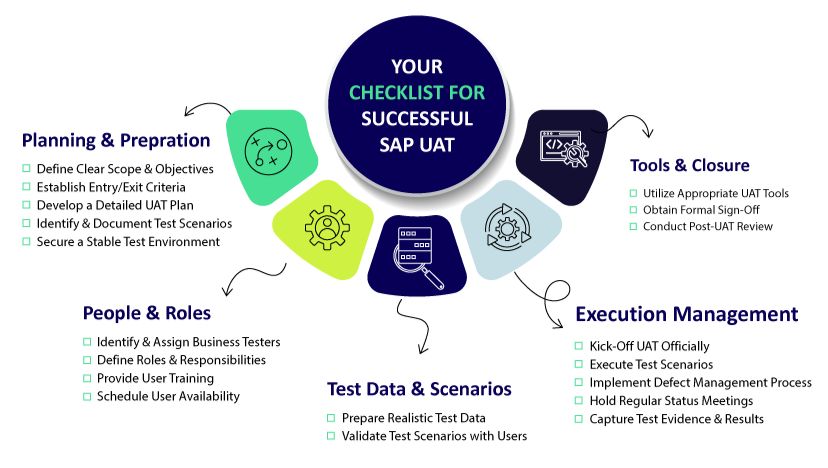
Start with a Clear Plan & Strategy: Define the UAT scope, objectives, specific business processes to be tested, timelines, and clear roles and responsibilities for testers and approvers before testing begins. Establish clear entry and exit criteria.
Involve Business Users Early and Often: Don’t wait until the final UAT phase. Engage business users during requirement gathering and design phases to ensure alignment and leverage their expertise in defining realistic test scenarios.
Focus on End-to-End Business Processes: Prioritize testing complete, real-world workflows that mimic daily operations (e.g., creating a sales order through to billing and payment) rather than just testing isolated transactions.
Prioritize Realistic Test Data: Make test data management a priority. Invest time and potentially tools to ensure testers have access to relevant, comprehensive, and compliant data sets that cover the required business scenarios.
Establish Effective Defect Management Strategies: Implement a clear, user-friendly process for business users to report defects found during UAT. Ensure prompt triage, clear communication on status, and efficient resolution by the technical teams.
Leverage the Right Tools: Manual UAT processes can be cumbersome. Utilizing appropriate tools for test management, execution tracking, data provisioning, and capturing results can drastically streamline the process, provide valuable insights, and make participation easier for business users. This is where modern platforms begin to show their true value.
Introducing Qyrus: A Smarter, AI-Powered Approach to SAP UAT
We’ve explored the critical nature of SAP User Acceptance Testing, the significant hurdles organizations face, and the best practices required for success. It’s clear that traditional methods and existing tools often struggle to keep pace, leading to prolonged test cycles and delays in adopting crucial business-IT changes. Today’s complex, hybrid IT landscapes, especially those involving SAP, demand a fresh perspective and new-age testing tools.
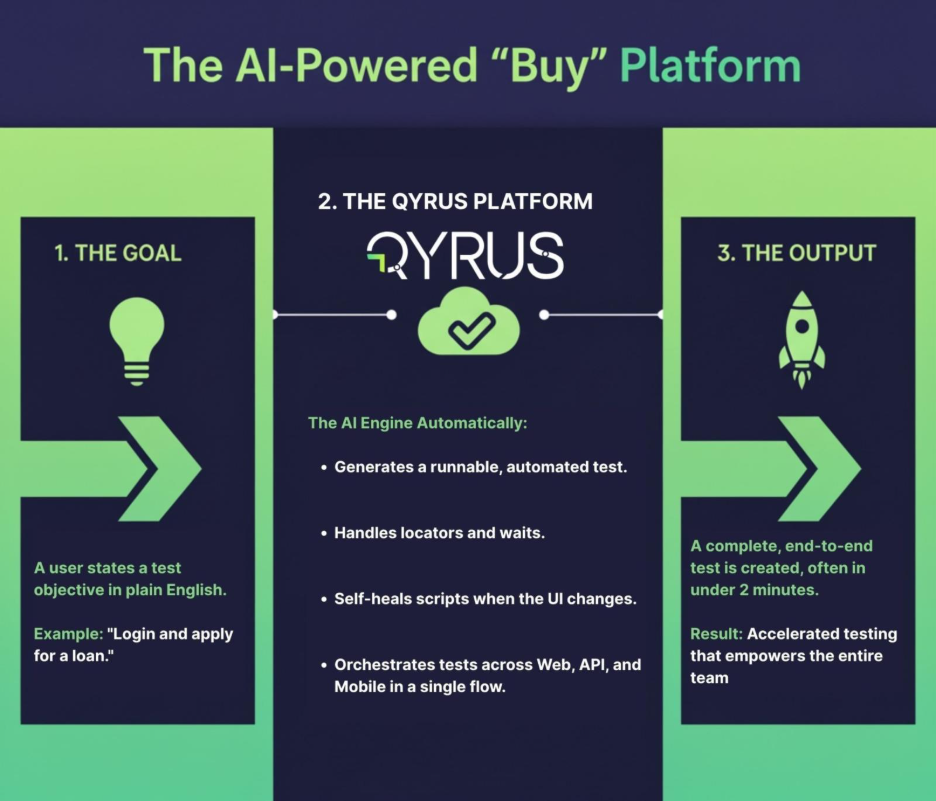
This is where Qyrus enters the picture. Qyrus isn’t just another testing tool; it’s designed specifically to tackle the challenges of modern Enterprise Application Testing, offering a fundamentally smarter way to approach validation, particularly for complex systems like SAP. Qyrus is envisioned as a comprehensive, codeless, and highly intelligent test automation SaaS platform built for the demands of digital transformation.
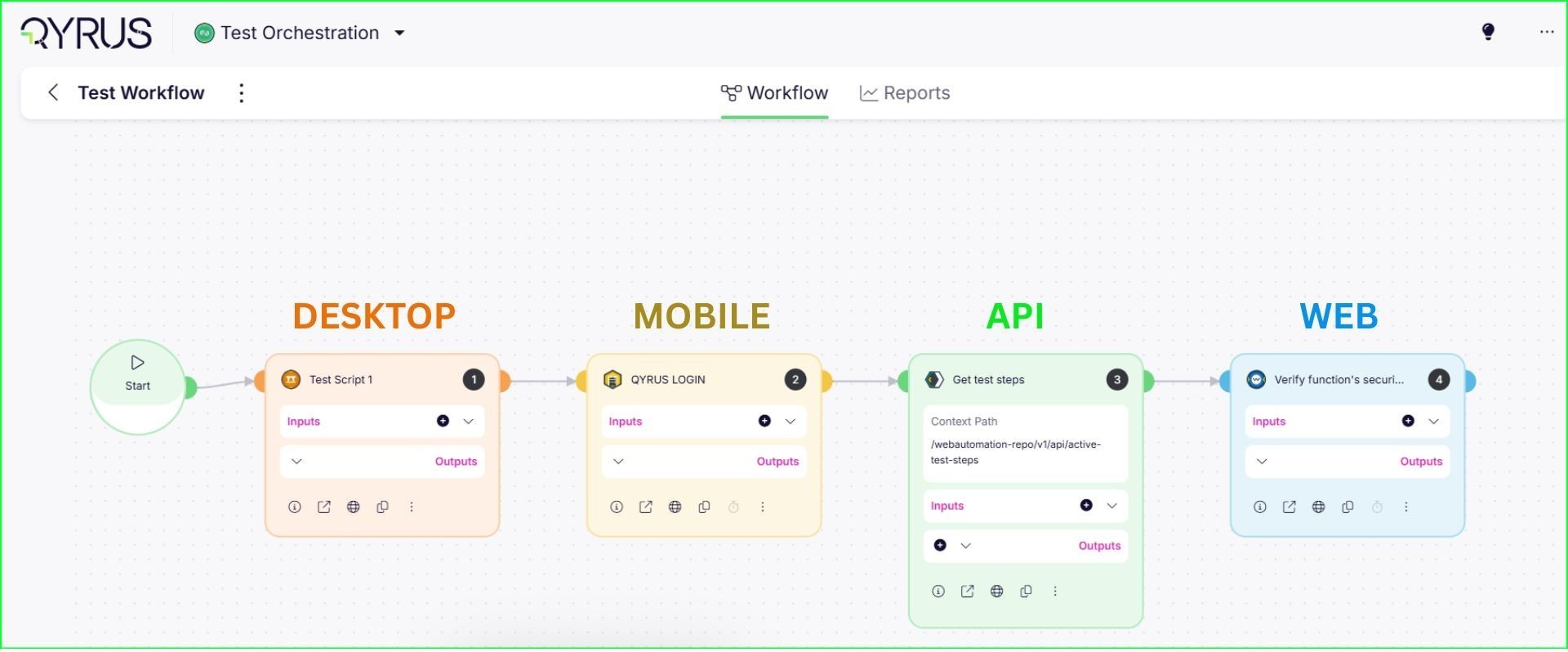
At its core, Qyrus leverages an AI-powered engine, moving beyond the limitations of older tools or time-consuming custom frameworks. It’s built to handle the diverse technologies found in modern SAP environments – encompassing not just traditional ERP interfaces but also Web (like Fiori apps), Mobile, APIs, and other integrated components. This unified approach directly addresses the difficulty of testing across today’s interconnected, multi-platform business processes.
For stakeholders seeking an intelligent, AI-enhanced alternative to tools like SAP Solution Manager, Qyrus provides capabilities designed to streamline UAT, improve accuracy, and ultimately ensure that SAP solutions deliver exceptional user experiences and tangible business value. It’s about shifting UAT from a potential bottleneck to a strategic enabler for confident go-lives.
How Qyrus Streamlines and Enhances SAP UAT
Let’s explore how Qyrus’s specific features directly address the common hurdles in SAP User Acceptance Testing, making the process more efficient and effective for everyone involved, especially business users.
(A) Intelligent Insights: Focusing Your UAT Efforts
Challenges Addressed: Keeping pace with change, SAP complexity, managing customizations.
Qyrus Capability: Qyrus tackles this head-on with its Test Strategy module (including Business Analysis, Customization Insights, Workbench Insights) and Impact Analyzer. Instead of guesswork, Qyrus analyzes actual SAP system usage, pinpoints implemented customizations and assesses the delta from release changes or transports. It intelligently identifies exactly which business processes and transactions are impacted by changes.
Benefit for UAT: This eliminates the “test everything” burden. Business users receive guided, impact-based recommendations on precisely what needs validation. This targeted approach, noted for its depth in identifying affected transactions, ensures UAT efforts are focused on the highest-risk areas, saving significant time and aligning testing with real-world usage and changes.
(B) Simplified Test Case Management & Design
Challenges Addressed: Business user time constraints, complexity in test design.
Qyrus’ Capability: While Qyrus offers powerful automation, its AI capabilities like SAP Scribe (a conversational AI trained on SAP knowledge) and the AI Test Generator act as intelligent assistants for UAT preparation. They can analyze functional specifications or even custom code (ABAP, UI5) to brainstorm and suggest relevant test scenarios.
Benefit for UAT: These features provide a robust starting point or baseline for UAT test cases. Business users aren’t expected to become automation experts; instead, they can review, refine, and adapt these AI-generated suggestions to fit their specific end-to-end UAT scenarios, ensuring comprehensive coverage without starting from scratch. This AI assistance accelerates the design phase, respecting the valuable time of business participants.
(C) Seamless & Realistic Test Data Management
Challenges Addressed: The critical need for realistic and comprehensive test data, especially for complex chains in systems like S/4HANA.
Qyrus Capability: Qyrus’s DataChain module revolutionizes test data provisioning for SAP. Business users can simply input a starting point, like a document or transaction number. DataChain automatically identifies all linked transactions in the business process chain and extracts the relevant data fields – even from S/4HANA’s in-memory database using a live data extraction approach. The Test Data Analyzer further assists with managing, masking, and ensuring data consistency.
Benefit for UAT: This provides business users with the rich, realistic, end-to-end data needed for their scenarios quickly and without manual drudgery or risky reliance on production data copies. It ensures UAT scenarios accurately reflect real operational data flows.
Challenges Addressed: Business user availability, testing complete cross-module/cross-platform workflows.
Qyrus Capability: Qyrus supports UAT execution efficiency in several ways. Robotic Smoke Testing (RST) can automate foundational checks, ensuring system stability before UAT begins, freeing users from repetitive tasks. Crucially, Qyrus excels at testing end-to-end business processes that span multiple SAP modules (SAP GUI, Fiori) and integrated non-SAP systems (Web, Mobile, APIs, Desktop applications). Capabilities like Document Exchange Testing (IDoc) allow specific validation of critical data interchanges. Furthermore, the platform significantly improves execution speed and automatically stores test evidence.
Benefit for UAT: Business users can focus their valuable time on validating complex business logic and exception handling, confident that core functionalities are stable, and that testing covers the entire operational flow. The increased speed and automated evidence capture streamline the validation process itself.
Empowering Business Users: Making SAP UAT Accessible and Effective
Ultimately, the success of SAP Testing and SAP User Acceptance Testing hinges on the engagement and effectiveness of business users. Qyrus is designed with this principle in mind, aiming to empower not just testers and developers, but specifically the business teams performing this critical validation.
Recognizing that business users are not typically testing specialists and face time constraints, Qyrus focuses on making UAT participation more intuitive and efficient. It addresses concerns about non-testers owning complex automation by providing support and context rather than demanding automation expertise.
Here’s how Qyrus empowers your business users:
Clarity Through Insights: Instead of vague test lists, users get clear insights from the impact analysis, understanding why specific areas need testing. This context makes their validation efforts more meaningful.
Focused Task Lists: Guided test selection pinpoints the most critical scenarios impacted by change, allowing users to concentrate their limited time where it matters most.
Simplified Preparation: AI-assisted test case suggestions provide a starting point, while streamlined data generation via DataChain removes the significant burden of manual data preparation.
Ease of Use: The platform is designed for usability, allowing users to execute tests (whether manual validation aided by Qyrus insights, or reviewing automated results) and log feedback efficiently. (If Qyrus includes specific features for managing manual test scripts and evidence capture, they further simplify this process.)
Reduced Burden: By automating foundational checks (RST) and providing realistic data, Qyrus allows business users to focus on validating business logic and user experience, not troubleshooting basic setup issues.
The goal isn’t to turn business users into automation engineers, but to provide them with intelligent tools and clear information, enabling them to perform their essential UAT role with greater confidence and less friction.
Achieve Confident SAP Go-Lives with Qyrus
SAP User Acceptance Testing doesn’t have to be the resource-draining bottleneck it often becomes. By moving beyond traditional methods and embracing an intelligent, AI-powered platform like Qyrus, organizations can transform their UAT process.
Qyrus helps you overcome the inherent challenges of SAP complexity, constant change, and data provisioning. It enables you to implement best practices by providing:
Intelligent impact analysis to focus efforts precisely.
AI assistance to streamline test design.
Automated, realistic test data generation.
Efficient end-to-end validation across SAP and integrated systems.
An empowered experience for your critical business users.
The result? Significantly reduced testing effort (often turning days into hours), dramatically improved execution speed, reduced risk of production defects, and increased confidence in your SAP deployments. By ensuring your SAP solutions truly meet business needs through effective UAT, you accelerate adoption, maximize the value of your SAP investments, and achieve smoother, more successful go-lives.
Ready to revolutionize your SAP User Acceptance Testing?
Contact us today to request a personalized demo and discover how Qyrus can help you achieve confident SAP success.
The Velocity Gap in BFSI Software Quality
Why Traditional QA Fails Modern Finance
The BFSI sector faces immense pressure to deliver rapid digital transformation, but outdated, manual QA has become a bottleneck. AI accelerates innovation but introduces unpredictable behaviors that legacy approaches can’t handle. Fragmented toolchains and slow, error-prone testing expose banks to security risks, costly inefficiencies, and customer churn.
Download this whitepaper to learn how to:
Address non-determinism in AI-powered financial systems
Move from reactive bug-finding to proactive trust engineering
Integrate holistic, automated testing across web, mobile, and APIs
Quantify the bottom-line impact of engineered software quality
What You’ll Discover Inside
Core principles of Trust Engineering for BFSI institutions
Qyrus platform’s role in enabling unified, intelligent, and automated QA.
Case study: 200% ROI for a leading UK bank using agentic QA.
Strategies to protect customer data, enhance user experience, and reduce manual testing effort.
Qyrus, a provider of AI-powered software testing solutions to enterprises, today announced that it has been named a Leader in The Forrester Wave™: Autonomous Testing Platforms, Q4 2025. The report evaluated the 15 most significant providers in the market based on 25 criteria.
As organizations increasingly integrate artificial intelligence into their software development lifecycles, the demand for autonomous testing solutions that can validate both the applications and the AI models within them has surged. In this evaluation, Qyrus received the highest score possible (5.0) in the Roadmap, Testing AI Across Different Dimensions, Testing RAG Pipelines, Level of Autonomous Testing, Pricing Flexibility and transparency, and Testing Agentic Tool Calling criteria.
“We believe being named a Leader in a Forrester report is tremendous evidence of our vision to transform quality engineering through Agentic AI,” said Ravi Sundaram, President at Qyrus. “As enterprises move from simple automation to true autonomy, we are dedicated to providing a platform that not only accelerates release velocity but also ensures trust in the generative AI systems building our future.”
The report notes that Qyrus “excels in AI testing dimensions, using heuristics and LLM to judge faithfulness, relevance, and coverage.” With the rise of agentic workflows, Qyrus has focused heavily on agentic test orchestration. The report states, “Its Sense to Evaluate to Execute to Report (SEER) orchestration framework and excellent agentic tool calling result in an above-par score for autonomous testing”.
Qyrus’ platform enables enterprises to scale their testing efforts across web, mobile, and API layers while addressing the specific complexities of modern AI applications. In the report’s “Forrester’s Take” section, the report concludes that “Qyrus suits enterprises seeking advanced AI-driven testing, multiagent orchestration, and robust validation of genAI outputs at speed and scale”.
Qyrus believes its recognition as a Leader underscores its commitment to innovation and its ability to support customers as they navigate the complexities of testing in an AI-first world.
This News Release is originally published on EIN Presswire
Disclaimer
Forrester does not endorse any company, product, brand, or service included in its research publications and does not advise any person to select the products or services of any company or brand based on the ratings included in such publications. Information is based on the best available resources. Opinions reflect judgment at the time and are subject to change. For more information, read about Forrester’s objectivity here.
SAP releases updates at breakneck speed. Development teams are sprinting forward, leveraging AI-assisted coding to deploy features faster than ever. Yet, in conference rooms across the globe, SAP Quality Assurance (QA) leaders face a grim reality: their testing cycles are choking innovation. We see this friction constantly in the field—agility on the front-end, paralysis in the backend.
The gap between development speed and testing capability is not just a process issue; it is a financial liability. Modern enterprise resource planning (ERP) systems, particularly those driven by SAP Fiori and UI5, have introduced significant complexities into the Quality Assurance lifecycle. Fiori’s dynamic nature—characterized by frequent updates and the generation of dynamic control identifiers—systematically breaks traditional testing models.
When business processes evolve, the Fiori applications update to meet new requirements, but the corresponding test cases often lag behind. This misalignment creates a dangerous blind spot. We often see organizations attempting to validate modern, cloud-native SAP environments using methods designed for on-premise legacy systems. This disconnect impacts more than just functional correctness; it hampers the ability to execute critical SAP Fiori performance testing at scale. If your team cannot validate functional changes quickly, they certainly cannot spare the time to load test SAP Fiori applications under peak user conditions, leaving the system vulnerable to crashes during critical business periods.
To understand why SAP Fiori test automation strategies fail so frequently, we must examine the three distinct evolutionary phases of SAP testing. Most enterprises remain dangerously tethered to the first two, unable to break free from the gravity of legacy processes.
Wave 1: The Spreadsheet Quagmire and the High Cost of Human Error
For years, “testing” meant a room full of functional consultants and business users staring at spreadsheets. They manually executed detailed, step-by-step scripts and took screenshots to prove validation.
This approach wasn’t just slow; it was economically punishing. Manual testing suffers from a linear cost curve—every new feature adds linear effort. Industry analysis suggests that the annual cost for manual regression testing alone can exceed $201,600 per environment. When you scale that across a five-year horizon, organizations often burn over $1 million just to stay in the same place. Beyond the cost, the reliance on human observation inevitably leads to “inconsistency and human error,” where critical business scenarios slip through the cracks due to sheer fatigue.
Wave 2: The False Hope of Script-Based Automation
As the cost of manual testing became untenable, organizations scrambled toward the second wave: Traditional Automation. Teams adopted tools like Selenium or record-and-playback frameworks, hoping to swap human effort for digital execution.
It worked, until it didn’t.
While these tools solved the execution problem, they created a massive maintenance liability. Traditional web automation frameworks rely on static locators (like XPaths or CSS selectors). They assume the application structure is rigid. SAP Fiori, however, is dynamic by design. A simple update to the UI5 libraries can regenerate control IDs across the entire application.
Instead of testing new features, QA engineers spend 30% to 50% of their time just setting up environments and fixing broken locators. This isn’t automation; it is just automated maintenance.
Wave 3: The Era of ERP-Aware Intelligence
We have hit a ceiling with script-based approaches. The complexity of modern SAP Fiori test automation demands a third wave: Agentic AI.
This new paradigm moves beyond checking if a button exists on a page. It focuses on “ERP-Aware Intelligence”—tools that understand the business intent behind the process, the data structures of the ERP, and the context of the user journey. We are moving away from fragile scripts toward intelligent agents that can adapt to changes, understand business logic, and ensure process integrity without constant human intervention.
To achieve the economic viability modern enterprises need, automation must do more than click buttons. It must reduce maintenance effort by 60% to 80%. Without this shift, teams will remain trapped in a cycle of repairing yesterday’s tests instead of assuring tomorrow’s releases.
The Technical Trap: Why Standard Automation Crumbles Under Fiori
You cannot solve a dynamic problem with a static tool. This fundamental mismatch explains why so many SAP Fiori test automation initiatives stall within the first year. The architecture of SAP Fiori/UI5 is built for flexibility and responsiveness, but those very traits act as kryptonite for traditional, script-based testing frameworks.
The “Dynamic ID” Nightmare
If you have ever watched a Selenium script fail instantly after a fresh deployment, you have likely met the Dynamic ID problem.
Standard web automation tools function like a treasure map: “Go to X coordinate and dig.” They rely on static locators—specific identifiers in the code (like button_123)—to find and interact with elements.
SAP Fiori does not play by these rules. To optimize performance and rendering, the UI5 framework dynamically generates control IDs at runtime. A button labeled __xmlview1–orderTable in your test environment today might become __xmlview2–orderTable in production tomorrow.
Because the testing tool cannot find the exact ID it recorded, the test fails. The application works perfectly, but the report says otherwise. These “false negatives” force your QA engineers to stop testing and start debugging, eroding trust in the entire automation suite.
The Maintenance Death Spiral
This instability triggers a phenomenon known as the Maintenance Death Spiral. When locators break frequently, your team stops building new tests for new features. Instead, they spend their days patching old scripts just to keep the lights on.
If you spend 70% of your time fixing yesterday’s work, you cannot support today’s velocity. This high rework cost destroys the ROI of automation. You aren’t accelerating release cycles; you are merely shifting the bottleneck from manual execution to technical debt management.
The “Documentation Drift”
While your engineers fight technical fires, a silent strategic failure occurs: Documentation Drift.
In a fast-moving SAP environment, business processes evolve rapidly. Developers update the code to meet new requirements, but the functional specifications—and the test cases based on them—often remain static.
This creates a dangerous gap. Your tests might pass because they validate an outdated version of the process, while the actual implementation has drifted away from the business intent. Without a mechanism to triangulate code, documentation, and tests, you risk deploying features that are technically functional but practically incorrect.
The Tooling Illusion: Why Current Solutions Fall Short
When organizations realize manual testing is unsustainable, they often turn to established automation paradigms, but each category trades one problem for another. Model-based solutions, while offering stability, suffer from a severe “creation bottleneck,” forcing functional teams to manually scan screens and build complex underlying models before a single test can run. On the other end of the spectrum, code-centric and low-code frameworks offer flexibility but remain fundamentally “blind” to the ERP architecture. Because these tools rely on standard web locators rather than understanding the business object, they shatter the moment SAP Fiori test automation environments generate dynamic IDs, forcing teams to simply trade manual execution for manual maintenance.
Native legacy tools built specifically for the ecosystem might feel like a safer bet, but they lack the modern, agentic capabilities required for today’s cloud cadence. These older platforms miss critical self-healing features and struggle to keep pace with evolving UI5 elements, making them ill-suited for agile SAP Fiori performance testing. Ultimately, no existing category—whether model-based, script-based, or native—fully bridges the gap between the technical implementation and the business intent. They leave organizations trapped in a cycle where they must choose between the high upfront cost of creation or the “death spiral” of ongoing maintenance, with no mechanism to align the testing reality with drifting documentation.
Code-to-Test: The Agentic Shift in SAP Fiori Test Automation
We built the Qyrus Fiori Test Specialist to answer a singular question: Why are humans still explaining SAP architecture to testing tools? The “Third Wave” of QA requires a platform that understands your ERP environment as intimately as your functional consultants do. We achieved this by inverting the standard workflow. We moved from “Record and Play” to “Upload and Generate.”
SAP Scribe: Reverse Engineering, Not Recording
The most expensive part of automation is the beginning. Qyrus eliminates the manual “creation tax” through a process we call Reverse Engineering. Instead of asking a business analyst to click through screens while a recorder runs, you simply upload the Fiori project folder containing your View and Controller files.
Proprietary algorit hms, which we call Qyrus SAP Scribe, ingest this source code alongside your functional requirements. The AI analyzes the application’s input fields, data flow, and mapping structures to automatically generate ready-to-run, end-to-end test cases. This agentic approach creates a massive leap in SAP Fiori test automation efficiency. It drastically reduces dependency on your business teams and eliminates the need to manually convert fragile recordings into executable scripts. You get immediate validation that your tests match the intended functionality without writing a single line of code.
The Golden Triangle: Triangulated Gap Analysis
Standard tools tell you if a test passed or failed. Qyrus tells you if your business process is intact.
We introduced a “Triangulated” Gap Analysis that compares three distinct sources of truth:
The Code: The functionality actually implemented in the Fiori app.
The Specs: The requirements defined in your functional documentation.
The Tests: The coverage provided by your existing validation steps.
Dashboards visualize exactly where the reality of the code has drifted from the intent of the documentation. The system then provides specific recommendations: either update your documentation to match the new process or modify the Fiori application to align with the original requirements. This ensures your QA process drives business alignment, not just bug detection.
The Qyrus Healer: Agentic Self-Repair
Even with perfect generation, the “Dynamic ID” problem remains a threat during execution. This is where the Qyrus Healer takes over.
When a test fails because a control ID has shifted—a common occurrence in UI5 updates—the Healer does not just report an error. It pauses execution and scans the live application to identify the new, correct technical field name. It allows the user to “Update with Healed Code” instantly, repairing the script in real-time. This capability is the key to breaking the maintenance death spiral, ensuring that your automation assets remain resilient against the volatility of SaaS updates.
Beyond the Tool: The Unified Qyrus Platform
Optimizing a single interface is not enough. SAP Fiori exists within a complex ecosystem of APIs, mobile applications, and backend databases. A testing strategy that isolates Fiori from the rest of the enterprise architecture leaves you vulnerable to integration failures. Qyrus addresses this by unifying SAP Fiori performance testing, functional automation, and API validation into a single, cohesive workflow.
Unified Testing and Data Management
Qyrus extends coverage beyond the UI5 layer. The platform allows you to load test SAP Fiori workflows under peak traffic conditions while simultaneously validating the integrity of the backend APIs driving those screens. This holistic view ensures that your system does not just look right but performs right under pressure.
However, even the best scripts fail without valid data. Identifying or creating coherent data sets that maintain referential integrity across tables is often the “real bottleneck” in SAP testing. The Qyrus Fiori Test Specialist integrates directly with Qyrus DataChain to solve this challenge. DataChain automates the mining and provisioning of test data, ensuring your agentic tests have the fuel they need to run without manual intervention.
Agentic Orchestration: The SEER Framework
We are moving toward autonomous QA. The Qyrus platform operates on the SEER framework—Sense, Evaluate, Execute, Report.
Sense: The system reads and interprets the application code and documentation.
Evaluate: It identifies gaps between the technical implementation and business requirements.
Execute: It generates and runs tests using self-healing locators.
Report: It provides actionable intelligence on process conformance.
This framework shifts the role of the QA engineer from a script writer to a process architect.
Conclusion: From “Checking” to “Assuring”
The path to effective SAP Fiori test automation does not lie in faster scripting. It lies in smarter engineering.
For too long, teams have been stuck in the “checking” phase—validating if a button works or a field accepts text. The Qyrus Fiori Test Specialist allows you to move to true assurance. By utilizing Reverse Engineering to eliminate the creation bottleneck and the Qyrus Healer to survive the dynamic ID crisis, you can achieve the 60-80% reduction in maintenance effort that modern delivery cycles demand.
Ready to Transform Your SAP QA Strategy?
Stop letting maintenance costs eat your budget. It is time to shift your focus from reactive validation to proactive process conformance.
If you are ready to see how SAP Fiori test automation can actually work for your enterprise—delivering stable locators, autonomous repair, and deep ERP awareness—the Qyrus Fiori Test Specialist is the solution you have been waiting for. Don’t let brittle scripts or manual regressions slow down your S/4HANA migration. Eliminate the creation bottleneck and achieve the 60-80% reduction in maintenance effort that your team deserves.
Let’s confront the reality of mobile testing right now. It is messy. It is expensive. And for most teams, it is a constant battle against entropy.
We aren’t just writing tests anymore; we are fighting to keep them alive. The sheer scale of hardware diversity creates a logistical nightmare. Consider the Android ecosystem alone: it now powers over 4.2 billion active smartphones produced by more than 1,300 different manufacturers. When you combine this hardware chaos with OS fragmentation—where Android 15 holds only 28.5% market share while older versions cling to relevance—you get a testing matrix that breaks traditional scripts.
But the problem isn’t just the devices. It’s the infrastructure.
If you use real-device clouds, you know the frustration of “hung sessions” and dropped connections. You lose focus. You lose context. You lose time. These infrastructure interruptions force testers to restart sessions, re-establish state, and waste hours distinguishing between a buggy app and a buggy cloud connection.
This chaos creates a massive, invisible tax on your engineering resources. Instead of building new features or exploring edge cases, your best engineers are stuck in the “maintenance trap.” Industry data reveals that QA teams often spend 65-70% of their time maintaining existing tests rather than creating new ones.
That is not a sustainable strategy. It is a slow leak draining your return on investment (ROI). To fix this, we didn’t just need a software update; we needed a complete architectural rebuild.
The Zero-Migration Paradox: Innovation Without the Demolition
When a software vendor announces a “complete platform rebuild,” seasoned QA leaders usually panic.
We know what that phrase typically hides. It implies “breaking changes.” It signals weeks or months of refactoring legacy scripts to fit new frameworks. It means explaining to stakeholders why regression testing is stalled while your team migrates to the “new and improved” version.
We chose a harder path for the upcoming rebuild of the Qyrus Mobility platform.
We refused to treat your existing investment as collateral damage. Our engineering team made one non-negotiable promise during this rebuild: 100% backwards compatibility from Day 1.
This is the “Zero Migration” paradox. We completely re-imagined the building, managing, and running of mobile tests to be faster and smarter, yet we ensured that zero migration effort is required from your team. You do not need to rewrite a single line of code.
Those complex, business-critical test scripts you spent years refining? They will work perfectly the moment you log in. We prioritized this stability to ensure you get the power of a modern engine without the downtime of a mechanic’s overhaul. Your ROI remains protected, and your team keeps moving forward, not backward.
Stop Fixing the Same Script Twice: The Modular Revolution
We need to talk about the “Copy-Paste Trap.”
In the early days of a project, linear scripting feels efficient. You record a login flow, then record a checkout flow, and you are done. But as your suite grows to hundreds of tests, that linear approach becomes a liability. If your app’s login button ID changes from #submit-btn to #btn-login, you don’t just have one problem; you have 50 problems scattered across 50 different scripts.
This is the definition of Test Debt. It is the reason why teams drown in maintenance instead of shipping quality code.
With the new Qyrus Mobility update, we are handing you the scissors to cut that debt loose. We are introducing Step Blocks.
Think of Step Blocks as the LEGO® bricks of your testing strategy. You build a functional sequence—like a “Login” flow or an “Add to Cart” routine—once. You save it. Then, you reuse that single block across every test in your suite.
The magic happens when the application changes. When that login button ID inevitably updates, you don’t hunt through hundreds of files. You open your Login Step Block, update the locator once, and it automatically propagates to every test script that uses it.
This shift from linear to modular design is not just a convenience; it is a mathematical necessity for scaling. Industry research confirms that adopting modular, component-based frameworks can reduce maintenance costs by 40-80%.
By eliminating the redundancy in your scripts, you free your team from the drudgery of repetitive fixes. You stop maintaining the past and start testing the future.
Reclaiming Focus: Banish the “Hung Session”
We need to address the most frustrating moment in a tester’s day.
You are forty minutes into a complex exploratory session. You have almost reproduced that elusive edge-case bug. You are deep in the flow state. Then, the screen freezes. The connection drops. Or perhaps you hit a hard limit; standard cloud infrastructure often enforces strict 60-minute session timeouts.
The session dies, and with it, your context. You have to reconnect, re-install the build, navigate back to the screen, and hope you remember exactly what you were doing. Industry reports confirm that cloud devices frequently go offline unexpectedly, forcing testers to restart entirely.
We designed the new Qyrus Mobility experience to eliminate these interruptions.
We introduced Uninterrupted Editing because we know testing is iterative. You can now edit steps, fix logic, or tweak parameters without closing the device window. You stay connected. The app stays open. You fix the test and keep moving.
We also solved the context-switching problem with Rapid Script Switching. If you need to verify a different workflow, you don’t need to disconnect and start a new session. You simply load the new script file into the active window. The device stays with you.
We even removed the friction at the very start of the process. With our “Zero to Test” workflow, you can upload an app and start building a test immediately—no predefined project setup required. We removed the administrative hurdles so you can focus on the quality of your application, not the stability of your tools.
Future-Proofing with Data & AI: From Static Inputs to Agentic Action
Mobile applications do not live in a static vacuum. They exist in a chaotic, dynamic world where users switch time zones, calculate different currencies, and demand personalized experiences. Yet, too many testing tools still rely on static data—hardcoded values that work on Tuesday but break on Wednesday.
We have rebuilt our data engine to handle this reality.
The new Qyrus Mobility platform introduces advanced Data Actions that allow you to calculate and format variables directly within your test flow. You can now pull dynamic values using the “From Data Source” option, letting you plug in complex datasets seamlessly. This is critical because modern apps handle 180+ different currencies and complex date formats that static scripts simply cannot validate. We are giving you the tools to test the app as it actually behaves in the wild, not just how it looks in a spreadsheet.
But we are not stopping at data. We are preparing for the next fundamental shift in software quality.
You have heard the hype about Generative AI. It writes code. It generates scripts. But it is reactive; it waits for you to tell it what to do. The future belongs to Agentic AI.
In Wave 3 of our roadmap, we will introduce AI Agents designed for autonomous execution. Unlike Generative AI, which focuses on content creation, Agentic AI focuses on outcomes. These agents will not just follow a script; they will autonomously explore your application, identifying edge cases and validating workflows that a human tester might miss. We are building the foundation today for a platform that doesn’t just assist you—it actively works alongside you.
Practical Testing: Generative AI Vs. Agentic AI
Dimension
Generative AI
Agentic AI
Core Function
Generates test code and suggestions
Autonomously executes and optimizes testing
Decision-Making
Reactive; requires prompts
Proactive; makes independent decisions
Error Handling
Cannot fix errors autonomously; requires human correction
Automatically detects, diagnoses, and fixes errors
Maintenance
Generates new tests; humans maintain existing tests
Actively uses tools, APIs, and systems to accomplish tasks
Feedback Loops
None; static output until new prompt
Continuous; learns and adapts from every execution
Outcome Focus
Process-oriented (did I generate good code?)
Results-oriented (did I achieve quality objectives?)
Conclusion: The New Standard for 2026
This update is not a facelift. It is a new foundation.
We rebuilt the Qyrus Mobility platform to solve the problems that actually keep you awake at night: the maintenance burden, the flaky sessions, and the fear of breaking what already works. We did it while keeping our promise of 100% backwards compatibility.
You get the speed of a modern engine. You get the intelligence of modular design. And you keep every test you have ever written.
Get Ready. The future of mobile testing arrives in 2026. Stay tuned for the official release date—we can’t wait to see what you build.
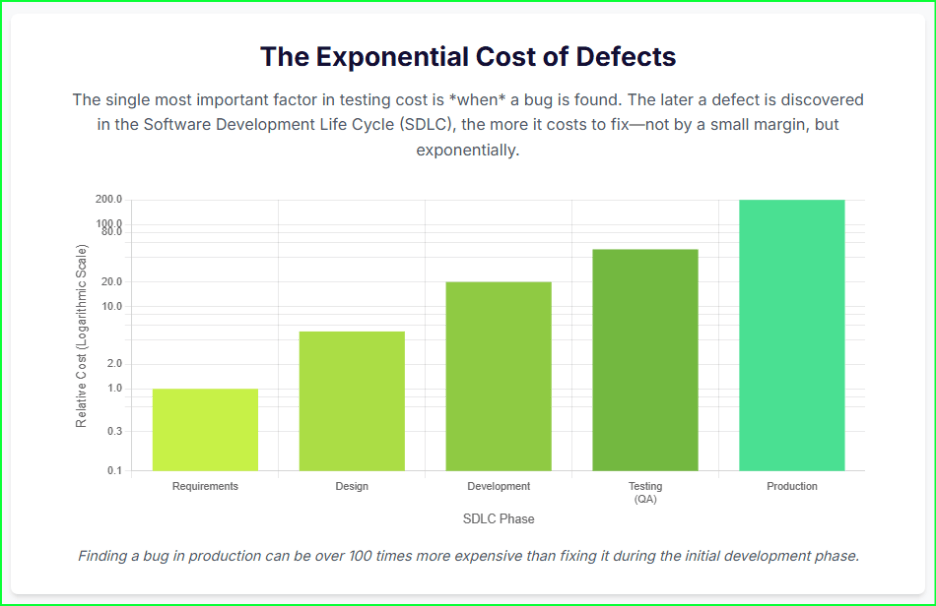
Consider the staggering price of poor software. In 2022, the cost of poor software quality in the US alone hit an astonishing $2.41 trillion. This isn’t just a number; it’s a massive tax on businesses that fail to invest in quality. The math is simple: a bug found in production is up to 100 times more expensive to fix than one caught during the initial design phase.
Many organizations, however, still treat their software testing cost as a line item to slash. This short-sighted approach creates a cycle of underinvestment. It leads directly to catastrophic external failures, emergency patches, and customer churn. You are not saving money; you are just delaying a much larger payment.
This guide changes that perspective. We will reframe software testing as a strategic, high-return investment. We will deconstruct the true costs of quality assurance, provide a clear framework for accurate software testing cost estimation, and share proven strategies for how to reduce the cost of software testing—not by cutting corners, but by optimizing value.
The Strategic Framework: Cost of Quality (CoQ) vs. Cost of Poor Quality (CoPQ)
To effectively manage your software testing cost, you must stop thinking about it as a simple expense. Instead, you need a structured financial framework. The Cost of Quality (CoQ) provides this structure. It classifies every quality-related expenditure into two strategic categories: proactive investments and reactive failures. This model reframes the entire conversation from “how much does testing cost?” to “what is the value of our investment in quality?”.
This framework is built on a central economic principle: every dollar you invest in “Good Quality” directly and significantly reduces the exponentially more damaging “Poor Quality” costs.
The Cost of Good Quality (Proactive Investment)
These are the proactive investments you make to build quality into your product from the start.
Prevention Costs: This is the money you spend to prevent defects from ever happening. It includes activities like developer training on secure coding, robust test planning, and conducting thorough requirements analysis before a single line of code is written.
Appraisal (Detection) Costs: This is the cost of finding defects before they reach your customer. This category includes all traditional QA activities: running manual and automated tests, QA team salaries, automation tools licensing, and setting up test environments.
The Cost of Poor Quality (Reactive Liability)
These are the reactive expenses you incur when quality fails.
Internal Failure Costs: These are the costs to fix bugs before the product ships. This includes all the developer time spent on debugging and rework, as well as the time your QA team spends re-running tests after a fix.
External Failure Costs: This is the most expensive and dangerous category. These costs explode after a defective product is released to users. It includes everything from increased customer support calls and emergency hotfixes to regulatory penalties, lost revenue, and severe, lasting reputational damage.
Key Takeaway: A smart testing process involves a deliberate investment in Prevention and Appraisal costs. This proactive spending is the single most effective way to drastically reduce the massive, uncontrolled costs of Internal and External failures.
What Factors Really Determine Your Software Testing Cost?
Your final software testing cost is not a fixed number. It’s a variable figure that depends on several key drivers. Understanding these factors is the first step toward building an accurate software testing cost estimation model and identifying opportunities for optimization.
Project Complexity
This is the most significant cost driver. A simple, single-platform application requires far less testing effort than a complex, cross-platform enterprise system. More features, complex business logic, and numerous third-party integrations all directly increase the testing scope and, therefore, the cost.
Testing Types
Not all testing is created equal. Different test types require different skills, tools, and environments, leading to varied costs.
Functional & Regression Testing: These form the baseline of QA efforts. Manual functional testing can range from $15-$30 per hour.
Automation Testing: While it carries a higher initial investment for setup, automation testing, often billed at $20-$35 per hour, provides long-term ROI by reducing manual effort in regression cycles.
Performance Testing: This specialized testing requires advanced tools and environments to simulate user load, with rates often falling between $20-$35 per hour.
Security & Compliance Testing: This is a high-skill domain. Security testing rates can be $25-$45 per hour, and specialized penetration tests can range from $5,000 to over $100,000, depending on the application’s scope.
Team Model & Location
Where your team is located and how it’s structured dramatically impacts the budget. Labor rates vary significantly by region. For example, a QA tester in North America might cost $50-$150 per hour, while a tester with similar skills in Asia could be $15-$40 per hour. Outsourcing to regions with lower labor costs can lead to savings of 60-70%. The choice between in-house, outsourced, or a hybrid model is one of the most critical financial decisions you will make.
Automation Tools & Infrastructure
Your technology stack has a clear price tag. Commercial automation tools come with licensing fees, which must be factored into your budget. Your testing infrastructure also plays a major role. A traditional on-premise test lab requires significant capital expenditure (CapEx), with initial setup costs potentially ranging from $10,000 to $50,000. In contrast, a cloud-based testing platform shifts this to an operational expense (OpEx), offering a pay-as-you-go model that eliminates large upfront investments and reduces long-term maintenance.
The Hidden Costs You’re Forgetting
The most dangerous costs are the ones you don’t track.
Test Maintenance: This is the #1 hidden cost in test automation. As your application changes, test scripts break. Teams can spend up to 50% of their automation budget just fixing and maintaining brittle scripts instead of finding new bugs.
Technical Debt: Poorly written, complex code is a drag on quality. This “technical debt” makes the application exponentially harder and more expensive to test with every new feature.
Test Data Management: Creating, managing, and securing compliant test data (especially for regulations like GDPR) is a significant and often completely overlooked expense.
Opportunity Cost: This is the business value lost when a lengthy, inefficient testing process delays your product release, allowing competitors to capture market share.
How to Accurately Estimate Your Software Testing Cost
Forget guesswork. A reliable software testing cost estimate isn’t pulled from thin air; it’s built on a structured approach. An accurate forecast prevents budget overruns, justifies resource allocation, and sets up a clear baseline for your project’s financial health. Here is a three-step framework for a more accurate software testing cost estimation.
Step 1: Deconstruct the Work (Work Breakdown Structure – WBS)
You can’t estimate what you haven’t defined. Start by using a Work Breakdown Structure (WBS) to divide the entire testing project into smaller, manageable components. Instead of one giant task called “testing,” you’ll have a detailed list:
Test Planning & Strategy
Test Environment Setup & Configuration
Test Case Design (per module or feature)
Test Data Creation
Test Execution (for functional, regression, performance, etc.)
Defect Management & Reporting
This detailed list of tasks becomes the foundation for all your effort calculations.
Step 2: Apply an Estimation Model
Once you have your task list, you can apply proven models to estimate the effort (in hours) for each item.
Function-Point Analysis: This method gauges project size by breaking tasks into “functional points” and categorizing them as simple, medium, or complex. You assign points to each feature (e.g., a simple login is 1 point, a complex payment gateway is 4 points) and then multiply the total points by a standard effort-per-point based on your team’s past performance.
Three-Point (PERT) Estimation: This technique brilliantly accounts for uncertainty. For each task, you get three estimates: (O)ptimistic, (M)ost Likely, and (P)essimistic. You then use a weighted average to find the expected effort: (O + 4M + P) / 6. This method avoids the trap of purely optimistic planning.
Analogous Estimation: Use your own history as a guide. This model involves using historical data and metrics from similar past projects as a baseline to estimate the effort for your current one.
Step 3: Calculate the Final Cost
With your total effort estimated, the final calculation is straightforward.
(Total Estimated Effort in Hours) x (Blended Hourly Rate of QA Team) + (Tool & Infrastructure Costs) = Total Software Testing Cost
Always include a 15-20% contingency buffer on top of this total. This buffer accounts for the unknown—the unexpected issues, scope creep, and hidden complexities that inevitably arise.
Simple Example:
Total Effort (from Step 2): 400 hours
Blended QA Rate: $80/hr (avg. of onshore/offshore team)
5 Proven Strategies for How to Reduce the Cost of Software Testing
The goal is not just to cut your software testing cost, but to optimize your spending. You want to achieve maximum quality and speed for every dollar you invest. Here is how to reduce the cost of software testing by focusing on efficiency and value, not just arbitrary cuts.
Strategy 1: “Shift Left” – Test Early in the Development Cycle
This is the most critical and impactful strategy. The “Shift-Left” philosophy involves moving quality-related activities as early in the development lifecycle as possible. The economic driver is simple: the cost to fix a bug explodes over time.
A defect found and fixed by a developer during the design phase is trivial. The exact same bug found after release can cost 4 to 100 times more to remediate, factoring in customer support, emergency patches, and rework. By integrating QA professionals into requirements and design discussions, you prevent entire classes of defects from ever being written.
Strategy 2: Implement Strategic Automated Testing
Automation is a powerful cost-saver, but only when applied strategically. The goal is to automate tasks that provide a high return on investment. This includes:
Repetitive, time-consuming tasks like regression testing.
Data-driven tests that run the same script with thousands of different data inputs.
Avoid automating unstable features or tests that will only be run once. Strategic automation frees your skilled manual testers to focus on high-value, human-centric tasks like exploratory testing and usability testing. Organizations that invest in test automation can see a positive ROI within the first year.
Strategy 3: Adopt Risk-Based Testing (RBT)
You cannot and should not test everything with equal effort. Risk-Based Testing (RBT) provides a systematic method to focus your finite testing efforts on the areas of the application that pose the greatest business risk.
This process involves identifying high-risk modules—based on code complexity, frequency of use, and the business impact of a failure—and prioritizing them. This follows the Pareto Principle (80/20 rule): you can often find 80% of the critical defects by focusing on the 20% most important features. Studies have shown that a well-implemented RBT strategy can yield a 35% higher ROI on your testing investment.
Strategy 4: Optimize Your Sourcing Strategy
A hybrid model is often the most cost-effective approach. This strategy involves:
Keeping your core strategy, complex risk-based testing, and business logic validation in-house.
Outsourcing or offloading high-volume, repetitive regression suites or specialized testing (like security) to a cost-effective partner.
This gives you the control of an in-house team combined with the cost-efficiency and specialized talent pool of an outsourcing partner. This can be especially effective for accessing specialized skills, like penetration testing, which can be slow and expensive to build internally.
Traditional automation tools have a critical flaw: they create the massive “Test Maintenance” hidden cost we identified earlier. As your application evolves, brittle scripts break, forcing your engineers to spend up to 50% of their time just fixing old tests.
Modern, AI-driven platforms are designed to solve this exact problem. AI can automatically detect UI changes, “self-heal” broken tests, and intelligently generate new test cases, drastically reducing maintenance overhead. AI-driven approaches have been shown to reduce overall QA costs by as much as 50%.
Cost Effectiveness with Qyrus Autonomous Platform
The biggest flaw in most automated testing strategies is the hidden software testing cost of maintenance. As your app evolves, your tests break, and your engineers spend more time fixing tests than finding bugs.
The Solution: The Qyrus Autonomous Testing Platform
Eliminate Tool Sprawl: Qyrus is a unified platform that handles Web, Mobile, API, Desktop, and SAP testing. This consolidation dramatically reduces licensing costs and the friction of a fragmented toolchain.
Crush Maintenance Costs with AI: The Qyrus SEER framework uses intelligent AI agents to tackle the biggest cost drivers:
Healer: Automatically detects UI changes and “self-heals” broken tests, virtually eliminating the manual maintenance overhead that plagues other tools.
TestGenerator & Rover: Autonomously generate and execute tests from requirements or by exploring your application, slashing the manual effort needed for test planning and creation.
Enable True Continuous Testing: Qyrus integrates directly into your CI/CD pipeline, allowing you to “shift left” and find bugs early in the development cycle when they are cheapest to fix.
The Bottom Line: Qyrus makes your testing process more cost efficient not just by automating, but by autonomously maintaining your automation. This delivers a faster ROI and frees your engineers to focus on quality, not script repair.
Beyond Cost: Measuring the Business ROI of Your Testing Investment
A mature testing strategy doesn’t just save money; it actively drives business value. To prove this, you must connect your testing efforts to the key performance indicators (KPIs) that your entire business runs on. The focus must shift from activity metrics (e.g., “test cases executed”) to outcome-based metrics that measure operational stability and delivery velocity.
Reducing the Change Failure Rate (CFR)
This is a critical DORA metric that measures how often a deployment to production fails or results in a degraded service. A high CFR is a direct indicator of quality problems escaping your test process, and it creates immense rework costs. A robust, automated regression testing suite, tracked in your CI/CD dashboard, is the number one tool for keeping this rate low and ensuring production stability.
Improving Mean Time to Recovery (MTTR)
When a failure does happen (and it will), this DORA metric measures the average time it takes to restore service. A long MTTR translates directly to customer impact, lost revenue, and reputational damage. A high-speed, reliable continuous testing pipeline is essential here. It allows your team to validate a fix and safely deploy it in minutes or hours, not days.
Increasing Release Velocity
For decades, testing was seen as the primary bottleneck to release new features. By automating your regression suite and reducing the testing cycle, you directly increase your release velocity. This allows you to capture market opportunities before your competitors. High-performing DevOps organizations that practice continuous testing deploy multiple times per day, not monthly, and have significantly lower change failure rates.
Conclusion: Stop Managing Cost, Start Optimizing Value
The software testing cost is not an unavoidable expense but a strategic, high-return investment in product quality and business resilience. The real price tag to fear is the $2.41 trillion cost of poor software—that is the steep price businesses pay for not investing.
You can achieve true cost effectiveness and competitive advantages. The path requires reframing your entire strategy around the Cost of Quality (CoQ) framework. It demands that you shift left to find bugs earlier, prioritize your efforts with risk-based testing, and—most importantly—leverage modern, autonomous platforms. These tools are the only way to eliminate the single biggest cost driver in traditional automation: the crippling, 50% budget-drain of test maintenance.
Stop letting brittle scripts and fragmented tools inflate your testing budget.
See how Qyrus’ AI-powered, unified platform can cut your maintenance overhead, boost your release velocity, and deliver a measurable ROI. Schedule a Demo Today!
Welcome to our November update! As we approach the end of the year, our mission to simplify and supercharge your testing lifecycle continues with renewed vigor. In November, we’ve focused on removing the friction between your tools and your goals, delivering enhancements that offer greater visibility, deeper ecosystem integration, and a more personalized AI experience.
In November, we are bridging critical gaps in your workflow. We’ve made reporting clearer with context-rich screenshots, streamlined test creation with instant cURL imports, and empowered enterprise teams by unlocking full Test Suite executions directly within Xray. Plus, our AI algorithms are now smarter than ever, capable of leveraging memory to adapt to your specific context. These updates are all about giving you the clarity and control you need to test with confidence.
Let’s dive into the powerful new features available on the Qyrus platform in November!
Web Testing
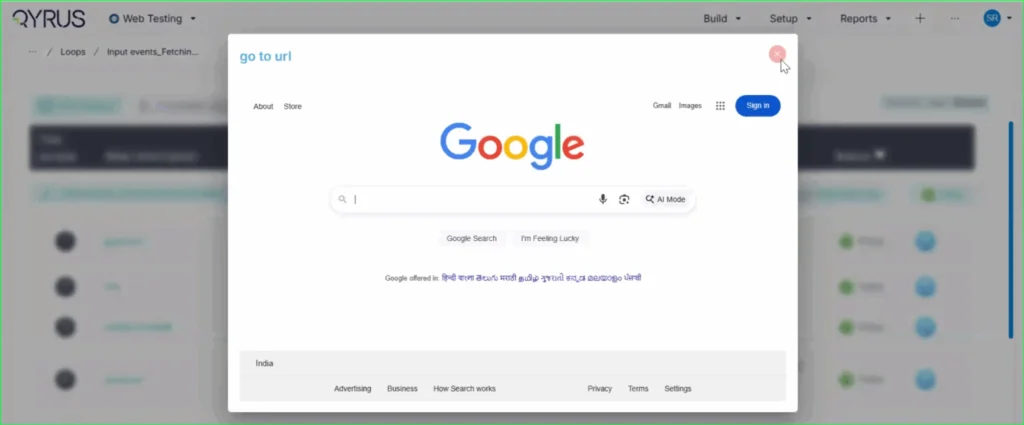
Context is King: Step Descriptions Now Label Your Screenshots!
The Challenge:
Previously, screenshots in execution reports were labeled with a generic “Screen Shot” tag. This forced users to constantly cross-reference the image with the test log to understand exactly what action was being captured in that specific frame, making the review process slower and less intuitive.
The Fix:
We have updated the reporting engine to replace the generic “Screen Shot” label. Now, the specific step description (e.g., “go to url”) is automatically displayed directly on the top left of every screenshot in the report.
How will it help?
This enhancement provides immediate context for every visual in your report. You can now browse through screenshots and instantly understand the specific test action being depicted without needing to look elsewhere. This significantly improves report readability, reduces cognitive load, and speeds up the debugging and review process.
No More Toggling: View Recorded Locators Instantly on the Step Page!
The Challenge:
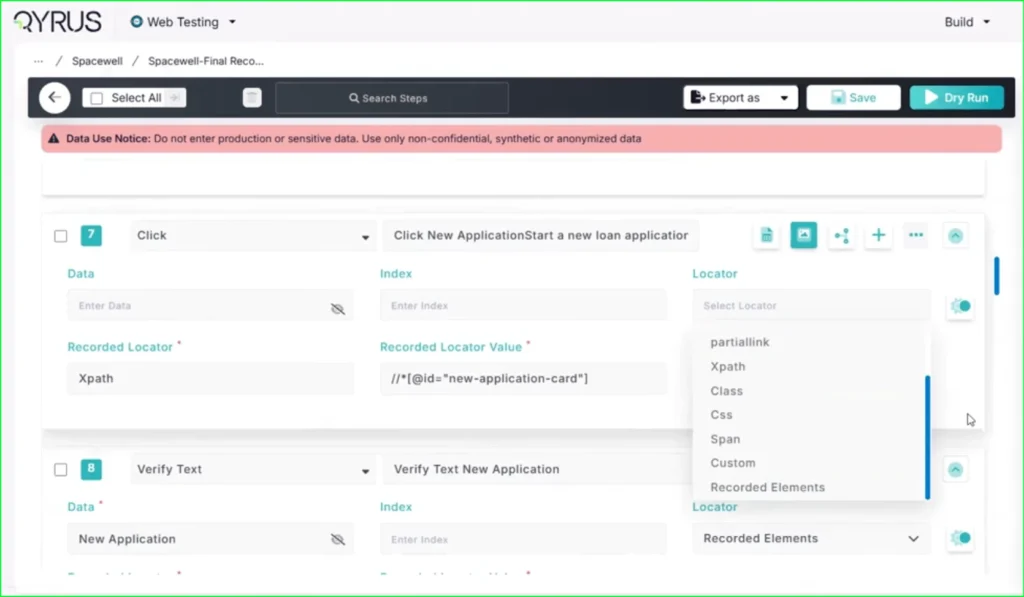
Previously, after using the Qyrus Recorder to capture a test flow, the specific locator values (like XPaths or CSS selectors) were not immediately visible on the main test step page. To view or verify these locators, functional testers found it cumbersome to have to re-enter “record mode” via the Encapsulate Chrome extension, disrupting their workflow just to check technical details.
The Fix:
We have updated the Qyrus Recorder with improved locator detection and data handling. Now, after recording a session, all captured locator values are immediately populated and visible directly on the step page within the Qyrus platform.
How will it help?
This update significantly streamlines the script review and validation process. You no longer need to switch back and forth between the platform and the recorder extension just to see how an element is being identified. This gives functional testers and automation engineers instant visibility into their test logic, making it faster and easier to verify scripts and ensure the correct elements are being targeted.
Scale Your Xray Testing: Suite Execution Now Supported!
The Challenge:
Previously, our integration with Xray was limited to triggering single test scripts. This created a workflow bottleneck for teams who needed to execute larger batches of tests or full regression sets, as there was no capability to launch a complete Test Suite directly from the Xray interface.
The Fix:
We have upgraded our Xray integration to fully support Test Suite execution. Users can now trigger the execution of entire suites from within Xray with the same ease and simplicity as running a single script.
How will it help?
This update allows you to significantly scale your testing efforts directly from your test management tool. You are no longer restricted to triggering scripts one by one; instead, you can launch comprehensive test suites in a single action. This streamlines your execution workflow, ensuring that your Xray-driven testing is as efficient and powerful as your needs demand.
qAPI Product Release Update
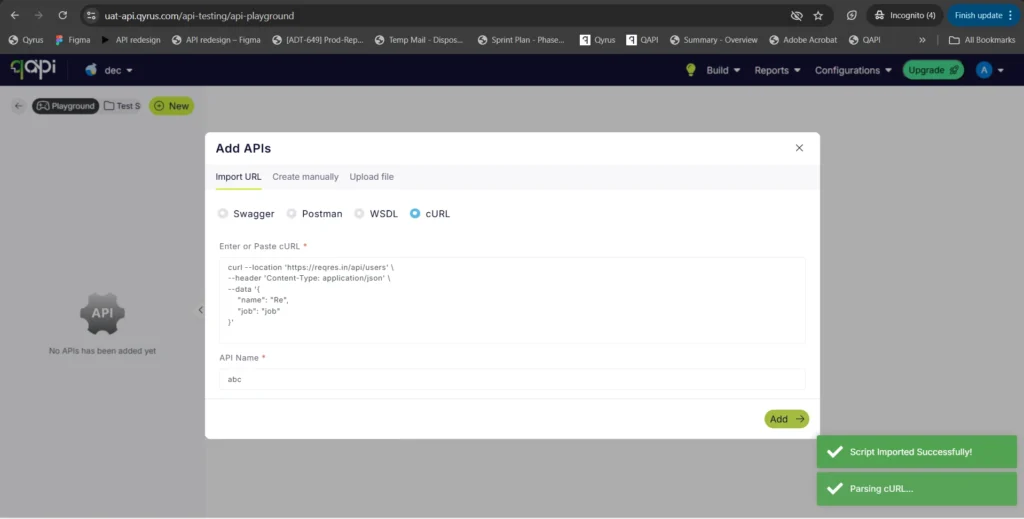
Copy, Paste, Done: Import APIs Instantly with cURL!
The Challenge:
Creating API tests manually can be a tedious process of copy-pasting individual components—headers, bodies, URLs, and methods—from your documentation or browser developer tools into the test platform. This manual reconstruction is not only slow but also increases the risk of transcription errors, leading to frustrated testers and broken initial tests.
The Fix:
We have introduced a new “Import via cURL” option in the API creation workflow. You can now simply paste a raw cURL command directly into Qyrus. The system will automatically parse the command and instantly create a fully configured API test with all the correct parameters, headers, and body content mapped for you.
How will it help?
This feature is a massive time-saver that bridges the gap between development and testing. Developers and testers often have cURL commands readily available (from API docs or network logs). By allowing direct import, we eliminate the manual data entry, ensuring your API tests are set up instantly and accurately, exactly as they were defined in your cURL command.
AI Enhancements
AI That Remembers: Enhanced Algorithms Now Access User Memory!
The Challenge:
Previously, while our AI algorithms were powerful, they often operated in isolation for each interaction. Without access to a persistent memory of past preferences, specific project contexts, or user-defined constraints, the AI could sometimes provide generic suggestions or require users to repeatedly provide the same background information, slowing down the workflow.
The Fix:
We have rolled out significant enhancements to all our AI algorithms. For users who have opted into the memory feature, these algorithms can now securely access and utilize stored context and preferences.
How will it help?
This upgrade makes your AI interactions significantly smarter and more personalized.
Reduced Repetition: The AI remembers your specific constraints and preferences, so you don’t have to repeat them.
Better Suggestions: Whether generating test data or building scenarios, the AI now understands your unique context, leading to more relevant and accurate results.
Seamless Workflow: Experience a more continuous and intelligent partnership with the platform, as the AI learns and adapts to your specific way of working over time.
Ready to Accelerate Your Testing with November Upgrades?
We are dedicated to evolving Qyrus into a platform that not only anticipates your needs but also provides practical, powerful solutions that help you release top-quality software with greater speed and confidence.
Curious to see how these October enhancements can benefit your team? There’s no better way to understand the impact of Qyrus than to see it for yourself.
The financial services sector is in the midst of a profound transformation. Fintech competition and rising customer expectations have made software quality a primary driver of competitive advantage, not just a back-office function. Modern customers manage their money through a dense network of mobile and web applications, pushing global mobile banking usage to over 2.17 billion users by 2025. This digital-first reality has placed immense pressure on the industry’s technology infrastructure, but many financial institutions have yet to adapt their testing practices.
This guide makes the case that automated app testing for financial software is a strategic imperative for survival and growth. It’s the only way to embed resilience, security, and compliance directly into the software development lifecycle. This guide explores the benefits of automation, the key challenges unique to the financial sector, and the transformative role of AI.
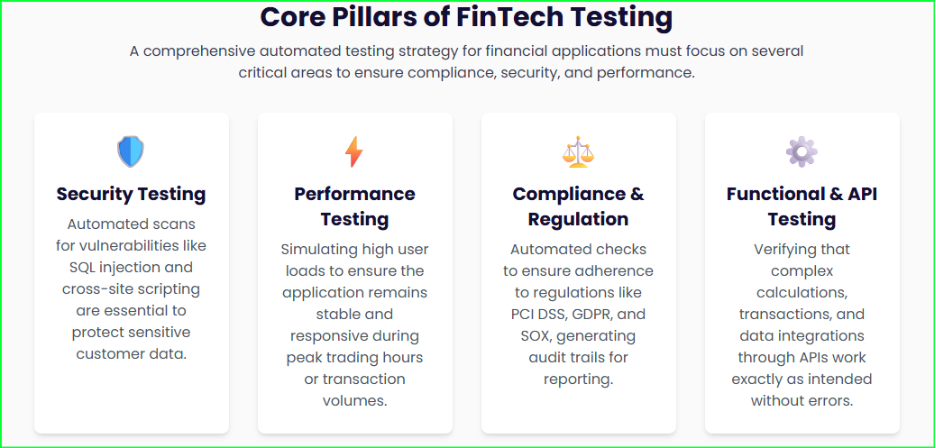
The Core Benefits of Automated App Testing for Financial Institutions
Automated app testing for financial software is a powerful force that drives significant, quantifiable benefits across the organization, transforming quality assurance from a cost center into a strategic enabler of business growth.
Accelerated Time-to-Market
Automated testing drastically cuts down the time and effort required for manual testing, which can consume 30-40% of a typical banking IT budget. By automating repetitive tasks, institutions can reduce testing cycles by up to 50%. This acceleration allows financial firms to release new features and updates faster, a crucial advantage in a highly competitive market where new updates are constantly being deployed. Integrated automation can enable a 60% faster release cycle.
Enhanced Security and Risk Mitigation
Financial applications are prime targets for cyber threats, and over 75% of applications have at least one flaw. Automated security testing tools regularly scan for known vulnerabilities and simulate cyberattacks to verify security measures. This includes testing common vulnerabilities like SQL injection, cross-site scripting attacks, and broken access controls that could allow unauthorized fund transfers. This proactive approach helps to reduce an application’s attack surface and keep customer data safe.
Ensuring Unwavering Regulatory Compliance
The financial industry faces overwhelming regulatory scrutiny from standards like the Payment Card Industry Data Security Standard (PCI DSS), the Sarbanes-Oxley Act (SOX), and the General Data Protection Regulation (GDPR).
Automated app testing for financial software simplifies this burden by continuously ensuring adherence to these standards and generating detailed audit trails. Automated compliance testing can reduce audit findings by as much as 82%.
Increased Accuracy and Reliability
Even minor mistakes can have significant financial consequences in this domain. Automated tests follow predefined steps with precision, which virtually eliminates the humanhuman error inherent in manual testing. This is critical for maintaining absolute transactional integrity, such as verifying data consistency and accurately calculating interest rates and fees.
Greater Test Coverage
Automation enables comprehensive test coverage by executing a wider range of scenarios, including complex use cases, edge cases, and repetitive tasks that are often difficult and time-consuming to perform manually. In fact, automation can lead to a 2-3x increase in automated test coverage compared to manual methods. By leveraging automation for tedious, repeatable tasks, human testers can focus on more complex, strategic work that requires critical thinking and creativity.
Key Challenges in Testing Financial Software
Despite the clear benefits, financial institutions face a complex and high-stakes environment for app testing. A generic testing strategy is insufficient because a failure can lead to severe consequences, including financial loss, reputational damage, and legal penalties. These challenges are distinct and require specialized attention.
Handling Sensitive Data
Financial applications handle immense volumes of sensitive customer data and personally identifiable information (PII). Testers must use secure methods to prevent data leaks, such as data masking, anonymization, and synthetic data generation. According to one report, 46% of banking businesses struggle with test data management, highlighting this significant hurdle. The use of realistic but non-production banking data is essential to protect sensitive information during testing.
Complex System Integrations
Modern financial systems are often a complex web of interconnected legacy systems and new APIs. The rise of trends like Open Banking APIs and Banking-as-a-Platform (BaaP) relies on deep integration between different systems and platforms, often from various providers. Ensuring seamless data transfer and integrity across this intricate web is a major challenge. The complexity of these integrations makes manual testing impossible at scale, making automation a prerequisite for the viability and reliability of these new platforms.
High-Stakes Performance Requirements
Financial applications must be able to handle immense transaction volumes and unexpected traffic spikes without slowing down or crashing. This is especially true during high-traffic events like tax season or flash sales on payment apps. Automated performance and load testing tools can simulate thousands of concurrent users to identify performance bottlenecks and ensure the application’s scalability.
Navigating Device and Platform Fragmentation
With customers using a wide variety of devices and operating systems, addressing device fragmentation and ensuring cross-platform compatibility is a significant hurdle for automated mobile testing. The modern financial journey is not linear; it spans web portals, mobile apps, third-party APIs, and core back-end systems. A single, unified platform is necessary to orchestrate this entire testing lifecycle and provide comprehensive test coverage across all critical technologies.
A Hybrid Approach: Automated vs. Manual Testing
The most effective strategy for app testing tools for financial software is not an “either/or” choice between automation and manual testing but a strategic hybrid approach. Each method has its unique strengths and weaknesses, and the optimal solution leverages both to ensure comprehensive quality and efficiency.
Automation’s Role
Automation excels at high-volume, repetitive, and data-intensive tasks where precision and speed are paramount. For financial applications, automation is indispensable for:
Regression Testing: As financial applications frequently update, automated regression tests are critical to ensure that new code changes do not negatively impact existing functionalities. This allows for the rapid re-execution of a comprehensive test suite after every code change.
Performance Testing and Load Testing: Automated tools can simulate thousands of concurrent users to identify performance bottlenecks, ensuring the application can handle immense transaction volumes without crashing.
API Testing: FinTech applications rely heavily on APIs to process payments and verify accounts. Automated API testing is essential for ensuring the functionality, performance, and security of these critical communication channels by directly sending requests and validating responses.
Manual Testing’s Role
While automation handles the heavy lifting, manual testing remains vital for tasks that require human adaptability and intuition. These are scenarios where a human can uncover subtle flaws that a script might miss:
Exploratory Scenarios: Testers can creatively explore the application to find unexpected issues, bugs, or use cases that were not part of the initial test plan.
Usability Evaluations: This involves assessing the intuitiveness of the user interface and the overall user experience to ensure the application is easy and seamless for customers to use. A landmark 2023 study found that global banks are losing 20% of their customers specifically due to poor customer experience.
The most effective strategy for B2B app testing automation and consumer-facing applications leverages a mix of both automation and manual testing. By using automation for tedious, repeatable tasks, human testers are freed to focus on more complex, strategic work that requires critical thinking and creativity, ensuring a more optimal use of resources. This synergistic relationship ensures that an application is not only functional and secure but also provides a flawless and intuitive user experience.
The Future is Here: The Role of AI and Machine Learning
The next frontier of financial software quality assurance lies in the strategic integration of artificial intelligence (AI) and machine learning (ML). These technologies are making testing smarter and more proactive, transforming QA from a reactive process to an intelligent function.
AI-Powered Test Automation
AI is not just automating tasks; it’s providing powerful new capabilities:
Self-Healing Tests: AI-powered tools can enable “self-healing tests” that automatically adapt to changes in the user interface (UI). This feature saves testers from the tedious task of continuously fixing brittle test scripts that break with every new software update. One study suggests that integrating AI can decrease testing cycles by 40% while increasing defect detection rates by 30%.
Test Case Generation and Prioritization: AI can intelligently generate test cases based on product specifications, user data, and real-world scenarios. This capability moves beyond a static test suite to a dynamic one that can prioritize tests to focus on high-risk areas and ensure more comprehensive coverage.
Autonomous Testing and Agentic Test Orchestration by SEER
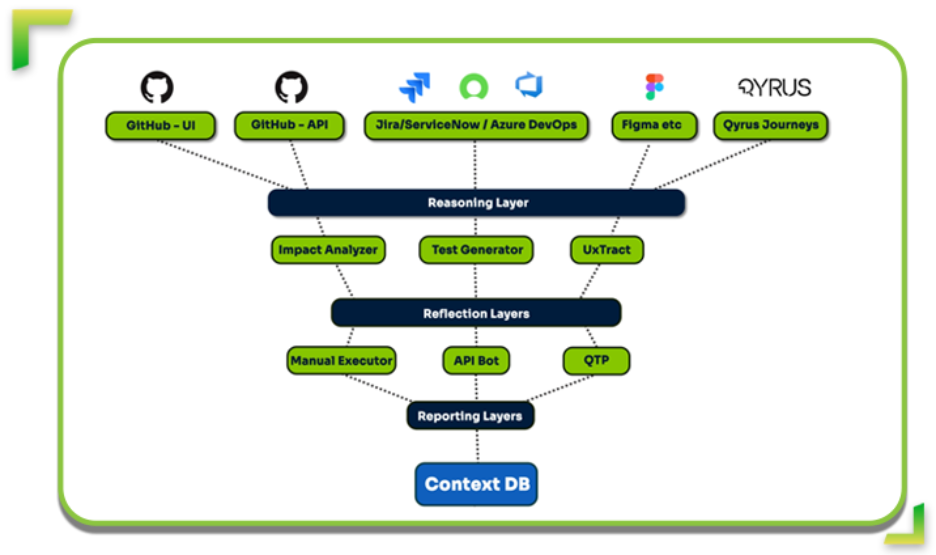
The rise of AI has led to a new paradigm called Agentic Orchestration. This approach is not about running scripts faster; it is about deploying an intelligent, end-to-end quality assurance ecosystem managed by a central, autonomous brain. Qyrus, a provider of an AI-powered digital testing platform, offers a framework called SEER (Sense → Evaluate → Execute → Report). This intelligent orchestration engine acts as the command center for the entire testing process.
Instead of one generalist AI trying to do everything, SEER analyzes the situation and deploys a team of specialized Single Use Agents (SUAs). These agents perform specific tasks with maximum precision and efficiency, such as:
Sensing Changes: SEER monitors repositories like GitHub for code commits and design platforms like Figma for UI/UX changes.
Evaluating Impact: The Impact Analyzer agent uses static analysis to determine which components are affected by a change, allowing for targeted testing instead of running an entire regression suite.
Executing Coordinated Action: SEER orchestrates the parallel execution of multiple agents, such as API Builder to validate new backend logic or TestPilot to perform functional tests on affected UI components.
Qyrus’ SEER Framework
Real-Time Fraud and Anomaly Detection
AI and ML algorithms can continuously monitor transaction logs to identify anomalies and potential fraud in real-time. This proactive approach significantly enhances security and mitigates risks associated with financial fraud. A case study of a payment processor revealed that an AI model achieved a 95% accuracy rate in identifying threats prior to deployment.
Qyrus: The All-in-One Solution for Financial Services QA
Qyrus is an AI-powered, codeless, end-to-end testing platform designed to address the unique challenges of financial software. It offers a unified solution for web, mobile, desktop, API, and SAP testing, eliminating the need for fragmented toolchains that create bottlenecks and blind spots. The platform’s integrated approach provides a single source of truth for quality, offering detailed reporting with screenshots, video recordings, and advanced analytics.
Mobile Testing Capabilities
The Qyrus platform’s mobile testing capabilities are built to handle the complexities of native and hybrid applications. It includes a cloud-based device farm that provides instant access to a vast range of real mobile devices and browsers for cross-platform testing. The Rover AI feature can autonomously explore applications to identify anomalies and potential issues much faster than any manual effort. It also intelligently evaluates outputs from AI models, a crucial capability as AI is integrated into fraud detection and credit scoring.
Solving Financial Industry Challenges
Qyrus directly addresses the financial industry’s unique security and compliance challenges with its secure, ISO 27001/SOC 2 compliant device farm and powerful AI capabilities. The platform’s no-code/low-code test design empowers both domain experts and technical users to rapidly build and execute complex test cases, reducing the dependency on specialized programming knowledge. This is particularly valuable given that 76% of financial organizations now prioritize deep financial domain expertise for their testing teams.
Quantifiable Results
The value of the Qyrus platform is demonstrated through powerful, quantifiable results. Key metrics from an independent Forrester Total Economic Impact™ (TEI) study highlight a 213% return on investment and a payback period of less than six months. A leading UK bank, for example, achieved a 200% ROI within the first year by leveraging the platform. The bank also saw a 60% reduction in manual testing efforts and prevented over 2,500 bugs from reaching production.
Curious about how much you can save on QA efforts with AI-powered automation? Contact our experts today!
Investing in Trust: The Ultimate Competitive Advantage
Automated app testing is no longer a choice but a necessity for financial institutions to stay competitive, compliant, and secure in a digital-first world. A modern QA strategy must move beyond simple cost-benefit calculations to a broader understanding of its role in risk management, compliance, and innovation.
By adopting a comprehensive testing strategy that combines automation with manual testing and leverages the power of AI, financial organizations can move beyond simply finding bugs to proactively managing risk and accelerating innovation.
The investment in a modern testing platform is a foundational step towards building a resilient, agile, and trustworthy financial technology stack. The future of finance will be defined not by those who offer the most products, but by those who earn the deepest trust, and that trust must be engineered.
Mobile apps are now the foundation of our digital lives, and their quality is no longer just a perk—it’s an absolute necessity. The global market for mobile application testing is experiencing explosive growth, projected to hit $42.4 billion by 2033.
This surge in investment reflects a crucial reality: users have zero tolerance for subpar app experiences. They abandon apps with performance issues or bugs, with 88% of users leaving an app that isn’t working properly. The stakes are high; 94% of users uninstall an app within 30 days of installation.
This article is your roadmap to building a resilient mobile application testing strategy. We will cover the core actions that form the foundation of any test, the art of finding elements reliably, and the critical skill of managing timing for stable, effective mobile automation testing.
The Foundation of a Flawless App: Mastering the Three Core Interactions
A mobile test is essentially a script that mimics human behavior on a device. The foundation of any robust test script is the ability to accurately and reliably automate the three high-level user actions: tapping, swiping, and text entry. A good mobile automation testing framework not only executes these actions but also captures the subtle nuances of human interaction.
Tapping and Advanced Gestures
Tapping is the most common interaction in mobile apps. While a single tap is a straightforward action to automate, modern applications often feature more complex gestures critical to their functionality. A comprehensive test must include various forms of tapping. These include:
Single Tap: The most basic interaction for selecting elements.
Double Tap: Important for actions like zooming or selecting text.
Long Press: Critical for testing context menus or hidden options.
Drag and Drop: A complex, multi-touch action that requires careful coordination of the drag path and duration. A strategic analysis of the research reveals two primary methods for automating this gesture: the simple driver.drag_and_drop(origin, destination) method, and a more granular approach using a sequence of events like press, wait, moveTo, and release.
Multi-touch: Advanced gestures such as pinch-to-zoom or rotation require sophisticated automation that can simulate multiple touch points simultaneously.
The Qyrus Platform can efficiently automate each of these variations, simulating the full spectrum of user interactions to provide comprehensive coverage.
Swiping and Text Entry
Swiping is a fundamental gesture for mobile navigation, used for scrolling or switching pages. Automation frameworks should provide robust control over directional swipes, enabling testers to define the starting coordinates, direction, and even the number of swipes to perform, as is possible with platforms like Qyrus.
Text entry is another core component of any specific mobile test. The best practice for automating this action revolves around managing test data effectively.
Hard-coded Text Entry
This is the simplest approach. You define the text directly in the script. It is useful for scenarios like a login page where the test credentials remain the same every time you run the test.
Example Script (Python with Appium):
from appium import webdriver from appium.webdriver.common.appiumby import AppiumBy # Desired Capabilities for your device desired_caps = { “platformName”: “Android”, “deviceName”: “MyDevice”, “appPackage”: “com.example.app”, “appActivity”: “.MainActivity” } # Connect to Appium server driver = webdriver.Remote(“http://localhost:4723/wd/hub”, desired_caps) # Find the username and password fields using their Accessibility IDs username_field = driver.find_element(AppiumBy.ACCESSIBILITY_ID, “usernameInput”) password_field = driver.find_element(AppiumBy.ACCESSIBILITY_ID, “passwordInput”) login_button = driver.find_element(AppiumBy.ACCESSIBILITY_ID, “loginButton”) # Hard-coded text entry username_field.send_keys(“testuser1”) password_field.send_keys(“password123”) login_button.click() # Close the session driver.quit()
Dynamic Text Entry
This approach makes tests more flexible and powerful. Instead of hard-coding values, you pull them from an external source or generate them on the fly. This is essential for testing with a variety of data, such as different user types, unusual characters, or lengthy inputs. A common method is to use a data-driven approach, reading values from a file like a CSV.
Example Script (Python with Appium and an external CSV):
Next, write the Python script to read from this file and run the test for each row of data:
import csv from appium import webdriver from appium.webdriver.common.appiumby import AppiumBy # Desired Capabilities for your device desired_caps = { “platformName”: “Android”, “deviceName”: “MyDevice”, “appPackage”: “com.example.app”, “appActivity”: “.MainActivity” } # Connect to Appium server driver = webdriver.Remote(“http://localhost:4723/wd/hub”, desired_caps) # Read data from the CSV file with open(‘test_data.csv’, ‘r’) as file: reader = csv.reader(file)
# Skip the header row next(reader) # Iterate through each row in the CSV for row in reader: username, password, expected_result = row
# Clear fields before new input username_field.clear() password_field.clear()
# Dynamic text entry from the CSV username_field.send_keys(username) password_field.send_keys(password) login_button.click()
# Add your assertion logic here based on expected_result if expected_result == “success”: # Assert that the user is on the home screen pass else: # Assert that an error message is displayed pass # Close the session driver.quit()
A Different Kind of Roadmap: Finding Elements for Reliable Tests
A crucial task in mobile automation testing is reliably locating a specific UI element in a test script. While humans can easily identify a button by its text or color, automation scripts need a precise way to interact with an element. Modern test frameworks approach this challenge with two distinct philosophies: a structural, code-based approach and a visual, human-like one.
The Power of the XML Tree: Structural Locators
Most traditional mobile testing tools rely on an application’s internal structure—the XML or UI hierarchy—to identify elements. This method is fast and provides a direct reference to the element. A good strategy for effective software mobile testing involves a clear hierarchy for choosing a locator.
ID or Accessibility ID: Use these first. They are the fastest, most stable, and least likely to change with UI updates. On Android, the ID corresponds to the resource-id, while on iOS it maps to the name attribute. The accessibilityId is a great choice for cross-platform automation as developers can set it to be consistent across both iOS and Android.
Native Locator Strategies: These include -android uiautomator, -ios predicate string, or -ios class chain. These are “native” locator strategies because they are provided by Appium as a means of creating selectors in the native automation frameworks supported by the device. These locator strategies have many fans, who love the fine-grained expression and great performance (equally or just slightly less performance than accessibility id or id).
Class Name: This locator identifies elements by their class type. While it is useful for finding groups of similar elements, it is often less unique and can lead to unreliable tests.
XPath: Use this only as a last resort. While it is the most flexible locator, it is also highly susceptible to changes in the UI hierarchy, making it brittle and slow.
CSS Selector: This is a useful tool for hybrid applications that can switch from a mobile view to a web view, allowing for a seamless transition between testing contexts.
To find the values for these locators, use an inspector tool. It allows you to click an element in a running app and see all its attributes, speeding up test creation and ensuring you pick the most reliable locator.
Visual and AI-Powered Locators: A Human-Centered Approach
While structural locators are excellent for ensuring functionality, they can’t detect visual bugs like misaligned text, incorrect colors, or overlapping elements. This is where visual testing, which “focuses on the more natural behavior of humans,” becomes essential.
Visual testing works by comparing a screenshot of the current app against a stored baseline image. This approach can identify a wide range of inconsistencies that traditional functional tests often miss. Emerging AI-powered software mobile testing tools can process these screenshots intelligently, reducing noise and false positives. These tools can also employ self-healing locators that use AI to adapt to minor UI changes, automatically fixing tests and reducing maintenance costs.
The most effective mobile testing and mobile application testing strategy uses a hybrid approach: rely on stable structural locators (ID, Accessibility ID) for core functional tests and leverage AI-powered visual testing to validate the UI’s aesthetics and layout. This ensures a comprehensive test suite that guarantees both functionality and a flawless user experience.
Wait for It: The Art of Synchronization for Stable Tests
Timing is one of the most significant challenges in mobile application testing. Unlike a person, an automated script runs at a consistent, high speed and lacks the intuition to know when to wait for an application to load content, complete an animation, or respond to a server request. When a test attempts to interact with an element that has not yet appeared, it fails, resulting in a “flaky” or unreliable test.
To solve this synchronization problem, testers use waits. There are two primary types: implicit and explicit.
Implicit Waits vs. Explicit Waits
Implicit waits set a global timeout for all element search commands in a test. It instructs the framework to wait a specific amount of time before throwing an exception if an element is not found. While simple to implement, this approach can cause issues. For example, if an element loads in one second but the implicit wait is set to ten, the script will wait the full ten seconds, unnecessarily increasing the test execution time.
Explicit waits are a more intelligent and targeted synchronization method. They instruct the framework to wait until a specific condition is met on a particular element before proceeding. These conditions are highly customizable and include waiting for an element to be visible, clickable, or for a loading spinner to disappear.
The consensus among experts is to use explicit waits exclusively. Although they require more verbose code, they provide the granular control essential for handling dynamic applications. Using explicit waits prevents random failures caused by timing issues, saving immense time on debugging and maintenance, which ultimately builds confidence in your test results.
Concluding the Test: A Holistic Strategy for Success
Creating a successful mobile test requires synthesizing all these practices into a cohesive, overarching strategy. A truly effective framework considers the entire development lifecycle, from the choice of testing environments to integration with CI/CD pipelines.
The future of mobile testing lies in the continued evolution of both mobile testing tools and the role of the tester. As AI and machine learning technologies automate a growing share of tedious work—from test case generation to visual validation—the responsibilities of a quality professional are shifting.
The modern tester is no longer a manual executor but a strategic quality analyst, architecting intelligent automation frameworks and ensuring an app’s overall integrity. The judicious use of AI-powered visual testing, for example, frees testers from maintaining brittle structural locators, allowing them to focus on exploratory testing and the nuanced validation of user experiences.
To fully embrace these best practices and build a resilient framework, consider the Qyrus Mobile Testing solution. With features like integrated gesture automation, intelligent element identification, and advanced wait management, Qyrus provides the tools you need to create, run, and scale your mobile application testing efforts.
Experience the difference.Get in touch with us to learn how Qyrus can help you deliver the high-quality mobile testing tools and user experiences that drive business success.
The conversation around quality assurance has changed because it has to. With developers spending up to half their time on bug fixing, the focus is no longer on simply writing better scripts. You now face a strategic choice that will define your team’s velocity, cost, and focus for years—a choice that determines whether quality assurance remains a cost center or becomes a critical value driver.
On one side, we have the “Buy” approach, embodied by all-in-one, no-code platforms like Qyrus. They promise immediate value and an AI-driven experience straight out of the box. On the other side is the “Build” approach—a powerful, customizable solution assembled in-house. This involves using a best-in-class open-source framework like Playwright and integrating it with an AI agent through the Model Context Protocol (MCP), creating what we can call a Playwright-MCP system. This path offers incredible control but demands a significant investment in engineering and maintenance.
This analysis dissects that decision, moving beyond the sales pitches to uncover real-world trade-offs in speed, cost, and long-term viability.
The ‘Build’ Vision: Engineering Your Edge with Playwright MCP
The appeal of the “Build” approach begins with its foundation: Playwright. This is not just another testing framework; its very architecture gives it a distinct advantage for modern web applications. However, this power comes with the responsibility of building and maintaining not just the tests, but the entire ecosystem that supports them.
Playwright: A Modern Foundation for Resilient Automation
Playwright runs tests out-of-process and communicates with browsers through native protocols, which provides deep, isolated control and eliminates an entire class of limitations common in older tools. This design directly addresses the most persistent headache in test automation: timing-related flakiness. The framework automatically waits for elements to be actionable before performing operations, removing the need for artificial timeouts. However, it does not solve test brittleness; when UI locators change during a redesign, engineers are still required to manually hunt down and update the affected scripts.
MCP: Turning AI into an Active Collaborator
This powerful automation engine is then supercharged by the Model Context Protocol (MCP). MCP is an enterprise-wide standard that transforms AI assistants from simple code generators into active participants in the development lifecycle. It creates a bridge, allowing an AI to connect with and perform actions on external tools and data sources. This enables a developer to issue a natural language command like “check the status of my Azure storage accounts” and have the AI execute the task directly from the IDE. Microsoft has heavily invested in this ecosystem, releasing over ten specialized MCP servers for everything from Azure to GitHub, creating an interoperable environment.
Synergy in Action: The Playwright MCP Server
The synergy between these two technologies comes to life with the Playwright MCP Server. This component acts as the definitive link, allowing an AI agent to drive web browsers to perform complex testing and data extraction tasks. The practical applications are profound. An engineer can generate a complete Playwright test for a live website simply by instructing the AI, which then explores the page structure and generates a fully working script without ever needing access to the application’s source code. This core capability is so foundational that it powers the web browsing functionality of GitHub Copilot’s Coding Agent. Whether a team wants to create a custom agent or integrate a Claude MCP workflow, this model provides the blueprint for a highly customized and intelligent automation system.
The Hidden Responsibilities: More Than Just a Framework
Adopting a Playwright-MCP system means accepting the role of a systems integrator. Beyond the framework itself, a team must also build and manage a scalable test execution grid for cross-browser testing. They must integrate and maintain separate, third-party tools for comprehensive reporting and visual regression testing. And critically, this entire stack is accessible only to those with deep coding expertise, creating a silo that excludes business analysts and manual QA from the automation process.
The ‘Buy’ Approach: Gaining an AI Co-Pilot, Not a Second Job
The “Buy” approach presents a fundamentally different philosophy: AI should be a readily available feature that reduces workload, not a separate engineering project that adds to it. This is the core of a platform like Qyrus, which integrates AI-driven capabilities directly into a unified workflow, eliminating the hidden costs and complexities of a DIY stack.
Natural Language to Test Automation
With Qyrus’ Quick Test Plan (QTP) AI, a user can simply type a test idea or objective, and Qyrus generates a runnable automated test in seconds. For example, typing “Login and apply for a loan” would yield a full test script with steps and locators. In live demos, teams achieved usable automated tests in under 2 minutes starting from a plain-English goal.
Qyrus alows allows testers to paste manual test case steps (plain text instructions) and have the AI convert them into executable automation steps. This bridges the gap between traditional test case documentation and automation, accelerating migration of manual test suites.
Democratizing Quality, Eradicating Maintenance
This accessibility empowers a broader range of team members to contribute to quality, but the platform’s biggest impact is on long-term maintenance. In stark contrast to a DIY approach, Qyrus tackles the most common points of failure head-on:
AI-Powered Self-Healing: While a UI change in a Playwright script requires an engineer to manually hunt down and fix broken locators, Qyrus’s AI automatically detects these changes and heals the test in real-time, preventing failures and addressing the maintenance burden that can consume 70% of a QA team’s effort. Common test framework elements – variables, secret credentials, data sets, assertions – are built-in features, not custom add-ons.
Built-in Visual Regression: Qyrus includes native visual testing to catch unintended UI changes by comparing screenshots. This ensures brand consistency and a flawless user experience—a critical capability that requires integrating a separate, often costly, third-party tool in a DIY stack.
Cross-Platform Object Repository: Qyrus features a unified object repository, where a UI element is mapped once and reused across web and mobile tests. A single fix corrects the element everywhere, a stark contrast to the script-by-script updates required in a DIY framework.
True End-to-End Orchestration, Zero Infrastructure Burden
Perhaps the most significant differentiator is the platform’s unified, multi-channel coverage. Qyrus was designed to orchestrate complex tests that span Web, API, and Mobile applications within a single, coherent flow. For example, Qyrus can generate a test that logs into a web UI, then call an API to verify back-end data, then continue the test on a mobile app – all in one flow. The platform provides a managed cloud of real mobile devices and browsers, removing the entire operational burden of setting up and maintaining a complex test grid.
Furthermore, every test result is automatically fed into a centralized, out-of-the-box reporting dashboard complete with video playback, detailed logs, and performance metrics. This provides immediate, actionable insights for the whole team, a stark contrast to a DIY approach where engineers must integrate and manage separate third-party tools just to understand their test results.
The Decision Framework: Qyrus vs. Playwright-MCP
Choosing the right path requires a clear-eyed assessment of the practical trade-offs. Here is a direct comparison across six critical decision factors.
1. Time-to-Value & Setup Effort
This measures how quickly each approach delivers usable automation.
Qyrus: The platform is designed for immediate impact, with teams able to start creating AI-generated tests on day one. This acceleration is significant; one bank that adopted Qyrus cut its typical UAT cycle from 8–10 weeks down to just 3 weeks, driven by the platform’s ability to automate around 90% of their manual test cases.
Playwright + MCP: This approach requires a substantial upfront investment before delivering value. The initial setup—which includes standing up the framework, configuring an MCP server, and integrating with CI pipelines—is estimated to take 4–6 person-months of engineering effort.
2. AI Implementation: Feature vs. Project
This compares how AI is integrated into the workflow.
Qyrus: AI is treated as a turnkey feature and a “push-button productivity booster”. The AI behavior is pre-tuned, and the cost is amortized into the subscription fee.
Playwright + MCP: Adopting AI is a DIY project. The team is responsible for hosting the MCP server, managing LLM API keys, crafting and maintaining prompts, and implementing guardrails to prevent errors. This distinction is best summarized by the observation: “Qyrus: AI is a feature. DIY: AI is a project”.
3. Technical Coverage & Orchestration
This evaluates the ability to test across different application channels.
Qyrus: The platform was built for unified, multi-channel testing, supporting Web, API, and Mobile in a single, orchestrated flow. This provides one consolidated report and timeline for a complete end-to-end user journey.
Playwright + MCP: Playwright is primarily a web UI automation tool. Covering other channels requires finding and integrating additional libraries, such as Appium for mobile, and then “gluing these pieces together” in the test code. This often leads to fragmented test suites and separate reports that must be correlated manually.
4. Total Cost of Ownership (TCO)
This looks beyond the initial price tag to the full long-term cost.
Qyrus: The cost is a predictable annual subscription. While it involves a license fee, a Forrester analysis calculated a 213% ROI and a payback period of less than six months, driven by savings in labor and quality improvements.
Playwright + MCP: The “open source is free like a puppy, not free like a beer” analogy applies here. The TCO is often 1.5 to 2 times higher than the managed solution due to ongoing operational costs, which include an estimated 1-2 full-time engineers for maintenance, infrastructure costs, and variable LLM token consumption.
Below is a cost comparison table for a hypothetical 3-year period, based on a mid-size team and application (assumptions detailed after):
Cost Component
Qyrus (Platform)
DIY Playwright+MCP
Initial Setup Effort
Minimal – Platform ready Day 1; Onboarding and test migration in a few weeks (vendor support helps)
High – Stand up framework, MCP server, CI, etc. Estimated 4–6 person-months engineering effort (project delay)
License/Subscription
Subscription fee (cloud + support). Predictable (e.g. $X per year).
No license cost for Playwright. However, no vendor support – you own all maintenance.
Infrastructure & Tools
Included in subscription: browser farm, devices, reporting dashboard, uptime SLA.
Infra Costs: Cloud VM/container hours for test runners; optional device cloud service for mobile ($ per minute or monthly). Tool add-ons: e.g., monitoring, results dashboard (if not built in).
LLM Usage (AI features)
Included (Qyrus’s AI cost is amortized in fee). No extra charge per test generated.
Token Costs: Direct usage of OpenAI/Anthropic API by MCP. e.g., $0.015 per 1K output tokens . ($1 or less per 100 tests, assuming ~50K tokens total). Scales with test generation frequency.
Personnel (Maintenance)
Lower overhead: vendor handles platform updates, grid maintenance, security patches. QA engineers focus on writing tests and analyzing failures, not framework upkeep.
Higher overhead: Requires additional SDET/DevOps capacity to maintain the framework, update dependencies, handle flaky tests, etc. e.g., +1–2 FTEs dedicated to test platform and triage.
Support & Training
24×7 vendor support included; faster issue resolution. Built-in training materials for new users.
Community support only (forums, GitHub) – no SLAs. Internal expertise required for troubleshooting (risk if key engineer leaves).
Defect Risk & Quality Cost
Improved coverage and reliability reduces risk of costly production bugs. (Missed defects can cost 100× more to fix in production)
Higher risk of gaps or flaky tests leading to escaped defects. Downtime or failures due to test infra issues are on you (potentially delaying releases).
Reporting & Analytics
Included: Centralized dashboard with video, logs, and metrics out-of-the-box.
Requires 3rd-party tools: Must integrate, pay for, and maintain tools like ReportPortal or Allure.
Assumptions: This model assumes a fully-loaded engineer cost of $150k/year (for calculating person-month cost), cloud infrastructure costs based on typical usage, and LLM costs using current pricing (Claude Sonnet 4 or GPT-4 at ~$0.012–0.015 per 1K tokens output ). It also assumes roughly 100–200 test scenarios initially, scaling to 300+ over 3 years, with moderate use of AI generation for new tests and maintenance.
5. Maintenance, Scalability & Flakiness
This assesses the long-term effort required to keep the system running reliably.
Qyrus: As a cloud-based SaaS, the platform scales elastically, and the vendor is responsible for infrastructure, patching, and uptime via an SLA and 24×7 support. Features like self-healing locators reduce the maintenance burden from UI changes.
Playwright + MCP: The internal team becomes the de facto operations team for the test infrastructure. They are responsible for scaling CI runners, fixing issues at 2 AM, and managing flaky tests. Flakiness is a major hidden cost; one financial model shows that for a mid-sized team, investigating spurious test failures can waste over $150,000 in engineering time annually.
Below is a sensitivity table illustrating annual cost of maintenance under different assumptions. The maintenance cost is modeled as hours of engineering time wasted on flaky failures plus time spent writing/refactoring tests.
Scenario
Authoring Speed (vs. baseline coding)
Flaky Test %
Estimated Extra Effort (hrs/year)
Impact on TCO
Status Quo (Baseline)
1× (no AI, code manually)
10% (high)
400 hours (0.2 FTE) debugging flakes
(Too slow – not viable baseline)
Qyrus Platform
~3× faster creation (assumed)
~2% (very low)
50 hours (vendor mitigates most)
Lowest labor cost – focus on tests, not fixes
DIY w/ AI Assist (Conservative)
~2× faster creation
5% (med)
150 hours (self-managed)
Higher cost – needs an engineer part-time
DIY w/ AI Assist (Optimistic)
~3× faster creation
5% (med)
120 hours
Still higher than Qyrus due to infra overhead
DIY w/o sufficient guardrails
~2× faster creation
10% (high)
300+ hours (thrash on failures)
Highest cost – likely delays, unhappy team
Assumes ~1000 test runs per year for a mid-size suite for illustration.
6. Team Skills & Collaboration
This considers who on the team can effectively contribute to the automation effort.
Qyrus: The no-code interface ‘broadens the pool of contributors,’ allowing manual testers, business analysts, and developers to design and run tests. This directly addresses the industry-wide skills gap, where a staggering 42% of testing professionals report not being comfortable writing automation scripts.
Playwright + MCP: The work remains centered on engineers with expertise in JavaScript or TypeScript. Even with AI assistance, debugging and maintenance require deep coding knowledge, which can create a bottleneck where only a few experts can manage the test suite.
The Security Equation: Managed Assurance vs. Agentic Risk
Utilizing AI agents in software testing introduces a new category of security and compliance risks. How each approach mitigates these risks is a critical factor, especially for organizations in regulated industries.
The DIY Agent Security Gauntlet
When you build your own AI-driven test system with a toolset like Playwright-MCP, you assume full responsibility for a wide gamut of new and complex security challenges. This is not a trivial concern; cybercrime losses, often exploiting software vulnerabilities, have skyrocketed by 64% in a single year. The DIY approach expands your threat surface, requiring your team to become experts in securing not just your application, but an entire AI automation system. Key risks that must be proactively managed include:
Data Privacy & IP Leakage: Any data sent to an external LLM API—including screen text or form values—could contain sensitive information. Without careful prompt sanitization, there’s a risk of inadvertently leaking customer PII or intellectual property.
Prompt Injection Attacks: An attacker could place malicious text on your website that, when read by the testing agent, tricks it into revealing secure information or performing unintended actions.
Hallucinations and False Actions: LLMs can sometimes generate incorrect or even dangerous steps. Without strict, custom-built guardrails, a claude mcp agent might execute a sequence that deletes data or corrupts an environment if it misinterprets a command.
API Misuse and Cost Overflow: A bug in the agent’s logic could cause an infinite loop of API calls to the LLM provider, racking up huge and unexpected charges. This requires implementing robust monitoring, rate limits, and budget alerts.
Supply Chain Vulnerabilities: The system relies on a chain of open-source components, each of which could have vulnerabilities. A supply chain attack via a malicious library version could potentially grant an attacker access to your test environment.
The Managed Platform Security Advantage
A managed solution like Qyrus is designed to handle these concerns with enterprise-grade security, abstracting the risk away from your team. This approach is built on a principle of risk transference.
Built-in Security & Compliance: Qyrus is developed with industry best practices, including data encryption, role-based access control, and comprehensive audit logging. The vendor manages compliance certifications (like ISO or SOC2) and ensures that all AI features operate within safe, sandboxed boundaries.
Risk Transference: By using a proven platform, you transfer certain operational and security risks to the vendor. The vendor’s core business is to handle these threats continuously, likely with more dedicated resources than an internal team could provide.
Guaranteed Uptime and Support: Uptime, disaster recovery, and 24×7 support are built into the Service Level Agreement (SLA). This provides an assurance of reliability that a DIY system, which relies on your internal team for fixes, cannot offer. The financial value of this guarantee is immense, as 91% of enterprises report that a single hour of downtime costs them over $300,000. Qyrus transfers uptime and patching risk out of your team; DIY puts it squarely back.
Conclusion: Making the Right Choice for Your Team
After a careful, head-to-head analysis, the evidence shows two valid but distinctly different paths for achieving AI-powered test automation. The decision is not simply about technology; it is about strategic alignment. The right choice depends entirely on your team’s resources, priorities, and what you believe will provide the greatest competitive advantage for your business.
To make the decision, consider which of these profiles best describes your organization:
Choose the “Build” path with Playwright-MCP if: Your organization has strong in-house engineering talent, particularly SDETs and DevOps specialists who are prepared to invest in building and maintaining a custom testing platform. This path is ideal for teams that require deep, bespoke customization, want to integrate with a specific developer ecosystem like Azure and GitHub, and value the ultimate control that comes from owning their entire toolchain.
Choose the “Buy” path with Qyrus if: Your primary goals are speed, predictable cost, and broad test coverage out of the box. This approach is the clear winner for teams that want to accelerate release cycles immediately, empower non-technical users to contribute to automation, and transfer operational and security risks to a vendor. If your goal is to focus engineering talent on your core product rather than internal tools, the financial case is definitive: a commissioned Forrester TEI study found that an organization using Qyrus achieved a 213% ROI, a $1 million net present value, and a payback period of less than six months.
Ultimately, maintaining a custom test framework is likely not what differentiates your business. If you remain on the fence, the most effective next step is a small-scale pilot with Qyrus. Implement a bake-off for a limited scope, automating the same critical test scenario in both systems.
Jerin Mathew
Manager
Jerin Mathew M M is a seasoned professional currently serving as a Content Manager at Qyrus. He possesses over 10 years of experience in content writing and editing, primarily within the international business and technology sectors. Prior to his current role, he worked as a Content Manager at Tookitaki Technologies, leading corporate and marketing communications. His background includes significant tenures as a Senior Copy Editor at The Economic Times and a Correspondent for the International Business Times UK. Jerin is skilled in digital marketing trends, SEO management, and crafting analytical, research-backed content.