Welcome to the third installment of our series on Agentic Orchestration. In our previous post, we explored the ‘Eyes and Ears’ of the operation—the Sense stage, which detects every change across the development ecosystem. But what happens next? In this chapter, we’re diving into the ‘Brain’ of the SEER framework: the intelligent Evaluate stage. If you’re just joining us, we recommend starting with Part 1 to grasp the foundational concepts.
How Qyrus Evaluates Change and Optimizes Testing
In software development, change is the only constant. But every change, no matter how small, introduces risk. How can you be confident that a minor code tweak won’t trigger a major application failure?
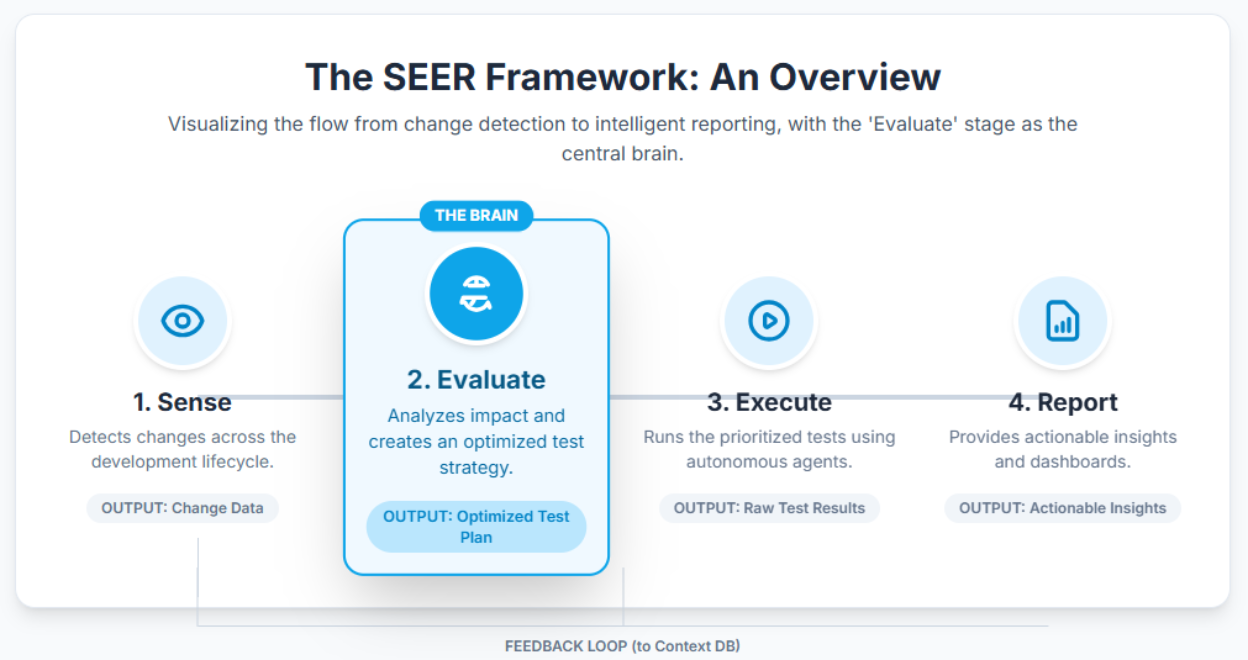
This is where the “Evaluate” stage of Qyrus’s SEER framework (Sense, Evaluate, Execute, Report) takes command. Building on the “Sense” stage which acts as the eyes and ears, the “Evaluate” stage is the strategic brain. It transforms raw data about changes into an intelligent, optimized testing strategy.
In this third installment, we’ll dissect how Qyrus performs its cognitive heavy lifting: analyzing the ripple effect of changes, generating the precise tests needed, and ensuring your testing efforts deliver maximum impact with minimum overhead.
Cognitive Crunch Time: From ‘What Changed?’ to ‘What Do We Do?’
The ‘Evaluate’ stage is where Qyrus flexes its AI muscle. Its primary goal is to answer the critical question that follows any detected change: “What is the smartest way to test this?” It achieves this through a sophisticated process of impact analysis, test creation, and strategy optimization.
Think of it as a lead detective arriving at a scene. The “Sense” stage has reported a change. Now, the “Evaluate” stage meticulously examines the evidence, traces potential connections, and formulates a precise plan of action. This ensures your testing is always laser-focused on the highest-risk areas, saving time and dramatically improving coverage.
Inside the Brain: How Evaluation Unfolds
The evaluation process isn’t a single action but a coordinated symphony of specialized AI components. It begins with a trigger and flows through a logical sequence to produce a master test plan.
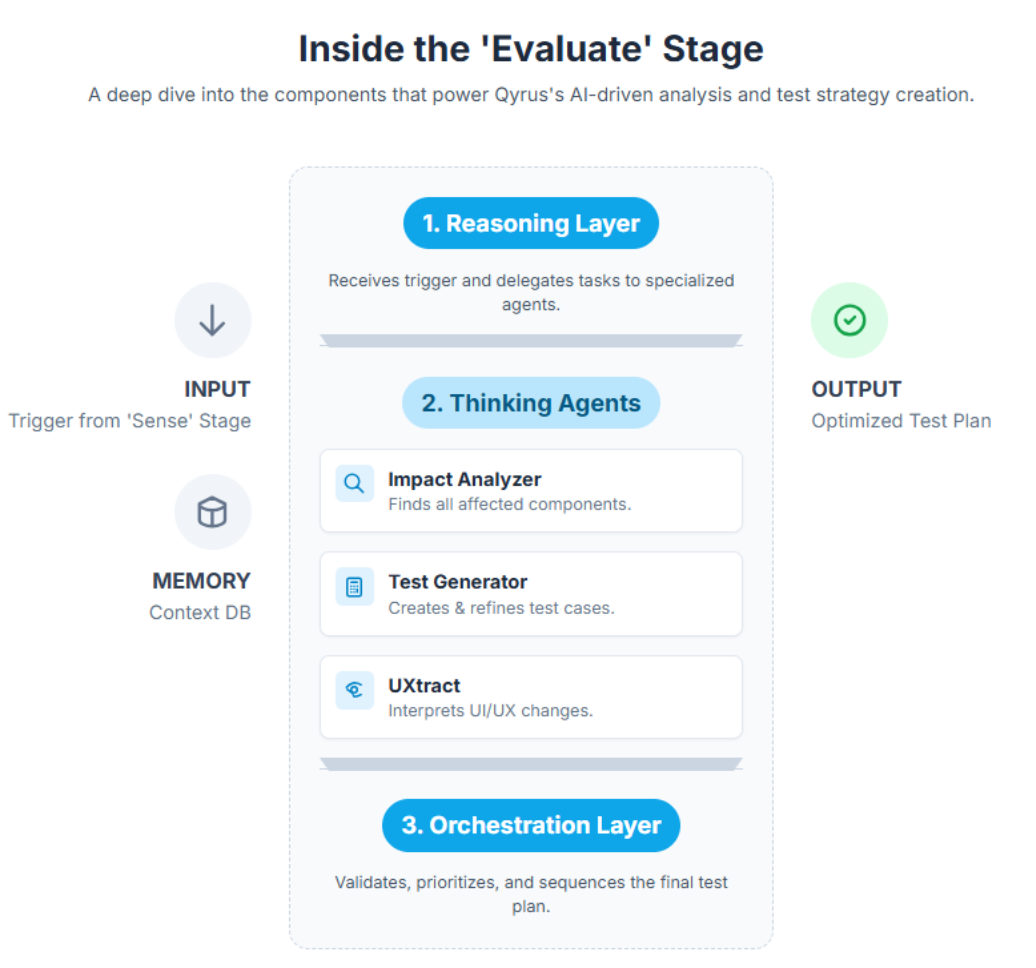
1. The Reasoning Layer: The Command Center
The Reasoning Layer is the control center of the ‘Evaluate’ stage, orchestrating logical decision-making upon receiving a trigger from the Watch Towers. It acts as the brain of the operation, directing the flow of information and coordinating the actions of the Thinking Agents.
Imagine a conductor leading an orchestra. The reasoning layer analyzes the incoming information about the changes, assesses their potential impact, and then delegates tasks to specialized “Thinking” agents. It determines which agent is best suited to analyze the change, generate relevant test cases, and optimize the testing strategy. This intelligent delegation of tasks ensures that the evaluation process is efficient, effective, and focused on the areas that matter most.
2. The Thinking Agents: A Squad of AI Specialists
These are the specialized AI-driven models, or Single Use Agents (SUAs), that perform specific tasks within the ‘Evaluate’ stage. They are experts in their respective domains, working together to analyze the impact of changes, generate relevant test cases, and optimize the testing strategy.
Think of them as specialized detectives, each with their own unique skills and expertise. Some are experts in analyzing code, others in understanding user flows, and yet others in generating test cases. This specialization ensures that every aspect of the change is thoroughly evaluated, and the most effective testing strategy is devised.
The thinking agents include:
Impact Analyzer: This agent acts as the forensic expert. Using static analysis, dependency graphs, and historical data, it maps out the potential ripple effect of a code change. It answers the question: “If this line of code changes, which other modules, components, or APIs could be affected?”
Test Generator: Leveraging Natural Language Processing (NLP), this agent functions as the strategist. It compares updated requirements and the impact analysis against existing tests. It then dynamically generates new, relevant test cases and refines existing ones to ensure complete coverage.
UXtract: This agent is the visual design expert. It meticulously extracts and interprets UI/UX changes, mapping differences between design files (like Figma versions) to specific user flows and test steps. This guarantees that visual integrity and accessibility are never compromised.
3. The Context DB: The System’s Long-Term Memory
The Context DB serves as the memory bank of the ‘Evaluate’ stage, a central data store containing historical test results, system configurations, defect trends, and traceability data. The SUAs use the data in the Context DB as one of the inputs for their reasoning.
Imagine a detective’s case files, filled with past experiences, insights, and knowledge. The Context DB provides the Thinking Agents with valuable context and information to make informed decisions. This historical data helps them analyze the impact of changes more accurately, generate more relevant test cases, and optimize the testing strategy for maximum effectiveness.
4. The Orchestration Layer: The Conductor of the Evaluation Symphony
This layer’s objective is to coordinate and validate decisions from the Thinking Agents. Its function is to serve as an orchestrator or “meta-controller” that confirms which test sets should be executed and in which sequence, applying business rules and testing policies.
Imagine a conductor leading an orchestra, ensuring that each musician plays their part in harmony with the others. The Orchestration Layer takes the recommendations from the Thinking Agents and creates a cohesive testing strategy. It ensures that the tests are executed in the right order, with the right resources, and in line with the overall testing policies and business rules. This coordination and validation ensure that the testing process is efficient, effective, and aligned with the organization’s goals.
The Payoff: Intelligent, Optimized, and Comprehensive Testing
The ‘Evaluate’ stage provides several benefits that greatly improve the testing process:
Intelligent Test Creation: By dynamically generating relevant test cases based on changes and requirements, the ‘Evaluate’ stage reduces the manual effort required to create and maintain tests. The Test Generator considers existing scenarios and suggests new ones, ensuring comprehensive test coverage. This AI test generator not only saves time but also ensures that your tests are always relevant and up to date.
Optimized Test Execution: The stage prioritizes and sequences tests for maximum efficiency. This ensures that the most important tests are run first, allowing for faster feedback and quicker identification of critical defects. With test optimization, you can be confident that your testing efforts are focused on the areas that matter most.
Comprehensive Impact Analysis: The Impact Analyzer identifies affected components, ensuring complete test coverage. This helps to focus testing efforts on the areas most likely to be impacted by a change, reducing the risk of overlooking critical issues. Impact analysis ensures that no stone is left unturned in your quest for quality software.
By combining intelligent test generation, optimized test execution, and comprehensive impact analysis, the ‘Evaluate’ stage empowers teams to achieve unparalleled efficiency and effectiveness in their AI-driven testing efforts. It’s like having a team of expert testers and strategists working tirelessly behind the scenes, ensuring that your testing process is always one step ahead. With Qyrus SEER, you can say goodbye to guesswork and embrace a data-driven approach to testing, where every decision is backed by intelligent insights and optimized for maximum impact.
Conclusion: Evaluate to Elevate
The ‘Evaluate’ stage is the strategic heart of the Qyrus SEER framework, transforming raw change data into an actionable intelligence blueprint. It’s how we move from reactive testing to a predictive, optimized, and truly AI-driven strategy.
But a brilliant strategy is only as good as its execution. In the next part of our series, we’ll explore the ‘Execute’ stage, where this carefully crafted plan is put into action. Stay tuned to see how Qyrus orchestrates a fleet of agents to seamlessly run tests, gather results, and bring you one step closer to fully autonomous testing.
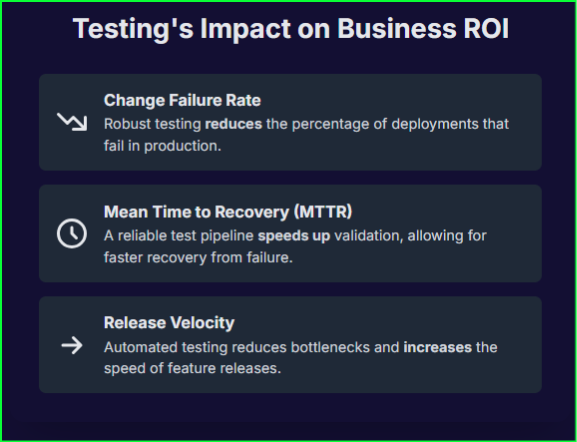
To win, teams must stop treating quality assurance as a final hurdle and start embedding it into the very DNA of their applications. This approach, centered on strategic mobile testing automation, is the key to delivering the quality users demand at the speed the market requires.
By designing for automated testing from day one, you build a foundation for continuous, reliable feedback that accelerates bug detection and transforms the test automation of mobile apps from a challenge into your greatest competitive advantage. This article is your blueprint for achieving that, detailing the core best practices for the modern testing of mobile applications.
Digital Fingerprints: Mastering Element Identification for Mobile Automated Testing
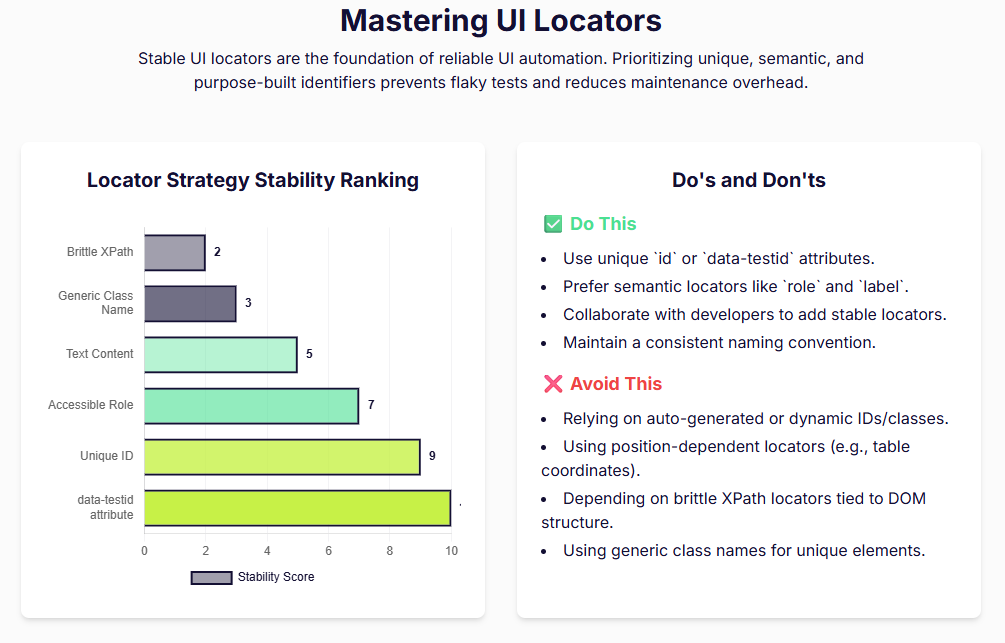
Think of your automation script as a detective and UI elements as its key witnesses. If the detective can’t reliably identify a witness every single time, the entire case falls apart. The same is true for mobile automated testing. Stable UI element locators are the foundational bedrock of reliable automation. Without them, even minor UI changes can cause your tests to fail, leading to endless maintenance and eroding confidence in your automation suite.
Your North Star: Why Unique and Accessibility IDs Reign Supreme
Developers should make unique Accessibility IDs the gold standard for identifying elements. A truly unique Accessibility ID acts like a permanent address, making your automation tests independent of the app’s underlying structure and therefore far more resilient. For cross-platform test automation of mobile apps, accessibility IDs are the most reliable locators you can use. They work consistently across both iOS and Android, which makes them perfect for crafting robust, reusable automation scripts. Additionally, by utilizing Accessibility IDs, you are ensuring that users who have visual impairments can use your applications with ease – whether your developers realize or not this may also be a compliance issue.
The Architectural Sin of Deep Nesting
Developers must avoid the temptation to deeply nest interactive elements. This common practice creates a tangled web that complicates automation and severely hinders accessibility. Both screen readers and automation tools struggle to navigate nested interactive controls. For example, if you place a clickable link inside a button, assistive technologies will often ignore the inner link because the parent button is the only focusable item. This makes the child element effectively invisible to both users who rely on assistive tech and your automation scripts.
Clarity and Consistency: The Golden Rules of Naming
Every single interactive element needs a unique, descriptive identifier. More importantly, you must ensure these IDs remain consistent across all future app versions. This discipline ensures that your automation scripts don’t break every time you release an update. Adopting a consistent naming convention for locators helps your entire team easily locate and interact with elements, creating a smoother workflow for everyone involved in the testing of mobile applications.
Choreographing the Code: Ensuring Predictable UI Behavior
A predictable UI is a testable UI. When your application behaves consistently, your automation scripts can execute their tasks with precision. However, when elements shift, disappear, or load erratically, it introduces chaos that even the most well-written test script cannot handle. You must engineer predictability into your application’s design to build a truly effective mobile testing automation framework. It is the only way to ensure your tests are stable, reliable, and meaningful.
Follow the Leader: The Power of Consistent Navigation
Your development team should use standard navigation components and interaction patterns whenever possible. Automation tools are designed to recognize and interact with these standard components easily. By sticking to established patterns, you create a logical and intuitive user flow that is just as easy for a script to follow as it is for a human. This simple discipline removes a significant layer of complexity from the test automation of mobile apps.
Standing on Solid Ground: Why Element Stability Is Non-Negotiable
Your app’s elements must maintain consistent positioning and attributes from one test run to the next. Avoid dynamic layout changes that might cause automation scripts to fail because they can no longer find what they’re looking for. It is especially critical that you do not use locators derived from an element’s on-screen position, as any minor layout adjustment will break these tests instantly. Instead, always tie locators to the inherent data or logical function of the element itself.
Taming the Flow: How to Handle Dynamic Content
When your app loads content dynamically, it must provide clear indicators that automation can detect. These signals tell the test script precisely when the page is fully rendered and ready for interaction. Elements that change frequently, like timestamps or ads, are notorious for introducing flakiness into tests. You can manage this instability by implementing strategies to hide these dynamic elements during screenshots or by controlling their state directly within the test environment.
Taming the Motion: Strategies for Handling Animations in Test Automation
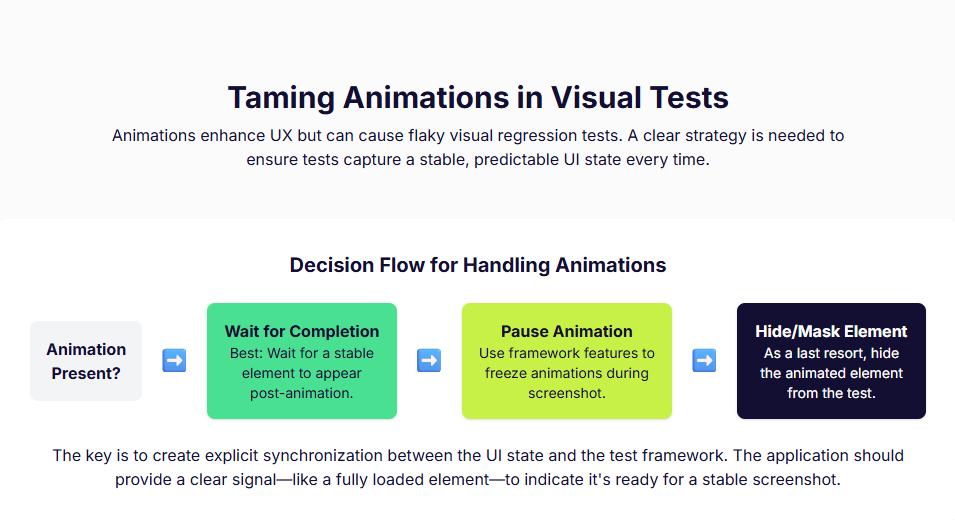
Animations create a dynamic and engaging user experience, but they can be a nightmare for automation. They are a primary cause of flaky tests, especially in visual regression testing where pixel-perfect comparisons are key. When your script captures a screenshot mid-animation, it will almost certainly fail the comparison against a baseline image, even if no real bug exists. This constant stream of false positives undermines the reliability of your entire mobile automated testing effort. To conquer this, you must give your application a way to tell your tests when to stand by and when to act.
The Flicker of Failure: Why Animations Cause Chaos
Visual regression testing works by comparing a baseline screenshot with a current one to detect unintended changes. This process demands a stable and static UI. Animations, by their very nature, create a transient state. Capturing an image while an element is fading, sliding, or resizing will inevitably lead to a failed test because the visual state is different from the baseline. These flaky tests create significant maintenance overhead and erode your team’s confidence in the automation suite.
Signaling Stillness: How to Wait for the Perfect Shot
You can eliminate animation-induced flakiness by implementing explicit synchronization mechanisms. The most straightforward approach is to ensure animations have fully completed before your test proceeds to the next step or captures a screenshot. Your team can achieve this in a few ways:
Wait for a Stable Element: A robust method involves waiting for a specific, non-animated element on the subsequent screen to become visible. You can configure this element to load only after the animation sequence has concluded, providing a reliable signal that the UI is static and ready for validation.
Use Completion Handlers: Many animation APIs and CSS event listeners offer completion handlers (like “animationend”) that execute a function once the animation finishes. Your test scripts can hook into these events to trigger the screenshot capture at the perfect moment.
Provide a “Disable” Switch: For maximum control, you can include options to disable or reduce animations specifically within your test environments. This ensures a consistent visual state for every single test run.
Building with Blocks: The Power of Modular Design in Mobile Testing Automation
A strong architectural foundation makes every aspect of development easier, and this is especially true for the testing of mobile applications. While many complex design patterns exist, one simple principle delivers an enormous return on investment for automation: modularity. When you build your application from small, independent, and reusable components, you create a structure that is inherently easier to test and maintain.
Isolate and Conquer: How Modularity Simplifies Testing
A modular design allows your team to test individual components in isolation. This is a massive advantage. Instead of needing to navigate through multiple screens and complex setups to validate a single piece of functionality, you can write focused tests that target a singular component. This approach makes your automation scripts simpler, faster, and far more reliable. If a change in one module breaks its dedicated tests, you know exactly where the problem lies without having to debug a massive, end-to-end test failure. This practice of actively breaking the application into small, reusable modules is a cornerstone of building testable software.
The Sterile Lab: Mastering the Environment for Test Automation of Mobile Apps
Your testing environment is the laboratory where you validate your application’s quality. If the lab is contaminated or inconsistent, your experimental results—your test outcomes—will be worthless. To achieve reliable results from the test automation of mobile apps, you must exert precise control over every aspect of the testing environment, from the server it runs on to the data it consumes.
A Room of One’s Own: The Case for Dedicated Environments
Your team must maintain dedicated environments exclusively for automated testing. This is non-negotiable. Running automated tests in the same space as manual testing or active development work creates conflicts and instability that will inevitably lead to false negatives. A separate, clean environment ensures that your test results are based on the code being tested, not on some random interference from other activities.
Feeding the Machine: Smart Data Management
You must implement clear strategies for managing test data so it doesn’t interfere with your automation scripts. The cardinal rule is to avoid hardcoded values in your tests. Instead, use parameterized data inputs, which allow you to run the same test with different data sets, making your scripts far more flexible and powerful. For apps with dynamic content, use stable data fixtures or mock your network requests to ensure the data displayed in the application is identical for every test run.
The Device Matrix: Conquering Configuration Chaos
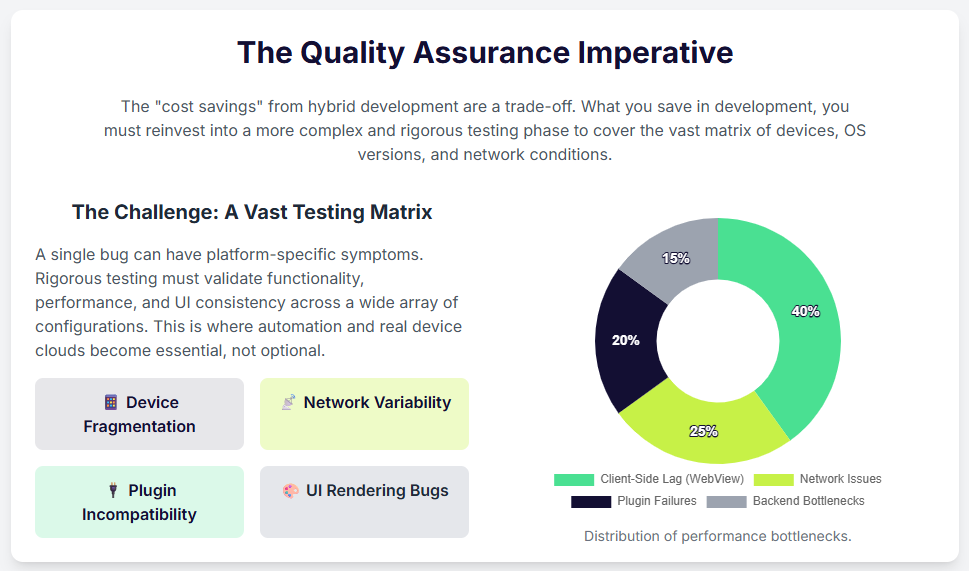
A critical part of the testing of mobile applications is ensuring your app works flawlessly across a vast landscape of device configurations, screen sizes, and operating systems. Verifying this consistency is a monumental task. To manage this chaos, you should standardize your test execution within a CI/CD pipeline. This ensures that every test runs under the exact same conditions, which is crucial for achieving stable and repeatable results that build confidence in your automation suite.
From Blueprint to Brilliance: Your Path to Automation Excellence
Building an automation-friendly application is not a matter of chance; it is a deliberate act of architectural precision. When you commit to this blueprint, you fundamentally shift your team’s capabilities. You empower them to move faster, catch bugs earlier, and release products with unshakable confidence. By forging stable element IDs, engineering predictable UI behavior, taming erratic animations, embracing modular design, and mastering your testing environment, you create a virtuous cycle of quality and speed. These practices are the pillars of modern mobile testing automation.
Adhering to these best practices is the most important step, and equipping your team with the right platform can dramatically accelerate your journey.
This is where Qyrus comes in.
Qyrus provides a comprehensive mobile testing platform built for teams that prioritize quality and efficiency. It is designed to support the very best practices detailed here. While you focus on building a testable app, Qyrus provides a powerful toolkit to execute your automation strategy at scale.
To conquer the immense challenge of device fragmentation, Qyrus offers a robust, real Device Farm. This approach is a proven, mainstream strategy for success, with real device cloud testing already accounting for 22% of the testing services market. With Qyrus, you can instantly validate your app’s consistency across a vast matrix of real device configurations, screen sizes, and operating systems, ensuring your application delivers a flawless experience for every user, everywhere.
Stop wrestling with unstable scripts and endless device maintenance. Elevate your test automation of mobile apps and start building with brilliance.
Book a demo today to discover how the Qyrus Mobile Testing platform and its extensive Device Farm can help you implement these best practices and achieve seamless, reliable automation today.
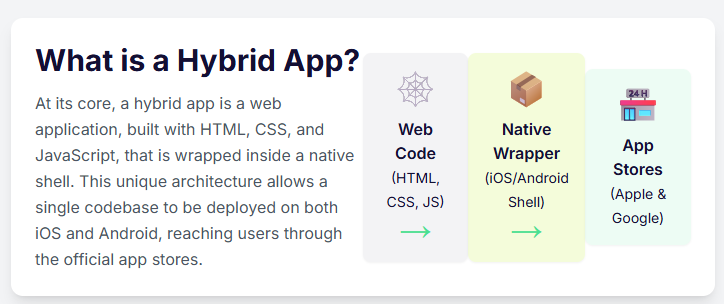
The world of mobile applications is no longer a simple choice of native vs web apps. A large number of businesses are now turning to hybrid solutions for their mobile needs, and it’s easy to see why. This strategic approach to hybrid app development combines the cost-efficiency and speed of web technology with the power of a native application shell, allowing a single codebase to conquer multiple platforms at once.
But this power comes with a price: complexity. Testing these intricate applications, with their constant dance between a native container and an embedded web view, has been a persistent source of headaches, flaky tests, and frustration for QA teams. Until now.
Qyrus is excited to announce a revolutionary suite of enhancements to our mobile testing platform, engineered specifically to cut through this complexity and make testing hybrid apps more reliable, stable, and efficient than ever before.
Why Hybrid App Development is Winning the Mobile Race
The massive shift toward hybrid apps isn’t just a trend; it’s a strategic business decision rooted in powerful, tangible advantages. For years, the native vs hybrid app debate centered on performance trade-offs, but today’s businesses are prioritizing efficiency and reach. The benefits are simply too compelling to ignore.
Radical Cost-Efficiency: The most significant advantage is the impact on the bottom line. By leveraging a single codebase for multiple platforms, companies can save up to 40% of their development budget. This eliminates the need to fund and manage separate, specialized development teams for iOS and Android, freeing up crucial resources.
Unmatched Speed-to-Market: In today’s competitive landscape, getting to market first is critical. Hybrid app development dramatically shortens development cycles. The “write once, run anywhere” philosophy means businesses can launch their app on the Apple App Store and Google Play Store simultaneously, capturing a wider audience from day one.
Maximum Market Penetration: Why choose one audience when you can have them all? With Android holding a 71.65% market share and iOS holding 27.62%, hybrid apps provide an immediate path to address nearly the entire mobile market with a single product.
This isn’t just a theory. The proof is likely already on your phone. Globally recognized applications utilize hybrid technology to power their services, demonstrating their scalability and success at the highest level.
The Core Testing Hurdle: Why Hybrid App Development Complicates QA
While the advantages of hybrid app development are clear, they introduce a layer of complexity that can bring testing efforts to a grinding halt. The very architecture that makes these apps so versatile is also what makes them notoriously difficult to test. A hybrid app isn’t a single entity; it’s a three-part system working in tandem, and a bug can originate in any layer.
The Native Shell: This is the lightweight, platform-specific container built with native code (like Swift for iOS or Kotlin for Android). It’s the “app” you download from the store, and its main job is to host the component where all the trouble starts.
The WebView: This is the heart of the hybrid app. It’s essentially a full-screen, in-app web browser that renders all the web-based content—the HTML, CSS, and JavaScript that make up the app’s user interface. For a test automation script, this is a completely separate world from the native shell.
The Bridge: This critical communication layer allows the web code inside the WebView to access native device features like the camera, GPS, or push notifications. This bridge is a frequent source of complex, platform-specific bugs.
This three-layer system creates the ultimate challenge for quality assurance: context switching. An automated test script must constantly jump between the native app context and the WebView context to perform actions and validations. This single activity is the number one cause of flaky, unreliable tests. A script that fails to switch context can prevent a locator from being properly identified, and the entire test run grinds to a halt. Worse, a single failure within the WebView can throw the test driver into an invalid state, derailing an entire suite execution and leaving QA teams to pick up the pieces. This is the frustrating reality that hybrid app testers face every day.
The Qyrus Solution: Intelligent and Resilient Hybrid Testing
Understanding these deep-rooted challenges is one thing; solving them is another. At Qyrus, we believe that the testing platform should adapt to the app’s complexity, not the other way around. That’s why we’ve gone beyond generic support and engineered a suite of intelligent enhancements that directly target and eliminate the most common points of failure in hybrid app development testing.
Feature 1: Automated Web View Detection
The Problem: Your test script needs to interact with an element inside a WebView, but it first needs to switch contexts. This is a notoriously flaky step where tests often fail, especially on iOS.
The Qyrus Solution: Forget manual guesswork. We’ve introduced a new ‘Switch to Web View’ action type that does the heavy lifting for you. It intelligently searches for the available web view and automatically switches the driver’s context. It’s a simple, powerful action that builds resilience directly into your tests.
Feature 2: Automatic Context Reset for Ultimate Stability
The Problem: A single test fails while the driver is in the WebView context. Because the driver is now “stuck,” every subsequent test in the suite also fails, creating a cascade of false negatives and wasting valuable time.
The Qyrus Solution: We’ve built a failsafe. After any test case scenario is executed—whether it passes or fails—Qyrus automatically resets the driver’s context back to Native. This ensures each test starts with a clean slate, isolating any single failure and allowing the rest of your suite to run to completion. The result is cleaner reports and more trustworthy results.
Feature 3: Proactive Safeguards for Critical App Actions
The Problem: Your script, still in a WebView context, attempts to execute a core application function like ‘Launch App’ or ‘Reset App’. This mismatch can cause unexpected errors and test instability.
The Qyrus Solution: Our platform now provides intelligent safeguards. Before executing critical application actions, Qyrus automatically checks and switches the driver to the Native context. This proactive measure prevents context-related errors before they can happen, ensuring your test environment remains stable and your commands execute flawlessly.
The Qyrus Advantage: What This Means for Your Team
These aren’t just minor updates; they are fundamental improvements designed to give your QA team their most valuable resource back: time. By building intelligence directly into the platform, Qyrus removes the most common obstacles in hybrid testing, allowing your team to move faster and with greater confidence.
Here’s what you can expect:
Dramatically Increased Reliability: Say goodbye to entire test runs failing because of a single, flaky context switch. Your automated tests will be more robust and resilient than ever.
Unprecedented Efficiency: Your engineers will spend less time debugging the testing tool and more time focused on what matters—improving the quality of your application.
Faster, More Trustworthy Results: With stable suite executions, you get accurate results you can depend on, allowing you to release with greater speed and confidence.
True Cross-Platform Confidence: Stop avoiding the hard-to-test areas. Your team will now have the power to easily and reliably automate the complex native-to-web interactions that are at the very core of your hybrid app development strategy.
Embrace the Future of Hybrid Testing
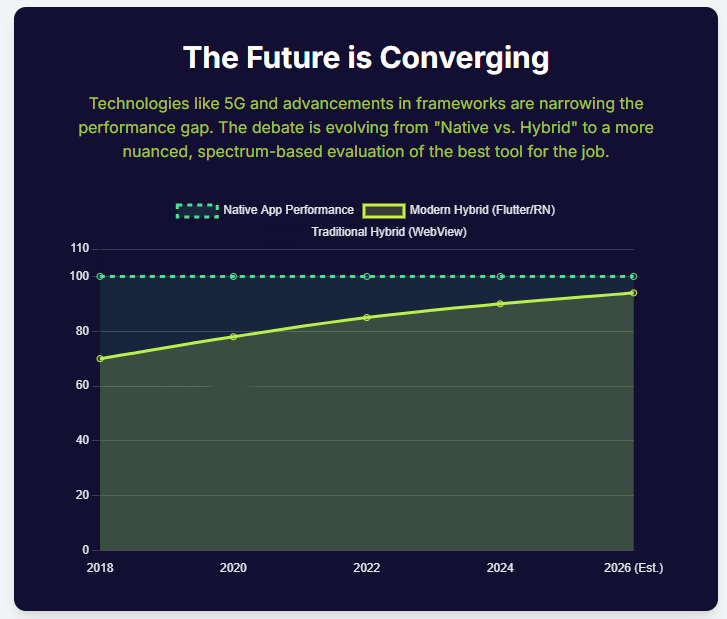
The debate between native vs hybrid app development has evolved. Today, the real question is not which development path you choose, but whether you have the right tools to ensure quality regardless of the underlying architecture. Hybrid applications are the present and future of mobile strategy, offering unparalleled speed and efficiency.
Hybrid apps demand a testing platform that is just as sophisticated and adaptable. Qyrus is committed to providing that platform. We believe in building intelligent solutions that tackle modern development challenges head-on, empowering you to build, test, and release better apps, faster.
Ready to stop fighting your tools and start testing flawlessly? Request a Demo and Experience the Future of Hybrid App Testing with Qyrus.
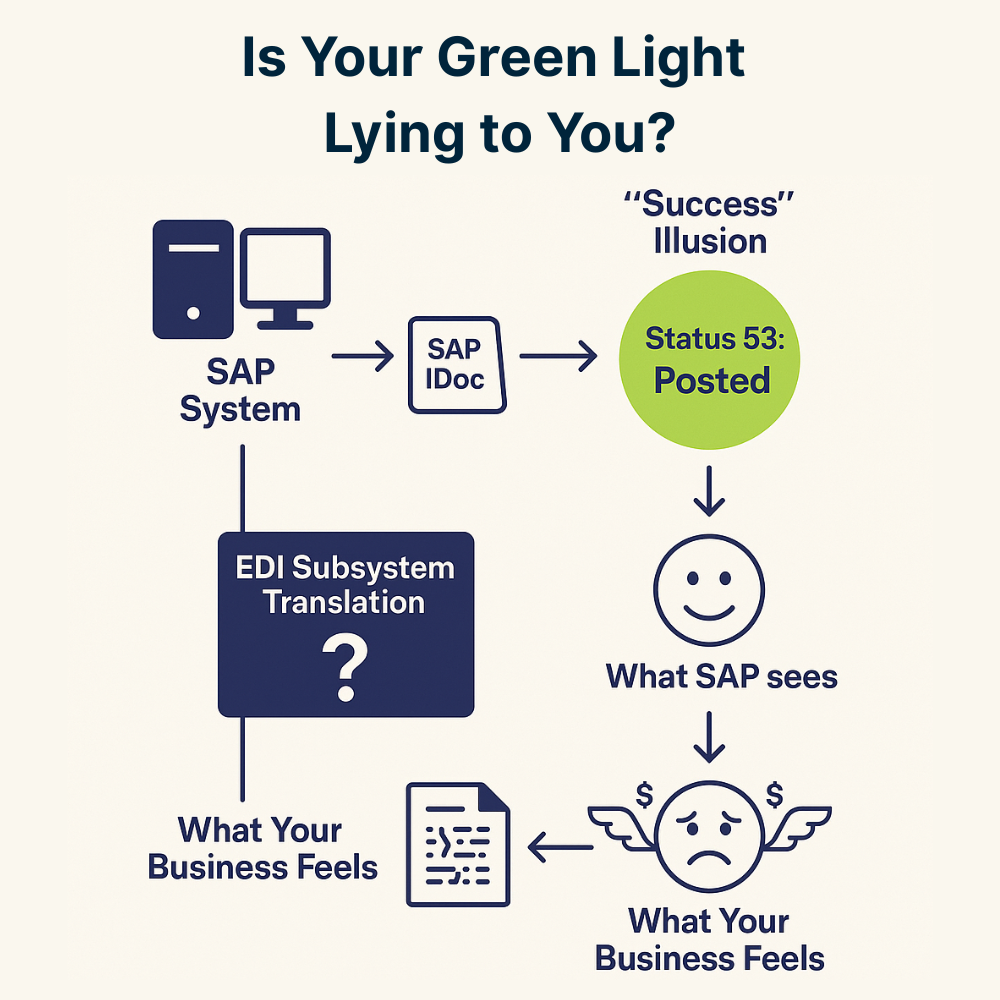
It’s a familiar feeling of relief for any SAP professional. You check the monitor, and there it is: Status 53. Application document posted. The SAP IDoc has finished its journey, the light is green, and everything appears to be a success. But is it? What if that green light is a lie, a digital facade hiding costly errors that are silently disrupting your operations and eroding your profits?
This isn’t a hypothetical fear; it’s a hidden reality in the high-stakes world of Electronic Data Interchange (EDI). EDI in SAP is the powerful, automated engine that exchanges critical business documents between trading partners, forming the very backbone of modern supply chains. It’s a massive and essential market, with research projecting its value to exceed $75 billion by 2033. Given that slightly more than half of all organizations rely on EDI to integrate solutions with their ERP systems, its smooth operation is non-negotiable.
Herein lies the dangerous blind spot. Your SAP system creates an IDoc, a standard data container, for the transaction. However, for your external partner to understand it, this SAP IDoc must first pass through a critical translation step. An intermediary piece of software, known as an EDI subsystem, must map and translate the IDoc into a global EDI standard like ANSI X12 or EDIFACT. This translation happens in a black box, outside of your SAP system’s direct view. A single flaw in that mapping logic can corrupt the data, even while SAP reports a successful handoff.
This post will pull back the curtain on this process. We will deconstruct the “cost of error” – a significant and often hidden component of your total cost of ownership – and reveal why a simple green light is not enough to guarantee data accuracy. It’s time to move beyond the illusion of success and find a way to achieve true data integrity.
The Anatomy of a Failure: Decoding the Cost of Error in Your SAP IDoc Landscape
To understand the “green light fallacy”, you first must understand the money it costs you. The largest, and most frequently underestimated component of an integration landscape’s Total Cost of Ownership (TCO) is not the software or the initial setup. It is the perpetual, operational “cost of error”. It’s the immense expense of manually monitoring and resolving the inevitable
SAP IDoc errors that arise in any high-volume environment. In fact, it is not uncommon for businesses to allocate a full-time, highly experienced, and therefore expensive, expert solely to the task of managing these failures.
The problem originates in a procedural black box. The journey of an outbound SAP IDoc doesn’t end when it’s created. Your SAP system’s direct responsibility concludes the moment it successfully passes the IDoc to the communication layer, known as the port (a milestone marked as Status ’03’). From there, a third-party EDI subsystem takes over, performing the complex and error-prone translation of the IDoc into a universal standard like ANSI X12. A single flaw in this external mapping can corrupt your data, long after SAP has washed its hands of the process.
These failures fall into a few distinct categories, but only one is truly silent.
Data-Related Errors (Status 51): This is the most frequent inbound failure. The SAP IDoc is structured correctly, but the business data inside is invalid. Think of a purchase order arriving for a material master that doesn’t exist or for a customer who is on credit block. The system rightly stops and raises a red flag.
Configuration Errors (Status 29): The process fails because the underlying setup within SAP is wrong. This is often due to a mistake in the Partner Profile (transaction WE20), the single most critical configuration object in the entire IDoc framework and a primary cause of routine processing failures.
Silent Mapping Errors (The Real Villain): This is the most dangerous failure. It’s where the structure is valid, the configuration is correct, and the EDI in SAP process runs to completion. The SAP IDoc receives the coveted Status ’53’. However, due to a subtle flaw in the external translation mapping, the data is semantically wrong. The price might be off by a decimal point, the unit of measure might be wrong, or the shipping address could be incorrect. Your system displays a success, but you’ve just shipped the wrong goods or sent a faulty invoice, triggering costly disputes and chargebacks.
Illuminating the Black Box: How Qyrus Guards Your EDI in SAP
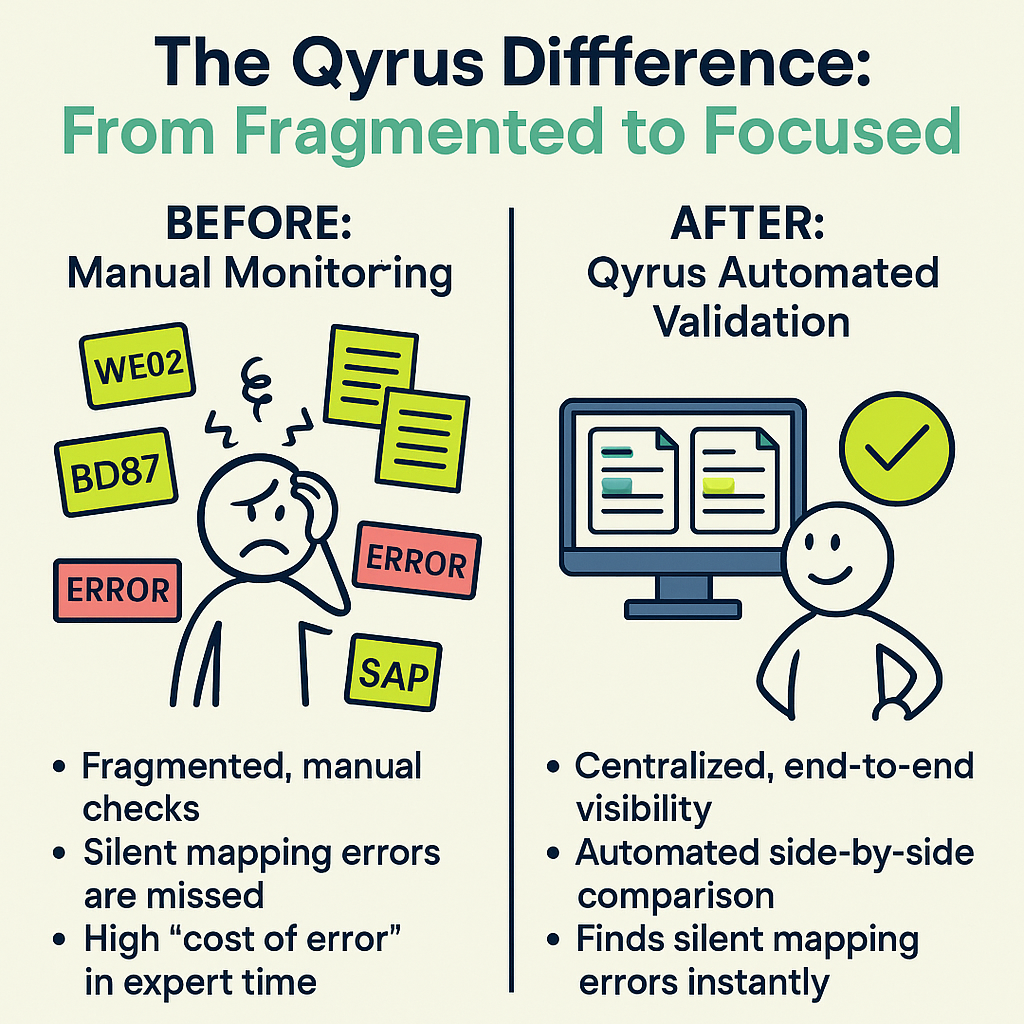
A reactive, “break-fix” approach to integration failures is unsustainable. The long-term solution isn’t to get better at firefighting; it’s to prevent the fires from starting by establishing proactive governance. The foundation of that strategy is true visibility. This means having the ability to see beyond individual SAP IDoc status codes and into the end-to-end health of your data flow. Standard SAP monitoring, fragmented across different transactions like WE02 and BD87, simply wasn’t built for this purpose.
This is where Qyrus Document Exchange Testing changes the game. Part of Qyrus SAP Testing solution, it’s a module designed specifically to provide the deep, end-to-end visibility that has been missing from EDI in SAP. It acts as your data integrity watchdog, moving you from a reactive state to a proactive one.
At its core, Qyrus’ “Relationship Spotter” feature solves a fundamental challenge. It automatically scans your SAP system to establish the crucial link between an incoming electronic document and the final business transaction it has posted. This creates a single, unified view of the entire process, a stark contrast to the siloed information available in standard tools.
Most importantly, Qyrus illuminates the black box of the EDI subsystem. It provides a clear window into the result of the complex translation process by enabling a side-by-side comparison of the source SAP IDoc and the final posted data. This allows you to audit the outcome of the mapping and verify that the data wasn’t corrupted during its journey. It is the definitive way to confirm that the unique requirements of each trading partner—a major challenge known as “partner heterogeneity”—were handled correctly, ensuring the data you sent is the data they actually received and posted.
Forensic-Level Detail: How Qyrus Puts Your Data Under the Microscope
So, how does Qyrus move beyond simply flagging a failed SAP IDoc to reveal the truth within your data? It provides a powerful, two-pronged approach that combines high-level oversight with a forensic deep-dive. It gives you both a telescope and a microscope.
It starts with the big picture. Qyrus allows you to perform a mass comparison of multiple IDocs at once, giving you a quick overview of any differences. This bulk analysis is the perfect tool for identifying systemic problems. You can instantly see if a whole batch of transactions from a specific partner is failing, or spot recurring patterns of errors that would be impossible to find by looking at IDocs one by one.
From this high-level view, you can then zoom in with laser-precision. The platform’s real power lies in its detailed, side-by-side comparison capabilities, which are designed to make finding discrepancies effortless.
An Intuitive Split-Screen View: Qyrus presents the source SAP IDoc and the final posted business document in a visual, split-screen layout. This immediately removes the need to toggle between different screens or transactions to manually compare data points.
Clear XML Tree Structure: Both the IDoc and its corresponding document are displayed in a clear, hierarchical XML tree structure. This is a massive advantage over viewing raw SAP IDoc data, as it allows you to easily compare not just field values but also the very structure of the documents.
Automatic Difference Highlighting: You don’t have to hunt for errors. Qyrus automatically highlights every single difference between the two documents, from changes in segment order to modifications in field values. Your eyes are drawn directly to the problem areas, turning hours of tedious manual checking into seconds of instant recognition.
This combination of features provides the comprehensive analysis needed to not just see that an error occurred, but to understand precisely why it happened, enabling a faster, more accurate resolution.
The S/4HANA Proving Ground: Future-Proofing Your EDI in SAP
There’s a common misconception that the rise of SAP S/4HANA means the death of the SAP IDoc. Let’s be clear: for on-premise and private cloud editions of S/4HANA, this is simply not true. The IDoc framework remains a core, supported technology that is deeply embedded in standard B2B processes and is still perfectly reliable for its intended purpose. The future is one of coexistence, not extinction.
For any organization moving from ECC to S/4HANA, one of the most critical best practices is to use IDoc comparison tools to detect segment length changes and other structural differences to validate interfaces after the move. An SAP IDoc that worked perfectly in the old system can suddenly fail or, worse, post incorrectly in the new one. This makes a tool that can perform precise, automated comparisons between the source and target documents an absolute necessity for mitigating migration risk.
Looking beyond the migration, the strategic future of enterprise integration is a hybrid one. Your architecture will become a managed portfolio of patterns: robust, asynchronous EDI in SAP for high-volume B2B document exchange, running alongside modern, real-time APIs for cloud and mobile applications. Even in this evolved landscape, the need for data integrity on your core EDI transactions does not disappear. Qyrus provides that consistent, reliable validation layer, ensuring your most critical supply chain and financial processes continue to run flawlessly.
Beyond Tech: The Hard-Dollar ROI of Data Integrity
Ultimately, the case for better data validation isn’t just technical; it’s financial. Investing in a tool that provides true visibility into your EDI in SAP landscape delivers a powerful and quantifiable return by directly impacting your bottom line. The value isn’t just in finding errors; it’s in the costly consequences you avoid.
Industry research has consistently shown the immense benefits of a well-implemented EDI strategy, but these benefits are only realized when the data is correct.
Dramatically Reduced Errors and Costs: Studies show that proper EDI implementation can reduce transaction errors by a staggering 30-40% and cut overall transaction costs by 35% or more. Qyrus is the enabling technology that ensures you achieve this, by catching the silent data errors that lead to expensive rework, chargebacks, and manual correction efforts.
Accelerated Business Cycles: Flawless data flow means a faster business. Automated, accurate EDI in SAP has been shown to speed up order-to-cash cycles by approximately 20% and can shorten the entire order-to-shipment cycle by as much as 50-60%. When you eliminate the delays caused by data-related disputes, your entire supply chain becomes more agile.
Mitigated Project Risk: By providing a robust validation framework for S/4HANA migrations and other projects, you directly de-risk these massive investments. A tool that helps you avoid becoming one of the 50-75% of ERP projects that fail to meet their objectives provides an ROI that is almost immeasurable.
Freed-Up Expert Resources: Perhaps the most immediate return is reclaiming the valuable time of your most experienced personnel. Instead of dedicating expensive experts to the soul-crushing, manual task of firefighting SAP IDoc failures, you can empower them to focus on high-value innovation and strategic initiatives.
This is where true data integrity pays dividends—transforming EDI in SAP from a potential cost center riddled with hidden risks into a streamlined, efficient engine for business growth.
Stop Guessing, Start Knowing: The Future of Your Data Integrity
The green light of a Status 53 is an alluring, but ultimately incomplete, signal. It confirms that a process ran, not that it ran correctly. For years, organizations have operated with this critical blind spot, accepting the immense hidden costs of manual error correction as a necessary evil for doing business with EDI in SAP. The reality is that the most dangerous errors—the silent mapping flaws that corrupt your data without raising an alarm—are the ones that standard tools were never designed to catch.
Qyrus Document Exchange Testing provides the crucial missing layer of validation. It delivers the proactive, automated monitoring and deep, forensic-level comparison that experts recommend. By illuminating the black box of EDI translation and establishing a clear relationship between the source SAP IDoc and the final posted document replaces guesswork with certainty. It provides the checks and balances needed to manage the massive trail of transactions that define modern business.
Don’t let silent data errors and hidden costs dictate the efficiency of your operations. It’s time to move beyond the green light.
Schedule a personalized demo todayto see firsthand how Qyrus can bring true, end-to-end data integrity to your business and ensure your SAP IDoc workflows are as successful as they appear.
This post is adapted from our original article co-authored by Ameet Deshpande (SVP of Product Engineering) and Vatsal Saglani (Data Science and Generative AI Lead) with our partners at Amazon Web Services and featured on the AWS Machine Learning Blog. Our collaboration with AWS allows us to leverage cutting-edge AI, and in this post, we explore how that translates into transformative value for your development team.
The Core Challenge: Why Traditional QA is Breaking
In today’s competitive landscape, businesses are forced to embrace accelerated development cycles to keep pace with market demands. While speed is essential, maintaining rigorous quality standards has become a significant challenge. This is where the limitations of long-established QA practices become glaringly obvious.
Traditional testing methods, which are pushed to the end of the development cycle, are no longer sustainable. This late-stage approach frequently leads to a cascade of negative consequences, including project delays, spiraling costs, and a compromised final product. The core of the issue lies in the exponential cost of discovering defects late in the process. According to research from the Systems Sciences Institute at IBM, a bug found after product release can cost four to five times as much to fix as one found during design, and up to 100 times more than if it were identified during the initial phases.
These staggering costs are not just financial. They represent lost productivity, time spent by developers’ context-switching to fix old code, and significant delays that can cause a company to miss critical market opportunities. When quality is treated as an afterthought, the entire development process becomes inefficient and reactive.
To break this cycle, a fundamental change is required. The industry is moving toward a “shift-left” paradigm, which focuses on integrating testing much earlier in the development process. By identifying and resolving problems sooner, teams can dramatically reduce costs, shorten timelines, and ultimately deliver a higher-quality product.
The Solution: The QyrusAI Intelligent Agent Suite
To overcome the challenges of traditional QA, you need a new class of tools designed for the speed and complexity of modern development. QyrusAI is a suite of AI-driven testing tools built to enhance quality across the entire software development lifecycle (SDLC). Powered by advanced large language models (LLMs) and vision-language models (VLMs) through Amazon Bedrock, our platform provides a set of intelligent agents that automate and elevate your testing strategy from day one.
Each agent is designed to tackle a specific challenge within the development workflow:
For Requirements & Design
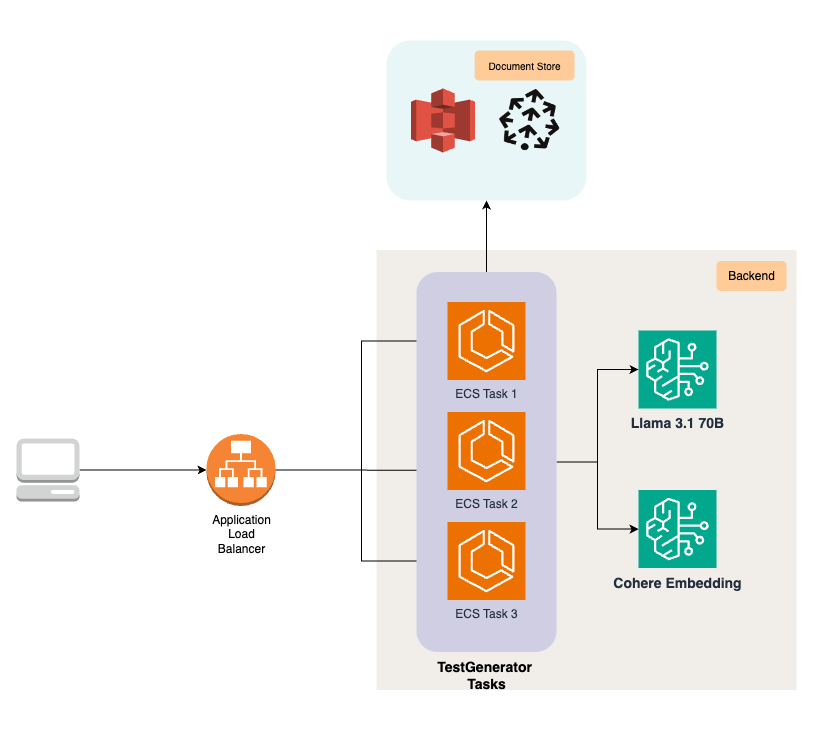
TestGenerator: Analyzes your requirements documents to automatically generate initial test cases. It intelligently infers potential user scenarios and edge cases to create a comprehensive test plan from the very start. TestGenerator uses a suite of advanced models such as Meta’s Llama 70B, Anthropic’s Claude 3.5 Sonnet, Cohere’s English Embed, and Pinecone on AWS Marketplace.
The following diagram shows how TestGenerator is deployed on AWS using Amazon Elastic Container Service (Amazon ECS) tasks exposed through Application Load Balancer, using Amazon Bedrock, Amazon Simple Storage Service (Amazon S3), and Pinecone for embedding storage and retrieval to generate comprehensive test cases.
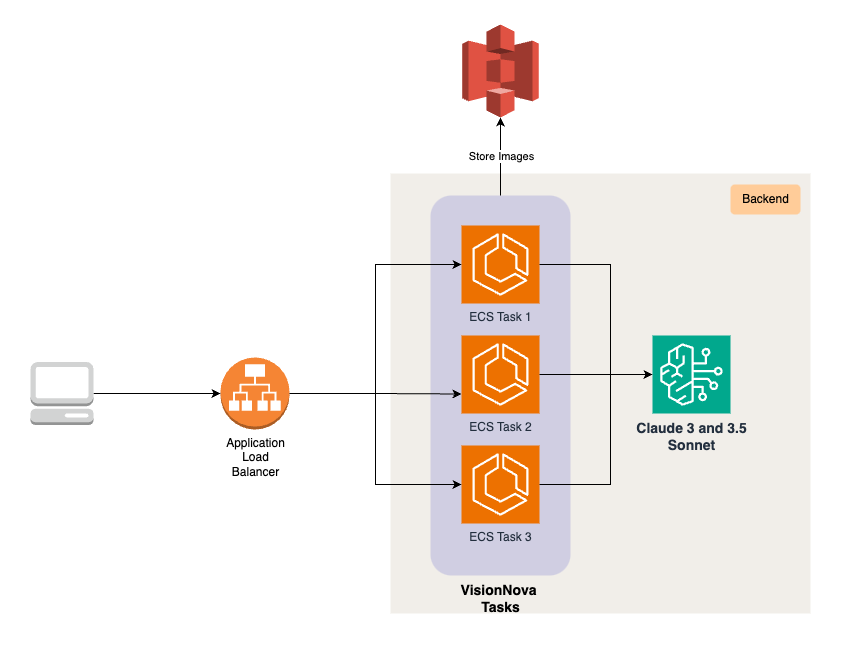
VisionNova: Crafts design-based test cases by analyzing UI/UX design documents. This agent translates visual elements and user experience flows into concrete, testable scenarios.
The following diagram shows how VisionNova is deployed on AWS using ECS tasks exposed through Application Load Balancer, using Anthropic’s Claude 3 and Claude 3.5 Sonnet models on Amazon Bedrock for image understanding, and using Amazon S3 for storing images, to generate design-based test cases for validating UI/UX elements.
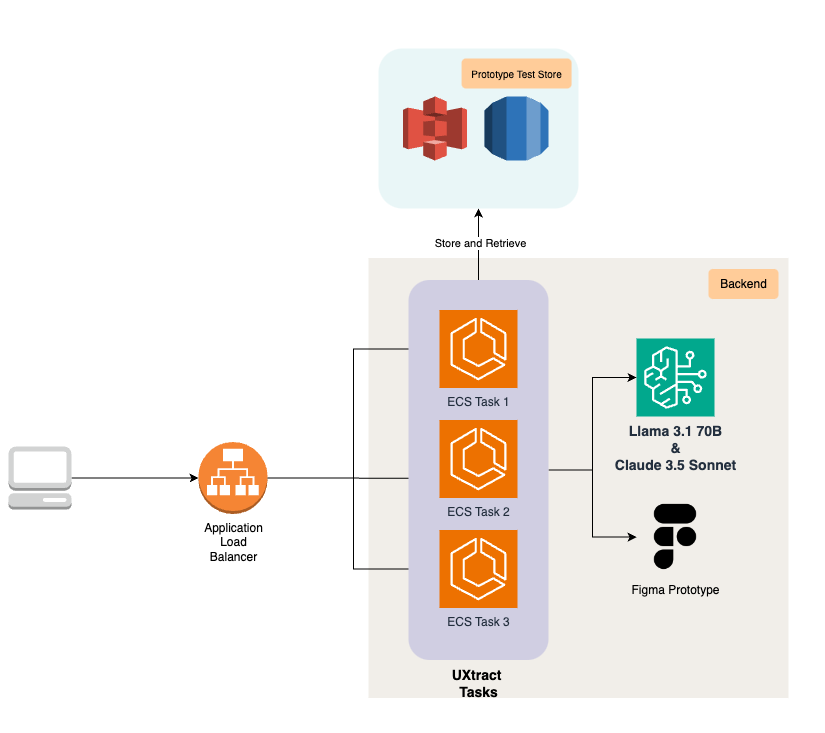
UXtract: Directly converts Figma prototypes into detailed test scenarios and step-by-step instructions. It analyzes the flow between screens to ensure every transition and user interaction can be validated.
The following diagram illustrates how UXtract uses ECS tasks, connected through Application Load Balancer, along with Amazon Bedrock models and Amazon S3 storage, to analyze Figma prototypes and create detailed, step-by-step test cases.
For Pre-Implementation & Development
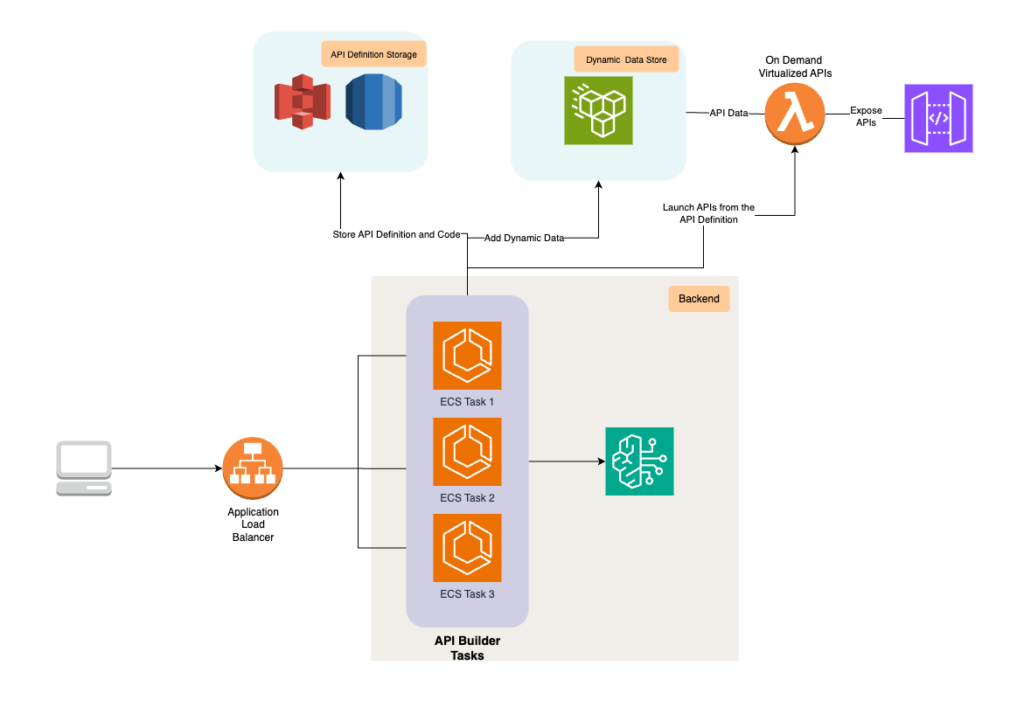
API Builder: Creates virtualized APIs based on specifications, allowing for early front-end testing. Your teams can build and test the user interface with accurate mock responses before the backend is even fully developed.
The following diagram illustrates how API Builder uses ECS tasks, connected through Application Load Balancer, along with Amazon Bedrock models and Amazon S3 storage, to create a virtualized and high-scalable microservice with dynamic data provisions using Amazon Elastic File System (Amazon EFS) on AWS Lambda compute.
Echo: Generates high-quality and logically sound, synthetic test data to ensure comprehensive testing coverage. This removes dependencies on sensitive or incomplete real-world data, enabling thorough testing early on.
For Active Testing & Maintenance
Rover & TestPilot: These are multi-agent frameworks designed for autonomous testing. Rover explores your application to uncover unexpected bugs and issues, while TestPilot conducts objective-based testing to verify that the application meets its intended goals.
Healer:Healer intelligently tackles common test script failures. It analyzes the script and the application’s current state to suggest accurate fixes for locator issues, significantly reducing test maintenance time.
How It Works: Transforming Your SDLC
QyrusAI’s integrated approach ensures that testing is no longer a final stage, but a proactive and continuous activity aligned with every phase of your software development lifecycle. This shift-left strategy makes sure issues are caught early and quality is maintained continuously.
The following diagram visually represents how QyrusAI agents integrate throughout the SDLC, from requirement analysis to maintenance, enabling a shift-left testing approach that makes sure issues are caught early and quality is maintained continuously.
Here is how the QyrusAI agents fit into your workflow, from initial concept to long-term maintenance:
Requirement Analysis: The process begins here. TestGenerator AI generates initial test cases directly from the requirements, creating a strong foundation for quality from the start.
Design: As UI/UX designs are created, VisionNova and UXtract convert Figma designs and prototypes into detailed test cases and functional steps. This validates the user experience before a single line of code is written.
Pre-Implementation: Before the backend is fully developed, two agents enable early progress:
API Builder creates virtualized APIs, allowing front-end testing to begin immediately.
Echo generates synthetic test data, providing comprehensive testing coverage without dependencies on real data.
Implementation: During active development, teams use pre-generated test cases and virtualized APIs to perform continuous quality checks.
Testing: In the formal testing phase, QyrusAI deploys its autonomous agents:
Rover, a multi-agent system, independently explores the application to uncover unexpected issues.
TestPilot conducts objective-based testing, ensuring the application meets all of its intended goals.
Maintenance: For long-term software quality, QyrusAI supports ongoing regression testing with advanced test management, version control, and reporting features.
This integrated model ensures that potential issues are detected earlier in the process, lowering the cost of fixing bugs and enhancing overall software quality.
The Proven Impact: AI-Driven Results
Adopting a new approach requires clear evidence of its benefits. Our data, collected from early adopters and internal testing of QyrusAI, demonstrates the significant and immediate impact of an AI-driven, shift-left strategy. The results consistently show that integrating AI early in the SDLC leads to a significant reduction in defects, development costs, and time to market. This real-world impact is why Gartner recently recognized Qyrus in its report on how Generative AI is impacting the Software Delivery Life Cycle (SDLC).
Here are the key improvements our partners have experienced:
80% Reduction in Defect Leakage: By finding and fixing defects in the initial phases, far fewer bugs ever reach production.
36% Faster Time to Market: Early defect detection, combined with reduced rework and more efficient testing, leads to faster delivery cycles.
20% Reduction in UAT Effort: Because comprehensive testing is performed early and often, a more stable and reliable product reaches the final user acceptance testing (UAT) phase.
Conclusion: The Future of Your QA is Here
Shift-left testing, powered by QyrusAI and its foundation on Amazon Bedrock, is revolutionizing the software development landscape. By integrating AI-driven testing across the entire SDLC, from requirements analysis to maintenance, Qyrus helps your teams to:
Detect and fix issues early, significantly cutting development costs.
Enhance software quality through more thorough, AI-powered testing.
Speed up development cycles without sacrificing quality.
Adapt quickly to evolving requirements and application structures.
This integration with advanced language and vision models from Amazon Bedrock provides unparalleled flexibility, scalability, security, and cost-effectiveness. By adopting this AI-powered approach, your organization can not only keep pace with today’s fast-moving digital world but also set new benchmarks in software quality and development efficiency.
Take the Next Step
Ready to revolutionize your testing process and build better software faster? Let’s get in touch.
The wait is officially over. On June 10, 2025, Google pushed the stable version of Android 16 to the public, marking the earliest major Android launch in over a decade. On June 10th, 2025, Qyrus became the first device farm to support Android 16 for testing. This release wasn’t just early; it was a strategic reset. While many initial reviews have labeled the update “boring” or “lackluster” due to the absence of immediate, dramatic visual changes, that surface-level take misses the entire story.
Beneath the surface, Android 16 “Baklava” is a foundational leap forward. Google has deliberately decoupled the stable platform from splashy feature drops, instead focusing on a massive overhaul designed to create a more agile and secure Android ecosystem. The accelerated release, enabled by a new “Trunk Stable” development model, gives developers and manufacturers a crucial head start. With powerful new APIs for AI and cross-device computing, a hardened security posture, and significant developer mandates, this update is less of a simple refresh and more of a quiet revolution. For app developers, this seemingly simple update introduces a complex new testing landscape.
This is where Qyrus steps in. As a premier automation tool for mobile application testing, we are proud to announce immediate, Day One support for the production release of Android 16. We ensure your team can validate your applications on this transformed platform from the moment it’s available, turning potential compatibility risks into a competitive advantage.
A Tale of Two Releases: The New Era of Android 16 Pixel Customization and Security
Understanding Android 16 requires grasping its unique, two-part release strategy. Google has made a calculated decision to release a stable platform with foundational changes first, while holding back the most significant user-facing features for a future Quarterly Platform Release (QPR). While this might create a confusing initial experience for users, it’s a strategic masterstroke for developers and OEMs, providing a stable API target months earlier than usual to accelerate the entire ecosystem’s update cycle.
This means developers need to prepare for two waves of change: the critical security and developer mandates available today, and the revolutionary UI and productivity features coming soon.
Available Now: Foundational Security and Mandates to Test For
While it may not look different on the surface, the initial release of Android 16 is packed with critical changes that demand immediate testing.
The Advanced Protection Suite: Security is the undeniable centerpiece of this release. Google has consolidated its most powerful security settings into a single, user-friendly toggle called “Advanced Protection.” When enabled, it creates a fortress around the device by activating Theft Detection Lock, blocking insecure 2G and Wi-Fi connections, and enhancing Google Play Protect scanning. It also introduces “Intrusion Logging,” an industry-first feature that backs up device activity logs to aid in forensic analysis after a potential compromise.
Smarter User Protection: To combat modern social engineering, Android 16 introduces “Identity Check,” which requires biometric authentication to change sensitive settings like passwords when the device is away from a trusted location, mitigating the risk of “shoulder surfing” attacks.
Critical Developer Mandates: Google is enforcing a “tough love” strategy to modernize the app ecosystem. For apps targeting API level 36, edge-to-edge display is now mandatory, as the ability to opt-out has been removed. Furthermore, on large screens (tablets, foldables, etc.), apps that previously restricted screen orientation will now be forced to be resizable and work in both portrait and landscape modes by default, making adaptive layouts a non-negotiable requirement.
Coming Soon: The Revolution in UI and Productivity
The most exciting changes are yet to come, but their foundations are already being laid in the OS, making it crucial to prepare for them now.
Material 3 Expressive: This is the future of Android 16 Pixel customization. It represents the next evolution of Google’s design language, moving beyond personalization to create a more dynamic, animated, and emotionally resonant interface. It’s built on principles of fluid, physics-based motion that makes UI elements “jiggle and morph,” expressive typography for “editorial-like moments,” and a richer use of color and shape.
Native Desktop Mode: Google is finally delivering a native, PC-like experience for Android. Developed in close collaboration with Samsung and built “on the foundation of Samsung DeX,” this feature will provide a true windowed environment with a taskbar and resizable apps when a phone is connected to an external monitor.
Live Updates: This new, standardized framework for progress-centric notifications is Android’s answer to Apple’s Live Activities. It will allow apps to show real-time information for ongoing events like food deliveries or ride-shares directly on the lock screen and always on display.
Testing these upcoming dynamic UIs, new form factors like desktop mode, and crucial security workflows is precisely where an advanced automation tool for mobile application testing becomes indispensable.
Tame the Complexity: Why Qyrus is the Essential Automation Tool for Mobile Application Testing on Android 16
The bifurcated release strategy for Android 16 and the significant volume of user-reported bugs on the “stable” version reveal a new reality for development teams. The accelerated release cycle came at the cost of a shorter public beta, effectively shifting the final, most challenging phase of bug discovery onto the public. Simply put, waiting for physical devices or relying on emulators is no longer a viable strategy for quality assurance.
This is why immediate access to a real device cloud is critical, and where Qyrus provides an unparalleled advantage.
Day One Readiness on Real Devices: Qyrus eliminates the waiting game. In continuation to our Android 16 beta release, our users were testing on a fleet of real Pixel devices running the final Android 16 build on its June 10th release date. This is the only way to reliably test for and safeguard against the kind of critical issues real users are reporting, from significant battery drain and system freezes to unstable Wi-Fi connections and widespread app crashes.
Master the New Mandates with Ease: Android 16’s new requirements for adaptive layouts can be a major development hurdle. Qyrus simplifies this process entirely. Our platform allows you to instantly test your app’s response to the now-mandatory resizability on large screens, ensuring it looks and functions perfectly on tablets, foldables, and in the upcoming native Desktop Mode. Testing complex security workflows like the new “Advanced Protection” suite and biometric-gated “Identity Check” becomes streamlined and repeatable.
Future-Proof Your App for the Visual Revolution: The most exciting features are still to come, but you can prepare for them today. With Qyrus, you can begin validating your app against the foundational APIs for features like Material 3 Expressive. This allows you to get ahead of the curve and ensure your app is ready to embrace the new era of Android 16 Pixel customization, with its fluid, physics-based motion and expressive designs, as soon as it rolls out.
Configure devices as your customers do: One of the biggest differentiators of Qyrus is that we offer private, dedicated devices for clients. This means they can configure devices as their customers do – configure an authenticator application for OTPs, setup an email account, or configure any other related 3rd party apps.
As the most adaptable automation tool for mobile application testing, Qyrus empowers your entire team—from manual testers to automation engineers—to tackle the full spectrum of challenges presented by Android 16, ensuring your user experience is flawless from day one and beyond.
Get Started in Minutes: Test on Android 16 Today
Ready to ensure your app is prepared for the most significant Android shift in years? Our platform makes it incredibly simple. You can begin validating your application on real devices running the official production release of Android 16 in just three easy steps:
Upload Your Application: Simply upload your .apk or .aab file.
Select & Test: Choose a real Google Pixel device running the official Android 16 build and instantly begin your manual or automated testing sessions.
It’s that straightforward. You can use your existing test suites to immediately check for regressions or build new ones to validate the new features and security workflows.
Don’t Wait for Bugs to Find You: Secure Your App’s Future
Android 16 “Baklava” is not just another update; it’s a transitional release that represents the launchpad for a faster, more secure, and more cohesive Android ecosystem. The strategic shift in development, the staggered feature releases, and the widespread user-reported stability issues have created a new reality where proactive, early testing is non-negotiable. Ensuring your app is ready is not just about compatibility—it’s about protecting your brand’s reputation and delivering the flawless experience your users’ demand.
With the right automation tool for mobile application testing, you can navigate this new landscape with confidence. Qyrus provides the immediate access, powerful features, and comprehensive support you need to get ahead of the curve and stay there.
Don’t let your application’s performance on Android 16 be an afterthought.
Every minute your SAP system is down, the clock starts ticking – money is being lost. For the average organization using SAP, that clock rings up an astonishing $9,000 per minute in losses, translating to over half a million dollars an hour. In some industries, that figure skyrockets to nearly $9 million per hour. These aren’t just numbers; they represent stalled production lines, failed customer transactions, and a direct hit to your bottom line. In this high-stakes environment, your only safety net is robust testing. Effective regression testing in SAP is the critical process that ensures the system changes you implement today don’t break the essential business processes you rely on tomorrow.
Given the risks, it’s no surprise that the SAP testing market is booming, projected to swell to $2.5 billion by 2033. Organizations clearly recognize the strategic value of getting this right. Yet, for many, the reality of testing falls dangerously short of the goal. The very safety net designed to protect business continuity has become a primary source of project delays, budget overruns, and immense frustration.
The core problem is that traditional approaches to SAP regression testing are fundamentally broken. They are slow, incredibly resource-intensive, and demand a level of specialized expertise that is increasingly hard to find. While teams struggle to keep up, they are forced to make a difficult choice between delaying critical go-lives and risking catastrophic post-production failures. But what if there was a better way? A new, agentic approach powered by AI is emerging, designed to dismantle these age-old challenges and transform one of the most critical SAP regression testing tools from a bottleneck into a business accelerator.
Anatomy of a Bottleneck: The Core Challenges of SAP Regression Testing
If you feel like your SAP testing efforts are an uphill battle, you are not alone. The challenges are not just technical; they are systemic, stemming from the very nature of SAP environments. Most organizations grapple with the same four major hurdles that turn a critical quality assurance process into a resource-draining gauntlet.
1. The Sheer Complexity of Customization and Integration
SAP systems are the opposite of “one-size-fits-all.” They are incredibly complex landscapes, typically heavily customized with bespoke code to meet specific business needs. This high degree of tailoring means standard test cases are often useless. Worse, modules are deeply interconnected; a minor configuration change in Finance can have unforeseen ripple effects across your entire supply chain or HR processes. This web of dependencies demands comprehensive end-to-end testing scenarios that are themselves a massive challenge to design and maintain.
2. The Manual Testing Quagmire
A surprisingly large number of organizations are still trying to fight this modern battle with outdated weapons. With some reports indicating that as few as 25% have adopted automated testing, many teams are stuck in the manual testing quagmire. This approach is not only agonizingly slow—manual execution of a full regression suite can stretch for weeks or even months—but it’s also dangerously prone to human error. It’s a laborious process that struggles to keep pace with the frequent updates common in today’s IT landscape, directly contributing to project delays and inflated costs.
3. The Data and Environment Black Hole
Before a single test case can run, a stage must be set. Unfortunately, creating this stage—a realistic, production-like test environment—is a monumental task that consumes enormous time and resources. In fact, many QA teams spend a staggering 30-50% of their time just on environment setup and data management, causing an estimated 74% of SAP projects to be delayed. Creating and maintaining a consistent set of high-quality, production-like test data is its own significant challenge, complicated by the need to anonymize sensitive information while preserving data integrity.
4. The Squeeze of Limited Skills, Time, and Budgets
Compounding every other issue is the relentless pressure of constraints. There is a well-documented shortage of SAP testing expertise, leaving many teams without the specialized skills needed to navigate the system’s complexity. At the same time, organizations report being pressured to do more with fewer resources. This isn’t just a feeling; it’s a budget reality. Testing activities can consume a massive 30-45% of the budget for a global SAP deployment. When projects face delays, testing timelines are often the first to be cut, significantly increasing the risk of defects slipping into the live environment. This creates a vicious cycle of being under-resourced, under-skilled, and perpetually short on time.
The End of Endless Scripting: A Smarter Path with Qyrus Agentic Regression
After navigating the labyrinth of traditional testing challenges, the path forward isn’t about working harder—it’s about working smarter. The solution to a problem rooted in complexity and manual effort isn’t a slightly better script recorder; it’s a fundamental paradigm shift. This is where a modern SAP regression testing best practice emerges: moving from manual execution to agentic, AI-driven automation. Qyrus Agentic Regression for SAP (ARS) is engineered specifically to dismantle the hurdles of complexity, time, and skill shortages that hold businesses back.
Instead of forcing your teams into a rigid, code-heavy framework, Qyrus ARS offers a more intelligent and intuitive approach.
1. Eliminate Scripting with AI-Infused, Visual Test Building
Imagine building complex regression tests without writing a single line of code. Qyrus makes this possible with a script-less, AI-infused platform where test flows are built using simple drag-and-drop functionality. This visual approach instantly removes the primary barrier to entry for most teams: the need for specialized scripting knowledge in tools like UFT or Selenium. It directly attacks the manual testing quagmire, replacing a tedious, error-prone process with a fast and repeatable one.
2. Start Testing in Days, Not Weeks, with Pre-Built Suites
One of the biggest drains on resources is building a test suite from scratch. Qyrus eliminates this bottleneck by providing a comprehensive library of pre-built regression suites for all major SAP processes, including Order-to-Cash (O2C), Procure-to-Pay (P2P), and Hire-to-Retire (H2R). Your team can reuse and customize these existing flows immediately, enabling you to create a basic regression framework in a matter of minutes. This means you can move from project kickoff to active testing in days, not the weeks or months required for manual creation.
3. Empower Your Business Experts, Not Just Your Coders
The chronic shortage of SAP technical specialists creates significant delays. Qyrus ARS is one of the only SAP regression testing tools designed specifically for business users who understand the processes best. With its business-friendly interface and natural language capabilities, a functional analyst can easily create, modify, and execute tests. This democratizes the testing process, reducing the reliance on a handful of expert SMEs and technical resources by 60%, according to Qyrus estimates.
4. Leverage True AI to Understand and Build Your Tests
This is the core of the “Agentic” approach. Qyrus doesn’t just automate clicks; it understands intent. Users can generate an entire end-to-end test flow simply by writing a prompt in plain English. The AI interprets the business logic and proposes a complete test outline for review. Need to understand a complex, existing test? The “Explain Test with AI” feature generates a clear explanation, making test maintenance and knowledge transfer seamless. This AI-led approach means deep business process knowledge is no longer a prerequisite to creating meaningful tests, fundamentally changing how regression suites are built and maintained.
The Old Way vs. The New Way: A Side-by-Side Look at SAP Test Automation
To truly grasp the shift that agentic automation represents, it’s helpful to place it side-by-side with traditional test automation. The difference isn’t just incremental; it’s a complete overhaul of the process, speed, and skills required to ensure quality in your SAP environment.
Setup Time and Test Creation
The Old Way: Traditional automation begins with a long and complex setup phase. This involves time-consuming environment preparation, building scripting frameworks from scratch, and extensive tool configurations. Test creation itself is a highly technical task, requiring users to write detailed scripts in languages specific to tools like UFT or Selenium. This process is often dependent on fragile screen recordings and manual mapping of UI flows.
The New Way with Qyrus ARS: The process is designed to be quick from the start, requiring minimal setup. Test creation is entirely script-less and infused with AI, relying on drag-and-drop actions to build flows5. Because it uses a combination of AI and APIs to construct tests, it has no dependency on screen recording, making the entire process faster and more resilient to UI changes.
Required Expertise and Usability
The Old Way: This approach is built for, and by, technical users. The learning curve for business users is incredibly high, and creating meaningful test cases requires a deep, expert-level understanding of the underlying business processes. This creates a dependency on a small pool of highly skilled (and expensive) resources.
The New Way with Qyrus ARS: The platform is fundamentally business-friendly and designed for non-technical users. Thanks to its visual interface and the AI engine’s ability to interpret logic, only a minimal understanding of the business process is needed to get started. This puts the power of testing directly into the hands of the people who know the business best.
Test Maintenance and Scalability
The Old Way: This is often where traditional automation projects fail. Maintenance effort is extremely high, as scripts require constant and often complex updates whenever SAP screens or workflows change. This complexity severely limits scalability; as the number of test cases grows, the maintenance burden can become unmanageable.
The New Way with Qyrus ARS: Maintenance effort is low. Because tests are built from reusable, API-based components, they are less brittle and far easier to modify. This makes the entire test suite highly scalable, allowing you to expand your regression coverage without exponentially increasing your maintenance workload.
Execution Speed
The Old Way: Test execution is often slow because it relies on interacting with the front-end user interface, replicating a human’s clicks and keystrokes step-by-step.
The New Way with Qyrus ARS: Execution is significantly faster because it operates primarily via APIs and backend validation. By interacting with the system at a deeper level, it bypasses the UI bottleneck, providing much quicker feedback on the health of your system after a change.
By the Numbers: The Tangible ROI of Qyrus Agentic Regression
The conceptual differences between traditional and agentic automation are clear, but the practical impact is what truly matters to your bottom line. Shifting to an AI-led approach delivers measurable improvements in speed, efficiency, and cost, transforming testing from a cost center into a value driver. The savings are not marginal; they are game-changing.
When you implement an agentic solution like Qyrus ARS, we estimate the below benefits:
Shrink Preparation Time: Regression prep time per release plummets by approximately 65%, from a typical 15–20 days down to just 3–5 days. This allows your team to be more agile and responsive to business needs.
Reduce Reliance on Experts: The need for deep, specialist SAP knowledge is drastically reduced. You can lessen your reliance on expert SAP SMEs by around 60%, empowering your existing functional teams to handle testing. Additionally, reliance on coding experts is also reduced as analysts can automate SAP tests on their own.
Accelerate Team Onboarding: Training time for new testers shrinks dramatically. A new team member can be onboarded and productive in just 2–3 days, a ~60% improvement over the 3–5 weeks required for traditional tools.
Massively Expand Test Coverage: Your ability to mitigate risk grows exponentially. Where manual methods might cover 10-20 variants of a process, an agentic approach can easily handle 50-100+ variants, giving you at least twice the test breadth and much greater confidence at go-live.
Build More with Less: The efficiency gains are enormous. You can build a test suite of 50 scenarios ~55% faster and with ~50% fewer people. This frees up your most valuable resources to focus on innovation rather than repetitive manual tasks.
These platform-specific benefits directly translate into the incredible financial returns seen across the industry for modern SAP testing solutions.
Stop Managing Risk, Start Driving Value: Future-Proof Your SAP Landscape
For too long, regression testing in SAP has been treated as a necessary evil—a slow, expensive, and resource-heavy insurance policy against system failure. As we’ve seen, the traditional approach is often a bottleneck in itself, fraught with complexity, manual effort, and a constant skills gap that leaves businesses struggling to keep pace with change. This old model forces a choice between speed and quality, leaving you to manage risk rather than drive value.
But a new way is not only possible; it’s here. By embracing an agentic, AI-driven platform like Qyrus ARS, you can fundamentally change the equation. This is a shift from writing fragile scripts to building resilient, AI-generated test flows; from relying on a few overburdened experts to empowering your entire business team; and from spending weeks on preparation to executing comprehensive tests in just days. It’s the definitive SAP regression testing best practice for the modern enterprise.
The ultimate goal isn’t just to find more bugs, faster. It’s about reclaiming resources, accelerating project timelines, and giving your organization the confidence to innovate freely. When your testing is no longer a roadblock, you can deploy updates, migrate to S/4HANA, and adapt to new business demands with true agility. You can finally move from simply managing risk to actively delivering stable, high-quality experiences that drive business value.
We live in a world dominated by small screens. It’s the first thing we check in the morning and the last thing we see at night. This mobile-first reality has created a staggering digital economy, with mobile apps generating over $935 billion in revenue in 2024 and users spending a combined 4.2 trillion hours glued to their applications. In this hyper-competitive arena, your native mobile app isn’t just another channel; it is your brand, your store, and your relationship with the customer.
But here’s the stark reality: user tolerance for mistakes is virtually zero. In a market with endless choices, a single bug can have devastating consequences. Consider that a staggering 88% of users will abandon an app after a bad experience , and 71% will uninstall it simply because it crashes or has errors. The stakes are clear. For any business to thrive, delivering flawless native experience through robust mobile application automation testing is not just an advantage—it’s a fundamental requirement for survival.
This post explores why a strategic investment in an intelligent automation tool for mobile application testing is critical, and how a next-generation platform can be the key to unlocking success.
The Bedrock of Quality: How Mobile Testing Automation Pays for Itself
To keep up with the demands of the modern market, development teams have learned that treating testing as an afterthought is a recipe for failure. Smart organizations perceive automation not merely as a project-specific expense but as a capital investment in their quality assurance process. It’s a strategic imperative that delivers compounding returns in speed, cost-effectiveness, and reliability.
The most immediate benefit is a dramatic increase in speed. While manual testing is slow, tedious, and vulnerable to human error; automated scripts can run around the clock, executing hundreds of test cases in a fraction of the time without missing a single issue. This is especially true for repetitive but crucial tasks like regression testing, where companies report slashing test times by a massive 70-80%. By integrating mobile app automation testing tools into their development pipeline, teams can shrink feedback cycles by up to 80%, reducing QA time from days to mere hours and empowering developers to fix bugs faster than ever before.
This efficiency translates directly into significant long-term cost savings. While automation requires an initial investment in tools and setup, these costs are consistently offset by long-term gains. Consider the incredible returns: one report found that every dollar invested in user experience—a direct result of high-quality testing—can yield up to $100 in return, yielding an staggering 9,900% ROI.
Finally, automation provides a level of accuracy that humans simply cannot match. Manual testing, especially for repetitive tasks, is highly prone to fatigue and error. Automated scripts, however, execute the exact same steps with perfect consistency every time, free from distractions or oversight. This eliminates human error, leading to more reliable results and a higher-quality product that users can trust.
Meeting the “Native Expectation” in Mobile Application Automation Testing
The general shift to mobile phones is only half the story. To truly understand the landscape, you must recognize that the world isn’t just mobile-first; it’s native-app-first. Users don’t just prefer native applications; they live inside them, creating an incredibly high standard for quality and performance. This isn’t a niche preference—the data shows it’s an overwhelming majority, with a massive 85% of mobile users preferring native apps over mobile websites. This is where they spend their time, with native apps commanding a staggering 70% of all digital media time.
This strong preference isn’t arbitrary. It’s rooted in the superior, seamless experience that only native applications can provide. Because they are built for a specific operating system, native apps are inherently faster, more responsive, and more reliable. This performance advantage translates directly into powerful business outcomes. For businesses, this is where the magic happens: conversion rates on native apps are often 3x higher than on mobile websites , and remarkably, 65% of all e-commerce sales are now driven through them.
This combination of preference and performance has created what is known as the “native expectation.” Users have been conditioned to expect a certain level of polish, speed, and flawless functionality. When an app fails to meet this high bar, the result is jarring, and forgiveness is in short supply. This is why thorough mobile application automation testing is not just a technical process but a crucial component of customer satisfaction and brand management
The Gauntlet: Why Native Mobile App Testing Is a Perfect Storm
While the “native expectation” creates a huge opportunity, delivering it requires navigating a gauntlet of technical challenges that are far more complex than those in web or desktop testing. This perfect storm of variables makes a comprehensive manual testing strategy not just impractical, but logistically impossible.
The single greatest challenge is device and OS fragmentation. The ecosystem is not one unified market, but thousands of micro-environments. Consider the mind-boggling reality of the Android market alone, which features over 24,000 distinct device models from different manufacturers—compared to only around 40 for iOS. Each of these devices can have a different screen size, resolution, hardware configuration, and OS version. Manually testing even a fraction of these is a futile effort, creating a scenario where achieving comprehensive coverage is practically impossible without automation.
Beyond the sheer number of devices, native apps present other deep-seated complexities. Effective mobile automation testing tools must account for:
Platform-Specific Interactions: iOS and Android have their own distinct design guidelines, gestures (swipes, pinches, long-presses), and navigation patterns. An app must be tested separately on each platform to ensure its UI and UX feel truly native and intuitive.
Hardware and Network Variables: Native apps integrate deeply with device hardware like cameras, GPS, and microphones. They must also perform flawlessly under a wide variety of network conditions, from high-speed Wi-Fi to spotty cellular data.
Rapid Release Cycles: In the world of Agile and CI/CD, updates are frequent. Running a full regression test with each new build is essential to ensure new features don’t break existing ones, and attempting this manually quickly becomes a severe bottleneck that grinds development to a halt.
This combination of fragmentation, deep integration, and the need for speed creates a testing matrix of exponential complexity. It’s a challenge that demands a smarter, more scalable approach.
The Intelligent Answer: Conquering Native App Challenges with Qyrus
The complexity of the native mobile ecosystem doesn’t have to be a roadblock. It’s a challenge that can be met with the right strategy and a smarter platform. Qyrus is a next-generation, AI-powered automation tool for mobile application testing designed specifically to overcome these hurdles, ensuring exceptional quality while accelerating your speed to market. It directly addresses the most painful aspects of native testing by mapping its intelligent features to your biggest challenges.
Challenge 1: Impossible Device Fragmentation
Qyrus Solution: The Qyrus Device Farm. Instantly test your application—manually or with automation—across a massive and diverse inventory of real Android and iOS devices. You can achieve comprehensive device coverage and eliminate the immense cost and effort of maintaining an in-house lab.
Challenge 2: Slow, Tedious Test Creation
Qyrus Solution: Mobile Automation & Rover AI. Use the intuitive Mobile Recorder to build complex automated test cases in minutes by simply recording your actions on a device. To go even faster, leverage Rover AI to visually scan your app, automatically identify UI and usability issues, and then seamlessly convert that entire analysis into a functional automation test with a single click.
Challenge 3: Brittle Tests and Constant Maintenance
Qyrus Solution: AI-Driven Script Correction. One of the biggest drains on resources is fixing tests that break due to minor UI changes. Qyrus’s AI automatically detects and corrects flaky scripts when elements shift or identifiers change, dramatically reducing the time your team spends on maintenance and allowing them to focus on creating new tests.
Challenge 4: Finding the Root Cause of Bugs
Qyrus Solution: Advanced Reporting. Go beyond a simple pass or fail. Every test run on the Qyrus platform generates a rich report including step-by-step screenshots, full video recordings, and detailed performance profiling (CPU, memory, network usage) to help your developers pinpoint the exact cause of any issue instantly.
Conclusion: Your App, Flawless
The verdict is clear. In a world where your business is defined by its mobile presence, and where 88% of users will leave after just one bad experience, quality is not negotiable. The sheer complexity and fragmentation of the native app ecosystem make traditional manual testing obsolete. The only path to success is a smart, strategic investment in automation.
By embracing a powerful, AI-driven platform like Qyrus, you are not just buying a testing tool; you are adopting a business strategy. It’s a strategy that protects your revenue, enhances your brand reputation, and empowers you to innovate faster and more confidently in the highly competitive mobile market.
Ready to give your mobile application the quality and speed boost it deserves? Explore the Qyrus mobile testing solution and see how our next-gen AI can transform your testing process.
It’s a frustratingly common story in the world of software development. Your highly skilled, expensive QA team is ready to get to work, but instead of testing, they’re spending a staggering 30-50% of their time just setting up test environments. This isn’t just a minor delay; it’s a critical bottleneck that results in approximately 74% of projects getting delayed. For organizations whose operations live and breathe on SAP, this problem is magnified tenfold.
The core challenge lies in effective SAP data testing as part of the overall SAP testing. SAP landscapes are intricate webs of interconnected modules and vast data volumes, making the task of creating realistic, compliant test data a monumental effort. The failure to manage this process effectively has predictable and painful consequences: project delays spiral into budget overruns, software quality suffers, and significant security vulnerabilities are left wide open.
This isn’t just an operational headache anymore. It has become a strategic imperative.
This post explores how a modern, automated approach to Test Data Management (TDM) can transform this critical challenge into your competitive advantage. We will unpack the real costs of outdated methods and introduce a new way forward with advanced SAP test data management tools like Qyrus DataChain, designed to cut through the complexity and deliver real results.
The Root of the Challenge: Why SAP Test Data Management is Uniquely Complex
To understand why so many resources are spent on SAP data testing, we first need to appreciate the platform’s unique nature. The problem isn’t just about handling large amounts of data; it’s about managing data that is vast, intricate, and deeply interconnected. This inherent complexity is the primary reason that manual approaches are no longer viable.
At their core, SAP systems manage enormous quantities of information, characterized by complex inter-relationships and dependencies between different modules and data objects. Generating representative test datasets that accurately reflect these complexities—without introducing redundant data—is a significant hurdle.
The most critical challenge is maintaining Data Consistency and Referential Integrity. Multiple SAP modules, such as finance, sales, and HR, are tightly linked. For a test process to be valid, the data must respect these connections. For example, a test of an “order-to-cash” cycle must preserve the referential links between customer records, sales orders, and financial documents to behave realistically. If the test data for a sales scenario lacks consistent master data in the finance module, tests are likely to fail for reasons unrelated to the function being tested, leading to “false positives” and wasted time.
This difficulty is compounded by the need for multiple testing environments. A typical SAP project requires several non-production systems for development, QA, UAT, and performance testing. Ensuring that test data is consistent and relevant across these diverse environments is vital for reliable outcomes. Manually refreshing these landscapes to keep the data realistic is a labor-intensive and disruptive process that often gets neglected, causing test environments to grow stale and unreliable.
These fundamental challenges—data volume, referential integrity, and environment synchronization—are why a strategic approach to sap test data management is no longer a luxury, but a necessity.
The Hidden Toll: Unpacking the Real Costs of Poor SAP Data Testing
An inadequate strategy for SAP data testing isn’t just an inconvenience that slows things down; it’s a constant drain on resources that silently chips away at your bottom line and exposes your organization to significant risk. The true cost manifests in tangible financial burdens, operational drag, and a growing list of compliance dangers.
The Financial Burden
When test data is a bottleneck, the financial repercussions are swift and severe. It is a primary contributor to the widely observed phenomenon where SAP implementation projects frequently exceed their initial budgets, with overruns of 40% to 60% being common. This is often compounded by the outdated practice of creating full copies of production systems for testing. This not only leads to bloated storage but also incurs ongoing maintenance costs that can be up to seven times higher than the initial cost of the storage capacity.
Beyond the direct costs, poor data management grinds productivity to a halt. Teams waste countless hours investigating “false positives”, bugs that aren’t real software defects but are simply the result of inconsistent or corrupt test data.
This problem is rooted in what can only be described as a referential integrity nightmare. A single, seemingly simple business process, like an “Order to Cash” scenario, triggers a cascade of corresponding data across completely different modules. A sales transaction in the Sales and Distribution (SD) module can create financial postings in Financial Accounting (FI) and inventory movements in Materials Management (MM). If the test data for this scenario lacks the corresponding data in FI or MM, the test will fail for reasons completely unrelated to the function being tested. Manually tracking and synchronizing this complex chain of data is an almost impossible, error-prone task.
The Compliance and Security Risk
In today’s regulatory landscape, the stakes for data privacy have never been higher. Protecting Personally Identifiable Information (PII) to comply with stringent regulations like GDPR and HIPAA is non-negotiable. Yet, a staggering survey found that only about 7% of companies were fully compliant with data privacy laws within their test environments.
This creates a breeding ground for “shadow data”—untracked or unmanaged sensitive data that proliferates across test systems. Breaches involving this specific type of data are even more costly, averaging an alarming USD 5.27 million. The message is clear: using the right SAP test data management tools is no longer optional for organizations that take security and compliance seriously.
The Path Forward: A Modern Approach to SAP Test Data Management
The solution to this complex data maze isn’t to work harder or hire more people to manage spreadsheets. The solution is to fundamentally change the approach. A modern strategy for SAP data testing hinges on automation—streamlining the entire process to eliminate manual effort, ensure data integrity, and provide data on demand. The goal is to empower testing teams, not to bury them in data preparation.
This is precisely why we are excited to introduce Qyrus DataChain.
Qyrus DataChain is a powerful solution designed specifically to streamline the entire process of test data creation for both SAP master data and business transaction processes. It was built from the ground up to directly address the core challenges of complexity, manual error, and the dependency on specialized system knowledge that plague traditional testing cycles. It represents a strategic shift, turning test data management from a bottleneck into an accelerator.
How Qyrus DataChain Works: From a Single Input to Test-Ready Data
Qyrus DataChain was designed for simplicity and power, replacing hours of painstaking manual work with a streamlined, automated workflow. It moves your team beyond error-prone spreadsheets by treating complex, related data as a single, manageable unit. Here’s how it transforms the process.
Step 1: Seamless Data Extraction
Everything starts with a single piece of information. The user simply provides one document or transaction number—like a sales order number, for instance—as the starting point. There is no need to manually hunt down every related document; this one input is all the tool needs to begin.
Step 2: Automated Transaction Mapping
This is where magic happens. Once the initial transaction number is provided, Qyrus DataChain automatically scans your SAP system to identify and map every single linked transaction. It intelligently follows the entire document trail, finding the associated quotation, the follow-on delivery, the final billing document, and the corresponding accounting entries. This automated mapping finally solves the “referential integrity nightmare,” ensuring that the entire end-to-end process data is captured accurately and completely.
Step 3: Comprehensive Data Generation
With all the linked transactions identified, the tool automatically extracts the relevant data from each step. This information is then instantly compiled into a single, structured file that is synchronized, traceable, and ready to be used for testing. This eliminates the need for manual data collection and spreadsheet maintenance, which is not only time-consuming but a primary source of errors and inconsistencies.
Step 4: Extensive Coverage
This powerful capability isn’t limited to just one business scenario. As one of the most versatile SAP test data management tools available, DataChain works across all common SAP transactions. This includes Inquiry, Quotation, Purchase Requisition, Quality Notifications, Accounting, and Material Movement, ensuring broad applicability for your most critical testing needs.
The Measurable Impact: The ROI of Automated SAP Data Testing
Adopting a modern approach with advanced SAP test data management tools isn’t a leap of faith; it’s a strategic investment that delivers substantial and quantifiable returns across cost, speed, and quality. The statistics from industry reports paint a compelling picture of the transformation.
Dramatically Reduce Time and Costs
By automating the most labor-intensive parts of the testing process, organizations see an immediate and significant reduction in wasted time and expense.
Faster Data Creation & Refreshes: Some organizations have achieved up to 92% faster test data creation and have accelerated their data refresh processes by as much as 90%.
Accelerated Testing Cycles: On average, the time required to complete testing cycles can be reduced by 51%.
Infrastructure & Hardware Savings: By creating lean, relevant data subsets instead of full copies, companies have reported reducing SAP HANA infrastructure costs by up to 70% and cutting S/4HANA hardware costs by up to 80%.
Ensure Complete Coverage and Enhance Quality
Automating data extraction and generation eliminates the primary source of testing issues: human error. This leads to higher quality data, which in turn leads to higher quality software.
Minimize Manual Errors: By removing error-prone spreadsheet maintenance and manual data collection, the risk of data inconsistencies is virtually eliminated, leading to more reliable testing.
Improve Defect Detection: Better data leads to better testing. One case study demonstrated a 70% improvement in test data coverage, which allowed the team to find more defects earlier.
Reduce Defect Leakage: Finding defects before they reach production is crucial. A notable case study at Yorkshire Water showed that implementing a modern TDM strategy resulted in the average defect leakage per release decreasing dramatically from 2.19 to just 0.67.
Accelerate Overall Project Delivery
The cumulative effect of these efficiencies is a significant acceleration in the entire software development lifecycle.
Impressive ROI: The financial returns on a mature SAP data testing strategy can be extraordinary. Organizations using Tricentis SAP testing solutions, which rely on effective TDM, have reported an average three-year ROI of 576%, demonstrating that this is an investment that pays for itself many times over.
Real-World Results with Qyrus: A Case Study
These industry statistics are powerfully demonstrated in a real-world scenario. A global automobile manufacturer was struggling with slow, resource-intensive manual testing for its critical SAP S/4HANA business processes. By implementing the Qyrus platform for SAP testing, which combines codeless automation with powerful test data management, the company achieved transformative results:
Overall testing effort was slashed by 88%.
Regression testing time was reduced by a staggering 92%.
Test execution time for critical Order-to-Cash and Procure-to-Pay cycles plummeted from 40 hours to just 5 hours.
100% test automation coverage was achieved for the processes in scope.
This case study showcases how leveraging a holistic platform that excels at SAP data testing can turn impressive industry statistics into a reality for your organization.
From Bottleneck to Business Accelerator: Redefine Your TDM Strategy
In today’s fast-paced digital enterprise, inefficient and manual processes are a significant liability. As we’ve seen, clinging to outdated methods for SAP data testing is not just slowing you down—it’s actively costing you money, exposing you to risk, and preventing your teams from delivering their best work. The data is clear: the hidden costs of poor test data management are too high to ignore.
By embracing a modern, automated approach with powerful sap test data management tools like Qyrus DataChain, you can fundamentally change this dynamic. You can transform Test Data Management from a painful bottleneck into a powerful catalyst for innovation and operational excellence. It’s time to move beyond the limitations of spreadsheets and empower your teams with the accurate, complete, and instantly available data they need to build better software, faster.
Take the Next Step
Ready to see how Qyrus DataChain can make a substantial difference in your SAP testing processes? We would love to schedule a brief demo to show you how our SAP Testing solution can directly benefit your team.
Schedule Your Qyrus DataChain Demo Today
The dust has just settled from Apple’s Worldwide Developers Conference (WWDC), and the entire tech world is buzzing about one thing: iOS 26. This isn’t just another annual update. Apple has officially unveiled what many are calling the most significant redesign of the iPhone operating system since iOS 7, marking a revolutionary new chapter for the user experience. From a groundbreaking visual overhaul to a massive leap in AI capabilities, iOS 26 is set to redefine how we interact with our most personal devices.
The developer beta is officially out, and the race is on for development teams to prepare their applications for a public release expected this September. In this crucial early phase, having access to a reliable testing environment is paramount. That’s why we are incredibly excited to make a major announcement of our own.
Qyrus is proud to be the first test automation solution to provide full support for the new iOS 26 beta.
We believe in empowering developers to stay ahead of the curve. This blog post will explore the most exciting iOS 26 features and demonstrate how you can start testing them today with Qyrus, ensuring your app is not just compatible, but truly shines on this next-generation OS.
A Glimpse into the Future: Exploring the Key iOS 26 Features
Before we discuss testing, it’s essential to understand the magnitude of change in the iOS 26 beta. This update is packed with foundational shifts and exciting new functionalities.
First, you might be wondering why Apple skipped from iOS 18 to iOS 26. In a major strategy shift, Apple has changed its naming convention to align all its operating systems under a unified numbering scheme reflecting the year of use. This brings us iOS 26, iPadOS 26, and macOS 26, all designed for the 2026 software cycle.
Now, let’s look at the groundbreaking iOS 26 features that developers need to prepare for:
The “Liquid Glass” Design Language: This is the centerpiece of iOS 26, representing the first major visual redesign since iOS 7. Interface elements now behave like translucent glass, with properties like refraction and specular highlights that respond dynamically to device movement. This new design creates an enhanced sense of depth and motion and extends across the entire system, from a more transparent Control Center to an edge-to-edge Browse experience in Safari.
A Leap in Apple Intelligence: iOS 26 significantly expands Apple’s AI capabilities.
Live Translation provides real-time translation of text and audio conversations directly in Messages, FaceTime, and Phone calls, all processed privately on-device.
Enhanced Visual Intelligence now works on screenshots, allowing you to ask ChatGPT questions about screen content or search for similar images and products on supported apps like Google or Etsy.
Revolutionized Phone and Messages Features: Daily communication gets a massive upgrade.
Call Screening lets your iPhone automatically answer calls from unknown numbers to ask for the caller’s name and purpose before you decide to answer.
Hold Assist monitors calls for you when you’re on hold and notifies you the moment a live agent becomes available, saving you from waiting endlessly by the phone.
The Apple Games App: iOS 26 introduces a new, dedicated Apple Games hub. This app serves as a central destination for all gaming activities, unifying access to installed games, Apple Arcade, multiplayer sections, leaderboards, and Game Center achievements.
These are just a few of the many foundational changes in iOS 26. The sheer scope of this update, from its visual core to its AI-powered features, underscores the critical need for early and thorough testing.
Don’t Wait for September: Why Testing on the iOS 26 Beta is Business-Critical
With a public release expected in mid-September 2025, it might seem like there’s plenty of time. However, the sheer magnitude of the changes in the iOS 26 beta makes early, rigorous testing a non-negotiable for any serious development team. Waiting could mean scrambling to fix major issues just before launch.
Here’s why you must start testing your applications on the iOS 26 beta immediately:
Adapt to the “Liquid Glass” Revolution: This isn’t just a new coat of paint; it’s a fundamental shift in UI philosophy. The new translucent and refractive materials of the “Liquid Glass” design can directly impact the readability and visual integrity of your app’s interface. Early testing is the only way to catch visual bugs, ensure your custom UI elements don’t clash with the new aesthetic, and guarantee a seamless visual experience for your users.
Validate New API and Framework Integrations: iOS 26 introduces powerful new frameworks for developers, like the Foundation Models Framework that allows apps to integrate Apple Intelligence features with just a few lines of code. To leverage these new capabilities, you need to test the integrations now, ensuring they perform correctly and add real value to your application.
Mitigate Core Functionality Risks: An update of this scale, described as Apple’s most ambitious software redesign in over a decade, inevitably introduces the risk of breaking existing features. Running your full regression test suites now on the iOS 26 beta is crucial to identify and fix any critical bugs that could disrupt your app’s core functionality.
Secure a Competitive Advantage: The public release in September is a hard deadline. Teams that start testing now will be prepared to launch fully compatible, optimized, and potentially feature-rich updates the day iOS 26 becomes available. This readiness is a powerful differentiator in a competitive market.
In short, proactive testing on the iOS 26 beta allows you to move from a reactive, last-minute rush to a strategic, confident launch plan.
Leading the Market, Not Following It
In a moment of significant technological change, speed and reliability are what matter most. Responding to the critical need for early testing, we are immensely proud to announce a major milestone: Qyrus is the first test automation platform to offer full support for the new iOS 26 beta.
This isn’t by accident. It’s a direct result of our commitment to providing development teams with the tools they need to innovate without boundaries. This immediate support is powered by the Qyrus Device Farm, our robust infrastructure designed for streamlined, secure, and comprehensive testing. We provide on-demand access to real mobile devices, ensuring your testing reflects real-world usage. Our entire test cloud is ISO 27001/SOC 2 compliant, giving you class-leading security, and we stand by our 99.9% real device availability promise.
To facilitate deep and thorough testing of the iOS 26 beta, we offer extensive capabilities, including being the only company to provide dedicated devices for your specific testing needs. This allows you to conduct focused, uninterrupted validation. You can further tweak your test scripts with advanced features like network throttling, biometrics (beta), and seamless CI integration to simulate a wide range of conditions your users might face.
Our device farm is already being equipped with the specific hardware required to run iOS 26. Apple has confirmed that the iOS 26 beta supports iPhone 11 and newer models, officially ending support for the iPhone XR, iPhone XS, and iPhone XS Max. The full list of compatible devices you can expect to find on our platform includes:
iPhone 16, 15, 14, 13, 12, and 11 series (all models)
iPhone SE (2nd and 3rd generation)
It is important to acknowledge the nature of this software. The iOS 26 beta is a pre-release version, and the OS itself is subject to change and potential instability. That is precisely why early access to a secure, stable, and highly available testing environment like Qyrus is so valuable. We provide the reliable infrastructure to navigate the beta phase, identify issues, and validate your app’s performance with confidence.
Testing the New iOS 26 Features: Practical Use Cases with Qyrus
Understanding the new iOS 26 features is the first step; validating your app against them is the next. As the first automation platform to support the iOS 26 beta, Qyrus provides the tools you need to tackle these unique testing challenges head-on. Here are some practical use cases for how you can use Qyrus today:
Validating the “Liquid Glass” UI: The new “Liquid Glass” design is a complete visual overhaul with translucent materials that create unprecedented depth and motion. This is where visual testing becomes essential.
Qyrus in Action: Use Qyrus’s visual regression testing to capture baseline screenshots of your app on a current OS and compare them against its appearance on the iOS 26 beta. This will instantly highlight any unintended layout shifts, broken elements, or readability issues caused by the new refractive and transparent interface components. Automate user journeys to ensure your custom UI remains crisp and functional against the new dynamic backgrounds.
Testing Apple Intelligence Integrations: iOS 26 introduces powerful on-device AI, including Live Translation in calls and messages and Enhanced Visual Intelligence that can analyze screen content.
Qyrus in Action: Automate UI tests to verify that these new AI-driven features integrate cleanly with your app. For example, you can create a test that takes a screenshot within your app and validates that the new Visual Intelligence contextual menu appears and functions as expected without disrupting your app’s interface.
Ensuring Compatibility with New Communication Features: Game-changing features like AI-powered Call Screening and Hold Assist will alter how the OS manages phone calls. While testing the core OS feature is Apple’s job, you need to ensure your app doesn’t break when they are active.
Qyrus in Action: Design tests that check your app’s stability and UI integrity while a call is in one of these new states. For example, does your app’s UI remain stable and responsive in the background while Hold Assist is active? Does your app correctly handle contacts that are now filtered by the new Unknown Sender Screening in Messages?
Verifying Integration with the Apple Games App: The new, dedicated Apple Games app acts as a central hub for all gaming activities.
Qyrus in Action: Automate test workflows that launch your game from the new Apple Games app. You can then run scripts that verify achievements, scores, and leaderboards are correctly reported back and displayed within the hub’s interface, ensuring a seamless experience for gamers.
Executing Full Regression on the iOS 26 Beta: Above all, a major OS update of this scale—the most ambitious in over a decade —requires comprehensive regression testing.
Qyrus in Action: Run your entire existing test suite on real iPhones running the iOS 26 beta in the Qyrus Device Farm. This is the most effective way to catch critical bugs in your app’s core functionalities before the public release in September.
By leveraging these use cases, you can move beyond basic compatibility checks and ensure your app is truly optimized for the revolutionary experience iOS 26 promises to deliver.
Get Ahead of the Curve: Start Your iOS 26 Beta Testing Today
With a developer beta currently available and a public release slated for mid-September 2025, the time to act is now. Being the first automation platform to support the iOS 26 beta, Qyrus makes it simple to begin your essential mobile app testing and validation cycles.
Here’s how you can get started on the Qyrus platform:
Access Our Real Device Farm:Log in to the Qyrus platform and navigate to our extensive mobile device farm. As the only company providing dedicated devices for testing, you can ensure a focused and stable environment.
Select Your iOS 26 Beta Device: Browse the available iPhones that are compatible with iOS 26, such as the iPhone 11 series or newer. Select a device running the new iOS 26 beta to begin your session.
Upload and Test: Upload your application’s build file (.ipa) and start executing your test cases. You can run your existing regression suites to check for compatibility or build new tests to validate the exciting new iOS 26 features.
Don’t let the public release date sneak up on you. Being prepared means starting today.
Take the next step to future-proof your application. Contact our team to schedule a personalized demo or start a trial to see how Qyrus can accelerate your iOS 26 beta testing and ensure you’re ready for launch day.
Be First, Be Ready
The launch of the iOS 26 beta marks a pivotal moment for the mobile landscape. This is not a simple incremental update; it is a revolutionary leap forward, representing Apple’s most ambitious software redesign in over a decade. From the foundational shift of the “Liquid Glass” design to the deep integration of Apple Intelligence, iOS 26 will fundamentally change user expectations.
In this new environment, waiting is not an option. Proactive, early, and thorough testing is the only way to ensure your application is ready to thrive.
As the first automation platform to provide support for the iOS 26 beta, Qyrus offers you a critical head start. We remove the environmental barriers, giving you immediate access to a secure, real-device testing platform so you can focus on what truly matters: ensuring your app delivers a flawless and innovative experience from day one. Embrace the future of iOS with confidence and a trusted partner by your side.
To know more about our mobile testing capabilities and get a personalized demo, please contact us.
Jerin Mathew
Manager
Jerin Mathew M M is a seasoned professional currently serving as a Content Manager at Qyrus. He possesses over 10 years of experience in content writing and editing, primarily within the international business and technology sectors. Prior to his current role, he worked as a Content Manager at Tookitaki Technologies, leading corporate and marketing communications. His background includes significant tenures as a Senior Copy Editor at The Economic Times and a Correspondent for the International Business Times UK. Jerin is skilled in digital marketing trends, SEO management, and crafting analytical, research-backed content.