Qyrus Named a Leader in The Forrester WaveTM: Autonomous Testing Platforms, Q4 2025 – Read More

Featured image

For years, IT operations has been built around a relatively simple premise: if systems are functioning as expected, the business will function as expected. That assumption shaped how teams monitored environments, prioritized incidents, and measured operational success. System uptime, response times, and infrastructure health became proxies for business performance. In simpler, more linear environments, that model largely held true. 

The enterprise environment has changed. Modern businesses depend on interconnected applications, APIs, data pipelines, cloud services, and infrastructure layers that continuously interact. A single customer action such as placing an order, completing a transaction, or accessing a service may traverse multiple systems, each with its own dependencies and performance characteristics. The relationship between system health and business outcome is no longer direct. It is mediated by complexity. 

When Complexity Breaks the Model 

While system component reliability has generally improved across isolated hardware layers, rising enterprise dependency across multi-cloud and API ecosystems means cost-per-incident is steadily increasing even as event frequency levels off. Today, 1 in 5 organizations (20%) report that their most recent major IT outage cost over $1 million. 

The Limits of System-Level Visibility 

Teams may have comprehensive visibility into individual components such as servers, services, and applications, but that visibility does not automatically explain how those components collectively support business processes. Systems can appear healthy in isolation while the business experiences degradation in aggregate. Transactions slow down, customer journeys break, and workflows stall because something within the dependency chain is no longer functioning optimally. 

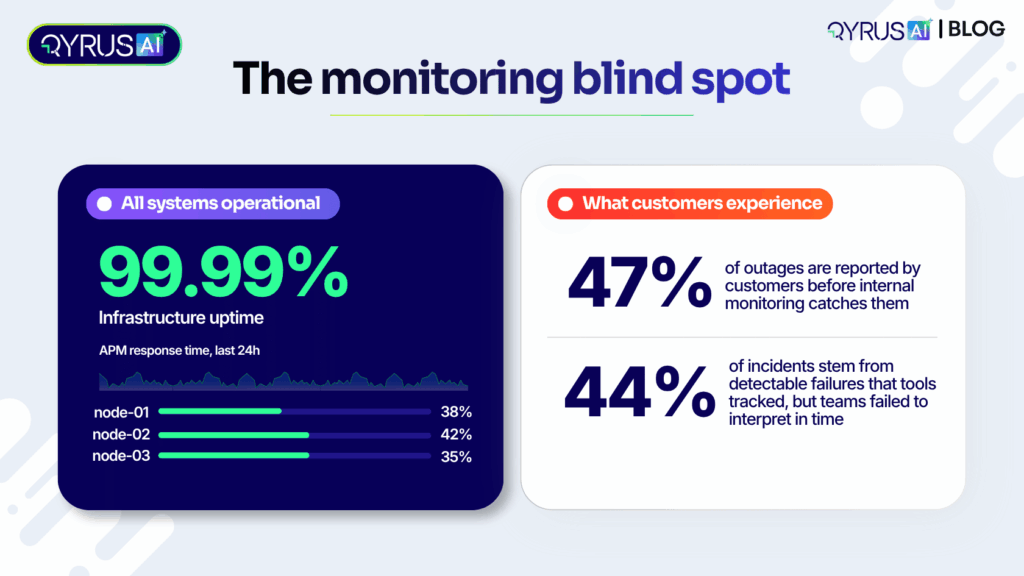
Highlighting this structural blind spot, 47% of outages are reported by customers before internal monitoring catches them—meaning nearly half of all major system disruptions are first flagged by end-users rather than internal technical alerts. Furthermore, 44% of incidents are caused by “detectable” failures, representing issues that technical telemetry actively tracked, but teams failed to interpret or prioritize correctly in time. 
The Gap Between Signals and Meaning 

The challenge is not necessarily a lack of data or visibility. Most organizations already have dashboards, alerts, monitoring, and observability tools. The challenge is context. These signals describe what is happening at a system level but often do not explain what it means at a business level. Teams are therefore forced to correlate signals manually, trace dependencies, and infer impact under time pressure and with incomplete information. 

The Cost of Operating Without Context 

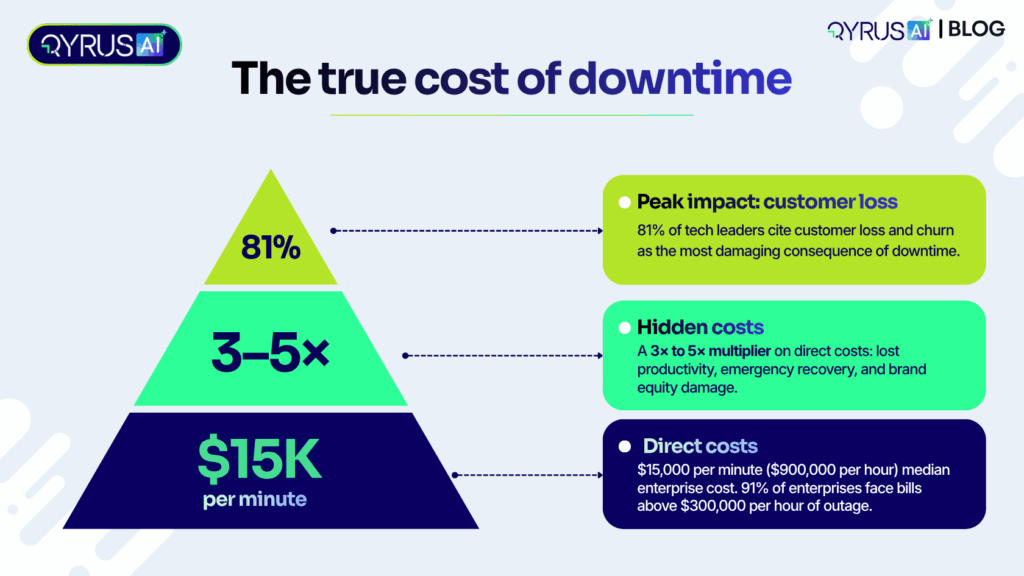
The gap between system visibility and business understanding has tangible and severe financial consequences. The median cost of enterprise IT downtime has jumped to approximately $15,000 per minute ($900,000 per hour), and 91% of enterprises report that a single hour of IT downtime costs them more than $300,000.  

Beyond immediate direct losses, organizations face 3x to 5x hidden costs—including lost productivity, emergency recovery expenses, and brand equity damage. In fact, 81% of technology leaders cite customer loss and churn as the most damaging direct consequence of downtime.  
Incident response can slow down because teams lack clarity about impact. Prioritization can become inconsistent because technical severity does not always correspond to business importance. Communication between IT and business stakeholders can also become fragmented because each group is working from a different view of the environment. Over time, this misalignment creates operational inefficiency and strategic risk. 

A Shift in Perspective: Toward BizOps 

Business Operations Intelligence, often discussed in the context of BizOps, brings business goals and IT operations into a shared operating context. The goal is not to discard monitoring or observability. It is to connect technical signals to the services, workflows, KPIs, and business outcomes they support. The unit of analysis moves from the individual component toward the service, workflow, transaction, and outcome. 

This broader approach is also reflected in the evolution of business observability. Rather than looking only at technical telemetry, business observability connects operational data with business metrics and context so teams can understand how technology affects business performance. 

From Components to Relationships 

This requires relational visibility rather than isolated visibility. Teams need to understand how systems are connected, how dependencies are structured, and how changes or failures propagate across the environment. More importantly, those relationships need to be mapped to business services so that the impact of an issue can be understood in terms that matter beyond IT. An alert becomes more useful when it can indicate which service, workflow, or customer journey may be affected. 

Why Static Approaches Fall Short 

Traditional approaches such as CMDBs, manual service mapping, and periodic documentation exercises can struggle to keep pace with modern environments. Systems evolve, dependencies shift, and new services are introduced continuously. A static representation can therefore become outdated between documentation cycles. For organizations operating across hybrid, cloud, and legacy environments, maintaining an accurate picture of the estate requires continuous discovery and relationship mapping. 

The Need for Continuous Intelligence 

What is required is a continuously evolving model of the enterprise that reflects the current state of systems, their relationships, and their connection to business outcomes. This changes how teams perceive their environment, prioritize work, and make decisions under pressure. The emphasis shifts from collecting more signals to creating usable context from the signals already available. 

Where QyrusAI Fits In 

This is where QyrusAI brings a business-aware operations approach into the broader enterprise application lifecycle. As an agentic platform, QyrusAI is designed to help enterprises modernize, assure, and operate their enterprise applications through a connected lifecycle.   

QyrusAI continuously discovers enterprise assets, maps dependencies, and connects technical relationships to business services. At the core of this approach is QyrusAI’s Live Enterprise Knowledge Graph, which provides a continuously observed model of applications, dependencies, and business services. This creates a shared context for understanding operational issues rather than relying solely on isolated alerts or static documentation. 

This connected lifecycle is delivered across three key pillars: 

  • Modernize: Helps enterprises discover applications and dependencies, assess technical debt, rationalize portfolios, and plan and execute modernization with greater architectural context.  
  • Assure: Focuses on testing and validation across web, mobile, API, SAP, data, and test orchestration, helping teams validate application changes before they reach production.  
  • Operate: Brings operational intelligence across AIOps, observability, BizOps, FinOps, automation, and incident response, helping teams connect technical health with business impact. Its Operate capabilities extend this context directly into operations, including BizOps, where technical signals can be connected to the business services and transactions they affect.  

 Together, these pillars create a connected view across the application lifecycle, with a shared Knowledge Graph and operational context that can flow seamlessly between modernization, quality, and operations. 

From Reaction to Clarity 

When business context is connected to technical signals, incident response can become more precise because impact is easier to identify. Prioritization can be grounded in business relevance rather than technical severity alone. Decision-making can also become faster because teams can work from a shared, contextual understanding of the environment instead of piecing together fragmented information. 

This approach aligns with the broader direction of enterprise observability. IBM notes that business observability connects technical signals with business metrics and context, helping teams understand how IT system health affects core business outcomes. The underlying principle is straightforward: visibility becomes more valuable when teams can connect what changed in technology to what matters to the business. 

The Real Shift 

The deeper shift is in how IT operations is measured. It is no longer sufficient to know that systems are running. Teams also need to understand whether the services and business processes those systems support are running as intended. That requires visibility into relationships, dependencies, service health, and business impact.  

Frequently Asked Questions (FAQs) 

  1. What is the main difference between traditional IT monitoring and Business Operations Intelligence (BizOps)?

Traditional IT monitoring focuses on isolated component metrics such as CPU loads, server uptime, and response latency. BizOps bridges the gap between IT and business goals by connecting those technical signals directly to the workflows, transactions, services, and business outcomes they support.  

  1. How does QyrusAI eliminate manual dependency mapping?

QyrusAI utilizes its Live Enterprise Knowledge Graph to continuously discover enterprise assets, map real-time technical dependencies, and link them automatically to business services without relying on outdated static documentation or manual CMDB spreadsheets.  

  1. Why do traditional CMDBs fail in modern hybrid environments?

Modern multi-cloud and microservice architectures evolve rapidly through continuous deployment pipelines and automated scaling. Traditional CMDBs and periodic documentation exercises quickly become obsolete, creating critical blind spots during active outages.  

  1. How does QyrusAI help reduce alert fatigue for SRE and IT Operations teams?

By mapping technical anomalies within the Live Enterprise Knowledge Graph and correlating raw telemetry against actual business workflows, QyrusAI groups related alerts and prioritizes them based on true commercial impact rather than isolated technical thresholds. 

Closing Thought 

The question is no longer whether your systems are healthy. 

It is whether you understand what that health actually means for your business. 

Ready to move from system-level visibility to business-level understanding? Explore QyrusAI BizOps to see how technical signals, dependencies, services, and business impact can be connected in a single operational context. 
Talk to an Expert 

Featured Image

Picture an enterprise with hundreds of applications. A few run business-critical services. Several do almost the same job. Some barely get used. Application rationalization is the discipline of sorting that portfolio: reviewing every application and deciding whether to modernize it, consolidate it, retire it, or leave it alone.  

The decision matters because modernization budgets are finite. When every outdated application becomes a modernization project, teams spend months upgrading systems that should have been merged or switched off. This guide shows a practical way to make the call, based on business role, usage and cost rather than technical age alone.  

Why an old application isn’t automatically a modernization candidate  

Ask most teams where to start, and they point at the oldest systems. The instinct makes sense. Older applications often run on aging frameworks, with limited vendor support and more security exposure.  

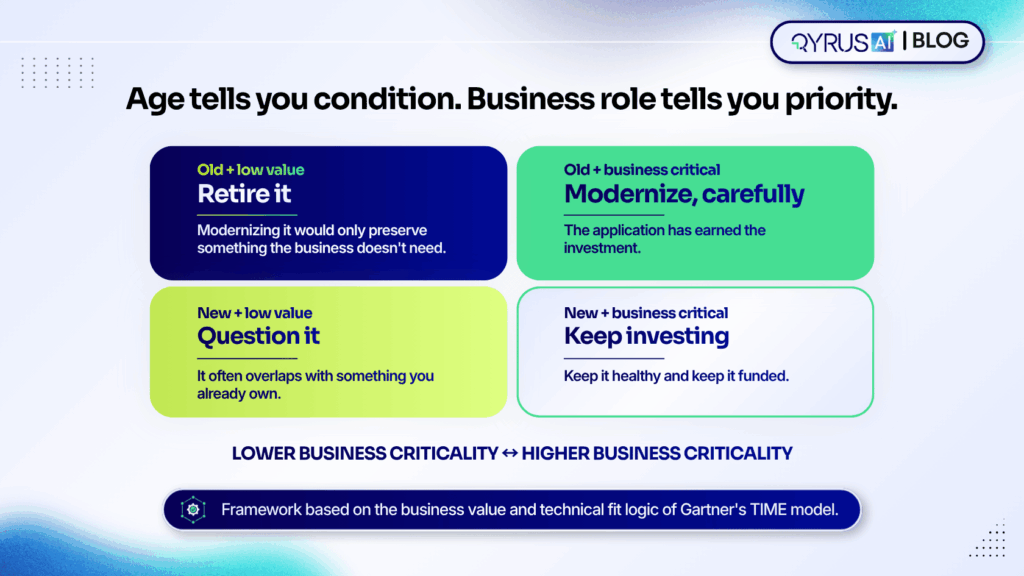
But age measures technical condition. It says little about how much the business relies on the application. A decade-old billing system may sit behind every invoice you send. A recently bought workflow tool may have a dozen users and no clear owner.  

Gartner’s TIME model captures this by plotting each application on two axes, business value and technical fit, then sorting it into Tolerate, Invest, Migrate, or Eliminate, as LeanIX explains. Age feeds into technical fit. But it is only one input beside maintainability, compatibility and vendor support. Enterprise architects use the result to see which applications deserve money. The same logic gives you four cases to remember:  

  • Old and business critical: modernize, carefully. The application has earned the investment.  
  • Old and low value: retire it. Modernizing it would only preserve something the business doesn’t need.  
  • New and business critical: keep investing and keep it healthy.  
  • New and low value: question it. It often overlaps with something you already own.  

Treating all four the same is how modernization budgets get spread thin.  

The four decisions a portfolio review produces  

Frameworks use different labels. TIME says Tolerate, Invest, Migrate and Eliminate. Cloud-focused models talk about rehosting, replatforming, retiring and retaining. Underneath the vocabulary, a portfolio review comes down to four practical outcomes.  

Decision  

When it fits  

Roughly maps to  

Modernize  

The business needs the application, but its technology holds it back  

Migrate  

Consolidate  

Several applications do the same job, so one survives and the others’ users and data move across  

Migrate, then Eliminate  

Retire  

The application has low value, low use or a redundant role; switch it off and keep any data you must retain  

Eliminate  

Leave alone  

It works, costs little and nobody is asking for more  

Tolerate or Invest  


Look at what that table implies. Three of the four outcomes reduce the amount of modernization you need to fund. Consolidation merges projects. Retirement removes them. Leaving an application alone avoids them. Cost, usage and business role drive each choice, not the year the application was built. That is why the review should come before the modernization budget, not after it.  

A worked example: three departments, one job  

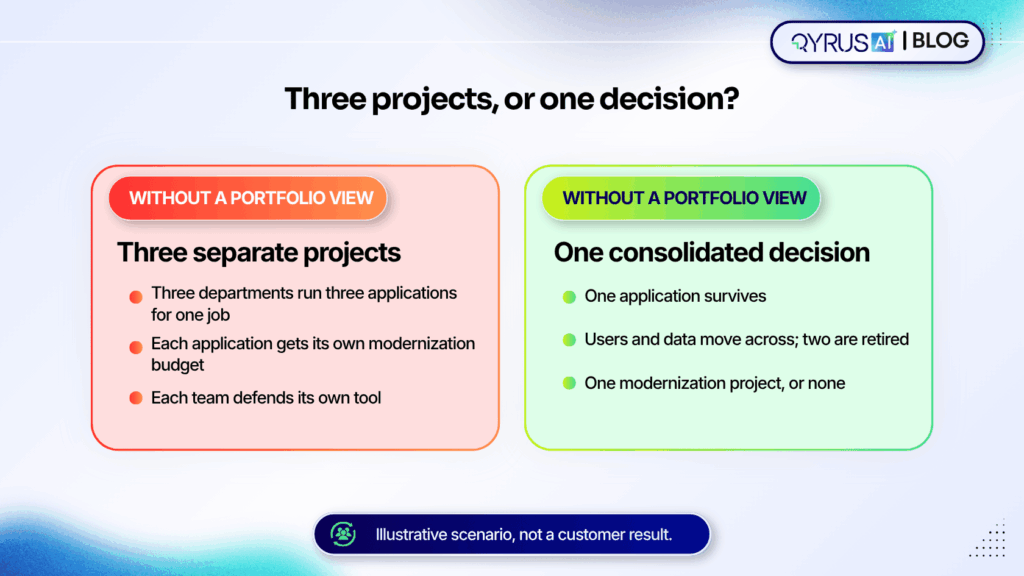
Here is an illustrative scenario, not a customer result. Sales, customer support and field services each run their own application to track customer requests. Each was a sensible purchase at the time. Now each carries its own licenses, infrastructure, upgrades and support contract.  

Without a portfolio view, a modernization program sees three separate applications and funds three projects. Each team defends its own tool, and the work starts from the assumption that all three will survive.  

A rationalization review asks different questions. How many people use each application every week? What does each cost to run? Which business process depends on it? Suppose the answers show that one application covers nearly everything the other two do, while the other two serve small teams for features the first already offers.  

Now the team can consolidate: keep one application, migrate the users and data from the others, and retire two. Three modernization projects become one, or none if the survivor is already healthy. Overlap isn’t always waste, though. If one department needs a regulated workflow the others lack, the duplication may be justified, and the review should say so.  

The same thinking applies to supporting systems. Test environments multiply in the same way, which is why we’ve written about how infrastructure consolidation lowers testing costs.  

Five steps that start with evidence  

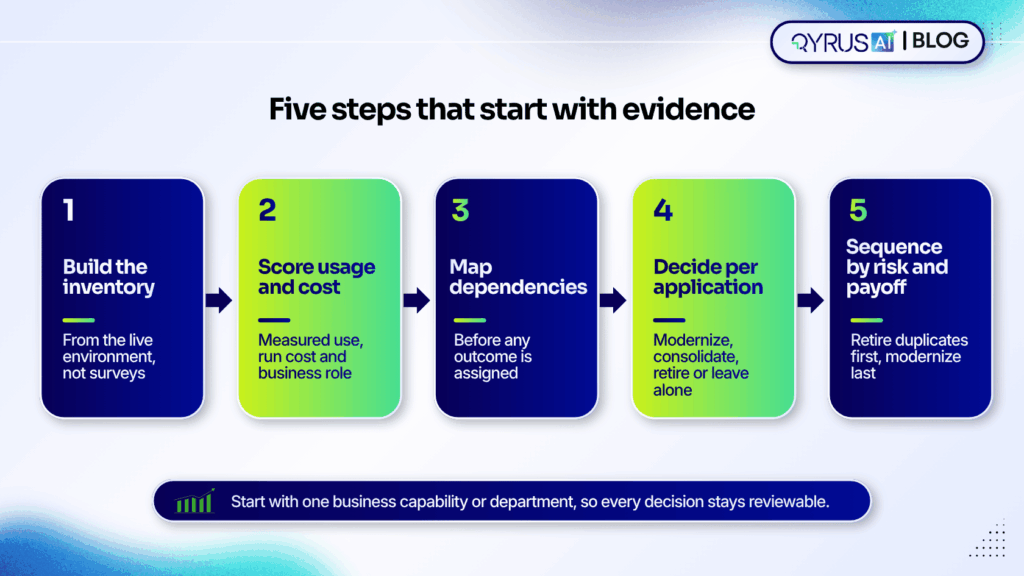
A review is only as good as the data behind it. These five steps put evidence ahead of opinion.  

  1. Build the inventory from the environment, not from surveys 

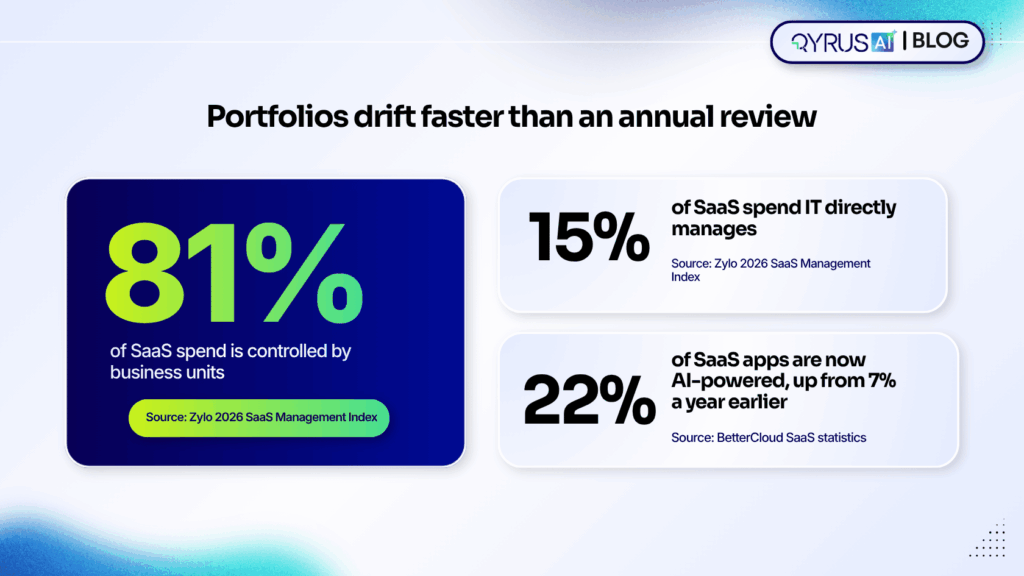
Most portfolios are bigger than the people running them believe. Zylo found that organizations underestimate their application count by about 1.7 times and their software spend by about 3 times, according to its analysis of SaaS sprawl. Ownership is scattered too. Business units control 81% of SaaS spend, while IT directly manages 15%, per Zylo’s 2026 SaaS Management Index. And Torii puts the average large enterprise at 2,191 business applications.  

A spreadsheet that people fill in by hand will miss much of that. Automated discovery gives you one application inventory that works as a single source of truth for every later decision.  

  1. Score usage, cost and business role 

For each application, record how often people actually use it, what it costs to run (licenses, infrastructure and support) and which business capabilities depend on it. Owners understandably defend their tools, so measured usage settles debates that opinion can’t.  

  1. Map dependencies before you decide 

A low-usage application can still feed a critical process. Map what each application connects to, including data feeds, integrations and shared infrastructure, before you assign an outcome. Finding a dependency before the decision is cheap. Finding it after the shutdown is not.  

  1. Decide per application 

Assign one of the four outcomes to each application in scope. Start with one business capability or department rather than the whole portfolio, so every decision stays reviewable. If a decision involves moving an ERP, plan the testing early; our guide to performance testing for a stable SAP S/4HANA go-live shows what to check. Whichever application survives a merger will also absorb new users and data, so it needs solid regression coverage. Here is how automated regression testing improves release quality.  

  1. Sequence by risk and payoff 

Retire clear duplicates first. They free up budget quickly and carry the least risk. Consolidations come next. Then modernize the critical applications, funded in part by what the earlier steps released. Revisit the plan each quarter as usage data changes.  

Retiring an application without breaking what depends on it  

Retirement looks like the easy win. It isn’t always. Legacy applications often feed reports, manual exports and indirect integrations. Those links can stay hidden until the system is gone, according to CIGen’s decommissioning guide.  

The opposite failure is the zombie application. Teams mark it retired and restrict access, but the database stays online and old integrations keep running. The savings never fully arrive, and nobody is sure the system can be switched off, a pattern that Archon describes in its decommissioning framework.  

A safer retirement follows four checks:  

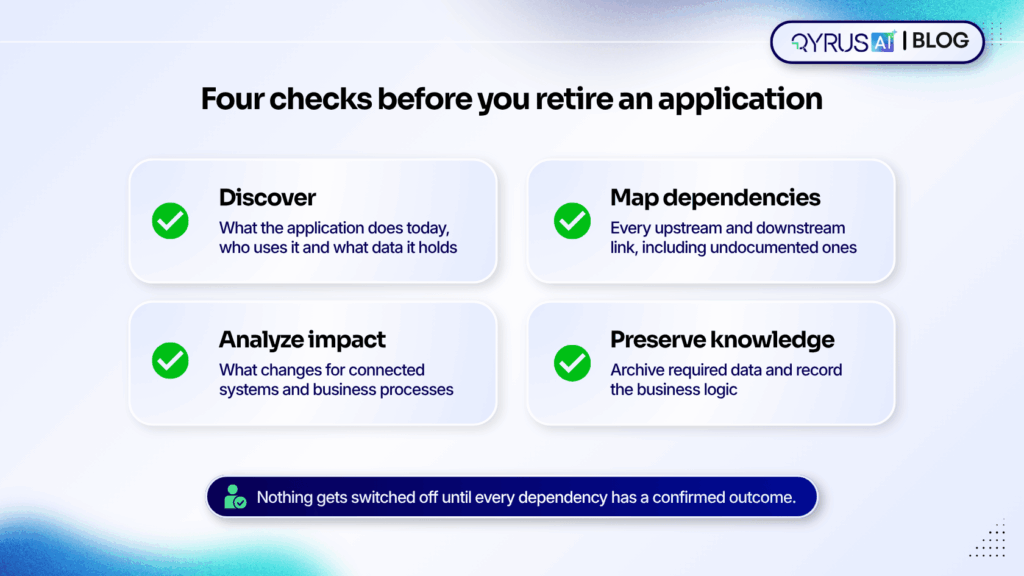
  • Discover: confirm what the application does today, who uses it and what data it holds.  
  • Map dependencies: list every upstream and downstream connection, including undocumented ones.  
  • Analyze impact: model what changes for connected systems and business processes before anything is switched off.  
  • Preserve knowledge: archive required data and record the business logic, so the organization keeps what the application knew after it is gone.

That last check matters more than most plans admit. When the people who understand an old system move on, the application itself is often the only record of how a process really works. Capture that before shutdown.  

Why a one-time cleanup doesn’t last  

A rationalized portfolio starts drifting the day you finish. Business units buy most SaaS themselves, so new tools rarely pass through central review. AI is speeding that up. BetterCloud reports that 22% of SaaS applications are now AI-powered, up from 7% a year earlier.  

New applications arrive faster than an annual review can catch them. Rationalization works best as a continuous practice: assess usage, overlap and cost as applications enter the portfolio, not once a year. Continuous assessment also keeps the inventory current, so the next decision starts from evidence instead of another survey.  

How QyrusAI supports application rationalization  

QyrusAI is a single AI platform that unites application modernization, software testing and autonomous IT operations. It organizes that work into three connected workspaces. Qyrus Modernize discovers, maps and modernizes the enterprise estate. Qyrus Assure validates every change through AI-driven test automation. Qyrus Operate detects and resolves issues in production. All three share one Knowledge Graph of the estate, so what one workspace learns informs the other two.  

Application rationalization sits inside Modernize, alongside application discovery, dependency mapping, legacy modernization, cloud migration intelligence and technical debt analysis. QyrusAI Application Rationalization looks across the whole portfolio and weighs how each application is used, what it costs to operate and what role it plays in the business. That gives teams the context to choose between modernizing, consolidating and retiring, instead of judging by technical age alone.  

Four capabilities support the decision:  

  • Auto-discovery and dependency mapping build the inventory and the connection map from the live environment, which reduces reliance on manual surveys and on a few subject-matter experts.  
  • Digital Twin impact analysis predicts the ripple effects of decommissioning an application before anyone switches it off.  
  • Knowledge retention keeps business logic and data context available in the Knowledge Graph after a system retires.  
  • Continuous assessment helps stop redundancy from building up again after the first review.  

QyrusAI’s targeted outcomes include decommissioning 20–30% of redundant legacy applications and achieving 15–20% infrastructure cost savings through right-sizing environments. These are targets, not guarantees, and results depend on the starting portfolio.  

Frequently asked questions  

What is application rationalization?  

It is a structured review of an organization’s application portfolio that decides what to modernize, consolidate, retire or keep as it is. The decision rests on usage, cost and business role.  

How is it different from application modernization?  

Rationalization decides which applications deserve which treatment. Modernization is the technical work of upgrading or re-platforming the ones you chose to keep and improve. Running the review first keeps you from modernizing systems you should have retired.  

When should a company start?  

Common triggers include mergers and acquisitions, a planned cloud migration, budget pressure, the retirement of a legacy system and a sudden rise in departmental or AI tools. Any of these tends to expose overlap.  

How many applications should a review cover at once?  

Start with one business capability or department. A narrower scope keeps the data reviewable and the decisions defensible, and you can extend the same method to the next area.  

What are the main risks of retiring an application?  

The biggest ones are hidden dependencies, data-retention obligations and user adoption. Mapping dependencies, archiving required data and planning for the people who use the application reduce all three.  

Make the right change in the right place  

The goal of modernization isn’t to make everything newer. It is to make the right change, in the right place, for the right reasons. Application rationalization gives you the evidence to do that: which applications to modernize, which to merge, which to retire and which to leave alone.  

QyrusAI Application Rationalization brings usage, cost and business context into that decision, backed by discovery and dependency mapping across the estate. Request a demo to see how QyrusAI can help you decide what to modernize and what to retire.  

Beyond Dashboards Featured image


In early 2025 the European Central Bank experienced a 7-hour core banking outage that affected 11 million customers.  

Post-incident analysis showed the root cause in less than twenty minutes. Every monitoring dashboard had shown green until the moment it did not. The change that caused the failure had passed through staging without incident. The problem only appeared under the specific load profile that production carried on a Tuesday morning, on hardware that staging did not replicate, interacting with a third-party dependency that nobody had  modelled. 

Of course the team had more monitoring than ever. But what they lacked was a proper system that could have told them what that change would actually do before it moved to production. 

This is the problem that a living digital twin can solve.  

Not more dashboards. Not a faster alert. But a simple system that can hold a working model of your environment, update it continuously in real-time, and lets you ask the question that monitoring cannot answer: if we deploy this now, what will break? 

This QyrusAI guide covers this briefly: Why regular monitoring hits a structural ceiling, what the maturity curve from static model to living twin looks like, what a genuine intelligent twin does for IT operations, why most enterprise twin initiatives stall before they deliver value, and how to start in a way that produces results in weeks rather than years. 

Barclays too faced a similar IT and mainframe failure that triggered a severe core banking system outage. The incident forced millions of customers out of their accounts, locked over 50% of digital and online transactions. 

The Limits of Your Monitoring Strategies  

The ‘single pane of glass’ term has been the goal of IT operations tooling for the better part of a decade. Unify your metrics, logs, and traces, surface everything in one place. Build dashboards that show the state of every system at a glance. The problem is not that this goal is wrong but that it solves the wrong problem. 

Dashboards show state but they do not predict consequences. 

A monitoring dashboard is a rear-view mirror. It tells you what is happening right now, and it tells you what happened in the past. It does not tell you what will happen if your deployment goes out at 2pm, or what the blast radius of a failed database migration will be across downstream services that nobody mapped, or whether the ‘routine’ certificate rotation you scheduled for Friday will cascade into an authentication failure that affects your payment processing. 

This isn’t a tooling gap that more dashboards close but clearly a category gap. Monitoring observes state. Prediction requires a model — something that understands how the components of your environment relate to each other well enough to simulate what happens when one of them changes. 

What is the difference between a digital twin and monitoring? 

This is the question IT teams ask most often when evaluating twin technology, and the distinction is specific. 

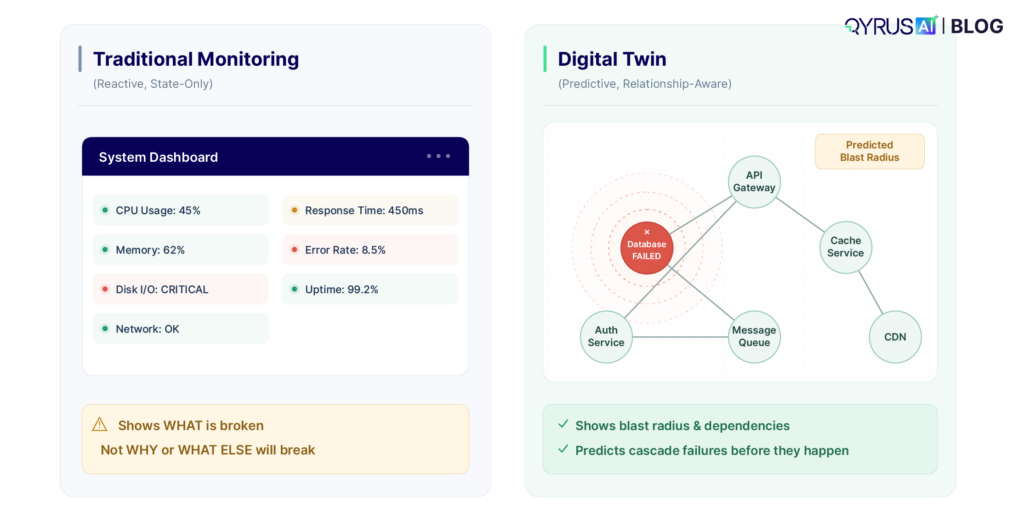
Monitoring collects telemetry — metrics, logs, traces, events and displays it. It tells you that CPU utilization on node-14 is at 94% right now. It can alert you when that threshold is crossed. It cannot tell you why the utilization is high, what will fail if it stays there, or whether the memory pressure on the adjacent node is related. 

A digital twin holds a live model of the relationships between your systems. It knows that node-14 runs the order processing service, which depends on the inventory API, which is already running slow, and which serves the checkout flow that accounts for 40% of your revenue. When CPU spikes on node-14, the twin does not just alert but it goes a step ahead and it maps the impact: these downstream services are at risk, this revenue flow is exposed and this is the change that was deployed 22 minutes ago that is most likely the cause. 

Traditional Monitoring 1

Monitoring answers: what is the current state of each system? 

A digital twin answers: given the current state of each system, what is the likely state of the whole environment in the next 30 minutes, and what happens if we make change X right now? 

One is observation. The other is a working model with predictive capability. Both are necessary. Neither substitutes for the other. 

Why teams still get blindsighted 

The most common form of production incident in modern enterprise IT is not random failure — it is change-induced failure. A deployment, a configuration update, a certificate rotation, a dependency version bump. Something that usually looks correct in staging, passed all tests, and still caused a production outage. 

The reason staging does not catch these is structural:, staging environments are approximations. They do not carry the exact load profile of production. They do not have the same mix of background jobs, caching states, and in-flight transactions. They do not replicate the specific combination of hardware, OS, and dependency versions that exists in production for every service. And they do not model the relationships between services — the cascade paths that make one service’s failure another service’s outage. 

A digital twin built from production telemetry addresses this directly. It does not replicate the environment but it models it. When you simulate a change against the twin, you are simulating it against a model that reflects how production actually behaves, including the load patterns, the dependency relationships, and the historical failure modes of the specific components involved.

80% 

Of production incidents caused by changes to existing systems, not new failures 

22 min 

Average time to detect that a change has caused a production issue without twin-based impact prediction 

67% 

Of enterprise organizations planning to invest in digital twin technology in 2026 (Core Systems survey) 

The Digital Twin Maturity Curve: From Static Asset Model to Living System 

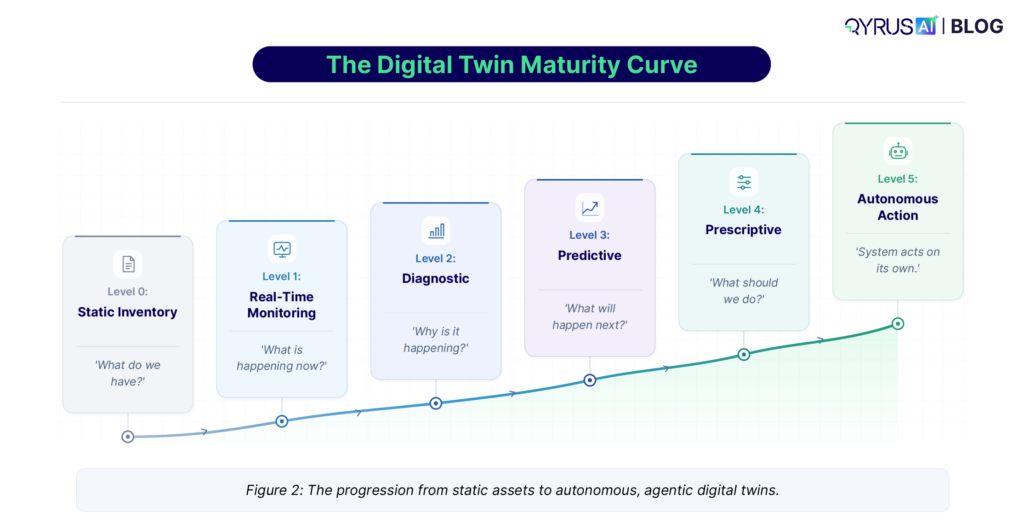
Most discussions of digital twins treat it as a binary — you either have one or you do not. The reality is a maturity curve with five distinct levels, each delivering different value and requiring different capability. Understanding where your organization sits on this curve is the most useful starting point for any twin initiative. 

Level 0 — 1: Asset inventory and static models 

Most organizations that believe they have a digital twin actually have a level 0 or level 1 system: an asset inventory with some relationship mapping. It describes what systems exist and how they are supposed to be connected, based on documentation and architectural diagrams. It does not reflect what is actually deployed, what the real dependency graph looks like at runtime, or how those dependencies behave under load. 

The value here is real but limited: a searchable CMDB with relationship data is more useful than spreadsheets. The ceiling is also real: a static model that is not fed by live telemetry drifts from reality within weeks of any significant deployment. Teams learn to distrust it, stop updating it, and eventually maintain it only for compliance purposes. 

Level 2 — 3: Telemetry-fed discovery and impact analysis 

A level 2 twin is fed by real telemetry: it discovers the actual dependency graph from network traffic, API call patterns, and service mesh data rather than from documentation. It knows what is actually calling at what frequency, with what latency profile. When something changes, it can show you what depends on it. 

Level 3 adds impact analysis: the ability to trace a failure or a change through the dependency graph and predict which following services can be affected. This is where the gap between monitoring and twin capability becomes operationally significant. A level 3 twin can answer ‘if this service goes down, what breaks?’ before the service goes down. 

Maturity Curve 1

Level 4 — 5: Predictive intelligence and autonomous action 

A level 4 twin predicts future states based on current telemetry trends. It does not wait for a threshold to be breached — it identifies that the trajectory of a metric will breach the threshold in approximately 18 minutes, and it surfaces that prediction with the context needed to act before the incident occurs.  

Level 5 is an autonomous twin that not only predicts but acts. It routes around failing components, triggers remediation workflows, and updates its own model in response to the changes it observes. This is where digital twin capability intersects with agentic AI: the twin becomes the perception layer through which an AI agent understands and acts on the environment. 

Why twins are expanding to business-process scope 

The twin’s scope is expanding for a specific reason: infrastructure failures are increasingly business failures. An SRE team that knows a service is down is useful. An IT operations team that knows a service is down, which customer journeys it affects, and what the revenue impact is per minute of downtime — and can communicate that to a business stakeholder in real time — is operationally essential. 

Business-process-level twins map IT system health to business outcome metrics. They connect the infrastructure layer — service availability, API latency, database response time — to business-layer metrics like transaction completion rate, checkout abandonment, and customer session drop-off. When an incident occurs, the twin can immediately answer the question that the business cares about: how much is this costing us, which customers are affected, and which product flows are broken? 

The Need for a Digital Twin for IT Operations

The conceptual case for digital twins is widely understood. The operational specifics are where teams lose clarity. Here is what a mature twin actually does — and what it changes about daily IT operations. 

Safe simulation: testing changes before they touch production 

Change management is the highest-risk activity in IT operations. More incidents are caused by changes than by spontaneous failures. The standard mitigation is staging environments, change windows, and rollback plans — all of which help but none of which provide advance certainty about what a change will do in production. 

A digital twin provides a third option: simulate the change against the model before applying it to the environment. Feed the twin the proposed change — a new deployment configuration, a dependency version update, a network topology modification — and let it evaluate the impact against the live model of your production environment. Which services are affected? Do any of them have dependency chains that create blast radius? Does this change touch a component that has had reliability issues in the last 72 hours? 

This does not replace staging or change controls. It adds a layer of intelligence that answers questions that staging cannot, because it operates against a model of how production actually behaves rather than an approximation. 

Chaos engineering as a twin use case, not a separate discipline 

Chaos engineering — deliberately introducing failures to test system resilience — is now a recognised discipline in enterprise IT. Gartner has listed it in its Hype Cycle for Platform Engineering and SRE for multiple years. The challenge has always been the same: chaos experiments carry inherent risk. You are intentionally breaking things, and if you do not understand the blast radius in advance, you may break more than you intended. 

A digital twin changes the risk profile of chaos engineering fundamentally. Instead of running a failure scenario in staging (where the results do not generalise to production) or carefully limiting production experiments (because you do not know the blast radius), you run the scenario in the twin first. The twin tells you which services will fail, which dependencies will cascade, and which paths will be affected — before you inject a single fault. You can then run the real experiment with confidence about what you are about to observe, and with a tighter scope because you already know where to look. 

Impact prediction for change management and deployments 

The twin’s most operationally immediate value is impact prediction during change management. When a change request is submitted, the twin evaluates it against the live model of the environment and produces an impact assessment: which services this change touches, what depends on those services, what is the predicted risk level based on the current state of those dependencies, and are there any open incidents or anomalies in the affected components that would increase risk. 

This transforms change management from a process based on checklist compliance — has the change been reviewed, has it been tested in staging, is there a rollback plan — to one based on actual environmental intelligence. The change request is evaluated against reality, not against documentation. 

Teams using twin-based change impact prediction consistently report two outcomes: fewer failed changes, because high-risk changes are identified before they go out, and faster post-incident recovery, because the twin’s dependency map accelerates root cause analysis when something does go wrong. 

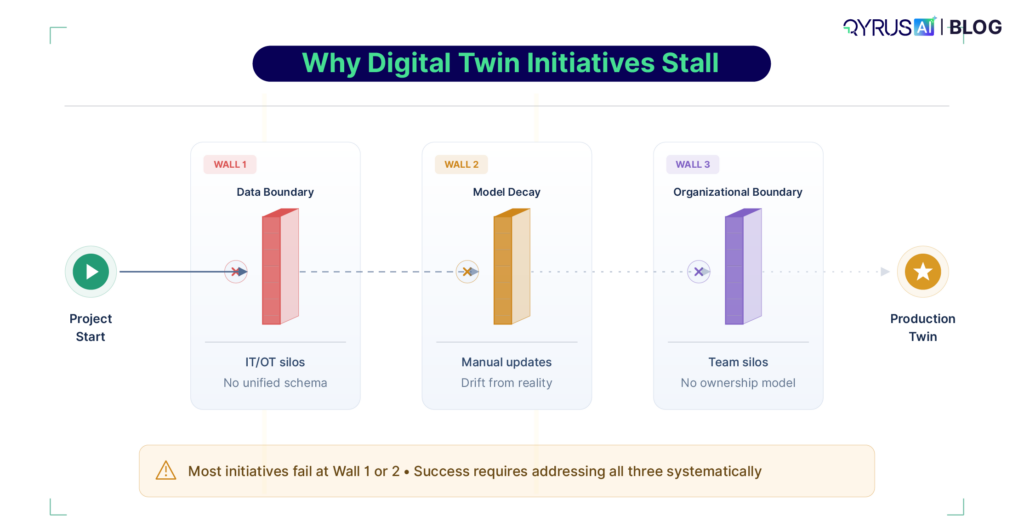
Why Most Digital Twin Initiatives Stall — and Where They Actually Fail 

The failure rate of enterprise digital twin initiatives is high. A 2026 survey from StartUs Insights found the market growing rapidly but noted that ‘pilots still stall’ in the transition from experimentation to production-grade infrastructure. The failure points are consistent across organizations.

Initiatives Stall

The data boundary problem: IT/OT and dev/ops integration 

The most common failure point is the data boundary. A digital twin’s value is proportional to the completeness and accuracy of the telemetry it ingests. A twin that only knows about infrastructure metrics — CPU, memory, network — cannot predict the impact of a change on the application layer. A twin that only knows about application-layer performance cannot correlate it with the infrastructure events that caused it. 

Enterprise environments have two chronic data boundary problems. The first is the IT/OT boundary in organizations with physical infrastructure: the operational technology layer — manufacturing equipment, building systems, network hardware — typically uses different protocols, different data formats, and different ownership structures from the IT layer. Bridging this boundary requires normalisation work that most teams underestimate by a factor of three to five. 

The second is the dev/ops boundary. Development teams generate rich data about application behavior— test results, deployment records, code change history, performance benchmarks — that operations teams rarely have access to in structured form. Without this data, the twin’s model of the environment is missing the most predictive signal for change-induced incidents: what changed, when, by whom, and what the test results showed. 

Static twin decay: why your model becomes wrong faster than you update it 

The second failure mode is decay. A twin built from a point-in-time discovery exercise reflects the environment as it was on the day of discovery. In an enterprise environment with continuous deployment, infrastructure changes, and evolving dependencies, that model drifts from reality within weeks. Teams that do not invest in continuous telemetry-fed model updates find that their twin becomes increasingly unreliable — producing impact assessments based on a topology that no longer exists. 

The solution is continuous auto-discovery: the twin rebuilds its model from live telemetry  continuously, rather than from periodic manual inventory updates. This requires both the telemetry infrastructure to feed it and the ingestion architecture to normalise and process that telemetry in real time. 


The organizational boundary: who owns the twin? 

The third failure mode is organizational. A digital twin that is useful for IT operations, useful for development teams, and useful for business stakeholders requires cross-functional ownership that most organizations do not have a structure for. Infrastructure teams own the hardware layer. Platform engineering owns the application infrastructure. Development teams own the application code. Finance teams own the business metrics that the twin maps to IT events. 

Twin initiatives that are owned by one of these teams and built to serve only that team’s needs consistently produce a partial twin that cannot answer the cross-functional questions that make twins genuinely valuable. The initiatives that succeed treat the twin as shared infrastructure — like a data warehouse — and establish governance structures that reflect that. 


Failure mode 

What it looks like in practice 

What the fix requires 

Data boundary (IT/OT, dev/ops) 

Twin has infrastructure metrics but not app layer; or app performance but not infra context 

Unified telemetry ingestion across all layers; API integration with CI/CD and change management systems 

Static model decay 

Impact assessments based on topology that was last updated 6 weeks ago 

Continuous auto-discovery from live telemetry; no periodic manual update cycles 

Organizational boundary 

Twin owned by infra team; can’t answer dev or business questions 

Treat twin as shared platform infrastructure; cross-functional governance from day one 

Confidence problem 

Twin produces predictions but operators don’t trust them — ‘it said red but it was fine’ 

Calibration period with measured accuracy; feedback loop from outcomes to model tuning 


How QyrusAI’s Intelligent Twin Addresses This 

 QyrusAI is the Intelligent Twin of the operational layer at the centre of the platform. It is not a standalone visualisation tool. It is the working model of the IT environment that every other capability — AIOps, incident prediction, chaos engineering, ITSM automation operates against. 

Auto-discovery from live telemetry, not manual inventory 

QyrusAI builds and continuously updates the twin’s dependency graph from live telemetry — network traffic patterns, API call chains, service mesh data, log correlation — rather than from documentation or periodic discovery exercises. The model reflects how the environment actually behaves at this moment, not how it was documented at the last architecture review. When a new service is deployed, or an existing service changes its dependency pattern, the twin’s model updates automatically. 

This addresses the static twin decay problem directly: the model cannot drift from reality because it is rebuilt from reality continuously. 

Enterprise Knowledge Graph as the perception layer for agentic AI 

The twin’s dependency model connects to QyrusAI’s Enterprise Knowledge Graph — a structured representation of the relationships between IT systems, business processes, organizational units, and business outcome metrics. This connection is what enables the twin to answer business-layer questions from infrastructure-layer events. 

When the knowledge graph maps the checkout service to its revenue contribution, and the twin knows the checkout service depends on the payment API, and the payment API is showing anomalous latency — the system can immediately produce a business-level impact statement rather than an infrastructure alert. Not ‘payment API P99 latency is 1,400ms.’ But ‘checkout completion is likely to drop by 18% in the next 12 minutes based on current payment API degradation.’ 

This is also the architecture that enables agentic AI. The twin and knowledge graph together form the perception layer — the structured understanding of the environment — through which an AI agent can act. Without a live, accurate model of the environment, an AI agent acts on incomplete information. With the twin as its perception layer, the agent can evaluate the likely impact of its actions before taking them. 

Change impact validation before deployment 

Our Auto Validate capability runs proposed changes against the live twin before deployment. A change request enters the system — a new deployment config, a dependency version update, a network change — and the twin evaluates its impact against the current model of the environment. Which services are in the blast radius? Are any of them currently degraded? Does this change touch a component with a history of instability? Is the proposed change window a high-traffic period for the affected services? 

Teams using Auto Validate report a consistent pattern: the changes that get flagged as high-risk by the twin are disproportionately the ones that would have caused incidents if they had gone out unmodified. The twin is not infallible, but its hit rate on identifying genuinely risky changes is substantially higher than human review of change requests alone, because it operates against the live environment model rather than against static documentation. 

MTTR reduction through twin-accelerated diagnostics 

When an incident does occur, the twin’s dependency map dramatically accelerates root cause analysis. Instead of an SRE manually tracing which services are affected, correlating logs from multiple sources, and building a picture of the cascade path — a process that routinely takes 20 to 45 minutes in complex environments — the twin surfaces the affected dependency chain immediately. It shows which components are failing, which upstream events preceded the failure, and which downstream services are at risk. 

The practical MTTR impact is not in detecting the incident faster — monitoring handles that. It is in the gap between detection and diagnosis, which in complex microservice environments is typically where most of the incident time is spent. The twin does not eliminate that work. It compresses it from 20–45 minutes to 3–8 minutes for the majority of incidents where the root cause is within a dependency the twin has  modeled. 

Analyst recognition 

QyrusAI has been recognized in Gartner Hype Cycles for Platform Engineering, SRE, I&O Automation, and Observability (2024–2025), specifically in the Chaos Engineering category. QyrusAI was named a Leader in the Forrester Wave for Autonomous Testing Platforms (Q4 2025) and featured as an AI-Augmented Testing vendor in Gartner’s April 2025 report on generative AI in the software delivery lifecycle. 

Where Do You Start: Twin Your Highest-Risk Systems First 

The failure mode of treating a digital twin initiative as an enterprise-wide infrastructure project is well-documented. The scope is too large, the data integration work takes too long, and the first value is too far away for the initiative to maintain organizational support. 

The approach that consistently produces results is narrower and faster: identify the two or three systems in your environment that carry the most risk — highest revenue exposure, most change frequency, most complex dependency graph, worst track record for change-induced incidents — and build the twin for those systems first. 

How to identify your highest-risk systems for twinning 

  • Change frequency — systems that are deployed to more than once per week are the highest-priority candidates because they generate the most change-induced incident risk 
  • Dependency centrality — systems that many other services depend on — payment APIs, authentication services, core data stores — have the highest blast radius when they fail 
  • Revenue exposure — systems that directly support revenue-generating flows should be prioritised, because the business case for twin investment is clearest and fastest to demonstrate 
  • Incident history — systems that have caused incidents in the last 12 months, particularly change-induced incidents, are proven high-risk areas where twin-based impact prediction delivers immediate value 

What a 90-day twin deployment looks like 

Weeks 1–2: Telemetry connection and auto-discovery. Connect the twin to the monitoring and observability stack for the target systems. Let auto-discovery run and validate the dependency graph against known architecture. Identify and fill data gaps. 

Weeks 3–6: Baseline and calibration. Run the twin in observation mode alongside normal operations. Validate that its impact predictions match real outcomes. Calibrate confidence thresholds. Build trust with the operations team by demonstrating prediction accuracy before using predictions for actual change decisions. 

Weeks 7–12: Active use in change management. Begin routing change requests for the target systems through the twin’s impact validation before deployment. Measure the rate of flagged changes that would have caused incidents. Begin expanding the dependency graph to adjacent systems. 

By week 12, a well-run deployment should have at least one measurable outcome: either a specific incident that was prevented by twin-based impact prediction, or a documented MTTR improvement for incidents that did occur. Both are straightforward to measure and straightforward to use as the business case for the next phase of expansion. 

Conclusion 

The monitoring problem in enterprise IT is not a tooling gap. It is a category gap. Monitoring tells you what the current state of each system is. It does not tell you what that state means for the rest of the environment, what the trajectory of that state will be in 20 minutes, or what will happen if you deploy a change into that state right now. No amount of additional monitoring closes that gap. 

A living digital twin closes it by providing something different in kind: a working model of the environment that understands relationships, evolves continuously from real telemetry, and can simulate what happens before it happens. The value is not in the visualisation. It is in the prediction — and in the operational decisions that prediction enables: changes that do not cause incidents, incidents that are diagnosed in minutes rather than hours, and business stakeholders who know what an infrastructure event means before they ask. 

The maturity curve from static asset model to living intelligent twin is not traversed in a single deployment. But it is traversed incrementally, and the value at each level is real. The organizations that start now — with a narrow scope, focused on their highest-risk systems and supported by telemetry-fed auto-discovery will have a three-year head start on the ones that wait for the category to mature further. 

Frequently Asked Questions 

What is a digital twin in IT operations? 

A digital twin in IT operations is a live, continuously updated model of your IT environment — its systems, services, dependencies, and relationships — that can simulate what happens when something changes or fails. Unlike monitoring, which observes the current state of each system, a digital twin understands how systems relate to each other, which allows it to predict the impact of changes and failures before they occur. Think of it as the difference between a speedometer (monitoring) and a navigation system that can predict traffic conditions and reroute based on what it knows about the road ahead (twin). 

What is the difference between a digital twin and AIOps? 

AIOps applies AI and machine learning to IT operations data — typically to detect anomalies, correlate alerts, and reduce noise. A digital twin is the environmental model that gives AIOps its context. AIOps without a twin can tell you that something looks anomalous. AIOps with a twin can tell you what that anomaly is likely to affect, what caused it, and what to do about it. The twin is the perception layer; AIOps is the analytical capability that operates on it. Most mature implementations combine both. 

How is a digital twin different from a CMDB? 

A CMDB (Configuration Management Database) is a record of what assets and configurations should exist in your environment, based on documentation and periodic discovery. It is manually maintained and typically reflects intended architecture rather than actual runtime  behavior. A digital twin is built from live telemetry and auto-discovery, reflecting what actually exists and how systems actually behave at runtime. The critical difference: a CMDB documents the environment as designed; a twin models it as deployed and operating. Most twin initiatives start with CMDB data as a seed and then update it continuously from live telemetry. 

How long does it take to build a digital twin for an enterprise IT environment? 

A functional twin for a specific set of high-priority systems can be operational within 4–8 weeks if the telemetry infrastructure is already in place. A comprehensive twin covering a full enterprise environment typically takes 6–18 months, depending on the complexity of data boundaries to cross, the quality of existing observability data, and the scope of business-layer integration. The most successful implementations start narrow — one business-critical system cluster — and expand progressively rather than attempting an enterprise-wide deployment from the start. 

What data does a digital twin need to work? 

At minimum: infrastructure metrics (CPU, memory, network, storage), service-level telemetry (API latency, error rates, throughput), and dependency discovery data (what is calling what). For full capability: application performance data, deployment records and change history, log correlation across services, business metric data (transaction volumes, conversion rates), and, in hybrid environments, OT/IoT sensor data for physical infrastructure. The more complete the telemetry, the more accurate the model. A twin built on incomplete data produces lower-confidence predictions and requires more calibration time. 

Can a digital twin be used for chaos engineering? 

Yes — and this is one of the highest-value use cases. A digital twin lets you run chaos scenarios against the model before introducing faults in the real environment. You can test what happens when a specific service fails, what the cascade looks like through the dependency graph, and which downstream systems are affected — without touching production. This does not replace real chaos experiments, but it dramatically reduces their risk by giving you advance knowledge of the blast radius. Teams use the twin to select safer experiment targets and to know exactly what to watch for when the experiment runs. 

Jack Henry is moving Symitar off its proprietary database and onto a new SQL-based platform – and its own leadership has said the transition raises the cost of testing and maintenance. 

That means every credit union running Symitar is already inside a modernization event, whether or not it has plans to switch cores. Add to that a market where 73% of credit unions are planning core replacement by 2027, and an OCC examination framework – effective January 2026 – that now treats an active core transformation as an elevated operational risk event, and testing stops being a downstream QA task. It becomes the thing standing between a clean transition and a costly one. 

Most modernization programs don’t fail on the migration itself. They fail on what wasn’t validated along the way – 77% of organizations that started a mainframe modernization program failed to complete at least one, primarily due to inadequate planning. QyrusAI closes that gap with a unified approach that pairs discovery and rationalization with continuous testing across the full Jack Henry stack. 

 What’s inside the whitepaper 

  • Why the Jack Henry Platform transition changes the calculus for every Symitar institution, not just those planning a core switch 
  • The four recurring pressure points across the Symitar lifecycle – from conversion to daily maintenance to strategic planning 
  • Why 77% of mainframe modernization programs fail to complete at least one phase, and what the ones that succeed do differently 
  • A practical model for testing across the full Jack Henry stack – Quest, Episys, SymXchange, jXchange – as one connected journey, not five disconnected checks 
  • A phased, parallel-run-aligned approach to engaging modernization and testing together 

One Platform for Modernization and Testing, Together 

QyrusAI brings discovery, rationalization, and cross-stack testing into one continuous loop instead of treating them as disconnected phases. Instead of mapping dependencies in one tool, testing UI flows in another, and validating APIs in a third, QyrusAI correlates all of it – so teams know what’s safe to touch, and can prove nothing broke once they touch it. 

Data-Analytics Leader Case Study

SAP transformation programs are only as fast as the testing behind them. When a Global Data & Analytics Leader found that its existing automation couldn’t keep up with complex SAP BRIM workflows spanning both classic and modern interfaces, it turned to Qyrus Assure. In a focused three-week proof of concept, QyrusAI delivered end-to-end SAP GUI and Fiori test automation on real revenue-critical scenarios. The result was faster execution, more stable scripts, and a project win. 

At a Glance 

Client 

Global Data & Analytics Leader 

Scope 

SAP BRIM Revenue Accounting and Reporting (RAR): Periodic and Milestone contract scenarios 

Qyrus capabilities 

SAP GUI and Fiori automation, Test Orchestration, Qyrus SAP Scribe, dynamic synchronization, cross-environment and VM-based execution, centralized reporting 

POC duration 

Three weeks 

Key result 

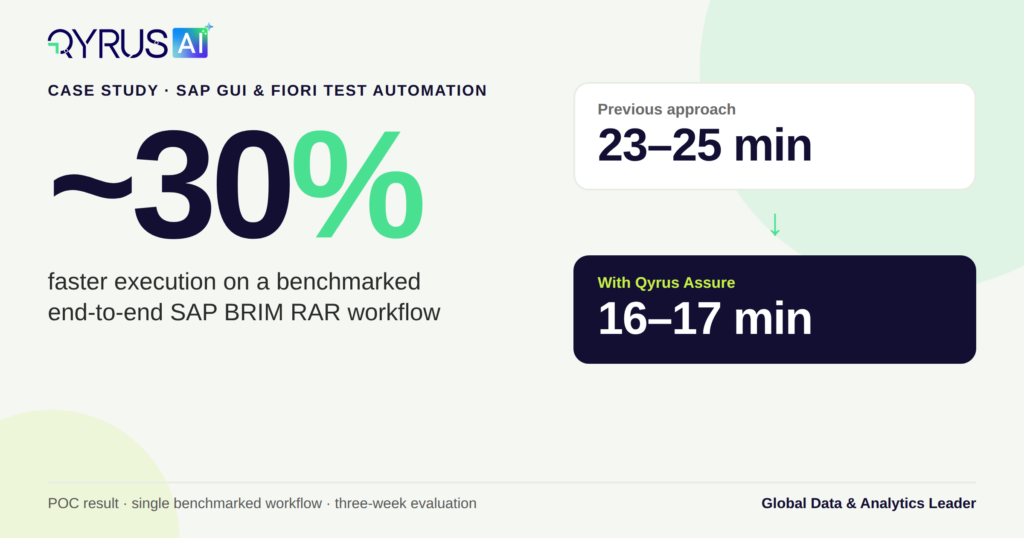
~30% faster execution on a benchmarked end-to-end workflow 

Outcome 

POC completed successfully; project awarded to QyrusAI 


qyrus-sap-case-study-stat-card

The Challenge: SAP Testing That Couldn’t Keep Pace With Transformation 

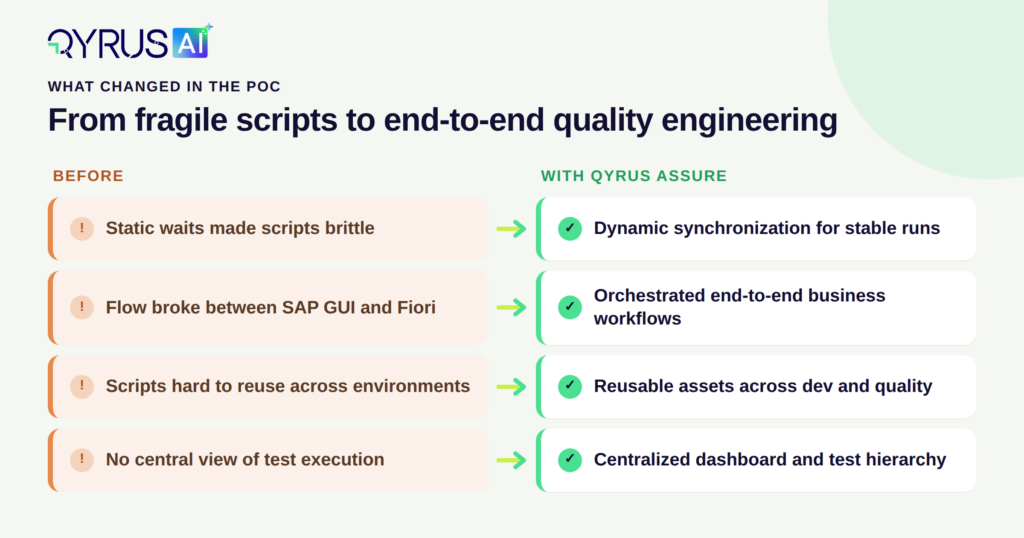
A Global Data & Analytics Leader was running an ambitious SAP transformation program. Each new release and regression cycle expanded the testing workload. Their existing automation approach was supposed to absorb that growth, but it was producing fragile scripts and consuming more effort than it saved. 

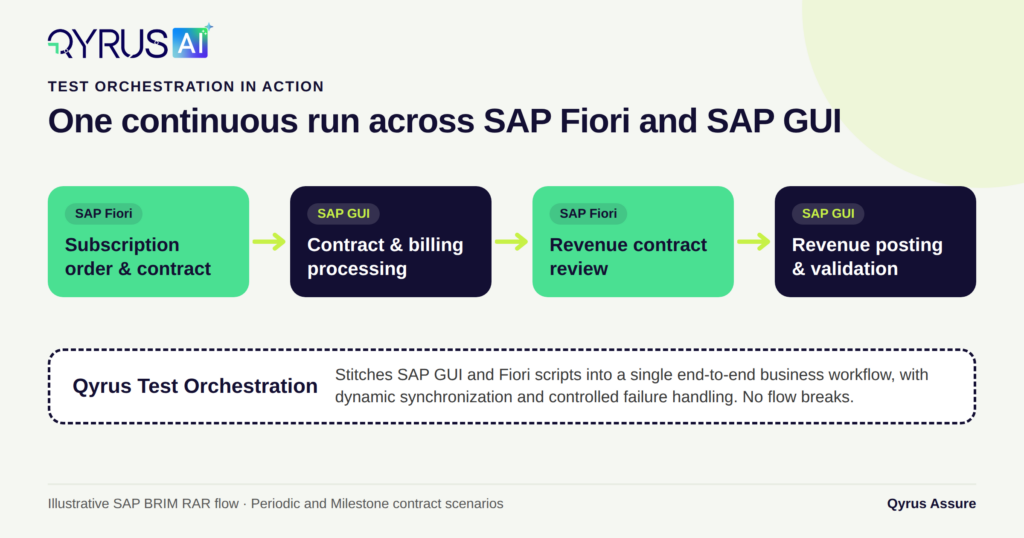
The problem was sharpest in SAP BRIM (Billing and Revenue Innovation Management). SAP RAR addresses revenue recognition in line with accounting standards such as ASC 606 and IFRS 15, so every contract scenario has to be correct from order through to revenue posting. These processes also don’t sit on one interface. A single subscription contract workflow can start in SAP Fiori and finish in SAP GUI, and most automation tools struggle to follow that path without breaking.  

The team’s challenges fell into four areas. 

  • Automation effort without matching value.
    • Building and maintaining automated tests took so much time that the productivity gains never arrived. Scripts, test cases, and datasets were hard to reuse across environments, so teams kept rebuilding work they had already done. 
  • Hybrid processes that broke the flow.
    • End-to-end business processes spanning SAP GUI and Fiori could not be automated as one continuous flow. Existing tools also had limited support for complex, business-level scenarios. 
  • Unstable, unreliable execution.
    • Scripts depended on static waits, which made them brittle and prone to false failures. When a critical step did fail, execution couldn’t reliably stop at the right point. Support for running tests across multiple environments and VM-based setups was limited. 
  • Poor visibility and heavy manual overhead.
    • With no centralized dashboard or structured test hierarchy, managing and monitoring test runs was difficult. Process, training, and testing documentation all required significant manual effort. The organization also saw untapped potential in AI and in integrations with Jira and productivity tools. 

The central question was this:

how could the organization scale SAP testing for transformation and regression programs while cutting automation effort, improving execution reliability, and giving the business clear visibility across complex SAP GUI and Fiori processes? 

The Solution: An AI-Assisted, End-to-End Approach With Qyrus Assure 

Qyrus proposed a focused proof of concept (POC). It would use the client’s real SAP testing scenarios and measurable success criteria, not a generic demo environment. The goal was to prove value on the processes that mattered most to the business. 

The solution brought together several Qyrus Assure capabilities. 

  • SAP GUI and Fiori automation.
    • QyrusAI automated both classic SAP GUI transactions and web-based Fiori apps, so business-critical steps were covered regardless of interface. 
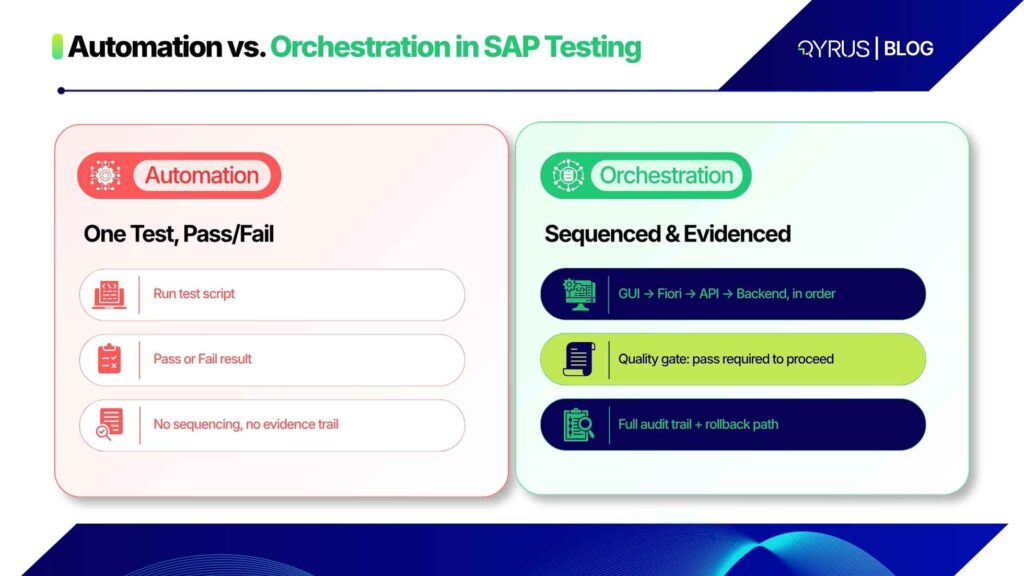
  • Test Orchestration.
    • Test Orchestration stitched individual SAP GUI and Fiori scripts into complete end-to-end business workflows. That removed the flow breaks that had previously stopped hybrid processes from being automated as a whole. 
  • Qyrus SAP Scribe.
    • Qyrus SAP Scribe uses custom ERP-aware AI models fine-tuned to a customer’s SAP landscape. It supported AI-assisted test generation, analysis, and documentation, which reduced the manual effort behind process and testing documentation. 
  • Dynamic synchronization.
    • Tests waited for actual application states instead of fixed timers. This replaced static waits and made scripts far more stable. 
  • Cross-environment and VM-based execution.
    • The same automation assets ran across the client’s development and quality environments without rework. VM-based execution let testers run suites in the background while they continued with other work. 
  • Centralized reporting and structured test management.
    • A single dashboard and a clear test hierarchy gave stakeholders real-time visibility into execution status and results. Controlled failure handling stopped runs at the right point when a critical step failed. 

Implementation: A Three-Week POC on Real Business Scenarios 

The POC ran as a three-week evaluation cycle. It focused on complex SAP BRIM RAR scenarios involving subscription order and contract processes across SAP Fiori and SAP GUI. 

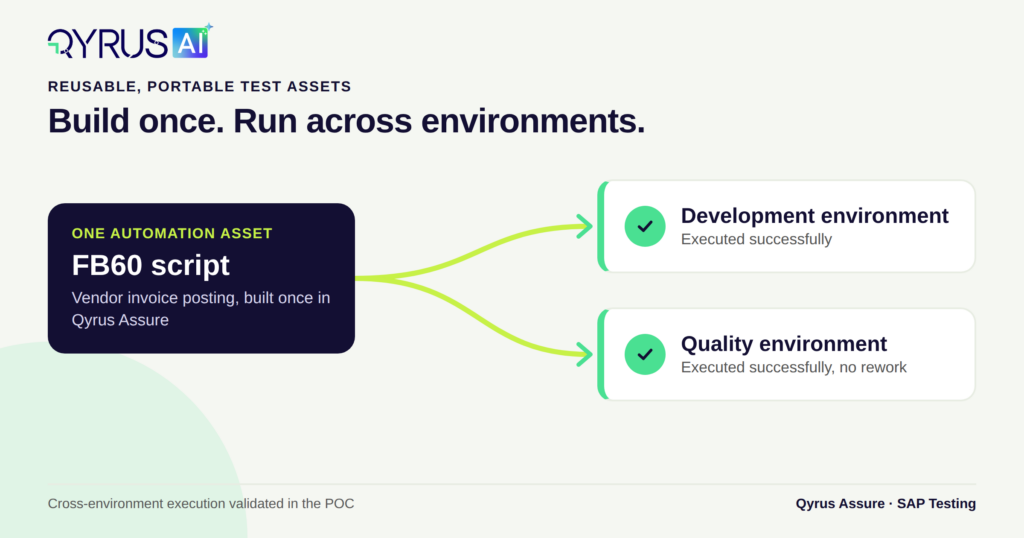
The scope included 17 test cases and scripts covering SAP GUI and Web/Fiori automation, built around Periodic and Milestone contract scenarios. Test Orchestration linked these scripts into complete business workflows. The team also validated cross-environment execution by running the same FB60 automation (vendor invoice posting) in both the development and quality environments. 

Business consultants from the client’s Order-to-Cash and Finance teams took part directly in the POC, supported by stakeholders from technical and project functions. Their involvement kept the evaluation grounded in real business logic, not just technical checks. 

Results: Faster, More Stable, and Ready to Scale 

The POC showed that QyrusAI could automate and orchestrate hybrid SAP GUI and Fiori business processes, run them across environments, and deliver stable, reusable test assets. 

~30% Faster Execution 

The clearest measurable gain was execution speed. In the POC, one benchmarked end-to-end workflow took about 23–25 minutes under the previous approach and 16–17 minutes with Qyrus. That is roughly a 30% reduction in execution time for that workflow. 

What the POC Demonstrated 

  • End-to-end BRIM RAR coverage. Periodic and Milestone workflows ran successfully as complete business processes. 
  • Continuous hybrid orchestration. SAP GUI and Fiori scripts ran together with no flow breaks. 
  • Portable, reusable automation. The same assets ran across development and quality environments without rework. 
  • Greater script stability. Dynamic synchronization reduced the dependence on static waits that had made earlier scripts fragile. 
  • Controlled execution. Failure handling and execution monitoring stopped runs at the right point when critical steps failed. 
  • Centralized visibility. Structured test management and a single dashboard gave teams a clear view of execution status. 
  • Tester productivity. VM-based execution let testers multitask instead of watching test runs. 
  • AI-assisted quality engineering. Qyrus SAP Scribe supported test generation, analysis, and documentation. 
  • Broader testing scope. Automation extended into RICEF objects and configuration and unit-testing scenarios. 

After the POC was completed, the Global Data & Analytics Leader awarded the project to Qyrus. 

qyrus-sap-challenge-outcome

Why This Matters for SAP-Driven Enterprises 

This organization’s situation is increasingly common. SAP has announced that mainstream maintenance for SAP ECC 6.0 and SAP Business Suite 7 will end on 31 December 2027, and many enterprises are compressing large transformation programs into a narrow window. Figures reported by CIO, based on Gartner analysis, estimate around 35,000 SAP ECC customers worldwide, with approximately 39% migrated to SAP S/4HANA by the end of 2024. For the remaining organizations, regression testing capacity often limits how fast they can move.  

Revenue-critical processes like BRIM and RAR raise the stakes further. These implementations involve revenue recognition models for subscription-based, milestone-based, and usage-based contracts, where an undetected defect can affect financial reporting as well as the user experience.  

This case shows how SAP testing can move from script-heavy automation to intelligent, end-to-end quality engineering: AI-assisted test creation, hybrid SAP GUI and Fiori orchestration, and reusable assets that run in any environment. The result is faster cycles, more reliable runs, and business-level visibility across the processes that matter most. 

See It on Your SAP Landscape 

Is your SAP transformation outgrowing your testing approach? See how Qyrus Assure automates hybrid SAP GUI and Fiori workflows end to end, including complex BRIM scenarios. 

Book an SAP testing demo → 

Featured Image

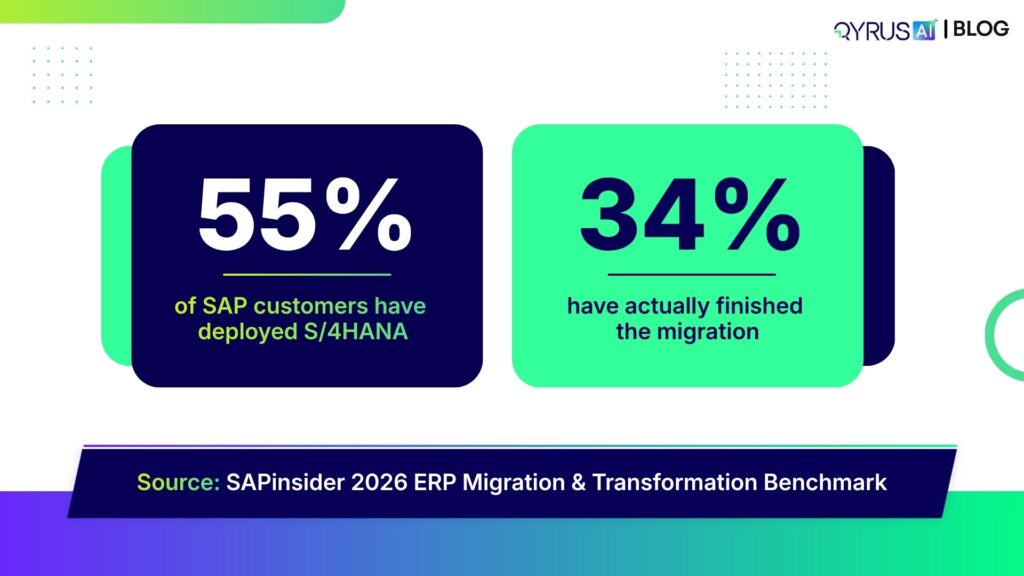
Fifty-five percent of SAP customers have now deployed S/4HANA in some form. Only thirty-four percent have actually finished the transition. That gap between “live” and “done” is not a rounding error — it’s the story of most SAP migrations running right now, and it explains why so many of them slip past their own deadlines even when the underlying technology works exactly as designed.  

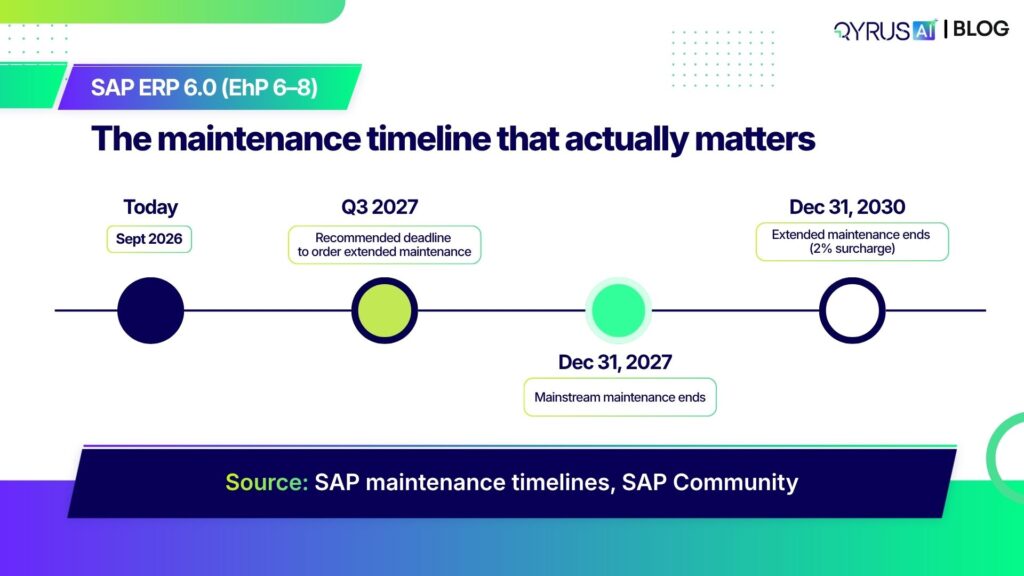
With SAP ERP 6.0’s mainstream maintenance ending December 31, 2027, for organizations on Enhancement Packages 6 through 8, the window to migrate without a rushed, high-risk scramble is closing. But new research from 2026 makes one thing clear: the organizations that miss this deadline mostly don’t miss it because of SAP. They miss it because of how the migration itself is run.  

The Deadline Everyone’s Watching, and the Number Nobody Talks About  

The mechanics of the deadline are simple enough. SAP ERP 6.0 on Enhancement Packages 6 through 8 loses mainstream maintenance on December 31, 2027. Extended maintenance is available as a bridge through December 31, 2030, at a 2 percentage-point surcharge on the maintenance base — after which only customer-specific maintenance remains, with no new fixes, no legal updates, and steadily increasing risk.  

What’s less discussed is where the industry actually stands against that date. SAPinsider’s 2026 ERP Migration and Transformation Benchmark puts current deployment at 55%, but only 34% of organizations have fully completed their transition. Of the rest, 41% plan to finish before the 2027 cutoff, 18% concede they won’t make it in time, and 7% have no migration plan at all.  

That 55%-to-34% gap is the number worth sitting with. An initial go-live is not a completed migration. Plenty of organizations are technically “live” on S/4HANA while running parallel systems, incomplete data models, and unresolved integration debt underneath — the exact conditions that turn a deadline-driven project into a multi-year scramble. If you’re mid-transition, our complete guide to SAP S/4HANA migration performance testing covers what a stable go-live actually requires. 

What Actually Derails SAP S/4HANA Migrations  

The ISG Data  

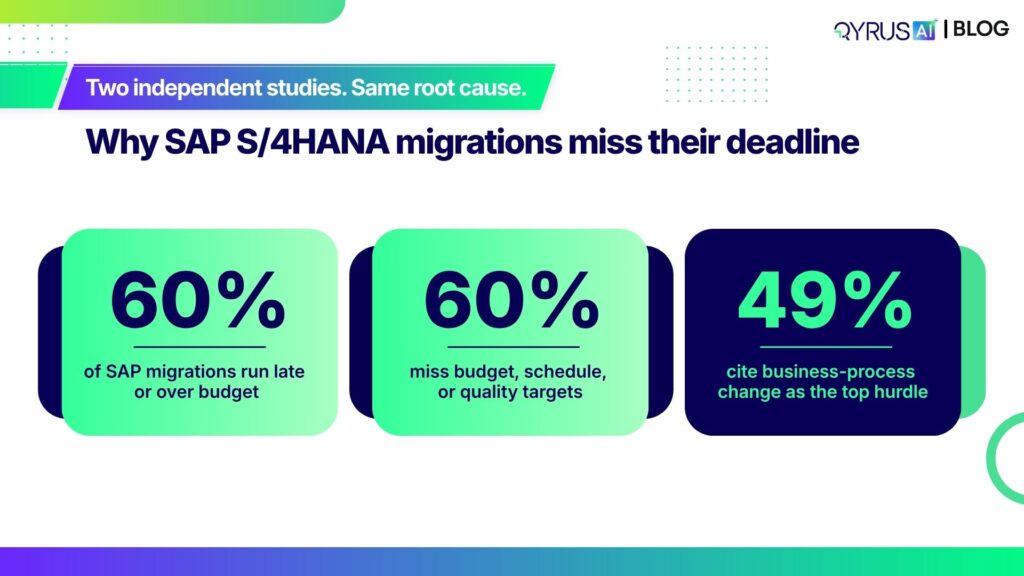
ISG’s State of SAP Migrations report, published in February 2026 and based on a survey of more than 200 senior decision-makers at large global companies, found that nearly 60% of SAP migration projects run late or over budget. The report’s authors point to underestimated complexity, scope that expands mid-project, and internal constraints nobody accounted for going in.  

The mechanism behind that number is organizational, not technical. Most migration programs run through multiple system integrators, SAP service providers, and niche specialists at once — and ISG’s research points to a lack of clear decision-making rights and acceptance criteria between them as a primary driver of the delays. Nobody owns the call, so the call doesn’t get made until it’s already a problem.  

A Second Study Says the Same Thing  

That pattern isn’t unique to one study. A 2025 Horváth survey of 200 SAP customer companies in the DACH region found the same 60% figure for projects missing budget, schedule, or quality targets — and identified business-process change as the single biggest hurdle, cited by 49% of respondents. It also surfaced a leadership gap: at smaller firms, the CEO personally leads the S/4HANA program in just 14% of cases.  

Two independent studies, on different populations, converging on the same root cause: this keeps getting run like an IT upgrade when it’s actually an enterprise transformation program. Our piece on navigating the SAP testing strategic approach to optimizing S/4HANA goes deeper on what that distinction means for test strategy specifically.  

The Quiet Trade-Off: Stability Now, Transformation Deferred  

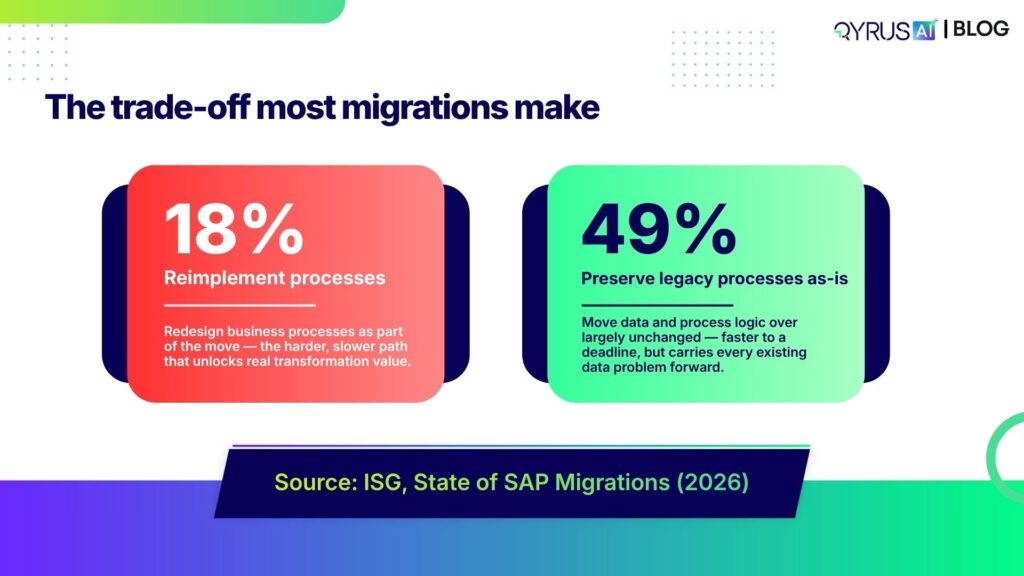
Here’s what that pressure actually produces in practice. ISG’s research found that fewer than one in five organizations (18%) reimplement their processes and technology during the move to S/4HANA. Nearly half (49%) carry out little to no re-engineering at all, choosing instead to preserve legacy processes and data structures largely as they are.  

That’s a rational response to deadline pressure — moving data and process logic over unchanged is faster than redesigning it. But it doesn’t make the underlying problem disappear. It just moves it. Master data that’s fragmented or stale in ECC doesn’t become clean by virtue of running on HANA; it just runs faster. Every report, every forecast, and eventually every AI agent built on top of that data inherits whatever was already broken underneath it.  

Why This Matters More Now Than It Did Two Years Ago  

The stakes attached to that trade-off have shifted. SAPinsider’s 2026 Benchmark found that 43% of respondents now cite SAP’s AI roadmap — the Business AI Platform and Autonomous Suite announced at Sapphire 2026, including more than 200 specialized AI agents and 50 Joule Assistants — as the primary external factor shaping their ERP strategy. That’s ahead of the 2027 maintenance deadline itself, now cited by 39%.  

This isn’t a laggard problem, either. Even large, well-resourced programs are still mid-transition under this same pressure: Airbus’s digital leadership has publicly acknowledged that most of the company’s SAP migration work remains ahead of it, despite the 2027 timeline bearing down on a sprawling estate that still includes legacy SAP R/3 and ECC 6.0 systems.  

What changed is the cost of getting the data wrong. A fragmented Business Partner record used to mean finance and procurement disagreed on a report. Now it means every autonomous agent and AI forecast built on top of S/4HANA inherits that same fragmentation — and a technically successful interface exchange can still mask incorrect data underneath. Our post on true data integrity in SAP EDI processes walks through exactly how that plays out at the IDoc level.  

Discover, Govern, Validate, Operate: How QyrusAI Closes the Gap  

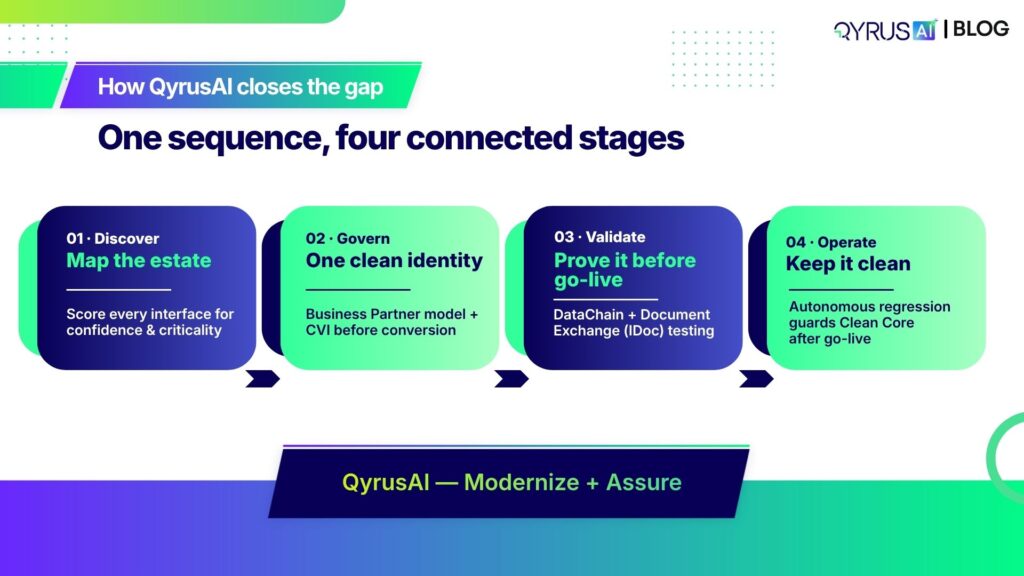
The pattern in both studies points to the same fix: treat the migration as a sequence of decisions to get right in order, not a single technical event. QyrusAI’s Modernize and Assure workspaces are built around exactly that sequence.  

Discover. Before you fix a single master record or commit to a migration path, you need an honest, evidence-based map of the SAP estate — not tribal knowledge or a stale architecture diagram. QyrusAI’s discovery capability inventories every integration (RFC, IDoc, REST/OData, SOAP, CPI iFlows) and scores each one for confidence and criticality, so scope gets locked before the project starts, not renegotiated mid-flight.  

Govern. The Business Partner model consolidates fragmented customer, vendor, and employee records into one master object per legal entity. Customer-Vendor Integration (CVI) is the bridge that keeps legacy and Business Partner records synchronized — and it needs to go in before conversion, not during it, with continuous deduplication and enrichment keeping records from fragmenting again after go-live.  

Validate. This is where QyrusAI’s Assure workspace does the heavy lifting. Qyrus Assure DataChain takes a single document or transaction number and maps every linked transaction across the flow — quotation, delivery, billing — cutting test data creation time by up to 92% and closing the “referential integrity nightmare” that makes manual test data setup for SAP such a bottleneck. Document Exchange (IDoc/EDI) Testing solves the specific problem covered above: it links every incoming IDoc to the business transaction it actually posted, catching the silent mapping flaws a “successful” technical status alone won’t reveal. This is the same approach that helped a $30B+ US automaker cut testing effort by 88% on its own complex SAP S/4HANA workflows. For more on closing the test data gap specifically, see the hidden tax on SAP projects and how DataChain eliminates it.  

Operate. Clean Core isn’t a milestone you hit once — it’s a discipline that erodes one “quick” core modification at a time. QyrusAI’s Autonomous Regression Suite keeps testing running after go-live, connecting to SAP’s standard APIs with no scripting required, so drift back into the core gets caught by a scheduled test run instead of discovered in production months later.  

Where to Start Your SAP S/4HANA Migration Governance  

The runway is shorter than the calendar suggests. For organizations planning to use extended maintenance as a bridge, SAP’s own guidance recommends completing that ordering process by Q3 2027 — which pulls the real decision point well ahead of the headline deadline.  

A few places to start regardless of where your program stands today:  

  • Map the estate first. Score every interface for confidence and criticality before you commit to a scope or a migration path.  
  • Stand up CVI early. Build the Business Partner bridge before conversion begins, not as a mid-project fire drill.  
  • Separate the obligatory cleanup from the discretionary work — and fund both. The fixes required for technical success (missing fields, postal formats) always get done because the system won’t go live without them. The fixes that create business value (deduplication, enrichment) are the first thing cut when the timeline tightens, and that’s exactly what erodes user trust in the new system on day one.  
  • Test the identity model, not just the interfaces. A clean Business Partner record only matters if it flows correctly through Lead-to-Cash and Source-to-Pay — prove that before go-live, not after.  

None of this changes the deadline. But it’s the difference between a migration your organization controls and one that controls you.  

Frequently Asked Questions  

What is the SAP S/4HANA 2027 deadline?  

December 31, 2027, is when SAP ends mainstream maintenance for SAP ERP 6.0 on Enhancement Packages 6 through 8. After that date, SAP no longer provides standard support, security patches, or legal updates for those releases unless an organization has purchased extended maintenance.  

What happens after SAP ECC mainstream maintenance ends?  

Organizations on Enhancement Packages 6–8 can purchase extended maintenance through December 31, 2030, at a 2 percentage-point surcharge on their maintenance base. After 2030, only reduced customer-specific maintenance is available, with no new fixes or legal updates.  

Why do most SAP S/4HANA migrations run over budget or behind schedule?  

Research from ISG and Horváth both point to governance failures rather than technology gaps: underestimated complexity, expanding scope, unclear decision rights across multiple vendors, and business-process change that gets underestimated going in.  

What is Customer-Vendor Integration (CVI) and why does it matter?  

CVI is the bridge that synchronizes legacy customer and vendor records into SAP’s unified Business Partner structure. It needs to be implemented before system conversion — not during or after — and it runs continuously to keep records in sync rather than functioning as a one-time migration step.  

What is SAP Clean Core?  

Clean Core is the practice of keeping custom logic out of the SAP core system and building it instead as side-by-side extensions on SAP Business Technology Platform (BTP). It has to be actively maintained after go-live, since even small core modifications accumulate and eventually degrade AI and automation capabilities built on top of the system.  

How long does an SAP S/4HANA migration typically take?  

Timelines vary by path: a brownfield conversion (keeping the existing system in place) typically runs 6 to 10 months, while a greenfield rebuild can take 12 to 36 months depending on customization volume and transformation ambition.  

How can QyrusAI help reduce SAP S/4HANA migration risk?  

QyrusAI combines estate discovery, Business Partner and CVI governance, AI-driven SAP test automation, and continuous post-go-live regression testing in one workspace — covering the full sequence from mapping the estate to keeping it clean after go-live.  

The Bottom Line  

The 2027 deadline is real, but it isn’t the thing most migrations actually fail against. The data is consistent across every study cited here: programs miss their targets because of how they’re governed, not because the underlying platform can’t get there. Mapping the estate honestly, governing to one clean identity, and testing before you trust the result is the sequence that keeps a deadline-driven program from becoming a multi-year rescue effort.  

Ready to see where your own SAP S/4HANA migration stands against this pattern? Request a QyrusAI demo to walk through your estate, your data governance gaps, and your testing coverage with the team.  

Featured Image

If your regression suite lives in Component-Based Test Automation (CBTA) inside SAP Solution Manager, you’ve probably already heard the deadline: mainstream maintenance for Solution Manager ends in 2027, with a paid extension available only through 2030. 

The important thing here is what actually happens to your test automation when that clock runs out ? 

Cloud Application Lifecycle Management (ALM) is positioned as the next big thing but for test automation specifically, that positioning will create a functional gap: Cloud ALM was built to manage and track tests, not to execute them the way CBTA does. Combining the two leads teams to assume the transition is a configuration exercise, when for test automation it’s closer to a rebuild. 

At QyrusAI we believe in bringing in the change as and when required. So we’ll walk you through what’s actually ending, what Cloud ALM does and doesn’t replace, where teams get stuck in practice, what a realistic migration path looks like, and what to evaluate in a replacement — whichever one you land on. 

What’s Actually Ending in 2027 

SAP has confirmed that Solution Manager 7.2 stays in mainstream maintenance until the end of 2027, with Customer Specific Maintenance available as a paid extension through 2030 — but only for systems already on Enhancement Package 6 through 8. Customers and users who are still running earlier Enhancement Package levels will have to complete an upgrade project first just to qualify for the extension. This adds a barrier that most teams haven’t planned for in an already tight timeline. 

The bigger complication is what happens to usage rights outside a classic on-premises setup. Solution Manager access is bundled into on-premises maintenance agreements by default.  

If you move to S/4HANA Cloud or RISE with SAP Private Cloud, and that default access disappears — SAP treats cloud ERP as covered by its own cloud maintenance agreement, which doesn’t automatically include Solution Manager.  

Customers in that position will have to separately subscribe to Solution Manager Private Cloud Edition (PCE) if they want to keep the platform running at or use SAP Focused Run for the operational monitoring pieces that don’t overlap with test automation. 

CBTA itself doesn’t exist as a standalone product with its own license or roadmap. It’s a component of Solution Manager’s Test Suite, and under the hood its test configurations are eCATT objects, subject to the same transport and object-repository rules as any other development object in Solution Manager.  

 When Solution Manager’s time runs out, CBTA will lose the platform it depends on to store test components, manage the Test Composition Environment (TCE), and execute configurations. There is no CBTA continuity path that doesn’t run through keeping Solution Manager itself alive, one way or another. 

Cloud ALM Is an Orchestration Layer, Not a CBTA Replacement 

SAP has been fairly direct about this, even if the messaging around “successor” platforms hides it: Cloud ALM’s Test Management capability is built for planning, assigning, tracking, and reporting on manual and automated tests. It is not a test automation engine, and it was never designed to be one.  

There’s no scripting language, no component model, and no execution runtime built into Cloud ALM equivalent to CBTA’s Test Composition Environment. 

What Cloud ALM does provide is a Test Automation API, configured through its Landscape Management Service, that lets external tools register as automation endpoints. Once registered, an endpoint shows up as a selectable “automation provider” inside Cloud ALM’s test preparation and execution screens — but the actual test logic, execution engine, and object handling live entirely inside whatever third-party tool you’ve connected. The key point is simple: Cloud ALM manages and reports; it doesn’t automate. 

SAP’s own bundled answer to that gap is Tricentis Test Automation for SAP (TTA), included at no additional licensing cost for SAP Enterprise Support customers, and Tricentis holds official partner status for Cloud ALM integration.  

That’s a needed head start, but it’s worth being precise about scope. The bundled entitlement automates web-based SAP applications — Fiori, Ariba, SuccessFactors — using a model-based, largely UI-driven execution approach.  

Validation in that tier will be UI-result based: it captures what displayed on screen and compares it against an expected value, rather than independently confirming what happened in the backend.  

Covering classic SAP GUI transactions, deeper API-level checks, or complex cross-module end-to-end scenarios typically means stepping up to a separate, higher-tier Tricentis license beyond what’s bundled. A handful of other vendors — Worksoft and Panaya among them — also maintain Cloud ALM connectivity, but the pattern holds across most of them: Cloud ALM is the coordination layer, and the automation depth depends entirely on which paid tool sits behind the API. 

If your CBTA suite today covers GUI-heavy back-office processes alongside Fiori transactions — which is the norm for any landscape that hasn’t fully moved to S/4HANA Cloud — the free bundled tool solves, at best, half the problem. 

Where Teams Face Problems 

Four patterns show up repeatedly in Solution Manager-to-Cloud-ALM transitions, and they compound each other if left unaddressed. 

Fiori-only coverage assumptions. CBTA’s core value was breadth: SAP GUI, Web Dynpro, BSP, SAP Portal, and SAPUI5 in one framework. Tools built primarily for the cloud-and-Fiori era quietly assume that’s all that’s left to test — a reasonable assumption for a greenfield S/4HANA Cloud Public Edition rollout, and a poor one for any brownfield or hybrid landscape still running ECC-derived transactions alongside newer Fiori apps.  

Coverage gaps here don’t show up during the evaluation demo; they show up mid-regression, when a critical back-office process turns out to have no automated coverage at all. 

UI-replay fragility. Screen-replay automation binds test scripts to specific UI elements — field IDs, control positions, layout structure. SAP updates Fiori apps on a quarterly cadence as a matter of course, and RISE/GROW with SAP cloud environments push updates on an even tighter cycle than comparable on-premises systems.  

Every release becomes a script-repair cycle. That maintenance tax compounds across a large regression suite, and it’s the same brittleness problem CBTA’s component model was originally built to reduce in the first place — resurfacing in the replacement tool if it relies on the same underlying execution approach. For more on this maintenance challenge, read How Can AI Reduce Test Maintenance Effort?. 

Seat-capped or throughput-limited execution. Some replacement tools price and throttle by concurrent execution seats, agents, or grid capacity, which directly caps how much of a regression suite can run inside a fixed testing window.  

Upgrade and cutover windows don’t expand to fit a licensing model — when a suite can’t finish in time, teams are left choosing between delaying go-live or cutting coverage, and neither is a real choice under audit or compliance pressure. 

Broken traceability and reporting continuity. CBTA test execution results feed directly into Solution Manager’s test plans, business process change analysis, and downstream reporting — the audit trail SAP-regulated organizations depend on for change documentation.  

None of that reporting structure carries over automatically to a new tool. Unless traceability is designed into the replacement from day one, teams often discover, well into a project, that they’ve solved automation but broken the audit and sign-off chain that made testing defensible in the first place. 

What Actually Transfers From CBTA  

The reality about CBTA migration is that there is no automatic conversion path, and no vendor genuinely offers one. CBTA test configurations are eCATT objects under the hood, tied to Solution Manager’s transport and object-repository model. That object binding, the TCE step logic, and the execution engine itself don’t move to any other platform — they simply have no equivalent representation outside Solution Manager. Anyone promising a one-click script conversion is glossing over that reality. 

 What does transfer are the assets CBTA represents, rather than the assets themselves: the business process scope, the sequencing and intent behind each test case, the field-level data rules, and — often the most valuable part — years of accumulated institutional knowledge about what regression coverage actually matters and why. Treat the migration as a documentation-driven rebuild, not a lift-and-shift, and the 2027 deadline becomes a planning problem instead of a crisis. 

Our Realistic Phased Approach 

In practice, our teams that handle this well tend to work through three phases rather than a single cutover: 

  1. Harvest before you migrate. Before Solution Manager access becomes a problem, export what CBTA already documents — TCE flow structure, component step descriptions, associated test data variants, and historical pass/fail patterns from test plan execution logs. 
    This becomes the specification for the rebuild, and it’s far easier to extract while the system is still fully accessible than to reconstruct from memory later. If your team is rebuilding scripts from documented test intent, this guide to writing effective test scripts can help standardize the output.
  2. Prioritize by business risk, not by script count. Not every CBTA script deserves a like-for-like rebuild. Ranking process coverage by business criticality — financial postings, order-to-cash, regulatory reporting — focuses early rebuild effort on the tests that actually protect the business, rather than burning the migration budget reproducing low-value coverage first.
  3. Run parallel before you cut over. Wherever the timeline allows, run the new automation alongside CBTA for at least one full regression cycle before decommissioning the old suite. Discrepancies between the two surface real gaps in the rebuild while there’s still a working system to compare against. 

What to Actually Evaluate in a Replacement 

Before comparing specific vendors, it helps to fix the criteria independently of who you end up choosing. We at QyrusAI suggest asking questions that tend to separate a tool that looks good in a demo from one that survives three years of quarterly Fiori updates. For a broader SAP testing framework, see our SAP Test Automation: The Complete 2026 Guide. 

  • UI technology coverage. Does it handle SAP GUI, Web Dynpro, and Fiori/SAPUI5 within the same tool and the same test flow, or only the newest interface layer — leaving GUI-heavy processes to a second tool or manual testing? 
     
  • Execution stability under UI churn. Is the tool structurally resilient to routine Fiori field and layout changes, or does every quarterly update trigger a wave of script maintenance? Ask specifically how the tool behaves the first time a control ID changes mid-suite, not just how it behaves on day one. 
     
  • Depth of validation. Can it verify what actually happened in the backend — the OData service response, the BAPI return code, the IDoc that posted — or does it only confirm that a screen rendered the expected value? UI-result validation and backend validation catch fundamentally different classes of defects. 
     
  • Cross-system reach. Can a single test flow span SAP and connected non-SAP systems in one execution, or does coverage stop cleanly at the SAP UI boundary, forcing separate tools and manual handoffs for integration testing? 
     
  • Execution capacity against real deadlines. Can the licensing and execution model actually run your full regression volume inside a realistic upgrade or cutover window, or does a seat-capped or grid-limited model force a coverage-versus-timeline tradeoff? 
     
  • Independence from Solution Manager and Cloud ALM. Does the tool require either platform to function at all, or can it operate as a standalone layer regardless of what SAP does next with its ALM roadmap? Given how much the ALM landscape has already shifted once, betting automation continuity entirely on one platform’s future direction is a real risk to price in. 
     
  • Traceability and audit continuity. Does the tool preserve a defensible execution history and reporting trail comparable to what Solution Manager provided, or does adopting it mean rebuilding your compliance evidence chain from scratch alongside the automation itself? 

How QyrusAI Fits as a CBTA Replacement 

QyrusAI addresses the CBTA gap directly rather than treating it as a Fiori-only problem. SAP Scribe is the reverse-engineering layer: it ingests process documentation, functional requirements, and application source to generate ready-to-run test cases automatically — the practical equivalent of rebuilding CBTA’s test intent without hand-authoring every script from scratch. That’s the mechanism behind the harvest-and-rebuild approach described above: your CBTA documentation and TCE process definitions become the input to the new suite, not a discarded artifact you start over without. 

Where our approach goes further than screen-replay tools are backend validation. QyrusAI’ ARS layer checks OData services, BAPI calls, and IDoc postings directly, rather than inferring correctness from what rendered on screen.  

That distinction matters specifically for SAP testing: a Fiori screen can display correctly while the underlying document posts with the wrong values, incorrect status, or a failed IDoc in the background — and UI-only automation, including UI-result-based validation, will never catch that class of defect. Validating the OData/BAPI/IDoc layer catches failures that screen-replay tools are structurally unable to see, because they never look past the interface in the first place. 

Our Healer component addresses the maintenance tax that made UI-replay tools fragile to begin with. When a Fiori control ID or layout shifts on a quarterly update, Healer identifies the change and repairs the affected script automatically, rather than leaving the failure for someone to triage and re-record by hand after the fact — turning what used to be a recurring maintenance project into a background process. 

QyrusAI also offers cross-system flows as a default case rather than an edge case: a single test can span Fiori, SAP GUI, backend APIs, and connected non-SAP applications in one execution, which matters for any process that doesn’t stop cleanly at the SAP UI boundary — order-to-cash flows that touch a CRM or logistics platform, for instance. And because execution isn’t gated by a seat-capped model, regression volume becomes a planning question rather than a licensing constraint working against a fixed cutover window. 

None of this requires Cloud ALM to be in place first. QyrusAI can sit alongside it, close the automation gap it deliberately leaves open, or run entirely independently of it — which matters given how much the ALM landscape has already shifted. 

Conclusion 

The 2027 deadline is real, and it isn’t far off once you account for the time a proper test automation rebuild actually takes. But the “Cloud ALM replaces Solution Manager” framing oversimplifies what happens to test automation specifically. Cloud ALM inherits the project and orchestration side of ALM — planning, tracking, reporting — while CBTA’s actual execution engine, component model, and UI coverage have no direct successor inside SAP’s own tooling.  

The bundled Tricentis tier closes part of that gap for Fiori-centric landscapes, but most CBTA suites cover more ground than that, and the difference between UI-result validation and backend validation is not a minor detail for regulated SAP environments. 

Planning for that gap now — harvesting what CBTA already documents, prioritizing by business risk, and treating the migration as a rebuild rather than a conversion — is what turns 2027 from a looming crisis into a manageable, scoped project. 

QyrusAI is one option built specifically to close that gap: SAP Scribe rebuilds test cases from what you already have, ARS validates the backend layer that screen-replay tools structurally can’t see, Healer keeps scripts stable against routine Fiori changes instead of breaking every quarter, and none of it depends on a seat-capped execution model or a completed Cloud ALM rollout to start working. 

FAQ 

Does Cloud ALM replace CBTA? For related SAP QA planning guidance, you may also find Qyrus’ User Acceptance Testing Best Practices for SAP Teams useful. 

No, not for automation specifically. Cloud ALM’s Test Management is a planning, assignment, and reporting layer for manual and automated tests — it has no built-in scripting language or execution engine comparable to CBTA’s Test Composition Environment. It relies entirely on an external Test Automation API and connected third-party tools to actually run automated tests, so “moving to Cloud ALM” solves test management, not test automation. 

Can I keep using CBTA past 2027?  

Only for as long as you keep Solution Manager itself running — either through paid Customer Specific Maintenance, available through 2030 for systems on Enhancement Package 6 through 8, or a Solution Manager Private Cloud Edition subscription if you’ve already moved to cloud infrastructure. CBTA has no license or existence independent of Solution Manager, so there’s no separate “keep CBTA” path. 

What’s the difference between eCATT and CBTA?  

eCATT is the older, more script-driven tool, largely limited to SAP GUI and Web Dynpro as testable interface technologies. CBTA is the more modern, component-based successor built on top of the same eCATT object model, extending coverage to Fiori/SAPUI5, SAP Portal, and BSP through reusable test components rather than hand-written scripts. Both live inside Solution Manager’s Test Suite, and both sunset on the same 2027/2030 timeline since neither exists outside that platform. 

What happens to my existing CBTA scripts?  

They don’t migrate automatically to any other platform — CBTA configurations are eCATT objects tied to Solution Manager’s own transport and object-repository model, and there’s no export path to an equivalent structure elsewhere, regardless of which tool you move to. What does carry forward is the documented process knowledge behind the scripts: business process scope, step sequencing, expected results, and field-level data rules, which any credible replacement tool uses as the specification for a rebuild rather than a literal conversion. 

Do I need Cloud ALM to use QyrusAI?  

No. QyrusAI connects directly to SAP systems — Fiori, SAP GUI, and backend services via OData/BAPI/IDoc — independent of any ALM platform sitting on top. It can run standalone, alongside an existing Cloud ALM rollout, or ahead of one, so adopting it isn’t contingent on Cloud ALM being fully implemented first. 

Jack Henry Blog Featured Image

October 19–21, 2026 
Kansas City, Missouri 
Booth #1604 

QyrusAI is headed to Jack Henry Connect 2026, October 19–21 in Kansas City. We’re excited to join financial institutions, technology leaders, and industry partners for three days of conversations around the technology shaping the future of financial services. 

As banks and credit unions continue modernizing their digital ecosystems, delivering reliable customer experiences means managing more applications, integrations, APIs, and data than ever before. At the same time, teams are under pressure to release faster without introducing additional risk. 

That’s where intelligent quality engineering can make a difference. 

What We’ll Be Sharing at Booth 1604 

Throughout Jack Henry Connect, the QyrusAI team will be available to discuss how financial institutions can use shared intelligence and AI to modernize systems, improve software quality, and operate more reliably. 

Stop by Booth 1604 to explore how QyrusAI can help teams: 

  • Modernize legacy and complex technology environments with application discovery, dependency mapping, migration intelligence, and technical debt analysis 
  • Assure critical banking experiences with AI-powered web, mobile, API, SAP, data, and end-to-end testing 
  • Operate more reliably with AIOps, intelligent automation, real-time analytics, and self-healing workflows 
  • Gain greater visibility across applications, integrations, dependencies, risk, and system health 
  • Bring modernization, testing, and operations together through one continuous intelligence loop 

Whether you’re modernizing existing systems, introducing new digital banking experiences, strengthening release confidence, or looking for more intelligent ways to manage your technology environment, we’d love to hear what your team is working on. 

Meet Us in Kansas City 

If you’re attending Jack Henry Connect 2026, make sure to stop by Booth #1604 and meet the QyrusAI team. 

We’re looking forward to connecting with the Jack Henry community and talking about what’s next for AI, automation, and software quality in financial services. 

See you October 19–21 in Kansas City! 

Test enterprise AI applications before hallucinations, retrieval failures, and unsafe tool calls reach production. 

Enterprise AI has moved from experimentation to production. LLMs now answer customer questions, summarize internal knowledge, reason across workflows, and trigger actions through connected tools. But the testing model most teams rely on has not kept up. 

Traditional QA validates deterministic software. AI systems are different. They depend on prompts, models, embeddings, vector indexes, APIs, context servers, permissions, and tool calls that can drift independently after deployment. A single regression in any layer can produce a fluent, confident, and incorrect output. 

QyrusAI closes that gap with a unified AI testing platform built for LLM evaluation, RAG pipeline testing, MCP endpoint validation, API testing, and continuous production monitoring. 

Where AI Testing in 2026 Falls Short 

Most AI teams use separate tools for separate problems: one tool for prompt evaluation, another for RAG metrics, another for API testing, and another for red-teaming. That fragmentation creates blind spots where real production failures happen. 

  • LLM evaluation misses retrieval failures when the model scores well against the context it received, even if the retriever supplied the wrong context. 
  • RAG testing misses infrastructure drift when API schema changes, stale indexes, or failed ingestion jobs silently degrade retrieval quality. 
  • MCP testing misses agent risk when tool calls, permissions, authentication, and session state are not validated as part of the AI workflow. 

The result: teams pass pre-release evaluations, ship confidently, and still discover hallucinations, outdated answers, tool misuse, data leakage, or workflow failures in production. 

One Platform for the Full AI Quality Stack 

QyrusAI brings AI quality signals into one continuous testing loop. Instead of treating API testing, LLM testing, RAG evaluation, and MCP validation as disconnected workflows, QyrusAI correlates them in a single platform so teams can see what failed, where it failed, and what changed before the failure appeared.

What QyrusAI Helps You Test 

LLM Evaluation 

Measure groundedness, faithfulness, hallucination risk, bias, toxicity, response relevance, and instruction following. 

QyrusAI helps teams move beyond basic prompt checks by evaluating whether model responses are accurate, safe, relevant, and aligned with business expectations. 

RAG Pipeline Testing 

Validate retrieval precision, context recall, chunking strategy, index freshness, reranking quality, and generation accuracy. 

RAG systems fail when the wrong context is retrieved, when indexes become stale, or when the model generates answers that are not faithful to source data. QyrusAI helps identify whether the issue is in retrieval, generation, or the infrastructure that connects them. 

MCP Testing 

Test tool definitions, tool call correctness, authentication propagation, session isolation, output schemas, and context server integrity. 

As enterprises adopt MCP-enabled AI agents, tool-calling becomes a critical production risk. QyrusAI helps validate whether agents are calling the right tools, passing the right parameters, respecting permissions, and handling tool outputs safely. 

API Infrastructure Testing 

Validate REST, SOAP, GraphQL, gRPC, and WebSocket endpoints that power AI workflows. 

AI quality depends on the systems underneath it. If an API changes, fails, slows down, or returns malformed data, AI outputs can degrade even when the model itself appears healthy. 

Production Drift Monitoring 

Detect model, prompt, retrieval, index, schema, and tool changes before they become user-facing failures. 

QyrusAI helps teams continuously monitor AI systems after deployment, so silent drift does not turn into hallucinations, compliance issues, or customer-facing incidents. 

Built for Enterprise AI Teams Moving From Pilot to Production 

QyrusAI is designed for QA leaders, platform engineering teams, AI product owners, and compliance stakeholders who need one trusted view of AI system quality. 

It gives teams the confidence to release AI features faster while reducing the risk of hallucinations, broken retrieval, unsafe tool calls, and unreliable agent behavior.

Featured Image

In heavily regulated sectors, telling a compliance officer that a test passed is essentially meaningless. The mandate isn’t about simple binary outcomes. It is about proving to an internal audit committee or a federal regulator that the exact right tests ran in the correct sequence before any code modification touched the production environment.  

This is fundamentally an evidence and sequencing problem. Basic automation answers a very narrow question. It tells you if a button works. It does not verify the holistic integrity of an entire SAP release. 

For banks, insurers, and manufacturing firms bound by stringent controls, the gap between simple test execution and complete release orchestration is where massive compliance risks hide. A modern enterprise resource planning environment connects countless third-party applications, external data lakes, and legacy mainframes.  

The capacity to bridge technological eras from traditional mainframes to contemporary NoSQL settings is the hallmark of a robust quality assurance approach. Through the use of agentic orchestration methods, organizations create a flexible structure that addresses present operational needs and future technology incorporation. 

Automation vs. Orchestration: The Distinction That Matters in SAP 

In complex enterprise architectures, grasping the technical difference between automating a script and orchestrating a release cycle is essential for maintaining operational stability. Automation focuses strictly on executing isolated test cases.  

An engineer writes a script to interact with a specific user interface, fill out a standardized form, or ping an application programming interface endpoint. The testing tool then reports a simple pass or fail status. While this approach is useful for localized component checks, this isolated methodology falls apart completely when confronted with cross-functional business processes. 

Consider a standard Order-to-Cash workflow within a large organization. This process rarely lives inside a single application boundary. It typically spans the legacy SAP GUI for initial order entry, transitions to a modern Fiori web portal for managerial approvals, requires outbound API calls to third-party logistics providers, and finally updates core backend financial databases. Automation simply tackles one of those localized steps independently. 

Test orchestration manages the entire sequence from end to end. It ensures that step two only triggers if step one successfully writes the correct state to the underlying database. Orchestration coordinates intelligent quality gates, applies necessary compensation steps if a connected system is temporarily unavailable, and captures immutable evidence at every single phase of the journey.  

Instead of just asking if the code works, orchestration asks if the business process survives the code change. It actively manages the dependencies, the environment variables, and the asynchronous data handoffs that define modern enterprise software. This broader scope is what allows engineering teams to move beyond basic maintenance and start deploying highly complex integrations with absolute confidence. 

What Regulated Industries Actually Need From SAP Testing 

The financial services sector provides the starkest example of why basic pass and fail metrics are insufficient for modern software delivery. In this environment, software quality assurance is fundamentally a governance and risk management function. The financial stakes for any system failure are exceptionally severe.  

In 2024, the average cost of a data breach in the financial sector surpassed $6.08 million, according to data from IBM’s annual security analysis. This figure is significantly higher than non-financial industries because a single faulty integration update can disrupt vital loan approvals or corrupt cross-border transaction ledgers. 

Changing legal frameworks are also forcing strict discipline onto technical teams. New compliance rules like the Consumer Duty regulations currently affect roughly 36% of BFSI firms. These mandates create a strict requirement for compliance-ready testing trails where every single code change is thoroughly documented and linked directly to a specific business requirement.  

The pressure on quality engineering teams is accelerating rapidly as banks invest heavily in new predictive technologies. Average projected AI spend across banking organizations reached $177 million in the first quarter of 2026, as detailed in recent KPMG banking reports. 

Implementing advanced intelligence securely at this magnitude necessitates what industry analysts refer to as governed intelligence. This idea encompasses the integration of automated testing within enterprise workflows, ensuring total observability and full traceability.  

Regulators demand a continuous audit trail demonstrating that an SAP transport received thorough, sequential validation prior to implementation. They anticipate comprehensive records indicating precisely who authorized a release, what information was utilized for validation, and how the system performed under simulated stress. Orchestration provides the infrastructure to capture this vital governance data automatically. 

Quality Gates and Compensation Patterns for SAP Release Management 

Dependable SAP release management is strongly dependent on programmatic quality checkpoints connected directly to the transport lifecycle. As a newly set up transport transitions from the Development stage to Quality Assurance, then to Staging, and finally to Production, it must undergo thorough orchestration evaluations.  

If a transport does not pass a certain validation checkpoint, the orchestration system must automatically invoke a Saga pattern or a compensation transaction to stop incomplete data commits from damaging the testing environment.  

For example, if an orchestrated test successfully creates a new vendor record in the SAP database but fails the subsequent validation check in a connected customer relationship management tool, a compensation pattern automatically rolls back that specific vendor creation.  

This mechanism maintains strict state consistency across the entire integrated environment. It prevents bad data from silently polluting downstream systems. It is highly beneficial for teams exploring different test data management strategies to maintain clean testing pipelines. 

Similarly, orchestration platforms utilize advanced circuit breakers during the environment promotion phase. If a downstream integration API is unresponsive during a staging test, the circuit breaker halts the transport promotion immediately.  

This prevents the continuous integration pipeline from attempting repeated doomed executions or pushing flawed code forward into a production state. Such a detailed level of control is critical for any SAP S/4HANA migration performance testing initiative, where maintaining data integrity is the utmost priority. Applying these particular patterns converts a delicate testing pipeline into a robust release mechanism capable of managing the unpredictable characteristics of hybrid cloud environments.  

How Qyrus Orchestrates SAP Testing End-to-End 

To understand the true operational impact of this approach, we can examine the recent transformation of a major North American Coca-Cola Bottler. This enterprise required seamless validation across a highly complex logistics network utilizing legacy SAP GUI interfaces, modern web portals, and mobile delivery applications used by drivers in the field. They deployed the Qyrus platform to implement true end-to-end test orchestration across their entire technical footprint. 

Utilizing a sophisticated desktop recorder designed specifically for SAP GUI environments, the engineering team mapped out their most complex supply chain workflows.  

A critical component of their ultimate success was the direct integration of the Qyrus Data Hub, which provided dynamic data handling capabilities. Instead of relying on static spreadsheets that break easily, the orchestration engine captured unique shipment identifiers at runtime and passed them sequentially through the entire mobile delivery sequence. 

Security and environment access were managed natively through the Qyrus Vault. This feature secured environment hierarchies and managed automated credential injection without ever exposing sensitive passwords or tokens in the testing logs. The platform also automatically generated complete PDF reporting for internal audits, capturing detailed screenshots and network payloads at every single step of the execution.  

This shift to a modern AI test orchestration platform to modernize enterprise QA resulted in significant efficiency improvements. It decreased their total test execution duration by 88%, shortening a procedure that once required 10,020 minutes to merely 1,186 minutes. They effectively coordinated more than 500 scripts among 40 various integrated applications. 

Coca-Cola Bottler_ Orchestration in Practice

The Future of SAP Quality Governance 

The conversation surrounding enterprise quality engineering is shifting rapidly. The most pressing question for technical leadership is no longer whether a specific automated script can execute successfully in a silo. The core requirement is proving, with an immutable audit trail, that the exact correct sequence of validations occurred before a release was authorized for production. This operational reality is especially true given the growing need for automated app testing for financial software where federal regulatory scrutiny is a constant factor in daily operations. 

Integrating artificial intelligence and high-speed automation into your delivery pipelines requires the underlying discipline of orchestration to maintain safety and compliance. You cannot scale deployment velocity without scaling your governance mechanisms simultaneously, a core principle in understanding continuous testing in DevOps.  

When your next SAP module update requires validation, you must ensure your platform can provide the exact evidence your governance officers demand. Building quality gates into your pipelines is the only reliable way to protect your production data from the risks of continuous delivery. 

Talk to us about orchestrating SAP release evidence for your compliance team.