
How to Write Effective Test Scripts: A Straightforward Guide
 Varun RS

Here is a situation every QA team knows: a test script passes in sprint one. It passes in sprint two. By sprint three, it has become the thing everyone quietly dreads — the test that someone has to fix before the release can go out, every single time.
It’s not because of what they tested, but because of how they were written. There’s a interesting insight behind it, what happens is when a script passes in first sprint it has a chance of becoming a maintenance liability by sprint three. It happens for various reasons if it’s properly coupled to fragile selectors, lacks clear failure context, or tries to validate too much at once.
In this Qyrus guide, you’ll find a clear definition of what a test script actually is, a step-by-step authoring framework, examples across manual, code-based, and no-code approaches, clubbed with best practices that actually cut maintenance overhead, and the most common mistakes that silently affecting engineering teams worldwide.
Let’s build scripts that stay reliable long after they’re written, so you and your teams finally can have a streamlined process.
What Is a Test Script And Is It Different From a Test Case?
We see a clear confusion between test cases and test scripts, it’s more than a vocabulary problem. It leads directly to weak automation strategies, coverage gaps, and maintenance costs that nobody budgeted for.
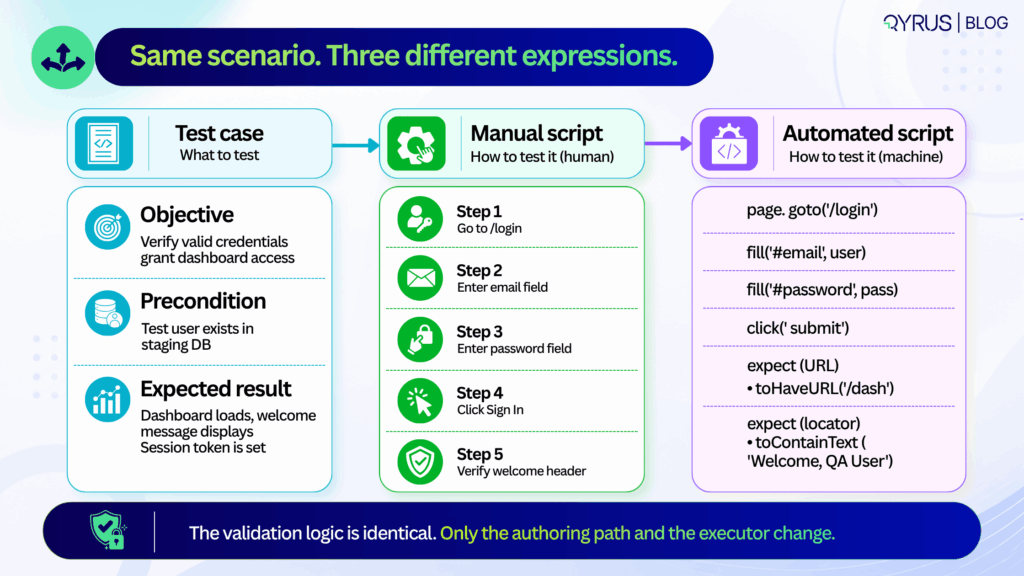
A test case defines what to test: it covers the objective, the preconditions, the inputs, and the expected outcome. It lives in a test management tool and traces back to a requirement or user story.
Whereas a test script defines how to test it: the exact sequence of steps, interactions, and assertions that operationalise the test case. It lives in version control, a CI pipeline, or an orchestration platform.
The clearest way to see the distinction
Test case: Verify that a user with valid credentials can access the dashboard.
Manual test script:
- Navigate to /login.
- Enter username “testuser@qyrus.com”.
- Enter password “SecurePass3qww!”.
- Click “Sign In”.
- Confirm dashboard loads and welcome message displays.
Automated test script: A code block or no-code workflow that launches a browser, fills the credential fields, submits the form, waits for the /dashboard route, and verifies the presence and content of the welcome header element.
The test case states the goal. The script operationalises it and neither substitutes for the other.
It is only when teams start to treat them as interchangeable, they will end up with test cases that read like code comments — over-specified, hard to update when requirements change or automation scripts that try to validate five different user journeys in a single run.
Both patterns produce the same outcome: the feedback is slow, debugging takes time, and maintenance costs that compound every sprint.
Keeping them separate has a practical upside too. Product managers and QA can refine acceptance criteria in parallel with engineers building the executable scripts. If the UI changes, you update the script. If the business rule changes, you update the test case. One doesn’t break the other.
How to Write a Test Script, Step by Step
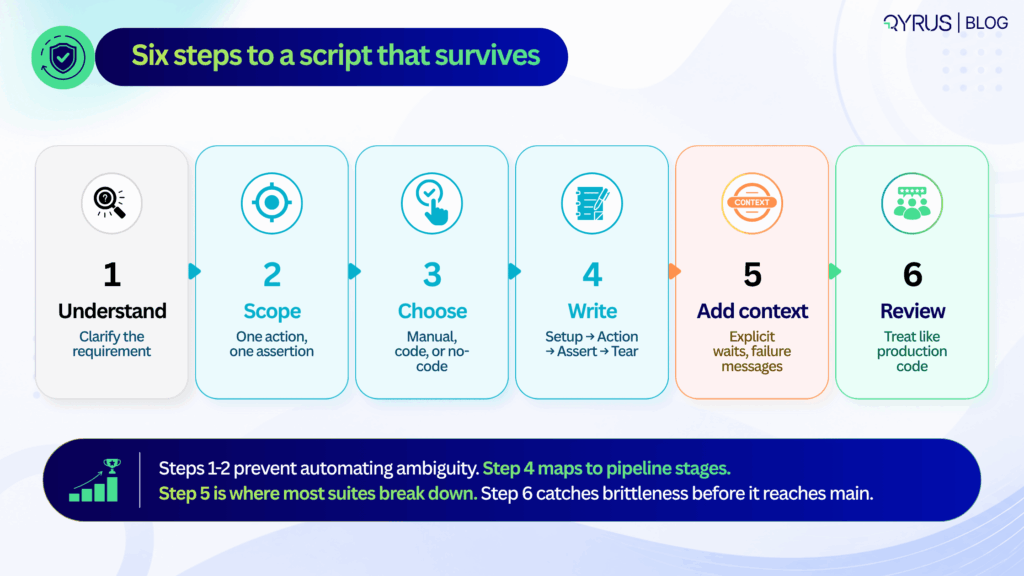
Writing a test script that survives multiple release cycles is not about clever code or exhaustive steps. It is about discipline, structure, and foresight. The following six steps apply equally whether you are writing a manual checklist, a Playwright test, or a no-code workflow.
Step 1: Set the Context
Before writing a single step, identify which specific acceptance criterion this script needs to verify. Is it a business rule, a UI state change, an API contract, or a data transformation? If you cannot state the purpose in one sentence, the scope is too broad and the script too will be broad.
Step 2: Next define the scope
When a script validates login, permissions checking, and data sync in a single run, a failure tells you nothing useful.
You do not know whether login has failed, or the permissions were wrong, or whether the data sync had a race condition. You only know that the 20-step chain broke somewhere. Your scripts should isolate risk. They fail fast and point directly at the broken component.
A common argument is that atomic scripts increase the number of tests and execution time. While that concern can be valid, parallel execution can help teams manage the additional test volume. Parallel execution handles scale. The debugging time saved by atomic failures pays back the execution overhead many times over.
Step 3: Choosing’ your authoring approach
The most important question is not which framework is most powerful. It is: who will be maintaining these scripts in six months? If the answer is a dedicated SDET team, code-based frameworks offer the right level of control.
If the answer is a mixed team of QA analysts and product managers, no-code authoring is more sustainable. If the answer is nobody — because the team is small and the feature is stable — a clear manual script may be the highest-ROI option.
Choosing based on industry hype rather than team composition is the most common reason automation investments underdeliver.
Step 4: Write in a consistent structure — setup, action, assertion, teardown
Every reliable script follows the same four-phase lifecycle, regardless of format:
- Setup — prepare test data, authenticate the session, navigate to the starting state. Anything that must be true before the test action begins
- Action — trigger the specific event being tested — a button click, a form submission, an API call, a file upload
- Assertion — verify the expected state or response. One primary assertion per script. Secondary validations are a separate test
- Teardown — clean up created records, close sessions, reset state. Teardown is the most commonly skipped phase and the most common source of cross-test contamination
This lifecycle maps cleanly to CI/CD pipeline stages and makes it possible to parallelize execution without shared state causing interference between tests.
Step 5: Add failure context, not just failure conditions
A script that fails silently — or dumps a raw stack trace — costs more time to diagnose than the defect it found costs to fix. Every test should include:
- Explicit waits — wait for DOM readiness, network idle, or specific element state — not sleep (5000) or arbitrary time delays that will be wrong in half your environments
- Custom failure messages — “Expected /dashboard URL after valid login, got /login — check session cookie configuration” is useful. A raw assertion error is not
- Data context in failure output — which test user, which environment, which data set was in use when the failure occurred
The engineer who receives this failure report at 11pm before a release will be grateful. So will the engineer who gets it at 9am three sprints later when the same failure reappears.
Step 6: Review scripts like production code
Test scripts that go unreviewed before merge accumulate the same kind of technical debt that unreviewed application code does — just more slowly and more expensively, because the symptoms (flaky CI, unexplained failures, maintenance backlogs) are harder to trace to their origin.
The checklist for a test script review:
- Do assertions match the acceptance criteria in the test case?
- Are selectors stable, or are they tied to implementation details that change regularly?
- Is test data isolated, or does this script depend on state created by another test?
- Is teardown present and correct?
- Would a new team member understand what this test is verifying and why from the script alone?
In 2026 and beyond, this workflow aligns directly with how your teams should ship. Requirements often start in AI-assisted product specs, but the verification logic still needs human clarity.
Step 1 and 2 prevent the common trap of automating ambiguous acceptance criteria.
Step 3 acknowledges that teams now blend SDETs, manual QA, and AI-generated snippets—tool choice should match team composition, not industry hype.
Step 4’s setup-action-assertion-teardown pattern maps cleanly to pipeline stages, making it easier to parallelize execution and cache test environments.
Step 5 is where most suites break down: without structured error context, flaky failures get quarantined instead of fixed, slowly eroding trust in the pipeline.
Step 6 closes the loop. Many organizations now treat test script reviews as mandatory PR gates, catching brittle selectors and hardcoded data before they reach main.
Following this sequence doesn’t just produce better scripts—it builds a testing culture that scales with release velocity.
Test Script Best Practices That Actually Prevent Maintenance Pain
Test scripts don’t decay because teams lack skill. They decay because small structural compromises compound over time. The practices below target the highest-leverage maintenance traps and are proven to extend script lifespan across release cycles.
Keep scripts atomic
One purpose, one primary assertion. When a script validates login, permissions, and data sync in a single run, a failure tells you nothing specific. Atomic scripts isolate risk and speed up root-cause analysis.
Avoid hardcoded waits and brittle selectors
Rigid XPath chains can contribute to flaky or brittle tests, particularly when they depend on implementation details that change frequently. Use explicit waits for network idle, DOM readiness, or API response states. Prefer stable attributes like data-testid or semantic roles over auto-generated class names.
If your team is still fighting this, our deep dive on what actually causes test flakiness breaks down why brittle selectors are only part of the problem — and what the other 72% looks like.
Standardize naming and formatting
A script named test1_final_updated is a future debugging liability. Use consistent conventions: MODULE_ACTION_EXPECTATION (e.g., AUTH_LOGIN_VALID_CREDENTIALS). Format code or steps uniformly so any team member can read, edit, or extend them.
Isolate test data and state
Shared test accounts or reused database rows cause cross-test contamination. Generate unique data per run, clean up after teardown, or use ephemeral test environments. State leakage is a silent suite killer.
Parameterize intelligently.
Don’t duplicate scripts for minor data variations. Use data tables, environment variables, or CSV/JSON inputs to run the same logic across multiple scenarios. Parameterization multiplies coverage without multiplying maintenance.
Document intent, not just steps.
A comment explaining why an assertion exists saves hours later. “Verify session token to prevent CSRF regression” is infinitely more useful than “Check token exists.” Intent documentation turns scripts into living quality documentation.
These practices are practical as they map directly to how modern pipelines handle scale. In 2026 and years to come, they also align with how AI-assisted testing tools operate. AI can generate selectors or suggest waits, but it still depends on human-defined boundaries. Without atomic scope, AI-generated scripts inherit the same bloat.
Without intent documentation, AI refactors can silently change verification logic. Treat these practices as guardrails, not suggestions. When baked into PR templates, linter rules, or no-code platform defaults, they become automatic rather than aspirational.
Teams that enforce them see fewer quarantined tests, faster CI feedback, and lower handoff friction between QA and engineering. The goal isn’t perfection on day one it’s having predictability in the next months.
Common Test Script Mistakes
The most expensive test failures aren’t the ones that catch bugs. They’re the ones that waste time, erode trust, and quietly drain engineering capacity. Three patterns consistently drive those costs.
Flaky vs. brittle failures
They’re often conflated, but the root causes and fixes differ. A flaky test passes and fails intermittently under identical conditions—usually due to race conditions, network latency, or unstable test data.
A brittle test fails predictably after a minor UI or API change—typically because of hardcoded selectors, rigid paths, or tight coupling to implementation details. Flakiness requires synchronization and data control. Brittleness requires abstraction and stable locators. Treating them as the same problem leads to the wrong fix.
The hidden cost of poor structure
Industry analyses from 2025 quality reports indicate that engineering teams spend 18–24% of their testing capacity maintaining or debugging unreliable scripts.
The World Quality Report continues to highlight test maintenance as a top-three bottleneck for release velocity. When scripts lack error context, try to validate too much, or skip peer review, they accumulate silent debt.
A single flaky script quarantined in CI might seem harmless, but ten of them degrade pipeline trust. Teams start ignoring failures, bypassing gates, or reverting to manual smoke checks—undoing the entire purpose of automation.
The most common structural mistakes:
- Overly broad scripts that chain multiple user journeys, making failures impossible to triage quickly.
- Zero error handling or custom messaging, leaving engineers to reverse-engineer raw logs.
- Skipping review cycles, allowing brittle selectors and hardcoded data to merge into main.
- Ignoring teardown, which leaves orphaned sessions, locked records, or polluted test databases.
The fix isn’t more automation. It’s better structure. Scripts that fail clearly, maintain a focused scope, and clean up after themselves are easier to maintain. Poorly structured scripts become a maintenance tax on every release.
Automated Test Scripts: When (and How) to Go Beyond Manual
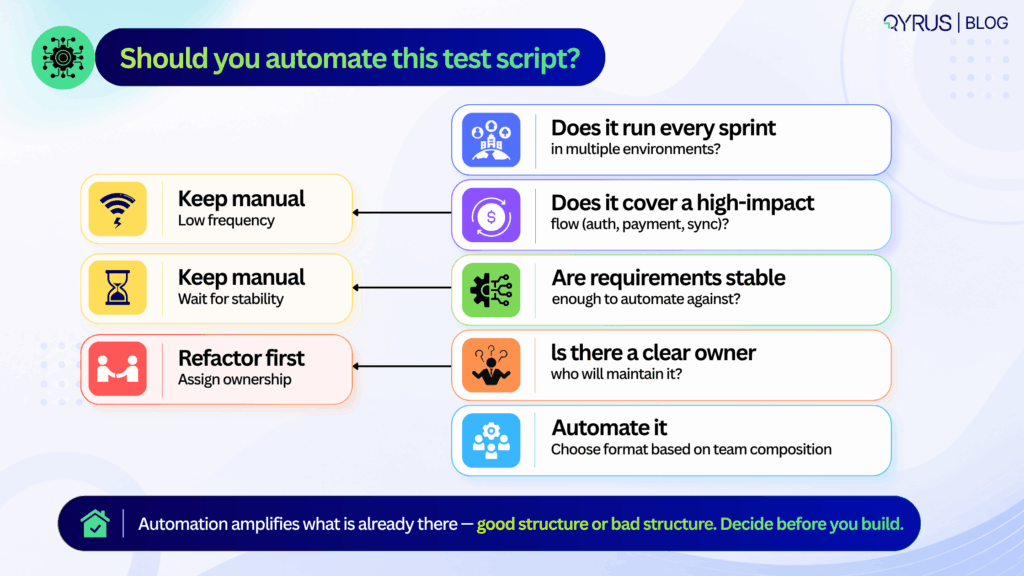
Automation isn’t a goal. It’s a leverage point. Knowing when to automate—and how to choose the right approach—prevents wasted effort and brittle suites.
Signals it’s time to automate:
- The test runs repeatedly across sprints or environments.
- It covers a regression-prone area or a high-value business process (checkout, auth, data sync).
- Manual execution creates bottlenecks or delays feedback beyond acceptable SLAs.
If a test is exploratory, rarely executed, or highly subjective, manual execution often remains the smarter choice.
Framework vs. no-code/low-code platforms
Code-based frameworks offer maximum flexibility, deep CI/CD integration, and fine-grained control over execution. They require engineering bandwidth, version control discipline, and ongoing maintenance.
No-code and low-code platforms trade some flexibility for speed, enabling QA analysts, product teams, and support engineers to author and maintain tests without writing code. The tradeoff isn’t quality—it’s ownership. Choose based on who will maintain the suite long-term, not who can write the first script fastest.
For a direct comparison of modern end-to-end testing tools across both approaches, our guide breaks down the specific tradeoffs worth knowing before you commit to a testing stack.
Where AI fits in 2026
AI now helps with natural-language test authoring, locator generation, and self-healing mechanisms that adapt to minor UI shifts without manual intervention. But self-healing addresses symptoms, not structure. It can update a broken selector or retry a flaky step, but it won’t fix an overly broad scope, a missing teardown, or an ambiguous assertion.
AI-generated scripts still require the same best practices outlined above. A poorly structured script is equally brittle whether a human, a framework, or an LLM wrote it. The quality of the foundation matters more than the tool that built it.
To understand how agentic testing takes this further, moving from self-healing individual scripts to AI agents that detect errors, generate test cases, and manage broader testing workflows, explore our guide before planning your next automation investment.
How Qyrus Helps Teams Write and Maintain Test Scripts
Qyrus is built to support the full spectrum of test script authoring and maintenance, whether your team prefers code, low-code, or codeless workflows across web, mobile, API, and desktop applications.
The platform’s codeless script builder allows non-engineers to create structured, executable tests using plain-English steps and visual workflows, without sacrificing the setup → action → assertion → teardown lifecycle.
For teams that prefer recording initial flows, the web and mobile recorder captures user interactions and converts them into editable, reusable scripts that can be refined with explicit waits and stable selectors.
To address the maintenance burden highlighted earlier, Qyrus includes a self-healing engine that detects broken locators and suggests safe alternatives during execution. This reduces routine repair work and keeps pipelines moving, while still relying on well-scoped, atomic test design as the foundation. Self-healing complements good structure; it doesn’t replace it.
Qyrus also supports parameterization and modular reusability out of the box. Teams can store test data securely, swap environments without rewriting steps, and chain reusable components across multiple scripts.
For teams managing at scale, Qyrus’s approach to mobile testing shows how modular design — updating a “Login Block” once and having it propagate automatically to every script that uses it — can reduce maintenance overhead by up to 80% in real-world deployments.
Whether your team manages scripts in version control, runs them through CI/CD gates, or orchestrates them alongside manual test cases, Qyrus provides a unified layer for authoring, execution, and reporting. The goal is consistent: reduce maintenance overhead, improve failure diagnostics, and keep test assets reliable as applications evolve.
If your team is looking to standardize script authoring, reduce maintenance cycles, or bring manual and automated testing into a single workflow, you can explore how Qyrus handles these patterns in practice or request a walkthrough tailored to your current stack.
Stay Ahead, Stay in the Loop with QyrusAI!
One Platform for Modernization, Quality Assurance and Intelligent IT Operations.

 October 16, 2026
  6 min
6 min