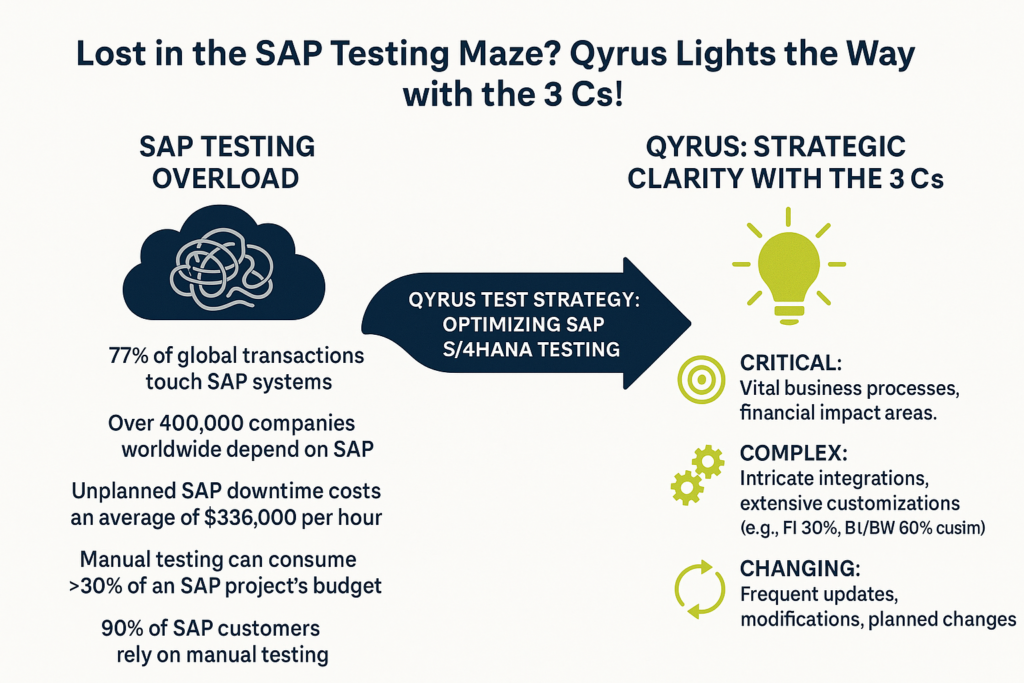
SAP. The very name evokes images of comprehensive business solutions, a digital backbone powering the world’s largest enterprises. It’s a sprawling empire, underpinning critical business processes from finance and supply chain to sales and human resources for countless organizations. In fact, an astounding 77% of global transactions touch an SAP system, and over 400,000 companies worldwide rely on these solutions for their core operations. Think about that for a moment. The vast majority of the world’s commerce, the distribution of 78% of the world’s food and 82% of its medical devices, all flows through SAP systems. This incredible reach, while a testament to SAP’s power, also presents a monumental challenge for quality assurance teams. How do you even begin to test something so vast, so interconnected? The sheer scale can easily make testing feel like an insurmountable task, leaving teams feeling overwhelmed before they even start.
For those on the front lines of SAP quality assurance, the daily reality is often a complex matrix of difficult decisions. The primary struggle? Pinpointing what absolutely, critically needs to be tested amidst millions of potential scenarios. Then comes the automation question: which areas are genuinely ripe for automation to yield the best return, and which will just lead to maintenance nightmares? And perhaps one of the most persistent headaches is accurately analyzing the true impact of frequent releases, updates, and customizations. Even a seemingly minor change in one module can send ripples across the entire integrated landscape, from sales and distribution to materials management and finance. Many organizations find themselves wrestling with these challenges, leading to inefficiencies and, more critically, potential risks.
The traditional, often manual, approach of trying to test “everything” is not just inefficient; but in the complex world of SAP, it’s practically impossible and economically unviable. Manual testing alone can devour 30% or more of an SAP project’s budget. Clearly, a shift is needed. It’s time to move beyond brute-force tactics and chart a course for a more intelligent, strategic, and ultimately more effective SAP S/4HANA testing approach. The goal isn’t just to test more, but to test smarter, focusing efforts where they deliver the most value and mitigate the highest risks. This is where a well-defined strategy becomes not just helpful, but absolutely essential for success.
Introducing the “3 Cs”: A Framework for Focused SAP Testing
To truly start optimizing SAP S/4HANA testing, we need a guiding philosophy, a framework that cuts through the noise and directs our attention to what genuinely matters. Enter the “3 Cs”—a powerful lens through which to view your SAP landscape and prioritize your testing efforts with intelligence and precision.
The Three Pillars of Smart SAP Testing: Critical, Complex, and Changing
The “3 Cs” provide a simple yet profound way to categorize and understand different aspects of your SAP environment:
Critical: This pillar focuses on identifying those business processes and transactions that are absolutely vital to your organization’s survival and success. Think about your core financial operations where errors could lead to significant financial misstatements or compliance breaches. Consider customer-facing processes where a glitch could directly impact revenue and reputation, or supply chain activities where downtime can cause huge disruptions. SAP systems often underpin these very core functions, and the financial stakes of failure are enormous, with unplanned SAP downtime potentially costing organizations hundreds of thousands, or even millions, per hour. Identifying these critical pathways is the first step in a resilient SAP S/4HANA testing approach.
Complex: SAP landscapes are inherently intricate, often featuring multiple interconnected modules like FICO, SD, and MM, along with extensive customizations. Each organization’s SAP setup is frequently tailored to its unique needs, with customization levels varying significantly across modules—FI (Financial Accounting) might see 30% customization, while BI/BW (Business Intelligence/Business Warehouse) could reach 60%. This pillar helps you understand transactions and processes characterized by high intricacy. This could involve numerous steps, multi-system integrations (including bespoke code and third-party add-ons), or complex custom development that standard scripts simply can’t cover. These complex areas are often where hidden defects lie.
Changing: The digital world is in constant motion, and SAP systems are no exception. This pillar directs your focus to areas of your SAP environment that are dynamic and volatile. This includes functionalities undergoing recent modifications, planned updates, or frequent patches, such as those common with SAP S/4HANA cloud editions that may release quarterly updates. Continuous testing becomes necessary to ensure that these regular updates do not disrupt existing SAP functionalities. Keeping a close eye on these changing elements is crucial for effective regression testing and ensuring stability.
From Volume to Value: The Strategic Impact of the “3 Cs”
Adopting the “3 Cs” framework fundamentally shifts your testing paradigm. Instead of attempting the impossible task of “testing everything,” you transition to a strategic, risk-based methodology. This is where the real value in optimizing SAP S/4HANA testing emerges.
This focused approach enables far more efficient resource allocation. By understanding what is critical to the business, complex in its structure, and frequently changing, you can direct your valuable testing resources—both human and technological—to the areas where they will have the most impact. This means prioritizing test cases that cover high-risk functionalities, ensuring that your most critical operations are robust, your most complex interactions are verified, and your most recent changes haven’t introduced instability. It’s about moving from a mindset of sheer volume to one of strategic value, ensuring your SAP S/4HANA testing approach is both efficient and highly effective in safeguarding your business operations.
Bringing the “3 Cs” to Life: The Qyrus Methodology
Understanding the “3 Cs” is the foundational step; operationalizing this framework is where the real transformation in your SAP S/4HANA testing approach begins. This is precisely where Qyrus steps in, offering a suite of intelligent modules designed to dissect your SAP landscape through the lens of Criticality, Complexity, and Change, thereby truly optimizing SAP S/4HANA testing efforts.
Spotlighting the Essentials: Qyrus Business Analysis for Criticality and Change
To zero in on what’s “Critical” and what’s “Changing” within your daily operations, Qyrus Business Analysis offers a powerful arsenal of analytical tools. It equips users with insightful charts and tables that illuminate T-code (transaction code) usage, data activity, user behavior, and frequently changed transactions. Imagine being able to clearly see which SAP modules are most frequently used, distinguishing between Master and Business data activity.
This module doesn’t just present data; it provides deep insights that allow you to pinpoint business-critical areas based on actual system usage and identify evolving functionalities by tracking frequently used and altered transactions. By understanding these dynamics, you can confidently identify which parts of your SAP system are absolutely critical to test and which are undergoing significant change, directly informing users of a smarter testing strategy.
Navigating Development Dynamics: Qyrus Workbench Insights for Complexity and Flux
The “Complex” and “Changing” aspects often stem from ongoing development activities within your SAP system. Qyrus Workbench Insights is tailored to shed light on these very elements. This module typically focuses on development changes, such as the creation of new programs, tables, or enhancements. These are often system-wide modifications that necessitate transport requests, clearly flagging them as areas of active change and potential complexity.
A key feature here is the ImpactAnalyzer, a tool designed to help identify and analyze the impact of such changes within the SAP system. By leveraging Workbench Insights, your team gains a clearer understanding of what new developments are occurring, how frequently objects are being changed by developers, and crucially, the potential ripple effects of these modifications, allowing you to proactively address areas of induced complexity and recent change.
Mastering Configuration Nuances: Qyrus Customization Insights for Evolving Complexity
Beyond code development, SAP systems are heavily shaped by “Changing” configurations and the “Complexity” these customizations introduce. Qyrus Customization Insights provides essential visibility into this domain. It focuses on configuration changes, such as setting up company codes or altering business process settings, which are typically managed through customizing requests. Qyrus allows you to track these modifications, offering clarity on what’s modifiable versus what has been released, and even presenting trends in system customizations over selected periods. Furthermore, by highlighting the top 5 business customizations and detailing user-wise customization activities, this module helps you understand not just what is changing, but also which specific business needs are driving these customizations and potentially adding layers of unique complexity to your SAP environment. This granular view is invaluable for a targeted SAP S/4HANA testing approach.
The Qyrus Transformation: From SAP Chaos to Testing Clarity and Confidence
Implementing the “3 Cs” framework through Qyrus isn’t just a theoretical exercise; it’s a practical pathway to transform your SAP testing from a source of stress into a pillar of strength and confidence. By leveraging the deep insights gleaned from its specialized modules, Qyrus empowers organizations to move beyond reactive problem-solving to proactive risk management, truly optimizing SAP S/4HANA testing outcomes.
Cutting Through the Clutter: Pinpoint Prioritization with Qyrus
One of the most immediate and significant benefits of adopting the Qyrus methodology is the newfound ability to prioritize testing efforts with surgical precision. Qyrus’s Test Strategy Module, inherently driven by the “3 Cs,” empowers your QA teams to make informed, data-backed decisions, ensuring that focus is squarely placed on high-risk and high-impact areas first. Imagine having a consolidated view where insights from Qyrus Business Analysis clearly flag “Critical” processes based on actual usage and highlight “Usage Changes”.
Simultaneously, Qyrus Workbench Insights brings “Development Changes” and associated “Complexity” to the forefront, while Qyrus Customization Insights reveals “Configuration Changes”. This integrated intelligence allows you to cut through the clutter of an expansive SAP landscape, ensuring that your most valuable testing resources are directed where they matter most, a cornerstone of an effective SAP S/4HANA testing approach.
Intelligent Automation, Real Results: Qyrus’s Blueprint for SAP Test Automation
While the benefits of SAP test automation are well-documented, with organizations reporting an 85% reduction in testing efforts, the challenge often lies in knowing what and how to automate effectively within complex SAP environments. Many organizations struggle with SAP automation, reports indicate that around 72% of companies still depend on manual testing to validate critical SAP processes, and only about 25% have largely automated their SAP testing. Qyrus fuels a smarter automation strategy by providing clear, actionable metrics on criticality, complexity, and change frequency derived directly from its Business Analysis, Workbench Insights, and Customization Insights sub-modules.
This data-driven approach helps identify the most suitable candidates for automation – those that are critical, frequently used, complex, or prone to change. Furthermore, Qyrus enhances this by offering capabilities to intelligently filter your existing test repositories, whether they are Automated Regression Suites (ARS), Core Qyrus tests, or Smoke tests, based on these dynamic insights. This ensures your automation efforts are not just expansive but also highly relevant and efficient.
De-risking Releases: Qyrus for Proactive SAP Impact Analysis
A major source of anxiety in SAP operations is the uncertainty surrounding new releases and updates. Qyrus helps transform this uncertainty into confidence through proactive impact analysis. Qyrus Workbench Insights, for example, features an Impact Analyzer that is instrumental in identifying and analyzing the potential ripple effects of development changes before they are deployed. Imagine being able to see how a specific transport request might affect various objects and programs.
Insights into frequently changed objects, the top 5 workbench customizations (like PROG, SUSH, TABL), and even user-specific workbench activities allow your teams to anticipate potential issues and mitigate risks proactively. Coupled with visibility into customization trends from Qyrus Customization Insights, you gain a much clearer picture of what’s changing and what the potential consequences are, a vital component for optimizing SAP S/4HANA testing and ensuring smoother, de-risked releases.
The Qyrus Advantage
Ultimately, the Qyrus transformation culminates in a significant competitive edge: The Qyrus Advantage. By harnessing the integrated intelligence of its platform and the precision of the “3 Cs” framework, organizations achieve a marked reduction in wasted effort, moving away from costly manual processes that can consume over 30% of project budgets. This strategic focus inherently improves test coverage on what truly matters, ensuring critical business functions are robustly validated.
The result is demonstrably faster release cycles through such optimized approaches. Most importantly, this leads to minimized business risk, evidenced by significant reductions in production errors and a more resilient SAPS/4HANA testing approach that safeguards your core operations, all facilitated by the comprehensive, data-driven Qyrus platform.
Fine-Tuning Your SAP Test Strategy with Qyrus’s Intelligent UI
Having a robust framework like the “3 Cs” is crucial, but the ability to dynamically apply and refine it is what truly elevates your SAP S/4HANA testing approach. Qyrus bridges this gap with an intelligent and interactive user interface, specifically designed to put you in control and enable a highly tailored strategy for optimizing SAP S/4HANA testing.
The Command Center: Qyrus’s UI for Strategic SAP Test Design
Think of Qyrus’s Test Strategy Customization Screen as your central command center. This powerful, yet remarkably user-friendly interface is where the “3 Cs” framework comes alive, allowing you to move from theoretical understanding to practical application. It’s designed to empower users to fine-tune numerous parameters, effectively translating your strategic priorities into actionable criteria that guide the entire test selection process. This screen provides a transparent and interactive way to define exactly what criticality, complexity, and change mean for your specific SAP landscape and testing goals.
Dialing in Precision: Granular Controls in the Qyrus Test Strategy UI
Qyrus offers an impressive level of granular control, allowing you to meticulously define your testing priorities:
3C’s Parameter Controls: You have direct influence over how each ‘C’ is weighted.
For Criticality, adjust sliders for minimum score thresholds (typically on a 1-10 scale) and select specific aspects such as “Financial Impact,” “Customer Facing,” or “Compliance Related” to ensure these areas are prioritized.
For Complexity, similar slides for minimum scores can be set, along with options to specifically include elements like “Multi-System Integration” or “Custom Development” which inherently add layers of intricacy.
For Change, again, sliders can define minimum change scores, and you can flag “Recent Modifications” or “Planned Changes” to ensure these volatile areas receive due attention.
Impact Analysis Parameters: Beyond the “3 Cs,” Qyrus allows you to factor in the broader impact of potential issues.
An “Impact Score Threshold” slide (e.g., 1-100) helps filter based on the severity of potential impact.
“Dependency Depth” controls allow you to define how far upstream or downstream the analysis should consider related processes, ensuring a comprehensive view of potential knock-on effects.
These detailed controls ensure that the subsequent test selection aligns perfectly with your nuanced understanding of risk and business priorities.
Intelligent Execution: AI-Driven Test Selection with Qyrus
The true power of these granular settings is unleashed when Qyrus’s AI engine gets to work. The parameters you define directly fuel an intelligent, AI-powered test selection process from your existing test repositories.
Filtered Test Selection: You can specify which types of tests the AI should consider, with checkboxes for your Automated Regression Suite (ARS), Core Qyrus testing (covering Web, API, Mobile, Desktop, Data), and dedicated Smoke Tests.
Real-Time Visibility: As you apply these filters, the Qyrus interface provides instant feedback.
A “Selected Transaction Codes & Business Processes” table dynamically updates, showing precisely which codes and processes match your criteria, along with their “3C’s” tags (often color-coded for easy identification) and an overall impact score.
The “AI-Selected Tests Section” then populates with the specific test cases chosen by the AI. This includes key performance metrics like the total number of tests selected, estimated test coverage percentage, and projected runtime. You’ll see a table detailing each selected test case (ID, description, test type with visual indicators, and the related transaction/process).
Smart Logic at Work: The AI prioritizes transaction codes with higher criticality, complexity, or change scores. It intelligently matches tests to business processes and transaction codes, optimizing comprehensive coverage while minimizing redundancy. The estimated runtime also gives you a practical understanding of the testing effort required.
This seamless integration of user-defined strategy with AI-driven execution, visualized clearly on a single screen, offers a sophisticated yet simple way to ensure your testing is both targeted and efficient, truly optimizing your SAP S/4HANA testing efforts.
Conclusion: Conquer SAP Testing Complexity with Qyrus
The journey through the SAP testing labyrinth, with its sheer scale—where 77% of global transactions flow through SAP systems and downtime can cost an average of $336,000 per hour —can indeed feel overwhelming. Traditional testing methods often buckle under this pressure, proving inefficient and economically draining. However, as we’ve explored, a path to clarity and control exists. The strategic “3 Cs” framework—focusing on what’s Critical, Complex, and Changing—provides the guiding principles needed to navigate this intricate environment, and Qyrus expertly brings this framework to life.
Qyrus’ comprehensive Test Strategy Module stands as the definitive solution for truly optimizing SAP S/4HANA testing. By seamlessly integrating the deep analytical power of its Business Analysis, Workbench Insights, and Customization Insights sub-modules, Qyrus provides unparalleled visibility into your SAP landscape. This is further amplified by its intelligent Test Strategy Customization UI, which empowers you to meticulously fine-tune your SAP S/4HANA testing approach based on these “3 Cs” and precise impact parameters, driving AI-powered test selection.
If the challenges of SAP testing complexity, inefficient resource allocation, and release uncertainty resonate with your experience, it’s time to explore a smarter path. Don’t let your SAP testing efforts remain a source of apprehension. We urge you to learn more about how Qyrus can revolutionize your approach. Take the next step towards clarity, confidence, and control.
Request a personalized demo of the Qyrus SAP Testing solution today and witness firsthand how the power of the “3 Cs,” combined with our intelligent platform, can transform your SAP testing from a monumental hurdle into a strategic advantage.
The landscape of enterprise mobility is booming, fundamentally changing how we work and interact with technology. Globally, over half the world’s population now owns a smartphone, a trend that underscores the increasing importance of mobile devices in our daily lives. In the U.S. alone, smartphone penetration is remarkably high, with approximately 91% of adults owning one in 2024. This widespread adoption fuels a massive investment in mobile applications; the global enterprise application market, encompassing mobile, reached approximately US$238 billion in 2020, and is expected to reach at about US$527.40 billion by 2030.
Within this dynamic web and mobile environment, businesses face a critical decision: whether to develop native applications or web apps. This choice carries significant implications for performance, user engagement, and overall success. While web apps offer certain advantages, this blog post will demonstrate why native apps, with their inherent strengths, remain crucial for delivering optimal mobile experiences. We’ll explore the key dimensions that set native applications apart, backing up our analysis with relevant statistics and industry insights.
Native vs. Web: Defining the Mobile Application Landscape
Before we delve deeper into the advantages of native applications, it’s crucial to establish a clear understanding of what differentiates them from their web-based counterparts.
Native Apps:
At their core, native applications are software programs meticulously crafted to operate on a specific mobile operating system. This means a native app built for iOS, Apple’s operating system, won’t run on Android devices, and vice-versa. Developers use the platform’s native programming languages and tools; for instance, Swift or Objective-C for iOS, and Kotlin or Java for Android.
The result is an application tightly integrated with the device’s hardware and software, delivering optimal performance and a truly native user experience. Native apps are distributed through and installed directly from app stores like Apple’s App Store or the Google Play Store.
Web Apps:
In contrast, web apps are not tied to a specific operating system. They are accessed through the mobile device’s web browser, much like any other website. These applications are built using standard web technologies such as HTML, CSS, and JavaScript. Responsive web design techniques enable web apps to adapt their layout and appearance to various screen sizes, ensuring a degree of usability across different devices. While web apps offer cross-platform accessibility, it’s important to recognize that they operate within the browser environment, which can introduce limitations and compromise the end user experience.
It’s also worth mentioning Progressive Web Apps (PWAs). PWAs represent a more advanced evolution of web apps, incorporating features that blur the lines with native app functionality. PWAs can offer offline access and push notifications, providing an enhanced user experience. However, even PWAs fundamentally run within a browser “wrapper” and may not achieve the same level of performance and device integration as a true native application.
The Need for Speed: Native Apps and the Performance Edge
When it comes to mobile applications, performance is a critical battleground. Users demand instantaneous responses, smooth transitions, and overall efficiency. In this arena, native applications consistently demonstrate a compelling advantage.
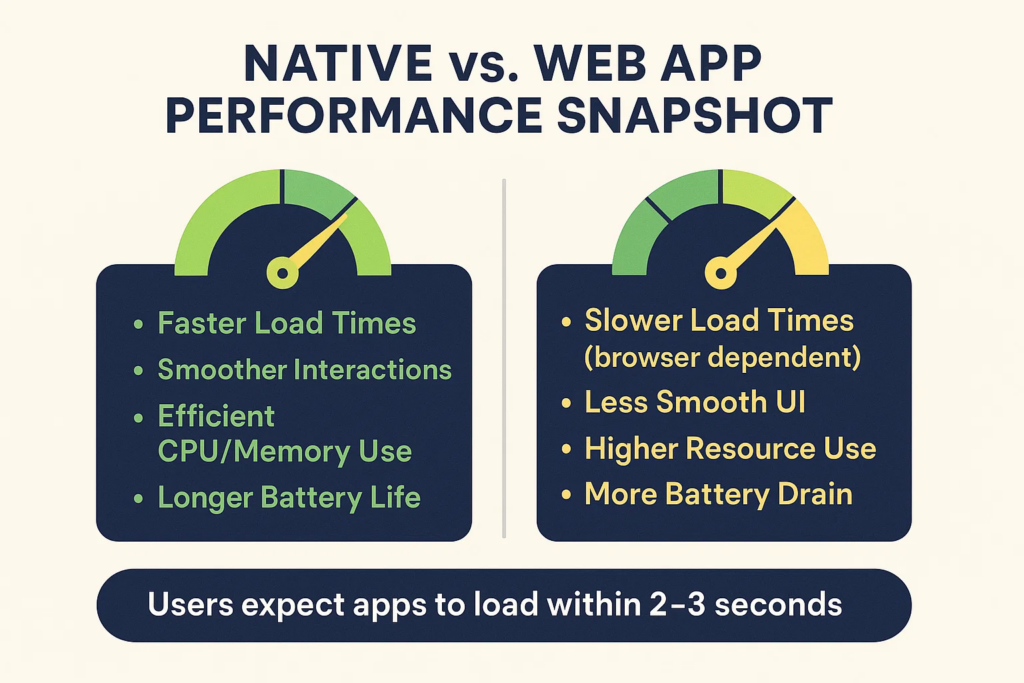
Native apps are purpose-built and compiled to execute directly on the device’s operating system, whether it’s iOS or Android. This close-to-the-metal approach allows them to harness the full power of the device’s CPU and GPU, resulting in optimized performance. Factors like faster load times (expected within 2 seconds), fluid animations, and highly responsive interactions are hallmarks of well-crafted native applications. For resource-intensive tasks such as complex calculations, 3D rendering, or real-time data processing, the performance edge of native applications becomes even more pronounced.
Web apps, in contrast, operate within the mobile browser environment. They rely on web technologies like HTML, CSS, and JavaScript, which must be interpreted and rendered by the browser. This introduces an extra layer of processing, often leading to slower performance and a less responsive user experience, especially under fluctuating or poor network conditions. This performance disparity can have tangible consequences; slow apps can frustrate users and decrease productivity. In fact, studies indicate that users expect apps to load within mere seconds, and failing to meet this expectation can lead to abandonment. Native applications, optimized for speed and efficiency, are better positioned to satisfy these demanding user expectations. Furthermore, research indicates that native apps generally consume less energy and utilize device resources more effectively than web apps, contributing to improved battery life and smoother overall device operation.
Engagement Elevated: The UX Power of Native Apps
Performance is only one piece of the puzzle; user experience (UX) and user interface (UI) are paramount in the competitive mobile landscape; they can significantly influence user engagement and satisfaction. In this critical area, native applications provide distinct advantages.
Because native applications are specifically designed and developed for a particular mobile operating system, they adhere to that platform’s established design guidelines and UI conventions. This platform-specific design creates a sense of familiarity and consistency, making the application feel intuitive, natural, and easy to navigate for the user. Users are accustomed to the look and feel of their operating system, and native apps seamlessly integrate with these expectations. Consider the smooth animations, fluid transitions, and highly responsive interactions that characterize well-designed native apps; these elements contribute substantially to a polished and engaging user experience.
Moreover, native apps possess a greater capacity to leverage device-specific features and hardware. Whether it’s accessing the device’s camera, utilizing GPS for location-based services, integrating with biometric authentication, or employing push notifications for timely updates, native applications can tap into the full potential of the mobile device. This deep integration enables richer, more interactive, and more context-aware experiences than are typically achievable with web apps.
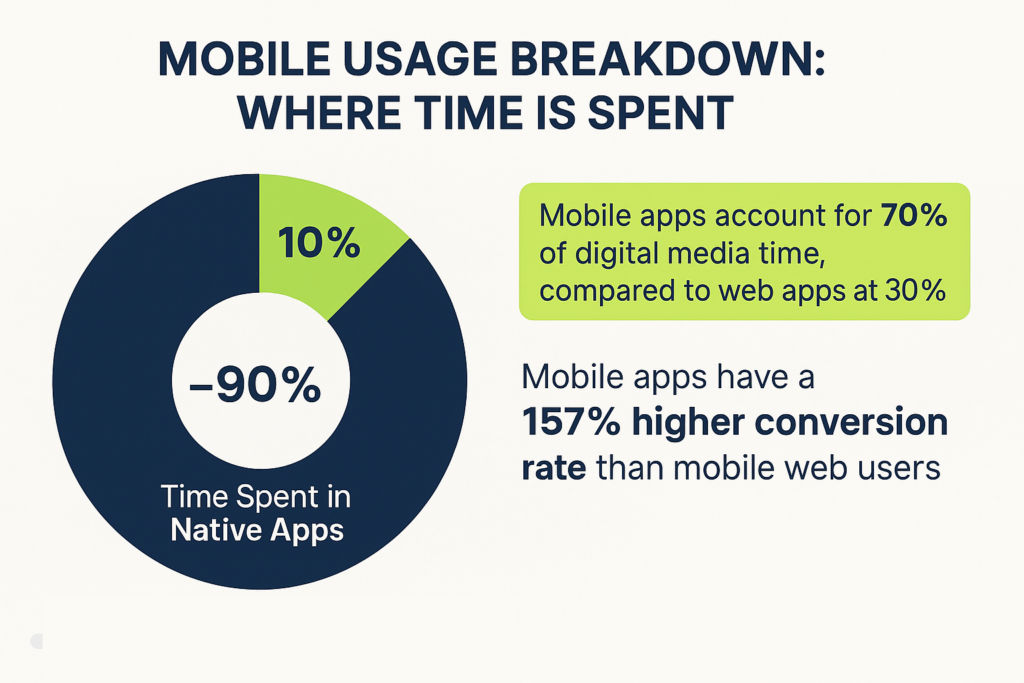
The impact of this superior UX and feature integration is clearly reflected in user behavior and engagement metrics. Statistics consistently demonstrate that a high percentage of mobile internet usage occurs within native applications, with some studies indicating nearly 90% of mobile internet time is spent in apps. Mobile apps also exhibit substantially higher conversion rates compared to web apps, with reports showing rates as much as 157% higher, underscoring their effectiveness in driving desired user actions and achieving business objectives. Furthermore, users spend significantly more time engaged with native mobile apps compared to web applications, highlighting the superior engagement they offer. In the competitive web and mobile landscape, this enhanced engagement and user preference represent a crucial differentiator.
Unlocking Device Potential: Native Apps and Feature Access
A fundamental advantage of native applications lies in their ability to fully harness the power of a mobile device’s hardware and software capabilities. This deep integration is a cornerstone of their value in the web and mobile ecosystem.
Native applications are not constrained by the limitations of a browser; they have direct access to a rich array of device features. Consider the possibilities: native apps can seamlessly integrate with the device’s camera to capture photos and videos, utilize GPS for precise location tracking and navigation, employ the accelerometer and gyroscope for motion-sensing and immersive experiences, and leverage biometric authentication for enhanced security. Furthermore, they can access core functionalities such as the contacts list, calendar, and push notification services, creating a cohesive and intuitive user experience.
This level of access empowers developers to create sophisticated and engaging applications that push the boundaries of what’s possible on mobile devices. For example, augmented reality (AR) applications, which overlay digital information onto the real world, heavily rely on native access to the camera, sensors, and processing power. Similarly, high-performance gaming, which demands optimized use of the device’s graphics capabilities and real-time responsiveness, typically thrives in the native application environment.
In essence, native applications provide the tools and capabilities to craft truly immersive, feature-rich, and deeply integrated mobile experiences. This capability remains a critical factor in their continued importance, even amidst the ongoing evolution of web and mobile technologies.
Always Available: The Power of Offline Functionality in Native Apps
While we live in an increasingly connected world, reliable internet access isn’t always guaranteed. This is particularly true in various enterprise scenarios and mobile-centric workflows. Native applications offer a significant advantage by providing robust offline functionality.
Native mobile apps possess the capability to store data locally on the device, enabling continued operation even without an active internet connection. This is a crucial feature for numerous use cases. Imagine field technicians conducting inspections in remote areas with limited connectivity, warehouse staff managing inventory in facilities with spotty Wi-Fi, or healthcare providers accessing patient records in locations with unreliable networks. Native apps allow these users to perform their tasks, access critical information, and collect data seamlessly, with synchronization occurring automatically once a connection is restored.
In contrast, web apps generally require an active internet connection to load pages and fetch data. Although modern web technologies like service workers and Progressive Web Apps (PWAs) can provide some degree of offline functionality through caching, the implementation is often more complex and the reliability can be less consistent compared to native solutions. In many cases, web apps offer limited functionality or become entirely unusable when offline.
For enterprises with a mobile-enabled workforce, especially those operating in the field or in areas with inconsistent connectivity, the offline capabilities of native applications can be a game-changer. It ensures business continuity, maximizes productivity, and enhances data accuracy, regardless of network availability.
The Native Edge: Choosing Quality in a Mobile-First World
In the ever-evolving landscape of web and mobile technology, the discussion about native applications versus web apps remains relevant. Both approaches have their strengths and weaknesses, and the “best” choice often depends on the specific requirements and objectives of a given project. However, when the goal is to deliver peak performance, create highly engaging user experiences, and fully leverage the capabilities of mobile devices, native applications continue to hold a decisive edge.
While web apps and hybrid app development can offer advantages in terms of cost-effectiveness and cross-platform reach, they frequently involve compromises in crucial areas. Native applications, by their very nature, are optimized for the mobile environment, providing a level of speed, responsiveness, and seamless integration that is often difficult to replicate with other approaches. In today’s mobile-first world, where users expect and demand high-quality, intuitive, and seamless mobile experiences, native applications become a crucial tool for businesses seeking to differentiate themselves and achieve success. User behavior and engagement statistics underscore this point: users spend a significant majority of their mobile time within native applications, and these apps consistently demonstrate higher conversion rates, indicating their effectiveness in driving desired user actions.
For businesses committed to delivering exceptional mobile experiences and recognizing the importance of high-performing native applications, Qyrus offers a suite of cutting-edge mobile testing solutions. As discussed, although web apps are not ideal for mobile devices, Qyrus also offers the ability to execute web tests on mobile devices. Qyrus empowers development teams to ensure their native applications perform flawlessly across a wide range of mobile devices and operating system versions. Don’t leave the success of your native or web applications to chance; invest in quality and reliability with Qyrus.
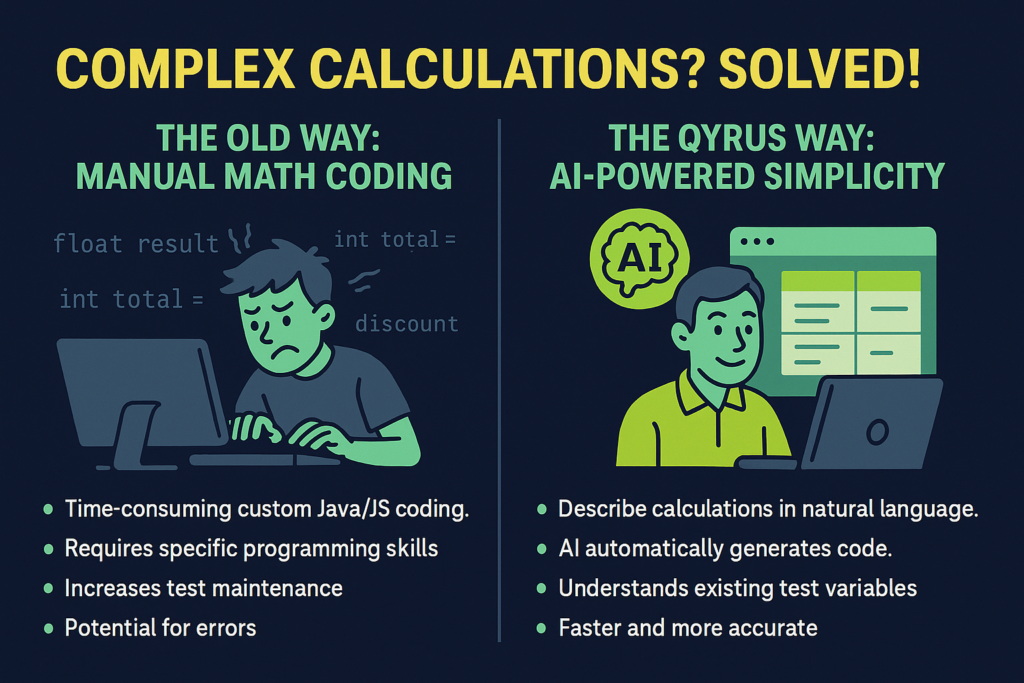
Are complex mathematical calculations throwing a wrench in your web testing? Verifying intricate financial sums, validating data with scientific formulas, or ensuring precise e-commerce calculations previously meant writing custom Java or JavaScript code even when using low-code solutions. While flexible, this approach demanded specific technical skills and added complexity to test creation and maintenance – a real detour on the path to streamlined automation.
But what if you could simply tell your testing platform what calculation you needed, and it would magically generate the code? What if this AI test code generator was smart enough to understand the very variables you’ve already set up in your test steps?
Good news: the manual coding detours are behind you! We’re thrilled to unveil a groundbreaking new feature in Qyrus Web Testing that fundamentally changes how you handle complex mathematical calculations. This is a significant leap, making sophisticated test automation accessible and efficient for everyone on your team.
The Challenge of Complex Calculations in Web Testing
Web testing often goes beyond simple interactions. Many critical user flows involve intricate calculations – think e-commerce totals with dynamic discounts and taxes, data visualizations requiring complex computations, or scientific applications demanding precise numerical outputs. Verifying these accurately is crucial.
Historically, automating these complex mathematical outcomes in web testing, even with a largely codeless framework like Qyrus, eventually required custom code. You’d find yourself needing to write snippets of Java or JavaScript to:
Fetch numerical values from different elements on a page.
Perform multi-step arithmetic or apply complex formulas.
Compare calculated results against expected values or other on-page data.
Handle specific data types or formatting requirements.
While offering flexibility, this reliance on custom code created hurdles. It demanded programming expertise, adding time, increasing the risk of errors in complex scripts, and making maintenance challenging as applications evolved. It was a clear bottleneck for testing efficiency and scalability.
Introducing AI-Powered Code Generation for Calculations: Your New AI Test Code Generator
We’ve seen the challenges, the time spent writing custom scripts, and the desire for a simpler way to handle complex math in your web tests. That’s precisely why we’re thrilled to introduce the latest innovation in Qyrus Web Testing: AI-Powered Code Generation for Complex Calculations.
This powerful new capability acts as your intelligent AI code test generator, designed specifically to tackle those intricate mathematical operations that previously required manual coding in Java or JavaScript. Our goal is to empower every tester, regardless of their programming background, to build comprehensive and robust test cases that include sophisticated data validation and calculations.
Instead of wrestling with syntax and logic in a code editor, you can now leverage the power of artificial intelligence right within the Qyrus platform. Simply describe the mathematical calculation you need to perform as part of your test step. The AI understands your intent and, crucially, is aware of the variables you have already defined within your test scenario. It then automatically generates the precise code snippet required to execute that calculation.
This feature is significant in AI automated test generation, specifically targeting a common pain point in web application testing. It removes the barrier of needing to write custom code for complex calculations and verifications, making your test creation process faster, more intuitive, and accessible to your entire QA team.
How it Works: AI, Your Test Variables, and Your Effortless AI Generated Test Code
Curious about how this intelligent ai test code generator actually works? While the underlying technology is sophisticated, designed to provide you with ai generated test code efficiently, the user experience is remarkably simple.
Here’s a breakdown of how our new ai test code generator works in harmony with your testing process:
You Describe the Calculation: Within your Qyrus web test step, you simply articulate the mathematical calculation you need using natural language. Example: “Calculate 15% of the value stored in the ‘subtotal’ variable and store it in a new variable called ‘tax_amount’.”
AI Processes Your Request: Our intelligent AI model receives your natural language instruction, trained to understand mathematical concepts and common testing requirements.
Contextual Understanding (Knowing Your Variables): This is a key differentiator. The AI has full context of the variables you have already created and defined within your current test scenario, understanding exactly what you mean when you reference them.
Code Generation: Based on your description and its understanding of your test variables, the AI generates the precise, optimized code necessary to perform the calculation within the Qyrus environment. This is where the power of llm-based code generation translates your intent into functional test code.
Seamless Integration: The generated code is seamlessly integrated into your test step. The calculation output can be stored in a new variable or used directly for verification.
This streamlined process means you focus on what to test, not how to code the calculation. It’s about making sophisticated AI automated test generation practical for numerical complexities.
The Benefits You’ll Experience: Why this AI Automated Test Generation is a Game Changer
Integrating an AI test code generator directly into your workflow for complex calculations isn’t just a neat trick; it delivers significant, tangible benefits that can transform your web testing process. Here’s what you can expect:
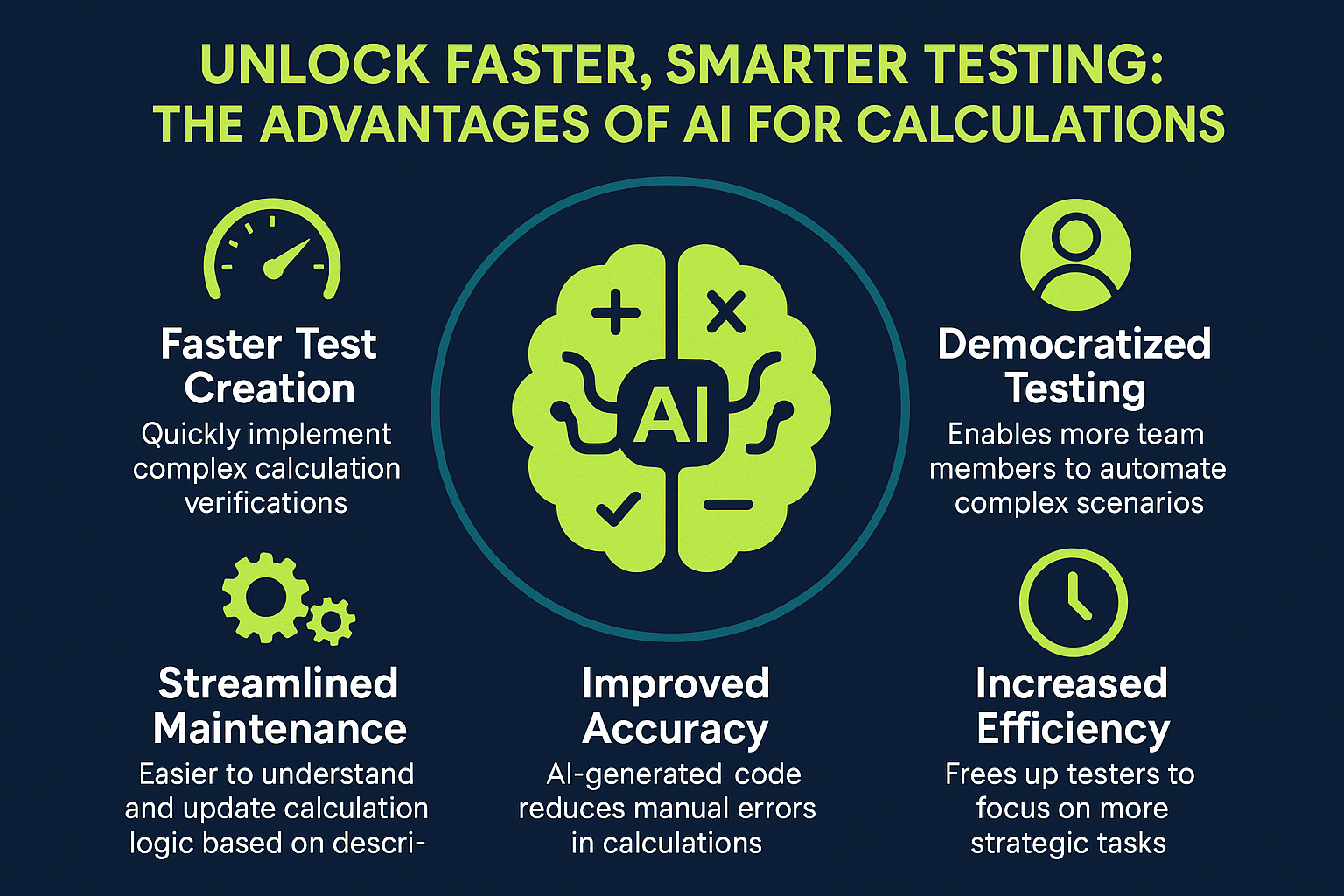
Supercharged Efficiency and Speed: This is perhaps the most immediate benefit. No more pausing to write custom code, debug syntax errors, or scour documentation for mathematical functions. By simply describing the calculation, you drastically cut down the time it takes to build and implement test steps involving complex math. This accelerated test creation directly contributes to faster testing cycles and quicker releases.
Democratized Test Automation: The need for specialized Java or JavaScript skills for complex calculations is virtually eliminated. This empowers your entire QA team, including manual testers and business analysts who understand the application’s logic, to contribute more effectively to automation. Our AI code test generator breaks down technical barriers, allowing everyone to build more comprehensive tests.
Reduced Errors, Increased Accuracy: Manually writing code for complex formulas can be prone to typos or logical errors. The AI generates code based on its training and understanding, leading to more accurate and reliable test logic for your calculations. This means fewer false positives or negatives caused by errors in your test scripts, and more trust in your test results.
Simplified Test Maintenance: Custom code snippets, especially those written by different team members over time, can become challenging to manage and update as your application evolves. With AI-generated code for calculations, the logic is based on your clear, natural language description within Qyrus, making it inherently easier to understand and maintain.
Faster Time to Market: By accelerating test creation and reducing maintenance overhead, this feature directly impacts your delivery pipeline. You can build, execute, and update tests faster, ensuring that your application is thoroughly validated without becoming a bottleneck in your development lifecycle. This enhancement in AI automated test generation capabilities is key to keeping pace in agile environments.
In essence, this new feature frees up your valuable time and technical resources, allowing your team to focus on more strategic testing activities and deliver higher-quality applications faster.
Putting the AI Test Code Generator to Work: Real-World Use Cases
The power of describing your calculation and letting Qyrus generate the code becomes clear when you look at everyday testing scenarios. This AI code test generator is designed to handle a variety of mathematical complexities you encounter in modern web applications. Here are a few examples:
Use Case 1: E-Commerce Checkout Total Verification
Imagine testing an e-commerce site. The final order total isn’t just the sum of item prices; it involves calculating discounts, applying sales tax based on location, and adding shipping costs. Manually coding this requires fetching each value, performing conditional logic for discounts, applying tax percentages, and then summing it all up.
With the new AI feature: You could create variables for subtotal, discount_amount, tax_rate, and shipping_cost earlier in your test. Then, for the final total verification step, you simply instruct the AI test code generator: “Calculate the final total by taking subtotal, subtracting discount_amount, adding (subtotal minus discount_amount) multiplied by tax_rate, and then adding shipping_cost. Store the result in a variable called final_calculated_total.” The AI processes this description, understands the variables you referenced, and generates the necessary code to perform the precise calculation, which you can then compare against the total displayed on the page.
Use Case 2: Financial Application Data Validation
In a banking or investment application, you might need to verify calculated fields like interest accrued, future value based on principal and interest rates, or portfolio performance metrics. These often involve specific financial formulas.
With the new AI feature: After extracting the necessary inputs like principal_amount, annual_interest_rate, and investment_period into variables, you could tell the AI: “Calculate the future value using the compound interest formula: principal_amount multiplied by (1 + annual_interest_rate / 12) raised to the power of (investment_period in years multiplied by 12). Store this in calculated_future_value.” The llm-based code generation understands the formula’s structure and applies it to your specified variables, providing the calculated value for verification against the application’s displayed figure.
Use Case 3: Data Transformation and Verification in Reporting
Web dashboards often display data that is transformed or aggregated using calculations. You might need to verify a percentage change, an average value across a dataset displayed in a table, or a unit conversion.
With the new AI feature: If you have variables representing current_value and previous_value, you could ask the ai automated test generation capability: “Calculate the percentage change from previous_value to current_value using the formula: ((current_value – previous_value) / previous_value) * 100. Store the result in percentage_change.” The AI generates the code to perform this common calculation, allowing you to easily verify the calculated percentage displayed on the report.
These examples demonstrate how describing your calculation in plain language, combined with the AI’s understanding of your test variables, makes automating complex mathematical verifications significantly faster and more intuitive.
Conclusion: Simplifying Complexity with Intelligent AI Automated Test Generation
By leveraging the power of llm-based code generation tailored for testing, Qyrus continues to deliver on its promise of simplifying test automation and making it accessible and efficient for teams of all sizes and technical backgrounds.
Say goodbye to the manual coding hassle for complex math and embrace a more intuitive, faster, and more accurate way to test. This is AI automated test generation truly put to work to solve real-world testing challenges.
Ready to See the Qyrus AI Test Code Generator in Action?
Experience firsthand how easy it is to handle complex calculations and accelerate your web testing.
The Android ecosystem is buzzing once again! The first glimpses of Android 16 Beta, codenamed “Baklava”, are out, bringing with them a wave of anticipation for developers, businesses, and tech enthusiasts alike. Each new Android version promises fresh capabilities, refined user experiences, and new opportunities for innovation. But this year, there’s a twist that adds a new layer of urgency.
Sources indicate that the production version of Android 16 is expected to roll out in early June. This is a significant shift, much earlier than the traditional September-October release window we’ve seen in previous cycles. This accelerated timeline means the race to ensure your applications are fully compatible and optimized for the new OS is on, and it’s faster than ever!
In this dynamic environment, early preparation is paramount. That’s why we’re thrilled to announce a crucial update from our side: Qyrus teams have successfully validated core functionality with the Android 16 Beta 4 on our platform! We understand the critical importance of day-one readiness, and our proactive efforts ensure that you can start your testing journey on this new OS version without delay, using robust mobile app testing tools.
This blog post will dive into what Android 16 Beta has in store and, more importantly, how Qyrus is geared up to support your essential testing efforts, helping you navigate this accelerated release schedule with confidence. Let’s explore!
What’s Brewing? A Look Inside the Exciting Features of Android 16 Beta
The Android 16 Beta is more than just an incremental update; it’s a glimpse into the future of mobile experiences, packed with enhancements designed to refine user interaction, boost privacy, and unlock new capabilities for app developers. As we gear up for its accelerated release, understanding these key features is the first step in preparing your applications.
Key Enhancements Unveiled in Android 16 Beta
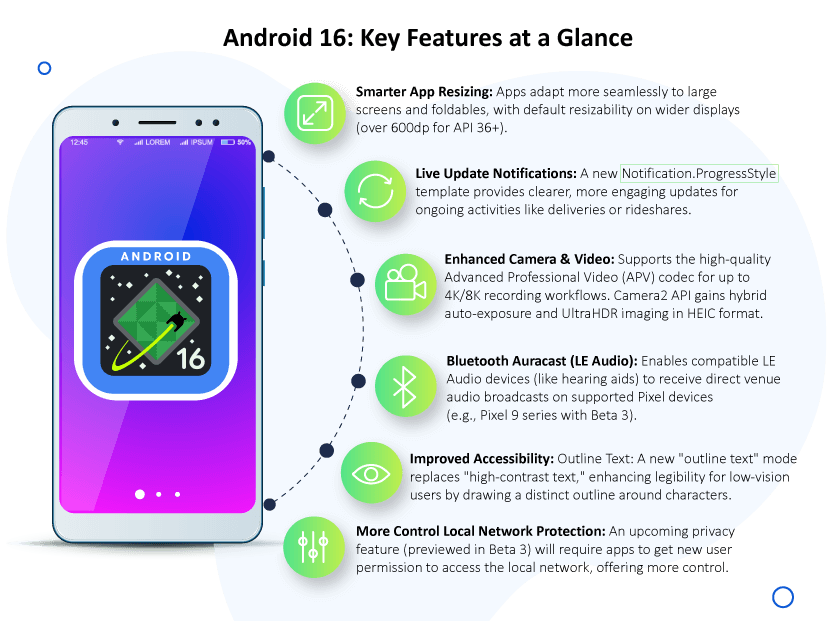
Adaptive & Resizable Apps (A New Standard for Large Screens): Android 16 is pushing for a more consistent and flexible app experience on larger screens. It phases out the ability for apps to lock screen orientation or disallow resizing, especially on devices wider than 600dp where apps targeting API 36 will become resizable by default. This is a big step for foldables and tablets, encouraging UIs that truly adapt.
Live Updates Notifications: Imagine clearer, more engaging progress for ongoing activities like ride shares or food deliveries. Android 16 Beta introduces a new Notification.ProgressStyle template specifically for these “Live Updates,” allowing for custom icons and distinct progress segments.
Advanced Video (APV) Codec & Camera Upgrades: Media capabilities get a significant boost. Android 16 adds support for the high-quality Advanced Professional Video (APV) codec, paving the way for near-lossless 4K/8K recording workflows. The Camera2 API also sees enhancements like hybrid auto-exposure modes and more precise white-balance controls. Plus, UltraHDR imaging now supports the HEIC format. Some of these camera features were noted as early as Android 16 Beta 2.
Bluetooth Auracast (LE Audio): Get ready for broadcast audio! Android 16 Beta (notably on Pixel 9 series with Beta 3) brings support for Auracast, allowing users with compatible LE Audio hearing aids or earbuds to receive direct audio streams in public venues.
Accessibility Boost with Outline Text: Improving legibility for low-vision users, Android 16 replaces “high-contrast text” with a new “outline text” mode that draws a thick, clear outline around text.
Privacy Focus with Local Network Protection (LNP): Previewed in Beta 3, this upcoming feature will require apps to obtain a new permission to access devices on the local LAN, giving users more control.
Pixel Exclusive: Battery Health Page: For newer Pixel devices (like the Pixel 8a and 9 series), Beta 3 introduced a dedicated Battery Health page in settings, showing battery capacity percentage relative to when it was new.
Beyond these user-facing features, developers should also be aware of important compatibility changes. These include new behaviors around ordered broadcasts, intent security, the potential for a 16KB memory page size on new devices, and stricter enforcement of UI navigation like edge-to-edge gestures.
Early performance observations on the android beta 16 have been a mixed bag, which is typical for beta software. Some users reported significant GPU benchmark gains on Tensor-powered Pixels after Beta 3, a sentiment echoed in community forums. However, initial betas also saw some regressions, including unexpected reboots with Beta 2 and notable battery drain or haptic feedback issues in earlier Beta 3 stages. Thankfully, these were largely addressed in subsequent incremental updates like Android 16 Beta 3.1 and Beta 3.2. The journey through beta is all about refinement!
The Clock is Ticking: Why Testing Your App on Android 16 Beta is More Crucial Than Ever!
Usually, the Android release cycle offers a more leisurely runway to the final launch. Developers typically have until late Q3, often September or October, to fine-tune their apps. But with Android 16 Beta, the game has changed. That’s a significantly shorter timeframe, meaning the window for preparation is tighter, and the call to action for developers is immediate.
So, why is diving into Android 16 Beta testing right now not just a good idea, but an absolute business imperative?
Beat the Accelerated Release Date: With a potential June launch, there’s simply less time between the final beta stages and the official public release. Early testing ensures your app isn’t caught off guard, providing a seamless experience for your users the moment they update their devices. You want to be ready when they are.
Ensure Day-One Compatibility: The last thing you want is your app breaking or behaving erratically on a brand-new OS. Testing on android beta 16 allows you to identify and address compatibility issues stemming from new API behaviors, permission changes, or UI enforcements before they impact your user base and your app store ratings.
Innovate with New Features: Android 16 isn’t just about changes under the hood; it’s about new capabilities. Early testing gives your team the runway to explore how new features—like Live Updates Notifications or enhanced camera functionalities—can be integrated into your app to create richer, more engaging user experiences.
Catch Regressions Early (and Save Costs): Identifying and fixing bugs or performance regressions specific to the new OS is far more efficient and cost-effective during the beta phase than scrambling post-launch when user impact is high.
Stay Ahead of the Competition: In a fast-moving market, readiness counts. Having your app fully optimized for Android 16 from day one can be a significant competitive differentiator. With this year’s faster schedule, getting ahead of the curve isn’t just an advantage; it’s a necessity.
The message is clear: the early bird gets the worm, especially when the worm is a stable, high-performing app on the latest Android OS. The condensed timeline for Android 16 Beta means proactive testing is the only way to fly.
Validated Mobile App Testing Tools for Your Android 16 Beta Needs
With the accelerated timeline for Android 16 Beta making early testing more critical than ever, the natural question arises: “Is my testing platform ready?” We’re excited to provide a clear and confident answer.
Our teams at Qyrus have diligently tested and validated our platform’s core compatibility and functionality with Android 16 Beta. This proactive validation means that as you gear up to explore the nuances of the new OS, Qyrus stands ready to support your efforts with powerful mobile app testing tools from day one of your beta journey.
Now, it’s important to address the nature of beta software. Android 16 is currently a Beta OS version. As with any pre-release software, there’s always a possibility of encountering unexpected OS-level behaviors or isolated issues that are part of the OS refinement process. However, Qyrus has proactively validated its essential testing functionalities against Android 16 Beta. We are prepared and ready to provide our clients with access to Android 16 beta environments on our platform as required, empowering you to begin your critical testing phases immediately and with confidence.
This early readiness is possible due to Qyrus’s robust architecture and commitment to supporting the latest mobile innovations.
Our platform’s core strengths:
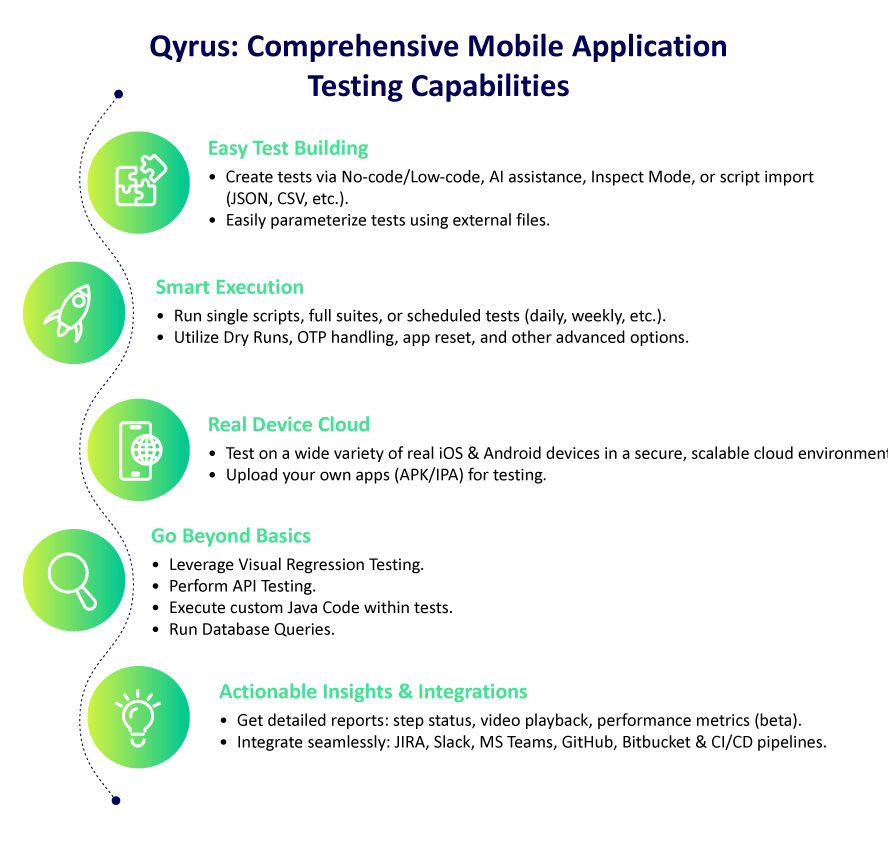
Access to a diverse real device cloud capable of running Android 16 Beta.
User-friendly and versatile test creation methods, from no-code/low-code options to AI-assisted scripting.
These elements ensure that you have a reliable and efficient environment to start validating your apps against Android 16 Beta straight away. We’re committed to helping you stay ahead of the curve.
Powering Your Validation: Practical Use Cases for Testing Android 16 Beta with Qyrus Mobile App Testing Tools
Understanding the new features of Android 16 Beta is one thing; rigorously testing your app against them is another. This is where Qyrus steps in, providing the versatile mobile app testing tools you need to ensure your application is not just compatible, but also leverages the best of what Android 16 has to offer. Here are some practical use cases demonstrating how Qyrus supports your validation efforts on this new beta OS:
Android 16 Beta Feature: Apps will become resizable by default on large screens (>600dp) and can’t lock orientation.
Qyrus in Action: Utilize Qyrus’s real device cloud to test your app on various screen sizes, including tablets and foldables running Android 16 Beta. Employ visual testing capabilities to automatically detect UI misalignments or broken layouts as your app resizes. Automate user flows in different orientations and window modes (e.g., split-screen) to confirm UI integrity and functionality.
Validating Live Updates Notifications:
Android 16 Beta Feature: A new Notification.ProgressStyle for ongoing activities like deliveries or rideshares.
Qyrus in Action: Leverage Qyrus’s UI automation to create tests that trigger these new live update notifications. Verify their appearance, ensure custom icons and progress segments render correctly, and test user interactions with these persistent notifications.
Testing Advanced Video (APV) Codec & New Camera Enhancements:
Android 16 Beta Feature: Support for high-quality APV codec and Camera2 API updates like hybrid auto-exposure, precise white balance, and UltraHDR in HEIC (some camera features noted in Android 16 Beta 2).
Qyrus in Action: For applications with media functionalities, use Qyrus to automate tests involving video recording and playback to check for compatibility with the new APV format. Automate UI interactions within your camera app to test the new exposure modes, color adjustments, and HDR capture settings on android beta 16 devices.
Verifying Bluetooth Auracast (LE Audio) Functionality:
Android 16 Beta Feature: Support for Auracast broadcast audio on compatible devices like the Pixel 9 series (noted with Beta 3).
Qyrus in Action: If your app interacts with Bluetooth audio or has features that could leverage Auracast, use Qyrus on supported real devices running Android 16 Beta. Automate tests for pairing with LE Audio peripherals and verify audio streaming behaviors in Auracast scenarios.
Checking Accessibility with Outline Text:
Android 16 Beta Feature: A new “outline text” mode for improved legibility, replacing high-contrast text.
Qyrus in Action: Where possible, automate the enabling of “outline text” through device settings interactions or ADB commands via Qyrus. Alternatively, manually configure it on your test devices. Then, run your existing UI tests to ensure all text remains legible and app layouts are not negatively impacted. Qyrus’s visual testing can also be invaluable here to compare text rendering against established baselines.
Adapting to Local Network Protection (LNP):
Android 16 Beta Feature: A future privacy feature, previewed in Beta 3, requiring new permissions for local LAN access.
Qyrus in Action: For apps that discover or communicate with devices on the local network (e.g., casting, IoT interactions), enable the LNP compatibility flag on your test devices (manually or via ADB through Qyrus). Execute your existing network-dependent test flows to confirm your app correctly requests new permissions or gracefully handles connection failures and EPERM errors.
Comprehensive Compatibility and Stability Checks:
Qyrus in Action: Beyond specific features, run your full regression suites using Qyrus on devices provisioned with Android 16 Beta. This helps catch unexpected compatibility issues, UI glitches, or performance bottlenecks early. Monitor app stability during these extensive test runs and utilize Qyrus’s detailed reporting to track progress and identify any regressions quickly.
By systematically using Qyrus’s diverse testing capabilities, you can thoroughly vet your application against the new and changed behaviors in Android 16 Beta, ensuring a smooth transition for your users.
Jump In: Getting Started with Your Android 16 Beta Testing on Qyrus
Ready to ensure your app is primed for the accelerated Android 16 Beta release? Qyrus makes it straightforward to begin your testing journey on this new operating system. As our teams have validated Qyrus’s core functionalities with Android 16 Beta, you can start your critical testing phases with the support of our robust mobile app testing tools.
Here’s how you can typically get started:
Access the Qyrus Platform:Log in to your Qyrus account. If you’re new, now is the perfect time to explore what Qyrus offers!
Navigate to the Device Cloud: Head over to the real device cloud section within the Qyrus platform.
Select Android 16 Beta: When choosing your desired device and OS combination for testing, you should find Android 16 Beta available as an option on compatible devices. Remember, as this is a beta OS, availability might be on specific devices initially and expanded over time.
Upload Your App & Start Testing: Upload your .apk file and begin executing your existing test scripts or creating new ones to validate compatibility and new feature integrations on Android 16 Beta.
Given that Android 16 Beta is still pre-release software, we’re providing access to it on our platform as required by our clients. This approach allows you to conduct essential early-stage testing while understanding the inherent nature of a beta operating system. For the most up-to-date information on specific device availability or any best practices for testing on a beta OS within Qyrus, we recommend checking our official documentation or reaching out to our support team.
Don’t wait for the official Android 16 launch to find out if your app is ready. The accelerated timeline demands proactive measures.
Imagine a world where artificial intelligence goes beyond simply responding to your commands. Picture AI that proactively identifies problems, sets its own goals, and takes independent action to solve them. This isn’t a scene from a futuristic movie; it’s the rapidly evolving reality of Agentic AI.
We’ve witnessed the transformative power of traditional AI and the creative prowess of generative AI. Now, a new wave of intelligence is emerging, one that imbues AI systems with a greater degree of autonomy and decision-making capability. This is Agentic AI, the next significant leap in artificial intelligence, poised to redefine how we interact with technology and conduct business across countless industries. In fact, Gartner projects that by 2028, a remarkable 33% of enterprise software applications will incorporate agentic AI, a staggering increase from less than 1% in 2024.
But the impact goes beyond mere integration. Gartner also forecasts that by 2028, agentic AI will autonomously make at least 15% of day-to-day work decisions, signifying a fundamental shift in how work gets done. Furthermore, the economic implications are substantial, with Gartner predicting a 25% reduction in customer service costs due to AI-driven automation.
So, what is Agentic AI exactly? It represents a paradigm shift from reactive and generative models to intelligent systems that can perceive their environment, reason about complex tasks, make independent decisions, and execute those decisions with minimal human oversight. Think of it as moving beyond tools that assist us to partners that can act on our behalf.
This blog post will serve as your comprehensive guide to understanding this exciting field. We will delve into the core definition of Agentic AI, explore its key characteristics that set it apart, differentiate it from related concepts like AI agents and generative AI, and illuminate its diverse real-world applications – including its exciting potential in software testing.
Defining Agentic AI: Beyond Traditional Paradigms
At its core, Agentic AI refers to artificial intelligence systems that can autonomously pursue specific goals by perceiving their environment, reasoning about actions, making decisions, and executing them with minimal human intervention. It’s about empowering AI to move beyond being a passive tool and to become an active agent.
To fully grasp the concept of Agentic AI, it’s crucial to understand its key characteristics:
Autonomy: This is the defining feature. Agentic AI systems possess the capacity to initiate and complete tasks independently, without constant human oversight. They can self-direct and manage their own operations.
Example: An Agentic AI system managing a smart home can adjust temperature and lighting based on occupancy and time of day, learning user preferences and adapting to changing conditions without explicit commands.
Goal Orientation: Unlike traditional AI, which often focuses on specific tasks, Agentic AI is driven by objectives. It has the ability to define and work towards specific goals, breaking down complex tasks into manageable steps.
Example: An Agentic AI designed for supply chain management can aim to optimize delivery times and costs. It can autonomously reroute shipments, negotiate with suppliers, and make decisions to achieve its objective.
Reasoning:Agentic AI isn’t just about following pre-programmed rules. It has the capability to analyze situations, evaluate options, and make informed decisions based on context and available information. This allows it to handle unexpected situations and adapt to dynamic environments.
Example: An Agentic AI in a customer service role can understand the nuances of a customer’s issue and determine the most appropriate solution, even if it wasn’t explicitly programmed for that specific scenario.
Adaptability: The ability to learn from interactions and feedback is crucial for Agentic AI. These systems can adjust their strategies and actions based on experience, improving their performance over time.
Example: An Agentic AI used for trading can analyze market trends in real-time and modify its investment strategies based on the outcomes of previous trades, constantly refining its approach.
Interaction:Agentic AI is not meant to operate in isolation. It has the capacity to communicate and collaborate with humans and other AI agents to achieve goals. This collaborative aspect is essential for complex tasks that require diverse skills and knowledge.
Example: An Agentic AI assistant can understand natural language queries and work with other specialized AI agents (e.g., an agent specializing in data analysis or another in content generation) to gather information and complete complex requests.
Agentic AI vs. Related Concepts: Clearing the Confusion
The landscape of artificial intelligence is rapidly evolving, and terms like Agentic AI, generative AI, and AI agents are often used, sometimes interchangeably. To truly understand what is Agentic AI, it’s crucial to distinguish it from these related but distinct concepts.
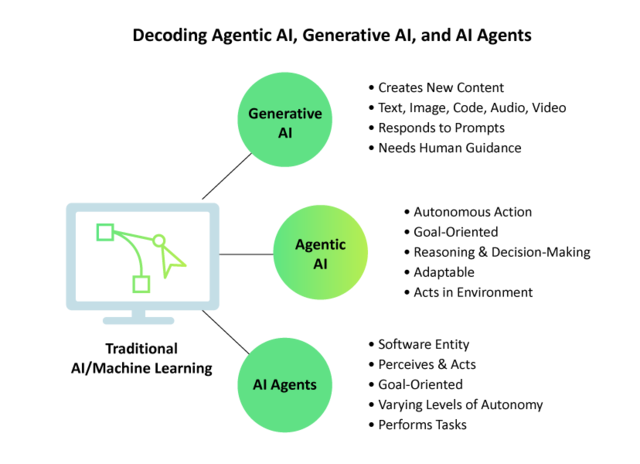
Agentic AI vs. Generative AI: While both represent significant advancements in AI, their core functionalities and goals differ significantly.
Generative AI focuses on creating new content – whether it’s text, images, code, audio, or video – based on patterns learned from vast datasets. Think of models like large language models (LLMs) that can write articles, create poems, or generate code snippets based on prompts. However, generative AI primarily responds to input and often requires human feedback for refinement and direction.
Agentic AI, on the other hand, focuses on acting and making autonomous decisions to achieve specific goals. While an Agentic AI system might leverage generative AI as a tool to create content as part of its task (e.g., generating a report or drafting an email), its primary function is to orchestrate actions, reason through problems, and execute solutions independently.
Analogy: Think of generative AI as a highly skilled artist who can paint a masterpiece based on your detailed instructions. Agentic AI is more like a project manager who not only understands the overall objective but can also plan the entire project, delegate tasks (potentially using generative AI for specific content creation), make strategic decisions along the way, and execute the plan autonomously.
Agentic AI vs. AI Agents: The term “AI agent” is closely related to Agentic AI, but it’s important to understand the nuance.
An AI agent is essentially a software entity that can perceive its environment through sensors, process that information, and act upon its environment through effectors to achieve specific goals. AI agents can range from simple rule-based systems to highly sophisticated, learning-based entities.
Agentic AI is the underlying intelligence and architectural framework that empowers AI agents to exhibit a high degree of autonomy, reasoning, adaptability, and goal-directed behavior. In essence, Agentic AI describes the capabilities that make an AI agent truly autonomous and intelligent in its actions.
Analogy: You can think of AI agents as individual workers with specific skills. Agentic AI is the management philosophy, the advanced cognitive abilities, and the underlying infrastructure that allows these workers to operate with greater independence, make strategic decisions, and coordinate effectively to achieve complex objectives. Not all AI agents are necessarily examples of sophisticated Agentic AI, but systems embodying Agentic AI are always comprised of one or more intelligent AI agents.
Agentic AI vs. Traditional AI/Machine Learning: Traditional AI and machine learning models often require significant human intervention for complex tasks, adaptation to new environments, and decision-making beyond their initial training.
Traditional AI might rely on pre-programmed rules and struggle with novel situations. Machine learning models excel at pattern recognition and prediction but typically require humans to define the tasks, prepare the data, and interpret the results.
Agentic AI represents a step towards greater independence. While it still relies on machine learning and other AI techniques, it integrates them in a way that allows the system to learn and adapt autonomously, define its own sub-goals, and take actions without explicit human programming for every step. It’s about moving from systems that react to data to systems that act intelligently within their environment.
The Power of Autonomy: Real-World Applications of Agentic AI
The ability of Agentic AI systems to operate autonomously, reason effectively, and adapt to dynamic environments opens up a vast array of possibilities across numerous industries. Here are some key areas where Agentic AI is already showing promise and is poised for significant growth:
Customer Service: Imagine AI agents that go beyond simple chatbots. Agentic AI can power customer service representatives that truly understand complex customer issues, proactively access and synthesize information from various sources, and autonomously resolve problems from start to finish, leading to faster, more personalized, and more effective support.
Example: An Agentic AI customer service agent can handle an insurance claim by understanding the customer’s situation, accessing policy details, gathering necessary documentation, communicating with relevant departments, and ultimately processing the claim – all with minimal human intervention.
Healthcare:Agentic AI can revolutionize healthcare by creating intelligent systems that can monitor patients remotely, analyze complex medical data to identify patterns and predict potential health issues, suggest personalized treatment plans based on a holistic understanding of a patient’s condition, and even optimize resource allocation within hospitals for greater efficiency.
Example: An Agentic AI system could continuously monitor a patient’s vital signs through wearable devices, detect subtle anomalies that might indicate an impending health crisis, and proactively alert medical professionals, potentially saving lives.
Finance: The financial industry can leverage Agentic AI for a multitude of tasks, including automated high-frequency trading that reacts to market fluctuations in real-time, sophisticated fraud detection systems that learn and adapt to evolving threats, personalized financial advisors that understand individual goals and provide tailored recommendations, and more efficient risk management strategies.
Example: An Agentic AI trading agent can analyze vast amounts of market data and execute trades based on complex algorithms and learned patterns, often outperforming human traders in speed and efficiency.
Supply Chain Management: Optimizing complex supply chains requires constant monitoring, prediction, and adaptation. Agentic AI can create autonomous systems that can predict demand fluctuations, manage inventory levels dynamically, optimize logistics and routing for efficiency, and proactively respond to disruptions like weather events or supplier issues, ensuring smoother and more resilient supply chains.
Example: An Agentic AI managing a logistics network can autonomously reroute deliveries in response to a traffic jam or a sudden warehouse closure, minimizing delays and costs.
IT Operations: Managing modern IT infrastructure is increasingly complex. Agentic AI can power autonomous IT operations agents that can proactively identify and resolve system issues before they cause downtime, automate routine maintenance tasks, enhance cybersecurity by detecting and responding to threats in real-time, and optimize resource allocation for peak performance.
Example: An Agentic AI monitoring a server network can detect unusual activity that might indicate a security breach and automatically implement countermeasures to neutralize the threat.
Smart Homes and Buildings:Agentic AI is the key to truly intelligent environments. Autonomous agents can learn user preferences and automatically adjust lighting, temperature, security systems, and entertainment based on routines, occupancy, and even mood, creating more comfortable, efficient, and personalized living and working spaces.
Example: An Agentic AI in a smart home can learn your preferred temperature at different times of the day and automatically adjust the thermostat accordingly, while also anticipating your arrival and turning on lights and music.
Research and Development: Accelerating scientific discovery requires sifting through vast amounts of data and generating new hypotheses. Agentic AI can act as a powerful research assistant, autonomously analyzing scientific literature, identifying patterns and connections, suggesting new research directions, and even helping to design and execute experiments.
Example: An Agentic AI in a pharmaceutical research lab can analyze millions of research papers to identify potential drug candidates for a specific disease, significantly speeding up the discovery process.
Software Testing: For companies focused on software quality, Agentic AI offers a transformative potential by enabling the creation of autonomous testing agents. These agents can:
Intelligently Design Test Cases: Analyze requirements, user stories, and code to automatically generate a comprehensive suite of test cases, including edge cases and scenarios humans might miss.
Example: An Agentic AI testing agent can understand the functionality of a new user authentication feature and autonomously create test cases covering valid and invalid credentials, password reset flows, and account lockout scenarios.
Self-Healing Test Scripts: Detect changes in the application UI or functionality and automatically update test scripts, significantly reducing the time and effort spent on test maintenance.
Example: If the label of a button changes from “Submit” to “Save,” an Agentic AI testing agent can automatically identify this change and update the corresponding test script without manual intervention.
Autonomous Test Execution and Analysis: Execute test suites across various environments and automatically analyze the results, identifying bugs, pinpointing the root cause of failures, and providing insightful reports for developers.
Example: An Agentic AI can run a full regression test suite after a code deployment and autonomously analyze the logs and identify newly introduced bugs, providing developers with detailed information for debugging.
Exploratory Testing: Simulate user behavior and explore the application in an intelligent and unpredictable manner to uncover usability issues and unexpected bugs that predefined test cases might miss.
Example: An Agentic AI agent can be tasked with “exploring the checkout process” of an e-commerce site and will autonomously navigate through different options, try various input combinations, and identify potential issues in the user experience.
Performance and Load Testing Optimization: Dynamically adjust testing parameters based on real-time system performance metrics to identify bottlenecks and scalability issues more effectively than traditional static load tests.
Example: An Agentic AI conducting load testing can automatically increase the number of virtual users until response times exceed a certain threshold, precisely identifying the system’s breaking point.
Security Vulnerability Detection: Proactively identify potential security flaws by autonomously probing the application with various simulated attack vectors and analyzing the responses for vulnerabilities.
Example: An Agentic AI security testing agent can automatically try common cross-site scripting (XSS) or SQL injection attacks on different input fields to identify potential security weaknesses.
Navigating the Challenges and Embracing the Future of Agentic AI
While the potential of Agentic AI is immense, its development and widespread adoption are not without their challenges. Addressing these hurdles is crucial to ensuring the responsible and beneficial integration of autonomous intelligence into our lives and businesses.
Current Challenges and Limitations of Agentic AI
Reliability and Predictability: Ensuring that Agentic AI systems behave consistently and predictably, especially in complex and safety-critical situations, is paramount. We need to build trust in their decision-making processes.
Transparency and Explainability: Understanding why an Agentic AI agent made a particular decision (often referred to as the “black box problem”) is critical for accountability, debugging, and building user trust. Developing methods for explainable AI (XAI) is crucial.
Security and Privacy: As Agentic AI systems become more integrated into our lives and handle sensitive data, ensuring their security against malicious attacks and safeguarding user privacy are of utmost importance.
Ethical Considerations: The increasing autonomy of Agentic AI raises significant ethical questions. We need to address potential biases embedded in data and algorithms, ensure fairness in decision-making, and clearly define responsibility and accountability for the actions of autonomous agents.
Infrastructure and Scalability: Developing and deploying sophisticated Agentic AI systems often requires significant computational resources, advanced infrastructure, and robust data management capabilities. Scalability to handle widespread adoption is also a key consideration.
Governance and Regulation: As Agentic AI becomes more powerful, establishing appropriate governance frameworks and regulations will be necessary to guide its development and deployment in a way that aligns with societal values and mitigates potential risks.
The Future Trends and Potential Advancements in Agentic AI
Despite these challenges, the future of Agentic AI is incredibly promising. We can anticipate several key trends and advancements:
Enhanced Autonomy and Reasoning: Future Agentic AI systems will exhibit even greater levels of autonomy, capable of tackling more complex tasks with more sophisticated reasoning and problem-solving abilities. They will be able to learn and adapt in increasingly nuanced and dynamic environments.
Improved Collaboration: We will see advancements in how humans and Agentic AI agents collaborate seamlessly. Natural language interfaces and intuitive interaction methods will become more sophisticated, fostering true partnership. Furthermore, different AI agents will become better at coordinating and working together to achieve common goals.
Personalization and Contextual Awareness: Future Agentic AI will have a deeper understanding of individual needs, preferences, and contexts. They will be able to personalize experiences and provide highly tailored solutions based on a rich understanding of the user and their environment.
Integration with Emerging Technologies: The power of Agentic AI will be amplified by its integration with other cutting-edge technologies such as advanced robotics, the Internet of Things (IoT), and quantum computing, leading to entirely new applications and capabilities.
New Applications and Industries: As the field matures, we can expect to see Agentic AI emerge in currently unimagined applications and transform industries we haven’t even considered yet. Its ability to automate complex cognitive tasks will unlock new levels of efficiency and innovation.
Remember! Humans are Still Import
It’s crucial to remember that the development and deployment of Agentic AI should be guided by a human-centric approach. The focus should be on how these intelligent systems can augment human capabilities, solve real-world problems effectively, and ultimately benefit society as a whole, while carefully considering and mitigating potential risks.
Based on the document, here’s a section that introduces Qyrus AI Agents for the blog:
Qyrus AI-Verse: A Suite of Intelligent Agents for Testing
Qyrus leverages the power of AI through its Qyrus AI-Verse, a collection of Single Use Agents (SUAs) designed to address specific challenges within the software quality assurance process. These AI-driven agents empower testers and innovators to achieve better outcomes throughout the Software Development Life Cycle (SDLC) by utilizing autonomous algorithms to test, self-heal, and predict tests.
Here’s a brief overview of some of the key Qyrus AI Agents:
Qyrus TestPilot: Acts as an AI co-pilot, enabling users to create and execute real-time tests directly from any URL and automatically generates relevant test cases.
TestGenerator & TestGenerator+: Automatically transforms JIRA tickets into actionable test scenarios, with TestGenerator+ expanding coverage to explore untested areas and proactively identify gaps.
API Builder: Instantly virtualizes APIs, converting user requirements into testable endpoints to facilitate parallel development and testing.
Echo: Generates synthetic, realistic data to fulfill diverse testing requirements.
Rover: Functions as an autonomous AI scout, exploring applications and identifying anomalies at a much faster pace than human testers.
Qyrus Eval: Evaluates AI model outputs for consistency and appropriateness, proving particularly useful in conversational AI applications.
Qyrus also provides agents like Manual Executor, DomainLens, and TestBridge Converter & Import to support manual testing with AI suggestions, convert document-based knowledge into test scenarios, and translate coded tests to Qyrus keywords and vice versa. Additionally, agents like Insights & AnalytiQ, API Discovery, Healer, BotMetrics, Visual Testing, and UXtract offer capabilities for performance insights, automated test updates, chatbot evaluation, UI/UX consistency, and enhanced interaction testing.
These AI agents contribute to significant improvements, including a 70% faster test creation process, increased efficiency leading to 35% or more cost savings, and a 70% increase in collaboration.
Conclusion: The Autonomous Horizon
The emergence of Agentic AI signifies a profound shift in the evolution of artificial intelligence. It moves us beyond systems that merely process information or generate content towards intelligent agents capable of independent thought, action, and adaptation. This paradigm shift promises to unlock unprecedented levels of efficiency, innovation, and problem-solving capabilities across virtually every sector.
As Agentic AI continues to mature, it holds the key to automating complex cognitive tasks, augmenting human intellect, and driving advancements that were once considered the realm of science fiction. Embracing this autonomous horizon requires not only technological innovation but also careful consideration of ethical implications, security measures, and the development of robust governance frameworks.
Ready to Explore the Power of Agentic AI in Software Testing?
At Qyrus, we recognize the transformative potential of Agentic AI and are actively leveraging its capabilities to revolutionize the field of software testing. We believe that autonomous testing agents can significantly enhance efficiency, improve test coverage, and accelerate the delivery of high-quality software.
If you are intrigued by the possibilities of integrating Agentic AI into your software testing processes and want to explore how Qyrus is pioneering this technology, we invite you to contact us today for a discussion. Let us show you how autonomous intelligence can elevate your testing strategy and help you build better software, faster.
A Digital Banquet: Why Mobile is the Main Course in Today’s F&B World
The Food and Beverages (F&B) sector is undergoing a seismic shift, a digital transformation of epic proportions. Gone are the days when a physical presence was enough; today, the battle for customer loyalty and market share is increasingly fought on the small screen. Consumers crave convenience, transparency, and immediate gratification, and mobile apps have become the primary channel to satisfy these demands. This isn’t just a trend; it’s the new reality.
Consider the staggering numbers. The global F&B market is enormous, projected to surge from USD 7.4 trillion in 2025 to an incredible USD 9.4 trillion by 2029, growing at a steady 6.2% CAGR (Food Industry Market Report). Within this vast market, technology is rapidly carving out its space. The dedicated food tech market, valued at nearly USD 294 billion in 2024, is set to approach $468 billion USD by 2033 (Foodtech Market Report).
Where does this growth converge? On mobile. People simply spend more time engaging with apps than websites – a staggering 86% increase, in fact. From ordering dinner via a delivery app to checking loyalty points at a favorite cafe or even scanning a QR code for a menu, mobile is central to the modern F&B experience.
This intense reliance on mobile applications brings a critical business function into the spotlight: mobile application testing. Ensuring these digital touchpoints are flawless isn’t just good practice; it’s essential for survival and growth. As customer expectations rise and the digital landscape becomes more complex, the need for robust testing strategies and effective mobile testing tools becomes paramount. The market reflects this urgency; the global mobile application testing solution market stood at $6.77 billion USD in 2024 and is forecast to skyrocket to nearly $32 billion USD by 2034, driven by the relentless demand for seamless mobile experiences (Mobile Application Testing Solution Market Growth).
For CEOs in the F&B sector, understanding and prioritizing mobile application testing is no longer optional. It’s a strategic imperative crucial for protecting revenue, delighting customers, ensuring operational efficiency, and ultimately, leading the digital charge in this dynamic industry.
Serving Up Success: Why Flawless Mobile Application Testing is a CEO’s Mandate
In the fast-paced F&B industry, your mobile app isn’t just another marketing channel; it’s often the primary storefront, the main ordering platform, and a key driver of customer loyalty. Getting the mobile experience right isn’t just desirable, it’s fundamental to business success. But why exactly is flawless mobile application testing non-negotiable for CEOs?
Meeting Sky-High Customer Expectations
Today’s consumers live on their smartphones. They expect instant access, intuitive navigation, seamless ordering, secure payments, and real-time updates. A clunky interface, a slow loading menu, a payment error, or inaccurate delivery tracking isn’t just an inconvenience; it’s a reason to switch to a competitor. First impressions are brutal in the digital world. Consider this sobering statistic: a staggering 94% of users uninstall mobile apps within the first 30 days of installation. This highlights the critical need for robust quality and exceptional user experience right from the start. Fail here, and you lose customers before you even have a chance to build a relationship.
The High Stakes of Mobile Performance
For CEOs, the strategic value of rigorous mobile application testing translates directly to the bottom line and operational stability:
Protecting Revenue & Preventing Loss: Bugs, crashes, and performance lags aren’t just frustrating; they directly impact sales. How much? Research by Kobiton reveals that for many companies, mobile apps account for a quarter of their total revenue. Furthermore, 75% of companies report that slow app releases, often hampered by inadequate testing, cost them over $100,000 per year. An untested or poorly tested application is a direct threat to your revenue streams. Effective testing, using the right mobile app testing tools, safeguards this vital income.
Ensuring Customer Satisfaction & Loyalty: In the hyper-competitive F&B space, a smooth, reliable, and delightful digital experience builds trust and encourages repeat business. Think seamless ordering, easy customization, reliable delivery tracking, and integrated loyalty rewards. Flawless execution keeps customers happy and coming back for more.
Achieving Operational Excellence: Your mobile app often needs to seamlessly integrate with backend systems – Point of Sale (POS), kitchen display systems, inventory management, and delivery partner platforms. Thorough mobile testing hacks ensure these intricate connections work flawlessly, preventing order errors, communication breakdowns, and operational chaos.
Managing Costs Effectively: It’s a well-established fact in software development: finding and fixing bugs early is significantly cheaper than addressing them after launch. Investing in comprehensive testing upfront prevents costly emergency fixes, reputational damage, and lost revenue down the line.
In essence, neglecting mobile app quality is akin to leaving money on the table while simultaneously frustrating your customers and stressing your operations. For F&B leaders steering their companies through the digital age, prioritizing mobile excellence through rigorous testing isn’t just important – it’s imperative.
The Recipe for Complexity: Tackling Unique F&B Mobile Application Testing Hurdles
While the goal is a seamless user experience, the journey to achieving it in the F&B mobile app world is fraught with unique challenges. Testing these applications isn’t just about finding bugs; it’s about navigating a complex ecosystem where digital interactions meet real-world logistics, timing is critical, and user expectations are incredibly high. CEOs need to appreciate these complexities to understand the true value of investing in robust mobile application testing and sophisticated mobile testing tools.
What Makes F&B App Testing Different?
Food and beverage apps operate at the intersection of multiple systems and user types, demanding specific testing focus areas:
Intricate Cross-Device Flows: An order often involves multiple applications – the customer’s app, the restaurant’s POS or tablet, and the delivery partner’s app. Ensuring data flows seamlessly and accurately between these different platforms and devices is a significant testing challenge.
Critical Real-Time Functionality: Features like live order tracking and instant payment processing are not just nice-to-haves; they’re core expectations. Testing must validate these real-time updates under various scenarios to ensure accuracy and reliability. Any lag or error severely impacts user trust.
Demanding Performance Under Pressure: F&B apps experience sharp peaks in demand (lunch/dinner rushes, promotions, weekends). Performance testing is crucial to ensure the app remains responsive, stable, and can handle high user loads and transaction volumes without crashing or slowing down, especially under varying network conditions.
Crucial UI/UX Optimization: From browsing menus visually to customizing complex orders and navigating checkout, the user interface must be intuitive and efficient. Testing needs to cover diverse user journeys across different screen sizes and operating systems.
Common Hurdles Amplified in F&B
Beyond these specific demands, F&B apps face amplified versions of common mobile testing challenges:
Platform Fragmentation: Ensuring a consistent, high-quality experience across countless Android and iOS devices, versions, and screen sizes is a constant battle.
Localization Nuances: Handling different languages, currencies, regional regulations, measurement units (e.g., metric vs. imperial for nutrition info), and local menu availability requires meticulous testing.
Third-Party Integration Risks: F&B apps heavily rely on external services – payment gateways, mapping APIs, POS systems, loyalty platforms. Ensuring these integrations are stable and handling errors gracefully is vital.
Security & Data Privacy: Handling sensitive customer data (addresses, payment details, order history) makes F&B apps prime targets. Rigorous security testing is essential to prevent breaches and comply with regulations like GDPR and CCPA.
The Physical-Digital Link: Unlike purely digital apps, F&B app success depends on real-world logistics. Testing needs to account for variations in delivery times, order accuracy (matching the digital order to the physical product), and communication between digital systems and physical operations.
Furthermore, the rapid proliferation of IoT devices in kitchens and supply chains, coupled with the rollout of 5G networks, adds layers of complexity. This demands more advanced mobile application testing methodologies to ensure seamless connectivity, performance, and compatibility across an increasingly interconnected ecosystem. Simply put, the F&B digital landscape requires a sophisticated approach to quality assurance.
The CEO’s Playbook: Crafting a Winning Strategy with Mobile App Testing Tools
Understanding the challenges is crucial but turning that understanding into action requires a clear strategy. For CEOs aiming to deliver exceptional mobile experiences in the F&B sector, implementing a robust mobile application testing strategy isn’t just an operational task; it’s a leadership decision.
Here’s a playbook outlining the key pillars for success:
Define Clear Testing Goals: What does success look like for your mobile app? Before diving into testing, establish clear, measurable objectives. This involves defining the scope across various testing types: functional testing (Does it work as expected?), security testing (Is customer data safe?), performance testing (Can it handle peak loads?), usability testing (Is it easy and intuitive to use?), and UI/UX testing (Does it look and feel right?). Aligning these goals with business objectives is key.
Select the Right Testing Approach: How will you execute your testing? Decide on the optimal model for your organization – building an in-house testing team, outsourcing to specialized QA partners, or adopting a hybrid approach that combines both. Your choice will depend on factors like internal expertise, budget, speed-to-market requirements, and the complexity of your application.
Determine Smart Device Coverage: You can’t test on every device, so prioritize wisely. Identify the most popular devices, operating systems, and screen sizes used by your target audience in your key markets. Leverage market data and analytics to create a device matrix that provides maximum relevant coverage without unnecessary overhead. Using appropriate mobile app testing tools that offer access to a wide range of real devices is crucial here.
Implement Effective Automation: While manual testing is essential for exploratory and usability checks, automation is vital for efficiency, speed, and coverage, especially for repetitive regression tests. Strive for a balanced approach, automating where it provides the most value – freeing up human testers for more complex and nuanced validation. Modern mobile testing tools often incorporate AI to make test creation and maintenance more efficient.
Establish Continuous Testing: Don’t treat testing as a final gate before release. Integrate mobile application testing throughout the entire development lifecycle (often called “Shift-Left”). This means testing early and often, ideally integrating automated tests into your CI/CD (Continuous Integration/Continuous Deployment) pipeline. This approach catches issues sooner when they are cheaper and easier to fix, accelerating release cycles. Furthermore, embracing modern practices like cloud-based and remote testing is now standard, allowing teams to efficiently test across numerous real devices and network conditions in a scalable manner.
By focusing on these strategic pillars, F&B CEOs can build a foundation for mobile quality that supports business goals, enhances customer satisfaction, and ensures their digital offerings are ready to compete.
Meet Qyrus: The Right Ingredients for Superior F&B Mobile Application Testing
Navigating the complex landscape of F&B mobile app testing requires more than just a strategy; it demands powerful, flexible, and efficient mobile testing tools. You need a partner that understands the intricacies of ensuring quality across diverse platforms, integrations, and user scenarios. Enter Qyrus – a comprehensive platform built to streamline and elevate your mobile application testing efforts.
Qyrus isn’t just another tool; it’s designed as an all-in-one solution specifically addressing the pain points faced by development and QA teams, particularly relevant for the demanding F&B sector. Here’s how Qyrus provides the advantage F&B leaders need:
Comprehensive Coverage, Simplified: Qyrus offers a unified platform tackling various testing needs – functional, visual, performance, and even API testing. Instead of juggling multiple tools, you get a single, integrated environment to manage your entire testing lifecycle.
Accelerated Testing with Ease of Use: Time-to-market is critical. Qyrus empowers teams with user-friendly features like no-code/low-code test creation and AI-assisted scripting, allowing both technical and less-technical users to build and execute tests quickly and efficiently.
Real-World Accuracy on Real Devices: Emulators and simulators can only go so far. Qyrus provides access to a scalable and secure real device farm, enabling you to test your F&B app on the actual iOS and Android devices your customers are using, ensuring compatibility and a true representation of the user experience.
Tackling F&B Complexity: Qyrus offers advanced capabilities crucial for F&B scenarios. Validate layouts precisely across devices with visual regression testing. Assess app responsiveness under load and gather performance metrics like CPU and memory usage. Test intricate backend interactions via API testing. You can even execute custom Java code for complex validations.
Scalability & Flexibility: As your business grows, your testing needs evolve. Qyrus supports this with features like data parameterization using external files and environment profiles, allowing you to easily run the same tests across different data sets and testing environments (e.g., staging vs. production).
Seamless Workflow Integration: Qyrus understands that testing doesn’t happen in a vacuum. The platform integrates smoothly with essential tools your teams already use, including JIRA for defect tracking, version control systems like GitHub and Bitbucket, and CI/CD pipelines, ensuring testing is embedded within your development workflow.
By leveraging Qyrus as your central mobile app testing tool, F&B organizations can move beyond simply finding bugs to proactively ensuring quality, accelerating releases, and delivering the exceptional mobile experiences that drive customer loyalty and business growth.
Future-Proofing Your Menu: Staying Ahead with Advanced Mobile Application Testing
The digital transformation in the Food and Beverages sector isn’t slowing down. As technology continues to evolve, so will customer expectations and the complexity of the mobile applications designed to meet them. For forward-thinking CEOs, anticipating these changes and adapting their mobile application testing strategies accordingly is crucial for sustained success. Staying ahead requires not just keeping pace but actively preparing for what’s next on the menu.
What mobile testing trends are shaping the future of F&B mobile apps and their testing needs?
AI-Driven Personalization: Apps are becoming smarter, leveraging Artificial Intelligence (AI) to offer personalized recommendations, predict ordering habits, and tailor promotions. Testing these sophisticated AI algorithms for accuracy, bias, and effectiveness will become increasingly critical. Teams will need mobile testing tools capable of validating complex, data-driven user experiences.
Rise of Contactless Experiences: Driven partly by recent global events but also by sheer convenience, contactless ordering, payment, and even pickup/delivery options are becoming standard. Testing these flows requires ensuring seamless integration with various payment systems, NFC technology, QR code scanners, and location services, all while maintaining robust security.
Deeper Cross-Platform Integration: The lines between web, mobile, and in-store digital touchpoints (like kiosks) will continue to blur. Customers will expect a consistent and connected experience regardless of how they interact with your brand. This necessitates comprehensive end-to-end testing across all platforms, ensuring data synchronicity and a unified brand experience.
Adapting to these trends requires a commitment to continuous improvement in your testing practices. It means embracing automation, potentially leveraging AI within your testing processes, and utilizing advanced mobile app testing tools like Qyrus that offer capabilities such as visual testing, performance monitoring, and robust API validation.
Futureproofing isn’t just about adopting new technologies; it’s about ensuring your quality assurance processes evolve alongside them, guaranteeing your digital offerings remain relevant, reliable, and ready for whatever comes next.
Conclusion: Leading the Digital Charge in F&B
For CEOs navigating the dynamic Food and Beverages landscape, the message is clear: mobile is no longer just a channel; it’s central to your business strategy. The pursuit of digital excellence, driven by robust mobile application testing, is fundamental to success. It’s about much more than just catching bugs; it’s about building consumer trust, reducing operational risks, ensuring seamless customer experiences, and ultimately, creating sustainable competitive advantages in a crowded marketplace.
Investing in a comprehensive testing strategy, supported by powerful and efficient mobile testing tools like Qyrus, allows F&B leaders to move from reactive problem-solving to proactive quality management. It enables you to confidently embrace innovation, meet evolving consumer expectations head-on, navigate complex integrations, and ensure your digital storefront delivers on its promise every single time.
As technology continues its relentless march, the F&B leaders who prioritize and invest in sophisticated mobile application testing will be best positioned to capture market share, enhance brand reputation, and drive profitable growth.
Don’t let inadequate testing leave a bad taste in your customers’ mouths. Evaluate your current approach, embrace the tools and strategies needed for excellence, and lead the digital charge in your sector.
Ready to elevate your F&B mobile testing? Explore Qyrus with a free trial or contact us today for a personalized demo.
We’ve all been there. It’s late in the sprint, UI testing is in full swing, and suddenly… a critical bug surfaces. After digging in, it turns out the root cause isn’t in the user interface at all, but deep within an underlying API. Finding these issues so late throws schedules into chaos, puts immense pressure on the QA team, and leads to frustrating delays. It’s a common pain point, especially when you consider that over 90% of executives now view APIs as mission-critical and 77% of businesses have adopted microservices, creating complex dependencies beneath the surface.
For QA Managers, this situation is particularly challenging. You might have a fantastic team skilled in navigating user interfaces and ensuring a great user experience, but they might lack the coding background or specific tooling knowledge typically associated with API testing. Asking developers for specifications or Postman collections can introduce delays or dependencies. The result? API testing often gets pushed later, or coverage remains lighter than ideal, despite 74% of developers now following an API-first approach. With 66% of organizations managing over 100 APIs, manually keeping track or relying solely on UI testing becomes unsustainable.
But what if your team’s existing UI expertise could be the key to unlocking earlier API insights? What if they could perform effective API discovery and create baseline API tests while doing the UI testing they already know? This blog will guide you, the QA Manager, through a practical, UI-driven API discovery workflow. We’ll explore how you can empower your current team using accessible API discovery tools, enabling them to contribute significantly to API quality and provide feedback much earlier in the process – without requiring them to become expert coders overnight.
The Strategic Edge: Why Earlier API Feedback is Golden for QA
So, the UI team finds API bugs late in the game. It’s frustrating, but it’s just part of the process, right? Not necessarily. Shifting API feedback earlier, even if it means using insights gleaned from testing a stable UI build, provides significant strategic advantages that directly address the chaos of late-cycle surprises. Investing time in a structured API discovery process, even one initiated through UI interaction, pays dividends.
Here’s why striving for earlier API validation is worth the effort:
Sidestep Late-Cycle Fire Drills: This is the big one. When you establish a baseline of API tests (discovered via UI interactions on Release N) and run them against Release N+1 early in its cycle, you catch API regressions or breaking changes before they derail extensive UI testing. Finding and fixing API issues earlier is significantly less disruptive and costly than dealing with them after they’ve impacted multiple UI components or user flows. Think fewer emergency meetings and more predictable releases.
Slash Debugging Time: Ever spent hours trying to figure out why a UI element is misbehaving, only to find the culprit was a faulty API response? When you run API tests derived from your API discovery efforts alongside your UI tests, you gain crucial diagnostic power. If a UI test fails, and a corresponding API test also fails, you can point development teams to the likely source much faster, dramatically speeding up root cause analysis.
Broaden Test Coverage Intelligently: Empowering your UI testers to perform basic API validation adds a vital layer to your test coverage. It leverages their deep functional knowledge of how the application should work and applies it to the underlying API interactions. This expands your safety net without the immediate need for dedicated API specialists or complex coding efforts, making better use of your existing team’s capabilities. Considering that 67% of organizations handle over 10 million API requests per month, ensuring these crucial interactions are covered is vital.
Boost Team Skills and Ownership: Introducing UI testers to API concepts via accessible API discovery tools is a fantastic way to upskill your team. It builds their confidence, broadens their technical understanding, and fosters a greater sense of ownership over application quality, end-to-end.
Enhance API Visibility & Security: While UI-driven discovery focuses on known flows, the process inherently increases visibility into the APIs being used. Simply knowing which APIs are active, even from UI interactions, is a step up from having no inventory, especially when only 58% of organizations have an established API discovery process. This increased awareness is a foundational step towards better API security posture, helping mitigate the risks highlighted by the fact that 37% of organizations suffered an API security incident last year.
Investing in earlier API feedback, facilitated by practical API discovery tools, isn’t just about finding bugs sooner; it’s about creating a more efficient, resilient, and capable QA process.
The QA Manager as Enabler: Equipping Your Team for API Discovery Success
As a QA Manager, seeing API-related bugs slip through until the late stages of UI testing is a major red flag. It signals a gap in test coverage and often leads to those stressful, down-to-the-wire fixes. While the immediate reaction might be frustration, the strategic response is enablement. Your role evolves beyond simply managing test execution; it becomes about empowering your team with the right processes and API discovery tools to catch these issues sooner.
Instead of viewing your UI-focused team as lacking API skills, recognize their deep functional knowledge of the application as a powerful asset. They know how the application should behave, which is the perfect starting point for validating the APIs that drive that behavior. Your role is to bridge the gap:
Identify the Need & Opportunity: Acknowledge the pattern – are API bugs consistently found late? Is your team hesitant about traditional API testing? This is your cue to explore alternative approaches, like UI-driven API discovery, that leverage your team’s existing strengths.
Champion the Right Tools: Your team doesn’t need to become hardcore developers overnight. Your role involves researching and introducing accessible API discovery tools, specifically those like browser extensions that integrate with familiar UI testing workflows. Providing a tool that simplifies capturing and understanding API calls is key to lowering the barrier to entry.
Facilitate the Workflow: Introduce the concept of UI-driven API discovery. Guide your team on how to use the chosen tool during their regular testing (e.g., on a stable staging environment) to capture a baseline of API interactions for key user journeys. Help them understand the value of this baseline for future regression testing.
Integrate Strategically: Plan how the outputs of this API discovery process – the captured API calls and basic tests – will be integrated into your team’s broader testing strategy. This might involve adding API regression checks to your test cycles for upcoming releases, using the findings to inform exploratory testing, or aiding developers in root cause analysis.
By shifting from solely managing bug reports to actively enabling your team with accessible methods and tools for API discovery, you transform your QA function. You build new capabilities within your existing team, foster greater ownership, and ultimately create a more robust and efficient quality assurance process.
How It Works: Your UI Testing Powers Your API Discovery
So, how does this UI-driven API discovery actually work in practice? It’s simpler than you might think, especially when using intuitive API discovery tools designed for this exact purpose. Let’s walk through the typical workflow using the Qyrus API Discovery Extension as our example.
The core idea is to leverage the UI interactions your team already performs. The Qyrus extension acts like a smart recorder running in the background of the browser (specifically Chrome, for the extension).
Here’s the step-by-step process:
Run Your UI Tests: Have your QA team perform their regular manual or automated UI tests on a stable version of your application (web or mobile accessed via browser). This could be on a staging environment, a dedicated QA build, or even key flows on the current production release to establish a baseline. The key is interacting with the application just like a user would.
Capture APIs Automatically: While the UI tests are running, ensure the Qyrus API Discovery Extension is active. It seamlessly monitors network traffic originating from the application and automatically records the underlying API calls associated with the actions being performed (like button clicks, form submissions, data loading, etc.).
Understand with AI & Filter Noise: Once the test flow is complete, the extension presents the captured API calls. This is where the intelligence comes in:
AI Explanations: Instead of raw data, the tool provides natural language explanations for what each API call likely does, making it instantly more understandable for testers less familiar with API jargon.
Intelligent Filtering: You can easily configure the extension to ignore calls to irrelevant domains (like analytics platforms or third-party widgets), focusing the API discovery only on your application’s core APIs.
(Optional) Visualize the Flow: For complex user journeys involving multiple API calls, the extension can often map the dependencies between them, showing how data might flow from one API call to the next (e.g., using an authentication token from login in subsequent requests).
Export Your Baseline API Tests: With the relevant APIs captured and understood, the final step is incredibly straightforward. With just a few clicks, export the captured API calls, their details, and even AI-generated assertions directly into the Qyrus platform (like qAPI). This instantly creates a baseline suite of API tests reflecting the user flows you just tested.
This workflow transforms standard UI testing into a powerful API discovery exercise. It leverages the team’s existing skills and activities, uses smart API discovery tools to automate the difficult parts (capture, explanation, assertion generation), and results in a tangible set of API tests ready to be used for future regression analysis.
Best Practices: Making UI-Driven API Discovery Work For You
Implementing a new approach, even one leveraging existing workflows, requires some strategy. To get the most out of UI-driven API discovery using API discovery tools like the Qyrus extension, QA Managers should focus on these key practices:
Start with a Solid Baseline: Garbage in, garbage out applies here too. Run your initial API discovery sessions (using the UI testing workflow) on a stable, known version of your application. This could be the current production release or a well-tested staging build. Capturing APIs against key, representative user flows on a reliable version ensures your baseline API test suite is accurate and trustworthy.
Shift API Regression Left: This is where the UI-driven approach delivers powerful early insights. Take the baseline API test suite captured from Release N and execute it against Release N+1 as soon as the APIs are deployed to a test environment. This often happens before the N+1 UI is fully stable or ready for extensive testing. Running these API tests early allows you to catch critical API regressions or breaking changes much sooner in the N+1 development cycle, preventing them from impacting later UI testing efforts.
Complement, Don’t Just Replace UI Tests: View the API tests generated through this API discovery method as a valuable addition to your testing arsenal, not necessarily a complete replacement for UI tests. Use them in conjunction. When a UI test fails, running the corresponding API tests can quickly help determine if the issue lies in the front-end logic or the back-end API response, significantly aiding root cause analysis.
Iterate and Update Your Baseline: Applications evolve. As new features are added or major workflows change, your initial API baseline might become outdated. Make it a practice to periodically re-run the API discovery process on significant new releases or feature updates. This keeps your API regression suite relevant and ensures you capture newly introduced APIs.
Empower Through Training: While using API discovery tools like the Qyrus extension is designed to be intuitive, provide your UI team with brief training. Ensure they understand how to activate the tool during their testing, how to filter noise effectively, how to export the results, and the basic purpose of using the generated API tests for regression. This builds confidence and ensures consistent usage.
By following these practices, QA Managers can effectively integrate UI-driven API discovery into their Agile process, transforming it into a sustainable strategy for improving quality and efficiency.
Addressing Your Questions: API Discovery via the UI Workflow
Adopting a new approach naturally brings questions. Let’s address some common queries QA Managers might have about using UI interactions and related API discovery tools to build API test suites:
Q1: If the UI already exists to run tests on, isn’t it too late for ‘discovery’? What’s the ‘shift left’ benefit?
A: That’s a great point! While this method requires an existing UI (from Release N) for the initial discovery, the “shift left” benefit applies to future releases. The API test baseline you create from Release N allows you to test the APIs for Release N+1 much earlier in its cycle – as soon as they’re available in a QA environment, often before the N+1 UI is fully baked. This accelerates feedback on API regressions for the next release. Plus, the enhanced API discovery provides immediate value by improving root cause analysis for the current release (Release N).
Q2: My UI testers are great, but they don’t know APIs or how to code tests. Can they really handle this?
A: Absolutely – that’s precisely who this approach empowers! API discovery tools like the Qyrus extension are designed to be codeless. The process leverages the UI interactions your team already performs. The tool handles the complex parts: capturing calls, providing AI-driven explanations in plain language, and even generating baseline assertions automatically. Your team’s functional knowledge is the key ingredient; the tool provides the accessible mechanism for them to contribute to API testing.
Q3: Why use this instead of just asking developers for their Postman collections?
A: Getting collections from developers is a valid approach, but this UI-driven method offers distinct advantages, especially if:
Developer collections aren’t readily available, consistently updated, or easy for your QA team to understand/use.
Most developers have very basic test cases that are based on expected usage and generally just check for a 200 status code.
Rarely will these collections have sufficient coverage over edge cases that QA is required to test against – waiting until the UI is ready to find these issues can be costly.
You want QA to have more ownership and control over creating API tests based directly on user workflows they understand.
You want to capture the actual APIs being called by the UI during specific interactions, which might sometimes differ slightly from theoretical specs.
This method complements other approaches and provides a practical option driven directly by QA’s functional testing activities.
Q4: How reliable are the AI-generated assertions? Do we just trust them blindly?
A: Think of the AI-generated assertions as a significant head start, not necessarily the finished product. Based on the observed API responses during the API discovery phase, the AI suggests relevant checks (like schema validation, checking specific JSON paths, etc.). This saves enormous time compared to writing them manually from scratch. Your team can then easily review, refine, and add more specific business logic assertions as needed within the Qyrus platform, ensuring the tests are both comprehensive and accurate.
By understanding how this specific UI-driven API discovery workflow functions, QA Managers can confidently address these common concerns and highlight its practical benefits for their teams.
Empower Your Team, Elevate Your API Testing with Smarter Discovery
The challenge is clear: finding critical API bugs during late-stage UI testing puts quality at risk and drains valuable sprint time. But the solution might already be within your team. For QA Managers, the opportunity lies in empowering your skilled UI testers – those who know your application’s functionality inside and out – to become active participants in API quality assurance. You don’t need to wait for specialized hires or complex tooling rollouts; you can leverage their existing expertise today.
Adopting a UI-driven API discovery workflow, facilitated by accessible API discovery tools like the Qyrus API Discovery Chrome Extension, provides a practical and powerful path forward. It allows your team to capture real-world API interactions during their normal testing routines, understand them with AI assistance, and generate baseline API tests without writing code. This baseline becomes invaluable for shifting API regression testing left in subsequent release cycles, providing earlier feedback and enabling faster root cause analysis when issues do arise.
Stop letting API issues hide until the last minute. As a QA Manager, you can champion this pragmatic approach to API discovery. Equip your UI team, integrate the workflow, and start building a more robust, efficient, and collaborative testing strategy. Elevate your team’s capabilities and catch critical issues sooner.
Ready to empower your UI team and get started with UI-driven API discovery?
Click. Order. Delivered. Today, getting your favorite meal delivered is often just a few taps away, thanks to the booming FoodTech industry. But behind that simple user experience lies a complex web of interconnected systems. Think about it: your food delivery app needs to talk seamlessly to restaurant ordering systems, health data providers, payment gateways, and delivery logistics platforms.
What makes this intricate dance possible? APIs – Application Programming Interfaces. They are the invisible messengers ensuring your order details reach the kitchen correctly, your payment goes through securely, and you can track your delivery in real-time.
However, when these messengers falter, the consequences can be significant. Minor glitches can cascade into major service disruptions, leading to incorrect orders, payment failures, and frustrated customers whose trust is easily broken. The financial impact is startling; according to one industry survey, 66% of companies report losing up to $500,000 per year due to poor integration, including API failures, with 10% losing more than $1 million annually. These aren’t just abstract numbers; they represent real losses stemming from disruptions in critical operations that underpin the entire FoodTech business model.
This is where robust API testing becomes absolutely critical. It’s the process of rigorously checking these API connections to ensure they function reliably, perform under pressure, and remain secure. Effective API testing strategies enable platforms to handle massive traffic surges during peak hours, process orders with near-perfect accuracy, and manage high volumes (~100 orders per minute) without breaking a sweat.
In this post, we’ll dive into the world of FoodTech to explore critical API testing examples. We’ll look at common challenges faced by developers and testers in this dynamic sector and discuss best practices. Furthermore, we’ll touch upon how comprehensive testing platforms like Qyrus can help ensure your FoodTech APIs deliver a five-star experience, every time.
Taste the Dish, Test the APIs: Why Both are Vital in FoodTech
Think of your favorite food delivery app. It’s not a single, monolithic system. Instead, it’s an ecosystem built on communication, with APIs acting as the vital communication lines. The app on your phone (User App) needs to talk to the restaurant’s order management system. That system, in turn, might need to communicate with inventory APIs. Then there’s the delivery logistics platform coordinating drivers, which constantly updates your app via APIs. And, of course, payment gateways process your transaction through secure API calls. It’s a constant, high-speed conversation happening behind the scenes: User Apps <-> Restaurant Systems <-> Delivery Logistics <-> Payment Gateways.
Now, imagine if those communication lines get crossed or drop out. The business impact isn’t just a minor inconvenience; it can be catastrophic. An API failure could mean orders getting lost or duplicated, restaurants receiving incorrect customization details (hello, unwanted pineapple on pizza!), payment processing errors leading to double charges or failed transactions or tracking information simply vanishing. Service outages kill the user experience, incorrect orders damage trust, payment issues cause financial headaches, and ultimately, the platform’s reputation suffers. In the competitive FoodTech landscape, users won’t hesitate to switch apps after a bad experience.
This is why rigorous API testing isn’t just a ‘nice-to-have’; it’s driven by core business needs specific to FoodTech:
Functional Reliability is Non-Negotiable: At its heart, a food app must reliably execute core tasks. Can users search for restaurants and see accurate menus? Does the ordering API capture items, quantities, and those crucial special instructions correctly? Do payment APIs handle various methods smoothly? Can users track their order from kitchen to doorstep accurately? API testing ensures these fundamental workflows function flawlessly, preventing operational chaos and ensuring customer expectations are met.
Peak Performance Under Pressure: FoodTech platforms face predictable, yet massive, surges in demand. Think lunch rushes, dinner peaks, weekend specials, or major sporting events. APIs must handle this immense, often sudden, increase in traffic – thousands of concurrent users placing orders, querying menus, and tracking deliveries – without buckling. Performance testing simulates these high-stress conditions to guarantee the APIs remain responsive and the platform stable, avoiding frustrating slowdowns or crashes precisely when demand is highest.
Bulletproof Data Security: Given that these apps handle sensitive personal information (names, addresses, phone numbers) and critical payment details (credit card numbers, bank info), security is paramount. APIs are potential gateways for attackers if not properly secured. Rigorous security testing of APIs is essential to verify authentication, authorization, and data encryption, protecting against data breaches, unauthorized access, and financial fraud, thereby maintaining user trust and regulatory compliance.
Essentially, meticulous API testing ensures the intricate network of services powering a FoodTech app works together reliably, scales effectively, and operates securely. It’s the secret sauce that enables a smooth, trustworthy experience from the moment a user opens the app to the final delivery confirmation. We’ll explore more specific API testing examples next.
Real-World Examples: API Testing in Action
To understand where the rubber meets the road in FoodTech API testing, let’s look beyond generic concepts and examine specific, critical testing areas with practical examples. These scenarios highlight the diverse functionalities that rely heavily on robust APIs:
Complex Data Integration & Processing APIs:
Why it’s critical: Modern FoodTech features, especially those related to health and personalization, often pull data from a wide array of sources – think user wearables, public health databases (like USDA), commercial nutrition APIs (like FatSecret), and direct user input via the app. Testing is absolutely crucial to ensure these data ingestion APIs, any backend ETL (Extract, Transform, Load) processing APIs, and the interactions with data storage function reliably and accurately. Garbage data in means garbage insights out.
Example: Consider testing the intricate API pipeline designed for health insights. This involves validating APIs that pull nutrition data from USDA and FatSecret, combining it correctly with meals logged by the user via the app’s API. Further testing ensures the processing step, perhaps triggered via an AWS Glue job API, runs correctly, and that the final, processed data is accurately stored, maybe in Amazon S3, ready for insight generation.
AI & Analytics API Testing:
Why it’s critical: Features are increasingly powered by AI and Machine Learning models, often exposed via APIs – think personalized recommendation engines predicting what you might like or analytics forecasting dietary outcomes. Testing must validate the inputs these APIs expect, the outputs they generate (are they relevant? accurate?), and their performance under load.
Example: Imagine testing the API endpoint responsible for personalized healthy meal suggestions. This API might take a user’s recent order history and profile data as input, pass it to an Amazon SageMaker ML model in the backend, and return tailored recommendations. Tests need to verify that the API handles various input formats correctly, that the suggestions returned are logical and relevant to the user’s profile, and that these recommendations are generated promptly without excessive delay.
Why it’s critical: It’s essential to validate that the entire interconnected system – encompassing data pipelines, AI models, user-facing APIs, and third-party integrations – can handle the strain of expected user loads and high data volumes without performance degradation. This ensures the app remains responsive even during peak usage.
Example: Let’s simulate a high-traffic event, like 5,000 users simultaneously tapping into their “Health Insights” tab right after completing their orders post-lunch rush. Load testing here verifies that the various APIs involved – fetching insights, calculating metrics, possibly calling underlying AI/data APIs – all respond within acceptable time limits, preventing slowdowns or timeouts for the users.
Multi-Interface & Cross-Platform Testing:
Why it’s critical: Consistency is key. Users expect features and data to look and behave the same whether they access the service via an iOS app, an Android app, or a web portal. Testing ensures the underlying APIs deliver consistent data and functionality across all these platforms and potentially other interfaces (like admin or support dashboards).
Example: Take the “Health Insights” feature again. Testing must confirm that the personalized insights, nutritional breakdowns, and recommendations generated by the backend APIs are displayed accurately and consistently, regardless of whether the user views them on their iPhone app, their Android tablet, or by logging into their account on the website.
Chatbot / Conversational AI Testing:
Why it’s critical: FoodTech apps increasingly deploy chatbots for tasks like placing orders or answering support queries. These AI-driven conversations require a different testing approach because natural language is inherently variable. Traditional testing tools, which often rely on exact text matching, can easily fail when a chatbot provides a perfectly valid response using slightly different phrasing.
Example: Consider testing a health-focused chatbot designed to provide calorie information. If the test script expects the exact response, “Your total calorie intake today is 1,500 calories,” it might incorrectly mark the test as failed if the chatbot responds, “You’ve consumed 1,500 calories so far today.” Both responses are correct, but the phrasing differs. This necessitates specialized testing tools (like Qyrus’s LLM Evaluator) capable of understanding the meaning (semantics) of the response, not just the literal string of text.
Payment Integration Testing:
Why it’s critical: Handling payments requires absolute precision and security. Testing must rigorously verify interactions with various payment gateways, ensuring reliability across different payment methods (credit cards, digital wallets, etc.) and secure handling of sensitive financial data.
Example: Suppose a food delivery app decides to integrate a popular new digital wallet payment option. Thorough payment integration testing becomes crucial. It needs to verify that the /initiatePayment API correctly redirects the user to the wallet provider for authorization. Equally important is testing the callback API that securely confirms payment success or failure from the provider. Testing must also cover edge cases like insufficient funds (ensuring the API handles the error gracefully and provides clear user feedback) and confirm that the internal recordTransaction API logs the final payment status accurately for backend reconciliation.
Testing across these diverse and complex areas is fundamental to delivering a reliable, performant, and trustworthy FoodTech application.
Best Practices for Robust FoodTech API Testing
Achieving reliable, scalable, and secure FoodTech applications requires adopting solid API testing best practices. Modern testing platforms like Qyrus not only support these practices but actively enhance them through intelligent automation and specialized features. Here’s how:
Embrace Comprehensive Automation
In the fast-paced FoodTech world, manually testing every API change across Web, Mobile, and backend layers is unsustainable. Automating API tests, along with relevant Web and Mobile UI checks, is crucial for rapid feedback during development and reliable regression checking before releases.
Qyrus’s unified platform is designed explicitly for testing across Web, Mobile, and API layers. The platform helps accelerate your automation efforts by leveraging its AI capabilities; features like TestPilot can generate functional test scripts quickly just from a URL or application interaction, while TestGenerator can automatically create test scenarios directly from requirements documented in JIRA tickets, significantly speeding up initial test creation.
Adopt Data-Driven & AI-Informed Testing
FoodTech apps deal with vast amounts of data variation – different user profiles, dietary preferences, order histories, locations, promotions, etc. Testing must cover diverse and realistic data sets. Furthermore, as apps incorporate AI, testing needs to validate these intelligent components effectively.
Organizations can implement robust data-driven testing by using tools like Qyrus Echo to generate synthetic, yet realistic, data tailored specifically to FoodTech scenarios (e.g., creating thousands of varied user profiles or complex order histories). For validating AI-driven features, employ specialized tools like Qyrus Eval, which is designed to intelligently assess AI model outputs, essential for ensuring the reliability of personalization engines or chatbots.
Prioritize Performance Under Realistic Load
Don’t wait for users to discover performance issues during peak hours. Conduct thorough performance and load testing that simulates real-world user behavior, expected peak traffic volumes, and the complex data interactions typical in FoodTech systems.
Qyrus’s integrated Performance Testing capabilities are designed to stress-test your applications. Gain crucial visibility into how your APIs and systems behave under pressure by utilizing tools like Insights & AnalytiQ, which provides deep performance analytics to help you identify and resolve bottlenecks early in the development cycle.
Ensure Seamless End-to-End Workflow Validation
Users experience workflows, not individual APIs. Test complete user journeys (like order placement and tracking) that span multiple internal APIs, third-party services (like payment gateways), and potentially different user interfaces (Web/Mobile). Where necessary, use service virtualization to isolate dependencies.
Use Qyrus’s core platform can easily orchestrate complex test scenarios that flow across different application layers (API, Web, Mobile). Simplify testing dependencies by employing API Builder to instantly virtualize backend APIs. This allows teams to conduct isolated testing of workflows or front-end components even when dependent backend services are unavailable or still under development, enabling parallel work streams.
Integrate Continuous Monitoring & Maintenance
Testing doesn’t stop at deployment. Monitor API health and performance in production. Crucially, have efficient processes for maintaining your automated test suites as the application evolves, preventing tests from becoming outdated and flaky.
Reduce the significant effort often associated with test maintenance by using Qyrus’s Healer feature. This AI-powered capability can automatically detect and suggest fixes for tests broken by minor UI or API changes. For specialized components like chatbots, leverage monitoring tools like BotMetrics to track their performance and behavior.
Build on a Secure & Compliant Foundation
Security is non-negotiable when handling sensitive user and payment data. Ensure your testing practices include security checks (like validating authentication and authorization) and that your testing infrastructure itself adheres to high security standards.
Conduct your testing activities with confidence by relying on Qyrus’s secure testing infrastructure. The platform is noted as being ISO 27001 & SOC2 compliant, ensuring that the environment where you run tests and manage test data meets stringent industry security and compliance standards.
By integrating these best practices, supported by the capabilities of an intelligent platform like Qyrus, FoodTech companies can significantly enhance the quality, reliability, and security of their critical API infrastructure.
Conclusion: Delivering Success in FoodTech with Superior API Testing
APIs are the backbone of the entire operation. From the moment a user searches for a restaurant to the final delivery notification, countless API calls work in concert to create that seamless experience we’ve all come to expect. Consequently, the success of any FoodTech platform hinges significantly on the quality and reliability of these APIs, making rigorous testing not just a technical task, but a fundamental business necessity.
Ignoring API testing is simply not an option in this competitive landscape. Navigating the unique challenges of FoodTech API testing – complex workflows, multi-interface synchronization, realistic performance simulation, and stringent security requirements – requires the right approach and the right tools. This is where a comprehensive testing platform like Qyrus becomes invaluable.
By simplifying test creation for intricate API chains, facilitating data-driven testing, offering sophisticated load and performance simulation, and incorporating security checks, Qyrus empowers FoodTech companies to implement best practices efficiently, overcome testing hurdles, and ensure their APIs consistently deliver exceptional, reliable experiences.
Investing in superior API testing is investing in the success and growth of your FoodTech venture.
Ready to ensure your APIs are delivering a five-star experience?
Discover how Qyrus can streamline your testing efforts: Request a Demo
Don’t let API failures compromise your service. Embrace comprehensive testing and deliver the seamless FoodTech experience your customers deserve.
Introduction: The Time Crunch in Software Development
For many years, traditional testing methodologies have served as the standard approach within the software development process. However, these conventional methods often struggle to provide the speed and efficiency required in today’s fast-paced digital landscape. As Enkonix notes, software time-to-market can range from six months to as long as five years, largely dependent on the product’s complexity.
In fact, lengthy test cycles frequently act as a significant bottleneck, impeding an organization’s agility and slowing down its ability to compete. Ranorex points out that quality assurance (QA) for a software application can take anywhere from 6 to 10 weeks, influenced by the intricacies of both the testing plan and the application itself.
Unfortunately, these extended testing phases can hinder a company’s capacity to deliver new features and products to market promptly. To fully understand this issue, it’s essential to analyze software testing life cycle and how it relates to the broader context of the software development life cycle.
But what if testing could be transformed from a roadblock into a catalyst for speed? Imagine a scenario where testing is a streamlined process that accelerates, rather than delays, your time to market. Or imagine a world where you can discover bugs before UI testing, allowing fixes to be completed along with UI development.
Fortunately, modern approaches are emerging that offer the promise of dramatically reducing testing time and enabling significantly faster software releases, allowing organizations to deliver value to their customers more quickly and efficiently. In this blog post, we will explore strategies to optimize the software testing life cycle and achieve this acceleration.
The Quicksand of Lengthy Test Cycles: Understanding the Pain
Prolonged test cycles present a significant obstacle for software development organizations, hindering their ability to deliver software releases in a timely and efficient manner. Let’s explore the core problems arising from these extended timelines:
The Grip of Increased Time-to-Market: Lengthy test cycles directly translate to delayed software releases, increasing the time it takes for new features and products to reach customers.
The Erosion of Competitiveness: Delays in software releases can severely compromise an organization’s competitiveness. In today’s dynamic markets, competitors who can deliver updates and innovations more rapidly gain a distinct advantage, potentially capturing market share.
The Strain on Resources and the Surge in Costs: Extended test cycles demand more resources, leading to increased costs. These resources include increased personnel hours from testing and development teams, as well as the need for expanded testing infrastructure to accommodate diverse operating systems and devices.
The Toll on Morale: Frustration and Burnout: The constant pressure of prolonged timelines, combined with the often-repetitive nature of lengthy testing processes, can lead to frustration and burnout among testing and development teams.
The Specter of Missed Market Opportunities: Delays in software releases can result in missed market opportunities. In rapidly evolving industries, even short delays can mean missing crucial market windows.
Unraveling the Reasons Behind the Delays: Why Test Cycles Drag On
To effectively address the problem of lengthy test cycles, it’s crucial to understand the underlying factors that contribute to these delays. Let’s examine the common reasons why test cycles often drag on:
The Weight of Reliance on Manual Testing: One significant contributor to prolonged test cycles is the heavy reliance on manual testing processes. These methods are inherently time-consuming, as each test case requires execution by a human tester. Manual testing is also susceptible to human error and can become increasingly difficult to scale as software complexity grows.
The Burden of Complex Test Frameworks: Organizations that depend heavily on code-based testing often develop or utilize complex test automation frameworks. Maintaining and scaling these frameworks can introduce substantial overhead and add significant time to the testing process.
The Pitfall of Inadequate Test Coverage: To expedite releases, teams may inadvertently compromise on testing thoroughness, resulting in inadequate test coverage. While this might seem to accelerate the initial testing phase, it often leads to a higher risk of defects slipping into production, which then necessitates costly and time-consuming rework.
The Challenge of Regression Testing: Each new software release or update necessitates regression testing to ensure that existing functionality remains unaffected. This requirement can significantly extend testing time, particularly in rapidly evolving software with frequent updates.
The Impediment of Siloed Teams and Poor Collaboration: When development and testing teams operate in silos, characterized by a lack of effective communication and collaboration, it can lead to significant delays and inefficiencies in the testing process. Issues may be discovered late in the cycle, requiring developers to revisit code, and poor communication can result in misunderstandings and duplicated efforts.
The Obstacle of Learning Curves for Testing Tools: Implementing new testing tools can initially slow down the testing process if these tools have steep learning curves. Testers may require considerable time and effort to become proficient, delaying test creation and execution.
The Difficulty of Integration with Existing Systems: Testing tools that lack seamless integration with other critical systems, such as Continuous Integration/Continuous Delivery (CI/CD) pipelines and defect management tools, can create bottlenecks in the software development lifecycle.
Lengthy test cycles trigger a chain reaction of negative consequences, starting with delayed software releases that reduce revenue and increase operational costs. This then leads to damaged brand reputation and lowered employee morale and finally hinders innovation as resources are consumed by simply trying to release on time. To avoid these repercussions, prioritizing efficient testing is essential.
A New Era of Testing: Modern Solutions for Speed
To overcome the delays and negative impacts of long test cycles, a new wave of modern software testing solutions is emerging, prioritizing speed, efficiency, and accuracy throughout the SDLC. A key innovation is codeless automation, which simplifies test creation by removing the need for extensive coding and enabling users to build tests through intuitive interfaces with action types. This democratization of test automation makes it accessible to more team members and significantly reduces the time to build and maintain test scripts.
Furthermore, AI is revolutionizing software testing by enhancing efficiency, accuracy, and coverage. AI-infused testing can automate test script maintenance, analyze test data, and even generate test cases autonomously, minimizing manual effort and improving test reliability. Modern solutions also emphasize continuous testing with seamless integration into CI/CD pipelines, and offer comprehensive testing across web, mobile, and APIs within a unified platform.
Qyrus: An AI-Driven, Outside-In Approach to SDLC Acceleration
Qyrus redefines efficiency not just in testing, but across the entire Software Development Life Cycle (SDLC). Engineered for speed and effectiveness, Qyrus employs a unique Outside-In approach, moving beyond traditional testing silos to provide a holistic, end-to-end perspective on software quality and delivery.
At the heart of this approach are Qyrus’s cutting-edge AI capabilities, including Generative AI and Reusable Agentic Workflows. These intelligent systems are designed to be inherently aware of your underlying systems and processes across web, mobile, and API platforms. This awareness allows Qyrus to:
Proactively Identify Issues: Instead of reacting to bugs found late in the cycle, Qyrus’s AI anticipates and flags potential problems throughout the SDLC.
Ensure System Consistency and Reliability: By understanding the interconnectedness of components, Qyrus helps maintain stability and coherence from development through deployment.
Enable Early Defect Detection: The Outside-In perspective, powered by AI, shifts defect discovery significantly earlier in the lifecycle, drastically reducing remediation costs and effort.
This intelligent, holistic strategy directly addresses the core challenge of lengthy development and testing cycles. By leveraging AI that understands the bigger picture and intervenes proactively, Qyrus streamlines workflows, enhances collaboration, and significantly accelerates your speed to market, ensuring robust, high-quality software delivery with unprecedented efficiency.
Quantifying the Gains: Real-World Time Savings with Qyrus
The Forrester Total Economic Impact (TEI) study on Qyrus offers compelling evidence of the tangible time savings achieved by organizations that implement Qyrus. A key finding of the study is that Qyrus enables the regression automation of around 90% of manual test cases.
This high level of automation translates directly into substantial time savings. Beyond regression testing, Qyrus also delivers considerable time efficiencies in other critical testing phases.
The study found that Qyrus reduced User Acceptance Testing (UAT) time by 20%, leading to notable productivity gains for various stakeholders. Furthermore, Qyrus’s automated reporting capabilities significantly streamline the reporting process, saving teams nearly two days’ worth of effort in generating regular reports for QA or UAT stages.
Qyrus vs. Competition: A Comparison of Time Savings
The table below provides data to illustrate these comparative time savings:
Qyrus’s design philosophy sets it apart from competitors who often focus on technical users with complex interfaces. Instead, Qyrus is built for all users, empowering manual and novice testers to quickly automate across many different domains while also providing the highly skilled technical tester with all the bells and whistles to test even faster. This emphasis on simplicity translates to significant time savings across various testing activities.
Qyrus’s intuitive design enables faster test creation, more efficient regression automation, and quicker test environment setup and team onboarding. By simplifying the testing process, Qyrus allows teams to spend less time on test management and more time on developing high-quality software.
Conclusion: Reclaim Time and Accelerate Success
Lengthy test cycles inflict significant pain points on businesses, resulting in delayed product releases, increased costs, and a sluggish response to market demands. These extended timelines can hinder innovation, negatively impact customer satisfaction, and ultimately affect profitability.
Qyrus offers a robust solution to these challenges through its codeless automation and AI-powered testing capabilities. Organizations have experienced significant automation of manual regression test cases, leading to considerable time savings. Furthermore, Qyrus has demonstrated its ability to reduce UAT testing time and streamline reporting processes.
Qyrus’s focus on simplicity and user-friendliness provides a key advantage over competitors. Its intuitive interface empowers all users to build tests more efficiently.
Don’t let long test cycles hold you back. Reclaim your time and accelerate your success with Qyrus!
Explore Qyrus’s comprehensive features and discover how it can transform your software testing process. Start your free trial today or request a demo to experience the benefits of faster time to market and higher quality software.
In today’s digital age, users expect software applications to work seamlessly across a multitude of devices and platforms. This expectation creates a significant challenge for software development teams: the increasing software testing costs and complexity of software testing infrastructure.
Historically, companies have tackled this by acquiring and maintaining a wide array of physical devices, virtual machines, and software licenses to mimic real-world user environments. Think of the stacks of devices, the rows of servers, and the sheer number of tools needed – it’s a lot! This traditional approach leads to a substantial financial burden and support from cross-functional teams to support. It includes the initial investment in hardware and software and the ongoing operational expenses like power, cooling, maintenance, and IT support.
To put this into perspective, ITConvergence reports that organizations typically spend between $10,000 and $50,000 on the initial setup of their testing infrastructure. But that’s just the beginning. According to London App Development, 25-35% of the total software development budget is spent on testing.
As technology advances and these costs continue to climb, businesses face a critical question: Are there smarter, more cost-effective ways to manage our software testing? Can strategies like infrastructure consolidation and the use of Artificial Intelligence provide a more viable and economical path to ensuring software quality and simultaneously reducing software testing costs?
Unveiling the Hidden Costs: The Pitfalls of Fragmented Test Infrastructure
Maintaining a fragmented test infrastructure can feel like navigating a minefield for software development organizations. It’s not just about the obvious expenses; it’s the hidden costs and inefficiencies that truly eat away at your resources. Let’s break down these pain points:
The High Price of Entry: Setting up a fragmented test infrastructure demands significant upfront investment. You’re looking at acquiring a diverse range of testing environments – physical devices, virtual machines, various operating systems – the costs quickly add up. This initial outlay can strain budgets, especially for startups and smaller businesses. Cost estimation in software testing becomes crucial here, and a fragmented approach makes accurate estimation incredibly difficult.
Operational Costs That Keep on Climbing: The spending doesn’t stop after the initial setup. Maintaining a fragmented infrastructure involves continuous expenses that can feel like a relentless drain. Think about hardware maintenance and upgrades, software licenses for a multitude of testing tools, the ever-increasing power consumption to run it all, and the large teams needed to manage and support this complex system.
Complexity Overload: Trying to configure, maintain, and ensure consistency across numerous, separate testing environments is a huge challenge. Differences in setup, versions, and configurations can easily lead to errors and unreliable test results. Imagine the frustration of chasing bugs only to realize they were caused by an environmental inconsistency! This complexity makes reliable cost estimation in software testing a nightmare, as unexpected issues constantly arise.
Scalability Challenges: Need to scale your testing efforts up or down? With a fragmented infrastructure, it’s a slow and painful process. Acquiring new hardware, provisioning environments, and getting them to play nicely with your existing systems takes time and effort, potentially delaying critical releases. This lack of agility directly impacts time to market and increases overall software testing costs.
Integration Headaches: Fragmented infrastructures often involve a mix of testing tools and environments that simply don’t work well together. This leads to data silos, wasted effort, and a struggle to achieve a smooth, efficient testing workflow. End-to-end testing becomes particularly difficult, as different parts of the application struggle to communicate.
Time-to-Market Erosion: All the challenges mentioned above – managing disparate environments, troubleshooting inconsistencies, and dealing with integration issues – contribute to a slower testing process. This ultimately delays software releases, preventing organizations from delivering new features and updates to customers quickly. In a fast-paced market, this delay translates directly into lost revenue and increased software testing costs.
The Consolidation Cure: Streamlining Your Testing Ecosystem for Cost Savings
Test infrastructure consolidation offers a powerful solution to the challenges we’ve discussed. It’s about moving towards a unified approach to software testing, leaving behind the fragmented chaos. The core idea is to reduce the number of separate tools and test environments, creating a streamlined and integrated ecosystem. This shift can unlock significant benefits and directly address the question of how to reduce the cost of software testing.
Slash Licensing Costs: One of the most immediate and noticeable advantages of consolidation is the potential for significant reductions in software licensing expenses. By moving away from a multitude of individual tools, you can decrease the number of software licenses needed, leading to substantial savings on procurement and ongoing subscription fees. Platforms that offer a comprehensive suite of testing capabilities within a single environment are key to achieving these savings.
Simplify Management and Maintenance: A consolidated testing ecosystem inherently simplifies management. Instead of grappling with a variety of tools, each with its own interface, update schedule, and compatibility requirements, your IT teams can focus on a single, unified platform like Qyrus. This streamlined approach reduces the administrative overhead associated with managing a diverse toolset, freeing up valuable IT resources and decreasing the workload on the teams responsible for maintaining the testing infrastructure. This directly translates to reduced operational costs.
Enhance Integration and Efficiency: Consolidated platforms are designed with better integration in mind. When your testing tools exist within a unified ecosystem, they are more likely to offer seamless interoperability, resulting in more efficient workflows. This level of integration streamlines the testing process, enabling a better flow of information between different stages of the software development lifecycle and directly contributes to how to reduce the cost of software testing.
Accelerated Time to Market: By addressing the challenges of fragmented infrastructure, consolidation contributes to a faster time to market. Streamlined workflows, reduced errors, and improved collaboration enable quicker testing cycles, allowing organizations to deliver new features and updates to customers more rapidly.
By embracing test infrastructure consolidation, organizations can move towards a more efficient, cost-effective, and manageable approach to software testing, ultimately leading to higher quality software and faster release cycles.
The AI Revolution: Intelligent Efficiency in Software Testing
Beyond consolidating your testing tools, Artificial Intelligence (AI) is a game-changer when it comes to reducing software testing costs. AI’s ability to analyze large datasets, identify patterns, and make smart decisions can be applied throughout the testing lifecycle, boosting efficiency and lowering operational costs. It’s about making testing smarter, not just faster.
AI is transforming tasks that traditionally demand significant manual effort:
Intelligent Test Generation: AI algorithms can analyze software requirements, user stories, and existing systems to automatically generate test cases. This significantly reduces the time and resources testing teams spend on manual test design and creation, leading to faster test coverage and lower labor costs.
Automated Test Maintenance: Software applications are constantly changing, which means test scripts need frequent, time-consuming manual updates. AI-powered tools can detect changes in the application (like modifications to the user interface or code) and automatically update the relevant test scripts. This greatly reduces the burden of manual test maintenance, ensuring tests remain effective and up to date.
Smart Defect Analysis: When tests fail, it takes testers a long time to analyze the results, find the root cause of defects, and prioritize them for development teams. AI can help by identifying patterns in test failures, correlating issues, and prioritizing defects based on their severity and impact. This allows teams to focus their efforts and resources on the most critical issues, leading to faster resolution times and reduced costs associated with debugging.
Predictive Analytics: By analyzing historical test data, such as past failure rates, defect trends, and code changes, AI can predict potential risk areas within the application. This enables testing teams to proactively focus their efforts on these high-risk areas, optimizing test coverage and potentially preventing costly defects from ever reaching production. According to London App Development, using predictive analytics in testing can reduce the time spent on defect fixing by up to 30%.
In essence, integrating AI into software testing empowers organizations to achieve greater efficiency, reduce manual effort, and ultimately lower the overall costs of ensuring software quality.
Qyrus: The Power of Consolidation for Cost-Effective Testing
Qyrus embodies the principles of test infrastructure consolidation by providing a comprehensive, codeless, and intelligent test automation platform designed for Web, Mobile, and API testing. This unified platform eliminates the need for multiple, specialized testing tools. By consolidating your testing activities within Qyrus, your organization can significantly reduce licensing costs and simplify the overall testing ecosystem.
Qyrus operates using an on-demand SaaS model with integrated browser and device farms. This is a crucial aspect of consolidation, as it removes the need for organizations to invest in and maintain their own extensive physical or virtual test infrastructure. This eliminates the overhead associated with hardware procurement, maintenance, and ongoing operational costs. Qyrus provides the necessary infrastructure on demand, enabling you to scale your testing efforts without the traditional burdens of infrastructure management.
As the Forrester Total Economic Impact study highlights, Qyrus’s strength lies in its ability to “build a scenario and string add-in components of all three [mobile, web, and API] to create an end-to-end scenario.” This further emphasizes Qyrus’s capability to unify different aspects of testing within a single platform.
Qyrus: AI-Driven Cost Reduction in Action
Qyrus harnesses the power of Artificial Intelligence (AI) to drive down the costs associated with software testing significantly. As an AI-infused platform, Qyrus incorporates intelligent capabilities across various aspects of the testing process, leading to increased efficiency and substantial cost savings.
One key area where Qyrus leverages AI is in test script maintenance.
Qyrus features Healer, an advanced AI-based tool that helps prevent test flakiness and brittleness. By recreating the base functionality of a script if it fails, Healer reduces the time spent investigating and fixing unreliable tests, ensuring that testing efforts are focused on genuine defects rather than test instability. Furthermore, Qyrus’s AI/ML-driven features assist in autocorrecting, self-navigating, and generating tests. By automating these traditionally manual tasks, Qyrus enables faster test creation and execution, saving valuable time and resources for testing teams.
The Forrester Total Economic Impact (TEI) study reveals several key benefits that directly translate to significant cost reductions:
Significant cost avoidance from reduced downtime: This is partly due to Qyrus’s proactive AI detection, which reduces 50% of incidents that enter production.
Time savings with regression testing automation: Qyrus enables the regression automation of around 90% of manual test cases, significantly reducing the need for manual regression testing.
Productivity gains during UAT and reporting: Qyrus’s enhanced automation and user-friendly features reduce time spent on UAT testing by 20%, and its automated reporting capabilities save nearly two days of effort in generating regular reports.
Time savings in resolving issues due to reduced production errors: Qyrus enables more automated and proactive identification of production errors, saving QA testers and developers time in managing fixes, and reduces incidents by about half.
By integrating AI throughout its platform, Qyrus empowers organizations to achieve substantial cost savings through reduced manual effort, improved test stability, and a decrease in production defects and downtime.
The Future of Testing: A Strategic Path to Cost Efficiency
The persistent challenge of high costs linked to traditional test infrastructure and manual processes continues to burden software development organizations. However, the rise of test infrastructure consolidation and the integration of Artificial Intelligence offer compelling ways to achieve substantial cost reduction.
Qyrus emerges as a powerful platform that effectively combines these two crucial approaches. As the demands on software testing continue to increase in complexity and the pressure to deliver high-quality software at speed intensifies, adopting a platform like Qyrus presents a compelling advantage. By embracing a unified, AI-driven approach, organizations can achieve more efficient, scalable, and significantly more cost-effective software testing practices, positioning themselves for success in the future of technology.
Want to reduce testing costs and improve quality? Try Qyrus now and experience the difference.
Jerin Mathew
Manager
Jerin Mathew M M is a seasoned professional currently serving as a Content Manager at Qyrus. He possesses over 10 years of experience in content writing and editing, primarily within the international business and technology sectors. Prior to his current role, he worked as a Content Manager at Tookitaki Technologies, leading corporate and marketing communications. His background includes significant tenures as a Senior Copy Editor at The Economic Times and a Correspondent for the International Business Times UK. Jerin is skilled in digital marketing trends, SEO management, and crafting analytical, research-backed content.