Imagine a world where artificial intelligence goes beyond simply responding to your commands. Picture AI that proactively identifies problems, sets its own goals, and takes independent action to solve them. This isn’t a scene from a futuristic movie; it’s the rapidly evolving reality of Agentic AI.
We’ve witnessed the transformative power of traditional AI and the creative prowess of generative AI. Now, a new wave of intelligence is emerging, one that imbues AI systems with a greater degree of autonomy and decision-making capability. This is Agentic AI, the next significant leap in artificial intelligence, poised to redefine how we interact with technology and conduct business across countless industries. In fact, Gartner projects that by 2028, a remarkable 33% of enterprise software applications will incorporate agentic AI, a staggering increase from less than 1% in 2024.
But the impact goes beyond mere integration. Gartner also forecasts that by 2028, agentic AI will autonomously make at least 15% of day-to-day work decisions, signifying a fundamental shift in how work gets done. Furthermore, the economic implications are substantial, with Gartner predicting a 25% reduction in customer service costs due to AI-driven automation.
So, what is Agentic AI exactly? It represents a paradigm shift from reactive and generative models to intelligent systems that can perceive their environment, reason about complex tasks, make independent decisions, and execute those decisions with minimal human oversight. Think of it as moving beyond tools that assist us to partners that can act on our behalf.
This blog post will serve as your comprehensive guide to understanding this exciting field. We will delve into the core definition of Agentic AI, explore its key characteristics that set it apart, differentiate it from related concepts like AI agents and generative AI, and illuminate its diverse real-world applications – including its exciting potential in software testing.
Defining Agentic AI: Beyond Traditional Paradigms
At its core, Agentic AI refers to artificial intelligence systems that can autonomously pursue specific goals by perceiving their environment, reasoning about actions, making decisions, and executing them with minimal human intervention. It’s about empowering AI to move beyond being a passive tool and to become an active agent.
To fully grasp the concept of Agentic AI, it’s crucial to understand its key characteristics:
Autonomy: This is the defining feature. Agentic AI systems possess the capacity to initiate and complete tasks independently, without constant human oversight. They can self-direct and manage their own operations.
Example: An Agentic AI system managing a smart home can adjust temperature and lighting based on occupancy and time of day, learning user preferences and adapting to changing conditions without explicit commands.
Goal Orientation: Unlike traditional AI, which often focuses on specific tasks, Agentic AI is driven by objectives. It has the ability to define and work towards specific goals, breaking down complex tasks into manageable steps.
Example: An Agentic AI designed for supply chain management can aim to optimize delivery times and costs. It can autonomously reroute shipments, negotiate with suppliers, and make decisions to achieve its objective.
Reasoning:Agentic AI isn’t just about following pre-programmed rules. It has the capability to analyze situations, evaluate options, and make informed decisions based on context and available information. This allows it to handle unexpected situations and adapt to dynamic environments.
Example: An Agentic AI in a customer service role can understand the nuances of a customer’s issue and determine the most appropriate solution, even if it wasn’t explicitly programmed for that specific scenario.
Adaptability: The ability to learn from interactions and feedback is crucial for Agentic AI. These systems can adjust their strategies and actions based on experience, improving their performance over time.
Example: An Agentic AI used for trading can analyze market trends in real-time and modify its investment strategies based on the outcomes of previous trades, constantly refining its approach.
Interaction:Agentic AI is not meant to operate in isolation. It has the capacity to communicate and collaborate with humans and other AI agents to achieve goals. This collaborative aspect is essential for complex tasks that require diverse skills and knowledge.
Example: An Agentic AI assistant can understand natural language queries and work with other specialized AI agents (e.g., an agent specializing in data analysis or another in content generation) to gather information and complete complex requests.
Agentic AI vs. Related Concepts: Clearing the Confusion
The landscape of artificial intelligence is rapidly evolving, and terms like Agentic AI, generative AI, and AI agents are often used, sometimes interchangeably. To truly understand what is Agentic AI, it’s crucial to distinguish it from these related but distinct concepts.
Agentic AI vs. Generative AI: While both represent significant advancements in AI, their core functionalities and goals differ significantly.
Generative AI focuses on creating new content – whether it’s text, images, code, audio, or video – based on patterns learned from vast datasets. Think of models like large language models (LLMs) that can write articles, create poems, or generate code snippets based on prompts. However, generative AI primarily responds to input and often requires human feedback for refinement and direction.
Agentic AI, on the other hand, focuses on acting and making autonomous decisions to achieve specific goals. While an Agentic AI system might leverage generative AI as a tool to create content as part of its task (e.g., generating a report or drafting an email), its primary function is to orchestrate actions, reason through problems, and execute solutions independently.
Analogy: Think of generative AI as a highly skilled artist who can paint a masterpiece based on your detailed instructions. Agentic AI is more like a project manager who not only understands the overall objective but can also plan the entire project, delegate tasks (potentially using generative AI for specific content creation), make strategic decisions along the way, and execute the plan autonomously.
Agentic AI vs. AI Agents: The term “AI agent” is closely related to Agentic AI, but it’s important to understand the nuance.
An AI agent is essentially a software entity that can perceive its environment through sensors, process that information, and act upon its environment through effectors to achieve specific goals. AI agents can range from simple rule-based systems to highly sophisticated, learning-based entities.
Agentic AI is the underlying intelligence and architectural framework that empowers AI agents to exhibit a high degree of autonomy, reasoning, adaptability, and goal-directed behavior. In essence, Agentic AI describes the capabilities that make an AI agent truly autonomous and intelligent in its actions.
Analogy: You can think of AI agents as individual workers with specific skills. Agentic AI is the management philosophy, the advanced cognitive abilities, and the underlying infrastructure that allows these workers to operate with greater independence, make strategic decisions, and coordinate effectively to achieve complex objectives. Not all AI agents are necessarily examples of sophisticated Agentic AI, but systems embodying Agentic AI are always comprised of one or more intelligent AI agents.
Agentic AI vs. Traditional AI/Machine Learning: Traditional AI and machine learning models often require significant human intervention for complex tasks, adaptation to new environments, and decision-making beyond their initial training.
Traditional AI might rely on pre-programmed rules and struggle with novel situations. Machine learning models excel at pattern recognition and prediction but typically require humans to define the tasks, prepare the data, and interpret the results.
Agentic AI represents a step towards greater independence. While it still relies on machine learning and other AI techniques, it integrates them in a way that allows the system to learn and adapt autonomously, define its own sub-goals, and take actions without explicit human programming for every step. It’s about moving from systems that react to data to systems that act intelligently within their environment.
The Power of Autonomy: Real-World Applications of Agentic AI
The ability of Agentic AI systems to operate autonomously, reason effectively, and adapt to dynamic environments opens up a vast array of possibilities across numerous industries. Here are some key areas where Agentic AI is already showing promise and is poised for significant growth:
Customer Service: Imagine AI agents that go beyond simple chatbots. Agentic AI can power customer service representatives that truly understand complex customer issues, proactively access and synthesize information from various sources, and autonomously resolve problems from start to finish, leading to faster, more personalized, and more effective support.
Example: An Agentic AI customer service agent can handle an insurance claim by understanding the customer’s situation, accessing policy details, gathering necessary documentation, communicating with relevant departments, and ultimately processing the claim – all with minimal human intervention.
Healthcare:Agentic AI can revolutionize healthcare by creating intelligent systems that can monitor patients remotely, analyze complex medical data to identify patterns and predict potential health issues, suggest personalized treatment plans based on a holistic understanding of a patient’s condition, and even optimize resource allocation within hospitals for greater efficiency.
Example: An Agentic AI system could continuously monitor a patient’s vital signs through wearable devices, detect subtle anomalies that might indicate an impending health crisis, and proactively alert medical professionals, potentially saving lives.
Finance: The financial industry can leverage Agentic AI for a multitude of tasks, including automated high-frequency trading that reacts to market fluctuations in real-time, sophisticated fraud detection systems that learn and adapt to evolving threats, personalized financial advisors that understand individual goals and provide tailored recommendations, and more efficient risk management strategies.
Example: An Agentic AI trading agent can analyze vast amounts of market data and execute trades based on complex algorithms and learned patterns, often outperforming human traders in speed and efficiency.
Supply Chain Management: Optimizing complex supply chains requires constant monitoring, prediction, and adaptation. Agentic AI can create autonomous systems that can predict demand fluctuations, manage inventory levels dynamically, optimize logistics and routing for efficiency, and proactively respond to disruptions like weather events or supplier issues, ensuring smoother and more resilient supply chains.
Example: An Agentic AI managing a logistics network can autonomously reroute deliveries in response to a traffic jam or a sudden warehouse closure, minimizing delays and costs.
IT Operations: Managing modern IT infrastructure is increasingly complex. Agentic AI can power autonomous IT operations agents that can proactively identify and resolve system issues before they cause downtime, automate routine maintenance tasks, enhance cybersecurity by detecting and responding to threats in real-time, and optimize resource allocation for peak performance.
Example: An Agentic AI monitoring a server network can detect unusual activity that might indicate a security breach and automatically implement countermeasures to neutralize the threat.
Smart Homes and Buildings:Agentic AI is the key to truly intelligent environments. Autonomous agents can learn user preferences and automatically adjust lighting, temperature, security systems, and entertainment based on routines, occupancy, and even mood, creating more comfortable, efficient, and personalized living and working spaces.
Example: An Agentic AI in a smart home can learn your preferred temperature at different times of the day and automatically adjust the thermostat accordingly, while also anticipating your arrival and turning on lights and music.
Research and Development: Accelerating scientific discovery requires sifting through vast amounts of data and generating new hypotheses. Agentic AI can act as a powerful research assistant, autonomously analyzing scientific literature, identifying patterns and connections, suggesting new research directions, and even helping to design and execute experiments.
Example: An Agentic AI in a pharmaceutical research lab can analyze millions of research papers to identify potential drug candidates for a specific disease, significantly speeding up the discovery process.
Software Testing: For companies focused on software quality, Agentic AI offers a transformative potential by enabling the creation of autonomous testing agents. These agents can:
Intelligently Design Test Cases: Analyze requirements, user stories, and code to automatically generate a comprehensive suite of test cases, including edge cases and scenarios humans might miss.
Example: An Agentic AI testing agent can understand the functionality of a new user authentication feature and autonomously create test cases covering valid and invalid credentials, password reset flows, and account lockout scenarios.
Self-Healing Test Scripts: Detect changes in the application UI or functionality and automatically update test scripts, significantly reducing the time and effort spent on test maintenance.
Example: If the label of a button changes from “Submit” to “Save,” an Agentic AI testing agent can automatically identify this change and update the corresponding test script without manual intervention.
Autonomous Test Execution and Analysis: Execute test suites across various environments and automatically analyze the results, identifying bugs, pinpointing the root cause of failures, and providing insightful reports for developers.
Example: An Agentic AI can run a full regression test suite after a code deployment and autonomously analyze the logs and identify newly introduced bugs, providing developers with detailed information for debugging.
Exploratory Testing: Simulate user behavior and explore the application in an intelligent and unpredictable manner to uncover usability issues and unexpected bugs that predefined test cases might miss.
Example: An Agentic AI agent can be tasked with “exploring the checkout process” of an e-commerce site and will autonomously navigate through different options, try various input combinations, and identify potential issues in the user experience.
Performance and Load Testing Optimization: Dynamically adjust testing parameters based on real-time system performance metrics to identify bottlenecks and scalability issues more effectively than traditional static load tests.
Example: An Agentic AI conducting load testing can automatically increase the number of virtual users until response times exceed a certain threshold, precisely identifying the system’s breaking point.
Security Vulnerability Detection: Proactively identify potential security flaws by autonomously probing the application with various simulated attack vectors and analyzing the responses for vulnerabilities.
Example: An Agentic AI security testing agent can automatically try common cross-site scripting (XSS) or SQL injection attacks on different input fields to identify potential security weaknesses.
Navigating the Challenges and Embracing the Future of Agentic AI
While the potential of Agentic AI is immense, its development and widespread adoption are not without their challenges. Addressing these hurdles is crucial to ensuring the responsible and beneficial integration of autonomous intelligence into our lives and businesses.
Current Challenges and Limitations of Agentic AI
Reliability and Predictability: Ensuring that Agentic AI systems behave consistently and predictably, especially in complex and safety-critical situations, is paramount. We need to build trust in their decision-making processes.
Transparency and Explainability: Understanding why an Agentic AI agent made a particular decision (often referred to as the “black box problem”) is critical for accountability, debugging, and building user trust. Developing methods for explainable AI (XAI) is crucial.
Security and Privacy: As Agentic AI systems become more integrated into our lives and handle sensitive data, ensuring their security against malicious attacks and safeguarding user privacy are of utmost importance.
Ethical Considerations: The increasing autonomy of Agentic AI raises significant ethical questions. We need to address potential biases embedded in data and algorithms, ensure fairness in decision-making, and clearly define responsibility and accountability for the actions of autonomous agents.
Infrastructure and Scalability: Developing and deploying sophisticated Agentic AI systems often requires significant computational resources, advanced infrastructure, and robust data management capabilities. Scalability to handle widespread adoption is also a key consideration.
Governance and Regulation: As Agentic AI becomes more powerful, establishing appropriate governance frameworks and regulations will be necessary to guide its development and deployment in a way that aligns with societal values and mitigates potential risks.
The Future Trends and Potential Advancements in Agentic AI
Despite these challenges, the future of Agentic AI is incredibly promising. We can anticipate several key trends and advancements:
Enhanced Autonomy and Reasoning: Future Agentic AI systems will exhibit even greater levels of autonomy, capable of tackling more complex tasks with more sophisticated reasoning and problem-solving abilities. They will be able to learn and adapt in increasingly nuanced and dynamic environments.
Improved Collaboration: We will see advancements in how humans and Agentic AI agents collaborate seamlessly. Natural language interfaces and intuitive interaction methods will become more sophisticated, fostering true partnership. Furthermore, different AI agents will become better at coordinating and working together to achieve common goals.
Personalization and Contextual Awareness: Future Agentic AI will have a deeper understanding of individual needs, preferences, and contexts. They will be able to personalize experiences and provide highly tailored solutions based on a rich understanding of the user and their environment.
Integration with Emerging Technologies: The power of Agentic AI will be amplified by its integration with other cutting-edge technologies such as advanced robotics, the Internet of Things (IoT), and quantum computing, leading to entirely new applications and capabilities.
New Applications and Industries: As the field matures, we can expect to see Agentic AI emerge in currently unimagined applications and transform industries we haven’t even considered yet. Its ability to automate complex cognitive tasks will unlock new levels of efficiency and innovation.
Remember! Humans are Still Import
It’s crucial to remember that the development and deployment of Agentic AI should be guided by a human-centric approach. The focus should be on how these intelligent systems can augment human capabilities, solve real-world problems effectively, and ultimately benefit society as a whole, while carefully considering and mitigating potential risks.
Based on the document, here’s a section that introduces Qyrus AI Agents for the blog:
Qyrus AI-Verse: A Suite of Intelligent Agents for Testing
Qyrus leverages the power of AI through its Qyrus AI-Verse, a collection of Single Use Agents (SUAs) designed to address specific challenges within the software quality assurance process. These AI-driven agents empower testers and innovators to achieve better outcomes throughout the Software Development Life Cycle (SDLC) by utilizing autonomous algorithms to test, self-heal, and predict tests.
Here’s a brief overview of some of the key Qyrus AI Agents:
Qyrus TestPilot: Acts as an AI co-pilot, enabling users to create and execute real-time tests directly from any URL and automatically generates relevant test cases.
TestGenerator & TestGenerator+: Automatically transforms JIRA tickets into actionable test scenarios, with TestGenerator+ expanding coverage to explore untested areas and proactively identify gaps.
API Builder: Instantly virtualizes APIs, converting user requirements into testable endpoints to facilitate parallel development and testing.
Echo: Generates synthetic, realistic data to fulfill diverse testing requirements.
Rover: Functions as an autonomous AI scout, exploring applications and identifying anomalies at a much faster pace than human testers.
Qyrus Eval: Evaluates AI model outputs for consistency and appropriateness, proving particularly useful in conversational AI applications.
Qyrus also provides agents like Manual Executor, DomainLens, and TestBridge Converter & Import to support manual testing with AI suggestions, convert document-based knowledge into test scenarios, and translate coded tests to Qyrus keywords and vice versa. Additionally, agents like Insights & AnalytiQ, API Discovery, Healer, BotMetrics, Visual Testing, and UXtract offer capabilities for performance insights, automated test updates, chatbot evaluation, UI/UX consistency, and enhanced interaction testing.
These AI agents contribute to significant improvements, including a 70% faster test creation process, increased efficiency leading to 35% or more cost savings, and a 70% increase in collaboration.
Conclusion: The Autonomous Horizon
The emergence of Agentic AI signifies a profound shift in the evolution of artificial intelligence. It moves us beyond systems that merely process information or generate content towards intelligent agents capable of independent thought, action, and adaptation. This paradigm shift promises to unlock unprecedented levels of efficiency, innovation, and problem-solving capabilities across virtually every sector.
As Agentic AI continues to mature, it holds the key to automating complex cognitive tasks, augmenting human intellect, and driving advancements that were once considered the realm of science fiction. Embracing this autonomous horizon requires not only technological innovation but also careful consideration of ethical implications, security measures, and the development of robust governance frameworks.
Ready to Explore the Power of Agentic AI in Software Testing?
At Qyrus, we recognize the transformative potential of Agentic AI and are actively leveraging its capabilities to revolutionize the field of software testing. We believe that autonomous testing agents can significantly enhance efficiency, improve test coverage, and accelerate the delivery of high-quality software.
If you are intrigued by the possibilities of integrating Agentic AI into your software testing processes and want to explore how Qyrus is pioneering this technology, we invite you to contact us today for a discussion. Let us show you how autonomous intelligence can elevate your testing strategy and help you build better software, faster.
There was a time when API testing sat quietly at the end of the release cycle—treated like a final checkpoint rather than a strategic advantage. Developers shipped code, testers scrambled to validate integrations, and deadlines slipped because bugs were discovered too late.
But everything changed the moment AI entered the SDLC.
Across the globe, nearly 90% of testers now actively seek tools that can simplify and accelerate their API testing workflows. Not because testing suddenly became harder—but because expectations skyrocketed. Today’s teams are expected to ship faster, catch defects earlier, and deliver flawless digital experiences—all at once.
Testing tools today aren’t just passive listeners capturing requests and responses. They’re becoming intelligent co-pilots—learning from previous test patterns, suggesting assertions automatically, generating test suites from documentation, predicting failure points, and even self-healing scripts when APIs evolve.
In short: AI isn’t just improving testing—it’s rewiring how teams think about quality.
And if you’re still treating API testing as a post-development activity, you’re already behind.
The good news? Shifting left doesn’t have to be complex. Whether you’re starting from scratch or optimizing an existing pipeline, here are practical steps to immediately level up your API testing game—and build an SDLC that’s faster, smarter, and future-ready.
What Is Shift-Left API Testing and Should You Plan for It?
Shift-left API testing is all about starting to test and validate in the design and coding phases, rather than waiting for QA handoffs or production deploys.
For developers, it means writing testable APIs from day one; for testers and QA, it’s about collaborating early to define expectations and automate checks.
In simple words, by shifting left you can prevent defects upstream to avoid downstream disasters in your distributed architectures.
We asked some people on how they see this change and here’s what they had to say:
From the Developer’s Desk: “Shift-left API testing means I’m writing tests alongside my API code, not after deployment. It’s about catching breaking changes before my teammates do—which saves everyone’s energy and our sprint goals.”
From the Tester’s Perspective: “Instead of being the security guard at the end, I’m now a collaborator from day one. Shift-left means I’m helping define what ‘working’ means before a single line of API code gets written.”
From the QA Leader’s View: “We’ve seen a 67% reduction in production incidents since implementing shift-left API testing. It’s not just blind faith—it’s actually essential for our teams to ship daily in microservices architectures.”
So, why is “shifting-left” crucial in Agile/DevOps teams today?
Overall, the thrust of your development strategy has changed.
Now it’s way too in the past where developers write code over the wall; now there’s shared ownership from the start. Why now? Because APIs are now at the heart of almost everything, from mobile backends to cloud services, early validation ensures reliability in complex ecosystems.
To ensure it easily happens in Agile and DevOps teams, shift-left is crucial because it aligns with fast iterations—gives continuous feedback loops that keeps everyone on the same page.
Google searches for “shift-left API testing” keyword/query have risen to 45% year-over-year, clearly showing the push for early validation in automation trends. Here’s why
1️⃣ Agility only works with early truth. Agile workflows today are designed to shorten planning cycles, but if critical defects surface late in the pipeline, it’s like moving in speed but in circles. Shift-left gives developers an “early preview” of contract alignment, reality, and performance/security checks while the code is still fresh in their heads.
2️⃣ DevOps needs confidence to automate. Continuous delivery pipelines are only as trustworthy as the signals that feed them. If tests are not well thought through or feedback is delayed, teams will be unsure before moving to production. API testing gives that confidence (unit, contract, and policy-as-code checks) to move forward with automation.
3️⃣ It redefines cost beyond dollars. The cost of late defects isn’t just rework—it’s delayed features, lost trust in CI/CD, and mental overhead from reworking everything. Early detection reduces your workload, keeps teams focused on new value delivery, and builds a culture of proactive ownership.
4️⃣ The left-right loop should be balanced. Shift-right is all about observability, feature flags, error budgets but those signals are only useful if they are implemented(yes, I already mentioned this). Shift-left API testing ensures those learnings don’t just sit in dashboards—they become guardrails that prevent repeat incidents.
Build Authority Through Testing: From Waterfall to Shift-Left
Once again, do you remember the old days when your teams used to say
Developer Experience: “In the old model, I’d spend weeks building an API, only to discover integration issues during system testing. The feedback loop was brutal—sometimes 2-3 weeks between writing code and knowing if it actually worked.”
Tester Challenges: “We were always the bottleneck. Receiving complex APIs with no context, trying to understand business logic through trial and error, and finding critical issues when there was no time to fix them properly.”
QA Leadership Struggles: “Late-stage defects cost 10x more to fix than early-stage ones. We were fighting fires instead of preventing them, and our teams were burning out from constant crisis mode.”
So, if you and your teams are still having these conversations, you need to start implementing on shortening the loop.
Waterfall: How It Used to Work
In old-school waterfall development, testing came at the very end of the process:
• Up-front lock-in: Requirements and design were finalized early, with little room for iteration.
• Late validation: Developers coded for weeks before handing off to testers.
• Surprise failures: Cross-service and contract issues surfaced late in system testing, often close to release.
• Slow, costly cycles: Feedback took weeks, defects were expensive to fix, and hotfixes or rollbacks became common.
The result? It’s pretty clear that teams, product developers, and users were all unhappy.
Shift-Left: How It Works Today
A good API development plan doesn’t have to be long. But it should be clear and driven by real outcomes, from the very start of development:
• Contracts first: Teams should define or refine OpenAPI specs, set acceptance criteria, and align on contracts before coding begins.
• Collaboration in flow: Developers and testers work together on unit, contract, and integration tests that run locally and on every pull request.
• Smarter pipelines: CI/CD gates run in layers—fast checks (unit, contract) first, followed by targeted integration, performance, and security tests. Feedback arrives in near real time, and you are back on track
This creates a proactive loop where issues are prevented, not just detected.
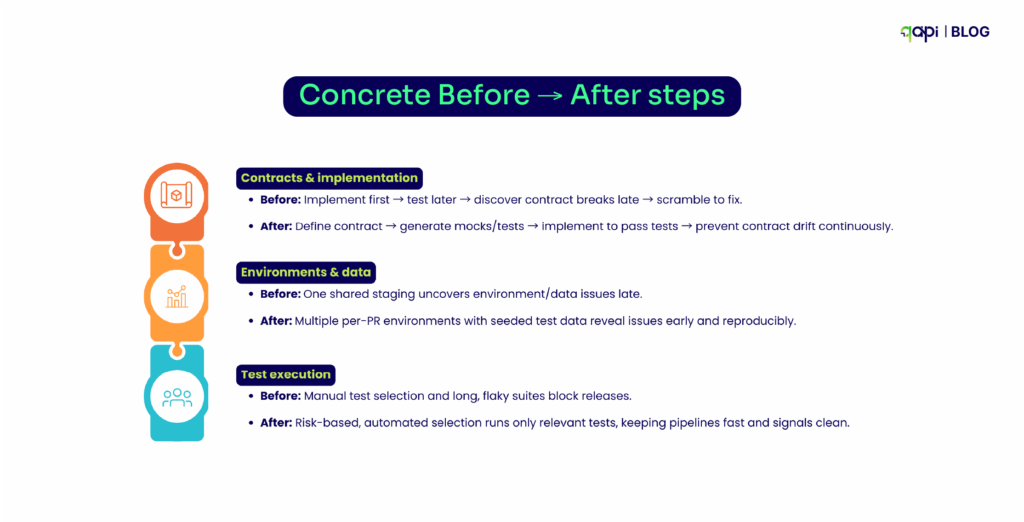
Concrete Before → After Steps
• Contracts & implementation
• Before: Implement first → test later → discover contract breaks late → scramble to fix.
• Before: One shared staging uncovers environment/data issues late.
• After: Multiple per-PR environments with seeded test data reveal issues early and reproducibly.
• Test execution
• Before: Manual test selection and long, flaky suites block releases.
• After: Risk-based, automated selection runs only relevant tests, keeping pipelines fast and signals clean.
The Benefit of Shifting Left: Speed, Quality, and Cost
• Faster Defect Detection and Lower Cost to Fix: Catch bugs during coding, not QA. Studies show shift-left reduces defects by 60-80%, slashing fix costs easily.
• Better Code Quality and Reliability: Developers get instant feedback via automated tests, leading to robust APIs. Testers focus on exploratory work, boosting overall reliability in distributed apps.
• Accelerated Release Cycles: With CI/CD integration, releases go from weeks to hours. For instance, teams can cut cycles by 70% using qAPI’s shift-left automation.
• Improved Collaboration Between Developers, Testers, and Stakeholders: qAPI helps teams share access so everyone is in on the developments everyone makes and can contribute simultaneously.
How to Embed Shift-Left API Testing—Best Practices for 2025
Shift-Left API Testing Starter Pack
You’ve seen the “why.”
Here’s the “what to do next” — see how qAPI makes each step easier by giving you one end-to-end, codeless platform where tests, data, environments, and results live in one place.
Step 1: Pick One API and Make It Bulletproof
What to do: Choose your most important API. Define clear “contracts” (rules of behavior). With qAPI: Upload your OpenAPI spec → qAPI instantly generates tests + mocks for dev and consumer teams. Result: Contract drift is caught immediately, not in production.
Step 2: Get Fast Feedback on Every Change
What to do: Run lightweight tests every time code changes. With qAPI: All test types (unit, contract, integration, security) run automatically in CI/CD. No coding needed.Result: Developers know within minutes if they broke something.
Step 3: Test in Realistic Environments
What to do: Use data and environments that feel like production. With qAPI: Spin up temporary PR environments with safe, realistic datasets qAPI lets you choose as many virtual users as you want so you’re in control at each step. Result: Integration issues surface early and can be reliably reproduced.
Step 4: Test Smart, Not Everything
What to do: Don’t waste time running every test on every change. With qAPI:Risk-based selection runs only relevant tests, while still covering critical paths. Result: Pipelines stay fast, signals stay clean, so does your Jira.
Step 5: Prove It’s Working
What to do: Track improvement over time. With qAPI: Built-in dashboards show bug escape rates, MTTR, coverage, and release velocity. Result: Leadership sees ROI in months, not years.
Now along this path, you’re sure to have some problems along the way.
Top 5 Problems You Might Face (and How to Fix Them)
1️⃣ Tests take too long to run
• Fix: Focus first on the most critical APIs and run only essential tests on each change. You can run parallel tests if needed.
2️⃣Team resists adopting new testing practices
• Fix: Start small with one API or feature, demonstrate quick wins, and gradually expand. Show how easy, simple and streamlined it can be.
• Fix: Use qAPI’s test case generation to automatically write new tests when minor changes occur, so you’re just clicking and saving time. Rather than thinking and writing code.
4️⃣Learning curve is too steep
• Fix: Take advantage of qAPI’s codeless interface—no programming is needed to create and run tests.
You can get used to it in no time.
5️⃣ Current tools don’t integrate well
• Fix: Connect qAPI to your existing CI/CD pipelines and tools so testing fits into your workflow seamlessly.
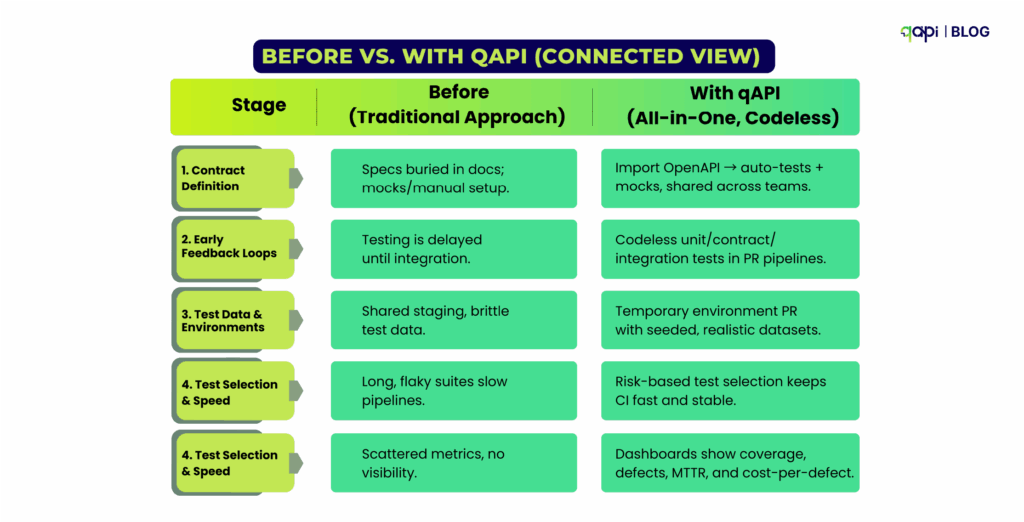
Before vs. With qAPI (Connected View)
Most guides explain what shift-left is. This one shows you how to actually do it—with qAPI as the single place to plan, run, and track every test type, without writing code.
Next step: Pick one API and run Step 1 in qAPI. You’ll see measurable results in your first week.
Act today.
I’ve seen teams build applications, products and services for startups and companies, and no matter the industry size and budget, the best ones start with one thing.
Clarity/Vision.
Clarity stands about what you’re trying to achieve, Vision is all about how you’re approaching it.
So, if you’re building your own, don’t aim for perfection. Look for impact. And build something that is making a difference, but before that, test it.
FAQs
Start small by picking a critical API, defining its contract (OpenAPI/Swagger), and adding automated tests early in development. Use tools like qAPI to run codeless unit, contract, and integration tests in your CI/CD pipeline.
Look for tools that support codeless test creation, contract-driven testing, and CI/CD integration. Examples include qAPI it can integrate any API collection like Postman, and Swagger. Prioritize tools that let you run all tests in one place and generate reusable mocks.
Yes. Wrap legacy APIs gradually with contracts, run automated tests against them, and integrate into PR-level pipelines. Start with new or high-impact endpoints first, then expand coverage.
Not at all. They complement each other. Shift-left catches issues early in dev, while shift-right validates real-world behavior with feature flags, canary releases, and monitoring. Combining both creates a full quality loop, reducing production bugs and rollbacks.
F&B leaders, time to stop thinking APIs are just “IT stuff.” They’re your 𝘴𝘦𝘤𝘳𝘦𝘵 𝘴𝘢𝘶𝘤𝘦 for driving operational efficiency and customer loyalty.
From 𝐟𝐫𝐚𝐧𝐜𝐡𝐢𝐬𝐞 𝐬𝐜𝐚𝐥𝐚𝐛𝐢𝐥𝐢𝐭𝐲 to 𝐦𝐨𝐛𝐢𝐥𝐞 𝐨𝐫𝐝𝐞𝐫-𝐚𝐡𝐞𝐚𝐝 to 𝐫𝐞𝐚𝐥-𝐭𝐢𝐦𝐞 𝐢𝐧𝐯𝐞𝐧𝐭𝐨𝐫𝐲 𝐬𝐲𝐧𝐜, an 𝐀𝐏𝐈-𝐟𝐢𝐫𝐬𝐭 𝐬𝐭𝐫𝐚𝐭𝐞𝐠𝐲 powers it all.
Let’s break it down 👇
✓ 𝐋𝐚𝐮𝐧𝐜𝐡 𝐧𝐞𝐰 𝐨𝐫𝐝𝐞𝐫𝐢𝐧𝐠 𝐞𝐱𝐩𝐞𝐫𝐢𝐞𝐧𝐜𝐞𝐬 without ripping out legacy POS ✓ 𝐈𝐧𝐭𝐞𝐠𝐫𝐚𝐭𝐞 𝐂𝐑𝐌, 𝐥𝐨𝐲𝐚𝐥𝐭𝐲, 𝐚𝐧𝐝 𝐝𝐞𝐥𝐢𝐯𝐞𝐫𝐲 𝐩𝐚𝐫𝐭𝐧𝐞𝐫𝐬 seamlessly (think DoorDash, and Uber Eats) ✓ 𝐀𝐝𝐚𝐩𝐭 𝐦𝐞𝐧𝐮𝐬, 𝐩𝐫𝐢𝐜𝐢𝐧𝐠, 𝐚𝐧𝐝 𝐩𝐫𝐨𝐦𝐨𝐬 across all platforms in real time ✓ 𝐅𝐮𝐭𝐮𝐫𝐞-𝐩𝐫𝐨𝐨𝐟 𝐲𝐨𝐮𝐫 𝐬𝐭𝐚𝐜𝐤 as you grow from 10 locations to 10,000
Just ask 𝐒𝐭𝐚𝐫𝐛𝐮𝐜𝐤𝐬, their mobile app experience is built entirely on an API-driven architecture.
Or look at 𝐒𝐰𝐞𝐞𝐭𝐠𝐫𝐞𝐞𝐧 , real-time personalization and omnichannel ordering? All thanks to a composable, API-first approach.
𝐓𝐡𝐢𝐬 𝐢𝐬 𝐡𝐨𝐰 𝐦𝐨𝐝𝐞𝐫𝐧 𝐅&𝐁 𝐬𝐜𝐚𝐥𝐞𝐬.
👇 Dive into the infographic to see how APIs go from backend tools to front-of-house power plays.
API-First = Business-First in F&B. Period.
Embedded this Infographic.

<a href="https://www.qyrus.com/post/why-api-first-equals-to-business-first-in-food-beverage/"><img style="width:100%;" src="/webcasata/surbhi/qyrus/wp-content/uploads/2025/05/Why-API-First-Business-First-in-Food-Beverage-new.jpg"></a><br>Why API First Equals to Business First in Food Beverage<a href="https://www.qyrus.com/post/why-api-first-equals-to-business-first-in-food-beverage/">Why API First Equals to Business First in Food Beverage</a>
A Digital Banquet: Why Mobile is the Main Course in Today’s F&B World
The Food and Beverages (F&B) sector is undergoing a seismic shift, a digital transformation of epic proportions. Gone are the days when a physical presence was enough; today, the battle for customer loyalty and market share is increasingly fought on the small screen. Consumers crave convenience, transparency, and immediate gratification, and mobile apps have become the primary channel to satisfy these demands. This isn’t just a trend; it’s the new reality.
Consider the staggering numbers. The global F&B market is enormous, projected to surge from USD 7.4 trillion in 2025 to an incredible USD 9.4 trillion by 2029, growing at a steady 6.2% CAGR (Food Industry Market Report). Within this vast market, technology is rapidly carving out its space. The dedicated food tech market, valued at nearly USD 294 billion in 2024, is set to approach $468 billion USD by 2033 (Foodtech Market Report).
Where does this growth converge? On mobile. People simply spend more time engaging with apps than websites – a staggering 86% increase, in fact. From ordering dinner via a delivery app to checking loyalty points at a favorite cafe or even scanning a QR code for a menu, mobile is central to the modern F&B experience.
This intense reliance on mobile applications brings a critical business function into the spotlight: mobile application testing. Ensuring these digital touchpoints are flawless isn’t just good practice; it’s essential for survival and growth. As customer expectations rise and the digital landscape becomes more complex, the need for robust testing strategies and effective mobile testing tools becomes paramount. The market reflects this urgency; the global mobile application testing solution market stood at $6.77 billion USD in 2024 and is forecast to skyrocket to nearly $32 billion USD by 2034, driven by the relentless demand for seamless mobile experiences (Mobile Application Testing Solution Market Growth).
For CEOs in the F&B sector, understanding and prioritizing mobile application testing is no longer optional. It’s a strategic imperative crucial for protecting revenue, delighting customers, ensuring operational efficiency, and ultimately, leading the digital charge in this dynamic industry.
Serving Up Success: Why Flawless Mobile Application Testing is a CEO’s Mandate
In the fast-paced F&B industry, your mobile app isn’t just another marketing channel; it’s often the primary storefront, the main ordering platform, and a key driver of customer loyalty. Getting the mobile experience right isn’t just desirable, it’s fundamental to business success. But why exactly is flawless mobile application testing non-negotiable for CEOs?
Meeting Sky-High Customer Expectations
Today’s consumers live on their smartphones. They expect instant access, intuitive navigation, seamless ordering, secure payments, and real-time updates. A clunky interface, a slow loading menu, a payment error, or inaccurate delivery tracking isn’t just an inconvenience; it’s a reason to switch to a competitor. First impressions are brutal in the digital world. Consider this sobering statistic: a staggering 94% of users uninstall mobile apps within the first 30 days of installation. This highlights the critical need for robust quality and exceptional user experience right from the start. Fail here, and you lose customers before you even have a chance to build a relationship.
The High Stakes of Mobile Performance
For CEOs, the strategic value of rigorous mobile application testing translates directly to the bottom line and operational stability:
Protecting Revenue & Preventing Loss: Bugs, crashes, and performance lags aren’t just frustrating; they directly impact sales. How much? Research by Kobiton reveals that for many companies, mobile apps account for a quarter of their total revenue. Furthermore, 75% of companies report that slow app releases, often hampered by inadequate testing, cost them over $100,000 per year. An untested or poorly tested application is a direct threat to your revenue streams. Effective testing, using the right mobile app testing tools, safeguards this vital income.
Ensuring Customer Satisfaction & Loyalty: In the hyper-competitive F&B space, a smooth, reliable, and delightful digital experience builds trust and encourages repeat business. Think seamless ordering, easy customization, reliable delivery tracking, and integrated loyalty rewards. Flawless execution keeps customers happy and coming back for more.
Achieving Operational Excellence: Your mobile app often needs to seamlessly integrate with backend systems – Point of Sale (POS), kitchen display systems, inventory management, and delivery partner platforms. Thorough mobile testing hacks ensure these intricate connections work flawlessly, preventing order errors, communication breakdowns, and operational chaos.
Managing Costs Effectively: It’s a well-established fact in software development: finding and fixing bugs early is significantly cheaper than addressing them after launch. Investing in comprehensive testing upfront prevents costly emergency fixes, reputational damage, and lost revenue down the line.
In essence, neglecting mobile app quality is akin to leaving money on the table while simultaneously frustrating your customers and stressing your operations. For F&B leaders steering their companies through the digital age, prioritizing mobile excellence through rigorous testing isn’t just important – it’s imperative.
The Recipe for Complexity: Tackling Unique F&B Mobile Application Testing Hurdles
While the goal is a seamless user experience, the journey to achieving it in the F&B mobile app world is fraught with unique challenges. Testing these applications isn’t just about finding bugs; it’s about navigating a complex ecosystem where digital interactions meet real-world logistics, timing is critical, and user expectations are incredibly high. CEOs need to appreciate these complexities to understand the true value of investing in robust mobile application testing and sophisticated mobile testing tools.
What Makes F&B App Testing Different?
Food and beverage apps operate at the intersection of multiple systems and user types, demanding specific testing focus areas:
Intricate Cross-Device Flows: An order often involves multiple applications – the customer’s app, the restaurant’s POS or tablet, and the delivery partner’s app. Ensuring data flows seamlessly and accurately between these different platforms and devices is a significant testing challenge.
Critical Real-Time Functionality: Features like live order tracking and instant payment processing are not just nice-to-haves; they’re core expectations. Testing must validate these real-time updates under various scenarios to ensure accuracy and reliability. Any lag or error severely impacts user trust.
Demanding Performance Under Pressure: F&B apps experience sharp peaks in demand (lunch/dinner rushes, promotions, weekends). Performance testing is crucial to ensure the app remains responsive, stable, and can handle high user loads and transaction volumes without crashing or slowing down, especially under varying network conditions.
Crucial UI/UX Optimization: From browsing menus visually to customizing complex orders and navigating checkout, the user interface must be intuitive and efficient. Testing needs to cover diverse user journeys across different screen sizes and operating systems.
Common Hurdles Amplified in F&B
Beyond these specific demands, F&B apps face amplified versions of common mobile testing challenges:
Platform Fragmentation: Ensuring a consistent, high-quality experience across countless Android and iOS devices, versions, and screen sizes is a constant battle.
Localization Nuances: Handling different languages, currencies, regional regulations, measurement units (e.g., metric vs. imperial for nutrition info), and local menu availability requires meticulous testing.
Third-Party Integration Risks: F&B apps heavily rely on external services – payment gateways, mapping APIs, POS systems, loyalty platforms. Ensuring these integrations are stable and handling errors gracefully is vital.
Security & Data Privacy: Handling sensitive customer data (addresses, payment details, order history) makes F&B apps prime targets. Rigorous security testing is essential to prevent breaches and comply with regulations like GDPR and CCPA.
The Physical-Digital Link: Unlike purely digital apps, F&B app success depends on real-world logistics. Testing needs to account for variations in delivery times, order accuracy (matching the digital order to the physical product), and communication between digital systems and physical operations.
Furthermore, the rapid proliferation of IoT devices in kitchens and supply chains, coupled with the rollout of 5G networks, adds layers of complexity. This demands more advanced mobile application testing methodologies to ensure seamless connectivity, performance, and compatibility across an increasingly interconnected ecosystem. Simply put, the F&B digital landscape requires a sophisticated approach to quality assurance.
The CEO’s Playbook: Crafting a Winning Strategy with Mobile App Testing Tools
Understanding the challenges is crucial but turning that understanding into action requires a clear strategy. For CEOs aiming to deliver exceptional mobile experiences in the F&B sector, implementing a robust mobile application testing strategy isn’t just an operational task; it’s a leadership decision.
Here’s a playbook outlining the key pillars for success:
Define Clear Testing Goals: What does success look like for your mobile app? Before diving into testing, establish clear, measurable objectives. This involves defining the scope across various testing types: functional testing (Does it work as expected?), security testing (Is customer data safe?), performance testing (Can it handle peak loads?), usability testing (Is it easy and intuitive to use?), and UI/UX testing (Does it look and feel right?). Aligning these goals with business objectives is key.
Select the Right Testing Approach: How will you execute your testing? Decide on the optimal model for your organization – building an in-house testing team, outsourcing to specialized QA partners, or adopting a hybrid approach that combines both. Your choice will depend on factors like internal expertise, budget, speed-to-market requirements, and the complexity of your application.
Determine Smart Device Coverage: You can’t test on every device, so prioritize wisely. Identify the most popular devices, operating systems, and screen sizes used by your target audience in your key markets. Leverage market data and analytics to create a device matrix that provides maximum relevant coverage without unnecessary overhead. Using appropriate mobile app testing tools that offer access to a wide range of real devices is crucial here.
Implement Effective Automation: While manual testing is essential for exploratory and usability checks, automation is vital for efficiency, speed, and coverage, especially for repetitive regression tests. Strive for a balanced approach, automating where it provides the most value – freeing up human testers for more complex and nuanced validation. Modern mobile testing tools often incorporate AI to make test creation and maintenance more efficient.
Establish Continuous Testing: Don’t treat testing as a final gate before release. Integrate mobile application testing throughout the entire development lifecycle (often called “Shift-Left”). This means testing early and often, ideally integrating automated tests into your CI/CD (Continuous Integration/Continuous Deployment) pipeline. This approach catches issues sooner when they are cheaper and easier to fix, accelerating release cycles. Furthermore, embracing modern practices like cloud-based and remote testing is now standard, allowing teams to efficiently test across numerous real devices and network conditions in a scalable manner.
By focusing on these strategic pillars, F&B CEOs can build a foundation for mobile quality that supports business goals, enhances customer satisfaction, and ensures their digital offerings are ready to compete.
Meet Qyrus: The Right Ingredients for Superior F&B Mobile Application Testing
Navigating the complex landscape of F&B mobile app testing requires more than just a strategy; it demands powerful, flexible, and efficient mobile testing tools. You need a partner that understands the intricacies of ensuring quality across diverse platforms, integrations, and user scenarios. Enter Qyrus – a comprehensive platform built to streamline and elevate your mobile application testing efforts.
Qyrus isn’t just another tool; it’s designed as an all-in-one solution specifically addressing the pain points faced by development and QA teams, particularly relevant for the demanding F&B sector. Here’s how Qyrus provides the advantage F&B leaders need:
Comprehensive Coverage, Simplified: Qyrus offers a unified platform tackling various testing needs – functional, visual, performance, and even API testing. Instead of juggling multiple tools, you get a single, integrated environment to manage your entire testing lifecycle.
Accelerated Testing with Ease of Use: Time-to-market is critical. Qyrus empowers teams with user-friendly features like no-code/low-code test creation and AI-assisted scripting, allowing both technical and less-technical users to build and execute tests quickly and efficiently.
Real-World Accuracy on Real Devices: Emulators and simulators can only go so far. Qyrus provides access to a scalable and secure real device farm, enabling you to test your F&B app on the actual iOS and Android devices your customers are using, ensuring compatibility and a true representation of the user experience.
Tackling F&B Complexity: Qyrus offers advanced capabilities crucial for F&B scenarios. Validate layouts precisely across devices with visual regression testing. Assess app responsiveness under load and gather performance metrics like CPU and memory usage. Test intricate backend interactions via API testing. You can even execute custom Java code for complex validations.
Scalability & Flexibility: As your business grows, your testing needs evolve. Qyrus supports this with features like data parameterization using external files and environment profiles, allowing you to easily run the same tests across different data sets and testing environments (e.g., staging vs. production).
Seamless Workflow Integration: Qyrus understands that testing doesn’t happen in a vacuum. The platform integrates smoothly with essential tools your teams already use, including JIRA for defect tracking, version control systems like GitHub and Bitbucket, and CI/CD pipelines, ensuring testing is embedded within your development workflow.
By leveraging Qyrus as your central mobile app testing tool, F&B organizations can move beyond simply finding bugs to proactively ensuring quality, accelerating releases, and delivering the exceptional mobile experiences that drive customer loyalty and business growth.
Future-Proofing Your Menu: Staying Ahead with Advanced Mobile Application Testing
The digital transformation in the Food and Beverages sector isn’t slowing down. As technology continues to evolve, so will customer expectations and the complexity of the mobile applications designed to meet them. For forward-thinking CEOs, anticipating these changes and adapting their mobile application testing strategies accordingly is crucial for sustained success. Staying ahead requires not just keeping pace but actively preparing for what’s next on the menu.
What mobile testing trends are shaping the future of F&B mobile apps and their testing needs?
AI-Driven Personalization: Apps are becoming smarter, leveraging Artificial Intelligence (AI) to offer personalized recommendations, predict ordering habits, and tailor promotions. Testing these sophisticated AI algorithms for accuracy, bias, and effectiveness will become increasingly critical. Teams will need mobile testing tools capable of validating complex, data-driven user experiences.
Rise of Contactless Experiences: Driven partly by recent global events but also by sheer convenience, contactless ordering, payment, and even pickup/delivery options are becoming standard. Testing these flows requires ensuring seamless integration with various payment systems, NFC technology, QR code scanners, and location services, all while maintaining robust security.
Deeper Cross-Platform Integration: The lines between web, mobile, and in-store digital touchpoints (like kiosks) will continue to blur. Customers will expect a consistent and connected experience regardless of how they interact with your brand. This necessitates comprehensive end-to-end testing across all platforms, ensuring data synchronicity and a unified brand experience.
Adapting to these trends requires a commitment to continuous improvement in your testing practices. It means embracing automation, potentially leveraging AI within your testing processes, and utilizing advanced mobile app testing tools like Qyrus that offer capabilities such as visual testing, performance monitoring, and robust API validation.
Futureproofing isn’t just about adopting new technologies; it’s about ensuring your quality assurance processes evolve alongside them, guaranteeing your digital offerings remain relevant, reliable, and ready for whatever comes next.
Conclusion: Leading the Digital Charge in F&B
For CEOs navigating the dynamic Food and Beverages landscape, the message is clear: mobile is no longer just a channel; it’s central to your business strategy. The pursuit of digital excellence, driven by robust mobile application testing, is fundamental to success. It’s about much more than just catching bugs; it’s about building consumer trust, reducing operational risks, ensuring seamless customer experiences, and ultimately, creating sustainable competitive advantages in a crowded marketplace.
Investing in a comprehensive testing strategy, supported by powerful and efficient mobile testing tools like Qyrus, allows F&B leaders to move from reactive problem-solving to proactive quality management. It enables you to confidently embrace innovation, meet evolving consumer expectations head-on, navigate complex integrations, and ensure your digital storefront delivers on its promise every single time.
As technology continues its relentless march, the F&B leaders who prioritize and invest in sophisticated mobile application testing will be best positioned to capture market share, enhance brand reputation, and drive profitable growth.
Don’t let inadequate testing leave a bad taste in your customers’ mouths. Evaluate your current approach, embrace the tools and strategies needed for excellence, and lead the digital charge in your sector.
Ready to elevate your F&B mobile testing? Explore Qyrus with a free trial or contact us today for a personalized demo.
We’ve all been there. It’s late in the sprint, UI testing is in full swing, and suddenly… a critical bug surfaces. After digging in, it turns out the root cause isn’t in the user interface at all, but deep within an underlying API. Finding these issues so late throws schedules into chaos, puts immense pressure on the QA team, and leads to frustrating delays. It’s a common pain point, especially when you consider that over 90% of executives now view APIs as mission-critical and 77% of businesses have adopted microservices, creating complex dependencies beneath the surface.
For QA Managers, this situation is particularly challenging. You might have a fantastic team skilled in navigating user interfaces and ensuring a great user experience, but they might lack the coding background or specific tooling knowledge typically associated with API testing. Asking developers for specifications or Postman collections can introduce delays or dependencies. The result? API testing often gets pushed later, or coverage remains lighter than ideal, despite 74% of developers now following an API-first approach. With 66% of organizations managing over 100 APIs, manually keeping track or relying solely on UI testing becomes unsustainable.
But what if your team’s existing UI expertise could be the key to unlocking earlier API insights? What if they could perform effective API discovery and create baseline API tests while doing the UI testing they already know? This blog will guide you, the QA Manager, through a practical, UI-driven API discovery workflow. We’ll explore how you can empower your current team using accessible API discovery tools, enabling them to contribute significantly to API quality and provide feedback much earlier in the process – without requiring them to become expert coders overnight.
The Strategic Edge: Why Earlier API Feedback is Golden for QA
So, the UI team finds API bugs late in the game. It’s frustrating, but it’s just part of the process, right? Not necessarily. Shifting API feedback earlier, even if it means using insights gleaned from testing a stable UI build, provides significant strategic advantages that directly address the chaos of late-cycle surprises. Investing time in a structured API discovery process, even one initiated through UI interaction, pays dividends.
Here’s why striving for earlier API validation is worth the effort:
Sidestep Late-Cycle Fire Drills: This is the big one. When you establish a baseline of API tests (discovered via UI interactions on Release N) and run them against Release N+1 early in its cycle, you catch API regressions or breaking changes before they derail extensive UI testing. Finding and fixing API issues earlier is significantly less disruptive and costly than dealing with them after they’ve impacted multiple UI components or user flows. Think fewer emergency meetings and more predictable releases.
Slash Debugging Time: Ever spent hours trying to figure out why a UI element is misbehaving, only to find the culprit was a faulty API response? When you run API tests derived from your API discovery efforts alongside your UI tests, you gain crucial diagnostic power. If a UI test fails, and a corresponding API test also fails, you can point development teams to the likely source much faster, dramatically speeding up root cause analysis.
Broaden Test Coverage Intelligently: Empowering your UI testers to perform basic API validation adds a vital layer to your test coverage. It leverages their deep functional knowledge of how the application should work and applies it to the underlying API interactions. This expands your safety net without the immediate need for dedicated API specialists or complex coding efforts, making better use of your existing team’s capabilities. Considering that 67% of organizations handle over 10 million API requests per month, ensuring these crucial interactions are covered is vital.
Boost Team Skills and Ownership: Introducing UI testers to API concepts via accessible API discovery tools is a fantastic way to upskill your team. It builds their confidence, broadens their technical understanding, and fosters a greater sense of ownership over application quality, end-to-end.
Enhance API Visibility & Security: While UI-driven discovery focuses on known flows, the process inherently increases visibility into the APIs being used. Simply knowing which APIs are active, even from UI interactions, is a step up from having no inventory, especially when only 58% of organizations have an established API discovery process. This increased awareness is a foundational step towards better API security posture, helping mitigate the risks highlighted by the fact that 37% of organizations suffered an API security incident last year.
Investing in earlier API feedback, facilitated by practical API discovery tools, isn’t just about finding bugs sooner; it’s about creating a more efficient, resilient, and capable QA process.
The QA Manager as Enabler: Equipping Your Team for API Discovery Success
As a QA Manager, seeing API-related bugs slip through until the late stages of UI testing is a major red flag. It signals a gap in test coverage and often leads to those stressful, down-to-the-wire fixes. While the immediate reaction might be frustration, the strategic response is enablement. Your role evolves beyond simply managing test execution; it becomes about empowering your team with the right processes and API discovery tools to catch these issues sooner.
Instead of viewing your UI-focused team as lacking API skills, recognize their deep functional knowledge of the application as a powerful asset. They know how the application should behave, which is the perfect starting point for validating the APIs that drive that behavior. Your role is to bridge the gap:
Identify the Need & Opportunity: Acknowledge the pattern – are API bugs consistently found late? Is your team hesitant about traditional API testing? This is your cue to explore alternative approaches, like UI-driven API discovery, that leverage your team’s existing strengths.
Champion the Right Tools: Your team doesn’t need to become hardcore developers overnight. Your role involves researching and introducing accessible API discovery tools, specifically those like browser extensions that integrate with familiar UI testing workflows. Providing a tool that simplifies capturing and understanding API calls is key to lowering the barrier to entry.
Facilitate the Workflow: Introduce the concept of UI-driven API discovery. Guide your team on how to use the chosen tool during their regular testing (e.g., on a stable staging environment) to capture a baseline of API interactions for key user journeys. Help them understand the value of this baseline for future regression testing.
Integrate Strategically: Plan how the outputs of this API discovery process – the captured API calls and basic tests – will be integrated into your team’s broader testing strategy. This might involve adding API regression checks to your test cycles for upcoming releases, using the findings to inform exploratory testing, or aiding developers in root cause analysis.
By shifting from solely managing bug reports to actively enabling your team with accessible methods and tools for API discovery, you transform your QA function. You build new capabilities within your existing team, foster greater ownership, and ultimately create a more robust and efficient quality assurance process.
How It Works: Your UI Testing Powers Your API Discovery
So, how does this UI-driven API discovery actually work in practice? It’s simpler than you might think, especially when using intuitive API discovery tools designed for this exact purpose. Let’s walk through the typical workflow using the Qyrus API Discovery Extension as our example.
The core idea is to leverage the UI interactions your team already performs. The Qyrus extension acts like a smart recorder running in the background of the browser (specifically Chrome, for the extension).
Here’s the step-by-step process:
Run Your UI Tests: Have your QA team perform their regular manual or automated UI tests on a stable version of your application (web or mobile accessed via browser). This could be on a staging environment, a dedicated QA build, or even key flows on the current production release to establish a baseline. The key is interacting with the application just like a user would.
Capture APIs Automatically: While the UI tests are running, ensure the Qyrus API Discovery Extension is active. It seamlessly monitors network traffic originating from the application and automatically records the underlying API calls associated with the actions being performed (like button clicks, form submissions, data loading, etc.).
Understand with AI & Filter Noise: Once the test flow is complete, the extension presents the captured API calls. This is where the intelligence comes in:
AI Explanations: Instead of raw data, the tool provides natural language explanations for what each API call likely does, making it instantly more understandable for testers less familiar with API jargon.
Intelligent Filtering: You can easily configure the extension to ignore calls to irrelevant domains (like analytics platforms or third-party widgets), focusing the API discovery only on your application’s core APIs.
(Optional) Visualize the Flow: For complex user journeys involving multiple API calls, the extension can often map the dependencies between them, showing how data might flow from one API call to the next (e.g., using an authentication token from login in subsequent requests).
Export Your Baseline API Tests: With the relevant APIs captured and understood, the final step is incredibly straightforward. With just a few clicks, export the captured API calls, their details, and even AI-generated assertions directly into the Qyrus platform (like qAPI). This instantly creates a baseline suite of API tests reflecting the user flows you just tested.
This workflow transforms standard UI testing into a powerful API discovery exercise. It leverages the team’s existing skills and activities, uses smart API discovery tools to automate the difficult parts (capture, explanation, assertion generation), and results in a tangible set of API tests ready to be used for future regression analysis.
Best Practices: Making UI-Driven API Discovery Work For You
Implementing a new approach, even one leveraging existing workflows, requires some strategy. To get the most out of UI-driven API discovery using API discovery tools like the Qyrus extension, QA Managers should focus on these key practices:
Start with a Solid Baseline: Garbage in, garbage out applies here too. Run your initial API discovery sessions (using the UI testing workflow) on a stable, known version of your application. This could be the current production release or a well-tested staging build. Capturing APIs against key, representative user flows on a reliable version ensures your baseline API test suite is accurate and trustworthy.
Shift API Regression Left: This is where the UI-driven approach delivers powerful early insights. Take the baseline API test suite captured from Release N and execute it against Release N+1 as soon as the APIs are deployed to a test environment. This often happens before the N+1 UI is fully stable or ready for extensive testing. Running these API tests early allows you to catch critical API regressions or breaking changes much sooner in the N+1 development cycle, preventing them from impacting later UI testing efforts.
Complement, Don’t Just Replace UI Tests: View the API tests generated through this API discovery method as a valuable addition to your testing arsenal, not necessarily a complete replacement for UI tests. Use them in conjunction. When a UI test fails, running the corresponding API tests can quickly help determine if the issue lies in the front-end logic or the back-end API response, significantly aiding root cause analysis.
Iterate and Update Your Baseline: Applications evolve. As new features are added or major workflows change, your initial API baseline might become outdated. Make it a practice to periodically re-run the API discovery process on significant new releases or feature updates. This keeps your API regression suite relevant and ensures you capture newly introduced APIs.
Empower Through Training: While using API discovery tools like the Qyrus extension is designed to be intuitive, provide your UI team with brief training. Ensure they understand how to activate the tool during their testing, how to filter noise effectively, how to export the results, and the basic purpose of using the generated API tests for regression. This builds confidence and ensures consistent usage.
By following these practices, QA Managers can effectively integrate UI-driven API discovery into their Agile process, transforming it into a sustainable strategy for improving quality and efficiency.
Addressing Your Questions: API Discovery via the UI Workflow
Adopting a new approach naturally brings questions. Let’s address some common queries QA Managers might have about using UI interactions and related API discovery tools to build API test suites:
Q1: If the UI already exists to run tests on, isn’t it too late for ‘discovery’? What’s the ‘shift left’ benefit?
A: That’s a great point! While this method requires an existing UI (from Release N) for the initial discovery, the “shift left” benefit applies to future releases. The API test baseline you create from Release N allows you to test the APIs for Release N+1 much earlier in its cycle – as soon as they’re available in a QA environment, often before the N+1 UI is fully baked. This accelerates feedback on API regressions for the next release. Plus, the enhanced API discovery provides immediate value by improving root cause analysis for the current release (Release N).
Q2: My UI testers are great, but they don’t know APIs or how to code tests. Can they really handle this?
A: Absolutely – that’s precisely who this approach empowers! API discovery tools like the Qyrus extension are designed to be codeless. The process leverages the UI interactions your team already performs. The tool handles the complex parts: capturing calls, providing AI-driven explanations in plain language, and even generating baseline assertions automatically. Your team’s functional knowledge is the key ingredient; the tool provides the accessible mechanism for them to contribute to API testing.
Q3: Why use this instead of just asking developers for their Postman collections?
A: Getting collections from developers is a valid approach, but this UI-driven method offers distinct advantages, especially if:
Developer collections aren’t readily available, consistently updated, or easy for your QA team to understand/use.
Most developers have very basic test cases that are based on expected usage and generally just check for a 200 status code.
Rarely will these collections have sufficient coverage over edge cases that QA is required to test against – waiting until the UI is ready to find these issues can be costly.
You want QA to have more ownership and control over creating API tests based directly on user workflows they understand.
You want to capture the actual APIs being called by the UI during specific interactions, which might sometimes differ slightly from theoretical specs.
This method complements other approaches and provides a practical option driven directly by QA’s functional testing activities.
Q4: How reliable are the AI-generated assertions? Do we just trust them blindly?
A: Think of the AI-generated assertions as a significant head start, not necessarily the finished product. Based on the observed API responses during the API discovery phase, the AI suggests relevant checks (like schema validation, checking specific JSON paths, etc.). This saves enormous time compared to writing them manually from scratch. Your team can then easily review, refine, and add more specific business logic assertions as needed within the Qyrus platform, ensuring the tests are both comprehensive and accurate.
By understanding how this specific UI-driven API discovery workflow functions, QA Managers can confidently address these common concerns and highlight its practical benefits for their teams.
Empower Your Team, Elevate Your API Testing with Smarter Discovery
The challenge is clear: finding critical API bugs during late-stage UI testing puts quality at risk and drains valuable sprint time. But the solution might already be within your team. For QA Managers, the opportunity lies in empowering your skilled UI testers – those who know your application’s functionality inside and out – to become active participants in API quality assurance. You don’t need to wait for specialized hires or complex tooling rollouts; you can leverage their existing expertise today.
Adopting a UI-driven API discovery workflow, facilitated by accessible API discovery tools like the Qyrus API Discovery Chrome Extension, provides a practical and powerful path forward. It allows your team to capture real-world API interactions during their normal testing routines, understand them with AI assistance, and generate baseline API tests without writing code. This baseline becomes invaluable for shifting API regression testing left in subsequent release cycles, providing earlier feedback and enabling faster root cause analysis when issues do arise.
Stop letting API issues hide until the last minute. As a QA Manager, you can champion this pragmatic approach to API discovery. Equip your UI team, integrate the workflow, and start building a more robust, efficient, and collaborative testing strategy. Elevate your team’s capabilities and catch critical issues sooner.
Ready to empower your UI team and get started with UI-driven API discovery?
The Final Checkpoint – Why SAP UAT Matters (and Why It’s Tough)
In the complex world of SAP implementations and upgrades, countless hours go into configuration, development, and functional testing. But before the champagne corks pop for a successful go-live, there’s one crucial gatekeeper: User Acceptance Testing (UAT). Think of SAP User Acceptance Testing as the final, critical checkpoint within SAP Testing, the moment where the real end-users – the people who rely on SAP for their daily tasks – give their seal of approval. It’s the ultimate confirmation that the system not only works technically but works for the business.
However, let’s be honest. For many organizations, SAP UAT often feels less like a confident stride to the finish line and more like a stumbling block. It can be time-consuming, pull key business users away from their primary responsibilities, and sometimes feel like a rubber-stamping exercise rather than genuine validation, especially given the sheer scale and customization inherent in many SAP landscapes. What if there was a smarter way? A way to make UAT more focused, efficient, and truly value-driven, moving beyond the limitations of traditional approaches?
Demystifying UAT in the SAP Ecosystem
So, what is UAT exactly in the SAP context? At its core, the definition of UAT testing is simple: it’s testing that is conducted by the intended end-users of the SAP system within a realistic, controlled environment before the system or its changes are deployed to production. It’s not about finding every minor bug (that’s what earlier testing phases are for); it’s about validating that the system enables users to execute their business processes correctly and efficiently, meeting the agreed-upon business requirements. There are certain acceptance criteria attributes for UAT, such as completeness, accuracy, user-friendliness, performance, reliability, security, scalability, and compatibility.
The ultimate goal isn’t just a sign-off; it’s achieving business acceptance. It’s building confidence among users and stakeholders that the SAP solution will deliver its intended value and won’t disrupt critical operations upon launch. In SAP, this often involves testing complete end-to-end business processes – think Order-to-Cash, Procure-to-Pay, or Record-to-Report – which might span multiple SAP modules (like SD, MM, FI) and even integrate with other internal and external systems, truly reflecting how the business operates day-to-day.
The Common Roadblocks: Challenges Specific to SAP UAT
While the goal of SAP User Acceptance Testing is clear, completing it without any chaos is often easier said than done. SAP environments present unique hurdles that can derail even well-intentioned UAT efforts:
Sheer Complexity & Scale: SAP systems are rarely simple. They often involve intricate configurations, numerous modules, and deep integrations across the business. Testing every possible scenario becomes impractical, demanding a smart approach to prioritize efforts effectively.
Keeping Pace with Constant Change: Whether it’s implementing S/4HANA, applying support packs, rolling out new features, or simply configuring existing processes, SAP environments are dynamic. Understanding the true impact of these changes on end-to-end business processes is crucial for targeted UAT, but often difficult to determine accurately.
The Test Data Conundrum: Realistic testing requires realistic data. However, generating or sourcing comprehensive, compliant, and accurate test data that reflects complex, multi-step transactions within SAP is a significant challenge. Using production data carries security risks, while manually creating data is time-consuming and often insufficient.
The Business User Bottleneck: Your finance experts, logistics coordinators, or HR managers are essential for UAT, but they also have demanding day jobs. Pulling them away for extensive testing cycles disrupts operations and often leads to rushed or superficial validation. UAT needs to be respectful of their time.
Taming Customizations (Z-Objects): Most SAP landscapes include custom developments (often called Z-Objects) tailored to specific business needs. These unique components are critical but fall outside standard test scripts, requiring dedicated attention during UAT as they are often impacted by upgrades or other changes.
Bridging the Communication Gap: Effective UAT requires seamless collaboration between the IT/QA teams deploying the changes and the business users validating them. Misunderstandings about requirements, test steps, or defect reporting can lead to frustration and delays.
Laying the Foundation: Best Practices for Successful SAP UAT
Navigating these challenges requires a strategic approach. Implementing best practices can significantly improve the effectiveness and efficiency of your SAP UAT cycles:
Start with a Clear Plan & Strategy: Define the UAT scope, objectives, specific business processes to be tested, timelines, and clear roles and responsibilities for testers and approvers before testing begins. Establish clear entry and exit criteria.
Involve Business Users Early and Often: Don’t wait until the final UAT phase. Engage business users during requirement gathering and design phases to ensure alignment and leverage their expertise in defining realistic test scenarios.
Focus on End-to-End Business Processes: Prioritize testing complete, real-world workflows that mimic daily operations (e.g., creating a sales order through to billing and payment) rather than just testing isolated transactions.
Prioritize Realistic Test Data: Make test data management a priority. Invest time and potentially tools to ensure testers have access to relevant, comprehensive, and compliant data sets that cover the required business scenarios.
Establish Effective Defect Management Strategies: Implement a clear, user-friendly process for business users to report defects found during UAT. Ensure prompt triage, clear communication on status, and efficient resolution by the technical teams.
Leverage the Right Tools: Manual UAT processes can be cumbersome. Utilizing appropriate tools for test management, execution tracking, data provisioning, and capturing results can drastically streamline the process, provide valuable insights, and make participation easier for business users. This is where modern platforms begin to show their true value.
Introducing Qyrus: A Smarter, AI-Powered Approach to SAP UAT
We’ve explored the critical nature of SAP User Acceptance Testing, the significant hurdles organizations face, and the best practices required for success. It’s clear that traditional methods and existing tools often struggle to keep pace, leading to prolonged test cycles and delays in adopting crucial business-IT changes. Today’s complex, hybrid IT landscapes, especially those involving SAP, demand a fresh perspective and new-age testing tools.
This is where Qyrus enters the picture. Qyrus isn’t just another testing tool; it’s designed specifically to tackle the challenges of modern Enterprise Application Testing, offering a fundamentally smarter way to approach validation, particularly for complex systems like SAP. Qyrus is envisioned as a comprehensive, codeless, and highly intelligent test automation SaaS platform built for the demands of digital transformation.
At its core, Qyrus leverages an AI-powered engine, moving beyond the limitations of older tools or time-consuming custom frameworks. It’s built to handle the diverse technologies found in modern SAP environments – encompassing not just traditional ERP interfaces but also Web (like Fiori apps), Mobile, APIs, and other integrated components. This unified approach directly addresses the difficulty of testing across today’s interconnected, multi-platform business processes.
For stakeholders seeking an intelligent, AI-enhanced alternative to tools like SAP Solution Manager, Qyrus provides capabilities designed to streamline UAT, improve accuracy, and ultimately ensure that SAP solutions deliver exceptional user experiences and tangible business value. It’s about shifting UAT from a potential bottleneck to a strategic enabler for confident go-lives.
How Qyrus Streamlines and Enhances SAP UAT
Let’s explore how Qyrus’s specific features directly address the common hurdles in SAP User Acceptance Testing, making the process more efficient and effective for everyone involved, especially business users.
(A) Intelligent Insights: Focusing Your UAT Efforts
Challenges Addressed: Keeping pace with change, SAP complexity, managing customizations.
Qyrus Capability: Qyrus tackles this head-on with its Test Strategy module (including Business Analysis, Customization Insights, Workbench Insights) and Impact Analyzer. Instead of guesswork, Qyrus analyzes actual SAP system usage, pinpoints implemented customizations and assesses the delta from release changes or transports. It intelligently identifies exactly which business processes and transactions are impacted by changes.
Benefit for UAT: This eliminates the “test everything” burden. Business users receive guided, impact-based recommendations on precisely what needs validation. This targeted approach, noted for its depth in identifying affected transactions, ensures UAT efforts are focused on the highest-risk areas, saving significant time and aligning testing with real-world usage and changes.
(B) Simplified Test Case Management & Design
Challenges Addressed: Business user time constraints, complexity in test design.
Qyrus’ Capability: While Qyrus offers powerful automation, its AI capabilities like SAP Scribe (a conversational AI trained on SAP knowledge) and the AI Test Generator act as intelligent assistants for UAT preparation. They can analyze functional specifications or even custom code (ABAP, UI5) to brainstorm and suggest relevant test scenarios.
Benefit for UAT: These features provide a robust starting point or baseline for UAT test cases. Business users aren’t expected to become automation experts; instead, they can review, refine, and adapt these AI-generated suggestions to fit their specific end-to-end UAT scenarios, ensuring comprehensive coverage without starting from scratch. This AI assistance accelerates the design phase, respecting the valuable time of business participants.
(C) Seamless & Realistic Test Data Management
Challenges Addressed: The critical need for realistic and comprehensive test data, especially for complex chains in systems like S/4HANA.
Qyrus Capability: Qyrus’s DataChain module revolutionizes test data provisioning for SAP. Business users can simply input a starting point, like a document or transaction number. DataChain automatically identifies all linked transactions in the business process chain and extracts the relevant data fields – even from S/4HANA’s in-memory database using a live data extraction approach. The Test Data Analyzer further assists with managing, masking, and ensuring data consistency.
Benefit for UAT: This provides business users with the rich, realistic, end-to-end data needed for their scenarios quickly and without manual drudgery or risky reliance on production data copies. It ensures UAT scenarios accurately reflect real operational data flows.
Challenges Addressed: Business user availability, testing complete cross-module/cross-platform workflows.
Qyrus Capability: Qyrus supports UAT execution efficiency in several ways. Robotic Smoke Testing (RST) can automate foundational checks, ensuring system stability before UAT begins, freeing users from repetitive tasks. Crucially, Qyrus excels at testing end-to-end business processes that span multiple SAP modules (SAP GUI, Fiori) and integrated non-SAP systems (Web, Mobile, APIs, Desktop applications). Capabilities like Document Exchange Testing (IDoc) allow specific validation of critical data interchanges. Furthermore, the platform significantly improves execution speed and automatically stores test evidence.
Benefit for UAT: Business users can focus their valuable time on validating complex business logic and exception handling, confident that core functionalities are stable, and that testing covers the entire operational flow. The increased speed and automated evidence capture streamline the validation process itself.
Empowering Business Users: Making SAP UAT Accessible and Effective
Ultimately, the success of SAP Testing and SAP User Acceptance Testing hinges on the engagement and effectiveness of business users. Qyrus is designed with this principle in mind, aiming to empower not just testers and developers, but specifically the business teams performing this critical validation.
Recognizing that business users are not typically testing specialists and face time constraints, Qyrus focuses on making UAT participation more intuitive and efficient. It addresses concerns about non-testers owning complex automation by providing support and context rather than demanding automation expertise.
Here’s how Qyrus empowers your business users:
Clarity Through Insights: Instead of vague test lists, users get clear insights from the impact analysis, understanding why specific areas need testing. This context makes their validation efforts more meaningful.
Focused Task Lists: Guided test selection pinpoints the most critical scenarios impacted by change, allowing users to concentrate their limited time where it matters most.
Simplified Preparation: AI-assisted test case suggestions provide a starting point, while streamlined data generation via DataChain removes the significant burden of manual data preparation.
Ease of Use: The platform is designed for usability, allowing users to execute tests (whether manual validation aided by Qyrus insights, or reviewing automated results) and log feedback efficiently. (If Qyrus includes specific features for managing manual test scripts and evidence capture, they further simplify this process.)
Reduced Burden: By automating foundational checks (RST) and providing realistic data, Qyrus allows business users to focus on validating business logic and user experience, not troubleshooting basic setup issues.
The goal isn’t to turn business users into automation engineers, but to provide them with intelligent tools and clear information, enabling them to perform their essential UAT role with greater confidence and less friction.
Achieve Confident SAP Go-Lives with Qyrus
SAP User Acceptance Testing doesn’t have to be the resource-draining bottleneck it often becomes. By moving beyond traditional methods and embracing an intelligent, AI-powered platform like Qyrus, organizations can transform their UAT process.
Qyrus helps you overcome the inherent challenges of SAP complexity, constant change, and data provisioning. It enables you to implement best practices by providing:
Intelligent impact analysis to focus efforts precisely.
AI assistance to streamline test design.
Automated, realistic test data generation.
Efficient end-to-end validation across SAP and integrated systems.
An empowered experience for your critical business users.
The result? Significantly reduced testing effort (often turning days into hours), dramatically improved execution speed, reduced risk of production defects, and increased confidence in your SAP deployments. By ensuring your SAP solutions truly meet business needs through effective UAT, you accelerate adoption, maximize the value of your SAP investments, and achieve smoother, more successful go-lives.
Ready to revolutionize your SAP User Acceptance Testing?
Contact us today to request a personalized demo and discover how Qyrus can help you achieve confident SAP success.
Is AI a gamechanger? Yes, it is replacing some jobs, but not for API testing. In fact, it’s the best opportunity to leverage AI and step ahead of the competition.
If you’re like most developers, testers, QA engineers, you’ve read the subreddits, and stack overflow comments then you know the space we are in right now.
The way teams approach testing has fundamentally changed. Ten years ago, testing was a checkpoint—a stage that happened before a release went live.
Ten years ago, is a long shot, just compare it with the scenario three years ago.
Today, in a world where APIs connect nearly every experience, testing has become the oil that keeps the engine(products) moving forward without breaking.
APIs isn’t just a supporting asset anymore; they are the product. A single broken endpoint can stall your application, interrupt a login, and derail an entire workflow. In a time where users expect(want!) seamless digital experiences, the cost of API failure is just too high- frustrated customers, and damaged brand trust.
But here’s the good news: API testing has also evolved. Thanks to automation, integration with CI/CD pipelines, and now artificial intelligence (AI), QA teams no longer need to choose between speed and quality.
If you’re curious and willing to take action, this is the right time to use the tools that don’t require expensive licences or hardcore training. You just a plan on how to use them
With the right approach, you can move fast and build resilient products. qAPI is calling this new playbook as the End-to-End API testing, and anyone can use it. In this guide we’re explaining the new partnership that combines API testing with AI efficiency to grow your business.
At Qyrus, we’ve seen this shift firsthand with qAPI, our AI-powered API testing platform. The most successful teams don’t think of testing as linear— “build, test, release.”
Instead, they work in a loop: setting quality standards, building tests as per real-world behavior, doubling down on automation through CI/CD, and evolving continuously with insights.
This loop doesn’t just catch bugs—it becomes a feedback engine that fuels faster development, better collaboration, and smarter decisions. Let’s explore how it works.
A lot of businesses are missing the important and basic step. The first thing you should do it define the functionality, limitations and performance parameters of your APIs.
Qyrus research shows that nearly 7 out of 10 developers spend 60% of their sprint time only on API testing.
1) Define Upfront
Every strong API testing strategy starts with a foundation. For APIs, that foundation is clarity—clearly stating what “good” looks like before you ever run a test.
The numbers above, shows that lot of people don’t even have an idea on how to use or start building APIs.
It’s easy to fall into the trap of running requests without rules. “Did the API respond?” isn’t enough. It’s because you have always done the same way, so the results have always been the same.
What a lot of those teams do not realize is it can be resolved easily with a relatively inexpensive AI tool and a good strategy in place. Everyone has access to the same AI tools. You and your team only need the context and perspectives about your business that can make a difference.
With qAPI, teams can import OpenAPI or Postman collections and immediately layer in schema validations and assertions without worrying about scripting. Instead of plain checks, every endpoint now has defined rules. For example:
• The 200 OK status code is not just a success—it must return a JSON response that matches the schema.
• The login endpoint must respond within 300ms or it’s flagged as a performance issue.
• The checkout flow must return a valid transaction ID every time, across all environments.
Tokens, variables, and parameters make it easy to handle credentials and environments. That means you’re not just testing with hardcoded data—you’re validating real-world conditions.
💡 Think of this step as drawing the map. Without it, your tests may run, but you’ll never know if you’re heading in the right direction.
2) Tailor: Make Tests Match Reality
The next step is to test your APIs the right way.
Here’s the truth: APIs rarely fail in isolation.
More than you realize, issues come from workflows—multi-step processes where one bad call creates bigger failures. A payment might succeed, but if the confirmation email isn’t received in within 5 minutes, you’ve lost the customer.
That’s why the second loop stage is about tailoring tests to recreate real-world journeys.
In qAPI, you can create customized process tests that lets you chain requests together to simulate how users actually interact with your product. You can validate:
• Business logic (e.g., a discount applies correctly at checkout).
• Dependency chains (e.g., user authentication before data retrieval).
This gives you confidence not just in endpoints, but in entire flows.
And here’s where AI steps in: qAPI’s Automap feature automatically discovers endpoints by mapping interactions, while it can also create workflows automatically expand your coverage without hours of manual work.
Instead of writing rules line by line, qAPI suggests validation points based on actual traffic and expected behavior. The good thing here is that instead of making guesses about thousands of people, you can simulate users and understand how your APIs perform under different conditions.
3) Simplify: Automate Across Your Pipeline
You might be thinking, “I can just run some tests locally on different tools” use the setup as it is, but you can do a lot better now.
A loop is only as strong as its motion. For API testing, that motion comes from automation—ensuring tests run continuously, not just when someone remembers to hit “run.”
While most of you might be confused as you have been running automated tests but, AI automation will give you a lot than you ask.
Too often, teams run tests locally, find issues late, and scramble before release. But the best teams integrate API testing directly into their CI/CD pipeline.
With qAPI, you can:
• Run tests automatically in Jenkins, Azure DevOps.
• Run suites per branch, per environment, and per release stage.
• Block problematic merges with quality gates that stop regressions from moving ahead.
This will not just reduce risk—it will build trust. Developers know their code won’t break critical APIs because the system won’t allow it. QA teams can shift from being gatekeepers to enablers, helping releases move faster while protecting quality.
4) Evolve: Learn Faster with AI + Reporting
The final stage of the loop—and arguably the most important—is learning.
This means caring about how your business shows up in the market. Think about it from a consumer’s perspective:
• A traveler is trying to book a ticket. The airline API must confirm seat availability, validate payment, and issue an e-ticket—within seconds.
• A shopper is buying a sofa online. Multiple APIs come into play: product catalog, pricing, payment gateway, shipping provider, even inventory checks in real time.
• Even something as simple as logging in or resetting a password relies on authentication APIs working flawlessly.
This is where AI shines. In qAPI, you don’t just see what passed or failed—you get AI-generated workflow summaries that explain what happened in plain language. That means:
• A developer new to the project can instantly understand a complex flow.
• A product manager can review test outcomes without diving into logs.
• A QA lead can spot gaps in assertions or flaky tests immediately.
Beyond summaries, qAPI reports include runtime stats, detailed charts, and insights that feed directly back into the first loop stage. You’re not just closing tickets—you’re closing the loop by improving future tests.
The API Testing Loop isn’t just a methodology—it’s a mindset. We have seen it making things possible for our client’s. Here’s why it delivers results:
• Shared understanding – Explicit contracts and AI-generated summaries align developers, QA, and product teams.
• Real-world coverage – Process testing ensures you’re validating the workflows users experience.
• Consistency at speed – CI/CD integration guarantees that testing isn’t an afterthought—it’s built into every release.
When these elements work together, testing stops being a bottleneck. Instead, it becomes a growth engine—powering faster shipping, better quality, and more resilient software.
Closing Thought
The future of API testing isn’t about running more tests—it’s about running smarter loops. By blending AI with automation, qAPI helps teams test in a way that’s continuous, contextual, and collaborative.
The shift is already happening. Teams that embrace the loop are finding they can move faster, reduce risk, and build products users’ trust. Teams that don’t risk being left behind.
So, the real question isn’t if you should adopt an API Testing Loop. It’s when. And the sooner you start, the sooner you’ll ship with confidence—on every commit.
Is manual testing still relevant in 2025-26? We often hear that manual testing is struggling big time to keep up with the pace of development with AI led tools today. Most testers would agree to this.
As the number of digital tools and services keeps growing, it’s natural that API testing will become a critical skill for modern QA professionals. For manual testers who have always focused on UI testing, transitioning to API automation can be challenging—especially when coding skills are limited or non-existent.
However, when done right, a codeless API testing tool can bridge this gap by helping manual testers automate API testing without writing a single line of code.
With 84% of developers now using AI tools in some way, and API-driven development becoming the norm, manual testers who leverage codeless automation can position themselves for significant career growth and expanded opportunities.
Below are what testers have shared with me in recent years about what is important to them when it comes to API testing.
But first, to make sure we’re synced, let’s look at why API testing is so important.
Why API Testing Should Be Your First Priority
The software testing industry today faces a significant skills gap, with manual testers often feeling left behind as organizations increasingly prioritize faster output, thus trusting automation.
We’ve seen product leaders and owners getting frustrated when operations are disrupted, new features that are supposed to be launched are delayed.
Modern applications integrate with dozens of APIs, each requiring validation of multiple endpoints, parameters, and response scenarios. Manual testing approaches cannot keep pace with this complexity.
Because each code change requires manual verification of multiple API endpoints, it consumes developer time that should focus on feature development.
Automating API tests has the upside of reducing expensive post-release fixes, reducing the risk of downtime and additional support costs. In that study, one tester said they wish they knew “The amount of efforts that can be saved by Intelligent API testing automation”. Another said they wished “They knew about end-to-end API testing earlier, because at times they spent just rewriting the same tests, which were just a click away on qAPI”
These feelings are still quite actively found on social media. One Redditor asked, “How do you decide how much API testing is enough?”
I think this says a lot about what the tester community feels about API testing. Everyone is aware of the challenges they have.
Only a handful of people have a clear understanding of how to leverage automation and a fraction of them know how to use AI for API testing without writing code.
With time, companies have both the power and responsibility to guide the masses to adapt and improvise but also support them and understand their concerns. Qyrus saw the problems their teams faced with API testing, they saw it happening across industries.
Following this insight, they created solutions for enterprises and individuals—making API testing accessible for all.
How To Move Towards End-To-End API Testing the Right Way
Contrary to popular belief, manual testers possess do have the right skills that give them an advantage in API testing:
• Deep understanding of business logic and user behavior
• Experience identifying edge cases and unexpected scenarios
• Strong analytical skills for interpreting test results
• Domain expertise that AI cannot replicate
• Intuitive grasp of what constitutes meaningful test coverage
Manual testers can use this exposure in user behavior, business logic, and edge cases that automated tools cannot intuit. When combined with qAPI, these skills become amplified rather than replaced.
Your APIs often communicate with each other, retrieve data from various systems, and initiate downstream processes. This inclusivity needs to come out during the API testing process.
That’s where end-to-end API testing comes in. Instead of testing just one piece, you’re validating the entire workflow—making sure APIs, databases, and services all work together seamlessly.
Think about it like this:
• A simple test can verify whether a login API returns a 200 status200-status code.
• An end-to-end test goes further: login → fetch user profile → update profile → confirm that the change reflects in the database and UI.
This approach will give you confidence that your product works the way your users expect!
Why Testing Your API End-to-End Makes a Difference?
• Catches integration bugs early – It’s not enough to know each API works independently; you need to validate that they work in sequence.
• Reduces reliance on UI testing – UI automation is fragile and time-consuming. API workflows test the same logic faster and with fewer false failures.
• Supports scalability – As your app grows, so does the number of APIs. End-to-end coverage ensures that as you scale, your foundations remain stable.
• Get Virtual users– To understand the limitations of your APIs, you need virtual users, and qAPI offers a way to choose how many you need. So you only pay for what you need.
• Bridges QA and Dev – Developers focus on unit testing APIs; testers extend that into real business scenarios across multiple APIs.
How Manual Testers Can Progress Towards End-to-End API Testing
Take the time to ensure that the product you plan to develop is well thought out.
1) Start with single endpoint validations.
• Validate basic responses: status codes, response times, key fields in the payload.
• Example: “Does the login API return the correct token format?”
2) Chain multiple requests together.
• Simulate actual workflows by passing data from one response into the next request.
• Example: Use the login token to fetch user details → then update user details.
3) Introduce data-driven testing.
• Instead of testing with one fixed value, try multiple inputs (valid, invalid, empty).
• Example: Test login with different credential sets or edge cases.
4) Expand to regression suites.
• Build reusable collections of API tests that can run after every deployment.
• Example: Automatically validate critical APIs (auth, payments, search) after each release.
5) Add monitoring or scheduled runs.
• Treat your API tests as ongoing health checks, not just one-time validations.
• Example: Run tests daily or hourly to detect issues in production environments early.
With qAPI, you can directly import your Postman/Swagger collection, and the system will not only create test cases but also automatically help chain them into workflows. Instead of manually coding logic for “use token from API A in API B,” qAPI handles that for you.
Mindset Shift for Manual Testers
The biggest change when moving toward end-to-end API testing isn’t technical—it’s conceptual. Instead of asking Why should you automate? Ask what I will get if I automate:
Instead of asking “Does this API work?” You start asking:
“Does this workflow work the way a real user needs it to?”
This shift makes manual testers more valuable. You’re not just checking buttons and forms—you’re validating the core logic of the application in a way that scales with the product.
So, How Does qAPI Work
• Reuse: qAPI lets you capture API interactions and convert them into reusable test cases
• Template-Based Creation: Pre-built templates for common API testing scenarios
• Visual Workflow Builders: Drag-and-drop interfaces for creating complex test scenarios
• AI-Powered Test Generation: Intelligent systems that suggest test cases based on API documentation
• Deploy Virtual Users: qAPI helps you test your APIs for functionality and performance with as many users as you want.
Select the new icon to add your API collection. In this case let’s use a Postman collection.
Click on add APIs, choose the import API option, and add the link.
Once added, select all the endpoints you need. Here, I’ll select all and click on add to test.
Select the API, check all the details and ensure all details are as per the requirements. You don’t need to edit anything. qAPI auto-fills all the boxes.
All you need to do is click a few buttons, as you can see that the test cases tab is empty.
To generate test cases, click on the bot icon in the right section of the screen, as shown in the image above. Click to generate test cases.
Now there’s a faster way to deal with these if you want to generate test cases for all of them at once.
All you need to do is put them in a test suite, select all APIs, and create one group as shown in the image below.
Once added, select the test suite and click on the bot icon in the right section of the screen.
Select the test cases you want; simply tick the ones you want. In this case, I’m selecting all of them.
All test cases have now been added to the test suite.
Hit on execute to run tests.
The Application will take you to the reports dashboard, where you can open it to get a detailed breakdown.
You can even download the reports for further evaluation.
qAPI – the Only End-to-End API testing tool
The transition from manual to codeless API testing represents not just a career enhancement opportunity but a necessity in today’s rapidly evolving software development landscape. Manual testers possess unique skills—business domain knowledge, user behavior understanding, and critical thinking capabilities—that become exponentially more valuable when combined with codeless automation tools.
The key to success lies in recognizing that codeless API testing doesn’t replace manual testing expertise; it amplifies it. By starting with qAPI and following a simple learning path, and focusing on high-value automation scenarios, manual testers can successfully bridge the skills gap and position themselves for long-term career growth.
The statistics are clear: organizations implementing API test automation see substantial ROI, and the demand for professionals who can effectively combine manual testing insights with automated testing capabilities continues to grow. The question isn’t whether manual testers should embrace codeless API testing—it’s how quickly they can begin their transformation journey.
For manual testers: take the next step, the path forward is clear: start with using qAPI, choose the ideal process to help you keep on track of your deliverables and remember that your existing testing expertise is not a liability to overcome, but an asset that you need to leverage in the age of intelligent test automation.
Click. Order. Delivered. Today, getting your favorite meal delivered is often just a few taps away, thanks to the booming FoodTech industry. But behind that simple user experience lies a complex web of interconnected systems. Think about it: your food delivery app needs to talk seamlessly to restaurant ordering systems, health data providers, payment gateways, and delivery logistics platforms.
What makes this intricate dance possible? APIs – Application Programming Interfaces. They are the invisible messengers ensuring your order details reach the kitchen correctly, your payment goes through securely, and you can track your delivery in real-time.
However, when these messengers falter, the consequences can be significant. Minor glitches can cascade into major service disruptions, leading to incorrect orders, payment failures, and frustrated customers whose trust is easily broken. The financial impact is startling; according to one industry survey, 66% of companies report losing up to $500,000 per year due to poor integration, including API failures, with 10% losing more than $1 million annually. These aren’t just abstract numbers; they represent real losses stemming from disruptions in critical operations that underpin the entire FoodTech business model.
This is where robust API testing becomes absolutely critical. It’s the process of rigorously checking these API connections to ensure they function reliably, perform under pressure, and remain secure. Effective API testing strategies enable platforms to handle massive traffic surges during peak hours, process orders with near-perfect accuracy, and manage high volumes (~100 orders per minute) without breaking a sweat.
In this post, we’ll dive into the world of FoodTech to explore critical API testing examples. We’ll look at common challenges faced by developers and testers in this dynamic sector and discuss best practices. Furthermore, we’ll touch upon how comprehensive testing platforms like Qyrus can help ensure your FoodTech APIs deliver a five-star experience, every time.
Taste the Dish, Test the APIs: Why Both are Vital in FoodTech
Think of your favorite food delivery app. It’s not a single, monolithic system. Instead, it’s an ecosystem built on communication, with APIs acting as the vital communication lines. The app on your phone (User App) needs to talk to the restaurant’s order management system. That system, in turn, might need to communicate with inventory APIs. Then there’s the delivery logistics platform coordinating drivers, which constantly updates your app via APIs. And, of course, payment gateways process your transaction through secure API calls. It’s a constant, high-speed conversation happening behind the scenes: User Apps <-> Restaurant Systems <-> Delivery Logistics <-> Payment Gateways.
Now, imagine if those communication lines get crossed or drop out. The business impact isn’t just a minor inconvenience; it can be catastrophic. An API failure could mean orders getting lost or duplicated, restaurants receiving incorrect customization details (hello, unwanted pineapple on pizza!), payment processing errors leading to double charges or failed transactions or tracking information simply vanishing. Service outages kill the user experience, incorrect orders damage trust, payment issues cause financial headaches, and ultimately, the platform’s reputation suffers. In the competitive FoodTech landscape, users won’t hesitate to switch apps after a bad experience.
This is why rigorous API testing isn’t just a ‘nice-to-have’; it’s driven by core business needs specific to FoodTech:
Functional Reliability is Non-Negotiable: At its heart, a food app must reliably execute core tasks. Can users search for restaurants and see accurate menus? Does the ordering API capture items, quantities, and those crucial special instructions correctly? Do payment APIs handle various methods smoothly? Can users track their order from kitchen to doorstep accurately? API testing ensures these fundamental workflows function flawlessly, preventing operational chaos and ensuring customer expectations are met.
Peak Performance Under Pressure: FoodTech platforms face predictable, yet massive, surges in demand. Think lunch rushes, dinner peaks, weekend specials, or major sporting events. APIs must handle this immense, often sudden, increase in traffic – thousands of concurrent users placing orders, querying menus, and tracking deliveries – without buckling. Performance testing simulates these high-stress conditions to guarantee the APIs remain responsive and the platform stable, avoiding frustrating slowdowns or crashes precisely when demand is highest.
Bulletproof Data Security: Given that these apps handle sensitive personal information (names, addresses, phone numbers) and critical payment details (credit card numbers, bank info), security is paramount. APIs are potential gateways for attackers if not properly secured. Rigorous security testing of APIs is essential to verify authentication, authorization, and data encryption, protecting against data breaches, unauthorized access, and financial fraud, thereby maintaining user trust and regulatory compliance.
Essentially, meticulous API testing ensures the intricate network of services powering a FoodTech app works together reliably, scales effectively, and operates securely. It’s the secret sauce that enables a smooth, trustworthy experience from the moment a user opens the app to the final delivery confirmation. We’ll explore more specific API testing examples next.
Real-World Examples: API Testing in Action
To understand where the rubber meets the road in FoodTech API testing, let’s look beyond generic concepts and examine specific, critical testing areas with practical examples. These scenarios highlight the diverse functionalities that rely heavily on robust APIs:
Complex Data Integration & Processing APIs:
Why it’s critical: Modern FoodTech features, especially those related to health and personalization, often pull data from a wide array of sources – think user wearables, public health databases (like USDA), commercial nutrition APIs (like FatSecret), and direct user input via the app. Testing is absolutely crucial to ensure these data ingestion APIs, any backend ETL (Extract, Transform, Load) processing APIs, and the interactions with data storage function reliably and accurately. Garbage data in means garbage insights out.
Example: Consider testing the intricate API pipeline designed for health insights. This involves validating APIs that pull nutrition data from USDA and FatSecret, combining it correctly with meals logged by the user via the app’s API. Further testing ensures the processing step, perhaps triggered via an AWS Glue job API, runs correctly, and that the final, processed data is accurately stored, maybe in Amazon S3, ready for insight generation.
AI & Analytics API Testing:
Why it’s critical: Features are increasingly powered by AI and Machine Learning models, often exposed via APIs – think personalized recommendation engines predicting what you might like or analytics forecasting dietary outcomes. Testing must validate the inputs these APIs expect, the outputs they generate (are they relevant? accurate?), and their performance under load.
Example: Imagine testing the API endpoint responsible for personalized healthy meal suggestions. This API might take a user’s recent order history and profile data as input, pass it to an Amazon SageMaker ML model in the backend, and return tailored recommendations. Tests need to verify that the API handles various input formats correctly, that the suggestions returned are logical and relevant to the user’s profile, and that these recommendations are generated promptly without excessive delay.
Why it’s critical: It’s essential to validate that the entire interconnected system – encompassing data pipelines, AI models, user-facing APIs, and third-party integrations – can handle the strain of expected user loads and high data volumes without performance degradation. This ensures the app remains responsive even during peak usage.
Example: Let’s simulate a high-traffic event, like 5,000 users simultaneously tapping into their “Health Insights” tab right after completing their orders post-lunch rush. Load testing here verifies that the various APIs involved – fetching insights, calculating metrics, possibly calling underlying AI/data APIs – all respond within acceptable time limits, preventing slowdowns or timeouts for the users.
Multi-Interface & Cross-Platform Testing:
Why it’s critical: Consistency is key. Users expect features and data to look and behave the same whether they access the service via an iOS app, an Android app, or a web portal. Testing ensures the underlying APIs deliver consistent data and functionality across all these platforms and potentially other interfaces (like admin or support dashboards).
Example: Take the “Health Insights” feature again. Testing must confirm that the personalized insights, nutritional breakdowns, and recommendations generated by the backend APIs are displayed accurately and consistently, regardless of whether the user views them on their iPhone app, their Android tablet, or by logging into their account on the website.
Chatbot / Conversational AI Testing:
Why it’s critical: FoodTech apps increasingly deploy chatbots for tasks like placing orders or answering support queries. These AI-driven conversations require a different testing approach because natural language is inherently variable. Traditional testing tools, which often rely on exact text matching, can easily fail when a chatbot provides a perfectly valid response using slightly different phrasing.
Example: Consider testing a health-focused chatbot designed to provide calorie information. If the test script expects the exact response, “Your total calorie intake today is 1,500 calories,” it might incorrectly mark the test as failed if the chatbot responds, “You’ve consumed 1,500 calories so far today.” Both responses are correct, but the phrasing differs. This necessitates specialized testing tools (like Qyrus’s LLM Evaluator) capable of understanding the meaning (semantics) of the response, not just the literal string of text.
Payment Integration Testing:
Why it’s critical: Handling payments requires absolute precision and security. Testing must rigorously verify interactions with various payment gateways, ensuring reliability across different payment methods (credit cards, digital wallets, etc.) and secure handling of sensitive financial data.
Example: Suppose a food delivery app decides to integrate a popular new digital wallet payment option. Thorough payment integration testing becomes crucial. It needs to verify that the /initiatePayment API correctly redirects the user to the wallet provider for authorization. Equally important is testing the callback API that securely confirms payment success or failure from the provider. Testing must also cover edge cases like insufficient funds (ensuring the API handles the error gracefully and provides clear user feedback) and confirm that the internal recordTransaction API logs the final payment status accurately for backend reconciliation.
Testing across these diverse and complex areas is fundamental to delivering a reliable, performant, and trustworthy FoodTech application.
Best Practices for Robust FoodTech API Testing
Achieving reliable, scalable, and secure FoodTech applications requires adopting solid API testing best practices. Modern testing platforms like Qyrus not only support these practices but actively enhance them through intelligent automation and specialized features. Here’s how:
Embrace Comprehensive Automation
In the fast-paced FoodTech world, manually testing every API change across Web, Mobile, and backend layers is unsustainable. Automating API tests, along with relevant Web and Mobile UI checks, is crucial for rapid feedback during development and reliable regression checking before releases.
Qyrus’s unified platform is designed explicitly for testing across Web, Mobile, and API layers. The platform helps accelerate your automation efforts by leveraging its AI capabilities; features like TestPilot can generate functional test scripts quickly just from a URL or application interaction, while TestGenerator can automatically create test scenarios directly from requirements documented in JIRA tickets, significantly speeding up initial test creation.
Adopt Data-Driven & AI-Informed Testing
FoodTech apps deal with vast amounts of data variation – different user profiles, dietary preferences, order histories, locations, promotions, etc. Testing must cover diverse and realistic data sets. Furthermore, as apps incorporate AI, testing needs to validate these intelligent components effectively.
Organizations can implement robust data-driven testing by using tools like Qyrus Echo to generate synthetic, yet realistic, data tailored specifically to FoodTech scenarios (e.g., creating thousands of varied user profiles or complex order histories). For validating AI-driven features, employ specialized tools like Qyrus Eval, which is designed to intelligently assess AI model outputs, essential for ensuring the reliability of personalization engines or chatbots.
Prioritize Performance Under Realistic Load
Don’t wait for users to discover performance issues during peak hours. Conduct thorough performance and load testing that simulates real-world user behavior, expected peak traffic volumes, and the complex data interactions typical in FoodTech systems.
Qyrus’s integrated Performance Testing capabilities are designed to stress-test your applications. Gain crucial visibility into how your APIs and systems behave under pressure by utilizing tools like Insights & AnalytiQ, which provides deep performance analytics to help you identify and resolve bottlenecks early in the development cycle.
Ensure Seamless End-to-End Workflow Validation
Users experience workflows, not individual APIs. Test complete user journeys (like order placement and tracking) that span multiple internal APIs, third-party services (like payment gateways), and potentially different user interfaces (Web/Mobile). Where necessary, use service virtualization to isolate dependencies.
Use Qyrus’s core platform can easily orchestrate complex test scenarios that flow across different application layers (API, Web, Mobile). Simplify testing dependencies by employing API Builder to instantly virtualize backend APIs. This allows teams to conduct isolated testing of workflows or front-end components even when dependent backend services are unavailable or still under development, enabling parallel work streams.
Integrate Continuous Monitoring & Maintenance
Testing doesn’t stop at deployment. Monitor API health and performance in production. Crucially, have efficient processes for maintaining your automated test suites as the application evolves, preventing tests from becoming outdated and flaky.
Reduce the significant effort often associated with test maintenance by using Qyrus’s Healer feature. This AI-powered capability can automatically detect and suggest fixes for tests broken by minor UI or API changes. For specialized components like chatbots, leverage monitoring tools like BotMetrics to track their performance and behavior.
Build on a Secure & Compliant Foundation
Security is non-negotiable when handling sensitive user and payment data. Ensure your testing practices include security checks (like validating authentication and authorization) and that your testing infrastructure itself adheres to high security standards.
Conduct your testing activities with confidence by relying on Qyrus’s secure testing infrastructure. The platform is noted as being ISO 27001 & SOC2 compliant, ensuring that the environment where you run tests and manage test data meets stringent industry security and compliance standards.
By integrating these best practices, supported by the capabilities of an intelligent platform like Qyrus, FoodTech companies can significantly enhance the quality, reliability, and security of their critical API infrastructure.
Conclusion: Delivering Success in FoodTech with Superior API Testing
APIs are the backbone of the entire operation. From the moment a user searches for a restaurant to the final delivery notification, countless API calls work in concert to create that seamless experience we’ve all come to expect. Consequently, the success of any FoodTech platform hinges significantly on the quality and reliability of these APIs, making rigorous testing not just a technical task, but a fundamental business necessity.
Ignoring API testing is simply not an option in this competitive landscape. Navigating the unique challenges of FoodTech API testing – complex workflows, multi-interface synchronization, realistic performance simulation, and stringent security requirements – requires the right approach and the right tools. This is where a comprehensive testing platform like Qyrus becomes invaluable.
By simplifying test creation for intricate API chains, facilitating data-driven testing, offering sophisticated load and performance simulation, and incorporating security checks, Qyrus empowers FoodTech companies to implement best practices efficiently, overcome testing hurdles, and ensure their APIs consistently deliver exceptional, reliable experiences.
Investing in superior API testing is investing in the success and growth of your FoodTech venture.
Ready to ensure your APIs are delivering a five-star experience?
Discover how Qyrus can streamline your testing efforts: Request a Demo
Don’t let API failures compromise your service. Embrace comprehensive testing and deliver the seamless FoodTech experience your customers deserve.
Introduction: The Time Crunch in Software Development
For many years, traditional testing methodologies have served as the standard approach within the software development process. However, these conventional methods often struggle to provide the speed and efficiency required in today’s fast-paced digital landscape. As Enkonix notes, software time-to-market can range from six months to as long as five years, largely dependent on the product’s complexity.
In fact, lengthy test cycles frequently act as a significant bottleneck, impeding an organization’s agility and slowing down its ability to compete. Ranorex points out that quality assurance (QA) for a software application can take anywhere from 6 to 10 weeks, influenced by the intricacies of both the testing plan and the application itself.
Unfortunately, these extended testing phases can hinder a company’s capacity to deliver new features and products to market promptly. To fully understand this issue, it’s essential to analyze software testing life cycle and how it relates to the broader context of the software development life cycle.
But what if testing could be transformed from a roadblock into a catalyst for speed? Imagine a scenario where testing is a streamlined process that accelerates, rather than delays, your time to market. Or imagine a world where you can discover bugs before UI testing, allowing fixes to be completed along with UI development.
Fortunately, modern approaches are emerging that offer the promise of dramatically reducing testing time and enabling significantly faster software releases, allowing organizations to deliver value to their customers more quickly and efficiently. In this blog post, we will explore strategies to optimize the software testing life cycle and achieve this acceleration.
The Quicksand of Lengthy Test Cycles: Understanding the Pain
Prolonged test cycles present a significant obstacle for software development organizations, hindering their ability to deliver software releases in a timely and efficient manner. Let’s explore the core problems arising from these extended timelines:
The Grip of Increased Time-to-Market: Lengthy test cycles directly translate to delayed software releases, increasing the time it takes for new features and products to reach customers.
The Erosion of Competitiveness: Delays in software releases can severely compromise an organization’s competitiveness. In today’s dynamic markets, competitors who can deliver updates and innovations more rapidly gain a distinct advantage, potentially capturing market share.
The Strain on Resources and the Surge in Costs: Extended test cycles demand more resources, leading to increased costs. These resources include increased personnel hours from testing and development teams, as well as the need for expanded testing infrastructure to accommodate diverse operating systems and devices.
The Toll on Morale: Frustration and Burnout: The constant pressure of prolonged timelines, combined with the often-repetitive nature of lengthy testing processes, can lead to frustration and burnout among testing and development teams.
The Specter of Missed Market Opportunities: Delays in software releases can result in missed market opportunities. In rapidly evolving industries, even short delays can mean missing crucial market windows.
Unraveling the Reasons Behind the Delays: Why Test Cycles Drag On
To effectively address the problem of lengthy test cycles, it’s crucial to understand the underlying factors that contribute to these delays. Let’s examine the common reasons why test cycles often drag on:
The Weight of Reliance on Manual Testing: One significant contributor to prolonged test cycles is the heavy reliance on manual testing processes. These methods are inherently time-consuming, as each test case requires execution by a human tester. Manual testing is also susceptible to human error and can become increasingly difficult to scale as software complexity grows.
The Burden of Complex Test Frameworks: Organizations that depend heavily on code-based testing often develop or utilize complex test automation frameworks. Maintaining and scaling these frameworks can introduce substantial overhead and add significant time to the testing process.
The Pitfall of Inadequate Test Coverage: To expedite releases, teams may inadvertently compromise on testing thoroughness, resulting in inadequate test coverage. While this might seem to accelerate the initial testing phase, it often leads to a higher risk of defects slipping into production, which then necessitates costly and time-consuming rework.
The Challenge of Regression Testing: Each new software release or update necessitates regression testing to ensure that existing functionality remains unaffected. This requirement can significantly extend testing time, particularly in rapidly evolving software with frequent updates.
The Impediment of Siloed Teams and Poor Collaboration: When development and testing teams operate in silos, characterized by a lack of effective communication and collaboration, it can lead to significant delays and inefficiencies in the testing process. Issues may be discovered late in the cycle, requiring developers to revisit code, and poor communication can result in misunderstandings and duplicated efforts.
The Obstacle of Learning Curves for Testing Tools: Implementing new testing tools can initially slow down the testing process if these tools have steep learning curves. Testers may require considerable time and effort to become proficient, delaying test creation and execution.
The Difficulty of Integration with Existing Systems: Testing tools that lack seamless integration with other critical systems, such as Continuous Integration/Continuous Delivery (CI/CD) pipelines and defect management tools, can create bottlenecks in the software development lifecycle.
Lengthy test cycles trigger a chain reaction of negative consequences, starting with delayed software releases that reduce revenue and increase operational costs. This then leads to damaged brand reputation and lowered employee morale and finally hinders innovation as resources are consumed by simply trying to release on time. To avoid these repercussions, prioritizing efficient testing is essential.
A New Era of Testing: Modern Solutions for Speed
To overcome the delays and negative impacts of long test cycles, a new wave of modern software testing solutions is emerging, prioritizing speed, efficiency, and accuracy throughout the SDLC. A key innovation is codeless automation, which simplifies test creation by removing the need for extensive coding and enabling users to build tests through intuitive interfaces with action types. This democratization of test automation makes it accessible to more team members and significantly reduces the time to build and maintain test scripts.
Furthermore, AI is revolutionizing software testing by enhancing efficiency, accuracy, and coverage. AI-infused testing can automate test script maintenance, analyze test data, and even generate test cases autonomously, minimizing manual effort and improving test reliability. Modern solutions also emphasize continuous testing with seamless integration into CI/CD pipelines, and offer comprehensive testing across web, mobile, and APIs within a unified platform.
Qyrus: An AI-Driven, Outside-In Approach to SDLC Acceleration
Qyrus redefines efficiency not just in testing, but across the entire Software Development Life Cycle (SDLC). Engineered for speed and effectiveness, Qyrus employs a unique Outside-In approach, moving beyond traditional testing silos to provide a holistic, end-to-end perspective on software quality and delivery.
At the heart of this approach are Qyrus’s cutting-edge AI capabilities, including Generative AI and Reusable Agentic Workflows. These intelligent systems are designed to be inherently aware of your underlying systems and processes across web, mobile, and API platforms. This awareness allows Qyrus to:
Proactively Identify Issues: Instead of reacting to bugs found late in the cycle, Qyrus’s AI anticipates and flags potential problems throughout the SDLC.
Ensure System Consistency and Reliability: By understanding the interconnectedness of components, Qyrus helps maintain stability and coherence from development through deployment.
Enable Early Defect Detection: The Outside-In perspective, powered by AI, shifts defect discovery significantly earlier in the lifecycle, drastically reducing remediation costs and effort.
This intelligent, holistic strategy directly addresses the core challenge of lengthy development and testing cycles. By leveraging AI that understands the bigger picture and intervenes proactively, Qyrus streamlines workflows, enhances collaboration, and significantly accelerates your speed to market, ensuring robust, high-quality software delivery with unprecedented efficiency.
Quantifying the Gains: Real-World Time Savings with Qyrus
The Forrester Total Economic Impact (TEI) study on Qyrus offers compelling evidence of the tangible time savings achieved by organizations that implement Qyrus. A key finding of the study is that Qyrus enables the regression automation of around 90% of manual test cases.
This high level of automation translates directly into substantial time savings. Beyond regression testing, Qyrus also delivers considerable time efficiencies in other critical testing phases.
The study found that Qyrus reduced User Acceptance Testing (UAT) time by 20%, leading to notable productivity gains for various stakeholders. Furthermore, Qyrus’s automated reporting capabilities significantly streamline the reporting process, saving teams nearly two days’ worth of effort in generating regular reports for QA or UAT stages.
Qyrus vs. Competition: A Comparison of Time Savings
The table below provides data to illustrate these comparative time savings:
Qyrus’s design philosophy sets it apart from competitors who often focus on technical users with complex interfaces. Instead, Qyrus is built for all users, empowering manual and novice testers to quickly automate across many different domains while also providing the highly skilled technical tester with all the bells and whistles to test even faster. This emphasis on simplicity translates to significant time savings across various testing activities.
Qyrus’s intuitive design enables faster test creation, more efficient regression automation, and quicker test environment setup and team onboarding. By simplifying the testing process, Qyrus allows teams to spend less time on test management and more time on developing high-quality software.
Conclusion: Reclaim Time and Accelerate Success
Lengthy test cycles inflict significant pain points on businesses, resulting in delayed product releases, increased costs, and a sluggish response to market demands. These extended timelines can hinder innovation, negatively impact customer satisfaction, and ultimately affect profitability.
Qyrus offers a robust solution to these challenges through its codeless automation and AI-powered testing capabilities. Organizations have experienced significant automation of manual regression test cases, leading to considerable time savings. Furthermore, Qyrus has demonstrated its ability to reduce UAT testing time and streamline reporting processes.
Qyrus’s focus on simplicity and user-friendliness provides a key advantage over competitors. Its intuitive interface empowers all users to build tests more efficiently.
Don’t let long test cycles hold you back. Reclaim your time and accelerate your success with Qyrus!
Explore Qyrus’s comprehensive features and discover how it can transform your software testing process. Start your free trial today or request a demo to experience the benefits of faster time to market and higher quality software.