Wildfires across the northern regions of the United States and Canada have been detrimental to air quality across the Chicago land area over the past few weeks. They have affected a range of states, causing a variety of alerts and notifications, ensuring people are aware of the quality changes, and encouraging residents to stay indoors as much as possible. And as the air is thick and dark, we cannot help but consider the possibility of importing in a nice ocean breeze from a remote island where there is little to no pollution, breathing in the brisk and high-quality air. This thought transitions us seamlessly into Qyrus’ automated testing solution, which offers quick imports of test scripts from Excel or JSON file formats and builds them into automated test scripts. This week’s Feature Friday is brought to you by Joyal and Milton, who will discuss these imports and how they make test building a true breath of fresh air!
Tell us more about the Quick Imports feature offered by Qyrus and its use cases.
Joyal: Great Question, the quick imports feature enables users to fill out an Excel or JSON file, and as long as it is in the proper format the files can be imported into Qyrus and automatically built into executable test scripts.
Milton: This feature truly simplifies test building and gives users another, streamlined test-building option. Whether it is making test building accessible to personas across the QA cycle or allowing targeted testers to build, save, or maintain scripts while offline or in transit, using a local environment, or having a strong familiarity with JSON or Excel.
What is the Quick Imports feature’s overall impact on the testing process?
Milton: This feature directly affects the test-building process, making it more efficient while reducing effort. Streamlining the transition from build to execute offers a simple way to build and manage scripts that still offer repeatable execution and parallel testing capabilities across a range of browsers.
Joyal: Exactly, it may be much easier to clone, merge, and alter scripts using a text editor format. Losing none of the power that Qyrus’ automated testing solution offers, simply simplifies and streamlines the test building and maintenance process.
How might Quick Imports help testers, developers, and business technologists? What value can this feature bring?
Milton: Developers can build tests without ever having to open or learn a new testing solution. Simply fill out the required information within an Excel or JSON template and import it directly into Qyrus as an automated test script. This allows developers to build comprehensive test scripts in a highly efficient manner.
Joyal: This allows testers to take a massive shift left. Using existing templates during development, testers can create expansive testing flows, fill out relevant step details and quickly share files with developers to fill out the remaining information such as the elements locator and locator value. Testers can create suites covering every feature of the application before release, import them into Qyrus, and execute repeatable across the required infrastructure. This increases efficiency while maximizing coverage.
Milton: This also makes testing more accessible for business analysts. With a foundation in user requirements and common user journeys, business analysts can build tests to ensure high-value features and functionalities are covered across the testing and QA cycle and ultimately functioning properly. Furthermore, Excel, as well as JSON, are commonly used file formats and the input templates are already laid out, minimizing the learning curve.
Does the same or similar functionality exist without Qyrus, and how do competitors address similar problems?
Joyal: There are very few solutions today that offer an out-of-the-box import option with test building, and even fewer which provide simple data templates that are automatically integrated into automated, repeatable test scripts.
Milton: The simplicity of test building using an Excel or JSON template speaks for itself. Being able to take those scripts and execute them may also be functionality that can be found elsewhere. But, by taking those files, and importing them into Qyrus, you now have every capability that Qyrus offers across that given script. This includes parallel testing and execution capabilities, infrastructure requirements, AI/ML capabilities, organizational structure, and more. This is the unique value that Qyrus offers in relation to existing technologies as well as market competitors.
How do you see Qyrus’ Quick Imports impacting day-to-day operations across organizations?
Joyal: The quick imports functionality is truly the most powerful across daily implementations. In the simplest terms, it allows anyone who is building tests another simple-to-use and easily importable format. Excel and JSON formats are consistently used across organizations of all shapes and sizes, and can now also be used to build automated test scripts. At the same time, the feature makes testing more accessible, as test creation can be done in a multitude of environments and conditions.
Milton: Exactly, it makes the test-building process significantly more inclusive. If there is a commonly used feature that a business analyst wants to ensure is working properly, it is now possible to fill out a form, import, and execute with a video of the executions and screenshots immediately available to you. Another example is before a sales pitch, members can quickly ensure the functionality is working for the upcoming release and confidently pitch a roadmap-based functionality to clients ahead of time while functionally testing the application in tandem. Furthermore, building tests across any environment so long as you can open your machine maximize accessibility and efficiency across day-to-day test building.
These features and functionalities set the standard for simple, steadfast, and efficient test building. Allowing users, a range of building options, pre-built templates, and execution is unique in and of itself. Furthermore, not just executing scripts but importing them into Qyrus script-building format and arming these scripts with all existing Qyrus features and functionalities make this feature both unique and powerful. Testing simplicity, efficiency, and accessibility are all affected by this feature, increasing speed to market, test case coverage, and QA team collaboration. That is all for this week but make sure to join us for next week’s Feature Friday where we will continue discussing Qyrus features and functionalities which truly enhance the QA lifecycle.
Test script reusability can be an immense boon or a challenge! This is where Qyrus’ innovative script parameterization features step in to optimize data-driven testing.
So, what is parameterization in testing? Parameterization is a data-driven testing methodology that simplifies life for QA teams. To start off, it first establishes parameters for a test script. Data-driven testing methods are then called in for efficient detection and addressal of potential issues after this step.
Parameterization empowers testers to write just one test for use in different scenarios and extract maximum coverage. This benefits the entire test build, execution, and reporting lifecycle. A case in point is the use of parameterization in Selenium.
The Qyrus platform adds a whole new dimension to parameterized testing with its possibilities. Qyrus introduces the power of collaboration to parameterized test builds. Its ease of use and intuitive UI gets even the most complex test environment up and running in no time.
Parameterized testing on Qyrus enables testers to create tables directly on the platform, which streamlines the overall process. These test data management capabilities set Qyrus apart from the competition.
Eliminate the need for specialized skillsets and cost-intensive manhours with Qyrus’ powerful parameterization features. Ensure end-to-end test coverage and simplify testing cycles with the Qyrus platform.
Watch this 1-minute video to learn about:
What is parameterization in testing?
Benefits of test script parameterization and data-driven testing
Data imports from external sources delay test building and execution of roadmaps. Test speed takes a further hit with mix-and-match approaches for synthetic data generation. This can become a significant challenge soon since synthetic generation will account for 60% of test data in requirements like analytics or AI by 2024.
Consolidation of fragmented data siloes is key to improving test data speed. Capabilities to synthetically generate data at runtime will bolster such capabilities. This is where you can simplify your environment using Qyrus’ smart test data management tools.
Qyrus puts an end to the jugglery associated with discrete third-party test data management tools. Consolidate and manage your test data from a single location with Qyrus.
The proven Low Code/No Code Qyrus platform ensures faster test building, execution, and coverage. Enable your teams to simplify test data management without compromises on the scale.
For instance, the intuitive Qyrus interface helps you to easily import data from a database or use an API call. Complement your testing processes with the effortless generation of synthetic test data during runtime.
Now, your developers can easily create sample tests to proactively resolve bugs in the pre-testing phase. The AI-powered solution from Qyrus also eases maintenance with its single-stop test management approach.
Watch this 1-minute video to learn about:
Generating, amplifying, and fetching data from your test databases
Data amplification for generating synthetic data
Importing data from external databases or AP
Class leading test data management tools
We’re excited to present this Feature Friday, where we shed light on the game-changing testing capabilities of Qyrus for Salesforce and SAP applications. Qyrus goes beyond traditional manual testing methods, offering an all-in-one platform that empowers testers, developers, and business technologists to optimize their testing efforts. From advanced locators to comprehensive reporting, Qyrus revolutionizes the testing landscape and streamlines day-to-day operations for organizations working with Salesforce and SAP. Without further to do, we’ll pass it off to Tim and Amy to share more information with us.
Tell us more about testing Salesforce and SAP on Qyrus.
Tim: Using Qyrus has multiple benefits when it comes to testing your Salesforce or SAP applications. Firstly, we are able to test both on the cloud as well as native desktop instances of both Salesforce and SAP. Qyrus has just released a brand new desktop application that now extends Qyrus’ testing brilliance into the desktop testing world.
Amy: Qyrus can do things like help find difficult locators when it comes to building out these SAP and Salesforce tests. One big issue we see when it comes to building out automated tests for these applications is that it can be really difficult to find certain locators. Qyrus looks for locators that won’t change based on the XPath. And other tools that aid in test building like our recorders work as well on SAP and Salesforce applications.
What kind of impact might Qyrus have on testing Salesforce and SAP applications?
Tim: Qyrus would help facilitate all aspects of the testing process, but specifically, Qyrus might make the test-building aspect easier over the others. As we’ve just mentioned, we have recorders that aid users in test building. Firstly, we have our original recorder for web test building that is just an extension of the browser. Secondly, we have Qloudbridge, our new desktop-based testing solution, which will take the role of Qyrus but on a desktop application. Qloudbridge has a recorder built-in, as well. And last but certainly not least, we have the mobile recorder which would be able to help test mobile Salesforce applications.
Amy: Qyrus is also dedicated to your success. We have a client success team that helps all clients with operations and training on how to not only use but how effectively use the Qyrus platform so as to optimize efficiency when it comes to testing. Each client has a dedicated client success team member that will be readily available to assist with any issue that might arise.
How might Qyrus help testers, developers, and business technologists when it comes to Salesforce and SAP testing?
Amy: Well, in general, we have robust reporting, the ability to live test, and we can reuse tests across the platform to help with test coverage. Instead of having to rebuild tests over and over, users can clone or embed tests within another. This is very helpful for users who are not as technically advanced compared to others. But specifically when it comes to testers, they can do things like schedule tests for execution on Qyrus, and connect their automated testing to CI pipelines like Jenkins or Azure DevOps. Another thing is that we offer tools like synthetic data generation and Test Data Management, which would help further increase test coverage, allowing users to utilize data-driven development in their testing processes.
Tim: For developers, using Qyrus would help get feedback to the team much quicker. Instead of having to wait for all the automated testing to finish and then getting some perhaps Excel form for reporting, Qyrus provides robust and comprehensive reports at the end of test executions. This would mean that the problem can be quickly identified in the report and all the device details including logs can be found in the report.
How do testers currently test Salesforce and SAP applications, and how do competitors address similar problems?
Amy: Currently, without Qyrus, we see testers often manually testing these Salesforce and SAP applications. Very few of our current clients who are testing Salesforce and SAP actually had anything automated. Much of the issue comes with the locators and the frequency of change in the application and the lack of control that was brought forward to testers. With Qyrus, all of that changes.
Tim: And when it comes to others, there are definitely other tools that help test Salesforce and SAP applications out there. Some tools are specifically made for testing Salesforce and SAP applications. However, what you miss out on is the rest of Qyrus. Qyrus is a one-stop shop for all of your testing needs, including infrastructure. What you trade off from not using Qyrus is the lack of control and agency over your own testing requirements and needs.
How do you see testing with Qyrus impacting day-to-day operations across organizations?
Amy: Overall, the simplicity that Qyrus offers is the biggest thing it has on the table. Day-to-day operations will change from having larger teams to smaller teams, and from spending most of the day focused on test building to being focused on expanding test coverage.
In concluding this Feature Friday, we’ve explored the pivotal role Qyrus plays in Salesforce and SAP testing. By replacing manual efforts with automation, Qyrus empowers testers, developers, and business technologists to overcome the challenges associated with locators and frequent application changes. With Qyrus as their comprehensive testing solution, organizations experience enhanced control, improved feedback cycles, and increased simplicity in day-to-day operations. Qyrus paves the way for streamlined testing processes, enabling teams to focus on expanding test coverage and achieving testing excellence.
Ever-shortening release cycles create QA concerns, especially in continuous deployment. Visual testing is a case in point. Older visual regression testing methods cannot ensure UI consistency and user experiences in Web apps.
Diagnose visual bugs at the onset with automated visual testing tools from Qyrus. Our AI-powered platform seamlessly adds visual testing to your functional Web tests, allowing timely detection of UI imperfections or inconsistencies across releases.
For example, Qyrus’ visual regression testing features can detect screen changes, bad color schemes, or alignment issues across versions in real-time. Users need to upload images for comparison against baseline screens. One can also improve accessibility with validation against Web Content Accessibility Guidelines 2.1 (WCAG 2.1).
Ensure great user experiences with just a checkbox in Qyrus’ functional Web testing workflow. Or leverage our natural language interface to create comprehensive tests. Augment these capabilities with test manuals. Empower your shift left efforts with the comprehensive Qyrus Software Testing platform.
In this session of The Qyrus Test-pert, join Hemanth Sharma and learn how to:
Use automated visual testing for the proactive detection of visual bugs
Leverage visual testing application tools across updates and releases
Optimize visual regression testing across multiple browsers and resolutions
Improve accessibility testing with Qyrus’ extensive feature set
Despite the widespread shift towards Web and mobile apps, the local app remains a prominent player in enterprise IT. In-depth testing of these desktop apps has become a major challenge for QA professionals. This is especially true for legacy on-premise desktop apps that are still used in the workplace for multiple reasons.
Widespread usage of desktop applications creates many issues for the QA team. Core business applications often tend to run on standalone nodes due to reasons right from customizable user experiences and compliance requirements, all the way up to security and business continuity. A case in point can be classic Windows or Mac apps that need ongoing maintenance due to their criticality. A similar need exists for SAP-based desktop applications.
Test execution that checks for performance, functionality, and usability of a local app requires tedious man-hours. The need for newer functionalities and the upgradation of features compounds these challenges. Complexities increase when we account for hybrid applications that exist at system user account levels and the cloud.
It is impractical to manually test desktop apps at the local system account level – especially for those with large-scale usage. This is where automated desktop application testing becomes imperative. The QloudBridge software solution from Qyrus addresses such test execution needs.
The QloudBridge USP QloudBridge’s desktop testing service facilitates test execution on a local application. It ensures end-to-end evaluation of local app performance, functionality, and usability.
The QloudBridge software solution bridges a user’s local system and the Qyrus cloud. Ideal for on-premise and cloud-based apps, QloudBridge also accelerates desktop testing in hybrid models. QloudBridge resolves challenges associated with the execution of tests on a user’s machine. At the same time, QloudBridge streamlines the management, analysis, and design of tests on the Qyrus cloud platform.
The uniqueness of QloudBridge lies in its extensive support for Windows, Electron, and SAP-based desktop applications. It enables seamless access and testing of local apps in the Qyrus cloud environment using Qyrus Connect. Desktop testing is the latest addition to the Qyrus Connect toolkit, which already supports API testing, Web testing, and API testing.
Using QloudBridge is as simple as adding the test device using an intuitive interface. QA professionals can seamlessly perform test execution steps just by running QloudBridge software on standalone computers. Users can test an application without its deployment in any environment. This mitigates the need for complex app deployments and physical access to the system user account.
A wide range of capabilities that extensively test legacy on-premise desktop apps is the best feature of QloudBridge. This is a boon for businesses dependent on classic desktop applications built using technologies like VB 6.0, .NET, WPF, or Windows Forms. QloudBridge’s features even account for testing of the cloud apps in cases where these on-prem apps have evolved into a hybrid model. Comprehensive testing of SAP-based desktop applications is another benefit of QloudBridge.
Under the hood QloudBridge includes powerful testing possibilities, many of which are similar to those available in Qyrus’ Web testing portfolio. For example, it is possible to perform tests and test structures using QloudBridge. Our desktop testing service also supports proven Qyrus features like Test Repository, Test Lab, and Test Sprint modules.
Test Lab helps QA professionals effortlessly import test scripts and access reports. QA teams can monitor the verification of overall test execution in software testing using QloudBridge’s Test Lab Dashboard feature.
Granular analysis of aspects like total pass and fail execution can be analyzed using the Test Lab Details feature. It is a great way to check overall execution and pass percentage. It provides a report about the script. Pass or fail status for script dry run is also available.
QloudBridge integrates two features that are highly useful for 360-degree automation of desktop application testing. Qyrus Inspector and Qyrus Recorder provide the following capabilities:
Qyrus Inspector: A very handy tool, Qyrus Inspector reduces test-building efforts. This feature helps testers and developers effortlessly obtain all the values required for a test. This eliminates the need for tedious and time-consuming manual inspections using multiple third-party tools. It also ensures compliance with accessibility standards.
Qyrus Recorder: This feature makes life easier with the option to record test-building steps on Windows-based desktop applications. In conjunction with Qyrus’ No Code capabilities, this enables faster test building and go-to-market times. Qyrus Recorder also includes a VB 6.0 Script converter which allows the conversion of SAP recorder tests into test steps.
QloudBridge enhances testing productivity via the automation of time and effort-intensive repetitive tasks. Its wide support for desktop applications and legacy technology frameworks makes it ideal for end-to-end testing of local apps.
Available as a ready add-on in the Qyrus platform, QloudBridge instantly ramps up your desktop application testing infrastructure.
Automation is impacting every facet of our world. With robots assembling cars, chatbots taking over customer service, drones delivering packages, and smart homes mitigating the need for light switches and automating appliances, it begs the question of why should testing be any different. And even with the birth of automation within testing, there is a limit to functionality. Though tests can be run in automation, bringing them into larger workflows including CI/CD tools has become increasingly difficult as testing complexity increases. This week’s Feature Friday is brought to you by Parth and Suraj who will discuss how CLI packages offered by Qyrus allow users to trigger automated test scripts without ever leaving the UI, making testing a truly automated, and hands-off experience.
Tell us more about the Updates to CLI commands offered by Qyrus and their use cases.
Parth: Our CLI commands package is constantly being updated to add more functionality. In this case, we have recently added a CLI package for API testing. This means that Qyrus now has the capability to trigger executions across API tests without having to access the UI. Simply select the desired scripts and they can be triggered through CLI commands.
Suraj: Exactly, there is no longer a need to access the UI to trigger executions. In essence, trigger straight from your pipeline, and all reports are then returned to the pipeline. Therefore, allowing Qyrus to do all the heavy lifting and automated testing in the back end, while users never have to leave their pipeline. Furthermore, all execution functionality with Qyrus carries over. This means you still can run parallel tests, data-driven tests, and any prerequisite APIs required to fulfill your API execution.
What is the updated CLI commands package’s overall impact on the testing process?
Parth: The most impact is noticed throughout the test execution and reporting processes. Having the ability to execute straight from pipelines centralizes testing requirements, and having both data-driven and visual reporting relayed straight to the pipeline allows for robust reporting and defect management straight from pipelines.
Suraj: This feature is seen as both an effort and time reduction. No more bouncing from a CI/CD tool back to the automated testing solution to correlate executions. And leveraging the execution capabilities and testing features offered by Qyrus’ automated testing solution, within an already established regression flow that defines existing best practices and requirements is a unique and powerful stack both in terms of time and effort.
How might CLI commands and the updates to the CLI package help testers, developers, and business technologists? What value can this feature bring?
Suraj: Dedicated testers find the most use from this feature. As testers often develop and maintain regression suites and testing pipelines, leveraging test building capabilities of Qyrus to build API tests in a steadfast, low-code no-code, manner and then implementing them straight into existing pipelines with already established logical flows, through a simple-to-use CLI package provides both power and simplicity. And with execution features of Qyrus alongside relayed reporting, Qyrus enhances any CI/CD tool, allowing testers to get the most out of their pipelines and automation.
Parth: Developers are also no exception. Developers now can add these CLI commands to their builds, forcing a triggered execution as soon as their APIs are deployed. Now taking an automated shift left, as soon as developers push new code there is already a pipeline execution in place triggering a set of dedicated test scripts and relaying the reporting to a centralized location. This provides immediate feedback during development cycles, making the deployment process more efficient.
Suraj: Though business analysts typically do not execute CLI commands, this feature also caters to the centralization of testing and reporting, making it significantly easier for more team members to enter the testing process. Where tests were previously maintained by code and executed using scripts and coded commands, with CLI packages alongside Qyrus’ rich reporting, Business analysts can easily refer to CI/CD pipelines and previous executions to further analyze application builds. With screenshots, tables, and direct data analysis, it is simple to understand testing requirements, follow the execution, and analyze reports for proper functionality. This involves more personas throughout the testing process, promoting a collaborative testing structure.
Does the same or similar functionality exist without Qyrus, and how do competitors address similar problems?
Parth: Before Qyrus there is a concept of automated testing, however, the difference comes in the ability to trigger executions which are then relayed onto pipelines. These additions truly enhance CI/CD pipelines, arming them with parallel testing and rich reporting features that Qyrus offers, while also simplifying the execution and organization process.
Suraj: In the industry today, across point solutions and competitors, there is no option that not only allows you to trigger executions but also relays important and use case-centric data back into the CI/CD tool. In essence, being able to run regression without ever leaving the pipeline.
How do you see Updates to CLI command packages impacting day-to-day operations across organizations?
Parth: The power of the CLI command package is that you can use it continuously, especially within pipelines and regression testing objectives. Anytime there is a deployment or a regression suite needs to be executed, developers and testers can simply execute the command, triggering all required executions. There is a limited need to even enter the Qyrus UI once scripts are created.
Suraj: That’s correct and with the execution capabilities and robust reporting that Qyrus offers relayed straight to the desired pipelines. Furthermore, CLI commands can be reused with minimal changes required to run a desired test or suite of test scripts. Adding simplicity, automation, and reusability to regression testing, enhancing CI/CD and regression testing and truly making a positive impact on deployment time and resources.
To take all of the benefits of Qyrus’ automated testing solution, and place it behind a triggered execution, truly and uniquely automates the testing process. Enhancing CI/CD tools with an already optimized testing solution brings about the best of both worlds. As your pipelines logically organize workflows and regression suites, they can now trigger the accompanying executions on Qyrus and return required reports straight to pipelines. In other words, the power of pipelines enhancing with the heavy lifting of Qyrus truly optimizes the testing and Quality Assurance process. Join us next week for Feature Friday as we delve further into Qyrus’ features and functionalities that revolutionize the testing process.
Parallel testing is an essential QA aspect, especially in the shift-left era. Yet, it can be an issue during functional testing, where manual script rebuilding translates to valuable manhours. In this parallel testing video, we demonstrate how your team can streamline these bottlenecks.
Legacy approaches that use simulators and emulators to check functionality create their own set of parallel testing challenges. The lack of real devices and browsers from different locations means that these non-scalable parallel testing methods limit coverage.
Automation of repetitive tasks is a force multiplier for software testers. This is where new-age solutions like Qyrus’ software test automation platform transform the meaning of parallel testing. Testing execution time reduction in the range of 40% is easily achievable using these tools.
Our parallel testing video demonstrates how you can benefit significantly from using the extended coverage from Qyrus. The use of real-world devices, browsers, and networks enables such USPs for our testing automation platform.
For instance, you can effortlessly create browser and device pools for every test case with Qyrus’ parallel testing tools. Scalable reuse of test cases, continuous automation, and robust reporting resolve all your parallel testing challenges.
Watch this 1-minute video to learn about:
Ways to increase parallel test execution speeds
Test efficiency improvements with parallel testing tools from Qyrus
Seamless reuse of scripts for simultaneous, parallel execution capabilities
Dynamic creation of device and browser pools for your top usage metrics
In software development, the manual creation of test cases and lengthy execution processes are time-consuming and prone to human error. Additionally, these challenges also include costs and effort associated with test maintenance, time constraints, and navigating through complex infrastructures.
However, things are about to change – for the better, of course! In fact, they are about to change for the better. The TestPilot – a groundbreaking ChatGPT plugin, can harness the power of ChatGPT to automate Web App testing and provide seamless solutions to enhance the testing process.
Unleashing the Power of ChatGPT: The Qyrus Way TestPilot is a game-changer in the realm of test automation. It leverages the remarkable intelligence of ChatGPT to generate tailored test scenarios, eliminating the need for painstaking manual test creation. By simply providing the URL of the web app, TestPilot intelligently identifies the app’s functionality and domain, saving considerable time and effort. This ChatGPT plugin is a testament to the power of ChatGPT for coding.
How it works Before we get into how this works, let’s understand what a plugin is, and its capabilities. A plugin is like a special tool or add-on for software or a website. It’s designed to make things easier or add extra features. Imagine you have a toy car, and you want to make it go faster. You can attach a turbo booster plugin to make it zoom!
The Qyrus plugin Similarly, a plugin for software testing, like TestPilot, is like a super-smart helper that works with another program called ChatGPT. It automates the process of testing web apps, meaning it can quickly and cleverly check if everything is working correctly. It’s like having a genius friend to test things in a flash. This Qyrus-powered GPT chatbot is a super tool for engineering teams everywhere.
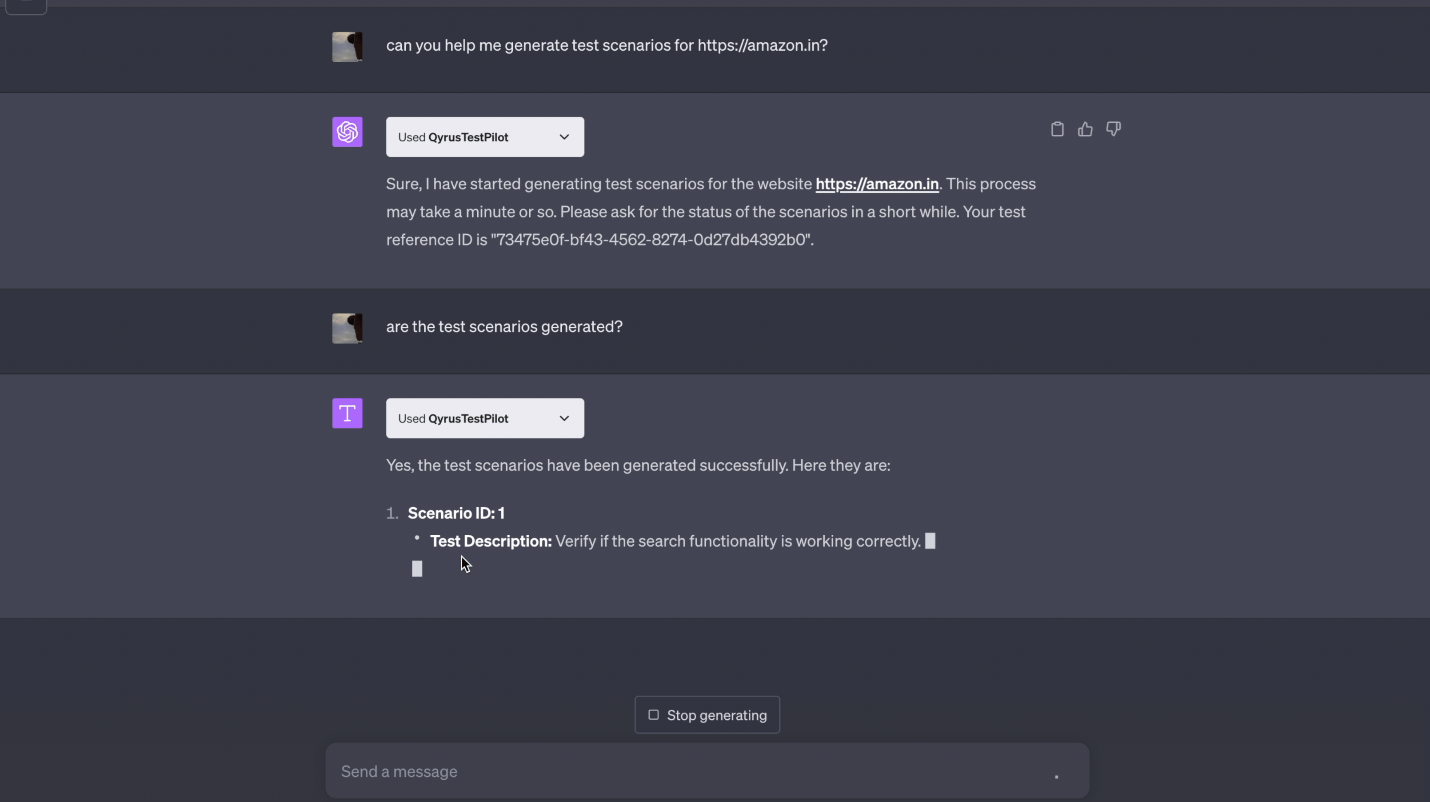
Sounds too good to be true? Take a look yourself! We asked it to generate tests for a page on Amazon’s website, and boy, did it deliver! From searching for products to checking login functionality and testing the wishlist feature, TestPilot nailed it!
Not only can this genius plugin identify the functionality and domain of an app based on its URL, but it also creates tailor-made test scenarios for optimal coverage – talk about saving time and effort!
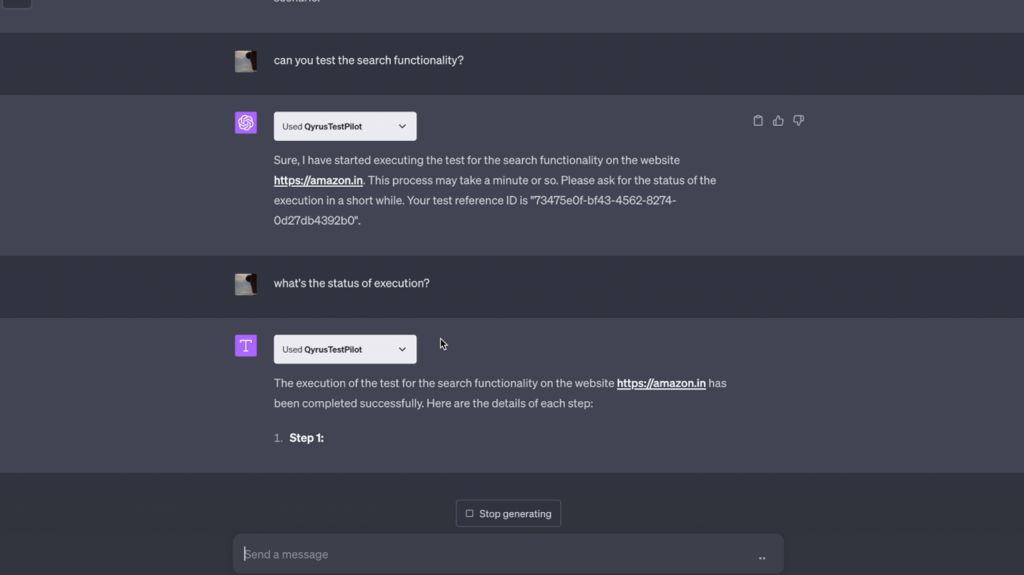
But wait, there’s more! TestPilot doesn’t just generate the tests, it also executes them using Qyrus Test Cloud, in real-time, providing instant results! No more waiting for test runs to complete or scrambling through logs. With TestPilot, you get your test results right away.
Here’s what it would look like
Open ChatGPT: You’ll need ChatGPT 4 subscription for the Qyrus plugin to work.
Install the Qyrus plugin ‘TestPilot’
Enter the URL in ChatGPT
Enjoy testing in a flash!
This Plugin can Change the Way we do Web Testing Forever
Instant Results, Real-Time Execution TestPilot doesn’t stop at test generation. It takes testing efficiency to the next level by seamlessly integrating with Qyrus Test Cloud, making this ChatGPT plugin a game-changer for test Cloud environments.
An immersive testing environment With the ability to re-run tests at any time, developers and QA teams can fine-tune their applications, ensuring optimal functionality and user experience. The GPT Chatbot makes this easier than ever!
Streamline processes like never before The TestPilot ensures optimal test coverage by intuitively identifying all the essential functionalities and generating test scenarios accordingly. This eliminates the risk of missing critical test cases, providing a more comprehensive testing process. With this streamlined experience, engineering teams can focus more on analyzing the results, fixing issues, and enhancing the overall quality of their websites.
Spread the word! We mean it when we say this plugin will change the way teams test software today and for years to come. With the ChatGPT integration, TestPilot brings forth a range of benefits that streamline web app testing. The intelligent algorithms behind ChatGPT enable TestPilot to identify the app’s functionality and domain, ensuring comprehensive test coverage.
This integration impacts Web App testing by eliminating the challenges engineering teams currently face with respect to time and effort. Through its smart test generation and real-time execution capabilities, the plugin enhances testing efficiency, accuracy, and overall software quality. With industry leaders already embracing AI in software testing, TestPilot positions itself as a vital tool in the quest for seamless and reliable web app testing.
Say goodbye to tedious testing, and hello to powering through with speed!
As content increases so do requirements, this is a standard of every given industry and one of the most basic but essential requirements is organization. For example, as clothing increases so does closet, wardrobe, and dresser space to promote a high level of organization. There is a surplus of products and solutions that target the need for organization due to growth. Other examples include spice drawers, shoe racks, hanging bike hooks, among more. The testing industry is no different, and the question remains, how do organizational methods change as test cases and automated test scripts increase? Standard name and description methods are useful, but to what extent? And how useful can they be across hundreds and even thousands of test cases? This week’s Feature Friday is brought to you by Milton and Kiwaun who will discuss Mind Maps, a unique way to organize and maintain tests at the script level, simplifying organization and maintenance across testing landscapes.
Tell us more about the Mind Maps featureoffered by Qyrusand its use cases.
Kiwaun: The concept of mind maps is very simple, yet extremely useful as well. During the creation of the scripts, Mind Maps allow users to place customized tags on scripts. Outside of the basic description and title of the script, you can now allocate personalized tags to the script to monitor a range of details.
Milton: Exactly, being able to add tags for testers, release cycles, specific features, and functionalities now gives scripts a customizable set of markers. Furthermore, when entering the mind maps you can then filter the suites by these different tags, providing you with a branching structure of all associated scripts and their previous execution specifics.
What is Mind Mapsoverall impact on the testing process?
Milton: This is a daily use feature during test building and reporting, which accelerates test coverage while reducing testing efforts. Mind Maps allow for a unique organization structure, which you can then filter from accordingly to have a quick and detailed view of all associated scripts and their previous executions.
Kiwaun: Exactly, having a detailed view of all users’ testing, which sprint release these scripts are a part of, or exactly what feature functionality they are testing could be extremely useful in day-to-day testing operations. Furthermore, this is a script-level tag, which means they are agnostic of other structures. Meaning, if you have your entire suite set up in a single organizational method, you can simply tag the individual scripts and enter the mind maps section in reporting and filter based on tags.
How might MindMaps help testers, developers, and business technologists? What valuecan this feature bring?
Kiwaun: For testers, Mind Maps make planning and organizing their scripts and suites much simpler. Suite and script structure are standard and extremely useful for organization purposes but are often restricted to customization. This way, testers can tag their scripts with their desired requirements and organize them at a high level. Outputting a clean branding diagram of all associated scripts makes it both informative and simple.
Milton: Developers are often seen tagging their sprints or their testers to given scripts. This allows developers to follow exactly what sprint cycle or release date certain features are a part of, and simultaneously note the coverage those features have or even know which testers from the team are covering which features. Furthermore, being able to navigate quickly to previous executions and understand which scripts are failing and why truly impacts release times and the overall quality assurance process.
Kiwaun: Even business analysts can monitor their team’s sprints, in-progress testing, or upcoming releases to ensure that application development is proper as well as test case coverage is consistent. Any holes in coverage, execution failures, and bugs can be easily identified accordingly.
Does the same or similar functionality exist without Qyrus, and how do competitors address similar problems?
Milton: There are a range of organizational methodologies out there, but none are as simple, transparent, yet useful as Qyrus Mind Maps. Simple organization and naming schemes can be powerful, but on a suite and script level as the number of requirements and in turn scripts increase, all standard organizational methods fail. This is where script-based tagging and in turn the Mind Maps’ hierarchy or branching display come in very handy.
Kiwaun: Furthermore, the diagrams are color-coordinated to previous execution specifics, and the branching and organization are automatically generated as the script is created using the tag. This, in turn, makes organizing a secondary thought, more or less effortless. And by automatically populating Mind Maps, reduces a surplus of effort that would have originally been the tester or developer’s responsibility. The feature can take away a large overhead previously dedicated to organizing and distributing test scripts.
How do you see Mind Mapsimpactingday-to-day operations across organizations?
Milton: Mind Maps are more of a daily-use feature than anything. The initial impact of the feature is directly upon script creation where custom tagging options are available and carry through the execution and reporting process, giving you the ability to not only organize by sprints and releases but also by the unique tags placed on each script. Multiple tags can be placed on each script, and they can also be filtered in buckets.
Kiwaun: Exactly, depending on tagging schemes it would be very easy to pull up a range of scripts that were for a given release cycle, built by a given tester, with additional tags as well. The ability to add as many tags as desired to a given script and filter across these tags using one or many makes finding different scripts or groups of scripts very simple. It is also very important to note that Mind Maps are automatically organized into a visual flow and mapping across tests and suites. This feature is both efficient and effective, delivering a high level of organization regardless of script size or quantity.
Mind Maps start with the ability to place individual or multiple tags across test scripts upon creation. These scripts act exactly as others across the platform, enabling a multitude of features and functionalities across test building, executing, and reporting. But using Mind Maps, these scripts can now be organized by tag or tags. This allows users to go into a large suite of scripts and filter out based on unique requirements, further providing a branching structure of previous executions with pass-fail indicators and execution specifics. Not only organizing the test scripts but also providing surface-level details of previous executions provides a moderate level of information alongside a high level of organization, enabling teams to be more organized and knowledgeable as testing requirements, and in turn test scripts, increase. Join us next week as we continue to delve into unique Qyrus features that revolutionize the testing process.
Kumar Vivek
Development
Duis aute irure dolor in reprehenderit in voluptate velit esse cillum dolore eu fugiat nulla pariatur. Excepteur sint occaecat cupidatat non proident, sunt in culpa qui officia deserunt mollit anim.