You’ve built a powerful mobile app. Your team has poured months into coding, designing, and refining it. Then, the launch day reviews arrive: “Crashes on my Samsung.” “The layout is broken on my Pixel tablet.” “Doesn’t work on the latest iOS.” Sounds familiar?
Welcome to the chaotic world of mobile fragmentation that hampers mobile testing efforts.
As of 2024, an incredible 4.88 billion people use a smartphone, making up over 60% of the world’s population. With more than 7.2 billion active smartphone subscriptions globally, the mobile ecosystem isn’t just a market—it’s the primary way society connects, works, and plays.
This massive market is incredibly diverse, creating a complex matrix of operating systems, screen sizes, and hardware that developers must account for. Without a scalable way to test across this landscape, you risk releasing an app that is broken for huge segments of your audience.
This is where a mobile device farm enters the picture. No matter how much we talk about AI automating the testing processes, testing range of devices and versions is still a challenge.
A mobile device farm (or device cloud) is a centralized collection of real, physical mobile devices used for testing apps and websites. It is the definitive solution to fragmentation, providing your QA and development teams with remote access to a diverse inventory of iPhones, iPads, and Android devices including Tabs for comprehensive app testing. This allows you to create a controlled, consistent, and scalable environment for testing your app’s functionality, performance, and usability on the actual hardware your customers use.
This guide will walk you through everything you need to know. We’ll cover what a device farm is, why it’s a competitive necessity for both manual tests and automated tests, the different models you can choose from, and what the future holds for this transformative technology.
Why So Many Bugs? Taming Mobile Device Fragmentation
The core reason mobile device farms exist is to solve a single, massive problem: device fragmentation. This term describes the vast and ever-expanding diversity within the mobile ecosystem, creating a complex web of variables that every app must navigate to function correctly. Without a strategy to manage this complexity, companies risk launching apps that fail for huge portions of their user base, leading to negative reviews, high user churn, and lasting brand damage.
Let’s break down the main dimensions of this challenge.
Hardware Diversity
The market is saturated with thousands of unique device models from dozens of manufacturers. Each phone or tablet comes with a different combination of screen size, pixel density, resolution, processor (CPU), graphics chip (GPU), and memory (RAM). An animation that runs smoothly on a high-end flagship might cause a budget device to stutter and crash. A layout that looks perfect on a 6.1-inch screen could be unusable on a larger tablet. Effective app testing must account for this incredible hardware variety.
Operating System (OS) Proliferation
As of August 2025, Android holds the highest market share at 73.93% among mobile operating systems, followed by iOS (25.68%). While the world runs on Android and iOS, simplicity is deceptive. At any given time, there are numerous active versions of each OS in the wild, and users don’t always update immediately. The issue is especially challenging for Android devices, where manufacturers like Samsung apply their own custom software “skins” (like One UI) on top of the core operating system. These custom layers can introduce unique behaviors and compatibility issues that don’t exist on “stock” Android, creating another critical variable for your testing process.
This is the chaotic environment your app is released into. A mobile device farm provides the arsenal of physical devices needed to ensure your app delivers a flawless experience, no matter what hardware or OS version your customers use.
Can’t I Just Use an Emulator? Why Real Physical Devices Win
In the world of app development, emulators and simulators—software that mimics mobile device hardware—are common tools. They are useful for quick, early-stage checks directly from a developer’s computer. But when it comes to ensuring quality, relying on them exclusively is a high-risk gamble.
Emulators cannot fully replicate the complex interactions of physical hardware, firmware, and the operating system. Testing on the actual physical devices your customers use is the only way to get a true picture of your app’s performance and stability. In fact, a 2024 industry survey found that only 19% of testing teams rely solely on virtual devices. The overwhelming majority depend on real-device testing for a simple reason: it finds more bugs.
What Emulators and Simulators Get Wrong
Software can only pretend to be hardware. This gap means emulators often miss critical issues related to real-world performance. They struggle to replicate the nuances of:
CPU and Memory Constraints: An emulator running on a powerful developer machine doesn’t accurately reflect how an app performs on a device with limited processing power and RAM.
Battery Drain: You can’t test an app’s impact on battery life without a real battery. This is a crucial factor for user satisfaction that emulators are blind to.
Hardware Interactions: Features that rely on cameras, sensors, or Bluetooth connections behave differently on real hardware than in a simulated environment.
Network Interruptions: Real devices constantly deal with fluctuating network conditions and interruptions from calls or texts—scenarios that emulators cannot authentically reproduce.
Using a device cloud with real hardware allows teams to catch significantly more app crashes simply by simulating these true user conditions.
When to Use Emulators (and When Not To)
Emulators have their place. They are great for developers who need to quickly check a new UI element or run a basic functional check early in the coding process.
However, for any serious QA effort—including performance testing, regression testing, and final pre-release validation—they are insufficient. For that, you need a mobile device farm.
Public, Private, or Hybrid? How to Choose Your Device Farm Model
Once you decide to use a mobile device farm, the next step is choosing the right model. This is a key strategic decision that balances your organization’s specific needs for security, cost, control, and scale.Let’s look at the three main options.
Public Cloud Device Farms
Public cloud farms are services managed by third-party vendors like Qyrus that provide on-demand access to a large, shared pool of thousands of real mobile devices.
Pros: This model requires no upfront hardware investment and eliminates maintenance overhead, as the vendor handles everything. You get immediate access to the latest devices and can easily scale your app testing efforts up or down as needed.
Cons: Because the infrastructure is shared, some organizations have data privacy concerns, although top vendors use rigorous data-wiping protocols. You are also dependent on internet connectivity, and you might encounter queues for specific popular devices during peak times.
Private (On-Premise) Device Farms
A private farm is an infrastructure that you build, own, and operate entirely within your own facilities. This model gives you absolute control over the testing environment.
Pros: This is the most secure option, as all testing happens behind your corporate firewall, making it ideal for highly regulated industries. You have complete control over device configurations and there are no recurring subscription fees after the initial setup.
Cons: The drawbacks are significant. This approach requires a massive initial capital investment for hardware and ongoing operational costs for maintenance, updates, and repairs. Scaling a private farm is a slow and expensive manual process, making it difficult to keep pace with the market.
Hybrid Device Farms
As the name suggests, a hybrid model is a strategic compromise that combines elements of both public and private farms. An organization might maintain a small private lab for its most sensitive manual tests while using a public cloud for large-scale automated tests and broader device coverage. This approach offers a compelling balance of security and flexibility.
Expert Insight: Secure Tunnels Changed the Game
A primary barrier to using public clouds was the inability to test apps on internal servers behind a firewall. This has been solved by secure tunneling technology. Features like “Local Testing” create an encrypted tunnel from the remote device in the public cloud directly into your company’s internal network. This allows a public device to safely act as if it’s on your local network, making public clouds a secure and viable option for most enterprises.
Quick Decision Guide: Which Model is Right for You?
You need a Public Farm if: You prioritize speed, scalability, and broad device coverage. This model is highly effective for startups and small-to-medium businesses (SMBs) who need to minimize upfront investment while maximizing flexibility.
You need a Private Farm if: You operate under strict data security and compliance regulations (e.g., in finance or healthcare) and have the significant capital required for the initial investment.
You need a Hybrid Farm if: You’re a large enterprise that needs a balance of maximum security for core, data-sensitive apps and the scalability of the cloud for general regression testing.
6 Must-Have Features of a Modern Mobile Device Farm
Getting access to devices is just the first step. The true power of a modern mobile device farm comes from the software and capabilities that turn that hardware into an accelerated testing platform. These features are what separate a simple device library from a tool that delivers a significant return on investment.
Here are five essential features to look for.
1. Parallel Testing
This is the ability to run your test suites on hundreds of device and OS combinations at the same time. A regression suite that might take days to run one-by-one can be finished in minutes. This massive parallelization provides an exponential boost in testing throughput, allowing your team to get feedback faster and release more frequently.
2. Rich Debugging Artifacts
A failed test should provide more than just a “fail” status. Leading platforms provide a rich suite of diagnostic artifacts for every single test run. This includes full video recordings, pixel-perfect screenshots, detailed device logs (like logcat for Android), and even network traffic logs. This wealth of data allows developers to quickly find the root cause of a bug, dramatically reducing the time it takes to fix it.
3. Seamless CI/CD Integration
Modern device farms are built to integrate directly into Continuous Integration/Continuous Deployment (CI/CD) pipelines like Jenkins or GitLab CI. This allows automated tests on real devices to become a standard part of your development process. With every code change, tests can be triggered automatically, giving developers immediate feedback on the impact of their work and catching bugs within minutes of their introduction.
4. Real-World Condition Simulation
Great testing goes beyond the app itself; it validates performance in the user’s environment. Modern device farms allow you to simulate a wide range of real-world conditions. This includes testing on different network types (3G, 4G, 5G), simulating poor or spotty connectivity, and setting the device’s GPS location to test geo-specific features. This is essential for ensuring your app is responsive and reliable for all users, everywhere.
5. Broad Automation Framework Support
Your device farm must work with your tools. Look for a platform with comprehensive support for major mobile automation frameworks, especially the industry-standard test framework, Appium. Support for native frameworks like Espresso (Android) and XCUITest (iOS) is also critical. This flexibility ensures that your automation engineers can write and execute scripts efficiently without being locked into a proprietary system.
6. Cross Platform Testing Support
Modern businesses often perform end-to-end testing of their business processes across various platforms such as mobile, web and desktop. Device farms should seamlessly support such testing requirements with session persistence while moving from one platform to another.
Qyrus Device Farm: Go Beyond Access, Accelerate Your Testing
Access to real devices is the foundation, but the best platforms provide powerful tools that accelerate the entire testing process. The Qyrus Device Farm is an all-in-one platform designed to streamline your workflows and supercharge both manual tests and automated tests on real hardware. It delivers on all the “must-have” features and introduces unique tools to solve some of the biggest challenges in mobile QA.
Our platform is built around three core pillars:
Comprehensive Device Access: Test your applications on a diverse set of real hardware, including the smartphones and tablets your customers use, ensuring your app works flawlessly in their hands.
Powerful Manual Testing: Interactively test your app on a remote device in real-time. Qyrus gives you full control to simulate user interactions, identify usability issues, and explore every feature just as a user would.
Seamless Appium Automation: Automate your test suites using the industry-standard Appium test framework. Qyrus enables you to run your scripted automated tests in parallel to catch regressions early and often, integrating perfectly with your CI/CD pipeline.
Bridge Manual and Automated Testing with Element Explorer
A major bottleneck in mobile automation is accurately identifying UI elements to create stable test scripts. The Qyrus Element Explorer is a powerful feature designed to eliminate this problem.
How it Works: During a live manual test session, you can activate the Element Explorer to interactively inspect your application’s UI. By simply clicking on any element on the screen—a button, a text field, an image—you can instantly see its properties (IDs, classes, text, XPath) and generate reliable Appium locators.
The Benefit: This dramatically accelerates the creation of automation scripts. It saves countless hours of manual inspection, reduces script failures caused by incorrect locators, and makes your entire automation effort more robust and efficient.
Simulate Real-World Scenarios with Advanced Features
Qyrus allows you to validate your app’s performance under complex, real-world conditions with a suite of advanced features:
Network Reshaping: Simulate different network profiles and poor connectivity to ensure your app remains responsive and handles offline states gracefully.
Interrupt Testing: Validate that your application correctly handles interruptions from incoming phone calls or SMS messages without crashing or losing user data.
Biometrics Bypass: Test workflows that require fingerprint or facial recognition by simulating successful and failed authentication attempts, ensuring your secure processes are working correctly.
Test Orchestration: Qyrus device farm is integrated into its Test Orchestration module that performs end-to-end business process testing across web, mobile, desktop and APIs.
Ready to accelerate your Appium automation and empower your manual testing? Explore the Qyrus Device Farm and see these features in action today.
The Future of Mobile Testing: What’s Next for Device Farms?
The mobile device farm is not a static technology. It’s rapidly evolving from a passive pool of hardware into an “intelligent testing cloud”. Several powerful trends are reshaping the future of mobile testing, pushing these platforms to become more predictive, automated, and deeply integrated into the development process.
AI and Machine Learning Integration
Artificial Intelligence (AI) and Machine Learning (ML) are transforming device farms from simple infrastructure into proactive quality engineering platforms. This shift is most visible in how modern platforms now automate the most time-consuming parts of the testing lifecycle.
AI-Powered Test Generation and Maintenance: A major cost of automation is the manual effort required to create and maintain test scripts. Qyrus directly addresses this with Rover, a reinforcement learning bot that automatically traverses your mobile application. Rover explores the app on its own, visually testing UI elements and discovering different navigational paths and user journeys. As it works, it generates a complete flowchart of the application’s structure. From this recorded journey, testers can instantly build and export mobile test scripts, dramatically accelerating the test creation process.
Self-Healing Tests: As developers change the UI, traditional test scripts often break because element locators become outdated. AI-driven tools like Qyrus Healer can intelligently identify an element, like a login button, even if its underlying code has changed. This “self-healing” capability dramatically reduces the brittleness of test scripts and lowers the ongoing maintenance burden.
Predictive Analytics: By analyzing historical test results and code changes, AI platforms can predict which areas of an application are at the highest risk of containing new bugs. This allows QA teams to move away from testing everything all the time and instead focus their limited resources on the most critical and fragile parts of the application, increasing efficiency.
Preparing for the 5G Paradigm Shift
The global deployment of 5G networks introduces a new set of testing challenges that device farms are uniquely positioned to solve. Testing for 5G readiness involves more than just speed checks; it requires validating:
Ultra-low latency for responsive apps like cloud gaming and AR.
Battery consumption under the strain of high data throughput.
Seamless network fallback to ensure an app functions gracefully when it moves from a 5G network to 4G or Wi-Fi.
Addressing Novel Form Factors like Foldables
The introduction of foldable smartphones has created a new frontier for mobile app testing. These devices present a unique challenge that cannot be tested on traditional hardware. The most critical aspect is ensuring “app continuity,” where an application seamlessly transitions its UI and state as the device is folded and unfolded, without crashing or losing user data. Device farms are already adding these complex devices to their inventories to meet this growing need.
Your Next Steps in Mobile App Testing
The takeaway is clear: in today’s mobile-first world, a mobile device farm is a competitive necessity. It is the definitive market solution for overcoming the immense challenge of device fragmentation and is foundational to delivering the high-quality, reliable, and performant mobile applications your users demand.
As you move forward, remember that the right solution—whether public, private, or hybrid—depends on your organization’s unique balance of speed, security, and budget.
Ultimately, the future of quality assurance lies not just in accessing devices, but in leveraging intelligent platforms that provide powerful tools. Features like advanced element explorers for automation and sophisticated real-world simulations are what truly accelerate and enhance the entire testing lifecycle, turning a good app into a great one.
Welcome to the final chapter of our five-part series on Agentic Orchestration. We’ve journeyed through the entire SEER framework—from the ‘Eyes and Ears’ of Sense, to the ‘Brain’ of Evaluate, and the ‘Muscle’ of Execute. If you’re just joining us, we invite you to start from the beginning to see how this transformative approach is reshaping the future of QA.
The Final Verdict: From Raw Data to Decisive Action with Agentic Orchestration
The tests have run. The agents have completed their mission. But in modern quality assurance, a simple “pass/fail” is no longer enough. The most critical part of the process is answering the question: “What did we learn, and what do we do next?” This is the final, crucial step where the entire value of the testing process is realized.
For too long, teams have been trapped by the failure of traditional test reporting. They face a flood of raw data—endless logs, fragmented dashboards from multiple tools, and noisy results that create more confusion than clarity. This data overload forces engineers to spend valuable time manually triaging issues instead of innovating. It’s a process that delivers data, but not decisions.
Welcome to the ‘Report’ stage, the intelligence layer of the Qyrus SEER framework. This is where we close the loop. Here, Agentic AI Orchestration moves beyond simple reporting and transforms raw test outcomes into strategic business intelligence. We will show you how the system delivers true Test Reporting & Test Insights that empower your team to act with speed and confidence.
Decoding the Data: Meet SEER’s Reporting Agents
To deliver true Test Reporting & Test Insights, the Qyrus SEER framework relies on a specialized unit of Single Use Agents (SUAs). These agents work in concert to sift through the raw outcomes from the execution stage, analyze the results, and present a clear, intelligent picture of your application’s quality. They are the analysts and translators of the operation.
The AI Analyst: Eval
At the heart of the reporting process is Eval. This sophisticated agent intelligently evaluates the outputs from all the tests, including those from complex AI models within your application.
Eval goes far beyond a simple pass/fail; it provides a deeper, more contextual analysis of the results, ensuring you understand the nuances of the test outcome. It’s the expert analyst that finds the signal in the noise.
The Mission Control Dashboard: AnalytiQ
AnalytiQ is the agent that brings everything together. It aggregates the logs and metrics from the entire execution squad—TestPilot, Rover, API Builder, and more—into a single, comprehensive dashboard. This provides your entire team, from developers to business leaders, with a centralized, single source of truth for quality, tracking trends and stability over time.
The Conversational Specialist: BotMetrics
Showcasing the platform’s flexibility, specialized agents like BotMetrics can be deployed for unique reporting needs. BotMetrics provides an expert, AI-driven evaluation of a chatbot’s conversational skills, analyzing interactions and providing recommendations to enhance the user experience. This demonstrates how Agentic AI Orchestration can provide deep insights for any component of your digital ecosystem.
The Assembly Line of Intelligence: How SEER Crafts Your Test Insights
Generating a truly valuable report is a deliberate, multi-step process. Agentic AI Orchestration doesn’t just dump raw data into a folder; it guides the results through a sophisticated assembly line of analysis to ensure the final output is concise, relevant, and immediately actionable. This is how the system produces world-class Test Reporting & Test Insights.
Step 1: Consolidate Test Coverage: Before analyzing failures, the system first confirms success. It automatically cross-checks the completed test runs with the specific components and user stories that were impacted by the initial change. This crucial first step ensures that the test scope was complete, providing immediate confidence that you tested everything that mattered.
Step 2: Perform AI-Driven Risk Assessment: Next, the agents evaluate the severity and potential business impact of any defects or anomalies that were found. They intelligently prioritize issues, categorizing them into high, medium, and low severity so your team knows exactly where to focus their attention first. This moves the conversation from “what broke?” to “what is the most critical thing to fix right now?”
Step 3: Deliver Instant, Actionable Feedback: Finally, the system delivers the verdict. A concise API Testing Report, a summary of UI validation, or a list of prioritized defects is sent instantly to the right stakeholders through automated notifications on Slack, email, or via updates to Jira tickets. The feedback loop that used to take days of manual triage is now closed in minutes.
Closing the Loop: The Transformative Benefits of Agentic Reporting
This intelligent reporting workflow does more than just save time; it creates a virtuous cycle of continuous improvement that fundamentally enhances your entire quality assurance process. The benefits of this Agentic AI Orchestration extend far beyond a simple dashboard, providing a clear competitive advantage.
Actionable Insights, Not Data Dumps: The system provides a deeper understanding of software quality by delivering insights that empower your team, not overwhelm them. Specialized agents like Eval intelligently assess outputs to provide smarter, more contextual results. This transforms your Test Reporting & Test Insights from a reactive log of what happened into a proactive guide for what to do next.
Predictive Analytics for Proactive Quality: By analyzing historical test results, defect trends, and risk profiles stored in the Context DB, the framework begins to predict potential failures before they happen. It identifies patterns and high-risk areas in your application. This allows your team to shift from a reactive to a proactive stance, optimizing test strategies to address issues long before they can impact your customers.
A Learning Loop for Continuous Improvement: This is the most powerful benefit of the entire framework. The system creates a continuous feedback loop. Every test outcome, coverage gap, and updated risk analysis is fed back into the Context DB, enriching the system’s knowledge base. This new knowledge makes the entire Qyrus SEER framework smarter and more efficient with every single test run, ensuring your QA process constantly evolves and adapts.
From Theory to Bottom Line: The Tangible ROI of Agentic Orchestration
AI in testing has officially reached its tipping point. Industry studies confirm that this is no longer a future concept but a present-day reality. A remarkable 68% to 71% of organizations now report that they have integrated or are utilizing Generative AI in their operations to advance Quality Engineering. The industry has spoken, and the move toward AI-driven quality is accelerating.
However, adopting AI is only the first step. The true measure of success lies in the tangible results it delivers. This is where the Qyrus SEER framework moves beyond the hype, translating the power of Agentic AI Orchestration into a measurable test automation ROI that transforms your bottom line.
Unprecedented Speed and Efficiency: By eliminating manual hand-offs and orchestrating targeted tests with specialized agents, the Qyrus platform dramatically accelerates the entire testing cycle. This allows organizations to shorten release timelines and increase developer productivity. Teams leveraging this intelligent automation see a 50-70% reduction in overall testing time. This translates directly to a faster time-to-market for new features, giving your business a significant competitive advantage.
Drastically Reduced Costs and Reallocated Talent: The autonomous, agent-driven nature of the SEER framework directly attacks the largest hidden costs in most QA organizations: maintenance and tool sprawl. By deploying the Healer agent to automatically fix broken scripts, organizations reduce the time and effort spent on test script maintenance by a staggering 65-70%. This frees your most valuable and expensive engineering talent from low-value repair work, allowing you to reallocate their expertise toward innovation and complex quality challenges.
Enhanced Quality and Deployment Confidence: Speed and cost savings are meaningless without quality. By intelligently analyzing changes and deploying agents like Rover and TestGenerator+ to explore untested paths, the Qyrus platform improves the effectiveness of your testing. AI-driven test generation can improve test coverage by up to 85%, ensuring that more of your application is validated before release. This smarter approach also leads to a 25-30% improvement in defect detection rates, catching more critical bugs before they impact your customers.
Conclusion: The SEER Saga—A New Era of Autonomous Quality
Our journey through the Qyrus SEER framework is now complete. We’ve seen how Agentic AI Orchestration builds a truly autonomous system, moving intelligently from one stage to the next. It begins with the “Eyes and Ears” of the Sense stage, which detects every change in your development ecosystem. It then moves to the “Brain” of the Evaluate stage, where it analyzes the impact and crafts a perfect testing strategy. Next, the “Muscle” of the Execute stage unleashes a squad of agents to perform the work with speed and precision.
Finally, we arrive at the “Voice” of the Report stage. This is where the system closes the loop, transforming raw data into the critical insights that drive your business forward. This is far more than just a new set of tools; it’s a fundamental paradigm shift that transforms QA from a bottleneck into a strategic accelerator. It’s how you can finally achieve faster releases, comprehensive coverage, and a significant reduction in costs, all while delivering higher-quality software.
Ready to Explore Qyrus’ Autonomous SEER Framework? Contact us today!
Welcome to the fourth chapter of our Agentic Orchestration series. So far, we’ve seen how the Qyrus SEER framework uses its ‘Eyes and Ears’ to Sense changes and its ‘Brain’ to Evaluate the impact. Now, it’s time to put that intelligence into action. In this post, we’ll explore the ‘Muscle’ of the operation: the powerful test execution stage. If you’re new to the series, we recommend starting with Part 1 to understand the full journey.
How the Qyrus SEER Framework Redefines Test Execution
The Test Strategy is set. The impact analysis is complete. In the last stage of our journey, the ‘Evaluate stage’ in the Qyrus SEER framework acted as the strategic brain, crafting the perfect testing plan. Now, it’s time to unleash the hounds. Welcome to the ‘Execute’ stage—where intelligent plans transform into decisive, autonomous action.
In today’s hyper-productive environment, where AI assistants contribute to as much as 25% of new code, development teams operate at an unprecedented speed. Yet, QA often struggles to keep up, creating a “velocity gap” where traditional testing becomes the new bottleneck. It’s a critical business problem. To solve it, you need more than just automation; you need intelligent agentic orchestration.
This is where the SEER framework truly shines. It doesn’t just run a script. It conducts a sophisticated team of specialized Single Use Agents (SUAs), launching an intelligent and targeted attack on quality. This is the dawn of true autonomous test execution, an approach that transforms QA from a siloed cost center into a strategic business accelerator.
Unleashing the Test Agents: A Multi-Agent Attack on Quality
The Qyrus SEER framework’s brilliance lies in its refusal to use a one-size-fits-all approach. Instead of a single, monolithic tool, SEER acts as a mission controller for its agentic orchestration, deploying a squad of highly specialized Single Use Agents (SUAs) to execute the perfect test, every time. This isn’t just automation; this is a coordinated, multi-agent attack on quality.
The UI Specialist – TestPilot: When the user interface needs validation, SEER deploys TestPilot. This agent acts as your AI co-pilot, creating and executing functional tests across both web and mobile platforms. It simulates real user interactions with precision, ensuring your application’s UI testing is thorough and that the front-end experience is not just functional, but flawless.
The Backend Enforcer – API Builder: For the core logic of your application, API Builder gets the call. This powerful agent executes deep-level API testing to validate your backend services, microservices, and complex integration points. It can even instantly virtualize APIs based on user requirements, allowing for robust and isolated testing that isn’t dependent on other systems being available.
The Autonomous Explorer – Rover: What about the bugs you didn’t think to look for? SEER deploys Rover, an autonomous AI scout that explores your application to uncover hidden bugs and untested pathways that scripted tests would inevitably miss. Rover’s exploratory work is a crucial part of our AI test execution, ensuring comprehensive coverage and building a deep confidence in your release.
The Maintenance Expert – Healer: Perhaps the most revolutionary agent in the squad is Healer. Traditional test automation’s greatest weakness is maintenance; scripts are brittle and break when an application’s UI changes. Healer solves this problem. When a test fails due to a legitimate application update, this agent automatically analyzes the change and updates the test script, delivering true self-healing tests. It single-handedly eliminates the endless cycle of fixing broken tests.
Behind the Curtain: The Technology Driving Autonomous Execution
This squad of intelligent agents doesn’t operate in a vacuum. They are powered by a robust and scalable engine room designed for one purpose: speed. The Qyrus SEER framework integrates deeply into your development ecosystem to make autonomous test execution a seamless reality.
First, Qyrus plugs directly into your existing workflow through flawless continuous integration. The moment a developer merges a pull request or a new build is ready, the entire execution process is triggered automatically within your CI/CD pipeline, whether it’s Jenkins, Azure DevOps, or another provider. This eliminates manual hand-offs and ensures that testing is no longer a separate phase, but an integrated part of development itself.
Next, Qyrus shatters the linear testing bottleneck with massive parallel testing. Instead of running tests one by one, our platform dynamically allocates resources, spinning up clean, temporary environments to run hundreds of tests simultaneously across a secure and scalable browser and device farm. It’s the difference between a single-lane road and a 100-lane superhighway. This is how we transform test runs that used to take hours into a process that delivers feedback in minutes.
The Bottom Line: Measuring the Massive ROI of Agentic Orchestration
A sophisticated platform is only as good as the results it delivers, and this is where the Qyrus SEER framework truly changes the game. By replacing slow, manual processes and brittle scripts with an autonomous team of agents, this approach delivers a powerful and measurable test automation ROI. This isn’t about incremental improvements; it’s about a fundamental transformation of speed, cost, and quality.
Slash Testing Time and Accelerate Delivery: By orchestrating parallel testing across a scalable cloud infrastructure, Qyrus shatters the testing bottleneck. This allows organizations to shorten release cycles and dramatically increase developer productivity. Teams that embrace this model see a staggering 50-70% reduction in overall testing time. What once took an entire night of regression testing now delivers feedback in minutes, giving your business a significant competitive advantage.
Eliminate Maintenance Costs and Reallocate Talent: The Healer agent directly attacks the single largest hidden cost in most QA organizations: script maintenance. By automatically fixing broken tests, Healer allows organizations to reduce the time and effort spent on test script maintenance by an incredible 65-70%. This frees your most valuable engineers from low-value repair work, allowing you to reallocate their expertise toward innovation and complex quality challenges that truly move the needle.
Enhance Quality and Deploy with Bulletproof Confidence: Speed is meaningless without quality. By intelligently deploying agents like Rover to explore untested paths, the Qyrus SEER framework dramatically improves the effectiveness of your testing. This smarter approach leads to a 25-30% improvement in defect detection rates, catching critical bugs long before they can impact your customers. This allows your teams to release with absolute confidence, knowing that quality and speed are finally working in perfect harmony.
Conclusion: The Dawn of Autonomous, Self-Healing QA
The Qyrus ‘Execute’ stage fundamentally redefines what it means to run tests. It transforms the process from a slow, brittle, and high-maintenance chore into a dynamic, intelligent, and self-healing workflow. This is where the true power of agentic orchestration comes to life. No longer are you just running scripts; you are deploying a coordinated squad of autonomous agents that execute, explore, and even repair tests with a level of speed and efficiency that was previously unimaginable.
This is the engine of modern quality assurance—an engine that provides the instant, trustworthy feedback necessary to thrive in a high-velocity, CI/CD-driven world.
But the mission isn’t over yet. Our autonomous agents have completed their tasks and gathered a wealth of data. So, how do we translate those raw results into strategic business intelligence?
In the final part of our series, we will dive into the ‘Report’ stage. We’ll explore how the Qyrus SEER framework synthesizes the outcomes from its multi-agent attack into clear, actionable insights that empower developers, inform stakeholders, and complete the virtuous cycle of intelligent, autonomous testing.
Ready to Explore Qyrus’ Autonomous Test Execution? Contact us today!
Software development has hit hyperdrive. Groundbreaking AI tools like Devin, GitHub Copilot, and Amazon Code Whisperer are transforming the SDLC landscape, with AI assistants now contributing to a substantial volume of code. But as engineering teams rocket forward, a critical question emerges: what about QA?
While development speeds accelerate, traditional quality assurance practices are struggling to keep up, creating a dangerous bottleneck in the delivery pipeline. Legacy methods, bogged down by time-consuming manual testing and automation scripts that demand up to 50% of an engineer’s time just for maintenance, simply cannot scale. This widening gap doesn’t just cause delays; it creates a massive test debt that threatens to derail your innovation engine.
The answer isn’t to hire more testers or to simply test more. The answer is to test smarter.
This is where a new paradigm, agentic orchestration, comes into play. We’d like to introduce you to Qyrus SEER, an intelligent, autonomous testing framework built on this principle. SEER is designed to close the gap permanently, leveraging a sophisticated AI orchestration model to ensure your quality assurance moves at the speed of modern development.
The QA Treadmill: Why Old Methods Fail in the New Era
Developers are not just coding faster; they are building in fundamentally new ways. At tech giants like Google and Microsoft, AI already writes between 20-40% of all new code, turning tasks that once took hours into scaffolds that take mere minutes. This has created a massive velocity gap, and traditional QA teams are caught on the wrong side of it, running faster just to stand still.
Qyrus SEER Infographic: The Velocity Gap
The Widening Gap: Is Your QA Keeping Pace?
AI is revolutionizing development, but traditional QA methods are struggling to keep up.
AI-Accelerated Development
67% of developers are using AI assistants, according to a survey.
At major tech companies, AI already accounts for 20-40% of new code.
Moving at unprecedented speed.
GAP
Traditional QA
35% of companies say manual testing is their most time-consuming activity.
Up to 50% of test engineering time is lost to script maintenance.
Running faster just to stand still.
The breakdown happens across three critical fronts:
The Manual Testing Bottleneck: The first casualty in this new race is manual testing. It’s an anchor in a sea of automation. When developers deploy AI-generated code with unprecedented speed, manual processes simply cannot keep up. It’s no surprise that 35% of companies identify manual testing as the single most time-consuming activity in their test cycles, making it a guaranteed chokepoint.
The Crushing Weight of Maintenance: For those who have embraced automation, a different nightmare emerges. Traditional, script-based automation is incredibly brittle. As AI-accelerated development causes applications to change more rapidly, the maintenance burden becomes unsustainable. Teams spend more time fixing old, broken tests than they do creating new ones to cover emerging features, trapping them in a reactive, inefficient cycle.
The Growing Skills Gap Crisis: Perhaps the most significant barrier is the human one. There’s a stark paradox in the industry: while a massive 82% of QA professionals recognize that AI skills will be critical in the coming years, a full 42% of today’s QA engineers lack the machine learning expertise needed to adopt these new tools. This crisis delays the implementation of effective agent orchestration, leaving teams without the internal champions required to lead the charge.
Qyrus SEER Infographic: The AI Skills Gap
The AI Skills Gap: A House Divided
There’s a disconnect between acknowledging the need for AI skills and possessing them.
The Acknowledged Need
82%
Of QA professionals agree that AI skills will be critical for their careers in the next 3-5 years.
The Current Reality
42%
Of QA engineers currently lack the machine learning and AI expertise required for implementation.
Intelligent Agentic AI Orchestration: Meet the Conductor of Chaos
The old model is broken. So, what’s the solution? You can’t fight an AI-driven problem with manual-driven processes. You need to fight fire with fire.
This is where Qyrus SEER introduces a new paradigm. This isn’t just another tool to add to your stack; it is a fundamental shift in how quality is managed, built upon one of the most advanced AI agent orchestration frameworks available today. Think of SEER not as a single instrument, but as the conductor of your entire testing orchestra. It intelligently manages the end-to-end workflow, ensuring every component of your testing process performs in perfect harmony and at the right time. This is the future of testing, a trend underscored by the fact that 70% of organizations are on track to integrate AI for test creation, execution, and maintenance by 2025.
At its core, SEER’s power comes from a simple yet profound four-stage cycle:
Sense → Evaluate → Execute → Report
This framework dismantles the old, linear process of test-then-fix. Instead, it creates a dynamic, continuous feedback loop that intelligently responds to the rhythm of your development lifecycle. It’s a system designed not just to find bugs, but to anticipate needs and act on them with autonomous precision.
Qyrus SEER Infographic: The SEER Framework
The SEER Framework: How Agentic Orchestration Works
A continuous, intelligent cycle that automates testing from end to end.
SENSE
Proactively monitors GitHub for code commits and Figma for design changes in real-time.
EVALUATE
Intelligently analyzes the impact of changes to identify affected APIs and UI components.
EXECUTE
Deploys the right testing agents (API Bots, UI Test Pilots) for a precision strike.
REPORT
Delivers actionable insights and integrates results directly into the development workflow.
Inside the Engine of Agentic AI Orchestration
SEER operates on a powerful, cyclical principle that transforms testing from a rigid, scheduled event into a fluid, intelligent response. This is the agentic orchestration framework in action, where each stage feeds into the next, creating a system that is constantly learning and adapting.
Sense: The Ever-Watchful Sentry
It all begins with listening. SEER plugs directly into the heart of your development ecosystem, acting as an ever-watchful sentry. It doesn’t wait to be told a change has occurred; it observes it in real-time. This includes:
Monitoring your repositories like GitHub for every code commit, merge, and pull request.
Observing design platforms such as Figma to detect UI and UX modifications as they happen.
This proactive monitoring means that the testing process is triggered by actual development activity, not by an arbitrary schedule. It’s the first step in aligning the pace of QA with the pace of development.
Evaluate: From Change to Actionable Insight
This is where the intelligence truly shines. Once SEER senses a change, it doesn’t just react; it analyzes the potential impact. It uses predictive intelligence to understand the blast radius of every modification, enabling it to pinpoint where defects are most likely to occur. For instance:
When a developer commits code, SEER parses the changes to identify precisely which APIs and backend services are affected.
When a designer updates a layout in Figma, SEER maps those visual changes to the corresponding user journeys and test scenarios.
This deep analysis is what sets AI agent orchestration frameworks apart. Instead of forcing your team to run a massive, time-consuming regression suite for a minor change, SEER eliminates the guesswork and focuses testing efforts only where they are needed most.
Execute: The Precision Strike
Armed with a clear understanding of the impact, SEER launches a precision strike. It orchestrates and deploys the exact testing agents required to validate the specific change. This is adaptive automation at its best.
For backend changes, it can deploy API Bots to conduct targeted tests on the impacted services.
For frontend modifications, it uses the Qyrus Test Pilot (QTP) to execute UI tests that reflect the new designs.
Crucially, these are not brittle, old-fashioned scripts. SEER’s execution is built on modern AI principles, where tests can automatically adapt to UI changes without human intervention, solving one of the biggest maintenance challenges in test automation.
Report: Closing the Loop with Clarity
The final stage is to deliver feedback that is both rapid and insightful. SEER generates clear, concise reports that detail test outcomes, code coverage, and performance metrics. But it doesn’t just send an email. It integrates these results directly into your CI/CD pipeline and development workflows, creating a seamless, continuous feedback loop. This ensures developers and stakeholders get the information they need instantly, allowing them to make confident decisions and accelerate the entire release cycle.
Qyrus SEER Infographic: The Old Way vs. The SEER Way
The Old Way vs. The SEER Way
Feature
Traditional QA (The Bottleneck)
Qyrus SEER (Agentic Orchestration)
Trigger
Manual start or fixed schedules
Real-time, triggered by code commits & design changes
Scope
Run entire regression suite; “test everything” approach
Intelligent impact analysis; tests only what’s affected
Maintenance
High; brittle scripts constantly break (up to 50% of engineer’s time)
Low; self-healing and adaptive automation
Feedback Loop
Slow; often takes hours or days
Rapid; real-time insights integrated into the CI/CD pipeline
Effort
High manual effort, high maintenance
Low manual effort, autonomous operation
Outcome
Slow releases, test debt, missed bugs
Accelerated releases, high confidence, improved coverage
The SEER Payoff: Unlocking Speed, Confidence, and Quality
Adopting a new framework is not just about better technology; it’s about achieving better outcomes. By implementing an intelligentagentic orchestration system like SEER, you move your team from a state of constant reaction to one of confident control. The benefits are not just theoretical; they are measurable.
Reclaim Your Time with Adaptive Automation
Imagine freeing your most skilled engineers from the soul-crushing task of constantly fixing broken test scripts. SEER’s ability to adapt to changes in your application’s code and UI without manual intervention directly combats maintenance overhead. This is not a small improvement. Organizations that implement this level of intelligent automation see a staggering 65-70% decrease in the effort required for test script maintenance. That is time your team gets back to focusing on innovation and complex quality challenges.
Enhance Coverage and Boost Confidence
True test coverage isn’t about running thousands of tests; it’s about running the right tests. SEER’s intelligent evaluation engine ensures your testing is laser-focused on the areas impacted by change. This smarter approach dramatically improves quality and boosts confidence in every deployment. The results speak for themselves, with teams achieving up to an 85% improvement in test coverage using AI-generated test cases and a 25-30% improvement in defect detection rates. You catch more critical bugs with less redundant effort.
Accelerate Your Entire Delivery Pipeline
When QA is no longer a bottleneck, the entire development lifecycle accelerates. SEER’s rapid feedback loop provides the insights your team needs in minutes, not days. This radical acceleration allows you to shrink release cycles and improve developer productivity. Companies leveraging intelligent automation are achieving a 50-70% reduction in overall testing time. This is the power of true agent orchestration—it doesn’t just make testing faster; it makes your entire business more agile.
Riding the AI Wave: Why Agentic Orchestration Is No Longer Optional
The move towards intelligent testing isn’t happening in a vacuum; it’s part of a massive, industry-wide transformation. The numbers paint a clear picture: the AI in testing market is experiencing explosive growth, with analysts forecasting a compound annual growth rate of nearly 19%. AI-powered testing is rapidly moving from an exploratory technology to a mainstream necessity. This isn’t a future trend—it’s the reality of today.
The AI Testing Market at a Glance
Market Indicator
Projection
Implication for Your Business
Market Growth (CAGR)
~19%
The industry is rapidly shifting; waiting means falling behind.
AI Tool Adoption by 2027
80% of Enterprises
AI-augmented testing will soon be the industry standard.
Current Tester Adoption
78% of testers have already adopted AI in some form.
Your team members are ready for more powerful tools.
Primary Driver
Need for Continuous Testing in DevOps/Agile
AI orchestration is essential to keep pace with modern CI/CD.
This wave is fueled by the relentless demands of modern software delivery. Agile and DevOps methodologies require a state of continuous testing that older tools simply cannot support. Modern CI/CD pipelines are increasingly embedding AI-powered tools to automate test creation and execution, enabling the speed and quality the market demands. Organizations are no longer asking if they should adopt AI in testing, but how quickly they can integrate it.
The trajectory is clear: the industry is moving beyond simple augmentation and toward fully autonomous solutions. Research predicts that by 2027, a remarkable 80% of enterprises will have AI-augmented testing tools. The future of quality assurance lies in sophisticated ai agent orchestration frameworks that can manage the entire testing lifecycle with minimal human intervention. Adopting a solution like SEER is not just about keeping up; it’s about positioning your organization for the next evolution of software development.
Your Next Move: Evolve or Become the Bottleneck
Quality assurance is at a crossroads. The evidence is undeniable: traditional testing methods cannot survive the speed and complexity of AI-enhanced software development. Sticking with the old ways is no longer a strategy; it’s a choice to become the bottleneck that slows down your entire organization.
Qyrus SEER offers a clear path forward. This isn’t about replacing human insight but augmenting it with powerful, intelligent automation. True AI orchestration frees your skilled QA professionals from the frustrating tasks of script maintenance and manual regression, allowing them to focus on what they do best: ensuring deep, contextual quality. By embracing this strategic shift, organizations are already achieving 50-70% improvements in testing efficiency and 25-30% better defect detection rates.
The window for competitive advantage is narrowing. The question is no longer if your organization should adopt AI in testing, but how quickly you can transform your practices to lead the pack.
Stop letting your testing pipeline be a bottleneck. Join our waitlist and be an early tester and discover how Qyrus SEER can bring intelligent, autonomous orchestration to your team.
Welcome to the third installment of our series on Agentic Orchestration. In our previous post, we explored the ‘Eyes and Ears’ of the operation—the Sense stage, which detects every change across the development ecosystem. But what happens next? In this chapter, we’re diving into the ‘Brain’ of the SEER framework: the intelligent Evaluate stage. If you’re just joining us, we recommend starting with Part 1 to grasp the foundational concepts.
How Qyrus Evaluates Change and Optimizes Testing
In software development, change is the only constant. But every change, no matter how small, introduces risk. How can you be confident that a minor code tweak won’t trigger a major application failure?
This is where the “Evaluate” stage of Qyrus’s SEER framework (Sense, Evaluate, Execute, Report) takes command. Building on the “Sense” stage which acts as the eyes and ears, the “Evaluate” stage is the strategic brain. It transforms raw data about changes into an intelligent, optimized testing strategy.
In this third installment, we’ll dissect how Qyrus performs its cognitive heavy lifting: analyzing the ripple effect of changes, generating the precise tests needed, and ensuring your testing efforts deliver maximum impact with minimum overhead.
Cognitive Crunch Time: From ‘What Changed?’ to ‘What Do We Do?’
The ‘Evaluate’ stage is where Qyrus flexes its AI muscle. Its primary goal is to answer the critical question that follows any detected change: “What is the smartest way to test this?” It achieves this through a sophisticated process of impact analysis, test creation, and strategy optimization.
Think of it as a lead detective arriving at a scene. The “Sense” stage has reported a change. Now, the “Evaluate” stage meticulously examines the evidence, traces potential connections, and formulates a precise plan of action. This ensures your testing is always laser-focused on the highest-risk areas, saving time and dramatically improving coverage.
Inside the Brain: How Evaluation Unfolds
The evaluation process isn’t a single action but a coordinated symphony of specialized AI components. It begins with a trigger and flows through a logical sequence to produce a master test plan.
1. The Reasoning Layer: The Command Center
The Reasoning Layer is the control center of the ‘Evaluate’ stage, orchestrating logical decision-making upon receiving a trigger from the Watch Towers. It acts as the brain of the operation, directing the flow of information and coordinating the actions of the Thinking Agents.
Imagine a conductor leading an orchestra. The reasoning layer analyzes the incoming information about the changes, assesses their potential impact, and then delegates tasks to specialized “Thinking” agents. It determines which agent is best suited to analyze the change, generate relevant test cases, and optimize the testing strategy. This intelligent delegation of tasks ensures that the evaluation process is efficient, effective, and focused on the areas that matter most.
2. The Thinking Agents: A Squad of AI Specialists
These are the specialized AI-driven models, or Single Use Agents (SUAs), that perform specific tasks within the ‘Evaluate’ stage. They are experts in their respective domains, working together to analyze the impact of changes, generate relevant test cases, and optimize the testing strategy.
Think of them as specialized detectives, each with their own unique skills and expertise. Some are experts in analyzing code, others in understanding user flows, and yet others in generating test cases. This specialization ensures that every aspect of the change is thoroughly evaluated, and the most effective testing strategy is devised.
The thinking agents include:
Impact Analyzer: This agent acts as the forensic expert. Using static analysis, dependency graphs, and historical data, it maps out the potential ripple effect of a code change. It answers the question: “If this line of code changes, which other modules, components, or APIs could be affected?”
Test Generator: Leveraging Natural Language Processing (NLP), this agent functions as the strategist. It compares updated requirements and the impact analysis against existing tests. It then dynamically generates new, relevant test cases and refines existing ones to ensure complete coverage.
UXtract: This agent is the visual design expert. It meticulously extracts and interprets UI/UX changes, mapping differences between design files (like Figma versions) to specific user flows and test steps. This guarantees that visual integrity and accessibility are never compromised.
3. The Context DB: The System’s Long-Term Memory
The Context DB serves as the memory bank of the ‘Evaluate’ stage, a central data store containing historical test results, system configurations, defect trends, and traceability data. The SUAs use the data in the Context DB as one of the inputs for their reasoning.
Imagine a detective’s case files, filled with past experiences, insights, and knowledge. The Context DB provides the Thinking Agents with valuable context and information to make informed decisions. This historical data helps them analyze the impact of changes more accurately, generate more relevant test cases, and optimize the testing strategy for maximum effectiveness.
4. The Orchestration Layer: The Conductor of the Evaluation Symphony
This layer’s objective is to coordinate and validate decisions from the Thinking Agents. Its function is to serve as an orchestrator or “meta-controller” that confirms which test sets should be executed and in which sequence, applying business rules and testing policies.
Imagine a conductor leading an orchestra, ensuring that each musician plays their part in harmony with the others. The Orchestration Layer takes the recommendations from the Thinking Agents and creates a cohesive testing strategy. It ensures that the tests are executed in the right order, with the right resources, and in line with the overall testing policies and business rules. This coordination and validation ensure that the testing process is efficient, effective, and aligned with the organization’s goals.
The Payoff: Intelligent, Optimized, and Comprehensive Testing
The ‘Evaluate’ stage provides several benefits that greatly improve the testing process:
Intelligent Test Creation: By dynamically generating relevant test cases based on changes and requirements, the ‘Evaluate’ stage reduces the manual effort required to create and maintain tests. The Test Generator considers existing scenarios and suggests new ones, ensuring comprehensive test coverage. This AI test generator not only saves time but also ensures that your tests are always relevant and up to date.
Optimized Test Execution: The stage prioritizes and sequences tests for maximum efficiency. This ensures that the most important tests are run first, allowing for faster feedback and quicker identification of critical defects. With test optimization, you can be confident that your testing efforts are focused on the areas that matter most.
Comprehensive Impact Analysis: The Impact Analyzer identifies affected components, ensuring complete test coverage. This helps to focus testing efforts on the areas most likely to be impacted by a change, reducing the risk of overlooking critical issues. Impact analysis ensures that no stone is left unturned in your quest for quality software.
By combining intelligent test generation, optimized test execution, and comprehensive impact analysis, the ‘Evaluate’ stage empowers teams to achieve unparalleled efficiency and effectiveness in their AI-driven testing efforts. It’s like having a team of expert testers and strategists working tirelessly behind the scenes, ensuring that your testing process is always one step ahead. With Qyrus SEER, you can say goodbye to guesswork and embrace a data-driven approach to testing, where every decision is backed by intelligent insights and optimized for maximum impact.
Conclusion: Evaluate to Elevate
The ‘Evaluate’ stage is the strategic heart of the Qyrus SEER framework, transforming raw change data into an actionable intelligence blueprint. It’s how we move from reactive testing to a predictive, optimized, and truly AI-driven strategy.
But a brilliant strategy is only as good as its execution. In the next part of our series, we’ll explore the ‘Execute’ stage, where this carefully crafted plan is put into action. Stay tuned to see how Qyrus orchestrates a fleet of agents to seamlessly run tests, gather results, and bring you one step closer to fully autonomous testing.
To win, teams must stop treating quality assurance as a final hurdle and start embedding it into the very DNA of their applications. This approach, centered on strategic mobile testing automation, is the key to delivering the quality users demand at the speed the market requires.
By designing for automated testing from day one, you build a foundation for continuous, reliable feedback that accelerates bug detection and transforms the test automation of mobile apps from a challenge into your greatest competitive advantage. This article is your blueprint for achieving that, detailing the core best practices for the modern testing of mobile applications.
Digital Fingerprints: Mastering Element Identification for Mobile Automated Testing
Think of your automation script as a detective and UI elements as its key witnesses. If the detective can’t reliably identify a witness every single time, the entire case falls apart. The same is true for mobile automated testing. Stable UI element locators are the foundational bedrock of reliable automation. Without them, even minor UI changes can cause your tests to fail, leading to endless maintenance and eroding confidence in your automation suite.
Your North Star: Why Unique and Accessibility IDs Reign Supreme
Developers should make unique Accessibility IDs the gold standard for identifying elements. A truly unique Accessibility ID acts like a permanent address, making your automation tests independent of the app’s underlying structure and therefore far more resilient. For cross-platform test automation of mobile apps, accessibility IDs are the most reliable locators you can use. They work consistently across both iOS and Android, which makes them perfect for crafting robust, reusable automation scripts. Additionally, by utilizing Accessibility IDs, you are ensuring that users who have visual impairments can use your applications with ease – whether your developers realize or not this may also be a compliance issue.
The Architectural Sin of Deep Nesting
Developers must avoid the temptation to deeply nest interactive elements. This common practice creates a tangled web that complicates automation and severely hinders accessibility. Both screen readers and automation tools struggle to navigate nested interactive controls. For example, if you place a clickable link inside a button, assistive technologies will often ignore the inner link because the parent button is the only focusable item. This makes the child element effectively invisible to both users who rely on assistive tech and your automation scripts.
Clarity and Consistency: The Golden Rules of Naming
Every single interactive element needs a unique, descriptive identifier. More importantly, you must ensure these IDs remain consistent across all future app versions. This discipline ensures that your automation scripts don’t break every time you release an update. Adopting a consistent naming convention for locators helps your entire team easily locate and interact with elements, creating a smoother workflow for everyone involved in the testing of mobile applications.
Choreographing the Code: Ensuring Predictable UI Behavior
A predictable UI is a testable UI. When your application behaves consistently, your automation scripts can execute their tasks with precision. However, when elements shift, disappear, or load erratically, it introduces chaos that even the most well-written test script cannot handle. You must engineer predictability into your application’s design to build a truly effective mobile testing automation framework. It is the only way to ensure your tests are stable, reliable, and meaningful.
Follow the Leader: The Power of Consistent Navigation
Your development team should use standard navigation components and interaction patterns whenever possible. Automation tools are designed to recognize and interact with these standard components easily. By sticking to established patterns, you create a logical and intuitive user flow that is just as easy for a script to follow as it is for a human. This simple discipline removes a significant layer of complexity from the test automation of mobile apps.
Standing on Solid Ground: Why Element Stability Is Non-Negotiable
Your app’s elements must maintain consistent positioning and attributes from one test run to the next. Avoid dynamic layout changes that might cause automation scripts to fail because they can no longer find what they’re looking for. It is especially critical that you do not use locators derived from an element’s on-screen position, as any minor layout adjustment will break these tests instantly. Instead, always tie locators to the inherent data or logical function of the element itself.
Taming the Flow: How to Handle Dynamic Content
When your app loads content dynamically, it must provide clear indicators that automation can detect. These signals tell the test script precisely when the page is fully rendered and ready for interaction. Elements that change frequently, like timestamps or ads, are notorious for introducing flakiness into tests. You can manage this instability by implementing strategies to hide these dynamic elements during screenshots or by controlling their state directly within the test environment.
Taming the Motion: Strategies for Handling Animations in Test Automation
Animations create a dynamic and engaging user experience, but they can be a nightmare for automation. They are a primary cause of flaky tests, especially in visual regression testing where pixel-perfect comparisons are key. When your script captures a screenshot mid-animation, it will almost certainly fail the comparison against a baseline image, even if no real bug exists. This constant stream of false positives undermines the reliability of your entiremobile automated testing effort. To conquer this, you must give your application a way to tell your tests when to stand by and when to act.
The Flicker of Failure: Why Animations Cause Chaos
Visual regression testing works by comparing a baseline screenshot with a current one to detect unintended changes. This process demands a stable and static UI. Animations, by their very nature, create a transient state. Capturing an image while an element is fading, sliding, or resizing will inevitably lead to a failed test because the visual state is different from the baseline. These flaky tests create significant maintenance overhead and erode your team’s confidence in the automation suite.
Signaling Stillness: How to Wait for the Perfect Shot
You can eliminate animation-induced flakiness by implementing explicit synchronization mechanisms. The most straightforward approach is to ensure animations have fully completed before your test proceeds to the next step or captures a screenshot. Your team can achieve this in a few ways:
Wait for a Stable Element: A robust method involves waiting for a specific, non-animated element on the subsequent screen to become visible. You can configure this element to load only after the animation sequence has concluded, providing a reliable signal that the UI is static and ready for validation.
Use Completion Handlers: Many animation APIs and CSS event listeners offer completion handlers (like “animationend”) that execute a function once the animation finishes. Your test scripts can hook into these events to trigger the screenshot capture at the perfect moment.
Provide a “Disable” Switch: For maximum control, you can include options to disable or reduce animations specifically within your test environments. This ensures a consistent visual state for every single test run.
Building with Blocks: The Power of Modular Design in Mobile Testing Automation
A strong architectural foundation makes every aspect of development easier, and this is especially true for the testing of mobile applications. While many complex design patterns exist, one simple principle delivers an enormous return on investment for automation: modularity. When you build your application from small, independent, and reusable components, you create a structure that is inherently easier to test and maintain.
Isolate and Conquer: How Modularity Simplifies Testing
A modular design allows your team to test individual components in isolation. This is a massive advantage. Instead of needing to navigate through multiple screens and complex setups to validate a single piece of functionality, you can write focused tests that target a singular component. This approach makes your automation scripts simpler, faster, and far more reliable. If a change in one module breaks its dedicated tests, you know exactly where the problem lies without having to debug a massive, end-to-end test failure. This practice of actively breaking the application into small, reusable modules is a cornerstone of building testable software.
The Sterile Lab: Mastering the Environment for Test Automation of Mobile Apps
Your testing environment is the laboratory where you validate your application’s quality. If the lab is contaminated or inconsistent, your experimental results—your test outcomes—will be worthless. To achieve reliable results from the test automation of mobile apps, you must exert precise control over every aspect of the testing environment, from the server it runs on to the data it consumes.
A Room of One’s Own: The Case for Dedicated Environments
Your team must maintain dedicated environments exclusively for automated testing. This is non-negotiable. Running automated tests in the same space as manual testing or active development work creates conflicts and instability that will inevitably lead to false negatives. A separate, clean environment ensures that your test results are based on the code being tested, not on some random interference from other activities.
Feeding the Machine: Smart Data Management
You must implement clear strategies for managing test data so it doesn’t interfere with your automation scripts. The cardinal rule is to avoid hardcoded values in your tests. Instead, use parameterized data inputs, which allow you to run the same test with different data sets, making your scripts far more flexible and powerful. For apps with dynamic content, use stable data fixtures or mock your network requests to ensure the data displayed in the application is identical for every test run.
The Device Matrix: Conquering Configuration Chaos
A critical part of the testing of mobile applications is ensuring your app works flawlessly across a vast landscape of device configurations, screen sizes, and operating systems. Verifying this consistency is a monumental task. To manage this chaos, you should standardize your test execution within a CI/CD pipeline. This ensures that every test runs under the exact same conditions, which is crucial for achieving stable and repeatable results that build confidence in your automation suite.
From Blueprint to Brilliance: Your Path to Automation Excellence
Building an automation-friendly application is not a matter of chance; it is a deliberate act of architectural precision. When you commit to this blueprint, you fundamentally shift your team’s capabilities. You empower them to move faster, catch bugs earlier, and release products with unshakable confidence. By forging stable element IDs, engineering predictable UI behavior, taming erratic animations, embracing modular design, and mastering your testing environment, you create a virtuous cycle of quality and speed. These practices are the pillars of modern mobile testing automation.
Adhering to these best practices is the most important step, and equipping your team with the right platform can dramatically accelerate your journey.
This is where Qyrus comes in.
Qyrus provides a comprehensive mobile testing platform built for teams that prioritize quality and efficiency. It is designed to support the very best practices detailed here. While you focus on building a testable app, Qyrus provides a powerful toolkit to execute your automation strategy at scale.
To conquer the immense challenge of device fragmentation, Qyrus offers a robust, real Device Farm. This approach is a proven, mainstream strategy for success, with real device cloud testing already accounting for 22% of the testing services market. With Qyrus, you can instantly validate your app’s consistency across a vast matrix of real device configurations, screen sizes, and operating systems, ensuring your application delivers a flawless experience for every user, everywhere.
Stop wrestling with unstable scripts and endless device maintenance. Elevate your test automation of mobile apps and start building with brilliance.
Book a demo today to discover how the Qyrus Mobile Testing platform and its extensive Device Farm can help you implement these best practices and achieve seamless, reliable automation today.
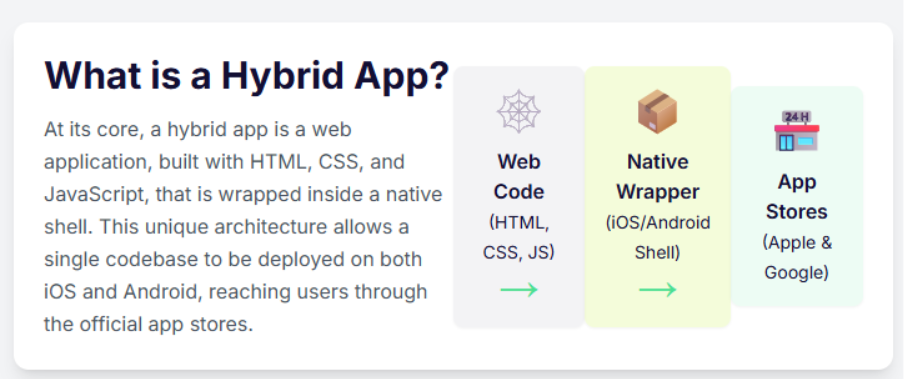
The world of mobile applications is no longer a simple choice of native vs web apps. A staggering 90% of businesses are now turning to hybrid solutions for their mobile needs, and it’s easy to see why. This strategic approach to hybrid app development combines the cost-efficiency and speed of web technology with the power of a native application shell, allowing a single codebase to conquer multiple platforms at once.
But this power comes with a price: complexity. Testing these intricate applications, with their constant dance between a native container and an embedded web view, has been a persistent source of headaches, flaky tests, and frustration for QA teams. Until now.
Qyrus is excited to announce a revolutionary suite of enhancements to our mobile testing platform, engineered specifically to cut through this complexity and make testing hybrid apps more reliable, stable, and efficient than ever before.
Why Hybrid App Development is Winning the Mobile Race
The massive shift toward hybrid apps isn’t just a trend; it’s a strategic business decision rooted in powerful, tangible advantages. For years, the native vs hybrid app debate centered on performance trade-offs, but today’s businesses are prioritizing efficiency and reach. The benefits are simply too compelling to ignore.
Radical Cost-Efficiency: The most significant advantage is the impact on the bottom line. By leveraging a single codebase for multiple platforms, companies can save up to 40% of their development budget. This eliminates the need to fund and manage separate, specialized development teams for iOS and Android, freeing up crucial resources.
Unmatched Speed-to-Market: In today’s competitive landscape, getting to market first is critical. Hybrid app development dramatically shortens development cycles. The “write once, run anywhere” philosophy means businesses can launch their app on the Apple App Store and Google Play Store simultaneously, capturing a wider audience from day one.
Maximum Market Penetration: Why choose one audience when you can have them all? With Android holding a 71.65% market share and iOS holding 27.62%, hybrid apps provide an immediate path to address nearly the entire mobile market with a single product.
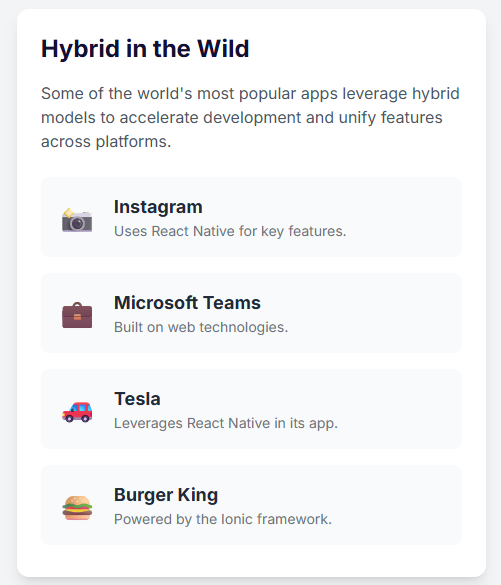
This isn’t just a theory. The proof is likely already on your phone. Globally recognized applications utilize hybrid technology to power their services, demonstrating their scalability and success at the highest level.
The Core Testing Hurdle: Why Hybrid App Development Complicates QA
While the advantages of hybrid app development are clear, they introduce a layer of complexity that can bring testing efforts to a grinding halt. The very architecture that makes these apps so versatile is also what makes them notoriously difficult to test. A hybrid app isn’t a single entity; it’s a three-part system working in tandem, and a bug can originate in any layer.
The Native Shell: This is the lightweight, platform-specific container built with native code (like Swift for iOS or Kotlin for Android). It’s the “app” you download from the store, and its main job is to host the component where all the trouble starts.
The WebView: This is the heart of the hybrid app. It’s essentially a full-screen, in-app web browser that renders all the web-based content—the HTML, CSS, and JavaScript that make up the app’s user interface. For a test automation script, this is a completely separate world from the native shell.
The Bridge: This critical communication layer allows the web code inside the WebView to access native device features like the camera, GPS, or push notifications. This bridge is a frequent source of complex, platform-specific bugs.
This three-layer system creates the ultimate challenge for quality assurance: context switching. An automated test script must constantly jump between the native app context and the WebView context to perform actions and validations. This single activity is the number one cause of flaky, unreliable tests. A script that fails to switch context can prevent a locator from being properly identified, and the entire test run grinds to a halt. Worse, a single failure within the WebView can throw the test driver into an invalid state, derailing an entire suite execution and leaving QA teams to pick up the pieces. This is the frustrating reality that hybrid app testers face every day.
The Qyrus Solution: Intelligent and Resilient Hybrid Testing
Understanding these deep-rooted challenges is one thing; solving them is another. At Qyrus, we believe that the testing platform should adapt to the app’s complexity, not the other way around. That’s why we’ve gone beyond generic support and engineered a suite of intelligent enhancements that directly target and eliminate the most common points of failure in hybrid app development testing.
Feature 1: Automated Web View Detection
The Problem: Your test script needs to interact with an element inside a WebView, but it first needs to switch contexts. This is a notoriously flaky step where tests often fail, especially on iOS.
The Qyrus Solution: Forget manual guesswork. We’ve introduced a new ‘Switch to Web View’ action type that does the heavy lifting for you. It intelligently searches for the available web view and automatically switches the driver’s context. It’s a simple, powerful action that builds resilience directly into your tests.
Feature 2: Automatic Context Reset for Ultimate Stability
The Problem: A single test fails while the driver is in the WebView context. Because the driver is now “stuck,” every subsequent test in the suite also fails, creating a cascade of false negatives and wasting valuable time.
The Qyrus Solution: We’ve built a failsafe. After any test case scenario is executed—whether it passes or fails—Qyrus automatically resets the driver’s context back to Native. This ensures each test starts with a clean slate, isolating any single failure and allowing the rest of your suite to run to completion. The result is cleaner reports and more trustworthy results.
Feature 3: Proactive Safeguards for Critical App Actions
The Problem: Your script, still in a WebView context, attempts to execute a core application function like ‘Launch App’ or ‘Reset App’. This mismatch can cause unexpected errors and test instability.
The Qyrus Solution: Our platform now provides intelligent safeguards. Before executing critical application actions, Qyrus automatically checks and switches the driver to the Native context. This proactive measure prevents context-related errors before they can happen, ensuring your test environment remains stable and your commands execute flawlessly.
The Qyrus Advantage: What This Means for Your Team
These aren’t just minor updates; they are fundamental improvements designed to give your QA team their most valuable resource back: time. By building intelligence directly into the platform, Qyrus removes the most common obstacles in hybrid testing, allowing your team to move faster and with greater confidence.
Here’s what you can expect:
Dramatically Increased Reliability: Say goodbye to entire test runs failing because of a single, flaky context switch. Your automated tests will be more robust and resilient than ever.
Unprecedented Efficiency: Your engineers will spend less time debugging the testing tool and more time focused on what matters—improving the quality of your application.
Faster, More Trustworthy Results: With stable suite executions, you get accurate results you can depend on, allowing you to release with greater speed and confidence.
True Cross-Platform Confidence: Stop avoiding the hard-to-test areas. Your team will now have the power to easily and reliably automate the complex native-to-web interactions that are at the very core of your hybrid app development strategy.
Embrace the Future of Hybrid Testing
The debate between native vs hybrid app development has evolved. Today, the real question is not which development path you choose, but whether you have the right tools to ensure quality regardless of the underlying architecture. Hybrid applications are the present and future of mobile strategy, offering unparalleled speed and efficiency.
Hybrid apps demand a testing platform that is just as sophisticated and adaptable. Qyrus is committed to providing that platform. We believe in building intelligent solutions that tackle modern development challenges head-on, empowering you to build, test, and release better apps, faster.
Ready to stop fighting your tools and start testing flawlessly? Request a Demo and Experience the Future of Hybrid App Testing with Qyrus.
It’s a familiar feeling of relief for any SAP professional. You check the monitor, and there it is: Status 53. Application document posted. The SAP IDoc has finished its journey, the light is green, and everything appears to be a success. But is it? What if that green light is a lie, a digital facade hiding costly errors that are silently disrupting your operations and eroding your profits?
This isn’t a hypothetical fear; it’s a hidden reality in the high-stakes world of Electronic Data Interchange (EDI). EDI in SAP is the powerful, automated engine that exchanges critical business documents between trading partners, forming the very backbone of modern supply chains. It’s a massive and essential market, with research projecting its value to exceed $75 billion by 2033. Given that slightly more than half of all organizations rely on EDI to integrate solutions with their ERP systems, its smooth operation is non-negotiable.
Herein lies the dangerous blind spot. Your SAP system creates an IDoc, a standard data container, for the transaction. However, for your external partner to understand it, this SAP IDoc must first pass through a critical translation step. An intermediary piece of software, known as an EDI subsystem, must map and translate the IDoc into a global EDI standard like ANSI X12 or EDIFACT. This translation happens in a black box, outside of your SAP system’s direct view. A single flaw in that mapping logic can corrupt the data, even while SAP reports a successful handoff.
This post will pull back the curtain on this process. We will deconstruct the “cost of error” – a significant and often hidden component of your total cost of ownership – and reveal why a simple green light is not enough to guarantee data accuracy. It’s time to move beyond the illusion of success and find a way to achieve true data integrity.
The Anatomy of a Failure: Decoding the Cost of Error in Your SAP IDoc Landscape
To understand the “green light fallacy”, you first must understand the money it costs you. The largest, and most frequently underestimated component of an integration landscape’s Total Cost of Ownership (TCO) is not the software or the initial setup. It is the perpetual, operational “cost of error”. It’s the immense expense of manually monitoring and resolving the inevitable
SAP IDoc errors that arise in any high-volume environment. In fact, it is not uncommon for businesses to allocate a full-time, highly experienced, and therefore expensive, expert solely to the task of managing these failures.
The problem originates in a procedural black box. The journey of an outbound SAP IDoc doesn’t end when it’s created. Your SAP system’s direct responsibility concludes the moment it successfully passes the IDoc to the communication layer, known as the port (a milestone marked as Status ’03’). From there, a third-party EDI subsystem takes over, performing the complex and error-prone translation of the IDoc into a universal standard like ANSI X12. A single flaw in this external mapping can corrupt your data, long after SAP has washed its hands of the process.
These failures fall into a few distinct categories, but only one is truly silent.
Data-Related Errors (Status 51): This is the most frequent inbound failure. The SAP IDoc is structured correctly, but the business data inside is invalid. Think of a purchase order arriving for a material master that doesn’t exist or for a customer who is on credit block. The system rightly stops and raises a red flag.
Configuration Errors (Status 29): The process fails because the underlying setup within SAP is wrong. This is often due to a mistake in the Partner Profile (transaction WE20), the single most critical configuration object in the entire IDoc framework and a primary cause of routine processing failures.
Silent Mapping Errors (The Real Villain): This is the most dangerous failure. It’s where the structure is valid, the configuration is correct, and the EDI in SAP process runs to completion. The SAP IDoc receives the coveted Status ’53’. However, due to a subtle flaw in the external translation mapping, the data is semantically wrong. The price might be off by a decimal point, the unit of measure might be wrong, or the shipping address could be incorrect. Your system displays a success, but you’ve just shipped the wrong goods or sent a faulty invoice, triggering costly disputes and chargebacks.
Illuminating the Black Box: How Qyrus Guards Your EDI in SAP
A reactive, “break-fix” approach to integration failures is unsustainable. The long-term solution isn’t to get better at firefighting; it’s to prevent the fires from starting by establishing proactive governance. The foundation of that strategy is true visibility. This means having the ability to see beyond individual SAP IDoc status codes and into the end-to-end health of your data flow. Standard SAP monitoring, fragmented across different transactions like WE02 and BD87, simply wasn’t built for this purpose.
This is where Qyrus Document Exchange Testing changes the game. Part of Qyrus SAP Testing solution, it’s a module designed specifically to provide the deep, end-to-end visibility that has been missing from EDI in SAP. It acts as your data integrity watchdog, moving you from a reactive state to a proactive one.
At its core, Qyrus’ “Relationship Spotter” feature solves a fundamental challenge. It automatically scans your SAP system to establish the crucial link between an incoming electronic document and the final business transaction it has posted. This creates a single, unified view of the entire process, a stark contrast to the siloed information available in standard tools.
Most importantly, Qyrus illuminates the black box of the EDI subsystem. It provides a clear window into the result of the complex translation process by enabling a side-by-side comparison of the source SAP IDoc and the final posted data. This allows you to audit the outcome of the mapping and verify that the data wasn’t corrupted during its journey. It is the definitive way to confirm that the unique requirements of each trading partner—a major challenge known as “partner heterogeneity”—were handled correctly, ensuring the data you sent is the data they actually received and posted.
Forensic-Level Detail: How Qyrus Puts Your Data Under the Microscope
So, how does Qyrus move beyond simply flagging a failed SAP IDoc to reveal the truth within your data? It provides a powerful, two-pronged approach that combines high-level oversight with a forensic deep-dive. It gives you both a telescope and a microscope.
It starts with the big picture. Qyrus allows you to perform a mass comparison of multiple IDocs at once, giving you a quick overview of any differences. This bulk analysis is the perfect tool for identifying systemic problems. You can instantly see if a whole batch of transactions from a specific partner is failing, or spot recurring patterns of errors that would be impossible to find by looking at IDocs one by one.
From this high-level view, you can then zoom in with laser-precision. The platform’s real power lies in its detailed, side-by-side comparison capabilities, which are designed to make finding discrepancies effortless.
An Intuitive Split-Screen View: Qyrus presents the source SAP IDoc and the final posted business document in a visual, split-screen layout. This immediately removes the need to toggle between different screens or transactions to manually compare data points.
Clear XML Tree Structure: Both the IDoc and its corresponding document are displayed in a clear, hierarchical XML tree structure. This is a massive advantage over viewing raw SAP IDoc data, as it allows you to easily compare not just field values but also the very structure of the documents.
Automatic Difference Highlighting: You don’t have to hunt for errors. Qyrus automatically highlights every single difference between the two documents, from changes in segment order to modifications in field values. Your eyes are drawn directly to the problem areas, turning hours of tedious manual checking into seconds of instant recognition.
This combination of features provides the comprehensive analysis needed to not just see that an error occurred, but to understand precisely why it happened, enabling a faster, more accurate resolution.
The S/4HANA Proving Ground: Future-Proofing Your EDI in SAP
There’s a common misconception that the rise of SAP S/4HANA means the death of the SAP IDoc. Let’s be clear: for on-premise and private cloud editions of S/4HANA, this is simply not true. The IDoc framework remains a core, supported technology that is deeply embedded in standard B2B processes and is still perfectly reliable for its intended purpose. The future is one of coexistence, not extinction.
For any organization moving from ECC to S/4HANA, one of the most critical best practices is to use IDoc comparison tools to detect segment length changes and other structural differences to validate interfaces after the move. An SAP IDoc that worked perfectly in the old system can suddenly fail or, worse, post incorrectly in the new one. This makes a tool that can perform precise, automated comparisons between the source and target documents an absolute necessity for mitigating migration risk.
Looking beyond the migration, the strategic future of enterprise integration is a hybrid one. Your architecture will become a managed portfolio of patterns: robust, asynchronous EDI in SAP for high-volume B2B document exchange, running alongside modern, real-time APIs for cloud and mobile applications. Even in this evolved landscape, the need for data integrity on your core EDI transactions does not disappear. Qyrus provides that consistent, reliable validation layer, ensuring your most critical supply chain and financial processes continue to run flawlessly.
Beyond Tech: The Hard-Dollar ROI of Data Integrity
Ultimately, the case for better data validation isn’t just technical; it’s financial. Investing in a tool that provides true visibility into your EDI in SAP landscape delivers a powerful and quantifiable return by directly impacting your bottom line. The value isn’t just in finding errors; it’s in the costly consequences you avoid.
Industry research has consistently shown the immense benefits of a well-implemented EDI strategy, but these benefits are only realized when the data is correct.
Dramatically Reduced Errors and Costs: Studies show that proper EDI implementation can reduce transaction errors by a staggering 30-40% and cut overall transaction costs by 35% or more. Qyrus is the enabling technology that ensures you achieve this, by catching the silent data errors that lead to expensive rework, chargebacks, and manual correction efforts.
Accelerated Business Cycles: Flawless data flow means a faster business. Automated, accurate EDI in SAP has been shown to speed up order-to-cash cycles by approximately 20% and can shorten the entire order-to-shipment cycle by as much as 50-60%. When you eliminate the delays caused by data-related disputes, your entire supply chain becomes more agile.
Mitigated Project Risk: By providing a robust validation framework for S/4HANA migrations and other projects, you directly de-risk these massive investments. A tool that helps you avoid becoming one of the 50-75% of ERP projects that fail to meet their objectives provides an ROI that is almost immeasurable.
Freed-Up Expert Resources: Perhaps the most immediate return is reclaiming the valuable time of your most experienced personnel. Instead of dedicating expensive experts to the soul-crushing, manual task of firefighting SAP IDoc failures, you can empower them to focus on high-value innovation and strategic initiatives.
This is where true data integrity pays dividends—transforming EDI in SAP from a potential cost center riddled with hidden risks into a streamlined, efficient engine for business growth.
Stop Guessing, Start Knowing: The Future of Your Data Integrity
The green light of a Status 53 is an alluring, but ultimately incomplete, signal. It confirms that a process ran, not that it ran correctly. For years, organizations have operated with this critical blind spot, accepting the immense hidden costs of manual error correction as a necessary evil for doing business with EDI in SAP. The reality is that the most dangerous errors—the silent mapping flaws that corrupt your data without raising an alarm—are the ones that standard tools were never designed to catch.
Qyrus Document Exchange Testing provides the crucial missing layer of validation. It delivers the proactive, automated monitoring and deep, forensic-level comparison that experts recommend. By illuminating the black box of EDI translation and establishing a clear relationship between the source SAP IDoc and the final posted document replaces guesswork with certainty. It provides the checks and balances needed to manage the massive trail of transactions that define modern business.
Don’t let silent data errors and hidden costs dictate the efficiency of your operations. It’s time to move beyond the green light.
Schedule a personalized demo todayto see firsthand how Qyrus can bring true, end-to-end data integrity to your business and ensure your SAP IDoc workflows are as successful as they appear.
This post is adapted from our original article co-authored by Ameet Deshpande (SVP of Product Engineering) and Vatsal Saglani (Data Science and Generative AI Lead) with our partners at Amazon Web Services and featured on the AWS Machine Learning Blog. Our collaboration with AWS allows us to leverage cutting-edge AI, and in this post, we explore how that translates into transformative value for your development team.
The Core Challenge: Why Traditional QA is Breaking
In today’s competitive landscape, businesses are forced to embrace accelerated development cycles to keep pace with market demands. While speed is essential, maintaining rigorous quality standards has become a significant challenge. This is where the limitations of long-established QA practices become glaringly obvious.
Traditional testing methods, which are pushed to the end of the development cycle, are no longer sustainable. This late-stage approach frequently leads to a cascade of negative consequences, including project delays, spiraling costs, and a compromised final product. The core of the issue lies in the exponential cost of discovering defects late in the process. According to research from the Systems Sciences Institute at IBM, a bug found after product release can cost four to five times as much to fix as one found during design, and up to 100 times more than if it were identified during the initial phases.
These staggering costs are not just financial. They represent lost productivity, time spent by developers’ context-switching to fix old code, and significant delays that can cause a company to miss critical market opportunities. When quality is treated as an afterthought, the entire development process becomes inefficient and reactive.
To break this cycle, a fundamental change is required. The industry is moving toward a “shift-left” paradigm, which focuses on integrating testing much earlier in the development process. By identifying and resolving problems sooner, teams can dramatically reduce costs, shorten timelines, and ultimately deliver a higher-quality product.
The Solution: The QyrusAI Intelligent Agent Suite
To overcome the challenges of traditional QA, you need a new class of tools designed for the speed and complexity of modern development. QyrusAI is a suite of AI-driven testing tools built to enhance quality across the entire software development lifecycle (SDLC). Powered by advanced large language models (LLMs) and vision-language models (VLMs) through Amazon Bedrock, our platform provides a set of intelligent agents that automate and elevate your testing strategy from day one.
Each agent is designed to tackle a specific challenge within the development workflow:
For Requirements & Design
TestGenerator: Analyzes your requirements documents to automatically generate initial test cases. It intelligently infers potential user scenarios and edge cases to create a comprehensive test plan from the very start. TestGenerator uses a suite of advanced models such as Meta’s Llama 70B, Anthropic’s Claude 3.5 Sonnet, Cohere’s English Embed, and Pinecone on AWS Marketplace.
The following diagram shows how TestGenerator is deployed on AWS using Amazon Elastic Container Service (Amazon ECS) tasks exposed through Application Load Balancer, using Amazon Bedrock, Amazon Simple Storage Service (Amazon S3), and Pinecone for embedding storage and retrieval to generate comprehensive test cases.
VisionNova: Crafts design-based test cases by analyzing UI/UX design documents. This agent translates visual elements and user experience flows into concrete, testable scenarios.
The following diagram shows how VisionNova is deployed on AWS using ECS tasks exposed through Application Load Balancer, using Anthropic’s Claude 3 and Claude 3.5 Sonnet models on Amazon Bedrock for image understanding, and using Amazon S3 for storing images, to generate design-based test cases for validating UI/UX elements.
UXtract: Directly converts Figma prototypes into detailed test scenarios and step-by-step instructions. It analyzes the flow between screens to ensure every transition and user interaction can be validated.
The following diagram illustrates how UXtract uses ECS tasks, connected through Application Load Balancer, along with Amazon Bedrock models and Amazon S3 storage, to analyze Figma prototypes and create detailed, step-by-step test cases.
For Pre-Implementation & Development
API Builder: Creates virtualized APIs based on specifications, allowing for early front-end testing. Your teams can build and test the user interface with accurate mock responses before the backend is even fully developed.
The following diagram illustrates how API Builder uses ECS tasks, connected through Application Load Balancer, along with Amazon Bedrock models and Amazon S3 storage, to create a virtualized and high-scalable microservice with dynamic data provisions using Amazon Elastic File System (Amazon EFS) on AWS Lambda compute.
Echo: Generates high-quality and logically sound, synthetic test data to ensure comprehensive testing coverage. This removes dependencies on sensitive or incomplete real-world data, enabling thorough testing early on.
For Active Testing & Maintenance
Rover & TestPilot: These are multi-agent frameworks designed for autonomous testing. Rover explores your application to uncover unexpected bugs and issues, while TestPilot conducts objective-based testing to verify that the application meets its intended goals.
Healer:Healer intelligently tackles common test script failures. It analyzes the script and the application’s current state to suggest accurate fixes for locator issues, significantly reducing test maintenance time.
How It Works: Transforming Your SDLC
QyrusAI’s integrated approach ensures that testing is no longer a final stage, but a proactive and continuous activity aligned with every phase of your software development lifecycle. This shift-left strategy makes sure issues are caught early and quality is maintained continuously.
The following diagram visually represents how QyrusAI agents integrate throughout the SDLC, from requirement analysis to maintenance, enabling a shift-left testing approach that makes sure issues are caught early and quality is maintained continuously.
Here is how the QyrusAI agents fit into your workflow, from initial concept to long-term maintenance:
Requirement Analysis: The process begins here. TestGenerator AI generates initial test cases directly from the requirements, creating a strong foundation for quality from the start.
Design: As UI/UX designs are created, VisionNova and UXtract convert Figma designs and prototypes into detailed test cases and functional steps. This validates the user experience before a single line of code is written.
Pre-Implementation: Before the backend is fully developed, two agents enable early progress:
API Builder creates virtualized APIs, allowing front-end testing to begin immediately.
Echo generates synthetic test data, providing comprehensive testing coverage without dependencies on real data.
Implementation: During active development, teams use pre-generated test cases and virtualized APIs to perform continuous quality checks.
Testing: In the formal testing phase, QyrusAI deploys its autonomous agents:
Rover, a multi-agent system, independently explores the application to uncover unexpected issues.
TestPilot conducts objective-based testing, ensuring the application meets all of its intended goals.
Maintenance: For long-term software quality, QyrusAI supports ongoing regression testing with advanced test management, version control, and reporting features.
This integrated model ensures that potential issues are detected earlier in the process, lowering the cost of fixing bugs and enhancing overall software quality.
The Proven Impact: AI-Driven Results
Adopting a new approach requires clear evidence of its benefits. Our data, collected from early adopters and internal testing of QyrusAI, demonstrates the significant and immediate impact of an AI-driven, shift-left strategy. The results consistently show that integrating AI early in the SDLC leads to a significant reduction in defects, development costs, and time to market. This real-world impact is why Gartner recently recognized Qyrus in its report on how Generative AI is impacting the Software Delivery Life Cycle (SDLC).
Here are the key improvements our partners have experienced:
80% Reduction in Defect Leakage: By finding and fixing defects in the initial phases, far fewer bugs ever reach production.
36% Faster Time to Market: Early defect detection, combined with reduced rework and more efficient testing, leads to faster delivery cycles.
20% Reduction in UAT Effort: Because comprehensive testing is performed early and often, a more stable and reliable product reaches the final user acceptance testing (UAT) phase.
Conclusion: The Future of Your QA is Here
Shift-left testing, powered by QyrusAI and its foundation on Amazon Bedrock, is revolutionizing the software development landscape. By integrating AI-driven testing across the entire SDLC, from requirements analysis to maintenance, Qyrus helps your teams to:
Detect and fix issues early, significantly cutting development costs.
Enhance software quality through more thorough, AI-powered testing.
Speed up development cycles without sacrificing quality.
Adapt quickly to evolving requirements and application structures.
This integration with advanced language and vision models from Amazon Bedrock provides unparalleled flexibility, scalability, security, and cost-effectiveness. By adopting this AI-powered approach, your organization can not only keep pace with today’s fast-moving digital world but also set new benchmarks in software quality and development efficiency.
Take the Next Step
Ready to revolutionize your testing process and build better software faster? Let’s get in touch.
The wait is officially over. On June 10, 2025, Google released the stable version of Android 16, marking the earliest major Android launch in over a decade. On the same day, Qyrus became the first device farm to support Android 16 for testing, giving teams Day-One access to real devices running the production release. This release wasn’t just early; it was a strategic reset. While many initial reviews have labelled the update “boring” or “lackluster” due to the absence of immediate, dramatic visual changes, that surface-level take misses the entire story.
Beneath the surface, Android 16 “Baklava” is a foundational leap forward. Google has deliberately decoupled the stable platform from splashy feature drops, instead focusing on a massive overhaul designed to create a more agile and secure Android ecosystem. The accelerated release, enabled by a new “Trunk Stable” development model, gives developers and manufacturers a crucial head start. With powerful new APIs for AI and cross-device computing, a hardened security posture, and significant developer mandates, this update is less of a simple refresh and more of a quiet revolution. For app developers, this seemingly simple update introduces a complex new testing landscape.
This is where Qyrus steps in. As a premier automation tool for mobile application testing, we are proud to announce immediate, Day One support for the production release of Android 16. For a broader look at how mobile teams can approach testing across devices, platforms, and user interactions, see our Pro’s Guide to Mobile App Testing: From Gesture to Go. We ensure your team can validate your applications on this transformed platform from the moment it’s available, turning potential compatibility risks into a competitive advantage.
A Tale of Two Releases: The New Era of Android 16 Pixel Customization and Security
Understanding Android 16 requires grasping its unique, two-part release strategy. Google has made a calculated decision to release a stable platform with foundational changes first, while holding back the most significant user-facing features for a future Quarterly Platform Release (QPR). While this might create a confusing initial experience for users, it’s a strategic masterstroke for developers and OEMs, providing a stable API target months earlier than usual to accelerate the entire ecosystem’s update cycle.
This means developers need to prepare for two waves of change: the critical security and developer mandates available today, and the revolutionary UI and productivity features coming soon.
Available Now: Foundational Security and Mandates to Test For
While it may not look different on the surface, the initial release of Android 16 is packed with critical changes that demand immediate testing.
The Advanced Protection Suite: Security is the undeniable centerpiece of this release. Google has consolidated its most powerful security settings into a single, user-friendly toggle called “Advanced Protection.” When enabled, it creates a fortress around the device by activating Theft Detection Lock, blocking insecure 2G and Wi-Fi connections, and enhancing Google Play Protect scanning. It also introduces “Intrusion Logging,” an industry-first feature that backs up device activity logs to aid in forensic analysis after a potential compromise.
Smarter User Protection: To combat modern social engineering, Android 16 introduces “Identity Check,” which requires biometric authentication to change sensitive settings like passwords when the device is away from a trusted location, mitigating the risk of “shoulder surfing” attacks.
Critical Developer Mandates: Google is enforcing a “tough love” strategy to modernize the app ecosystem. For apps targeting API level 36, edge-to-edge display is now mandatory, as the ability to opt-out has been removed. Furthermore, on large screens (tablets, foldables, etc.), apps that previously restricted screen orientation will now be forced to be resizable and work in both portrait and landscape modes by default, making adaptive layouts a non-negotiable requirement.
Android 16’s UI and Productivity Features
Android 16 also introduced significant UI and productivity changes, making it important for development teams to validate these experiences across supported devices and form factors.
Material 3 Expressive: This is the future of Android 16 Pixel customization. It represents the next evolution of Google’s design language, moving beyond personalization to create a more dynamic, animated, and emotionally resonant interface. It’s built on principles of fluid, physics-based motion that makes UI elements “jiggle and morph,” expressive typography for “editorial-like moments,” and a richer use of color and shape.
Native Desktop Mode: Google is finally delivering a native, PC-like experience for Android. Developed in close collaboration with Samsung and built “on the foundation of Samsung DeX,” this feature will provide a true windowed environment with a taskbar and resizable apps when a phone is connected to an external monitor.
Live Updates: This new, standardized framework for progress-centric notifications is Android’s answer to Apple’s Live Activities. It will allow apps to show real-time information for ongoing events like food deliveries or ride-shares directly on the lock screen and always on display.
Tame the Complexity: Why Qyrus is the Essential Automation Tool for Mobile Application Testing on Android 16
The bifurcated release strategy for Android 16 and the significant volume of user-reported bugs on the “stable” version reveal a new reality for development teams. The accelerated release cycle came at the cost of a shorter public beta, effectively shifting the final, most challenging phase of bug discovery onto the public. Simply put, waiting for physical devices or relying on emulators is no longer a viable strategy for quality assurance.
This is why immediate access to a real device cloud is critical, and where Qyrus provides an unparalleled advantage. For a deeper look at how a mobile device farm helps teams address device fragmentation and real-device testing challenges, see Why You Still Need a Mobile Device Farm.
Day One Readiness on Real Devices: Qyrus eliminates the waiting game. Following our Android 16 beta release, our users were testing on a fleet of real Pixel devices running the final Android 16 build on its June 10th release date. This is the only way to reliably test for and safeguard against the kind of critical issues real users are reporting, from significant battery drain and system freezes to unstable Wi-Fi connections and widespread app crashes.
Master the New Mandates with Ease: Android 16’s new requirements for adaptive layouts can be a major development hurdle. Qyrus simplifies this process entirely. Our platform allows you to instantly test your app’s response to the now-mandatory resizability on large screens, ensuring it looks and functions perfectly on tablets, foldables, and in the upcoming native Desktop Mode. Testing complex security workflows like the new “Advanced Protection” suite and biometric-gated “Identity Check” becomes streamlined and repeatable.
Validate Android 16’s New UI and User Experiences: Android 16’s evolving UI and productivity capabilities create new experiences that teams need to validate across supported devices and configurations. With Qyrus, you can begin validating your app against the foundational APIs for features like Material 3 Expressive. This allows you to get ahead of the curve and ensure your app is ready to embrace the new era of Android 16 Pixel customization, with its fluid, physics-based motion and expressive designs, as soon as it rolls out.
Configure devices as your customers do: One of the biggest differentiators of Qyrus is that we offer private, dedicated devices for clients. This means they can configure devices as their customers do – configure an authenticator application for OTPs, set up an email account, or configure any other related 3rd party apps.
As the most adaptable automation tool for mobile application testing, Qyrus empowers your entire team—from manual testers to automation engineers—to tackle the full spectrum of challenges presented by Android 16. Learn more about mobile app testing automation strategies for building scalable, automation-ready mobile applications.
Get Started in Minutes: Test on Android 16 Today
Ready to ensure your app is prepared for the most significant Android shift in years? Our platform makes it incredibly simple. You can begin validating your application on real devices running the official production release of Android 16 in just three easy steps:
Upload Your Application: Simply upload your .apk or .aab file.
Select & Test: Choose a real Google Pixel device running the official Android 16 build and instantly begin your manual or automated testing sessions.
It’s that straightforward. You can use your existing test suites to immediately check for regressions or build new ones to validate the new features and security workflows.
Don’t Wait for Bugs to Find You: Secure Your App’s Future
Android 16 “Baklava” is not just another update; it’s a transitional release that represents the launchpad for a faster, more secure, and more cohesive Android ecosystem. The strategic shift in development, the staggered feature releases, and the widespread user-reported stability issues have created a new reality where proactive, early testing is non-negotiable. Ensuring your app is ready is not just about compatibility—it’s about protecting your brand’s reputation and delivering the flawless experience your users demand.
With the right automation tool for mobile application testing, you can navigate this new landscape with confidence. Qyrus provides the immediate access, powerful features, and comprehensive support you need to get ahead of the curve and stay there.
Don’t let your application’s performance on Android 16 be an afterthought. Take action now: