Qyrus Named a Leader in The Forrester WaveTM: Autonomous Testing Platforms, Q4 2025 – Read More

From Alert Fatigue to Autonomous Healing

The Alert Fatigue Problem Hasn’t Gone Away, It’s Gotten Louder 

The modern enterprise IT landscape has developed into a complex, delicate network of hybrid cloud infrastructure, agile microservices, external APIs, and legacy software. To maintain visibility across this rapidly expanding architecture, organizations have historically adopted a strategy of accumulating monitoring platforms.  

From Application Performance Monitoring (APM) and Network Performance Monitoring (NPM) to Security Information and Event Management (SIEM) systems, the dominant industry belief was clear: implementing additional monitoring tools would inherently result in quicker incident resolution. Rather, this buildup has resulted in a constant, overwhelming stream of operational data that clouds root causes instead of clarifying them. 

Why more monitoring tools created more problems 

The vast amount of telemetry produced by extensively distributed systems has fundamentally exceeded human cognitive ability. In modern corporate IT environments, the data illusion is prevalent: dashboards are perpetually lit with metrics, logs continuously stream, and alerts activate in real-time across separate systems. 

Nonetheless, rather than providing clear guidance, operations teams encounter highly fragmented visibility and isolated workflows. The main architectural flaw of the contemporary monitoring stack is its basic dependence on segregated telemetry silos. Performance tools monitor latency, IT Service Management (ITSM) systems oversee incident tickets, and security platforms record unauthorized access attempts; however, very few of these systems have the contextual intelligence to comprehend how their individual data layers connect. 

When a singular anomaly occurs, such as a particular network lag or a database schema inconsistency, cascading failures trigger numerous redundant alerts simultaneously across different independent monitoring systems.  

Due to the absence of a unified dependency graph, these systems regard each symptom as a separate crisis. The phenomenon resulting from this, referred to in the industry as alert fatigue, is not just a psychological issue; it represents a quantifiable, escalating operational crisis.  

Alert fatigue develops gradually as Site Reliability Engineering (SRE) and Security Operations Center (SOC) analysts are exposed to high volumes of repetitive, low-value alerts over extended periods, gradually eroding their sensitivity to critical warnings. 
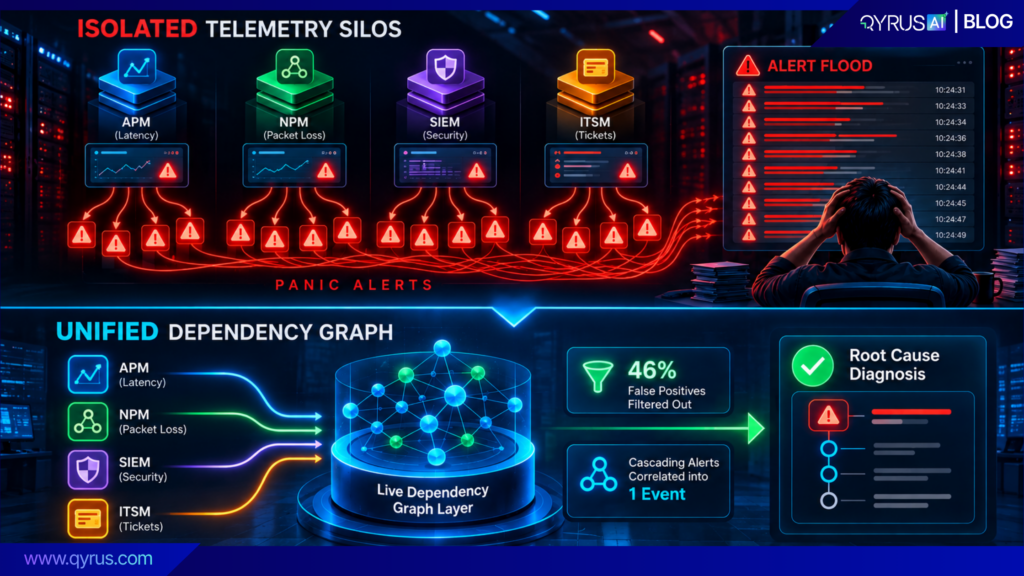
Recent operational studies show that the typical enterprise SOC gets an astonishing 3,832 alerts each day. Since human teams can’t manually handle this volume, analysts typically overlook about 40% to 62% of all incoming alerts. Compounding this crisis, an estimated 46% of these triggered alerts are false positives.  

This persistent, unmanageable noise significantly elevates organizational risk. The saturation of benign or redundant alerts drastically increases the probability that analysts will overlook legitimate, potentially catastrophic infrastructure failures, rendering the very tools designed to protect the enterprise functionally detrimental. 

The impact of MTTR sitting at hours, not minutes 

When alert volumes exceed manual triage capabilities, Mean Time to Resolution (MTTR) stalls, and the resulting financial consequences become significant. IT downtime is not just a localized technical issue confined to the IT department; it has become a direct financial liability at the boardroom level that disrupts worldwide supply chains, halts transactional revenue streams, and causes enduring harm to brand equity. The financial repercussions of a system failure increase exponentially with the reliance of today’s businesses on constant, real-time digital functions. 

The economic implications of downtime have greatly deteriorated as infrastructure complexity has intensified. Traditionally, industry analysts depended on recognized baseline indicators to measure this risk.  

Nonetheless, current information shows a significant rise in outage expenses, largely influenced by the incorporation of sophisticated Artificial Intelligence (AI) tasks, edge computing, and closely linked automated supply chains that cannot withstand delays or interruptions. 

Reporting Organization / Context 

Estimated Cost of IT Downtime 

Analytical Findings & Contextual Drivers 

Gartner (Historical Baseline) 

$5,600 per minute ($336,000/hour) 

A widely cited foundational average spanning all organizational sizes, establishing downtime as a six-figure hourly liability. 

ITIC 2024 Survey 

>$300,000 per hour 

Field data indicates that more than 91% of mid-size and large enterprises report hourly downtime costs consistently exceeding this threshold. 

Splunk / Oxford Economics (2026) 

$15,000 per minute ($900,000/hour) 

The average cost for the Global 2000, driven by massive transactional revenue impact, regulatory compliance penalties, and SLA breaches. 

Siemens (Automotive Manufacturing) 

$2.3 Million per hour 

Specific to complex manufacturing; this figure has doubled since 2019 due to the extreme fragility of just-in-time automated supply chains. 

The prolonged duration of MTTR at hours instead of minutes is mainly due to the manual aspects of the diagnostic phase. Upon a failure, the financial clock starts immediately, but engineers must dedicate the initial vital hours to manually reverse-engineering unprocessed system logs, cross-referencing telemetry from isolated observability tools, and trying to identify the root cause by painstakingly mapping disconnected dependencies manually. 

Teams frequently misidentify upstream infrastructure events, like localized power grid issues, as standalone equipment failures at the site, sending engineering teams without need while the actual problem persists. Addressing this multi-million-dollar crisis necessitates a transition in the operational model from manual data correlation to autonomous, context-sensitive system intelligence. 

The Industry Is Moving Past Detect and Notify 

As the severe limitations and hidden costs of traditional, reactive monitoring become undeniably apparent to enterprise leadership, the IT operations landscape is undergoing a systemic architectural shift. The year 2026 marks the definitive inflection point where passive observability, the practice of simply detecting an error and notifying a human, is being aggressively replaced by active, intelligent, and autonomous operations. 

What analysts mean by outcome-driven operations 

Leading industry analysts have completely redefined the expectations for enterprise IT operations in 2026, highlighting a definitive transition away from passive reporting toward what is now termed “outcome-driven operations“. In previous iterations of IT operational maturity, success was measured purely by the deployment footprint of monitoring tools and the raw volume of metrics collected. Currently, the operational directive to merely “maintain the lights” coexists with requirements. These include supporting enterprise AI at scale, controlling rising cloud technology costs, securing distributed zero‑trust environments, and delivering clear business outcomes. 

Outcome-driven operations means focusing on fixing real business problems instead of constantly watching dashboards or dealing with endless alerts. 

The ideal goal is to keep systems available, improve performance, control costs, and make sure everything meets the required SLOs. 

In this approach, observability does more than collect data. It helps teams understand what is happening, find problems faster, and take action. I&O leaders are also bringing different observability tools together and using AIOps to reduce unnecessary alerts, connect related issues, find the root cause, and even fix some problems automatically. 

The focus is on getting the problem solved, whether that means restoring a microservice, improving a database, or stopping a security threat, rather than simply creating another support ticket. 

Agentic remediation vs. rule-based automation: what’s actually different 

To achieve the promise of outcome-driven operations, organizations have historically relied heavily on runbook automation. It is important to understand that traditional rule-based automation and modern agentic AI represent two entirely different, and largely incompatible, computational paradigms. 

Early rule-based automation (often called AIOps 1.0) relies heavily on basic “if-then” scripts. For instance, an engineer might set a rule that automatically restarts a service if CPU usage tops 90% for five minutes. 

That kind of rigid setup works fine when your environment is stable and predictable. But the moment you apply it to today’s complex, constantly shifting cloud setups, it starts to break down. 

The main issue is that traditional scripts don’t have any context. They blindly follow orders without understanding how their actions impact other systems, what’s happening upstream, or how the network layout might have changed. 

Because they are so inflexible, even a minor update can instantly break hundreds of automated workflows. Instead of saving time, IT teams end up stuck in a never-ending cycle of fixing broken runbooks, which completely defeats the purpose of setting up automation to begin with. 

Conversely, agents powered by AI are capable of independent thought and action. Rather than merely sticking to a strict script, they approach issues similarly to how a skilled human IT expert would. 

In contrast, agentic remediation utilizes Large Language Models (LLMs) and sophisticated multi-agent systems to function with true systemic independence. Rather than relying on hardcoded rules, agentic systems are defined by four core, dynamic capabilities: perception (the ability to observe and interpret the real-time environment state), reasoning (the capacity to understand context and map causal relationships), planning (the ability to determine dynamic, multi-step action sequences to achieve a goal), and action (the capability to execute targeted interventions through APIs or Infrastructure-as-Code). 

Rather than adhering to a fixed script that breaks down with unforeseen variables, agentic AI evaluates the present state of the environment, creates a customized remediation strategy based on real-time dependency information, and carries it out independently.  

Additionally, agentic systems have memory; they do not re-assess every known variable anew in subsequent, similar situations. By recalling environmental context and learning continuously from past failure modes, these systems can self-heal broken architectural components, dynamically update their own locator scripts when application user interfaces change, and make complex engineering decisions with a level of adaptability that mirrors human cognition, without the associated latency, bias, or fatigue.  
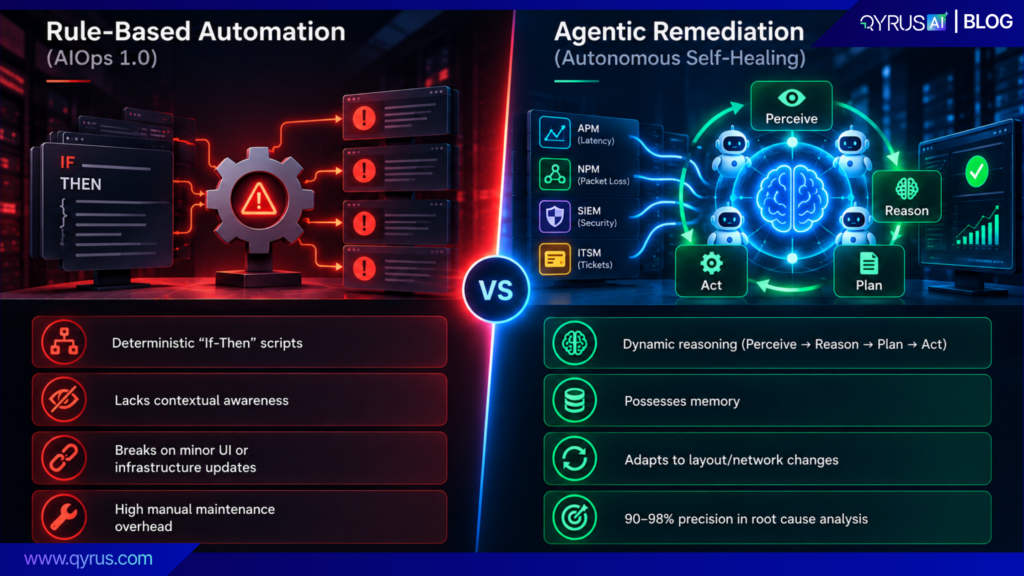
Recent empirical research on agentic AI deployment within Site Reliability Engineering (SRE) demonstrates that these autonomous systems can achieve an astonishing 90-98% precision in root-cause analysis, driving 55-98% improvements in MTTR over traditional, rule-based automation approaches. 

What a Self-Healing Loop Actually Looks Like 

Self-healing means creating systems that can find and solve problems by themselves. For this to function properly, the system must gather information and figure out what is not working and then do the thing without waiting for a person to get involved. It also needs to remember problems, so those same issues do not happen again. 

Auto Discover → Auto Detect → Auto Diagnose → Auto Resolve → Auto Optimize 
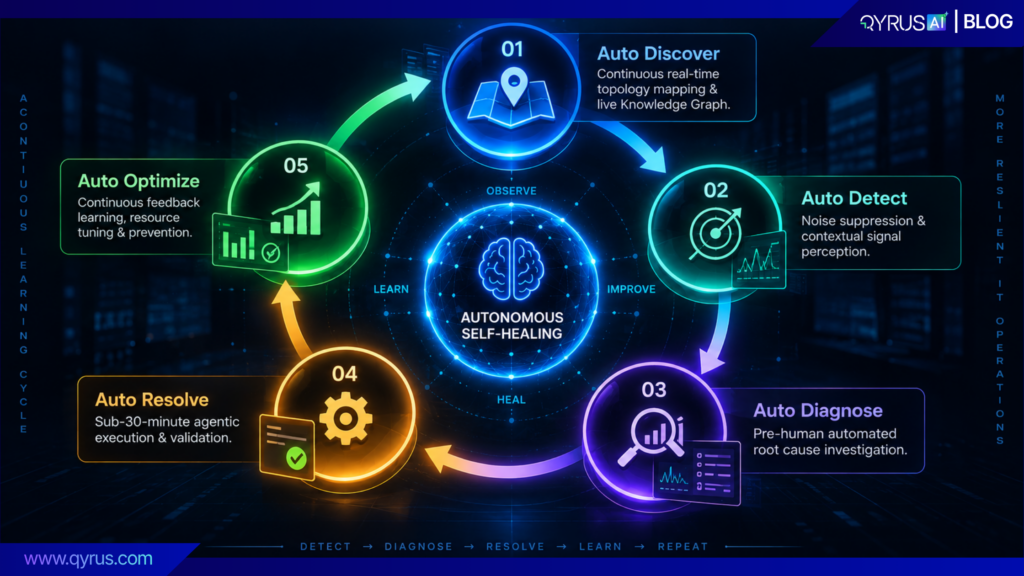
The shift from IT operations to a fully autonomous self-healing enterprise must follow a clear five step path. When executed correctly, this continuous loop entirely eliminates the manual triage bottlenecks that conventionally delay incident resolution. 

  1. Auto Discover (Continuous Real-Time Mapping): The first step in self-healing is knowing what is happening across the entire IT environment. Instead of relying on old CMDBs that need to be updated manually, self-healing systems can automatically keep track of the environment. They map servers, virtual machines, cloud networks, edge applications, and how they are connected. This gives teams a clear, up-to-date view of the entire environment. 
  2. Auto Detect (Contextual Perception & Noise Suppression): The knowledge graph perpetually charts the surroundings, as the system absorbs millions of signals, logs, and traces. Since the agentic system inherently comprehends the current network topology, it can readily differentiate between a slight, localized variation and a significant, cascading anomaly. This situational understanding minimizes intrusive alert sounds from the entire stack, significantly lowering the rate of false positives and averting analyst exhaustion. 
  3. Auto Diagnose (Pre-Human Root Cause Analysis): When a genuine anomaly happens, the system leverages the live dependency graph to pinpoint precisely how the failure is spreading throughout the infrastructure, microservices, and applications.  
    1. Through automated causal reasoning, it completely avoids the conventional manual investigation stage. The system transforms a basic, contextless alert into a completely diagnosed, prioritized issue prior to a human operator logging into the dashboard. 
  4. Auto Resolve (Agentic Execution): Once the main problem is clearly seen, the platforms smart AI creates a focused plan to fix it and carries it out on its own using APIs or connected automation tools. What usually needs one to ten hours of manual escalation, cross-team collaboration, ticket routing, and diagnostic triage is now shortened into a great resolution time of under 30 minutes.  
    1. Most importantly, the system then runs automated validation checks to confirm that the executed fix holds, ensuring that no secondary failures or unintended consequences were triggered by the remediation effort. 
  5. Auto Optimize (Continuous Prevention): Self-healing operations are basically proactive rather than reactive. The system feeds the incident data and remediation outcome back into the knowledge graph, once the resolution is successful.  

The platform uses this historical intelligence to forecast future availability and capacity needs, dynamically tune cloud resources, and identify fragile or “noisy” infrastructural components that require architectural hardening. This guarantees that the infrastructure is perpetually learning, evolving, and immunizing itself based on its own operational history. 

Where Digital Twins and Chaos Engineering fit into prevention, not just recovery 

To attain genuine, enterprise-level operational resilience, organizations need to progress beyond just rapid recovery from failures; they must recognize and address critical vulnerabilities prior to their occurrence in production. This heightened level of preparedness is attained by incorporating the principles of Digital Twins and Chaos Engineering within the self-healing operational cycle. 

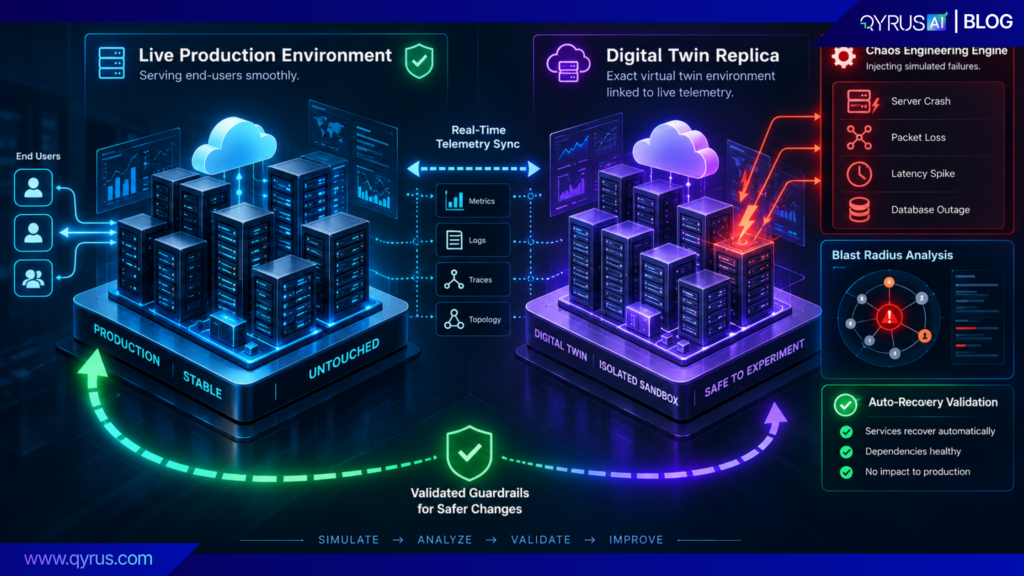
A Digital Twin, within contemporary IT operations, is an accurate, real-time virtual representation of the complete enterprise environment. This encompasses all active applications, network frameworks, security measures, cloud dependencies, and current configurations. Instead of implementing unverified and risky changes directly in a live environment that customers see, operations and security teams use an “Intelligent Twin” to accurately simulate the potential effects of intended code deployments, infrastructure migrations, or intricate configuration updates.  

By testing the suggested modifications on the virtual model, the system can compute the exact “blast radius” of any potential failure, guaranteeing that disastrous go-live events are detected, examined, and completely avoided within the simulation framework. 

Chaos Engineering enhances the effectiveness of the Digital Twin even more. It entails deliberately creating regulated, chaotic situations, like abrupt server failures, high network delays, data packet loss, or sensor information errors, within the system to proactively evaluate its limits of resilience.  

Starting with large tech firms like Netflix through tools such as Chaos Monkey, this approach is similar to administering a non-threatening vaccine into a biological organism to securely develop enduring immunity. Historically, conducting Chaos Engineering directly on live production systems carried immense financial and operational risk, deterring widespread enterprise adoption.  

However, modern approaches utilize the Digital Twin (an approach heavily researched in academia under the moniker “ChaosTwin”) to safely and continuously inject massive faults into the virtual replica rather than the live network. 

By running these automated failure simulations against the Digital Twin, the self-healing platform can safely observe how the architecture reacts under extreme duress. It can validate whether automated failover and recovery mechanisms function correctly, calculate the Failure-Domain Independence Factor (FDIF), and systematically harden the underlying architecture against rare, high-impact regional disruptions before they can cause actual production downtime. 
Human-in-the-loop guardrails: why full autonomy isn’t (and shouldn’t be) the goal yet 

Despite the highly advanced diagnostic and execution capabilities of agentic AI, the objective of enterprise self-healing operations is not the total, unchecked removal of human oversight. In complex corporate environments, trust remains the foundational currency of all AI adoption.  

Smart systems must work inside rules that are strictly managed, very clear, and fully understandable. Letting AI bots independently run harmful, costly, heavy, or very delicate system updates, such as erasing databases or altering main safety walls, without any human watching brings huge rule, legal, and work dangers. Therefore, ready auto-fixing platforms are built to require strict human-involved (HITL) limits.  

In this mixed work model, the AI does the deep, heavy load work: constantly taking data, quickly mapping links, finding the exact base cause, making a complete fix plan, and filling the exact run script. But, for key systems or risky system moves, the bot deliberately stops its process to ask clear human approval. 

In this process, the human worker is raised from a hand “doer” to a smart leader and approver, checking the AI’s logic and blast-radius check before allowing running. This guarantees that normal, safe issues are fixed instantly without help, while hard, new, or key system fixes stay closely matched with strict company rule guidelines and legal orders. 

True autonomy, in this sophisticated context, does not recklessly remove human control; rather, it greatly enhances control by ensuring that highly paid human engineering intelligence is applied only where it is strictly necessary and most valuable. 

The Business Case Beyond Fewer Tickets 

The enterprise value proposition of autonomous self-healing operations extends exponentially beyond the basic operational metric of reducing the raw volume of ITSM helpdesk tickets. Implementing a closed-loop autonomous system fundamentally reshapes the core economics of IT operations, elevating infrastructure management from a reactive, unpredictable cost center to a highly strategic enabler of business resilience and continuous growth. 

MTTR reduction and uptime as boardroom metrics 

In 2026, infrastructural resilience must be engineered deeply into systems by design, rather than being treated as an external, reactive backup plan. As a direct result of this shift, Mean Time to Resolution (MTTR) and system uptime percentages have completely transitioned from being purely technical Key Performance Indicators (KPIs) discussed in the server room, into critical boardroom metrics scrutinized by the C-suite and investors.  

Because complex enterprise downtime now costs hundreds of thousands or millions of dollars per hour, the ability to resolve incidents autonomously within minutes directly protects corporate revenue streams and preserves market capitalization. 

Using smart AI and auto-fixing system tools brings massive, clear drops in fix-times, with proven repair time gains going from 55% to a huge 98%. By catching weird system actions quickly and stopping the main cause before it can turn into a public, user-facing crash, companies can ensure unmatched, steady rates of uptime.  

Always high online numbers help to calm senior leaders, meet tough rules with strict Service Level Agreements (SLAs), and strongly guard the brand’s name in very busy, always-on online spaces where user patience for lag is non-existent. 

Freeing L2/L3 talent for high-value work instead of firefighting 

Perhaps the most profound, yet often under-measured, organizational impact of self-healing operations is the immediate liberation of highly skilled, difficult-to-retain engineering talent. In traditional, reactive IT models, Level 2 (L2) and Level 3 (L3) engineers are frequently consumed by a perpetual cycle of reactive firefighting. 

Countless engineering hours are lost daily tracing obscure network propagation paths, manually investigating false-positive security alerts, and writing repetitive scripts to restart stalled services. This chronic, demoralizing cycle of triage severely hampers enterprise innovation, actively delaying critical strategic initiatives such as global cloud migration, legacy system modernization, and enterprise-wide AI integration. 

By automating the entire discovery, diagnosis, and remediation loop for the majority of Level 1 and Level 2 incidents, self-healing platforms eliminate the exhaustive, manual labor associated with routine system failures. The 1 to 10 hours typically required to manually escalate, route, and triage a moderate incident is systematically reduced to a highly governed, sub-30-minute automated resolution flow.  

This massive paradigm shift allows senior engineering staff to log out of the ticketing queue and focus exclusively on high-value, strategic projects that directly align with long-term business goals. Engineers can concentrate on enhancing intricate system architectures, improving cloud expenditures using FinOps tactics, and speeding up the creation of innovative, income-generating digital products. 

How QyrusAI’s Self-Healing Operations Gets There 

The realization of this autonomous, resilient future requires an enterprise platform capable of seamlessly unifying continuous observability, intelligent automated testing, and agentic execution into a single operational layer. QyrusAI explicitly bridges the historical divide between quality assurance and IT operations by delivering a comprehensive, closed-loop self-healing ecosystem designed for maximum enterprise scale. 

The Auto framework in practice 

The core analytical engine driving QyrusAI’s self-healing operations is its proprietary Live Enterprise Knowledge Graph. Unlike static, heavily siloed IT registries that decay the moment they are updated, this shared semantic data layer continuously observes and accurately models every single application, API dependency, business service, and cost line across the entire enterprise. Every operational pillar of the QyrusAI platform consistently reads from this graph, and every automated action taken by the system writes back to it, creating a unified, dynamically living source of truth. 

By leveraging this incredibly deep topological context, QyrusAI deploys its agentic Auto-Heal framework through an industry-first methodology known as SEER (Sense, Evaluate, Execute, Report). 

  • Sense & Evaluate: When an environmental anomaly is detected, QyrusAI instantly evaluates the incoming signal against the vast Knowledge Graph to mathematically deduce the exact blast radius and pinpoint the root cause, entirely bypassing the need for manual human investigation. 
  • Execute: The platform’s AI agents collaborate to orchestrate a precise remediation plan. Whether the failure involves dynamically updating broken element locators in a complex web application via the Healer AI, or automatically restarting a stalled microservice in a multi-cloud environment, the agentic workflow resolves the issue autonomously, operating safely within predefined human-in-the-loop governance guardrails. 
  • Report & Prevent: Following successful resolution, the platform immediately updates its internal Digital Twin. It then utilizes advanced Chaos Engineering protocols to run continuous, controlled failure experiments against this virtual replica. This proactively identifies latent architectural weaknesses and hardens the real-world environment against future disruptions before they can manifest. 
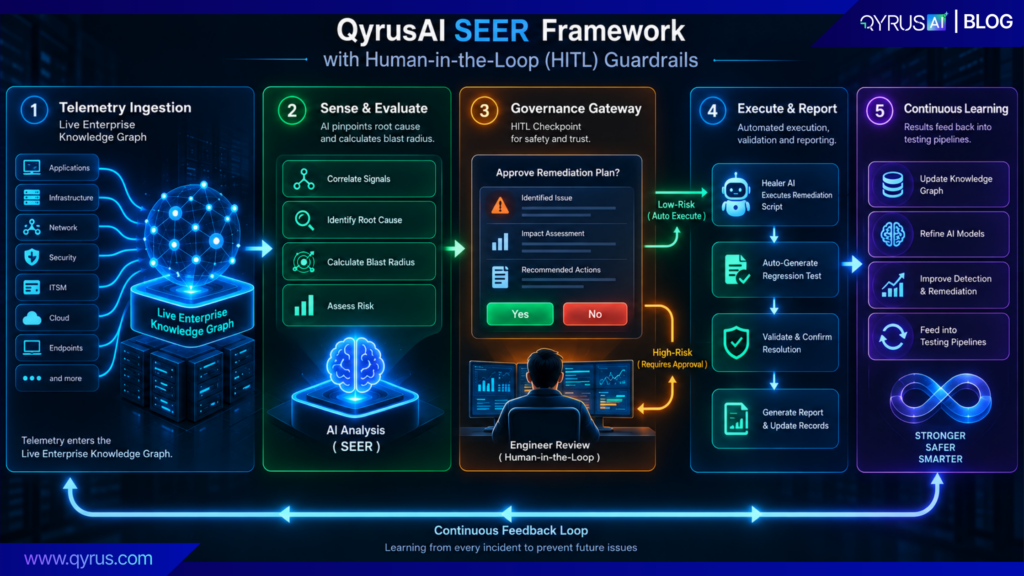
Furthermore, QyrusAI uniquely connects production reality directly back to the software testing pipelines. Every production incident handled by the system automatically generates a reproducible regression test, ensuring that real-world operational evidence is instantly transformed into actionable modernization intelligence. Future code releases are strictly gated by this production-validated evidence, definitively merging quality assurance and operational resilience into one continuous, unbreakable system. 

Proofpoints: MTTR reduction, uptime, cost savings from automating L1/L2 

Enterprises operating within the QyrusAI self-healing loop consistently experience dramatic, highly measurable shifts in their core operational economics. By moving exhaustive root-cause analysis and complex remediation out of disparate manual workflows and into a governed, autonomous agentic engine, organizations achieve massive scale efficiencies that are impossible with human labor alone. 

The deployment of agentic remediation inherently drives down Mean Time to Resolution and time-to-diagnose metrics, collapsing multi-hour triage processes into mere minutes. This direct, aggressive reduction in system downtime translates instantly to maximized system uptime and significantly lower ongoing operational costs. 

 Furthermore, because the Live Enterprise Knowledge Graph perfectly maps intricate legacy dependencies and complex application interactions, the platform also acts as an indispensable intelligence layer for safe cloud migration waves and legacy application rationalization.  

By completely eliminating architectural blind spots, QyrusAI actively prevents the cascade failures that have historically derailed large-scale digital transformation efforts, emphatically proving that autonomous operations are not merely about fixing what breaks, but about fundamentally transforming how the entire enterprise functions and scales. 

Getting Started: A Practical First Step 

The structural transition from widespread alert fatigue to fully autonomous healing your entire existing IT stack. does not happen overnight, nor does it require a risky “rip and replace” of your entire existing IT stack. The most effective first step for IT leadership in 2026 is moving away from static, rule-based automation scripts and focusing intensely on continuous topological discovery. 

Before AI tools can safely and quickly fix a complicated network, the system must completely understand the specific setup it works in. By using a Live Enterprise Knowledge Graph, companies can pull scattered data from older monitoring programs like performance, network, and security trackers. It turns all that messy information into a clear map showing how every piece connects together. After creating this essential blueprint, tech teams can assign easy, repetitive basic helpdesk jobs to AI assistants, making sure real people still check and approve every step for safety. When the AI consistently cuts downtime and proves its value, leaders can safely give it permission to handle harder, more complex network fixes. 

Ready to stop reacting and start preventing? Discover how unifying your testing and monitoring engines turns every production incident into an automated defense against the next one. Book a Demo / Talk to an Expert today to see QyrusAI’s Live Enterprise Knowledge Graph and self-healing operations in action. 

Frequently Asked Questions (FAQs) 

  1. What is the main difference between traditional AIOps and agentic self-healing? Traditional AIOps primarily relies on basic machine learning algorithms purely for anomaly detection, and uses static, rule-based runbooks (if-this-then-that logic) to automate basic tasks. These rigid rules break instantly when infrastructure or UI elements change. Conversely, agentic self-healing uses Large Language Models (LLMs) and autonomous agents capable of perception, reasoning, planning, and execution. Agentic AI understands dynamic system context and can autonomously generate and apply fixes to entirely new failure modes without requiring predefined, human-written scripts.
  2. How does a Live Enterprise Knowledge Graph eliminate CMDB maintenance?

Standard Configuration Management Databases (CMDBs) rely on scheduled scans and manual data entry, leaving them hopelessly out of date in fast-moving cloud setups. A Live Enterprise Knowledge Graph tracks everything automatically. It constantly maps out servers, apps, networks, and how they connect in real time, keeping the entire ecosystem accurate and ready to use without requiring anyone to update it by hand. 

  1. What role does a Digital Twin play in self-healing operations?

A Digital Twin is a precise, safe virtual replica of an entire IT environment, tracking every config and security setting. Instead of rolling out changes directly into production and crossing your fingers, teams run simulations inside the Digital Twin first. This serves as a safety check to spot mistakes, bad configurations, or risky failure points long before they can drag down actual business operations. 

  1. Why is Chaos Engineering necessary if a system already self-heals? While self-healing operations resolve incidents autonomously after they occur, Chaos Engineering focuses entirely on proactive prevention. By intentionally injecting controlled, simulated failures (e.g., terminating a core service or introducing severe network latency) into a Digital Twin environment, the system observes exactly how the architecture reacts under stress. This allows engineers to uncover hidden vulnerabilities, validate that failover mechanisms work correctly, and build “immunity” into the system before a real-world crisis strikes.
  2. Does autonomous remediation mean human engineers are no longer involved? No. Mature, enterprise-grade self-healing frameworks rely heavily on “human-in-the-loop” (HITL) guardrails to maintain trust, safety, and strict regulatory governance. The AI handles the exhaustive heavy lifting of continuous discovery, root-cause diagnosis, and generating a detailed remediation plan. However, for critical systems or high-risk actions, the system automatically pauses to request explicit human authorization before executing the fix. This frees engineers from repetitive triage while ensuring human intelligence remains firmly in control of critical infrastructural decisions.
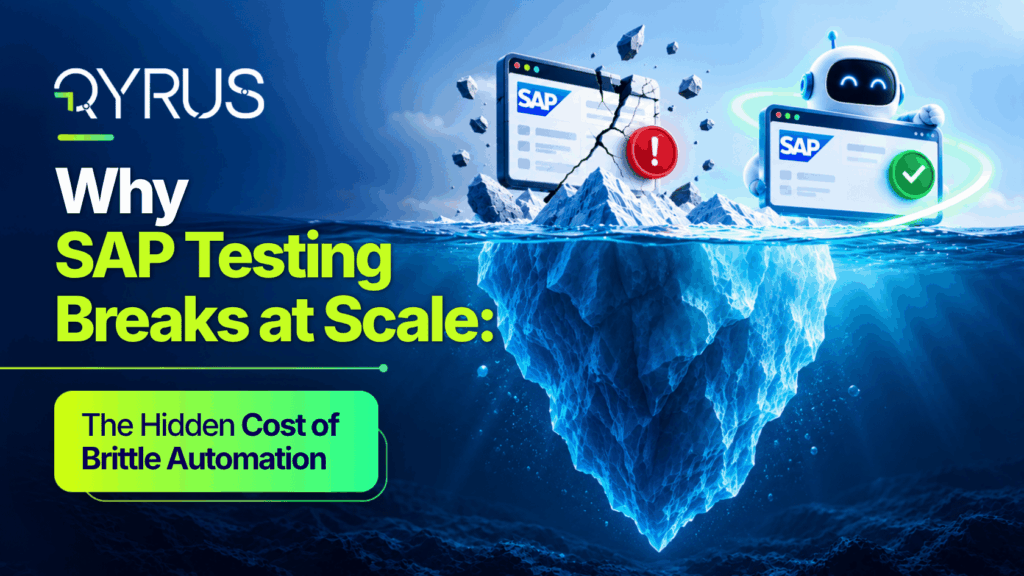
Why SAP Testing Breaks at Scale_ The Hidden Cost of Brittle Automation(Feature Image)

Introduction: SAP Automation Works Until the Environment Starts Changing 

An SAP team successfully automates a set of critical business processes. Initial results are highly positive: regression cycles become faster, manual effort decreases, and the suite appears to deliver exactly what was expected. 

Then, the environment changes. 

An SAP Fiori application is updated, altering its document object model. A mandatory release shift modifies transaction flows. A dynamically generated field alters its internal identifier. A third-party integrated app changes its API, or a business process is modified to meet new compliance rules. Suddenly, previously working tests begin failing. The end-user could likely execute the transaction without issue, but the automation itself can no longer recognize or interact with the application reliably. 

SAP test automation rarely fails because automation is an ineffective concept. It fails due to the automation method frequently relying too much on components, scripts, and assumptions that ultimately shift as the SAP landscape advances. Test scripts grow fragile when they rely too much on static UI components, predefined locators, and particular application frameworks. 

The main argument outlining modern enterprise quality assurance is evident: as the SAP landscape expands and becomes increasingly dynamic, maintaining fragile automation becomes more costly. What starts as a controllable regression suite can swiftly transform into a significant maintenance challenge amidst dynamic Fiori applications, S/4HANA release timelines, and complex system integrations. 

What Makes SAP Testing Different? 

Enterprise leaders often underestimate the complexity of SAP testing, assuming it is standard browser testing applied to a larger application. However, modern SAP environments are highly complex ecosystems. They simultaneously encompass SAP S/4HANA, SAP Fiori, SAP SuccessFactors, SAP Ariba, custom ABAP applications, and third-party enterprise platforms like Salesforce. 

More importantly, individual SAP transactions frequently participate in larger business processes: 

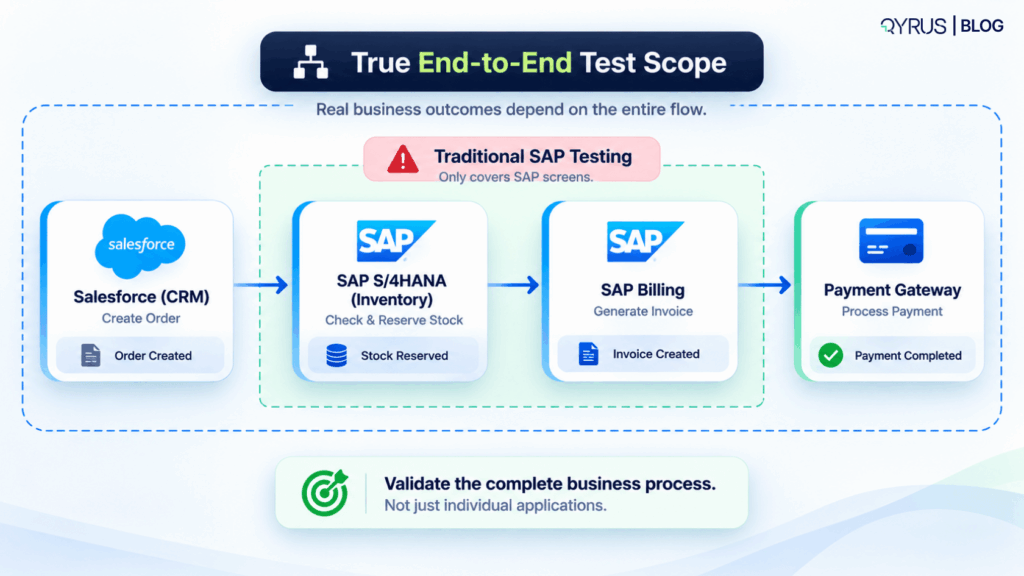
  • Order-to-Cash: Salesforce → SAP S/4HANA → SAP Inventory → SAP Billing → Payment 
  • Procure-to-Pay: SAP Ariba → SAP S/4HANA → Purchasing → Supplier Finance 
  • Hire-to-Retire: SAP SuccessFactors → SAP S/4HANA → Payroll → Employee Lifecycle 

A test may pass at the individual application level while the overall business process still fails. For example, an automated script might successfully input data into a Fiori purchase order screen, but if the downstream financial ledger isn’t updated, the process is broken. Scalable SAP testing must understand applications, objects, integrations, and overarching business processes together. 

Why Traditional Locators Struggle with SAP Fiori 

The shift to SAP Fiori brought a new level of complexity to automation. Fiori’s contemporary, web-oriented framework depends extensively on dynamic, metadata-based rendering, which consistently weakens conventional test automation tools. 

The locator problem 

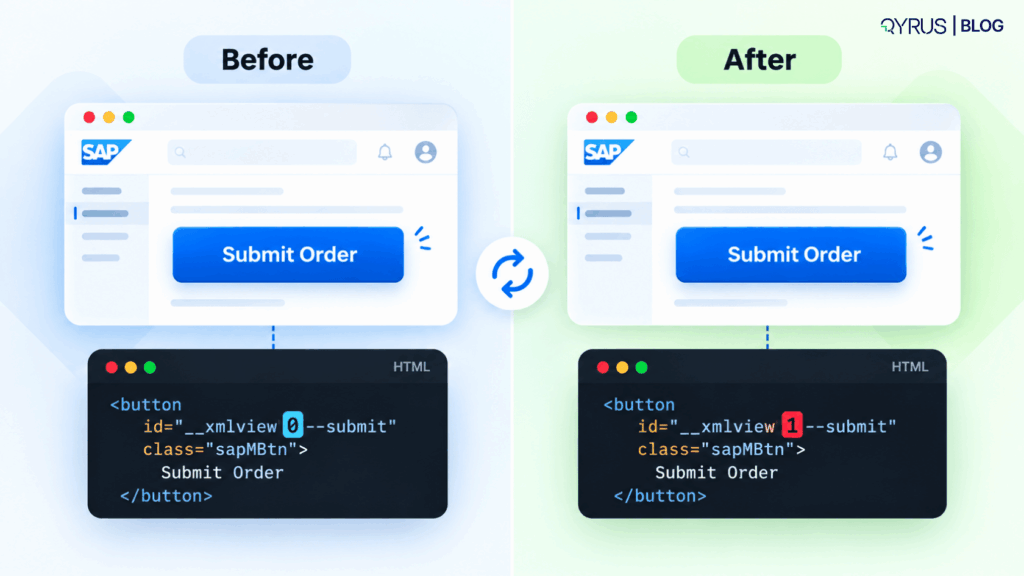
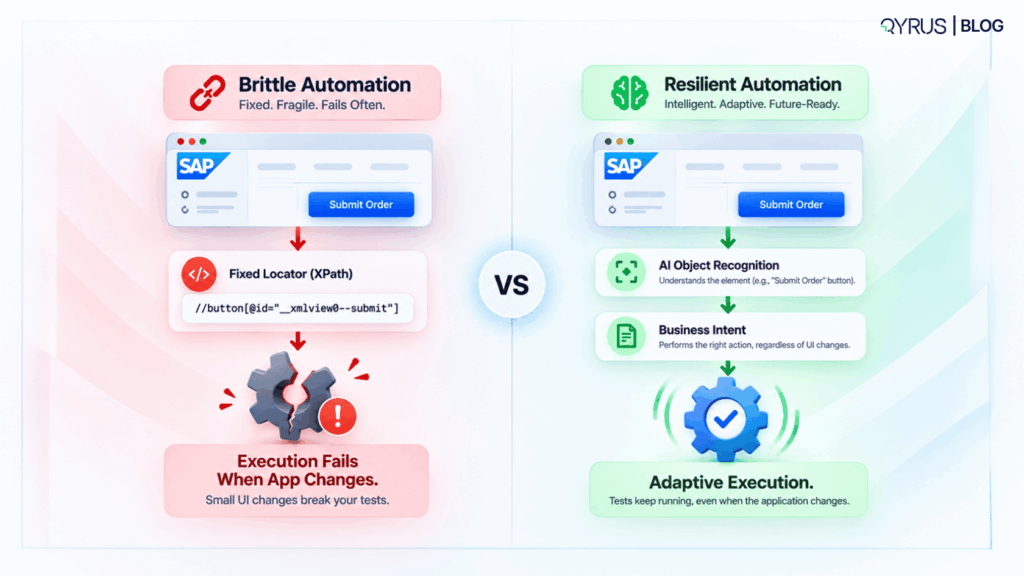
Conventional UI automation often relies on fixed identifiers such as XPath expressions, CSS selectors, and HTML IDs. These deterministic approaches work effectively when application structures remain strictly stable. However, SAP Fiori applications involve dynamically generated elements and metadata-driven interfaces that render differently based on context. Addressing these SAP Fiori test automation issues are essential since a test script may rely on a particular identifier today, but that identifier could completely change following a small application update. The button remains, the business process is the same, yet the automation does not succeed. 

Why dynamic IDs create maintenance overhead 

The use of dynamic UI5 frameworks means that elements receive generated IDs that change unpredictably. A control ID that renders as __xmlview1 during one session might render as __xmlview0 during the next. This dynamic generation immediately breaks any locator tied to the original string. This leads to a devastating maintenance chain: application change → locator changes → test failure → investigation → manual script update → retest → regression execution. 

The Hidden Cost of Brittle SAP Automation 

When an enterprise relies on fragile test scripts, the financial and operational tolls compound, directly contributing to the high failure rate of ERP implementations across the industry. 

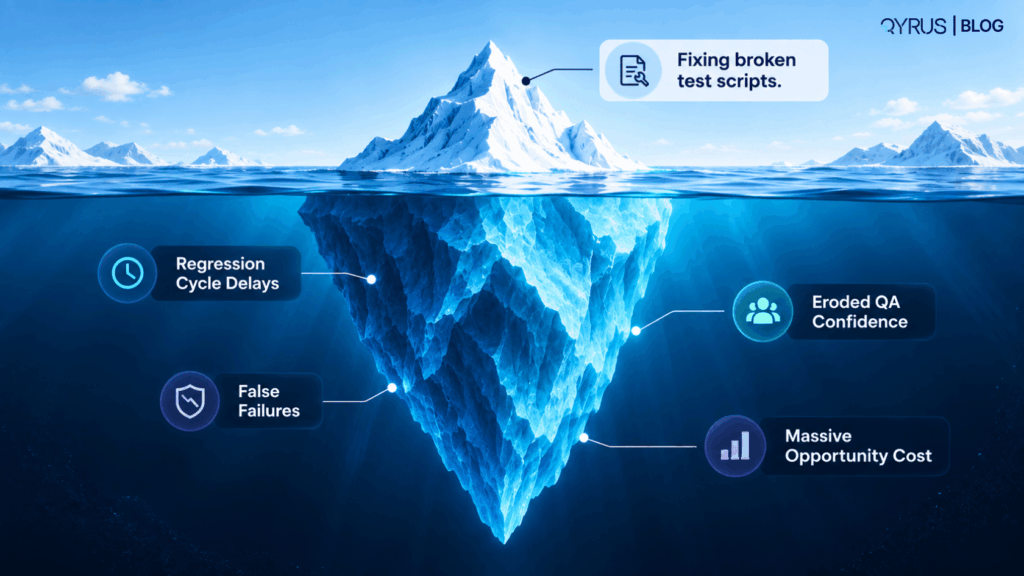
Test script maintenance 

When scripts fail, highly skilled QA engineers are forced to spend substantial time identifying failed tests, manually determining whether the failures represent real product defects or automation decay, updating locators, revalidating scripts, and maintaining test data. 

Regression cycle delays 

When an automation suite requires significant manual maintenance before every major release, it loses its primary benefit: speed. Instead of seamlessly moving from build to execution to analysis, teams must halt CI/CD pipelines to repair and validate automation scripts, delaying release cycles. 

False failures 

Brittle automation routinely creates failures unrelated to actual application defects. This leads to noisy test results, increased investigation time, and drastically reduced confidence in the automation. Genuine, critical business defects can easily get buried in the noise and leak into production. 

Opportunity cost 

The biggest hidden cost is what teams cannot accomplish because their capacity is entirely consumed by script maintenance. Instead of improving risk-based testing, validating new business processes, or refining release quality, engineers spend their time keeping legacy scripts barely functional. 

Regression Testing: Where the Problem Multiplies 

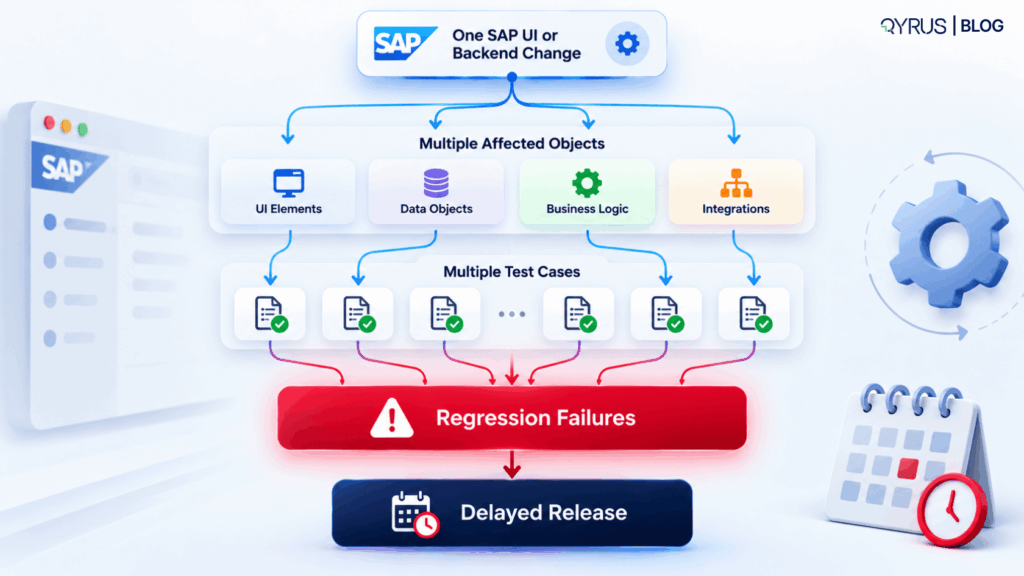
The maintenance burden of brittle automation scales exponentially in enterprise regression suites. A minor UI change does not necessarily mean only one test case needs updating. In interconnected SAP environments, the same application component is frequently utilized by multiple business processes, different test environments, and various user roles. 

One SAP change → Multiple affected objects → Multiple test cases → Regression failures → Manual investigation → Automation maintenance → Delayed release. 

This cascading failure mechanism makes the phrase “breaks at scale” a tangible, daily reality for large organizations. 

The S/4HANA Upgrade Challenge 

The fragility of traditional automation is acutely problematic during an SAP S/4HANA transformation. S/4HANA upgrades are not just “migration validation.” They fundamentally alter various layers: Fiori applications substitute outdated UIs, SAP HANA brings in new data formats, and essential business processes are redesigned. 

This transformation creates a vastly larger testing surface. Furthermore, adhering to the SAP S/4HANA Cloud release schedule involves managing bi-annual major upgrades alongside bi-weekly hotfixes. Brittle automation becomes incredibly expensive because it must survive an environment undergoing continuous transformation. Teams must implement resilient SAP S/4HANA cloud testing strategies to keep pace with these frequent release cycles. 

SAP Testing Doesn’t Stop at SAP 

Modern business processes rarely live entirely inside SAP. A typical procurement process may start in SAP Ariba, transition to SAP S/4HANA for handling, engage with a specific supplier portal, and finish in an external financial application. Testing only SAP screens does not validate the entire business process.  

The primary unit of testing should increasingly be the comprehensive business process, creating a natural and necessary bridge toward true end-to-end enterprise testing. 

Why Cross-System Dependencies Make Automation More Fragile 

Expanding the testing scope introduces cross-system dependencies. In a multi-system workflow, an automated test may fail because a Fiori UI dynamically changed, a Salesforce DOM was updated, an API contract was quietly altered, or test data became desynchronized. 

This interconnected fragility creates a severe diagnostic problem: When an end-to-end test fails, where did the failure originate? A scalable SAP testing strategy requires deep visibility across the entire workflow. Implementing robust end-to-end SAP business process validation demands capabilities beyond simple browser record-and-playback tools, including cross-application orchestration and deep dependency awareness. 

The Shift from Script-Centric Automation to Resilient Automation 

To break free from the overwhelming upkeep liabilities of fragile scripts, organizations need to implement a crucial paradigm shift. Rather than inquiring about how to keep all these scripts, organizations should ask: “How can automation adjust when the application evolves?” 

The Traditional Script-Centric Model: Application → Locator → Script → Execution. If the locator changes, the script breaks. The Resilient Automation Model: Application → Object Recognition → Business Intent → Adaptive Execution. The automation framework understands what it needs to interact with based on intent, rather than relying solely on a static identifier. 

How AI-Based Object Recognition Changes SAP Automation 

Artificial intelligence is fundamentally changing how testing systems interact with complex interfaces, moving beyond rigid code dependencies. 

From fixed locators to intelligent recognition 

AI-powered object recognition helps automation identify elements based on deep contextual information rather than static locators. By utilizing computer vision and structural analysis, intelligent systems build multi-attribute fingerprints for every UI element. If a primary ID changes, the system evaluates secondary attributes to locate the intended control, providing greater resilience to UI updates. 

Self-healing automation 

The evolution of self-healing test automation allows automation to detect when expected interactions fail, analyze the interface for the most probable alternative, and complete the intended action. Crucially, self-healing must strictly preserve the intended test action without introducing semantic drift (making a failed test pass when a real defect exists). 

What Resilient SAP Automation Should Look Like 

A scalable SAP testing strategy should ideally provide a comprehensive framework built on adaptability: 

  1. Application Awareness: Natively understand SAP structures, Fiori design paradigms, and backend architecture. 
  2. Dynamic Object Recognition: Reduce dependency on fragile identifiers using multi-attribute contextual matching. 
  3. Self-Healing: Autonomously adapt when elements move or change IDs while preserving business intent. 
  4. Business-Process Awareness: Validate data-driven workflows spanning multiple transactions. 
  5. Cross-Application Testing: Support validating SAP alongside Salesforce, Ariba, APIs, and downstream systems. 
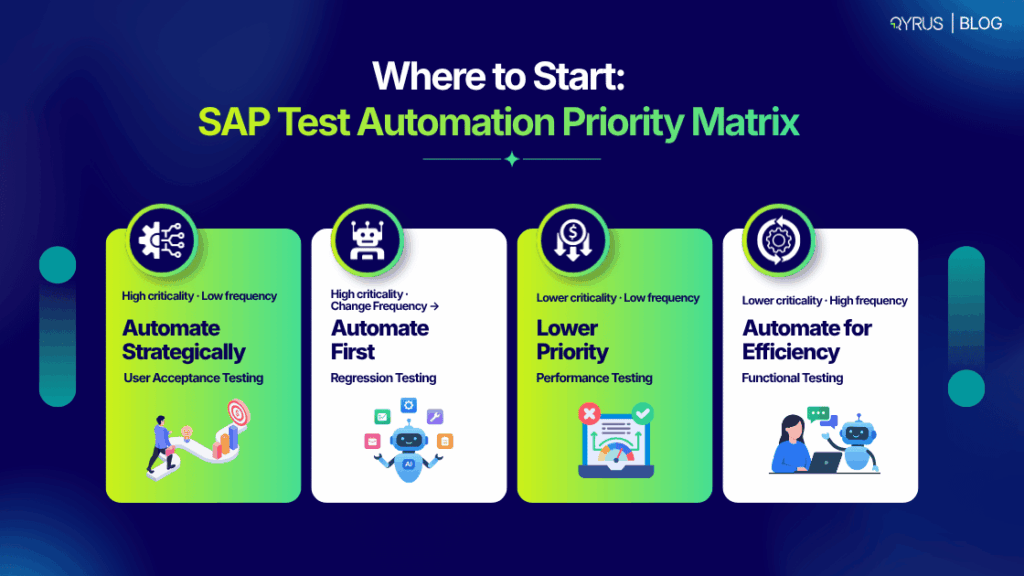
  6. Regression Intelligence: Prioritize testing based on actual application code changes to minimize redundant execution. 
  7. Maintainability: Implement unified data strategies, such as managing SAP test data efficiently, to reduce the manual engineering effort required to keep operations running. 

From Automation Coverage to Automation Resilience 

Most organizations measure automation using volume-based vanity metrics like test case counts and pass/fail rates. However, high coverage with brittle scripts simply equates to massive technical debt. 

To evaluate true operational readiness, organizations must introduce resilience-focused metrics: How often do tests require manual maintenance? How quickly can the suite recover after a cloud update? How much effort is spent purely repairing tests? The value of SAP automation isn’t determined only by how much you automate; it is determined by how well that automation survives change. 

Building a More Sustainable SAP Testing Strategy 

Transitioning to a resilient quality engineering engine requires a structured approach: 

  • Step 1: Identify business-critical processes. Prioritize workflows like Order-to-Cash and Procure-to-Pay. 
  • Step 2: Map dependencies. Identify all SAP and non-SAP applications involved in the full data journey. 
  • Step 3: Identify automation fragility. Audit test assets for hard-coded locators and duplicate manual efforts. 
  • Step 5: Measure resilience. Track maintenance effort, automation failure rates, and regression cycle times. 

QyrusAI: Making SAP Test Automation More Resilient 

QyrusAI is a comprehensive platform built to help enterprises seamlessly modernize, assure, and operate their most critical software ecosystems. For organizations struggling with the weight of maintaining brittle scripts, QyrusAI exemplifies the shift toward resilient, cross-platform automation. QyrusAI SAP Scribe uses ERP-aware AI models explicitly tailored to the customer’s landscape, moving decidedly beyond brittle XPath-based execution. Specifically for dynamic user interfaces, the QyrusAI Fiori Test Specialist can autonomously generate end-to-end executable test scripts using SAP application source code and specifications. Because processes rarely exist in isolation, deploying modern AI-powered SAP testing tools like QyrusAI enables validation across complete multi-system business processes. In the end, its self-repairing features significantly lessen the manual upkeep demands tied to constant application modifications. 

For organizations aiming to lessen the maintenance load of SAP automation while boosting assurance in essential business operations, AI-driven testing provides a more robust solution ahead. QyrusAI combines SAP-aware automation, smart object detection, self-healing capabilities, and cross-application testing to assist teams in creating and sustaining dependable end-to-end SAP testing at scale. 

Explore AI-powered SAP testing with QyrusAI. 

FAQs 

1: Why does SAP test automation become difficult to maintain? 

Traditional testing scripts rely heavily on static locators. As SAP environments continuously evolve—driven by dynamic UI element generation, changing backend configurations, frequent S/4HANA releases, and shifting integrations—these static scripts break, creating massive maintenance debt. 

2: Why do XPath-based automation scripts break in SAP Fiori?  

XPath-based scripts frequently fail because Fiori utilizes metadata-driven interfaces and dynamic DOM structures. As seen when understanding dynamic IDs in SAP UI5, control identifiers are often generated dynamically at runtime (e.g., __xmlview1 changes to __xmlview0 upon a page reload), breaking rigidly coded scripts. 

3: How does SAP S/4HANA impact testing and test automation?  

In the field of testing and test automation SAP S/4HANA holds a significant importance, by substantially broadening the testing domain by incorporating new data frameworks, Fiori interfaces, and API adjustments. With SAP S/4HANA Cloud follows a rapid release timeline featuring semi-annual upgrades and bi-weekly hotfixes, manual testing instantly falls behind and loses its significance.   

4: What is self-healing test automation?  

Self-healing test automation uses AI enabled features to adjust to changes in web sites or Apps UI. In a scenario where an expected locator fails, the programming interface using computer vision and structural similarity to identify alternative interaction methods, ensuring the test runs smoothly without any hurdles while providing the expected results. 

5: Can SAP testing tools test processes across non-SAP applications?  

Yes, but that will be only true if the company invests in an all-in-one testing platform. Today’s business workflows bounce all over the place from SAP S/4HANA and Salesforce to Ariba and external APIs so you need a tool that can effortlessly glue all those moving parts together in a single test. 

6: How can AI reduce SAP test automation maintenance?  

AI drastically reduces maintenance by moving automation away from rigid script dependencies. By utilizing AI-based object recognition, tools locate elements contextually rather than relying on brittle CSS or XPath selectors. AI also powers self-healing, automatically adapting execution during runtime to bypass UI changes without manual intervention. 

SAP Automation Must Be Built to Survive Change 

SAP automation doesn’t become difficult because enterprises automate too much; it becomes difficult when automation is built around assumptions that cannot keep up with a constantly evolving environment. SAP Fiori interfaces are highly dynamic, S/4HANA transformations expand testing surfaces, and enterprise processes span complex webs of third-party systems. As regression suites grow, script maintenance can consume the very value automation was supposed to create. 

For SAP testing to scale effectively without crushing quality engineering teams, automation needs to become as adaptable as the applications it tests. By shifting away from script-centric rigidity and embracing intelligent object recognition and self-healing frameworks, organizations can build sustainable testing engines capable of supporting continuous enterprise transformation.  

Ready to transform your SAP testing strategy? Contact us today to eliminate maintenance debt and build a resilient, AI-powered automation framework with QyrusAI.  

Featured Image

Most SAP roadmap conversations in 2026 eventually arrive at the same question: what actually happens when the clock runs out. Not the abstract version, but the operational one. What breaks, what gets cut, and what a rushed migration costs an organization that waited too long to find out.  

SAP ECC’s mainstream maintenance ends December 31, 2027. That part is settled and well documented. What’s less settled, and what most guides on this topic skip, is what happens to migration quality when organizations compress years of planning into the time that’s left. This piece covers both: the dates that matter and the part almost nobody is telling CIOs about, why migrations under deadline pressure actually go wrong.  

None of this is new information to anyone who has been tracking SAP’s roadmap. What’s changed is the math. With roughly eighteen months of planning runway left before the deadline itself, and 18 to 36 months being a typical range for a large enterprise migration, the window where “we’ll get to it” was a defensible answer has effectively closed. 

The Dates That Actually Matter  

SAP has been consistent about its maintenance timeline for years, and the schedule is confirmed directly on SAP’s own support portal, not through analyst speculation.  

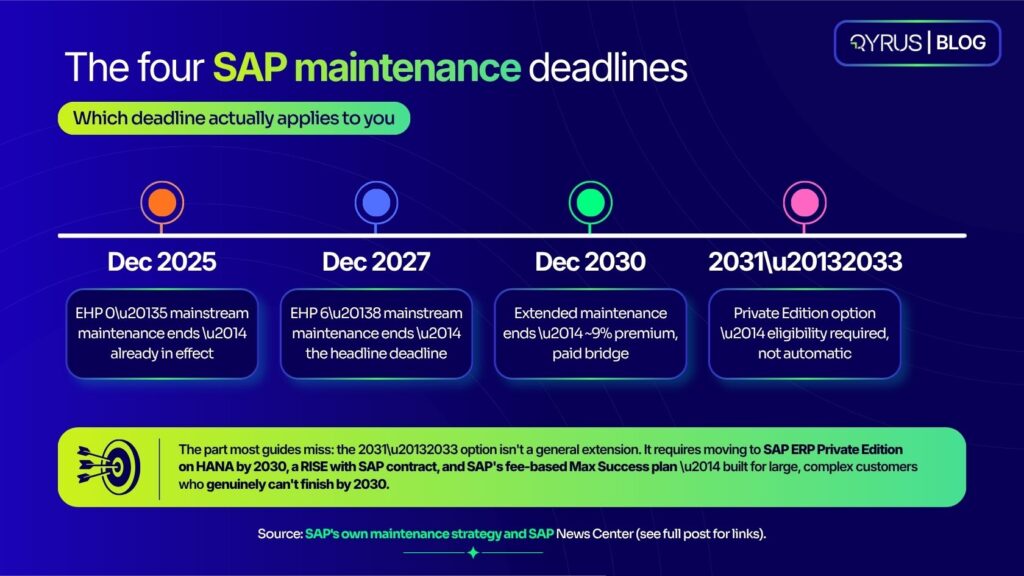
  • Mainstream maintenance for SAP ECC 6.0 on Enhancement Packages 6–8 ends December 31, 2027.  
  • Enhancement Packages 0–5 already lost mainstream maintenance on December 31, 2025, and moved into customer-specific maintenance, a tier with no new security patches or legal updates.  
  • Extended maintenance runs January 2028 through December 31, 2030, at roughly a two-percentage-point premium on the maintenance basis, commonly cited as an approximate 9% increase over standard fees.  

Mainstream maintenance is what most organizations don’t think about until it’s gone, the security patches, legal and regulatory updates, and full support coverage that keep a core ERP current. Extended maintenance keeps a narrower version of that flowing through 2030. It doesn’t add new capability, and it doesn’t reduce the custom-code debt that made the migration risky to begin with. It buys time, not safety.  

The 2033 Option Most Guides Aren’t Covering Yet  

There’s a newer wrinkle that hasn’t made it into most SAP ECC end-of-life content: SAP’s ERP Private Edition Transition Option, announced through SAP’s own newsroom. It lets a select group of large, complex customers keep running ECC, under a managed cloud subscription, through the end of 2033.  

It comes with real conditions, not a blanket reprieve. Eligible organizations must move relevant systems to SAP ERP Private Edition, which requires running on the HANA database, before the end of 2030, hold a RISE with SAP contract, and purchase the option under SAP’s fee-based Max Success plan.  

It’s purchasable starting in 2028 and usable only from 2031 through 2033. SAP has been explicit that this targets its largest, most complex customers, particularly those that genuinely can’t finish their transformation by 2030. It is not a general escape hatch for organizations that would simply prefer to delay migration planning. 

Where the SAP Install Base Actually Stands  

Ask five sources how many of SAP’s roughly 35,000 ECC customers have migrated to S/4HANA, and you’ll get five different numbers, because each study measures at a different point in time with a different methodology. That range is worth seeing honestly rather than reduced to one convenient statistic.  

  • Gartner data, as reported by CIO.com, put completed migrations at 39% of the ECC base as of the end of 2024.  
  • Forrester’s internal findings indicate that less than 50% of ECC clients are on track to finish their migration by 2027, as about 13,000 customers remain on Enhancement Packages 0–5, which have already exceeded their 2025 deadline. 
  • Other adoption models foresee completion rates reaching the upper 50s by the time the 2027 deadline finally arrives. 
      

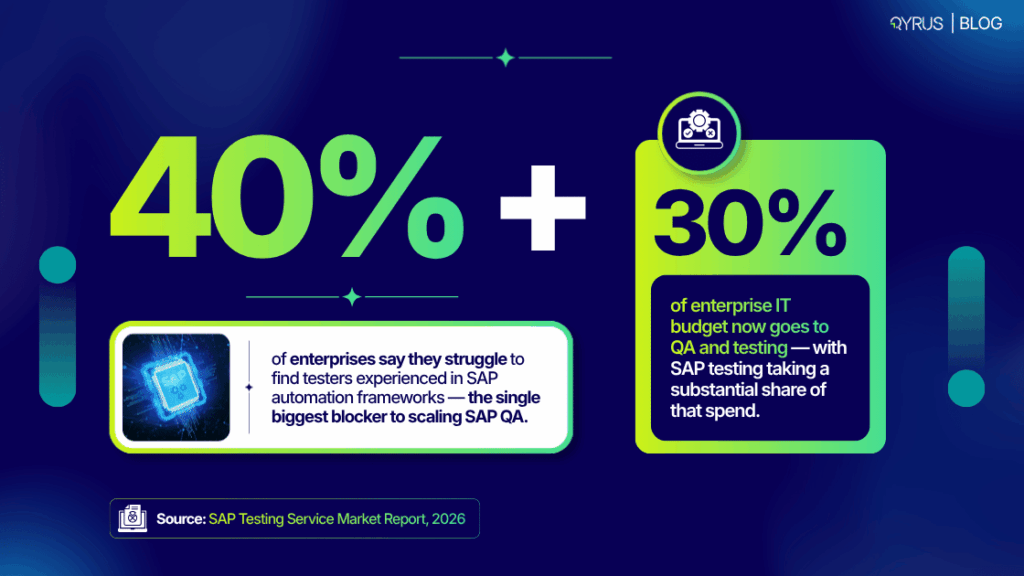
Whichever figure proves closest, every source agrees on the same underlying fact: a meaningful share of the SAP customer base is going to hit the 2027 deadline without having finished. That’s a demand problem as much as a technical one — Forrester’s research cites data from the Americas’ SAP Users’ Group showing that more than a quarter of organizations already rank SAP skills availability as their top challenge, a shortage that only tightens as more programs compete for the same consultants in the same narrowing window.  

The range matters practically, not just academically. An organization benchmarking itself against “39% have migrated” draws a different conclusion than one benchmarking against “fewer than half will finish by 2027.” Either way, the honest takeaway is the same: being mid-planning in 2026 puts an organization in the majority, not the exception,  which is exactly why what happens inside a compressed timeline matters more than the timeline itself.  

The Part Most Deadline Guides Skip: What Actually Breaks Under Pressure  

Here’s where most content on this topic stops: here are the dates, here are your three options, talk to a partner. That’s useful, but it skips the question that determines whether a migration actually succeeds — what happens operationally when a multi-year transformation gets compressed into whatever time is left.  

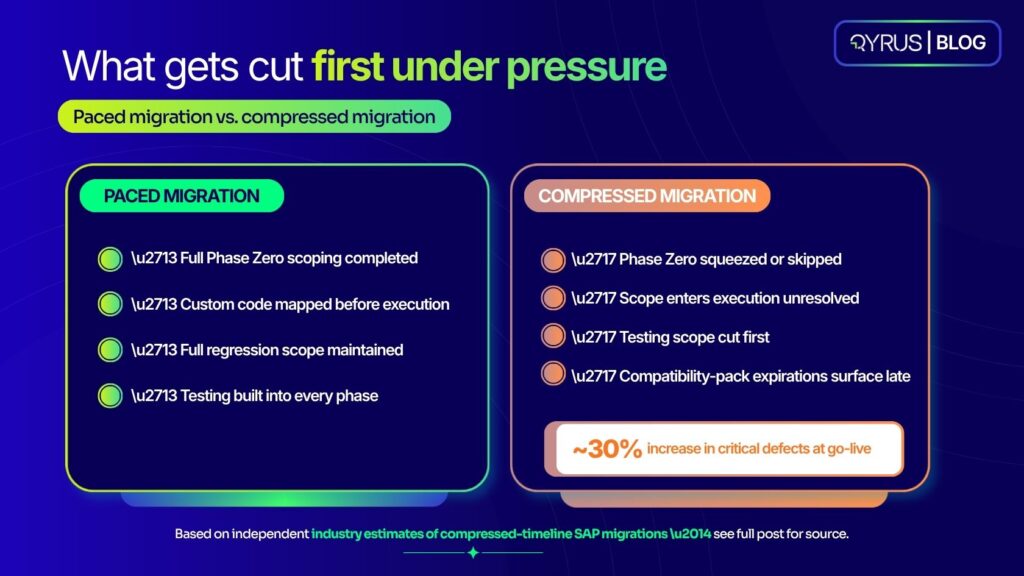
The pattern shows up consistently across organizations that started late. Phase Zero, the assessment and scoping work that isn’t billable to a systems integrator and that nobody wants to delay the “real” project to finish properly, gets squeezed first.  

Scope enters execution unresolved. Many organizations have also been running on S/4HANA compatibility packs that let ECC-style behavior keep working temporarily; as those packs expire through 2026, functionality that was quietly propped up stops working all at once, and testing scope expands right when there’s least time to absorb it.  

The consequence is measurable. Independent estimates put the effect of compressed testing phases at roughly a 30% increase in critical defects discovered at go-live, exactly the outcome a hard deadline is supposed to help organizations avoid, not cause.  

In practice, this rarely looks like a single dramatic failure. It looks like a finance close process that worked in every test scenario the team had time to write, but not the edge case a specific regional entity hits every quarter-end. It looks like an integration that passed its happy-path test but breaks under the exact transaction volume a peak sales period generates. These aren’t exotic failure modes, they’re the ordinary cost of a test suite that shrank to fit a shrinking timeline instead of a timeline that expanded to fit the actual scope of the estate.  

There’s also a security dimension that’s easy to underweight while focused on the migration itself. This isn’t unique to SAP — it’s a documented pattern across enterprise software generally. Software that has reached end-of-life gathers unaddressed vulnerabilities at a consistent rate after a vendor ceases to provide updates, and studies indicate that software beyond its support period is roughly four times more likely to be actively targeted by attackers than software still receiving patches.  

Two Structural Reasons Testing Breaks First  

Zoom into why testing specifically is what gives way under a compressed timeline, and it comes down to two recurring problems, not one.  

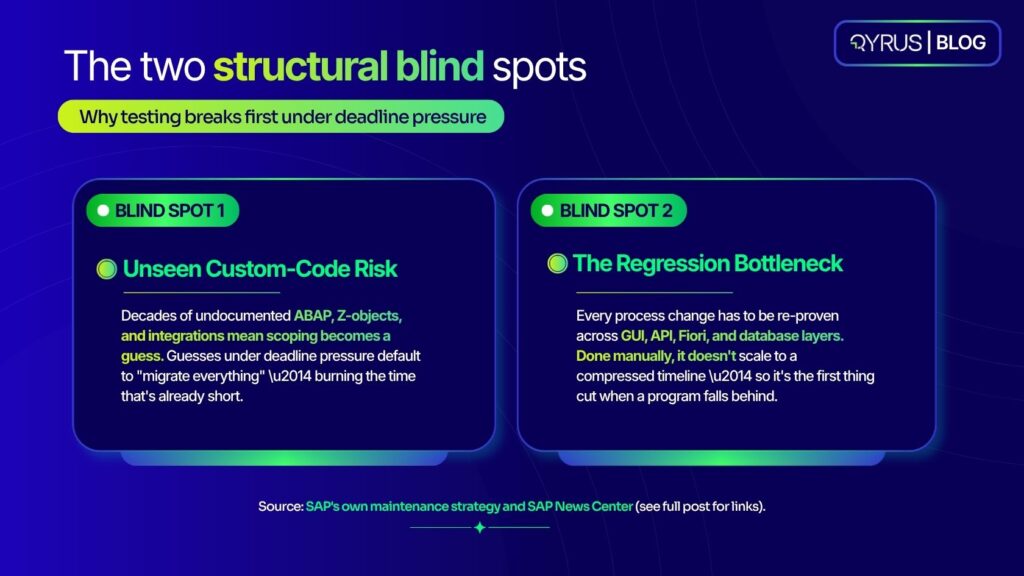
The first is visibility. Most SAP estates carry a decade or more of custom ABAP, Z-objects, and point-to-point integrations that nobody currently on staff fully documented. When teams can’t see what a piece of custom code actually does or what depends on it, scoping becomes a guess, and guesses under deadline pressure tend to default to “migrate everything to be safe,” which burns the exact time that’s already short. Field data from brownfield conversion projects suggests a meaningful share of what teams initially flag as critical custom code turns out to be dead weight, code nobody’s actively using, while the code that genuinely needs attention gets buried in the same undifferentiated pile.  

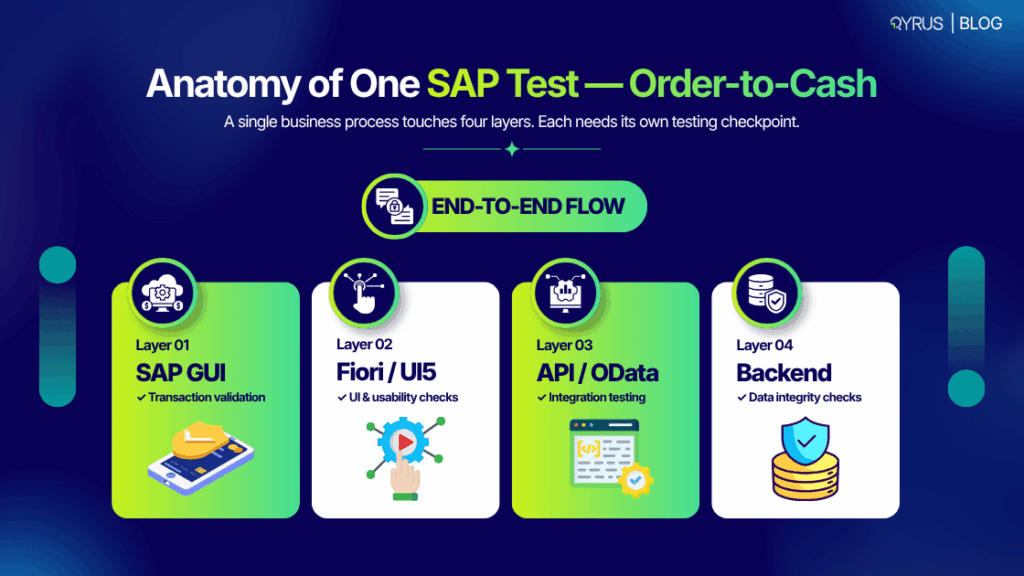
The second is validation capacity. Every change to a core business process like Order-to-Cash, Procure-to-Pay, or Record-to-Report, has to be re-proven end to end across GUI, API, Fiori, and database layers before it’s safe to ship. Done manually, that validation work is slow and doesn’t scale to a compressed timeline, which is precisely why it’s the first thing that gets cut when a program falls behind. A regression cycle that would take a small QA team the better part of a week to run manually simply can’t keep pace with a program trying to compress eighteen months of work into twelve.  

Our team goes deep on both of these structural blind spots, with a full technical breakdown and a phase-by-phase model for closing them, in our strategic approach to SAP S/4HANA testing, and in our full CIO playbook on defect-free migrations.  

Get the full framework: “The 2027 Forcing Function: A CIO’s Playbook for Defect-Free S/4HANA Migrations at Scale” maps all 25 friction points, the 5-phase delivery model, and the economics of closing both blind spots before the window closes. Download the whitepaper here. 

Neither problem is solved by adding more people to the project in month eleven. Both are solved by treating estate visibility and test automation as one connected discipline from the start, which is the argument our executive guide to SAP functional testing risk walks through in more detail.  

What CIOs Should Actually Do with the Time That’s Left  

None of this is an argument for panic, and it isn’t an argument for waiting either. A few concrete moves matter more than the calendar math itself:  

  • Scope the custom-code estate now, even informally, rather than waiting for a formal project kickoff to find out how large the problem actually is.  
  • Build testing into Phase Zero planning, not the Realize phase — by the time testing shows up as a line item on a project plan, it’s usually already the constraint everyone’s working around.  
  • Treat compatibility-pack expirations as a trigger, not a footnote — know which packs the organization depends on and when each one runs out through 2026.  

For a deeper look at what a stable, well-tested go-live actually requires once a migration is underway, our complete guide to SAP S/4HANA migration performance testing covers the practical mechanics in full.  

How Qyrus Helps  

This is the part of the problem Qyrus is built to solve. QModernize builds a live dependency map of an SAP estate — custom ABAP, cross-module process dependencies, and integrations — so scoping decisions are based on evidence instead of guesswork. QAssure pairs with it to auto-generate and self-heal the regression suites needed to prove every process chain before it reaches production, scoped automatically to whatever actually changed rather than a static suite re-run on every release.  

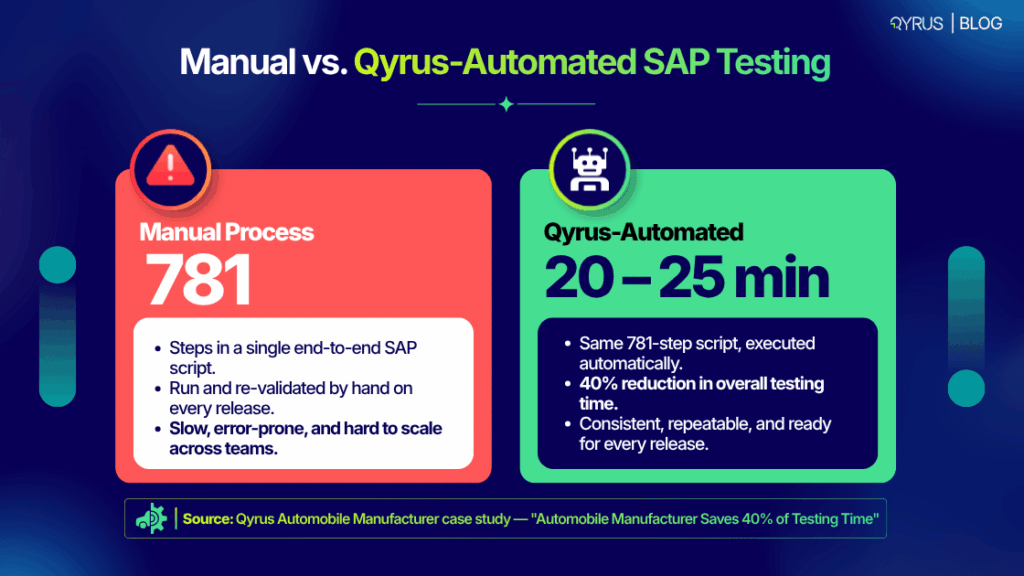
The combination is not theoretical. When a $30B+ automotive manufacturer needed to validate a critical, high-volume SAP procurement process without the traditional weeks of manual scripting, Qyrus’s agentic testing and SAP Scribe AI cut testing effort for that scenario by 88%, as detailed in Inside the 88% Win.  

If you’re weighing platforms as part of your own 2027 planning, our guide to choosing the right SAP testing tools is a useful next stop.  

FAQ s 

When does SAP ECC support actually end?  

Mainstream maintenance for SAP ECC 6.0 Enhancement Packages 6–8 ends December 31, 2027. Enhancement Packages 0–5 already lost mainstream maintenance on December 31, 2025, and are now on customer-specific maintenance.  

What’s the difference between extended maintenance and customer-specific maintenance?  

Extended maintenance (2028–2030) is a paid option that keeps security patches and select legal updates flowing at a premium over standard fees. Customer-specific maintenance is the default fallback with materially reduced scope — no guaranteed new security patches or legal updates, which is why most organizations treat it as a last resort rather than a plan.  

Can an organization really run SAP ECC until 2033?  

Only under SAP’s ERP Private Edition Transition Option, and only for eligible large, complex customers who move to SAP ERP Private Edition on HANA by 2030 and hold a RISE with SAP contract. It’s not a general extension available to every ECC customer, and it’s a purchased subscription, not a free grace period.  

What happens if an organization does nothing before the 2027 deadline?  

The system keeps running, but it loses access to new security patches, legal and regulatory updates, and full SAP support coverage — exposure that compounds the longer it continues, particularly for organizations in regulated industries.  

How long does a typical SAP S/4HANA migration take?  

Large, complex enterprise migrations commonly run 18 to 36 months, which is why organizations starting late face a genuinely compressed timeline against the 2027 and 2030 deadlines rather than a comfortable one.  

Does the 2027 deadline actually affect testing strategy?  

Yes — it’s usually the first casualty of a compressed timeline. Programs that start late tend to cut testing scope first, which is directly linked to the increase in critical defects found at go-live rather than during the project itself.  

The Deadline Is Fixed. The Outcome Isn’t.  

December 31, 2027 isn’t moving, and for most organizations, neither is December 31, 2030. What’s still very much within an organization’s control is whether the migration that happens inside that window is a rushed one or a proven one, and that comes down to whether custom-code risk and testing capacity get solved early or get discovered at go-live.  

For the full technical breakdown — a 25-point risk map, a 5-phase delivery model, and the economics of closing both blind spots before the window closes — download “The 2027 Forcing Function: A CIO’s Playbook for Defect-Free S/4HANA Migrations at Scale.”  

Or talk to the Qyrus team directly about what a Modernization Readiness Assessment would find in your own SAP estate.  

Featured image

Welcome to our August release! This update focuses on improving usability, execution control, automation flexibility, and platform stability across Web Testing, Desktop Testing, API Testing, Device Farm, Test Orchestration, and qAPI.  

Featuring enhanced export options, smarter generation feedback, new scripting actions, parameterized execution, plugin support, and stronger workflow controls, this release empowers teams to build, manage, and troubleshoot automation with greater speed and clarity. 

Web Testing

Function Export from the Web UI 

The Challenge:

Teams required a faster and more consistent way to move reusable functions out of the Web UI without relying on separate export paths or manual workarounds. 

The Fix:

Web Testing now supports direct Function export from the Web UI. This aligns the experience with script exports, making reusable assets easier to package and share. 

Why it matters:

This enhancement provides a cleaner export workflow, improves portability, and reduces friction when managing shared automation components. 

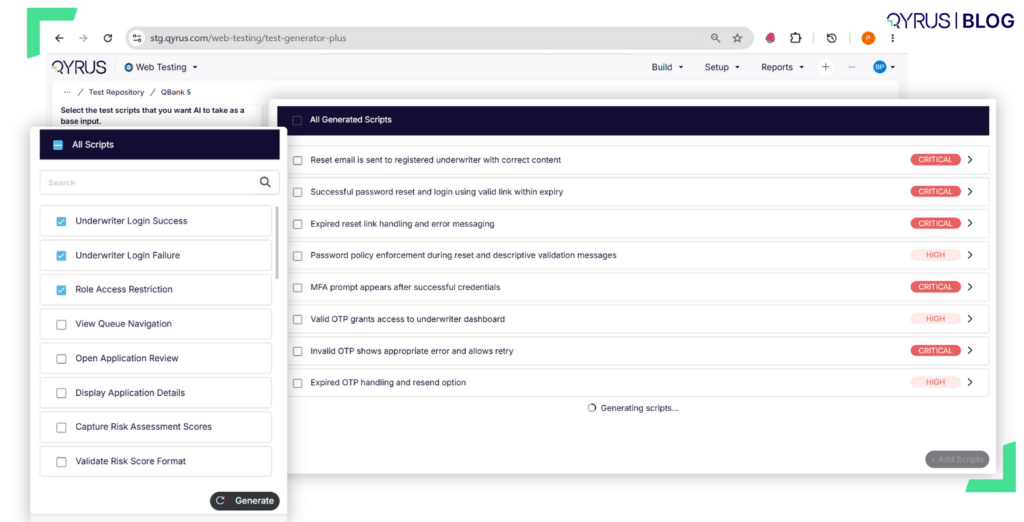
Test Generator v2 Status Improvements

The Challenge:

Users needed clearer real-time feedback during test generation and validation so they could understand progress without waiting for delayed status updates. 

The Fix:

Status indicators now marks generated and validated steps as complete immediately after each stage finishes, creating a more responsive generation experience. 

Also included:

The project list now displays recently created projects first, scrolling behavior for actions has been improved, and multiple bug fixes and UX refinements have been added. 

New Scripting Actions for Smarter Control

The Challenge:

Desktop workflows often require conditional control and calculated values during execution, but users previously had to rely on less direct scripting patterns to handle these needs. 

The Fix:

Two new scripting actions have been added: Break Loop, which stops a loop early when a condition is met, and calculate, which performs arithmetic operations and stores the result in variables. 

Why it matters:

These actions will now make desktop automation flows more flexible, easier to maintain, and better suited for dynamic test logic. 

Advanced Verification and Transformation Support

The Update:

Verify Expression adds a general-purpose verifier for conditional checks across variables, TDM fields, and loop data. Transformations now support value cleanup steps such as trimming, case conversion, and regex extraction before comparison. 

Also included:

Parameterization support has been added for SAP GUI ComboBoxes and methods such as Invoke Element Method and Set Element Property, along with multiple bug fixes and UX improvements. 

Plugin Integrations for API Automation

The Update:

API Testing now includes Azure, Jenkins, and CLI plugins for API Enterprise, helping teams integrate API automation more directly into enterprise delivery workflows. The qAPI Process Canvas has also been decoupled from the TO Workflow Canvas using a shared UI graph core, improving maintainability and consistency across experiences. 

Visibility and Workflow Control Enhancements

Users can now stop executions within the TO workflow, report summary pages include parameterized icons, script detail visibility has been improved in the Azure plugin, and multiple bug fixes and improvements have been delivered. 

More Reliable iOS Log Uploads

Update:

Device Farm now supports file streaming for large iOS log uploads, helping prevent timeout failures during heavy log transfer scenarios. 

Improved Stability for Heavy Diagnostic Sessions

This improves reliability for iOS testing sessions and makes large diagnostic uploads more stable. Multiple bug fixes and stability improvements are also included. 

Parameterized Workflows with Pause and Stop Controls

Test Orchestration now allows scripts inside TO workflows to read from parameterized tables already created in their respective services. Users can also Pause and Stop test executions, giving teams stronger control over active runs. 

Smarter Navigation Across Teams and Projects  

Deep link handling has been improved so users are automatically switched to the right team when opening specific projects, folders, or workflows. Multiple bug fixes and improvements are included. 

Unified qAPI Integrations and Canvas Architecture

qAPI introduces Azure, Jenkins, and CLI plugins for API Enterprise, along with canvas decoupling between the qAPI Process Canvas and TO Workflow Canvas using a shared UI graph core. 

Users now Get Execution Control, Reporting Cues, and Plugin Visibility

Execution stop support has been integrated within the TO workflow, parameterized icons have been added to report summaries, Azure plugin script detail visibility has been improved, and multiple bug fixes and improvements have been delivered. 

Ready to Leverage August‘s Innovations? 

Our releases are a step towards simplifying automation workflows with clearer generation feedback, more flexible scripting, stronger execution controls, improved plugin support, and better platform reliability across services. 

Eager to explore how these advancements can transform your testing efforts? The best way to appreciate the Qyrus difference is to experience these new capabilities directly.  

Ready to dive deeper or get started?  

Book a Personalized Demo

Featured-thumbnail

Here is a situation every QA team knows: a test script passes in sprint one. It passes in sprint two. By sprint three, it has become the thing everyone quietly dreads — the test that someone has to fix before the release can go out, every single time. 

It’s not because of what they tested, but because of how they were written. There’s a interesting insight behind it, what happens is when a script passes in first sprint it has a chance of becoming a maintenance liability by sprint three.  It happens for various reasons if it’s properly coupled to fragile selectors, lacks clear failure context, or tries to validate too much at once. 

In this Qyrus guide, you’ll find a clear definition of what a test script actually is, a step-by-step authoring framework, examples across manual, code-based, and no-code approaches, clubbed with best practices that actually cut maintenance overhead, and the most common mistakes that silently affecting engineering teams worldwide.  

Let’s build scripts that stay reliable long after they’re written, so you and your teams finally can have a streamlined process. 

What Is a Test Script And Is It Different From a Test Case? 

We see a clear confusion between test cases and test scripts, it’s more than a vocabulary problem. It leads directly to weak automation strategies, coverage gaps, and maintenance costs that nobody budgeted for. 

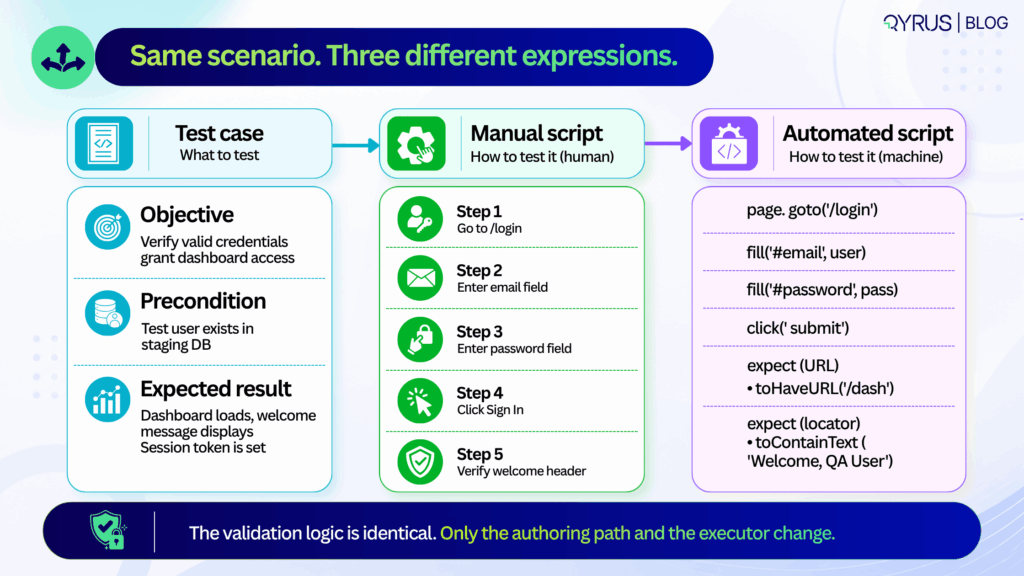
A test case defines what to test: it covers the objective, the preconditions, the inputs, and the expected outcome. It lives in a test management tool and traces back to a requirement or user story.  

Whereas a test script defines how to test it: the exact sequence of steps, interactions, and assertions that operationalise the test case. It lives in version control, a CI pipeline, or an orchestration platform. 

The clearest way to see the distinction 

Test case: Verify that a user with valid credentials can access the dashboard. 

Manual test script:  

  1. Navigate to /login. 
  2. Enter username “testuser@qyrus.com”. 
  3. Enter password “SecurePass3qww!”. 
  4. Click “Sign In”. 
  5. Confirm dashboard loads and welcome message displays.

Automated test script: A code block or no-code workflow that launches a browser, fills the credential fields, submits the form, waits for the /dashboard route, and verifies the presence and content of the welcome header element. 

The test case states the goal. The script operationalises it and neither substitutes for the other. 

It is only when teams start to treat them as interchangeable, they will end up with test cases that read like code comments — over-specified, hard to update when requirements change or automation scripts that try to validate five different user journeys in a single run. 

Both patterns produce the same outcome: the feedback is slow, debugging takes time, and maintenance costs that compound every sprint. 

Keeping them separate has a practical upside too. Product managers and QA can refine acceptance criteria in parallel with engineers building the executable scripts. If the UI changes, you update the script. If the business rule changes, you update the test case. One doesn’t break the other. 

How to Write a Test Script, Step by Step 

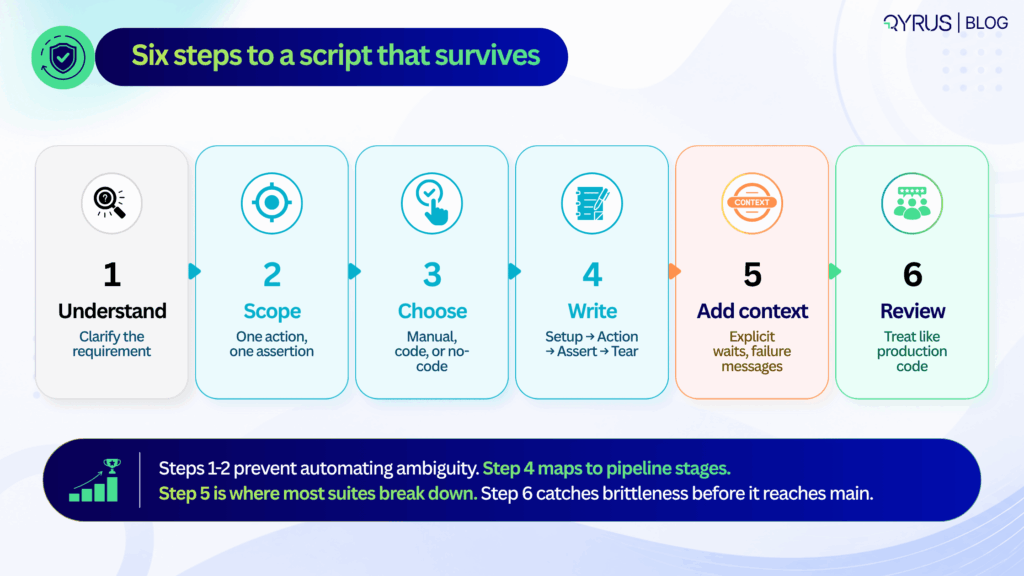
Writing a test script that survives multiple release cycles is not about clever code or exhaustive steps. It is about discipline, structure, and foresight. The following six steps apply equally whether you are writing a manual checklist, a Playwright test, or a no-code workflow. 

Step 1: Set the Context 

Before writing a single step, identify which specific acceptance criterion this script needs to verify. Is it a business rule, a UI state change, an API contract, or a data transformation? If you cannot state the purpose in one sentence, the scope is too broad and the script too will be broad. 

Step 2: Next define the scope  

When a script validates login, permissions checking, and data sync in a single run, a failure tells you nothing useful.  

You do not know whether login has failed, or the permissions were wrong, or whether the data sync had a race condition. You only know that the 20-step chain broke somewhere. Your scripts should isolate risk. They fail fast and point directly at the broken component. 

 A common argument is that atomic scripts increase the number of tests and execution time. While that concern can be valid, parallel execution can help teams manage the additional test volume. Parallel execution handles scale. The debugging time saved by atomic failures pays back the execution overhead many times over. 

Step 3: Choosing’ your authoring approach  

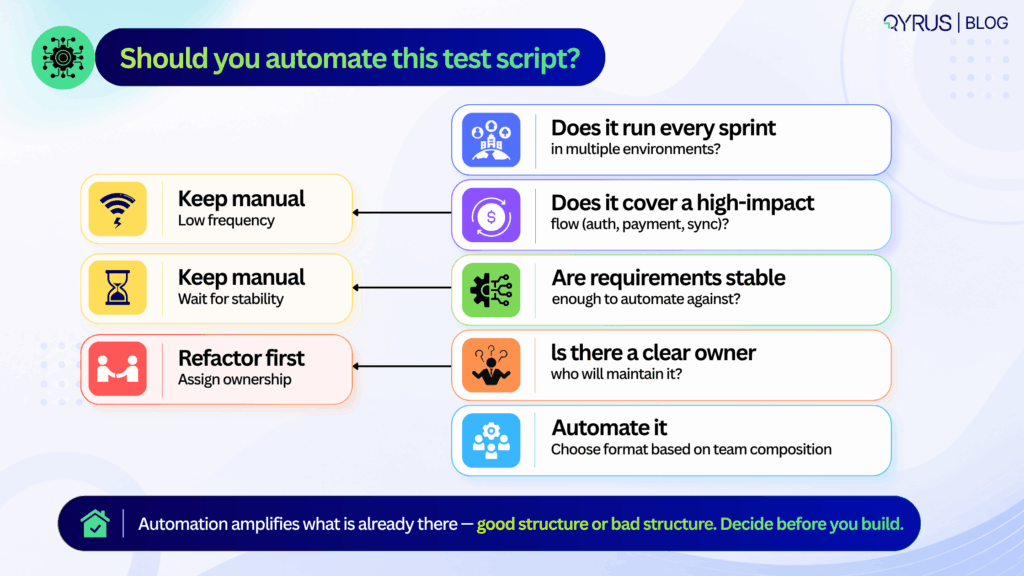
The most important question is not which framework is most powerful. It is: who will be maintaining these scripts in six months? If the answer is a dedicated SDET team, code-based frameworks offer the right level of control.  

If the answer is a mixed team of QA analysts and product managers, no-code authoring is more sustainable. If the answer is nobody — because the team is small and the feature is stable — a clear manual script may be the highest-ROI option. 

Choosing based on industry hype rather than team composition is the most common reason automation investments underdeliver. 

Step 4: Write in a consistent structure — setup, action, assertion, teardown 

Every reliable script follows the same four-phase lifecycle, regardless of format: 

  • Setup — prepare test data, authenticate the session, navigate to the starting state. Anything that must be true before the test action begins
  • Action — trigger the specific event being tested — a button click, a form submission, an API call, a file upload
  • Assertion — verify the expected state or response. One primary assertion per script. Secondary validations are a separate test
  • Teardown — clean up created records, close sessions, reset state. Teardown is the most commonly skipped phase and the most common source of cross-test contamination

This lifecycle maps cleanly to CI/CD pipeline stages and makes it possible to parallelize execution without shared state causing interference between tests. 

Step 5: Add failure context, not just failure conditions 

A script that fails silently — or dumps a raw stack trace — costs more time to diagnose than the defect it found costs to fix. Every test should include: 

  • Explicit waits — wait for DOM readiness, network idle, or specific element state — not sleep (5000) or arbitrary time delays that will be wrong in half your environments
  • Custom failure messages — “Expected /dashboard URL after valid login, got /login — check session cookie configuration” is useful. A raw assertion error is not
  • Data context in failure output — which test user, which environment, which data set was in use when the failure occurred

The engineer who receives this failure report at 11pm before a release will be grateful. So will the engineer who gets it at 9am three sprints later when the same failure reappears. 

Step 6: Review scripts like production code 

Test scripts that go unreviewed before merge accumulate the same kind of technical debt that unreviewed application code does — just more slowly and more expensively, because the symptoms (flaky CI, unexplained failures, maintenance backlogs) are harder to trace to their origin. 

The checklist for a test script review:  

  • Do assertions match the acceptance criteria in the test case?  
  • Are selectors stable, or are they tied to implementation details that change regularly?  
  • Is test data isolated, or does this script depend on state created by another test?  
  • Is teardown present and correct?  
  • Would a new team member understand what this test is verifying and why from the script alone? 

In 2026 and beyond, this workflow aligns directly with how your teams should ship. Requirements often start in AI-assisted product specs, but the verification logic still needs human clarity. 

Step 1 and 2 prevent the common trap of automating ambiguous acceptance criteria.  

Step 3 acknowledges that teams now blend SDETs, manual QA, and AI-generated snippets—tool choice should match team composition, not industry hype.  

Step 4’s setup-action-assertion-teardown pattern maps cleanly to pipeline stages, making it easier to parallelize execution and cache test environments.  

Step 5 is where most suites break down: without structured error context, flaky failures get quarantined instead of fixed, slowly eroding trust in the pipeline.  

Step 6 closes the loop. Many organizations now treat test script reviews as mandatory PR gates, catching brittle selectors and hardcoded data before they reach main.  

Following this sequence doesn’t just produce better scripts—it builds a testing culture that scales with release velocity. 

Test Script Best Practices That Actually Prevent Maintenance Pain 

Test scripts don’t decay because teams lack skill. They decay because small structural compromises compound over time. The practices below target the highest-leverage maintenance traps and are proven to extend script lifespan across release cycles. 

Keep scripts atomic  

One purpose, one primary assertion. When a script validates login, permissions, and data sync in a single run, a failure tells you nothing specific. Atomic scripts isolate risk and speed up root-cause analysis. 

Avoid hardcoded waits and brittle selectors 

Rigid XPath chains can contribute to flaky or brittle tests, particularly when they depend on implementation details that change frequently. Use explicit waits for network idle, DOM readiness, or API response states. Prefer stable attributes like data-testid or semantic roles over auto-generated class names. 

If your team is still fighting this, our deep dive on what actually causes test flakiness breaks down why brittle selectors are only part of the problem — and what the other 72% looks like. 

Standardize naming and formatting 

A script named test1_final_updated is a future debugging liability. Use consistent conventions:  MODULE_ACTION_EXPECTATION (e.g., AUTH_LOGIN_VALID_CREDENTIALS). Format code or steps uniformly so any team member can read, edit, or extend them. 

Isolate test data and state 

Shared test accounts or reused database rows cause cross-test contamination. Generate unique data per run, clean up after teardown, or use ephemeral test environments. State leakage is a silent suite killer. 

Parameterize intelligently.  

Don’t duplicate scripts for minor data variations. Use data tables, environment variables, or CSV/JSON inputs to run the same logic across multiple scenarios. Parameterization multiplies coverage without multiplying maintenance. 

Document intent, not just steps. 

A comment explaining why an assertion exists saves hours later. “Verify session token to prevent CSRF regression” is infinitely more useful than “Check token exists.” Intent documentation turns scripts into living quality documentation. 

These practices are practical as they map directly to how modern pipelines handle scale. In 2026 and years to come, they also align with how AI-assisted testing tools operate. AI can generate selectors or suggest waits, but it still depends on human-defined boundaries. Without atomic scope, AI-generated scripts inherit the same bloat.  

Without intent documentation, AI refactors can silently change verification logic. Treat these practices as guardrails, not suggestions. When baked into PR templates, linter rules, or no-code platform defaults, they become automatic rather than aspirational. 

Teams that enforce them see fewer quarantined tests, faster CI feedback, and lower handoff friction between QA and engineering. The goal isn’t perfection on day one it’s having predictability in the next months. 

Common Test Script Mistakes  

The most expensive test failures aren’t the ones that catch bugs. They’re the ones that waste time, erode trust, and quietly drain engineering capacity. Three patterns consistently drive those costs. 

Flaky vs. brittle failures 

They’re often conflated, but the root causes and fixes differ. A flaky test passes and fails intermittently under identical conditions—usually due to race conditions, network latency, or unstable test data.  

A brittle test fails predictably after a minor UI or API change—typically because of hardcoded selectors, rigid paths, or tight coupling to implementation details. Flakiness requires synchronization and data control. Brittleness requires abstraction and stable locators. Treating them as the same problem leads to the wrong fix. 

The hidden cost of poor structure 

Industry analyses from 2025 quality reports indicate that engineering teams spend 18–24% of their testing capacity maintaining or debugging unreliable scripts.  

The World Quality Report continues to highlight test maintenance as a top-three bottleneck for release velocity. When scripts lack error context, try to validate too much, or skip peer review, they accumulate silent debt.  

A single flaky script quarantined in CI might seem harmless, but ten of them degrade pipeline trust. Teams start ignoring failures, bypassing gates, or reverting to manual smoke checks—undoing the entire purpose of automation. 

The most common structural mistakes: 

  • Overly broad scripts that chain multiple user journeys, making failures impossible to triage quickly. 
  • Zero error handling or custom messaging, leaving engineers to reverse-engineer raw logs. 
  • Skipping review cycles, allowing brittle selectors and hardcoded data to merge into main. 
  • Ignoring teardown, which leaves orphaned sessions, locked records, or polluted test databases. 

The fix isn’t more automation. It’s better structure.  Scripts that fail clearly, maintain a focused scope, and clean up after themselves are easier to maintain. Poorly structured scripts become a maintenance tax on every release. 

Automated Test Scripts: When (and How) to Go Beyond Manual 

Automation isn’t a goal. It’s a leverage point. Knowing when to automate—and how to choose the right approach—prevents wasted effort and brittle suites. 

Signals it’s time to automate: 

  • The test runs repeatedly across sprints or environments. 
  • It covers a regression-prone area or a high-value business process (checkout, auth, data sync). 
  • Manual execution creates bottlenecks or delays feedback beyond acceptable SLAs. 
    If a test is exploratory, rarely executed, or highly subjective, manual execution often remains the smarter choice. 

Framework vs. no-code/low-code platforms 

Code-based frameworks offer maximum flexibility, deep CI/CD integration, and fine-grained control over execution. They require engineering bandwidth, version control discipline, and ongoing maintenance.  

No-code and low-code platforms trade some flexibility for speed, enabling QA analysts, product teams, and support engineers to author and maintain tests without writing code. The tradeoff isn’t quality—it’s ownership. Choose based on who will maintain the suite long-term, not who can write the first script fastest. 

For a direct comparison of modern end-to-end testing tools across both approaches, our guide breaks down the specific tradeoffs worth knowing before you commit to a testing stack. 

Where AI fits in 2026 

AI now helps with natural-language test authoring, locator generation, and self-healing mechanisms that adapt to minor UI shifts without manual intervention. But self-healing addresses symptoms, not structure.  It can update a broken selector or retry a flaky step, but it won’t fix an overly broad scope, a missing teardown, or an ambiguous assertion. 

AI-generated scripts still require the same best practices outlined above. A poorly structured script is equally brittle whether a human, a framework, or an LLM wrote it. The quality of the foundation matters more than the tool that built it. 

To understand how agentic testing takes this further, moving from self-healing individual scripts to AI agents that detect errors, generate test cases, and manage broader testing workflows, explore our guide before planning your next automation investment. 

How Qyrus Helps Teams Write and Maintain Test Scripts 

Qyrus is built to support the full spectrum of test script authoring and maintenance, whether your team prefers code, low-code, or codeless workflows across web, mobile, API, and desktop applications. 

The platform’s codeless script builder allows non-engineers to create structured, executable tests using plain-English steps and visual workflows, without sacrificing the setup → action → assertion → teardown lifecycle.  

For teams that prefer recording initial flows, the web and mobile recorder captures user interactions and converts them into editable, reusable scripts that can be refined with explicit waits and stable selectors. 

To address the maintenance burden highlighted earlier, Qyrus includes a self-healing engine that detects broken locators and suggests safe alternatives during execution. This reduces routine repair work and keeps pipelines moving, while still relying on well-scoped, atomic test design as the foundation. Self-healing complements good structure; it doesn’t replace it. 

Qyrus also supports parameterization and modular reusability out of the box. Teams can store test data securely, swap environments without rewriting steps, and chain reusable components across multiple scripts.  

For teams managing at scale, Qyrus’s approach to mobile testing shows how modular design — updating a “Login Block” once and having it propagate automatically to every script that uses it — can reduce maintenance overhead by up to 80% in real-world deployments. 

Whether your team manages scripts in version control, runs them through CI/CD gates, or orchestrates them alongside manual test cases, Qyrus provides a unified layer for authoring, execution, and reporting. The goal is consistent: reduce maintenance overhead, improve failure diagnostics, and keep test assets reliable as applications evolve. 

If your team is looking to standardize script authoring, reduce maintenance cycles, or bring manual and automated testing into a single workflow, you can explore how Qyrus handles these patterns in practice or request a walkthrough tailored to your current stack. 

Enterprise resource planning ecosystems have evolved from being standalone databases controlled by singular architectures. Contemporary SAP ecosystems reflect highly interconnected digital structures where a solitary configuration adjustment in the Financial Accounting and Controlling (FI/CO) module can immediately cause unexpected disturbances throughout Materials Management (MM), Sales and Distribution (SD), and Human Capital Management (HCM).  

The structural interdependence, when paired with SAP’s continuous release schedule, which includes significant cloud version upgrades, Feature Package Stacks (FPS), Support Package Stacks (SPS), and localized emergency transports, renders the conventional quality engineering model completely ineffective. 

Manual testing is structurally and mathematically incapable of keeping pace with this release velocity.  

Automation isn’t optional so much as a mandatory response to a scheduling problem: SAP ships continuous changes faster than human teams can manually re-validate the complex business processes those changes touch.  

That is why SAP test automation is no longer just a clever way to cut QA costs. Today, it’s a hard requirement. To maintain stable production, manage your release timelines, and successfully execute significant system migrations without disrupting the business, manual processes are not an option. 

To attain genuine test resilience, it is essential to move beyond fragile script-based validations. Today’s quality leaders must deploy scalable, workflow-driven orchestration that bridges disparate technologies, unifies legacy protocols with cloud-native web architectures, and seamlessly validates the next generation of enterprise workflows. 

What Is SAP Test Automation & How It Works 

At its core, SAP test automation involves utilizing dedicated software platforms to automatically carry out, verify, and oversee business processes throughout the whole SAP application environment. Instead of depending on manual operators to navigate through Transaction Codes (T-codes), input parameters, and check database conditions, automated testing performs comprehensive validation with complete consistency, traceability, and rapidity. 

Nonetheless, automating an enterprise SAP environment is inherently more complicated than automating a typical web application. An effective SAP test automation framework for businesses should operate simultaneously across diverse UI technologies, communication protocols, and architectural layers: 

  • Legacy SAP GUI (WinGUI / JavaGUI): Based on proprietary SAP protocols and ActiveX-based rendering, validating the desktop GUI necessitates unique hook mechanisms that can interpret low-level SAP Scripting APIs instead of conventional web Document Object Model (DOM) elements. 
  • Modern SAP Fiori (SAPUI5): Testing Fiori is notoriously difficult because the underlying web framework is constantly shifting. You’re dealing with nested shadow roots, fluid CSS classes, and element IDs that regenerate every time a new session starts. If you try to rely on traditional XPath or coordinate-based selectors, your scripts will break almost instantly. 
  • API & Middleware Integration Layers: Core business logic frequently bypasses the UI entirely via Remote Function Calls (RFCs), Business Application Programming Interfaces (BAPIs), Intermediate Documents (IDocs), and modern OData / REST web services. 
  • Backend Database Validation: A test isn’t actually complete until you prove the data landed exactly where it belongs. True end-to-end validation means querying your underlying SAP HANA tables (like BSEG, BKPF, VBAK, or VBAP) to ensure financial ledgers are balanced and inventory counts are mathematically correct. 

For years, teams tried to manage this technical complexity using SAP’s bundled tools, like eCATT and CBTA. Those native utilities are fine if your processes never leave the core ABAP stack.  

But in the real world, enterprise workflows rarely stay inside a neat SAP bubble. The moment a transaction crosses over into Salesforce, a custom e-commerce frontend, or a third-party logistics API, those legacy tools hit a brick wall. 

Modern enterprises are replacing legacy tools with specialized third-party platforms. These platforms approach quality engineering not through isolated script execution, but by treating business processes as interconnected, node-based workflows.  

To understand how contemporary architectures compare across capabilities, review our technical guide to choosing the right SAP testing tools.   

Why Manual SAP Testing Breaks Down 

Depending on manual testing for a complicated ERP system is an inherently flawed approach, and the difficulties only increase with each new version. When an update is released and there’s no clear method to understand what it affects, QA teams find themselves in a difficult position.  

They’re forced to choose between two bad options: run a quick round of basic smoke tests and just hope nothing critical breaks in production, or grind through months of manual regression testing that brings your release schedule to a dead stop. 

The worldwide demand for SAP testing services and software showcases the immediacy of this change. Independent market reports anticipate market valuations between USD 0.97 billion in 2026 and USD 1.79 billion by 2034, while some predictions expect growth reaching USD 4.7 billion by 2033. More than 3,000 service providers currently function within the SAP QA ecosystem, as companies dedicate as much as 30% of their total IT budgets specifically to QA and testing. 

The primary reason for this expenditure is an expanding skills gap. Industry statistics indicate that over 40% of companies face challenges in locating and keeping testers with extensive expertise in intricate SAP automation frameworks.  

Creating and sustaining conventional test scripts demands a rare combination of business process understanding, ABAP programming knowledge, and proficiency in test automation engineering. When scripts fail because of regular UI changes, manual testers are returned to typical execution, increasing technical debt and exhausting engineering resources. 

This human-capacity issue is encountering an unchangeable architectural deadline: SAP has announced that standard support for SAP ECC ends in 2027. Sticking with a legacy ERP means paying a steep premium for extended maintenance, but moving to S/4HANA is no walk in the park. It isn’t a simple in-place software update, it is a massive architectural tear-down. 

If your team doesn’t have a reliable sap test automation tool locked in before you start, your migration timeline will inevitably derail. You will find yourself trapped in endless manual regression cycles, and surprise production bugs will stall the project for months.  

Core Testing Types & What to Automate First 

  1. Implementing a company-wide automation strategy doesn’t entail trying to automate every individual manual test case from the outset. Achieving sustainable success necessitates segmenting the testing area into separate functional categories and utilizing a risk-based prioritization framework. 
  2. SAP Functional Testing: Ensuring that individual transactions, user interfaces, custom ABAP applications, and system computations operate precisely as per technical requirements. This involves confirming both positive and negative validation rules, field dependencies, currency conversions, and automatic tax calculations across separate modules. Automated functional tests act as foundational components for larger regression suites. 
  3. SAP Regression Testing: Confirming that newly implemented transports, custom code improvements, security role changes, or support package stacks do not interfere with existing business operations. Due to the close interconnection of SAP systems, modifying an inventory valuation approach may unintentionally disrupt subsequent billing timelines or financial reports. Automated regression suites need to be designed to operate consistently in distributed environments. 
  4. Performance & Load Testing:  Moving to S/4HANA or rolling out a major Feature Package Stack isn’t just a software update. It completely rewires your underlying infrastructure, memory usage, and database query execution. Performance testing is how you prove this new architecture won’t buckle under real-world pressure. It guarantees the system stays online when it actually counts whether you are pushing through a heavy month-end financial close, handling a brutal Black Friday transaction spike, or running critical overnight payroll batch runs. 
  5. User Acceptance Testing (UAT): We need to make sure that the whole process works the way the business teams need it to be. With tools that use low-code and node-based automation, the business analysts and the team leaders can set up and record real-life business situations without having to write any code. This makes the UAT validation into tests that we can reuse and are automated. This way, it becomes easier and saves time.  

For organizations evaluating current testing methods, the most common mistake is attempting to automate edge cases too soon. Successful implementation demands precise prioritization. Begin by automating the primary “happy paths” of your crucial, high-risk business processes, the pathways that directly impact revenue or compliance, such as Order-to-Cash (O2C) or Procure-to-Pay (P2P). 

Once the core processes are stabilized, extend the focus to address edge cases and integrate the suite into a more extensive SAP CI/CD testing pipeline. Approaching it incrementally is the sole method to demonstrate ROI swiftly and gain the trust of the rest of the business in the automation.  

The 2026 Shift: AI Agents in your Workflow 

The discipline of enterprise software quality assurance is experiencing an architectural paradigm shift. Testing has traditionally been deterministic: if a user clicks a button, the system must produce an exact, predictable output. Nonetheless, SAP’s Hannover Messe 2026 agenda has officially verified that autonomous AI agents are now functioning directly within essential enterprise transactional processes. 

These smart agents are capable of making operational choices, such as adjusting purchase order routing according to live supplier risk ratings or independently addressing invoice discrepancies. This shift fundamentally expands the scope of modern quality assurance. AI-driven SAP testing is no longer restricted to using machine learning models to accelerate script authoring; it now requires validating the actual business logic and operational decisions made by autonomous AI agents operating within SAP itself.  

To manage this evolving landscape, modern orchestration platforms are advancing across three essential capabilities: 

Enterprise Testing Requirement Legacy Automation Approach 2026 Orchestration Standard 
Test Scope Selection Blindly retesting massive regression suites after every transport import, wasting time and compute resources. 

SAP change impact analysis inspects ABAP code and transport layers to pinpoint the exact processes at risk, enabling risk-targeted validation.  


UI Updates & Maintenance 

Static scripts break immediately when SAP Fiori updates dynamic element IDs or CSS classes, causing massive technical debt.  


Self-healing test automation uses dynamic computer vision and DOM heuristics to fix broken object locators in real-time during execution.  


Test Data Provisioning 

Copying static, sensitive production data into non-production environments, creating GDPR/CCPA compliance risks.  


Automated synthetic test data generation creates realistic, parameterized scenarios without exposing actual customer datasets.  


As these technologies converge, expect the enterprise software category to keep splitting into two tiers: native, bundled tooling covering basic Fiori web scenarios, versus specialized cross-system platforms needed for anything touching the SAP GUI, complex APIs, or genuine end-to-end business workflows. For an evaluation of modern synthetic data generation tools, explore KiwiQA’s breakdown of SAP test tools.  

How Qyrus Handles SAP Test Automation 

Moving beyond legacy point solutions requires a fundamental shift in how organizations approach quality engineering. Traditional tools frequently stumble when attempting to link legacy desktop protocols with modern web interfaces. Test orchestration is the company solution provided by Qyrus to seamlessly validate these cross-system business flows. Qyrus serves as both the company name and the comprehensive product platform designed specifically to handle the most demanding enterprise ecosystems. 

Rather than treating automated testing as isolated script files, Qyrus delivers deep architectural integration through purpose-built capabilities: 

  • SAP Scribe: A low-code, visual process authoring engine that allows technical QA architects and non-technical functional analysts to capture, parameterize, and orchestrate complex SAP business workflows without writing lines of brittle script code. 
  • ARS (Auto Recovery System) & Healer: Enterprise environments cannot tolerate test suite crashes caused by intermittent network latency or minor UI modifications. Qyrus’s ARS and Healer engines dynamically resolve broken element paths, handle unexpected system modal popups, and automatically realign object locators in real time during execution, virtually eliminating the maintenance burden.  
  • Cross-System End-to-End Orchestration: Real-world enterprise processes span far beyond the boundaries of an SAP application. A single automated test on Qyrus can originate in a third-party API, execute a transaction in the SAP GUI, validate the approval in SAP Fiori, and confirm the database entry in the backend without breaking session continuity. 
  • DataChain Technology: Resolves the test data bottleneck by automatically generating, conditioning, and injecting synthetic data entities into active test pipelines, ensuring that data availability never delays a release cycle. 

The real-world operational impact of this orchestration approach is proven across complex enterprise environments. A premier global automobile manufacturer utilized Qyrus to automate a massive, multi-departmental SAP business process comprising a 781-step end-to-end workflow. Building the complete automated test flow required just 7 to 8 hours of total authoring time on the Qyrus platform. During active release cycles, full execution was slashed to just 20 to 25 minutes, achieving a 40% total reduction in testing time compared to their manual baseline.  

To read more on how this methodology scales, explore turning nightmares into triumphs with an SAP test automation tool. 

Frequently Asked Questions 

What’s the difference between SAP test automation and regular test automation? 

Regular automation generally targets standalone web or mobile applications using standard DOM selectors. SAP automation requires specialized protocols to interact with proprietary SAP GUI scripting environments, complex ABAP-level integrations, and dynamic SAP Fiori architectures within a single test flow. 

Can you automate SAP GUI and Fiori together? 

Yes. Contemporary cross-system orchestration platforms enable the creation of smooth workflows that transition seamlessly between traditional SAP GUI desktop settings and modern SAP Fiori web interfaces, maintaining execution continuity. 

What’s eCATT vs. CBTA?  

eCATT (Extended Computer Aided Test Tool) is an older, native SAP tool primarily used for testing backend ABAP processes. CBTA (Component-Based Test Automation) is a newer native tool designed to test SAP business processes more modularly. Both often require third-party augmentation for true end-to-end testing across non-SAP enterprise applications.  

What does SAP test automation cost?  

Expenses differ significantly based on the scale of deployment, with options from subscription-based SaaS pricing for nimble teams to extensive enterprise site licensing. When assessing platforms, organizations need to consider typical obstacles such as significant initial setup effort and continuous script upkeep, which frequently surpass the initial software license expense. 

How long does implementation take? 

Traditional frameworks that rely heavily on scripts may require several months for deployment, whereas contemporary node-based orchestration platforms can frequently outline essential business processes and start running valuable regression suites in merely a few weeks. 

Does it work with S/4HANA migrations? 

Absolutely. Implementing a robust automation strategy is a prerequisite for migration. Automated test orchestration ensures you can run continuous validation as you move from ECC to the new data architecture. For further reading on validation requirements, see our complete guide to SAP S/4HANA migration performance testing. 

Conclusion 

The intersection of SAP’s 2027 ECC mainstream support cutoff, ongoing cloud release rhythms, and the integration of autonomous AI agents into transactional processes has fundamentally transformed enterprise quality engineering. Manual testing is no longer a practical operational approach; it subjects the organization to significant system failures, postponed transformation efforts, and unmanageable increases in QA budgets. 

To create a robust enterprise quality framework, QA leaders need to advance past isolated tool script automation and adopt comprehensive test orchestration. By utilizing a smart platform that can validate traditional SAP GUI screens, contemporary Fiori interfaces, intricate APIs, and their underlying databases within a self-healing framework, organizations can convert testing from a hindrance in deployment into a fundamental catalyst for business speed and release assurance. 

Test orchestration is the company solution provided by Qyrus to manage this exact complexity, accelerating your SAP s4hana testing release cycles while drastically reducing maintenance overhead. Request a demo to see how Qyrus automates SAP testing across GUI, Fiori, API, and backend in one flow. 

The majority of enterprise quality assurance initiatives struggle in the final stretch not due to insufficient engineering work, but because of a significant absence of operational organization. In the absence of defined entry and exit standards, measurable key performance indicators, or risk-focused delineation, testing phases rapidly turn into disorganized, chaotic activities.  

Previously, individuals in the industry viewed this phase as something static. It was like a box that people checked off at the end of a cycle. This was the step where a human had to say it was okay before a system was ready to use.  

Things are changing very quickly now. The industry is changing the way it thinks about this phase of the system going. The old way of thinking about this phase is not working anymore. But now, this phase is not a static checkbox, at the end.  

Modern delivery models reframe this phase into a continuous, risk-based, and increasingly AI-assisted function embedded much earlier in the software development lifecycle. 

Implementing user acceptance testing best practices is the single most effective lever for preventing defect leakage. An escaped defect causes engineering work increases support problems slows down product plans and greatly reduces the confidence that executives have in the quality checks. The money risk of seeing this step as a simple task is very high; the total cost of bad software quality in the United States was estimated to be about $24.1 trillion in 2022.  

This detailed report gives a structure, for enterprise quality assurance leaders, test architects and engineering managers who are running any validation program. Furthermore, because Enterprise Resource Planning (ERP) environments carry unique structural risks, this document includes a dedicated analysis for teams running operations inside SAP, where cross-module interdependencies introduce complexities that generic testing frameworks consistently fail to address. 

What ‘Good’ UAT Actually Looks Like in 2026 

To understand what effective execution looks like, it is critical to define user acceptance testing precisely and distinguish it from system, regression, or functional testing. While functional testing verifies that a system operates according to technical specifications, acceptance testing validates that the system actually works for the business user in real-world operational scenarios. It is the definitive measure of business fitness. 

As we approach 2027, the operations of various systems have significantly transformed. We need to produce results more quickly, which means we have reduced time to thoroughly check everything prior to approval.  

Moreover, AI-generated code is being integrated into delivery pipelines more swiftly than conventional quality assurance methods can assess it. In reaction, established organizations are conducting smaller testing phases sooner and more often, linking these initiatives to feature finalization instead of random release timelines. 

Organizations that perform comprehensive, methodical acceptance testing encounter up to 40% fewer significant problems after launch than those that consider it merely a formality. 

QA Testing Phase 

Primary Objective 

Evaluator Profile 

Definition of Success 

Unit Testing 

Validate individual code components. 

Software Developer 

Code compiles and passes localized logical assertions. 

System/Integration Testing 

Validate API handoffs and system architecture. 

QA Automation Engineer 

Systems communicate correctly without technical errors. 

Functional Testing 

Validate software against technical requirements. 

QA Analyst 

Software behaves exactly as the technical design document specifies. 

User Acceptance Testing 

Validate business process viability. 

End-User / Subject Matter Expert 

The software enables the business to execute end-to-end workflows effectively. 

What 'Good' UAT Actually Looks Like in 2026

Building a UAT Test Strategy: The Framework 

A successful UAT test strategy requires significantly more than merely a schedule and a participant list. A formal governance document is needed, detailing the scope, objectives, RACI (Responsible, Accountable, Consulted, Informed) roles, environment configuration, and specific deadlines. 

A vital development in contemporary strategy is the transition to risk-oriented scoping. Thorough “test everything” methods are inherently at odds with rapid release cycles. In contrast, top enterprise teams intentionally focus on high-impact workflows, allowing the quality of evidence to determine the final go/no-go choice instead of the total number of test cases. 

The foundation of this framework is the creation of strict entry and exit standards. A frequent failure happens when a strategy document is created at the start of a project and not reviewed again, resulting in subjective go-live choices driven by executive influence instead of empirical evidence. A structured approach specifically outlines the numerical limits that allow the testing process to start and finish. 

Governance Gate 

Component 

Concrete Requirement Example 

Entry Criteria 

System Testing Status 

System testing is 100% complete with a ≥95% pass rate. 

Entry Criteria 

Defect Thresholds 

Zero Critical (P1) or High (P2) defects remain open in the system environment. 

Entry Criteria 

Environment Readiness 

The dedicated staging environment is configured with production-like masked data and integrated APIs. 

Entry Criteria 

Participant Readiness 

Business users have completed training on the new workflows and received secure access credentials. 

Exit Criteria 

Execution Rate 

100% of the critical-path business scenarios have been executed and documented. 

Exit Criteria 

Defect Resolution 

All P1 and P2 defects discovered during the phase are resolved, retested, and closed. 

Exit Criteria 

Requirement Coverage 

100% of defined business requirements are covered by at least one executed scenario. 

Exit Criteria 

Formal Sign-Off 

Documented approval is obtained from all designated business process owners. 

UAT Test Strategy: The Framework

UAT Best Practices That Actually Move the Needle 

To optimize outcomes, quality leaders must move beyond theoretical advice and implement user acceptance testing best practices that directly address the most common points of failure. The following methodologies represent a measurable system for ensuring business readiness, grounded in empirical data rather than isolated advice. 

Pitch Real Business Users Early, Not IT Proxies 

More than 70% of digital transformation efforts fail, with insufficient acceptance from end users recognized as a key factor. This statistic clearly points to inadequate or ignored acceptance stages. IT proxies or business analysts aiming to “understand” end-users often miss critical workflow elements and real-life contexts. 

Real end-users need to be brought in, so that it gives them time to participate in making scenarios and to create test data. When people who are not technical are left out of the process, the final system usually does not match business needs. 

Build Scenarios Around End-to-End Business Processes 

Evaluating isolated transactions does not represent how tasks are genuinely performed within an organization. Test scenarios and data should be designed based on ongoing end-to-end business processes.  

For instance, instead of just confirming that a purchase order can be made, the scenario must follow the entire process from requisition creation to purchase order generation, receipt of goods, and final invoice payment. This guarantees that transfers between departments operate properly. 

Formalize Defect Management and Triage 

If something breaks, users need a simple way to flag it. To keep testing from stalling, teams should figure out what makes an issue urgent, agree on response times for developers, and touch base daily to clear any hurdles. If the defect reporting system is overly complicated, business users will cease reporting minor issues, resulting in unnoticed failures after launch. 

Track Telemetry and KPIs from Day One 

Quality leaders must not wait until the exit phase to evaluate performance. Tracking execution rates and defect detection trajectories daily allows test architects to intervene if a specific department is falling behind or if a particular module is generating an unusual volume of errors. This proactive telemetry separates disciplined programs from reactive ones. 

Prohibit Timeline Compression 

We see it happen all the time: development runs late, and testing gets shoved into the final week before go-live. It’s the quickest way to break a release. Instead of adjusting the timeline, testing time gets slashed just to meet a made-up deadline. Quality leaders have to draw a hard line here. The testing window is non-negotiable, and releases should be driven by actual product readiness, not a schedule. 

Strategic Best Practice 

Common Anti-Pattern to Avoid 

Operational Impact of Failure 

Direct End-User Involvement 

Using Business Analysts or QA engineers as stand-ins for actual system users. 

High risk of low user adoption; usability flaws escape into production. 

End-to-End Scenario Design 

Testing atomic, isolated transactions without context (e.g., just clicking “Save”). 

Cross-departmental workflows break down at integration points. 

Strict Defect Triage SLAs 

Allowing reported bugs to sit in an unprioritized backlog during the testing phase. 

Testing stalls; business users lose momentum and trust in the IT department. 

Protected Testing Windows 

Cannibalizing the UAT schedule to make up for upstream development delays. 

Severe defect leakage; critical path scenarios remain completely untested. 

UAT Best Practices

Automated UAT Testing: Where Automation Fits (and Where It Doesn’t) 

As organizations push for faster releases, automated UAT testing has become a strategic imperative. However, there is a stark divide between intention and execution within the enterprise space. While 75% of organizations say AI testing is a top priority, a tiny 16% have actually pulled it off.  

The reason for this hold-up is pretty straightforward. When it comes to making business calls, evaluating how an app actually feels to use, or catching weird edge cases, you still need a human brain in the mix. 

Automating this phase requires honesty about what should and should not be scripted. The ideal candidates for automation are repetitive regression-adjacent scenarios, massive data setup procedures, and environmental health checks. 

Crucially, the underlying methodology of automation is experiencing a massive architectural shift. The industry must recognize that Automated Visual Testing – The Future of Workflow-Driven Testing is no longer confined to basic, static screenshot comparisons that break whenever a single CSS pixel shifts.  

Instead of running isolated checks, testing is moving toward visual, drag-and-drop test orchestration. This approach lets non-technical business users connect web, mobile, API, and desktop scripts into one continuous workflow. 

With Qyrus, subject matter experts can map out complex paths and conditional logic on a simple node-based canvas without writing code. The biggest advantage here is how data moves automatically. If an API test generates an order ID, that exact ID feeds straight into the next step—like a mobile app checking the order status. This lets teams test real, end-to-end user journeys across completely different systems without handing off data manually. 

To keep these workflows stable, AI locators automatically update your scripts whenever a user interface changes. This eliminates the constant maintenance that used to make automated testing so fragile. (For a closer look at how this works, check out Self-Healing Test Automation: The Complete Guide.) 

But test architects do have to watch out for data privacy. Since these tests need real-world context, it’s easy to accidentally expose sensitive production data. Teams have to carefully mask their data or generate synthetic sets to stay compliant with privacy laws, all while keeping the information realistic enough for these complex workflows to actually function. 

Automation Candidate Profile 

Keep-Human Candidate Profile 

Regression-Adjacent Workflows: Repetitive processes that verify existing functionality has not regressed. 

Usability and Experience: Evaluating whether a new interface is intuitive and efficient for daily operations. 

Complex Data Setup: Creating hundreds of purchase orders or user profiles required before manual validation can begin. 

Edge-Case Interpretation: Deciding how to handle ambiguous business scenarios that fall outside standard operating procedures. 

Cross-Platform Synchronization: Verifying that data entered in a Web application immediately reflects in the Mobile application. 

Process Governance Approvals: Final sign-off on legal, compliance, or financial workflows requiring human authorization. 

Automated UAT Testing

UAT for SAP Teams: The Additional Layer of Risk 

Executing a UAT SAP strategy requires navigating structural complexities that generic software testing frameworks simply do not account for. The most successful SAP implementations begin planning for user acceptance three to four months before the testing phase even starts, deliberately avoiding the trap of compressing validation into the final weeks. 

The primary challenge in an SAP environment is deep cross-module interdependency. An operational change in the Financial Accounting (FI) module can easily create unforeseen ripple effects in the Materials Management (MM) or Sales and Distribution (SD) modules. Consequently, test scenarios cannot be siloed by department; they must cross functional boundaries to ensure overarching business processes remain intact. 

Furthermore, SAP teams face a unique and dangerous phenomenon known as the “Green Light Lie” when dealing with Electronic Data Interchange (EDI) and IDoc (Intermediate Document) processing. When an SAP system successfully processes an inbound document through the application layer, it assigns it Status 53 (“Application document posted”). Conversely, for outbound documents, a Status 03 indicates the data has been successfully passed to the port. 

The “Green Light Lie” occurs because these statuses only represent a technical success from the perspective of the SAP system itself. For an outbound transaction to be understood by an external trading partner, the IDoc must pass through an external EDI subsystem that translates it into a universal standard like ANSI X12 or EDIFACT. This critical translation occurs in a procedural black box outside of SAP’s direct view. If there is a single flaw in the mapping logic of this external subsystem, the data becomes semantically corrupted, a decimal point may be shifted, a unit of measure rendered incorrectly, or a shipping address altered. 

Because the SAP system registers a technical success (Status 53 for inbound processing or Status 03 for outbound completion), standard system monitors will show a green light.  

However, the business outcome is a complete failure, resulting in incorrect physical shipments, faulty invoices, and costly chargebacks. A robust strategy must explicitly test these integration points, utilizing side-by-side document comparison tools to illuminate the translation black box and verify semantic accuracy, not just technical handoffs. 

IDoc Status Code 

System Perspective 

True Business Reality (The Green Light Lie) 

Status 51 (Inbound) 

Error: Application document not posted. 

System halts correctly; data or configuration error identified. No hidden business risk. 

Status 03 (Outbound) 

Success: Data passed to port. 

Technical success inside SAP, but potential semantic corruption in the EDI subsystem mapping. 

Status 53 (Inbound) 

Success: Application document posted. 

Document posted, but underlying translated values (e.g., pricing, quantities) may be semantically incorrect. 

For a comprehensive methodology on mitigating these ERP-specific integration risks, teams should consult Mastering SAP User Acceptance Testing: Key Strategies for Success and SAP Functional Testing: The Executive Guide to Risk, Automation, and Release Velocity. 

UAT for SAP Teams

Measuring UAT Success: KPIs, Entry/Exit Criteria, and Sign-Off 

The ultimate differentiator between a disciplined validation program and an ad hoc exercise is the rigorous application of quantifiable Key Performance Indicators (KPIs). Translating subjective user feedback into objective mathematical data is vital for executive go/no-go decisions. Quality leaders must monitor a core set of metrics to gauge both the efficiency of the test team and the underlying readiness of the software. 

Execution Rate and Progress 

This metric tracks the velocity of the testing phase by measuring the total number of executed test cases against the total number planned. A healthy execution rate demonstrates that the testing environment is stable and that business users have the access and dedicated time necessary to complete their assignments. 

Defect Detection Rate and Efficiency (DDE) 

The Defect Detection Efficiency (or Defect Containment Efficiency) is a critical measure of how well the testing phase isolates issues before they reach production. It calculates the percentage of total bugs caught before launch versus those that escaped. 


A consistently high DDE means your testing strategy is doing its job. But if you’re suddenly finding basic technical glitches right at the end of the release cycle, that’s a massive red flag. It usually means your earlier stages, like system and integration testing, completely missed the mark. 

Requirements Coverage 

Also known as coverage-by-requirement, this metric ensures that every business workflow mapped during the requirements gathering phase is validated by at least one executed test case. 

An enterprise benchmark for critical-path workflows is typically >90%, ensuring no major functional area is left exposed. 

Defect Resolution Time 

You have to track exactly how long it takes to go from reporting a bug to getting a verified fix back in staging. Keeping this turnaround time short is what keeps your momentum going. If developers take too long to push fixes, testing grinds to a halt, and your business users will quickly lose interest in the process. 

Key Performance Indicator 

Enterprise Benchmark Target 

What a Negative Deviation Signals 

Execution Rate (Critical Path) 

≥95% 

Environmental instability, bad test data, or poor participant availability. 

Defect Escape Rate (Post-Live) 

<2% 

Severe gaps in risk-based scoping or inadequate end-to-end scenario design. 

Requirements Coverage 

>90% 

Incomplete test strategy leaving specific, critical business functions exposed to risk. 

Defect Resolution Time 

<48 hours for Critical bugs 

Engineering bottlenecks or poorly defined defect triage SLAs. 

User Sign-Off Rate 

100% of required process owners 

Process governance failures or unresolved business alignment issues. 

Final sign-off shouldn’t be treated as just another testing milestone—it’s a strict governance requirement. If your defect rates are low but nobody wants to approve the release, something is broken. It usually points to a massive gap between what the business wanted and what IT actually built. Tracking this data gives you a chance to fix that friction before it blocks your go-live. Establishing these dashboards early is a foundational practice, as detailed in Automated Regression Testing Improves Release Quality Here’s How. 

Measuring UAT Success

How Qyrus Helps Teams Run UAT with Confidence 

Executing these rigorous methodologies at an enterprise scale requires testing infrastructure capable of supporting both non-technical business users and complex architectural requirements. Qyrus provides an AI-driven, all-in-one platform designed to eliminate the friction that typically derails enterprise validation efforts. 

By offering a strictly codeless test-building interface, Qyrus significantly lowers the barrier to entry, allowing actual business subject matter experts to construct and execute tests directly. This addresses the critical best practice of involving real end-users early in the lifecycle without forcing them to learn complex automation frameworks.  

Furthermore, the platform’s self-healing (Healer) technology directly addresses the historical tension between automation speed and maintenance depth, dynamically updating locators when application interfaces inevitably change. 

For teams operating within complex ERP environments, the Qyrus SAP Fiori Test Specialist module and the Agentic Regression for SAP (ARS) framework provide a lightweight ecosystem utilizing pre-built, customizable suites via visual drag-and-drop actions.  

Additionally, Qyrus Document Exchange Testing provides a direct solution to the “Green Light Lie.” By automatically scanning the SAP system to link incoming electronic documents to their final posted business transaction, and utilizing side-by-side XML tree hierarchies with auto-highlighting, the platform rapidly illuminates the EDI subsystem black box. This ensures accurate semantic business validation alongside technical success, allowing teams to secure their enterprise environments efficiently. 

Conclusion 

The evolution of user acceptance testing from a static, end-of-cycle formality into a continuous, risk-based strategic function represents one of the most critical operational shifts in modern software delivery.  

However, implementing user acceptance testing best practices only yields a tangible return on investment when those practices are anchored to a highly measurable strategy. Organizations must enforce strict entry and exit criteria, continuously monitor quantifiable KPIs like defect detection efficiency, and maintain honest scoping boundaries regarding what visual automation orchestration can and cannot accomplish. 

In complex enterprise environments, especially SAP, catching structural issues like cross-module dependencies and IDoc mapping errors early is the only way to stop massive bugs from hitting production. But when you equip your team with smart test orchestration and a low-code platform, business users can finally validate these massive systems at the speed of modern development. 

Curious how we do it? Request a demo to see how Qyrus helps teams handle user acceptance testing, including heavy SAP workflows, with total confidence. 

FAQ 

What is the difference between UAT and functional testing? 

Functional testing focuses on the technical side. QA engineers run it to prove the software meets all the documented requirements. UAT shifts the focus to the real world. Actual business users step in to make sure the software handles their daily tasks and brings real value to the business. 

Who should be involved in UAT — QA testers or business users? 

Business users need to take the lead here. QA professionals are still essential—they organize the testing, manage the environments, and triage defects. But when it comes to actually clicking through the business processes, that has to be done by the people who will actually use the software on the job. 

How long should a UAT cycle take? 

There’s no standard timeline—it depends entirely on the scope of your release. However, most teams are moving away from cramming all their testing into a huge, multi-week phase at the end. The better approach is to run smaller, continuous checks as each feature wraps up. The one exception is large-scale projects like SAP rollouts, where you need to start planning three to four months in advance just to sort out your test data. 

What are the most common UAT failure points? 

Most UAT phases fall apart for a handful of predictable reasons. Usually, it happens when teams don’t set clear rules for when testing should begin and end. Another major issue is shrinking the QA window simply because development ran late. You also see failures when IT steps in to test instead of the actual business users, or when teams only check single actions rather than the full, end-to-end workflow. 

Can UAT be fully automated? 

No. You can definitely automate the repetitive heavy lifting—like data setup and standard regression flows—using test orchestration. But true acceptance testing will always require a human. Automation can’t judge how an app actually feels to use, make complex business decisions, or untangle unpredictable edge cases. The best approach is a hybrid one: use automation to prep the environments and run the predictable workflows, then let your human experts focus entirely on validating the real-world business value. 

How is SAP UAT different from standard application UAT? 

SAP environments feature deep cross-module interdependencies, meaning a seemingly minor change in a finance module can completely break a supply chain process. Additionally, SAP testing must account for complex data integrations and the “Green Light Lie” of IDoc processing, where technical success statuses often mask catastrophic semantic data mapping errors in external EDI subsystems. 

What does a good UAT exit criteria checklist include? 

A rigorous exit checklist must include strictly quantifiable metrics rather than subjective feelings. It should require 100% execution of critical-path scenarios, resolution and retesting of all high-severity defects, achievement of defined requirements coverage benchmarks (typically >90%), and formal, documented sign-off from all designated business process owners. 

Ask most IT or finance leaders whether Software Asset Management is under control, and the first answer is usually yes. Ask a few more questions, and a different picture emerges: software costs keep climbing, audits stay reactive, and nobody is fully confident in the underlying data.

Traditional SAM was built to answer one question — what do we own — in a world of fixed seats and quarterly reviews. Today’s enterprise runs on SaaS subscriptions, cloud-linked licensing, and AI consumption billed by token, credit, and API call. None of that sits still long enough for a periodic inventory to stay accurate.

In this perspective, Qyrus covers:

  • Why most SAM programs create an illusion of control — and what that gap actually costs
  • Why visibility alone isn’t enough, and what “context” needs to mean
  • The seven capabilities modern SSAM has to deliver
  • Qyrus’s approach: continuous discovery, a live enterprise knowledge graph, and agentic execution
  • Our recommendations for IT and finance leaders evaluating a platform

Qyrus was recently named a notable vendor in Forrester’s “The SaaS And Software Asset Management Solutions Landscape, Q3 2026.” [Read more →]

Fill out the form to get the Qyrus perspective.

Forrester SAM Report

QyrusAI has been named among notable vendors in Forrester’s “The SaaS And Software Asset Management Solutions Landscape, Q3 2026,” published August 12, 2026 by Biswajeet Mahapatra with Frederic Giron, Laura Demarki, and Bill Nagel.

The report notes that “[SaaS and software asset management solutions] connect software assets, SaaS, IT assets, FinOps, procurement, finance, security, and business operations via a trusted data foundation and continuous governance loop.” Qyrus’ inclusion reflects our industry focus on Financial Services, Manufacturing, and Utilities.

Organizations need visibility that goes beyond a static inventory to answer harder questions: who’s actually using what, whether spend maps to business value, and whether the data would hold up in an audit.

That’s the category Forrester’s “The SaaS And Software Asset Management Solutions Landscape, Q3 2026” sets out to map — providing an overview of vendors across software asset management, SaaS management, IT asset management, and FinOps as buyers look for platforms that connect fragmented consumption data to defensible financial and governance outcomes.

For Qyrus, its inclusion among the notable vendors in this landscape reflects the SaaS and software asset management capability built on the Qinfinite foundation, now part of Qyrus, with a recognized industry focus in Financial Services, Manufacturing, and Utilities.

Want to see how QyrusAI approaches Software Asset Management? Read our perspective, Rethinking Software Asset Management in the Age of Continuous IT

Forrester does not endorse any company, product, brand, or service included in its research publications and does not advise any person to select the products or services of any company or brand based on the ratings included in such publications. Information is based on the best available resources. Opinions reflect judgment at the time and are subject to change. This report is part of a broader collection of Forrester resources, including interactive models, frameworks, tools, data, and access to analyst guidance. For more information, read about Forrester’s objectivity here.

APIs are no longer just powering applications — they’re powering AI agents. Gartner’s new Market Overview for API and MCP Testing Tools sizes this market at $582 million in 2026, forecasting growth to approximately $760 million by 2029 as enterprises scale AI agent and Model Context Protocol (MCP) integrations. Qyrus is listed among the example vendors profiled in the report. 

What’s Inside the Report 

  • Why Gartner sees AI agents and MCP as new integration surfaces that traditional API testing wasn’t built to validate 
  • The four vendor categories shaping this market — pure-play API testing, software testing platforms, API management, and open source — and the trade-offs of each 
  • Gartner’s mandatory and optional capability set for evaluating tools, including protocol coverage, contract testing, service virtualization, and AI-assisted test generation 
  • A directory of example vendors in the space, including Qyrus 

Why This Matters for Your Team 

Gartner’s research notes that MCP adoption is outpacing the maturity of commercial testing capabilities — only 14% of software engineering leaders say they haven’t incorporated MCP into their architecture at all. That gap is exactly where unified platforms need to prove themselves: supporting REST, GraphQL, and SOAP testing today while building out validation for MCP servers and agent-driven workflows. 

Qyrus platform takes the same unified approach — functional, process, and performance testing for REST, SOAP, and GraphQL APIs, backed by AI-assisted test generation (Nova AI) and no-code test building — so teams aren’t stitching together separate tools as MCP and agent testing requirements mature. 

GARTNER is a registered trademark and service mark of Gartner, Inc. and/or its affiliates in the U.S. and internationally and is used herein with permission. All rights reserved.

Gartner does not endorse any vendor, product or service depicted in its research publications, and does not advise technology users to select only those vendors with the highest ratings or other designation. Gartner research publications consist of the opinions of Gartner’s research organization and should not be construed as statements of fact. Gartner disclaims all warranties, expressed or implied, with respect to this research, including any warranties of merchantability or fitness for a particular purpose.