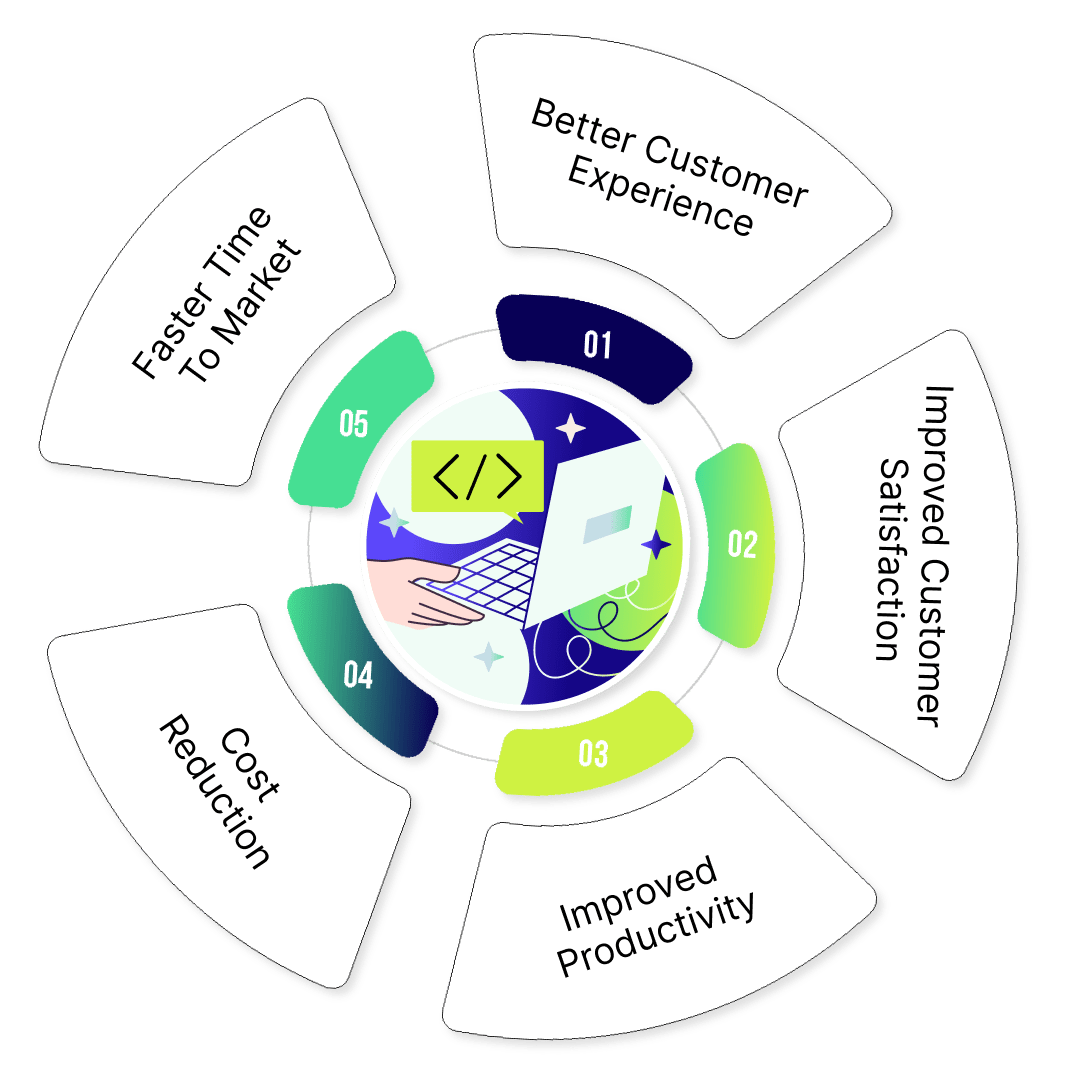
As a tester, you play a crucial role in delivering high-quality mobile apps. However, ensuring top-notch quality for mobile apps requires efficient and reliable development processes. Continuous Integration and Continuous Delivery (CI/CD) pipelines play a crucial role in automating the processes, ensuring faster time-to-market and improved product quality.
Automation testing is a key component of CI/CD pipelines, automating the execution of test cases to identify defects early in the development cycle. However, testing mobile apps presents unique challenges due to factors such as device fragmentation, platform variations, complex user interactions, frequent updates and releases, limited resources, and manual testing overheads.
By leveraging automation testing platforms such as Qyrus, developers and QA teams can significantly improve their efficiency, productivity, and the overall quality of mobile applications.
Below is a CI/CD guide on how to get started with Qyrus. This blog covers how the platform’s advanced features can help you streamline your mobile CI/CD process.
Getting Started with Qyrus
Setting up your mobile CI/CD pipeline in Qyrus is straightforward:
Team Setup: Create a team of users with access to your test projects. A team lead typically does this once, ensuring proper access control.
Project Setup: Organize your test suites and configurations within a project. To create a project:
Click on the “New Project” button
Provide a name, description, and select the device type (Android or iOS)
Click “Create Project”
App Upload: Easily upload your Android (APK) or iOS (IPA) applications for testing. You can do this right after project creation or later in the “Setup” tab under “Application Management”.
Suite Setup: Group related test scripts together in suites. You can create suites manually or use AI-assisted creation:
For manual creation, click “Create Suite Manually” and provide a name and module description
For AI-assisted creation, use JIRA tickets or custom descriptions to generate test scenarios
Script Setup: Create individual test scripts to automate your app testing. Qyrus offers multiple ways to create scripts:
Manual creation using the Live Test feature
AI-assisted creation from JIRA tickets or custom descriptions
Import from JSON or CSV files
Import from Rover* (Qyrus’ Exploratory AI tester)
Key Features for Mobile CI/CD
Qyrus offers several features that enhance your CI/CD (mobile) workflow:
Live Testing: Connect and interact with a real device while building your test scripts. This feature allows you to:
Select a device from your device pool
Choose between “Install App” or “Launch App” configurations
Interact with the device in real-time to create accurate test steps
Record Mode: Capture your actions on the device and automatically convert them into test steps. This mode supports:
Taps, long presses, and swipes
Text input and verification
Navigation actions like “Go Back” and “Press Home”
Inspect Mode: Easily find locator types and values to create accurate test steps. This mode allows you to:
Click on elements to populate locator information automatically
Change locator types on the fly
Verify elements before adding them to your test script
Parameterization: Use data-driven testing to cover multiple scenarios efficiently. You can:
Upload Excel sheets with test data
Use variables in your test steps
Run the same script with multiple data sets
API Testing: Incorporate API calls directly into your test scripts for end-to-end testing. Supported methods include:
GET, POST, PUT, and DELETE
Query parameters, headers, and request body customization
Response data extraction for use in subsequent steps
Execution and Reporting
Qyrus provides flexible execution options:
Single script execution: Run individual scripts for targeted testing
Multiple script execution: Select and run multiple scripts simultaneously
Suite execution: Execute all scripts within a suite
Dry runs: Validate scripts without affecting overall test reports
Execution configuration options include:
Selecting single devices or device pools
Choosing between “First Available” or “Device Coverage” execution strategies
Setting up scheduled runs (one-time, weekly, daily, or hourly)
After execution, detailed reports help you quickly identify and address any issues in your app. The reporting features include:
Healer: An AI tool that helps find new locators for failed steps, reducing maintenance efforts.
Device Pool Management: Create logical groups of devices for comprehensive testing coverage.
By leveraging Qyrus’ features, teams can significantly accelerate their mobile CI/CD process, leading to faster development cycles and higher-quality apps. Whether you’re new to mobile CI/CD or looking to optimize your existing process, Qyrus provides the tools and flexibility to meet your needs. Try our free trial now and see for yourself!
Case Study: A leading bank in the UK achieved significant reductions in testing time and increased test case throughput with Qyrus, leading to operational efficiencies and cost savings.
Introduction: Empowering Teams with API Testing
Software applications are intricately interconnected these days, making the reliability and performance of APIs paramount. A single API glitch can disrupt an entire ecosystem, leading to financial losses, customer dissatisfaction, and reputational damage. On top of it, traditional API testing methods are time-consuming, complex, and error-prone.
To avoid such pitfalls, organizations are increasingly turning to API test services and end-to-end API testing tools. By ensuring API readiness, businesses can mitigate risks, streamline development processes, and deliver exceptional user experiences with innovative testing platforms like Qyrus.
The “Zero Complexity API Testing” is a 3-part blog series. This series highlights the vital importance of API testing, breaking down barriers with AI, and unlocking new possibilities in the future of API Testing.
Part I:From Buggy Deployments to Seamless Operations – The Critical Role of API Testing
It explores real-world scenarios where API failures can lead to significant consequences, such as lost revenue, customer dissatisfaction, and reputational damage. It focuses on the importance of API testing and the struggles that UI teams face due to various challenges.
Part II: Breaking Down Barriers with Qyrus
This part talks about how, by implementing Qyrus’ robust API testing strategies, organizations can proactively identify and address issues before they impact production environments. It talks about Qyrus AI capabilities and how one can go beyond functional testing with Qyrus and AI.
Part III: Future of API Testing – Unlocking New Possibilities
It focuses on unlocking new possibilities with Qyrus API testing. How a well-strategized API testing journey can lead to new growth opportunities in an organization and deliver high-quality software
This blog also introduces Qyrus, a powerful end-to-end API testing platform designed to simplify and streamline API testing. Qyrus addresses the common challenges faced by testing teams, including technical complexity, time-consuming setups, and maintaining test cases. Through its innovative GenAI features, Qyrus empowers teams to effectively test their APIs, ensuring high-quality, reliable software and API readiness.
Part I: From Buggy Deployments to Seamless Operations – The Critical Role of API Testing
According to a study by Rapid API, more than 90% of executives indicated APIs as mission-critical. When APIs become crucial to a company’s operations, it is essential to prioritize comprehensive and effective end-to-end API testing.
Let’s look at the situation below, which could have been avoided if the company had opted for API test services.
A Critical Bug Discovered in Production
Meet Emily, a lead tester at a rapidly growing e-commerce company. Her team is responsible for ensuring that the website runs smoothly, from browsing products to making secure payments. The stakes are high: even a minor glitch can lead to lost sales and frustrated customers.
Recently, a critical bug slipped into production. Customers reporting that their orders were duplicated, causing confusion and frustration. Upon investigation, Emily’s team discovered that the root cause was a failure in the API responsible for processing payments. This API, which communicated with the payment gateway, was intermittently timing out and causing duplicate requests to be sent.
Had Emily’s team implemented thorough API testing, this bug could have been caught early. The incident was a wake-up call—API testing was not just an option; it was essential.
Below is why API Testing is critical.
Ensures Functionality: Validates that the API performs as expected and handles requests correctly.
Improves Reliability: Detects issues early in the development cycle, reducing the risk of failures in production.
Enhances Security: Identifies vulnerabilities that could be exploited by malicious actors.
Boosts Performance: Ensures that APIs can handle expected loads and provide optimal performance.
Challenges Faced by UI Testers Moving to API Testing
Despite its importance, many teams struggle with API testing due to various challenges, particularly those coming from a UI testing background:
Technical Complexity: Traditional API testing tools often require advanced coding skills, which can be a barrier for testers without a strong programming background. The technical nature of traditional tools can also limit API testing to a small group of specialized testers, hindering collaboration and knowledge sharing within teams.
Time-Consuming Setup: Setting up API tests often involves the manual configuration of numerous parameters, such as endpoints, headers, and payloads. This can be labor-intensive and time-consuming, detracting from other critical tasks.
Maintaining Test Cases: As APIs evolve, keeping test cases up-to-date can be daunting. Managing multiple versions of test cases can be difficult, especially in large-scale projects, leading to confusion and inconsistencies.
Integration with Other Tools: Integrating API testing tools with other tools in the testing ecosystem, such as test management platforms or continuous integration/continuous delivery (CI/CD) pipelines, can be challenging due to compatibility issues or proprietary formats. Data synchronization between API testing tools and other tools can be complex, especially when dealing with large datasets. These integration challenges can disrupt the smooth flow of the testing process, leading to inefficiencies and delays.
Emily knew she had to address this gap. APIs were the backbone of their platform, enabling communication between different systems and services. Without robust API testing, the integrity of their entire system was at risk. However, her team needed a solution that was easy to use, required minimal coding, and integrated seamlessly with their existing workflows. They needed Qyrus.
Sneak Peek into the Part II: Breaking Down Barriers with Qyrus
Emily has discovered Qyrus, a SaaS product designed to simplify API testing. Qyrus’ API test services offer a suite of features that address all the challenges her team faced, making API testing accessible and efficient for her team. In the next part, we’ll explore how Qyrus revolutionizes the API testing process with its innovative features, making it more accessible and efficient for all users.
Some of the features we’ll cover in the next blog are codeless testing of APIs, codeless assertions, data-driven testing, API chaining and data plumbing. Stay tuned for the next part!Try the Freemium version now to experience the power of fast and insightful API automation testing!
API adoption and integration have continuously increased in the IT industry to support growing business demands. Today, hundreds of APIs (application programming interfaces) support various dynamic product categories, from payments and social media to e-commerce.
According to a McKinsey survey, nearly 80% of people believe APIs are crucial for business and IT operations. This highlights how API and web services testing strategies have become in driving innovation and efficiency across various sectors.
APIs are everywhere, as developers create them as a connecting link between shortcodes to build secure and scalable software applications. However, for each use case, the API must follow specific standards to ensure seamless communication, so teams follow a well-defined API lifecycle to create, test, and deploy APIs. Web services and API testing is a critical component of the API lifecycle, ensuring that these digital connections function as intended. Let us look at what happens during API discovery and testing.
API Discovery with Qyrus While testing APIs has become more streamlined, uncovering the complexities of APIs powering a web application and their interactions remains a time-consuming and manual task. This is where Qyrus offers a more efficient approach. Introducing the API Discovery extension, your one-stop shop for effortlessly discovering APIs within your Chrome browser. This ingenious tool seamlessly integrates with your developer tools, transforming into your personal AI assistant on the API exploration journey. Qyrus’ API Discovery empowers you to visit your web application and record all relevant API calls for your business needs. It revolutionizes API and web services testing by automating the discovery of critical API calls. No more digging through irrelevant analytics or user monitoring calls. Our AI capabilities elevate the experience further by providing explanations for each API call, a game-changer for QA engineers who often spend precious time deciphering cryptic documentation.
API Discovery goes beyond mere recording. It goes deeper by mapping the API landscape and uncovering the hidden relationships between APIs. Think of it as a cartographer meticulously charting an unknown territory. It reveals how APIs interact, for instance, how a user access token might be used across all APIs following a user authentication call. This visualization of the API process provides invaluable insight into the application’s overall functionality.
Seamless Integration for Effortless Testing The API Discovery lies in its seamless integration with the Qyrus API Testing service. All recorded API calls and their dependencies can be exported directly as cloud-based API tests, ensuring they’re readily available for future use. This eliminates the tedious task of manual test creation, saving you valuable time and resources.
Consider an application where a tester diligently tests your application flow. In the background, API Discovery silently records all the relevant APIs. Once finished, with a few clicks, you can export these recorded APIs as automated tests within the Qyrus platform. It’s like testing on autopilot, maximizing efficiency and minimizing effort.
Maximizing Efficiency API Discovery’s functionality extends further. It works seamlessly alongside the Qyrus Encapsulate extension, allowing you to record regression tests while simultaneously capturing relevant APIs.
We understand the importance of thorough testing. That’s why API Discovery goes beyond recording. It empowers you to generate assertions – the cornerstones of robust API testing. Assertions allow you to “battle-test” your APIs, ensuring the responses meet pre-defined values or checks for specific elements within the response.
Creating assertions can be a time-consuming task. Here’s where our innovative Generative AI steps in. This cutting-edge technology helps you generate assertions automatically, freeing you from tedious manual work and allowing you to focus on more strategic aspects of testing.
Role of API testing Once the APIs are discoverable, the process of validating the use case logic and its capability to provide reliability and test other aspects of the application is equally important. API Testing’s primary purpose is to help teams catch issues before they reach production and impact users. There are multiple ways on how a developer chooses to test an API-
Functional Testing: Validates that the API can perform its defined functions accurately and reliably.
Unit Testing: Focuses on individual components of an API, ensuring each function works as intended.
Integration Testing: Ensures that different systems or components work together correctly and seamlessly.
Performance Testing: Used to evaluate how quickly and efficiently an API can respond to requests to ensure optimal performance.
Load Testing: Assesses how the API behaves under heavy load to ensure it can handle high traffic volumes.
Stress Testing: Pushes the API beyond average capacity to see how it manages extreme conditions and high stress.
Security Testing: Testing an API to ensure it correctly handles encrypted communication and user authentication.
Fuzz Testing: Provides unexpected inputs to uncover bugs and vulnerabilities, ensuring robust error management.
Integrating Qyrus’ API Discovery into Web Testing Practices Qyrus provides comprehensively advanced API testing solutions. Our platform supports various testing types—from functional to performance and end-to-end tests. Users can seamlessly import Postman collections or OpenAPI specs, simplifying test setup and management. The platform’s intuitive interface allows for the easy creation of complex API workflows, ensuring comprehensive test coverage.
Moreover, Qyrus offers a groundbreaking feature, the Qyrus API Discovery plugin. This Chrome extension integrates directly into your web testing environment, providing contextual API testing capabilities. By aligning API testing with functional testing workflows, API Discovery enhances efficiency and reduces workflow disruptions. It empowers developers and functional testers to actively participate in API testing, leveraging your contextual knowledge to drive better testing outcomes.
Here’s a detailed look at how the API Discovery tool transforms the API testing landscape.
Domain-Specific Control Qyrus allows testers to specify which domains to include or exclude, providing complete control over the scope of testing. For instance, if your functionality depends on external sites not running on the same domain, you can easily add those to the testing environment. This ensures that only relevant data and interactions are considered, streamlining the testing process and reducing unnecessary noise.
Automated Test Generation Once the domains are set, Qyrus can quickly generate tests by analyzing the API calls made during functional testing. For example, when authenticating, Qyrus captures the headers, payload, and response, allowing you to generate assertions and dependencies automatically. This functionality is particularly useful for complex API interactions, as Qyrus can map out dependencies between multiple API calls, providing a clear understanding of the data flow and interactions.
Comprehensive Assertions Assertions in Qyrus are cordless and can be generated directly from the captured data. Schema validation and JSON path assertions are built-in, ensuring the response conforms to expected formats and values. This level of detail is often time-consuming to implement manually, but with Qyrus, it becomes a quick and automated process. For example, if you are testing a financial application, you can easily assert that account summaries return the correct balance for each account.
Seamless Integration with Qyrus Qyrus seamlessly integrates with your API interface, allowing you to export and execute tests within minutes. By logging into Qyrus, you can select the relevant project and test suites, and the tool will automatically populate the necessary data and assertions. This integration ensures that the testing process is both fast and efficient, significantly reducing the time from test creation to execution.
Handling Failures and Customization Qyrus API tool provides detailed reports and allows you to quickly identify and resolve failures. For instance, if a date assertion fails due to a time mismatch, you can easily modify or remove the assertion and re-run the test. This flexibility ensures that you can fine-tune your tests to match the dynamic nature of your applications.
Benefits of Using Qyrus
Fast Setup: Even with no prior knowledge of the APIs, you can start testing immediately by capturing calls during functional testing.
High Coverage: API testing inherently provides high coverage; with Qyrus, you achieve this with minimal setup.
Reduced Manual Effort: Automated assertions and test generation minimize the need for manual coding and reduce potential errors.
Seamless Integration: The Qyrus API tool directly integrates for centralized reporting and orchestration, extending its benefits to performance testing and beyond.
How It Works: From Recording to Testing Imagine you’re performing functional testing on a web application. With our Chrome extension enabled, every API call made during your testing session is automatically recorded and presented in a human-readable format. This critical contextualization bridges the gap between functional testing activities and the need to validate APIs that power these applications. Once the API calls are captured, testers can filter out irrelevant calls or domains, focusing solely on the APIs that impact the application’s functionality. This selective approach ensures that the generated API tests are precise and targeted, saving time and effort in creating comprehensive test scenarios.
Empowering Testers with AI-Driven Automation At the heart of our solution lies our AI-driven testing platform. Integrated seamlessly with the Chrome extension, Qyrus analyzes the captured API interactions and automatically generates test scenarios and assertions. This automation feature not only accelerates the API testing lifecycle but also enhances test coverage by including schema validations, JSON path assertions, and header validations.
Also, Qyrus provides advanced features such as dependency analysis between APIs. This capability
allows testers to visualize and understand the relationships and dependencies among different API calls, optimizing test coverage and ensuring thorough validation of critical paths.
Seamless Integration and Execution with Qyrus Once the tests and assertions are generated, testers can export them directly into the Qyrus application. This integration further helps in the centralized management of API tests within Qyrus, where testers can organize tests into projects and test suites for structured execution and reporting. Qyrus provides detailed test reports that highlight both successful validations and any failures encountered, empowering testers to identify and resolve issues seamlessly.
“Looking ahead, we are expanding these capabilities to include mobile applications. This extension will enable testers to achieve similar levels of integration and automation across different platforms, ensuring consistent and reliable API testing practices regardless of the application’s environment“- Ameet Deshpande AVP, Product Engineering @Qyrus.
To gain a deeper understanding of the capabilities of Qyrus API tools, watch this webinar, in which Ameet provides a comprehensive walk-through of the application and its features.
API Management tools can help you streamline the entire API lifecycle. It is important to choose the right tool based on your needs. Choose Qyrus, a flexible API management platform that lets you incorporate the tools of your choice but manage them centrally. By building a systematic API discovery practice, organizations can foster innovation and streamline development processes.
[wpcode id=”5190″]
Tailored for developers, administrators, and product managers who demand more from their tools, this model offers an array of sophisticated features designed to streamline your workflow and elevate your API projects to new heights. By providing a robust framework for developers to interact with various software components, QAPi Pro allows businesses to create custom solutions tailored to their specific needs.
Our premium model provides access to enhanced functionalities such as automated testing, detailed analytics, and seamless integrations with other tools in your tech stack. This ensures that you not only create and manage APIs with ease but also maintain their performance and reliability at the highest standards. The premium model is about empowering your team to work smarter, not harder, by providing the resources needed to handle complex API requirements effortlessly.
Discover how our premium model can enhance your productivity and ensure the reliability of your applications; you can create API solutions that support your team’s growth.
Note: Follow the same steps as the Import URL. Use Nova AI for generating test cases.
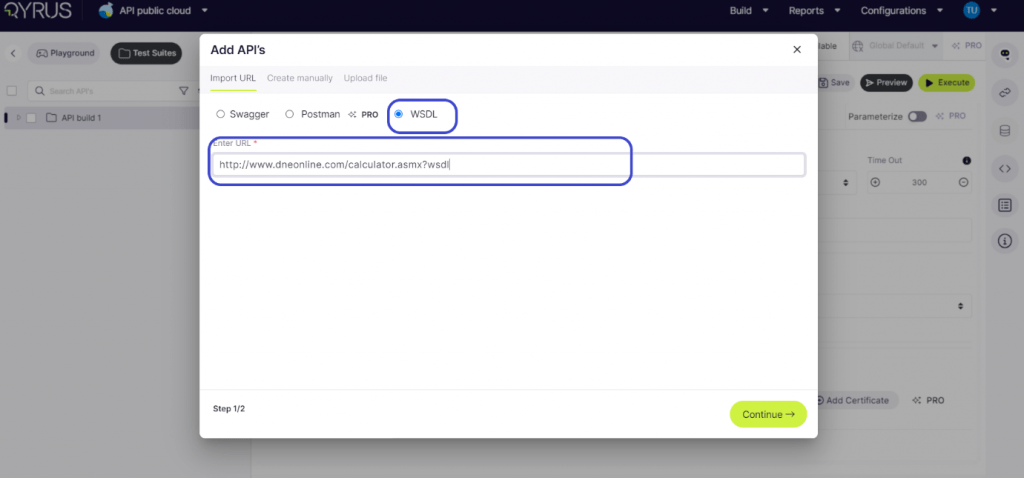
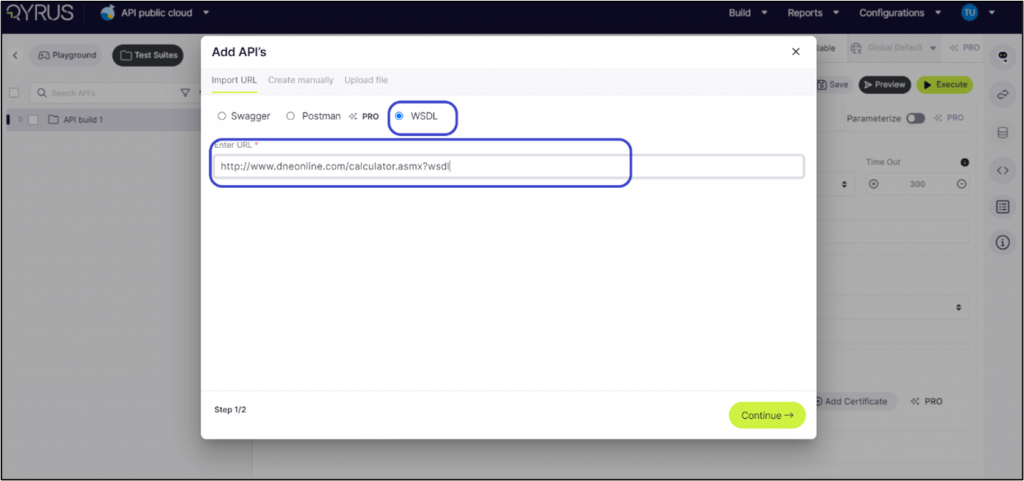
Option 3: Using WSDL Format Step 1: Navigate to the Add API button and select “WSDL” if your API utilizes the WSDL format.
Step 2: Enter the WSDL URL:
Add the URL of your WSDL file. Consider using a sample WSDL URL for a practical example or to familiarize yourself with the procedure.
Step 3: Initiate Import by Clicking ‘Continue’: Modifying API
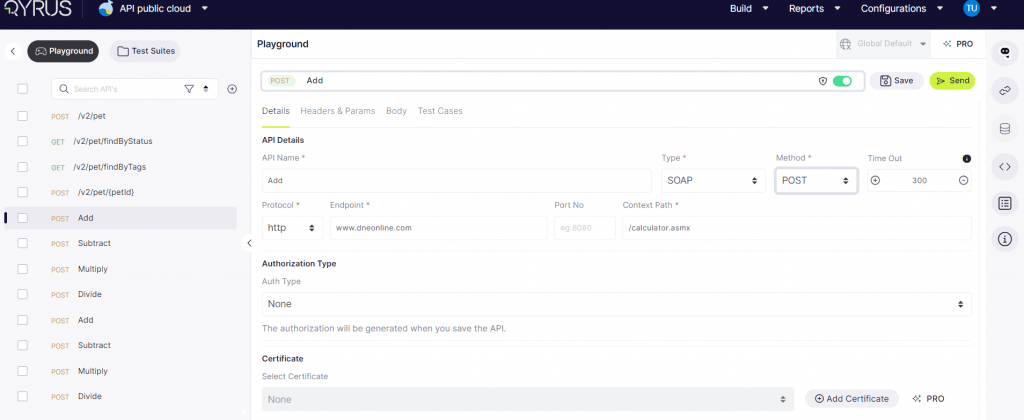
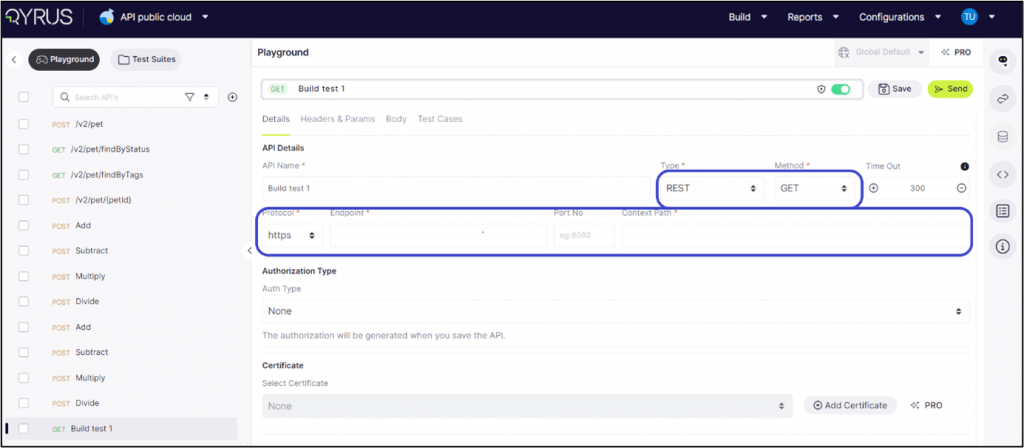
Select an API: The main screen will display all its intricate details under the ‘Details’ tab. Here, you can modify the API to fit your exact needs.
API Name and Type: Users can view the API’s name and select its type (REST, SOAP) to ensure proper handling within the platform.
Method Selection: Users can designate the appropriate method (GET, POST, PUT, DELETE, PATCH) based on the desired action the API should perform, thereby defining its interaction with the server.
Timeout Setting: Users have the option to set a timeout in milliseconds.
Protocol Configuration: The platform facilitates toggling between HTTP and HTTPS protocols, allowing users to secure API calls by opting for HTTPS where applicable.
Endpoint and Context Path: In this section, users can modify the API’s endpoint URL and specify the context path, which is essential for accurately directing API calls.
Authorization Type: Users can select the authorization type that aligns with the API’s security requirements, ensuring secure interactions, whether it involves Basic Auth or OAuth. The authorization will be generated when you save the API.
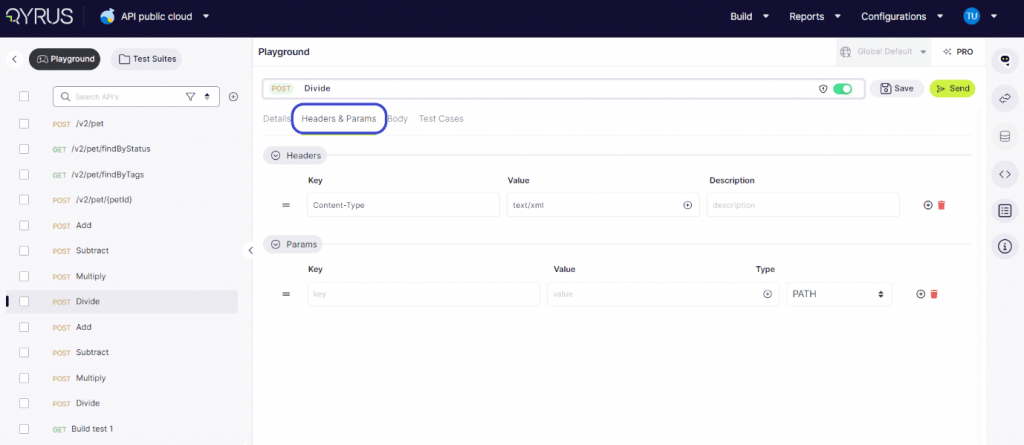
In the Headers and Params tab, users can add, delete, and modify both the key and value, as well as the type of each parameter. This functionality allows for precise customization and configuration of API requests, ensuring accurate and effective testing.
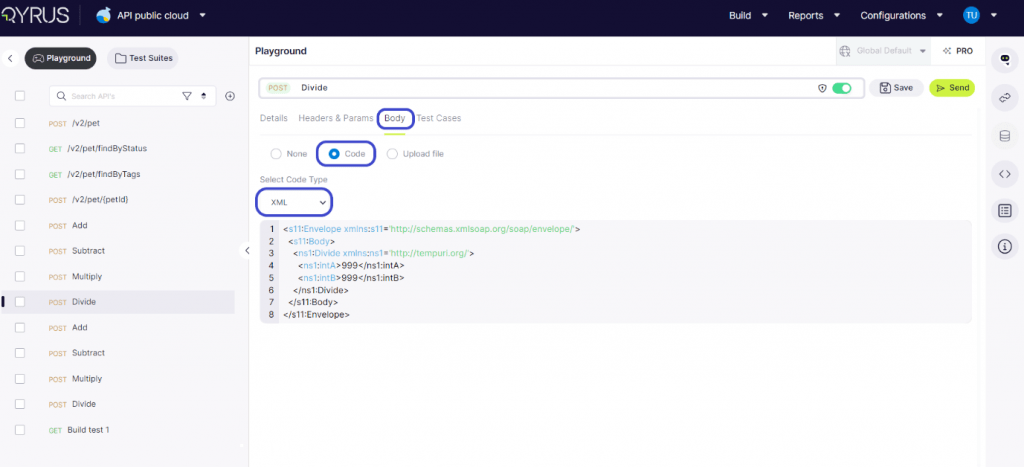
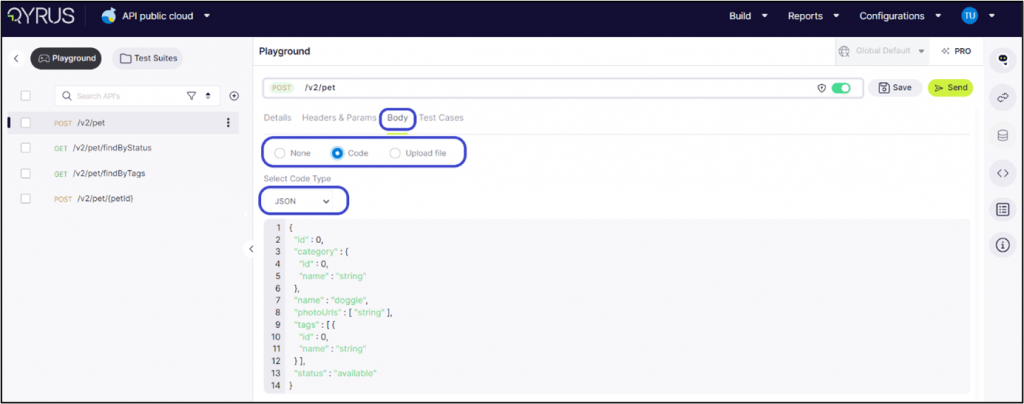
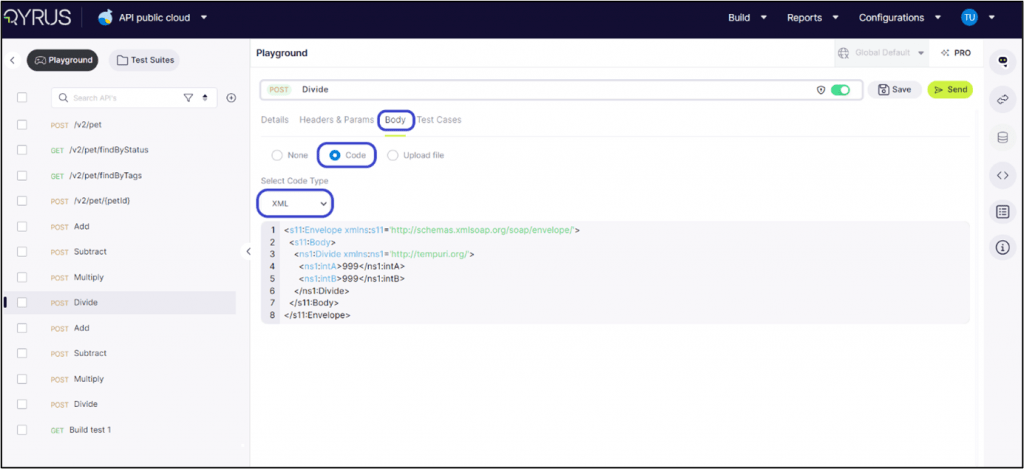
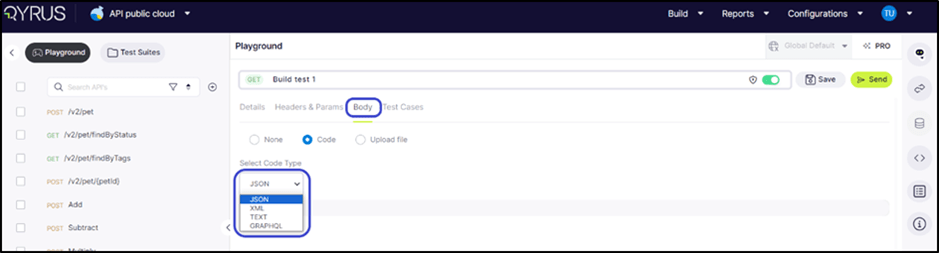
Within the Body tab, users encounter an array of options for inputting data. They can choose to enter the code directly or upload a file.
In the code type for WSDL, the system shows the XML code type.
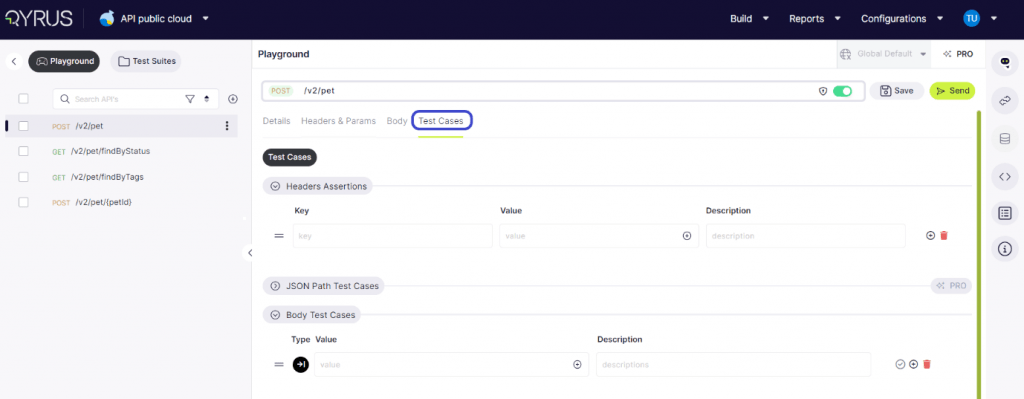
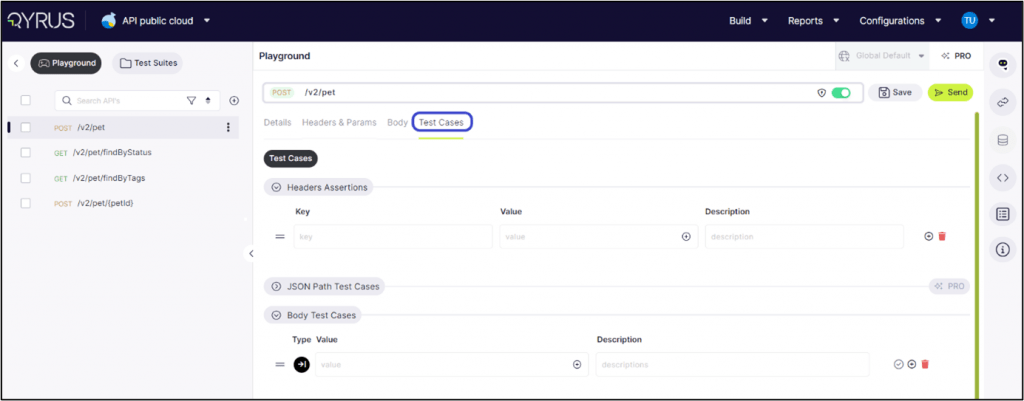
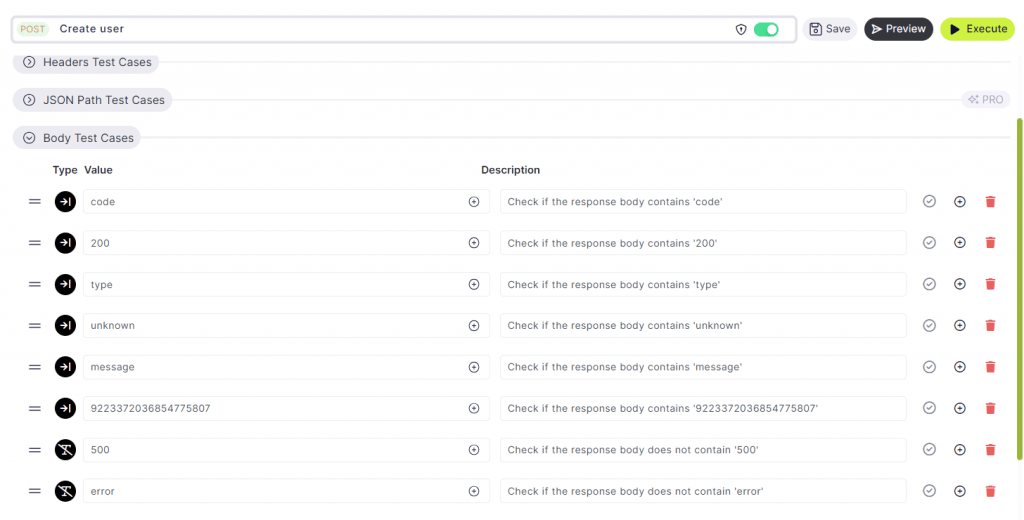
On the Test Cases tab, users are presented with options to define test cases for headers assertions, and the body of the API request or response. This functionality allows for thorough testing and validation of various aspects of the API’s behavior, ensuring reliability and consistency in its performance.
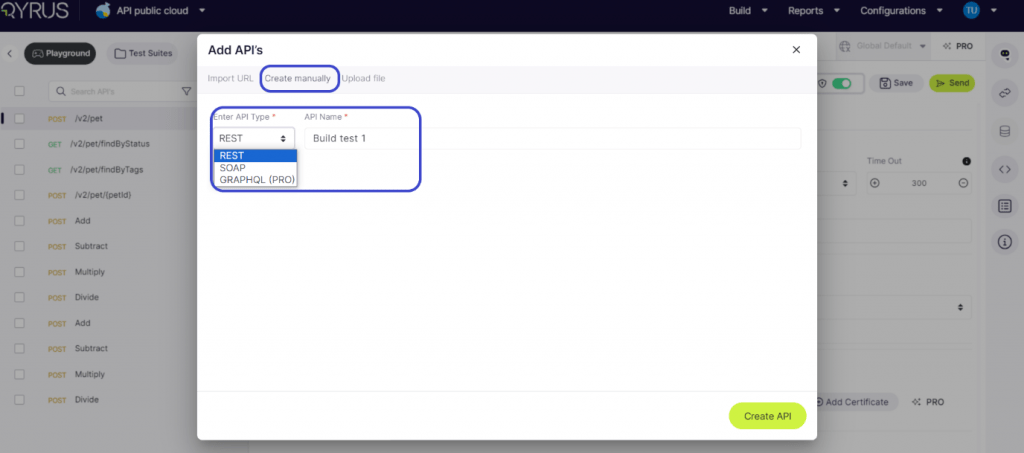
Type 2: Create Manually
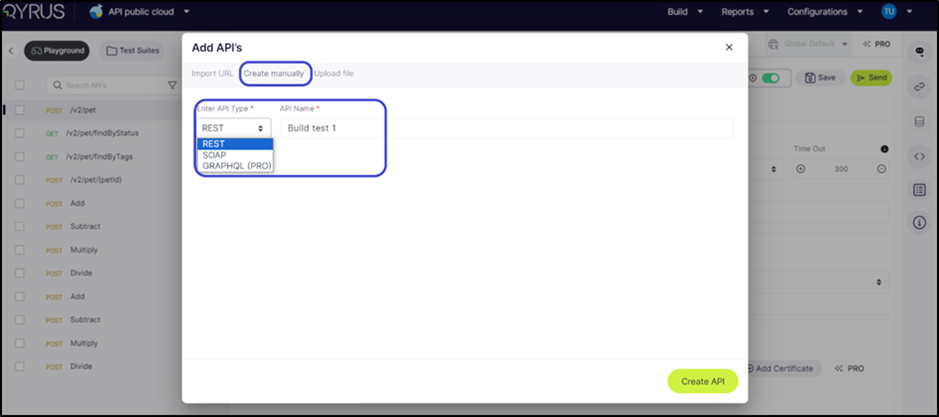
Click on Add API and choose the ‘Create manually’ option Select the API type and give a name.
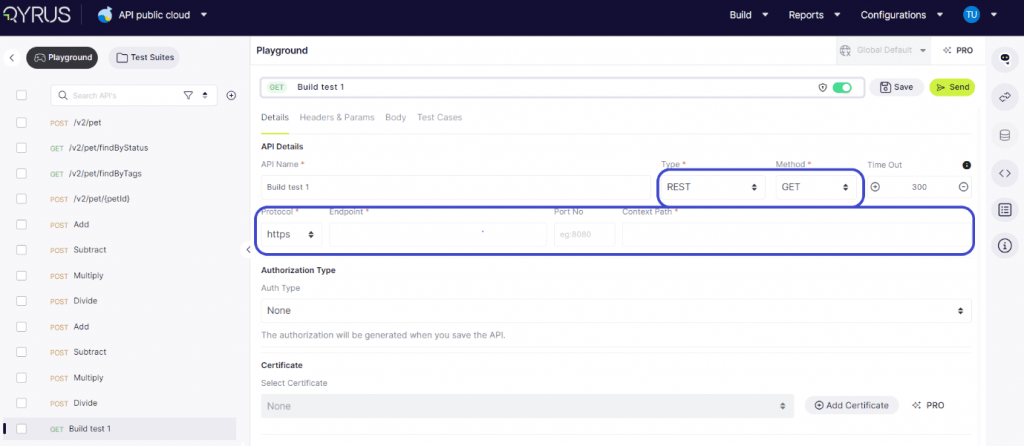
Click on Create API to begin the manual process. Enter all the required details for the API.
API Name and Type: Users can view the API’s name and select its type (REST, SOAP) to ensure proper handling within the platform.
Method Selection: Users can designate the appropriate method (GET, POST, PUT, DELETE, PATCH) based on the desired action the API should perform, thereby defining its interaction with the server.
Timeout Setting: Users have the option to set a timeout in milliseconds.
Protocol Configuration: The platform facilitates toggling between HTTP and HTTPS protocols, allowing users to secure API calls by opting for HTTPS where applicable.
Endpoint and Context Path: In this section, users can modify the API’s endpoint URL and specify the context path, which is essential for accurately directing API calls.
Authorization Type: Users can select the authorization type that aligns with the API’s security requirements, ensuring secure interactions, whether it involves Basic Auth or OAuth. The authorization will be generated when you save the API.
In the Headers and Params tab, users can add, delete, and modify both the key and value, as well as the type of each parameter. This functionality allows for precise customization and configuration of API requests, ensuring accurate and effective testing.
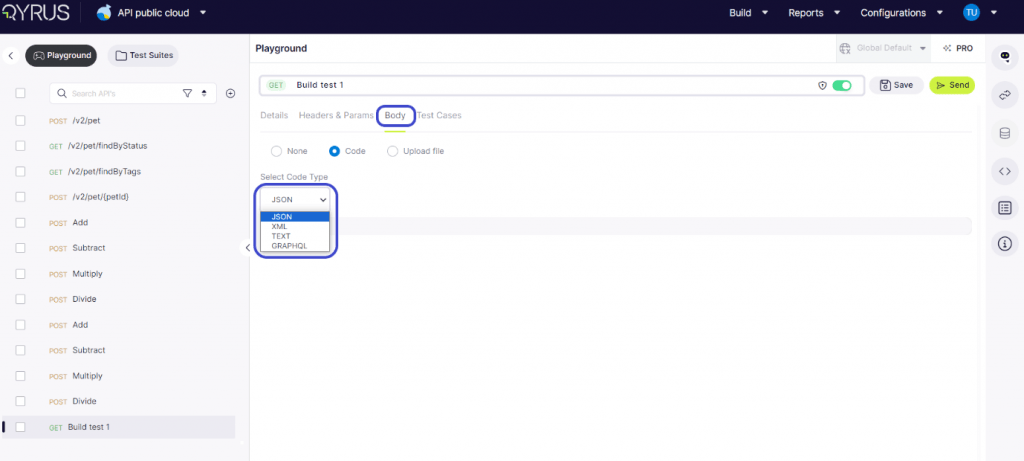
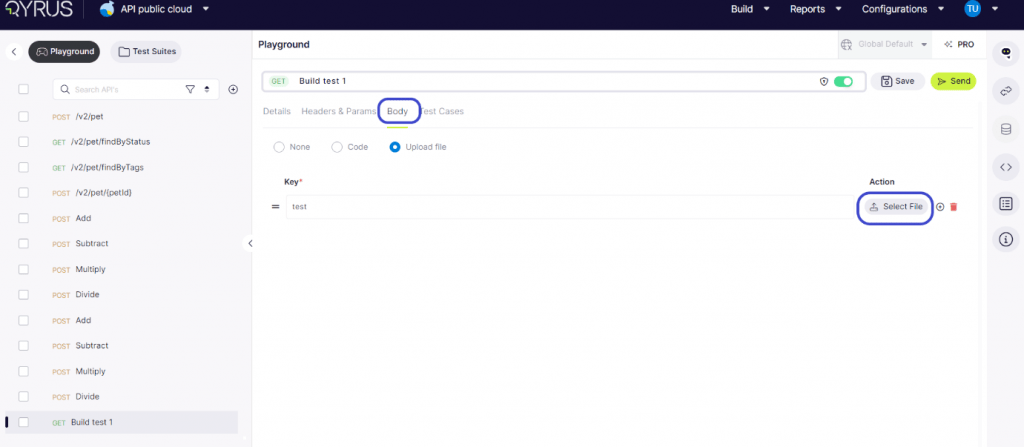
Within the Body tab, users have two options for inputting data. They can opt to either enter the code directly or upload a file.
Enter a unique key name and upload the body by uploading the file.
The Test Cases tab, users need to manually define test cases for headers assertions, and the body of the API request or response. This functionality allows for thorough testing and validation of various aspects of the API’s behavior, ensuring reliability and consistency in its performance.
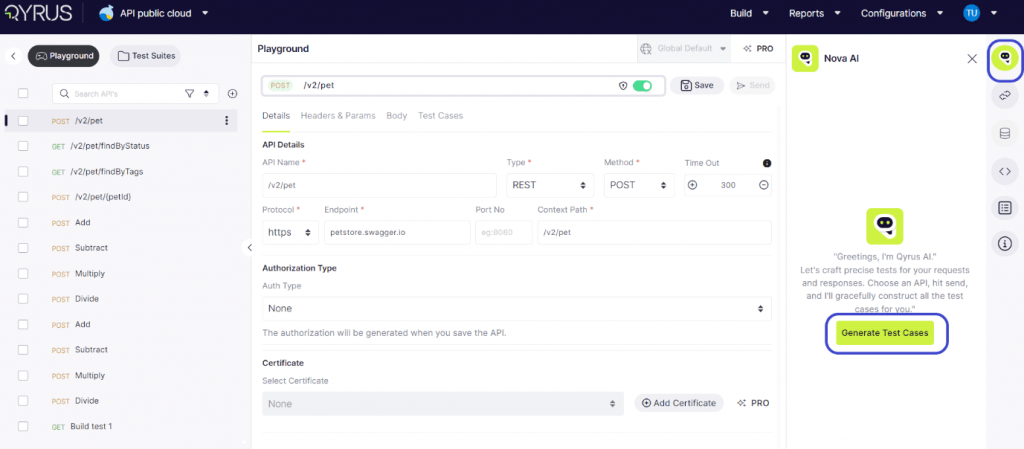
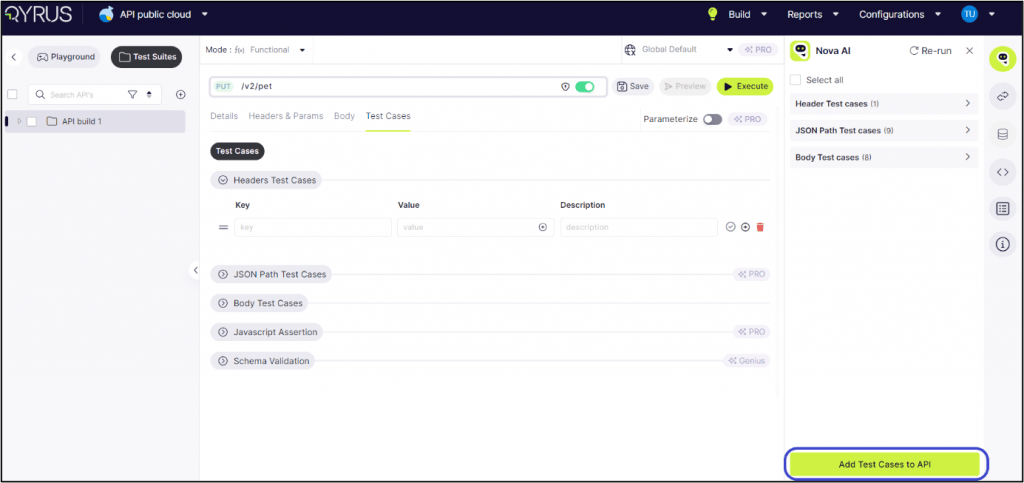
Step 1: Click on Nova and choose to generate test cases.
Step 2: The AI will analyze the API and generate ideal test cases that are best suited to test its capabilities.
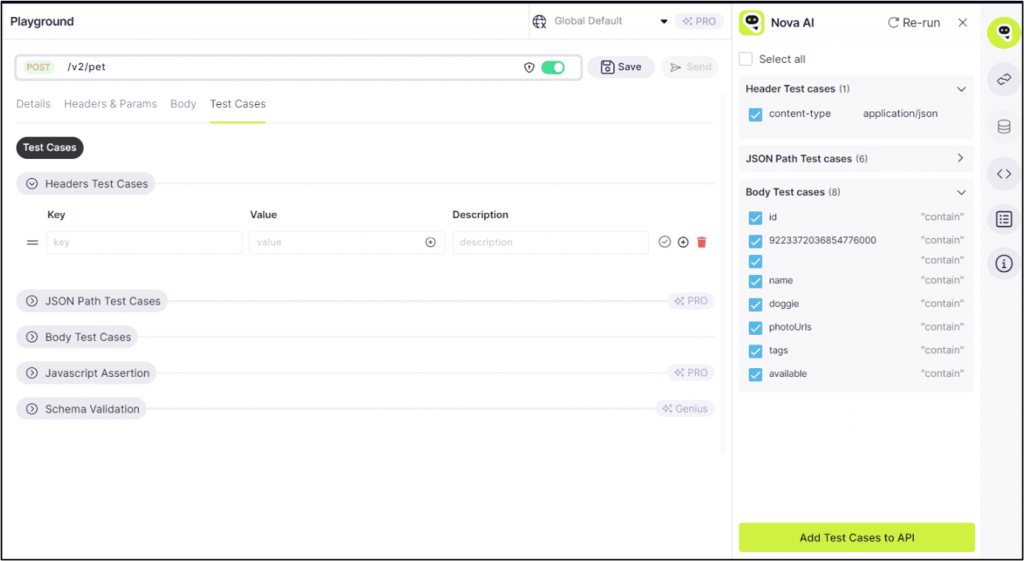
Step 3: Mark the different test cases, such as header and body test cases, in the tick box.
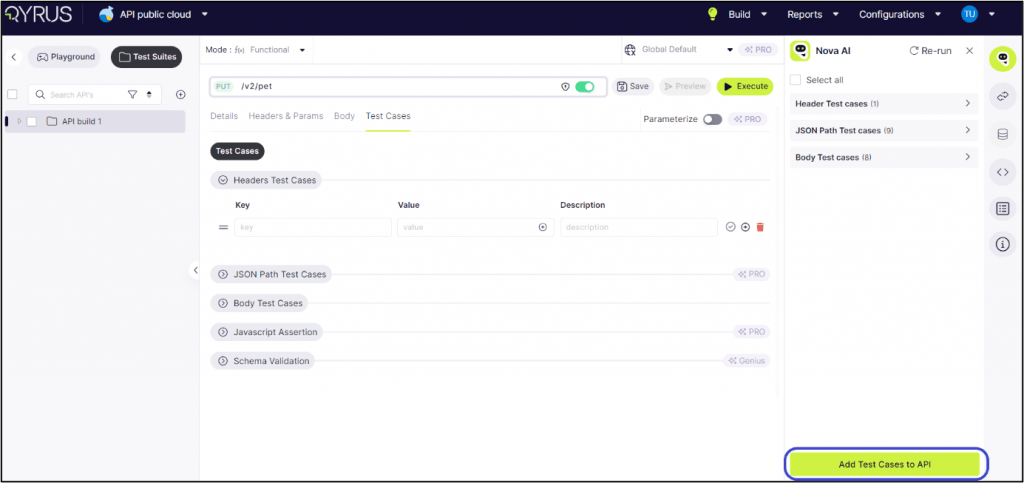
Step 4: click on Add test cases to API.
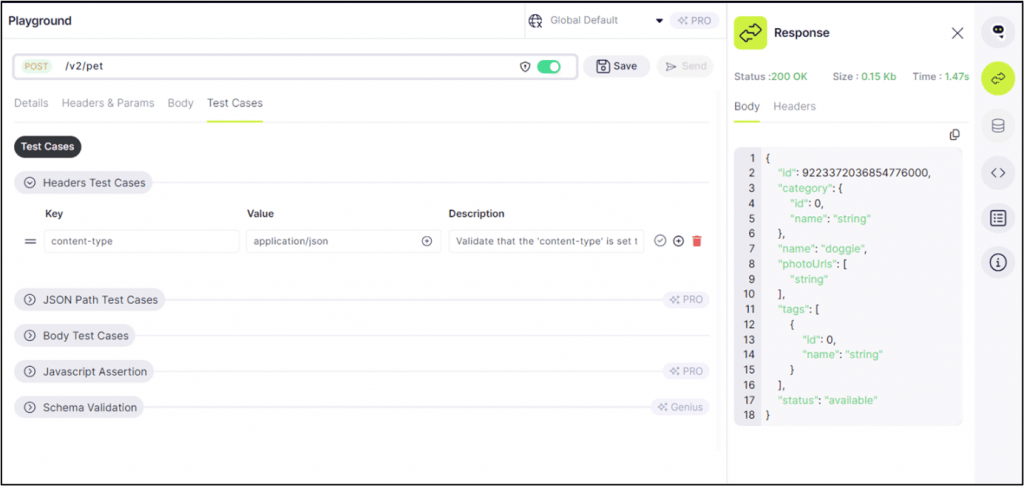
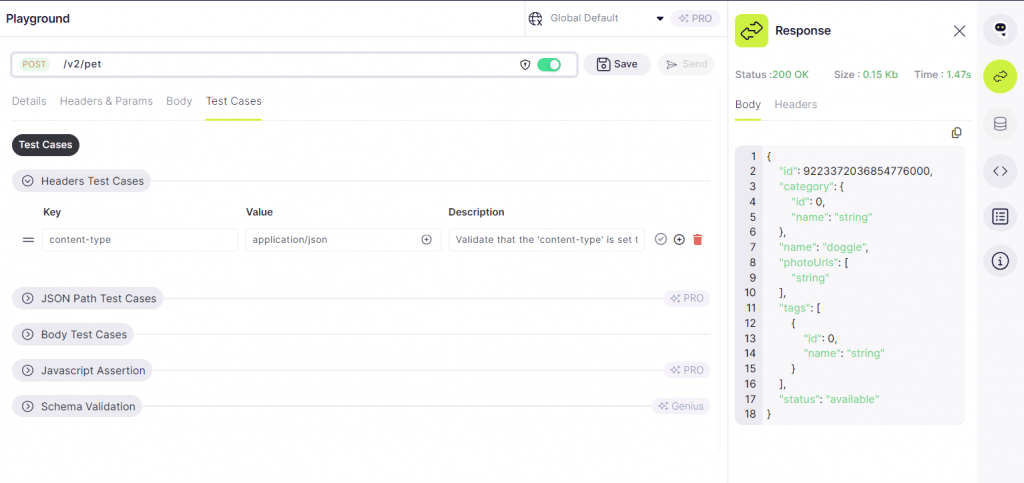
Step 5: Click on Headers Test Cases now to see the key, value and description.
Step 6: Click on Send.
Step 7: The response tab is opened and shows the body and header used for the test case.
Step 8: The status shows ‘200 OK’, which means the test was successful and the API is completely functional.
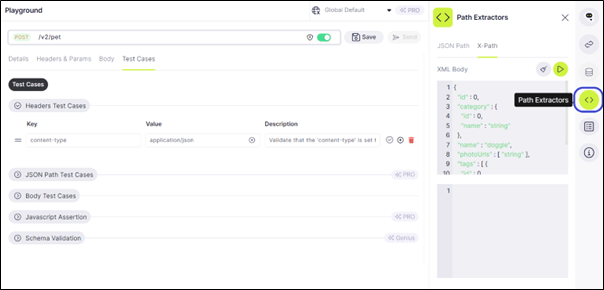
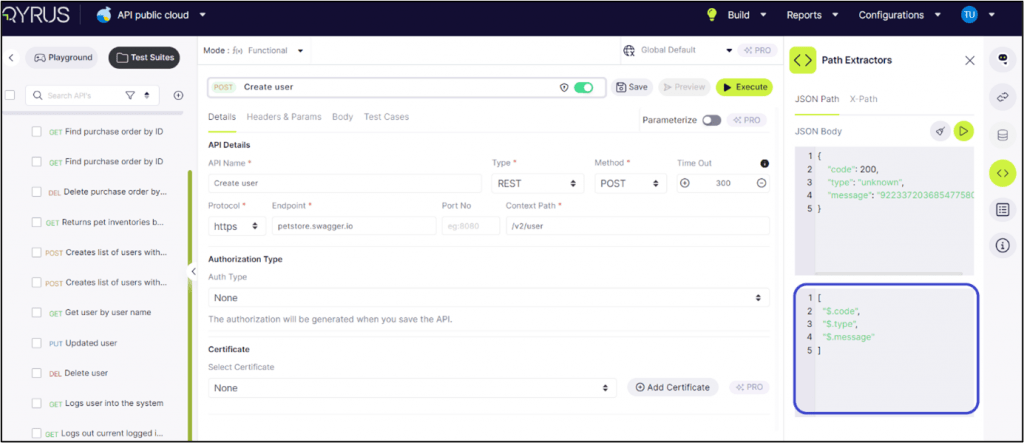
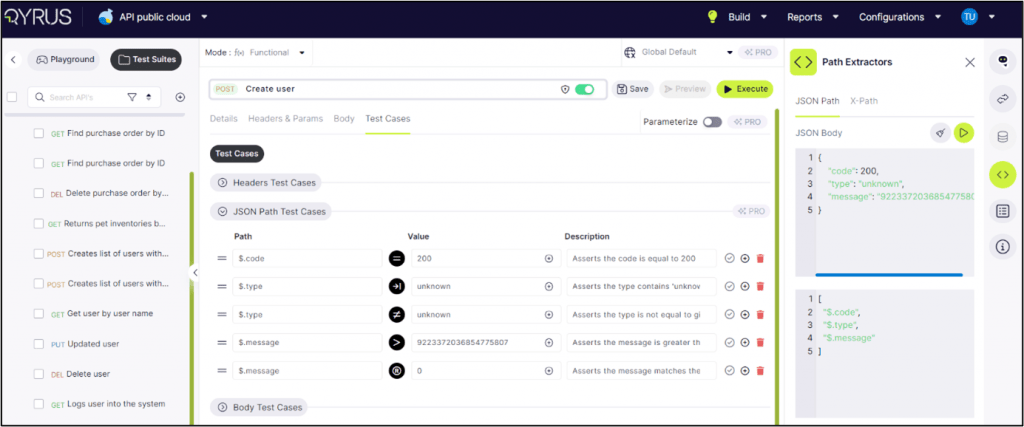
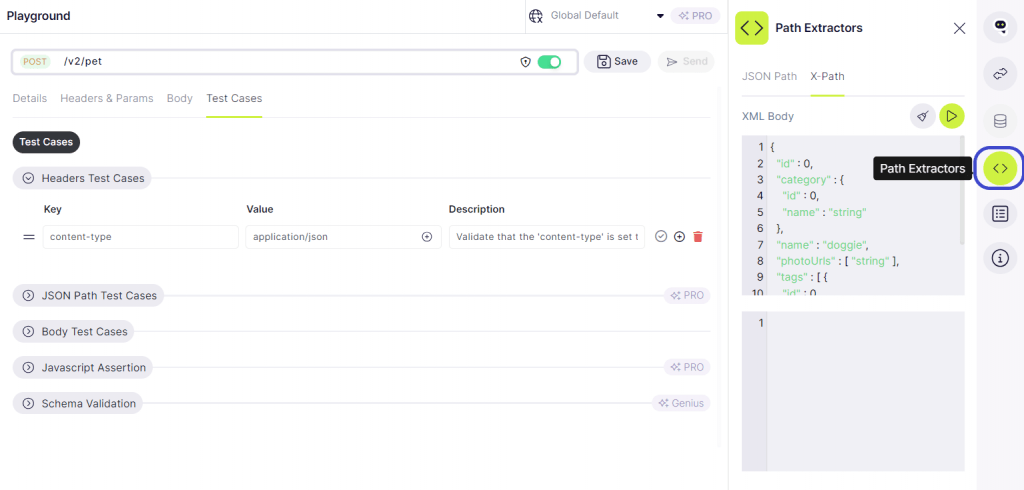
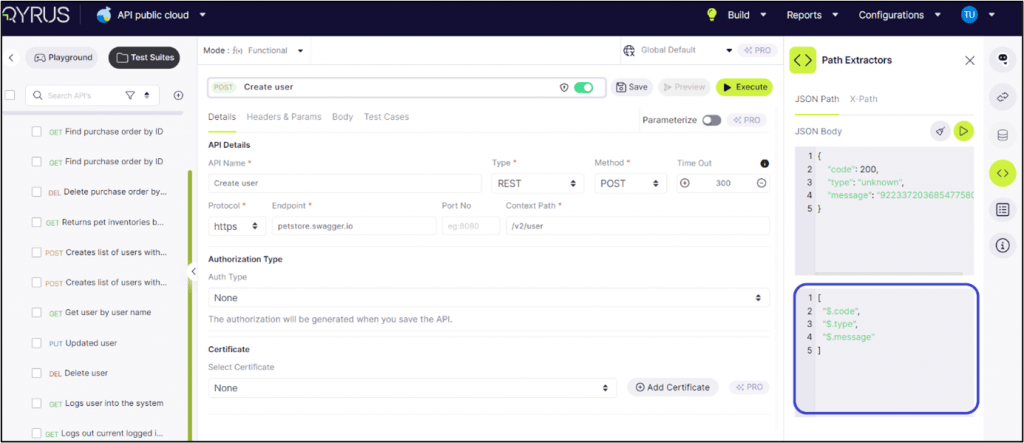
Step 9: To extract its path, click on ‘Path Extractor’ and select JSON path/ X-path.
Step 10: Click on the play button to extract the path. It will show the path, as highlighted in the image below.
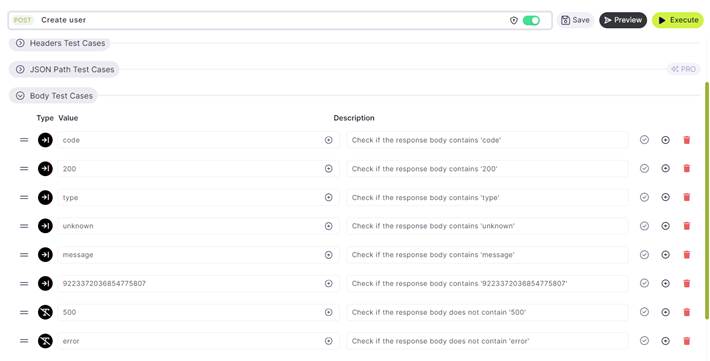
Step 11: Similarly, for Body Test Cases. AI will suggest all the test cases.
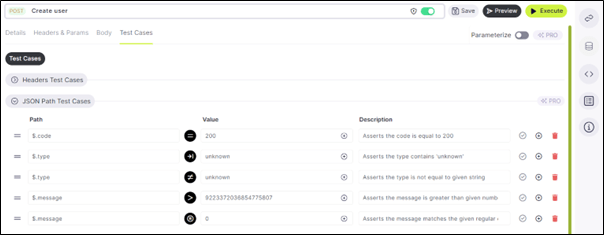
Step 12: In Pro mode, JSON path test cases are also accessible.
Step 13: For each of the test cases, open the Path Extractor to check the path.
The description lists out the reasoning for the test case, when creating test cases manually it is best recommended to define them.
Type 3: Upload File
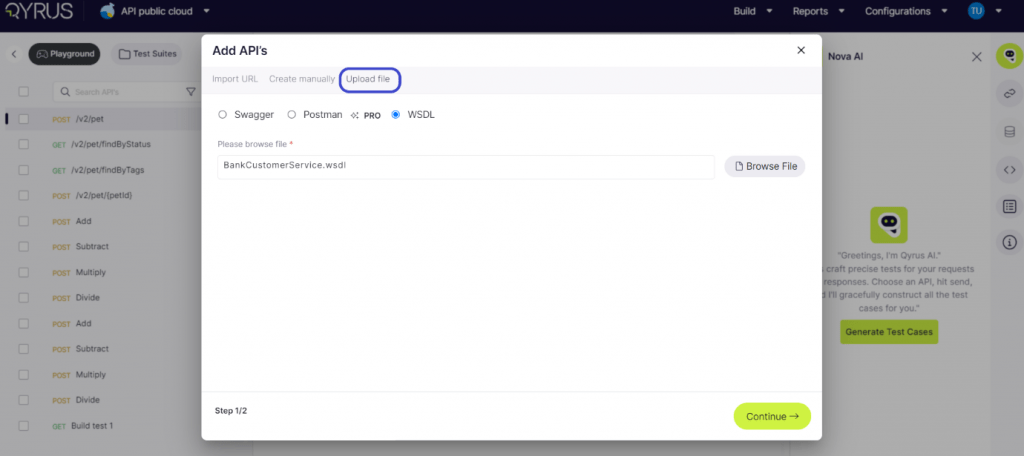
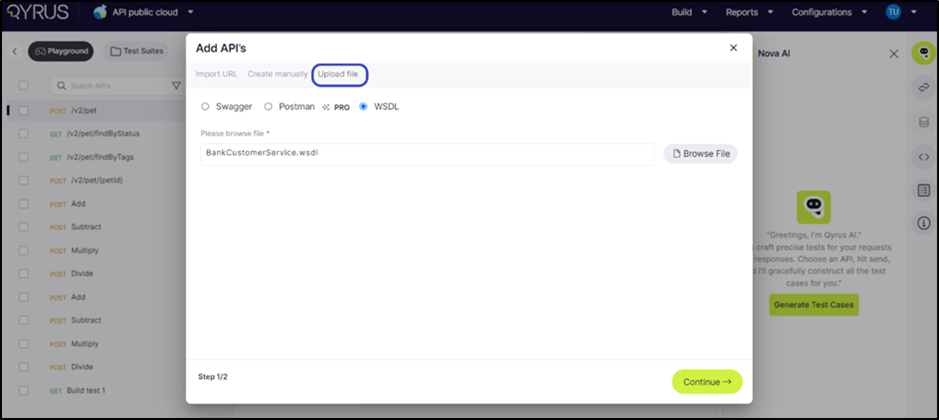
To manually upload the file, click on the Swagger or WSDL type, upload the respective type of file, and click on continue.
Note: Follow the same steps as for the Import URL.
Conclusion
The premium model is not just about managing APIs; it is about revolutionizing the entire API lifecycle. By providing an intuitive interface and smart testing features, our premium model offers Pro Tools (API features) that shows how API access can drive integration, innovation, and growth. By creating APIs, businesses can unlock new opportunities, enhance collaboration, and ensure their systems are scalable and efficient.
APIs make it easier for different teams within an organization to collaborate on projects. For instance, the IT department can create APIs that allow the marketing team to access real-time data and analytics, fostering a more collaborative and agile working environment. This level of sophistication empowers your team to handle complex API requirements with ease, reducing downtime and boosting overall productivity.
For more information or personalized assistance, reach out to Qyrus. We are here to help you achieve excellence to create APIs, manage them and beyond. Embrace the future of API software with our premium model and take your projects to the next level. Try QAPi now.
Watch what our Qyrus President, Ravi Sundaram, has to say about QAPi.
[wpcode id=”5190″]
Index In this part, we will go through the steps required to create a project in QAPi and how to navigate the application.
Want to know what is QAPi and how to get started with it? Read here.
We’ll guide you through the API testing process using our platform. Whether you prefer importing URLs, creating APIs manually, or uploading files, our platform offers the flexibility to meet your diverse project needs.
Let’s dive into the step-by-step procedure of setting up your project under the freemium model.
API Onboarding Index
Project Creation under the Freemium model
Type 1: Import URL
Type 2: Create Manually
Type 3: Upload File
Test Suite Creation
Conclusion
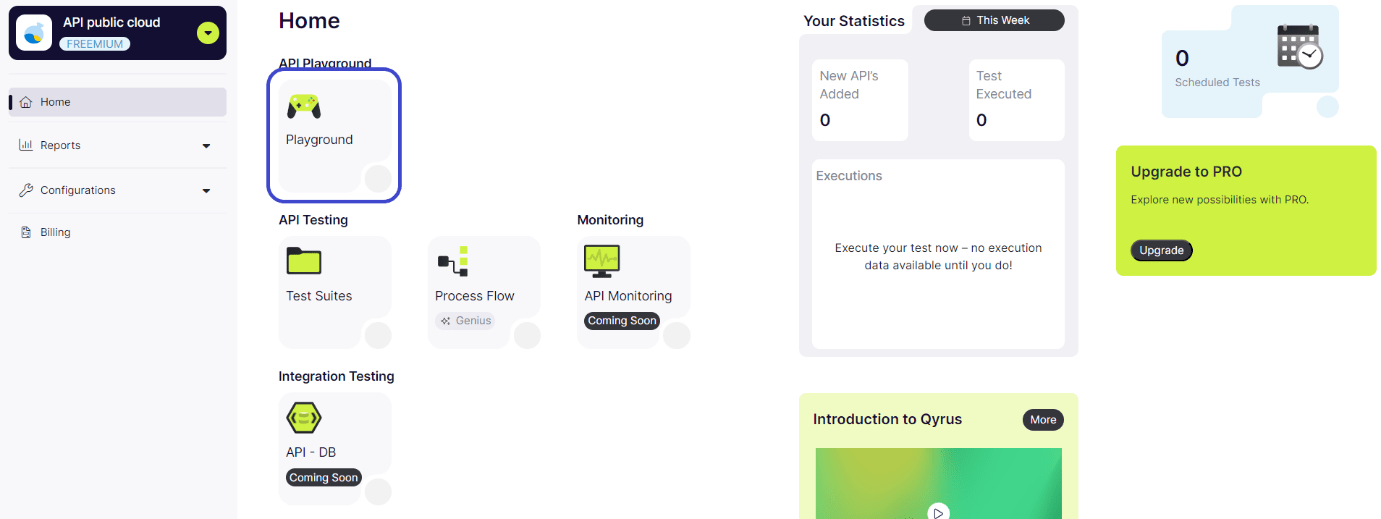
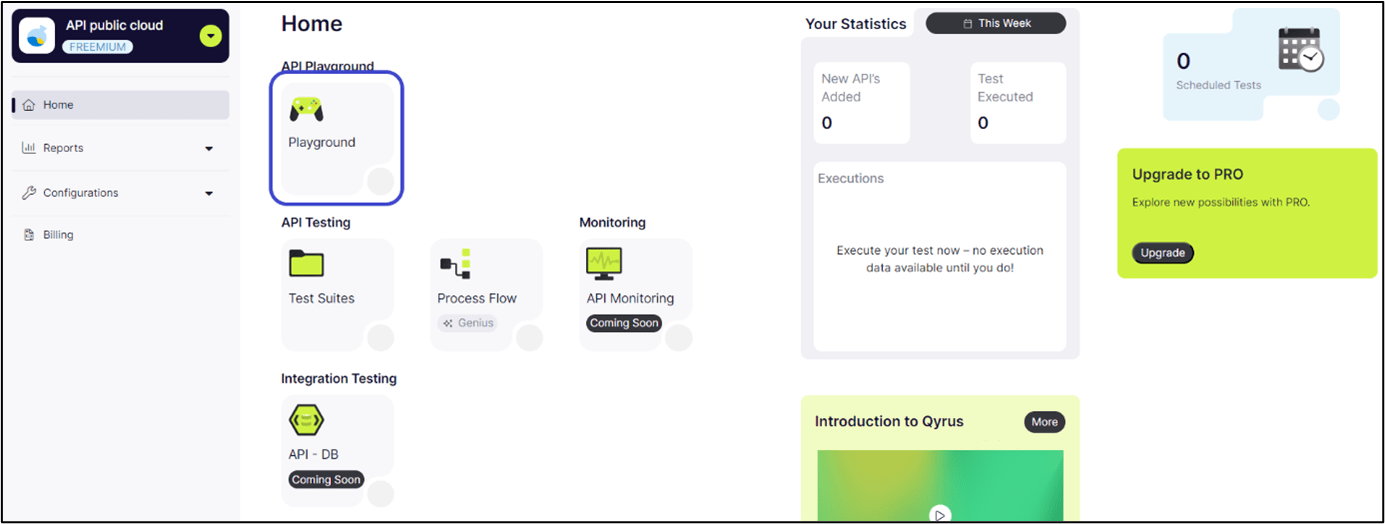
To accommodate diverse project requirements, our platform provides three methodologies for creating APIs in your Test Suite. This flexibility ensures you can select the approach most compatible with your workflow. Step 1: From the dashboard, click on ‘Playground’.
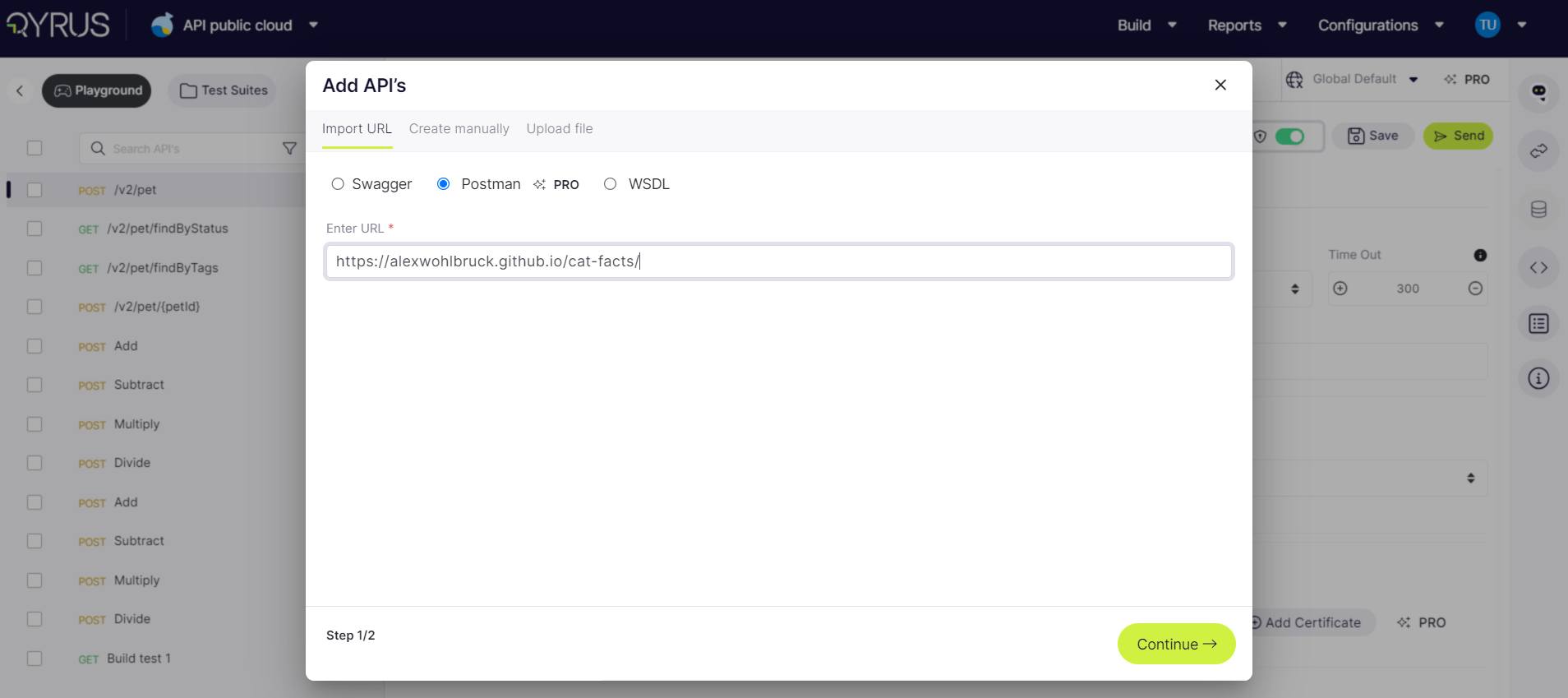
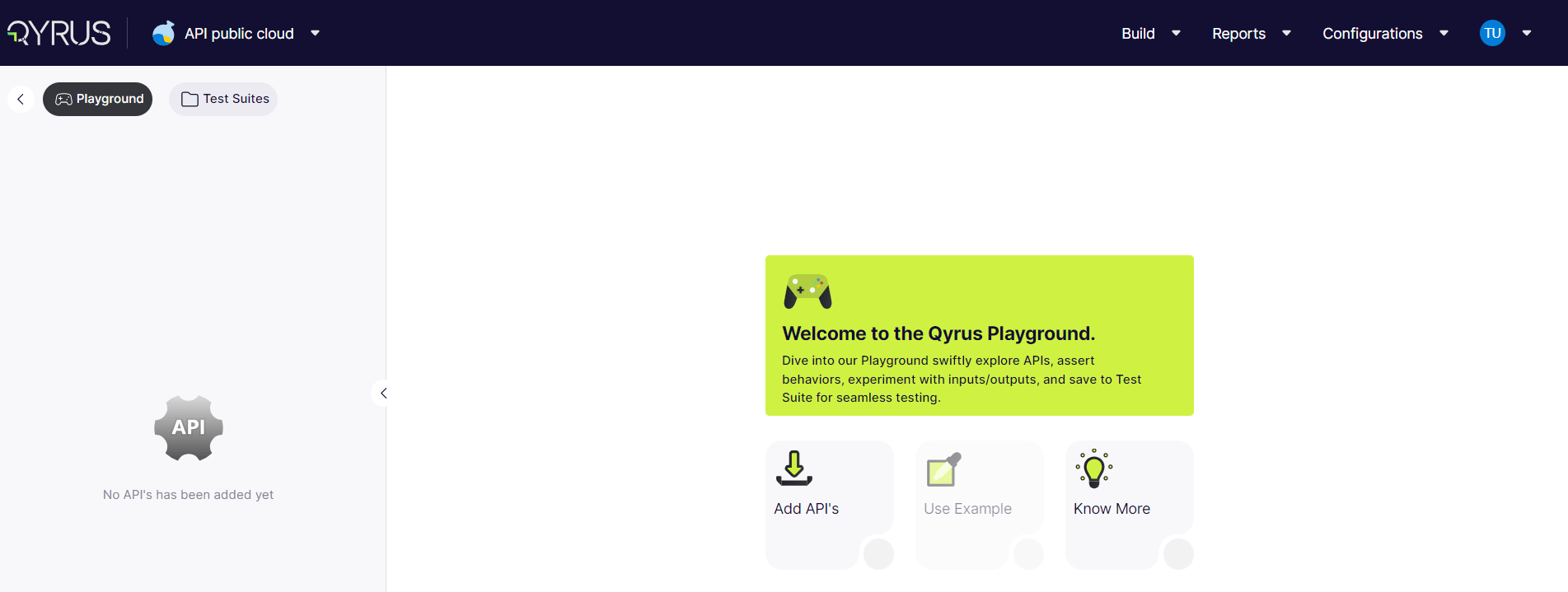
Step 2: Click on ‘Add APIs’
Note: If you want to know more about the Qyrus platform, you can click on ’Know More’ to learn about API, project-setup, functional-testing, API-process testing, Advanced-features, and FAQs.
Type 1: Import URL
One efficient method of creating APIs is through URL imports. This process supports two primary formats: Swagger and WSDL*. Depending on your project’s specifications, you can choose the format that best aligns with your requirements.
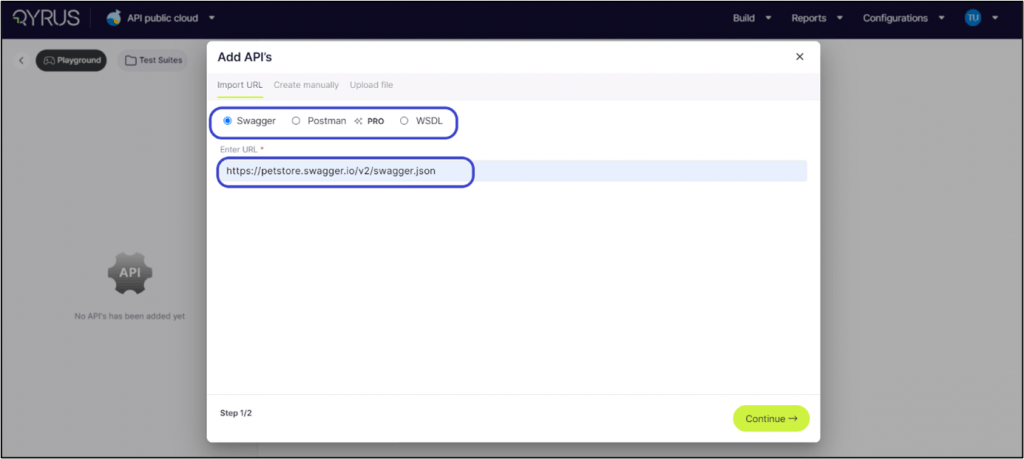
Option 1: Using Swagger Format Step 1: In the import section, click on “Swagger” if you’re using the Swagger format for your API.
Step 2: Input the Swagger URL: In the provided field, type in the URL of your Swagger file. To practice or see how it works, for example, let’s use https://petstore.swagger.io/v2/swagger.json. This sample URL shows you how the process works with a real example.
Step 3: Click ‘Continue’: This tells the platform to start fetching your API’s details from the Swagger file you specified.
The platform will now take a moment to process the URL and add your API to your Test Suite. It will read the Swagger file and set up your API so you can start working with it.
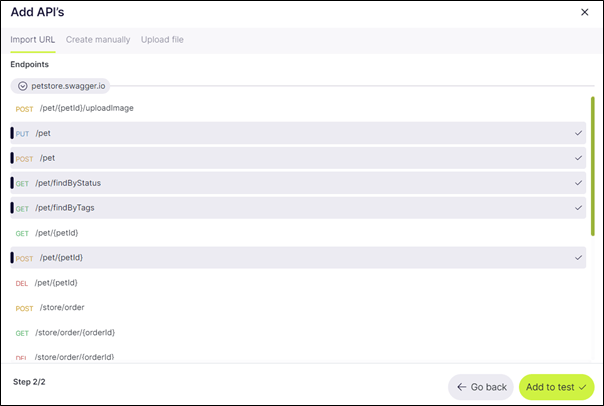
Step 4: Select all the Endpoints to add to testing and click on ‘Add to test’.
Once you successfully import your APIs using the URL method, the platform will navigate you to a comprehensive dashboard.
This dashboard is where you can manage all your imported APIs effectively.
Let’s dive into how you can edit, create, delete, modify, and send these APIs to meet your project requirements.
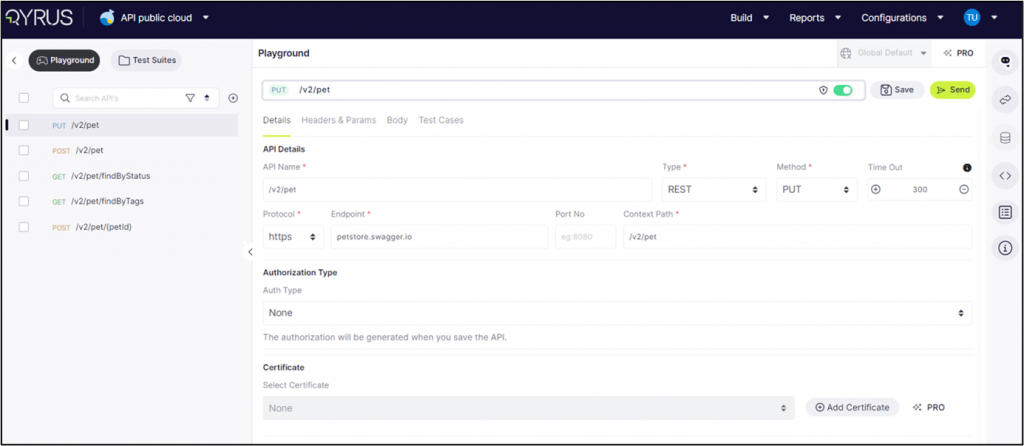
Navigating Your API Dashboard Upon arrival at the API dashboard, you’ll notice the platform has organized your APIs neatly. Here’s how to get started with managing them:
Accessing Your APIs: On the left side of the screen, you’ll find a list of all your imported APIs. This list is your gateway to manage each API individually.
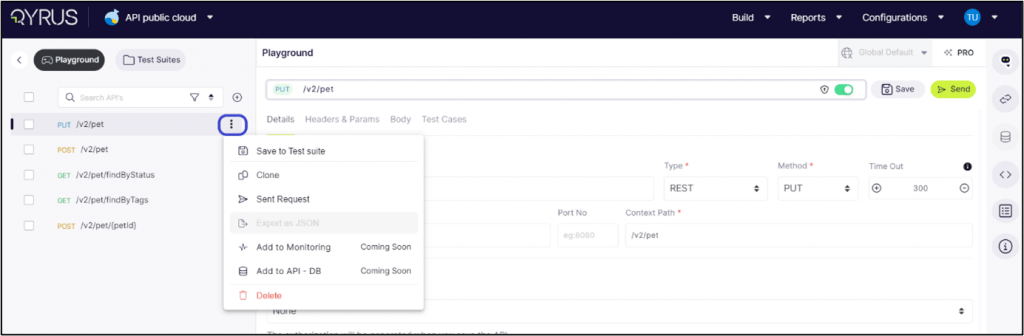
Exploring API Options: Click on any API from the list to select it. Once selected, look for the three dots (more options) next to the API name. Clicking here will reveal a menu with various actions you can perform.
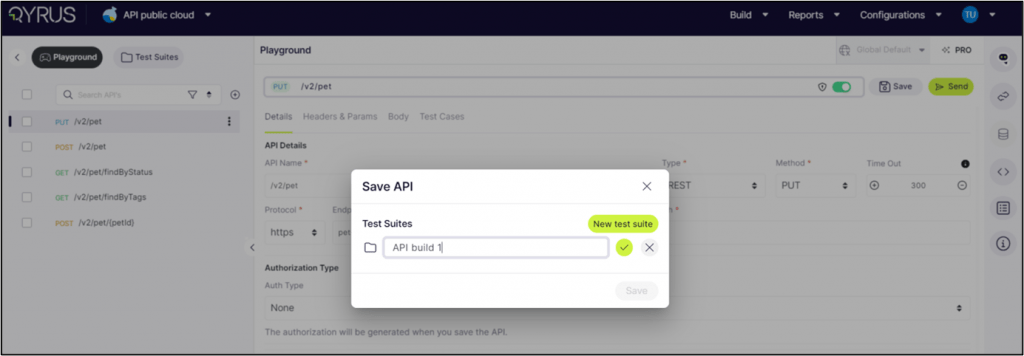
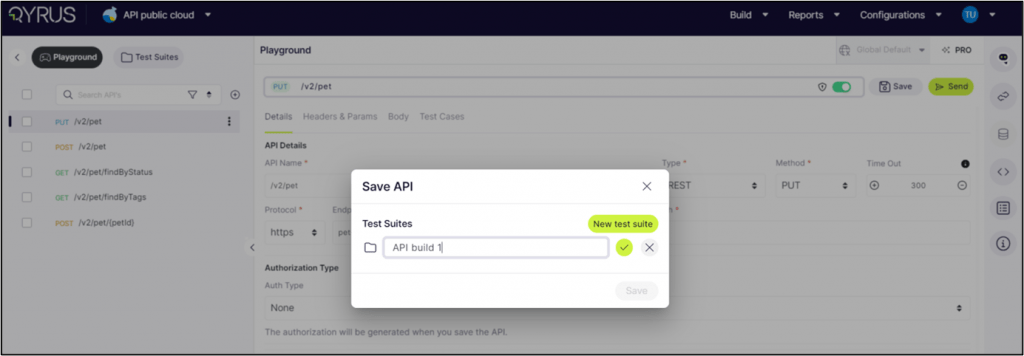
Saving to Test Suite: First, click on ‘Save to test Suite’ to add an API to a specific Test Suite.
A pop-up box will ask you to name your Test Suite if you haven’t already created one.
Do this by typing the name into the field provided and clicking the tick box to confirm.
If you’ve previously set up a Test Suite, you can save your API by selecting it from the dropdown menu.
Cloning an API: Cloning is handy when you want to create a similar API with slight modifications. Select ‘Clone’ to make an exact copy of the selected API, which you can edit as needed.
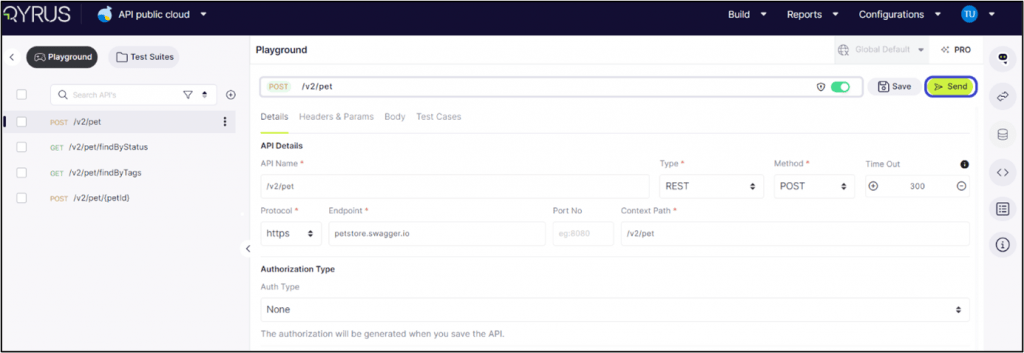
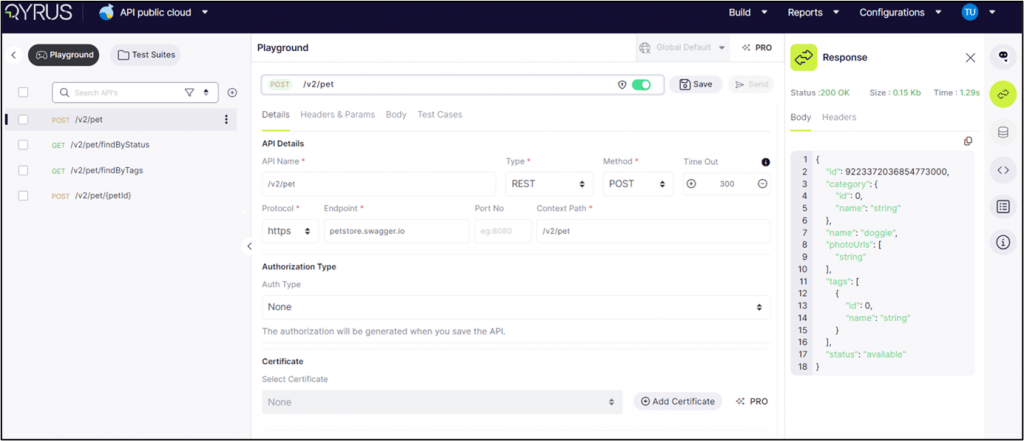
Sending an API: This option helps you test your API’s functionality in real-time. Choose ‘Send’ to execute the API call and view the response, which helps you validate its performance.
You can also click on the send button highlighted in the image below.
It will open the response tab, showing:
Status: If the server has successfully processed the request, it will show OK as a successful interaction, the standard response for successful HTTP requests.
Size: The total size of the response data sent from the server, including headers and body content. It gives an idea of the payload’s weight, which can impact load times and performance, especially in data-intensive applications.
Time: The duration taken for the request to be sent, processed, and for the response to be received. It is a critical metric for assessing the efficiency and speed of the API, highlighting the system’s responsiveness.
Users can review the body of the response, often shown in the format specified (such as JSON, XML, etc.), to assess the API’s behavior and validate its output against expected results. This immediate feedback is crucial for debugging and optimizing API functionality.
Deleting an API: If an API is no longer needed or was added by mistake, selecting the ‘Delete’ icon will remove it from your dashboard.
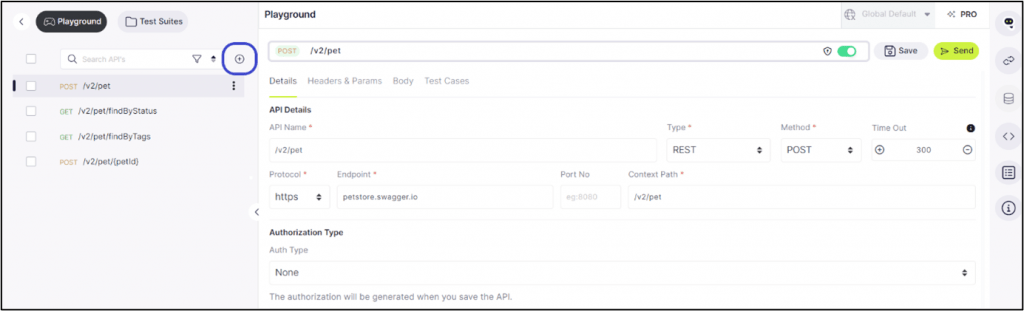
To add more APIs, click on the Add Icon.
Modifying API
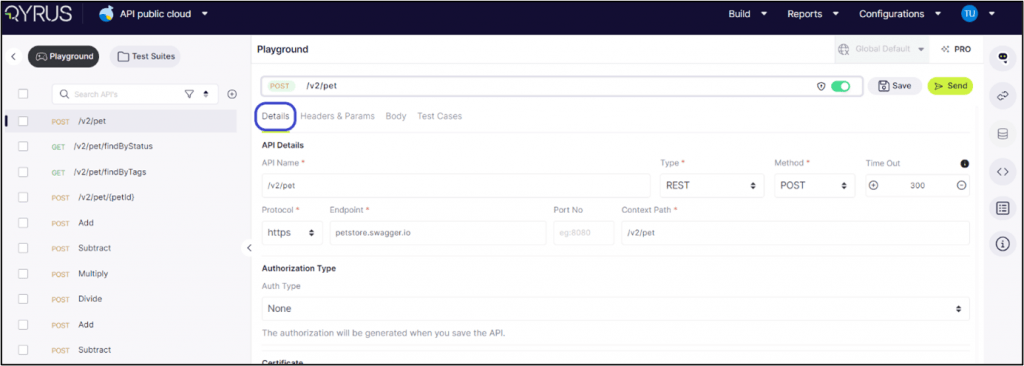
Select an API: The main screen will display all its intricate details under the ‘Details’ tab. Here, you can modify the API to fit your exact needs:
API Name and Type: Users can view the API’s name and select its type (REST, SOAP) to ensure proper handling within the platform.
Method Selection: Users can designate the appropriate method (GET, POST, PUT, DELETE, PATCH) based on the desired action the API should perform, thereby defining its interaction with the server.
Timeout Setting: Users have the option to set a timeout in milliseconds.
Protocol Configuration: The platform facilitates toggling between HTTP and HTTPS protocols, allowing users to secure API calls by opting for HTTPS where applicable.
Endpoint and Context Path: In this section, users can modify the API’s endpoint URL and specify the context path, which is essential for accurately directing API calls.
Authorization Type: Users can select the authorization type that aligns with the API’s security requirements, ensuring secure interactions, whether it involves Basic Auth or OAuth. The authorization will be generated when you save the API.
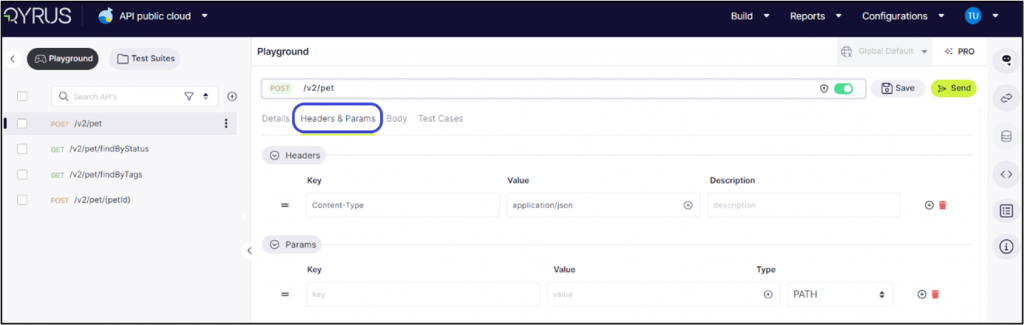
In the Headers and Params tab, users can add, delete, and modify both the key and value, as well as the type of each parameter. This functionality allows for precise customization and configuration of API requests, ensuring accurate and effective testing.
Within the Body tab, users have several options for inputting data. They can choose to enter the code directly or upload a file.
When selecting the code option, users can specify the type of code they input, including JSON, XML, Text, or GraphQL.
Generate Use Cases with NOVA Under the ‘Test Cases’ tab, users are presented with options to define test cases for Header Assertions, and the body of the API request or response. This functionality allows for thorough testing and validation of various aspects of the API’s behavior, ensuring reliability and consistency in its performance.
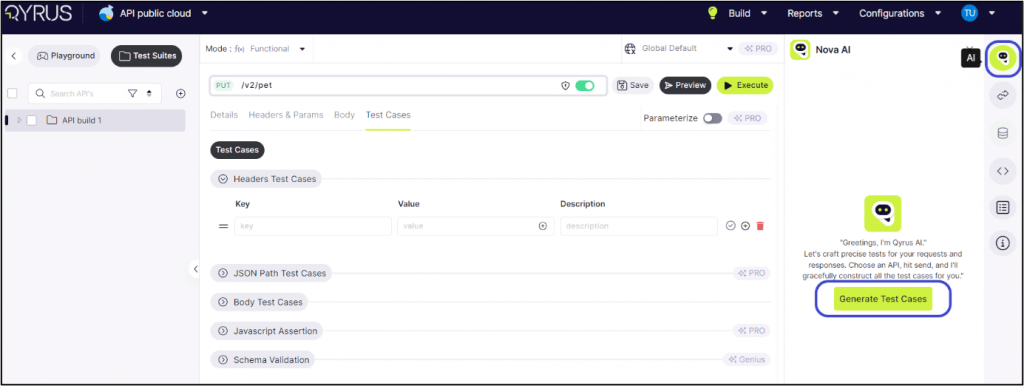
Step 1: Click on Nova and choose to generate test cases.
Step 2: The AI will analyze the API and generate ideal test cases that are best suited to test its capabilities.
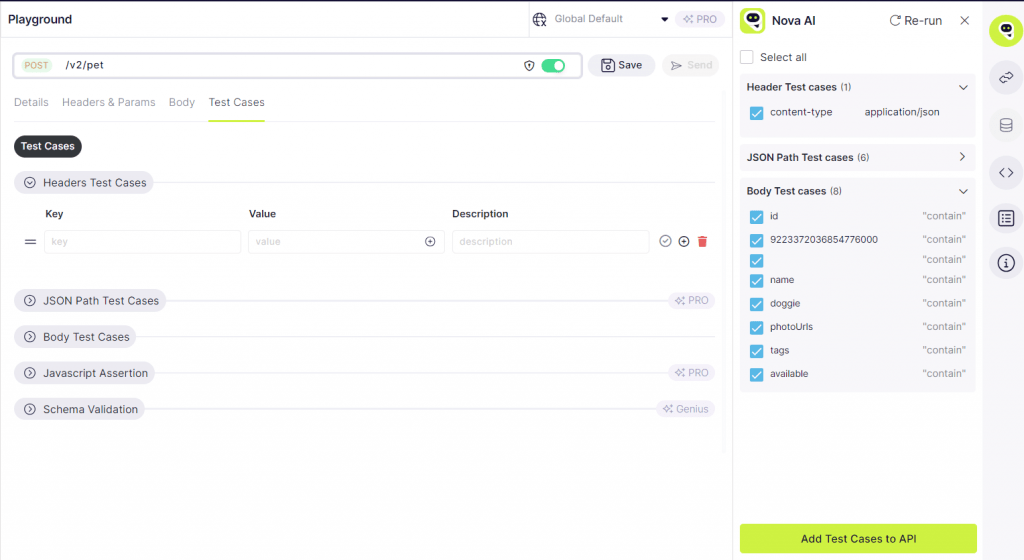
Step 3: Mark the different test cases, such as header and body test cases, in the tick box.
Step 4: click on Add test cases to API.
Step 5: Click on Headers Test Cases now to see the key, value and description.
Step 6: Click on Send.
Step 7: The response tab is opened and shows the body and header used for the test case.
Step 8: The status shows ‘200 OK’, which means the test was successful and the API is completely functional.
Step 9: To extract its path, click on ‘Path Extractor’ and select JSON path/ X-path.
Step 10: Click on the play button to extract the path. It will show the path, as highlighted in the image below.
Step 11: Similarly, for Body Test Cases. AI will suggest all the test cases.
Option 2: Using WSDL Format
Step 1: Navigate to the Add API button and select “WSDL” if your API utilizes the WSDL format.
Step 2: Enter the WSDL URL: Add the URL of your WSDL file. Consider using a sample WSDL URL for a practical example or to familiarize yourself with the procedure.
Step 3: Initiate Import by Clicking ‘Continue’:
Modifying API
Select an API: The main screen will display all its intricate details under the ‘Details’ tab. Here, you can modify the API to fit your exact needs.
API Name and Type: Users can view the API’s name and select its type (REST, SOAP) to ensure proper handling within the platform.
Method Selection: Users can designate the appropriate method (GET, POST, PUT, DELETE, PATCH) based on the desired action the API should perform, thereby defining its interaction with the server.
Timeout Setting: Users have the option to set a timeout in milliseconds.
Protocol Configuration: The platform facilitates toggling between HTTP and HTTPS protocols, allowing users to secure API calls by opting for HTTPS where applicable.
Endpoint and Context Path: In this section, users can modify the API’s endpoint URL and specify the context path, which is essential for accurately directing API calls.
Authorization Type: Users can select the authorization type that aligns with the API’s security requirements, ensuring secure interactions, whether it involves Basic Auth or OAuth. The authorization will be generated when you save the API.
In the Headers and Params tab, users can add, delete, and modify both the key and value, as well as the type of each parameter. This functionality allows for precise customization and configuration of API requests, ensuring accurate and effective testing.
Within the Body tab, users encounter an array of options for inputting data. They can choose to enter the code directly or upload a file.
In the code type for WSDL, the system shows the XML code type.
On the Test Cases tab, users are presented with options to define test cases for headers assertions, and the body of the API request or response. This functionality allows for thorough testing and validation of various aspects of the API’s behavior, ensuring reliability and consistency in its performance.
Type 2: Create Manually
Click on Add API and choose the ‘Create manually’ option
Select the API type and give a name.
Click on Create API to begin the manual process.
Enter all the required details for the API.
API Name and Type: Users can view the API’s name and select its type (REST, SOAP) to ensure proper handling within the platform.
Method Selection: Users can designate the appropriate method (GET, POST, PUT, DELETE, PATCH) based on the desired action the API should perform, thereby defining its interaction with the server.
Timeout Setting: Users have the option to set a timeout in milliseconds.
Protocol Configuration: The platform facilitates toggling between HTTP and HTTPS protocols, allowing users to secure API calls by opting for HTTPS where applicable.
Endpoint and Context Path: In this section, users can modify the API’s endpoint URL and specify the context path, which is essential for accurately directing API calls.
Authorization Type: Users can select the authorization type that aligns with the API’s security requirements, ensuring secure interactions, whether it involves Basic Auth or OAuth. The authorization will be generated when you save the API.
In the Headers and Params tab, users can add, delete, and modify both the key and value, as well as the type of each parameter. This functionality allows for precise customization and configuration of API requests, ensuring accurate and effective testing.
Within the Body tab, users have two options for inputting data. They can opt to either enter the code directly or upload a file.
Enter a unique key name and upload the body by uploading the file.
The Test Cases tab, users need to manually define test cases for headers assertions, and the body of the API request or response. This functionality allows for thorough testing and validation of various aspects of the API’s behavior, ensuring reliability and consistency in its performance.
Type 3: Upload File
To manually upload the file, click on the Swagger or WSDL type, upload the respective type of file, and click on continue.
Note: Follow the same steps as for the Import URL.
Test Suite Creation
Step 1: Once the APIs are uploaded and tested, the user needs to add them to a test suite. Select the API, click on more options, and click on Save to Test Suite.
Step 2: A pop-up box will prompt the user to name their Test Suite if one hasn’t been created already.
Step 3: Enter the desired name into the provided field and click the tick box to confirm.
Step 4: Navigate to the testing suite after the APIs are added to the testing suite section.
Step 5: Here, users can test multiple APIs simultaneously. Click on ‘Preview’ to inspect the request body and response.
Step 6: After previewing, click on ‘Execute’. This action will initiate the API tests, push them, and initiate the test run.
Step 7: The platform will begin running the tests and subsequently navigate the user to the report stage for detailed analysis and review.
Check Functional Reports to get an analysis of the API tests.
Conclusion
We’ve explored the transformative power of QAPi. With its intuitive features, smart testing capabilities, and user-friendly interface, our aim with this application is to redefine how API testing is conducted. As organizations embrace this innovation, they open doors to faster, more comprehensive testing, boosting efficiency and ensuring the reliability of their applications.
Creating and managing projects under the freemium model on our platform is straightforward and flexible, this allows you to tailor your API setup to your project’s specific needs. The API onboarding process is designed to be seamless, ensuring you can quickly integrate and manage your APIs using our robust API dashboard.
We hope this guide has helped get you started with creating and managing APIs in your Test Suite using our free API testing tool. If you need further assistance or have any additional questions, please get in touch with Qyrus for more help. We would be happy to assist you and guide to solve your problems!
The software industry is going through a transformation of Artificial Intelligence (AI) and Machine Learning (ML). Software Testing is no exception to this. Advanced technologies like AI and ML are revolutionizing the traditional software process and practices. AI and ML help reduce the complexities involved in Software Testing. The new AI capabilities focus on speed, accuracy, and delivery. Though shift-left testing has been a buzzword in the software industry for a long time, it was hard to achieve due to many challenges, and AI and ML solutions quickly made it possible. This revolution not only helps the organization but also helps testers focus on their core objective of delivering high-quality software in reduced time to market.
As per Fortune Business Insights, the AI-enabled market is projected to grow up to USD 2,746.6 million by 2030, exhibiting a CAGR of 20.7% during the forecast period. By 2025, nearly 70% of freshly developed enterprise solutions will be created with the help of low-code or no-code technologies.
What is AI and ML
Artificial Intelligence, or AI, refers to the simulation of human intelligence in machines that are designed, developed, and programmed to think as humans and mimic human actions. ML is the branch of AI that refers to the development of algorithms, using data by helping the AI to imitate the way that humans learn, gradually improving its accuracy. The difference between AI and ML is that AI is an end product that mimics one or more tasks. ML is a subset that helps to build AI-based systems by focusing on algorithms.
What’s the difference between AI and ML? ML is the subsystem of AI; However, AI can exist with or without ML. Most of the AI systems use ML for prediction and self-correction. ML can also help with accuracy. The detailed comparison of AI and ML is as follows.
Artificial Intelligence (AI)
Machine Learning (ML)
AI allows to simulate the human intelligence
ML learn autonomously from historical data
AI helps to build the intelligent system to perform complex tasks
ML helps to build the machine with high accuracy by learning its own over the period
AI has a broad range of applications
ML scope is limited compared to AI
AI can mimic human decision-making.
ML uses the self-learning technique; it can help in producing predictive models.
AI can use structured, semi-structured, and unstructured
ML uses only structured and semi-structured data
AI utilizes the decision trees to learn, reason, and correct itself
ML uses statistical models to learn, but it can self-correct with new data
How does AI help to reshape test automation? Organizations are adopting the Agile methodology to go early to the market. Though application development easily adjusts to the rapid change, software testing still faces challenges when adopting Agile. Most of the time, the deliverables come towards the end of the sprint with tight timelines. Following all the testing processes and completing test activities within the same sprint is not only difficult but also challenging.
Testing activities involve analyzing the requirements, creating the test cases with expected and actual results, labeling them with the right priority, and automating them. These tasks seem very simple but take a lot of time and effort. The testing tools are evolving with AI capabilities, they can generate the test cases based on the requirement, and with additional configuration, they can also generate the test automation script. This considerably reduces the effort and saves a lot of time.
Today, many test automation tools come with in-built AI capabilities. Some of the latest trends in AI and ML (test automation tools) are no-code-based tools, intelligent recording of test scripts, and intelligent conversion of natural language to programming language. AI and ML solutions are not only helpful in test automation; they also generate the load on a system based on historical data and help in performance testing. It can analyze the application code and suggest possible vulnerabilities, security breaches, etc.
Benefits of AI-based test automation tool
It reduces the complexity involved in the testing process
It intelligently suggests a possible fix by making a test failure analysis
AI can reduce the technical proficiency required in automation with no-code and natural language processing
AI reduces the maintenance effort
It can identify the gaps in test automation and help in increasing the test coverage.
It can save the organization’s costs in various ways, such as by reducing technical resources, automating repetitive tasks, etc.
AI can help in test automation efficiency and reliability by decreasing flakiness and maintenance.
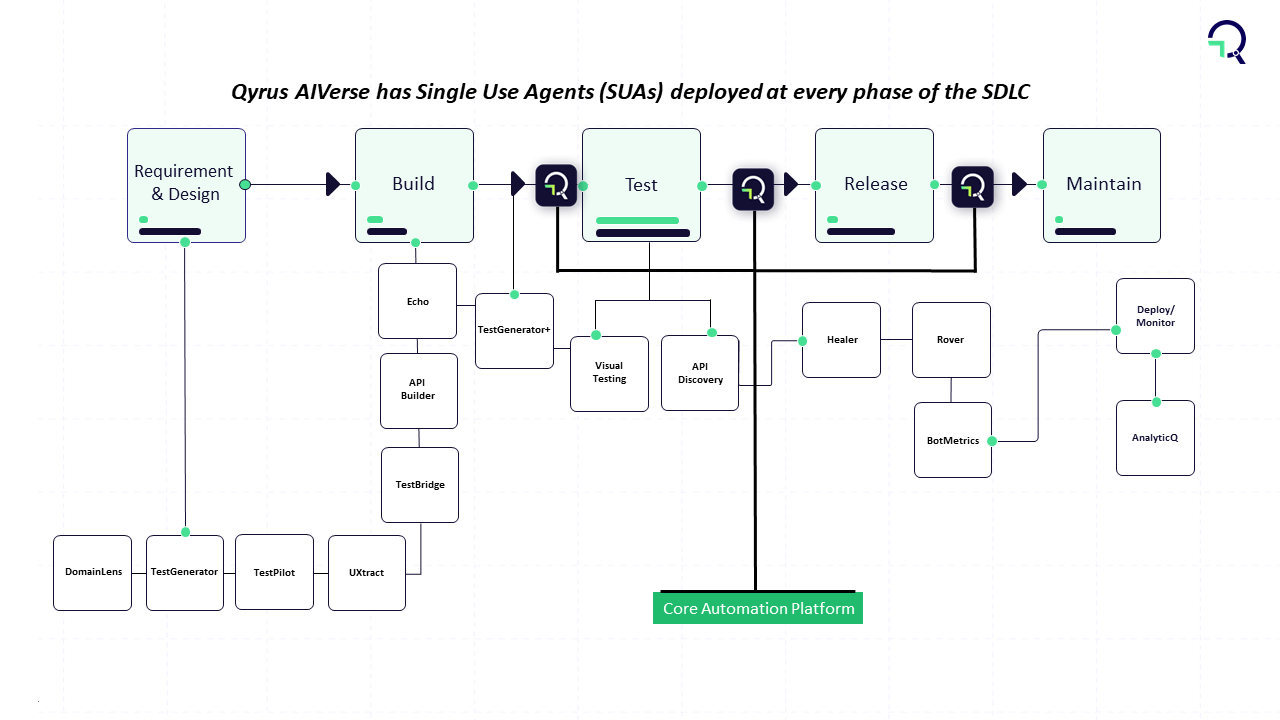
How AI-based testing tool helps to accelerate test automation There are many AI-based tools in the market, each offers many unique features. Most of the tools focus on the no-code-based feature. Qyrus is focused on bringing the most out of AI capabilities in terms of automation testing and testing processes. The Qyrus AI Verse provides all the basic AI features, such as no-code or scriptless automation. It provides AI-based testing solutions for Mobile and Web platforms with capabilities of UI, Component, and API testing. Some of the notable features of Qyrus are that it allows the AI and ML solutions for visual testing with Rover. Users utilize TestGenerator to generate functional test cases by automatically reading the JIRA tickets. As mentioned earlier, the in-sprint automation and shift left testing can be easily done by integrating TestGenerator into Qyrus. It translates acceptance criteria into functional test cases, which can be easily converted to automation scenarios with Qyrus no-code automation testing. It can also facilitate shift left and continuous monitoring using GenAI technology.
Conclusion Software testing is undergoing a major revolution with modern AI and ML technologies. AI and ML can reduce the complexities involved in the testing process by mimicking human actions. Repetitive tasks no longer require human interference. Though many tools attempt to bring AI into automation testing not all are successful. Qyrus is focusing on bridging all the gaps in software testing and automation with AI and ML capabilities. Additionally, Qyrus provides the features to integrate many popular AI tools like TestGenerator, API Discovery, TestPilot, Rover, etc. to get the most out of AI. The AI technology in the Qyrus tool can significantly reduce the organization’s cost and help increase the ROI.
Handling APIs correctly is hard to crack, as they are the backbone of modern applications. They enable different systems to communicate seamlessly, facilitating everything from basic data retrieval to complex transaction processing. For developers, admins, and product managers, the reliability and performance of these APIs are critical.
API management tools help significantly in reducing downtime or performance issues that lead to user-facing errors, latency, and ultimately, a loss of customer trust. In today’s competitive software landscape, users have little patience for unreliable applications. An issue at the API layer can quickly escalate, causing customer churn and negatively impacting the business.
This is why API testing platforms are so important. Thorough testing ensures that APIs function correctly under various conditions, providing a safety net that helps prevent issues before they reach the end user. It’s about more than just catching bugs; it’s about ensuring that your application delivers a seamless experience every time.
Effective API testing platforms and practices can make this task more manageable, giving your team the confidence to innovate and push boundaries without compromising reliability.
Introducing QAPi A cloud-based platform that simplifies and automates your entire API testing lifecycle. QAPi (Qyrus API Testing Platform) offers API testing coverage, as it automates and monitors the quality and performance of the endpoints, to ensure a seamless experience for your products and services.
Effortless Testing: Our intuitive interface is designed to simplify the creation of API tests, eliminating the need for extensive coding. This allows your team to focus on test strategy rather than implementation details.
Harness the Power of Automation: Utilize global variables, parameterization, and token management to automate repetitive tasks. These features significantly reduce manual effort, enabling your team to execute tests quickly and consistently.
Comprehensive API Support: Our platform supports testing across REST, SOAP, and GraphQL APIs. With just a few clicks, you can ensure that all aspects of your application’s API layer are thoroughly tested.
Enhanced Test Coverage: Achieve in-depth testing with assertions on API body, path, and headers. Additionally, our schema generator facilitates comprehensive testing by ensuring that your APIs adhere to predefined standards and structures.
Seamless Integration: Easily import and reuse functional APIs and response data, ensuring a smooth workflow within your development ecosystem. This integration capability allows you to maintain consistency and reliability across your testing processes.
Ready to Get Started with QAPi? Signing up is easy and takes just a few minutes. Here’s a quick guide:
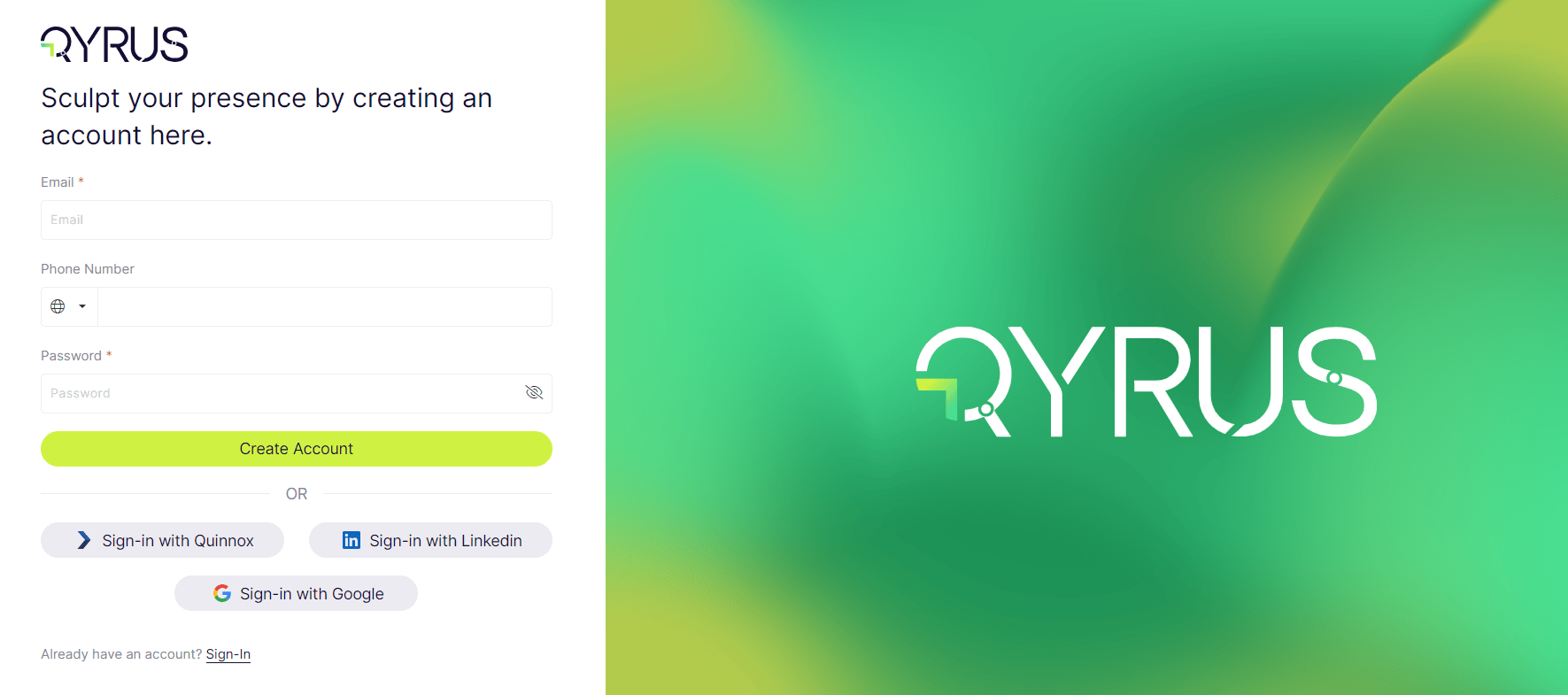
To begin accessing our platform, you need to create a user account. There are three simple ways to sign in:
The system will send a verification code to the registered email address. Enter the code and confirm the account.
Once the above steps are completed, user profile will be created.
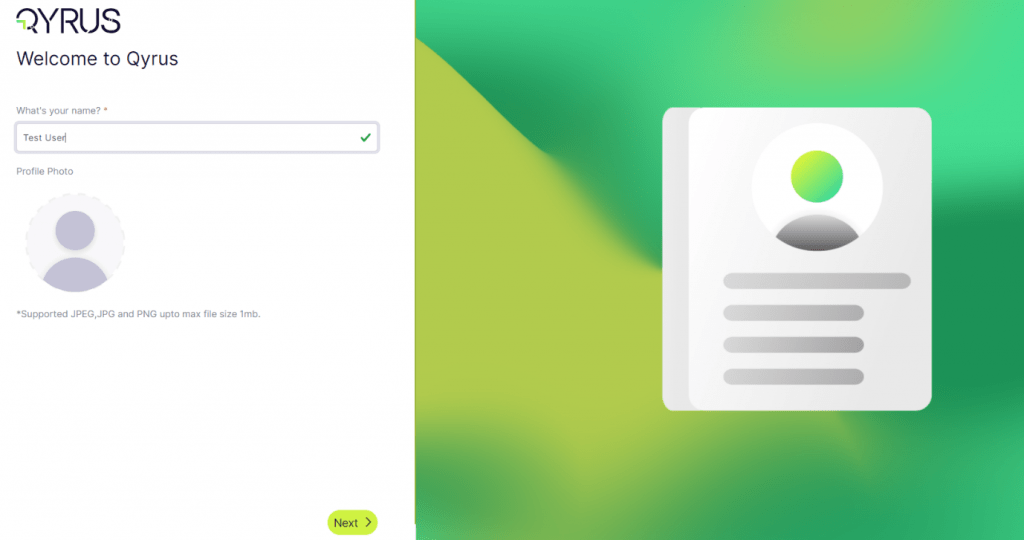
After logging in, enter your name. This helps personalize your experience on our platform.
Add a Profile Photo (Optional)
Initiate Workspace Creation: To organize your projects and APIs efficiently, you’ll need to create a workspace.
Name Your Workspace: Enter a unique name for your workspace. This is where all your APIs will be accessible, making it easier to manage your projects.
Click on ‘Next’
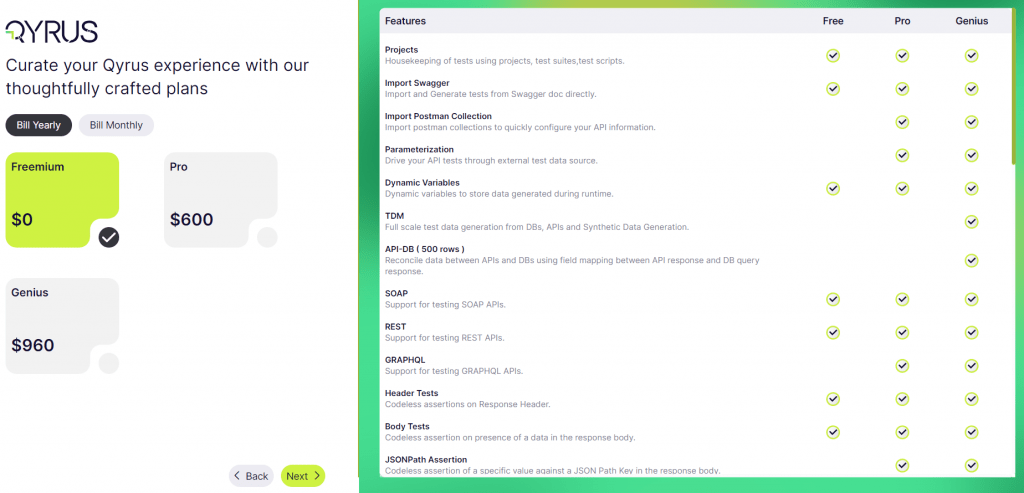
Select the plan that best suits your needs (Freemium or Pro).
Upon successfully logging in, the Qyrus API bot will greet you. This bot is designed to provide an overview and assist you in navigating the platform.
Freemium or Pro? What’s the difference? Here’s a closer look at our two categories. Below are the features and capabilities offered so you can leverage its plans to suit your specific needs.
1. Freemium Plan: Your Launchpad for API Testing The Freemium plan is a perfect entry point if you are new to Qyrus or want to experiment with its features before accessing. Here’s what you get with the Freemium plan:
Project Management: Establish a structured testing environment by creating projects, managing test suites, and building test scripts.
Seamless API Integration: Effortlessly import existing API specifications from popular tools like Swagger and Postman. This eliminates the need for manual configuration and streamlines your workflow.
Broad API Support: Perform basic API testing on a variety of protocols, including both SOAP and REST APIs. The Freemium plan allows you to explore Qyrus’ compatibility with your specific API types.
Test Management: Organize your testing efforts efficiently with project creation, test suite management, and test script-building functionalities.
Essential Testing Features: Perform basic API testing coverage features like postman collection import and basic request generation.
2. Pro Plan: Unleash the Power of Automation The Pro plan offers a significant leap in functionalities, ideal for teams who require a more robust testing suite. Upgrading to Pro grants you access to all the features included in the Freemium plan, plus a variety of additional benefits:
Advanced Features: Drive your tests using external data sources with parameterization. Dynamic variables allow you to store data generated during runtime, further enhancing your testing capabilities.
Enhanced Data Handling: The Pro plan unlocks TDM (Test Data Management) functionalities. Generate comprehensive test data from various sources including databases, APIs, and synthetic data. Additionally, users can reconcile data between APIs and databases, ensuring data consistency across your systems.
The information should be a good start for a new user to explore the QAPi platform. You can now have a tour of the cloud application and interact with our Qyrus API Bot for further queries.
Stay tuned for our next blog post, where we’ll delve deeper into API testing coverage and explore best practices for creating projects and testing APIs real-time. We’ll also demonstrate how QAPi can elevate your test automation capabilities with our powerful platform.
Fintech trends are at the forefront of innovation. As digital evolution reshapes financial services, mobile applications’ role in facilitating financial transactions has become necessary.
As challenging as 2023 was, it ushered in a reality check for fintechs, bringing some much-needed rationalization to the sector. Not all players could adapt to the new market conditions. Those that did now appear more focused, disciplined, and deliberate in terms of where and how they allocate resources.
The Fintech industry has seen some growth in broader venture funding. But as per CB Insights’s report on the State of Fintech Q1’24, “fintech funding continued to slide in Q1’24, declining 16% quarter-over-quarter (QoQ%) to $7.3B. Fintech deal volume, on the other hand, increased for the first time since Q1’23.“
In this blog, we start with what fintech applications are and how the best fintech companies use mobile testing automation to build a fintech app. We will also cover mobile testing automation’s significance and trends to look out for!
So, what are Fintech applications? Simply put, it’s a digital platform that leverages cutting-edge technology to provide financial services efficiently and conveniently. From banking and payments to investing and insurance, Fintech apps cater to a wide array of financial needs. As the demand for seamless user experiences surges, developers are constantly challenged to create robust applications that ensure security, reliability, and performance.
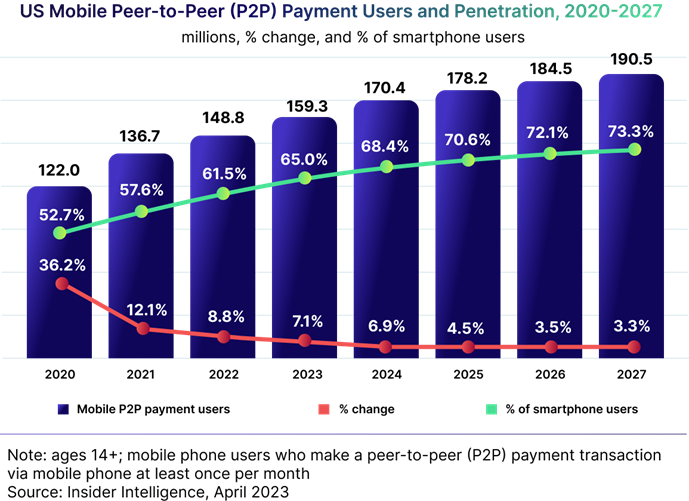
Amidst all the fintech trends that everybody is raving about, one aspect stands tall – the increasing reliance on mobile devices for financial transactions. As per eMarketer, 80.4% of new users adopting mobile P2P transfers between 2023 and 2027 are expected to be from Generation Z (the more tech-savvy generation).
This shift towards mobile-centric solutions has propelled the need for effective Mobile Testing Automation.
To ensure the Fintech companies meet the demands of today’s tech-savvy users, they must build an app that best suits them.
It all starts with understanding the nuances of Fintech Trends and incorporating them into the development process. Whether it’s seamless integration with third-party services, real-time analytics, or AI-powered chatbots, staying abreast of emerging trends is key to building a successful Fintech app.
However, building a Fintech app is just the beginning. Ensuring its performance across various devices and platforms is equally crucial. This is where Mobile Testing Automation comes into play. Companies like Qyrus automate the testing process and help developers identify and fix issues faster, accelerating time-to-market and enhancing overall quality.
Let’s look at some of the top Mobile Testing Trends that are here to stay (FOR SURE)!
Test Automation Test automation continues to be a cornerstone in mobile testing, ensuring efficiency, accuracy, and rapid deployment in the landscape of mobile applications. While in the Fintech Trends, this may not be number one, ‘Test Automation’ tops the list in the mobile testing trends in a big way.
Why? It empowers fintech companies to conduct repetitive tests swiftly, freeing up valuable human resources for more complex tasks. By harnessing automation frameworks like Appium or Espresso, testers can execute tests across various devices and platforms, ensuring comprehensive coverage in fintech solutions. Moreover, automation integrates seamlessly into Continuous Integration/Continuous Deployment (CI/CD) pipelines, facilitating faster time-to-market for Fintech innovations.
Its scalability enables thorough regression testing, which is crucial for maintaining the integrity of financial applications amidst frequent updates and iterations. As the demand for agility and quality heightens in Fintech Trends, the significance of test automation only amplifies, establishing it as a non-negotiable aspect of mobile testing frameworks.
Cloud-based Testing A game changer we need to talk about more often. It offers unparalleled flexibility, scalability, and cost-effectiveness. Fintech applications demand agility and accessibility, making cloud-based solutions indispensable for companies. Leveraging cloud infrastructure, testers can execute tests across many real devices and simulated environments, ensuring comprehensive coverage.
This approach obviates the need for costly hardware investments and facilitates on-demand scalability, making it ideal for handling peak loads during product launches or promotional events.
Furthermore, cloud-based testing fosters collaboration among geographically dispersed teams, streamlining the testing process and accelerating time-to-market for innovations. Security remains a paramount concern in the Fintech landscape, and cloud providers adhere to stringent compliance standards, ensuring data integrity and confidentiality.
As Fintech Trends continue to evolve, the agility and efficiency offered by cloud-based testing solidify its position as an indispensable component of mobile testing strategies.
Application of Generative AI Generative AI revolutionizes mobile testing by leveraging machine learning algorithms to generate test cases, data, and scenarios autonomously. With the complexity and diversity of applications on the rise in Fintech apps, generative AI offers unprecedented efficiency and accuracy to fintech companies.
By analyzing patterns and anomalies in application behavior, AI-powered tools can dynamically create test cases tailored to specific user scenarios, ensuring comprehensive coverage and detecting edge cases that might elude manual testing.
Moreover, generative AI adapts to evolving Fintech Trends by continuously learning from real-world interactions, enhancing the robustness of test suites over time. Its ability to simulate user behavior at scale enables fintech companies to validate the performance and reliability of their applications. Even under diverse conditions, it mitigates the risk of potential failures in production.
As Fintech Trends drive innovation and complexity in mobile applications, the application of generative AI emerges as a transformative force, redefining the landscape of mobile testing methodologies.
Codeless Testing Codeless testing democratizes mobile testing by enabling non-technical stakeholders to create and execute test cases intuitively, without writing a single line of code. It also enhances test coverage by providing access to testing tools and enabling a wider range of team members to participate in the quality assurance process.
Furthermore, where collaboration and rapid iteration are paramount for success, codeless testing empowers domain experts and business analysts to contribute directly to the testing process. Its low barrier to entry fosters cross-functional collaboration and ensures that testing aligns closely with business objectives and user expectations.
As the demand for agility and collaboration intensifies, the accessibility and efficiency offered by codeless testing make it a cornerstone of modern mobile testing strategies.
Here is a quick snippet of what Russ Thornton, CTO, Shawbrook Bank said about Qyrus, “Quinnox is a key partner of ours, not only supporting our technology delivery teams but also with tools like Qyrus. Test automation is a critical capability for any engineering team, and Qyrus supports the testing of our web, API, and mobile components as a part of our CI/CD processes, and also in ongoing regression testing across our partner ecosystem. The real power of Qyrus is that we have this extremely broad testing capability in one tool, run in the Cloud, and reusable across all our development teams.”
APIs (Application Programming Interfaces) are essential for building complex and interconnected systems that power many digital experiences we use daily. To make sure these APIs work smoothly, API testing plays an important role in the overall process.
API testing, while crucial, presents a myriad of challenges that testers encounter throughout the testing lifecycle.
But what are the major challenges faced in API testing? Let’s dissect some major hurdles in API testing and see how automation testing can help overcome them.
Complexity of API Integrations: One of the foremost challenges in API testing stems from the intricate nature of API integrations. Modern applications often rely on a multitude of APIs, each serving a specific purpose. Each APIs can have its own unique design, protocols, and authentication methods. APIs can use various data formats such as JSON, XML, or Protocol Buffers, as well as protocols like REST, SOAP, or GraphQL. Testing the interactions between these APIs and ensuring seamless integration pose significant challenges for testers.
Adopting a modular approach to testing can help address the complexity of API integrations. Breaking down the testing process into smaller, manageable units allows testers to focus on individual APIs and their interactions.
Dynamic Nature of APIs APIs are not static entities; they have the ability to evolve with updates and modifications. APIs often have multiple versions, each with its own set of endpoints, parameters, and behaviors.
As they evolve, endpoints may be added, removed, or modified, and parameters may change. Updates to APIs may result in changes to the structure or content of API responses. Modifications to API logic or business rules can affect how clients interact with the API.
Keeping pace with these changes and ensuring backward compatibility while testing can be daunting and time-consuming. Testers need to adapt their testing strategies to accommodate the dynamic nature of APIs.
Implementing version control and continuous testing practices can mitigate the challenges posed by the dynamic nature of APIs. By maintaining multiple versions of APIs and conducting regression testing with each update, testers can ensure compatibility across different API versions.
Additionally, utilizing automated tools for API versioning and dependency management streamlines the testing process and reduces manual effort.
Data Validation Across APIs Validating data across multiple APIs presents another set of challenges. As data flows between different endpoints, ensuring its accuracy, completeness, and consistency becomes paramount. Crafting comprehensive test cases to validate data integrity adds complexity to the testing process.
APIs may use different data formats such as JSON, XML, or Protocol Buffers to exchange information. APIs often have schemas or data models that define the structure, types, and constraints of the data they exchange. APIs should ensure the integrity of data during transmission to prevent data corruption or loss. APIs should validate incoming data to prevent injection attacks, malformed requests, or unexpected behavior.
Addressing these challenges requires comprehensive testing strategies that cover various aspects of data validation, including schema validation, input validation, boundary testing, and cross-field validation.
Employing data-driven testing techniques and schema validation tools can streamline data validation across APIs. By defining reusable data sets and expected outcomes, testers can automate data validation tests and ensure consistency across API endpoints.
Additionally, leveraging schema validation tools such as JSON Schema or Swagger can verify the structure and format of API responses, enhancing data integrity testing.
Dependency on External Systems APIs often rely on external systems and third-party services, introducing dependencies beyond the tester’s control. With external systems, testers have limited control over the behavior of those systems. Fluctuations in the performance or availability of these external dependencies can impact API testing. External systems may produce data that varies over time. Testers must account for such dependencies and devise strategies to handle them effectively.
Implementing mocking and virtualization techniques helps mitigate dependencies on external systems during API testing. By creating mock APIs or virtual services that simulate the behavior of external dependencies, testers can isolate components for testing and eliminate reliance on external systems.
Additionally, incorporating service virtualization tools such as Qyrus’ into the testing infrastructure enables testers to emulate various scenarios and network conditions, enhancing the robustness of API tests.
Maintaining Test Coverage Crafting comprehensive API test cases to cover various scenarios and edge cases poses a significant challenge. Testers need to strike a balance between achieving adequate test coverage and optimizing testing efforts. Maintaining a robust test suite that captures the breadth of API functionalities requires meticulous planning and execution.
Prioritizing test case coverage based on risk assessment and business impact helps optimize testing efforts and focus on critical functionalities. Employing exploratory testing techniques and boundary analysis can uncover hidden defects and edge cases that may be overlooked in traditional test scenarios.
Additionally, leveraging low-code software testing tools that generate codeless assertions across various components ensures comprehensive test coverage across APIs. Watch this 1-min video to see how you can build API tests in half the time.
While there are many more challenges in API testing, software testing platforms such as Qyrus offer a comprehensive solution to overcome API testing challenges.
As per Industry ARC, “The recent advancements in technology such as artificial intelligence and machine learning process are further creating opportunities for API testing processes.”
Qyrus’ AI-enabled testing platform is designed to streamline the API testing process and ensure the reliability and performance of APIs. With its new intuitive UI, testing is not only easy to use but also faster now!
Qyrus’ newly launched ‘QAPi’ platform is designed to streamline the API testing process and ensure reliability and performance of APIs. With its new intuitive UI, testing is not only easy to use but also faster now!
Low Code Testing: The Superhero All Fintech Companies Should Have! Fintech companies are always looking for new ways to make their software better and faster. One such method they’re using is low code testing. This means instead of writing every single line of code by hand to test their programs, they use tools that help them do it quicker and easier.
Imagine you’re building a Lego tower. Instead of putting each brick in place one by one, low code testing is like having a special machine that helps you stack the bricks much faster. In Fintech, these tools/platforms are like magic machines that help testers and developers test their software without spending too much time doing it manually.
Fintech companies love these low-code testing platforms because they help them make sure their software works well and doesn’t have any problems. It’s like having a superhero sidekick that helps you catch any mistakes before they become big problems.
So, who’s this superhero the testing industry is raving about? The global market for low-code platforms is likely to reach USD 65 billion by the year 2027.
As explained earlier, low code testing is a modern approach to testing applications that minimizes the need for writing code. It utilizes low-code test automation tools to streamline and expedite the testing process while maintaining accuracy and reliability. In essence, it empowers testers to create robust test cases with minimal coding effort, enabling faster and more efficient testing cycles.
While some coding might be involved, low code test automation tools significantly reduce the need to learn different frameworks and programming languages. This effectively eliminates the barrier for non-technical testers, enabling them to engage in testing activities with ease.
Here are some characteristics that make this feature a superhero material:
Visual interface: Low code testing platforms typically provide visual interfaces that allow users to create test cases and automation workflows by dragging and dropping predefined components, such as test steps, assertions, and data sources.
Simplified and Rapid Test Case Creation: Low-code testing tools provide intuitive interfaces that allow testers to create test cases effortlessly. The elimination of extensive programming knowledge requirements also enables the rapid creation of test cases, reducing the time and effort required to develop comprehensive test suites.
Reusability: Test components and scripts can be reused across different test scenarios, saving time and effort in test creation and maintenance.
Rapid Feedback Loops: With automated test execution, low-code testing facilitates quick feedback on software quality, allowing for prompt identification and resolution of issues.
Minimal coding: While some level of scripting or coding may still be required in certain cases, low code testing minimizes the need for extensive programming knowledge. Users can often achieve complex testing scenarios without writing code from scratch.
Companies like Qyrus have mastered the low code game. They are a proven and trusted partner for several global Fintech enterprises looking to achieve their objectives.
Here is a 1-minute video to give a glimpse of what a low code automation platform can do.
How does low-code testing differ from traditional testing methodologies? Low code testing differs significantly from traditional testing methodologies. In traditional methods, testing often involves writing extensive lines of code for test scripts, setting up testing environments, and manually executing tests. Low-code testing, as mentioned earlier, simplifies this process by providing visual interfaces, drag-and-drop functionalities, and pre-built components to create and execute tests with minimal manual coding.
Accessibility and Ease of Use: Low code testing, particularly when employed alongside low code test automation tools, offers a significant advantage in accessibility and ease of use, especially for Fintech companies. Unlike traditional testing methods that often demand specialized technical skills, such as coding or scripting expertise, low code testing platforms are purposefully designed to be user-friendly and accessible to a broader range of users, including business analysts and domain experts involved in Fintech software development.
Rapid Development and Deployment: As per an article by Medium, cloud-based low-code solutions allow banks to deploy applications instantly in the cloud. How? With the visual interfaces and drag-and-drop functionalities offered by low code testing platforms, Fintech teams can swiftly build and modify test automation scenarios without the need for extensive coding, facilitating rapid iterations and updates.
Flexibility and Customization: Adaptability is paramount to any industry. Fintech companies can easily tailor test automation workflows to meet specific testing requirements and adapt them as needed, without being constrained by rigid scripting languages or frameworks.
Reduced Maintenance Overhead: Fintech companies often operate under tight deadlines and stringent regulatory environments. Low code testing helps alleviate the maintenance overhead associated with traditional testing methods, allowing Fintech teams to focus more on innovation and compliance. With low code testing platforms, tests are easier to maintain and update over time, ensuring that Fintech software remains robust and compliant with regulatory standards.
Enhanced Collaboration and Visibility: Collaboration and transparency are fundamental for success in Fintech. Low code testing promotes enhanced collaboration and visibility across teams involved in Fintech software development. The visual nature of low code testing platforms facilitates better communication between business stakeholders, testers, and developers within Fintech companies, fostering a shared understanding of testing objectives and outcomes. Additionally, built-in reporting and analytics capabilities in low code testing platforms enable Fintech stakeholders to track testing progress and performance effectively, ensuring alignment with business goals and regulatory requirements.
Overall, the use of low-code testing platforms like Qyrus can have a significant business impact.
Here is an interesting case study about a Retail Bank with 4500 employees and more than 5 million customers. This is how they drove their test coverage to 90% with Qyrus.
The Problem?
Insufficient manual testing led to insufficient testing, and complex bug detection and impeded the creation of the CI/CD platform.
Insufficient testing also led to the loss of customers due to inferior apps.
The Retail Bank chose Qyrus to transition their fully manual testing method to a low code automation testing approach.
The Outcome? Astonishing!
Automated test scripts and cloud-hosted reports resulted in 2500 automated test executions per week.
Repurposing and reusing test scripts improved test coverage by 90%.
Leveraging Qyrus’ device farm, the bank scaled testing from 30 devices to 50 devices.
Jerin Mathew M M is a seasoned professional currently serving as a Content Manager at Qyrus. He possesses over 10 years of experience in content writing and editing, primarily within the international business and technology sectors. Prior to his current role, he worked as a Content Manager at Tookitaki Technologies, leading corporate and marketing communications. His background includes significant tenures as a Senior Copy Editor at The Economic Times and a Correspondent for the International Business Times UK. Jerin is skilled in digital marketing trends, SEO management, and crafting analytical, research-backed content.