Hey there, testing heroes! It’s Feature Friday, and we’re about to embark on a mobile testing adventure that’s as wild as a squirrel with a caffeine addiction. Have you ever felt like finding that elusive element in your mobile app was like searching for your keys in the Bermuda Triangle? Well, fear not, because Dan and Steve from Qyrus are here with their secret sauce. They’ll spill the beans on how to find those elements with our action types like “Tap by Relative Coordinates,” “Send Text,” and the superhero-sounding “Dynamic Press Keys.” So, grab your coffee, lean in closer, and let’s unveil these nifty mobile testing hacks together!
Tell us, what happens when a user cannot find the element they’re looking for when building mobile tests?
Dan: Well, we have a few ways that users can get around not being able to find an element they’re trying to interact with in their script. And that comes in a few different ways through using a few of our various action types. Firstly, we have “Tap by Relative Coordinates,” then we have “Send Text,” and lastly “Dynamic Press Keys.”
Steve: Qyrus can provide a more robust way of interacting with elements than simply using “Tap By Coordinates,” which can be very flaky between devices. By using “Tap By Relative Coordinates,” the user can use a parent element locator as a reference point to interact with an internal element that has been hidden. A user can then use “Send Text” to set data or “Dynamic Press Keys” to add data from a dynamic variable.
What is the overall impact on the testing process?
Dan: Well, by implementing the strategy we outlined above, users can reduce the amount of time it takes to build or create test scripts. Also, this workaround is much simpler than each time adjusting the coordinates you want to tap on each based on the device being tested.
Steve: Imagine testing on a range of different devices, all with differing resolutions. That means each device would almost require its own script because of the coordinate issue. Furthermore, it’s an easy-to-understand process that all takes place on the Qyrus UI with no code involved. That means it’s also more accessible to the potential business users of Qyrus.
Does the same or similar functionality exist without Qyrus, and how do competitors address similar problems?
Dan: Competitors typically utilize a coordinate-based approach when it comes to workarounds for these types of issues. These solutions tend to be flaky. Sometimes we also see a computer vision-based approach to match an element from an image. To be clear, Qyrus has this capability as well, but we have found that it can slow down performance.
Steve: Before “Tap By Relative Coordinates,” a user would use the phone coordinates on the image to interact with the element. To handle tests on multiple phones, they would have to create a series of variables and environment profiles, which is time-consuming. The other way would be the computer vision route, which would require uploading an image and then taking a performance hit during test execution.
How do you see this solution impacting day-to-day operations across organizations?
Steve: It reduces the potential for flaky tests in the element not found use case. It also reduces the amount of work to find a path towards working with the solution. There is also obviously less hassle with broken tests from unreachable elements.
Dan: Again, the biggest benefit is that the same locator information can be shared across different devices, improving the potential of reusing the same test script across different phones.
And there you have it, fellow testing heroes! We hope you’ve enjoyed this caffeinated journey through the mobile testing jungle with Dan and Steve. Just remember, when you find yourself hunting for those elusive elements, you now have some superhero action types in your utility belt. So go forth, conquer those mobile testing challenges, and may your app always be as smooth as a perfectly brewed cup of coffee. Stay caffeinated, stay testing, and stay awesome!
Step into the world of test reusability with Qyrus’ innovative approach, as presented by Jorell and Kiwaun. Qyrus’ arsenal of features empowers users to make tests reusable, whether it’s through importing Selenium tests or the intuitive embedding and cloning of test scripts. They also explore the seamless export and import capabilities within the platform. Join us in understanding the broader implications of reusability within the testing landscape and how it aids testers, developers, and business technologists.
Tell us more about Qyrus’ ability to make tests reusable.
Jorell: Qyrus has multiple ways that tests can be made reusable. We have options to import Selenium tests onto our platform, as well as the ability to clone test scripts on the Qyrus platform itself. We can embed test scripts within other test scripts and even flag test scripts for end-to-end business process testing, or what we like to call Component testing.
Kiwaun: Qyrus can also export its scripts. That being said, if a script exists in one project or team on Qyrus, it can be quickly moved over to another project or team by exporting. Then, these tests can just be imported quickly back onto the platform.
What is the overall impact that “reusability” has on the testing process?
Jorell: Making scripts reusable is important because it cuts down on the amount of time that it takes for a team to complete certain tasks. Having redundant work is never good.
Kiwaun: Cutting down on time obviously saves money and resources in general, allowing these testers to focus more on what matters… testing. In that way, they can move on to create or build more scripts, thus increasing test coverage. And the awesome thing is how simple it is to move tests around and make them reusable on Qyrus. It’s not like we’re copying and pasting large amounts of code from one file to the next, hoping things will work.
How might this help testers, developers, and business technologists?
Kiwaun: More business-oriented users would find making these tests reusable very simple. Again, no coding is involved. As a matter of fact, you don’t have to look at one single line of code to do these various tasks. If a business technologist wanted to export and import tests themselves, it’s no different from downloading and uploading files to the internet. We all have experience in this!
Jorell: Exactly! This is also a benefit to testers and developers. It helps them get work done in a much timelier manner. Testers can work more collaboratively, and share test scripts, and ideas on how to overall test more effectively.
Does the same or similar functionality exist without Qyrus, and how do competitors address similar problems?
Kiwaun: Other companies and competitors definitely have the capability to make their tests reusable within their own platforms, but the process and the steps in which to do so can often be convoluted or confusing. Qyrus’ simplistic UI seeks to make testing easier in every aspect. Doing something simple like making tests reusable or embedding tests within each other should not be something that requires a large amount of research or knowledge of the platform to do. At most, a quick trip to the documentation should suffice.
How do you see reusability impacting day-to-day operations across organizations?
Jorell: Their day-to-day would get easier, as embedding test scripts reduces the time required to build out certain scenarios and cases. For example, a tester can build out a common set of steps that might be found in many scenarios and then go on to share that with his colleagues to embed within other scripts for simplicity.
Kiwaun: Then, if something requires a change or the script requires maintenance, there is only one point of change. So, let’s say we have to add, edit, or remove a step, we can do that in our one script and have that reflected across every other script it’s embedded within.
In conclusion, the ability to create reusable tests offered by Qyrus represents a significant leap forward in enhancing the efficiency and productivity of testing teams. The reduction of redundant work not only saves time but also conserves valuable resources. This streamlined approach allows testers to focus on what truly matters – thorough testing. The simplicity of moving tests within Qyrus, without the need for complex coding, empowers business technologists to actively participate in the testing process. Testers and developers benefit from collaborative efforts, ensuring quicker test script creation and, ultimately, expanded test coverage. With Qyrus, test reusability becomes a cornerstone of effective testing.
Explore the evolution from API to database testing with the latest feature enhancements brought to you by Qyrus. Brett and Joyal take us on a journey through the expanded API testing landscape, shedding light on the integration of database testing and validations. This feature bridges the gap between APIs and databases, ensuring data accuracy and integrity in your applications. From supporting additional database types to asserting lambda functions, Qyrus’ updates enhance the versatility of API to DB testing. Let’s delve deeper into the profound impact this feature promises to have on your testing processes.
Tell us more about the expanded API to database testing features.
Brett: API testing, for those not aware, also includes database testing and validations that can be made on those tests. Essentially, it takes some API call that might do something like post data, and then it makes a database query to see whether or not the data was entered correctly into the database.
Joyal: The updates include expanded support for other types such as Snowflake, Netezza, DynamoDB, and DB2. But beyond that, we also have the capability to assert lambda functions, as well. This increases the overall versatility of API to DB testing.
What is the overall impact on the testing process this feature might have?
Brett: API testing involves a higher level of technicality compared to evaluations of web and mobile applications. It’s susceptible to failures, primarily due to improper test setup. Therefore, we’ve made a concerted effort to simplify the required configurations in this testing domain. Additionally, we’re committed to offering users clear feedback and visual aids to streamline the test creation process. For instance, our JSON tree mapping tool provides a graphical representation of the API’s request body, allowing users to interactively select the desired node and extract the necessary JSON path for database mapping.
Joyal: Furthermore, this approach presents a solution to several issues by ensuring the correct functionality of both post-API execution logic and the API itself within a single test. In essence, it enables the testing of two distinct entities using a unified test case.
How might these updates help testers, developers, and business technologists? What value can this feature bring?
Brett: That’s an excellent question. Typically, testers initiate the API testing process with functional testing to validate that the API is performing as intended. They establish suitable assertions within their functional tests to confirm that the API exhibits the desired behavior. Once they are confident that the API behaves correctly, they proceed to set up database assertions to verify the accurate storage of data within their database. This approach helps testers ensure seamless communication between their APIs and databases.
Joyal: Developers can leverage this approach to ensure the proper functioning of the API itself and validate the correctness of post-API execution logic. Additionally, it allows for the validation of the final output stored in the database, ensuring that the database functions as expected. Developers can incorporate these test executions into their development sprints and continuous integration (CI) pipelines to maintain data processing integrity with each new software build.
Brett: This feature offers robust reporting capabilities and user-friendly assertion creation, making it an excellent tool for business technologists and analysts seeking deeper insights into their application’s inner workings. Following the data transfer and storage processes is made straightforward with comprehensive reporting, and collaboration is facilitated with options for shared reporting. Furthermore, the codeless approach empowers non-technical specialists to even create test scripts, ensuring synchronization and functionality between the application and the database.
Does the same or similar functionality exist without Qyrus, and how do competitors address similar problems?
Brett: Well, the tester can call their API from a tool like Postman, then navigate inside the database to make sure the expected data was input successfully. In the case of lambda, the tester would need to check the logs and review that the expected data was sent over to the lambda.
Joyal: And in terms of competition, the API-to-DB functionality allows the users to test both the API and DB at the same time. Competitors do not have the same capability. We have not seen any competitors that can assert lambdas with their functional API tests.
How do you see this feature impacting day-to-day operations across organizations?
Joyal: Well, a user doesn’t need to write any code to test databases or lambdas, and they can be tested at the exact same time, as we just stated. With Qyrus, anyone can make these tests. You don’t need a deep understanding or knowledge of coding or testing frameworks to achieve this level of testing.
In conclusion, Qyrus’ expanded API to database testing features represents a significant leap forward in ensuring the reliability and functionality of your applications. Testers will benefit from simplified configurations and enhanced feedback, making the testing process smoother and more efficient. Developers gain the ability to validate API functionality and data storage simultaneously, seamlessly integrating testing into their development workflows. Moreover, this feature empowers business technologists with comprehensive reporting and codeless test script creation, democratizing the testing process across organizations. With Qyrus, the future of API and database testing is here, accessible to all.
Across the world, 25% of mobile apps are forgotten by users after the first use. In these cases, a subpar user experience (UX) is often the culprit. This can be due to application bugs, slow performance, complex interfaces, or crashes. Such abandonment impacts user retention, transaction fulfillment, and overall brand value.
Chartbuster mobile apps usually have a unique trait that contributes to their success. In all these mobile apps, the USP is a great user experience that goes beyond just fluid navigation.
Outstanding user experiences are all about familiar experiences along with seamless fulfillment of services and transactions. Aspects like application performance, personalization, and user accessibility also contribute significantly to these interactions. This is where comprehensive mobile application testing becomes imperative to improve UX.
Here are four mobile UX testing best practices to ensure an outstanding end-to-end user experience.
Best practice #1
Automate testing across the mobile app lifecycle Faster time to market is a non-negotiable for mobile apps. The resulting QA challenges can detrimentally affect end-to-end user experiences. Automation of mobile app testing is an ideal way out of this catch-22 situation.
Mobile app test automation accelerates go-to-market cycles. It increases test coverage and ensures continuous mobile app UX improvements. These testing solutions also reduce bugs and overall risk, which contributes to the creation of outstanding user experiences.
New-age software testing platforms reduce complexities in mobile application testing with codeless interfaces, AI, and machine learning (ML). Benefits like elevated levels of automation and test script reuse accompany the use of these platforms.
The usage of features like test step recording in mobile testing solutions exponentially scale up automation. These make it easier to automate and customize complex tests for reuse. For example, Qyrus’ Mobile Recorder feature effortlessly captures and converts user interactions into test steps. This is complemented by intuitive form-led test step creation that boosts mobile app testing efficiency.
Higher levels of test intelligence are now achievable due to the integration of AI in mobile app testing services. These can be beneficial to ensure outstanding end-to-end user experiences. AI accelerates the detection and classification of errors. It accurately detects false negatives and true positives that affect UX testing outcomes.
Best practice #2
Mitigate bugs proactively with black-box testing The powerful combination of AI and ML paves the way for advanced user experience testing options like exploratory testing. For instance, reliance on black-box mobile UX testing tools that utilize AI and ML is ideal for unsupervised functional testing of user interfaces.
Today’s innovative black-box mobile app testing tools reduce the need for expert testers. QA teams can ensure considerable time, cost, and man-hour savings with such UX automation testing tools.
The use of AI and ML-backed black-box solutions for mobile user experience testing also delivers benefits like:
Faster and stable mobile app UI testing
Maximization of test and state coverage
Automatic input generation
Intelligent test execution
In-depth insights into user behavior
Utilization of production data to create new tests
To take a case in point, Qyrus Rover is an end-to-end, fully autonomous mobile app testing solution powered by AI and ML. Designed for DevOps and QA teams, Qyrus Rover visually maps user journeys to identify traffic patterns and UI issues. Integration of reinforcement learning ensures the automatic creation of optimal test steps for every use case.
Mobile UX testing tools like Qyrus Rover can create a flip-book of clicks or use dynamic locators within a mobile app’s interface for faster test execution. Or it can be used for mapping of navigation flows to create new tests. In addition, Qyrus Rover’s seamless integration with test environments translates to stable tests and quicker bug fixes.
Best practice #3
Bank on the power of self-healing tests Frequent update cycles mean that mobile apps are in a state of constant flux. Due to this, flakiness, brittleness, and fragmentation create constant mobile app testing bottlenecks. The use of AI for self-healing tests can be handy to improve UX in such test environments.
A case in point is a mobile app test’s failure due to changes in an element’s ID value. In such cases, AI ensures automatic updates of the element’s locator values to mitigate test flakiness and brittleness. This eliminates the need for manual test script reviews, ID changes, and rebuilds.
Self-healing tests intelligently optimize the efforts, time, and costs that go into mobile UX testing. This results in smarter and quicker tests that evolve automatically with the dynamic changes of app components.
For example, Qyrus’ Healer AI tool integrates robust self-healing capabilities for mobile user experience testing. It factors in every change without any effect on mobile app test automation. All this is possible with the need for prior training on the mobile application.
Qyrus Healer ensures AI-enabled script correction with more than 99.9% certainty. This means no more “object not found errors” or manual searches for the correct locator value. Tests can recover in a matter of microseconds in case of failures.
Best practice #4
Utilize device farms for real-world UX simulations When it comes to great user experiences, there is no substitute for testing on actual mobile devices. This is why QA teams increasingly rely on device farms as their test infrastructure of choice.
From a mobile UX testing context, device farms are ready-made test beds that consist of actual mobile devices. Device farms offer a wide variety of mobile app testing options in terms of operating systems, browsers, and highly customizable network configurations. This ensures that testers can ensure optimal UX despite issues like mobile device fragmentation, screen resolutions, application types (native or hybrid), or upgrade cycles.
Available as cloud-based services, extensive simulation capabilities, and highly secure infrastructure are the inherent strengths of device farms. These services eliminate the cost and management complexity associated with self-owned test device infrastructure.
AI augmentation is a standard feature in next-gen device farms like Qyrus’ Device Infrastructure. This service’s highlights include a highly scalable and low-latency mobile device farm with guaranteed 99.9% availability.
AI-augmented UX automation testing tools like Rover and real-time dashboards are part of Qyrus Device Infrastructure. The toolkit also includes in-depth test script optimization options with network throttling, biometrics (beta), SDK, and CI functionalities.
Qyrus Device Infrastructure offers mobile app testers instant access to Android, Windows, and iOS devices using Qyrus’ codeless test environment creation approach. The highly secure ISO 27001 and SOC 2 compliant device farm from Qyrus allows testers to optimize mobile UX testing on the fly. Easy-to-use management features ensure rapid on-demand deployment of device labs based on business demands.
Enter the realm of cutting-edge web application testing with Qyrus’ ChatGPT plugin, a transformative tool driven by the power of AI. This groundbreaking tool leverages advanced AI to redefine the testing landscape, offering a seamless experience from test creation to execution. It empowers testers, developers, and business technologists to navigate the complexities of web application testing effortlessly. Join us as we delve deeper into the immense potential and transformative capabilities of this game-changing plugin.
Tell us more about the ChatGPT plugin offered by Qyrus and its use cases.
Dan: Qyrus has made its first ChatGPT plugin that works for testing. The plugin can build, create and execute test scenarios by simply providing a URL to your web application.
Linto: The ChatGPT plugin is for web application testing specifically. It helps the user to quickly build tests by analyzing the web application’s structure and behavior. It then can do things like suggest new scenarios for the user to build upon. Then, it can run all of those with the Qyrus test engine.
What is the ChatGPT plugin’s overall impact on the testing process?
Dan: Overall, the plugin aids in every step of the testing process. This includes the initial phases of testing, which include identifying scenarios and cases that can be automated and stretching through the building and creation of the scripts all the way to the execution and reporting of said scripts.
Linto: And given that it helps along every step of the way, it provides a good amount of effort reduction when it comes to testing in general. Because the tool helps to identify new or previously undiscovered test scenarios, it can help improve test coverage. And, given how much assistance it provides, the cost-benefit of using a tool like this is apparent.
How might this feature help testers, developers, and business technologists? What value can this feature bring?
Linto: The plugin can help build a good portion of the testing process for the tester, giving them more time to work on refining the test coverage. This allows the tester to focus on the special cases and scenarios where the tester’s skills really shine.
Dan: A developer can use this to quickly create test cases for new features they may be working on. This gives the developer more time to refine their work. Since the plugin also executes the tests on the Qyrus engine, the developer does not have to worry about any kind of environment setup for testing. They get instant feedback without having to set anything up.
Linto: And lastly, the plugin gives the business technologist insight into the testing process. By simply needing a URL, the plugin guides the business technologist through the testing process, teaching the business technologist as they go along. The business technologist doesn’t need to know much about the inner workings of their product to help build effective tests. The plugin handles that for them.
Does the same or similar functionality exist without Qyrus, and how do competitors address similar problems?
Linto: This is the first LLM-powered testing solution. We are one of the first testing platforms to use generative AI in the testing process and include it in every step of the testing process.
How do you see this plugin impacting day-to-day operations across organizations?
Dan: It removes a large chunk of the test-building process such as testers don’t need to find locators for specific elements on the webpage, testers do not need to build common test cases, as the plugin knows how to build these, and the plugin provides instant feedback for the tester as it builds and executes the tests.
Linto: Additionally, there will be less boilerplate tests. You don’t need a high level of skill to build effective and proficient tests. On top of that, no environment setup is required and there is significantly less navigation required throughout the building process.
In conclusion, the ChatGPT plugin from Qyrus represents a monumental leap in web application testing. Its AI-driven features not only simplify the testing process, but also significantly enhance efficiency and accuracy. Testers can create and execute scenarios with ease, developers can quickly generate test cases, and business technologists gain valuable insights, all within a unified platform. Qyrus continues to lead the industry with innovative solutions that are set to revolutionize the way organizations approach web application testing, making it more accessible and effective than ever before.
Get ready for an enlightening Feature Friday, as we unveil Qyrus’ cutting-edge solution – the API Discovery Recorder. This AI-powered marvel promises to transform the landscape of API testing. Join us as we journey through the key features and advantages of this tool, and discover how it empowers testers, developers, and business technologists to achieve comprehensive and efficient API testing without the complexity of traditional methods.
Tell us more about the API Discovery Recorder offered by Qyrus and its use cases.
Dan: The API Discovery Recorder is a generative, AI-powered extension that tracks APIs that can be critical to the functionality of your web application. It helps the user quickly build API tests and generate assertions by simply browsing the web application locally on your machine.
Linto: The recorder has the ability to filter APIs that are not directly related to the functionality of your web app. That way, it doesn’t create test scripts and assertions that don’t make any sense or are not needed. Users can directly import these API tests that were generated directly to the Qyrus platform for further testing in the API testing service.
Dan: Furthermore, the recorder is super easy to use. A non-technical user can fire up the recorder and just as easily import these tests directly into the platform, and also without requiring documentation on the APIs under test. Of our various core services, API comes off as the most technical and difficult for non-technical users to understand and get started with. Now, that is an issue no longer.
What is the recorder’s overall impact on the testing process?
Dan: The recorder takes the test building and creation part of the testing process and expedites it. That way, users can create more API tests at a faster rate and without as much work put into creating assertions for the actual test. Qyrus handles all of that for the user. And, the user can always go into the test themselves and edit as they see fit.
Linto: And with users being able to churn out more test scripts, that means testers can focus on increasing test coverage where needed and even expanding into other areas of their application to automate testing.
How might this feature help testers, developers, and business technologists? What value can this feature bring?
Linto: A tester could quickly and exhaustively generate API assertions to improve both test coverage and the speed of their API test-building process. And a developer could find use in this tool to quickly test their APIs as they build them. The more you test, the more bugs you catch, and a developer would be able to very easily perform this testing without having to dedicate time to actually building out the script themselves beyond the basic functionality of the API test. This is part of that “shift left” mentality that is often mentioned in development and testing.
Dan: Furthermore, a business technologist or business-oriented user would be able to build out tests and indeed an entire test suite themselves. And that’s all with zero knowledge of the functionality of the APIs. The generative AI nature of the tool even helps to create descriptions for the API calls, taking even more load off of the user’s hands. That way, business users could also get an idea of what certain APIs are doing.
Does the same or similar functionality exist without Qyrus, and how do competitors address similar problems?
Dan: Currently, there are only a handful of tools out there that are developing generative AI-powered tools for API testing. One of the things that stands out in our tool is that it can generate assertions for the API and not just the skeleton of the test itself. By working with the Qyrus API Testing service, API process tests or chaining tests can be quickly built out, as well.
Linto: Many API testing solutions still involve a bit of coding, or at least the knowledge of it. Even the “low-code” solutions require an understanding of code snippets or basic JavaScript in order to create assertions on the API. At roughly the same time that a tester can write two assertions using other methods, the API Discovery Recorder is able to generate between ten to twenty. These can then be directly imported onto Qyrus where the tester can leverage all of the advantages of a cloud-native environment.
How do you see this feature impacting day-to-day operations across organizations?
Linto: Not only does this tool make building solid API test scripts easier, it makes it more accessible to completely non-technical users, as well. As we just mentioned, you can generate ten to twenty assertions in the time it takes a user to make two using traditional testing methods.
Dan: The API Discovery Recorder’s ability to filter out non-functional APIs, in addition to its ability to be plugged into Qyrus’s API process testing, are two stellar features that bring a smart testing mindset to API testing. Another important “smart” feature is the ability to generate easy-to-understand descriptions that make it easy for non-technical users to comprehend what is going on in the background of their web application.
In wrapping up this Feature Friday, we’ve explored the transformative power of Qyrus’ API Discovery Recorder. With its generative AI features, smart assertion generation, and user-friendly interface, this tool is poised to redefine how API testing is conducted. As organizations embrace this innovation, they open doors to faster, more comprehensive testing, boosting efficiency and ensuring the reliability of their applications. Qyrus continues to lead the way, providing solutions that revolutionize the testing landscape.
Welcome to this week’s Feature Friday, where we embark on an extraordinary journey into the realm of mobile testing with Qyrus. Imagine stepping into the enchanted world of testing, armed with a mystical compass that leads you to the perfect device for your test executions. Today, we are thrilled to explore the remarkable “First Available Device” feature that revolutionizes how testers and developers execute their tests. Choosing the right device from an extensive pool can be akin to navigating a labyrinth of choices. This is where the “First Available Device” feature comes to the rescue, like a guiding compass, pointing testers in the direction of optimal test executions. Join us as Jorell Socorro and Amairani Lopez shed light on this game-changing capability and its impact on mobile testing.
Tell us more about the First Available Device offered by Qyrus and its use cases.
Jorell: The “First Available Device” feature on Qyrus is a true game-changer for mobile testing. It allows testers and developers to select and utilize the first available real mobile device for their test executions. Gone are the days of setting up dedicated device pools for each test, as this feature streamlines the testing process and ensures faster test executions without waiting for device allocation.
Amy: Absolutely, Jorell! With AI integration, Qyrus intelligently suggests the best device for testing at any given moment, ensuring optimal device utilization and enhancing testing efficiency and accuracy. Testers and developers can readily view all available devices, making informed decisions on device selection for their test runs.
What is First Available Device overall impact on the testing process?
Jorell: The impact is significant, Amy. By eliminating the need to create device pools for every test, testers can directly choose the first available device, saving valuable time and effort. This feature optimizes the testing workflow, resulting in faster test executions and increased productivity.
Amy: Indeed, the convenience and efficiency it brings are unparalleled. Testers can quickly proceed with their test scripts without worrying about device availability, making the entire testing process seamless and hassle-free.
How might First Available Device help testers, developers, and business technologists? What value can this feature bring?
Jorell: For testers, the feature ensures faster test executions, as they can immediately run tests on available devices without any delays. This reduces idle time and improves testing efficiency.
Amy: Developers can also benefit from this capability by easily accessing available devices when they need to perform ad-hoc tests or troubleshoot issues on specific devices. It streamlines their testing and debugging process, enabling quicker feedback and resolution.
Does the same or similar functionality exist without Qyrus, and how do competitors address similar problems?
Jorell: While some testing platforms offer device pooling options, the “First Available Device” feature is unique to Qyrus. Many competitors do not provide the convenience of directly choosing the first available device for test executions, which sets Qyrus apart.
Amy: The simplicity and efficiency of this feature make Qyrus stand out in the market, providing a seamless and optimized testing experience that is hard to match.
How do you see First Available Device impacting day-to-day operations across organizations?
Jorell: This feature will streamline and expedite mobile testing in various organizations. Testers and developers will no longer need to worry about device allocation, and they can focus on testing and improving the software quality.
Amy: Additionally, the AI-driven suggestions for device selection will lead to better testing outcomes and faster feedback loops, enhancing the overall software development process.
What other features complement the “First Available Device” capability, and how do they work together to create a robust testing environment?
Jorell: Qyrus’s low code no code platform and the Component service are excellent complements to the “First Available Device” feature. Testers can build and reuse tests across web, mobility, API, and desktop applications, making test creation and execution even more efficient.
Amy: With Qyrus’s infrastructure testing capabilities, users can execute tests at lightning speed in parallel on real mobile devices, adding to the agility and scalability of mobile testing. This seamless integration provides a complete and powerful testing environment.
The “First Available Device” feature in Qyrus is a testament to the platform’s commitment to innovation and efficiency in mobile testing. The cumbersome task of setting up device pools for each test is replaced with a seamless experience, where testers can focus on refining their scripts and accelerating their testing schedules. By streamlining device selection and utilization, this feature empowers testers and developers to deliver high-quality software at an accelerated pace.
Thank you, Jorell and Amy, for sharing your insights on this remarkable feature! Stay tuned for more exciting innovations in the world of software testing. Happy testing!
With automation tools like Qyrus, users can test their applications much quicker. Organizations have significantly cut their test build and run times with Qyrus, and they do not need to code or create manual tests. Test users can now make scripts with a click of a mouse. However, when building large but similar test scripts, test building can feel tedious when users have to keep creating the same steps over and over again. With step functions, users can now step up their test-building capabilities. Parth and Steve will explain how step functions can bring value to testers and organizations.
Tell us more about step functions offered by Qyrus and its use cases. (From a high level, provide a summary of this feature)
Parth: So, a user can reuse existing steps from a previous test script in a new test script. They don’t need to recreate the same steps in their script and can directly use what they already created.
Steve: It allows users to maintain the test scripts easily. If a user makes an edit in one location, all locations using these steps will be updated. Especially for big test scripts, maintenance times can be exponentially reduced with this feature.
What are step functions’ overall impact on the testing process?
Parth: Users can create larger and more scalable scripts when building tests. Test building becomes easier for the user as it drastically decreases human error when recreating the same steps across different tests.
Steve: There is a clear reduction in effort and time spent by the user. Users gain more time to create better and more impactful test cases. Companies also see a cost-benefit tied to the effort reduction, with more opportunity for users to write efficient test scripts.
Parth: Reusable test steps also help during test execution and reporting. It is simpler for users to select which test steps and scripts to run if the user wants to only run specific test steps. It also makes viewing test reports easier.
How might step functions help testers and developers? What value can this feature bring?
Steve: Testers can reuse the steps they have from an existing script to build new ones. They are able to build new tests much faster. The edits made in one location will update to all other scripts. With this feature, long test scripts can now be completed in just a few clicks. Furthermore, users can easily track scripts implementing certain step functions, especially in a customizable way using Qyrus’ mind maps.
Parth: Developers can also run steps from a CI pipeline to test a specific area of their application. A step functions implementation is flexible and can be used across a variety of tools.
Does the same or similar functionality exist without Qyrus, and how do competitors address similar problems?
Parth: Other users may have to recreate steps or find a more roundabout way to implement steps from another script. Step functions give an easy and simple ability to incorporate existing steps within a new test script.
Steve: I agree with Parth. They may have to export the steps to another folder or library in order to use them elsewhere. Or find another way to import the test steps.
How do you see step functions impacting day-to-day operations across organizations?
Steve: This function has already impacted many day-to-day operations across multiple organizations by making scripts much easier to maintain. Step functions lower maintenance, allowing organizations to strengthen business operations and their provided services. Users can create new tests effortlessly, as already created steps can be implemented anywhere else.
Parth: All your scripts can now be easily maintained with step functions. If updates are required, users can make those changes, and the step functions that will update whatever scripts use them. Step functions are easy to integrate within pipelines, which could offer faster test building and testing capabilities. Their reusability also allows updates within one function to update across any test scripts using them, bringing high scalability across test suites and folders.
In the realm of software testing, Qyrus introduces a simple, yet game-changing feature with step functions, addressing a common challenge users face in test script creation. This innovation allows users to reuse existing steps from previous test scripts, streamlining the process, reducing repetition, and enhancing accuracy. This practical tool significantly improves test-building efficiency, making it easier to create larger and more scalable test scripts. By minimizing manual work and the potential for error, step functions empower testers and developers to focus on refining test cases and ensuring quality. This feature also simplifies test execution, reporting, and maintenance, providing a clear advantage over other methods. Qyrus’ step functions are yet another one of the platform’s innovations on reusability in test creation, adding to other prominent features such as its end-to-end, or Component Testing, and its ability to reuse functional API tests for performance API tests. Step functions emerge as a valuable addition, optimizing day-to-day operations and further solidifying its commitment to enhancing testing processes.
Step into a world of magical efficiency, where a mystical recorder unlocks the secrets of desktop application testing. Welcome to this week’s Feature Friday, where we unravel the enchanting capabilities of QloudBridge’s latest innovation – the QloudBridge Recorder. Like a master magician, Qyrus has conjured up this cutting-edge feature, setting new standards in the realm of desktop application testing. The QloudBridge Recorder is no ordinary wand; it has the power to record not just Windows applications, but also enterprise legacy applications like SAP. With its spellbinding abilities, users can effortlessly capture every interaction with these applications, weaving a seamless script that automates their testing process. Join us as Milton Par and Amairani Lopez guide us through the wondrous functionalities and versatile applications of the QloudBridge Recorder. Prepare to be mesmerized as we unveil the secrets behind its effortless script-building magic!
Tell us more about the QloudBridge recorder offered by Qyrus and its use cases.
Milton: The QloudBridge recorder is a game-changer in the world of testing. It allows users to effortlessly record and generate test scripts for desktop applications, eliminating the tedious manual script-building process. With just a few clicks, the QloudBridge recorder captures user actions, creating a script that’s readily available for execution.
Amy: Absolutely, Milton! The recorder simplifies the testing workflow, benefiting testers, developers, and business technologists alike. For testers, it saves valuable time and effort in creating scripts for desktop applications, enabling them to focus on analyzing test results and improving testing efficiency.
What is the recorder’s overall impact on the testing process?
Milton: The QloudBridge recorder significantly streamlines the test preparation phase, transforming complex desktop application testing into a seamless experience. By automatically generating scripts, it reduces the chances of human error and enhances the reliability of test automation.
Amy: Indeed, it’s a remarkable feature for developers, too. With precise element identification and script generation, they can debug and fine-tune scripts quickly during the development phase, accelerating the overall development process for testing applications.
What value can this feature bring while testing on desktop applications?
Milton: The recorder empowers testing teams to build accurate test cases with ease, irrespective of their coding background. For business technologists, this means that they can actively contribute to the testing process without the need for coding skills, promoting collaboration across teams. And beyond that, the simplified UI will make it easier for them to understand and grasp, as well.
Amy: Additionally, the QloudBridge Recorder boosts productivity by reducing the dependency on manual script creation. This enables testers and developers to focus more on test analysis and software improvements on desktop applications, ultimately delivering better-quality products to end-users.
Does the same or similar functionality exist without Qyrus, and how do competitors address similar problems?
Milton: While there are other recorders available on the market, the QloudBridge recorder stands out with its seamless integration into Qyrus’s comprehensive testing platform. This ensures a smooth end-to-end testing experience for desktop applications with easy access to other Qyrus features.
Amy: Moreover, the QloudBridge recorder’s ability to detect and support various actions, such as clicks, sets, window switching, and application launching, sets it apart from competitors. Its versatility enhances testing capabilities across a wide range of applications and scenarios.
How do you see QloudBridge recorder impacting day-to-day operations across organizations?
Milton: The QloudBridge recorder is a true time-saver. With simplified script generation, organizations can accelerate their testing cycles and achieve faster release cycles without compromising on the quality of their applications.
Amy: Agreed! It also fosters collaboration between testing, development, and business teams, breaking down the barriers to communication. The QloudBridge recorder empowers teams to collaborate more effectively and deliver products that meet user expectations.
The QloudBridge recorder redefines desktop application testing, making it more intuitive, efficient, and productive. By automating script creation and facilitating collaboration, this feature empowers testing teams to deliver high-quality software at an accelerated pace. Embrace the QloudBridge recorder and unlock a world of possibilities in desktop application testing with Qyrus. Thank you, Milton and Amy, for sharing your insights on this remarkable feature! Stay tuned for more exciting innovations in the world of software testing. Happy testing!
Speed, efficiency, accuracy, maintenance, and costs. These are constant challenges during automated website tests.
Now factor in aspects like the need for comprehensive coverage, shorter release cycles, and faster go-to-market mandates. The situation can get quite complicated for QA professionals. This is where recent automated website testing developments attempt to overcome existing limitations.
Join us as we survey these trends to see how these transform website testing processes.
Trend #1
AI is here to stay QA professionals are no strangers to AI due to its widespread use for testing websites. This has been the case even in the ‘pre-ChatGPT’ days. On this front, the deeper integration of AI and Machine Learning (ML) promises to further transform automated software testing.
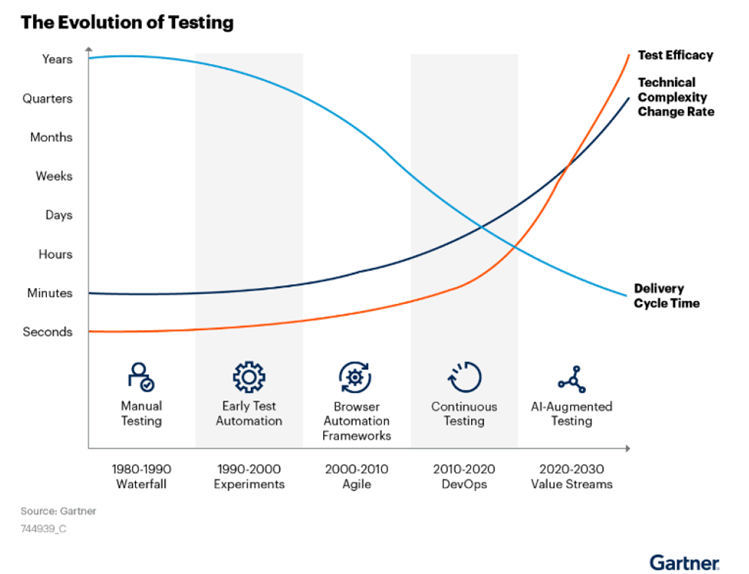
According to Gartner, AI-augmented testing delivers significant advantages like test efficacy, technical complexity, and delivery cycle times. AI’s utility to create comprehensive test cases and avoid duplication of efforts is one such use case.
Today, AI-enabled features are quite in vogue for use cases, right from automated website testing to visual tests. AI augmentation overcomes automated testing challenges like flakiness, brittleness, and fragmentation. This is of great assistance to ensure optimal tests and Website functionality across its development lifecycle.
A case in point is Qyrus Healer, which uses self-healing code to mitigate common automation issues like test failures. Healer relies on AI to reduce the effort spent on refactoring and script maintenance. As a result, tests can recover in microseconds with an accuracy of over 99.9%.
Generative AI has also made inroads into website automated testing. For example, Qyrus TestPilot is the world’s first ChatGPT plugin to automate Web app testing. This enables testers to generate tests using natural language queries. It can also identify Web app functionality based on just the domain URL.
QyrusTestPilot seamlessly creates and executes complex test scenarios without manual intervention. It leverages generative AI for the identification of complex bugs that might be missed by manual test-building methods.
Trend #2
Comprehensive testing takes center stage End-to-end Web, Mobile, and API testing capabilities are here to stay. Since comprehensive testing platforms span the entire software lifecycle, it eliminates the need for complex testing frameworks and cost-heavy infrastructure.
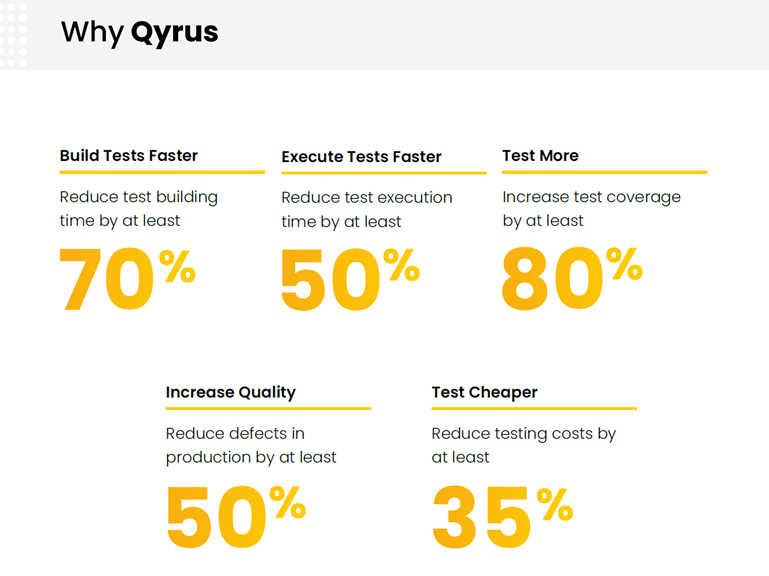
A comprehensive test platform replaces multiple-point solutions, delivering significant benefits in management, scalability, and test coverage. For instance, the latest automated website testing platforms like Qyrus can enhance test coverage by at least 80%. Multiple benefits accompany these, as illustrated in Figure: Why Qyrus.
Next-gen testing platforms include comprehensive Website automated testing and test data management tools. Real-time insights that include test reports, analytics, and dashboards ensure maximum efficiency.
Comprehensive Web application testing tools also include features like data parameterization and global variables. These capabilities ensure optimal test building and coverage.
Trend #3
Codeless approaches amp up test automation The low-code and no-code revolution has taken the developer community by storm over the last couple of years. Industry estimates indicate that this market will grow at a compounded annual rate of 28%, with a worth of $45.5 billion by 2027.
Software testing has also been a significant beneficiary of the low code, no code movement. Using low-code, no-code interfaces in Web application testing tools substantially reduce lead times and cost overheads associated with test automation.
For example, QA teams can quickly automate test cases using drag-and-drop interfaces or ready-made templates. These interventions mean that even less experienced users can rapidly scale test exercises.
Web application testing tools also leverage low-code, no-code capabilities for the automation of repetitive tasks like test case execution and data management. This frees up testers for higher-value assignments.
By nature of its definition, low-code or no-code software testing tools must offer easy-to-use yet customization-friendly UIs to be effective. Qyrus achieves this with a highly intuitive test-building approach.
With Qyrus, testers can leverage the platform’s predictive step-building approaches to build tests faster. The tester can just type a simple description of desired test step functionality and select from the presented Auto-suggest options. This is complemented by powerful Test Recorder features for easy creation and import of complex Web tests.
Trend #4
Smarter test data management possibilities Consolidating fragmented data sets like Excel sheets and databases is an eternal challenge in Web testing environments. The recent introduction of synthetic data further complicates test automation efforts.
Estimates indicate that synthetic generation will contribute 60% of the data required for AI and analytics project development by 2024. Reliance on multiple discrete data management tools impacts test speeds. The inclusion of intelligent test data management features in Web application testing tools addresses these issues.
Intelligent test data management mitigates challenges associated with distributed data siloes. Advanced website testing platforms enable testers to consolidate and manage test data from a single location. These solutions also include features to generate synthetic test data during runtime.
The Qyrus interface is a notable example of such intelligent test data management integration. With seamless data imports from databases or API calls, testers can ensure high test data speeds, Qyrus can also effortlessly generate synthetic data within the Test Data Management system at runtime. A suite of advanced test data management tools complements these capabilities.
Trend #5
Real-world Testing gets Device Farm to assist Gone are the days of self-owned test infrastructure like device farms. On this front, virtual devices also fail to fulfill the need for Website testing in real-world conditions.
The need to deliver outstanding user experiences calls for testing at scales that are not achievable in-house. This is where cloud-hosted device farm services like Qyrus Device Infrastructure ensure that testers get unfettered access to world-class testing infrastructure.
Device farm services enable automated or manual Website tests 24x7x365, irrespective of the tester’s location. Seamless provisioning features ensure instant availability to thousands of real devices, browsers, network types, and OS versions. Each device in Qyrus’ device farm includes granular configuration and provisioning options that ensure end-to-end test environment design.
Features like on-demand scalability and high availability levels are the best benefits of opting for cloud-based device farm services. Qyrus Device Infrastructure also leverages AI to deliver comprehensive testing capabilities and insights.
Class-leading security is another benefit of opting for hosted device farms. For instance, the ISO 27001 and SOC 2 compliant Qyrus test cloud assures absolute peace of mind for our customers.
Kumar Vivek
Development
Duis aute irure dolor in reprehenderit in voluptate velit esse cillum dolore eu fugiat nulla pariatur. Excepteur sint occaecat cupidatat non proident, sunt in culpa qui officia deserunt mollit anim.