10% Worldwide Code is Generated by TuringBots ~ As per 2023 Forrester Prediction* *A commissioned study conducted by Forrester Consulting on behalf of Quinnox Aug 23 (Add to the bottom of the page)
AI and Machine Learning in Fintech Testing Automation In the ever-evolving landscape of financial technology, or fintech, staying ahead of the curve is crucial for companies seeking to provide seamless and secure experiences for their users. One of the key drivers of this evolution is the integration of artificial intelligence (AI) and machine learning (ML) into testing automation processes. This paradigm shift not only enhances test coverage, accuracy, and efficiency but also propels fintech applications into a new era of reliability and innovation.
The Rise of TuringBots: Redefining Automation in Fintech TuringBots, inspired by the genius of Alan Turing, are taking center stage in the realm of automation. These intelligent bots, equipped with advanced machine learning algorithms, are designed to mimic human-like cognitive functions. When integrated into Fintech platforms, TuringBots excel in tasks that require reasoning, problem-solving, and decision-making. Their ability to adapt and learn from data makes them indispensable in streamlining complex financial processes.
In the context of AI and ML in Test Automation, TuringBots prove to be a game-changer. Traditionally, testing financial software required extensive manual efforts, consuming time and resources. However, with TuringBots, the testing process becomes agile and efficient. These bots can simulate user interactions, identify vulnerabilities, and ensure the robustness of Fintech applications. As a result, Fintech companies can accelerate their software development life cycle, bringing innovations to market faster and with increased confidence.
Fintech Trends: A Glimpse into the Future The Fintech landscape is undergoing a seismic shift, driven by technological advancements. Among the prominent trends shaping the industry, the integration of AI and ML in Test Automation stands out. Fintech companies are leveraging these technologies to enhance the reliability and security of their platforms. The ability of TuringBots to conduct comprehensive testing ensures that financial applications meet stringent regulatory standards and deliver a seamless user experience.
Another noteworthy trend is the increasing adoption of AI in Fintech for risk management. Machine learning algorithms analyze vast datasets to identify patterns and anomalies, enabling real-time risk assessment. This proactive approach to risk mitigation enhances the stability of financial systems and safeguards against potential threats.
Furthermore, AI and ML are fueling innovations in customer service within the Fintech sector. Chatbots, a specific application of AI, are becoming ubiquitous in providing instant and personalized assistance to users. These conversational interfaces enhance user engagement, simplify issue resolution, and contribute to an overall positive customer experience.
AI in Fintech: Transforming Operations and Customer Experiences
The infusion of AI in Fintech goes beyond test automation; it extends to every facet of financial operations. From customer onboarding to fraud detection, AI algorithms are optimizing processes and mitigating risks. In customer onboarding, AI-powered systems streamline the verification process, reducing the time required to establish new accounts. This not only enhances user satisfaction but also contributes to operational efficiency.
Fraud detection, a critical concern in the financial industry, benefits immensely from AI’s predictive capabilities. Machine learning models analyze transaction patterns and identify anomalies indicative of fraudulent activities. The proactive nature of AI in fraud detection minimizes losses and fortifies the security infrastructure of Fintech platforms.
Moreover, AI-driven personalization is reshaping customer experiences in Fintech. By analyzing user behavior and preferences, AI algorithms tailor recommendations and services to individual needs. This level of customization not only improves customer satisfaction but also fosters loyalty in an increasingly competitive market.
The Role of AI and ML in Test Automation: Ensuring Robust Fintech Solutions
As Fintech companies integrate AI and ML into their operations, the need for robust testing becomes paramount. Here, the synergy between AI and ML in Test Automation, powered by TuringBots, plays a pivotal role. These intelligent bots meticulously test applications, identifying vulnerabilities and ensuring that security measures are foolproof.
The iterative nature of machine learning enables TuringBots to continuously evolve their testing methodologies. They learn from each testing cycle, adapting to new features and functionalities. This dynamic approach ensures that Fintech applications remain resilient in the face of evolving cyber threats and regulatory changes.
Qyrus AIVerse: Designed with Users in Mind, Enhanced with AI
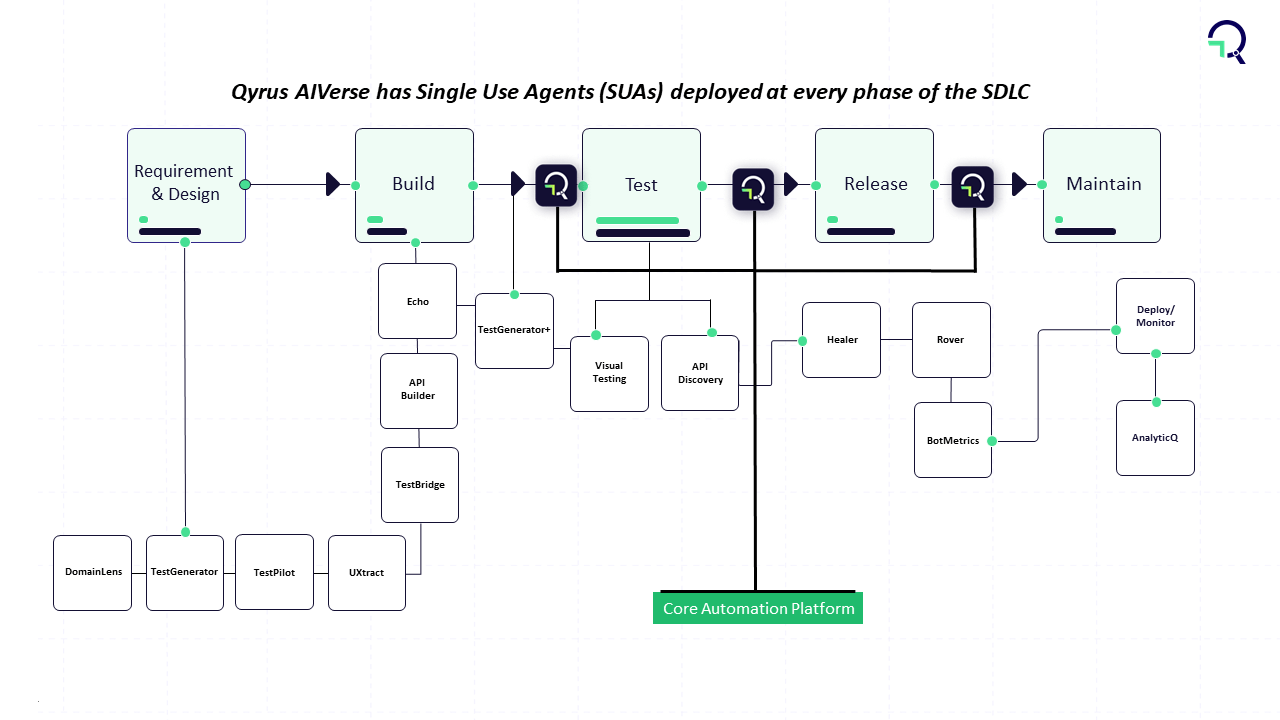
Qyrus AIVerse or TuringBots or Single Use Agents (SUAs) serve distinct purposes such as generating scenarios or tests, data amplification, domain understanding etc. By deploying an amalgamation of these SUAs, one can achieve ‘objecting-based testing’.
So, what all can a QyrusBot do?
Well, it can read Jira stories and tickets to create test automation scenarios, it can create realistic and diverse test data, analyze requirements and build APIs for testing, learn from past tests and suggest new test cases, analyze logs and other data sources to identify potential risks, and the list goes on.
Conclusion: Navigating the Future with AI/ML and TuringBots
In conclusion, the fusion of AI, ML, and TuringBots is reshaping the landscape of Fintech. The transformative power of these technologies is evident not only in test automation but also in revolutionizing how financial services are delivered and experienced. Fintech trends underscore the industry’s trajectory towards a more secure, efficient, and customer-centric future.
As we move forward, Fintech companies that harness the potential of AI in their operations will stand at the forefront of innovation. The integration of TuringBots and AI/ML in Test Automation will be the cornerstone of this evolution, ensuring that Fintech solutions are not only cutting-edge but also resilient in the face of an ever-changing financial landscape. The future of Fintech is undeniably intertwined with the capabilities of AI, ML, and TuringBots, heralding a new era of possibilities and opportunities.
Dive into the world of testing complexities with Qyrus’ focus on testing the happy path/unhappy path. Parth and Steve are here to unravel the intricacies of testing positive and negative scenarios, exploring the advantages and multifaceted benefits this approach offers. Discover how Qyrus revolutionizes testing methodologies, providing a platform that empowers testers, developers, and business technologists alike.
Tell us more about testing the happy path/unhappy path on Qyrus.
Parth: Happy path testing involves verifying that the positive test cases of your application are functioning properly. It’s about ensuring that your application performs as expected under normal, favorable conditions. On the other hand, unhappy path testing focuses on assessing how well error handling is implemented in your application during negative test cases. The overall purpose is to comprehensively test all coverage aspects of your application.
Steve: Exactly. In general, all use cases fall into either negative or positive categories. During testing, the objective is to confirm that every aspect of the application, whether positive or negative, is working as expected. It’s a comprehensive approach aimed at validating the functionality and robustness of the application across various scenarios. Top of Form
What are some advantages of testing the happy path/unhappy path?
Parth: The advantage of happy path testing lies in its ability to validate that the core functionalities of the system work correctly under normal conditions. It serves as a baseline for assessing the overall performance and usability of the system, contributing to building confidence in its ability to meet user expectations during typical use.
Steve: Conversely, the advantage of unhappy path testing is multifaceted. It goes beyond typical functionality testing and extends to security. By deliberately testing how the system handles invalid or malicious inputs, unhappy path testing exposes potential security vulnerabilities. It also plays a crucial role in identifying error-handling mechanisms, and ensuring users receive informative and appropriate error messages. Furthermore, it helps uncover and address issues related to data validation, boundary conditions, and exception handling. Essentially, it’s a comprehensive approach to fortifying the system against a range of potential issues.
How might testing happy path/unhappy path help testers, developers, and business technologists? What value can this feature bring?
Parth: Testers leverage testing happy path/unhappy path by creating Qyrus scripts that encompass both positive and negative scenarios. This ensures a thorough examination of the application’s functionality and its ability to handle errors correctly. For developers, these tests serve as a valuable feedback loop, guiding them to make necessary fixes based on identified scenarios. It’s particularly beneficial for enhancing error handling in case negative scenarios fail.
Steve: The value extends to business technologists as well. Testing happy path/unhappy path provides comprehensive test coverage, empowering business technologists to make informed decisions about their applications. This testing methodology enables them to understand how the application behaves under various conditions. Additionally, business technologists can use the insights gained to make recommendations for changes that can enhance the application’s user-friendliness, contributing to a more robust and user-centric product.
How do you see testing happy path/unhappy path on Qyrus impacting day-to-day operations across organizations?
Parth: The impact of testing happy and unhappy paths on Qyrus is substantial for day-to-day operations. The platform enables parallel testing, allowing users to simultaneously test multiple happy and unhappy scenarios. This approach ensures a comprehensive understanding of all aspects of their application, contributing to a more efficient testing process.
Steve: Testing on Qyrus provides insights into the changes needed to make the application more user-friendly and helps the team understand how the application handles errors. Qyrus facilitates efficiency by allowing users to clone and reuse scripts and suites. This means users can modify test data to test both positive and negative scenarios without starting from scratch, streamlining day-to-day testing operations across the organization.
In conclusion, the exploration of happy and unhappy path testing on Qyrus, guided by the insights of Parth and Steve, reveals a holistic approach to testing. From boosting confidence in positive scenarios to fortifying security and error handling, Qyrus emerges as a transformative force in the testing landscape. Stay tuned for more innovations that continue to elevate testing standards across organizations!
What’s brewing at Qyrus? This Feature Friday spotlights the latest changes in mobility testing, specifically in email reporting. Join Milton and Kiwaun as they walk us through the intricacies of these updates. It’s not just about reporting; it’s about making the post-testing process smoother and more user-friendly through report-testing automation. Let’s explore how Qyrus continues to shape the landscape of testing automation with these innovative features.
Tell us more about the email reporting changes that came to mobility.
Milton: Certainly. The recent changes in email reporting bring a more detailed summary of test results right to the user’s inbox. It’s about providing a quick and comprehensive overview without the need to dive into the full report right away.
Kiwaun: These changes cater to users who prefer having basic testing information and reports readily available in their email, offering a convenient way to stay informed without the necessity of downloading and going through the entire report. It’s all about efficiency and accessibility in the reporting process.
What is the overall impact on the testing process these updates might have?
Milton: The impact of these updates is primarily focused on the test reporting aspect of the testing process. It’s about refining and enhancing how users receive and interact with the results of their tests.
Kiwaun: The overarching goal of these updates is to streamline the testing process by reducing overall effort. By delivering the reporting details directly in email format, we aim to make the testing experience more efficient and user-friendly. It’s all about simplifying the post-testing procedures for our users through report testing automation.
How might this help testers, developers, and business technologists?
Kiwaun: Certainly, these updates bring value to testers, developers, and business technologists alike. They allow users to quickly assess the performance of their test suite without the need to open a full report. Report testing automation gives the user the ability to share this information in email format, making collaboration easier among colleagues.
Milton: Importantly, developers and business technologists can seamlessly receive these reports from their testing counterparts, eliminating the need for direct access to Qyrus or the requirement to navigate to a specific report. It’s a practical way to foster collaboration across all teams involved in the testing process.
Does the same or similar functionality exist without Qyrus, and how do competitors address similar problems?
Kiwaun: Competitors do offer features for sharing reports among users and team members. However, it’s worth noting that our reports stand out for their detailed information and superior reporting quality compared to competitors. We’ve prioritized delivering comprehensive and insightful reporting capabilities through our innovative report testing automation.
Milton: Without Qyrus, users and testers would find themselves manually collecting test reporting and execution information to compile into an email for sharing with colleagues. This process can be disorganized and prone to causing confusion and conflicts within teams. Qyrus, on the other hand, streamlines this entire process by means of report testing automation, providing a structured and efficient way to handle test reporting and communication among team members.
How do you see this feature and its updates impacting day-to-day operations across organizations?
Milton: The impact of report testing automation and its updates on day-to-day operations is quite straightforward. It makes operations easier for testers and colleagues alike by eliminating the need to manually navigate and view reports on the Qyrus platform. This enables a quick and direct assessment of test execution results, indicating whether a test passed or failed, along with pertinent details on any failures. It’s essentially about simplifying the workflow for a more efficient day-to-day testing process.
In summary, this Feature Friday delved into the recent enhancements in email reporting for mobility testing, shedding light on the transformative effects on the testing process. Milton and Kiwaun underscored the significance of these updates, particularly in improving efficiency and accessibility. By enabling users to receive comprehensive usability testing reports directly in their emails, Qyrus is championing a new era in report testing automation. This not only facilitates smoother collaboration but also elevates day-to-day testing operations to a more streamlined and effective level. Keep an eye out for further insights and innovations as Qyrus continues to lead the charge in testing automation.
Hello testing aficionados! This Feature Friday, we’re unraveling the mysteries of Qyrus’ action types – “Set,” “Send Text,” and “Press Keys.” What are these actions, and how can they revolutionize your keyboard input tests? Steve and Parth have the answers. Dive into the details of the “Sendkeys” command, learn how to automate key presses effortlessly, and explore the impact these action types have on the future of test automation. Stay tuned for a journey into the core features shaping the software quality assurance trends.
Tell us more about the difference between the type of actions “Set,” “Send Text,” and “Press Keys” offered by Qyrus and its use cases.
Steve: So, the distinction between these actions is quite specific. With the type of action “Set,” the process involves finding the input field using a locator and then sending data to it. “Send Text,” on the other hand, requires a prior “Tap” action on an input field before the user can send data when the field is recognized as active. Lastly, “Press Keys” is about simulating keyboard key presses, like “Enter” or “Backspace.”
Parth: Building on that, in practical terms, both the type of action “Set” and the type of action “Send Text” are commonly used when users need to input data into specific fields. “Press Keys” finds its application in scenarios where, for example, a search bar lacks a dedicated search button. Users can input the ‘ENTER’ keyword into the data field, prompting the application to submit the search request.
What is the overall impact these action types have on the testing process?
Steve: Primarily, the impact is observed in the test-building process throughout the testing lifecycle. These action types play a crucial role in shaping how tests are constructed and executed.
Parth: The significant value lies in effort reduction. Instead of testers having to devise workarounds for various scenarios using a single action type, we’ve taken the initiative to think through those scenarios for users. The introduction of different action types addresses these diverse testing needs seamlessly, all without requiring any coding. It’s about providing a more efficient and user-friendly testing experience.
How might these action types help testers and developers? What value can this feature bring?
Parth: For testers, the value lies in the versatility of the type of action “Set” and the type of action “Send Text,” allowing interaction with any input field in the application seamlessly. Additionally, “Press Keys” provides the ability to simulate various keyboard actions, enhancing the range of scenarios that can be tested—all without the need for complex coding.
Steve: From a developer’s perspective, these action types provide valuable insights into the intricacies of how input fields function within their applications. It allows developers to test a wide array of scenarios, evaluating their application’s responsiveness to different inputs. With the type of action “Press Keys,” developers can specifically explore how their application handles keyboard interactions, gaining a more comprehensive understanding of their software’s behavior.
Does the same or similar functionality exist without Qyrus? Can testers do this on their own?
Parth: Well, without Qyrus, testers would find themselves in a more manual and resource-intensive scenario. They’d need to manually input data into the application’s fields and perform keyboard actions themselves. Given the variability in how different devices handle input fields, testers might even need to invest in multiple devices to comprehensively assess how the application responds to these inputs. Qyrus essentially streamlines and automates these processes, saving testers from the complexities of managing varied devices and manual interactions.
How do you see these action types impacting day-to-day operations across organizations?
Parth: These action types, particularly “Set” and “Send Text,” simplify testing. Qyrus provides testers with multiple options for sending data to the application, making the testing process more versatile and adaptable. Additionally, the inclusion of “Press Keys” makes executing keyboard actions straightforward.
Steve: Firstly, testing becomes faster as users can employ these three methods to send data in various ways, thoroughly testing all aspects of the application. And secondly, it makes testing smarter by allowing users to observe how the application handles data sent in multiple different ways. Overall, these action types contribute to a more efficient and insightful testing routine within organizations.
So, that’s a wrap for Feature Friday! Steve and Parth have unveiled the power of Qyrus’ action types – “Set,” “Send Text,” and “Press Keys.” From deciphering the nuances of these actions to showcasing how they enhance testing processes, this session was all about making testing more versatile. Stay tuned for more updates, as Qyrus continues to evolve and bring innovative features to the testing landscape.
Let’s delve into the latest enhancements in Qyrus’ mobility command line interface (CLI)! Brett and Joyal are here to guide us through the changes, emphasizing a more informative and user-friendly experience for executing and managing tests from the command line. Notable updates include improved feedback mechanisms and the introduction of a flexible first-available device feature. Let’s jump right in!
Tell us more about these new mobility CLI changes.
Brett: So, with these changes, we’ve focused on enhancing the feedback users receive when they trigger an execution. This is all about providing a more informative and user-friendly experience. Additionally, we’ve introduced the first available device feature for executions, offering users greater flexibility.
Joyal: Another notable improvement is the shift to reading CLI arguments from a configuration file instead of passing everything with the commands. This adjustment aims to streamline the process and make it more user-friendly.
What is the overall impact these new changes might have?
Brett: The impact of these changes is significant, touching both the test execution and test building aspects. As mentioned earlier, users now have the ability to import or update scripts directly from the CLI and execute them accordingly. It’s an improvement that enhances the efficiency of the entire testing process.
Joyal: These changes contribute to a reduction in effort. The streamlined processes, especially with the ability to import and update scripts from the CLI, make tasks more efficient and less resource-intensive. It’s a positive shift towards optimizing efforts in testing workflows.
How might this feature help testers, developers, and business technologists? What value can this feature bring?
Brett: For testers, this feature opens up the ability to create and update scripts directly from the CLI. The improved feedback mechanism provides them with a clearer understanding of the execution state, and the introduction of the first available device feature adds a layer of flexibility by eliminating the need to wait for a specific device.
Joyal: From a developer’s perspective, this feature facilitates the building and updating of scripts, aligning seamlessly with the iterative nature of developing or changing apps. For business technologists, the utility might be a bit constrained unless they possess in-depth technical knowledge. Nevertheless, the collaborative aspect between developers and testers is enhanced, contributing to smoother app development and testing processes.
Does the same or similar functionality exist without Qyrus, and how do competitors address similar problems?
Joyal: Well, without Qyrus, users essentially have to take the DIY route and build the CLI app themselves to match all the functionalities Qyrus offers. However, this involves a significant investment of time and requires a certain level of technical knowledge. It’s not as straightforward as having a ready-made solution like Qyrus.
How do you see this feature impacting day-to-day operations across organizations?
Brett: Users now have enhanced knowledge about the state of an execution, enabling them to troubleshoot and fix configurations more effectively. The ability to create and modify scripts and initiate executions directly through the CLI without relying on the Qyrus UI streamlines workflows and enhances efficiency.
Joyal: In terms of day-to-day operations, these updates introduce a significant speed boost when working with Qyrus. If you find yourself triggering executions with the same configurations consistently, you can simply run the same command, eliminating the need to manually select configurations through the UI or specify command arguments each time. Additionally, the introduction of the first available device feature further expedites the process by automatically selecting the first available device for execution, whether from a list of dedicated devices or a device pool. It’s all about making the workflow faster and more efficient.
In conclusion, the latest mobility CLI changes from Qyrus, explained by Brett and Joyal, mark a significant step forward in test execution and script management. By streamlining processes, enhancing feedback, and introducing a flexible device feature, these changes contribute to a more efficient and optimized testing workflow. Keep an eye on Qyrus as it continues to redefine the CLI experience for testers and developers.
Hey testing enthusiasts! Welcome to Feature Friday, where we’re diving into the nitty-gritty of Qyrus’ latest marvel, the Bitbucket integration. Join Milton and Kiwaun as they unpack the simplicity of pulling and pushing Qyrus scripts into Bitbucket. It’s not just about version control; it’s a whole new way that testers handle scripts. Stick around to explore its impact, and the value it brings, and get a sneak peek into the future updates that promise to elevate your testing game.
Tell us more about Qyrus’ Bitbucket integration.
Milton: Certainly, Qyrus’ Bitbucket integration allows users to seamlessly pull and push Qyrus scripts to Bitbucket. It essentially functions as a form of version control.
Kiwaun: Indeed, with this version control feature, users have the capability to store various versions of a particular script in Bitbucket. They can easily push or pull the script as required. Notably, users can push a Qyrus-compatible script to Bitbucket and subsequently pull it directly from the Qyrus UI.
What is the overall impact Bitbucket integration has on the testing process?
Milton: The Bitbucket integration has a meaningful impact on the testing process, influencing both test building and management. The convenience of integrating with Qyrus has streamlined various aspects.
Kiwaun: The integration of Qyrus with Bitbucket brings about a noticeable reduction in the effort testers need to invest in script management. Beyond that, it plays a role in enhancing overall test coverage, contributing positively to the testing process.
How might Qyrus’ integration with Bitbucket help testers, developers, and business technologists? What value can this feature bring?
Kiwaun: Well, this integration is particularly geared towards testers. It allows testers to seamlessly pull a default test script into Qyrus, depending on the testing scenario. Once imported, they can conveniently edit the script within Qyrus.
Milton: If needed, testers have the flexibility to roll back changes by pulling the previous version from Bitbucket. Additionally, users can also make edits to an uploaded script directly from Bitbucket. It essentially streamlines the testing workflow for testers.
Does the same or similar functionality exist without Qyrus?
Milton: One could potentially achieve a similar functionality without Qyrus by building their own testing framework from scratch and integrating it with Bitbucket. However, it’s worth noting that such an approach demands a certain level of coding knowledge and expertise.
How do you see this integration impacting day-to-day operations?
Milton The Bitbucket integration really streamlines day-to-day operations for testers. With management being integrated into Qyrus, testers can easily push and pull scripts to and from their Bitbucket repositories. This is particularly handy as it allows users to pull default scripts from scenarios they’ve encountered before, enhancing efficiency in their daily tasks.
Kiwaun Beyond just ease of management, this integration promotes reusability, which is a significant factor in day-to-day operations. Users can maintain different versions of the same script on Bitbucket, and this flexibility allows them to pull or push these scripts whenever needed. For instance, if a user needs to test different versions of their app, they can effortlessly pull version-specific scripts from Bitbucket, adding a layer of adaptability to their daily testing routines.
Qyrus is constantly improving its features and pushing out updates. What might users expect in terms of updates to this integration in the future?
Kiwaun: Well, currently, users are limited to pushing and pulling one script at a time. Looking ahead, our next goal is to introduce the capability for bulk push and pull of files. Essentially, users can anticipate the ability to push or pull an entire test suite in one go, providing a more efficient and comprehensive approach to managing their scripts.
And that’s a wrap on Feature Friday! Qyrus’ Bitbucket integration isn’t just a feature; it’s a testing game-changer. Milton and Kiwaun showcased how it simplifies script management, amps up test coverage, and adds a layer of adaptability to your daily grind. Stay tuned for what’s next – Qyrus is on the move, and Feature Fridays are the place to be for the latest in testing innovation!
Greetings, testing enthusiasts! In this special edition of Feature Friday, 2023 Wrap-Up, we’re diving into Qyrus’s latest testing features that are set to redefine the future of test automation. Join Tim and Adhiraj as they unravel core testing features of Qyrus rolled out throughout the 2023 year, showcasing the integration with GitHub, TestRail, XRay, Teams/Slack, CLI Commands, and introducing AI-enhanced tools like Rover, Qyrus Bot, Qyrus-GPT Plugin, API Discovery Tool, and NOVA. We’ll explore how these innovations align with the latest software quality assurance trends, bringing you the cutting-edge in test automation.
New Integrations
Github GitHub Integration on Qyrus is one of the testing features that aims at seamlessly merging version control into Qyrus Mobility. It’s targeted towards users well-acquainted with GitHub, allowing them to push and pull scripts effortlessly, enhancing control and organization. Read more about this integration here.
TestRail TestRail is a test case management software that can now get data from Qyrus test reports. Once a Qyrus test report is finished, it is created or updated in the TestRail test case. This integration is a game-changer for TestRail users. Read more about this integration here.
XRay The Xray integration is an out-of-the-box integration that provides a link between your Xray issues and your Qyrus test scripts. Upon execution of these test scripts, the results are then populated straight to Xray to view execution results and updates from a single platform. Read more about this integration here.
Teams / Slack Email notifications are already a thing on Qyrus, but we all know how bloated our inboxes can get. Getting notifications to your Slack or Teams channels is much more convenient as a whole. That way, entire teams or multiple stakeholders can be notified instantly about test results. And lastly, if someone has those messaging apps on their mobile devices, they’ll also get these notifications on the fly. Read more about this integration here.
CLI Commands CLI commands allow users to interact with, inspect, or execute automated test scripts without visiting the Qyrus UI. With a range of pipeline integrations out of the box and webhooks for required custom integration, these packages allow a range of functionality without ever leaving the pipeline enabling Qyrus to execute in the background. Our CLI commands package is constantly being updated to add more functionality. Qyrus now has the capability to trigger executions across API tests without having to access the UI. Read more about our CLI commands here and check out our recent updates.
New AI-Enhanced Tools and Features
Rover Rover AI is another one of our innovative ideas for automation testing that’s come to life. It is a tool that explores your mobile application and provides an activity map at the end of all possible user journeys that can take place on the application. Given that activity map, users can then build tests off of it. Simply clicking each node on the map – or each screen – the user can build out a test script for their mobile applications at lightning speeds. Read more about Rover AI, one of our incredible testing features, here.
Qyrus Bot Qyrus Bot is an advanced chatbot that simplifies the entire testing process by offering a range of testing features that help users create, run, schedule, and manage tests with ease. With Qyrus Bot, users can create tests using natural language, without the need for technical expertise. Read more about how Qyrus Bot works here.
Qyrus-GPT Plugin Qyrus has made its first ChatGPT plugin that works for testing. The plugin can build, create, and execute test scenarios by simply providing a URL to your web application. It helps the user to quickly build tests by analyzing the web application’s structure and behavior. It then can do things like suggest new scenarios for the user to build upon. Then, it can run all of those with the Qyrus test engine. Read more about Qyrus’ GPT plugin here.
API Discovery Tool The API Discovery Recorder is a generative, AI-powered extension that tracks APIs that can be critical to the functionality of your web application. It helps the user quickly build API tests and generate assertions by simply browsing the web application locally on your machine. Read more about how the API Discovery Tool works here.
Nova NOVA stands at the forefront of test automation innovation. A few of its capabilities are reading JIRA tickets, JIRA integration, and analyzing the requirements mentioned in the ticket. It can then automatically generate functional test scenarios from what it has analyzed. This helps to ensure that the delivered functionality of the application matches expectations and requirements. Oh, and if you don’t know how to write functional test scenarios, NOVA is there to lend a helping hand! Read more about our AI-powered NOVA tool here.
Overall Improvements to the Platform
Web / Mobility API Calling Well, for starters, the idea behind this is to enable testers to build out more complex and comprehensive test scripts to help increase test coverage. Basically, a user is able to configure an API call to be made during the test script execution and then use that response data in the next part of the test. Read more about how this works here.
Step Functions A user can reuse existing steps from a previous test script in a new test script. They don’t need to recreate the same steps in their script and can directly use what they already created. It allows users to maintain the test scripts easily. If a user makes an edit in one location, all locations using these steps will be updated. Especially for big test scripts, maintenance times can be exponentially reduced with this as one of Qyrus’ many testing features. Learn more about step functions here.
Salesforce Web Recorder Updates Qyrus’ Salesforce Web Recorder in Web Testing has received exciting updates that we’re thrilled to share with you. These enhancements allow users to efficiently record and automate test scenarios within the Salesforce platform with more ease. Recording test scenarios becomes a breeze, eliminating the need for manual and error-prone processes. We’ll discuss how these updates benefit testers, developers, and organizations as a whole. Read more about how our web recorder handles Salesforce testing here.
Quick Imports The quick imports feature enables users to fill out an Excel or JSON file, and as long as it is in the proper format the files can be imported into Qyrus and automatically built into executable test scripts. This feature truly simplifies test building and gives users another, streamlined test-building option. Whether it is making test building accessible to personas across the QA cycle or allowing targeted testers to build, save, or maintain scripts while offline or in transit, using a local environment, or having a strong familiarity with JSON or Excel. Read more on this topic here!
Updates to Test Building on Mobility There has been a range of additions to mobile test building that make the process even simpler and more efficient. As you know, Qyrus is built on action types and therefore new ones are constantly being added to ensure steadfast and efficient testing. One of the most recently impactful is tap by Relative Coordinates. This testing feature assists in tapping on elements that cannot be located by normal means. There is a range of reasons elements can be difficult to locate and when the desired elements cannot be found with inspect mode, tapping by Relative Coordinates fixes these problems by taking a user-defined percentage of the element to locate it on the screen. In essence, this allows users to use any unique part of the element to locate it. Read more on how Qyrus has updated its test building on Mobility here!
Updates to API Process Test Building The new way to build API Process tests is out! It offers a new perspective on chaining or stitching together the APIs to make the process test itself. Previously, we would chain the APIs together and go to a new screen to configure the connections, but now it’s all seamlessly built together on the same page. Read more about how Qyrus has updated its test building on API Process testing here!
And there you have it, the grand finale of the 2023 Feature Friday year! Qyrus has not just introduced testing features; it’s unleashed a testing revolution. From seamless integrations to AI-powered tools, Qyrus is setting the stage for the future of test automation. These innovations aren’t just about today; they’re about staying ahead of software quality assurance trends. Get ready to elevate your testing game with Qyrus!
Hey, tech wizards, it’s Feature Friday, and we’re about to uncover the automation innovation behind Qyrus’ TestGenerator, the magical AI tool from Qyrus. Tim and Adhiraj are our guides through the realm of TestGenerator and its dense mysteries. It’s not just a tool; it’s a testing symphony, orchestrating collaboration between testers, developers, and business technologists. Qyrus is constantly coming up with innovative ideas for automation testing! Get ready to witness how TestGenerator transforms your testing landscape!
Tell us more about the AI tool TestGenerator offered by Qyrus.
Tim: TestGenerator stands at the forefront of test automation innovation. For example, one of its abilities is to read JIRA tickets and analyze the requirements mentioned in the ticket. It can then automatically generate functional test scenarios from what it has analyzed. This helps to ensure that the delivered functionality of the application matches expectations and requirements.
Adhiraj: Some of its key capabilities include integration with popular test management tools, including JIRA integration, intelligent analysis, automated test scenario creation, and introducing a consistent testing approach. In terms of what TestGenerator’s potential use cases may be, they can range from enabling and assisting with continuous testing, regression testing, and enhancing agile development, all the way to promoting collaborative development. Teams can work in parallel. When developers update JIRA tickets, testers can receive automatically generated test scenarios.
Tim: And, if you don’t know how to write functional test scenarios, TestGenerator is there to lend a helping hand!
What is TestGenerator’s overall impact on the testing process?
Tim: The automation innovation of TestGenerator has a great impact on the test scenario creation and generation aspects. No longer do testers have to come up with test scenarios themselves and parse through JIRA tickets to understand requirements and expectations. Now, all they need to do is enter their JIRA ticket number, for example, and scenarios will be automatically generated and able to be imported onto the Qyrus platform.
How might this tool help testers, developers, and business technologists?
Adhiraj: Testers and developers can work better together through utilizing TestGenerator. Things just move faster in general and help these separate teams collaborate in a more effective manner. Although this is basically a tool for testers, it makes everyone’s lives easier in the process, a true testament to automation innovation.
Tim: Business technologists will find it easier for them to also create test scenarios of their own. Furthermore, they could utilize a tool like TestGenerator to understand the requirements and have the tool analyze these tickets themselves. This definitely makes things run more smoothly for them, as well.
How do you see TestGenerator impacting day-to-day operations across organizations?
Adhiraj: Instead of testers being bogged down by having to analyze and write test scenarios from dozens of JIRA tickets, they can utilize TestGenerator to get the job done faster. Less time would be wasted on doing these tasks in general. Testing is being accelerated from stage 0 with TestGenerator, truly an example of automation innovation.
Why should someone use TestGenerator?
Tim: Well, first and foremost, for the efficiency. Testers can eliminate the manual effort of understanding requirements and writing test scenarios all from scratch. Embracing the automation innovation of TestGenerator will guarantee accuracy in their testing. TestGenerator helps reduce the chances of missing critical functionality and ensures every requirement is converted into a test scenario.
Adhiraj: Furthermore, whether you just have a handful of JIRA tickets for a sprint or you have hundreds of tickets for a sprint, TestGenerator can scale to your needs, all driven by AI. Collaboration is also key. It will help streamline the development-to-testing pipeline and promote better communication between teams.
As the curtains fall on this Feature Friday, it’s time to marvel at the automation innovation we call TestGenerator. This AI marvel is not just reshaping how we understand requirements; it’s reshaping the entire testing landscape. Testers, developers, and business technologists, you now have a tool that scales to your needs, enhances collaboration, and ensures every requirement is a test scenario. TestGenerator isn’t just a tool; it’s the hero in your testing saga!
Imagine organizing a colossal library with various authors continuously adding, modifying, and refining their books. Suppose there’s a system that not only systematically organizes all books but also immediately updates any changes made by authors, ensuring every reader always has access to the latest version without waiting or seeking updates. This is a real-world parallel to what GitHub integration on Qyrus aims to achieve in the digital realm of script and code management. Dive into today’s Feature Friday with Kiwaun Wallace and Daniel Moctezuma as they unfold this seamless integration’s functionalities, impact, and benefits in Qyrus Mobility Testing. The anticipation bubbles as Kiwaun Wallace and Daniel Moctezuma share their insights into the integration, its uses, and its impacts.
Tell us more about GitHub Integration offered by Qyrus and its use cases.
Kiwaun: GitHub Integration on Qyrus aims at seamlessly merging version control into Qyrus Mobility. It’s targeted towards users well-acquainted with GitHub, allowing them to push and pull scripts effortlessly, enhancing control and organization.
Daniel: Absolutely, Kiwaun. It also empowers developers to manage their test scripts and codebase in a unified location, ensuring a more organized and streamlined operational workflow.
What is GitHub Integration’s overall impact on the testing process?
Kiwaun: The integration significantly streamlines the testing process. The ability to maintain scripts and code in the same place ensures efficiency and consistency, leading to more reliable testing outcomes.
Daniel: Yes, and beyond that, it reduces the complexity and time spent in managing separate platforms, allowing teams to focus more on testing quality.
How might GitHub Integration help testers, developers, and business technologists? What value can this feature bring?
Kiwaun: Testers and developers can ensure more synchronized and error-free script management. The integration simplifies the version control process, leading to enhanced productivity and reduced errors.
Daniel: For business technologists, it brings the value of seamless integration, enhancing overall operational efficiency, and ensuring streamlined project management.
Does the same or similar functionality exist without Qyrus, and how do competitors address similar problems?
Kiwaun: While basic version control exists, the seamless integration offered by Qyrus is a cut above. Competitors often require additional platforms or tools, which may lead to increased complexity and reduced efficiency.
Daniel: Exactly, Kiwaun. The intuitive and user-friendly interface of Qyrus GitHub Integration stands out, ensuring a smoother experience compared to other alternatives in the market.
How do you see GitHub Integration impacting day-to-day operations across organizations?
Kiwaun: GitHub Integration on Qyrus will be a game-changer for daily operations. Organizations can expect more streamlined, organized, and efficient operations with reduced chances of error and increased productivity.
Daniel: I concur, Kiwaun. The integration will diminish the hassle and time spent on version control, allowing teams to allocate more time to other crucial aspects, thereby enhancing overall organizational efficiency.
In conclusion, GitHub Integration on Qyrus stands as a beacon of efficiency and streamlined operations, promising to significantly enhance version control, operational workflow, and overall organizational productivity. As Kiwaun Wallace and Daniel Moctezuma highlighted, the integration not only simplifies the process but also ensures a unified platform for script and code management, underscoring the commitment of Qyrus to delivering top-notch, innovative solutions to its users. Stay tuned for more insights on next week’s Feature Friday!
Picture a rehearsal before the grand premiere of a play. Just as actors run through their lines, honing their timing and ensuring their movements and dialogues sync perfectly before the final performance, the Live Test in Mobility feature offered by Qyrus performs similarly in mobile app testing. It ensures that every script and function is tested in real-time, refined, and perfected for the final show – the live application deployment. Join us as our experts, Amairani Lopez and Ananya Bhargava, draw back the curtains to reveal the impact and utility of this feature in the world of mobile app testing.
Tell us more about Live Test in Mobility offered by Qyrus and its use cases.
Amairani: Live Test in Mobility is a real-time testing boon for testers and developers. Running scripts on a device as they are built is a game-changer. This immediate feedback allows for instant adjustments, ensuring scripts are robust and reliable, significantly easing the script-building process.
Ananya: Exactly, Amairani! This feature accelerates the script testing phase, providing instant insights into script performance and allowing immediate rectifications, ensuring optimal functionality and performance.
What is Live Test in Mobility’s overall impact on the testing process?
Amairani: The Live Test feature positively revolutionizes the mobile app testing process. It enhances test building and execution, broadens test coverage, and offers substantial cost and effort reductions, all while ensuring the utmost quality and reliability.
Ananya: Absolutely! It significantly trims the time and resources traditionally required, ensuring a more efficient and streamlined mobile app testing process—a practical solution for modern, agile development environments.
How might Live Test in Mobility help testers, developers, and business technologists? What value can this feature bring?
Amairani: For testers, it’s about real-time validation of their scripts. Developers gain by swiftly checking feature implementations, aiding in early bug detection. The simplicity of Live Test in Mobility allows business technologists to showcase live, real-time script execution, enhancing demonstrations and presentations.
Ananya: The comprehensive utility it brings to various roles is invaluable. It bridges gaps, enhancing coordination and understanding among different teams ensuring seamless and efficient operations while performing mobile app testing.
Does the same or similar functionality exist without Qyrus, and how do competitors address similar problems?
Amairani: Most competitors do not offer live previews on real devices. The alternatives involve running tests manually or through a remote device, often leading to delayed reports and insights. Selecting and running specific steps in real-time with Qyrus is a distinctive advantage.
Ananya: I agree. Traditional methods like Sauce Labs or external programs like Appium often lack the real-time feedback and ease that Qyrus’ Live Test provides, ensuring Qyrus stands out in addressing these critical, real-time testing needs.
How do you see Live Test in Mobility impacting day-to-day operations across organizations?
Amairani: It’s about efficiency and intelligent work. Teams can validate each script step as they go, allowing immediate corrections and adjustments. This immediate feedback loop saves time and effort, contributing to smoother, more efficient operational flows in mobile app testing.
Ananya: Yes, the ripple effects on daily operations are significant. It instills confidence in teams, knowing they can rely on real-time insights to ensure their mobile applications’ consistent performance and reliability.
In summation, just like a meticulous dress rehearsal contributes to the smooth execution of a play, the Live Test in Mobility by Qyrus guarantees the efficient and effective functioning of your mobile applications. It is a feature that transcends traditional mobile app testing methods, bringing in real-time, on-device script testing, ensuring each step is verified for perfection before the final rollout. With insights from Amairani Lopez and Ananya Bhargava, it’s clear that this tool is not just a luxury but a necessity, aiming to iron out the kinks, enhance the script building, and ensure a standing ovation after the app’s launch. The seamless, error-free performance it promises highlights its paramount importance in mobile testing. The ease of use and the time-efficient process make it a game-changer, reaffirming the commitment to delivering nothing but excellence.
Kumar Vivek
Development
Duis aute irure dolor in reprehenderit in voluptate velit esse cillum dolore eu fugiat nulla pariatur. Excepteur sint occaecat cupidatat non proident, sunt in culpa qui officia deserunt mollit anim.